ignition AUDI Q5 2018 Manual PDF
[x] Cancel search | Manufacturer: AUDI, Model Year: 2018, Model line: Q5, Model: AUDI Q5 2018Pages: 392, PDF Size: 60.56 MB
Page 324 of 392
Checking and Filling
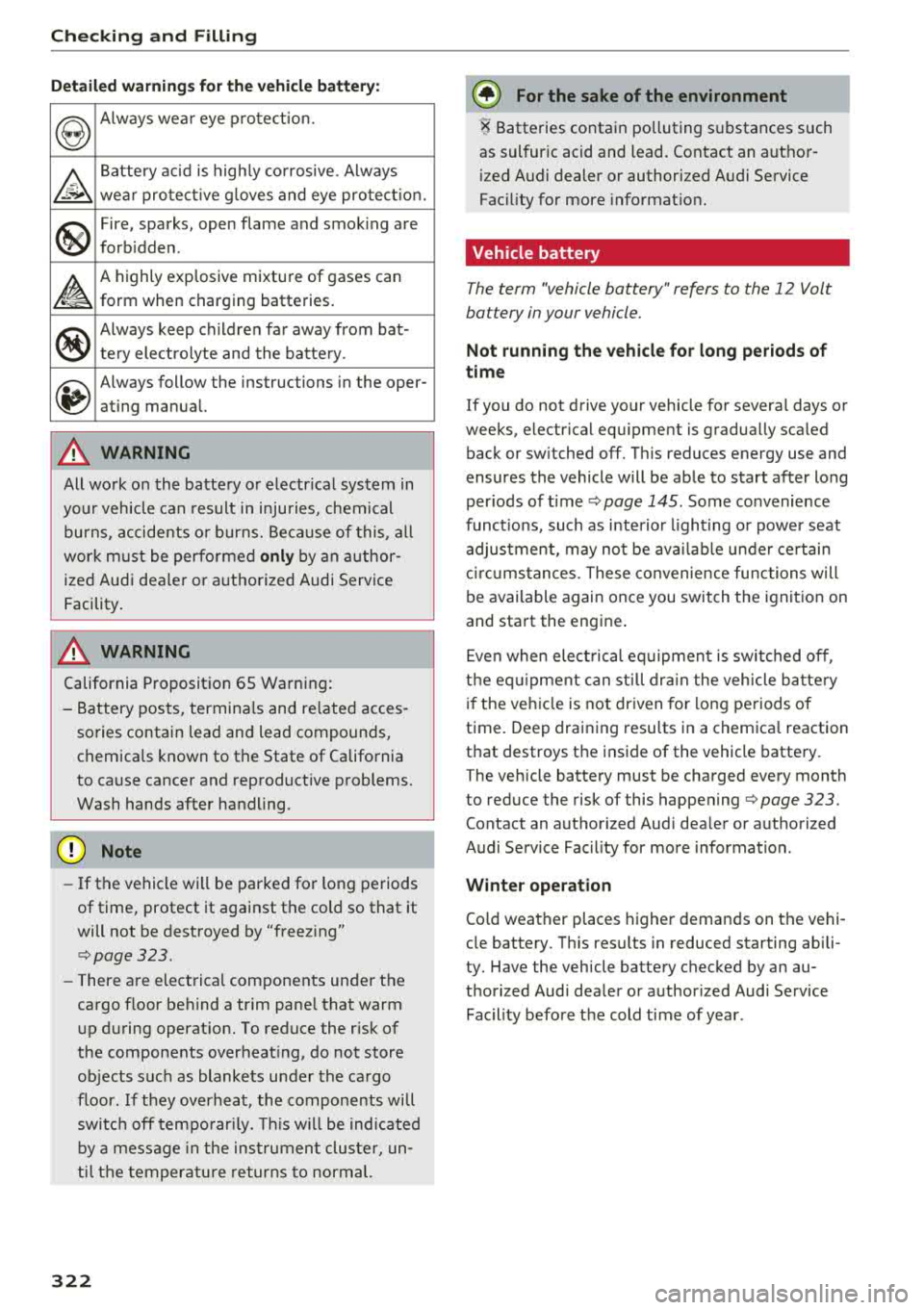
Detailed warnings for the vehicle battery:
~
Always wea r eye protection.
~
Battery acid is highly corrosive. Always
wea r protect ive g loves and eye pro tect io n .
.
®
Fire, sparks, open flame and smok ing are
forb idden .
~
A highly explosive mixture of gases can
form when charging batteries.
®
Always keep childre n far away from bat-
tery electrolyte and the batte ry .
~
Always follow the instructions in the oper-
ating manual.
A WARNING
All wo rk on the batte ry o r electrical system in
yo ur vehicle can result in inju ries, chemical
burns, accidents or burns. Because of this, all
wor k must be performed
only by an author
ized Audi dealer or authorized Audi Service
Facility.
A WARNING
California Proposition 65 Warning:
- Battery posts, terminals and re lated acces
sories contain lead and lead compounds,
chemica ls known to the State of California
to cause cancer and reproductive problems.
Wash hands after handling .
@ Note
-If the vehicle will be parked for long periods
of time, protect it against the cold so that it
will not be destroyed by "freezing"
<=>page 323.
-There are electrical components under the
cargo floor behind a trim pane l that warm
up during operation. To reduce the risk of
the components overheat ing, do not store
objects such as blankets under the cargo
floor . If they overheat, the components wi ll
switc h off temporarily. This will be ind icat ed
by a message in the instrument cluster, un
til the temperature returns to normal.
322
@ For the sake of the environment
i Batteries contain polluting substances such
as sulfur ic acid and lead. Contact an author
i zed Audi dealer or authorized Audi Service
Fac ility for more informat ion.
Vehicle battery
The term "vehicle battery" refers to the 12 Volt
battery in your vehicle.
Not running the vehicle for long periods of
time
If you do not drive your vehicle for severa l days or
weeks, electrical equ ipment is gradually sca led
back or switched off. This reduces energy use and
ensures the vehicle will be able to start after long
periods of
time<=> page 145 . Some convenience
funct ions, such as interior lighting or power seat
adjustment, may not be available under certain
circumstances . These convenience functions will
be available again once you switch t he ignition on
and start the engine .
Even when electrical equipment is switched off,
the equipm ent can still drain the vehicle battery
if the vehicl e is not driven for long periods of
time. Deep draining results in a chemical reaction
that destroys the inside of the vehicle battery.
The vehicle battery must be charged every month
to reduce the risk of this happening
<=> page 323.
Contact an authorized Aud i dealer or authorized
Audi Service Fac il ity for more information.
Winter operation
Cold weather places higher demands on the vehi
cle battery. This results in reduced starting abili
ty. Have the vehicle battery checked by an au
thorized Audi dealer or authorized Audi Service
Fac il ity before the cold time of year .
Page 325 of 392
u co ..... N r-N .....
~ 0 co
Charging the vehicle battery
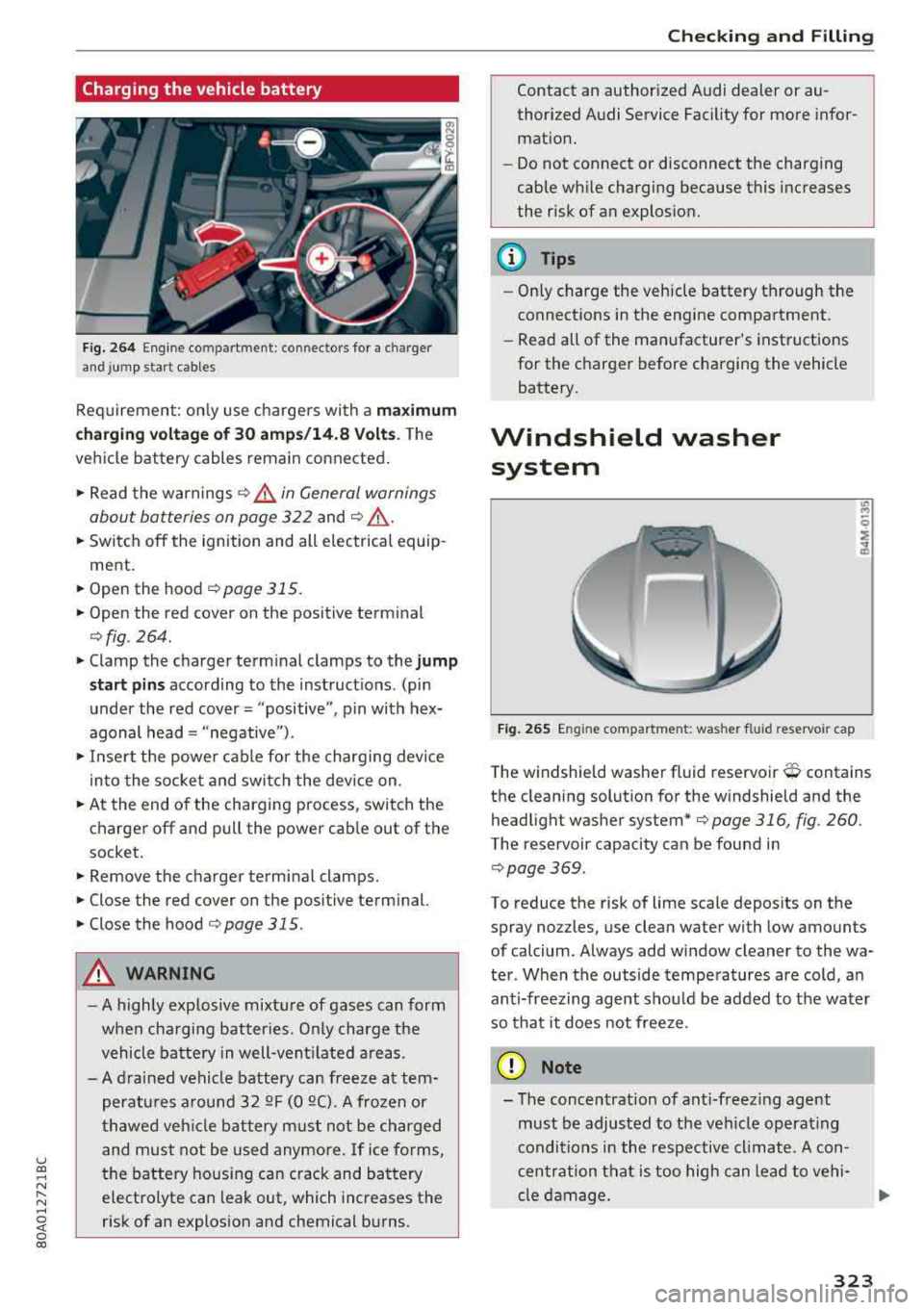
Fig. 264 Engine co mpartment : connec tor s fo r a charg er
and jump s ta rt cab les
Req uirement: on ly use charge rs with a maximum
c harging voltage of 30 amp s/14 .8 Volt s.
T he
vehicle battery cables remain connected .
.,. Read the warnings ¢ & in General warnings
about batteries on page 322
and ¢ ,& .
.,. Switch off the ignition and all e lectrical equip
ment .
.,. Open the hood ¢ page 315 .
.,. Open the red cover on the positive term inal
¢ fig . 264 .
.,. Clamp the charger term inal clamps to the jump
s tart pins
according to the instruct ions . (pin
under the red cover = "positive", p in with hex
agonal head= "negative ") .
.,. In se rt the powe r cable for the charging device
in to the socket and swi tch the device on .
.,. At the end of the charging process, switch the
charger off and pull the power cab le out of the
socket.
.,. Remove the charger terminal clamps .
.,. Close the red cover on the positive term inal.
.,. Close the hood ¢ page 315 .
A WARNING
-A highly explosive mixtu re of gases can form
whe n cha rging batter ies. O nly charge the
vehicle ba tte ry in well-ven tilated are as.
- A dra ined vehicle battery can freeze at tem
peratu res a round 3 2
QF (0 QC). A frozen or
t hawed veh icle bat tery m ust not be charged
and must not be used anymore. If ice forms,
the battery housing can crack and battery electrolyte can leak out, which increases the
risk of an explosion and chemical b urns .
Chec king and Filling
Contact an author ized Audi dealer or au
thorized Audi Service Facility for more infor
mat ion.
- Do not connect or disconnect the charging
cable wh ile charging because this increases
the risk of an explos ion.
(D Tips
- Only charge the veh icle battery through the
connect ions in the engine compartment .
- Read all of the manufacturer's instructions
for the charger before charging the vehicle battery.
Windshield washer system
F ig. 265 Engine compar tmen t: was her fluid reservo ir ca p
T he windshield washer fluid reservoir O contains
the clean ing solut ion for the w indshield and the
headlight washer system*
¢page 316, fig. 260 .
The reservoir capacity can be found in
¢page 369 .
To reduce the risk of lime scale deposits on the
spray no zzles, use clean water with low amounts
of calcium . Always add w indow cleaner to the wa
ter . When the outside tempe ratures are cold, an
anti-freez ing agent sho uld be added to t he water
so that it does not free ze.
@ Note
- The concentration of ant i-freez ing agent
must be adjusted to the ve hicle operat ing
conditio ns in the respective cl imate . A con
c en tration that is too high can lead to vehi
cle d am age .
323
Page 326 of 392
Checking and Filling
-Never add radiator anti-freeze or other addi
tives to the washer fluid.
-Do not use a glass cleaner that contains
paint solvents, because this could damage
the paint .
Service interval display
The service interval display detects when your ve
hicle is due for service.
Checking service intervals
You can check the remaining distance or time un
til the next oil c hange or next inspection in the
Infotainment system .
.,. Select in the Infot ainment system: the I MENU I
button > Vehicle > left contro l button > Service
& checks > Service intervals.
Resetting the indicator
An author ized Audi dealer or authorized Audi
Service Facility will reset the service interval dis
p la y after performing serv ice.
If you have changed the oil yourself, you must re
set the oil c hange interva l.
.,. Select in the Infotainment system: the lMENUI
button
> Vehicle > left control button > Service
& checks > Service intervals > Reset oil change
interval.
If an oil change or inspection is due, you can ac
cess it in the Infotainment system . The display
works in two stages:
-Service reminder: after a certain distance is
driven, a message appears in the instrument
cluster display every time the ign ition is switch
ed on. The remaining distance and t ime is dis
played br iefly.
-Service due : if your vehicle has reached a serv
ice interval, a message appears briefly after
switching the ignition on.
0 Note
-Only reset the oil change indicator if the oil
was c hanged.
-Following the service inter vals is critical to
maintain ing the service life and value of
324
your vehicle, especially the engine . Even if
the mileage on the ve hicle is low, do not ex
ceed t he time for the next service .
Page 345 of 392
individual tires. If the pressure changes in one or
more tires, this is indicated in the instrument
cluster display with an indicator light
[IJ and a
message . If only one tire is affected, the location
of that tire will be indicated.
The tire pressures must be stored in the Infotain ment system again each time the pressures
change (switching between partial and full load
pressure) or after changing or replacing a tire on
your vehicle
¢ page 343 . The tire pressure moni
toring system only monitors the tire pressure you
have stored. Refer to the tire pressure label for
the recommended tire pressure for your vehicle
¢ page 335, fig. 269.
Tire tread circumference and vibration character
istics can change and cause a tire pressure warn
ing if:
- the tire pressure in one or more tires is too low
- the tires have structural damage
- the tire was replaced or the tire pressure was
changed and it was not stored
¢ page 343
- tires that are only partially used are replaced
with new tires
Indicator lights
[IJ-loss of pressure in at least one tire¢,&. .
Check the tires and replace or repair if necessary.
Check/correct the pressures of all four tires and
store the pressure again in the Infotainment sys
tem
¢ page 343 .
mm (Tire Pressure Monitoring System) Tire
pressure: malfunction! See owner's manual.
If
mm appears after switching the ignition on or
while driving and the
[IJ indicator light in the in
strument cluster blinks for approximately one minute and then stays on, there is system mal
function . Try to store the correct tire pressures
~ page 343 . In some cases , you must drive for
several minutes after storing the pressures until
the indicator light turns
off. If the indicator light
does turn off or turns on again after a short peri
od of time, drive to an authorized Audi dealer or
authorized Audi Service Facility immediately to
~ have the malfunction corrected. .... N ,..._
N ..... 0 <( 0 00
Wheels
A WARNING
--- If the tire pressure indicator appears in the
display, reduce your speed immediately and
avoid any hard steering or braking maneu
vers. Stop as soon as possible and check the
tires and their pressure.
- The driver is responsible for maintaining the
correct tire pressure. You must check the
tire pressure regularly .
- Under certain conditions (such as a sporty
driving style, winter conditions or unpaved
roads), the tire pressure monitoring system
indicator may be delayed.
@ Tips
- The tire pressure monitoring system can al
so stop working when there is an ESC mal
function.
- Using snow chains may result in a system
malfunction.
- The tire pressure monitoring system in your
Audi was calibrated with
"Audi Original
Tires"~ page 332. Using these tires is rec
ommended.
Storing tire pressures
App lies to: vehicles wi th Tir e Pr essure Mo nito ring Syste m in
dica tor
If the tire pressure changes or a tire is replaced ,
it must be confirmed in the Infotainment sys tem .
.. Before storing the tire pressures, make sure the
tire pressures of all four tires meet the speci
fied values and are adapted to the load
¢page 335 .
.. Switch the ignition on .
.. Select in the Infotainment system: I MENU ! but
ton
> Vehicle > Service & checks > Tire pres
sure monitoring
> Store tire pressure > Yes,
store now.
(D Tips
Do not store the tire pressures if snow chains
are installed .
343
Page 346 of 392
Care and cleaning
Care and cleaning
General information
Regular, proper care helps to maintain your vehi
cle's value. It can also be a requirement when
submitting warranty claims for corrosion damage
and paint defects on the body.
The required cleaning and care products can be
obtained from an authorized Audi dealer or au
thorized Service Facility . Read and follow the in
structions for use on the packaging .
A WARNING
-Using cleaning and care products incorrectly
can be dangerous to your health.
- Always store clean ing and care products out
of reach of children to reduce the r isk of poi
son ing.
@ For the sake of the environment
- Preferab ly purchase environmenta lly-friend
l y cleaning products.
- Do not dispose of leftover cleaning and care
products with household trash.
Car washes
The longer that deposits such as insects, bird
droppings, tree sap or road salt remain on the ve
h icle, the more the surface can be damaged. High
temperatures such as those caused by sunlight
increase the damaging effect.
Before washing, r inse
off heavy deposits with
p lenty of water.
Stubborn deposits such as bird droppings or tree
sap are best removed with plenty of water and a microfiber cloth.
A lso, wash the underside of yo ur vehicle once
road sa lt stops being used for the season .
Pressure washers
When washing your veh icle w ith a pressure wash
er , al ways fo llow the operating instructions pro
vided with the press ure washer. This is especially
important in regard to the pressure and spraying
distance. Do not aim the spray directly at the
344
seals on the side windows, doors, lids or the sun
roof* or at tires, rubber hoses, insulating materi
a l, sensors* or camera lenses* . Keep a distance of
at least 16 in (40 cm).
Do not remove snow and ice with a pressure
washer.
Never use cone nozz les or high pressure nozzles.
The water temperature must not be above 140 °F
(60 °() .
Automatic car washes
Spray off the vehicle before washing.
Make sure that the windows and roof* are closed
and the windshie ld wipers are
off . Follow instruc
tions from the car wash operator, especially if
there are accessories attached to your vehicle.
If possible, use car washes that do not have
brushes.
Washing by hand
Clean the vehicl e starting from the top and work
in g down using a soft sponge or cl eaning br ush.
Use solvent-free cleaning products.
Washing vehicles with matte finish paint by
hand
To avoid damaging the paint when washing, first
remove dust and large part icles from you r vehi
cle. Insects, grease spots and fingerprints are
best removed with a special cleaner for matte
finish paint .
Apply t he product using a microfiber cloth. To
avoid damaging th e paint surface, do not use too
much pressure.
R inse the vehicl e thoroughly with wate r. Then
clean using a neutra l shampoo and a soft micro
f iber cloth .
Rinse the vehicl e thoroughly again and let it air
dry. Remove any water residue using a chamois.
A WARNING
-Only wash the vehicle when the ignition is
off and follow the instructions from the car
-
Page 362 of 392
Fuses and bulb s
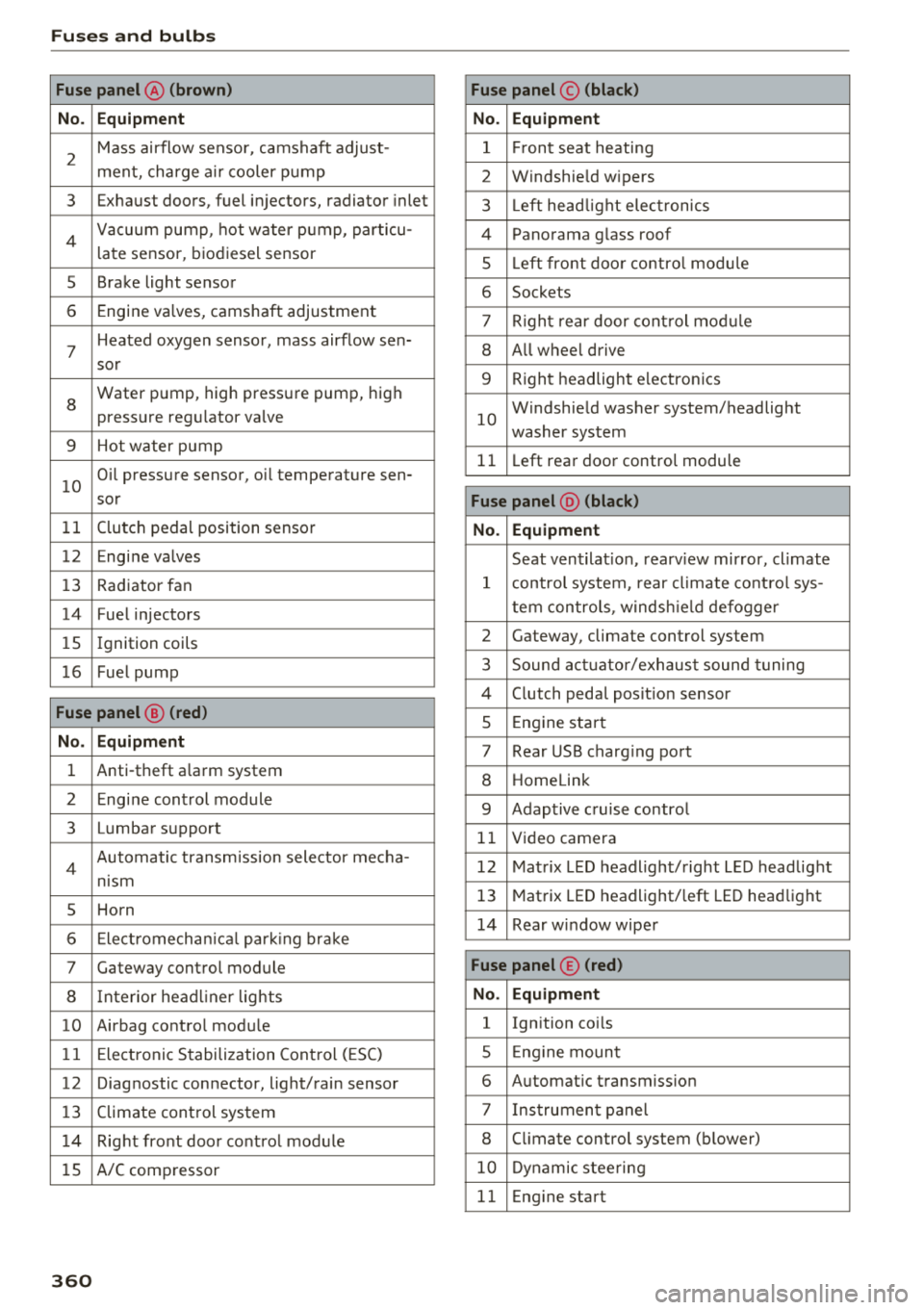
Fuse panel@ (brown ) Fuse panel© (blac k)
N o. E quip ment No. Equipmen t
2
Mass airflow sensor, camshaft adjust-
ment, charge air cooler pump 1 Fr ont seat heating
2 Windshie ld wipers
3 Exhaust doors, fuel injectors, radiator inlet 3 Left head light elect ronics
4 Vacuum pump , hot water p ump, particu-
late sensor, biodiesel sensor 4 Panorama glass roof
s L eft front doo r contro l modu le
5 Brake light sensor 6 Sockets
6 Engine valves, camshaft adjustment 7 Right rear door cont rol mod ule
7
Heated oxygen sensor, mass airflow sen-8 All wheel drive
sor
8
Water pump, high pressure pump, high
pressure regulator va lve
9 Hot water pump
9 R ight headlight electronics
10
Windshield washer system/headlight
washer system
1 1 Left rear door contro l module
10
Oil pressure sensor, oil temperature sen-
sor
Fu se p anel @ (blac k)
11 Clutch pedal position sensor No. Equipment
12 Engine valves
Seat ventilation, rearv iew mirror, cl imate
13 Radiator fan 1 control system, rear cl imate control sys-
14 Fuel injectors tern controls
, windsh ie ld defogger
15 Ignition coils 2 Gateway, climate control system
16 Fuel pump 3 Sound act uator/exhaust sound tuning
Fuse panel @ (red )
4 Clutch pedal posit ion sensor
5 Engine start
N o. Equipment 7 Rear USB charging port
1 Anti-theft a larm system 8 Homelink
2 Engine control module 9 Adaptive cruise control
3 Lumbar support 11 Video camera
4 Automatic transm ission selector mecha-
nism 12 Matrix LED headlight/right LED headlight
5 Horn
13 Matrix LED headlight/ left LED headlight
6 Electromechan ica l park ing brake
14 Rear window wiper
7 Gateway control module Fu se panel © (red )
8 Interior headliner lights No . Equipmen t
10 Airbag control module 1 Ignition coils
11 Electronic Stabilization Control (ESC) 5 E ng ine mount
12 Diagnostic connector, light/rain sensor 6 Automatic transmiss ion
13 Climate control system 7 I nstrument panel
1 4 Right front door control module 8 C limate control system (blower)
lS A/C compressor
10 Dynamic stee ring
11 Eng ine start
36 0
Page 374 of 392
Consum er Info rmation
today's automobi les, have steadi ly red uced the
scope of maintenance and repairs which can be
carried out by veh icle owners.
Al so , sa fet y and
en vironmental
concerns place very strict limits
on the nature of repairs and adjustments to en
g ine and transmission parts w hich an owner can
perform .
Maintenance, adjustments and repairs usually re
qu ire special tools, testing devices and other
equ ipment available to specially trained work
shop personnel in order to assure proper per
forma nce, re liab ility and safety of the ve hicle and
its many systems .
Improper maintenance, adjustments and repairs
can impair the operation and reliab il ity of your
ve hicle and eve n void your vehicle warra nty .
Therefo re, proof of se rvicing in accordance w ith
the m aintenance schedule may be a condition fo r
up hold ing a possible wa rranty claim made wi thin
the warranty pe riod.
Above all, ope rational safety can be adversely af
fected, c re ating unnecessa ry risks fo r you and
your passengers.
I f in doubt about any servicing, have it done by
your author ized Audi dealer or any other prope rly
eq uipped and qualified workshop . We strongly
urge yo u to g ive your author ized Audi dealer the
opportunity to perform a ll scheduled mainte
nance and necessary repairs. Your dealer has the
facilities, origina l parts and tra ined specialists to
keep your veh icle running properly.
Performing limit ed maint enanc e yourself
The fo llowing pages describe a limited number of
procedures whic h can be performed on your ve hi
cle with ordinary tools, should the need arise and
tra ined personnel be unava ilable. Before per
forming any of these procedures, always thor
ough ly read all of the app licab le text and carefu l
ly follow the instructions g iven . Always rigorously
observe the
W ARNINGS prov ided .
Befo re yo u check an ything in the engine com
partment , alway s read and h eed all WARNINGS
c> .&. and c> .&. in Working in the engine compart
ment on page 314 .
372
A WARNING
-Ser ious personal injury may occur as a result
of improperly performed maintenance, ad
justments or repairs .
- Always be extreme ly careful when work ing
on the vehicle . Always follow commonly ac
cepted safety practices and general com mon sense. Never r is k personal in jury.
- Do not attempt any of the maintenance,
checks or repairs described on the following pages if you are not fu lly fam il iar with these
or other procedu res with respect to the ve
hicle, or are uncertain how to proceed.
- Do not do any work wi thout the prope r tools
and eq uipmen t. H ave the necessary wo rk
done by your authorized Audi dealer or an
other properly equipped and qualified work
shop.
- The engine compartment of any motor vehi
cle is a potentially hazardous area . Never
reach into the area around or touch the radi
ator fan. It is temperature controlled and
can switch on suddenly - even when the en
gine is off and the ignition key has been re
moved. The rad iator fan switches on auto
mat ically when the coolant reaches a certain
temperature and will con tinue to run until
the coolant temperat ure drops.
- Always remove the igni tion key before any
one gets under the vehicle.
- Always support your vehicle with safety
stands if it is necessary to work underneath
the vehicle. The jack* s upplied w ith the vehi
cle is no t ad equate for th is pu rpose and
could collapse causing se rious personal in
jury .
- If you must work underneath the vehicle
with the wheels on the ground, always make
sure the vehicle is on level ground, that the
wheels a re always sec urely blocked and that
the engine cannot be started.
- Always make sure the transmission se lector
lever (automatic t ransm iss ion) is in P (Park
position) and the park b rake is applied .
Page 380 of 392
Index
Convenience key
Switching the ignition on . . . . . . . . . . . . . . 76
Unlock ing/ locking . . . . . . . . . . . . . . . . . . . . 33
Conven ience opening/closi ng . . . . . . . . . . . . 4 1
Convert ible ch ild safety seats . . . . . . . . . . . 299
Convertible locking retractor
Activating . . . . . . . . . . . . . . . . . . . . . . . . . . 304
Deactivating . . . . . . . . . . . . . . . . . . . . . . . . 305
Using to secure a child safety seat . . . . . . 304
Cooled glove compa rtment . . . . . . . . . . . . . . 61
Cooling mode (automatic climate control sys-
tem) . . . . . . . . . . . . . . . . . . . . . . . . . . . . . 70, 7 1
Cooling system Adding coolant . . . . . . . . . . . . . . . . . . . . . . 320
Coolant .. .. .. .. ................ ... . 319
Coolant level check ing . . . . . . . . . . . . . . . . 320
Coolant temperature indicato r . . . . . . . . . . 11
Cross hairs 205
Cr uise contro l system . . . . . . . . . . . . . . . . . . . 95
Cup holders . . . . . . . . . . . . . . . . . . . . . . . . . . . 60
Current cons umption . . . . . . . . . . . . . . . . . . . 1 6
D
Data connection . . . . . . . . . . . . . . . . . . . . . . 194
Data protect ion . . . . . . . . . . . . . . . . . . . . . . . 195
Data recorder 145
Date . . . . . . . . . . . . . . . . . . . . . . . . . . . . . 16, 245
Date display . . . . . . . . . . . . . . . . . . . . . . . . . 245
D aytime running lights . . . . . . . . . . . . . . . . . 45
D eclarat ion of compliance . . . . . . . . . . . . . . 374
Defrost ing (windows) . . . . . . . . . . . . . . . . . . . 71
D EF ( inst rument cluste r) . . . . . . . . . . . . . . . . 12
Demo mode
refer to Presentation mode . . . . . . . . . . . . 211
Destination on the map Using the MMI touch . . . . . . . . . . . . . . . . . 205
Determin ing correc t load limit . . . . . . . . . . 339
D. 't 1 191 a compass . . . . . . . . . . . . . . . . . . . . . . . S4
Dig ita l Rights Management . . . . . . . . . . . . . 225
Dimensions . . . . . . . . . . . . . . . . . . . . . . . . . . 369
Dimming the exterior mirrors . . . . . . . . . . . . SO
D imming the rearview mirror . . . . . . . . . . . . SO
D irectory
refer to Contacts . . . . . . . . . . . . . . . . . . . . 183
378
Display . . . . . . . . . . . . . . . . . . . . . . . . . . . . . . 12
Cleaning . . . . . . . . . . . . . . . . . . . . . . . . . . . 346
Infotainment system d isp lay . . . . . . 148, 246
Instrument cluster . . . . . . . . . . . . . . . . . . . . 15
Mult ifunct ion steer ing whee l . . . . . . . . . . . 12
Versions (MMI) . . . . . . . . . . . . . . . . . . . . . . 148
Distance . . . . . . . . . . . . . . . . . . . . . . . . . . . . . 16
Doors Mechan ica lly locking . . . . . . . . . . . . . . . . . . 35
Driver informat ion system
Chang ing v iews . . . . . . . . . . . . . . . . . . . . . . 12
Energy consumers . . . . . . . . . . . . . . . . . . . . 17
Outs ide temperat ure display. . . . . . . . . . . . 10
Se rvice interva l display . . . . . . . . . . . . . . . 32 4
T rip comp ute r . . . . . . . . . . . . . . . . . . . . . . . 16
V iew 14
D river seat
refer to Seating posit ion . . . . . . . . . . . . . . 253
D rives
refer to Media . . . . . . . . . . . . . . . . . . 225, 234
Drive select
refer to Audi drive select . . . . . . . . . . . . . . 125
D rivi ng econom ica lly . . . . . . . . . . . . . . . . . . . 73
Driving offroad . . . . . . . . . . . . . . . . . . . . . . . . 82
Drivi ng on hills . . . . . . . . . . . . . . . . . . . . . . . . 83
D rivi ng safely . . . . . . . . . . . . . . . . . . . . . . . . 252
Driving through water . . . . . . . . . . . . . . . . . . 73
D rivi ng time . . . . . . . . . . . . . . . . . . . . . . . . . . 16
DVD drive (med ia drives) . . . . . . . . . . . . . . . 226
Dynamic steering . . . . . . . . . . . . . . . . . . . . . 125
Dynam ic volume
refer to Syste m volume . . . . . . . . . . . . . . . 250
E
E-ma il 181
E asy seat entry . . . . . . . . . . . . . . . . . . . . . . . . 76
E conom ica l route . . . . . . . . . . . . . . . . . . . . . 210
eco (button) . . . . . . . . . . . . . . . . . . . . . . . . . . 70
EDS . . . . . . . . . . . . . . . . . . . . . . . . . . . . . . . . 140
El ec tromechanical pa rking brake . . . . . . . . . 80
E lectromechanical steering . . . . . . . . . . . . . 144
E lectronic immobilizer . . . . . . . . . . . . . . . . . . 31
Electron ic Stab il izat ion Control
refer to ESC . . . . . . . . . . . . . . . . . . . . 140, 141
Emergency assistance . . . . . . . . . . . . . . . . . 350
E mergency b raking fu nction . . . . . . . . . . . . . 81