ignition AUDI Q5 2018 Owner's Guide
[x] Cancel search | Manufacturer: AUDI, Model Year: 2018, Model line: Q5, Model: AUDI Q5 2018Pages: 392, PDF Size: 60.56 MB
Page 83 of 392
u co ..... N r--N ..... 0 <( 0 00
~ To prevent the parking brake from releasing au
tomatica lly, pull and ho ld
the(®) switch and
press the acce lerator pedal. The park ing brake
remains set and prevents the veh icle from ro ll
ing backward.
~ You can release the(®) switch again once you are sure that you are g iv ing enough dr iv ing
force to the whee ls by pressing the accele rator
pedal.
Emergency braking function
You can use the emergency brak ing funct ion in an
emergency situation, or if the standard brake op
erat ion malfunct ions or is disabled .
~ Pull and hold the(®) switch.
~ As soon as you release the (®) switch or acceler-
ate, the brak ing stops .
Pu lling and holding the(®) switch while driv ing
the vehicle activates the emergency braking func
tion . The vehicle is braked at all four wheels by
activating the hydraulic brake system . The brak
i ng effect is s imilar to heavy
braking ~.,&. .
To reduce the r isk of activating the emergency
braking by mistake, a warn ing tone (buzzer)
sounds when
the(®) switch is pulled . Emergency
braking stops as soon as
the(®) switch is released
or the accele rato r peda l is p ressed .
Parking
~ Press the brake pedal to stop the vehicle.
~ Pull the(®) switch to set the parking brake.
~ Select the "P" selector lever posit ion .
~ Turn the eng ine off ~.,&. .
~ Turn the steer ing whee l w hen pa rking on in
clin es so that the whee ls will roll into the curb
i f t he ve hicle starts moving.
A WARNING
- Do not press the accelerator pedal inadver
tent ly if a gear is selected when the vehicle
is stationary and the engine is running. Oth
erwise, the veh icle w ill start to move imme
diately and th is could result in an acc ident.
- Emergency braking should only be used in an emergency, when the normal brake peda l
has failed or the brake pedal is obstructed .
Driving
During emergency braking, your vehicle will
brake s imilar to heavy braking. ESC and the
associated components (ABS, ASR, EDL)
cannot overcome the laws of physics .
Around curves and when road or weather
conditions are bad, a full brake applicat ion
can cause the veh icle to skid o r the rear end
to swerve, which inc reases the risk of an ac
cident.
- I f the power supply fails, you cannot set the
p ar king brake if it is released . In this case,
park the veh icle on leve l ground and secu re
it by placing the selector lever in the "P" po
sition. See an authorized Audi dealer or au
thor ized Audi Service Facility for assistance.
- Always set the parking brake when leaving
your veh icle, even if for a sho rt period of
time. Otherwise the vehicle could roll away, increasing the risk of an accident .
- If you leave the vehicle, switch the ignition off and take the veh icle key with you. This
applies particularly when children remain in
the vehicle . Otherwise, ch ildren cou ld start
the engine, release the parking brake or op
erate e lectr ica l equipment such as power
windows, wh ich increases the r is k of an acci
dent.
- No one, especially children, should remain
in the vehicle when it is lo cked. Lo cked
doors ma ke it more diffic ult for emergency
workers to get into the vehicle, which puts lives at risk .
(D Tips
When stopp ing at a t raff ic sign al or stopp ing
i n city traffic, yo u can set the park ing brake
manua lly . The vehicle does not have to be
held with the brake pedal. The parking brake
eliminates the tendency to creep when a se l ector lever position is engaged. As soon as
you press the accelerator peda l, the parking
brake re leases automatically and your vehicle
starts to move
~page 82 .
(D Tips
- Occasional noises when the parking brake is
set and released are normal and are not a
cause for concern .
.,.
81
Page 87 of 392
S tronic transmission
The S tronic is a dual-clutch transmiss ion. Power
is transferred using two clutches that work inde
pendently from one another. They replace the
torque converter used in conventional automatic
transmissions and allow the vehicle to accelerate
without a noticeable interruption in traction.
tiptron ic transmission
In the tiptronic transmission, power is transfer
red by a torque converter.
Selecting a selector lever position
Fig. 90 Center co nso le: selector lever
0 ,.... N
0
1 a,
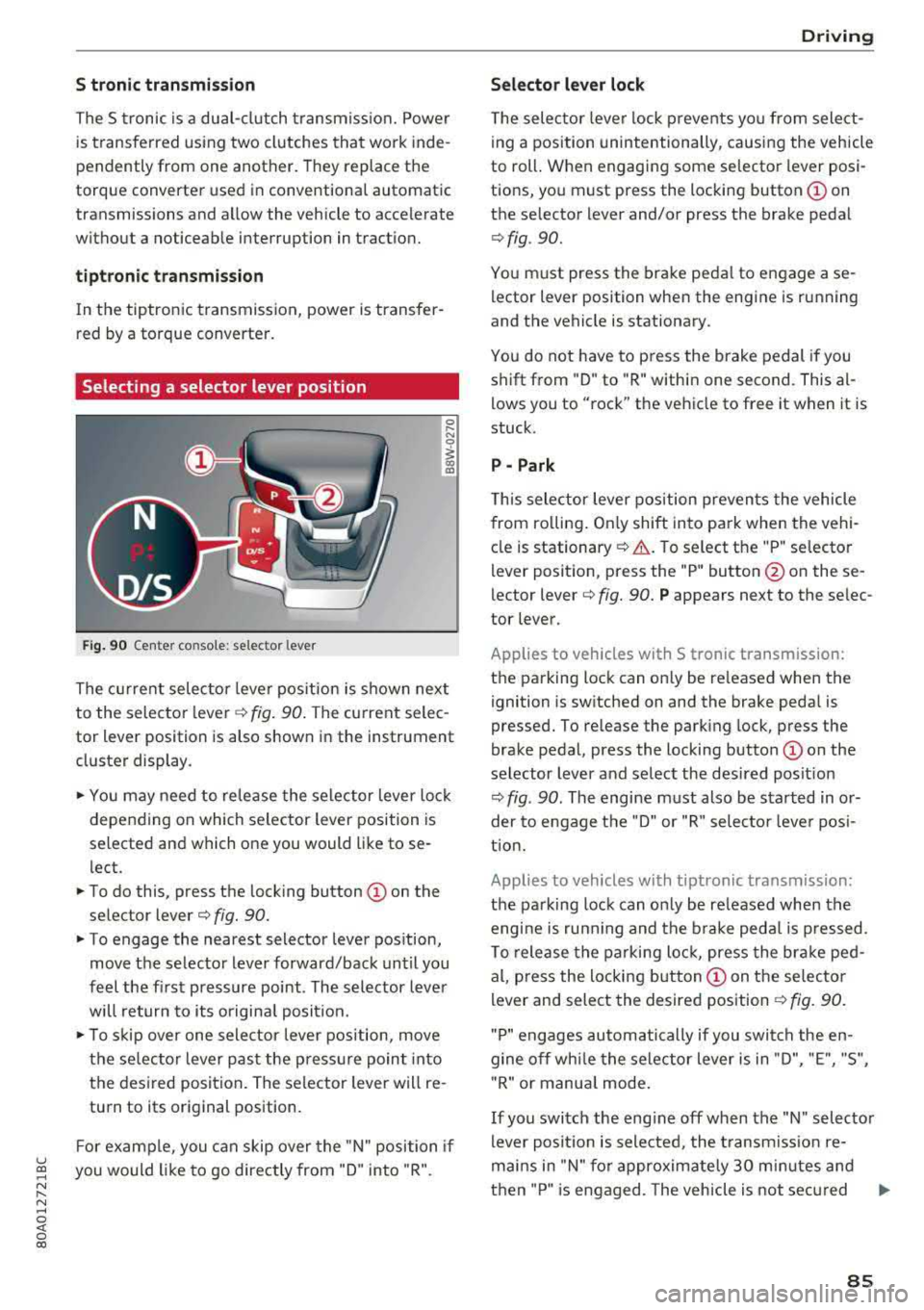
The current selector lever position is shown next
to the selector
l ever ¢ fig. 90. The current selec
tor lever position is also shown in the instrument
cluster display .
... You may need to release the selector lever lock
depending on which selector lever position is
selected and which one you would like to se
l ect.
... To do this, press the locking button © on the
selector
lever¢ fig. 90.
... To engage the nearest selector lever position,
move the selector lever forward/back until you
feel the first pressure point . The selector lever
will return to its original posit ion.
.., To skip over one selector lever position, move
the selec tor lever past the pressure point into
the desired position . The selector lever will re
turn to its original position.
F or example, you can skip over the "N" position if
u ~ you would like to go directly from "D" into "R".
N ...... N ......
~ 0 co
Driving
Selector lever lock
The selector lever lock prevents you from select
ing a position unintentionally, causing the vehicle
to roll. When engaging some selector lever posi
tions, you must press the locking
button © on
the selector lever and/or press the brake pedal
¢ fig . 90.
You must press the brake pedal to engage a se
lector lever position when the engine is running
and the vehicle is stationary.
You do not have to p ress the brake pedal if you
shift from "D" to "R" within one second. This
al
lows you to "rock" the vehicle to free it when it is
stuck.
P - Park
This selector lever position prevents the vehicle
from ro lling . On ly shift into pa rk when the vehi
cle is
stationary ¢.&. . To select the "P" selector
lever position, press the "P" button @ on these
lector
lever¢ fig. 90. P appears next to the selec
tor lever.
Applies to vehicles with S t ronic transm ission:
the parking lock can only be re leased when the
ignition is switched on and the brake pedal is
pressed. To release the parking lock, press the
brake pedal, press the locking
button @ on the
selector lever and select the desired posit ion
¢ fig . 90. The engine must also be started in or
der to engage the "D" or "R" selector leve r pos i
tion.
Applies to vehicles with tiptronic transmission:
the parking lock can only be re leased when the
engi ne is ru nning and the brake pedal is pressed .
To release the parking lock, press the brake ped
al, press the locking
button @ on the selector
lever and select the desired position
¢ fig. 90.
"P " engages automatically if you switch the en
gine off whi le the selector lever is in "D", "E", "S",
" R" or manua l mode.
If you switch the eng ine off when the "N" selector
lever position is selected, the transmission re
mai ns in "N" for approximately 30 m inutes and
then "P" is engaged. The vehicle is not secured
..,
85
Page 98 of 392
Ass is tanc e system s
the cruise control from braking. This is be
cause pressing the accelerator pedal over
rides the cruise contro l system .
- If a brake system ma lfunction such as over
heating occurs when the cruise control sys
tem is sw itched on, the braking function in
the system may be switched off . The rest of
the cruise control system functions remain act ive as long as
the @;\l)~ij (USA models) /
Bl (Canada models) indicato r light is on.
@ Note
Before driving downhill a long distance on a
steep hill, decrease you r speed and select a
lower gear. This makes use of the eng ine
brak ing effect and re lieves the bra kes.
(D Tips
The b rake l ights turn on w hen the brakes a re
app lied automat ically .
Changing the speed
Applies to: vehicles with cruise control system
.,. T o inc rease/decrease the speed in 1 mph (1
k m/h) increments, br ie fly
tap the leve r toward
0 10 ¢ page 95, fig. 94 to the f irst leve l.
.,. To increase/decrease the speed in S mph (10
km/ h) increments, br iefly
tap the leve r toward
0 10 to the second level.
.,. To increase or decre ase the speed quickly, hold
the lever toward
0 10 to the first or second
level until the des ired speed is reached .
Overriding the speed
Applies to: vehicles with cruise control system
You can p ress t he accelerator pedal to inc rease
your speed, for examp le if you want to pass
someo ne. The speed yo u se t earlier w ill res ume
as soon as yo u release the accelerator peda l.
H oweve r, if you are exceeding the stored speed
by a cons ider able amo unt for a long time , the
cr uise con trol sys tem w ill tempo rar ily switch off.
The
[ij;\l)~ij (USA models) tBI (Canada models) in
dicator light in the instrument cluster turns off
and the stored speed is maintained .
96
Preselecting a speed
Applies to: vehicles with cruise control system
You can pre-select your desired speed when the
vehicle is stationary .
.,. Switch the ignition on.
.,. Pull the lever into pos ition (D ¢ page 95,
fig . 94 .
.,. To increase or decrease the speed, tap the leve r
toward
0 10 .
This function makes it possible , for example , to
save the speed you want before driving on the highway . Once you are on the expressway, acti
vate the c ruise control system by pull ing t he lev
e r in to position
(D .
Switching off
Applies to: vehicles with cruise control system
Deactivating temporarily
.,. Press the br ake pedal, or
.,. Press the lever towar d@ (not loc ke d in to
place)
¢ page 95, fig. 94.
Switching off completely
.,. Press the lever into position @(clicked into
place), or
.,. Switch the ignit io n off.
The speed you stored will be ma intained if the
c ruise contro l has been switched off tempora rily .
To resume the stored speed, re lease the bra ke
pedal and pull the lever to posi tion
(D .
Switc hing the ignit ion off w ill erase the stored
speed .
.&_ WARNING
You sho uld only resume the s to red speed if i t
i s no t too h igh fo r exis ting traff ic condi tions .
Ot herwise you can increase the risk of an acci
dent .
Page 110 of 392

Assistance systems
The distances provided are specified values . De
pending on the driving situation and how the ve
h icle ahead is dr iv ing, the actual d istance may be
more or less than these target d istances.
If you change the time gaps, the newly set value
appears briefly in the instrument cluster disp lay,
for example
II for Distance 3. This only occurs if
the
D rive r assistance display is not currently
shown in the display
r=>page 104, fig. 104.
Distance 1: this setting corresponds to a distance
of 92 ft (28 m) when traveling at 62 mph (100 km/h), or a time d istance of 1 second.
Distance 2 : this setting corresponds to a distance
of 118 ft (36 m) when traveling at 62 mph (100
km/h), or a time d istance of 1.3 seconds .
Distance 3: this setting corresponds to a distance
of 164 ft (SO m) when traveling at 62 mph (100
km/h), or a time distance of 1.8 seconds .
Distance 4: this setting corresponds to a distance
of 219 ft (67 m) when traveling at 62 mph (100
km/h), or a time dista nce o f 2.4 seconds .
Distance 5 : this setting corresponds to a distance
of 328 ft (100 m) when traveling at 62 mph (100
km/h), or a time distance of 3.6 seco nds.
A WARNING
When setting the distance, the driver is re
sponsible for adhering to any applicab le lega l
regulations.
(D Tips
Depending on the selected driving mode in
drive se lect* and the set distance, the driving
behavior will vary from dynamic to comforta
ble when accelerating
9 page 12 7.
Setting Audi adaptive cruise control
Applies to: vehicles with Audi adaptive cruise control
-
.. Select in the Infotainment system: I MENU I but
ton
> Vehicle > left control button > Driver as
sistance
> Audi adaptive cruise control.
1) In prepa ra tio n at the t ime of print ing. T his funct ion is not
ava ilable in every vehicle .
108 Storing the last distance
1
)
The last distance that was set will be stored after
the ignition is switched off. If the distance is not
stored,
Distance 3 is a utomatica lly set eve ry time
the ignit ion is switched on.
Driving program
Applies to: vehicles without Audi drive select
Depending on the selected driving program and
distance, driving behavior when accelerating will
vary from dynamic to comfortable.
Selecting the driving mode
Applies to: vehicles with Audi drive select
For vehicles with drive select, refer to
r=>page 127.
(0 Tips
Your settings are automatically stored and as
signed to the remote control key being used.
Driver intervention request
Applies to: vehicles with Audi adaptive cruise control
Fig. 109 Instr umen t cluster: request for driver interve n
t ion
The request for driver intervention instructs you
to take over if the adaptive cruise control braking
funct ion is not able to maintain a suffic ient dis
tance to the veh icle dr iv in g ahead
r=> fig . 109 .
Page 118 of 392
Assistance systems
-when the driver's seat belt is unfastene d
- u p to ten seconds after sw itchin g on t he ig-
n itio n
(Ud) Note
Impa cts or damag e to the ca m era m ou nt on
t he wi ndshi eld can di splac e the se nsor. Pr e
sense city can be im pa ir ed by t his . H ave an a u
thorized A udi dealer o r aut ho rize d A udi Serv
ice Facility check the ir funct ion.
(D Tips
- You can ca ncel the system brakin g inte rven
tion if yo u accelerate co nsidera bly or swerve
away.
- Kee p in m ind t hat pre sense city ca n brake
un expecte dly. Always sec ure a ny ca rgo o r
ob jects t hat you a re t ransport ing t o reduce
the r isk of damage or injury.
- Specific pre sense city funct io n s sw itch o ff
whe n the ESC is limited o r switc hed off
c:> page 141 or the hill d esce nt ass ist is
swi tch ed o n
c:> page 142 .
-Wh en t here is a mal function in the came ra,
the p re se nse city func tions also sw itch o ff.
Settings in the Infotainment system
Applies to: ve hicles w ith Audi p re se nse
.,. Se lect in the Info ta in m en t sys tem: IME NUI but
t on
> Vehicle > left contro l bu tton > Driver as
sistance
> Audi pre sense .
Switch on /off Audi pre sense -
the pre sense
fu nctions can be turned o n and off .
If the system is switched off, it switches o n aga in
automatically once the ignition is sw itched on
again .
Prewarning -the early warning can be switched
off or the p re sense city/front warning point ca n
be set
( Early /Medium /Late ).
Set the wa rnin g time fo r the ea rly warn ing to
Early at f irst. I f th is causes undesired ea rly warn
i n gs to appear, then set the wa rning time to
Me
dium .
The Late warning t ime sho uld on ly be set
i n sp ecia l cir cumstances .
116
(D Tips
Your settings are automatically store d and as
s ign ed to t he remote co ntro l key bein g used .
Messages
Applies to : vehicles wit h Audi pre sense
II] Audi pre sense: malfunction! Please contact
Service
This message ap pears w hen the pre sense f unc
tion is a ffected . Fo r example, th is co uld be
ca used by a faulty sensor. Drive to an autho rized
Audi dealer or author ized A udi Service Fac ility im
med iate ly to have the ma lfu nction corrected .
II] Audi pre sense: currently limited . Sensor
view limited due to surroundings. See owner's manual
This message a ppears if t he radar se nsor and
camera view is obstructed, fo r example by leaves,
snow, heavy sp ray o r dirt. If necessary, clean the
senso rs and the area around the camera
c:> page 103 , fig. 100 or c:>page 121, fig. 121 .
II] Audi pre sense: currently limited . Trailer
towing mode
Fo r vehicles wit h a tra ile r h itch installed at the
factory, the pre sense rear functions switc h off
whe n the elect rical connector at the soc ket is
pl ugged in. The re is no guarantee the functions
will switc h off w hen usin g a ret rofitted trailer
hitc h.
II] Audi pre sense: currently restricted
This mess age app ears if the ESC is res tricted or
switc hed off, fo r exam ple .
II] Audi pre sense: currently limited. See own
er's manual
This message a ppears w hen the re is a tem porary
failu re in a sub syst em, such as the ESC. If t his
m ess age app ears re pea te d ly, drive to an au thor
iz ed Audi de aler or auth oriz ed A udi Se rvice Facili
ty to h ave the m alfun ction co rrected .
II] Audi pre sense: emergency braking system
off
~
Page 125 of 392
u co ..... N r-N .....
~ 0 co
Exit warning
Applies to: ve hicles with exit warning system
Fig. 122 Example dis play
Fig. 123 Door: warning lig h t
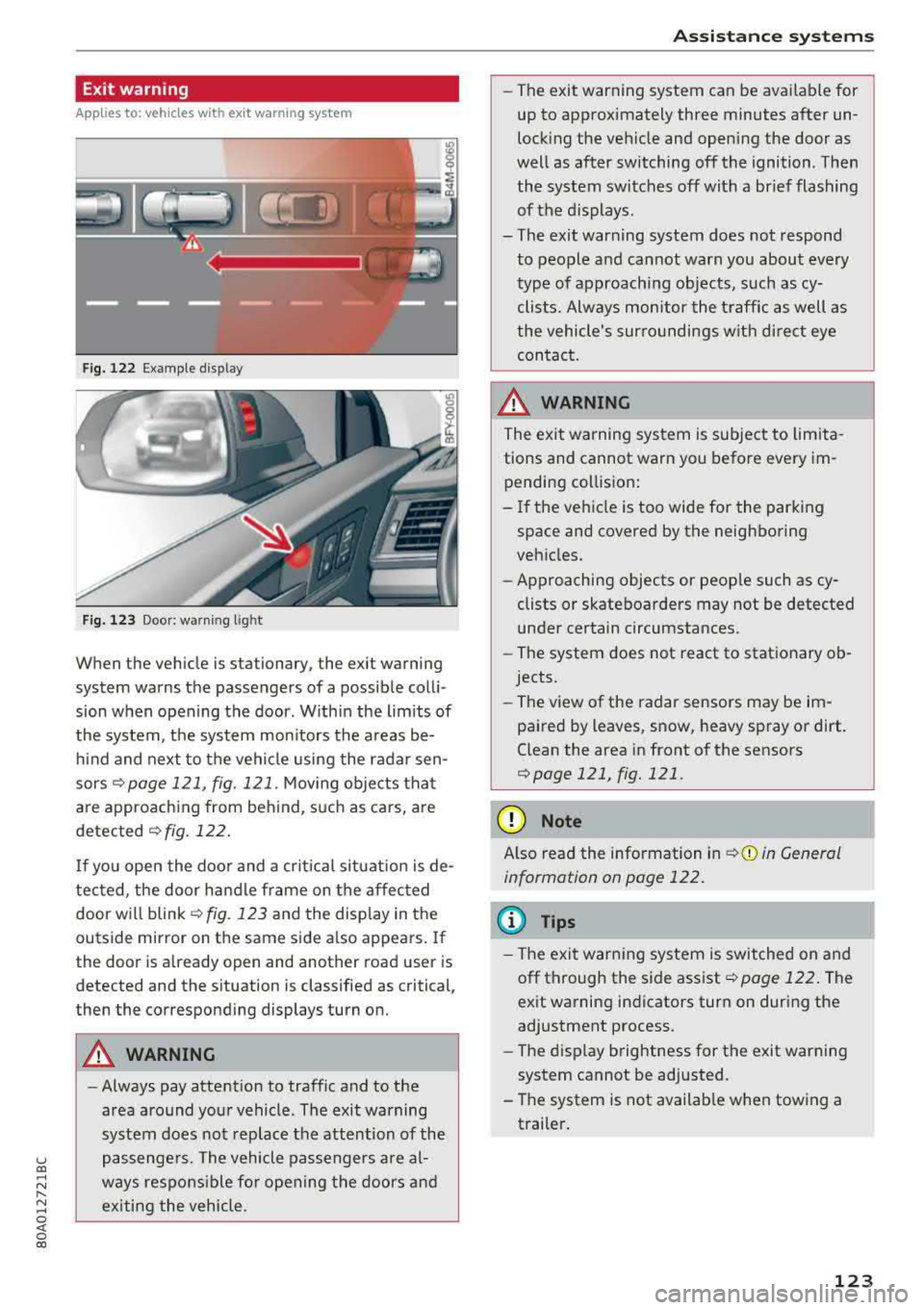
When the vehicle is stationary, the exit warning
system warns the passengers of a possible colli
sion when opening the door . Within the limits of
the system, the system monitors the areas be
hind and next to the vehicle using the radar sen
sors
¢ page 121, fig. 121 . Moving objects that
are approaching from behind, such as cars, are
detected ¢ fig. 122.
If you open the door and a critical situation is de
tected, the door handle frame on the affected door will
blink ¢ fig. 123 and the display in the
outside mirror on the same side also appears. If
the door is already open and another road user is
detected and the situation is classified as critical
J
then the corresponding displays turn on.
A WARNING
-
- Always pay attention to traffic and to the
area around your vehicle . The exit warning
system does not replace the attention of the
passengers. The vehicle passengers are al
ways responsible for opening the doors and
exiting the vehicle .
Assistance systems
-The exit warning system can be available for
up to approximately three minutes after un
locking the vehicle and opening the door as
well as after switching off the ignition . Then
the system switches off with a brief flashing
of the displays.
- The exit warning system does not respond to people and cannot warn you about every
type of approaching objects, such as cy clists. Always monitor the traffic as well as
the vehicle's surroundings with direct eye contact.
A WARNING
= -
The exit warning system is subject to limita-
tions and cannot warn you before every im
pending collision:
- If the vehicle is too wide for the parking
space and covered by the neighboring
vehicles.
- Approaching objects or people such as cy
clists or skateboarders may not be detected
under certain circumstances.
- The system does not react to stationary ob
jects.
- The view of the radar sensors may be im
paired by leaves, snow, heavy spray or dirt.
Clean the area in front of the sensors
¢page 121, fig. 121 .
(D Note
Also read the information in ¢(i) in General
information on page 122.
(D Tips
- The exit warning system is switched on and
off through the side
assist¢ page 122. The
exit warning indicators turn on during the
adjustment process.
- The display brightness for the exit warning
system cannot be adjusted.
- The system is not available when towing a
trailer.
123
Page 134 of 392
Parking aid
the sound was muted, no tone will sound. Pay at
tention to the vehicle's surroundings when you
start to dr ive .
Switching on /off
Applies to: ve hicles w ith pa rking system plus
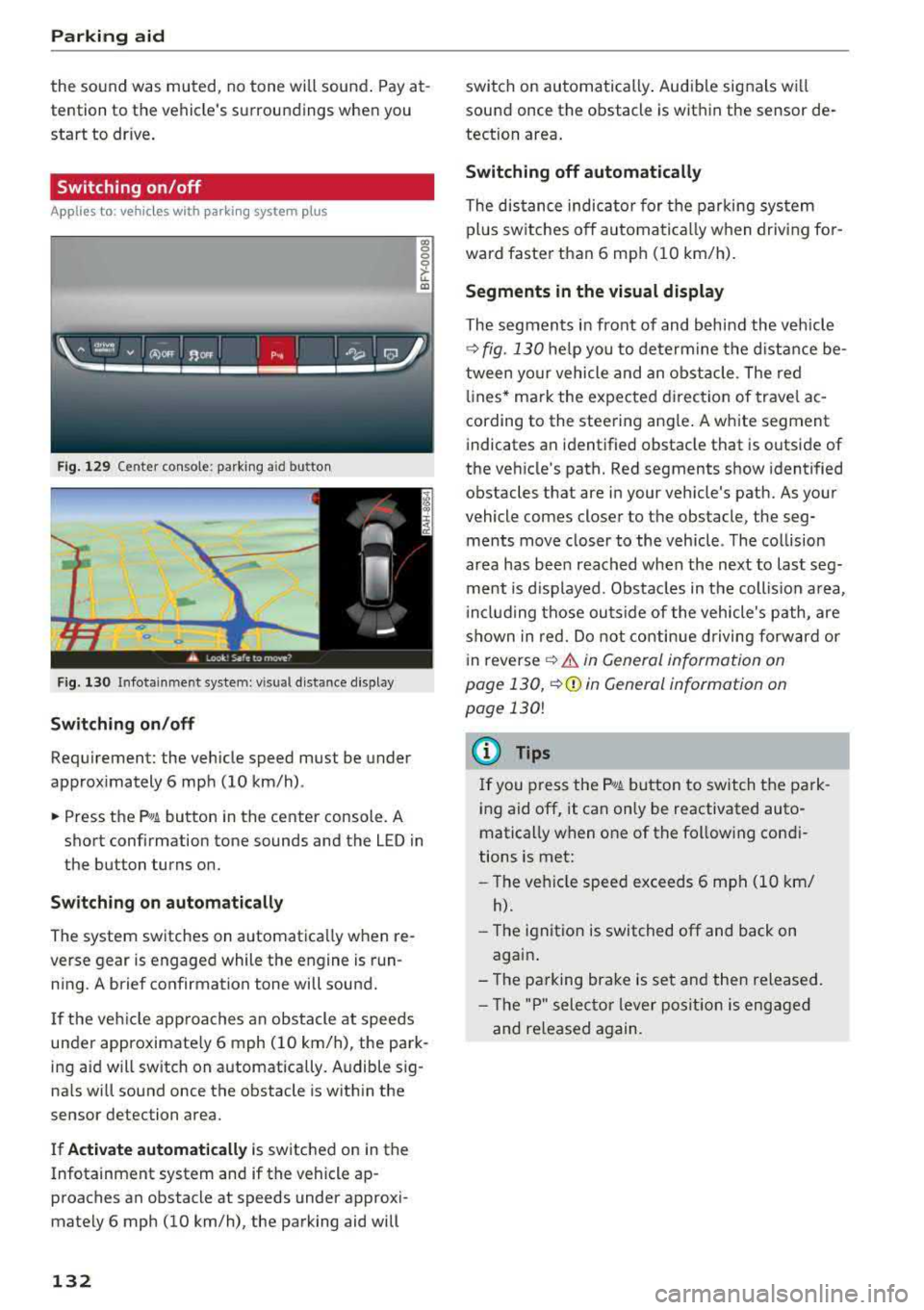
Fig. 129 Center console: park ing a id bu tton
Fig. 130 I n fot ainme nt system: v is ual d ist ance d isplay
Switching on /off
Requirement: the vehicle speed must be under
approximately 6 mph (10 km/h) .
co 0 0
~ LL. m
.. Press the p,, 1A button in the center console . A
short confirmation tone sounds and the LED in
the button turns on.
Switching on automatically
The system switches on automatica lly when re
verse gear is engaged while the engine is run
ning. A brief confirmation tone will sound.
I f the veh icle approaches an obstacle at speeds
under approximate ly 6 mph (10 km/h), the park
ing a id will sw itch on automatically . Audible sig
na ls will sound once the obstacle is within the
sensor detection area.
I f
Activate automatically is switched on in the
Infotainment system and if the vehicle ap
proaches an obstacle at speeds under approxi
mately 6 mph (10
km/h), the parking aid will
132
switch on automatically . Audible signals wi ll
sound once the obstacle is within the sensor de
tection area.
Switching off automatically
The distance indicator for the parking system
plus sw itches
off automatically when driving for
ward faster than 6 mph (10 km/h).
Segments in the visual display
The segments in front of and behind the vehicle
¢
fig. 130 he lp you to determine the distance be
tween your vehicle and an obstacle . The red
lin es* ma rk the expected d irection of travel ac
cording to the steering angle . A white segment
indicates an identified obstacle that is outside of
the veh icle's path. Red segments show identified
obstacles that are in your vehicle's path. As your
vehicle comes closer to the obstacle, the seg ments move closer to the vehicle . The collision
area has been reached when the next to last seg
ment is displayed . Obstacles in the collis ion area,
inclu ding those outside of the vehicle's path, are
shown in red. Do not continue driving forward or
i n
reverse ¢.&. in General information on
page 130,
¢ (D in General information on
page
130!
(D Tips
If you press the ?~A button to switch the park
ing aid
off, it can only be reactivated auto
matically when one of the following condi
tions is met:
-The vehicle speed exceeds 6 mph (10 km/
h).
-The ignition is switched off and back on
again .
- The parking brake is set and then released.
- Th e "P" selector lever position is engaged
and re leased again.
Page 169 of 392
u co ..... N r--N ..... 0 <( 0 00
Voice recognition system Operating
Applies to: vehicles with voice recognitio n system
You con operate many Infotainment functions
conveniently by speaking.
Requirement: the ignition and the MM I must be
switched on ¢
page 148, there must not be any
phone call in progress and the park ing system
must not be active .
~ Switching on: press the~ button @
¢page 14, fig . 11 o r ¢ page 15, fig. 13 br iefly
on the mu ltifunction stee ring wheel and say
the des ired command after the
Beep .
~ Switching off : press and hold the [2;J b utton.
Or : press the [2] but to n.
~ Pausing : say the command Pause . To resume,
press the
[2;J b utton .
~ Correcting : say the com mand Correction . Or :
simp ly say a new comm and d uring an an
no uncement
¢ page 245.
Input assistance
The system gu ides you throug h the input with
v isua l and audio feedbac k.
- Visual input assistance : after switching on
vo ice recogn it ion, a display w ith a selection of
poss ible commands appea rs . This command
display can be sw itched on o r off. Se lec t:
IMEN UI butt on> Settings > left cont ro l button
> MMI settings > Speech dialog system .
- Audio input assistance :
to have the poss ible
comm ands read, tu rn th e voice rec ogn ition sys
tem o n and say
Help.
For the system to understand you:
Speak clearly and dis tinct ly a t a normal vo lume .
Speak lo uder when d riving faste r.
Emphasize the words in the commands even ly
a n d do no t leave long pauses .
C lose the doors, the windows and the sunroof* to
reduce background noise . Make s ure that passen
gers a re not speaking when you a re giving a voice
command .
Voice recognition system
D o not d irect the vents towa rd the hands -free mi
c ro p hone, wh ich is in the roof head liner nea r the
front interior lig hts.
O nly use the system from the dr ive r's sea t be
ca use the hands -free microphone is di rected to
ward that seat .
Additional settings
See¢ page 245, Speech dialog system .
_&. WARNING
- Dir e ct y ou r full a tte ntio n to dr iv in g. A s the
d river, you have com ple te re sponsibili ty fo r
safety in t raff ic . O nly use the functions in
such a way t hat you a lways maintai n com
p lete contro l over your vehicle in all traffic
situations.
- Do not use t he voice recognition system in
emergencies beca use your voice may change
in st ressfu l situations. It may take longe r to
d ia l the number o r th e system may not be
ab le to d ia l it at all. Dia l the emergency
number manually.
(D Tips
-The d ialog pauses w hen the re is a n incom
ing phone call a nd will con tinue if yo u ig
nore the ca ll. The dia log ends if yo u answer
t he ca ll.
- Yo u can select an item in the list using ei
t her the vo ice recogn it io n sys tem o r the
cont ro l knob .
Command overview
information
Applies to: vehicles with voice recognition system
T he following overv iews des cribe the comm ands
t h at can be used to ope rate the MMI using the
vo ice recognit ion system.
Alte rnative co m mand s ar e separate d using
a"/ ",
fo r ex ample say: Telephone / (or) Navigation /
(or) Radio.
Sequences of com mands used to perfo rm an a c
t io n a re iden tified w it h
a ">", fo r ex am ple s ay:
Enter address > ( then) Enter country/state . ..,
167
Page 175 of 392
u co ..... N ,..._
N ..... 0 <( 0 00
The ignition and the MMI must be switched on.
No phone call is in progress.
The parking aid as well as the Audi voice recogni
tion system must not be active .
A cell phone must be connected to the MMI with
the
Handsfree profile ¢page 174.
The cell phone being connected must have voice
control that can be controlled externally .
.. Switching on: press and hold the 5) button on
the multifunction steering wheel* and say the
desired command after the external speech di
alog begins .
.. Continuing/resuming the dialog: the system
remains ready to use for a short time after end
ing the dialog. You can start a new external dia
log during this time. Press the
51 button if
needed, and say a new command .
Or: select
and confirm
Resume on the MMI control panel.
.,. Switching off: press and hold the 5) button .
Or: select and confirm Cancel on the MMI con
trol panel.
(D Tips
- There are no voice guidance* prompts when
a dialog is active.
- This function depends on the cell phone
used. You can obtain more information
from your cell phone service provider or
from your cell phone user guide.
- AUDI AG simply provides access to control
your cell phone with voice operation and
does not take any responsibility for the con
tents and commands within the external
voice control.
Voice recognition system
173
Page 176 of 392
Tele phone
Telephone
Introduction
Applies to: vehicles with telephone
To make phone coils in your vehicle using the
/11/111, connect your cell phone to the /11/111 via
Bluetooth.
Hand sfree
After you have connected your ce ll phone to the
MMI via B luetooth, you can use the handsfree
system and operate telephone functions through
your
MMI. You can make calls using the antenna
on your cell phone.
A WARNING
-Medical experts warn that cell phones can
interfere w ith the funct ion of pacemakers .
Always mainta in a m inimum d istance of
about 8 inches (20 cm) between the ce ll
phone antenna and the pacemaker.
-Do not carry the cell phone in a pocket di
rectly over the pacemaker when the phone
is switched on.
-Sw itch the cell phone off immediately if
you suspect it may be interfering w ith the
pacemaker.
-Do not use the vo ice recognit ion system*
<=) page 167 in emergencies because your
vo ice may change in stressful situations. It
may take longer to dial the number or the
system may not be able to dia l it at all. Dial
the emergency n umbe r manua lly.
-Switch your cell phone off in areas where
there is a ris k of an exp losion . These loca
tions are not always clearly mar ked. This
may include gas stations, fuel and chemical
storage facilities or transport vehicles, o r lo
cations where fue l vapors (such as propane
or gaso line vapor in vehicles or bui ldings),
chemicals or large quantities of dust parti
cles (such as flour, sawdust or metal) may
be present in the air . This also applies to all
other locations where you would normally
turn your vehicle engine off .
-The demands of traffic requ ire your full at
tent io n. Always read the chapter
Q page 147, Traffic safety information.
174
-
@ Note
Always fo llow the information found in Q @ in
Wi -Fi hotspot on page 194.
(D Tips
-Th e Bluetooth connect ion range is limited
to inside the vehicle. It can also be affected by local conditions and interference with
other devices .
-To learn which Bluetooth connections and
wh ich of the funct ions in your ce ll phone are
supported, check with your cell phone serv
ice provider or the database for mob ile devi
ces at www .aud iusa .com/bluetooth.
Setup
Connecting a cell phone using Bluetooth
Applies to: vehicles with telephone
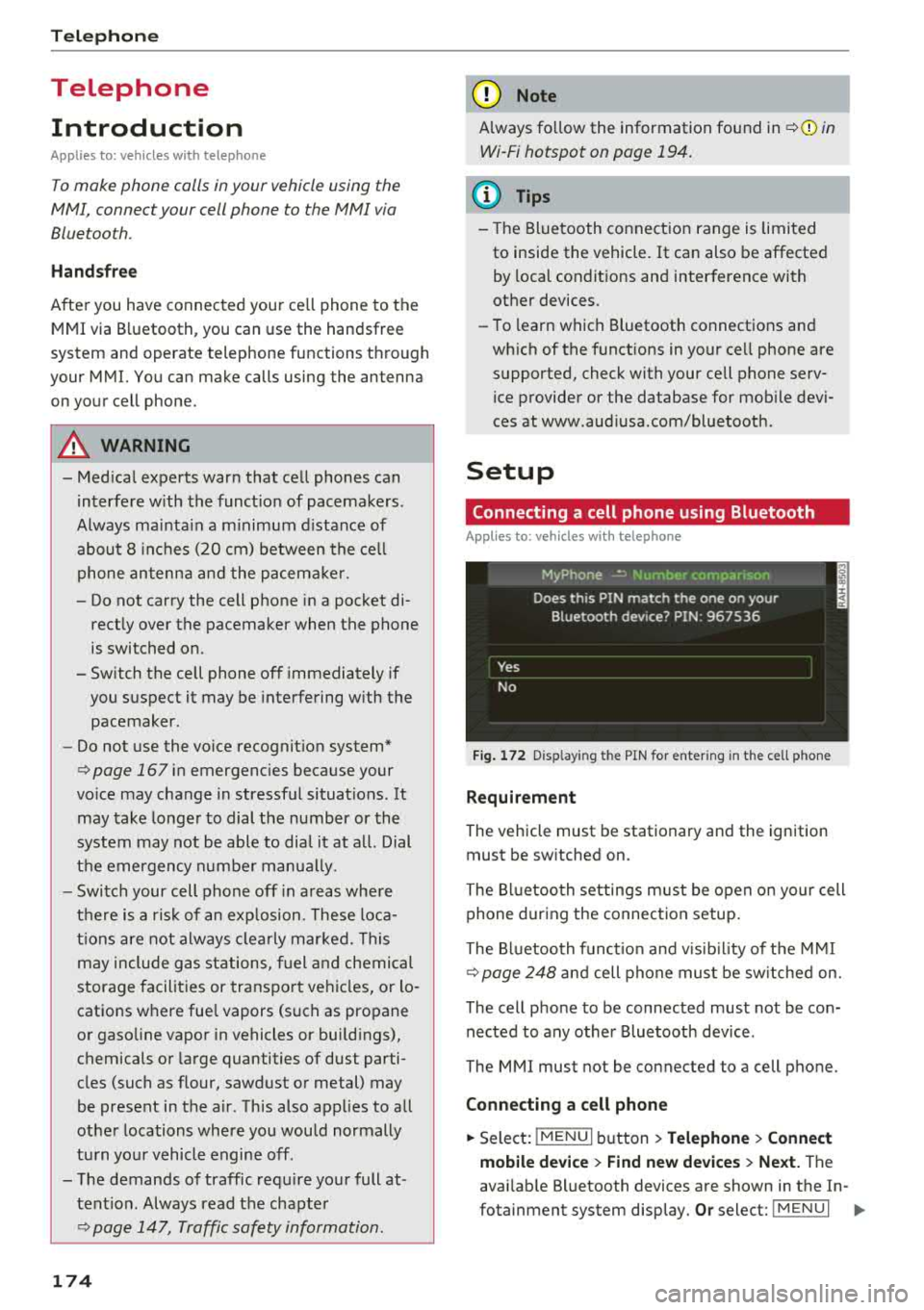
Fig . 172 D isp layin g the PIN for enter ing in t he cell phone
R equi rem ent
The vehicle must be stationary and the ignition
must be switched on.
The Bl uetooth settings m ust be open on your cell
phone during the connection setup.
The Bluetooth funct io n and v is ib il ity of the
MMI
Q page 248 and cell phone must be sw itched on.
The cell phone to be connected must not be con nected to any other Bluetooth device .
The
MMI mus t not be connected to a cell phone.
Conn ecting a c ell phon e
.. Select: IMENU I button> Telephone > Connect
mobile de vice > Find new de vic es > Next.
The
avai lab le Bluetooth devices are shown in the In-
fotainment system display.
Or select: ! MENUI 1111-