roof AUDI Q5 2018 Owners Manual
[x] Cancel search | Manufacturer: AUDI, Model Year: 2018, Model line: Q5, Model: AUDI Q5 2018Pages: 392, PDF Size: 60.56 MB
Page 4 of 392
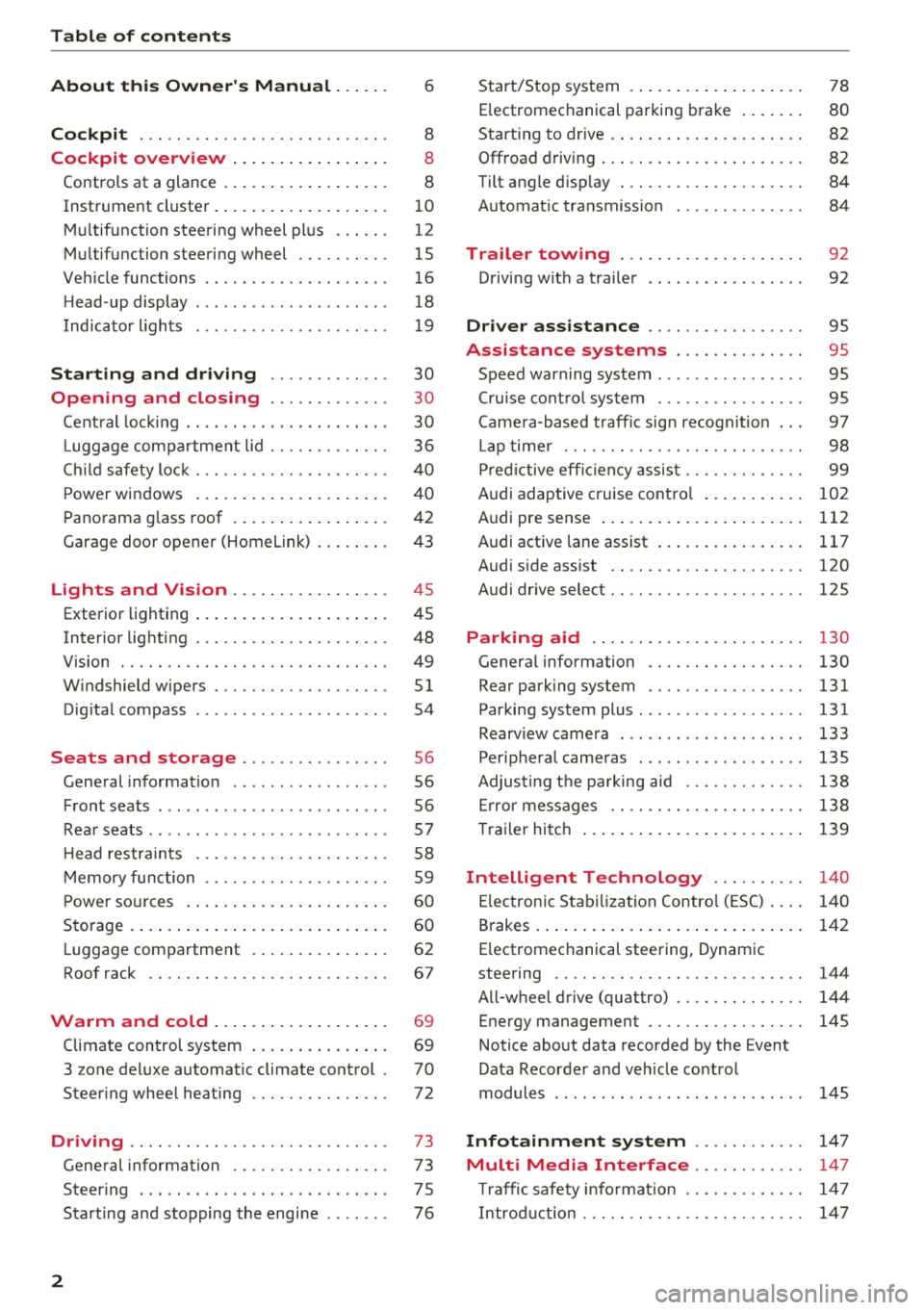
Table of contents
About this Owner's Manual. . . . . .
6
Cockpit . . . . . . . . . . . . . . . . . . . . . . . . . . . 8
Cockpit overview . . . . . . . . . . . . . . . . . 8
Controls at a glance . . . . . . . . . . . . . . . . . . 8
Instrument cluster . . . . . . . . . . . . . . . . . . .
1 0
M ultif unction steering wheel pl us . . . . . . 12
Mu ltifunction steering wheel . . . . . . . . . . 15
Ve hicle functions . . . . . . . . . . . . . . . . . . . . 16
H ead-up display . . . . . . . . . . . . . . . . . . . . . 18
Indicato r lights . . . . . . . . . . . . . . . . . . . . . 19
Starting and driving . . . . . . . . . . . . . 30
Opening and closing . . . . . . . . . . . . . 30
Cent ral lock ing . . . . . . . . . . . . . . . . . . . . . . 30
Luggage com part ment lid . . . . . . . . . . . . . 36
C hil d safety lock . . . . . . . . . . . . . . . . . . . . .
40
Powe r windows . . . . . . . . . . . . . . . . . . . . . 4 0
Panorama g lass roof . . . . . . . . . . . . . . . . . 42
Garage door opener (Homelink) . . . . . . . . 43
Lights and Vision . . . . . . . . . . . . . . . . . 45
Exterio r lighting . . . . . . . . . . . . . . . . . . . . . 45
Interior lighting . . . . . . . . . . . . . . . . . . . . . 48
V1s1on . . . . . . . . . . . . . . . . . . . . . . . . . . . . . 49
W indshield wipers . . . . . . . . . . . . . . . . . . .
51
Dig ita l compass . . . . . . . . . . . . . . . . . . . . . 54
Seats and storage . . . . . . . . . . . . . . . . 56
General information . . . . . . . . . . . . . . . . . 56
Front seats . . . . . . . . . . . . . . . . . . . . . . . . . 56
Rea r seats . . . . . . . . . . . . . . . . . . . . . . . . . .
57
H ead restra ints . . . . . . . . . . . . . . . . . . . . . 58
M emory fu nction . . . . . . . . . . . . . . . . . . . . 59
P ower so urces . . . . . . . . . . . . . . . . . . . . . . 60
Storage . . . . . . . . . . . . . . . . . . . . . . . . . . . . 60
L uggage compartment . . . . . . . . . . . . . . . 62
Roof rack . . . . . . . . . . . . . . . . . . . . . . . . . . 67
Warm and cold . . . . . . . . . . . . . . . . . . . 69
Climate control system . . . . . . . . . . . . . . . 69
3 zone del uxe automatic climate control .
70
Steering whee l heating . . . . . . . . . . . . . . . 72
Driving .... .. .. ............. .... .. . 73
Gene ral information . . . . . . . . . . . . . . . . . 73
Steer ing . . . . . . . . . . . . . . . . . . . . . . . . . . . 7 5
Starting and stopping the engi ne . . . . . . . 76
2
Start/Stop system .... ... .. ..... ... . .
E lectromechanical parking brake .. ... . .
Start ing to drive . ..... ... .. ..... ... . .
0ffroad driving . .. .. .. ............. . .
Tilt angle d isplay . .. .. ............. . .
Automat ic transmission
Trailer towing ... .. ............. . .
Driving with a tra iler .. ... .. ..... ... . .
Driver assistance .. ............. . .
Assistance systems ............. .
Speed warning system ............... .
78
80
82
82 84
84
92
92
95
95
95
Cru ise cont rol system . . . . . . . . . . . . . . . . 95
Came ra-based t raff ic sign recogn it io n . . . 97
Lap time r . . . . . . . . . . . . . . . . . . . . . . . . . . 98
P red ictive eff ic iency assis t . . . . . . . . . . . . . 99
Audi adaptive cruise contro l . . . . . . . . . . .
102
Audi pre sense . . . . . . . . . . . . . . . . . . . . . . 112
Audi active lane assist . . . . . . . . . . . . . . . . 117
Audi s ide ass ist . . . . . . . . . . . . . . . . . . . . . 120
Audi drive select . . . . . . . . . . . . . . . . . . . . . 125
Parking aid . . . . . . . . . . . . . . . . . . . . . . . 130
Genera l information . . . . . . . . . . . . . . . . . 130
Rear parking system . . . . . . . . . . . . . . . . . 131
Parking system plus ... ............... 131
Rearv iew camera . . . . . . . . . . . . . . . . . . . . 133
Per iphera l came ras . . . . . . . . . . . . . . . . . . 135
Adjus ting the pa rking aid . . . . . . . . . . . . . 138
Er ror messages . . . . . . . . . . . . . . . . . . . . . 138
T raile r hitch . . . . . . . . . . . . . . . . . . . . . . . . 139
Intelligent Technology . . . . . . . . . . 140
El ectron ic Stab iliza tion Contro l (ESC) . . . . 140
Brakes . . . . . . . . . . . . . . . . . . . . . . . . . . . . . 142
E lectromechanical steering, Dynamic
steering . . . . . . . . . . . . . . . . . . . . . . . . . . .
144
A ll-wheel drive (quattro) . . . . . . . . . . . . . . 144
Energy management . . . . . . . . . . . . . . . . . 145
Notice about data recorded by the Event
Data Recorder and veh icle co ntrol
modules . . . . . . . . . . . . . . . . . . . . . . . . . . .
145
Infotainment system . . . . . . . . . . . . 147
Multi Media Interface............ 147
Traffic safety info rmat ion . . . . . . . . . . . . . 14 7
Intro duction . . . . . . . . . . . . . . . . . . . . . . . .
14 7
Page 38 of 392
Opening and clo sin g
~ WARNING
Read and following all WARNINGS c:> .&. in De
scription on page 30.
Anti-theft alarm system
Applies to: vehicles w ith anti-t heft alarm system
If the anti -theft alarm system detects a vehicle
break-in, audio and v isual warning signals are
triggered. The anti-theft alarm system is switch
ed on or off when locking/unlocking your vehicle.
If the alarm is tr iggered, it w ill shut off automat
ically after a ce rta in amount of time .
Sw itching the alarm off manually
• To switch the alarm off, press the rrl button on
the remote control key or switch the ignition
on.
Depending on the vehicle equipment, the anti
theft alarm system may have the following fea
tures:
Break -in security feature
The alarm w ill sound if the re is a break- in at the
doors, hood, and/or luggage compartment lid.
Interior /towing protection monitoring
button*
The alarm wi ll be triggered if there are move
ments detected in the vehicle interior or if there
is a change in the veh icle ang le .
If you leave persons/an imals in the vehicle o r
have the vehicle t ransported, sw itch off the inte
rior/towing protection monitoring alarm to pre
vent the alarm from being triggered:
• Press the ffi button on the remote cont ro l key a
seco nd time
within 2 seconds. Or
• Applies to vehicles with convenience key: touch
the sensor on the door handle a second t ime
with in 2 se conds . Or
• Turn the mechanical key in the door lock to the
close pos it ion a second time
w ithin 2 second s.
• If you lock the veh icle now, then the interior/
towing protect ion monitor will stay off until
the next time the vehicle is u nlocked.
36
@ Tips
The interior/towing protection monitoring *
on ly functions correctly when the windows
and the roof* are closed.
Luggage compartment
lid
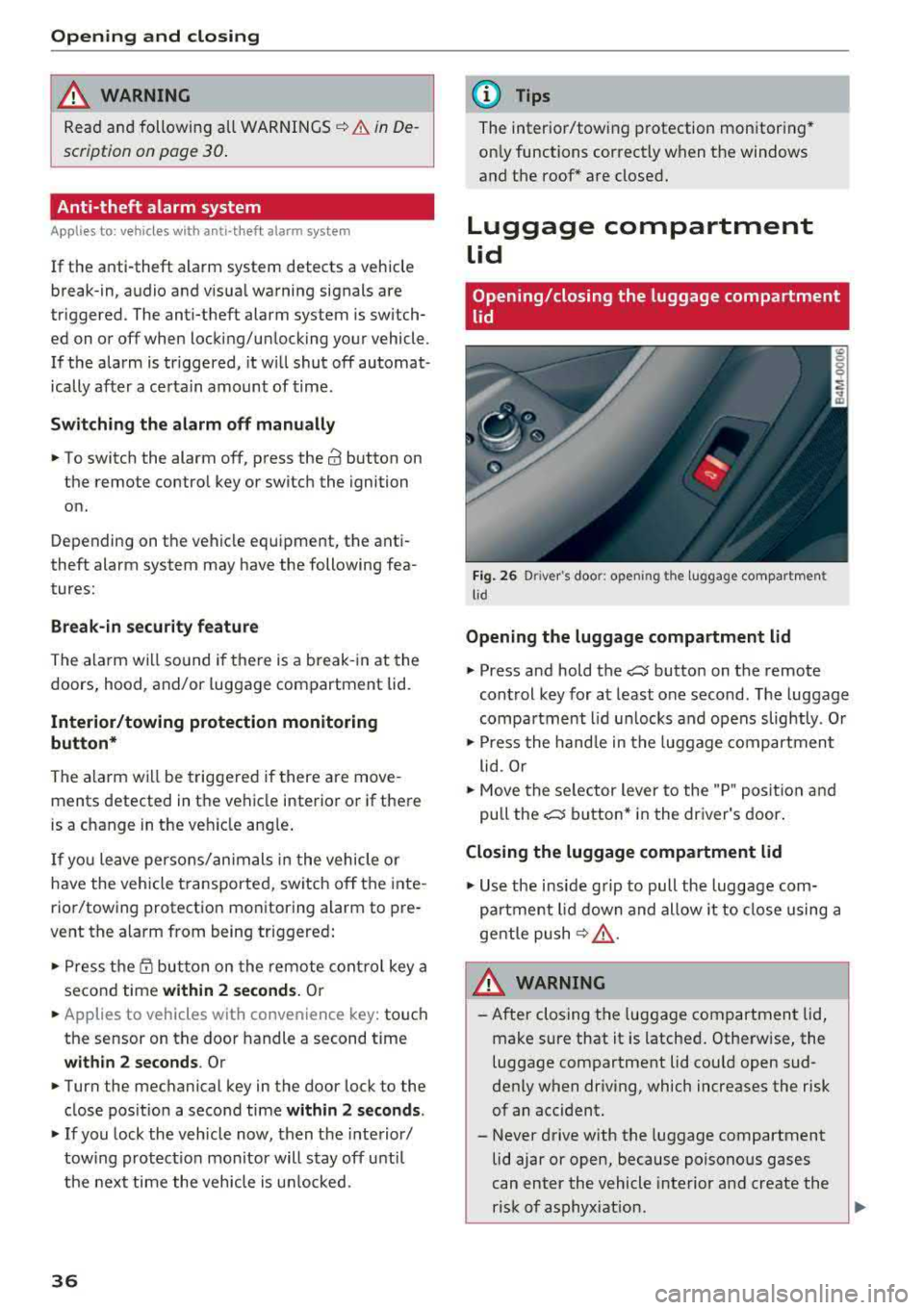
Opening/closing the luggage compartment
lid
F ig . 26 D river 's doo r: ope ning th e luggage compartmen t
l id
Opening the luggage compartment lid
• Press and hold the c::J button on the remote
control key for at least one second . The luggage
compa rtment l id u nlocks and opens slightly . Or
• Press the hand le in the luggage compartment
lid . Or
• Move the se lector lever to the "P" posit io n and
pull the
c::J button* in the dr iver's door .
Closing the luggage compartment lid
• Use the inside grip to pull the luggage com
pa rtment lid down and allow it to close using a
gentle push
¢ .&, .
&_ WARNING
-After closing the luggage compartment lid,
make sure that it is latched . Otherw ise, the
luggage compartment lid cou ld open sud
denly when driv ing, which increases the risk
of an accident.
- Never drive with the luggage compartment
lid ajar or open, because poisono us gases
can enter the vehicle interior and create the
risk of asphyx iat ion.
..,_
Page 42 of 392
Opening and closing
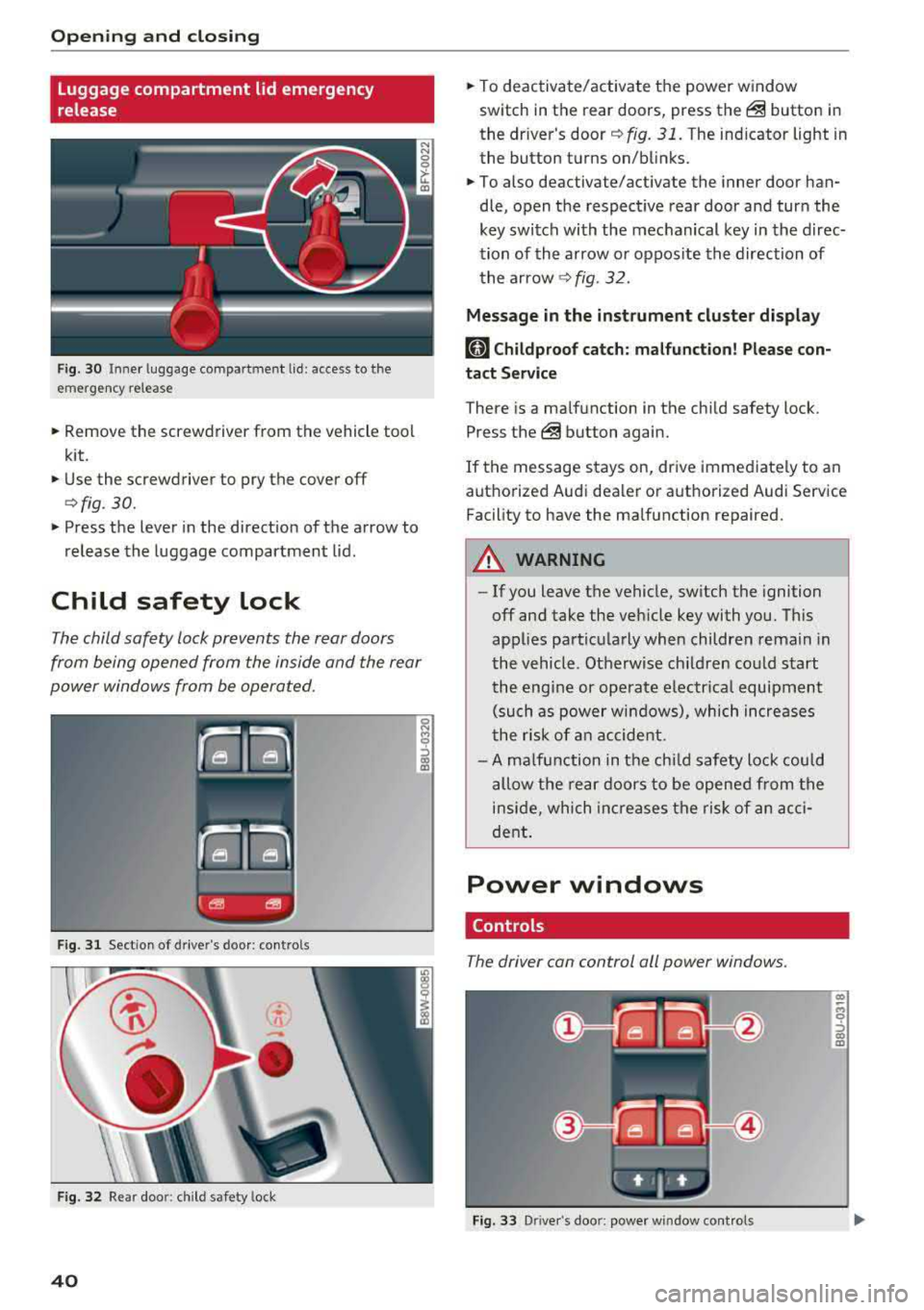
Luggage compartment lid emergency
release
Fig. 30 Inne r luggage compartment lid : access to the
emergency release
.. Remove the screwdriver from the vehicle tool
kit.
.. Use the screwdriver to pry the cover off
<=>fig. 30.
.. Press the lever in the direct ion of the arrow to
release the luggage compartment lid .
Child safety lock
The child safety lock prevents the rear doors
from being opened from the inside and the rear
power windows from be operated.
F ig. 31 Sect ion of drive r's door: contro ls
Fig . 32 Re ar doo r: child safety lock
40
.. To deactivate/activate the power window
switch in the rear doors, press
the@ button in
the driver's
door ¢ fig. 31. The indicator light in
the button turns on/blinks .
.. To also deactivate/activate the inner door han
dle, open the respect ive rear door and turn the
key switch with the mechanical key in the direc
tion of the arrow or oppos ite the direction of
the arrow
¢fig. 32.
Message in the instrument cluster display
(81 Childproof catch: malfunction! Please con
tact Service
There is a ma lfunction in the chi ld safety lock .
Press
the @ button again .
If the message stays on, drive immediate ly to an
authorized Audi dealer or authorized Audi Service
Facility to have the malfunction repaired .
A WARNING
-- If you leave the vehicle, sw itch the ignition
off and take the veh icle key with you. This
applies particularly when children remain in
the vehicle. Otherwise ch ildren could start
the engine or operate electrical equipment
(such as power windows), which increases
the ris k of an accident.
- A malfunction in the child safety lock could
allow the rear doors to be opened from the
inside, which increases the risk of an acci
dent.
Power windows
Controls
The driver can control all power windows .
Fig. 33 Driver's doo r: power window cont rols
Cl) ~
"" 0
='> Cl) m
Page 43 of 392
u co ..... N ,..._
N ..... 0 <( 0 00
All power window switches are equipped with a
two-stage function *:
Opening and clo sing the windows
.,. T o open or close the w indow completely, p ress
the sw itc h down or p ull the sw itc h up br iefly to
the second level. The operation wi ll stop if the
switch is pressed/pu lled again.
.. To se lect a position in between opened and
closed, press/pull the switch to the first leve l
until the desired window position is reached.
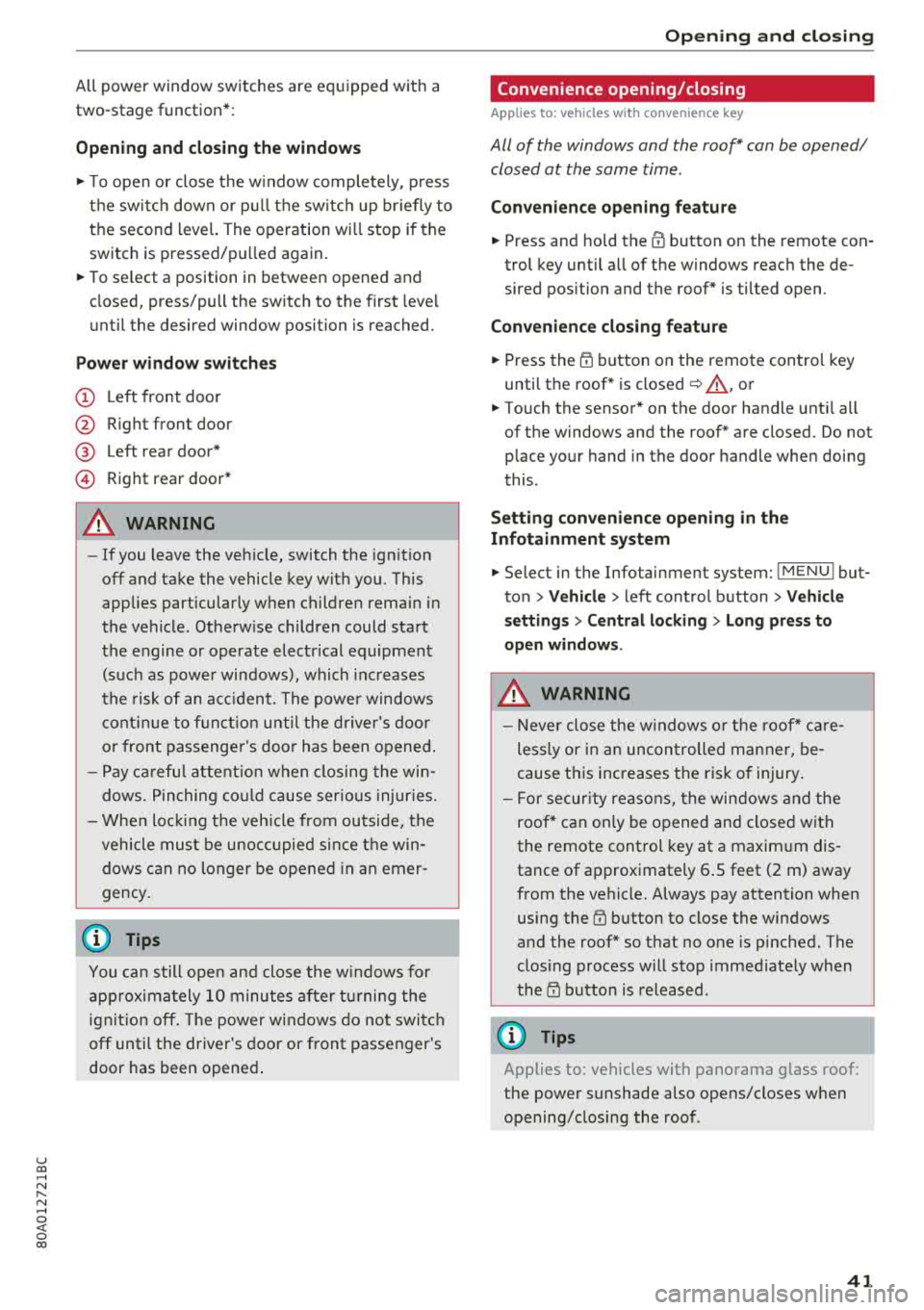
Po wer window switch es
(D Left front door
@ R ight front door
@ L eft rea r door*
© Right rear door*
A WARNING
- If you leave the veh icle, switch the ignition
off and take the vehicle key with you. This
applies particularly when children remain in
the vehicle . Otherw ise children could start
the engine or operate elect rical equipment
(such as powe r windows), which inc reases
the risk of an acc ident. The power windows
c ontin ue to f unct ion until the driver's door
or front passenge r's door has been opened .
- Pay ca reful attent ion when closing the win
dows. Pin ching co uld cause serious injur ies.
- When loc king the veh icle from outside, the
vehicle mus t be unoccupied since the win
dows can no longer be opened in an emer
gency.
(D Tips
You can still open and close the w indows for
app roxima tely 10 minutes after tu rning the
ign it ion off. The power windows do no t switch
off until the driver's door or front passenger's
door has been opene d.
Opening and cl osing
Convenience opening/closing
Applies to: vehicles with convenience key
All of the windows and the roof* con be opened/
closed at the some time .
Convenience opening f eature
.. Press and hold the @ button on the remote con
trol key until a ll of the windows reach the de
sired position and the roof* is ti lted open .
Convenience closing feature
.. Press the t'fl button on the remote control key
until the roof* is closed
~ ,&. , or
.. Touch the sensor * on the door handle unti l all
of the windows and the roof* are closed. Do not place your hand in the door handle when doing
this .
Sett ing con ven ience opening in the
Infotainment system
.. Select in the Infotainment system: I MENU ! but
ton
> V ehicle > left control button > V ehicle
s etting s
> Central locking > Long press to
open windows .
A WARNING
-Never close the w indows o r the roof* ca re
lessly or in an uncon trolled manner, be
cause this increases the risk o f injury .
- For secur ity reasons, the win dows and the
roof* c an only be opened and closed with
the remote control key at a maxim um dis
tance of approximately 6.S feet (2 m) away
from the vehicle. Always pay attention when using the
t'fl button to close the windows
and the roof * so that no one is pinched. The
clos ing process will stop immediately when
the
t'fl button is released.
(D Tips
Applies to: vehicles with panorama glass roof:
the power sunshade also opens/closes when
opening/closing the roof .
-
41
Page 44 of 392
Opening and clo sin g
Correcting power window malfunctions
You can reactivate the one-touch up/down func
tion if it malfunctions.
.. Pull the power window switch up unt il the win
dow is completely raised.
.. Release the sw itch and pull it up again for at
least one second.
Panorama glass roof
Panorama glass roof, opening/closing the
sunshade
A ppl ies to: ve hicles w ith pan orama gl ass roo f
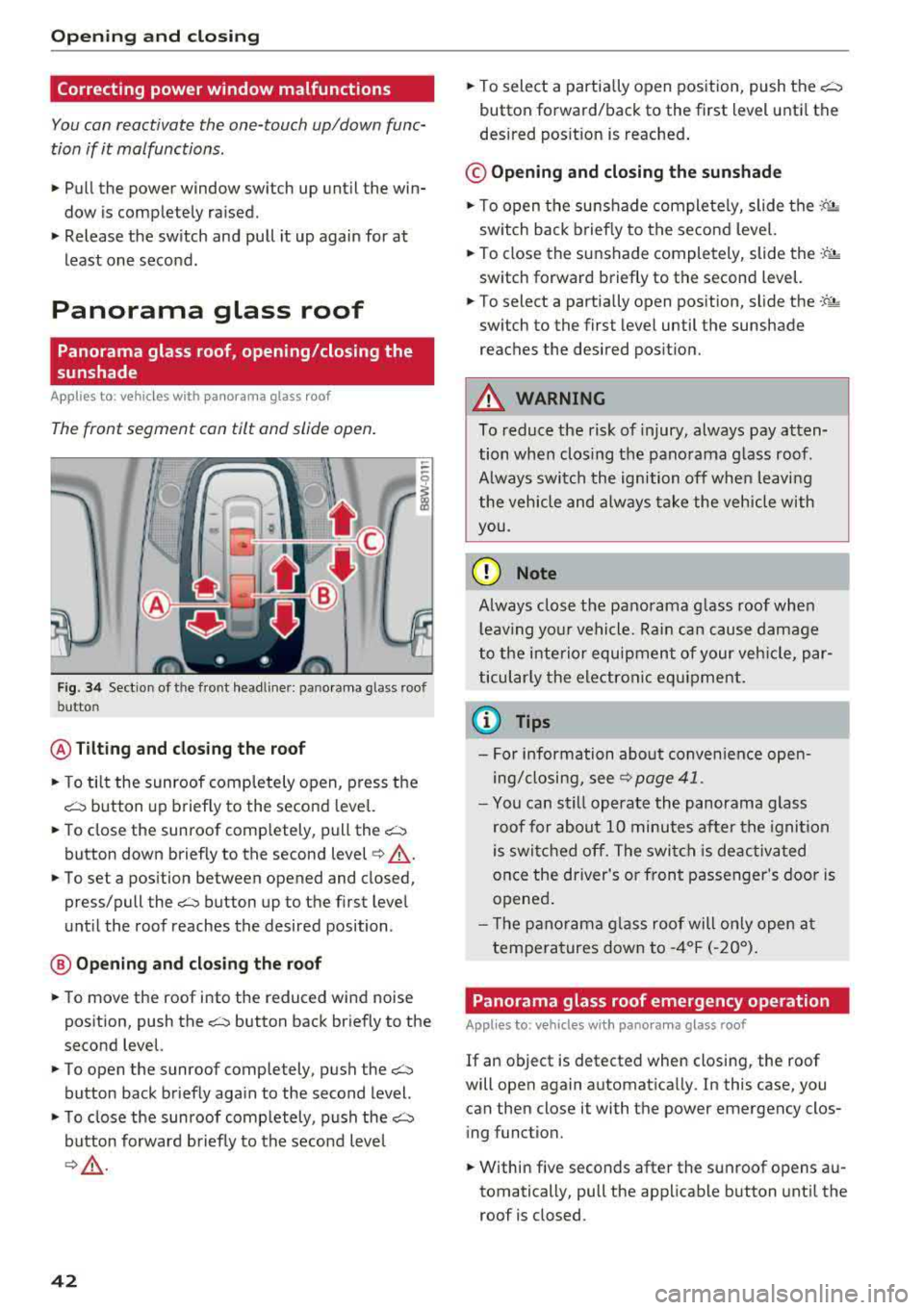
The front segment can tilt and slide open.
Fig. 34 Sect ion of the front headline r: pano rama glass roof
button
@ Tilting and clo sing th e roof
.. To tilt the sunroof comp letely open, press the
c::::::, button up briefly to the second leve l.
.,. To close the sunroof completely, pull the~
button down briefly to the second level¢_& .
.. To set a position between opened and closed,
press/pull
the~ button up to the first level
until the roof reaches the desired position .
@ Opening an d clos ing th e ro of
.,. To move the roof into the reduced wind noise
position, push
the~ button back briefly to the
second level.
.. To open the sunroof completely, push the~
button back briefly aga in to the second level.
.,. T o close the sunroof comp letely, push the c::::::,
button forward briefly to the second level
¢ ,& .
42
.,. To select a partia lly open pos ition, push the~
button forward/back to the first level unti l the
desired pos ition is reached .
© Opening and closing the sunshad e
.,. To open the sunshade completely, slide the ·-P. •·
sw itch back briefly to the second level.
.,. To close the su nshade completely, slide the -'f'~
switch forward briefly to the second level.
.,. To select a partially open position, slide the -:t- ;&
switch to the first level until the sunshade
reaches the desired posit ion.
A WARNING
To reduce the risk of injury, always pay atten
tion when clos ing the panorama g lass roof.
A lways switch the ignition off when leavi ng
the vehicle and always take the vehicle with
you.
(D Note
A lways close the panorama g lass roof when
l eav ing you r vehicle. Ra in can cause damage
to the i nterior equipment of your veh icle, par
ticular ly the electronic equ ipment.
(I) Tips
- For information about convenience open
ing/closing, see
9 page 41 .
-You can still operate the panorama glass
roof for about 10 minutes a fter the igni tion
is switched off. The swi tch is deactiv ated
once the driver's or front passenger's door is
opened .
- T he p anorama g lass roof will on ly open a t
temperatures down to
- 4°F ( -20°).
Panorama glass roof emergency operation
App lies to: vehicles wi th pano ra m a g lass ro of
If an object is detected when closing, the roof
will open again automatica lly. In this case, you
can then close it with the power emergency clos
i ng function.
.,. Within five seconds after the sunroof opens au
tomatically, pull the applicable button unti l the
roof is closed.
Page 69 of 392
u co ..... N r-N .....
~ 0 co
Removing and in stalling the cargo floor
.,. To remove the cargo floo r, p ull the entire cargo
floor toward the back of the veh icl e.
... To insert the cargo f loor, slide it toward the
backr ests until i t aud ibly engag es into the tabs
r=> fig . 79 .
Roof rack
Applies to: veh icles with roof rack
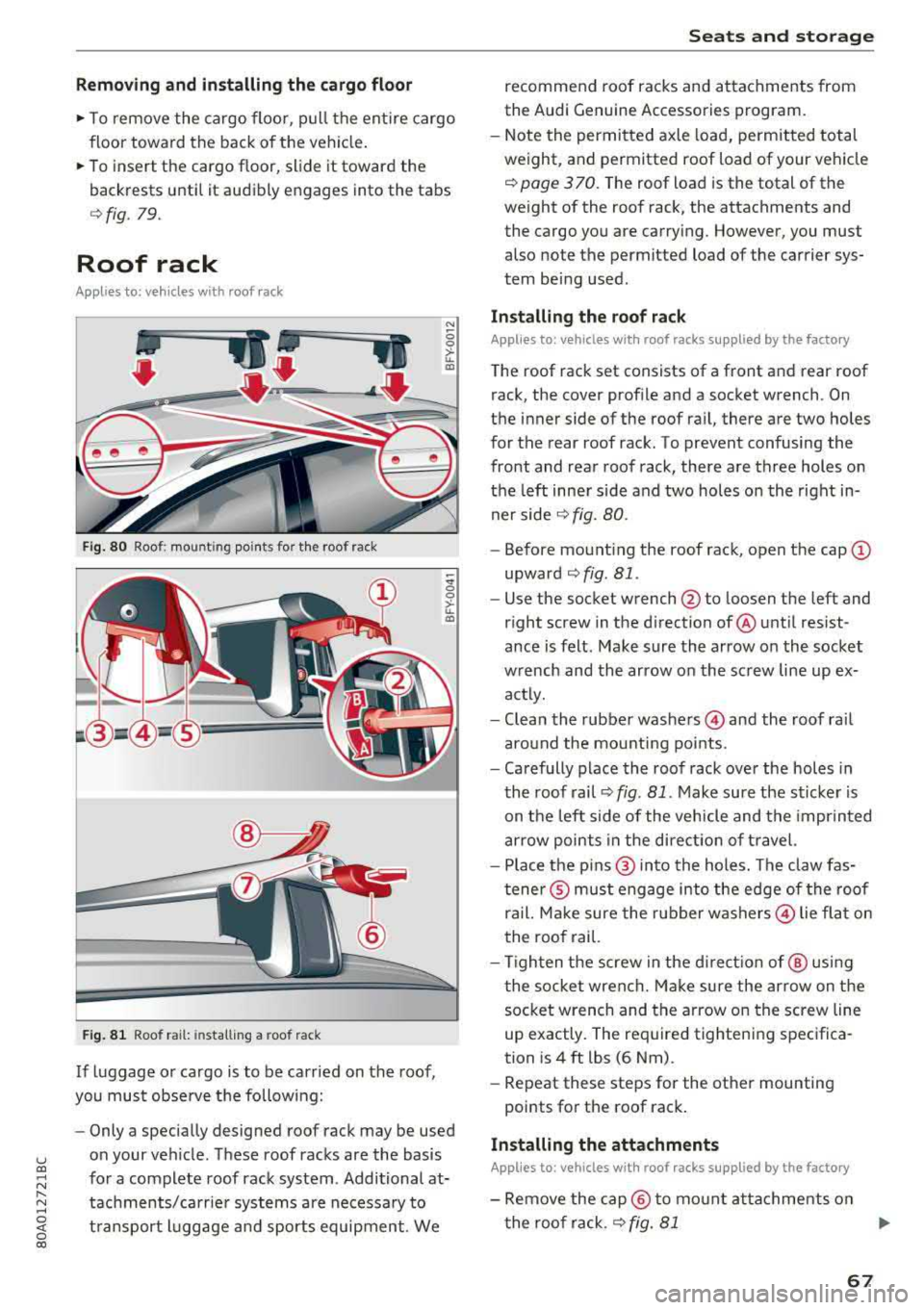
Fig. 80 Roo f: mount ing poi nts fo r th e ro of rack
F ig . 81 Roo f ra il: in sta lling a roo f ra ck
If luggage or cargo is to be carried on the roof ,
you must obse rve the following:
"' -0
0
>-u.. a,
-;!I; 0 >-u.. a,
- Only a specially designed roo f rack may be used
on your veh icle . These roof racks are the basis
for a complete roof rack system . Additional at
tachments/carrie r systems are necessary to
t ransport l uggage a nd sports equipment . We
S eats and storag e
recommend roof racks and attachme nts from
the Aud i G enu ine Accessories program .
- Note the permitted axle load, permitted total
weight , and permitted roof load of your veh icle
9 pag e 3 70 . The roof load is the total of the
weight of the roof rack, the attachments and
the cargo you are carrying . However, you must
also no te the permit ted load o f the carrier sys
tem being used .
Installing the ro of r ack
Applies to: vehicles with roof racks supplied by the factory
The roof rack set consists of a front and rear roof
rack, the cover profile and a socket wrench . On
the inner side of the roof rail, the re are two holes
for the rear roof rack. To prevent confusing the
front and rear roof rack, there a re three holes on
the left inner side and two holes on the right in
ner side
9 fig. 80 .
-Before mount ing the roof rack, open the cap (D
upward 9 fig . Bl .
- Use the socket wrench
@ to loo sen the left and
r ight screw in the d irection of @unt il res ist
ance is felt. Make sure the arrow on the socket
wrench and the arrow on the screw line up ex
actly.
- Clean the rubber
washers @ and the roof rai l
around the mounting points .
- Carefully place the roof rack over the holes in
the roof rail '=>
fig. 81 . Make sure the sticker is
on the left side of the vehicle and the imprinted
arrow points in the direct ion of travel.
- Place the p ins @ into the holes. The claw fas
tene r® must engage into the edge of the roof
ra il. Ma ke sure the rubber
washers @ lie flat on
the roof rai l.
- Tighten the screw in the directio n of @ using
t he socket wrench. Make sure the arrow on the
socket wrench and the arrow on the screw line
up exactly. The required tight ening specifica
tion is 4 ft lbs (6 Nm) .
- Repeat these steps for the other mounting
po ints for th e roof rack .
Installing the attachments
Applies to: vehicles with roof racks supplied by the factory
- Remove the cap@ to mo unt at tachments on
the roof rack .
9 fig. 81 ..,
67
Page 70 of 392
Seat s and sto rage
- Slide the attachment into the T-groove (z) .
- T ighten the a tt a chmen t accord ing to the roof
rack insta llation instructions .
- Close the cap @.
Installing the cover p rofile
Applies to: vehicles with roof racks supplied by the factory
-After you have mounted the attachments, seal
the open ings in the T-groove
0 with the cover
profi le @ .
- If you do not want to use the attachment, seal
the whole T-groove
0 w ith the cover profile
® ·
- If necessary, cut the cover prof ile to the neces-
sa ry length .
A WARNING
-Follow the installat io n instructions p rovided
with the roof ra ck sys tem. If you do not se
c u re the roof rac k sys tem and objec ts on the
roof cor rectly, they co uld come loose from
the vehicle and cause an accident .
- T he r is k of an accident increases when using
a roof rack system, because it changes the
driving c haracteristics by shifting the center
of gravity and/or the increasing the surface
area exposed to wind. You may need to
adapt your driv ing style and speed to the
current conditions . We recommend that you
do not dr ive faster tha n 80 mph (130 km/
h).
- Distribute the cargo evenly on the roof rack
and do not exceed the maximum width o r
the max imum tota l roof load weight .
- Before every tr ip, a ll bolts and co nnect ions
on the roof rack must be checked. Tighten
them if necessary and re che ck t hem regular
ly. If you do not do th is, there is a higher
risk of the roof rack o r the a ttachme nts
loosening or fa lling off .
(LlJ) Note
-If yo u use o ther roof l uggage rac k systems
o r do no t instal l the roof rac ks as s pec ified,
then a ny damage to the vehicle is no t cov
ered by the warranty . Caref ully follow t he
assembly and insta llation instructions i n
cluded with the roof rack ca rrier system.
68
- T o red uce the risk of damage, you must re
move the roof rack and attachment before
tak ing yo ur vehicle thro ugh an a utomat ic
car wash.
- Ma ke sure that the luggage compartment
lid and the panorama g lass roof* do not
come into contact with objects on the roof
w hen they are open.
@) For the sake of the environment
Your vehicle wi ll use more fue l due to the in
creased wind resistance. So remove the roof rack after us ing it.
(D Tips
Applies to: vehicles with roof racks supplied
by the factory: when installing the roof rack
supplied by the factory on the roof ra il, sensor
technology is used to adjust the ESC to any p ossib le change in the vehicle's cen ter of
g ravity resulting from the load.
Page 71 of 392
u co ..... N r--N ..... 0 <( 0 00
Warm and cold Climate control system
Description
The climate control system warms , cools and re
moves humidity from the air in the vehicle inte ri
or. It is the most effective when the w indows and
sunroof* are closed . If there is a bu ild -up of heat
inside the ve hicle, ventilation can he lp to speed
up the cooling process.
I n all he ating mode f unct ions except for
defrost ,
the blower on ly switches to a higher speed once
the engine coolant has reached a sufficient tem
perature .
Pollutant filter
The pollutant filte r removes pollutants such as
d ust and pollen from the a ir.
Key recognition
The climate control settings are automatically
sto red and assig ned to the remote control key
that is i n use .
Warm and c old
@ For the sake of the environment
If you wo uld like to reduce fue l consumption,
switch the air conditioning off. T his w ill also
r educe em issions.
(D Tips
- To prevent interference with the heating
and cooling output and to prevent the win
dows from fogging over, the a ir intake in
fro nt of the w indshie ld must be free of ice,
snow o r leaves .
- Condensation from the coo ling system can
dr ip and form a pudd le of water under the
veh icle . Th is is norma l and does not mean
t here is a lea k.
- The e nergy management system may tem
pora rily switch off certa in functions, s uch as
the seat heati ng* o r rear window defogger .
Th ese sys tems are av ailable aga in as soon
as t he e nergy supply has been restore d.
69
Page 76 of 392

Drivin g
engaged, for examp le when you notice that the
next traffic light is red . This produces an engine
braking effect, which helps to protect the brakes
and tires and reduces the emissions and fuel con
sumpt ion to zero (fuel shut-off during decelera
tion) .
Shift effici entl y
Upshifting earlier is an effective way to save fuel.
Staying in a gear too long uses fue l unnecessari
ly .
Press down on the acce lerator peda l slowly and
avoid "kick -down".
Avoid full acceleration
You shou ld rare ly t ravel at the maximum vehicle
speed. High speeds cause a d isp ropor tionately
high increase in fuel consumption, emissions and
traffic noise . Driving more slowly saves fue l.
Reduce idling time
The Start/Stop system* helps to reduce the idling
time automatically. In vehicles witho ut the Start/
Stop system* , it is
efficient to switch the eng ine
off when stopped at rai lroad crossings and long
red lights . Stopping the engine for
30 -40 sec
onds already saves more fu el than the amount of
extra fuel needed to restart the engine.
It t akes a very long time in idle to wa rm the en
gine up to operating temperature . Wear and
emissions are especially high in the warm -up
phase. Therefore, you should begin driving im
mediately after starting the engine. Avoid high
RPMs while do ing th is .
Ha ve mainten anc e performed regularly
By having maintenance performed regu lar ly on
your veh icle, you can he lp to reduc e fuel con
sumpt ion before you even start to dr ive. The
maintenance condition of your vehicle not only
affects traffic safety and long -term value but al
so impacts fuel consumption . A poorly main
tained engine can lead to fuel consumpt ion that
is
1 0% hi gher tha n normal.
74
Avoid short trip s
The engine and exh aust clean ing system mus t
reach their optima l operating temperature to ef
fective ly reduce consumption and emissions.
A cold engine uses a d isp roportionately high
amoun t of fue l. The eng ine re aches opera ting
temperat ure and cons umption norma lizes on ly
after approximate ly 2.5 mi les (4 km) .
Check the tire pressure
To save fue l, ma ke sure the t ires are always in
flated to the correct
press ure~ page 335. The
fuel consumpt ion can increase by
5% if the pres
sure is on ly
0 .5 bar too low. Due to t he increased
rolling resistance, low tire pressures wi ll also
l ead to greater tire wear and will affect driving
behavior.
Do not drive on winter tires year -round, as this
will consume up to
10% more fue l.
Eliminat e unnecessary weight
Since eve ry po und of ext ra weight increases f uel
consump tion, a quick inspec tion of the luggage
compartment may be worth it to avoid unneces
sary weight .
When not be ing used , a roof rack sho uld be re
moved to decrease the w ind resis tance of the ve
hicle . This will save you approx imately
12% fue l
at speeds from
6 2 -75 mph (100 -120 km/h) .
Save energy
The eng ine d rives the generator, which generates
electr ic ity; the f uel consumpt ion also inc reases
wi th the demand for e lec tricity . T he refore, sw itch
electrica l eq uipment o ff when you no longe r
need it . Examples of eq uipment that uses a lot of
energy are air blowers at a high setting, the rear
window defogger and seat heating* .
@ Note
Do not leave engine idling unattended after
starting. If warning lights s houl d come on to
i ndicate improper operation, they would go
unheeded. Extended idling also produces
h eat, which could result in overheating or
other damage to the veh icle or othe r proper
ty .
Page 115 of 392
u co ..... N r--N ..... 0 <( 0 00
-Closi ng the w indows and sunroof*
- Activ ati ng the eme rgency fl ashe rs
l ).
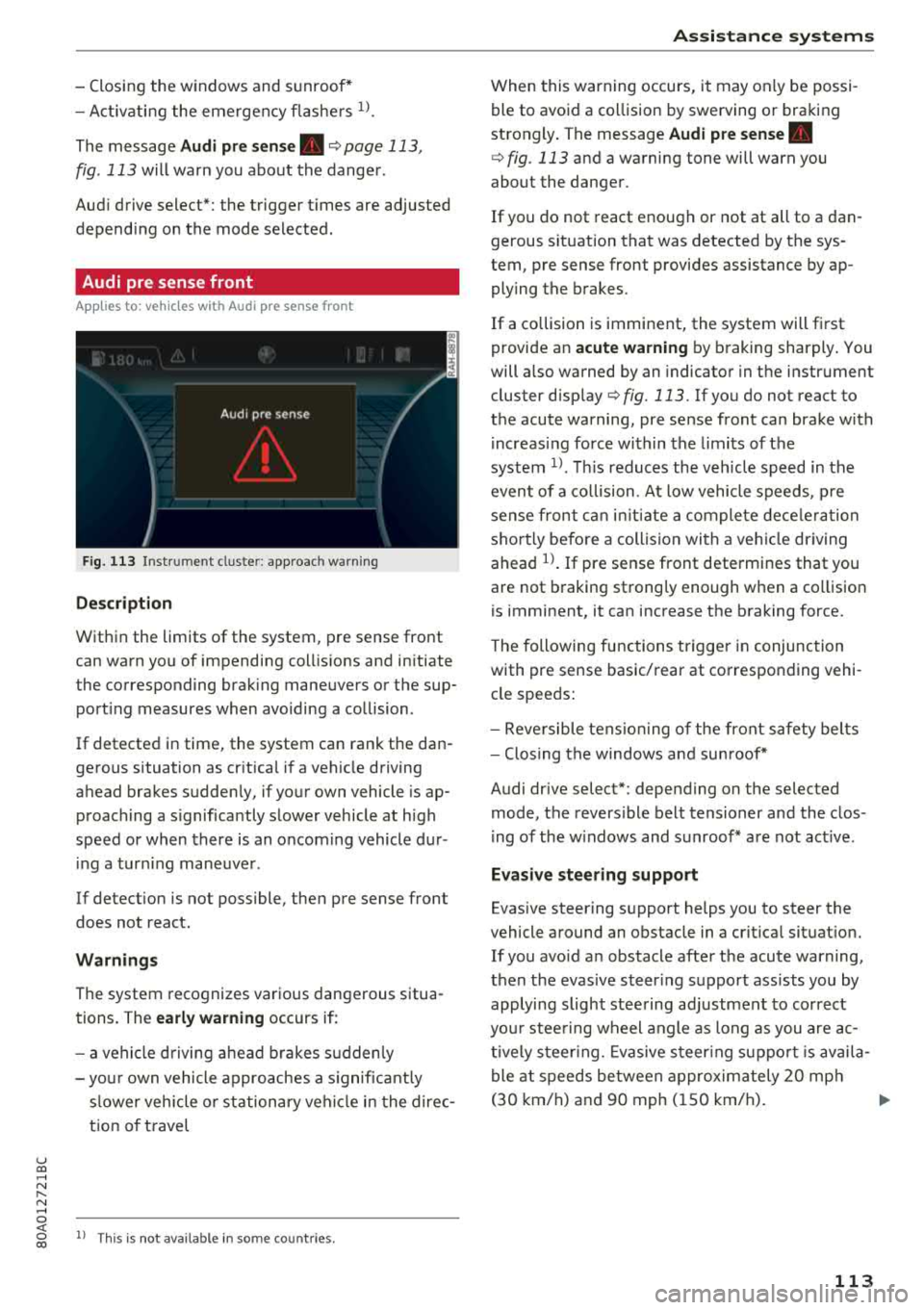
The message Audi pre sen se. ¢ page 113,
fig . 113 will warn you about the dange r.
Aud i drive select*: the trigger t imes are adjusted
depend ing on the mode selected .
Audi pre sense front
Applies to: vehicles with Audi pre sense front
Fig . 113 In strumen t clu ste r: approac h warn ing
Descr iption
Within the limits of the system, pre sense front
can warn yo u of impending coll is ions and in itiate
the corresponding brak ing maneuvers or the sup
port ing measures when avoiding a co llision .
If detected in time, the system can rank the dan
gerous situation as cr itica l if a vehicle driving
ahead brakes sudden ly, if you r own vehicle is ap
proaching a s ignificantly s lower vehicle at h igh
speed or when there is an oncom ing vehicle dur
i ng a tur ning maneuve r.
If detection is not poss ible, then pre sense front
does not react.
Warnings
The system recognizes various dange rous situa
tions. The
early warning occurs if:
- a vehicle d riving ahe ad brakes s udden ly
- yo ur own vehicle approaches a s ignificant ly
s lower veh icle o r st ation ary veh icle in the dire c
t ion of t ravel
ll Thi s is not availa ble in so m e co untrie s.
A ss istance systems
When this warning occurs, it may on ly be possi
ble to avoid a co llision by swerving o r braking
strongly . The message
Audi pre sense.
¢ fig . 113 and a wa rning tone will warn you
about the danger .
If you do not react enough or not at all to a dan
gerous sit uat ion that was detected by the sys
tem, p re sense front provides assistance by ap
ply ing the b rakes .
If a collision is imminent, the system will first
provide a n
acute warning by braking sharply . You
will a lso warned by an indicato r in the instr ument
cluster
disp lay¢ fig. 113 . If you do not react to
the acute warning, pre sense front can brake w ith
i ncreas ing fo rce wi thin the limits of the
system
1> . Thi s reduces the veh icle speed in the
even t of a co llision . At low vehicle speeds, p re
sense fron t can ini tia te a complete dece le ra tion
shor tly be fore a collision wi th a ve hicle dr iving
ahead
l)_ If pre sense front determi nes that you
are not braking strong ly enough when a co llision
is imminent, it can increase t he b raking force.
T he following fu nctions t rigge r in conjunction
with pre sense basic/rea r at co rresponding vehi
cle speeds:
- Reve rsible tens ion ing of the front safety bel ts
- Clos ing the windows and sun roof*
Audi drive select*: depending on the selec ted
mode, the revers ible be lt tensioner and the clos
i ng of the w indows and s unroof * are not act ive .
Evasive steering support
Evas ive steering s upport helps you to steer the
vehicle a round an obstacle in a crit ica l situat ion.
If you avo id a n obstacle after the acute warning,
then the evasive s teer ing suppo rt ass ists you by
applying sligh t stee ring adjustmen t to correct
yo ur stee ring w heel angle as long as you are ac
t ive ly s teer ing. Evasive s teer ing su ppo rt i s avai la
ble at speeds be tween approx im ately 20 mp h
( 3 0 km/h) and 9 0 mph ( 150 km/h) .
..,.
113