sport mode AUDI Q5 2018 Owners Manual
[x] Cancel search | Manufacturer: AUDI, Model Year: 2018, Model line: Q5, Model: AUDI Q5 2018Pages: 392, PDF Size: 60.56 MB
Page 23 of 392
u co ..... N r--N ..... 0 <( 0 00
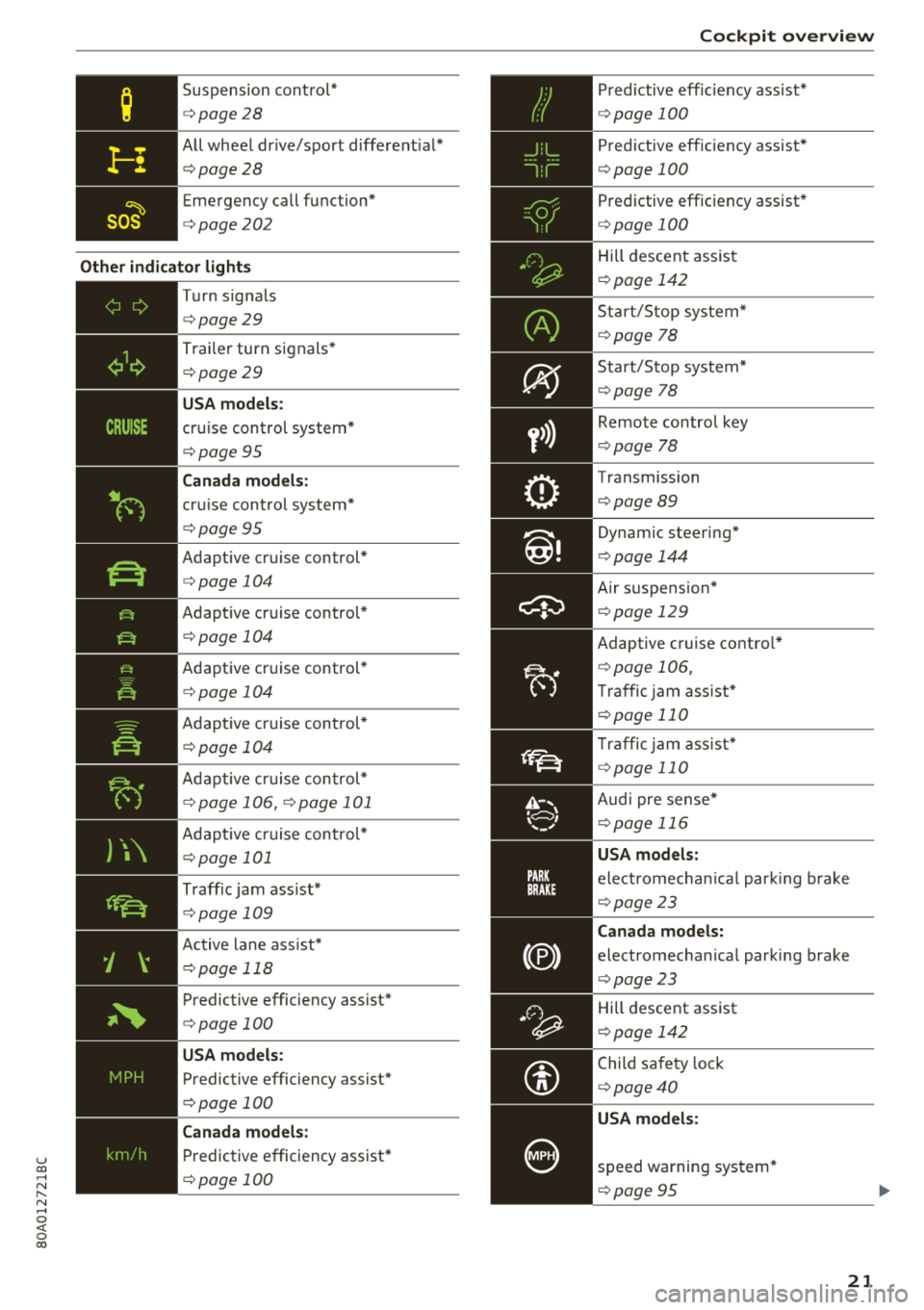
Suspension cont rol*
c:> page 28
All wheel dr ive/sport different ial*
c:> page28
Emergency call function*
c:>page202
Other indic ato r ligh ts
-
~
--------------
Turn signa ls
c:> page 29
Trai ler turn signals *
c:>page 29
USA model s:
cruise control system *
c:>page 95
Canada models :
cruise control system*
c:> page 95
Adapt ive cruise control*
c:> page 104
Adapt ive cruise control*
c:> page 104
Adaptive cruise control*
c:> page 104
Adapt ive cr uise control*
c:> page 104
Adapt ive cr uise con trol*
c:> page 106, c:> page 101
Adapt ive cr uise control*
c:> page 101
Traff ic jam ass ist*
c:> page 109
Active lane ass ist*
c:> page 118
Predictive efficiency assist*
c:> page 100
USA models :
Predictive efficiency assist*
c:> page 100
Canada models :
Predictive efficiency assist*
c:> page 100
Coc kpit o ver view
P red ictive eff ic iency assist*
c:> page 100
Pred ictive eff ic iency assist*
c:> page 100
Predictive efficiency assist*
c:> page 100
Hill descent assis t
c:>page 142
Start/Stop system*
c:>page 78
Start/Stop system*
c:>page 78
Remote control key
c:>page 78
Transmission
c:>page 89
Dynam ic steering*
c:> page 144
Air suspension*
c:> page 129
Adaptive cruise contro l*
c:> page 106,
Traffic jam assist*
c:> page 110
Traffic jam assist*
c:> page 110
Audi pre sense *
c:>page 116
USA models:
electromechan ica l par king b rake
c:> page 23
Canada models:
electromechan ica l park ing brake
c:> page 23
Hill descent assist
c:>page 142
Child sa fety lo ck
c:> page 40
USA models :
speed warning system*
c:>page 95
21
Page 31 of 392
u co ..... N ,..._
N ..... 0 <( 0 00
The transmission temperature has increased s ig
nificant ly due to the sporty driving manner. Drive
in a less sporty manner until the temperature re
turns to the normal range and the indicator light
switches of .
A WARNING
Contact an authorized Audi dealer or author
ized Aud i Serv ice Facility if the all whee l dr ive/
sport diffe rential is fa ulty o r malfunctioning .
The repair must be performed by trained per
sonnel using the correct oil in or der to ensure
safety .
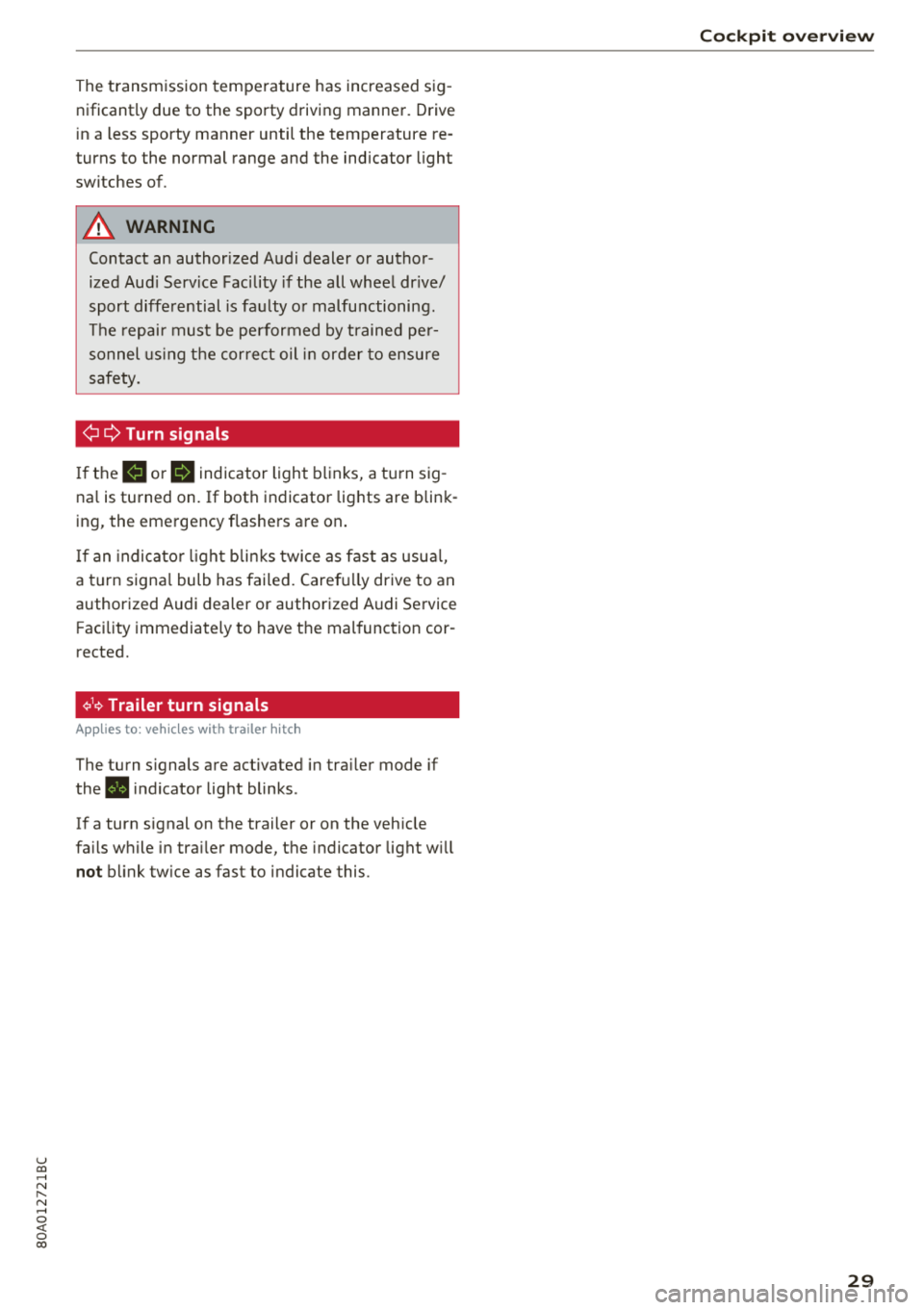
¢¢Turn signals
If the B or II indicator light b links, a t urn sig
na l is turned on. If both indicator lig hts are blink
ing, the eme rgency flashe rs a re on .
I f an indica to r li ght bli nks twice as fast as usu al,
a tu rn signa l bulb has failed . Caref ully drive to an
authorized Audi dealer or authorized Audi Service Facility immediately to have t he mal function cor
rected.
¢19 Trailer turn signals
Appl ies to : ve hicl es w ith traile r hitch
The turn s ignals are activated in tra iler mode if
the . in d icator lig ht blinks .
I f a turn signal on the trailer or on the veh icle
fa ils w hile in tra ile r mode, the indicator light w ill
not blink twice as fast to indicate this .
Cockpit o ver view
29
Page 86 of 392
Driving
Drive quick ly through sandy or marshy off-road
sections and do not stop , if at all poss ibl e.
Driving through water
Also read the information found in ¢ page 73.
Driving on a slope
If you a re ever unable to dr ive up a hill , do not try
to turn around . Drive back down in
re verse in
stead. Otherwise you r un the r isk o f tipping over .
If the vehicle threatens to tip over when dr iving
across a slope , you mu st immediately stee r
downhill in the direction of the slope.
Do not park your vehicle on steep hills.
To reduce the r isk of t ipping over, dr ive on hills in
the direction of the downward s lope (fa ll line)
-
never crosswise .
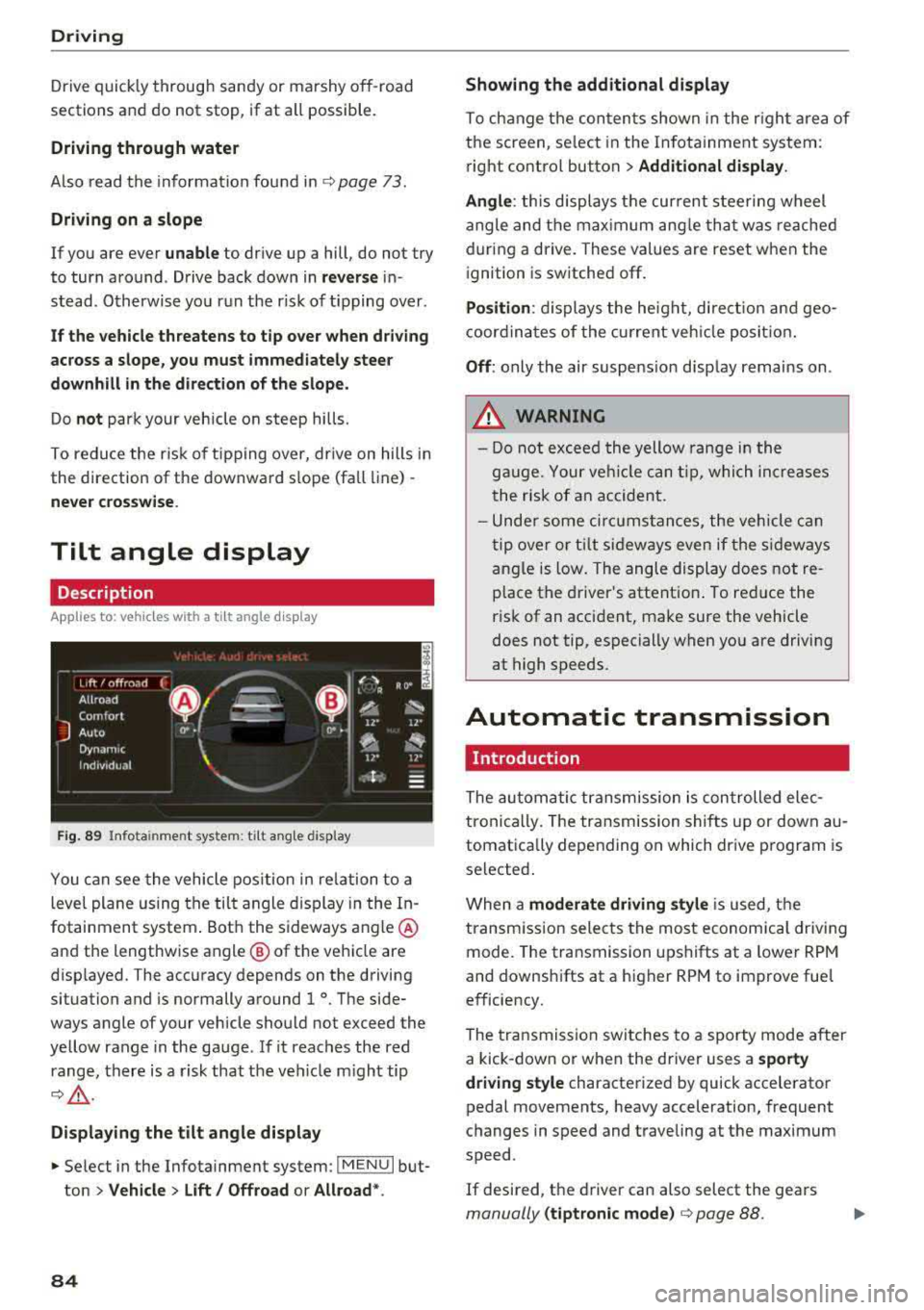
Tilt angle display
Description
Applies to: vehicles with a ti lt angle display
F ig. 89 I nfo ta in me nt syste m: tilt ang le d ispla y
You c an see the vehicle pos ition in re lation to a
leve l plane us ing the tilt angle display in the In
fotainment system . Bot h the sideways angle @
and the lengthwise angle @ of the vehicle are
disp layed. The accuracy depends on the driving
situation and is normally a round 1
°. The side
ways angle of your vehicle should no t exceed the
ye llow range in the gauge . If it reaches the red
range, there is a risk that the ve hicle m ight tip
¢ ,&. .
Displaying the tilt angle display
~ Select in the Infotainment system : IME NUI but
ton
> Vehicle > Lift / Offroad or Allroad *.
84
Showing the additional display
To ch ange the con ten ts shown in the r igh t ar ea of
t h e screen, se lect in the In fo ta inment system :
r ight contro l button
> Additional display.
Angle :
this displays t he cur rent stee ring wheel
angle and t he max imum ang le th at was re ached
dur ing a drive . These values are reset when the
i gnition is switche d off .
Position : displays the he ig ht, di re ct io n a nd geo
coor din at es of the cur rent veh icle posit io n.
Off : only the air suspe nsio n disp lay remains on .
A WARNING
- Do not excee d the yellow range in the
g au ge. Your ve hicle can t ip, whi ch in cre as es
t he risk of an accident.
- Unde r some ci rcumstan ce s, the vehicle can
t ip ove r or til t sid eways eve n if the s ideways
angle is low. The angle display does not re
p lace the driver's attent io n. To re duce the
risk of an accident, make sure the vehicle
does not tip, especially when yo u are driving
at high speeds.
Automatic transmission
Introduction
The au tom atic transmission is con trolled ele c
tronically. The transmission shifts up or down au
tomat ica lly depending on which dr ive p rogram is
selected .
When a
moderate driving style i s used, t he
transm iss ion selec ts the most economica l driv ing
mode. The transmission upshifts at a lower RPM
and downshifts at a higher RPM to improve fue l
e fficiency.
The tra nsmission switches to a sporty mode after
a kick-down or when the driver uses a
sporty
driving style
characterized by quick accelerator
pedal movements, heavy acceleration, frequent
changes in speed and t raveling at the max imum
speed .
If desired, th e driver can also select the gears
manually (tiptronic mode ) ¢ page 88.
Page 88 of 392
Drivin g
from rolling in t he "N " selector lever position, so
you need to set the pa rking
brake<®> ¢ page 80.
You must use the parking lock emergency release
before towing the
vehicle ¢ page 90.
R-Reverse
The reverse gear is engaged in this pos ition . Only
select reverse gear when the veh icle is stationary
and the eng ine is running at idle
speed ¢.& . To
engage the "R" se lecto r lever posit ion, p ress the
brake pedal , press the lock ing button
CD on the
selector lever, and select the "R " position
¢ fig . 90.
A confirmation tone w ill sound when the reve rse
gear is engaged .
N
· N eutral (idle )
The transm ission is in idle in this pos ition . To en
gage the "N" selector lever position, press the loc king button
CD on the se lector lever and sh ift
into t he "N " posit io n
¢ fig. 90.
If you sw itch the engine off when the "N" selector
lever position is se lected, the transmission re
mains in "N " for app rox imately 30 minutes and
t hen "P " is engaged.
You cannot select the "N " pos ition when the ign i
tion is sw itched off. When d riving through an au
tomatic ca r wash, first select the "N " posi tion and
t hen t urn the engine off.
For safety reasons, the vehicle cannot be locked
when the transm ission is in the "N" pos ition .
DIS· Dr iving forward
When the transmission is in the "D/S" pos it ion, it
can be operated e ither in the normal "D " mode or
in the "S" sport mode . Move the selector lever
back to engage the "S" spo rt mode . You can o nly
select the "S" se lector lever position when the "D"
or " E" pos it io n is selected. To sele ct the "D" or " E"
position again w hen "S " is engaged, move these
lecto r leve r
back ¢.& . To shi ft from "N" to "D"
when traveling at speeds below 1 mph (2 km/h), pr ess th e brak e pedal and s hift into the "D" posi
tion ¢_& .
In t he normal mode "D" , the transmission a uto
matica lly selects the suitab le gear ratio . It de -
86
pends on engine load , vehicle speed and driving
sty le.
Se lect t he sport mod e "S " for sporty dr iv ing. The
vehicle makes f ull use of the eng ine's power.
S hi ft ing may become noticeable when accelerat
ing .
The "S" se lector lever posi tion engages automati
c all y w hen you select the dynam ic* mode in drive
select.
A WARNING
Read and fo llow all WARNINGS .
- The vehi cle can roll even i f the ig nit ion is
switched off .
- P owe r is s till tra nsmi tted to t he wheels
when t he engine is running at idle . To pre
vent the vehicle from "creeping", yo u must
keep your foot on the b rake in a ll selector
lever positions (except "P " and "N") when
the engine is ru nning.
- Before open ing the hood, select the "P " se
lector lever pos it ion and set the parking
brake. This reduces the risk of an acc ident .
Always read and follow the app licab le warn
ings ¢ page 314, Working in the engine
compartment.
(D Tips
If you accide nta lly select "N" while dr iv ing,
take your foot off the accelerator pedal and
wait fo r the e ng ine to slow down to idle be
fo re selecti ng "D " or "S" .
Driving tips
Starting the engine
.,. The "P" or "N " pos it io n m ust be selected.
St arting from a stop
.,. Press and hold the brake peda l.
.,. Start the engine ¢ page 76.
.,. Press the locking button CD on the selector lev
er a nd se lect the "D", "E", "S " or "R " pos it io n
¢ page 85.
.,. Wa it a mome nt until the t ransmiss ion sh ifts.
You will notice a slig ht movement when the
gear engages .
Page 116 of 392
Ass is tanc e system s
Turn a ssist
When start ing to dr ive and up to speeds of maxi
mum 6 mph (10 km/h), the turn assist uses a
braking intervention to prevent your vehicle from
colliding with an oncoming vehicle when turning left or right (available in certain co untries). The
braking intervent ion causes your vehicle to stay
in its lane.
A WARNING
-Pre sense front cannot overcome the laws of
physics . It is a system des igned to assist and
it cannot prevent a collision in every circum
sta nce. The d rive r must a lways i ntervene.
T he d river is always respons ib le for b raking
at the correct time. Do not let the increased
safety provided tempt you into taking risks .
This cou ld increase your risk of a co llision .
-The system can deploy incorrectly d ue to
system -specific limits .
-Please note that the sensors and the camera
do not always detect all objects or lane
markings. This increases the risk of an acci
dent.
-Pre sense front does not react to people, an
ima ls or ob jects that are crossing the veh i
cle's path or that are diff icu lt to detect
c::> &
in General information on page 103.
-Reflective ob jects s uch as guard rails or the
entrance to a tunnel, heavy rain and ice can
affect the function of the radar sensors and
the system's ability to detect a coll is io n risk.
{UJ) Note
The sensors can be displaced by impacts or
damage to the bumper, whee l housing and
underbody . Pre sense fro nt can be impa ired
by this. Have an authorized Aud i dealer or au
thori zed Aud i Service Fac ility check the ir func
tion.
(D Tips
-You can cancel the brak ing with increasing
fo rce that is in it iated by the system by b rak-
l) Th is is not ava ilab le in some co untri es .
114
ing yourse lf, by acce lerating not iceably or
by swerving.
-Keep in mind that pre sense front can brake
unexpectedly . A lways secure any cargo or
objects that you are transporting to reduce
the risk of damage or injury.
-Specific pre sense front functions switch off
when the ESC is restricted or sw itched off
c::> page 141 or the hill ho ld assist is switch
ed on
c::> page 142.
Audi pre sense rear
App lies to: vehicles wit h Audi side ass ist
If the risk of a collision with a vehicle ahead is de
tected, the follow ing funct ions can be triggered:
-Reversible tens ioning of the front safety belts
at the corresponding speeds.
-Closing the windows and sunroof*
- Activating the emergency f lashers with in -
creased frequency
ll .
The message Audi pre sen se. c::> page 113,
fig . 113
wi ll warn you about the danger.
Audi drive select* : th e function is not act ive de
pend ing on the mode selected.
A WARNING
-To re duce the r isk o f an accident, please
note that the side assist* radar sensors do
not a lways detect every object.
-
-P re sense rear does not react to people, ani
mals or objects that are crossing t he vehi
cle's path o r that are d ifficult to detect.
-R eflective objects such as guard rai ls, heavy
rain and ice can impair the function of the
radar sensors and the ability to detect a col
lision risk.
@ Note
The radar sensors can be disp laced by impacts
or damage to the bumper, w heel housing and
u nderbody. Pre sense rear can be impa ired by
..,.
Page 118 of 392
Assistance systems
-when the driver's seat belt is unfastene d
- u p to ten seconds after sw itchin g on t he ig-
n itio n
(Ud) Note
Impa cts or damag e to the ca m era m ou nt on
t he wi ndshi eld can di splac e the se nsor. Pr e
sense city can be im pa ir ed by t his . H ave an a u
thorized A udi dealer o r aut ho rize d A udi Serv
ice Facility check the ir funct ion.
(D Tips
- You can ca ncel the system brakin g inte rven
tion if yo u accelerate co nsidera bly or swerve
away.
- Kee p in m ind t hat pre sense city ca n brake
un expecte dly. Always sec ure a ny ca rgo o r
ob jects t hat you a re t ransport ing t o reduce
the r isk of damage or injury.
- Specific pre sense city funct io n s sw itch o ff
whe n the ESC is limited o r switc hed off
c:> page 141 or the hill d esce nt ass ist is
swi tch ed o n
c:> page 142 .
-Wh en t here is a mal function in the came ra,
the p re se nse city func tions also sw itch o ff.
Settings in the Infotainment system
Applies to: ve hicles w ith Audi p re se nse
.,. Se lect in the Info ta in m en t sys tem: IME NUI but
t on
> Vehicle > left contro l bu tton > Driver as
sistance
> Audi pre sense .
Switch on /off Audi pre sense -
the pre sense
fu nctions can be turned o n and off .
If the system is switched off, it switches o n aga in
automatically once the ignition is sw itched on
again .
Prewarning -the early warning can be switched
off or the p re sense city/front warning point ca n
be set
( Early /Medium /Late ).
Set the wa rnin g time fo r the ea rly warn ing to
Early at f irst. I f th is causes undesired ea rly warn
i n gs to appear, then set the wa rning time to
Me
dium .
The Late warning t ime sho uld on ly be set
i n sp ecia l cir cumstances .
116
(D Tips
Your settings are automatically store d and as
s ign ed to t he remote co ntro l key bein g used .
Messages
Applies to : vehicles wit h Audi pre sense
II] Audi pre sense: malfunction! Please contact
Service
This message ap pears w hen the pre sense f unc
tion is a ffected . Fo r example, th is co uld be
ca used by a faulty sensor. Drive to an autho rized
Audi dealer or author ized A udi Service Fac ility im
med iate ly to have the ma lfu nction corrected .
II] Audi pre sense: currently limited . Sensor
view limited due to surroundings. See owner's manual
This message a ppears if t he radar se nsor and
camera view is obstructed, fo r example by leaves,
snow, heavy sp ray o r dirt. If necessary, clean the
senso rs and the area around the camera
c:> page 103 , fig. 100 or c:>page 121, fig. 121 .
II] Audi pre sense: currently limited . Trailer
towing mode
Fo r vehicles wit h a tra ile r h itch installed at the
factory, the pre sense rear functions switc h off
whe n the elect rical connector at the soc ket is
pl ugged in. The re is no guarantee the functions
will switc h off w hen usin g a ret rofitted trailer
hitc h.
II] Audi pre sense: currently restricted
This mess age app ears if the ESC is res tricted or
switc hed off, fo r exam ple .
II] Audi pre sense: currently limited. See own
er's manual
This message a ppears w hen the re is a tem porary
failu re in a sub syst em, such as the ESC. If t his
m ess age app ears re pea te d ly, drive to an au thor
iz ed Audi de aler or auth oriz ed A udi Se rvice Facili
ty to h ave the m alfun ction co rrected .
II] Audi pre sense: emergency braking system
off
~
Page 128 of 392
Assistance systems
Engine and automatic transmission
Depending on the mode , the engine and auto
matic transmission respond more quickly or in a
more balanced manner to accelerator peda l
movements. In the sporty
Dynamic mode, the
transmission shifts at higher speed ranges.
Air suspension*
The air suspension* is an electronically-control
led air suspension and damping system. The
ad
justment depends on the driving mode selected,
steering movements, the driver's braking and
ac
celeration, and as the road surface, vehicle speed
and load. The veh icle ground clearance depends
on the mode selected and the speed .
The ground clearance increases significantly
when the vehicle is in the
Allroad mode . At
speeds from approximate ly SO mph (80 km/h) to
75 mph (120 km/h), the ground clearance
re
duces in stages . When the speed decreases, the
ground clearance increases aga in automat ically .
The ground clearance is the lowest in
Dynamic
mode.
Suspension control*
The suspension control* uses sensors to record
information regard ing steering movements,
braking and acceleration operations by the driv
er, road surface, dr iv in g speed, and load. This
makes it possible to adapt damping to the driv
ing situation near ly in rea l time. With drive
se
lect, you can adjust the suspension contro l to be
sporty
( Dynamic ), comfortab le (C omfort ) or bal
anced
(A uto ).
Steering
The power steering adapts. Ind irect steer ing that
moves easi ly as in
Comfort mode is especia lly
suited to long drives on highways. The
Dynamic
mode provides sporty, direct steering.
The following applies to vehicles with dynamic
steering* : the steering ratio changes based on
vehicle speed in order to maintain optimum
steering effort for the driver at all times . This
sets the steering to be less sensitive at higher
speeds in order to prov ide improved vehicle con
trol. At reduced speeds, steering is more direct in
126
order to keep the steering effort as minima l as
possible when the driver is maneuvering the ve hi
cle. At low and average speeds, dynamic steer
i ng* addit iona lly prov ides more respons ive steer
i ng performance.
Sport differential*
As a component of the all whee l drive system
(quattro)
r=!> page 144, the sport differentia l dis
tributes the driving power to the rear axle
de
pending on the s ituation. The distr ibut ion of
power varies depending on the selected mode
from moderate
(C omfort ) to sporty (Dynamic ).
The goal is a high level of ag ility and ability to ac
celer ate on curves. The vehicle is very respons ive
to stee ring.
Adaptive cruise control (ACC)*
The behavior whe n accelerating can be adjusted
from comfortable to sporty, depending on the drive select mode . Adaptive cruise control also
r esponds to the driv in g behavior of the vehicle
ahead in a more conservative or sporty manner.
Engine sound*
The engine sound adapts to the current mode
and can be subtle to sporty .
@ Note
Applies to: vehicles with a ir suspension
- Make sure there is enough clearance above
and below the vehicle when pa rking. Th e
height of the vehicle (ground clearance) can
change once it is parked due to temperature
fluctuations, changes to the load conditions
and changes to the driving modes.
- When transporting the vehicle on a car
car
rier, train, ship or by other means, only tie
the vehicle down at the running sur face of
the tires, which is the outer c ircumference.
Securing the vehicle at the axle compo
nents, suspension struts or tow ing eyes is
not perm itted because the pressure in the
air suspens ion struts can change during
transport. The vehicle may not be secured
sufficiently if this happens .
Page 129 of 392
u co ..... N r--N ..... 0 <( 0 00
(D Tips
The "S" selector lever position automatically
engages when the
Dynamic mode is se lected .
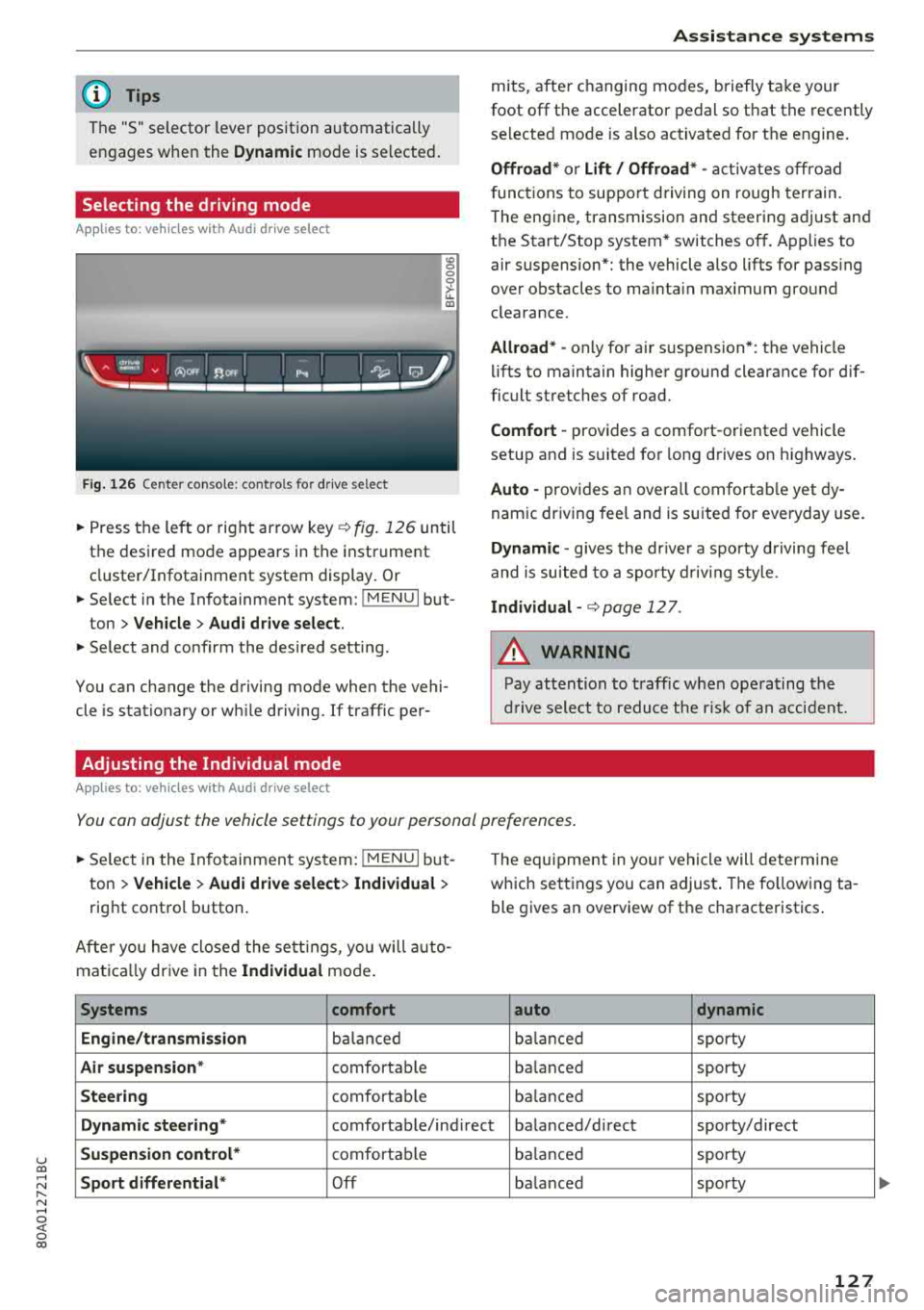
Selecting the driving mode
Applies to: ve hicles with Audi drive select
Fig. 126 Center conso le: controls for drive select
0 >'-LL ID
~ Press the left o r right arrow key¢ fig. 126 until
the desired mode appears in the instrument
cluster/Infotainment system display . Or
~ Se lect in the Infotainment system: !MENUI but-
ton
> Vehicle > Audi drive select.
~ Select and confirm the desired setting.
You can change the driving mode when the vehi
cle is stationary or wh ile driving. If traffic per-
Adjusting the Individual mode
Applies to: ve hicles with Audi drive select
Assistance systems
mits, after changing modes, briefly take your
foot
off the accelerator pedal so that the recently
selected mode is also activated for the engine.
Offroad* or Lift/ Offroad* -activates off road
f unct ions to support driving on rough terrain.
T he engine, transmission and steering adjust and
the Start/Stop system* switches
off. Applies to
air suspension*: the vehicle also lifts for pass ing
over obstacles to mainta in maximum ground
clearance.
Allroad * -only for ai r suspension *: the vehicle
lifts to maintain higher ground clearance for dif
ficult stretches of road.
Comfort -provides a comfort -oriented vehicle
setup and is suited fo r long d rives on h ighways .
Auto -provides an overall comfortable yet dy
namic driving feel and is suited for everyday use.
Dynamic -gives the drive r a sporty driving feel
and is suited to a sporty driving style .
Individual -¢ page 12 7.
A WARNING
-
Pay attention to traffic when operating the
drive select to reduce the risk of an accident.
You can adjust the vehicle settings to your personal preferences .
~ Select in the Infotainment system: !MENUI but
ton
> Vehicle > Audi drive select> Individual >
right contro l button.
Afte r you have closed the settings, you will auto
mat ica lly dr ive in the
Individual mode.
Systems comfort
Engine/transmission
balanced
Air suspension * comfortable
Steering comfortable Th
e equipment in yo ur vehicle will determine
which settings you can adjust . The fo llowing ta
ble gives an overview of the characteristics .
auto dynamic
balanced
sporty
ba lanced sporty
balanced sporty
Dynamic
steering* comfortable/ind irect ba lanced/direct sporty/direct
Suspension control* comfortab le balanced sporty
Sport differential* Off balanced sporty
127
...
Page 130 of 392
Ass is tance sy stem s
Systems comfort
Engine sound*
subtle
AC C* comfortable
al Subtle in th e se lector lever position "D" and sporty in " S".
@ Tips
Your sett ings a re automatical ly saved in Indi
vidual mode.
Raising/lowering the vehicle
Applies to: veh icles w ith a ir suspe nsion
.,.. Press the left or right arrow key ¢ page 127,
fig . 126
until the desired mode appears in the
instrument cluster/Infotainment system d is
play. Or
.,.. Select in the Infotainment system: I MENU I but
ton
> Ve hicle > Aud i d rive sele ct .
.,.. Select and conf irm the desired setting.
CD Note
The Lift / Offroad mode switches to All road
mode when dr iv ing above approximately
20 mph (30 km/h) and the vehicle automati
cally lowe rs again . These modes may only be
used on a tempo rary bas is and are not intend
ed for continuo us d riving.
(D Tips
- The filled -in boxes in the Infotainment sys
tem represent the current vehicle level. If
the segment is white or blinking, then the
vehicle is lifting or lowering. If only the bot
tom segment is filled in, then the veh icle is
at the lowest level ( lowest ground clear
ance). If all the segments are filled in, then
the vehicle is at the highest level (highest
ground clear a nee) .
- The target level is highlighted with a
red
frame while the vehicle is lifting or lower
i ng . The frame is then h idden when the ve
hicle reaches the target level.
- The vehicle lifts up to the highest level
when you select
Lift / Offroad . Select an
other mode to lower the vehicle again .
128
auto dynamic
subtle/sportyal sporty
ba lanced sporty
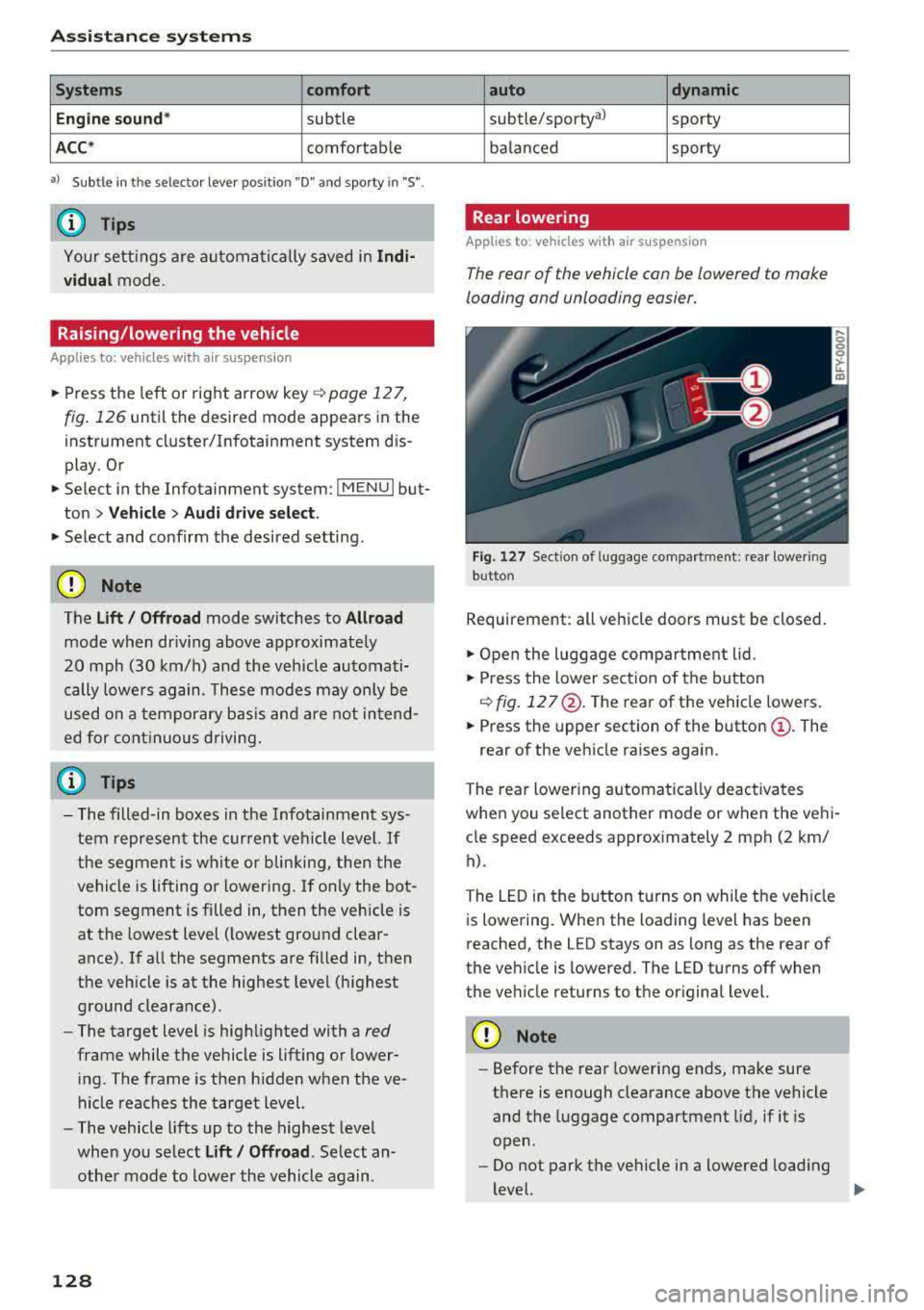
Rear lowering
Applies to: vehicles wit h air suspensio n
The rear of the vehicle con be lowered to make
loading and unloading easier.
Fig. 127 Section of luggage compa rtment: rear lower ing
but ton
Requirement: all vehicle doors must be closed.
.,.. O pen the luggage compar tment lid.
.,.. Press the lower sect io n of the button
C) fig. 12 7@ . The rear of the vehicle lowe rs .
.,.. Press the upper section of the button@. The
rear of the veh icle raises again.
The rear lowering a utomat ica lly deactiva tes
whe n you select another mode or when the ve hi
cle speed exceeds approx imately 2 mph (2 km/
h).
The LED in the button t urns on while the veh icle
is lowering. When the loading level has been
reached, the LED stays on as long as the rear of
the vehicle is lowered. The LED turns off when
the veh icle returns to the original level.
CD Note
-Before the rear lowering ends, make sure
there is enough clearance above the vehicle
and the luggage compartment lid, if it is
open .
- Do not park the vehicle in a lowered load ing
level.
..,..
Page 286 of 392
Airbag syste m
Make sure that the PASSENGER AIR B AG
OFF ,;; light comes on and stays on all the
t ime whenever the ignition is switched on.
A WARNING
- If the PASS ENGER AIR B AG O FF 1'i; light
does not go out when an adult is sitting on
the front passenger seat after tak ing the
steps described above, make sure the adult
is p roperly seated and restrained at one of
the rear seating positions.
- Have the airbag system inspected by your
authorized Aud i dealer before transporting
anyone on the front passenger seat.
(D Tips
If the capacitive passenger detection system
determines that the front passenger seat is
empty, the frontal airbag on the passenge r
side w ill be tu rned off, and the
PA SSENGER
AIR BAG OFF
1'i ; light will stay on.
-
Repair, care and disposal of the airbags
Parts of the airbag system are installed at many
different places on your Audi. Installing, remov
ing, servic ing or repa iring a part in an area of the
veh icle can damage a part of an airbag system
and prevent that system from working properly
in a collision .
There are some important things you have to
know to make sure that the effectiveness of the
system w ill not be impaired and that discarded
components do not cause injury or pollute the
env ironment.
A WARNING
Improper care, serv icing and repai r proce
dures can increase the r is k of personal injury
and death by preventing an airbag from de
ploying when needed or dep loying an airbag
unexpectedly:
-
- Never cover, obstruct, or change the steer
ing wheel horn pad or airbag cover or the in
strument pane l or modify them in any way.
284
- Never attach any objects such as cupholders
or telephone mountings to the surfaces cov
ering the a irbag un its.
- For cleaning the horn pad or instrument
panel, use only a soft, dry cloth or one mois
tened w ith plain water. Solvents or cleaners
could damage the airbag cover or change
the st iffness or strength of the material so
that the airbag cannot deploy and protect
properly.
- Never repair, adjust, or change any parts of
the airbag system.
- All work on the steering wheel, instrument
panel, front seats or e lectr ica l system ( in
cluding the installation of a udio eq uipment,
cellular telephones and CB radios, etc.) m ust be performed by a qualified techn ician
who has the training and specia l equipment
necessary.
- For any work on the airbag system, we strong ly recommend that you see your au
thorized Audi dealer or qualified workshop.
- Never modify the front b umper or parts of
the vehicle body.
- Always make sure that the side a irbag can
inflate without interference:
- Never install seat covers or replacement
upholstery over the front seatbacks that
have not been specifically approved by
A udi.
- Never use additional seat c ushions that
cover the areas where the side airbags in
flate.
- Damage to the orig inal seat cove rs or to
the seam in the area of the s ide airbag
module mus t always be repaired immedi
ate ly by an autho rized Aud i dealer .
- The a irbag sys tem can deploy on ly once. Af
ter an airbag has been deployed, it m ust be
replaced with new replacement parts de
signed and approved especia lly for your
Audi model version . Replacement of com
plete airbag systems or airbag components
must be performed by qua lified workshops
only . Make sure that any airbag service ac
tion is entered in your Audi Warranty
&
Ma intenance booklet under AIRBAG RE-
PLAC EMENT RECORD.
Ii)-