RON AUDI Q5 2019 Owners Manual
[x] Cancel search | Manufacturer: AUDI, Model Year: 2019, Model line: Q5, Model: AUDI Q5 2019Pages: 392, PDF Size: 99.86 MB
Page 154 of 392
MultiMediaInterface
MMIOn/Offknobwith
joystickfunction
Operating
RAH-8536|
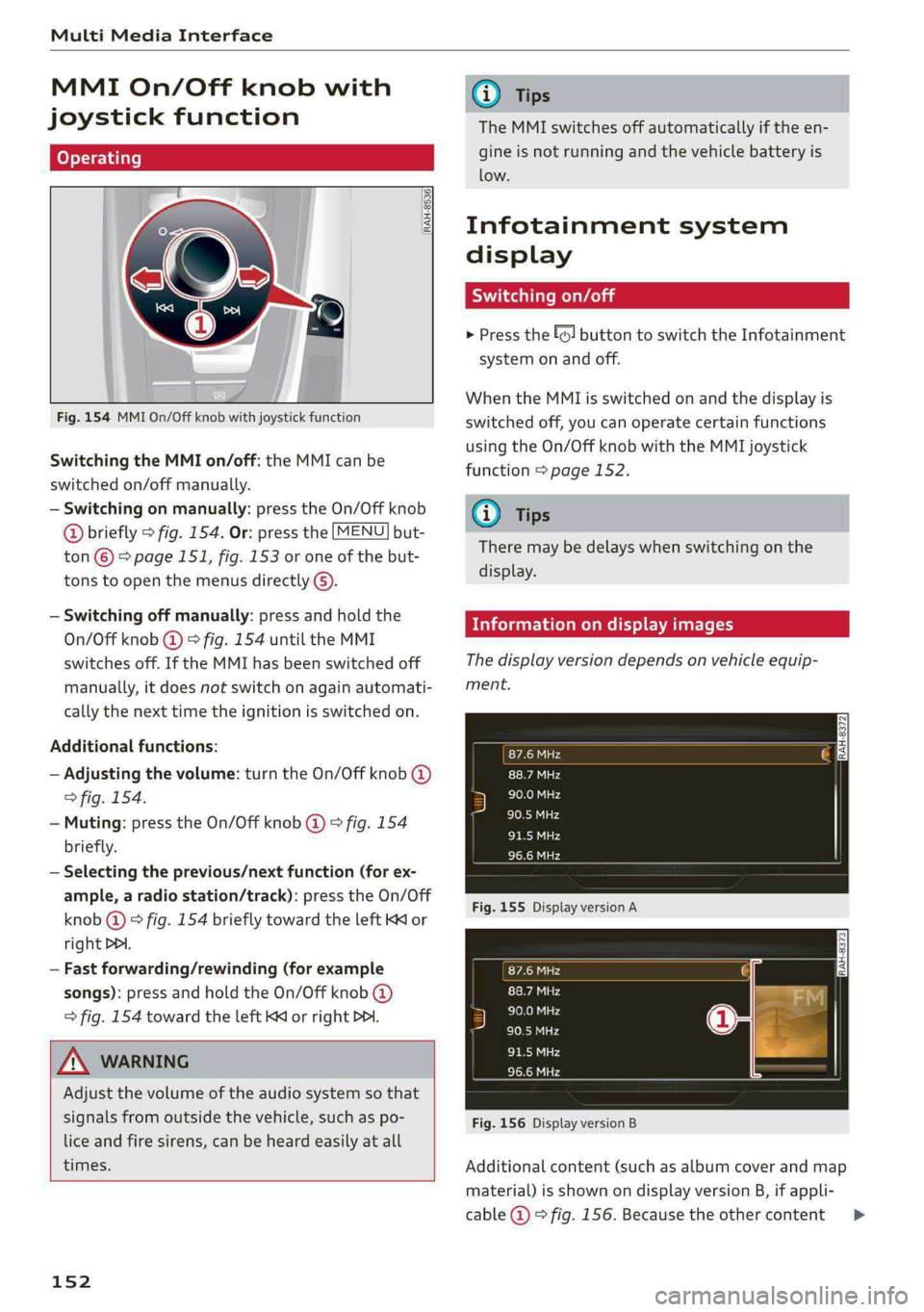
Fig.154MMIOn/Offknobwithjoystickfunction
SwitchingtheMMIon/off:theMMIcanbe
switched
on/offmanually.
—Switchingonmanually:presstheOn/Offknob
@briefly>fig.154.Or:pressthe[MENU]but-
ton©>page151,fig.153oroneofthebut-
tonstoopenthemenusdirectly().
—Switchingoffmanually:pressandholdthe
On/Offknob@)>fig.154untiltheMMI
switchesoff.IftheMMIhasbeenswitchedoff
manually,itdoesnotswitchonagainautomati-
callythenexttimetheignitionisswitchedon.
Additionalfunctions:
—Adjustingthevolume:turntheOn/Offknob@)
>fig.154.
—Muting:presstheOn/Offknob@)©fig.154
briefly.
—Selectingtheprevious/nextfunction(forex-
ample,aradiostation/track):presstheOn/Off
knob@)®fig.154brieflytowardtheleftKKor
rightDPI.
—Fastforwarding/rewinding(forexample
songs):pressandholdtheOn/Offknob@)
>fig.154towardtheleftKdorrightPo.
ZAWARNING
Adjustthevolumeoftheaudiosystemsothat
signalsfromoutsidethevehicle,suchas po-
liceandfiresirens,canbeheardeasilyatall
times.
152
G)Tips
TheMMIswitchesoffautomaticallyiftheen-
gineisnotrunningandthevehiclebatteryis
low.
Infotainmentsystem
display
Siarcelal
>Pressthe[6]buttontoswitchtheInfotainment
systemonandoff.
WhentheMMIisswitchedonandthedisplayis
switchedoff,youcanoperatecertainfunctions
usingtheOn/OffknobwiththeMMIjoystick
function>page152.
G)Tips
Theremaybedelayswhenswitchingonthe
display.
clearleClmemCaley
Thedisplayversiondependsonvehicleequip-
ment.
Fig.155DisplayversionA
Fig.156DisplayversionB
Additionalcontent(suchasalbumcoverandmap
material)isshownondisplayversionB,ifappli-
cable@©fig.156.Becausetheothercontent>
Page 158 of 392
MultiMediaInterface
Movingthecrosshairs
Appliesto:vehicleswithMMItouch
Movingthemap
Appliesto:vehicleswithMMItouch
RAH-8670|
Appliesto:vehicleswithautomatictransmissionandMMI
touch
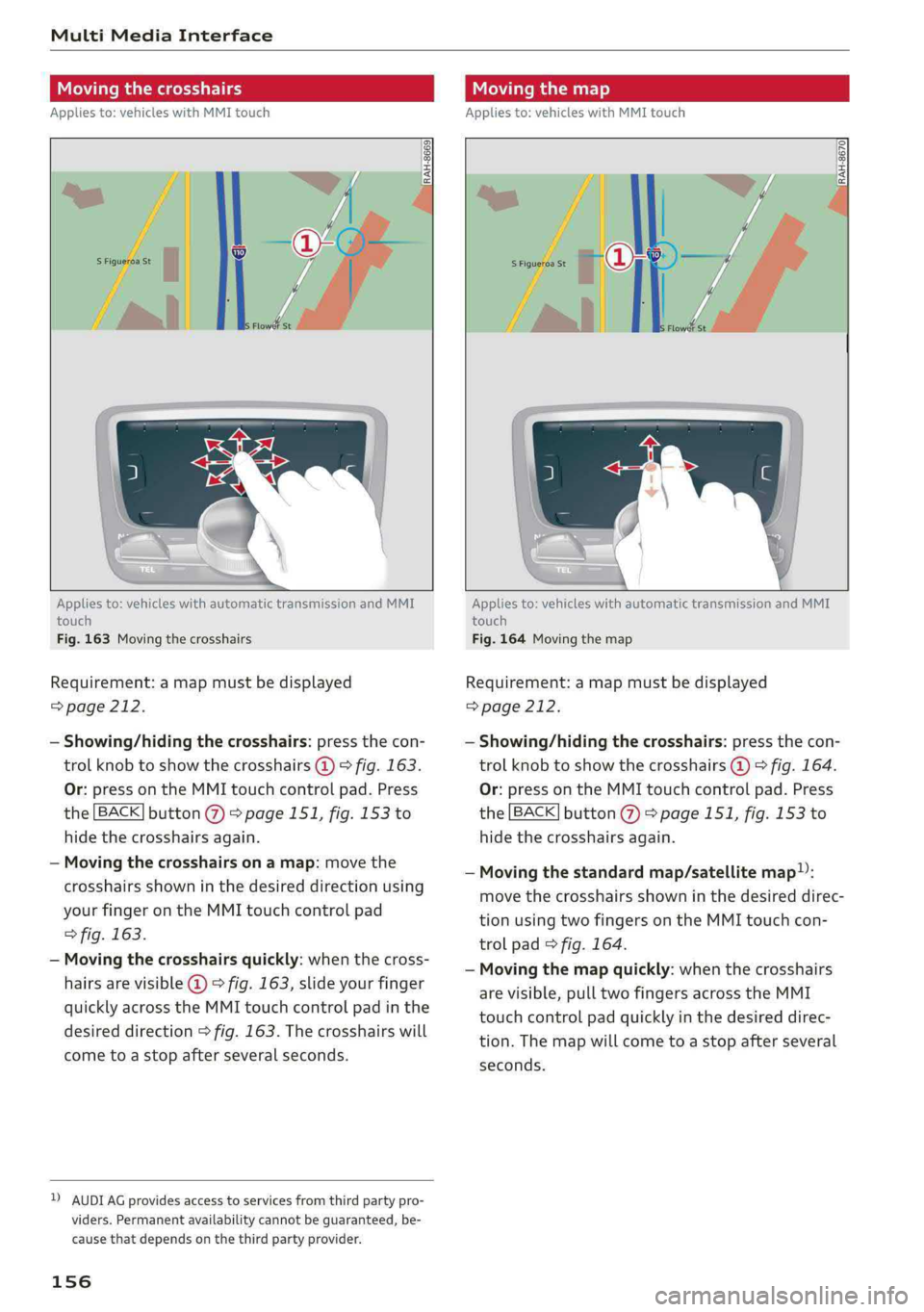
Fig.163Movingthecrosshairs
Requirement:amapmustbedisplayed
=>page212.
—Showing/hidingthecrosshairs:pressthecon-
trolknobtoshowthecrosshairs@)>fig.163.
Or:pressontheMMItouchcontrolpad.Press
the[BACK]button@>page151,fig.153to
hidethecrosshairsagain.
—Movingthecrosshairsonamap:movethe
crosshairsshowninthedesireddirectionusing
yourfingerontheMMItouchcontrolpad
>fig.163.
—Movingthecrosshairsquickly:whenthecross-
hairsarevisible@©fig.163,slideyourfinger
quicklyacrosstheMMItouchcontrolpadinthe
desireddirection>fig.163.Thecrosshairswill
cometoastopafterseveralseconds.
DAUDIAGprovidesaccesstoservicesfromthirdpartypro-
viders.Permanentavailabilitycannotbeguaranteed,be-
causethat dependsonthethirdpartyprovider.
156
Appliesto:vehicleswithautomatictransmissionandMMI
touch
Fig.164Movingthemap
Requirement:amapmustbedisplayed
=>page212.
—Showing/hidingthecrosshairs:pressthecon-
trolknobtoshowthecrosshairs@)©fig.164.
Or:pressontheMMItouchcontrolpad.Press
the[BACK]button@>page151,fig.153to
hidethecrosshairsagain.
—Movingthestandardmap/satellitemap):
movethecrosshairsshowninthedesireddirec-
tionusingtwofingersontheMMItouchcon-
trolpad>fig.164.
—Movingthemapquickly:whenthecrosshairs
arevisible,pulltwofingersacrosstheMMI
touchcontrolpadquicklyinthedesireddirec-
tion.Themapwillcometoastopafterseveral
seconds.
Page 163 of 392
![AUDI Q5 2019 Owners Manual 80A012721BG
MultiMediaInterface
FreetextsearchisavailableintheVehicle*,Ra-
dio*,Media*,Telephone*,Navigation*andAudi
connect*menus.
Openingfreetextsearch
>Select:[MENU]button>desiredmenuitem
(su](/img/6/57631/w960_57631-162.png "AUDI Q5 2019 Owners Manual 80A012721BG
MultiMediaInterface
FreetextsearchisavailableintheVehicle*,Ra-
dio*,Media*,Telephone*,Navigation*andAudi
connect*menus.
Openingfreetextsearch
>Select:[MENU]button>desiredmenuitem
(su")
80A012721BG
MultiMediaInterface
FreetextsearchisavailableintheVehicle*,Ra-
dio*,Media*,Telephone*,Navigation*andAudi
connect*menus.
Openingfreetextsearch
>Select:[MENU]button>desiredmenuitem
(suchasTelephone).
>Keepturningthecontrolknobtotheleftuntil
thefreetextsearchinputfield@>fig.169
appears.Or:pushthecontrolknobuptoopen
theinputfield@.
ThehandwritingrecognitionfortheMMItouch
controlpad*isautomaticallyactivated.Simply
startwriting.
Free textsearchforanentry
>Enteroneormoresearchtermsinanyorderin-
totheinputfield.Theindividualsearchterms
mustbe separated by spaceswhenentering.
Aninputsuggestiontocompletetheentry*3)
=>fig.169isshowndependingontheinput.Ad-
ditionalentriesthatcontaintheenteredsearch
termsarelistedIntheresultslist@)>fig.169.
Ifthedesiredtermisstillnotdisplayed,enter
additionallettersuntilitisdisplayed.
MenusandSymbols
Itisoftenenoughjusttoenterthefirstlettersof
thesearchterminorderforittodisplayinthere-
sultslist.Forexample,intheTelephone*menu,
writetheinitialsofthecontactbeingsearched,
separatedbyaspace.
Selectingtheinputsuggestiontocomplete
theentry
Requirement:aninputsuggestiontocomplete
theentry*@)>fig.169mustbedisplayed.
>MMItouchinput*:pressthecontrolknob.Or:
pressontheMMItouchcontrolpad”*.
>Spellerinput:pushthecontrolknobup.
Selectinganentryfromtheresultslist
Requirement:atleastoneentrymustbedis-
playedintheresultslist2)>fig.169.
>MMItouchinput*:turnthecontrolknobtothe
right.Selectandconfirm anentryfromthelist.
>Spellerinput:selectandconfirm[LIST]@
=>page159,fig.168.Or:pushthecontrolknob
down.Selectandconfirm anentryfromthe
list.
Neesodbr-16-15-15TSOv
Bassieudecand
(oes
Fig.170Diagram:menusandsymbols
Symbol/DescriptionDescription
Selectedfunction
@Selectedtext
@
TMCReceivingTMC/onlinetrafficinformation>page217
161
Page 169 of 392
80A012721BG
Multifunctionsteeringwheel
Requirement:adestinationmustbeentered
=>page203,routeguidancemustbestartedand
thenavigationtabmustbedisplayed.
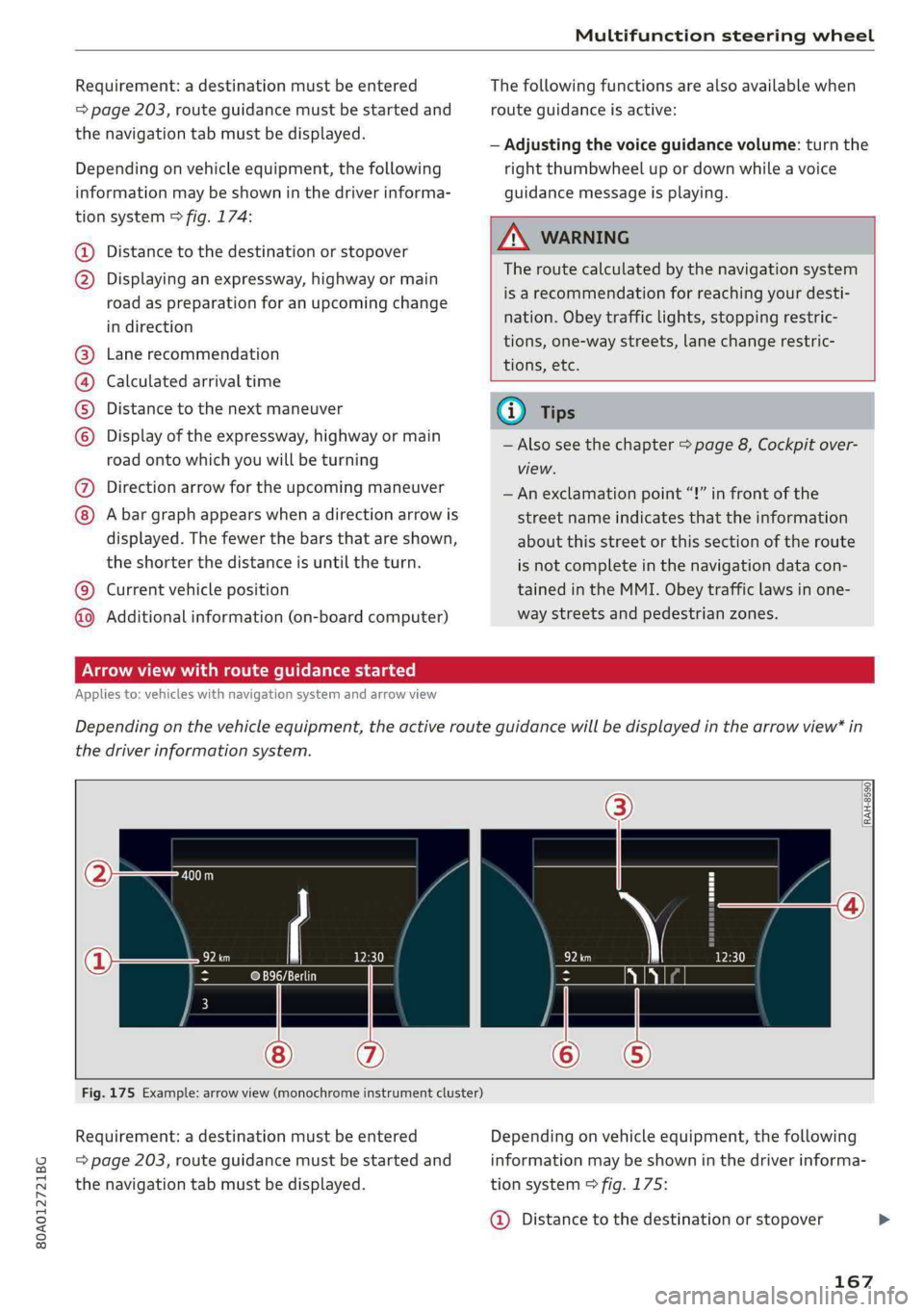
Dependingonvehicleequipment,thefollowing
informationmaybeshowninthedriverinforma-
tionsystem>fig.174:
Distancetothedestinationorstopover
©oDisplayinganexpressway,highwayormain
roadaspreparationforanupcomingchange
indirection
Lanerecommendation
Calculatedarrivaltime
Distancetothenextmaneuver
Display oftheexpressway,highwayormain
roadontowhichyouwillbeturning
Directionarrowfortheupcomingmaneuver
©
O80
Abargraphappearswhenadirectionarrowis
displayed.Thefewerthebars thatareshown,
theshorterthedistanceisuntiltheturn.
Currentvehicleposition©
Additionalinformation(on-boardcomputer)
Thefollowingfunctionsarealsoavailablewhen
routeguidanceisactive:
—Adjustingthevoiceguidancevolume:turnthe
rightthumbwheelupordownwhileavoice
guidancemessageisplaying.
ZA\WARNING
Theroutecalculatedby thenavigationsystem
isarecommendationforreachingyourdesti-
nation.Obeytrafficlights,stoppingrestric-
tions,one-waystreets,lanechangerestric-
tions,etc.
(i)Tips
—Alsoseethechapter>page8,Cockpitover-
view.
— Anexclamationpoint“!”infront ofthe
streetnameindicatesthattheinformation
aboutthisstreetorthissectionoftheroute
isnotcompleteinthenavigationdatacon-
tainedintheMMI.Obeytrafficlawsinone-
waystreetsandpedestrianzones.
TAUAmelhmeereeitanle)
Appliesto:vehicleswithnavigationsystemandarrowview
Dependingonthevehicleequipment,theactiverouteguidancewillbedisplayedinthearrowview*in
thedriverinformationsystem.
om:
Fig.175Example:arrowview(monochromeinstrumentcluster)
Requirement:adestinationmustbeentered
=page203,routeguidancemustbestartedand
thenavigationtabmustbedisplayed.
Dependingonvehicleequipment,thefollowing
informationmaybeshowninthedriverinforma-
tionsystem>fig.175:
@Distancetothedestinationorstopover
167
Page 170 of 392
Multifunctionsteeringwheel
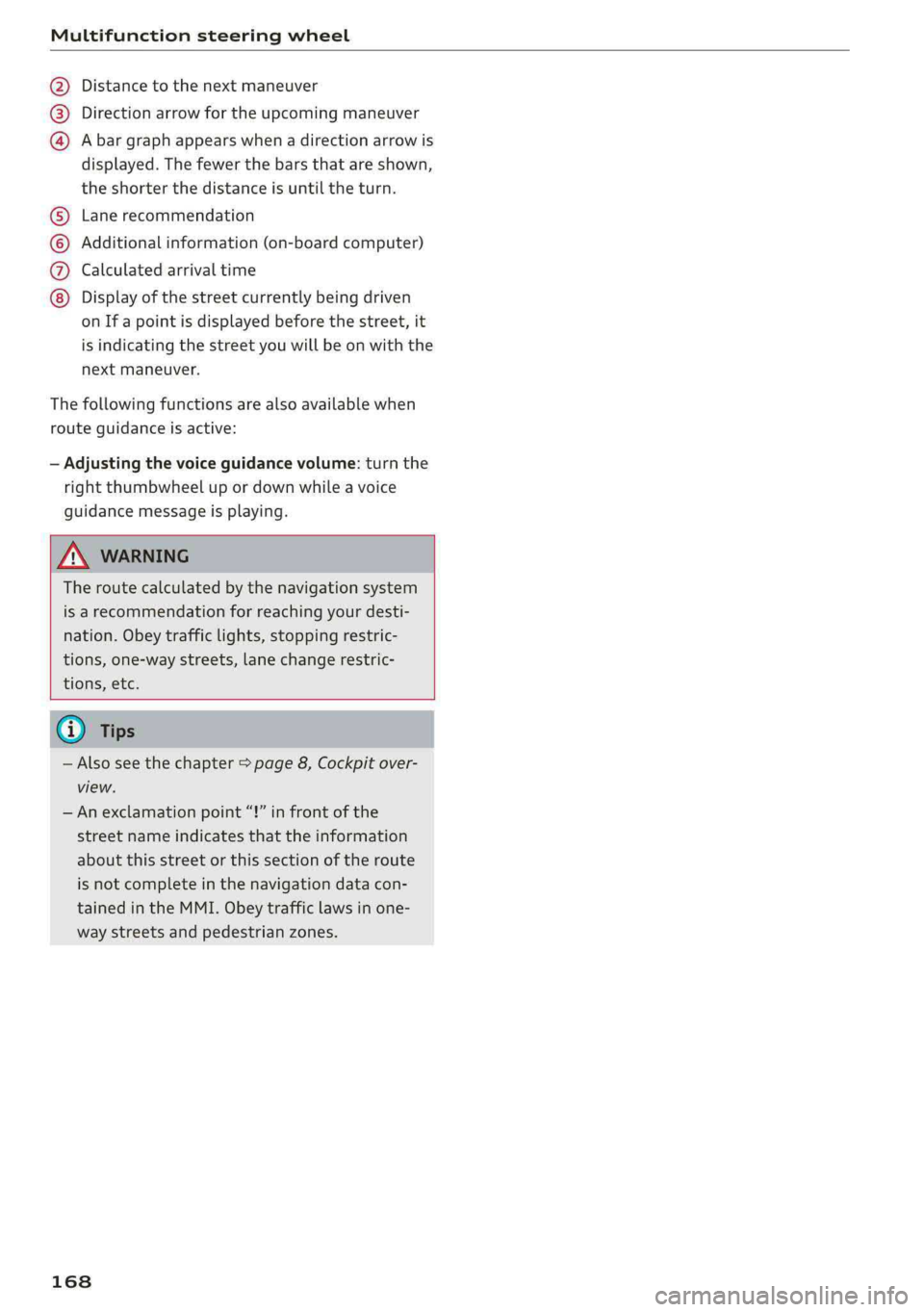
Distancetothenextmaneuver
Directionarrowfortheupcomingmaneuver
Abargraphappearswhen adirectionarrowis
displayed.Thefewerthebars thatareshown,
theshorterthedistanceisuntiltheturn.
®O®
Lanerecommendation
Additionalinformation(on-boardcomputer)
Calculatedarrivaltime
©0G®@Displayofthestreetcurrentlybeingdriven
onIfapointisdisplayedbeforethestreet,it
isindicatingthestreetyouwillbe onwiththe
nextmaneuver.
Thefollowingfunctionsarealsoavailablewhen
routeguidanceisactive:
—Adjustingthevoiceguidancevolume:turnthe
rightthumbwheelupordownwhileavoice
guidancemessageisplaying.
ZXWARNING
Theroutecalculatedby thenavigationsystem
isarecommendationforreachingyourdesti-
nation.Obeytrafficlights,stoppingrestric-
tions,one-waystreets,lanechangerestric-
tions,etc.
@Tips
—Alsosee thechapter>page8,Cockpitover-
view.
—Anexclamationpoint“!”infront ofthe
streetnameindicatesthattheinformation
aboutthisstreetorthissectionoftheroute
isnotcompleteinthenavigationdatacon-
tainedintheMMI.Obeytrafficlawsinone-
waystreetsandpedestrianzones.
168
Page 172 of 392
Voicerecognitionsystem
Voicerecognitionsystem
Operating
Appliesto:vehicleswithvoicerecognitionsystem
YoucanoperatemanyInfotainmentfunctions
convenientlybyspeaking.
Requirement:theignitionandtheMMImustbe
switched
on>page152.Asystemlanguagesup-
portedbythevoicerecognitionsystemmustbe
set.Theremustbenophonecallsinprogressand
theparkingaidmustnotbeactive.
>Switchingon:pressthe[%]button@
=>page17,fig.11or>page18,fig.13briefly
onthemultifunctionsteeringwheelandsay
thedesiredcommandaftertheBeep.
>Switchingoff:pressandholdthe|™]button.
Or:pressthe|5|button.
>Pausing:saythecommandPause.Toresume,
pressthe|]button.
>Correcting:saythecommandCorrection.Or:
simplysayanewcommandduringanan-
nouncement>page246.
Inputassistance
Thesystemguidesyouthroughtheinputwith
visualandaudiofeedback.
—Visualinputassistance:afterswitchingon
voicerecognition,adisplaywithaselectionof
possiblecommandsappears.Thiscommand
displaycanbe switchedonoroff.Select:
MENU]button>Settings>leftcontrolbutton
>MMIsettings>Speechdialogsystem.
—Audioinputassistance: tohavethepossible
commandsread,turnthevoicerecognitionsys-
temonandsayHelp.
Forthesystemtounderstandyou:
Speakclearlyanddistinctly atanormalvolume.
Speaklouderwhendrivingfaster.
Emphasizethewordsinthecommandsevenly
anddonotleavelongpauses.
Closethedoors,thewindows,andthesunroof*
toreducebackgroundnoise.Makesurethatpas-
sengersarenotspeakingwhenyouaregivinga
voicecommand.
170
Donotdirecttheventstowardthehands-freemi-
crophone,whichisintheroofheadlinernearthe
frontinteriorlights.
Onlyusethesystemfromthedriver'sseatbe-
causethehands-freemicrophoneisdirectedto-
wardthatseat.
Additionalsettings
See>page246,Speechdialogsystem.
ZAWARNING
—Directyourfullattentiontodriving.Asthe
driver,youhavecompleteresponsibilityfor
safetyintraffic.Onlyusethefunctionsin
suchawaythatyoualwaysmaintaincom-
pletecontroloveryourvehicleinalltraffic
situations.
—Donotuse thevoicerecognitionsystemin
emergenciesbecauseyourvoicemaychange
instressfulsituations.Thesystemmaytake
longertodialthenumberormaynotbe
abletodialitatall.Dialtheemergency
numbermanually.
Gi)Tips
— Thedialogpauseswhenthereisanincom-
ingphonecallandwillcontinueifyouig-
norethecall.Thedialogendsifyouanswer
thecall.
—Youcanselectan iteminthelistusingei-
therthevoicerecognitionsystemorthe
controlknob.
Commandoverview
information
Appliesto:vehicleswithvoicerecognitionsystem
Thefollowingoverviewsdescribethecommands
thatcan beusedtooperatetheMMIusingthe
voicerecognitionsystem.
Alternativecommandsareseparatedusinga“/”,
forexamplesay:Telephone/(or)Navigation/
(or)Radio.
Sequencesofcommandsusedtoperformanac-
tionareidentifiedwitha “>”,forexamplesay:
Enteraddress>(then)Entercountry/state.>
Page 183 of 392
80A012721BG
Telephone
—YouMUSTceaseoperatingthisdeviceim-
mediatelyifrequestedby theFCCora
licensedwirelessserviceprovider.
—WARNING:E911locationinformationmay
notbeprovidedormaybeinaccuratefor
callsservedbyusingthisdevice.
@)Note
ApplicabletoCanada
InCanada,operationofaZoneEnhancer,
suchasanAudiPhoneBox,issubjecttothe
followingrequirementsoftheInnovation,
ScienceandEconomicDevelopmentCanada
(ISED):
—ThisisaCONSUMERdevice.
—BEFOREUSE,youMUSTmeetallrequire-
mentssetoutinCPC-2-1-05.
—YouMUSToperatethisdevicewithapproved
antennas
andcablesasspecifiedbythe
manufacturer.AntennasMUSTNOTbein-
stalledwithin20cmofanyperson.
—YouMUSTceaseoperatingthisdeviceim-
mediatelyifrequestedbyISEDoralicensed
wirelessserviceprovider.
—WARNING:£911locationinformationmay
notbeprovidedormaybeinaccuratefor
callsservedbyusingthisdevice.
@Tips
— TheAudiphoneboxisnotavailableinall
countries.Foradditionalinformation,con-
tactanauthorizedAudidealership.
—Placingthemobiledeviceinabagorprotec-
tivesleeveinsidetheAudiphoneboxcanin-
terferewiththeconnectiontotheexternal
antenna*.
—Metallicobjectsinthe Audiphoneboxblock
thewirelesschargingofyourmobiledevice
andcallsmadeusingtheexteriorantenna’*.
—Thechargingtimeandtemperaturewillvary
dependingonthemobiledevicebeingused.
—Yourmobiledevicecanonlybechargedin
theAudiphoneboxwhentheignitionis
switchedon.
—Toreducetheriskofmalfunctions,make
surethemobiledeviceispositionedcorrect-
ly intheAudiphonebox.
—Themaximumchargingoutputis5watts.
—Strongtransmissionqualitycannot beguar-
anteedifmorethanonemobiledeviceisin
thebox.*
—Onlyonemobiledeviceatatimecan be
chargedwirelesslyintheAudiphonebox.
—AudirecommendsusingAudiGenuineAc-
cessories.Audihasverifiedtheirreliability,
safety,andsuitability.
—YoucanpurchaseaUSBadapterfromanau-
thorizedAudidealerorauthorizedAudi
ServiceFacility,oratspecialtystores.
Usingthetelephone
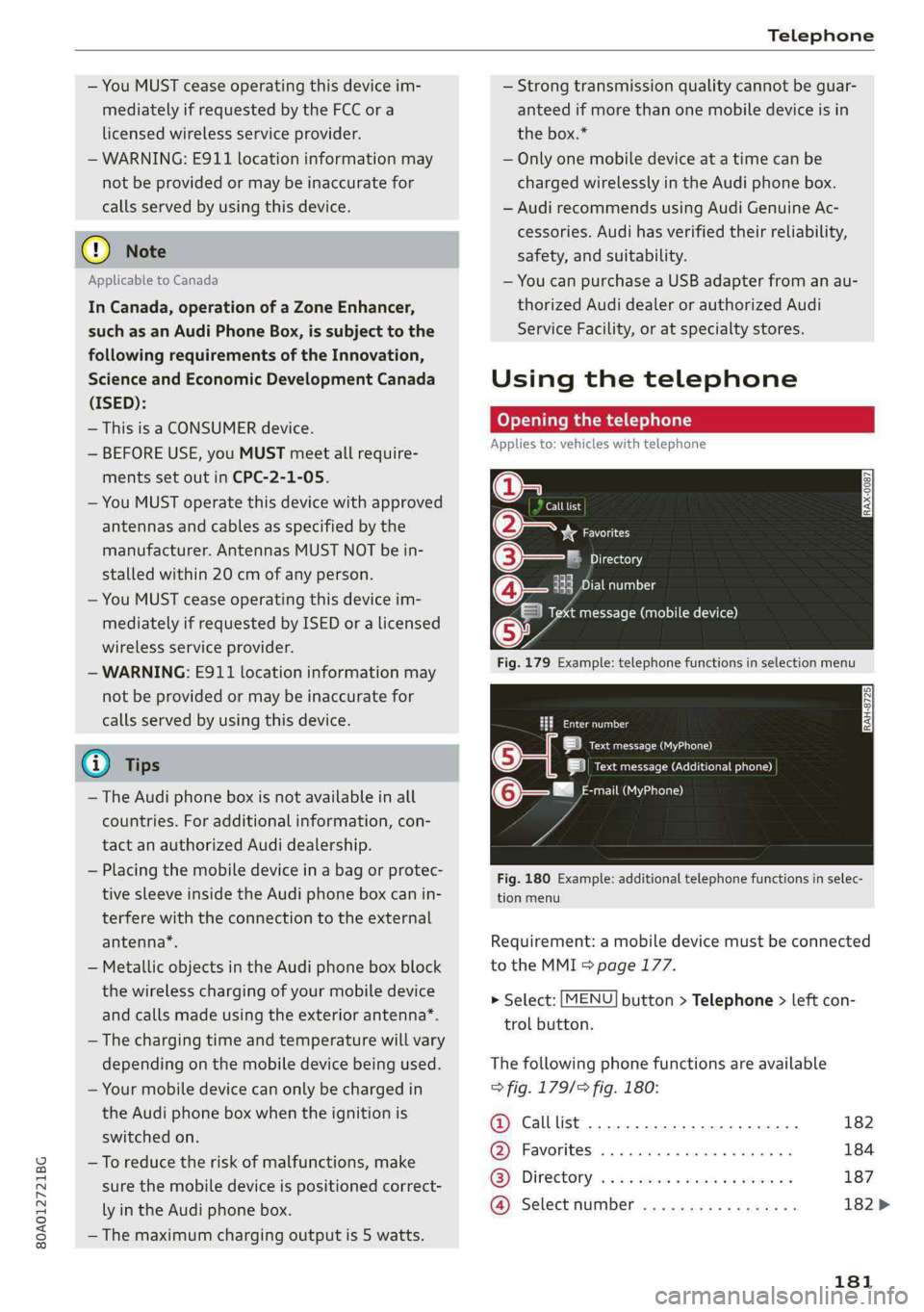
Openingthetelephone
Appliesto:vehicleswithtelephone
Calllist
(2*Favorites
©—:Directory
18Emaisle
Vamessage(mobiledevice)
Fig.179Example:telephonefunctionsinselectionmenu
Cmnal
LetaAa)
|ieeeACCneura)
mail(MyPhone)@-—"
Fig.180Example:additionaltelephonefunctionsinselec-
tionmenu
Requirement:amobiledevicemustbeconnected
totheMMI>page177.
>Select:[MENU]button>Telephone>leftcon-
trolbutton.
Thefollowingphonefunctionsareavailable
>fig.179/9fig.180:
@Calllist20.0.0...eee182
@®Favorites..............0.00008184
GS]Directory,wo:csamonswmm2 ymeeeas187
@Selectnumber..............0-.182>
181
Page 186 of 392
Telephone
automaticallydisconnect.Depending on
yourmobiledevice,phonecallsinprogress
maybeautomaticallyredirectedfromthe
MMItoyourmobiledevicesothatyoucan
continuethecallonyourphone.
— Thedisplay ofan incomingphonecallinthe
Infotainmentsystemdisplaymaystillbe
visibleforafewsecondsafteracallisan-
sweredorignoreddependingonthecell
phoneinuse.
Makinganemergencycall
Appliesto:vehicleswithtelephone
>Select:[MENU]button>Telephone>leftcon-
trolbutton>Dialnumber>Enteremergency
callnumber(forexample,911)>OK.
ZA\WARNING
—Becauseyourphoneworkswithradiosig-
nals,aconnectioncannotbeguaranteedun-
derallcircumstances.Donotrelyononly
yourphonewhenitcomestoessentialcom-
munication(such asamedicalemergency).
—Alwaysfollowtheinstructionsgivenbythe
emergencypersonnelduringanemergency
callandonlyendthecallwhentheyinstruct
youtodoso.
@Tips
Emergencynumbersarenotthesameevery-
where.Findoutwhichemergencynumberis
usedinyourcurrentlocation.
Favorites
Appliesto:vehicleswithtelephone
Upto50contacts,inadditiontothevoicemail
number,canbestoredinanyorderinthefavor-
iteslist.
>Select:[MENU]button>Telephone>leftcon-
trolbutton.
Storinganexistingphonenumberasa
favorite:
—SelectandconfirmCalllist/Directory.
—Selectacontactorphonenumberfromthelist.
—Select:rightcontrolbutton>Storeasfavorite.
184
—Enteranameforthefavoriteorselectasug-
gestion.
—SelectandconfirmSave.
Renamingstoredfavorites
—Select:Favorites>afavoritefromthelist.
—Selecttherightcontrolbutton>Renamefavor-
ite.
Movingstoredfavorites
—Select:Favorites>afavoritefromthelist.
—Selecttherightcontrolbutton>Movefavorite.
—Selectandconfirmthelocationoftheselected
favorite.
Deletingastoredfavorite
—Select:Favorites>afavoritefromthelist.
—Select:rightcontrolbutton>Deletefavorite>
DeletethisentryorDeleteallentries.
Messages
Meetlst
Appliesto: cellphoneswithBluetoothMessageAccessProfile
(MAP)
Dependingonthemobiledevicebeingusedand
themobilenetworkcontract,youmaybeableto
receiveandsendtextmessagesusingtheMMI.
Requirement
AcellphonemustbeconnectedtotheMMIvia
BluetoothMAP(MessageAccessProfile)
>page177.
>Select:[MENU]button>Telephone>leftcon-
trolbutton>textmessage(myPhone)/text
message(secondaryphone)*.
Writenewtextmessage
SelectandconfirmWritenewtextmessage.
—Usingatemplate:selectandconfirmthede-
siredtemplatefromthelist.
—Writingyourowntext*:selectandconfirmDo
not usetemplate.EntertextusingtheMMI
touchcontrolpad*ortheletterspeller.
—Enteroneormorerecipients.
—SelectandconfirmSend.
Page 188 of 392
Telephone
Telephonesettings
See>page189.
@)Tips
MessagesthataredeletedintheMMIarealso
deletedinthemobiledeviceautomatically.
Appliesto: cellphoneswithBluetoothMessageAccessProfile
(MAP)
Dependingonthetypeofmobiledevicebeing
used,youmaybeabletoreceiveandsende-
mailsthroughtheMMI.
Requirement:acellphonemustbeconnectedto
theMMIviaBluetoothMAP(MessageAccessPro-
file)>page177.Youcanfindoutifyourmobile
devicesupportsthisfunctionbycheckingyour
mobiledeviceowner'smanual.
>Select:[MENU]button>Telephone>leftcon-
trolbutton>e-mail(myPhone)/e-mail(secon-
daryphone)*.
Writenewe-mail
SelectandconfirmWritenewe-mail.
—Usingatemplate:selectandconfirmthede-
siredtemplatefromthelist.
—Writingyourowntext*:selectandconfirmDo
notusetemplate.EntertextusingtheMMI
touchcontrolpad”ortheletterspeller.
—Enteroneormorerecipients.
—SelectandconfirmSend.
Inbox
Allreceivede-mailsaredisplayed.
Sent
Allsente-mailsaredisplayed.
Outbox
Alle-mailsthatwillbesentaredisplayed.
Drafts
Allsavede-mailsthathavenotbeensentyetare
displayed.
186
CG)Note
Alwaysfollowtheinformationfoundin>@in
Generalinformationonpage192.
@Tips
—Formoreinformationonsupportedmobile
devices,visitwww.audiusa.com/bluetooth
orcontactanauthorizedAudidealerorau-
thorizedAudiServiceFacility.
—Toensurethatyoursente-mailsarere-
ceived,connectyourcellphonetotheWi-Fi
hotspot*inthevehicleso thatthe e-mail
apponyourcellphonecontinuestohaveIn-
ternetaccess.Ifyouarestillnotreceivinge-
mailseventhoughyouhaveasuccessful
connection,thencontactyoure-mailservice
provideroryourcellphoneserviceprovider.
Messageoptions
Appliesto: cellphoneswithBluetoothMessageAccessProfile
(MAP)
>Select:[MENU]button>Telephone>leftcon-
trolbutton>e-mail(myPhone)/e-mail(secon-
daryphone)*>Inbox/Sent/Outbox>right
controlbutton.
Thefollowingoptionsmaybeavailabledepend-
ingontheselectedmenu.
Storeastemplate
Tene-mailtemplatesarestoredintheMMI.You
cansaveupto10additionaltemplatesofyour
own.
—Createane-mail.
—Selectandconfirm Storeastemplate.
Resumelasteditede-mail
Thelaste-mailinprogresscanberesumed.
Reply*
Areplycanbesentfortheselectede-mailinthe
Inbox.
Replytoall*
Areplycanbesentfortheselectede-mailinthe
Inboxanditwillbesenttoalloftheenteredre-
cipients.
Page 190 of 392
Telephone
@Tips
—Additionalinformationonfreetextsearches
canbefoundunder>page160.
—Checkforapossiblerequesttosynchronize
onyourcellphone.Requeststosynchronize
thedirectorymustbeconfirmedso that
yourcellphonecontactscan beloadedinto
theMMI.
— ThecontactdisplayintheMMIdependson
themobiledevicebeingused.Formorein-
formationonsupportedmobiledevices,vis-
itwww.audiusa.com/bluetoothorcontact
anauthorizedAudidealerorauthorizedAu-
diServiceFacility.
—Pleasenotethatonlythedirectoryfromthe
primaryphone*isalwaysdisplayed.
— Thecontactsfromthemobiledevicemay
notbetransferredinalphabeticalorder.If
therearetoomanyentries,contactswith
differentfirstlettersmaybemissinginthe
MMI.
—ThecontactsinthelocalMMImemoryare
alwaysvisibleandcan be accessedbyother
users.
Freetextsearchforacontact
Appliesto:vehicleswithtelephone
MENU >Select:button>Telephone>leftcon-
trolbutton>Directory.
>Tolimitthesearch,entertheinitialsofthecon-
tactbeingsearchedwitheachinitialseparated
byaspaceintheinputfield.Enteradditional
lettersifnecessary.
> Selectandconfirmacontactfromthedirectory.
Thephonenumbersfortheselectedcontactare
displayed.
>Tomakethecall,selectandconfirmaphone
number.
G)Tips
—Youcanscrollthroughlonglistsquicklyby
turningthecontrolknobquickly.Thescroll-
ingspeeddependsonthenumberoflisten-
tries.
—Additionalinformationonfreetextsearches
canbefoundunder>page160.
188
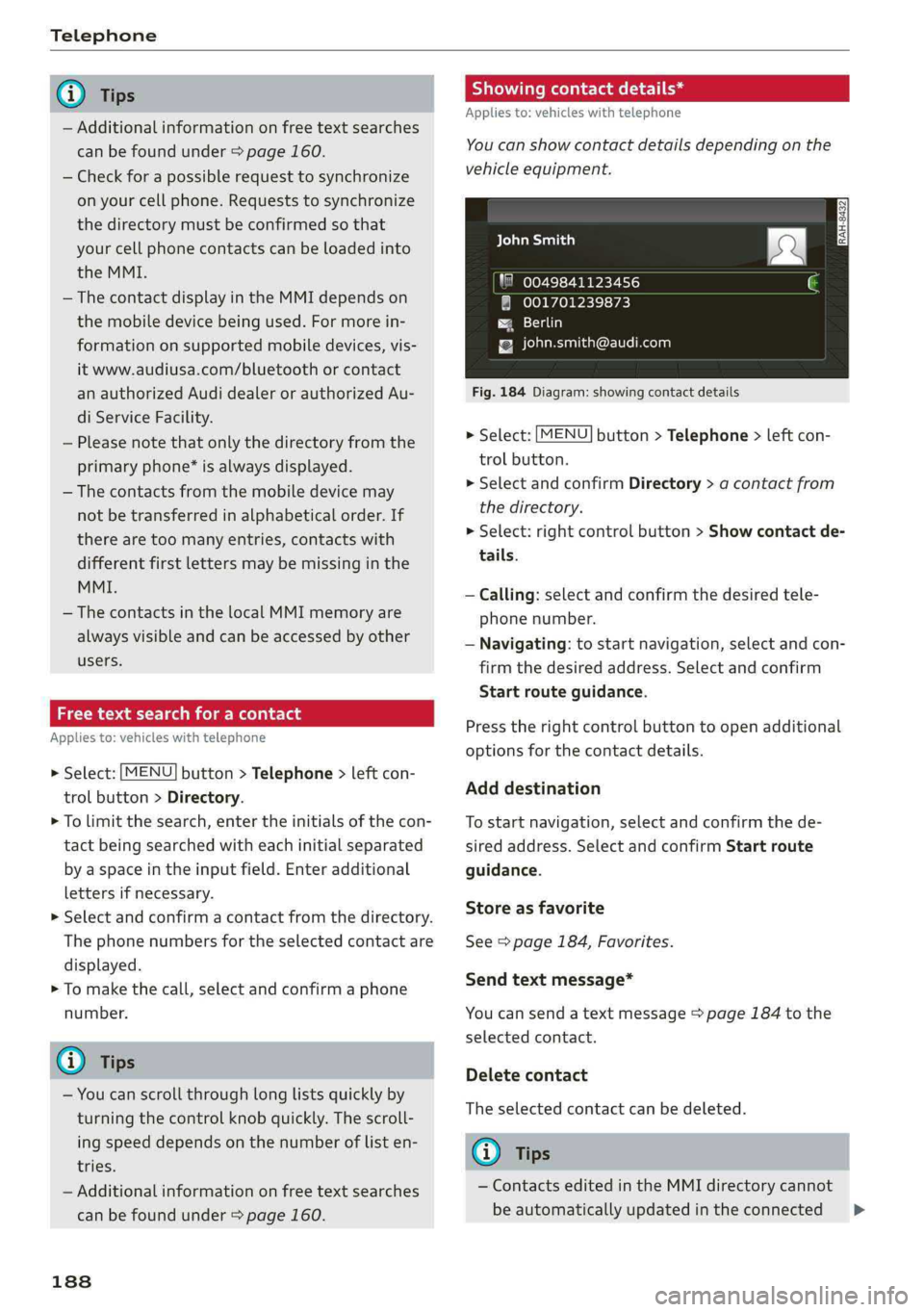
Showingcontactdetails*
Appliesto:vehicleswithtelephone
You canshowcontactdetailsdepending onthe
vehicleequipment.
aCeyealian)
"80049841123456
@001701239873
Paes)
{[email protected]
Fig.184Diagram:showingcontactdetails
>Select:[MENU
trolbutton.
>SelectandconfirmDirectory>acontactfrom
thedirectory.
>Select:rightcontrolbutton>Showcontactde-
tails.
button>Telephone>leftcon-
—Calling: selectandconfirmthedesiredtele-
phonenumber.
—Navigating:tostartnavigation,selectandcon-
firmthedesiredaddress.Selectandconfirm
Startrouteguidance.
Presstherightcontrolbuttontoopenadditional
optionsforthecontactdetails.
Adddestination
Tostartnavigation,selectandconfirmthede-
siredaddress.SelectandconfirmStartroute
guidance.
Storeasfavorite
See>page184,Favorites.
Sendtextmessage*
Youcansendatextmessage>page184tothe
selectedcontact.
Deletecontact
Theselectedcontactcan bedeleted.
Gi)Tips
—ContactseditedintheMMIdirectorycannot
beautomaticallyupdatedintheconnected>