RON AUDI Q5 2019 Owners Manual
[x] Cancel search | Manufacturer: AUDI, Model Year: 2019, Model line: Q5, Model: AUDI Q5 2019Pages: 392, PDF Size: 99.86 MB
Page 191 of 392
80A012721BG
Telephone
cellphone.Audirecommendseditingcell
phonecontactsdirectlyinthecellphone.
—OnlythecontactsinthelocalMMImemory
canbeeditedordeleted.
Importingandexportingcontacts
Appliesto:vehicleswithtelephone
ContactsinvCardformat(.vcf)canbeimported
intothedirectoryorexported.
Requirement:anSDcard mustbeinsertedinone
oftheSDcardreaders*>page226oraUSBstor-
agedevicemustbeconnectedtothe Audimusic
interface*>page231ortherequirementsfor
AudiconnectInfotainmentservices*mustbe
met>page192.
>Select:[MENU]button>Telephone>leftcon-
trolbutton>Directory.
>Select:rightcontrolbutton>Contactsettings.
—Importingcontactsfromastoragedevice:se-
lectandconfirmImportcontacts>SDcard
1/SDcard2orUSBdevice1/USBdevice2>
desiredcontacts>Startimport.
—Exportingcontactstoastoragedevice:select
andconfirmExportcontacts>SDcard1/SD
card2orUSBdevice1/USBdevice2>desired
contacts>Startexport.
—Selectingallcontactsatoncetoimport/
export:selectandconfirmImportcontacts/Ex-
port
contacts>SDcard1/SDcard2orUSBde-
vice1/USBdevice2> All >Startimport/Start
export.
G)Tips
—Alwaysreadthechapter>page192,Audi
connect.
—ForadditionalinformationonthemyAudi
account,visitwww.audiusa.com/myaudi.
— Theimportedcontactsarestoredinthelo-
calmemoryofthedirectory.
—Amaximumof1,000contactscanbeim-
ported.Youcancheckthedirectorymemory
capacityatanytime>page190.
+Dependsontheconnectedcellphone.
—Neversaveimportantdataonmemorycards
orUSBstoragedevices.Audiisnotresponsi-
blefordamagedorlostfilesandmedia.
—Contactsthatweredownloadedfromamo-
biledevicecannotbeexported.
—Thereshouldbenootherfilesor folderson
thestoragemediumcontainingthecontacts
tobeimported.
Additionalsettings
Telephonesettings
Appliesto:vehicleswithtelephone
>Select:[MENU]button>Telephone>rightcon-
trolbutton>Telephonesettings.
Calloptions*
Callforwarding:youcanswitchtheforwarding
ofincomingcallstoyourvoicemailortoanother
phonenumberonandoff.Youcan checkifthe
functionisactivatedordeactivatedwithCheck
status.
Callwaiting:youarealerted toanincomingcall
duringaphonecallwhenthefunctionisswitched
on[M.Youcancheckifthefunctionisactivated or
deactivatedwithCheckstatus.
Sendowntelephonenumber:sendingyour
phonenumberwithanoutgoingcallcanbeacti-
vatedanddeactivated.WiththeNetwork-de-
pendentsetting,thesettinglistedinthecon-
tractwiththecellphoneserviceproviderisused.
ThesettingsonlyapplytotheTelephonemenuin
theMMI.Pleasenotethatthesettingsonyour
mobiledevicewillapplyafterdisconnectingthe
Bluetoothconnection.Youcancheckifthefunc-
tionisactivated ordeactivatedwithChecksta-
tus.
Ringtoneandvolumesettings”)
UsingtheMutetelephonefunction,youcan
switchtheringtoneplaybackthroughtheMMI
speakeronandoff.Youcanplaytheringtonesus-
ingtheRingtonefunction.Selectandconfirm an
entryfromthelist.FortheRingtonevolume/
Messagevolumesettings,see>page250.The
189
Page 194 of 392
Audiconnect
Audiconnect
Generalinformation
Dependingonthecountryandthevehicleequip-
ment,thefollowing functionsmaybeavailable:
—AudiconnectInfotainment
—Audiconnectvehiclecontrol
YoucanalsofindmoreinformationonAudicon-
nect
onlineatwww.audiusa.com.
ZA\WARNING
—Toreducetheriskofanaccident,onlyuse
Audiconnectserviceswhenroadandtraffic
conditionspermit.Alwaysreadandfollow
the
notesin>page151,Trafficsafetyinfor-
mation.
—Itisonlysafe tousetablets,laptops,mobile
devicesandothersimilardeviceswhenthe
vehicleisstationarybecause,likeallloose
objects,theycouldbethrownaroundthein-
sideofthevehicleinacrashandcauseseri-
ousinjuries.Storethesetypesofdevicesse-
curelywhiledriving.
—Asthedriver,donotallowusageoftheWi-
Fihotspottodistractyoufromdriving,as
thiscouldincreasetheriskofanaccident.
—Donotuseanywirelessdevicesonthefront
seatswithinrangeoftheairbagswhiledriv-
ing.Alsoreadthewarningsinthechapter
=page270,Frontairbags.
—Toreducetheriskofanaccident,use theAu-
diconnectInfotainmentserviceswithaWi-
Fihotspotonlyintherearseatwhentheve-
hicleisinmotion,oronlywhenthevehicleis
stationary.
@)Note
—Appliesto:embeddedSIMcardusage:The
connectioncostsofAudiconnectInfotain-
mentservicesareincludedinthepriceof
AudiconnectInfotainmentduring thesub-
scriptionperiodwithsomeexceptions.
Pleasenotethattheremaybeadditional
chargeswhenusingsomeservices.Forex-
ample,thisapplies toInternetradio/
podcastsorforInternetconnectionsand
192
servicesthatusetheWi-Fihotspot,suchas
onlinemediasources.Dependingonthe
country,dataplansmayneedtobepur-
chasedfortheseservices>page199.For
additionalinformation,seewww.audiusa.
com/myaudi.
—Incertainsituations,theWi-Fihotspotdata
connectionmaybeestablishedasareplace-
mentfortheSIMcardonyourWi-Fidevice.
Thisfeature dependsontheconfiguration
ofyourWi-Fideviceandoperatingsystem.
Thiscouldresultinfeesdependingonyour
cellphoneserviceprovider,especiallyifyou
areusingthisfeaturewhileabroad.Aflat
ratedataplanisstronglyrecommended.For
moreinformation,contactyourcellphone
serviceproviderorrefertotheowner'sman-
ualforyourWi-Fidevice.
—Youareresponsibleforallprecautionstaken
fordataprotection,anti-virusprotection,
andprotectionagainstlossofdataonmo-
biledevicesthatareused,forexample,to
accesstheInternetthroughtheWi-Fihot-
spot.
G)Tips
—Theavailabilityofservicesdependsonthe
subscription.
—AUDIAGprovidesaccesstoservicesfrom
thirdpartyproviders.Permanentavailability
cannotbe guaranteed,becausethatde-
pendsonthethirdpartyprovider.
—Useofthemostup-to-datemobilenetwork
standardisnotavailableineverycountry.
ContactanauthorizedAudidealeror au-
thorizedAudiServiceFacilityoryourcell
phoneserviceproviderforadditionalinfor-
mation.
—AudiconnectInfotainmentservicesareonly
availablewithinthecellphonenetworkcov-
eragefromyourcellphoneserviceprovider.
—Availability,scope,providers,screendisplay,
andcosts ofservicesmayvarydependingon
thecountry,model,modelyear,enddevice
andrates.
Page 197 of 392
80A012721BG
Audiconnect
AboutAudiconnect
Hereyouwillfindlegalinformationregarding
AudiconnectInfotainmentusage.
Login
See>page193.
Connectionmanager
See>page246.
Licensesubscription
Thevalidityandexpirationdateofyourlicenses
aredisplayed.
Refresh
ThecontentoftheselectedAudiconnectInfo-
tainmentserviceortheentireAudiconnectInfo-
tainmentlistisupdated.
Dataprivacy
Requirement:theignitionmustbe switchedon.
Location,vehicle,andpersonal dataaretransmit-
tedwhenusingAudiconnectservices.
Allowingsendingofdata
—SelectandconfirmActivatedataconnection.
Thedatamoduleforthe useofallAudiconnect
serviceswillbeactive.
Restrictingsendingofdata
—SelectandconfirmActivateprivacy.Thedata
connectionislimitedordeactivateddepending
ontheequipment.ThemajorityofAudiconnect
serviceswillnot beavailable.
Thefollowinginterfacesarenotaffectedbythis
setting:Bluetooth,BluetoothLowEnergy(BLE),
Wi-Ficonnection,Audismartphoneinterface
(ASI),NearFieldCommunication(NFC),charging
communication(e-tron),ElectronicTollCollect
(ETC),ifequipped.
@)Note
Alwaysfollowtheinformationfoundin>@in
Generalinformationonpage192.
)Dependsonthecountryand equipment. Theseservices
are availableforalimitedtime.
@Tips
—Ifthetransmissionofdataislimited,data
willstillbetransmittedtoverifysubscrip-
tions.
—Ifthetransmissionofdataislimited,itwill
havethefollowingeffectsontheexchange
ofdataforAudiconnectservicesandemer-
gencycalls,ifequipped:
—Theemergencycallfunctionwillremain
availablewithoutrestrictionsandwillcon-
tinuetotransmitdata.
—Ifanonlineroadsideassistancecallisini-
tiated,nodatawillbetransmitted,buta
callwillbemade.
—IftheGeofencingAlert,SpeedAlert,
and/orValetAlertserviceshavebeenacti-
vatedbythekeyuser,thentheywillre-
mainavailablewithoutrestrictionsand
continuetotransmitdata.
Audiconnectvehicle
controlservices
Appliesto:vehicleswith Audiconnectvehiclecontrol
WithAudiconnectvehiclecontrolservices)),you
canutilizevariousservicesusingthemyAudiapp
oronlineatwww.audiusa.com/myaudi.
Z\WARNING
Alwaysfollowtheinformationfoundin>AV
inGeneralinformationonpage192.
@Tips
—Accessingspecificdataorcontrollingfunc-
tionsremotelydependsonthechargelevel
ofthevehiclebattery.Therefore,these
functionsonlyhavelimitedavailabilityafter
switchingofftheignition.
— AneSIMcardestablishestheInternetcon-
nectionforAudiconnectvehiclecontrol
services.Thecostsforthisareincludedin
thepriceofAudiconnectvehiclecontrol
195
>
Page 201 of 392
80A012721BG
Audiconnect
Dataplans!)
Appliesto:vehicleswith dataplans
Requirement:YoumusthavearegisteredmyAudi
accountatwww.audiusa.com/myaudi.Yourvehi-
clemustberegisteredinyourmyAudiaccount.
Youcanpurchasedataplansatwww.audiusa.
com/myaudi.
ZAWARNING
Alwaysfollow theinformationfoundin>AA
inGeneralinformationonpage192.
@)Note
Alwaysfollowtheinformationfoundin>@®in
Generalinformationonpage192.
(i)Tips
—Pleasenotethatanyvehiclepassengercan
deletetheSIMowner.
— Theassociatedvehicleisnotautomatically
deletedfromthecustomerportalforthe
cellphoneserviceproviderwhenyoudelete
theSIMownerinthevehicle.Ifsellingyour
vehicle,youshoulddeletethevehiclefrom
thecustomerportalforthecellphoneserv-
iceprovidertoavoidbeingchargedforaddi-
tionalpurchases.
DataPrivacy
Appliesto:vehicleswithAudiconnectInfotainment
AUDIAGcollects,uses,storesandsharesyour
personalinformation,suchascontactdata,vehi-
cledata,usagedata,drivingdataandprecisege-
olocation,inordertoprovideyouwiththeprod-
uctsandservicesyouhavepurchasedorrequest-
Troubleshooting
Appliesto:vehicleswithAudiconnectInfotainment
Theinformationthatfollowslistssometrouble-
shootingoptions.Theydependontheequip-
ment.
))_Notavailableineverymarket.
ed,andforanumberofotherpurposes,forex-
ample,totrackqualityissues,toperformance
andsafety,tomeetourinternalcomplianceorle-
galrequirementsandtomarkettocustomers
andpotentialcustomers.Foramorecomplete
listofthedatawecollect,howweuseitandwith
whomweshareit,pleasevisityourAudination-
al/salesregionwebsiteatwww.audi.com.
Thecollection,useandsharingmayvarydepend-
ingonyourmodelandmodelyear,yoursubscrip-
tionstatus,ortheserviceoffering.Forexample,
collection,useandsharingmayvarybetweenAu-
diconnectservices,ifyouhavedesignatedakey
user,orifyouaredrivingamodelequippedwith
persistentdatalogging.Please reviewthecom-
pletePrivacyStatementtounderstandourdata
handlingpracticeswithrespecttoaparticular
service.
Youcanfindadditionalinformationaboutourda-
taprivacypracticesinyourMMI.
>Select:[MENU]button>Audiconnect>right
controlbutton>AboutAudiconnect.
Informationaboutourprivacypracticesincon-
junctionwiththemobileAudiconnectapplica-
tioncanbefoundintheApplication’sPrivacy
Statement.
Foradditionalinformationabouttheprivacy
practicesrelatingtoAudiconnect,myAudi,or
otherwebsites,applicationsoronlineservicesas
wellasyourobligationswithrespecttousing
theseservices,andforadditionalinformationre-
gardingAudiconnectterms andconditions,
pleasevisityourAudinational/salesregionweb-
siteatwww.audi.com.
199
Page 203 of 392
80A012721BG
Emergencycall
Emergencycall
Introduction
Appliesto:vehicleswithemergencycallfunction
Dependingonthe countryandthevehicleequip-
ment,thefollowing functionsmaybeavailable.
Withtheemergencycall,youcancallforhelpin
dangeroussituationsasquicklyaspossible.Use
thisfunctionwhenemergencyhelpisneeded
=>page201.
Withonlineroadsideassistance,youcanrequest
assistanceifthereisabreakdownoraminoracci-
dent>page202.
@Tips
— TheservicesareprovidedthroughaSIM
cardinstalledinthevehicle.Thecostofthe
callanddataconnectionsisincludedinthe
priceoftheservices.Servicesareprovided
assumingthatthecellphonenetworkre-
quiredfortheinstalledSIMcardisfunction-
ingandavailable foruse.Theavailableserv-
icessetbyAudiAGareonlyavailablewithin
thecellphonenetworkcoverageareafor
thecellphoneserviceprovider selectedby
AudiAG.
—Youcanfindwhatdatawillbetransferredat
www.audiusa.com.
—Theseservicescannot bedeactivatedusing
thesettingsintheInfotainmentsystem.
Emergencycall
Appliesto:vehicleswithemergencycallfunction
Anemergencycallisacombinationofdatatrans-
missionandaphonecall.Thedatatransmission
fromyourvehicleforwardsimportantinforma-
tion,suchasthevehicleandpositiondata,tothe
emergencycallcenter.
@)Tips
Theavailability oftheservicesofferedde-
pendsonthecountryandmaychangeinthe
future.
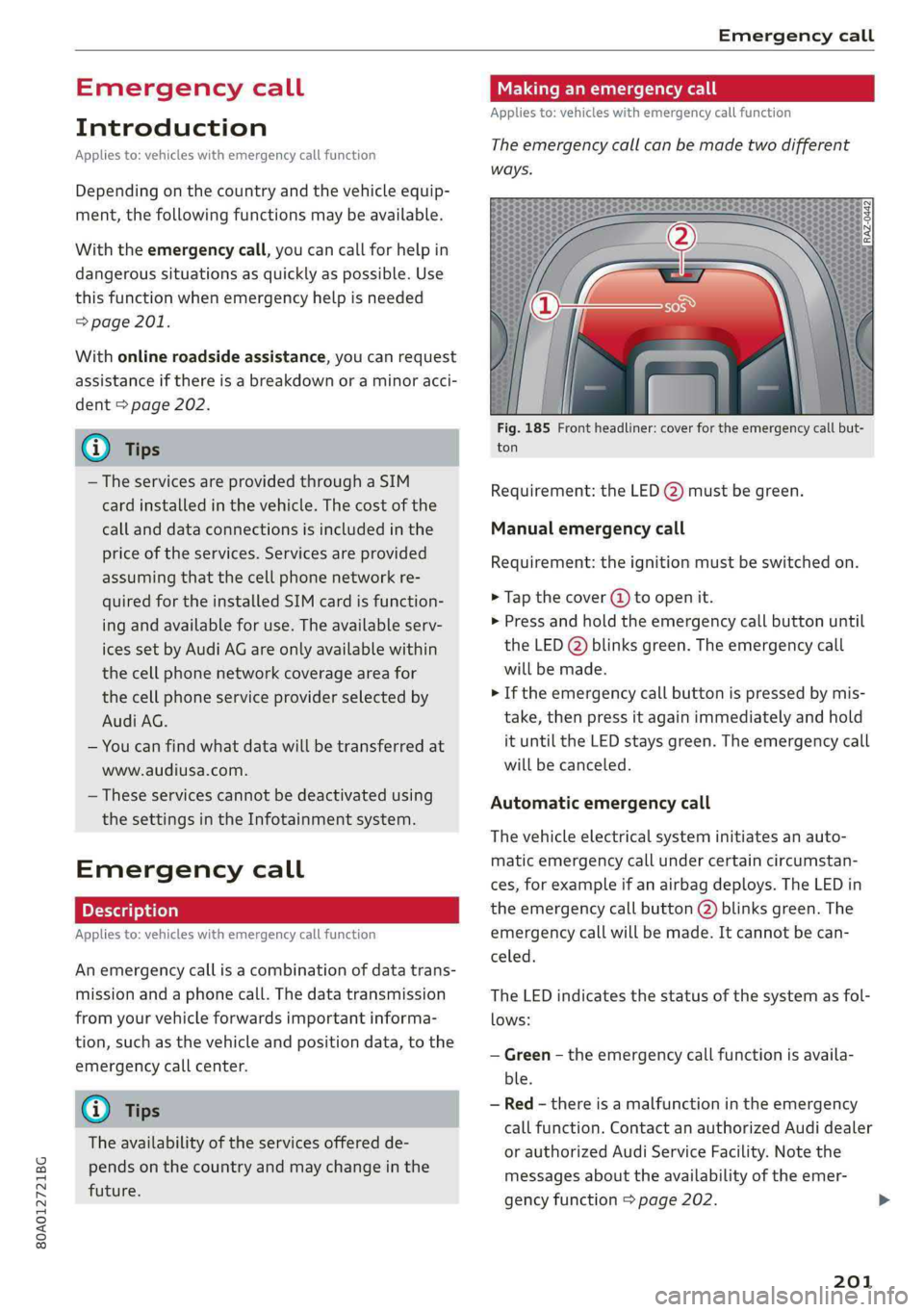
Makinganemergencycall
Appliesto:vehicleswithemergencycallfunction
Theemergencycallcanbemadetwodifferent
ways.
Fig.185Frontheadliner:coverfortheemergencycallbut-
ton
Requirement:theLED@)mustbegreen.
Manualemergencycall
Requirement:theignitionmustbeswitchedon.
>Tapthecover(4)toopenit.
>Pressandholdthe emergencycallbuttonuntil
theLED()blinksgreen.Theemergencycall
willbemade.
>Iftheemergencycallbuttonispressedbymis-
take,thenpressitagainimmediatelyandhold
ituntiltheLEDstaysgreen.Theemergencycall
willbecanceled.
Automaticemergencycall
Thevehicleelectricalsysteminitiatesanauto-
matic emergencycallundercertaincircumstan-
ces,forexampleifanairbagdeploys.TheLEDin
the emergencycallbutton(2)blinksgreen.The
emergencycallwillbe made.Itcannot becan-
celed.
TheLEDindicatesthestatusofthesystemasfol-
lows:
—Green-theemergencycallfunctionisavaila-
ble.
—Red-thereisamalfunctionintheemergency
callfunction.ContactanauthorizedAudidealer
orauthorizedAudiServiceFacility.Notethe
messagesabouttheavailability oftheemer-
gencyfunction>page202.
201
Page 204 of 392
Emergencycall
—Off-theemergencycallfunctionisnotavaila-
ble,perhapsbecausenonetworkisavailable.
@)Tips
Iftheemergencycalliscanceledduetoa
poorconnection,thenthesystemautomati-
callytriestoconnectagain.
Appliesto:vehicleswithemergencycallfunction
303|Emergencycallfunction:malfunction!Re-
strictedfunctionality.PleasecontactService
Ifthisindicatorlightturnsonandthismessage
appears,the emergencycallfunctionisrestrict-
ed.Forexample,youcannotcalltheemergency
callcenter,butdatamaystill betransmittedun-
dercertaincircumstances.Drivetoanauthorized
AudidealerorauthorizedAudiServiceFacilityim-
mediatelytohavethemalfunctioncorrected.
&Emergencycallfunction:malfunction!Func-
tionunavailable.PleasecontactService
Ifthisindicatorlightturnsonandthismessage
appears,youcannotmakeanemergencycall.
DrivetoanauthorizedAudidealerorauthorized
AudiServiceFacilityimmediatelytohavethe
malfunctioncorrected.
Onlineroadside
assistance
Appliesto:vehicleswithonlineroadsideassistance
Anonlineroadsideassistancecall)) isacombina-
tionofdatatransmissionandaphonecall.The
data transmissionfromyourvehicleforwardsim-
portantinformationtothe Audiservicecenter,
suchasthevehicleandpositiondata.
))Theavailabilityoftheservicesoffereddependsonthe
countryandmaychangeinthefuture.
202
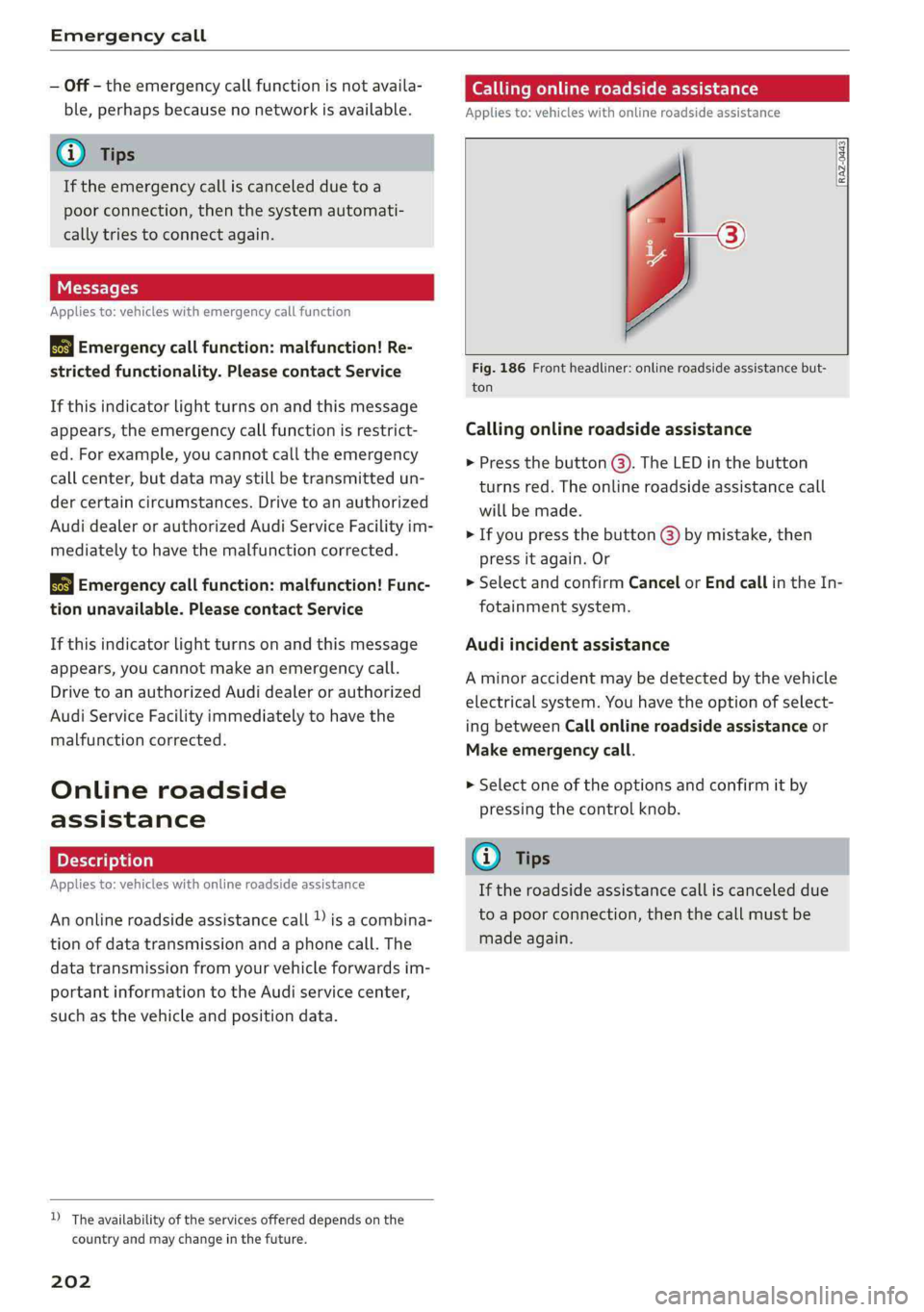
Callingonlineroadsideassistance
Appliesto:vehicleswithonlineroadsideassistance
RAZ-0443
Fig.186Frontheadliner:onlineroadsideassistancebut-
ton
Callingonlineroadsideassistance
>Pressthebutton@).TheLEDinthebutton
turnsred.Theonlineroadsideassistancecall
willbemade.
>Ifyoupressthebutton@)bymistake,then
pressitagain.Or
>SelectandconfirmCancelorEndcallintheIn-
fotainmentsystem.
Audiincidentassistance
Aminoraccidentmaybedetectedbythevehicle
electricalsystem.Youhavethe optionofselect-
ingbetweenCallonlineroadsideassistanceor
Makeemergencycall.
>Selectoneoftheoptionsandconfirmitby
pressingthecontrolknob.
G)Tips
Iftheroadsideassistancecalliscanceleddue
toapoorconnection,thenthecallmustbe
madeagain.
Page 206 of 392
Navigation
>Pushthecontrolknobup.Theinputfieldisdis-
played@)&page203,fig. 187.
—Enteroneormoresearchtermsintotheinput
field.
—Ifavailable,confirmtheinputsuggestion*to
completetheentryorawordsuggestion*.See
=>page159,Letter/numberspeller.
—Turn thecontrolknobtotherighttochangethe
resultslist.
—Selectandconfirmadestinationfromthere-
sultslist.
Theroutedisplaysasanoverviewinthemap.
Routeguidanceisalreadyactive.
Narrowingthesearcharea
Allcountries/statesareselectedatthefactory
forthefreetextsearch.
—Select:therightcontrolbutton>
-Country/stateselection-intheinputfield1
=>page203,fig.187.
—Selectthecountryorstate(@)thatshould be
searchedforinthefreetextsearchinorderto
narrowthenumberof resultsandincreasethe
searchspeed.Theselectedentryinthecoun-
try/stateselectionisstored.Or:SelectAll
countries/states.
@Tips
— TheMMIinputsuggestionsdependonthe
lastnavigateddestinations.
—Upto50entriescanbestoredinthelast
destinationslist.
—Additionalinformationonfreetextsearches
canbefoundunder>page160.
Loadingpreviousdestinations
Appliesto:vehicleswithnavigationsystem
Yourlastdestinationsareautomaticallystored
andcanbeloadeddirectlyas adestination.
Requirement:adestinationwasalreadynavigat-
edto.
>Pressthe [NAV/MAP]buttonrepeatedlyuntil
the Enterdestinationmenuisdisplayed
=>page203,fig.187.
204
YourlastdestinationislisteddirectlyintheEnter
destinationmenuunderthehomeaddressand
identifiedwiththesymbol@)>page203,
fig.187.
—Selectandconfirmoneofthelastdestinations
fromthelist.
Deletingpreviousdestinations
—Selectoneofthelastdestinationsfromthelist.
—Select:rightcontrolbutton>Deletedestina-
tion>DeletethislastdestinationorDeleteall
lastdestinations.
Theselecteddestinationoralllastdestinations
is/aredeletedandnolongerdisplayedintheEn-
terdestinationmenu.
Enteringanaddress
Appliesto:vehicleswithnavigationsystem
As analternativetofreetextsearch,youcanal-
so enteranaddressinstages.
>Pressthe [NAV/MAP]buttonrepeatedlyuntil
theEnterdestinationmenuisdisplayed
=>page203,fig.187.
>Select:leftcontrolbutton>Enteraddress.
—Enteringadestinationusingacountry/state:
selectandconfirmCountry/state.Selectand
confirmacountryorstatedirectlyfromthelist.
Or:searchforacountryorstateusingtheinput
field.
—EnteringadestinationusingtheCity/ZIP
code:selectandconfirmCity/ZIPcode.Entera
cityoraZIPcode.Or:selectandconfirmacity
fromthelist.
—Selectandconfirmadditionaldetailsaboutthe
destinationsuchasStreet,Housenumberor
Downtown.
—Destinationentry usinga streetintersection*:
Requirement:youmustenterastreet.Select
andconfirmIntersection.Selectandconfirma
streetdirectlyfromthelist.Or:searchfora
streetusingtheinputfield.
—SelectandconfirmStartrouteguidance.
Page 208 of 392
Navigation
—ThenselectandconfirmStartrouteguidance.
Additionaldirectoryfunctionsinthenavigation
systemcanbefoundunder>page211.
@)Tips
—Addressesthathavebeenimportedfrom
yourmobiledeviceintotheMMIcanalsobe
usedasadestination.
—If acontactisgrayed outinthedirectory,
thiscontacthasneitheradestinationnoran
addressassignedtoit.
olelmneat)
Appliesto:vehicleswithnavigationsystem
>Pressthe LNAV/MAP]buttonrepeatedlyuntil
the Enterdestinationmenuisdisplayed
=>page203,fig.187.
>Select:leftcontrolbutton>Pointsofinterest.
—Changingthesearcharea:selectandconfirm
Searcharea>asearchareafromthelist.
Thefollowingsearchcategoriesareavailable:
Nearby:pointsofinterestcanbeselectedfrom
differentcategories.Thepointsofinterestare
listedstartingfromtheimmediatevicinityofthe
vehicleuptoaradiusofapproximately124miles
(200km).
Alongtheroute:pointsofinterestalongthe
routecanonlybeselectedduringactiveroute
guidance.Thepointsofinterestarelocateddi-
rectlyalongorintheimmediatevicinityofthe
calculatedroute.Thepointsofinterestcanlike-
wisebeselectedfromvariouscategories.Forex-
ample,youcansearchforahotelorparkinglot
atthedestination.
Neardestination/Nearstopover:pointsofinter-
estnearadestinationorastopover canonlybe
selectedduringactiverouteguidance.Thepoints
ofinterestcanlikewisebeselectedfromvarious
categories.Forexample,youcansearchforaho-
telorparkinglotatthedestination.
In anewcity:selectacountry/stateorsearchin
anewcity.Enterthenameofthedesiredcity.
Points ofinterestcanbeselectedfromvarious
categories.Thisfunctionallowsyoutosearchfor
206
points ofinterestinanycityregardlessoftheac-
tiverouteguidanceorthevehicleposition.
—Searchingforthenameofapointofinterest
intheselectedsearcharea:Select:Findentry
>Enter pointofinterest.Enterthenameofthe
pointofinterest.
—Searchingforapointofinterestinaspecific
category:selectSelectcategory.Selectand
confirmacategorysuchasRestaurants.
(i)Tips
—Distancestopointsofinterestaredisplayed
asastraight-linedistancefromyourcurrent
location.Theactualdistancefromyourcur-
rent locationtothepointofinterestisup-
datedautomatically.Thelistofpointsofin-
terestthatwerefoundisnotresortedwhen
thishappens.
—Theremaybeentriesinthelistthatcannot
bedisplayedcompletelyduetotheirlength.
Selectthecorrespondingentryfromthelist.
Select:rightcontrolbutton>Showdestina-
tiondetails.Detailedinformationforthese-
lectedentryinthelististhendisplayed.
Onlinepointofinterestsearch(online
search)
Appliesto:vehicleswithnavigationsystem andAudiconnect
Infotainment
You cansearchforpointsofinterestontheInter-
net.
Requirement:TherequirementsforAudiconnect
Infotainmentmustbemet>page192.
>Pressthe [NAV/MAP]buttonrepeatedlyuntil
theEnterdestinationmenuisdisplayed
=>page203,fig.187.
>Select:leftcontrolbutton>Onlinesearch.The
searcharealastsetisdisplayedintheinput
field.
—Changingthesearcharea:select:rightcontrol
button>Selectsearcharea.
—Searchingforonlinedestinationsinthese-
lectedsearcharea:enteranewcity/stateif
necessary.Enterthesearchterm,suchashotel.
Pressthecontrolknob.Selectandconfirm an
onlinedestinationfromthelist.
Page 209 of 392
80A012721BG
Navigation
—Searchingforonlinedestinationsinaspecific
category:selectandconfirmSelect category.
SelectandconfirmacategorysuchasRestau-
rants.
Findwhichsearchareasareavailableunder
=>page206,Pointofinterestsearch.
Youcansearchforonlinedestinationsusingthe
voicerecognitionsystem>tableonpage173.
G)Tips
Alwaysreadthechapter>page192,Audi
connect.
AccessingdestinationsfrommyAudi
account
Appliesto:vehicleswithnavigationsystemandAudiconnect
Infotainment
ImportindividualdestinationsfromyourmyAudi
accountintotheMMI.
Requirement:
TherequirementsforAudiconnectInfotainment
mustbemet>page192.
YoumusthavearegisteredmyAudiaccountat
www.audiusa.com/myaudi.Youmusthaveavehi-
cleassignedtoyourmyAudiaccountandyou
musthavestoredoneormoredestinations.
>Pressthe [NAV/MAP]buttonrepeatedlyuntil
theEnterdestinationmenuisdisplayed
=>page203,fig.187.
>Select:leftcontrolbutton>myAudicontacts.
>Ifnecessary,enteryourmyAudiuserdataor
yourmyAudiPIN>page193.Thecontacts
storedinmyAudiaredisplayed.
—Selectandconfirmacontact.
—Selectandconfirmaprivateorbusinessdesti-
nation.
—SelectandconfirmStartrouteguidance.
@Tips
—YouonlyneedtoenterthemyAudiuserdata
onetime.
—YoucanreceiveyourmyAudiPINifyouhave
setupamyAudiaccount.
—Foradditionalinformation,visitwww.
audiusa.com.
Enteringadestinationusinggeo
coordinates
Appliesto:vehicleswithnavigationsystem
>Pressthe [NAV/MAP]buttonrepeatedlyuntil
theEnterdestinationmenuisdisplayed
=>page203,fig.187.
>Select:leftcontrolbutton>Geographicalcoor-
dinates.
—SelectLatitude/Longitude.
—Pressthecontrolknobtosettheindividualval-
ues.
—Turn thecontrolknobtotheleft/rightto
changetheselectedvalue.
—SelectandconfirmStartrouteguidance.
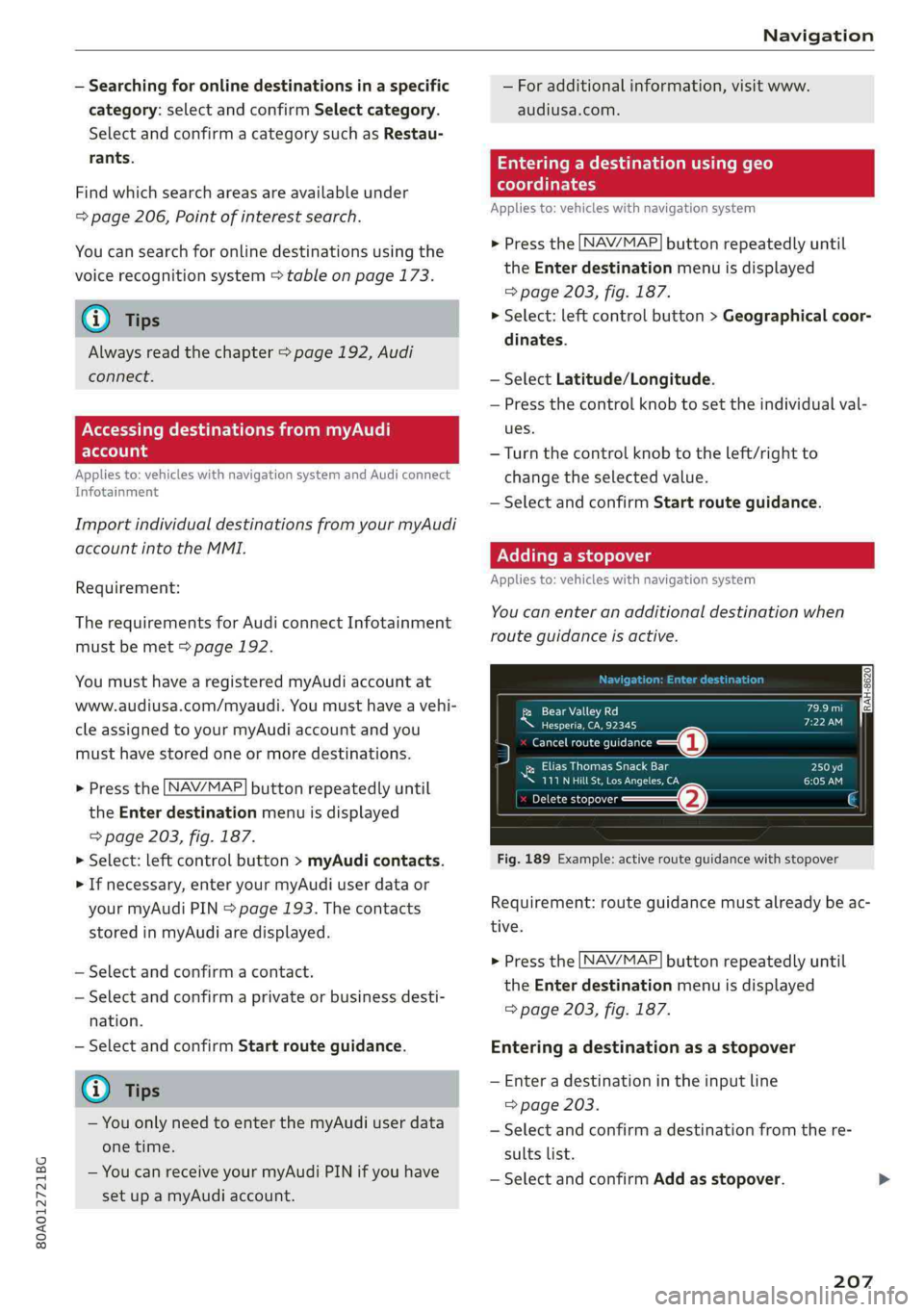
Addingastopover
Appliesto:vehicleswithnavigationsystem
You canenteranadditionaldestinationwhen
routeguidanceisactive.
[RAH-8620|Pend)
ee)
5menortina—@
RecoPra
™111NHilLSt,LosAngeles,CACHOlw)
Deletestopover(2)
Fig.189Example:activerouteguidancewithstopover
Requirement:routeguidancemustalreadybeac-
tive.
>Pressthe [NAV/MAP]buttonrepeatedlyuntil
theEnterdestinationmenuisdisplayed
=>page203,fig.187.
Enteringadestinationasastopover
—Enteradestinationintheinputline
=>page203.
—Selectandconfirmadestinationfromthere-
sultslist.
—SelectandconfirmAddasstopover.
207
Page 212 of 392
Navigation
G@)Tips
—Personalroutesarelearnedbasedontheve-
hicleposition.Therouteisprioritizedac-
cordingtohowfrequentlyyoudrivetoa
destination.
—Amaximumofthreepersonalroutesare
displayedintheEnterdestinationmenu.
Basedonthecurrentvehicleposition,the
trafficsituation fortheroutethatismost
likelytobedrivenoutofthethreeroutes
willalwaysbemonitored.
—Pleasenotethatpersonalroutesthathave
alreadybeenstoredwillremainstoredafter
theignitionisswitchedoffandtheymust
bedeletedmanually.
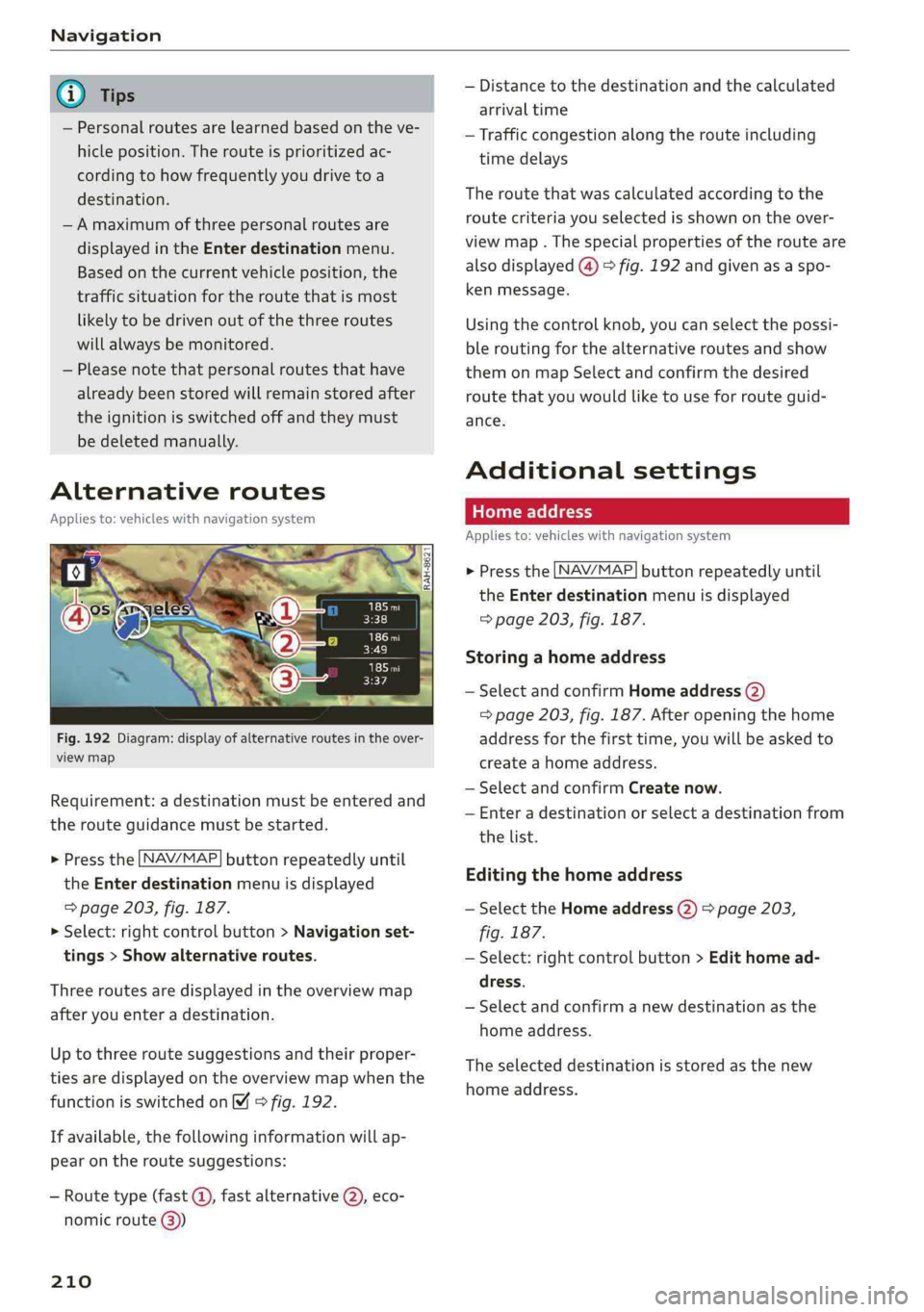
Alternativeroutes
Appliesto:vehicleswithnavigationsystem
Fig.192Diagram:displayofalternativeroutesintheover-
viewmap
Requirement:adestinationmustbeenteredand
therouteguidancemustbestarted.
>Pressthe LNAV/MAP]buttonrepeatedlyuntil
the Enterdestinationmenuisdisplayed
=>page203,fig.187.
>Select:rightcontrolbutton>Navigationset-
tings>Showalternativeroutes.
Threeroutesaredisplayedinthe overviewmap
afteryouenteradestination.
Uptothree routesuggestionsandtheirproper-
tiesaredisplayedonthe overviewmapwhenthe
functionisswitchedon4©fig.192.
Ifavailable,thefollowinginformationwillap-
pearontheroutesuggestions:
—Routetype(fast©,fastalternative2), eco-
nomicroute@))
210
—Distancetothedestinationandthecalculated
arrivaltime
—Trafficcongestion along therouteincluding
timedelays
Theroutethatwascalculatedaccordingtothe
routecriteriayouselectedisshownontheover-
viewmap.Thespecialpropertiesoftherouteare
alsodisplayed(@)>fig.192andgivenasaspo-
kenmessage.
Usingthecontrolknob,youcanselectthepossi-
ble
routingforthealternativeroutesandshow
themonmapSelectandconfirmthedesired
routethatyouwouldliketouseforrouteguid-
ance.
Additionalsettings
Appliesto:vehicleswithnavigationsystem
>Pressthe LNAV/MAP]buttonrepeatedlyuntil
theEnterdestinationmenuisdisplayed
=>page203,fig. 187.
Storingahomeaddress
—SelectandconfirmHomeaddress(2)
=>page203,fig.187.Afteropeningthehome
addressforthefirsttime,youwillbe askedto
createahomeaddress.
—SelectandconfirmCreatenow.
—Enteradestinationorselectadestinationfrom
thelist.
Editingthehomeaddress
—SelecttheHomeaddress(2)>page203,
fig.187.
—Select:rightcontrolbutton>Edithomead-
dress.
—Selectandconfirmanewdestinationasthe
homeaddress.
Theselecteddestinationisstoredasthenew
homeaddress.