ESP AUDI Q5 2019 Owners Manual
[x] Cancel search | Manufacturer: AUDI, Model Year: 2019, Model line: Q5, Model: AUDI Q5 2019Pages: 392, PDF Size: 99.86 MB
Page 227 of 392
80A012721BG
Media
Media
Introduction
Therearevariousmediadrivesandconnections
availableintheMMI.Forexample,youcanplay
audio/video*filesfromtheJukebox*orconnect
yourmobiledevicetotheAudimusicinterface*
andoperateitthroughtheMMI.
Notes
Mediaandformatrestrictions:theMMI(includ-
ingtheSDcardreaderandtheUSBstoragede-
viceconnection*)wastestedwithavarietyof
productsandmediaavailableinthemarket.
However,theremaybecaseswhereindividualde-
vicesormediaandaudio/video*filesmaynot be
recognized,mayplayonlywithrestrictionsor
maynotplayatall.
DigitalRightsManagement:pleasenotethat
theaudio/video*filesaresubjecttocopyright
protection.
Themediadrivesdonotplayfilesthatarepro-
tectedbyDRMandthatareidentifiedwiththe
symbolfi.
Datasecurity:neverstoreimportantdataonSD
cards,theJukebox*,CDs/DVDsormobiledevices.
AudiAGisnotresponsiblefordamagedorlost
filesandmedia.
Loadingtimes:themorefiles/folders/playlists
thatareonastoragemedium,thelongeritwill
taketo loadtheaudio/video*files.Audirecom-
mendsusingstoragemediathatonlycontainau-
dio/videofiles*.To decreasethetimeittakesto
loadaudio/videofiles*,createsubfolders(forex-
ample,fortheartistoralbum).Theloadingtime
willalsoincreasewhenimportingfiles.
Additionalinformation:whenplaying,audio
filesareautomaticallydisplayedwithanyaddi-
tionalinformationthatisstored(suchasthear-
tist,trackandalbumcover).Ifthisinformationis
notavailableonthestoragemedium,theMMI
willchecktheGracenotemetadatadatabase.
However,insomecases,theadditionalinforma-
tionmaynotbedisplayed.
Restrictedfunctionality:resettheMediaset-
tingstothefactorydefaultsettingsiffunctional-
ityisrestricted>page246.
Iffunctionalityisrestricted,resettheJukebox*
tothefactorydefaultsettings>page246.
Forinformationaboutthepropertiesofsupport-
edmediaandfileformats,see>page240.
CG)Note
Alwaysfollowtheinformationfoundin>@in
Generalinformationonpage192.
CD/DVDoperation
CD/DVDandformatrestrictions:thefunctionali-
tyofindividualstoragemediamaybelimiteddue
tothevarietyofblankCDs/DVDsavailable and
thevariouscapacities.AudioCDsorvideoDVDs
withcopyprotection,CDs/DVDsthatdonotcon-
formtothestandard,andmultisessionCDsmay
havelimitedplaybackormaynotplayatall.Audi
recommendsfinalizingtherecordingprocess
whencreatingmultisession CDs.Multisession
DVDsarenotsupported.
UsingCDs/DVDs,theCDdrive ortheDVDdrive:
toensurecorrect,high-qualityplaybackandto
preventdamagetothedriveordiscreadinger-
rors,alwaysstoreCDs/DVDsinaprotective
sleeveanddonotexposethemtodirectsunlight.
Donotuse:
—Damaged,dirtyorscratchedCDs/DVDs
—
SingleCDs/DVDswith3in(8cm)diameter
—CD/DVDsthatarenotround
—CDs/DVDswithlabels
—Protectiverings
—CleaningCDs
Thermalprotectionswitch:CD/DVDplayback
maybetemporarilyunavailableifoutsidetem-
peraturesareextremelyhotorcold.Athermal
protectionswitchisinstalledtoprotectthe
CD/DVDandthelaser.
Laserdevices:laserdevicesare dividedintosafe-
tyclasses1to4inaccordancewithDINIEC76
225
>
Page 231 of 392
80A012721BG
Media
Wi-Fiaudioplayer
Appliesto:vehicleswithWi-Fiaudioplayer
UsingtheWi-Fiaudioplayermediasourceonthe
MMI, youcanconnectandoperateyourWi-Fi-ca-
pablemediaplayer(suchasasmartphone)to
wirelesslyplaymusicfromyourmediaplayerli-
brary.Themediaplayerisconnectedthroughthe
vehicle'sWi-Fihotspot.AUPnPServerapporan
integratedUPnP/DLNAserveronyourmedia
playerisrequiredtoaccessyourmediaplayerli-
brary.
Requirement:theWi-Fifunctiononyourmedia
playermustbe switchedon.ThemyAudiappora
UPnPserverappmustbeinstalledonyourmedia
player.Or:youmustbeusingamediaplayerwith
anintegratedUPnP/DLNAserver.
—Connectingamediaplayer:pressthe[MEDIA
button.Presstheleftcontrolbuttonuntilthe
sourcesoverview>page234isdisplayed.Se-
lectandconfirm Wi-Fiaudioplayer(7)
=>page234,fig.211.
—Ifnecessary,selectandconfirmWi-Fiturned
off>TurnonWi-FitoactivateWi-Fiinthe
MMI.SelectWi-Fisettings,ifnecessary.Select
thesamesettingsonthewirelessmediaplayer
thatareusedfortheWi-Fihotspot.
—StartingtheWi-Fiaudioplayer:Startthe
myAudiapporanUPnPserverapp,orallow
mediasharingonyourdevice.
Operatingthemediaplayer:themediaplayeris
operatedthroughtheMMI.
—Presstheleftcontrolbuttonrepeatedlyuntil
theFoldersmenuitemappears.Selectandcon-
firmFolders.
—Playingmusicfromthemediaplayer:select
andconfirmMediacenter.
Webradio:see>page230.
objects,theycouldbethrownaroundthein-
sideofthevehicleinacrashandcauseseri-
ousinjuries.Storethesetypesofdevicesse-
curelywhiledriving.
—Donotuseanywirelessdevicesonthefront
seatswithinrangeoftheairbagswhiledriv-
ing.Also readandfollowthewarningsin
=page270,Frontairbags.
ZAWARNING
—Asthedriver,donotallowusageoftheWi-
Fihotspottodistractyoufromdriving,as
thiscouldincreasetheriskofanaccident.
—Itisonlysafe tousetablets,laptops,mobile
devicesandothersimilardeviceswhenthe
vehicleisstationarybecause,likeallloose
C)Note
Alwaysfollowtheinformationfoundin>@in
Generalinformationonpage192.
G)Tips
—Alwaysreadthechapter>page192,Audi
connect.
—PleasenotethataWi-Ficonnectiondoes
notautomaticallymakeitpossible touse
the
Internet.Foradditionalinformation,
see>page193.
—Toavoidinterruptionsduringplayback,de-
activatethepowersavingfunctiononthe
mediaplayer orconnectittoacharger.
—Theloadingtimesfortheaudiodatadepend
onthemediaplayerusedandthenumberof
filesthatitcontains.
—Amaximumof2,000entriesperdirectory
aredisplayedintheMMI.
—Songsdownloadedforofflineuseusingmu-
sicstreamingservicesarestoredonyour
mobiledevice(suchasasmartphone)and
maybeDRMprotected.TheWi-Fiaudio
playerwillnotplayDRMprotectedfiles.
—ContactanauthorizedAudidealeror au-
thorizedAudiServiceFacilityforadditional
informationontheWi-Fiaudioplayer.
229
Page 232 of 392
![AUDI Q5 2019 Owners Manual Media
Onlinemediaand
Internetradio
Appliesto:vehicleswithAudiconnect
Youcanplaybackandoperatevariousonlineme-
diaservicesandInternetradiousingtheMMI.
Fig.208Onlinemedia
> Pressthe[MEDIA]button.](/img/6/57631/w960_57631-231.png "AUDI Q5 2019 Owners Manual Media
Onlinemediaand
Internetradio
Appliesto:vehicleswithAudiconnect
Youcanplaybackandoperatevariousonlineme-
diaservicesandInternetradiousingtheMMI.
Fig.208Onlinemedia
> Pressthe[MEDIA]button.")
Media
Onlinemediaand
Internetradio
Appliesto:vehicleswithAudiconnect
Youcanplaybackandoperatevariousonlineme-
diaservicesandInternetradiousingtheMMI.
Fig.208Onlinemedia
> Pressthe[MEDIA]button.Presstheleftcontrol
buttonuntilthesourcesoverview>fig.208is
displayed.
Appliesto:onlinemediaandInternetradiousage
Requirement:
—ThemyAudiappmustbeinstalledandopenon
yourmobiledevice.
—YoumustbeloggedintoyourmyAudiaccount
inthemyAudiapp andyoumusthaveselected
yourvehicle.
—TheWi-Fifunctiononthemobiledeviceandon
theMMImustbe switchedon.
—Ifnecessary,checkinthe connectionmanager
=>page246ifthemobiledeviceyouconnected
isselectedundertheMMIconnectapp().
—TheMMImustbeconnectedtothenetwork.
—ThesymbolfortheOnlinemediasource(@)
=>fig.208isshownintheMMI.
Appliesto:onlinemediausage
Additionalrequirement:
— Asupportedonlinemediaservicemustbeavail-
ableinthecountrywherethevehicleisbeing
operated.
—Youmusthave anaccountwithasupportedon-
linemediaservice.
—Dependingontheonlinemediaservice,you
mayneedtoinstallandopenanapponyour
mobiledevice.
StartingOnlinemedia
—Pressthe[MEDIA]button.Presstheleftcontrol
buttonuntilthesourcesoverview>page234is
displayed.
230
—Selectandconfirm anonlinemediaservice.
StartingInternetradio
—Pressthe[MEDIA]button.Presstheleftcontrol
buttonuntilthesourcesoverview>page234is
displayed.
—SelectandconfirmInternetradio.TheInternet
radiobrowserorthelaststationthatwasplay-
ingisshown.
—Selectingthestation:ifnecessary,selectand
confirmacategoryintheInternetradioBrows-
er>astation.
OnlinemediaandInternetradio:additionalop-
tions
—Presstherightcontrolbutton.
Thefollowingoptionsmaybeavailable,depend-
ingontheinformationshown(suchasthesta-
tion/trackthatiscurrentlyplaying):
—Soundsettings:see>page249.
—Wi-Fisettings:see>page198,Wi-Fisettings.
—Connectionmanager:see>page246.
—Additionaloptionsmaybeavailable,depending
ontheactiveonlinemediaserviceorInternet
radio.
ZA\WARNING
—Itisonlysafe tousetablets,laptops,mobile
devicesandothersimilardeviceswhenthe
vehicleisstationarybecause,likeallloose
objects,theycouldbethrownaroundthein-
sideofthevehicleinacrashandcauseseri-
ousinjuries.Storethesetypesofdevicesse-
curelywhiledriving.
—Donotuseanywirelessdevicesonthefront
seatswithinrangeoftheairbagswhiledriv-
ing.Also readandfollowthewarningsin
=>page270,Frontairbags.
C)Note
—Alwaysfollowtheinformationfoundin>®
inGeneralinformationonpage192.
—Theregenerallyareadditionalcostswhen
usinganonlinemediaserviceaccount,espe-
ciallywhenitisusedinternationally.
Page 233 of 392
80A012721BG
Media
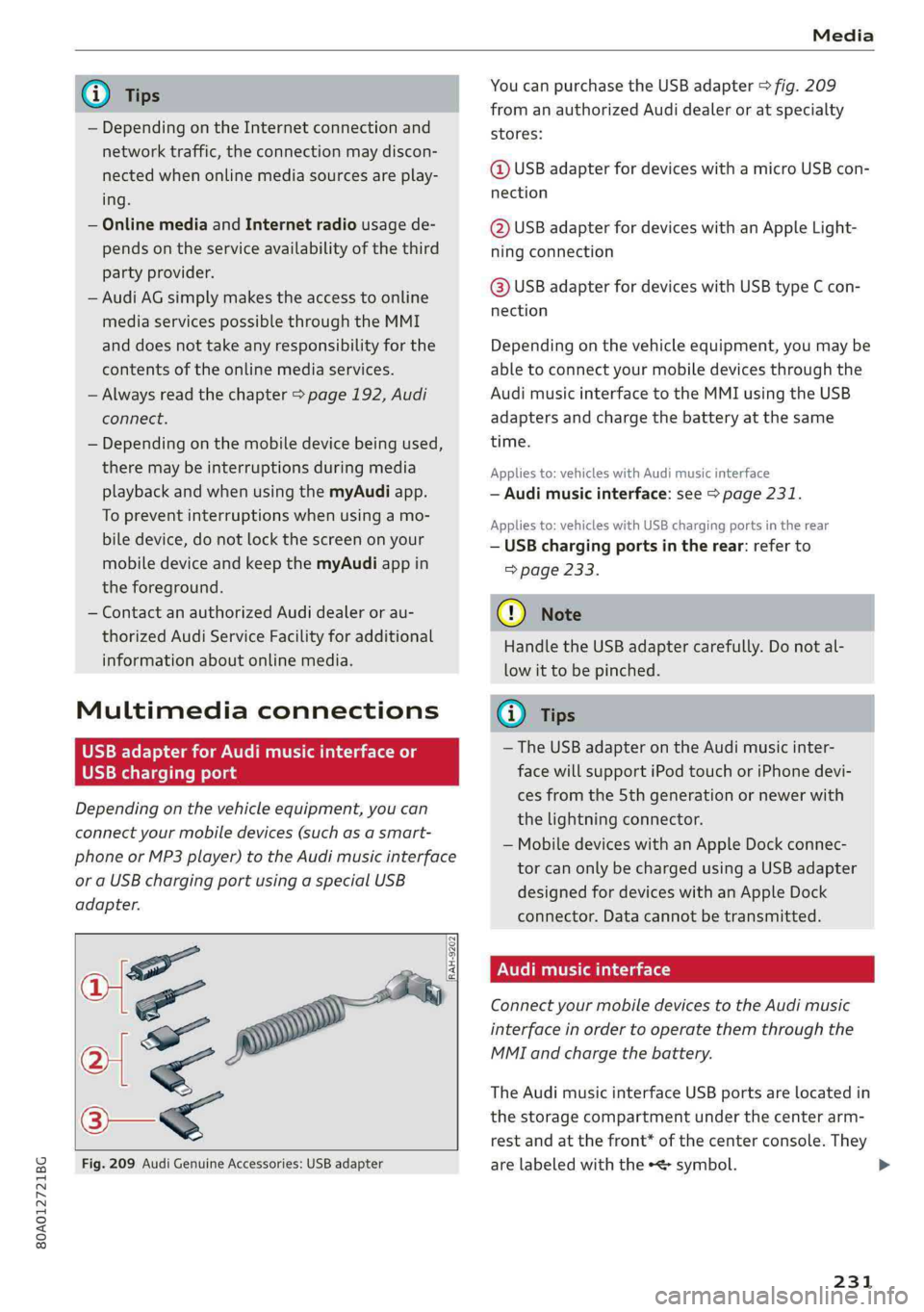
@TipsYoucanpurchasetheUSBadapter>fig.209
fromanauthorizedAudidealeroratspecialty
— Depending ontheInternetconnectionandstores:
networktraffic,the connectionmaydiscon-
nectedwhenonlinemediasourcesareplay-@USBadapterfordeviceswithamicroUSBcon-
ing.nection
—OnlinemediaandInternetradiousagede-@USBadapterfordeviceswithanAppleLight-
pendsontheserviceavailabilityofthethirdningconnection
partyprovider.
—AudiAGsimplymakestheaccesstoonlinehaaSeadsterfardevicesaitUSBGmeEcon
mediaservicespossiblethroughtheMMInection
anddoesnottakeanyresponsibilityfortheDepending onthevehicleequipment,youmaybe
contentsoftheonlinemediaservices.abletoconnectyourmobiledevicesthroughthe
—Alwaysreadthe chapter>page192,AudiAudimusicinterfacetotheMMIusingtheUSB
connect.adaptersandchargethebatteryatthesame
— Depending onthemobiledevicebeingused, time.
theremaybeinterruptionsduringmediaAppliesto:vehicleswithAudimusicinterface
playbackandwhenusingthemyAudiapp.—Audimusicinterface:see>page231.
TopreventinterruptionswhenSSeeAppliesto:vehicleswithUSBchargingportsintherear
biledevice,donotlockthescreenonyour—USBchargingportsintherear:referto
mobiledeviceandkeepthemyAudiappin>page233.
theforeground.
—ContactanauthorizedAudidealeror au-@)Note
thorizedAudiServiceFacilityforadditional
HandletheUSBadaptercarefully.Donotal-
informationaboutonlinemedia.
lowittobepinched.
MultimediaconnectionsG)Tips
—TheUSBadapteronthe Audimusicinter-
USBchargingportfacewillsupportiPodtouchoriPhonedevi-
cesfromthe 5thgenerationornewerwith
thelightningconnector.
—MobiledeviceswithanAppleDockconnec-
torcanonlybechargedusingaUSBadapter
designedfordeviceswithanAppleDock
connector.Datacannotbetransmitted.
Audimusicinterface
ConnectyourmobiledevicestotheAudimusic
interfaceinordertooperatethemthroughthe
MMIandchargethebattery.
Dependingonthevehicleequipment,youcan
connectyourmobiledevices(suchas asmart-
phoneorMP3player)totheAudimusicinterface
oraUSBchargingportusingaspecialUSB
adapter.
af
a|=
TheAudimusicinterfaceUSBportsarelocatedin
o—«thestoragecompartmentunderthecenterarm-
restandatthefront* ofthecenterconsole.They
Fig.209AudiGenuineAccessories:USBadapterarelabeledwiththe«
[RAH-9202
\
231
Page 234 of 392
Media
TheAudimusicinterfaceAUXinputislocatedin
thestoragecompartmentunderthecenter
armrestandislabeledwithAUX.
USBInput
—Connectingorchargingmobiledevicesusinga
USBadapter:ConnectthematchingUSBadapt-
ertothe AudimusicinterfaceUSBportand
thenconnectittothemobiledevice,forexam-
pleaniPhone.Thebatterywillchargeautomat-
ically.
—DisconnectingamobiledevicefromtheAudi
musicinterface:RemovetheUSBadapterfrom
the AudimusicinterfaceUSBport.
Themediaarestartedandoperatedthroughthe
mobiledeviceortheMMI,dependingonthede-
vicebeingused>page234.
Connectingmultiplemobiledevices:ifamobile
device(suchasasmartphone)isconnectedatthe
respectiveUSBportontheAudimusicinterface,
thenalldevicescanbeusedasa playbacksource.
AUXInput
—Connectingamobiledevice totheAUXinput:
ConnecttheAUXcabletotheAUXinputonthe
Audimusicinterfaceandthenconnectittothe
mobiledevice(forexample,anMP3playerora
smartphone).
—DisconnectingamobiledevicefromtheAUX
input:RemovetheAUXcablefromtheAUXin-
putonthe Audimusicinterface.
—Operation:selectandconfirmtheExternalau-
dioplayersource©)>page234,fig.210.Me-
diaisstartedandoperatedonthemobilede-
vice.
ZAWARNING
Drivingrequiresyourcompleteandundivided
attention.Asthedriver,youhavecompletere-
sponsibilityforsafetyintraffic.Neveroperate
mobiledeviceswhiledriving,becausethisin-
creasestheriskofanaccident.
1)Applies onlytoMTPdevices.DoesnotapplytoAppledevi-
cesandUSBmassstoragedevices.
232
@)Note
—UseaUSBextensioncabletoconnectdevi-
cesthathaveanintegratedUSBconnector
(suchasaUSBstick)topreventdamageto
yourUSBdeviceandthe Audimusicinter-
face.
—Extremelyhighorlow temperaturesthat
canoccurinsidevehiclescandamagemobile
devicesand/orimpairtheirperformance.
Neverleavemobiledevicesinthevehiclein
extremelyhighorlowtemperatures.
G)Tips
—Alwaysfollowtheinformationfoundin
=page59.
—Whenyouswitchtheignitionoff,theUSB
portsarestillsuppliedwithpoweruntilthe
energymanagementintervenes.
—DonotuseanadditionaladapterorUSBex-
tensioncabletoconnectmobiledevicesto
theAudimusicinterfacethatalreadyhavea
cableorthatmustbeconnectedwithaUSB
adapter(>page231).Using anadditional
adapterorUSextensioncablemayimpair
functionality.
—YoucanpurchasetheAUXconnectorcable
fromanauthorizedAudidealeror atspe-
cialtystores.
—Audirecommendssettingthevolumeofa
mobiledeviceconnectedtotheAUXinputto
approximately70%ofthemaximumvol-
ume.
—Functionalityisnotguaranteedformobile
devicesthatdonotconformtotheUSB2.0
specification.
—USBhubsarenotsupported.
—SomeversionsoftheiPodsuchastheiPod
shufflecannotbeconnectedtotheUSB
adapterfordeviceswithAppleDockconnec-
tor.ConnectthesedevicesusingaAUXcon-
nectorcable.
—Changedcontentonamobiledevice»)that
isconnectedtotheAudimusicinterface
maynotbedisplayedinthemediacenter.In>
Page 238 of 392
Media
©Videos*
Allavailablevideofilesaredisplayed.Selectand
confirmavideofile.
@)Note
Appliesto:vehicleswithAudiconnectInfotainmentand
useoftheradiocategorywithiPod/iPhone
Alwaysfollowtheinformationfoundin>@in
Generalinformationonpage192.
G@)Tips
—Onlythecategoriessupportedbythemedi-
umareavailable.Forexample,CD/DVD-
ROMtrackscannotbeselectedwithcatego-
riessuchasArtists,AlbumsorGenres.
WithaniPod/iPhone(source:Audimusicin-
terface>page231),the Podcasts,Audio
booksandComposerscategoriesarealso
available.
—For safetyreasons,thevideoimageisonly
displayedwhenthevehicleisstationary.On-
lythesoundfromthevideoplayswhiledriv-
ing.
—Whensynchronizingaportabledevicewith
"Cloud“services,playlistsmaydisplayincor-
rectly
intheMMI.Usethemediacenterin
thedevice.
—WithaniPod/iPhone(mediasource:Audi
musicinterface>page231),the Podcasts,
Audio booksandComposerscategoriesare
alsoavailable.
G)Tips
Appliesto:iPod/iPhoneonAudimusicinterface
—AnInternetconnectionisrequiredtouse
theadditionalRadiocategory,anonline
mediaservice.Alsoseethe chapter
=>page198,Wi-Fisettings.Also readthe
informationonthe Audimusicinterfaceand
thesupporteddevices>page231.
— DependingontheInternetconnectionand
networktraffic,theconnectionmaydiscon-
nectedwhenonlinemediasourcesareplay-
ing.
—Theuseofonlinemediaservicesdependson
theserviceavailabilityofthethirdparty
provider.
236
—AudiAGsimplymakestheaccesstoonline
mediaservicespossiblethroughtheMMI
anddoesnottakeanyresponsibilityforthe
contentsoftheonlinemediaservices.
ac-\Bx-yaestla)
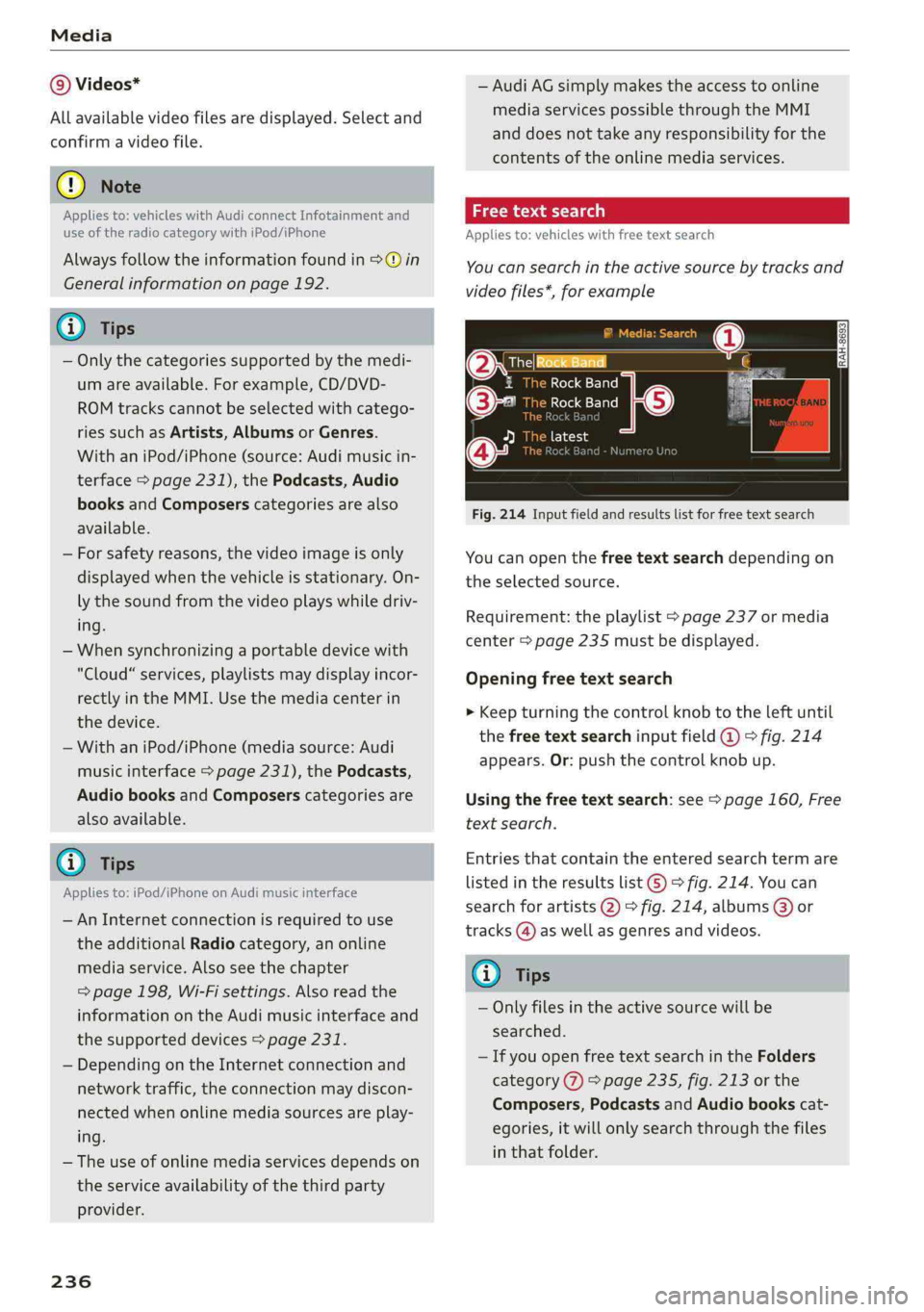
Appliesto:vehicleswithfree textsearch
Youcansearchintheactivesourcebytracksand
videofiles*,forexample
OresRockBandq
1RockBand:
©-RockBand
[eie-hie
a
Fig.214Inputfieldandresultslistforfreetextsearch
Youcanopenthefreetextsearchdependingon
theselectedsource.
Requirement:theplaylist>page237ormedia
center>page235mustbedisplayed.
Openingfreetextsearch
>Keepturningthecontrolknobtotheleftuntil
thefreetextsearchinputfield@°fig.214
appears.Or:pushthecontrolknobup.
Usingthefreetextsearch:see>page160,Free
textsearch.
Entriesthatcontaintheenteredsearchtermare
listedintheresultslist©>fig.214.Youcan
searchforartists2)°fig.214,albums@)or
tracks@)aswellasgenresandvideos.
Gi)Tips
—Onlyfilesintheactivesourcewillbe
searched.
—IfyouopenfreetextsearchintheFolders
category(7)>page235,fig.213orthe
Composers,PodcastsandAudiobookscat-
egories,itwillonlysearchthroughthefiles
inthatfolder.
Page 242 of 392
Media
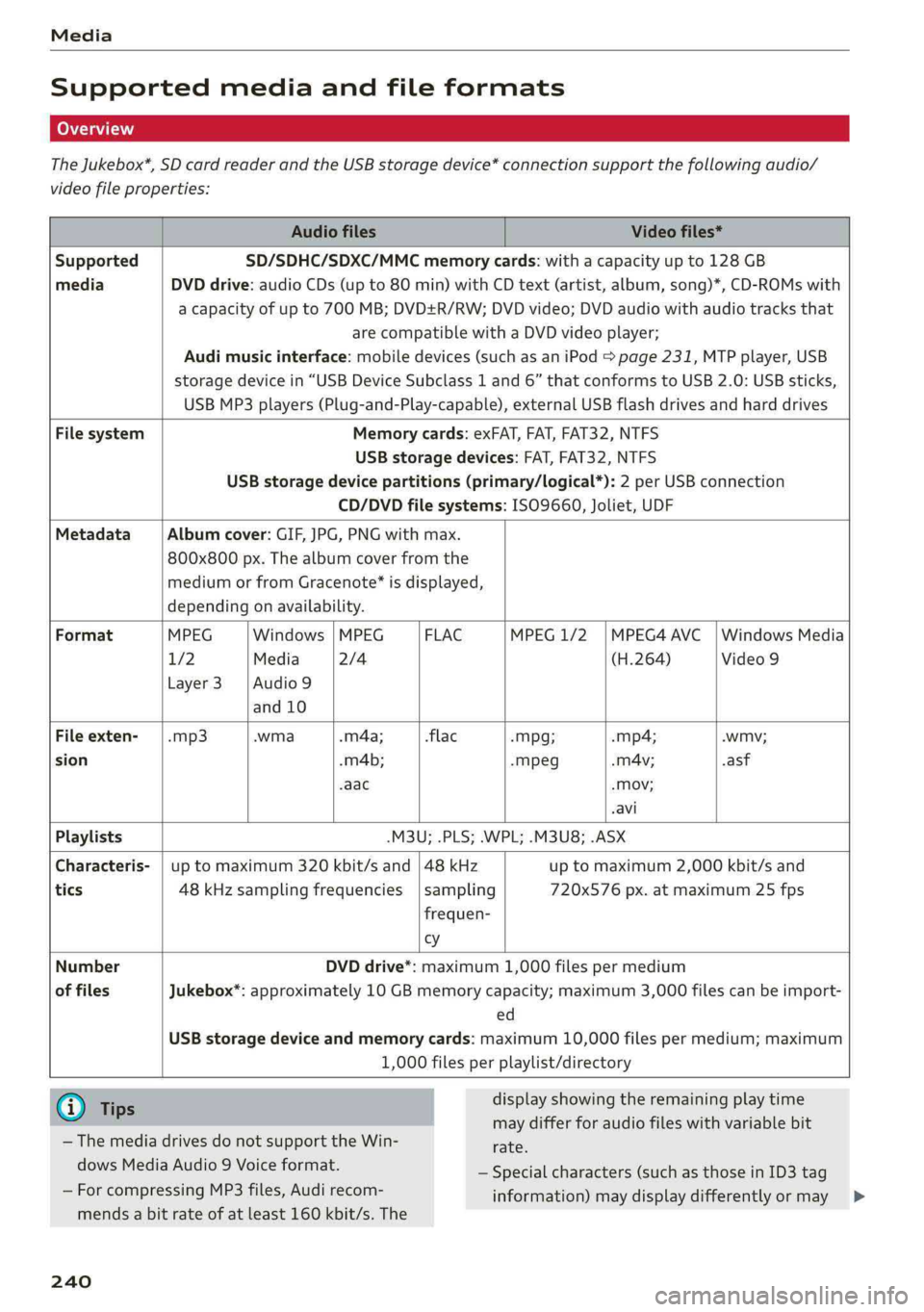
Supportedmediaandfileformats
TheJukebox*,SDcardreaderandtheUSBstoragedevice*connectionsupportthefollowingaudio/
videofileproperties:
AudiofilesVideofiles*
SupportedSD/SDHC/SDXC/MMCmemorycards:withacapacityupto128GB
mediaDVDdrive:audioCDs(upto80min)withCDtext(artist,album,song)*,CD-ROMswith
acapacityofupto700MB;DVD+R/RW;DVDvideo;DVDaudiowithaudiotracksthat
arecompatiblewithaDVDvideoplayer;
Audimusicinterface:mobiledevices(suchasaniPod>page231,MTPplayer,USB
storagedevicein“USBDeviceSubclass1and6” thatconformstoUSB2.0:USBsticks,
USBMP3players(Plug-and-Play-capable), externalUSBflashdrivesandharddrives
FilesystemMemorycards:exFAT,FAT,FAT32,NTFS
USBstoragedevices:FAT,FAT32,NTFS
USBstoragedevicepartitions(primary/logical*):2perUSBconnection
CD/DVDfilesystems: ISO9660,Joliet,UDF
MetadataAlbumcover:GIF,JPG,PNGwithmax.
800x800px.Thealbumcoverfromthe
mediumorfromGracenote®isdisplayed,
dependingonavailability.
FormatMPEGWindows|MPEGFLACMPEG1/2|MPEG4AVC|WindowsMedia
1/2Media2/4(H.264)Video9
Layer3 |Audio9
and 10
Fileexten--mp3.wma.m4a;-flac-mMpg;-mp4;.wmv;
sion.m4b;-mpeg.mA4v;.asf
-aac-Mov;
avi
Playlists.M3U;.PLS;.WPL;.M3U8;.ASX
Characteris-|uptomaximum320kbit/sand|48kHzuptomaximum2,000kbit/sand
tics48kHzsamplingfrequencies|sampling720x576px.atmaximum25fps
frequen-
cy
Number
offiles
DVDdrive*:maximum1,000filespermedium
Jukebox*:approximately10GBmemorycapacity;maximum3,000filescanbeimport-
ed
USBstoragedeviceandmemorycards:maximum10,000filespermedium;maximum
1,000filesperplaylist/directory
G)Tips
displayshowingtheremainingplaytime
maydifferforaudiofileswithvariablebit
— ThemediadrivesdonotsupporttheWin-rate.
dowsMediaAudio9Voiceformat.
—ForcompressingMP3files, Audirecom-
—Specialcharacters(suchasthoseinID3tag
information)maydisplaydifferentlyormay
mendsabitrateofatleast160kbit/s.The
240
>
Page 243 of 392
80A012721BG
Media
notalwaysdisplay,dependingonthesys-
temlanguage.
— Themanufacturerofthestoragedevicecan
—SomeMTPplayerfunctionsarenotsupport-
ed,suchasratingmusictracksandvideo
provideinformationaboutits“USBDevice
Subclass”.
playback.
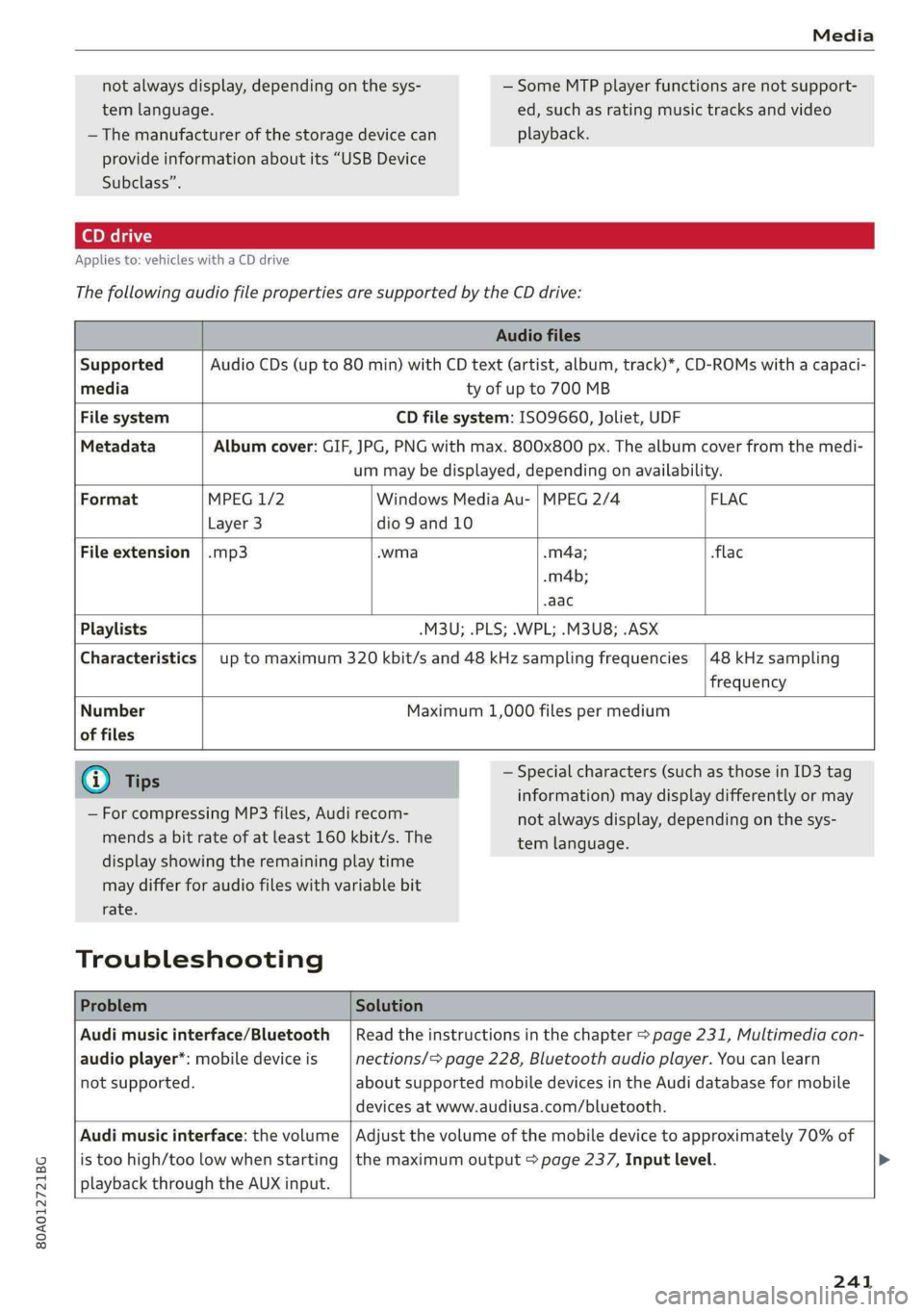
Appliesto:vehicleswithaCDdrive
ThefollowingaudiofilepropertiesaresupportedbytheCDdrive:
Audiofiles
SupportedAudioCDs(upto80min)withCDtext(artist,album,track)*,CD-ROMswithacapaci-
mediatyofupto700MB
FilesystemCDfilesystem:ISO9660,Joliet,UDF
MetadataAlbumcover:GIF,JPG,PNGwithmax.800x800px.Thealbumcoverfromthemedi-
ummaybedisplayed,dependingonavailability.
FormatMPEG1/2WindowsMediaAu-|MPEG2/4 FLAC
Layer3dio9and10
Fileextension|.mp3.wma-m4a;flac
.m4b;
-aac
Playlists-M3U;.PLS;.WPL;.M3U8;.ASX
Characteristicsuptomaximum320kbit/sand48kHzsamplingfrequencies
48kHzsampling
frequency
Number
offiles
Maximum1,000filespermedium
@Tips
—ForcompressingMP3files, Audirecom-
mendsabitrateofatleast160kbit/s.The
—Specialcharacters(such asthoseinID3tag
information)maydisplaydifferentlyormay
displayshowingtheremainingplaytime
maydifferforaudiofileswithvariablebit
rate.
Troubleshooting
notalwaysdisplay,dependingonthesys-
temlanguage.
ProblemSolution
Audimusicinterface/Bluetooth
audioplayer*:mobiledeviceis
notsupported.
Readtheinstructionsinthechapter>page231,Multimediacon-
nections/=page228,Bluetoothaudioplayer.Youcanlearn
aboutsupportedmobiledevicesinthe Audidatabaseformobile
devicesatwww.audiusa.com/bluetooth.
Audimusicinterface:thevolume
istoohigh/toolowwhenstarting
playbackthroughtheAUXinput.
Adjustthevolumeofthemobiledevicetoapproximately70%of
themaximumoutput>page237,Inputlevel.>
241
Page 247 of 392
![AUDI Q5 2019 Owners Manual 80A012721BG
Systemsettings
Systemsettings
Settingthedateand
time
Youcanset theclocktimemanuallyorusingthe
GPS*,
>Select:[MENU]button>Settings>leftcontrol
button>MMIsettings>Date&time.
>Or:select](/img/6/57631/w960_57631-246.png "AUDI Q5 2019 Owners Manual 80A012721BG
Systemsettings
Systemsettings
Settingthedateand
time
Youcanset theclocktimemanuallyorusingthe
GPS*,
>Select:[MENU]button>Settings>leftcontrol
button>MMIsettings>Date&time.
>Or:select")
80A012721BG
Systemsettings
Systemsettings
Settingthedateand
time
Youcanset theclocktimemanuallyorusingthe
GPS*,
>Select:[MENU]button>Settings>leftcontrol
button>MMIsettings>Date&time.
>Or:select:[MENU]button>Vehicle>leftcon-
trolbutton>Vehiclesettings>Date&time.
Automaticsetting
Whenthisfunctionisswitchedon¥,thetime
anddateareautomaticallyset.
Time
Requirement:theAutomaticsettingmustbe
switchedoff.
Pressthecontrolknob.YoucansettheTime
manuallybyturningandpressingthecontrol
knob.
Date
Requirement:theAutomaticsettingmustbe
switchedoff.
Pressthecontrolknob.YoucansettheDate
manuallybyturningandpressingthecontrol
knob.
Timezone
Whenselectingtheappropriatetimezone,a
samplingofcountriesinthiszonewillbelisted.
Automatictimezone*
Whenthisfunctionisswitchedon@,thetime
willautomaticallyadjusttothecorresponding
timezone.
Automaticdaylightsavingtime*
WhenthisfunctionisswitchedonM,thetime
willautomaticallyswitchtodaylightsavingtime.
D_TheQistandardmakesitpossibletocharge yourmobile
devicewirelessly.
Timeformat
Ifyouselect24h,theclockwilldisplay,forexam-
ple,13:00.IfyouselectAM/PM,theclockwill
display,forexample,1:00PM.
Dateformat
IfyouselectDD.MM.YYYY,thedatedisplaywill
show,forexample,31.08.2018.Ifyouselect
MM/DD/YYVY,thedatedisplaywillshow,forex-
ample,08/31/2018.IfyouselectYYYY-MM-DD,
thedatedisplaywillshow,forexample,
2018-08-31.
MMIsettings
>Select:[MENU]button>Settings>leftcontrol
button>MMIsettings.
Language
Youcanchangethedisplaylanguageaswellas
thelanguageforthevoiceguidance*andvoice
recognitionsystem”*.
Thenumberoflanguagesavailabledependson
themarket.
Measurementunits
Thefollowingmeasurementunitscan besetde-
pendingonavailability:Speed,Distance,Tem-
perature,Fuelconsumption,Volume,Pressure.
Mobiledeviceremindersignal
Appliesto:vehicleswithAudiphonebox
Requirement:yourcellphonemustbeQi-capa-
ble)orconnectedtotheAudimusicinterface@
withaUSBadaptercable>page180,fig.178.
Whenthedeviceremindersignalisswitchedon,
youwillbenotifiedthatyourmobiledeviceisstill
intheAudiphonebox*whenyouleavethevehi-
cle.YoucanselectbetweenSpokencue,Signal
toneandOff.
Mobiledeviceremindersignalvolume:youcan
adjusttheremindersignalvolumebyturningthe
controlknob.
245
Page 248 of 392
Systemsettings
Switchoffpop-up:whenthefunctionisswitched
on[¥,themessagesintheInfotainmentsystem
displayregardingthechargingstatusofyourcell
phoneinthe Audiphonebox*arehidden.There-
mindernottoforgetyourcellphonewhenleav-
ingthevehicleisalsoswitchedoff.
Tooltips
WhenthisfunctionisswitchedonM,yourMMI
showsyoutipsforinput.Thefrequencyofhow
oftenitdisplaysdecreaseswithtime.
Speechdialogsystem
Appliesto:vehicleswithvoicerecognitionsystem
Dependingonvehicleequipment,thefollowing
functions
maybeavailable:
Commanddisplay:whenthisfunctionisswitch-
edonM,theMMIwillshowyouthepossible
commandsforvoiceinputintherespective
menu.
Shortdialog:whenthisfunctionisswitchedon
,ashorterformofthepromptsisused.
Commandduringvoiceoutput*:thisfunctionis
switchedonatthefactory.Whenthisfunctionis
switchedon[M,youcansaynewcommandsdur-
ingannouncements.Youdonotneedtowaitfor
thesignaltone(beep)duringanannouncement.
Whenthefunctionisswitchedoff(J,youneedto
waitforthesignaltone(beep)tosayanewcom-
mand.
Volume:youcanadjustthevolumeofthe
promptsbyturningthecontrolknob.
Individualspeechtraining(onlywhenthevehi-
cleisstationary):youcanadaptthevoicerecog-
nitionsystemtoyourvoiceorpronunciationinor-
dertoimprovethesystem'sabilitytorecognize
yourspeech.Individualspeechtrainingiscom-
prisedof20speechentriesthatconsistofcom-
mandsandsequencesofnumbers.Youcande-
letetheprogrammedvoicetrainingwiththeRe-
setindividualspeechtrainingfunction.
Displaybrightness
YoucanadjustthebrightnessoftheInfotain-
mentsystemdisplaybyturningthecontrolknob.
246
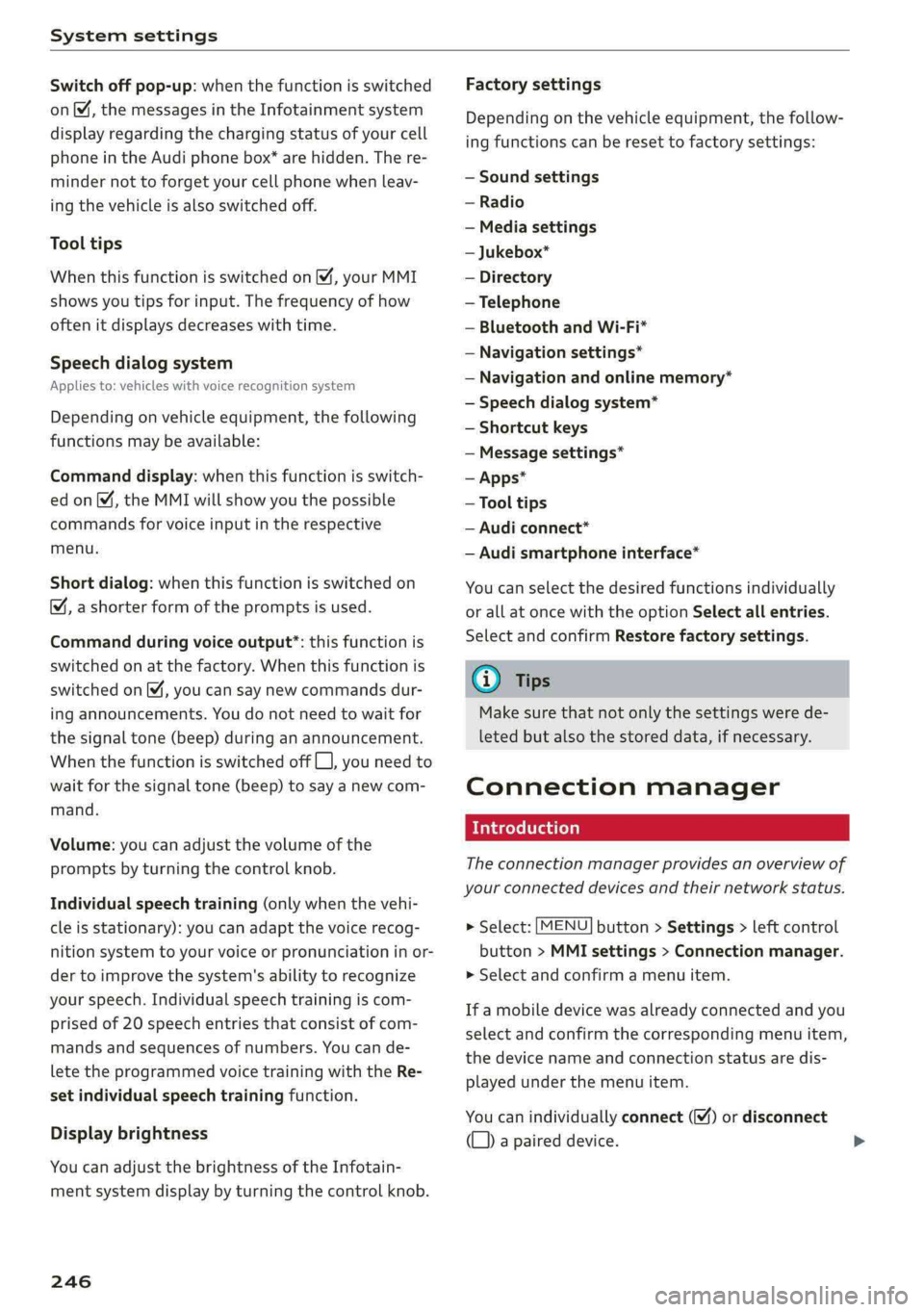
Factorysettings
Dependingonthevehicleequipment,thefollow-
ingfunctionscanberesettofactorysettings:
—Soundsettings
—Radio
—Mediasettings
—Jukebox*
—Directory
—Telephone
—BluetoothandWi-Fi*
—Navigationsettings*
—Navigationandonlinememory*
—Speechdialogsystem*
—Shortcutkeys
—Messagesettings*
—Apps*
—Tooltips
—Audiconnect*
—Audismartphoneinterface*
Youcanselectthedesiredfunctionsindividually
orallatoncewiththeoptionSelectallentries.
Selectandconfirm Restorefactorysettings.
Gi)Tips
Makesurethatnotonlythesettingswerede-
letedbutalsothestoreddata,ifnecessary.
Connectionmanager
Introduction
Theconnectionmanagerprovidesanoverviewof
yourconnecteddevicesandtheirnetworkstatus.
>Select:[MENU]button>Settings>leftcontrol
button>MMIsettings>Connectionmanager.
>Selectandconfirmamenuitem.
If amobiledevicewasalreadyconnectedandyou
selectandconfirmthecorrespondingmenuitem,
thedevicenameandconnectionstatusaredis-
playedunderthemenuitem.
Youcanindividuallyconnect(M)ordisconnect
(L))apaireddevice.