ESP AUDI Q5 2019 Owners Manual
[x] Cancel search | Manufacturer: AUDI, Model Year: 2019, Model line: Q5, Model: AUDI Q5 2019Pages: 392, PDF Size: 99.86 MB
Page 191 of 392
80A012721BG
Telephone
cellphone.Audirecommendseditingcell
phonecontactsdirectlyinthecellphone.
—OnlythecontactsinthelocalMMImemory
canbeeditedordeleted.
Importingandexportingcontacts
Appliesto:vehicleswithtelephone
ContactsinvCardformat(.vcf)canbeimported
intothedirectoryorexported.
Requirement:anSDcard mustbeinsertedinone
oftheSDcardreaders*>page226oraUSBstor-
agedevicemustbeconnectedtothe Audimusic
interface*>page231ortherequirementsfor
AudiconnectInfotainmentservices*mustbe
met>page192.
>Select:[MENU]button>Telephone>leftcon-
trolbutton>Directory.
>Select:rightcontrolbutton>Contactsettings.
—Importingcontactsfromastoragedevice:se-
lectandconfirmImportcontacts>SDcard
1/SDcard2orUSBdevice1/USBdevice2>
desiredcontacts>Startimport.
—Exportingcontactstoastoragedevice:select
andconfirmExportcontacts>SDcard1/SD
card2orUSBdevice1/USBdevice2>desired
contacts>Startexport.
—Selectingallcontactsatoncetoimport/
export:selectandconfirmImportcontacts/Ex-
port
contacts>SDcard1/SDcard2orUSBde-
vice1/USBdevice2> All >Startimport/Start
export.
G)Tips
—Alwaysreadthechapter>page192,Audi
connect.
—ForadditionalinformationonthemyAudi
account,visitwww.audiusa.com/myaudi.
— Theimportedcontactsarestoredinthelo-
calmemoryofthedirectory.
—Amaximumof1,000contactscanbeim-
ported.Youcancheckthedirectorymemory
capacityatanytime>page190.
+Dependsontheconnectedcellphone.
—Neversaveimportantdataonmemorycards
orUSBstoragedevices.Audiisnotresponsi-
blefordamagedorlostfilesandmedia.
—Contactsthatweredownloadedfromamo-
biledevicecannotbeexported.
—Thereshouldbenootherfilesor folderson
thestoragemediumcontainingthecontacts
tobeimported.
Additionalsettings
Telephonesettings
Appliesto:vehicleswithtelephone
>Select:[MENU]button>Telephone>rightcon-
trolbutton>Telephonesettings.
Calloptions*
Callforwarding:youcanswitchtheforwarding
ofincomingcallstoyourvoicemailortoanother
phonenumberonandoff.Youcan checkifthe
functionisactivatedordeactivatedwithCheck
status.
Callwaiting:youarealerted toanincomingcall
duringaphonecallwhenthefunctionisswitched
on[M.Youcancheckifthefunctionisactivated or
deactivatedwithCheckstatus.
Sendowntelephonenumber:sendingyour
phonenumberwithanoutgoingcallcanbeacti-
vatedanddeactivated.WiththeNetwork-de-
pendentsetting,thesettinglistedinthecon-
tractwiththecellphoneserviceproviderisused.
ThesettingsonlyapplytotheTelephonemenuin
theMMI.Pleasenotethatthesettingsonyour
mobiledevicewillapplyafterdisconnectingthe
Bluetoothconnection.Youcancheckifthefunc-
tionisactivated ordeactivatedwithChecksta-
tus.
Ringtoneandvolumesettings”)
UsingtheMutetelephonefunction,youcan
switchtheringtoneplaybackthroughtheMMI
speakeronandoff.Youcanplaytheringtonesus-
ingtheRingtonefunction.Selectandconfirm an
entryfromthelist.FortheRingtonevolume/
Messagevolumesettings,see>page250.The
189
Page 194 of 392
Audiconnect
Audiconnect
Generalinformation
Dependingonthecountryandthevehicleequip-
ment,thefollowing functionsmaybeavailable:
—AudiconnectInfotainment
—Audiconnectvehiclecontrol
YoucanalsofindmoreinformationonAudicon-
nect
onlineatwww.audiusa.com.
ZA\WARNING
—Toreducetheriskofanaccident,onlyuse
Audiconnectserviceswhenroadandtraffic
conditionspermit.Alwaysreadandfollow
the
notesin>page151,Trafficsafetyinfor-
mation.
—Itisonlysafe tousetablets,laptops,mobile
devicesandothersimilardeviceswhenthe
vehicleisstationarybecause,likeallloose
objects,theycouldbethrownaroundthein-
sideofthevehicleinacrashandcauseseri-
ousinjuries.Storethesetypesofdevicesse-
curelywhiledriving.
—Asthedriver,donotallowusageoftheWi-
Fihotspottodistractyoufromdriving,as
thiscouldincreasetheriskofanaccident.
—Donotuseanywirelessdevicesonthefront
seatswithinrangeoftheairbagswhiledriv-
ing.Alsoreadthewarningsinthechapter
=page270,Frontairbags.
—Toreducetheriskofanaccident,use theAu-
diconnectInfotainmentserviceswithaWi-
Fihotspotonlyintherearseatwhentheve-
hicleisinmotion,oronlywhenthevehicleis
stationary.
@)Note
—Appliesto:embeddedSIMcardusage:The
connectioncostsofAudiconnectInfotain-
mentservicesareincludedinthepriceof
AudiconnectInfotainmentduring thesub-
scriptionperiodwithsomeexceptions.
Pleasenotethattheremaybeadditional
chargeswhenusingsomeservices.Forex-
ample,thisapplies toInternetradio/
podcastsorforInternetconnectionsand
192
servicesthatusetheWi-Fihotspot,suchas
onlinemediasources.Dependingonthe
country,dataplansmayneedtobepur-
chasedfortheseservices>page199.For
additionalinformation,seewww.audiusa.
com/myaudi.
—Incertainsituations,theWi-Fihotspotdata
connectionmaybeestablishedasareplace-
mentfortheSIMcardonyourWi-Fidevice.
Thisfeature dependsontheconfiguration
ofyourWi-Fideviceandoperatingsystem.
Thiscouldresultinfeesdependingonyour
cellphoneserviceprovider,especiallyifyou
areusingthisfeaturewhileabroad.Aflat
ratedataplanisstronglyrecommended.For
moreinformation,contactyourcellphone
serviceproviderorrefertotheowner'sman-
ualforyourWi-Fidevice.
—Youareresponsibleforallprecautionstaken
fordataprotection,anti-virusprotection,
andprotectionagainstlossofdataonmo-
biledevicesthatareused,forexample,to
accesstheInternetthroughtheWi-Fihot-
spot.
G)Tips
—Theavailabilityofservicesdependsonthe
subscription.
—AUDIAGprovidesaccesstoservicesfrom
thirdpartyproviders.Permanentavailability
cannotbe guaranteed,becausethatde-
pendsonthethirdpartyprovider.
—Useofthemostup-to-datemobilenetwork
standardisnotavailableineverycountry.
ContactanauthorizedAudidealeror au-
thorizedAudiServiceFacilityoryourcell
phoneserviceproviderforadditionalinfor-
mation.
—AudiconnectInfotainmentservicesareonly
availablewithinthecellphonenetworkcov-
eragefromyourcellphoneserviceprovider.
—Availability,scope,providers,screendisplay,
andcosts ofservicesmayvarydependingon
thecountry,model,modelyear,enddevice
andrates.
Page 199 of 392
80A012721BG
Audiconnect
Remotelockingandunlocking
Requirement:thevehiclemustbeparkingand
theignitionmustbeswitchedoff.
Thisserviceallowsyoutounlockorlockyourve-
hicle.
Vehiclestatusreport
Thisservicetransfersdriverinformationsystem
datatoaserver.Dependingonthevehicleequip-
ment,certaindatamaybeaccessed,suchasthe
remainingrangeormileage.Thevaluesmaydif-
ferfromthevaluesdisplayedinthevehicle.
CarFinder
Thisservicetransmitstheparkinglocationtoa
server whentheignitionisswitchedoff.Thevehi-
clelocation,yourlocation,ortheroutetoyour
vehiclecanbedisplayed.Thenewparkingloca-
tioncannotbedeterminedwiththisserviceifthe
vehicleismovedaftershuttingthevehicleoff
andwithoutswitchingtheignitiononandoff
again,forexampleifthevehicleistowedorsto-
len.
—Deactivatingandactivatingtheparkingposi-
tion:Select:[MENU]>Audiconnect>Carfind-
er.
OnlineAudiservicerequest
Requirement:theservicemustbeactivatedon-
lineatwww.audiusa.com/myaudiandanauthor-
izedAudidealerorauthorizedAudiservicefacili-
tymustbeselected.
Thisservicetransmitsservice-relevantdatato
yourselectedauthorizedAudidealerorauthor-
izedAudiservicefacility.Theywillcontactyou
beforeyournextserviceappointment.
StolenVehicleLocator
Thisserviceassistsyouinlocatingyourvehicleif
itisstolen.
—Contactthepolice.YoureceiveaCaseID.
—CalltheservicehotlineandgiveyourCaseID.
Theservicehotlinewillforwardtheestablished
datatothepolice.YoureceivetheAudiService
hotlinenumberwhenyoupurchaseyourvehicle.
GeofencingAlert
Requirement:akeyusermustbesetinthevehi-
cle>page196.
Thisserviceallowsyouto setpermittedandfor-
biddenzonesforyourvehicleaswellassettime
limitsforthesezones.Ifyourvehicleleavesa
permittedzoneorentersaforbiddenzone,you
willbenotifiedwithapushnotificationand/oran
e-mail.
SpeedAlert
Requirement:akeyusermustbesetinthevehi-
cle>page196.
Youcansetuptotwospeedlimitsforyourvehi-
cleusingthis service.Ifyourvehicleexceedsaset
speedlimit,youwillbenotifiedwithapushnoti-
ficationand/ore-mail.
ValetAlert
Requirement:akeyusermustbesetinthevehi-
cle>page196.
Ifyougiveyourvehicletoaparkingservice,you
cansetazoneandaspeedlimitusingthemyAu-
diapp.Ifthevehicleleavesthezoneorexceeds
thespeedlimit,youwillbenotifiedwithapush
notificationand/ore-mail.
ZA\WARNING
Donotignoremessagesandwarningorindi-
catorlightsthatturnoninthevehiclebe-
causeoftheinformationinthevehiclestatus
report.Thiscouldlead tobreakdownsinon
theroad,accidentsandseriousinjuries.
@)Tips
Forsomeservices,youcanselectifyouwould
liketobenotifiedwithapushnotification
and/orane-mail.
Settings
Co)ate-Mar-iancola4
>Select:[MENU]button>Audiconnect>right
controlbutton>Connectionmanager.
>Select:rightcontrolbutton>Onlinesettings>
Dataconnectionsettings.
197
>
Page 201 of 392
80A012721BG
Audiconnect
Dataplans!)
Appliesto:vehicleswith dataplans
Requirement:YoumusthavearegisteredmyAudi
accountatwww.audiusa.com/myaudi.Yourvehi-
clemustberegisteredinyourmyAudiaccount.
Youcanpurchasedataplansatwww.audiusa.
com/myaudi.
ZAWARNING
Alwaysfollow theinformationfoundin>AA
inGeneralinformationonpage192.
@)Note
Alwaysfollowtheinformationfoundin>@®in
Generalinformationonpage192.
(i)Tips
—Pleasenotethatanyvehiclepassengercan
deletetheSIMowner.
— Theassociatedvehicleisnotautomatically
deletedfromthecustomerportalforthe
cellphoneserviceproviderwhenyoudelete
theSIMownerinthevehicle.Ifsellingyour
vehicle,youshoulddeletethevehiclefrom
thecustomerportalforthecellphoneserv-
iceprovidertoavoidbeingchargedforaddi-
tionalpurchases.
DataPrivacy
Appliesto:vehicleswithAudiconnectInfotainment
AUDIAGcollects,uses,storesandsharesyour
personalinformation,suchascontactdata,vehi-
cledata,usagedata,drivingdataandprecisege-
olocation,inordertoprovideyouwiththeprod-
uctsandservicesyouhavepurchasedorrequest-
Troubleshooting
Appliesto:vehicleswithAudiconnectInfotainment
Theinformationthatfollowslistssometrouble-
shootingoptions.Theydependontheequip-
ment.
))_Notavailableineverymarket.
ed,andforanumberofotherpurposes,forex-
ample,totrackqualityissues,toperformance
andsafety,tomeetourinternalcomplianceorle-
galrequirementsandtomarkettocustomers
andpotentialcustomers.Foramorecomplete
listofthedatawecollect,howweuseitandwith
whomweshareit,pleasevisityourAudination-
al/salesregionwebsiteatwww.audi.com.
Thecollection,useandsharingmayvarydepend-
ingonyourmodelandmodelyear,yoursubscrip-
tionstatus,ortheserviceoffering.Forexample,
collection,useandsharingmayvarybetweenAu-
diconnectservices,ifyouhavedesignatedakey
user,orifyouaredrivingamodelequippedwith
persistentdatalogging.Please reviewthecom-
pletePrivacyStatementtounderstandourdata
handlingpracticeswithrespecttoaparticular
service.
Youcanfindadditionalinformationaboutourda-
taprivacypracticesinyourMMI.
>Select:[MENU]button>Audiconnect>right
controlbutton>AboutAudiconnect.
Informationaboutourprivacypracticesincon-
junctionwiththemobileAudiconnectapplica-
tioncanbefoundintheApplication’sPrivacy
Statement.
Foradditionalinformationabouttheprivacy
practicesrelatingtoAudiconnect,myAudi,or
otherwebsites,applicationsoronlineservicesas
wellasyourobligationswithrespecttousing
theseservices,andforadditionalinformationre-
gardingAudiconnectterms andconditions,
pleasevisityourAudinational/salesregionweb-
siteatwww.audi.com.
199
Page 208 of 392
Navigation
—ThenselectandconfirmStartrouteguidance.
Additionaldirectoryfunctionsinthenavigation
systemcanbefoundunder>page211.
@)Tips
—Addressesthathavebeenimportedfrom
yourmobiledeviceintotheMMIcanalsobe
usedasadestination.
—If acontactisgrayed outinthedirectory,
thiscontacthasneitheradestinationnoran
addressassignedtoit.
olelmneat)
Appliesto:vehicleswithnavigationsystem
>Pressthe LNAV/MAP]buttonrepeatedlyuntil
the Enterdestinationmenuisdisplayed
=>page203,fig.187.
>Select:leftcontrolbutton>Pointsofinterest.
—Changingthesearcharea:selectandconfirm
Searcharea>asearchareafromthelist.
Thefollowingsearchcategoriesareavailable:
Nearby:pointsofinterestcanbeselectedfrom
differentcategories.Thepointsofinterestare
listedstartingfromtheimmediatevicinityofthe
vehicleuptoaradiusofapproximately124miles
(200km).
Alongtheroute:pointsofinterestalongthe
routecanonlybeselectedduringactiveroute
guidance.Thepointsofinterestarelocateddi-
rectlyalongorintheimmediatevicinityofthe
calculatedroute.Thepointsofinterestcanlike-
wisebeselectedfromvariouscategories.Forex-
ample,youcansearchforahotelorparkinglot
atthedestination.
Neardestination/Nearstopover:pointsofinter-
estnearadestinationorastopover canonlybe
selectedduringactiverouteguidance.Thepoints
ofinterestcanlikewisebeselectedfromvarious
categories.Forexample,youcansearchforaho-
telorparkinglotatthedestination.
In anewcity:selectacountry/stateorsearchin
anewcity.Enterthenameofthedesiredcity.
Points ofinterestcanbeselectedfromvarious
categories.Thisfunctionallowsyoutosearchfor
206
points ofinterestinanycityregardlessoftheac-
tiverouteguidanceorthevehicleposition.
—Searchingforthenameofapointofinterest
intheselectedsearcharea:Select:Findentry
>Enter pointofinterest.Enterthenameofthe
pointofinterest.
—Searchingforapointofinterestinaspecific
category:selectSelectcategory.Selectand
confirmacategorysuchasRestaurants.
(i)Tips
—Distancestopointsofinterestaredisplayed
asastraight-linedistancefromyourcurrent
location.Theactualdistancefromyourcur-
rent locationtothepointofinterestisup-
datedautomatically.Thelistofpointsofin-
terestthatwerefoundisnotresortedwhen
thishappens.
—Theremaybeentriesinthelistthatcannot
bedisplayedcompletelyduetotheirlength.
Selectthecorrespondingentryfromthelist.
Select:rightcontrolbutton>Showdestina-
tiondetails.Detailedinformationforthese-
lectedentryinthelististhendisplayed.
Onlinepointofinterestsearch(online
search)
Appliesto:vehicleswithnavigationsystem andAudiconnect
Infotainment
You cansearchforpointsofinterestontheInter-
net.
Requirement:TherequirementsforAudiconnect
Infotainmentmustbemet>page192.
>Pressthe [NAV/MAP]buttonrepeatedlyuntil
theEnterdestinationmenuisdisplayed
=>page203,fig.187.
>Select:leftcontrolbutton>Onlinesearch.The
searcharealastsetisdisplayedintheinput
field.
—Changingthesearcharea:select:rightcontrol
button>Selectsearcharea.
—Searchingforonlinedestinationsinthese-
lectedsearcharea:enteranewcity/stateif
necessary.Enterthesearchterm,suchashotel.
Pressthecontrolknob.Selectandconfirm an
onlinedestinationfromthelist.
Page 210 of 392
Navigation
Deletingastopover
—Pushthecontrolknobup.Freetextsearchand
activerouteguidancearedisplayed.Or:Turn
the
controlknobtotheleftuntiltheactive
routeguidanceisshown.
—SelectandconfirmDeletestopover(2)
>fig.189.
—Thestopoverisdeleted.
(eTleeET
Appliesto:vehicleswithnavigationsystem
Requirement:routeguidancemustbeactive.
>Pressthe LNAV/MAP]buttonrepeatedlyuntil
the Enterdestinationmenuisdisplayed
=>page203,fig.187.
>Turn thecontrolknobtotheleftuntiltheactive
routeguidanceisshown>page207,fig.189.
> SelectandconfirmDeletedestination(@)
=>page207,fig.189.Thedestinationisdelet-
ed. Or:selecttherightcontrolbutton>Cancel
routeguidance.
Additionaloptionswhenenteringa
Ceeacea)
Appliesto:vehicleswithnavigationsystem
>Presstherightcontrolbutton.
Dependingontheselectedfunction,thefollow-
ingoptionsmaybeavailablewhenenteringa
destination:
Cancelrouteguidance:Requirement:routeguid-
ancemustbeactive.Routeguidanceiscanceled.
Foradditionalinformation,see>page208.
Countryinformation:youcandisplaytheappli-
cableurbanandruralspeedlimitsforanycoun-
try/state.Ifthisfunctionisactivated,theinfor-
mationwillbeautomaticallyshowntoyouinthe
routeinformation@)%page212,fig.194when
thespeedlimitisexceeded>page215.
Country/stateselection:see>page204,Nar-
rowingthesearcharea.
Routecriteria: see>page212,Routecriteria.
208
Showlocationonmap:Requirement:youmust
haveselectedadestinationfromtheresultslist.
Thedestinationenteredisdisplayedonthemap.
Parkingatthislocation*:Requirement:youmust
haveselectedadestinationfromtheresultslist.
Allparkingoptionsnear theselectedlocationare
displayedintheInfotainmentsystem.
Delete:theselectedentryisdeleted.Youcande-
leteindividualentriesorallentries(forexample,
favoritesorlastdestinations).
Audiconnectatthislocation*:Requirement:you
musthaveselectedadestinationfromtheresults
list.Allowsyoutosearchforitemsinthevicinity
oftheselectedlocation,suchasTravelinforma-
tion.
Onlinetrafficdata*:theonlinetrafficinforma-
tion>page218canbe switchedonoroff.
Adddestinationtocontact:see>page211.
Storeasfavorite:see>page211.
Voiceguidance:see>page212.
Navigationsettings:see>page211.
@Tips
Informationononlinetrafficdata*canalso
befoundonlineatwww.audiusa.com.
Page 212 of 392
Navigation
G@)Tips
—Personalroutesarelearnedbasedontheve-
hicleposition.Therouteisprioritizedac-
cordingtohowfrequentlyyoudrivetoa
destination.
—Amaximumofthreepersonalroutesare
displayedintheEnterdestinationmenu.
Basedonthecurrentvehicleposition,the
trafficsituation fortheroutethatismost
likelytobedrivenoutofthethreeroutes
willalwaysbemonitored.
—Pleasenotethatpersonalroutesthathave
alreadybeenstoredwillremainstoredafter
theignitionisswitchedoffandtheymust
bedeletedmanually.
Alternativeroutes
Appliesto:vehicleswithnavigationsystem
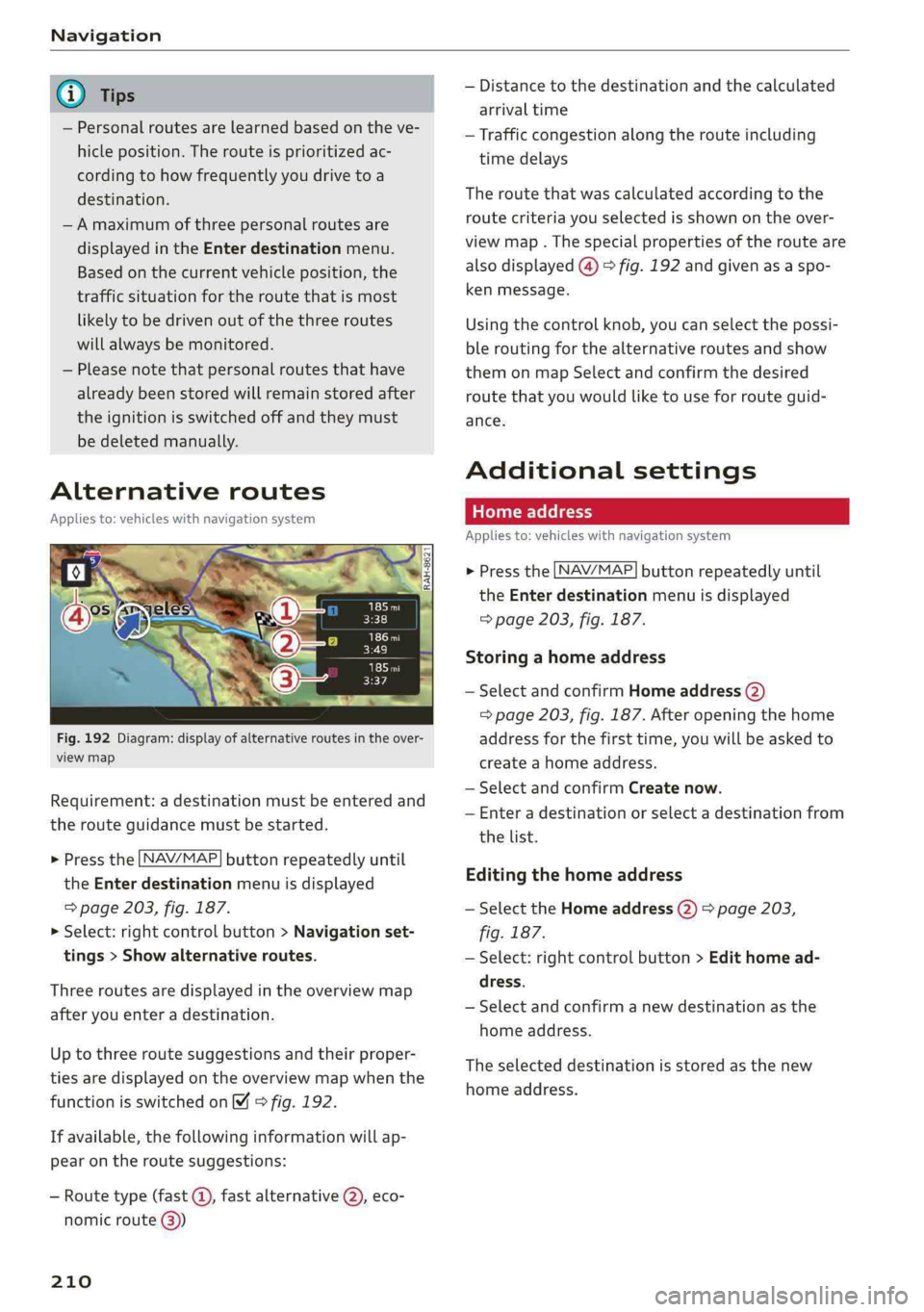
Fig.192Diagram:displayofalternativeroutesintheover-
viewmap
Requirement:adestinationmustbeenteredand
therouteguidancemustbestarted.
>Pressthe LNAV/MAP]buttonrepeatedlyuntil
the Enterdestinationmenuisdisplayed
=>page203,fig.187.
>Select:rightcontrolbutton>Navigationset-
tings>Showalternativeroutes.
Threeroutesaredisplayedinthe overviewmap
afteryouenteradestination.
Uptothree routesuggestionsandtheirproper-
tiesaredisplayedonthe overviewmapwhenthe
functionisswitchedon4©fig.192.
Ifavailable,thefollowinginformationwillap-
pearontheroutesuggestions:
—Routetype(fast©,fastalternative2), eco-
nomicroute@))
210
—Distancetothedestinationandthecalculated
arrivaltime
—Trafficcongestion along therouteincluding
timedelays
Theroutethatwascalculatedaccordingtothe
routecriteriayouselectedisshownontheover-
viewmap.Thespecialpropertiesoftherouteare
alsodisplayed(@)>fig.192andgivenasaspo-
kenmessage.
Usingthecontrolknob,youcanselectthepossi-
ble
routingforthealternativeroutesandshow
themonmapSelectandconfirmthedesired
routethatyouwouldliketouseforrouteguid-
ance.
Additionalsettings
Appliesto:vehicleswithnavigationsystem
>Pressthe LNAV/MAP]buttonrepeatedlyuntil
theEnterdestinationmenuisdisplayed
=>page203,fig. 187.
Storingahomeaddress
—SelectandconfirmHomeaddress(2)
=>page203,fig.187.Afteropeningthehome
addressforthefirsttime,youwillbe askedto
createahomeaddress.
—SelectandconfirmCreatenow.
—Enteradestinationorselectadestinationfrom
thelist.
Editingthehomeaddress
—SelecttheHomeaddress(2)>page203,
fig.187.
—Select:rightcontrolbutton>Edithomead-
dress.
—Selectandconfirmanewdestinationasthe
homeaddress.
Theselecteddestinationisstoredasthenew
homeaddress.
Page 215 of 392
![AUDI Q5 2019 Owners Manual 80A012721BG
Navigation
>Pressthe LNAV/MAP]buttonrepeatedlyuntil
themapisdisplayed>fig.194.
Zoomingin/outonthemap
—Turn thecontrolknobtotheleftortotheright.
Alternatively,youcanalsozoomin/out](/img/6/57631/w960_57631-214.png "AUDI Q5 2019 Owners Manual 80A012721BG
Navigation
>Pressthe LNAV/MAP]buttonrepeatedlyuntil
themapisdisplayed>fig.194.
Zoomingin/outonthemap
—Turn thecontrolknobtotheleftortotheright.
Alternatively,youcanalsozoomin/out")
80A012721BG
Navigation
>Pressthe LNAV/MAP]buttonrepeatedlyuntil
themapisdisplayed>fig.194.
Zoomingin/outonthemap
—Turn thecontrolknobtotheleftortotheright.
Alternatively,youcanalsozoomin/outonthe
mapusingtheMMItouchcontrolpad*
=>page157,ifthecrosshairsareswitchedon.
Or:turntheleftthumbwheelonthemultifunc-
tionsteeringwheel*>page16.
Turningthecrosshairson/off
—Switchingthecrosshairson:pressthecontrol
knobinthemapview>fig.194.
—Switchingthecrosshairsoff:pressthe[BACK
button.
Whenthecrosshairsareswitchedoff>fig.194:
@)Direction.Foradditionalinformation,see
=>page214.
@)Thedistancetothedestinationincludesthe
calculatedarrivaltime.
@Whenthetrailermodefunctionisswitched
on,thecorrespondingsymbolisdisplayed
nexttothearrivaltime.
@Scale:turnthecontrolknobtotheleftor
righttodecreaseor increasethescale.When
theAutomaticzoomfunctionisswitchedon
,an“A”for“Automatic”isdisplayedinthe
magnifyingglass.
Altitude
Vehiclelocation
Routeinformation:variousinformationwill
bedisplayedduringactiverouteguidance
(forexample,theupcomingmaneuverin-
cludingcalculateddistanceandstreet
names).Thedisplayalsoprovidestrafficin-
formationorpointsofinterestonthecurrent
route.
Roadcurrentlybeingdrivenon
CO®@
Whenthecrosshairsareswitchedon>fig.195:
@)Thecrosshairs:movethecrosshairsinthede-
sireddirectionandsetapointonthemapus-
ingtheMMItouchcontrolpad”orthecontrol
D_Onlyappliestovehicleswithoutcamera-basedspeedlimit
display.
knob.Whenthecrosshairsareturnedoff,the
roadbeingcurrentlydrivenonisshown.
@Speeddisplay):Displaysthemaximumper-
mittedspeedonexpresswaysandonhigh-
ways.
@Entertainmentslidingmenu*:see
=>page157.
@®Additionalinformationonthecrosshairspo-
sition:ifyoumovethecrosshairstoa loca-
tiononthemap,availableinformationfor
thecurrentpositionisdisplayed.Tapbriefly
ontheMMItouchcontrolpad.Or:pressthe
controlknob.Inthedestinationdetails,you
canstartrouteguidancetothedisplayedlo-
cation.SelectandconfirmStartrouteguid-
ance.
@Mapcontents(pointsofinterest,favorites).
Whentherearemultiplepointsofinterestin
theimmediatevicinity,thesymbolsare
shownstackedonthemap.
Betterroute#3:ifabetterrouteisavailable
forthecurrentrouteguidance,itwillbeindi-
catedonthemapincludingthetimethat
wouldbesaved.Moreinformationcanbe
foundunder>page218.
Mapfunctions
Appliesto:vehicleswithnavigationsystem
>Pressthe [NAV/MAP]buttonrepeatedlyuntil
themapisdisplayed>page212,fig.194.
>Presstheleftcontrolbutton.
Thefollowingmapfunctionscan beselected:
Switchtodestinationinput
ThefreetextsearchintheEnterdestination
menuisdisplayed>page203,fig.187.
Trafficmessages
CurrenttrafficinformationisdisplayedintheIn-
fotainmentsystemdisplay.Youcanalsofindad-
ditionalinformationunder>page217.>
213
Page 219 of 392
80A012721BG
Navigation
@Tips
—Alwaysreadthechapter>page192.
— Theamountofavailableonlinemapupdates
inthevehicleislimited.Toupdatemorere-
gions,usethemapupdateviaSDcardat
www.audiusa.com/myaudi.
—Alwaysreadthechapter>page192,Audi
connect.
Trafficinformation
Appliesto:vehicleswithnavigationsystem
Coeenaes@
®Westbound#>Eastbound
@)Northbound
©>-@serthvoun
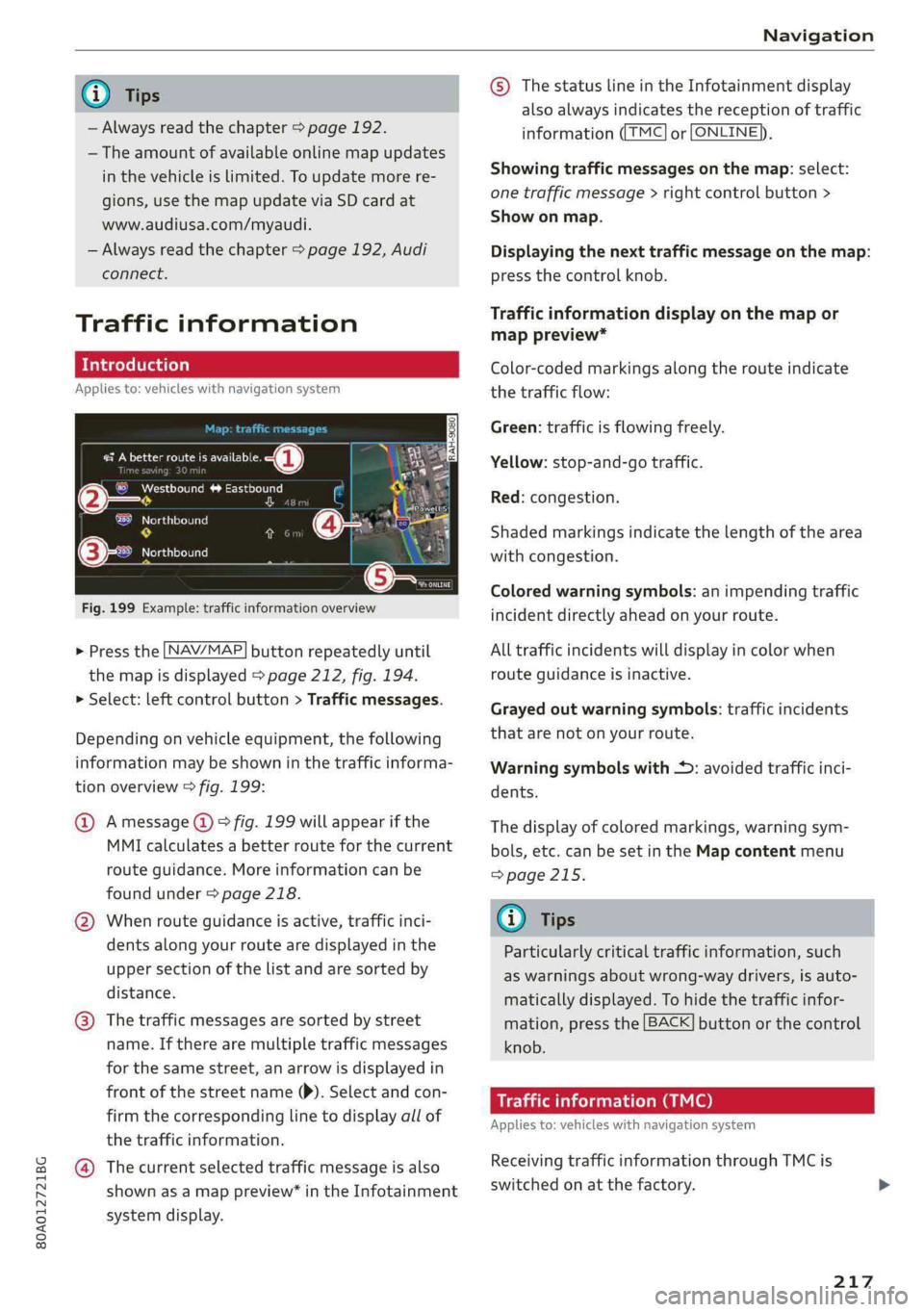
Fig.199Example:trafficinformationoverview
>Pressthe LNAV/MAP]buttonrepeatedlyuntil
themapisdisplayed>page212,fig.194.
>Select:leftcontrolbutton>Trafficmessages.
Dependingonvehicleequipment,thefollowing
informationmaybeshowninthetrafficinforma-
tionoverview>fig.199:
@Amessage(@)>fig.199willappearifthe
MMIcalculatesabetterrouteforthecurrent
routeguidance.Moreinformationcanbe
foundunder>page218.
@Whenrouteguidanceisactive,trafficinci-
dents along yourroutearedisplayedinthe
uppersectionofthelistandaresortedby
distance.
@®Thetrafficmessagesaresorted bystreet
name.Iftherearemultipletrafficmessages
forthesamestreet,anarrowisdisplayedin
frontofthestreetname()).Selectandcon-
firmthecorrespondinglinetodisplayallof
thetrafficinformation.
@Thecurrentselectedtrafficmessageisalso
shownasamappreview”intheInfotainment
systemdisplay.
©)ThestatuslineintheInfotainmentdisplay
alsoalwaysindicatesthereceptionoftraffic
informationTMC]orLONLINE}),
Showingtrafficmessagesonthemap:select:
onetrafficmessage>rightcontrolbutton>
Showonmap.
Displayingthe nexttrafficmessageonthemap:
pressthecontrolknob.
Trafficinformationdisplayonthemapor
mappreview*
Color-codedmarkingsalongtherouteindicate
thetrafficflow:
Green:trafficisflowingfreely.
Yellow:stop-and-gotraffic.
Red:congestion.
Shadedmarkingsindicatethelength ofthearea
withcongestion.
Coloredwarningsymbols:animpendingtraffic
incidentdirectlyaheadonyourroute.
Alltrafficincidentswilldisplayincolorwhen
routeguidanceisinactive.
Grayedoutwarningsymbols:trafficincidents
thatarenotonyourroute.
Warningsymbolswith*:avoidedtrafficinci-
dents.
Thedisplay ofcoloredmarkings,warningsym-
bols,etc.canbesetintheMapcontentmenu
=>page215.
G@)Tips
Particularlycriticaltrafficinformation,such
aswarningsaboutwrong-waydrivers,isauto-
maticallydisplayed.Tohidethetrafficinfor-
mation,pressthe[BACK]buttonorthecontrol
knob.
Trafficinformation(TMC)
Appliesto:vehicleswithnavigationsystem
ReceivingtrafficinformationthroughTMCis
switchedonatthefactory.
217
Page 221 of 392
80A012721BG
Navigation
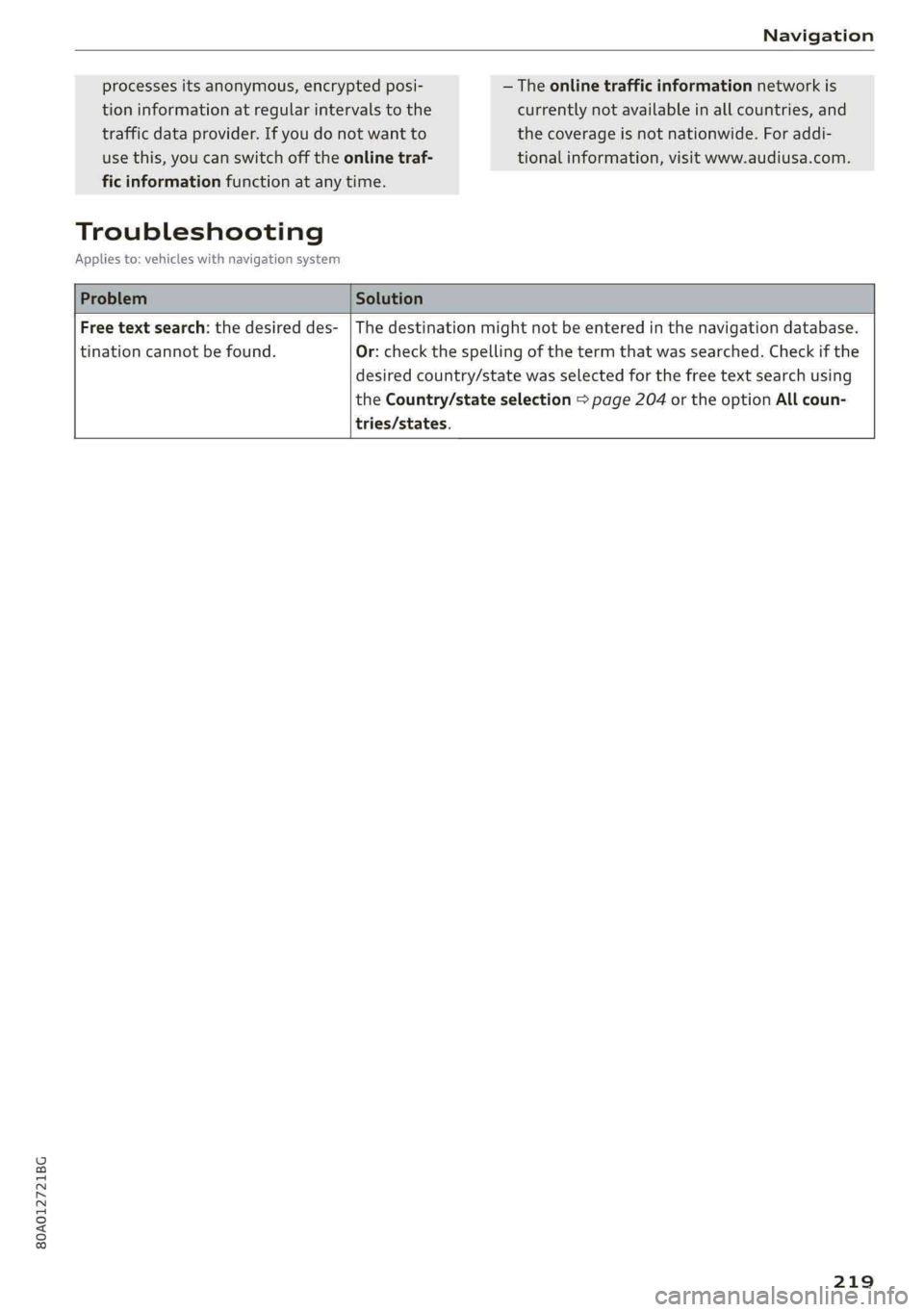
processesitsanonymous,encryptedposi-—Theonlinetrafficinformationnetworkis
tioninformationatregularintervalstothecurrentlynotavailableinallcountries,and
trafficdataprovider.Ifyoudonotwanttothecoverageisnotnationwide.Foraddi-
usethis,youcanswitchofftheonlinetraf-tionalinformation,visitwww.audiusa.com.
ficinformationfunctionatanytime.
Troubleshooting
Appliesto:vehicleswithnavigationsystem
ProblemSolution
Freetextsearch:thedesireddes-
tinationcannotbefound.
Thedestinationmightnotbeenteredinthenavigationdatabase.
Or:checkthespellingofthetermthatwassearched.Checkifthe
desiredcountry/statewasselectedforthefreetextsearchusing
theCountry/stateselection>page204orthe optionAllcoun-
tries/states.
219