battery AUDI Q5 2019 User Guide
[x] Cancel search | Manufacturer: AUDI, Model Year: 2019, Model line: Q5, Model: AUDI Q5 2019Pages: 392, PDF Size: 99.86 MB
Page 80 of 392
Driving
—Environmentalconditions(slopes,inclines,ele-
vation,temperature)
—Battery (chargestatus,temperature,powerus-
age)
—Enginetemperature
—Assistsystems
—Drivingbehavior
Dependingontheengine,theindicatorlight
mayappeariftheengineisnot stopped.
ScalemaeCeleraLin
Appliesto:vehicleswithStart/Stopsystem
IfyouleavethevehicleduringaStopphase,the
enginecanberestartedwithinapproximately30
secondsifthedoorsareclosed,thedriver'ssafe-
tybeltisfastened,andthebrakepedalispress-
ed.
Ifyouleavethevehiclelongerthan30seconds,
theignitionwillswitchoffautomaticallytopre-
vent thevehiclebatteryfromdraining.Ifthisis
thecase,themessageStart/stopsystem:igni-
tionwillbeswitchedoffin30swillappearinthe
instrumentclusterand,ifthelowbeamhead-
lightsareswitchedon,theparkinglightswill
switchoninstead.Theparkinglightswillswitch
offafterapproximately30minutesorwhenyou
lockthevehicle.
Theignitionalsoswitchesoffwhenyoulockthe
vehiclefromtheoutsideduringaStopphase.
IftheStart/Stopsystemhasnotturnedoffthe
engineorifyouhave switchedtheStart/Stopsys-
temoffmanually, theenginewillcontinuetorun
andtheignitionwillnotswitchoffautomatically.
Toreducetheriskofasphyxiation,neverallow
theenginetoruninconfinedspaces.
Ifyouleavethevehiclewiththe"D/S"or"R"
selectorleverpositionengaged,theparking
brakeisautomaticallyset.
78
ManuallyswitchingtheStart/Stopsystem
aaeel
Appliesto:vehicleswithStart/Stopsystem
The(A)>Fbuttonislocatedabovetheselectorlev-
erinthecenterconsole.
>Press(A)°*toswitchonoroff.TheLEDinthe
buttonturnsonwhenthefunctionisswitched
off.
IfyouswitchthesystemoffduringaStop
phase,theenginewillstartagainautomati-
cally.
WeTel4
Appliesto:vehicleswithStart/Stopsystem
Start/stopsystem:deactivated.Pleasestart
enginemanually
Thismessageappearswhenspecificconditions
arenotmetduringaStopphase.TheStart/Stop
systemwillnot beabletorestarttheengine.The
enginemustbestartedwiththe
STARTENGINESTOP]button.
Start/stopsystem:malfunction!Function
unavailable.PleasecontactService
ThereisamalfunctionintheStart/Stopsystem.
DrivethevehicletoanauthorizedAudidealeror
authorizedServiceFacilityassoonaspossibleto
havethemalfunctioncorrected.
Electromechanical
parkingbrake
= q
s
=%a
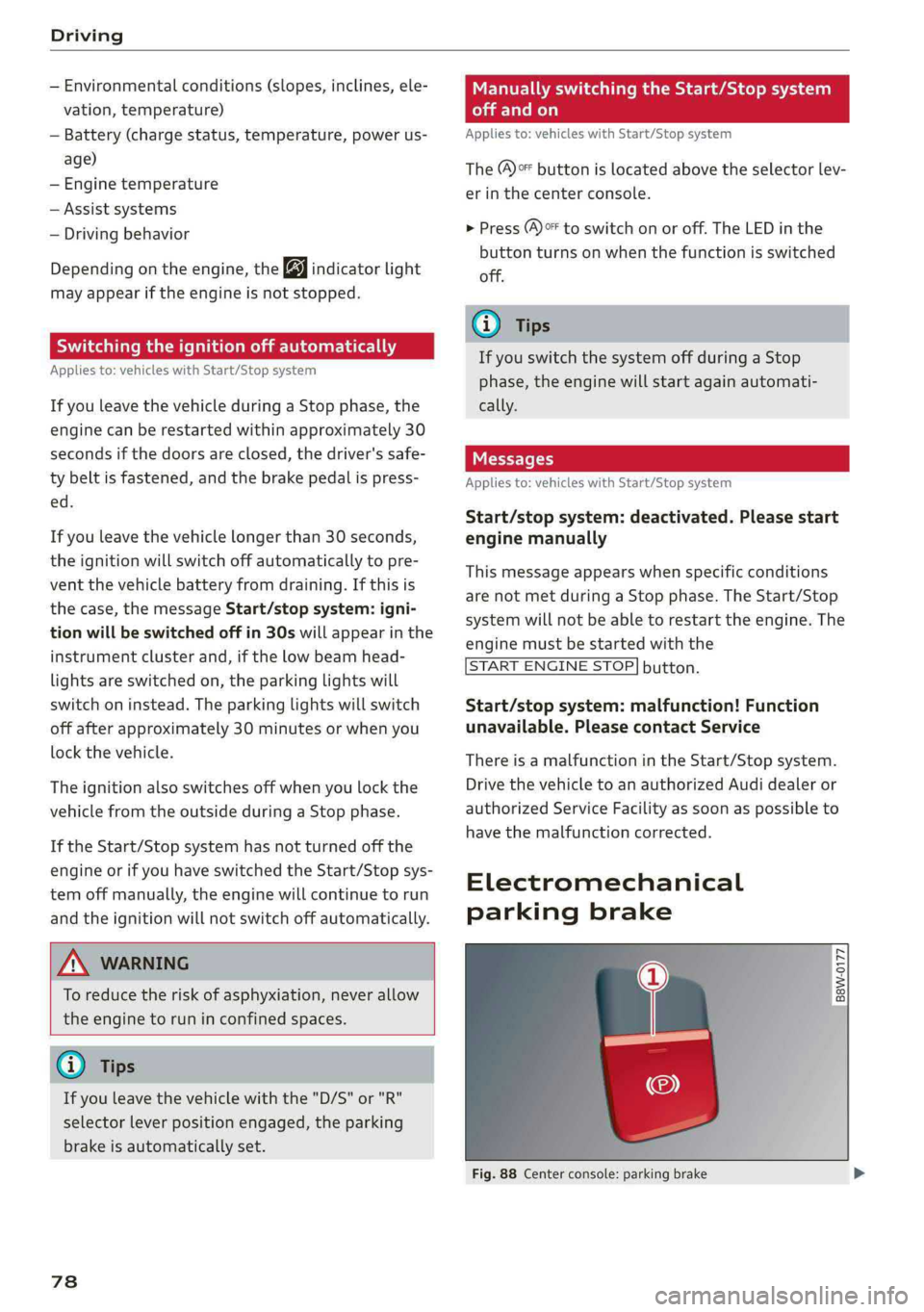
Fig.88Centerconsole:parkingbrake
Page 127 of 392
80A012721BG
Assistsystems
@)Tips
—Youcancanceltheautomaticbrakeactiva-
tionwithincreasingbrakingforceifyouap-
plythe brakesyourselforaccelerateconsid-
erably.
—Insomesituations,rearcross-trafficassist
maywarnyouevenifthereisnocrosstraffic
ina criticalarea,forexamplewhenbacking
intoaparkingspaceormaneuvering.
—Therearcross-trafficassistalsoswitchesoff
whenyouswitchofftheESC.
— Thesystemisnotavailablewhentowinga
trailer.
—Foranexplanationonconformitywiththe
FCCregulationsintheUnitedStatesandthe
IndustryCanadaregulations,see
=>page370.
Messages
Appliesto:vehicleswithAudisideassist
Amessageappearsintheinstrumentclusterdis-
playifthesideassistswitchesoffautomatically.
BAudisideassist:malfunction!Pleasecontact
Service
eB]Audisideassistandexitwarning: malfunc-
tion!PleasecontactService
Thesystemcannotguaranteethatitwilldetect
vehiclescorrectlyandithasswitchedoff.The
sensorshavebeenmovedorarefaulty.Havethe
systemcheckedbyanauthorizedAudidealeror
authorizedAudiServiceFacilitysoon.
Audisideassist:currentlyunavailable.Sen-
sorvisionrestrictedduetosurroundings.See
owner'smanual
Audisideassistandexitwarning:currently
unavailable.Sensorvisionrestrictedduetosur-
roundings
Theradarsensorvisionisimpaired.Theareain
frontofthesensorsmustnot becoveredbybike
racks,stickers,leaves,snoworanyotherobjects.
Cleantheareacoveringthesensors,ifnecessary
=>page121,fig.122.
Audisideassist:currentlyunavailable.See
owner'smanual
Audisideassistandexitwarning:currently
unavailable.Seeowner'smanual
Sideassistcannotbe switchedonatthistimebe-
causethereisamalfunction(forexample,the
batterychargelevelmaybetoolow).
Audisideassist:unavailableintowingmode
Audisideassistandexitwarning:currently
unavailable.Towingmode
Sideassistswitchesoffautomaticallywhenthe
electricalconnectorinthefactory-installedtrail-
erhitchisconnected.Thereisnoguaranteethe
systemwillswitchoffwhenusingaretrofitted
trailerhitch.Donotusesideassistandtheexit
warningwhentowingatrailer.
Rearparkingaid:obstacledetectionrestrict-
ed
Therearcross-trafficassistisnotavailable.Ei-
thertheESCisswitchedoff,ortheradarsensors
maybecoveredbyabikerack,stickers,leaves,
snoworotherobjects.SwitchtheESCon,or
cleantheareainfront ofthesensorsifnecessary
=page121,fig.122.Ifthismessagecontinues
tobedisplayed,driveimmediatelytoanauthor-
izedAudidealerorauthorizedAudiServiceFacili-
tytohavethemalfunctionrepaired.
Audidriveselect
Introduction
Appliesto:vehicleswith Audidriveselect
Driveselectmakesitpossibletoexperiencedif-
ferenttypesofvehiclecharacteristicsinonevehi-
cle.YoucanselectthedrivingmodesOffroad*or
Lift/Offroad*,Allroad*,Comfort,AutoandDy-
namicintheInfotainmentsystem,forexample
toswitchfromasportytoacomfortabledriving
mode.IntheIndividualmode,thesettingscan
beadjustedtoyourpersonalpreferences.This
makesitpossibletocombinesettingssuchasa
sportyenginesettingwithlightsteering.
Appliesto:vehicleswith Audidriveselect
Thefollowingsystems,amongotherthings,are
influencedbydriveselect:
125
>
Page 150 of 392
IntelligentTechnology
Ifthisindicatorlightturnsonandstaysonand
thismessageappears,thepowersteeringmay
havefailed.
Stopthevehicleinasafelocationassoonaspos-
sible.Donotcontinuedriving.Seeanauthorized
AudidealerorauthorizedAudiServiceFacilityfor
assistance.
aSteering:malfunction!Youcancontinue
driving
Iftheindicatorlightturnsonandthismessage
appears,thesteeringwheelmaybemoredifficult
tomoveormoresensitivethanusual.Thesteer-
ing
wheelmayalsobeturnedtothesidewhen
drivingstraight.
DriveslowlytoanauthorizedAudidealeror au-
thorizedAudiServiceFacilitytohavethemal-
functioncorrected.
Dynamicsteering:correctingsteeringwheel
position
Iftheindicatorlightturnsonandthismessage
appears,thedynamicsteering”isreinitializing.
Thesteeringwheelwillbeeasytomoveafter
startingtheengine.Reinitializationmightbe
necessaryifthesteeringwheelwasmovedwhile
theenginewasswitchedoff.Thedisplayturnsoff
iftheinitializationwassuccessful.
@Tips
—Iftheaoralindicatorlightonlystayson
forashorttime,youmaycontinuedriving.
— Thedynamicsteeringstabilitysystems
=>page144arenotavailableintheeventof
asystemmalfunction.
—Foradditionalinformationondynamic
steering,see>page125.
Allwheeldrive(quattro)
Theall-wheeldrivesystemdistributesthedriving
powervariablytothefrontandrearaxletoim-
provethedrivingcharacteristics.Itworkstogeth-
erwithselectivewheeltorquecontrol,whichcan
activatewhendrivingthroughcurves
=>page144.
148
Appliesto:Vehicleswithquattroultra:Ifthe
drivingsituationdoesnotrequireallwheeldrive,
thentherearsection ofthedrivetrainwilldecou-
pleandthussavefuel.Thesystemconstantlyde-
terminesandanticipatesifallwheeldriveis
needed.Thisallowsthereardrivetrainto recou-
pleshortlybeforeitisneeded.
Theallwheeldriveconceptisdesignedforhigh
enginepower.Yourvehicleisexceptionallypow-
erfulandhasexcellentdrivingcharacteristics
bothundernormaldrivingconditionsandon
snowandice.Alwaysreadandfollowsafetypre-
cautions>A\.
ZAWARNING
—Eveninvehicleswithallwheeldrive,you
shouldadaptyourdrivingstyletothecur-
rentroadandtrafficconditionstoreduce
theriskofanaccident.
— Thebrakingabilityofyourvehicleislimited
tothetractionofthewheels.Inthisway,it
isnotdifferentfromatwowheeldrivevehi-
cle.Donotdrivetoofastbecausethisin-
creasestheriskofanaccident.
—Notethatonwetstreets,thefrontwheels
can“hydroplane’”ifdrivingatspeedsthat
aretoohigh.Unlikefrontwheeldrivevehi-
cles,theengineRPMdoesnotincreasesud-
denlywhenthevehiclebeginshydroplaning.
Adaptyourspeedtotheroadconditionsto
reducetheriskofanaccident.
Sportdifferential
Appliesto:Vehicleswithsportdifferential
Thesportdifferentialdistributesthedrivepower
totherearaxlebasedonthesituation.Thegoal
isahighlevelofagilityandabilitytoaccelerate
oncurves.Thevehicleisvery responsivetosteer-
ing.ThesettingsdependontheselectedAudi
driveselect*mode.
Energymanagement
Yourvehicleisequippedwithanintelligentener-
gymanagementsystemfordistributingelectrici-
ty.Thissignificantlyimprovesthestartingability
andincreasesthevehiclebatterylife.
Page 151 of 392
80A012721BG
IntelligentTechnology
@)Tips
—Ifyoudriveshortdistancesfrequently,the
vehiclebatterymaynotchargeenough
whiledriving.Asaresult,conveniencefunc-
tionsforelectricalequipmentmaybetem-
porarilyunavailable.
—Thevehiclebatterywillgraduallydrainif
the
vehicleisnotdrivenforlongperiodsof
time,orifelectricalequipmentisused
whentheengineisnotrunning.Toensure
thatthevehiclecanstillbestarted,the
electricalequipmentwillbelimitedor
switchedoff.
Noticeaboutdata
recordedbytheEvent
DataRecorderand
vehiclecontrolmodules
EventDataRecorder
Thisvehicleisequippedwithan EventDataRe-
corder(EDR).ThemainpurposeofanEDRisto
record,incertaincrashornearcrash-likesitua-
tions,suchasanairbagdeploymentorhittinga
roadobstacle,data thatwillassistinunderstand-
inghowavehicle'ssystemsperformed.TheEDR
isdesignedto recorddatarelatedtovehicledy-
namics andsafetysystemsforashortperiodof
time,typically30secondsorless.TheEDRinthis
vehicleisdesignedto recordsuchdataas:
—Howvarioussystemsinyourvehiclewereoper-
ating;
—Whetherornotthedriverandpassengersafety
beltswerebuckled/fastened;
—Howfar(ifatall)thedriverwasdepressingthe
acceleratorand/orbrakepedal;and,
—Howfastthevehiclewastraveling.
Thesedatacanhelpprovideabetterunderstand-
ingofthecircumstancesinwhichcrashesandin-
juriesoccur.NOTE:EDRdataarerecordedby your
vehicleonlyifanon-trivialcrashsituationoccurs;
nodataarerecordedbytheEDRundernormal
drivingconditionsandnopersonaldata(e.g.,
name,gender,age,andcrashlocation)arere-
corded.However,otherparties,suchaslawen-
forcement,couldcombinetheEDRdata withthe
typeofpersonallyidentifyingdataroutinelyac-
quiredduringacrashinvestigation.
Toreaddata recordedbyanEDR,specialequip-
mentisrequired,andaccesstothevehicleorthe
EDRisneeded.Inadditiontothevehiclemanu-
facturer,otherparties,suchaslawenforcement,
thathavethespecialequipment,canreadthein-
formationiftheyhaveaccesstothevehicleorthe
EDR.
Somestatelawsrestricttheretrievalordown-
loadingofdatastoredbyEDRsinstalledinavehi-
clefortheexpresspurposeofretrievingdataaf-
teranaccidentorcrasheventwithouttheown-
er'sconsent.
AudiwillnotaccesstheEDRand/orsimilardata
orgiveittoothers-
—unlessthevehicleowner(orlesseeifthevehi-
clehasbeenleased) agrees;or
—upontheofficialrequestbythepolice;or
—upontheorderofacourtoflaworagovern-
mentagency;or
—forthedefenseofalawsuitthroughthejudicial
discoveryprocess.
—Audimayalsousethedataforresearchabout
vehicleoperationandsafetyperformanceor
providethedatatoathirdpartyforresearch
purposeswithoutidentifyingthespecificvehi-
cleorinformationabouttheidentityofitsown-
erorlesseeandonlyaftertherecordedvehicle
datahasbeenaccessed.
Vehiclecontrolmodules
Yourvehicleisalsoequippedwithanumberof
electroniccontrolmodulesforvariousvehicle
systems,suchasenginemanagement,emission
control,airbags,andsafetybelts.
Theseelectroniccontrolmodulesrecorddata
duringnormalvehicleoperationthatmaybe
neededbytrainedtechniciansfordiagnosticand
repairpurposes.Therecordingcapabilityofthese
modulesislimitedtodata(nosoundisrecorded).
Onlyasmallamountofdataisactuallyrecorded
overaverylimitedperiodoftime,orstoredwhen
asystemfaultisdetectedbyacontrolmodule.
Someofthedatastoredmayrelatetovehicle
speed,direction,orbraking,aswellasrestraint
149
>
Page 154 of 392
MultiMediaInterface
MMIOn/Offknobwith
joystickfunction
Operating
RAH-8536|
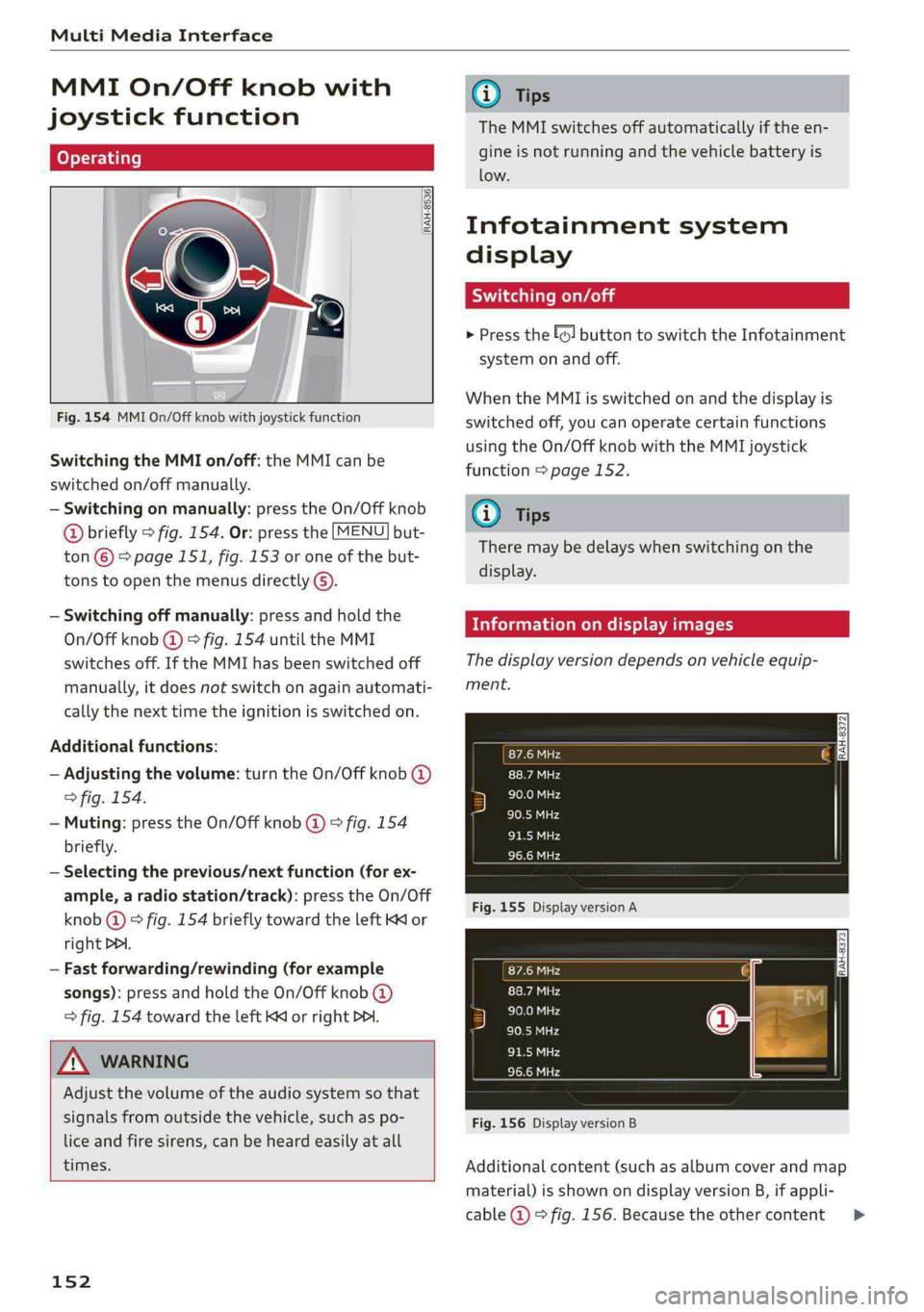
Fig.154MMIOn/Offknobwithjoystickfunction
SwitchingtheMMIon/off:theMMIcanbe
switched
on/offmanually.
—Switchingonmanually:presstheOn/Offknob
@briefly>fig.154.Or:pressthe[MENU]but-
ton©>page151,fig.153oroneofthebut-
tonstoopenthemenusdirectly().
—Switchingoffmanually:pressandholdthe
On/Offknob@)>fig.154untiltheMMI
switchesoff.IftheMMIhasbeenswitchedoff
manually,itdoesnotswitchonagainautomati-
callythenexttimetheignitionisswitchedon.
Additionalfunctions:
—Adjustingthevolume:turntheOn/Offknob@)
>fig.154.
—Muting:presstheOn/Offknob@)©fig.154
briefly.
—Selectingtheprevious/nextfunction(forex-
ample,aradiostation/track):presstheOn/Off
knob@)®fig.154brieflytowardtheleftKKor
rightDPI.
—Fastforwarding/rewinding(forexample
songs):pressandholdtheOn/Offknob@)
>fig.154towardtheleftKdorrightPo.
ZAWARNING
Adjustthevolumeoftheaudiosystemsothat
signalsfromoutsidethevehicle,suchas po-
liceandfiresirens,canbeheardeasilyatall
times.
152
G)Tips
TheMMIswitchesoffautomaticallyiftheen-
gineisnotrunningandthevehiclebatteryis
low.
Infotainmentsystem
display
Siarcelal
>Pressthe[6]buttontoswitchtheInfotainment
systemonandoff.
WhentheMMIisswitchedonandthedisplayis
switchedoff,youcanoperatecertainfunctions
usingtheOn/OffknobwiththeMMIjoystick
function>page152.
G)Tips
Theremaybedelayswhenswitchingonthe
display.
clearleClmemCaley
Thedisplayversiondependsonvehicleequip-
ment.
Fig.155DisplayversionA
Fig.156DisplayversionB
Additionalcontent(suchasalbumcoverandmap
material)isshownondisplayversionB,ifappli-
cable@©fig.156.Becausetheothercontent>
Page 182 of 392
Telephone
UsingtheAudiphone
box
Appliesto:vehicleswithAudiphonebox
Youcanchargeyourmobiledevicebatteryusing
theAudiphonebox.Youcanmakecallsthrough
theexteriorantenna*onthevehicle.Usingthe
externalantenna*helpswhenthereisalowsig-
nalandalsoprovidesbetterreceptionquality.
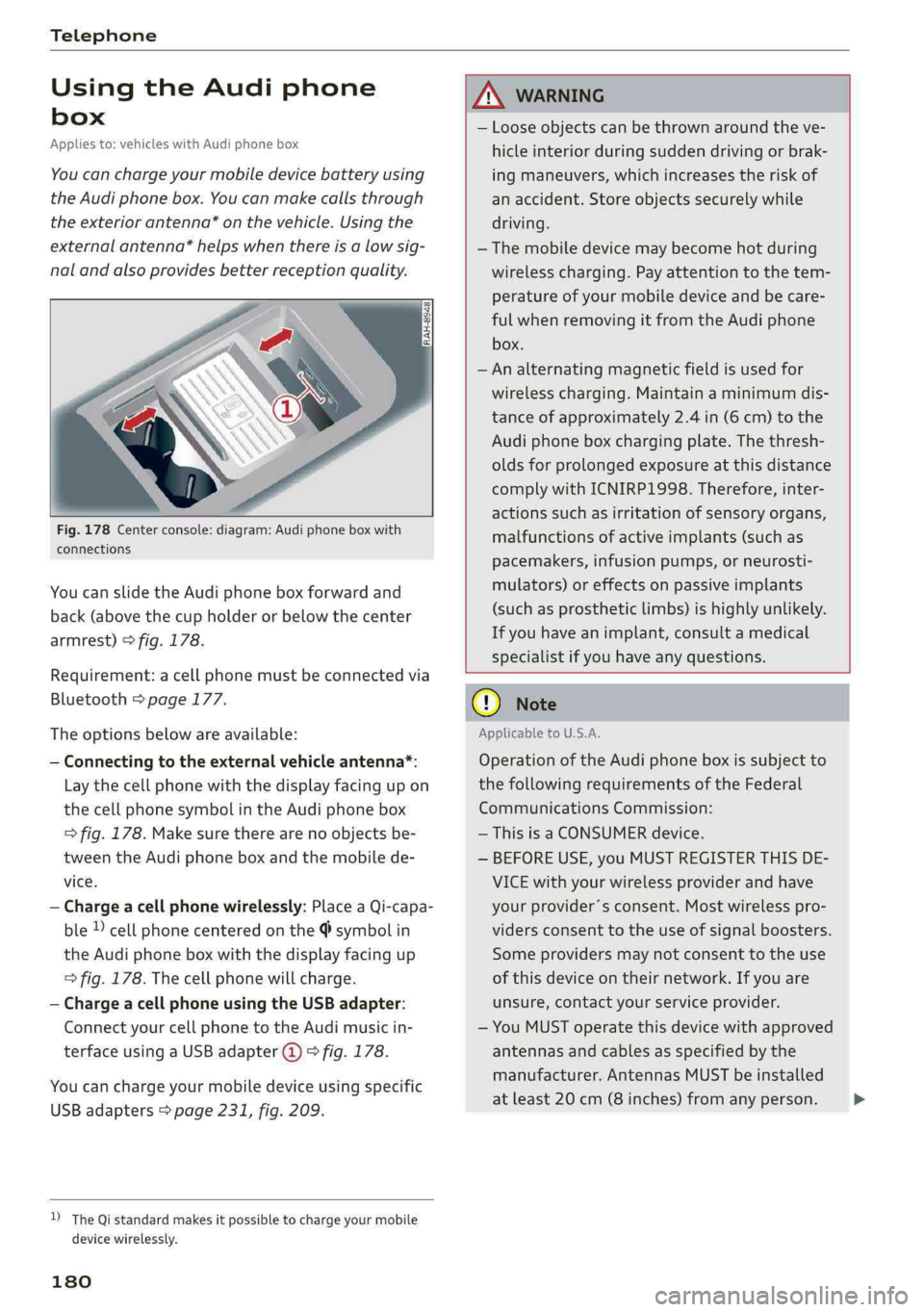
Fig.178Centerconsole:diagram:Audiphoneboxwith
connections
Youcanslidethe Audiphoneboxforwardand
back(abovethecupholderorbelowthecenter
armrest)>fig.178.
Requirement:acellphonemustbeconnectedvia
Bluetooth>page177.
Theoptionsbelowareavailable:
—Connectingtotheexternalvehicleantenna*:
Laythecellphonewiththedisplayfacingupon
thecellphonesymbolintheAudiphonebox
>fig.178.Makesuretherearenoobjectsbe-
tweenthe Audiphoneboxandthemobilede-
vice.
—Chargeacellphonewirelessly:PlaceaQi-capa-
ble»cellphonecenteredonthe@symbolin
the Audiphoneboxwiththedisplayfacingup
=>fig.178.Thecellphonewillcharge.
—ChargeacellphoneusingtheUSBadapter:
Connectyourcellphonetothe Audimusicin-
terfaceusingaUSBadapter@)>fig.178.
Youcanchargeyourmobiledeviceusingspecific
USBadapters>page231,fig.209.
D_TheQistandardmakesitpossibletocharge yourmobile
devicewirelessly.
180
ANWARNING
—Looseobjectscanbethrownaroundtheve-
hicleinteriorduringsuddendrivingorbrak-
ingmaneuvers, whichincreasestheriskof
anaccident.Storeobjectssecurelywhile
driving.
— Themobiledevicemaybecomehotduring
wirelesscharging.Payattentiontothetem-
perature ofyourmobiledeviceandbecare-
fulwhenremovingitfromthe Audiphone
box.
—Analternatingmagneticfieldisusedfor
wirelesscharging.Maintainaminimumdis-
tanceofapproximately2.4in(6cm)tothe
Audi
phoneboxchargingplate.Thethresh-
oldsforprolongedexposureatthisdistance
complywithICNIRP1998.Therefore,inter-
actionssuchasirritationofsensoryorgans,
malfunctionsofactiveimplants(suchas
pacemakers,infusionpumps,orneurosti-
mulators)oreffectsonpassiveimplants
(such as prostheticlimbs)ishighlyunlikely.
Ifyouhaveanimplant,consultamedical
specialistifyouhaveanyquestions.
()Note
ApplicabletoU.S.A.
Operationofthe Audiphoneboxissubjectto
thefollowingrequirementsoftheFederal
CommunicationsCommission:
—ThisisaCONSUMERdevice.
—BEFOREUSE,youMUSTREGISTERTHISDE-
VICEwithyourwirelessproviderandhave
yourprovider’sconsent.Mostwirelesspro-
vidersconsenttotheuseofsignalboosters.
Someprovidersmaynotconsenttothe use
ofthisdeviceontheirnetwork.Ifyouare
unsure,contactyourserviceprovider.
—YouMUSToperatethisdevicewithapproved
antennas
andcablesasspecifiedby the
manufacturer.AntennasMUSTbeinstalled
atleast20cm(8inches)fromanyperson.
Page 197 of 392
80A012721BG
Audiconnect
AboutAudiconnect
Hereyouwillfindlegalinformationregarding
AudiconnectInfotainmentusage.
Login
See>page193.
Connectionmanager
See>page246.
Licensesubscription
Thevalidityandexpirationdateofyourlicenses
aredisplayed.
Refresh
ThecontentoftheselectedAudiconnectInfo-
tainmentserviceortheentireAudiconnectInfo-
tainmentlistisupdated.
Dataprivacy
Requirement:theignitionmustbe switchedon.
Location,vehicle,andpersonal dataaretransmit-
tedwhenusingAudiconnectservices.
Allowingsendingofdata
—SelectandconfirmActivatedataconnection.
Thedatamoduleforthe useofallAudiconnect
serviceswillbeactive.
Restrictingsendingofdata
—SelectandconfirmActivateprivacy.Thedata
connectionislimitedordeactivateddepending
ontheequipment.ThemajorityofAudiconnect
serviceswillnot beavailable.
Thefollowinginterfacesarenotaffectedbythis
setting:Bluetooth,BluetoothLowEnergy(BLE),
Wi-Ficonnection,Audismartphoneinterface
(ASI),NearFieldCommunication(NFC),charging
communication(e-tron),ElectronicTollCollect
(ETC),ifequipped.
@)Note
Alwaysfollowtheinformationfoundin>@in
Generalinformationonpage192.
)Dependsonthecountryand equipment. Theseservices
are availableforalimitedtime.
@Tips
—Ifthetransmissionofdataislimited,data
willstillbetransmittedtoverifysubscrip-
tions.
—Ifthetransmissionofdataislimited,itwill
havethefollowingeffectsontheexchange
ofdataforAudiconnectservicesandemer-
gencycalls,ifequipped:
—Theemergencycallfunctionwillremain
availablewithoutrestrictionsandwillcon-
tinuetotransmitdata.
—Ifanonlineroadsideassistancecallisini-
tiated,nodatawillbetransmitted,buta
callwillbemade.
—IftheGeofencingAlert,SpeedAlert,
and/orValetAlertserviceshavebeenacti-
vatedbythekeyuser,thentheywillre-
mainavailablewithoutrestrictionsand
continuetotransmitdata.
Audiconnectvehicle
controlservices
Appliesto:vehicleswith Audiconnectvehiclecontrol
WithAudiconnectvehiclecontrolservices)),you
canutilizevariousservicesusingthemyAudiapp
oronlineatwww.audiusa.com/myaudi.
Z\WARNING
Alwaysfollowtheinformationfoundin>AV
inGeneralinformationonpage192.
@Tips
—Accessingspecificdataorcontrollingfunc-
tionsremotelydependsonthechargelevel
ofthevehiclebattery.Therefore,these
functionsonlyhavelimitedavailabilityafter
switchingofftheignition.
— AneSIMcardestablishestheInternetcon-
nectionforAudiconnectvehiclecontrol
services.Thecostsforthisareincludedin
thepriceofAudiconnectvehiclecontrol
195
>
Page 230 of 392
Media
—Thestatusofthedeletingprocessisshownin
theMMI.Jukeboxplaybackstopsduringthede-
letingprocessandstartsagainautomatically
oncethedeletioniscomplete.
@)Note
Donotimportaudio/videofileswhentheen-
gineisturnedoffbecausethiswilldrainthe
vehiclebattery.
@)Tips
—TracksfromaudioCDscannotbeimported
totheJukeboxforlegalreasons.
—Filesthathavealreadybeenimportedare
automaticallyrecognizedandcannotbe
copiedtotheJukeboxagain.
—Itisnotpossible toplay audio/video*files
intheCD/DVD*drivewhileimportingthem.
— TheJukeboxdoesnotprovidean export
functionduetolegalreasons.
—Filesortrackswithoutadditionalstoredin-
formationarelistedasUnknown.Audirec-
ommendsaddingadditionalinformation
(such asID3tags)toaudiofiles.
—ResettheJukeboxtothefactorydefaultset-
tingswhensellingyourvehicle>page246.
Bluetoothaudioplayer
Appliesto:vehicleswithBluetoothaudioplayer
WiththeBluetoothaudioplayer,youcanplay
musicwirelesslyfrom yourBluetooth-capable
device(suchasacellphone)throughtheMMI.
Requirement:thevehiclemustbestationaryand
theignitionmustbe switchedon.TheBluetooth
settingswillopenonyourmobiledeviceduring
theconnectionsetup.TheBluetoothfunctionand
visibilityoftheMMI>page248andmobilede-
vicemustbe switchedon.TheBluetoothaudio
player>page248mustbe switchedoninthe
MMI.
—ConnectingaBluetoothplayer:pressthe
MEDIA]button.Presstheleftcontrolbutton
untilthesourcesoverviewisdisplayed.Select
andconfirmBluetoothaudioplayer@)
=>page234,fig.211.
228
—Ifnecessary,selectandconfirm,Notconnected
>ConnectBluetoothaudioplayer.TheBlue-
toothdevicesearchstarts.Followtheinstruc-
tionsintheMMI.
—SelectandconfirmthedesiredBluetoothdevice
fromthelist.TheMMIgeneratesaPINforthe
connection.
—SelectandconfirmYes.
—EnterthePINforconnectingonyourBluetooth
device.Or:ifthePINisalreadydisplayedon
yourBluetoothdevice,confirmitintheBlue-
toothdeviceandintheMMI.Thetimeallowed
forenteringthePINislimitedtoapproximately
30seconds.
Themediaisstartedandoperatedthroughthe
mobiledeviceortheMMI,dependingonthede-
vicebeingused.
(i)Tips
—Checkforanyconnectionrequestsonyour
Bluetoothdevice.
—MultipleBluetoothaudioplayerscan be
connectedtotheMMI,butonlyonemobile
devicecanbeactive.
—BluetoothprotocolsAVRCP(1.0/1.3/1.4)
andA2DParesupported.
—NotethevolumesettingonyourBluetooth
device.Audirecommendssettingyourmo-
biledevicetothemaximumvolumewhen
usingitasaBluetoothaudioplayer.
— Thesupportedmediafunctions(suchas
shuffle)dependontheBluetoothdevicebe-
ingused.
—Formoreinformationonsupporteddevices,
visitwww.audiusa.com/bluetoothorcon-
tactanauthorizedAudidealerorauthorized
AudiServiceFacility.
Page 233 of 392
80A012721BG
Media
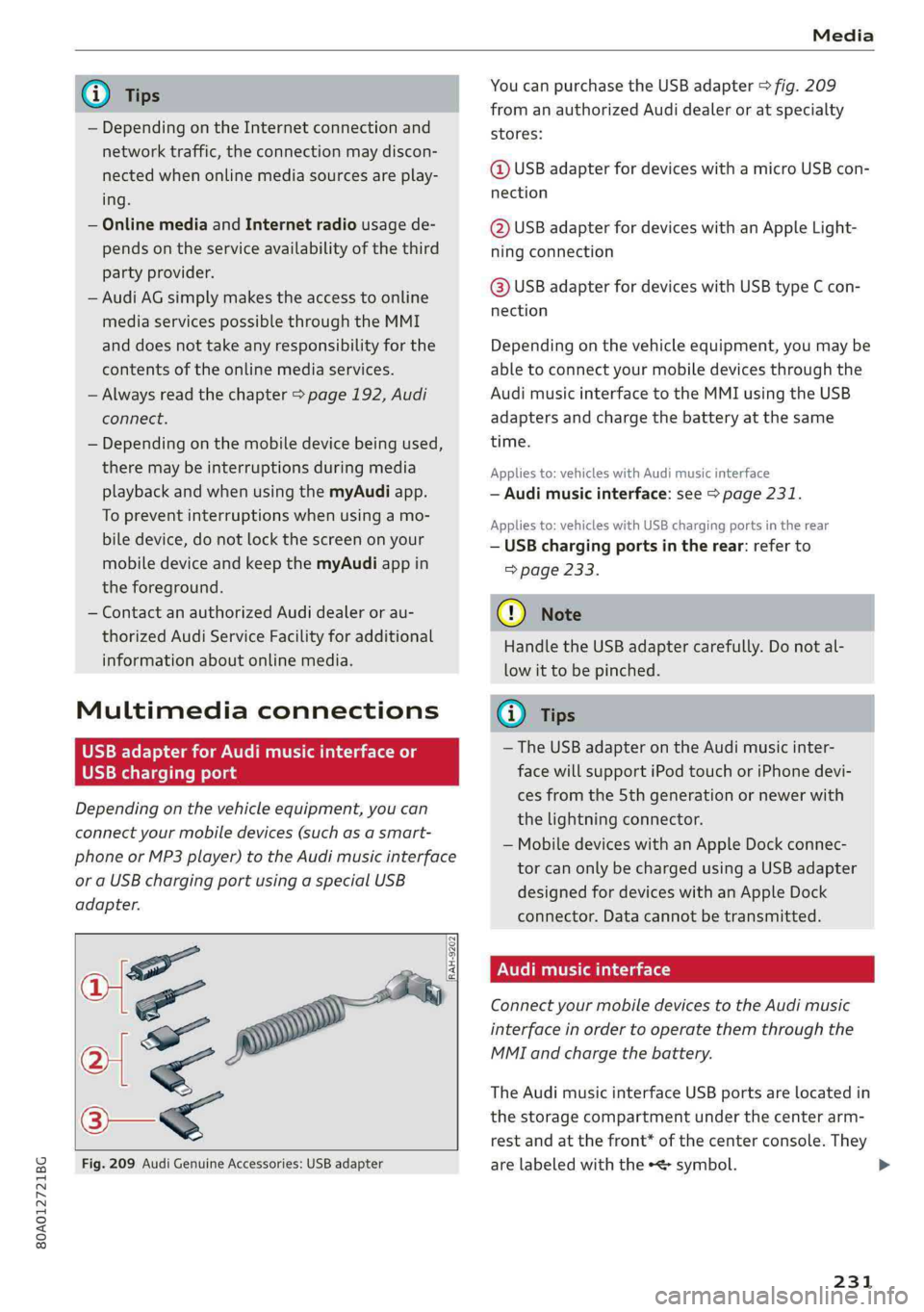
@TipsYoucanpurchasetheUSBadapter>fig.209
fromanauthorizedAudidealeroratspecialty
— Depending ontheInternetconnectionandstores:
networktraffic,the connectionmaydiscon-
nectedwhenonlinemediasourcesareplay-@USBadapterfordeviceswithamicroUSBcon-
ing.nection
—OnlinemediaandInternetradiousagede-@USBadapterfordeviceswithanAppleLight-
pendsontheserviceavailabilityofthethirdningconnection
partyprovider.
—AudiAGsimplymakestheaccesstoonlinehaaSeadsterfardevicesaitUSBGmeEcon
mediaservicespossiblethroughtheMMInection
anddoesnottakeanyresponsibilityfortheDepending onthevehicleequipment,youmaybe
contentsoftheonlinemediaservices.abletoconnectyourmobiledevicesthroughthe
—Alwaysreadthe chapter>page192,AudiAudimusicinterfacetotheMMIusingtheUSB
connect.adaptersandchargethebatteryatthesame
— Depending onthemobiledevicebeingused, time.
theremaybeinterruptionsduringmediaAppliesto:vehicleswithAudimusicinterface
playbackandwhenusingthemyAudiapp.—Audimusicinterface:see>page231.
TopreventinterruptionswhenSSeeAppliesto:vehicleswithUSBchargingportsintherear
biledevice,donotlockthescreenonyour—USBchargingportsintherear:referto
mobiledeviceandkeepthemyAudiappin>page233.
theforeground.
—ContactanauthorizedAudidealeror au-@)Note
thorizedAudiServiceFacilityforadditional
HandletheUSBadaptercarefully.Donotal-
informationaboutonlinemedia.
lowittobepinched.
MultimediaconnectionsG)Tips
—TheUSBadapteronthe Audimusicinter-
USBchargingportfacewillsupportiPodtouchoriPhonedevi-
cesfromthe 5thgenerationornewerwith
thelightningconnector.
—MobiledeviceswithanAppleDockconnec-
torcanonlybechargedusingaUSBadapter
designedfordeviceswithanAppleDock
connector.Datacannotbetransmitted.
Audimusicinterface
ConnectyourmobiledevicestotheAudimusic
interfaceinordertooperatethemthroughthe
MMIandchargethebattery.
Dependingonthevehicleequipment,youcan
connectyourmobiledevices(suchas asmart-
phoneorMP3player)totheAudimusicinterface
oraUSBchargingportusingaspecialUSB
adapter.
af
a|=
TheAudimusicinterfaceUSBportsarelocatedin
o—«thestoragecompartmentunderthecenterarm-
restandatthefront* ofthecenterconsole.They
Fig.209AudiGenuineAccessories:USBadapterarelabeledwiththe«
[RAH-9202
\
231
Page 234 of 392
Media
TheAudimusicinterfaceAUXinputislocatedin
thestoragecompartmentunderthecenter
armrestandislabeledwithAUX.
USBInput
—Connectingorchargingmobiledevicesusinga
USBadapter:ConnectthematchingUSBadapt-
ertothe AudimusicinterfaceUSBportand
thenconnectittothemobiledevice,forexam-
pleaniPhone.Thebatterywillchargeautomat-
ically.
—DisconnectingamobiledevicefromtheAudi
musicinterface:RemovetheUSBadapterfrom
the AudimusicinterfaceUSBport.
Themediaarestartedandoperatedthroughthe
mobiledeviceortheMMI,dependingonthede-
vicebeingused>page234.
Connectingmultiplemobiledevices:ifamobile
device(suchasasmartphone)isconnectedatthe
respectiveUSBportontheAudimusicinterface,
thenalldevicescanbeusedasa playbacksource.
AUXInput
—Connectingamobiledevice totheAUXinput:
ConnecttheAUXcabletotheAUXinputonthe
Audimusicinterfaceandthenconnectittothe
mobiledevice(forexample,anMP3playerora
smartphone).
—DisconnectingamobiledevicefromtheAUX
input:RemovetheAUXcablefromtheAUXin-
putonthe Audimusicinterface.
—Operation:selectandconfirmtheExternalau-
dioplayersource©)>page234,fig.210.Me-
diaisstartedandoperatedonthemobilede-
vice.
ZAWARNING
Drivingrequiresyourcompleteandundivided
attention.Asthedriver,youhavecompletere-
sponsibilityforsafetyintraffic.Neveroperate
mobiledeviceswhiledriving,becausethisin-
creasestheriskofanaccident.
1)Applies onlytoMTPdevices.DoesnotapplytoAppledevi-
cesandUSBmassstoragedevices.
232
@)Note
—UseaUSBextensioncabletoconnectdevi-
cesthathaveanintegratedUSBconnector
(suchasaUSBstick)topreventdamageto
yourUSBdeviceandthe Audimusicinter-
face.
—Extremelyhighorlow temperaturesthat
canoccurinsidevehiclescandamagemobile
devicesand/orimpairtheirperformance.
Neverleavemobiledevicesinthevehiclein
extremelyhighorlowtemperatures.
G)Tips
—Alwaysfollowtheinformationfoundin
=page59.
—Whenyouswitchtheignitionoff,theUSB
portsarestillsuppliedwithpoweruntilthe
energymanagementintervenes.
—DonotuseanadditionaladapterorUSBex-
tensioncabletoconnectmobiledevicesto
theAudimusicinterfacethatalreadyhavea
cableorthatmustbeconnectedwithaUSB
adapter(>page231).Using anadditional
adapterorUSextensioncablemayimpair
functionality.
—YoucanpurchasetheAUXconnectorcable
fromanauthorizedAudidealeror atspe-
cialtystores.
—Audirecommendssettingthevolumeofa
mobiledeviceconnectedtotheAUXinputto
approximately70%ofthemaximumvol-
ume.
—Functionalityisnotguaranteedformobile
devicesthatdonotconformtotheUSB2.0
specification.
—USBhubsarenotsupported.
—SomeversionsoftheiPodsuchastheiPod
shufflecannotbeconnectedtotheUSB
adapterfordeviceswithAppleDockconnec-
tor.ConnectthesedevicesusingaAUXcon-
nectorcable.
—Changedcontentonamobiledevice»)that
isconnectedtotheAudimusicinterface
maynotbedisplayedinthemediacenter.In>