buttons AUDI Q5 2019 User Guide
[x] Cancel search | Manufacturer: AUDI, Model Year: 2019, Model line: Q5, Model: AUDI Q5 2019Pages: 392, PDF Size: 99.86 MB
Page 73 of 392
![AUDI Q5 2019 User Guide 80A012721BG
Warmandcold
up.Coolingmodeswitchesoffautomatically
whentheoutsidetemperatureisbelowzero.
Ifyouactivate[A/CON],thecoolingmodewillbe
automaticallyregulated.|A/COFF]switchescool-
ingmode](/img/6/57631/w960_57631-72.png "AUDI Q5 2019 User Guide 80A012721BG
Warmandcold
up.Coolingmodeswitchesoffautomatically
whentheoutsidetemperatureisbelowzero.
Ifyouactivate[A/CON],thecoolingmodewillbe
automaticallyregulated.|A/COFF]switchescool-
ingmode")
80A012721BG
Warmandcold
up.Coolingmodeswitchesoffautomatically
whentheoutsidetemperatureisbelowzero.
Ifyouactivate[A/CON],thecoolingmodewillbe
automaticallyregulated.|A/COFF]switchescool-
ingmodeoff.
Ifyouactivate[A/CMAX/}*,thecoolingmodewill
operatewithmaximumoutput.To reduceunnec-
essaryenergyusage,onlyusethisfunctionbrief-
ly.
Ifyouactivate[A/Ceco}*,theclimatecontrolsys-
temwilloperateinenergy-savingmode.
<=Recirculationmode
Inrecirculationmode,theairinsidethevehicleis
circulatedandfiltered.Thispreventstheunfil-
teredairoutsidethevehiclefromenteringthe
vehicleinterior.Switchingrecirculationmodeon
whendrivingthroughatunnelor whensittingin
trafficisrecommended>A.
Youcanswitchtherecirculationmodeonoroff
usingthe<>button.Youcanalsoswitchthere-
circulationmodeoffbypressingtheknob@)or
the§%button.
AUTO}Automaticmode
Automaticmodemaintainsaconstanttempera-
tureinsidethevehicle.Airtemperature,airflow
andairdistributionarecontrolledautomatically.
Youcanswitchautomaticmodeonoroffby
pressingtheknob@.
Temperature
Youcanadjustthetemperaturebetween60°F
(+16°C)and84°F(+28°C)byturningtheknob
©.Ifoutsideofthisrange,LOorHIwillappear
intheclimatecontrolsystemdisplay.Inbothset-
tings,theclimatecontrolrunsconstantlyatthe
maximumcoolingorheatinglevel.Thetempera-
tureisnotregulated.
Thetemperaturecanbeadjustedintherearus-
ing
therearcontrols>fig.83.
=Blower
Youcanadjustthevolumeofairgeneratedby the
blowertoyourpreferenceusingtherockerswitch
@.Theblowershouldalwaysrunatalowsetting
topreventthewindowsfromfoggingandtoen-
sureacontinuousexchangeofairinsidethevehi-
cle.To havetheblowerregulatedautomatically,
pressoneoftheknobs().
Airdistribution
Youcanusetherockerswitches(2)toadjustthe
ventswheretheairwillflowoutof.Pressthe
rockerswitches(2)repeatedlyuntilthedesired
airdistributionsettingisdisplayedintheclimate
controlsystemcontrols.Tohavetheairdistribu-
tionregulatedautomatically,pressoneofthe
knobs@).
SYNC]Synchronization
Usetherockerswitch ()toselectthefunction.
Whensynchronizationisswitchedon,theset-
tingsforthedriver'ssideareappliedtothefront
passenger'ssideandtherear(exceptforseat
heating/ventilation*).Whenthesettingsonthe
frontpassenger'ssideorinthereararechanged,
thesynchronizationisautomaticallyswitchedoff
and3-zoneappearsinthedisplay.
SETREAR]function
Usetherockerswitch ()toselectthefunction.
Whenthefunctionisswitchedon,youcanadjust
allsettingsfortherearusingtheclimatecontrol
systemcontrolsinthecockpit.Therearclimate
controlsystemcontrolscannotbeoperatedat
thesametime.Thisfunctionswitchesoffauto-
maticallyafteracertainperiodoftimeorafter
leavingthemenu.
«Seatheating*
Pressingtheabuttonswitchestheseatheating
onatthehighestsetting(level3).TheLEDsindi-
catethetemperaturelevel.Toreducethetem-
perature,pressthebuttonagain.Toswitchthe
seatheatingoff,pressthebuttonrepeatedlyun-
tiltheLEDturnsoff.
#)Seatventilation*
Pressingthe£4 buttonswitchestheseatventila-
tiononatthehighestlevel(3).TheLEDsindicate
thetemperaturelevel.To reduce theventilation
level,pressthebuttonagain.Toswitchtheseat
ventilationoff,pressthe buttonrepeatedlyuntil
theLEDturnsoff.
71
Page 77 of 392
80A012721BG
Driving
Invehicleswithmemoryfunction*,thesteering
columnsettingsarestoredtogetherwiththe
seatposition.
VA
Appliesto:vehicleswithpowersteeringwheeladjustment
Easyseatentrymakesiteasiertoenterandexit
thevehiclebyadjustingthesteeringcolumnau-
tomatically.
> SelectintheInfotainmentsystem:[MENU]but-
ton>Vehicle> leftcontrolbutton>Vehicle
settings>Seats>Driver'sseat>Easyentry
function.
Wheneasyseatentryisswitchedon,thesteering
columngoesbackupintotheparkpositionwhen
theignitionisswitchedoff.Afterenteringtheve-
hicle,thesteeringcolumnreturnstothestored
positiononcetheignitionisswitchedon.
Startingandstopping
theengine
Startingtheengine
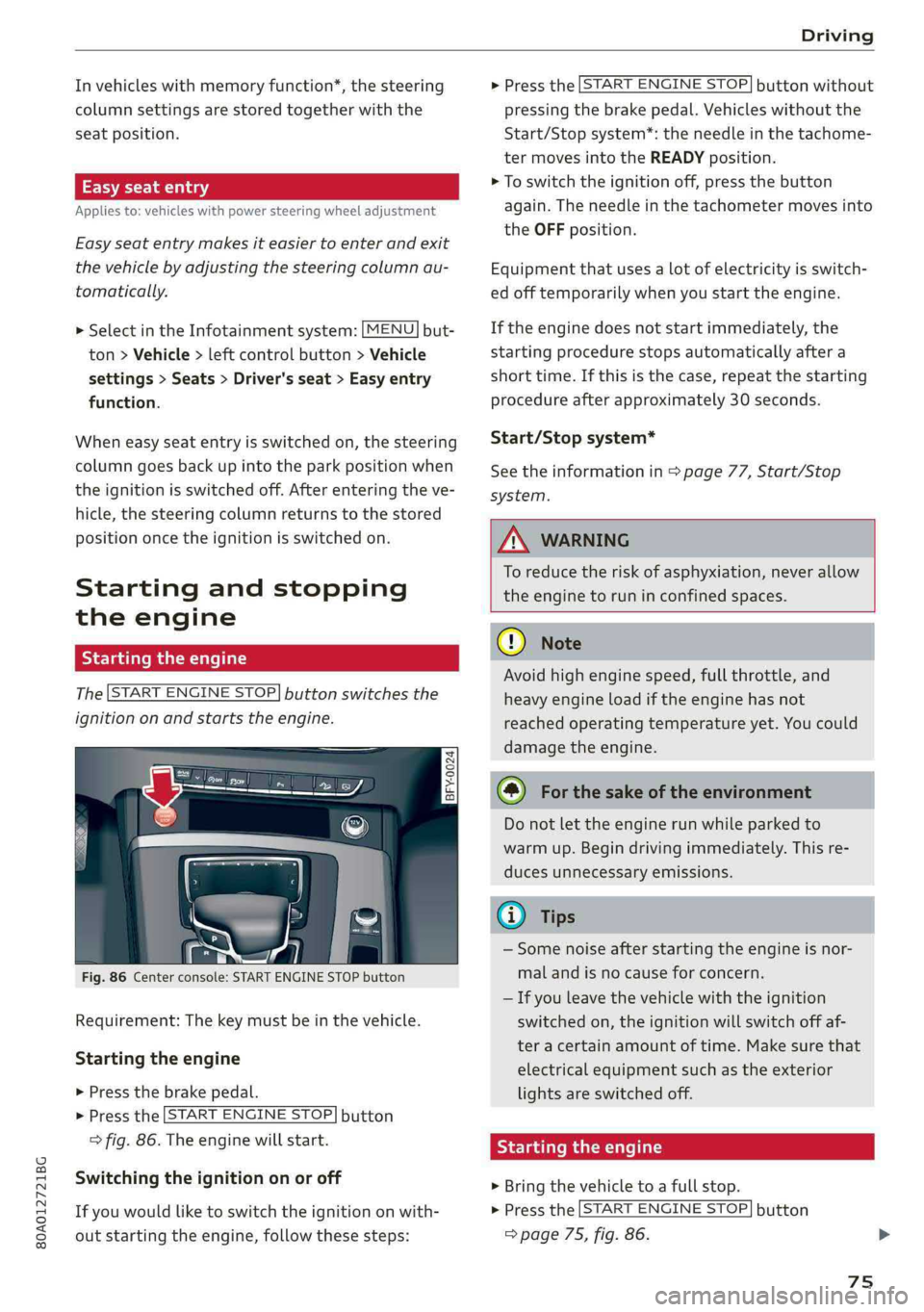
The[STARTENGINESTOP]buttonswitchesthe
ignitiononandstartstheengine.
= a 3S
poycoO
Fig.86Centerconsole:STARTENGINESTOPbutton
Requirement:Thekeymustbeinthevehicle.
Startingtheengine
>Pressthebrakepedal.
>Pressthe|STARTENGINESTOP]button
>fig.86.Theenginewillstart.
Switching theignitiononoroff
Ifyouwouldliketoswitchtheignitiononwith-
outstartingtheengine,followthesesteps:
>Pressthe[STARTENGINESTOP]buttonwithout
pressingthebrakepedal.Vehicleswithoutthe
Start/Stopsystem*:theneedleinthetachome-
termovesintotheREADYposition.
>Toswitchtheignitionoff,pressthe button
again.Theneedleinthetachometermovesinto
theOFFposition.
Equipmentthatusesalotofelectricityisswitch-
edofftemporarilywhenyoustarttheengine.
Iftheenginedoesnotstartimmediately,the
startingprocedurestopsautomaticallyaftera
shorttime.Ifthisisthecase,repeatthestarting
procedureafterapproximately30seconds.
Start/Stopsystem*
Seetheinformationin>page77,Start/Stop
system.
Z\WARNING
To reducetheriskofasphyxiation,never allow
theenginetoruninconfinedspaces.
CG)Note
Avoidhighenginespeed,fullthrottle,and
heavyengineloadiftheenginehasnot
reached
operatingtemperatureyet.Youcould
damagetheengine.
@)Forthesakeoftheenvironment
Donotlettheenginerunwhileparkedto
warmup.Begindrivingimmediately.Thisre-
ducesunnecessaryemissions.
Gi)Tips
—Somenoiseafterstartingtheengineisnor-
malandisnocauseforconcern.
—Ifyouleavethevehiclewiththeignition
switchedon,theignitionwillswitchoffaf-
teracertainamountoftime.Makesurethat
electricalequipmentsuchastheexterior
lightsareswitchedoff.
Startingtheengine
>Bringthevehicletoafullstop.
>Pressthe|STARTENGINESTOP]button
=>page75,fig.86.
75
Page 106 of 392
Assistsystems
Youcansetanyspeedbetween20mphand95
mph(30km/hand150km/h).
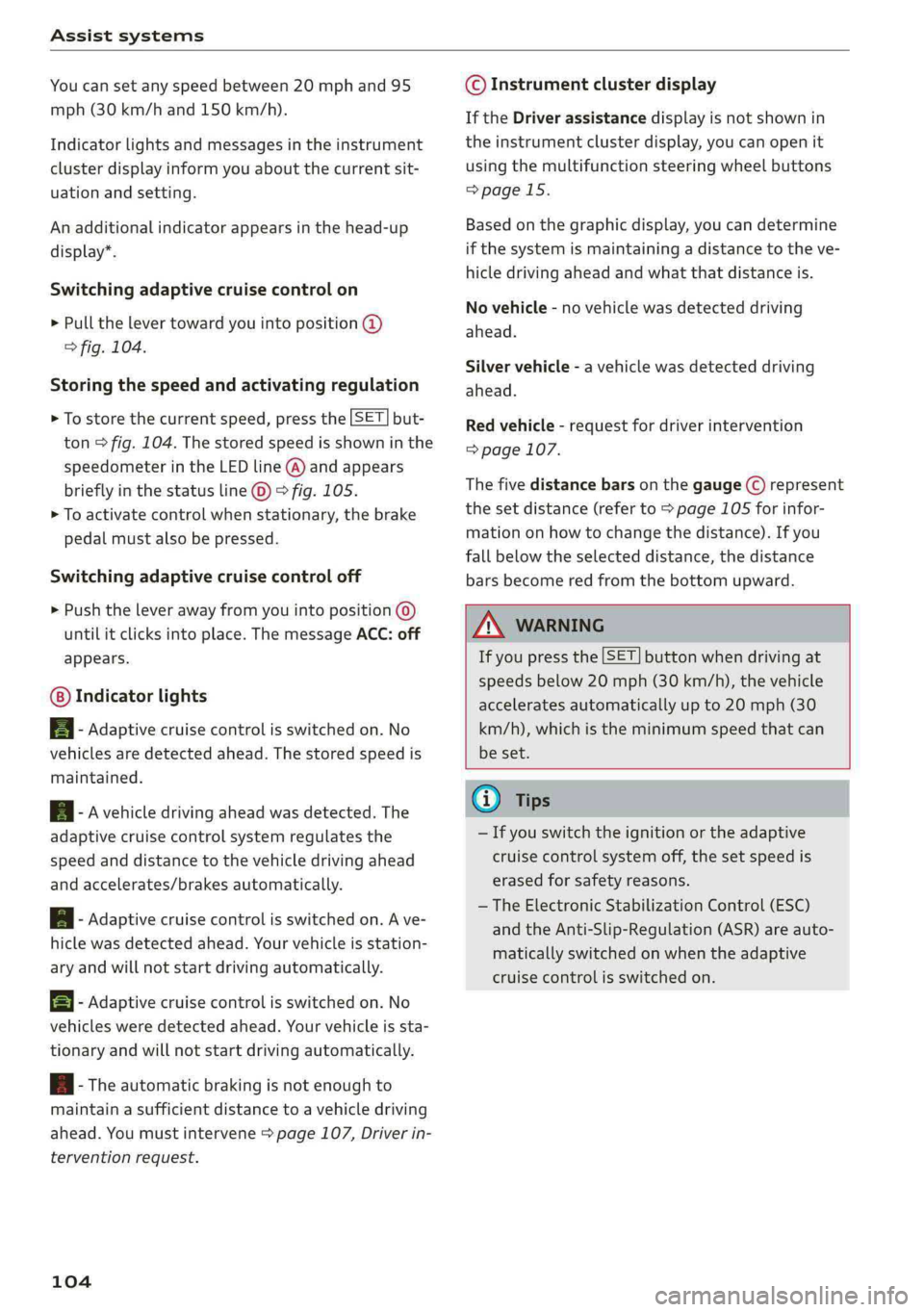
Indicatorlightsandmessagesintheinstrument
clusterdisplayinformyouaboutthecurrentsit-
uationandsetting.
Anadditionalindicatorappearsinthehead-up
display”.
Switchingadaptivecruisecontrolon
>Pullthelevertowardyouintoposition@
>fig.104.
Storingthespeedandactivatingregulation
>Tostorethecurrentspeed,pressthe[SET]but-
ton>fig.104.Thestoredspeedisshowninthe
speedometerintheLEDline(@)andappears
brieflyinthestatusline©)>fig.105.
>Toactivatecontrolwhenstationary,thebrake
pedalmustalsobepressed.
Switchingadaptivecruisecontroloff
>Pushtheleverawayfromyouintoposition©)
untilitclicksintoplace.ThemessageACC:off
appears.
Indicatorlights
B-Adaptivecruisecontrolisswitchedon.No
vehiclesaredetectedahead.Thestoredspeedis
maintained.
B-Avehicledrivingaheadwasdetected.The
adaptivecruisecontrolsystemregulatesthe
speedanddistancetothevehicledrivingahead
andaccelerates/brakesautomatically.
A-Adaptivecruisecontrolisswitchedon.Ave-
hiclewasdetectedahead.Yourvehicleisstation-
aryandwillnotstartdrivingautomatically.
EB-Adaptivecruisecontrolisswitchedon.No
vehiclesweredetectedahead.Yourvehicleissta-
tionaryandwillnotstartdrivingautomatically.
B-Theautomaticbrakingisnotenoughto
maintainasufficientdistancetoavehicledriving
ahead.Youmustintervene>page107,Driverin-
terventionrequest.
104
©Instrumentclusterdisplay
IftheDriverassistancedisplayisnotshownin
theinstrumentclusterdisplay,youcanopenit
usingthemultifunctionsteeringwheelbuttons
>page15.
Basedonthegraphicdisplay,youcandetermine
ifthesystemismaintainingadistancetotheve-
hicledrivingaheadandwhatthatdistanceis.
Novehicle-novehiclewasdetecteddriving
ahead.
Silvervehicle-avehiclewasdetecteddriving
ahead.
Redvehicle-requestfordriverintervention
=>page107.
Thefivedistance barsonthegauge(©represent
the
setdistance(referto>page105forinfor-
mationonhowtochangethedistance).Ifyou
fallbelowtheselecteddistance,thedistance
barsbecomeredfromthebottomupward.
ZXWARNING
Ifyoupressthe[SET]buttonwhendrivingat
speedsbelow20mph(30km/h),thevehicle
acceleratesautomaticallyupto20mph(30
km/h),whichistheminimumspeedthatcan
beset.
(i)Tips
—Ifyouswitchtheignitionortheadaptive
cruisecontrolsystemoff,thesetspeedis
erasedforsafetyreasons.
— TheElectronicStabilizationControl(ESC)
andtheAnti-Slip-Regulation(ASR)areauto-
maticallyswitchedonwhentheadaptive
cruisecontrolisswitchedon.
Page 110 of 392
Assistsystems
Trafficjamassist
Appliesto:vehicleswithtrafficjamassist
Trafficjamassistsupportsthedriverwhendriv-
ingintrafficjamsorinheavytraffic.
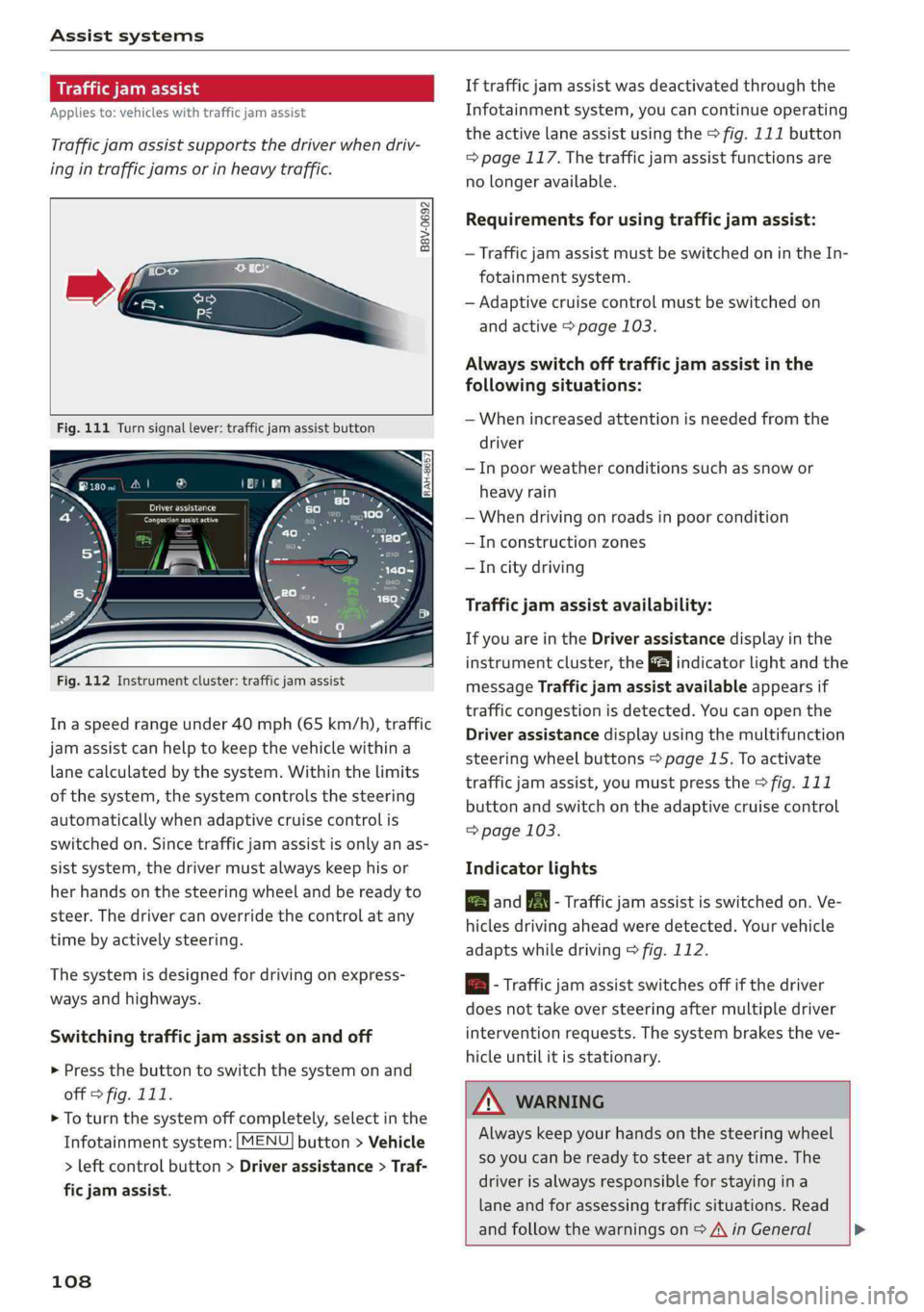
B8V-0692
Fig.111Turnsignallever:trafficjamassistbutton
RAH-8657
Fig.112Instrumentcluster:trafficjamassist
In aspeedrangeunder40mph(65km/h),traffic
jamassistcanhelptokeepthevehiclewithina
lanecalculatedbythesystem.Withinthelimits
ofthe system, thesystemcontrolsthesteering
automaticallywhenadaptivecruisecontrolis
switchedon.Sincetrafficjamassistisonlyanas-
sistsystem,thedrivermustalwayskeephisor
herhandsonthesteeringwheelandbereadyto
steer.Thedrivercanoverridethecontrolatany
timebyactivelysteering.
Thesystemisdesignedfordrivingonexpress-
waysandhighways.
Switchingtrafficjamassistonandoff
>Pressthebuttontoswitchthesystemonand
off>fig.111.
>Toturnthesystemoffcompletely,selectinthe
Infotainmentsystem:[MENU]button>Vehicle
>leftcontrolbutton>Driverassistance> Traf-
ficjamassist.
108
Iftrafficjamassistwasdeactivatedthroughthe
Infotainmentsystem,youcancontinueoperating
theactivelaneassistusingthe>fig.111button
=>page117.Thetrafficjamassistfunctionsare
nolongeravailable.
Requirementsforusingtrafficjamassist:
—TrafficjamassistmustbeswitchedonintheIn-
fotainmentsystem.
—Adaptivecruisecontrolmustbeswitchedon
andactive>page103.
Alwaysswitchofftrafficjamassistinthe
followingsituations:
—Whenincreasedattentionisneededfromthe
driver
—Inpoorweatherconditionssuchassnowor
heavyrain
—Whendrivingonroadsinpoorcondition
—Inconstructionzones
—Incitydriving
Trafficjamassistavailability:
IfyouareintheDriverassistancedisplayinthe
instrumentcluster,theindicatorlightandthe
messageTrafficjamassistavailableappearsif
trafficcongestionisdetected.Youcanopenthe
Driverassistancedisplayusingthemultifunction
steeringwheelbuttons>page15.Toactivate
trafficjamassist,youmustpressthe>fig.111
buttonandswitchontheadaptivecruisecontrol
=>page103.
Indicatorlights
BandB-Trafficjamassistisswitchedon.Ve-
hiclesdrivingahead weredetected.Yourvehicle
adaptswhiledriving>fig.112.
B-Trafficjamassistswitchesoffifthedriver
doesnottakeoversteeringaftermultipledriver
intervention requests.Thesystembrakes theve-
hicleuntilit isstationary.
ZAWARNING
Alwayskeepyourhandsonthesteeringwheel
soyoucanbereadytosteeratanytime.The
driverisalwaysresponsibleforstayingina
laneandforassessingtrafficsituations.Read
andfollowthewarningson>A\inGeneral>
Page 120 of 392
Assistsystems
Displayintheinstrumentcluster
Appliesto:vehicleswithAudiactivelaneassist
wmaq 9
=+a
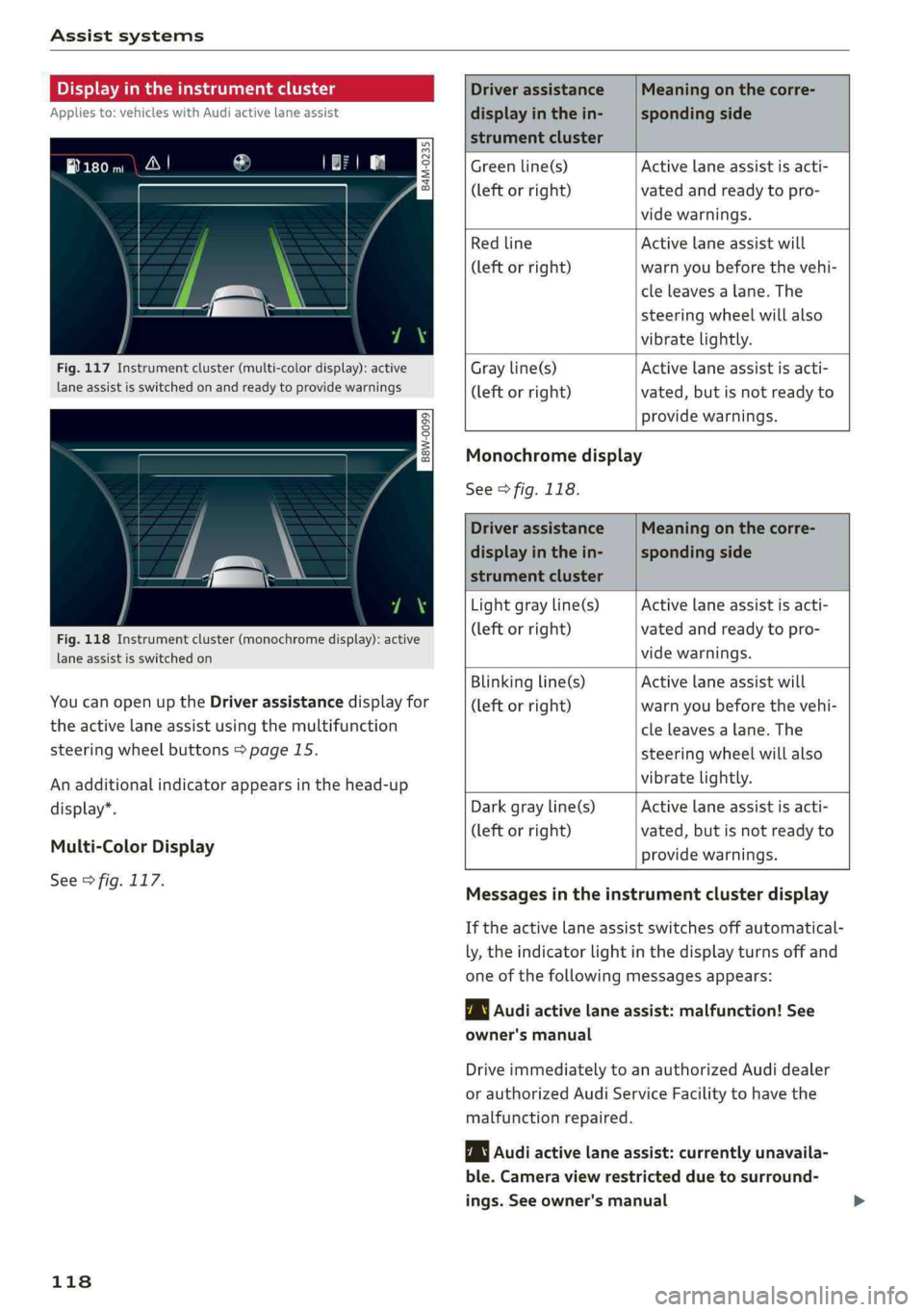
Fig.117Instrumentcluster(multi-colordisplay):active
laneassistisswitched onandreadytoprovidewarnings
B8W-0099
Fig.118Instrumentcluster(monochromedisplay):active
laneassistisswitched on
YoucanopenuptheDriverassistancedisplayfor
theactivelaneassistusingthemultifunction
steeringwheelbuttons>page15.
Anadditionalindicatorappearsinthehead-up
display”.
Multi-ColorDisplay
See>fig.117.
118
Driverassistance
displayinthein-
strumentcluster
Meaningonthecorre-
spondingside
Greenline(s)
(leftorright)
Activelaneassistisacti-
vatedandreadytopro-
videwarnings.
Redline
(leftorright)
Activelaneassistwill
warnyoubeforethevehi-
cleleavesalane.The
steeringwheelwillalso
vibratelightly.
Grayline(s)
(leftorright)
Activelaneassistisacti-
vated,butisnotreadyto
providewarnings.
Monochromedisplay
See>fig.118.
Driverassistance
displayinthein-
strumentcluster
Meaningonthecorre-
spondingside
Lightgrayline(s)
(leftorright)
Activelaneassistisacti-
vatedandreadytopro-
videwarnings.
Blinkingline(s)
(leftorright)
Activelaneassistwill
warnyoubeforethevehi-
cleleavesalane.The
steeringwheelwillalso
vibratelightly.
Darkgrayline(s)
(leftorright)
Activelaneassistisacti-
vated,butisnotreadyto
providewarnings.
Messagesintheinstrumentclusterdisplay
Iftheactivelaneassistswitchesoffautomatical-
ly,theindicatorlightinthedisplayturnsoffand
oneofthefollowingmessagesappears:
1Audiactivelaneassist:malfunction!See
owner'smanual
DriveimmediatelytoanauthorizedAudidealer
orauthorizedAudiServiceFacilitytohavethe
malfunctionrepaired.
Audiactivelaneassist:currentlyunavaila-
ble.Cameraviewrestrictedduetosurround-
ings.Seeowner'smanual
Page 153 of 392
80A012721BG
MultiMediaInterface
MultiMediaInterface
Trafficsafety
information
AudirecommendsperformingcertainInfotain-
mentsystemfunctions,suchasenteringa desti-
nation,onlywhenthevehicleisstationary.Al-
waysbepreparedtostopoperating theInfotain-
mentsystemintheinterestofyoursafetyand
thesafety ofotherroadusers.
Introduction
TheMultiMediaInterface,orMMIforshort,
combinesvarioussystemsforcommunication,
navigation*andentertainmentinyourAudi.You
canoperatetheMMIusingtheMMIcontrolpan-
el,themultifunctionsteeringwheelorthevoice
recognitionsystem*.
RAH-8836|
Z\WARNING
Onlyuse theInfotainmentsystemwhenroad,
traffic,weather,andvisibilityconditionsper-
mitandalwaysinawaythatallowsyouto
maintaincompletecontroloveryourvehicle.
@Tips
Certainfunctionsarenotavailablewhiledriv-
ing.
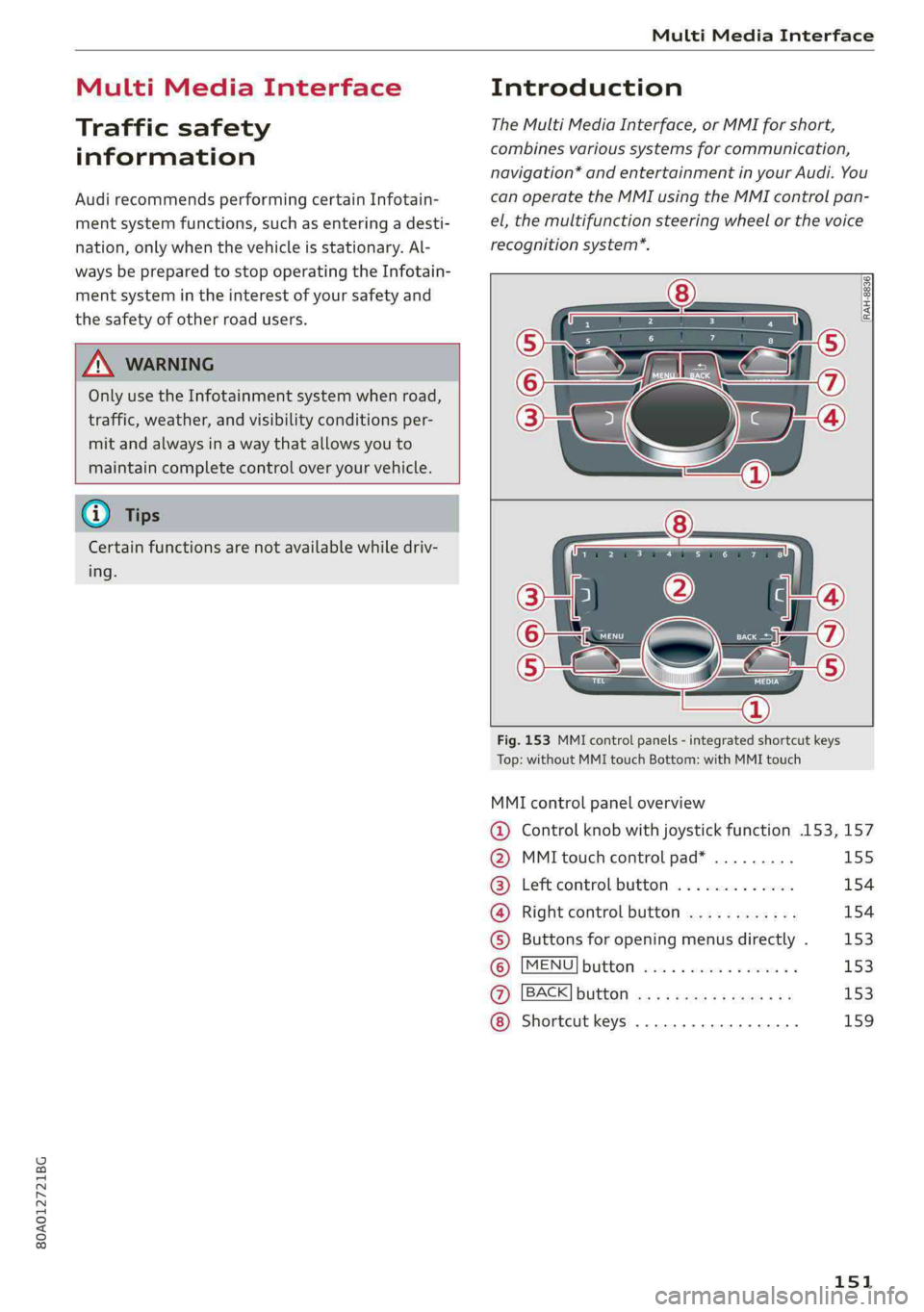
Fig.153MMIcontrolpanels-integratedshortcutkeys
Top:withoutMMItouchBottom:withMMItouch
MMIcontrolpaneloverview
@Controlknobwithjoystickfunction.153,157
@MMItouchcontrolpad*.........155
®Leftcontrolbutton.............154
@®Rightcontrolbutton............154
©)Buttonsforopeningmenusdirectly.153
6)[MENUButtonssceaoc2canevocermin&153
@)[BACK]button<3:+eavesseweae153
Shortcutkeys.........2..00000159
151
Page 156 of 392
MultiMediaInterface
Openingtheselectionmenu/optionsmenu
thecontrolbuttons
= z
||zrxG3
Appliesto:MMIcontrolpanelwithintegratedcontrolbut-
tonsontheMMItouchcontrolpad
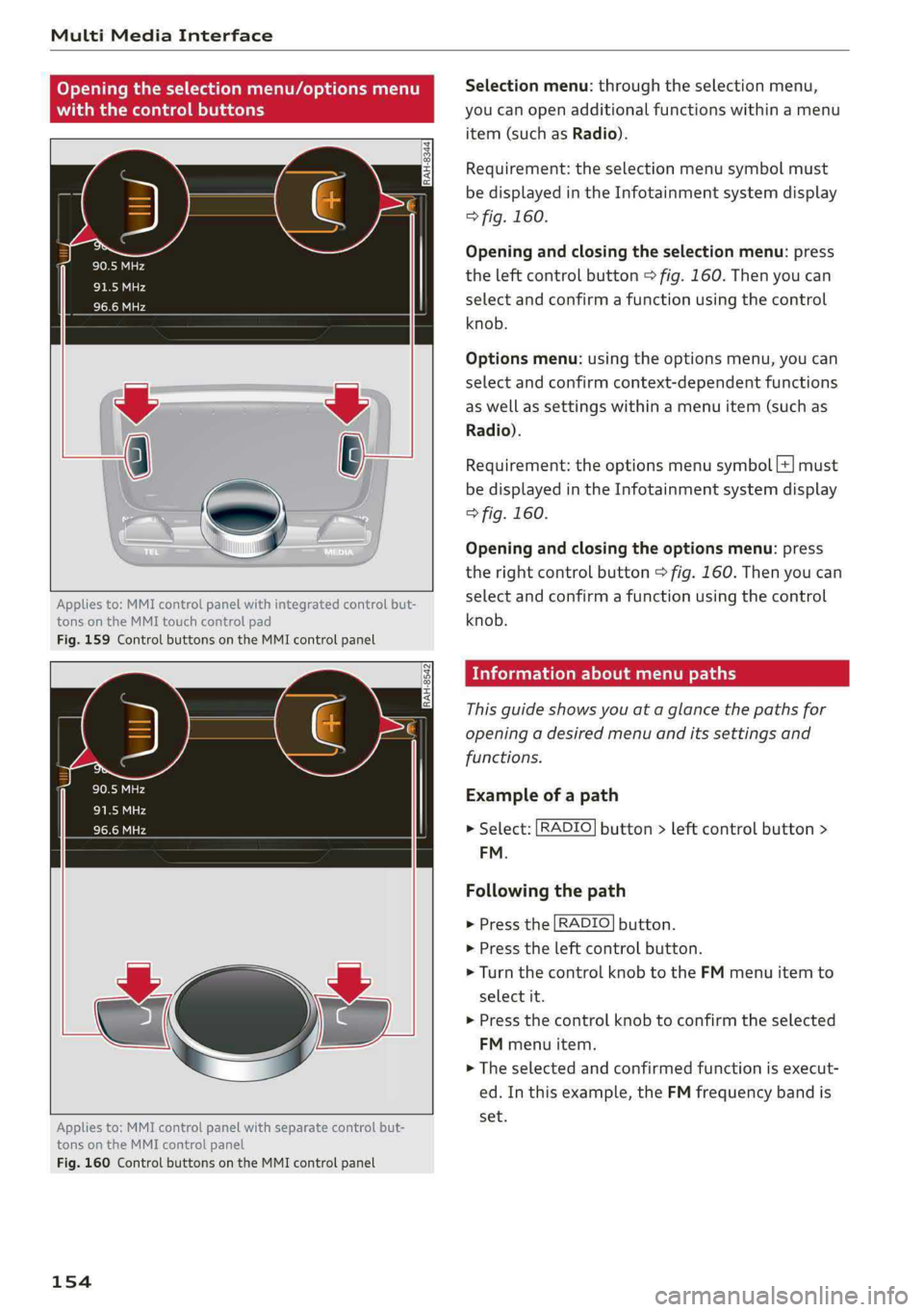
Fig.159ControlbuttonsontheMMIcontrolpanel
RAH-8542
Appliesto:MMIcontrolpanelwithseparatecontrolbut-
tonsontheMMIcontrolpanel
Fig.160ControlbuttonsontheMMIcontrolpanel
154
Selectionmenu:throughtheselectionmenu,
youcanopenadditionalfunctionswithinamenu
item(suchasRadio).
Requirement:theselectionmenusymbolmust
bedisplayedintheInfotainmentsystemdisplay
>fig.160.
Openingandclosingtheselectionmenu:press
theleftcontrolbutton>fig.160.Thenyoucan
selectandconfirmafunctionusingthecontrol
knob.
Optionsmenu:usingtheoptionsmenu,youcan
selectandconfirmcontext-dependentfunctions
aswellassettingswithinamenuitem(suchas
Radio).
Requirement:theoptionsmenusymbol[+]must
bedisplayedintheInfotainmentsystemdisplay
>fig.160.
Openingandclosingtheoptionsmenu:press
therightcontrolbutton>fig.160.Thenyoucan
selectandconfirmafunctionusingthecontrol
knob.
Meleeelak)Celieeerary
Thisguideshowsyouat aglancethepathsfor
openingadesiredmenuand itssettingsand
functions.
Exampleofapath
>Select:[RADIO]button>leftcontrolbutton>
FM.
Followingthepath
>Pressthe[RADIO]button.
>Presstheleftcontrolbutton.
>Turn thecontrolknobtotheFMmenuitemto
selectit.
>Pressthecontrolknobtoconfirmtheselected
FMmenuitem.
>Theselectedandconfirmedfunctionisexecut-
ed.In thisexample,theFMfrequencybandis
set.
Page 157 of 392
80A012721BG
MultiMediaInterface
MMItouch
MMItouchcontrolpad
Appliesto:vehicleswithMMItouch
Youcanenterdatausinghandwritingrecogni-
tionontheMMItouchcontrolpad.
®©-co=~Angeles,CA
=>ae)i
Jbgdeewn,LosAngeles,CAYT
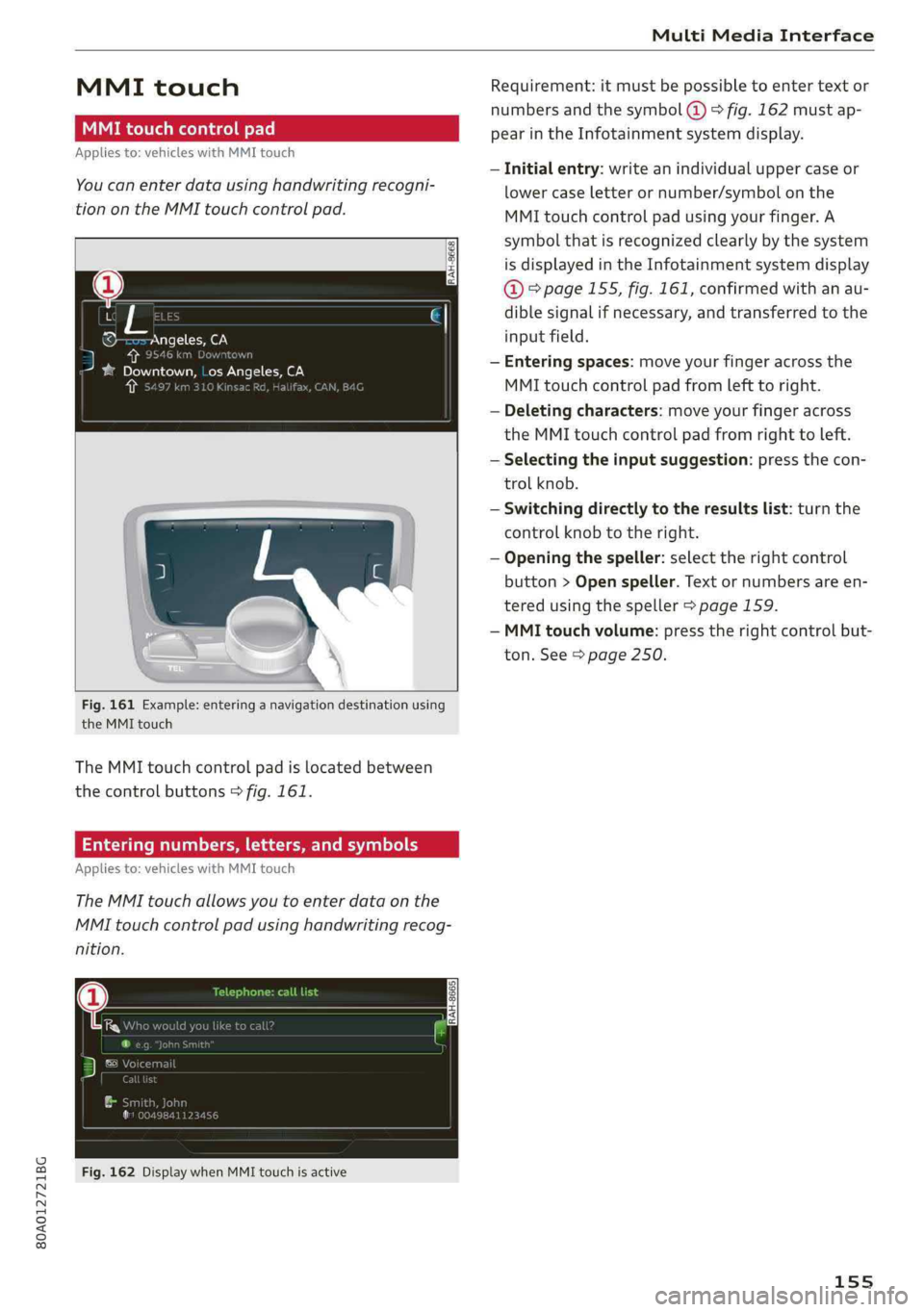
Fig.161Example:enteringanavigationdestinationusing
theMMItouch
TheMMItouchcontrolpadislocatedbetween
thecontrolbuttons>fig.161.
Enteringnumbers,letters,andsymbols
Appliesto:vehicleswithMMItouch
TheMMItouchallowsyoutoenterdataonthe
MMItouchcontrolpadusinghandwritingrecog-
nition.
Fig.162DisplaywhenMMItouchisactive
Requirement:itmustbepossible toentertext or
numbersandthesymbol(@>fig.162 mustap-
pearintheInfotainmentsystemdisplay.
—Initialentry:writeanindividualuppercaseor
lowercaseletterornumber/symbolonthe
MMItouchcontrolpadusingyourfinger.A
symbolthatisrecognizedclearlyby thesystem
isdisplayedintheInfotainmentsystemdisplay
@&page155,fig. 161,confirmedwithanau-
diblesignalifnecessary,andtransferredtothe
inputfield.
—Enteringspaces:moveyourfingeracrossthe
MMItouchcontrolpadfromlefttoright.
—Deletingcharacters:moveyourfingeracross
theMMItouchcontrolpadfromrighttoleft.
—Selectingtheinputsuggestion:pressthecon-
trolknob.
—Switchingdirectlytotheresultslist:turnthe
controlknobtotheright.
—Openingthespeller:selecttherightcontrol
button>Openspeller.Textornumbersare en-
tered usingthespeller>page159.
—MMItouchvolume:presstherightcontrolbut-
ton.See>page250.
155
Page 225 of 392
80A012721BG
Radio
Radiotextisavailable fortheselectedstation.
See>page221.
@Screenview
DisplayCoverartorStationlogo.See
=>page224,Preferredpictureview*.
Displayingthestationlist:
Turnthecontrolknob.Or:pressthe[BACK]but-
ton.
Radiomenu
ee
He[Presets
(2Girne
©-:.Cited
asiM
e-
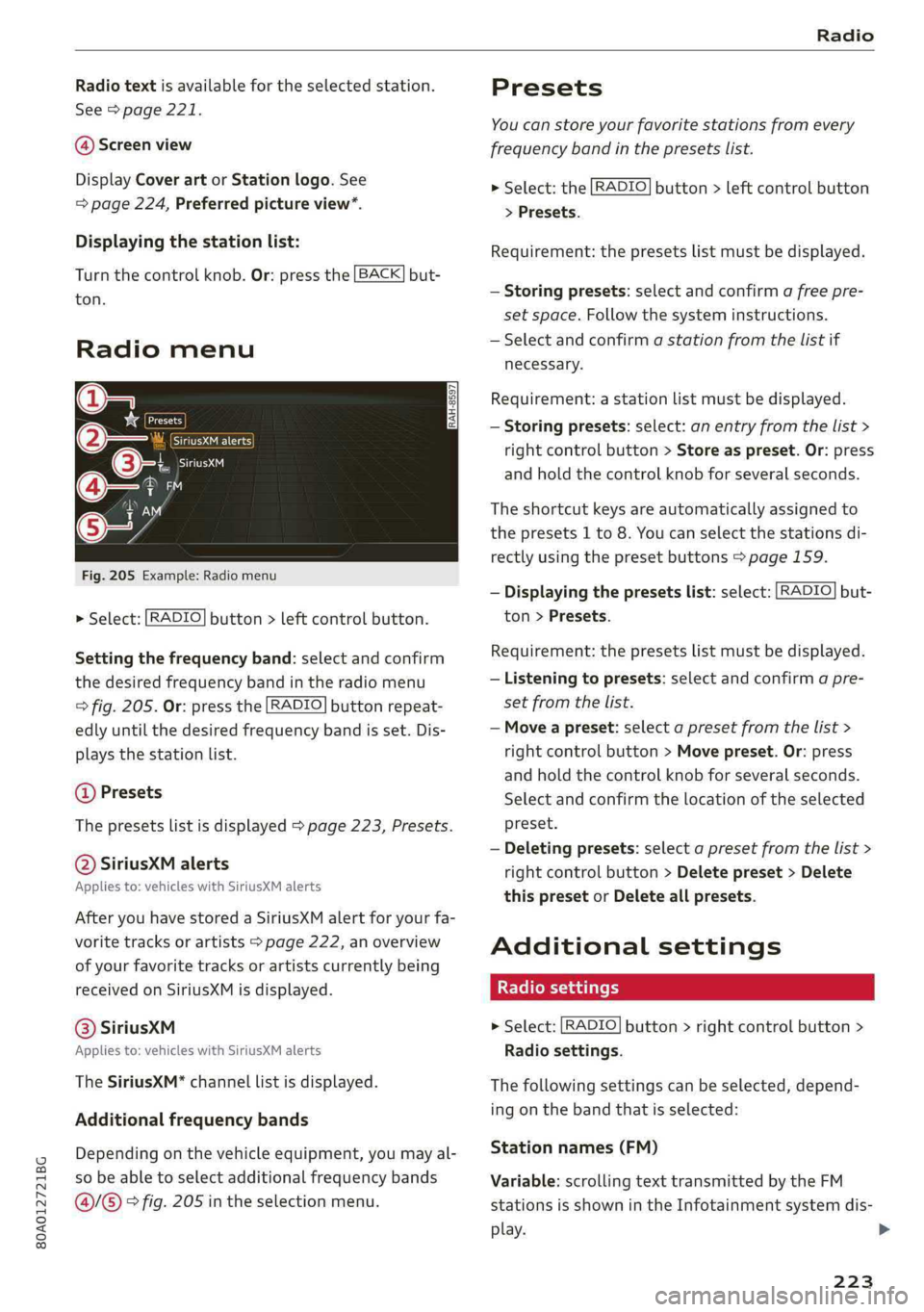
Fig.205Example:Radiomenu
>Select:[RADIO]button>leftcontrolbutton.
Settingthefrequencyband:selectandconfirm
thedesiredfrequencybandintheradiomenu
>fig.205.Or:pressthe[RADIO]buttonrepeat-
edlyuntilthedesiredfrequencybandisset.Dis-
playsthestationlist.
@Presets
Thepresetslistisdisplayed>page223,Presets.
@SiriusXMalerts
Appliesto:vehicleswithSiriusXMalerts
AfteryouhavestoredaSiriusXMalertforyourfa-
voritetracksorartists>page222,an overview
ofyourfavoritetracksorartistscurrentlybeing
receivedonSiriusXMisdisplayed.
©®SiriuskXM
Appliesto:vehicleswithSiriusXMalerts
TheSiriusXM*channellistisdisplayed.
Additionalfrequencybands
Dependingonthevehicleequipment,youmayal-
sobeabletoselectadditionalfrequencybands
@/@®>fig.205intheselectionmenu.
Presets
You canstoreyourfavoritestationsfromevery
frequencybandinthepresetslist.
>Select:the[RADIO]button>leftcontrolbutton
>Presets.
Requirement:thepresetslistmustbedisplayed.
—Storingpresets:selectandconfirm afreepre-
setspace.Followthesysteminstructions.
—Selectandconfirmastationfromthelistif
necessary.
Requirement:astationlistmustbedisplayed.
—Storingpresets:select:anentryfromthelist>
rightcontrolbutton>Storeaspreset.Or:press
andholdthecontrolknobforseveralseconds.
Theshortcutkeysareautomaticallyassignedto
thepresets1to8.Youcanselectthestationsdi-
rectlyusingthepresetbuttons>page159.
—Displayingthepresetslist:select:[RADIO]but-
ton>Presets.
Requirement:thepresetslistmustbedisplayed.
—Listeningtopresets:selectandconfirmapre-
setfromthelist.
—Moveapreset:selectapresetfromthelist>
rightcontrolbutton>Movepreset.Or:press
andholdthecontrolknobforseveralseconds.
Selectandconfirmthelocationoftheselected
preset.
—Deletingpresets:selectapresetfromthelist>
rightcontrolbutton>Deletepreset>Delete
thispresetorDeleteallpresets.
Additionalsettings
>Select:[RADIO]button>rightcontrolbutton>
Radiosettings.
Thefollowingsettingscanbeselected,depend-
ingonthebandthatisselected:
Stationnames(FM)
Variable:scrollingtexttransmittedbytheFM
stationsisshownintheInfotainmentsystemdis-
play.
223
Page 253 of 392
80A012721BG
Systemsettings
RestartingtheMMI
[RAH-8611
ew
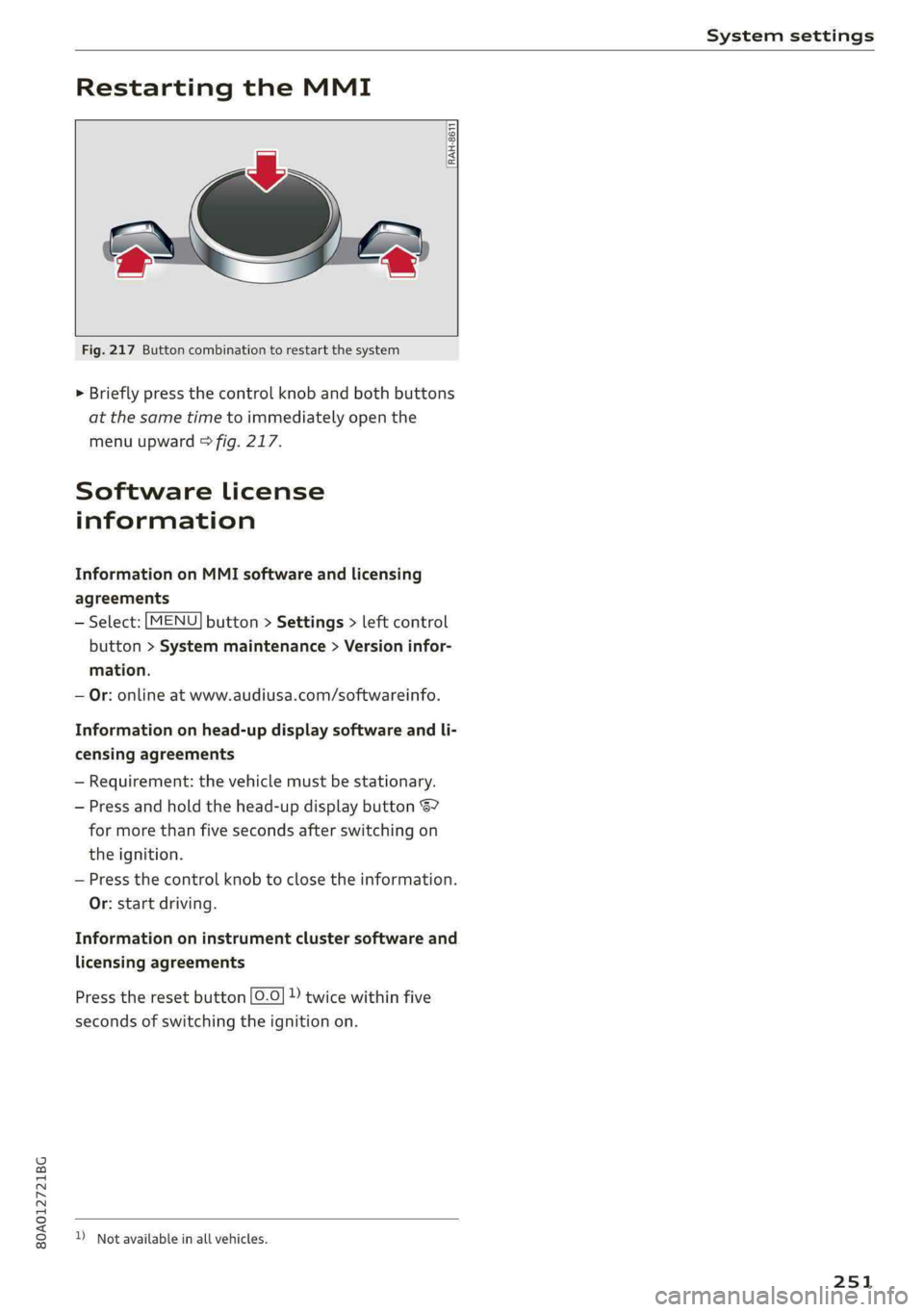
2‘«
Fig.217Buttoncombinationtorestartthesystem
>Brieflypressthecontrolknob andbothbuttons
atthesametimetoimmediatelyopenthe
menuupward>fig.217.
Softwarelicense
information
InformationonMMIsoftwareandlicensing
agreements
—Select:[MENU]button>Settings>leftcontrol
button>Systemmaintenance>Versioninfor-
mation.
—Or:onlineatwww.audiusa.com/softwareinfo.
Informationonhead-updisplaysoftwareandli-
censingagreements
—Requirement:thevehiclemustbestationary.
—Pressandholdthehead-updisplaybutton67
formorethanfivesecondsafterswitchingon
theignition.
—Pressthecontrolknobtoclosetheinformation.
Or:startdriving.
Informationoninstrumentclustersoftwareand
licensingagreements
Presstheresetbutton[0.0]))twicewithinfive
secondsofswitchingtheignitionon.
)Notavailableinallvehicles.
251