lights AUDI Q5 2019 User Guide
[x] Cancel search | Manufacturer: AUDI, Model Year: 2019, Model line: Q5, Model: AUDI Q5 2019Pages: 392, PDF Size: 99.86 MB
Page 29 of 392
80A012721BG
Head-updisplay
Head-updisplay
Description
Appliesto:vehicleswithhead-updisplay
0 as
ge32%oS
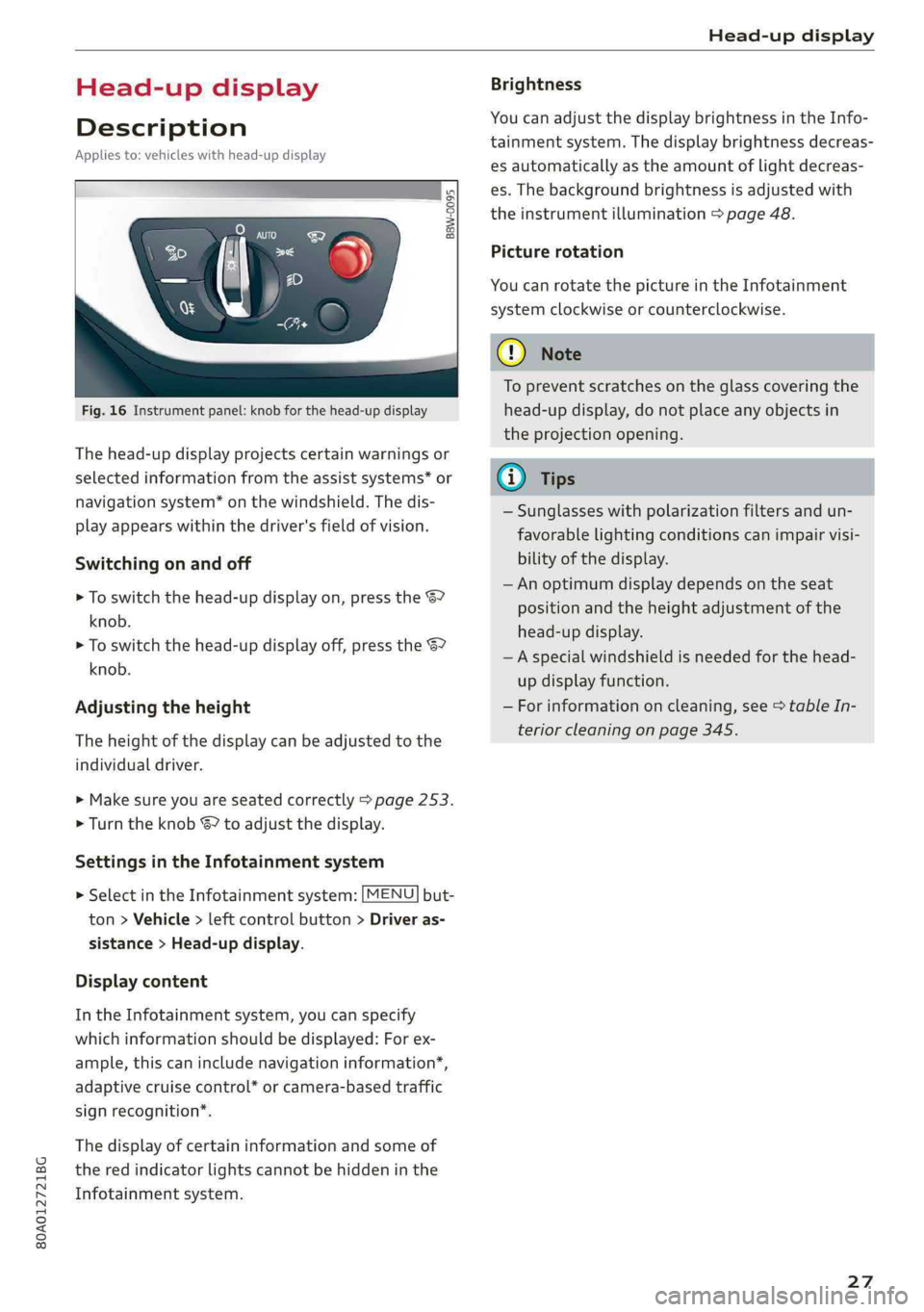
Fig.16Instrumentpanel:knobforthehead-updisplay
Thehead-updisplayprojectscertainwarningsor
selectedinformationfromtheassistsystems*or
navigationsystem*onthewindshield.Thedis-
playappearswithinthedriver'sfieldofvision.
Switchingonandoff
>Toswitchthehead-updisplayon,pressthe67
knob.
>Toswitchthehead-updisplayoff,presstheS7
knob.
Adjustingtheheight
Theheightofthedisplaycan beadjustedtothe
individualdriver.
>Makesureyouareseatedcorrectly>page253.
>Turn theknobS?toadjustthedisplay.
SettingsintheInfotainmentsystem
>SelectintheInfotainmentsystem:[MENU]but-
ton>Vehicle> leftcontrolbutton>Driveras-
sistance>Head-updisplay.
Displaycontent
IntheInfotainmentsystem,youcanspecify
whichinformationshould bedisplayed:Forex-
ample,thiscanincludenavigationinformation”,
adaptivecruisecontrol*orcamera-basedtraffic
signrecognition*.
Thedisplay ofcertaininformationandsomeof
thered indicatorlightscannotbehiddeninthe
Infotainmentsystem.
Brightness
YoucanadjustthedisplaybrightnessintheInfo-
tainmentsystem.Thedisplaybrightnessdecreas-
esautomaticallyastheamountoflightdecreas-
es.Thebackgroundbrightnessisadjusted with
theinstrumentillumination>page48.
Picturerotation
YoucanrotatethepictureintheInfotainment
systemclockwiseorcounterclockwise.
CG)Note
Topreventscratchesontheglasscoveringthe
head-updisplay,donotplaceanyobjectsin
theprojectionopening.
@)Tips
—Sunglasseswithpolarizationfiltersandun-
favorable
lightingconditionscanimpairvisi-
bilityofthedisplay.
— Anoptimumdisplaydependsontheseat
positionandthe heightadjustmentofthe
head-updisplay.
—Aspecialwindshieldisneededforthe head-
updisplayfunction.
—Forinformationoncleaning,see>tableIn-
teriorcleaningonpage345.
27
Page 31 of 392

80A012721BG
Openingandclosing
itwillnotbepossibletolocktheluggage
compartmentandtheluggagecompart-
mentlidwillopen.Theturnsignalswill
flashseveraltimestoindicatethis.The
doorswilllock.Alwaystaketheconvenience
keywithyou,orunauthorizedpeoplemay
beabletoenterthevehicle.
G)Tips
—Donotleavevaluablesunattendedintheve-
hicle.Alockedvehicleisnota safe!
— TheLEDinthedriver's doorrailblinkswhen
youlockthevehicle.IftheLEDlightsupfor
approximately30secondsafterlocking,
thereisamalfunctioninthecentral locking
system.Havetheproblemcorrectedby an
authorizedAudidealerorauthorizedAudi
ServiceFacility.
7
Fig.17Yourvehiclekeyset
7
RAZ-062)
@Vehiclekey
Thevehiclekeyisaremotecontrolkeyorconven-
iencekey*.Theconveniencekey*isaremotecon-
trolkeywithspecialfunctions>page31 and
=page75.Youcanunlockorlockyourvehicle
withthevehiclekey.Amechanicalkeyisintegrat-
edinthevehiclekey>page30.
@Keytagwithvehiclecode
Appliesto:vehicleswithAudiconnectvehiclecontrol
Openthekey tagandscratch torevealthevehicle
code.YoucanunlocktheAudiconnectvehicle
controlservices*foryourvehiclewiththisvehicle
code.Foradditionalinformation,see
=>page195.Ifakeyfobislost,contactanau-
thorizedAudidealerorauthorizedAudiService
Facility.
Vehiclekeyreplacement
If akeyislost,seeanauthorizedAudidealeror
authorizedAudiServiceFacility.Havethisvehicle
keydeactivated.Itisimportanttobringallkeys
withyou.Ifakeyislost,youshouldreportitto
yourinsurancecompany.
Numberofkeys
Youcancheckthenumberofkeysprogrammed
toyourvehicleintheInfotainmentsystem.Todo
this,selectthe[MENU]button>Vehicle>left
controlbutton>Service&checks>Vehiclein-
formation.Thisway,youcanmakesurethatyou
haveallthekeyswhenpurchasingausedvehicle.
Electronicimmobilizer
Theimmobilizerpreventsunauthorizeduseof
thevehicle.
Insomecases,itmaynot bepossible tostartthe
vehicleifthereisavehiclekeyfromadifferent
vehiclemanufactureronthekeychain.
Datainthevehiclekey
Whendriving,serviceandmaintenance-relevant
dataiscontinuouslystoredinyourvehiclekey.
YourAudiserviceadvisorcanreadoutthisdata
andtellyouabouttheworkyourvehicleneeds.
This appliesalsotovehicleswithaconvenience
key”.
Personalconveniencesettings
Iftwopeopleuseonevehicle,itisrecommended
thateachpersonalwaysusestheirownvehicle
key.Whentheignitionisturnedofforwhenthe
vehicleislocked,personalconveniencesettings
forthefollowingsystemsarestoredandas-
signedtothevehiclekey:
—Climatecontrolsystem
—Steeringwheelheating*
—Centrallockingsystem
—Interiorlighting”
—Exteriorlighting
—Rainsensor
—Memoryfunction*
29
Page 44 of 392
Openingandclosing
Panoramicglassroofemergencyclosing
Appliesto:vehicleswithpanoramicglassroof
Ifanobjectisdetectedwhenclosing,theroof
willopenagainautomatically.Inthiscase,you
canthencloseitwiththepoweremergencyclos-
ingfunction.
>Withinfivesecondsafterthesunroofopensau-
tomatically,pulltheapplicablebuttonuntilthe
roofisclosed.
Garagedooropener
pledtlCela)
Appliesto:vehicleswithgaragedooropener
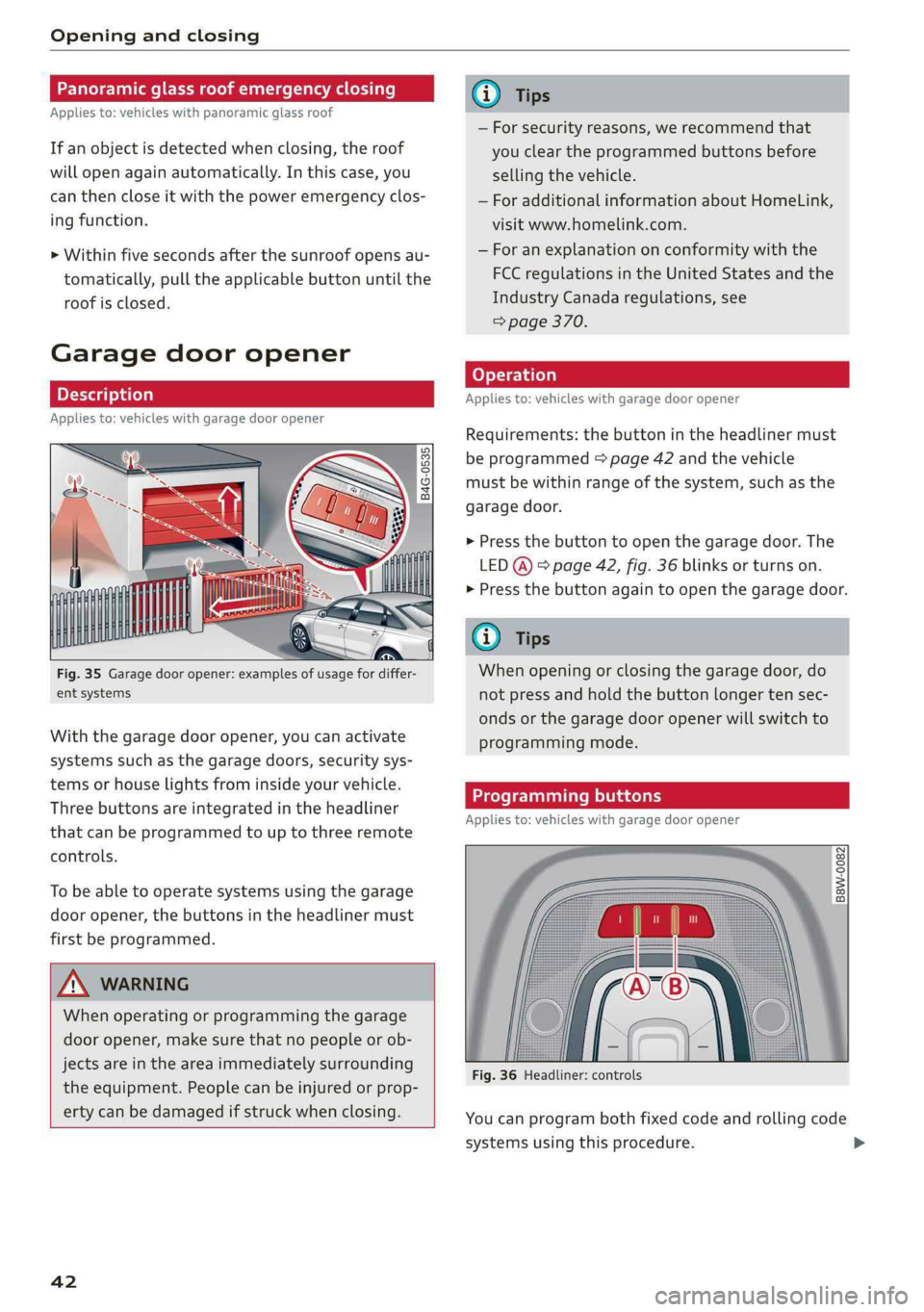
Fig.35Garagedooropener:examplesofusagefordiffer-
entsystems
Withthegarage dooropener,youcanactivate
systemssuchasthegaragedoors,securitysys-
temsorhouselightsfrominsideyourvehicle.
Threebuttonsareintegratedintheheadliner
thatcanbeprogrammedtouptothreeremote
controls.
To beabletooperatesystemsusingthegarage
dooropener,thebuttonsintheheadlinermust
firstbeprogrammed.
ZXWARNING
Whenoperatingorprogrammingthegarage
dooropener,makesurethatnopeopleorob-
jectsareintheareaimmediatelysurrounding
theequipment.Peoplecanbeinjuredorprop-
ertycanbedamagedifstruckwhenclosing.
42
—Forsecurityreasons,werecommendthat
youcleartheprogrammedbuttonsbefore
sellingthevehicle.
—ForadditionalinformationaboutHomeLink,
visitwww.homelink.com.
—Foranexplanationonconformitywiththe
FCCregulationsinthe UnitedStatesandthe
IndustryCanadaregulations,see
=>page370.
Appliesto:vehicleswithgaragedooropener
Requirements:thebuttonintheheadlinermust
beprogrammed>page42andthevehicle
mustbewithinrangeofthesystem,suchasthe
garagedoor.
>Pressthebuttontoopenthegaragedoor.The
LED@)°page42,fig.36blinksorturnson.
>Pressthebuttonagaintoopenthegaragedoor.
G@)Tips
Whenopeningorclosingthegaragedoor,do
notpressandholdthebuttonlongertensec-
ondsorthegarage dooropenerwillswitchto
programmingmode.
Programmingbuttons
Appliesto:vehicleswithgaragedooropener
a©S$
2
=oa
Fig.36Headliner:controls
Youcanprogrambothfixedcodeandrollingcode
systemsusingthisprocedure.
Page 46 of 392

LightsandVision
LightsandVision
Exteriorlighting
Switchingthelightsonandoff
Fig.37Instrumentpanel:lightswitchwithbuttons
Lightswitch©
Turnthelightswitchtothecorrespondingposi-
tionwhentheignitionisswitchedon.2andthe
selectedpositionturnon(exceptposition0).
O-Thedaytimerunninglightsautomaticallyturn
on.Invehiclesforcertainmarkets,youcan
switchtheautomaticdaytimerunninglightson
andoffintheInfotainment*system.
AUTO-Theheadlightsautomaticallyadapttothe
surroundingbrightness.
300-Parkinglights
2D-Lowbeamheadlights
Buttons
WhenyouturnthelightswitchtotheAUTOor
lowbeamheadlightpositionZO,youcanactivate
thefollowingfunctions:
So-All-weatherlights.Theheadlightsautomati-
callyadjustsothattherewillbelessglare,forex-
amplewhentheroadsurfaceiswet.
Q#-Rearfoglights*
Automaticheadlightrangecontrolsystem
Yourvehicleisequippedwithanautomatichead-
lightrangecontrolsystemthatreducesglarefor
oncomingtrafficifthevehicleloadchanges.The
headlightrangeadjustsautomatically.
44
Audiadaptivelight
Appliesto:vehicleswith Audiadaptivelight
Adaptivelightprovidesbettervisibilitywhenitis
darkbyadaptingthelightstotheroadconditions
basedonspeed,suchasonexpressways,rural
roads,at intersections,andincurves.Theadap-
tivelightonlyfunctionswhenthelightswitchis
intheAUTOposition.
ZAWARNING
—Automaticheadlights*areonlyintendedto
assistthedriver.They donotrelievethe
driverofresponsibilitytocheckthe head-
lightsandtoturnthemonmanuallybased
onthecurrentlightandvisibilityconditions.
Forexample,fogcannot bedetectedbythe
lightsensors.Soalwaysswitchonthelow
beamsundertheseweatherconditions and
whendrivinginthe dark20.
—Topreventglarefortrafficbehindyourvehi-
cle,therearfoglightsshouldonlybeturned
oninaccordancewithtrafficregulations.
@)Tips
—Ifthevehiclebatteryhasbeendischarging
forawhile,theparkinglightmayswitchoff
automatically.Avoidusingtheparking
lightsforseveralhours.
—Follow theregulationsapplicabletothe
countrywhereyouareoperatingthevehicle
whenstoppingthevehicleandwhenusing
thelightingsystems.
—Thelightsensorfortheautomatichead-
lights*isintherearview mirrormount.Do
notplaceanystickersinthisareaonthe
windshield.
—Awarningtonewillsoundifyouopenthe
doorwhentheexteriorlightsareswitched
on.
—Onlythefrontheadlightsturnonwhenthe
daytimerunninglightsareswitchedon*.In
vehiclesincertainmarkets,thetaillights
willalsoturnon.
—Incoolordampweather,theinsideofthe
headlights,turnsignals,andtaillightscan
fog
overduetothetemperaturedifference
betweenthe insideandoutside.Theywill
clearshortlyafterswitchingthemon.This>
Page 47 of 392
80A012721BG
LightsandVision
doesnotaffecttheservicelifeofthelight-
ing.
Turnsignalandhighbeamlever
©
Le
©
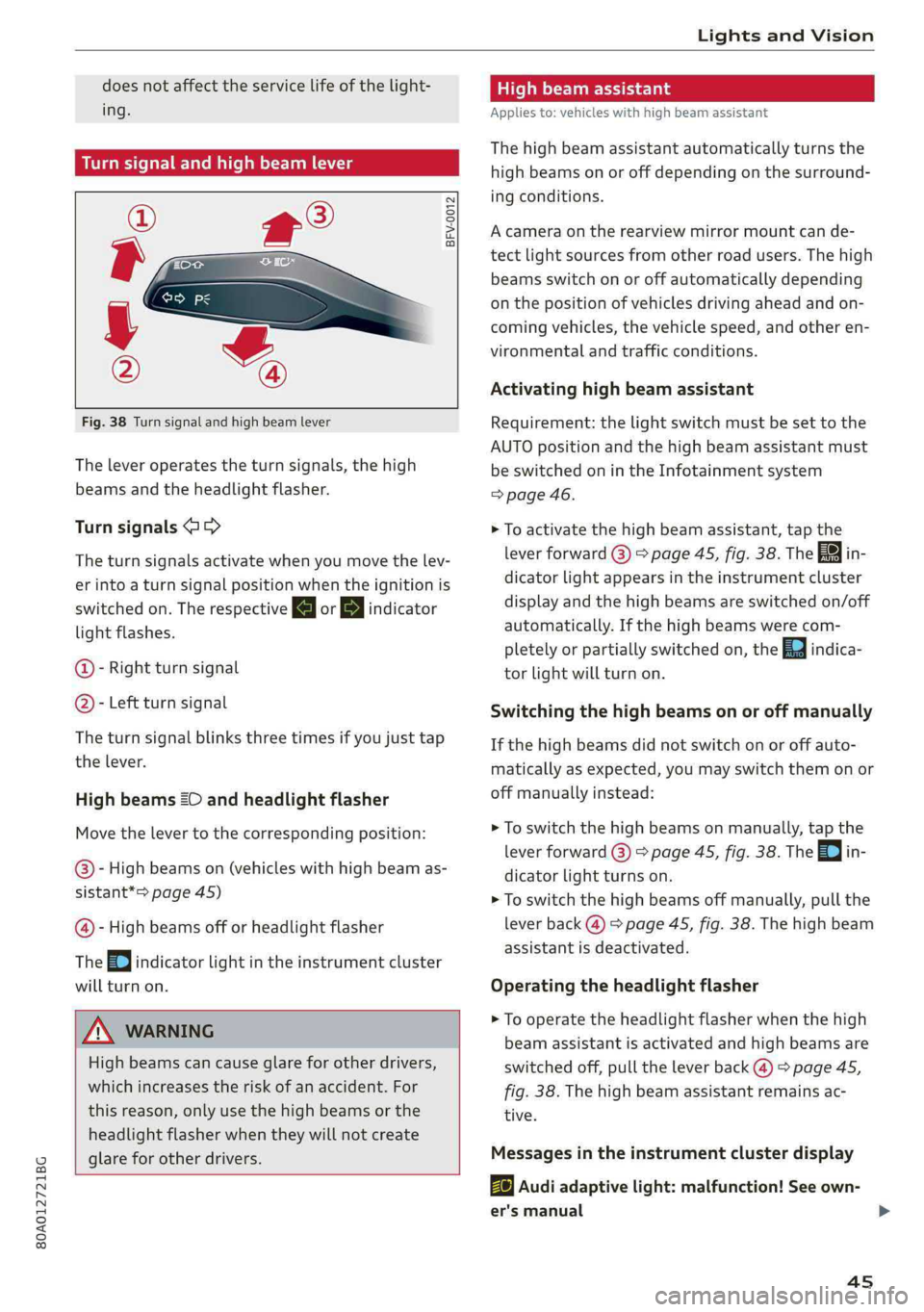
Fig.38Turnsignalandhighbeamlever
Theleveroperatestheturnsignals,thehigh
beamsandtheheadlightflasher.
Turnsignals@>>
Theturnsignalsactivatewhenyoumovethelev-
erintoaturnsignalpositionwhentheignitionis
switchedon.TherespectiveaorBindicator
lightflashes.
@-Rightturnsignal
@- Leftturnsignal
Theturnsignalblinksthreetimesifyoujusttap
the
lever.
HighbeamsZOandheadlightflasher
Movethelevertothecorrespondingposition:
@®)-Highbeamson(vehicleswith highbeamas-
sistant*>page45)
@-Highbeamsofforheadlightflasher
TheEqjindicatorlightintheinstrumentcluster
willturnon.
ZAWARNING
Highbeamscancauseglareforotherdrivers,
whichincreasestheriskofanaccident.For
this reason,onlyuse thehighbeamsorthe
headlight
flasher whentheywillnotcreate
glareforotherdrivers.
thmeee
Appliesto:vehicleswithhighbeamassistant
Thehighbeamassistantautomaticallyturnsthe
highbeamsonoroffdependingonthesurround-
ingconditions.
Acameraontherearview mirrormountcande-
tectlightsourcesfromotherroadusers.Thehigh
beamsswitchonoroffautomaticallydepending
onthepositionofvehiclesdrivingaheadandon-
comingvehicles,thevehiclespeed,andotheren-
vironmentalandtrafficconditions.
Activatinghighbeamassistant
Requirement:thelightswitchmustbesettothe
AUTOpositionandthehighbeamassistantmust
be switchedonintheInfotainmentsystem
=>page46.
>Toactivatethehighbeamassistant,tap the
leverforward@)>page45,fig.38.TheBYin-
dicatorlightappearsintheinstrumentcluster
displayandthehighbeamsareswitchedon/off
automatically.Ifthehighbeamswerecom-
pletelyorpartiallyswitchedon,theEaindica-
torlightwillturnon.
Switchingthe high beamsonoroffmanually
Ifthehighbeamsdidnotswitchonoroffauto-
maticallyasexpected,youmayswitchthemonor
offmanuallyinstead:
>Toswitchthehighbeamsonmanually, tapthe
leverforward@)>page45,fig.38.The=0}in-
dicatorlightturnson.
>Toswitchthehighbeamsoffmanually,pullthe
leverback@)>page45,fig.38.Thehighbeam
assistantisdeactivated.
Operatingthe headlightflasher
>Tooperatethe headlightflasherwhenthehigh
beamassistantisactivatedandhighbeamsare
switchedoff,pulltheleverback@)>page45,
fig.38.Thehighbeamassistantremainsac-
tive.
Messagesintheinstrumentclusterdisplay
BaAudiadaptivelight:malfunction!Seeown-
er'smanual
4s
Page 48 of 392

LightsandVision
Highbeamassistant:malfunction!Seeown-
er'smanual
DriveimmediatelytoanauthorizedAudidealer
orauthorizedAudiServiceFacilitytohavethe
malfunctionrepaired.Youcanstillswitchthe
highbeamsonoroffmanually.
Headlightassistant:currentlyunavailable.
Cameraviewrestrictedduetosurroundings.
Seeowner'smanual
Thecameraviewisblocked,forexamplebya
stickerordebris.
Thesensorislocatedbetweentheinteriorrear-
viewmirrorandthewindshield.Donotplaceany
stickersinthisareaonthewindshield.
ZA\WARNING
Highbeamassistantisonlyintendedtoassist
thedriver.Thedriverisstillresponsiblefor
controllingtheheadlightsandmayneedto
switchthemonandoffmanuallydepending
onlightandvisibilityconditions.Itmaybe
necessarytooperatethemmanuallyinsitua-
tionssuchas:
—Inadverseweatherconditionssuchasfog,
heavyrain,blowingsnoworsprayingwater.
—Onroadswhereoncomingtrafficmaybe
partiallyobscured,suchasexpressways.
—Whenthereareroadusersthatdonot have
sufficientlighting,suchasbicyclersorvehi-
cleswithdirtytaillamps.
—Intightcurvesandonsteephills.
—Inpoorlylitareas.
—Withstrongreflectors,suchassigns.
—Iftheareaofthewindshieldnearthesensor
isfoggedover,dirty,icyorcoveredwitha
sticker.
Adjustingtheexterior lighting
ThefunctionsareadjustedintheInfotainment
system.
> SelectintheInfotainmentsystem:[MENU]but-
ton>Vehicle>leftcontrolbutton>Vehicle
settings>Exteriorlighting.
46
Automaticheadlights
YoucanadjustthefollowingsettingsintheAuto-
matic
headlightsmenu:
Activationtime-youcanadjustiftheautomatic
headlights switchonEarly,MediumorLateac-
cordingtothesensitivityofthelightsensor.
Headlightassistant*-youcanswitchthehigh
beamassistant*onandoff.
Entry/exitlighting
Whenitisdark,theEntry/exitlightingillumi-
natestheareaaroundthevehiclewhenunlocking
the
vehicleandafterswitchingofftheignition
andopeningthedriver'sdoor.
TheEntry/exitlightingonlyworkswhenitisdark
andthelightswitchisintheAUTOposition.
Daytimerunninglights
USAmodels:thedaytimerunninglightscanbe
switchedon/off.SelectOnorOff.
Canadamodels:thisfunctioncannotbe switched
off.Theyactivateautomaticallyeachtimetheig-
nitionisswitchedon.
Emergencyflashers
Fig.39Centerconsole:emergencyflasherbutton
The
emergencyflashersmakesotherdrivers
awareofyourvehicleindangeroussituations.
>PresstheAbuttontoswitchtheemergency
flashersonoroff.
Youcanindicatealanechangeoraturnwhenthe
emergencyflashersareswitchedonbyusingthe
turnsignallever.Theemergencyflashersstop
temporarily.
Page 49 of 392
80A012721BG
LightsandVision
Theemergencyflashersalsoworkwhentheigni-
tionisturnedoff.
@)Tips
Youshouldswitchtheemergencyflasherson
if:
—youarethelastcarinatrafficjamso that
allothervehiclesapproachingfrombehind
can seeyourvehicle
—yourvehiclehasbrokendownoryouare
havinganemergency
—yourvehicleisbeingtowedorifyouaretow-
inganothervehicle
Interiorlighting
elumiiceCmieidiire)
a g
=%8
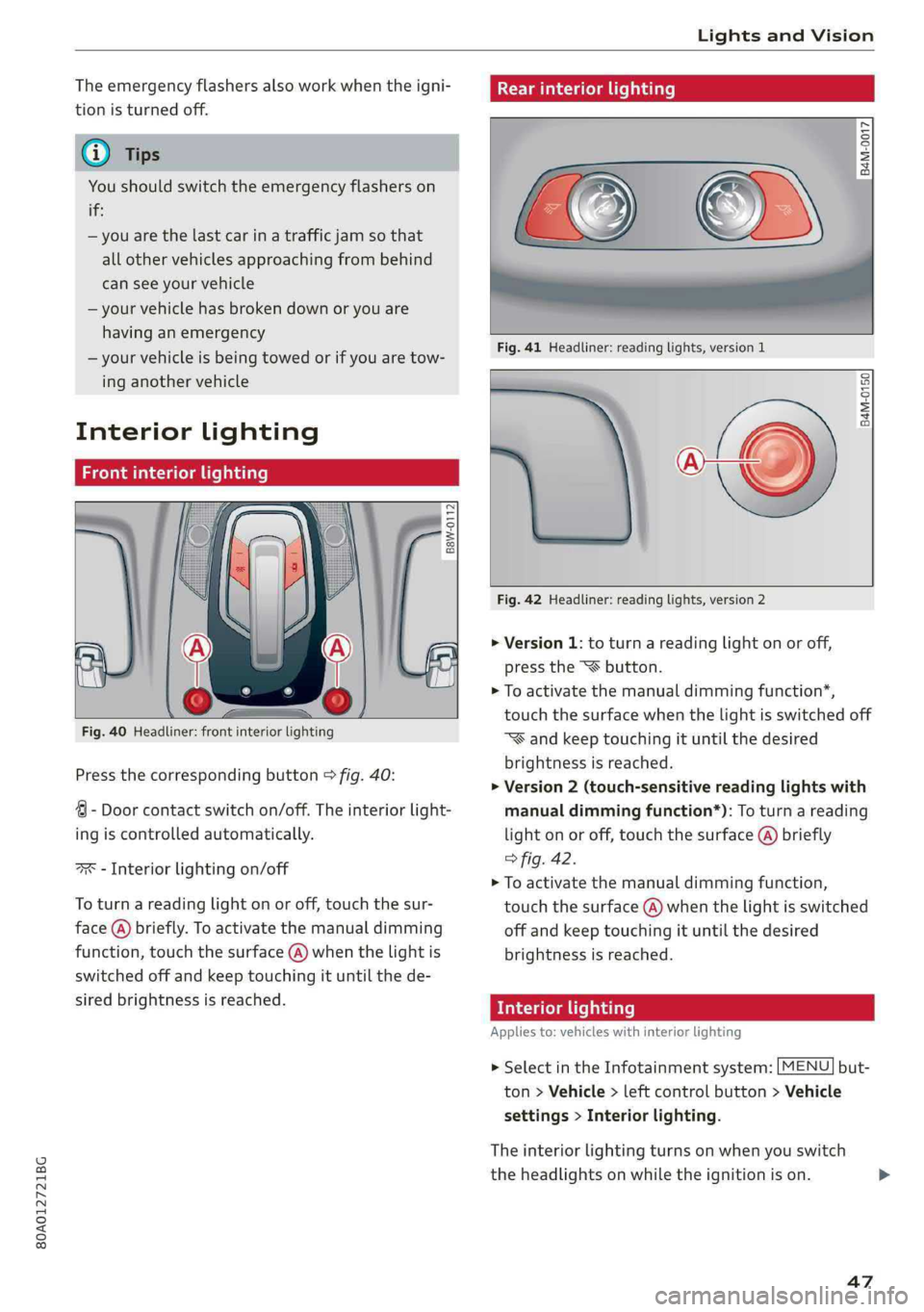
Fig.40Headliner:frontinteriorlighting
Pressthecorrespondingbutton>fig.40:
4-Doorcontactswitchon/off.Theinteriorlight-
ingiscontrolledautomatically.
“xs-Interiorlightingon/off
Toturnareadinglightonoroff,touchthesur-
face(@)briefly.Toactivatethemanualdimming
function,touchthesurface(@)whenthelightis
switchedoffandkeeptouchingituntilthede-
siredbrightnessisreached.
Rearinteriorlighting
=
8 2 3
Fig.41Headliner:readinglights,version1
me
Fig.42Headliner:readinglights,version2
B4M-0150
>Version1:toturnareadinglightonoroff,
presstheSXbutton.
>Toactivatethemanualdimmingfunction*,
touchthesurfacewhenthelightisswitchedoff
“®andkeeptouchingituntilthedesired
brightnessisreached.
>Version2(touch-sensitivereadinglightswith
manualdimmingfunction*):Toturnareading
lightonoroff,touchthesurface(@)briefly
>fig.42.
>Toactivatethemanualdimmingfunction,
touchthesurface@)whenthelightisswitched
offandkeeptouchingituntilthedesired
brightnessisreached.
TicaColmCeliadare)
Appliesto:vehicleswithinteriorlighting
>SelectintheInfotainmentsystem:[MENU]but-
ton>Vehicle>leftcontrolbutton>Vehicle
settings>Interiorlighting.
Theinteriorlightingturnsonwhenyouswitch
theheadlightsonwhiletheignitionison.
47
Page 50 of 392
LightsandVision
Version1
Toadjustthebrightnessofindividualzones,se-
lectFrontbrightness*,DoorbrightnessorFoot-
wellbrightness.Turn thecontrolknobtotheleft
or totheright.Pressthecontrolknobtoconfirm
thebrightness.
Version2
Selectandconfirmoneofthedisplayedprofiles
bypressingthecontrolknob.
Individual:youcancustomizethebrightnessand
colorofindividualzones.Presstherightcontrol
button.Pressthecontrolknobagaintoconfirm
thesettings.
Audidriveselect:theinteriorandcontourlight-
ingcolorchangesdependingonthedrivingmode
selectedindriveselect*>page125.
G)Tips
Thesettingisautomaticallystoredandas-
signedtotheremotecontrolkeythatisbeing
used.
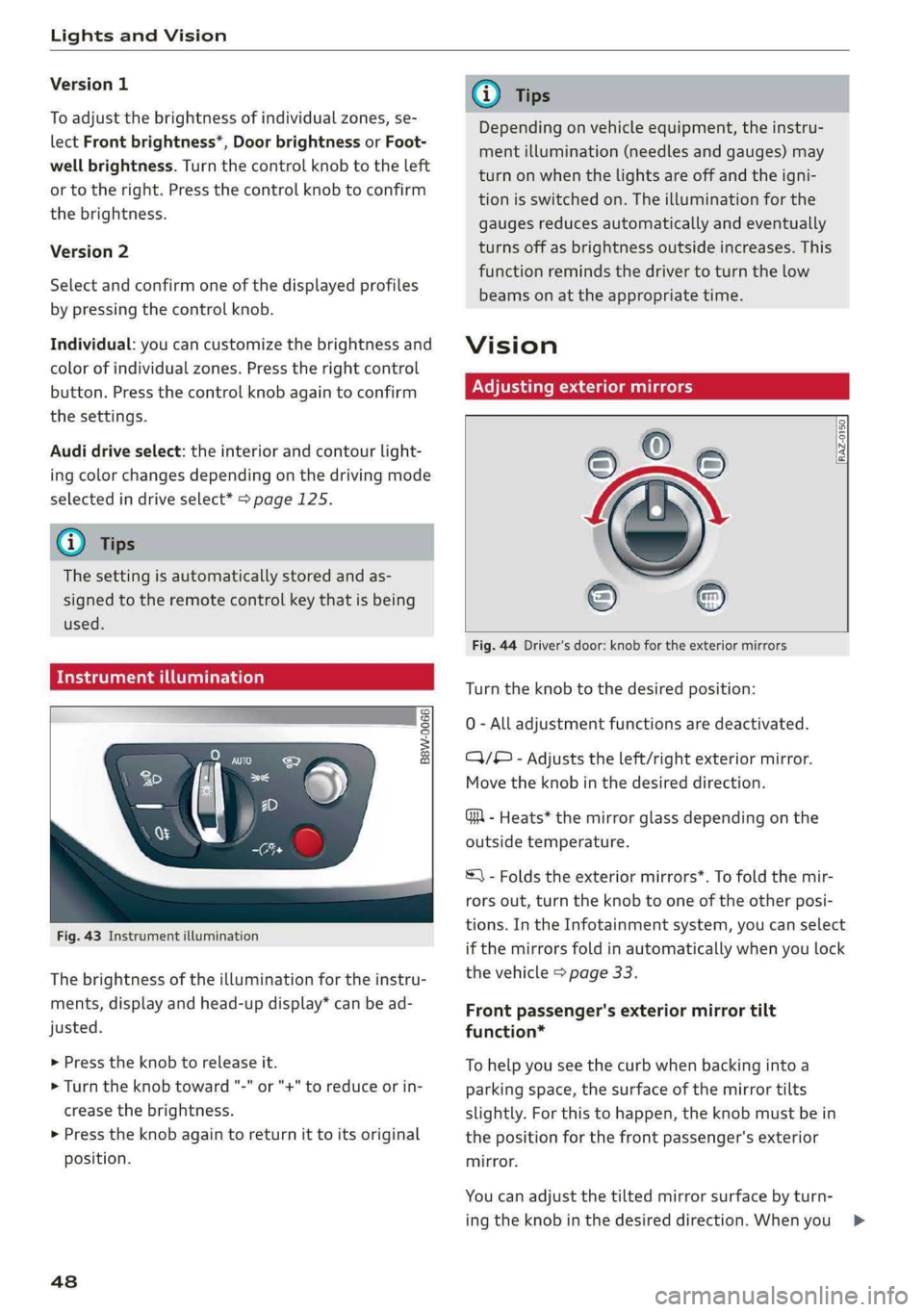
Maidainattapeeearaeya)
Fig.43Instrumentillumination
Thebrightnessoftheilluminationfortheinstru-
ments,displayandhead-updisplay*canbead-
justed.
>Presstheknobtoreleaseit.
>Turn theknobtoward"-"or"+"toreduceorin-
creasethebrightness.
>»Presstheknobagaintoreturnittoitsoriginal
position.
48
G)Tips
Dependingonvehicleequipment,theinstru-
mentillumination(needlesandgauges)may
turnonwhenthelightsareoffandtheigni-
tionisswitchedon.Theilluminationforthe
gaugesreducesautomaticallyandeventually
turnsoffasbrightnessoutsideincreases.This
functionremindsthedrivertoturnthelow
beamsonattheappropriatetime.
Vision
Adjustingexteriormirrors
RAZ-0150.
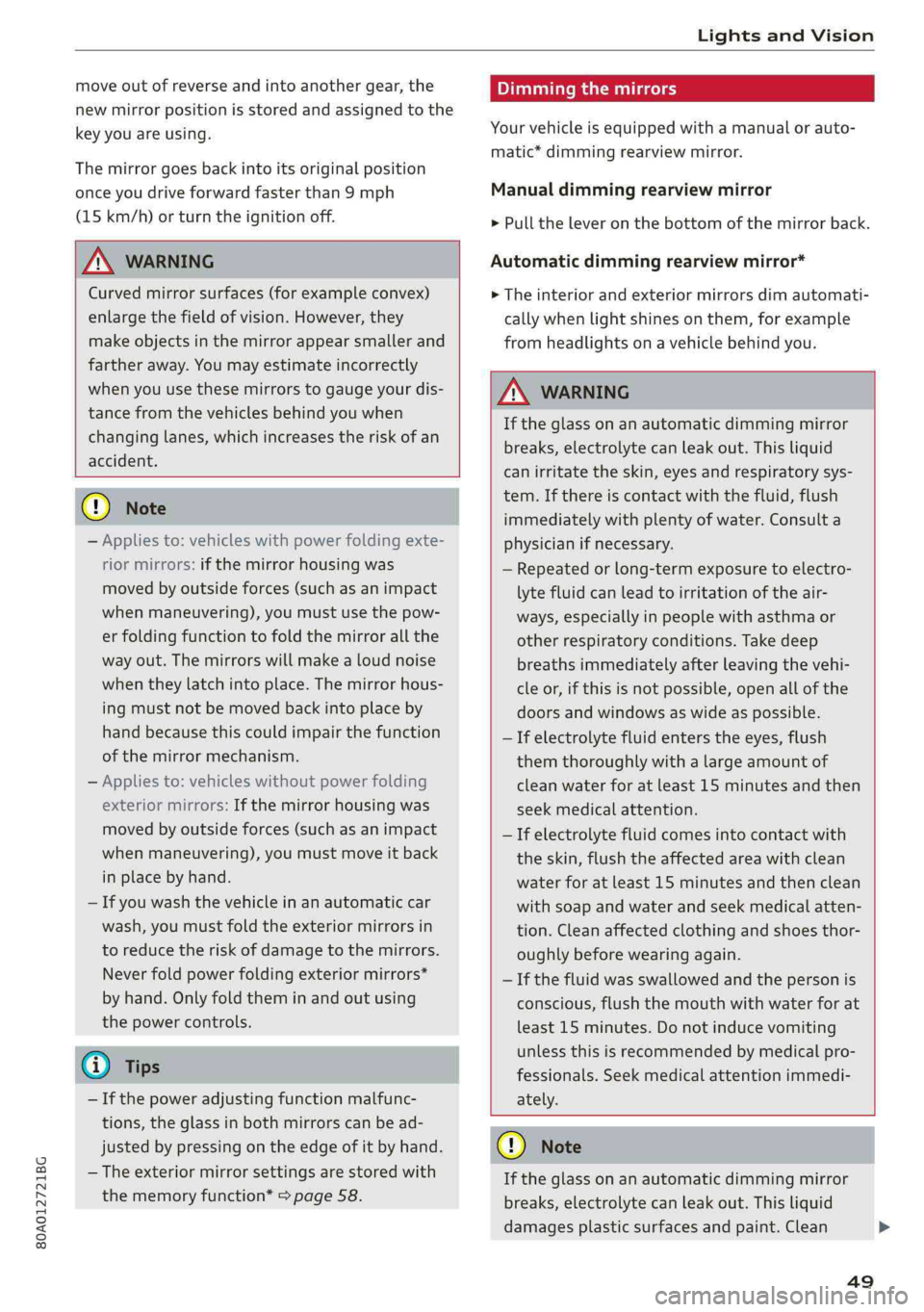
Fig.44Driver'sdoor:knobfortheexteriormirrors
Turntheknobtothedesiredposition:
0-Alladjustmentfunctionsaredeactivated.
C)/®-Adjuststheleft/rightexteriormirror.
Movetheknobinthedesireddirection.
GA-Heats*themirrorglassdependingonthe
outsidetemperature.
=)-Foldstheexteriormirrors*.Tofoldthemir-
rorsout,turntheknobtooneoftheotherposi-
tions.IntheInfotainmentsystem,youcanselect
ifthemirrorsfoldinautomaticallywhenyoulock
thevehicle>page33.
Frontpassenger'sexteriormirrortilt
function*
Tohelpyouseethecurbwhenbackingintoa
parkingspace,thesurfaceofthemirrortilts
slightly.Forthistohappen,theknobmustbein
thepositionforthefrontpassenger'sexterior
mirror.
Youcanadjustthetiltedmirrorsurfacebyturn-
ingtheknobinthedesireddirection.Whenyou>
Page 51 of 392
80A012721BG
LightsandVision
moveoutof reverseandintoanothergear,the
newmirrorpositionisstoredandassignedtothe
keyyouareusing.
Themirrorgoesbackintoitsoriginalposition
onceyoudriveforwardfasterthan9mph
(15km/h)orturntheignitionoff.
ZAWARNING
Curvedmirrorsurfaces(forexampleconvex)
enlargethefieldofvision.However,they
makeobjectsinthemirrorappearsmallerand
fartheraway.Youmayestimateincorrectly
whenyouusethesemirrorstogaugeyourdis-
tancefromthevehiclesbehindyouwhen
changinglanes,whichincreasestheriskofan
accident.
()Note
—Appliesto:vehicleswithpowerfoldingexte-
riormirrors:ifthemirrorhousingwas
movedbyoutsideforces(suchasanimpact
whenmaneuvering),youmustuse thepow-
erfoldingfunctiontofoldthemirrorallthe
wayout.Themirrorswillmakealoudnoise
when
theylatchintoplace.Themirrorhous-
ingmustnot bemovedbackintoplaceby
handbecausethiscouldimpairthefunction
ofthemirrormechanism.
—Appliesto:vehicleswithoutpowerfolding
exterior mirrors:Ifthemirrorhousingwas
movedbyoutsideforces(suchasanimpact
whenmaneuvering),youmustmoveitback
inplacebyhand.
—Ifyouwashthevehicleinanautomaticcar
wash,youmustfoldtheexteriormirrorsin
toreducetheriskofdamagetothemirrors.
Neverfoldpowerfoldingexteriormirrors*
byhand.Onlyfoldtheminandoutusing
thepowercontrols.
G)Tips
—Ifthepoweradjustingfunctionmalfunc-
tions,theglassinbothmirrorscanbead-
justedbypressingontheedgeof itbyhand.
— Theexteriormirrorsettings arestoredwith
thememoryfunction*>page58.
Dimmingthemirrors
Yourvehicleisequippedwithamanualorauto-
matic*dimmingrearviewmirror.
Manualdimmingrearviewmirror
> Pulltheleveronthebottomofthemirrorback.
Automaticdimmingrearviewmirror*
>Theinteriorandexteriormirrorsdimautomati-
callywhenlightshinesonthem,forexample
fromheadlightsonavehiclebehindyou.
Z\WARNING
Iftheglassonanautomaticdimmingmirror
breaks,electrolytecanleakout.Thisliquid
canirritatetheskin,eyesandrespiratorysys-
tem.Ifthereiscontactwiththefluid,flush
immediatelywithplentyof water.Consulta
physicianifnecessary.
—Repeatedorlong-termexposuretoelectro-
lytefluidcanleadtoirritationoftheair-
ways,especiallyinpeoplewithasthmaor
otherrespiratory conditions.Takedeep
breathsimmediatelyafterleavingthevehi-
cleor,ifthisisnotpossible,openallofthe
doorsandwindowsaswideaspossible.
—Ifelectrolytefluidenterstheeyes,flush
themthoroughlywithalargeamountof
cleanwaterforatleast15minutesandthen
seekmedicalattention.
—Ifelectrolytefluidcomesintocontactwith
theskin,flushtheaffectedareawithclean
waterforatleast15minutesandthenclean
withsoapandwaterandseekmedicalatten-
tion.Cleanaffectedclothingandshoesthor-
oughlybeforewearingagain.
—Ifthefluidwasswallowedandthepersonis
conscious,flushthemouthwithwaterforat
least15minutes.Donotinducevomiting
unlessthisisrecommendedbymedicalpro-
fessionals.Seekmedicalattentionimmedi-
ately.
@)Note
Iftheglassonanautomaticdimmingmirror
breaks,electrolytecanleakout.Thisliquid
damagesplasticsurfacesandpaint.Clean
49
>
Page 52 of 392

LightsandVision
thisliquidasquicklyaspossible,forexample
withawetsponge.
—Ifthelightreachingtherearviewmirroris
obstructed,theautomaticdimmingmirror
willnotfunctioncorrectly,
—Theautomaticdimmingmirrorsdonotdim
whentheinteriorlightingisturnedonor
thereversegearisselected.
Fig.45Sunvisor
Sunvisor
Thesunvisorsforthedriverandfrontpassenger
canbereleasedfromtheirmountsandturnedto-
wardthedoors>fig.45@).
Theycanalsobemovedbackandforthlength-
wiseinthisposition.
Vanitymirror
Themirrorlightswitchesonwhenthecoverover
thevanitymirror@)opens.
Appliesto:vehicleswithsunshade
<=
2 6 2
=7ao
Fig.46Reardoor:sunshade
sO
Reardoorsunshade
>Pullthesunshadeoutandattachittothere-
tainerontheupperdoorframe>fig.46.
Windshieldwipers
SeremeaROUeel
B4M-0018
B4M-0019
Fig.48Rearwindowwiperoperation
MovethewindshieldwiperleverS7tothecorre-
spondingposition:
@-Windshieldwipersoff
@-Rainsensormode.Thewindshieldwipers
switchononcethevehiclespeedexceedsapprox-
imately2mph(4km/h)anditisraining.The
higherthesensitivityoftherainsensorthatisset
(switch@)totheright),theearlierthewind-
shieldwipersreacttomoistureonthewind-
shield.Youcandeactivatetherainsensormode
intheInfotainmentsystem,whichswitchesthe
intermittentmodeon.Todothis,select:[MENU
button>Vehicle>leftcontrolbutton>Driveras-
sistance>Rainsensor.Inintermittentmode,
youcanadjusttheintervaltimeusingtheswitch
®.
@-Slowwiping