mirror AUDI Q5 2019 User Guide
[x] Cancel search | Manufacturer: AUDI, Model Year: 2019, Model line: Q5, Model: AUDI Q5 2019Pages: 392, PDF Size: 99.86 MB
Page 60 of 392
Seats
Installingtheheadrestraints
>Slidethepostsontheheadrestraintdowninto
theguidesuntilthepostsclickintoplace.
>Pressthebutton(arrow)©fig.60andslidethe
headrestraintallthewaydown.Youshould not
be
abletoremovetheheadrestraintfromthe
backrestwithoutpressingthebutton.
ZXWARNING
—Alwaysreadandfollowtheapplicablewarn-
ings>page255,Properadjustmentof
headrestraints.
—Onlyremovetheheadrestraintsfromthe
rearseatswhenitisnecessaryforinstalling
achildsafetyseat>page288,Childsafety.
Installtheheadrestraintagainimmediately
oncethechildsafetyseatisremoved.Driv-
ingwiththeheadrestraintsremovedornot
intheuprightpositionincreasestheriskof
seriousinjury.
Memoryfunction
Appliesto:vehicleswithmemoryfunction
Withthememoryfunction,youcansaveandre-
call
seatprofilesusingthememorybuttonsin
thedoortrimpanelandwiththevehiclekey.
Thedriver'sseatprofileisstoredagainandas-
signedtothevehiclekeyeachtimethevehicleis
locked.Whenyouopenthedoor,theseatprofile
isautomaticallyrecalled.Iftwopeopleuseone
vehicle,itisrecommendedthateachpersonal-
waysuses“hisorherown”vehiclekey.
Dependingontheequipment,itmaybepossible
tostorethefollowingsettings:
—Driver'sseat:seat,exteriormirror*
Aaa]
Appliesto:vehicleswithmemoryfunction
Thedriver'sseatprofilecanbeassignedtothe
vehiclekeywhenthevehicleislocked.
> SelectintheInfotainmentsystem:[MENU]but-
ton>Vehicle> leftcontrolbutton>Vehicle
58
settings>Seats>Driver'sseat>Storeset-
tingsonremotecontrolkey.
@)Tips
Ifyoudonotwishtohavetheseatprofilefor
anotherdriverassignedtothevehiclekey,
switchthememoryfunctionoffintheInfo-
tainmentsystem.
iTaatelaaeliacelry
Appliesto:vehicleswithmemoryfunction
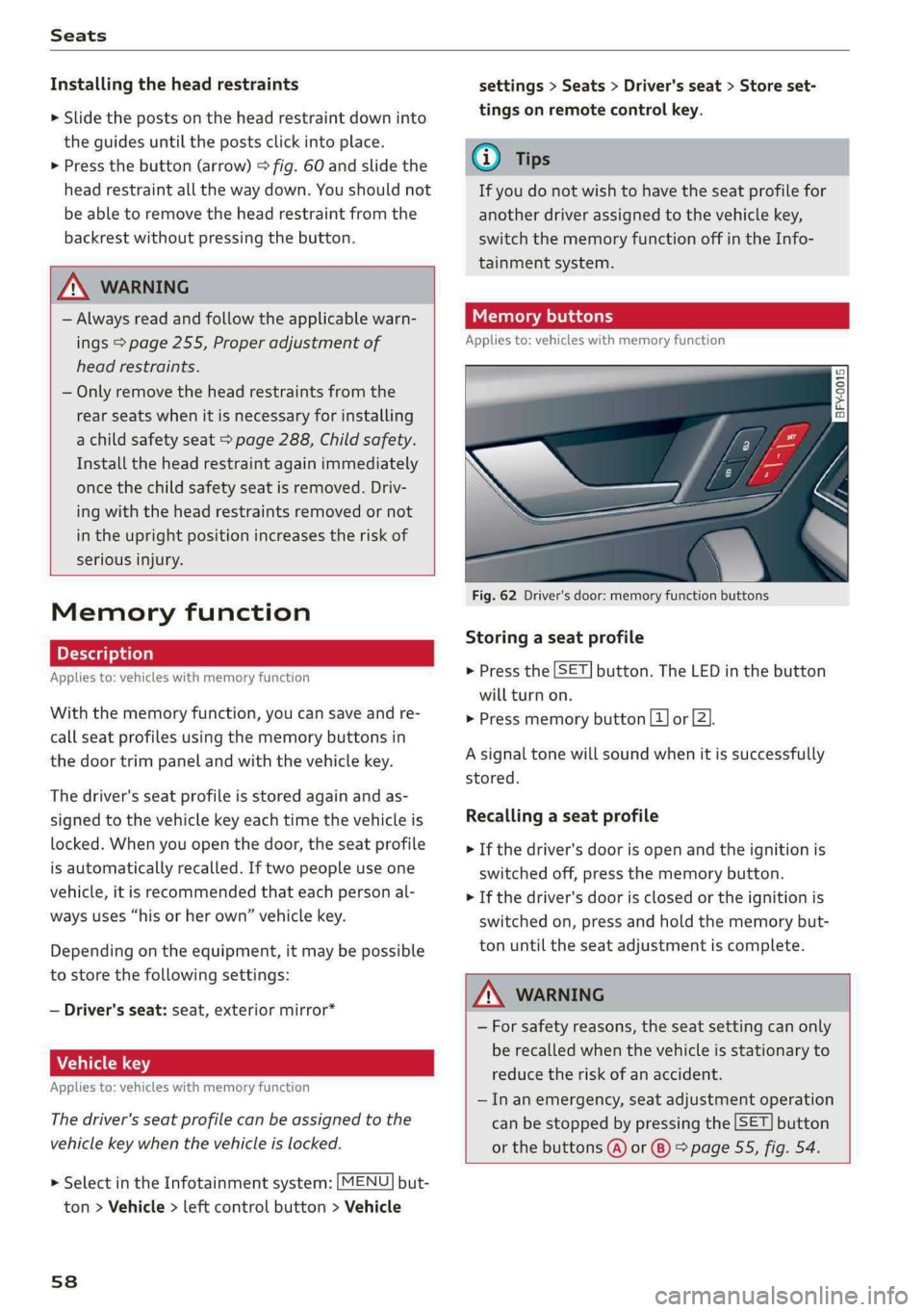
1D Ss
£ > ao
Fig.62Driver'sdoor:memoryfunctionbuttons
Storingaseatprofile
>Pressthe[SET]button.TheLEDinthe button
willturnon.
>Pressmemorybutton[1]or[2].
Asignaltonewillsoundwhenitissuccessfully
stored.
Recallingaseatprofile
>Ifthedriver's doorisopenandtheignitionis
switchedoff,pressthememorybutton.
>Ifthedriver'sdoorisclosedortheignitionis
switchedon, pressandholdthememorybut-
tonuntiltheseat adjustmentiscomplete.
Z\WARNING
—Forsafetyreasons,theseatsettingcanonly
berecalledwhenthevehicleisstationaryto
reducetheriskofanaccident.
—Inanemergency,seatadjustmentoperation
canbestoppedbypressingthe[SET]button
orthebuttons@)or®)>page55,fig.54.
Page 93 of 392
80A012721BG
Trailertowing
Tongueweight
Themaximumpermittedtongueweightofthe
trailerdrawbaronthetrailerhitchballheadmust
notbeexceeded.
Havingthetongueweighttoolowaffectstheve-
hicle'shandling.Fordrivingsafety,alwaysusing
themaximumpermittedtongueweightisrecom-
mended,butnotexceedit.Distributingthecargo
inthetrailercorrectlywillhelptoachievethis
weight.
Youcandeterminethetongueweightusinga
tongueweightscale,abathroomscale,orapub-
licweighstation,forexample.
Thepermittedtongueweightofyourvehiclecan
befoundinthevehicledocumentationorin
=>page373.
Loaddistribution
Poorcargoloadanddistributioncannegatively
impactvehiclehandling.Loadthetrailerbased
onthefollowingcriteriaasmuchaspossible:
—Storeobjectsinthevehicleluggagecompart-
ment,ifpossible.Thevehicleshould always
carrytheheaviestpossibleloadandthetrailer
shouldhavethelightestpossibleload.
—Distributetheloadinthetrailersothatthe
heavyobjectsareasclosetotheaxleaspossi-
ble.
—Secureobjectssothattheydonotslide.
—Utilizethemaximumpermittedtongueweight
ifpossible.
Tires
Set thetirepressureonyourvehiclefora“full
load”;seethetirepressuresticker>page334.If
necessary,alsoadjustthetirepressureonthe
traileraccordingtothemanufacturer'sspecifica-
tions.
Thetrailerandthevehicleshould beequipped
withwintertireswhendrivinginwintertempera-
tures.
Outsidemirrors
Ifyoucannotseethetrafficbehindthetrailer
withthestandardexterior mirrors,thenyou
mustattachadditionalexterior mirrors.Adjust
themsoyouhaveasufficientvisibilitybehind
you.
Exterior lighting
Followthelegalregulationsregardingthelight-
ingequipmentonyourtrailer.Contact anauthor-
izedAudidealerorauthorizedAudiServiceFacili-
tyformoreinformation.
Beforeyoustartdriving,checkalllightingequip-
mentonthetrailerwhileitishitchedtothevehi-
cle.
Theheadlightrangecontrolautomaticallyad-
juststhelightrangeoftheheadlights.
Safety chains
Makesurethesafetychainsarecorrectlyapplied
whenpullingatrailer.Thechainsshouldhang
enoughsothatthetrailercandrivearound
curves.However,theymustnottouchthe
ground.
Airsuspension
Appliesto:vehicleswithairsuspension
The
airsuspensionmustbeatthestandardvehi-
cleheight beforeyouadjustthetongueweight
onthetrailerandhitchthetrailer9,
=>page128,Liftingandloweringthevehicle.
Forvehicleswithafactory-installedtrailerhitch,
theairsuspensiontrailermodewillautomatically
switchonifyouconnectthetrailercabletothe
socket.
Forvehicleswitharetrofittedtrailerhitch,you
mustswitchontheairsuspensiontrailermode
manually.SelectintheInfotainmentsystem:
MENU}button>Vehicle>leftcontrolbutton>
Vehiclesettings>Airsuspension:trailer.Switch
itoffagainwhenyouarenolongertowingatrail-
er.
Youcanalsoswitchofftrailermodemanually
whiledriving,forexample,whenusingabicycle
racksystem.
Ifyouhavetodrivethroughdifficultroadcondi-
tions,youcanraisethevehicleagainafterhitch-
ingthetrailerorafteradjustingthetongue
weight.
91
Page 122 of 392

Assistsystems
Audisideassist
Appliesto:vehicleswithAudisideassist
B4M-0099}
Fig.119Sensordetectionrange
Fig.120Displayontheexteriormirror
Sideassist(lanechangeassist)helpsyoumonitor
yourblindspotandtrafficbehindyourvehicle.
Withinthelimitsofthesystem,itwarnsyou
aboutvehiclesthatarecomingcloserorthatare
travelingwithyouwithinsensorrange@)
>fig.119.If alanechangeisclassifiedascriti-
cal,thedisplay(2)intheexteriormirrorturnson
>fig.120.
Thedisplayintheleftexteriormirrorprovidesas-
sistancewhenmakingalanechangetotheleft,
whilethedisplayintherightexteriormirrorpro-
videsassistancewhenmakingalanechangeto
theright.
Informationstage
Aslongasyoudonotactivatetheturnsignal,
sideassistinformsyouaboutvehiclesthatare
detectedandclassifiedascritical.Thedisplayin
themirrorturnson,butisdim.
Thedisplayremainsdimintheinformationstage
sothatyourviewtowardthefrontisnotdistur-
bed.
120
Warningstage
Ifthedisplayinamirrorblinksbrightlywhenyou
activateaturnsignal,sideassistiswarningyou
aboutdetectedvehiclesthatithasclassifiedas
critical.Ifthishappens,checktrafficby glancing
intheexteriormirrorsandoveryourshoulder
=>A\inGeneralinformationonpage121.
Appliesto:vehicleswithactivelaneassist:the
displayinthemirrorcanalsoblinkifyouhavenot
activatedaturnsignal:ifyouareapproachinga
detectedlanemarkerlineanditappearsyouwill
beleavingthelane,sideassistwillwarnyou
aboutdetectedvehiclesthatithasclassifiedas
critical.
@Tips
Youcanadjustthebrightnessonofthedis-
playontherearviewmirror>page122.
Page 123 of 392

80A012721BG
Assistsystems
ere)
Appliesto:vehicleswithAudisideassist
B4M-0101
BFY-0004
Fig.122Rearofthevehicle:positionofthesensors
Sideassistfunctionsatspeedsaboveapproxi-
mately9mph(15km/h).
@Vehiclesthatareapproaching
Incertaincases,avehiclewillbeclassifiedas
criticalforalanechangeevenifitisstillsome-
whatfaraway.Thefasteravehicleapproaches,
thesoonerthedisplayintheoutsidemirrorwill
turnon.
Vehiclestravelingwithyou
Vehiclestravelingwithyouareindicatedinthe
exteriormirroriftheyareclassifiedascriticalfor
alanechange.Allvehiclesdetectedbysideassist
areindicatedbythetimetheyenteryour“blind
spot”,atthelatest.
©Vehiclesyouarepassing
Ifyouslowlypassavehiclethatsideassisthas
detected(thedifferenceinspeedbetweentheve-
hicleandyourvehicleislessthanapproximately
9mph(15km/h)),thedisplayintheexteriormir-
rorturnsonassoonasthevehicleentersyour
blindspot.
Thedisplaywillnotturnonifyouquicklypassa
vehiclethatsideassisthasdetected(thediffer-
enceinspeedisgreaterthanapproximately9
mph(15km/h)).
Functionallimitations
Theradarsensorsaredesignedtodetecttheleft
andrightadjacentlaneswhentheroadlanesare
thenormalwidth.Insomesituations,thedisplay
intheexteriormirrormayturnoneventhough
thereisnovehiclelocatedintheareathatiscriti-
calforalanechange.Forexample:
—Ifthelanesarenarroworifyouaredrivingon
theedgeofyourlane.Ifthisisthecase,the
systemmayhavedetectedavehicleinanother
lanethatisnotadjacenttoyourcurrentlane.
—Ifyouaredrivingthroughacurve.Sideassist
mayreacttoavehiclethatisinthesamelane
or
onelaneoverfromtheadjacentlane.
—Ifsideassistreactstootherobjects(suchas
roadsidestructureslikeguardrails).
—Inpoorweatherconditions.Thesideassist
functionsarelimited.
Donotcovertheradarsensors>fig.122with
stickers,deposits,bicyclewheelsorotherob-
jects,becausethiswillimpair thefunction.For
informationoncleaning,see>page343.
ZXWARNING
—Alwayspayattentiontotrafficandtothe
areaaroundyourvehicle.Sideassistcannot
replaceadriver'sattention.Thedriveralone
isalwaysresponsibleforlanechangesand
similardrivingmaneuvers.
—Insomesituations,thesystemmaynot
functionoritsfunctionmaybelimited.For
example:>
121
Page 124 of 392

Assistsystems
—Ifvehiclesareapproachingorbeingleft
behindveryquickly.Thedisplaymaynot
turnonintime.
—Inpoorweatherconditionssuchasheavy
rain,snoworheavymist.
—Onverywidelanes,intightcurves,orif
thereisariseintheroadsurface.Vehicles
intheadjacentlanemaynot be detected
becausetheyareoutsideofthesensor
range.
©)Note
Thesensorscanbedisplacedbyimpactsor
damagetothebumper,wheelhousingand
underbody.Thiscanimpair thesystem.Have
anauthorizedAudidealerorauthorizedAudi
ServiceFacilitychecktheirfunction.
@)Tips
—Thesesystemsarenotavailableintrailer
towingmode.Thereisnoguaranteethesys-
temswillswitchoffwhenusingaretrofitted
trailerhitch.Donot use thesefunctions
whentowingatrailer.
—Ifthewindowglassinthedriver'sdooror
frontpassenger'sdoorhasbeentinted,the
displayintheexteriormirrormaybeincor-
rect.
—Foranexplanationonconformitywiththe
FCCregulationsinthe UnitedStatesandthe
IndustryCanadaregulations,see
=>page370.
Switchingonandoff
Appliesto:vehicleswithAudisideassist
Thesystemcanbe switchedon/offintheInfo-
tainmentsystem.
>SelectintheInfotainmentsystem:[MENU]but-
ton>Vehicle>leftcontrolbutton>Driveras-
sistance>Audisideassist.Offswitchesthe
systemoff.
Ifthesystemisactivated,thedisplaysintheex-
terior
mirrorswillturnonbrieflywhentheigni-
tionisswitchedon.
122
G)Tips
Whenyouswitchsideassistonoroff,theexit
warningsystemactivatesordeactivates
=page123.
Settingthedisplaybrightness
Appliesto:vehicleswithAudisideassist
ThedisplaybrightnesscanbeadjustedintheIn-
fotainmentsystem.
>SelectintheInfotainmentsystem:[MENU]but-
ton>Vehicle> leftcontrolbutton>Driveras-
sistance>Audisideassist.
Thedisplaybrightnessadjustsautomaticallyto
thebrightnessofthesurroundings,bothinthe
informationandinthewarningstage.Invery
darkorverybrightsurroundings,theautomatic
adjustmentwillsetthedisplay totheminimum
ormaximumlevel.Insuchcases,youmaynotice
nochangewhenadjustingthebrightness, orthe
changemayonlybenoticeableoncethesur-
roundingschange.
Adjustthebrightnesstoalevelwherethedisplay
intheinformationstagewillnotdisruptyour
view
ahead.Ifyouchangethebrightness,thedis-
playintheexteriormirrorwillbrieflyshowthe
brightnesslevelintheinformationstage.The
brightnessofthewarningstageislinkedtothe
brightnessintheinformationstageandisadjust-
edalongwiththeinformationstage.
@)Tips
—Thesideassistfunctionsarenotactivedur-
ingtheadjustmentprocess.
— Theexitwarningindicatorsturnonduring
the
adjustmentprocess.
—Yoursettingsareautomaticallystoredand
assignedtothevehiclekeybeingused.
Page 125 of 392

80A012721BG
Assistsystems
Appliesto:vehicleswithexitwarningsystem
Fig.124Door:warninglight
Whenthevehicleisstationary,theexitwarning
system warnsthepassengersofapossiblecolli-
sionwhenopeningthedoor.Withinthelimitsof
thesystem,thesystemmonitorstheareasbe-
hindandnexttothevehicleusingtheradarsen-
sors>page121,fig.122.Movingobjectsthat
areapproachingfrombehind,suchascars,are
detected>fig.123.
Ifyouopenthedoorandacriticalsituationisde-
tected,thedoorhandleframeontheaffected
doorwillblink>fig.124andthedisplayinthe
outsidemirroronthesamesidealso appears.If
thedoorisalreadyopen andanotherroaduseris
detectedandthesituationisclassifiedascritical,
thenthecorrespondingdisplaysturnon.
ZAWARNING
—Alwayspayattentiontotrafficandtothe
areaaroundyourvehicle.Theexitwarning
systemdoesnotreplacetheattentionofthe
vehicleoccupants.Thevehicleoccupantsare
alwaysresponsibleforopeningthedoors
andexitingthevehicle.
— Theexitwarningsystemcanbeavailablefor
uptoapproximatelythreeminutesafterun-
lockingthevehicleandopeningthedooras
wellasafterswitchingofftheignition.Then
thedisplaysflashbrieflyandthesystem
switchesoff.
—Theexitwarningsystemdoesnotrespond
topeopleandcannotwarnyouaboutevery
typeofapproachingobjects,suchascyclists.
Alwaysmonitorthetrafficaswellastheve-
hicle'ssurroundingswithdirecteyecontact.
Z\WARNING
Theexitwarningsystemissubjecttolimita-
tionsandcannotwarnyoubeforeeveryim-
pendingcollision:
—Ifthevehicleistoowidefortheparking
spaceandcoveredby the neighboringvehi-
cles.
—Approachingobjectsorpeoplesuchascy-
clistsorskateboardersmaynot be detected
undercertaincircumstances.
—The systemdoesnotreacttostationaryob-
jects.
— Theviewoftheradarsensorsmaybeim-
pairedbyleaves,snow,heavysprayordirt.
Clean
theareainfrontofthesensors
=>page121,fig.122.
@)Note
Alsoreadtheinformationin>@inGeneral
informationonpage122.
@Tips
—Theexitwarningsystemisswitchedonand
offthroughthesideassist>page122.The
exitwarningindicatorsturnonduringthe
adjustmentprocess.
—Thedisplaybrightnessfortheexitwarning
systemcannotbeadjusted.
—The systemisnotavailablewhentowinga
trailer.
123
Page 131 of 392

80A012721BG
Parkingaid
Parkingaid
Generalinformation
Appliesto:vehicleswitharearparkingsystem/parkingsys-
templus/rearviewcamera/peripheralcameras/parkassist.
Dependingonyourvehicle'sequipment,various
parkingaidswillhelpyouwhenparkingandma-
neuvering.
Therearparkingsystemisanaudible parkingaid
thatwarnsyouofobstaclesbehindthevehicle
=>page130.
Theparkingsystemplusassistsyouwhilepark-
ingusingaudioandvisualsignalstowarnyou
aboutobjectsdetectedinfrontof,behind,andat
thesides*ofthevehicle>page130.
Therearviewcamerashowstheareabehindthe
vehicleintheInfotainmentsystemdisplay.The
linesintherearviewcameraimagehelpyouto
parkormaneuver>page132.
Theperipheralcamerasgivevariousviewsto
helpyouwhenparkingormaneuvering
=page134.Theparkingsystemplusfunctions
arealsoavailable>page130.
Parkassisthelpsyoutolocatesuitableparking
spaceswhenparallelorperpendicularparking,
andalsohelpswhenleavingaparallelparking
space>page137.
ingsystemmaybe impairedasaresult.
HaveanauthorizedAudidealerorauthor-
izedAudiServiceFacilitychecktheirfunc-
tion.
ZA\WARNING
—Alwayslookfortrafficandcheckthearea
aroundyourvehiclebylookingatitdirectly
aswell.Theparkingsystemcannotreplace
thedriver'sattention.Thedriverisalways
responsiblewhenenteringorexitingapark-
ingspaceandduringsimilarmaneuvers.
—Pleasenotethatsomesurfaces,suchas
clothing,arenotdetectedbythesystem.
—Sensorsandcamerashaveblindspotsin
whichpeopleandobjectscannotbedetect-
ed.Beespeciallycautiousofsmallchildren
andanimals.
—Alwayskeepyoureyesonthevehicle'ssur-
roundings,usingtherearviewmirroraswell.
— Thesensorscanbedisplacedbyimpactsor
damagetotheradiatorgrille,bumper,
wheelhousingandtheunderbody.Thepark-
@)Note
—Someobjectsarenotdetectedordisplayed
bythesystemundercertaincircumstances:
—objectssuchasbarrierchains,trailerdraw
bars,verticalpolesorfences
—objectsabovethesensorssuchaswallex-
tensions
—objectswithcertainsurfacesorstructures
suchaschainlinkfencesorpowdersnow
—Ifyoucontinuedrivingclosertoalowob-
ject,itmaydisappearfromthe sensor
range.NotethatyouwillnoLongerbe
warnedaboutthisobstacle.
—Maintainenoughdistancefromthecurbto
reducetheriskofdamagetotherims.
@)Tips
—Thesystemmayprovideawarningeven
thoughtherearenoobstaclesinthecover-
ageareainsomesituations,suchas:
—certainroadsurfacesor whenthereistall
grass
—externalultrasonicsourcessuchasfrom
cleaningvehicles
—inheavyrain,snow,orthickvehicleex-
haust
—Werecommendthatyoupracticeparkingin
atraffic-freelocationorparkinglottobe-
comefamiliarwiththesystem.Practice
parkingingoodlightand weathercondi-
tions.
—Youcanchangethevolumeofthesignals
andthedisplay>page142.
—Whatappearsintheinfotainmentdisplayis
somewhattime-delayed.
—Thesensorsmustbekeptcleanandfreeof
snowandicefortheparkingaidtooperate.
— Therearviewcameraiscleanedwhenclean-
ingtherearwindow©page50.
129
Page 135 of 392
80A012721BG
Parkingaid
—Onlyuse therearviewcameratoassistyouif
itshowsagood,clearpicture.Forexample,
theimagemaybeaffectedbythesunshin-
ingintothelens,dirtonthelens,orifthere
isamalfunction.
—Usetherearviewcameraonlyiftheluggage
compartmentlidiscompletelyclosed.Make
sureanyobjectsyoumayhavemountedon
theluggagecompartmentliddonotblock
therearviewcamera.
— Thecameralensenlargesanddistortsthe
fieldofvision.Theobjectappearsbothal-
teredandinaccurateonthescreen.
—Incertainsituations,peopleorobjectsin
thedisplayappearcloserorfartheraway:
—Forobjectsthatdonottouchtheground,
suchasthebumperofaparkedvehicle,a
trailerhitchortherearofatruck.Donot
use the
orientationlinesinthiscase.
—Ifdrivenfromalevelsurfaceontoanin-
cline,oradownwardslope.
—Ifdriventowardprotrudingobjects.
—Ifthevehicleiscarryingtoomuchloadin
therear.
—Appliesto:vehicleswithairsuspension:the
accuracyoftheorientationlinesandblue
surfacesdecreaseswhenthevehicleis
raised/lowered>page125.
@)Note
—Alwaysreadandfollowtheapplicablewarn-
ings>@inGeneralinformationon
page129.
— Theorange-coloredorientationlinesinthe
Infotainmentdisplayshowthevehiclepath
basedonthesteeringwheelangle.The
front ofthevehicleswingsoutmorethan
therearofthevehicle.Maintainplentyof
distanceso thatanexteriormirrororacor-
nerofthevehicledoesnotcollidewithany
obstacles.
@)Tips
Thereisnodistancewarningfortherearand
thesides*whentrailertowingmodeisdetect-
ed.Thefrontsensorsremainactivated.The
visualdisplayswitchestotrailermode.The
rearviewcameraimagewillnotshowtheori-
entationlinesandthebluesurfaces.Thereis
noguaranteethefunctionswillswitchoff
whenusingaretrofittedtrailerhitch.
SicaReRol
Appliesto:vehicleswithrearviewcamera
Switchingonandoff
Requirement:thevehiclespeedmustbeunder
approximately6mph(10km/h).
>PressthePvbuttoninthecenterconsole
=>page131,fig.130.Ashortconfirmation
tonesoundsandtheLEDinthebuttonturns
on.
Switchingonautomatically
Thesystemswitchesonautomaticallywhenre-
versegearisengagedwhiletheengineisrun-
ning.Abrieftonewillsound.
Switchingoffautomatically
Thesystemswitchesoffautomaticallywhendriv-
ingforwardfasterthan6mph(10km/h).
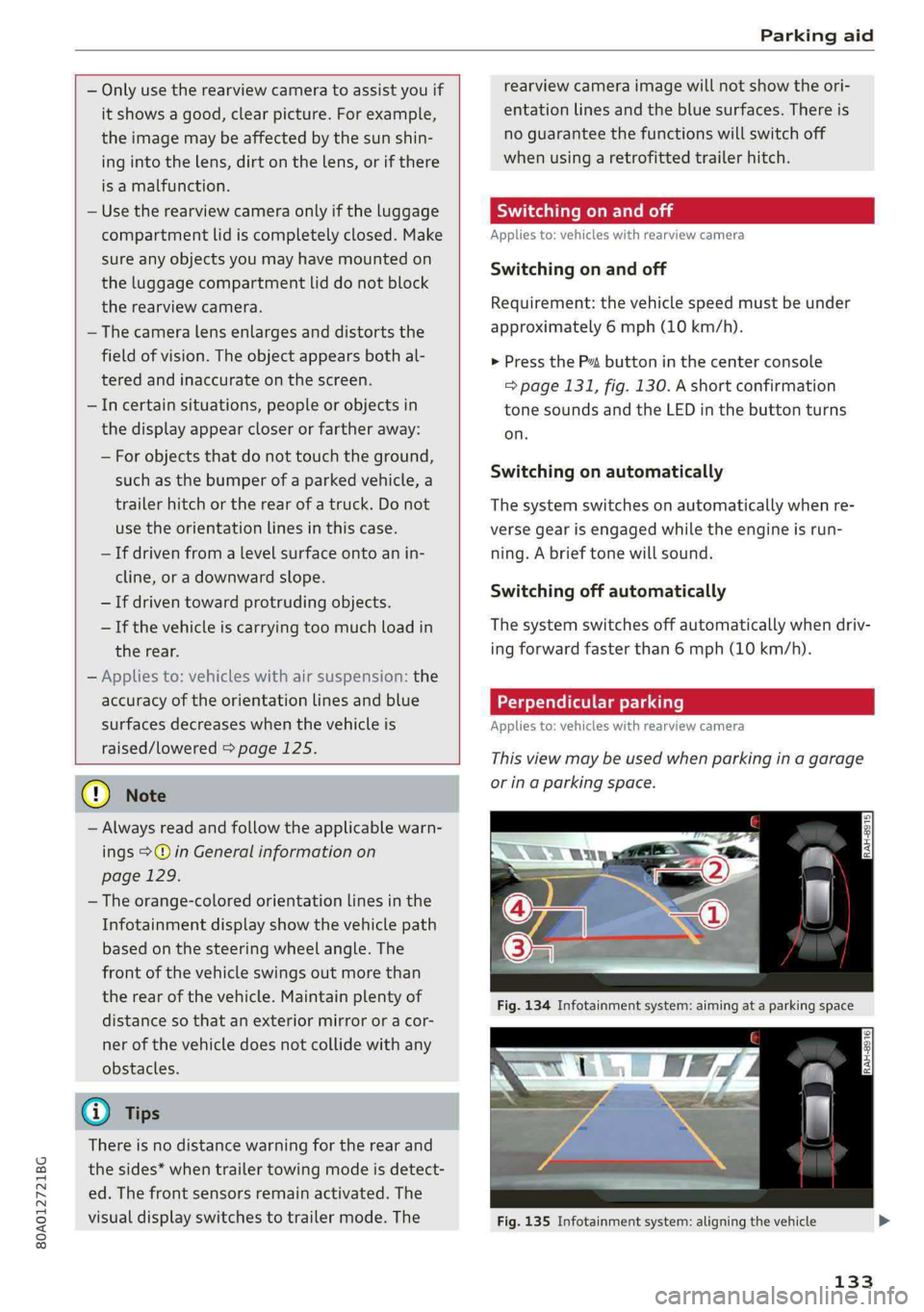
Perpendicularparking
Applies
to:vehicleswithrearviewcamera
Thisviewmaybeusedwhenparkinginagarage
orinaparkingspace.
Fig.135Infotainmentsystem:aligningthevehicle
133
Page 136 of 392
Parkingaid
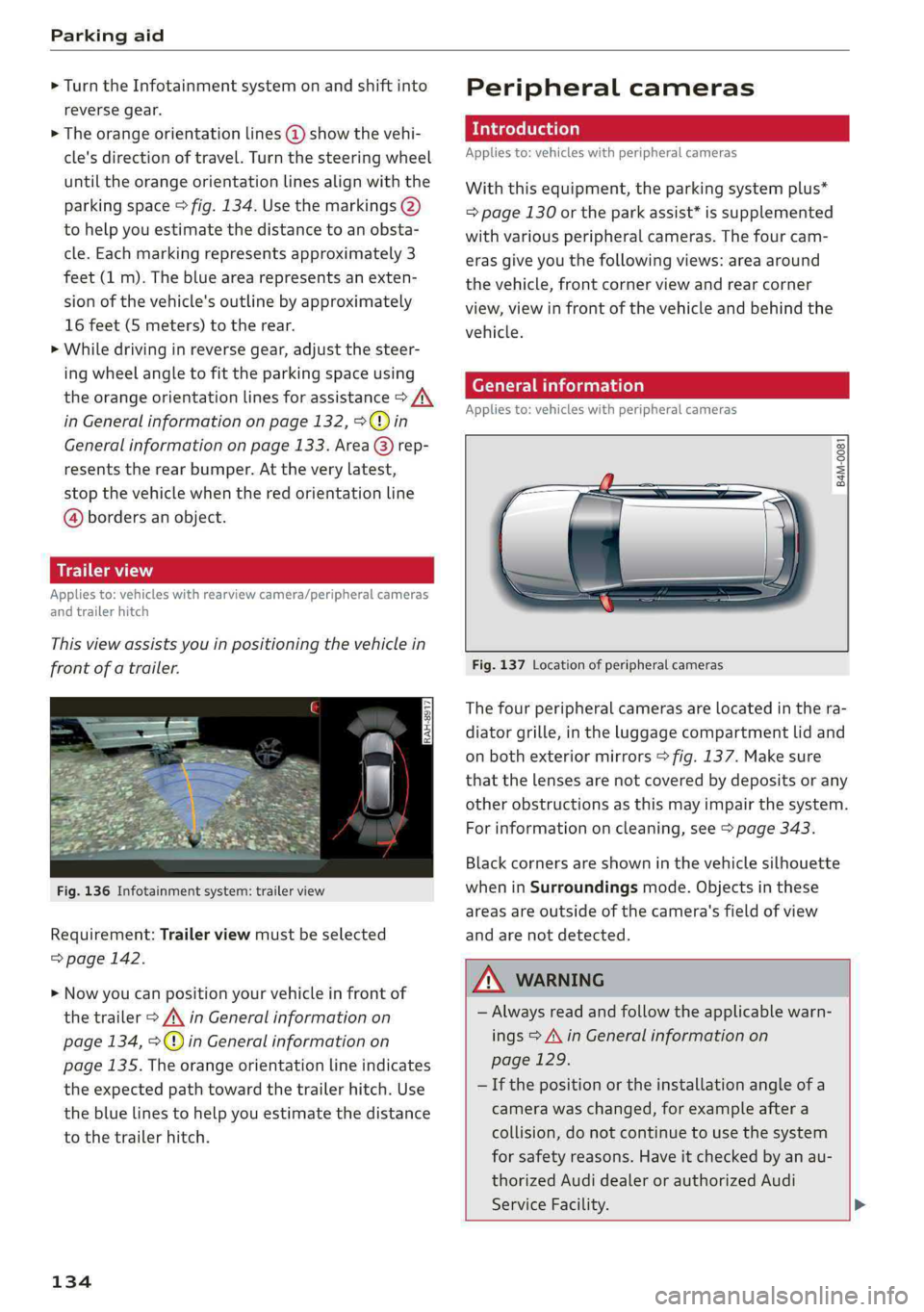
>Turn theInfotainmentsystemonandshiftinto
reversegear.
>Theorangeorientationlines@showthevehi-
cle'sdirectionoftravel.Turn thesteeringwheel
untiltheorangeorientationlinesalignwiththe
parkingspace>fig.134.Usethemarkings@)
tohelpyouestimatethedistancetoanobsta-
cle.Eachmarkingrepresentsapproximately3
feet(1m).Thebluearearepresentsanexten-
sionofthevehicle'soutlinebyapproximately
16feet(5meters)totherear.
>Whiledrivinginreversegear,adjustthesteer-
ingwheelangletofittheparkingspaceusing
theorangeorientationlinesforassistance>A\
inGeneralinformationonpage132,>@)in
Generalinformationonpage133.Area@)rep-
resentstherearbumper.Attheverylatest,
stopthevehiclewhentheredorientationline
@bordersanobject.
NirliCimUCW
Appliesto:vehicleswith rearviewcamera/peripheralcameras
andtrailerhitch
Thisviewassistsyouinpositioningthevehiclein
frontofatrailer.
Fig.136Infotainmentsystem:trailerview
Requirement:Trailerviewmustbeselected
=>page142.
>Nowyoucanpositionyourvehicleinfrontof
thetrailer>/\inGeneralinformationon
page134,>@)inGeneralinformationon
page135.Theorangeorientationlineindicates
theexpectedpathtowardthetrailerhitch.Use
thebluelinestohelpyouestimatethedistance
tothetrailerhitch.
134
Peripheralcameras
Introduction
Appliesto:vehicleswithperipheralcameras
Withthisequipment,theparkingsystemplus*
=page130ortheparkassist*issupplemented
withvariousperipheralcameras.Thefourcam-
erasgiveyouthefollowingviews:areaaround
thevehicle,frontcornerviewandrearcorner
view,viewinfrontofthevehicleandbehindthe
vehicle.
Generalinformation
Appliesto:vehicleswithperipheralcameras
B4M-0081
Fig.137Locationofperipheralcameras
Thefourperipheralcamerasarelocatedinthera-
diatorgrille,intheluggagecompartmentlidand
onbothexteriormirrors>fig.137.Makesure
thatthelensesarenotcoveredbydepositsorany
otherobstructionsasthismayimpairthesystem.
Forinformationoncleaning,see>page343.
Blackcornersareshowninthevehiclesilhouette
wheninSurroundingsmode.Objectsinthese
areasareoutsideofthecamera'sfieldofview
andarenotdetected.
Z\WARNING
—Alwaysreadandfollowtheapplicablewarn-
ings>A\inGeneralinformationon
page129.
—Ifthepositionortheinstallationangleofa
camerawaschanged,forexampleaftera
collision,donotcontinuetouse thesystem
forsafety reasons.Haveitcheckedby anau-
thorizedAudidealerorauthorizedAudi
ServiceFacility.>
Page 137 of 392
80A012721BG
Parkingaid
—Keepinmindthattheimageinthedisplayis
incorrectiftheexteriormirrorhousinghas
beenmovedoutofplace.
—Onlyuse theimagesprovidedby thecamera
ontherearofthevehiclewhentheluggage
compartmentlidiscompletelyclosed.Make
sureanyobjectsyoumayhavemountedon
theluggagecompartmentliddonotblock
therearviewcamera.
— Theareaaroundthevehicleisshownusing
thecameraimages.Thevehicleimageis
shownbythesystem.Objectsandobstacles
abovethecameraarenotdisplayed.
—Cameralensesenlargeanddistortthefield
ofvision.Theobjectsappearbothaltered
andinaccurateonthescreen.
—Appliesto:vehicleswithairsuspension:the
accuracyoftheorientationlinesandblue
surfacesdecreaseswhenthevehicleis
raised/lowered>page125.
@)Note
—Alwaysreadandfollowtheapplicablewarn-
ings>@inGeneralinformationon
page129.
— TheInfotainmentdisplayshowsthedirec-
tioninwhichtherearofthevehicleistravel-
ingbasedonthesteeringwheelangle.The
frontofthevehicleswings outmorethan
therearofthevehicle.Maintainplentyof
distanceso thatanexteriormirrororacor-
nerofthevehicledoesnotcollidewithany
obstacles.
G)Tips
—Ifthe2/&8/
grayedout,thenthepowerexteriormirrors
werefoldedinorthedriver'sdoor/front
passenger'sdoor/luggagecompartmentlid
wasopened.
—Thereisnodistancewarningfortherear
andthesides*whentrailertowingmodeis
detected.Thefrontsensorsremainactivat-
ed.Thevisualdisplayswitchestotrailer
mode.Therearviewcameraimagewillnot
showtheorientationlinesandthebluesur-
faces.Thereisnoguaranteethefunctions
willswitchoffwhenusingaretrofittedtrail-
erhitch.
ice
Appliesto:vehicleswithperipheralcameras
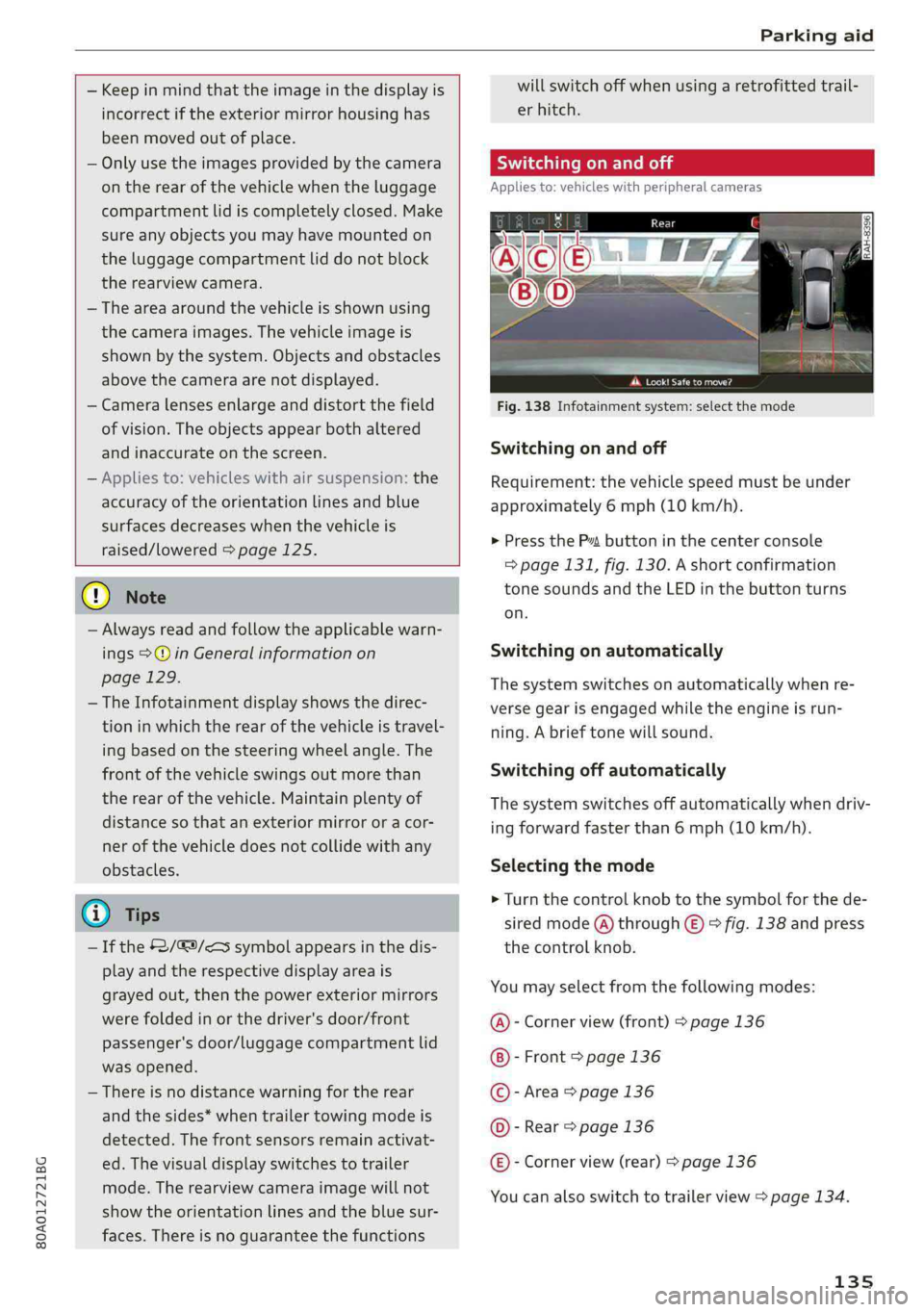
Fig.138Infotainmentsystem:selectthemode
Switchingonandoff
Requirement:thevehiclespeedmustbeunder
approximately6mph(10km/h).
>PressthePsbuttoninthecenterconsole
=>page131,fig.130.Ashortconfirmation
tonesoundsandtheLEDinthebuttonturns
on.
Switchingonautomatically
Thesystemswitchesonautomaticallywhenre-
versegearisengagedwhiletheengineisrun-
ning.Abrieftonewillsound.
Switchingoffautomatically
Thesystemswitchesoffautomaticallywhendriv-
ingforwardfasterthan6mph(10km/h).
Selectingthemode
>Turn thecontrolknobtothesymbolforthede-
siredmode(A)through©)>fig.138andpress
thecontrolknob.
Youmayselectfromthefollowingmodes:
@-Cornerview(front)>page136
-Front>page136
©-Area>page136
©-Rear>page136
@®-Cornerview(rear)>page136
Youcanalsoswitchtotrailerview>page134.
135