ECO mode AUDI Q5 2019 Owner's Manual
[x] Cancel search | Manufacturer: AUDI, Model Year: 2019, Model line: Q5, Model: AUDI Q5 2019Pages: 392, PDF Size: 99.86 MB
Page 86 of 392
Driving
Youmustpressthebrakepedaltoengagease-
lectorleverpositionwhentheengineisrunning
andthevehicleisstationary.
Youdonothavetopressthebrakepedalifyou
shiftfrom"D"to"R"withinonesecond.Thisal-
lowsyouto “rock”thevehicleto freeitwhenitis
stuck.
P-Park
Thisselectorleverpositionpreventsthevehicle
fromrolling.Onlyshiftintoparkwhenthevehicle
isstationary>A\.Toselectthe"P"selectorlever
position,pressthe"P"button()ontheselector
lever
>fig.90.Pappearsnexttotheselectorlev-
er.
Appliesto:vehicleswithStronictransmission:
theparkinglockcanonlybereleasedwhenthe
ignitionisswitchedonandthebrakepedalis
pressed.Toreleasetheparkinglock,pressthe
brakepedal,pressthereleasebutton(@)onthe
selectorlever,andselectthedesiredposition
=>fig.90.Theenginemust alsobestartedinor-
dertoengagethe"D" or"R"selectorleverposi-
tion.
Appliesto:vehicleswithtiptronictransmission:
theparkinglockcanonlybereleasedwhenthe
engineisrunningandthebrakepedalispressed.
Toreleasetheparkinglock,pressthebrakeped-
al,pressthereleasebutton@ontheselector
lever,andselectthedesiredposition>fig.90.
“P"engagesautomaticallyifyouswitchtheen-
gineoffwhiletheselectorleverisin"D","E", "S",
"R",ormanualmode.
Ifyouswitchtheengineoffwhenthe"N"selector
leverpositionisselected,thetransmissionre-
mainsin"N"forapproximately30minutesand
then"P"isengaged.Thevehicleisnotsecured
fromrollinginthe"N"selectorleverposition,so
youneedtosettheparkingbrake©>page78.
Youmustusetheparkinglockemergencyrelease
beforetowingthevehicle>page89.
R-Reverse
Thereversegearisengagedinthisposition.Only
selectreversegearwhenthevehicleisstationary
andtheengineisrunningatidlespeed>A\.To
84
engagethe"R"selectorleverposition,pressthe
brakepedal,pressthereleasebutton(@onthe
selectorlever,andselectthe"R"position
>fig.90.
Atonewillsoundwhenthereversegearisengag-
ed.
N-Neutral(idle)
Thetransmissionisinidleinthisposition.Toen-
gagethe"N"selectorleverposition,pressthere-
leasebutton@ontheselectorleverandshiftin-
tothe"N"position>fig.90.
Ifyouswitchtheengineoffwhenthe"N"selector
leverpositionisselected,thetransmissionre-
mainsin"N"forapproximately30minutesand
then"P"isengaged.
Youcannotselectthe"N"positionwhentheigni-
tionisswitchedoff.Whendrivingthroughanau-
tomaticcarwash,firstselectthe"N"positionand
thenturntheengineoff.
For safetyreasons,thevehiclecannotbelocked
whenthetransmissionisinthe"N"position.
D/S-Drivingforward
Whenthetransmissionisinthe"D/S"position,it
canbeoperatedeitherinthenormal"D"modeor
inthe"S"sportmode.Movetheselectorlever
backtoengagethe"S"sportmode.Youcanonly
selectthe"S"selectorleverpositionwhenthe"D"
or"E"positionisselected.Toselectthe"D"or"E"
positionagainwhen"S"isengaged,movethese-
lectorleverback>A\.Toshiftfrom"N"to"D"
when
travelingatspeedsbelow1mph(2km/h),
pressthebrakepedalandshiftintothe"D"posi-
tion>A.
Inthenormalmode"D",thetransmissionauto-
maticallyselectsthecorrectgear.Itdependson
engineload,vehiclespeedanddrivingstyle.
Selectthesportmode"S"forsportydriving.The
vehiclemakesfulluseoftheengine'spower.
Shiftingmaybecomenoticeablewhenaccelerat-
ing.
The"S"selectorleverpositionengagesautomati-
callywhenyouselectthedynamic*modeindrive
select.
Page 88 of 392
Driving
Hilldescentcontrol
Thehilldescentcontrolsystemassiststhedriver
whendrivingdownhills.
Hilldescentcontrolactivateswhenthetransmis-
sionisinthe"D" or"S"positionand youpressthe
brakepedal.Thetransmissionautomaticallyse-
lectsagearthatissuitableforthehill.Hillde-
scentcontroltriestomaintainthespeedthat
wasselectedatthetimeofbraking,withinphysi-
calandtechnicallimitations.Ifmaystill benec-
essarytoadjustthespeedwiththebrakepedal.
Hilldescentcontrolswitchesoffoncethehilllev-
elsoutorifyoupresstheacceleratorpedal.
Whenoperatingthecruisecontrolsystem*
=>page93,hilldescentcontrolisalsoactivated
when
thespeedisset.
ZXWARNING
Hilldescentcontrolmaynotbeabletomain-
tainaconstantspeedunderallconditions.Al-
waysbereadytoapplythebrakes.
Shiftingmanually(tiptronicmode)
Thetiptronicmodeallowsthedrivertoshiftthe
gearsmanually.
B8W-0249
Fig.91Centerconsole:shiftingmanuallywiththeselector
lever
86
2SSs
s
=zza
Fig.92Steeringwheel:Shiftpaddles*
Shiftingwiththeselectorlever
Youcanshiftintotiptronicmodewhilethevehi-
cleisstationaryorwhiledriving.
>Toshiftintotiptronicmode,pushtheselector
leverfromthe"D/S"positiontotheright.As
soonasthetransmissionswitchesover,the"M"
transmissionsettingwillappearintheinstru-
mentclusterdisplay.
>Toshiftupagear,tap theselectorleverfor-
ward@)>fig.91.
>Toshiftdownagear,taptheselectorlever
backward©).
>Toswitchtiptronicmodeoff,pushtheselector
leverbackintothe"D/S"position.
Shiftingwiththeshiftpaddles
Appliesto:vehicleswithshiftpaddles
Youcanoperatetheshiftpaddlesinthe"D/S"or
"M"selectorlever positions.
>Toshiftupagear,tap theshiftpaddle@)
>fig.92.
>Toshiftdownagear,tap the©)shiftpaddle.
>Toshiftintothelowestgear,holdthe©shift
paddle.
>Ifyoudonotpressashiftbuttonwithinashort
timewhileinthe"D/S"position,the transmis-
sionwillreturn toautomaticmode.Tokeep
shiftingusingtheshiftpaddles,movethese-
lectorlevertotherightoutofthe"D/S"posi-
tion.
>Whenyouwanttoshiftoutoftiptronicmode,
pressandholdtheG@)shiftpaddleforalonger
periodoftimeormovetheselectorleverback
andreleaseit.
The
transmissionautomaticallyshiftsupordown
beforecriticalenginespeedisreached.
Page 89 of 392
80A012721BG
Driving
Thetransmissiononlyallowsmanualshifting
whentheenginespeediswithinthepermitted
range.
G)Tips
—Ifyoushifttothenextlowestgear,the
transmissionwillonlyshiftiftheenginewill
notbeover-revwved.
—Withkick-down,thetransmissionshiftstoa
lowergear,dependingonvehiclespeedand
enginespeed.
—tiptronicdoesnotworkifthetransmission
isrunninginemergencymode.
Kick-downenablesmaximumacceleration.
Whenyoupresstheacceleratorpedaldownbe-
yondtheresistancepoint,theautomatictrans-
missiondownshiftsintoalower gearandtheen-
gineutilizesitsfullpower,ifthevehiclespeed
andengineRPMpermit.Itshiftsupintothenext
highergearoncethemaximumpermittedengine
RPMisreached.
ZA\WARNING
Pleasenotethatthewheelscouldspinon
slickorslipperyroadswhenkick-downisac-
tive.
Launchcontrolprogram
Appliesto:vehicleswithStronictransmission
The launchcontrolprogramprovidesthebest
possibleaccelerationwhenstartingfromastop.
Requirement:theenginemustbeatoperating
temperatureandthesteeringwheelmustnot be
turned.
>DeactivatetheStart/Stopsystem*>page78.
TheLEDinthe[®«]buttonturnson.
>Withtheenginerunning,pressthe|&OFF]but-
tonbriefly>page145.TheBindicatorlight
turnsonandthemessageStabilizationcontrol
(ESC):offroad.Warning!Reducedstabilityap-
pearsintheinstrumentclusterdisplay.
> Pull
theselectorleverbackoutofthe"D/S"po-
sitionbrieflytoselectthe"S"positionorselect
theDynamicdrivingmodeindrivese-
lect*>page127.
>Pressthebrakepedalfirmlywithyourleftfoot
andholditallthewaydownforatleastone
second.
>Atthesametime,pressthegaspedalallthe
waydownwithyourrightfootuntiltheengine
reachesandstaysatahighRPMlevel.
>Removeyourfootfromthebrakepedalwithin
fiveseconds>/\.
ZA\WARNING
—Alwaysadaptyourdrivingtothetrafficflow.
—OnlyusetheLaunchcontrolprogramwhen
roadandtrafficconditionsallowitandother
driverswillnot beendangeredorbothered
byyourdrivingandthevehicle'saccelera-
tion.
—Pleasenotethatthedrivewheelscanspin
andthevehiclecanbreakawaywhenoffroad
modeisswitchedon,especiallywhenthe
roadisslippery.
—Oncethevehiclehasstartedmoving,press
the[&OFF]buttonbrieflytoturntheoffroad
modeoff.
CG)Note
WhenacceleratingusingLaunchControl,all
vehiclecomponentsaresubjecttoheavy
loads.Thiscanresultinincreasedwear.
G@)Tips
AfteracceleratingusingtheLaunchControl,
thetemperatureof somevehiclecomponents
mayincreasegreatly.Ifthathappens,the
functionwillnot beavailable forafewmi-
nutestoreduce theriskofdamage.Aftera
cool-downperiod,LaunchControlwillbe
availableagain.
Messages
[BiTransmission:toohot.Pleasestopvehicle
Donotcontinuedriving.Selectthe"P"selector
leverpositionandcontactanauthorizedAudi
dealerorauthorizedAudiServiceFacilityforas-
sistance.
87
>
Page 90 of 392
Driving
iTransmission:malfunction!Safelystopvehi-
cle
Donotcontinuedriving.Stopthevehicleassoon
aspossibleinasafelocationandsecureitsoit
doesnotroll.SeeanauthorizedAudidealeror
authorizedAudiServiceFacilityforassistance.
fs}Selectorlever:malfunction!Youcancontin-
uedriving.PleasecontactService
Thereisasystemmalfunctioninthetransmis-
sion.DriveimmediatelytoanauthorizedAudi
dealerorauthorizedAudiServiceFacilitytohave
themalfunctionrepaired.
fs}Pbutton:malfunction!AutoPwhenengine
off.PleasecontactService
Thereisamalfunctioninthe"P"buttononthe
selectorlever.Thetransmissionautomatically
engages"P"whenyouswitchofftheengine.
DrivetoanauthorizedAudidealerorauthorized
AudiServiceFacilityimmediatelytohavethe
malfunctioncorrected.
5Selectorlever:malfunction!Gearchangeon-
lypossibleusingbothpaddlelevers.Pleasecon-
tactService
Thereisasystemmalfunctioninthetransmis-
sion.Youcancontinuedrivingwithrestricted
function.Theselectorleverisnotworking.Gears
canonlybeselectedby tappingbothshiftpad-
dlesatthesametimewhenthevehicleisstation-
ary>page86,fig.92.Payattentiontothese-
lectedtransmissionpositionintheinstrument
clusterdisplay.Theparkinglockengagesauto-
maticallywhenyouturnofftheengine.Driveto
anauthorizedAudidealerorauthorizedAudi
ServiceFacilityimmediatelytohavethemalfunc-
tioncorrected.
fiTransmission:pleasepressbrake pedaland
selectgearagain
Pressthebrakepedalandselectthedesiredse-
lectorleverpositionagain.Youcanthencontinue
driving.
fs}Transmission:toohot.Pleaseadaptdriving
style
838
Thetransmissiontemperaturehasincreasedsig-
nificantly.Driveverycautiouslyortakeabreak
fromdrivinguntilthetemperaturereturnstothe
normalrangeandtheindicatorlightturnsoff.
iTransmission:malfunction!Youcancontin-
uedriving.Seeowner'smanual
Thereisasystemmalfunctioninthe transmis-
sion.Youmaycontinuedriving.Drivetoanau-
thorizedAudidealerorauthorizedAudiService
Facilitysoontohavethe malfunctioncorrected.
iTransmission:malfunction!Youcancontin-
uedrivinginDuntilengineisoff
Thereisasystemmalfunctioninthe transmis-
sion.Thetransmissionisswitchingtoemergency
mode.Ifyouturntheengineoff,youwillnotbe
abletoselectanyotherselectorleverpositions
afterstartingtheengineagain.Drivetoanau-
thorizedAudidealerorauthorizedAudiService
Facilityimmediatelytohave the malfunctioncor-
rected.
iTransmission:malfunction!Youcancontin-
uedrivingwithlimitedfunction.Pleasecontact
Service
Thereisasystemmalfunctioninthe transmis-
sion.Thetransmissionisswitchingtoemergency
mode.Thismodeonlyshiftsintocertaingearsor
maynolongershiftatall.Theenginemaystall.
DrivetoanauthorizedAudidealerorauthorized
AudiServiceFacilityimmediatelytohavethe
malfunctioncorrected.
i]Transmission:malfunction!Youcancontin-
uedrivingwithlimitedfunction.Noreverse
gear
Thereisasystemmalfunctioninthe transmis-
sion.Thetransmissionisswitchingtoemergency
mode.Thismodeonlyshiftsintocertaingearsor
maynolongershiftatall.Theenginemaystall.
You cannotengagethereversegear.Drivetoan
authorizedAudidealerorauthorizedAudiService
Facilityimmediatelytohavethe malfunctioncor-
rected.
flDangerofrollingaway!Pnotpossible.
Pleaseapplyparkingbrake
Page 91 of 392

80A012721BG
Driving
—Theparkinglockwasreleasedusingtheemer-
gencyrelease>page89.Or
—Theparkinglockcannolongerbeengaged.
DrivetoanauthorizedAudidealerorauthor-
izedAudiServiceFacilityimmediatelytohave
themalfunctioncorrected.
Moveselectorlevertoautomaticposition
Thereisamalfunctioninthetiptronicmode.End
tiptronicmodebypushingtheselectorleverto
theleftintothe"D/S"position.
Parkinglockemergencyrelease
>Keepthebrakepedalpressedandengagethe
followingselectorleverpositionsoneafterthe
other:"N","D"andbackto"N".
>Turn theengineoffagain.
>Graspthe socketwrenchwithbothhandsand
carefullypullitupwardtoremove.
>Installthecover.
Iftheparkinglockisreleasedwiththeemergen-
cyrelease,thefs]indicatorlightturnsoninthe
instrumentclusterand“N”isengaged.The mes-
sageDangerofrollingaway!Pnotpossible.
Pleaseapplyparkingbrakealsoappears.
B4M-0189
@
@)
Fig.93Driver'ssidefootwell:releasingtheparkinglock
usingtheemergencyrelease
Theemergencyreleaseislocatedunderthefloor
matonthedriver'sside.Readandfollowtheim-
portantinstructionsabouttowing>page364.
Releasingtheparkinglockusingthe
emergencyrelease
>Set theparkingbraketosecureyourvehicle
fromrollingaway.Ifthisisnotpossible,secure
yourvehiclefromrollingusinganothermeth-
od.
>Prythecoveroffatoneoftheopeningsusing
thescrewdriverfromthevehicletoolkit.
>Insertthe socketwrenchfromthevehicletool
kitintotheopening>fig.93.
>Turn thesocketwrenchclockwise(4)untilit
stopsandpressitdownward(2)untilitlocksin-
toplace.
>Leavethe socketwrenchinserted.
Resettingtheparkinglock
>»Pressthebrake pedalandstarttheengine.
ZA\WARNING
—Theparkinglockmustbereleasedusingthe
emergencyreleasebeforetowingthevehi-
cley
— Theparkinglockmayonlybereleasedusing
the emergencyreleaseiftheparkingbrake
isset.Ifit isnotworking,securethevehicle
fromrollingusingthebrakepedalorother
suitablemeans,suchasblockingafrontand
arearwheel.Anunsecuredvehiclemayroll
away,whichincreasestheriskofanacci-
dent.
—Onlyactivatetheemergencyreleasewhile
onalevelsurfaceoraslightslope.
—Toreducetheriskofanaccident,youmust
notdrivewhentheemergencyreleaseisac-
tivated.
©Note
Duetotheriskofdamage,carefullyremove
the socketwrenchwhenyouresettheparking
lock.
89
Page 93 of 392
80A012721BG
Trailertowing
Tongueweight
Themaximumpermittedtongueweightofthe
trailerdrawbaronthetrailerhitchballheadmust
notbeexceeded.
Havingthetongueweighttoolowaffectstheve-
hicle'shandling.Fordrivingsafety,alwaysusing
themaximumpermittedtongueweightisrecom-
mended,butnotexceedit.Distributingthecargo
inthetrailercorrectlywillhelptoachievethis
weight.
Youcandeterminethetongueweightusinga
tongueweightscale,abathroomscale,orapub-
licweighstation,forexample.
Thepermittedtongueweightofyourvehiclecan
befoundinthevehicledocumentationorin
=>page373.
Loaddistribution
Poorcargoloadanddistributioncannegatively
impactvehiclehandling.Loadthetrailerbased
onthefollowingcriteriaasmuchaspossible:
—Storeobjectsinthevehicleluggagecompart-
ment,ifpossible.Thevehicleshould always
carrytheheaviestpossibleloadandthetrailer
shouldhavethelightestpossibleload.
—Distributetheloadinthetrailersothatthe
heavyobjectsareasclosetotheaxleaspossi-
ble.
—Secureobjectssothattheydonotslide.
—Utilizethemaximumpermittedtongueweight
ifpossible.
Tires
Set thetirepressureonyourvehiclefora“full
load”;seethetirepressuresticker>page334.If
necessary,alsoadjustthetirepressureonthe
traileraccordingtothemanufacturer'sspecifica-
tions.
Thetrailerandthevehicleshould beequipped
withwintertireswhendrivinginwintertempera-
tures.
Outsidemirrors
Ifyoucannotseethetrafficbehindthetrailer
withthestandardexterior mirrors,thenyou
mustattachadditionalexterior mirrors.Adjust
themsoyouhaveasufficientvisibilitybehind
you.
Exterior lighting
Followthelegalregulationsregardingthelight-
ingequipmentonyourtrailer.Contact anauthor-
izedAudidealerorauthorizedAudiServiceFacili-
tyformoreinformation.
Beforeyoustartdriving,checkalllightingequip-
mentonthetrailerwhileitishitchedtothevehi-
cle.
Theheadlightrangecontrolautomaticallyad-
juststhelightrangeoftheheadlights.
Safety chains
Makesurethesafetychainsarecorrectlyapplied
whenpullingatrailer.Thechainsshouldhang
enoughsothatthetrailercandrivearound
curves.However,theymustnottouchthe
ground.
Airsuspension
Appliesto:vehicleswithairsuspension
The
airsuspensionmustbeatthestandardvehi-
cleheight beforeyouadjustthetongueweight
onthetrailerandhitchthetrailer9,
=>page128,Liftingandloweringthevehicle.
Forvehicleswithafactory-installedtrailerhitch,
theairsuspensiontrailermodewillautomatically
switchonifyouconnectthetrailercabletothe
socket.
Forvehicleswitharetrofittedtrailerhitch,you
mustswitchontheairsuspensiontrailermode
manually.SelectintheInfotainmentsystem:
MENU}button>Vehicle>leftcontrolbutton>
Vehiclesettings>Airsuspension:trailer.Switch
itoffagainwhenyouarenolongertowingatrail-
er.
Youcanalsoswitchofftrailermodemanually
whiledriving,forexample,whenusingabicycle
racksystem.
Ifyouhavetodrivethroughdifficultroadcondi-
tions,youcanraisethevehicleagainafterhitch-
ingthetrailerorafteradjustingthetongue
weight.
91
Page 101 of 392
80A012721BG
Assistsystems
Themessagesdisplayeddependonthenaviga-
tiondata* beingup-to-dateandthecorrectiden-
tificationbythetrafficsignrecognition”.
Whenadaptivecruisecontrol*isswitchedoff,the
predictiveefficiencyassistonlyprovidesnotifica-
tionswithoutcontrolledinterventions.See
=>page99,Predictivemessages(efficiencyas-
sist).
Whenadaptivecruisecontrol”isswitchedon,the
systemrespondstoupcomingsituationsauto-
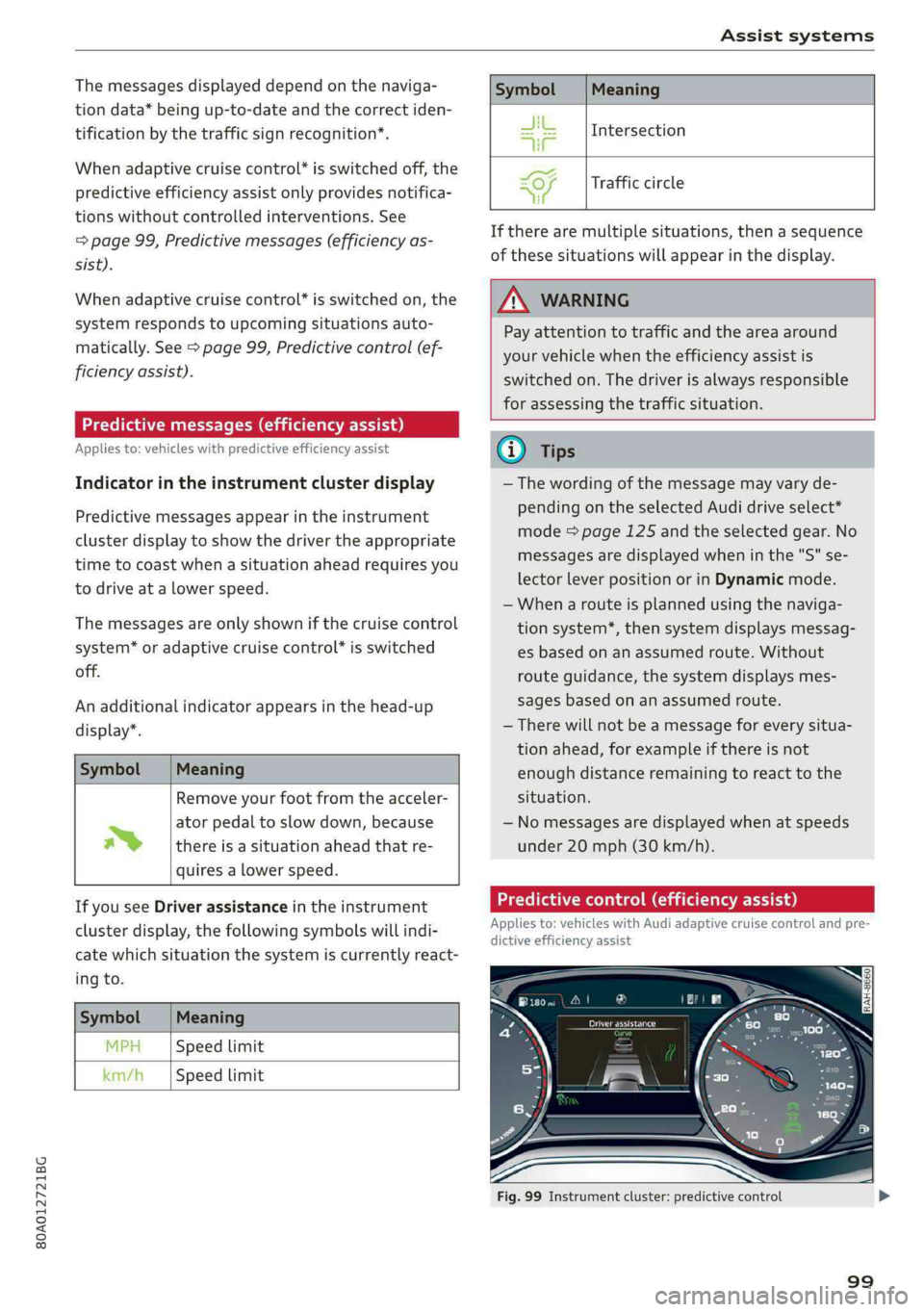
matically.See>page99,Predictivecontrol(ef-
ficiencyassist).
Predictivemessages(efficiencyassist)
Appliesto:vehicleswithpredictiveefficiencyassist
Indicatorintheinstrumentclusterdisplay
Predictivemessagesappearintheinstrument
clusterdisplay toshowthedrivertheappropriate
timetocoastwhenasituationaheadrequiresyou
todriveatalowerspeed.
Themessagesareonlyshownifthecruisecontrol
system*oradaptivecruisecontrol*isswitched
off.
Anadditionalindicatorappearsinthehead-up
display”.
SymbolMeaning
Removeyourfootfromtheacceler-
atorpedaltoslowdown,because
thereisasituationaheadthatre-
quiresalowerspeed.
~
IfyouseeDriverassistanceintheinstrument
clusterdisplay,thefollowingsymbolswillindi-
catewhichsituationthesystemiscurrentlyreact-
ingto.
SymbolMeaning
MPHSpeedlimit
km/hSpeedlimit
SymbolMeaning
JitIntersection
TE
=O)Trafficcircle
ai
Iftherearemultiplesituations,thenasequence
ofthesesituationswillappearinthedisplay.
Z\WARNING
Payattentiontotrafficandtheareaaround
yourvehiclewhentheefficiencyassistis
switchedon.Thedriverisalwaysresponsible
forassessingthetrafficsituation.
@Tips
—Thewordingofthemessagemayvaryde-
pendingontheselectedAudidriveselect*
mode=page125andtheselectedgear.No
messagesaredisplayedwheninthe"S"se-
lectorleverpositionorinDynamicmode.
—Whenarouteisplannedusingthenaviga-
tionsystem*,thensystemdisplaysmessag-
esbasedonanassumedroute.Without
routeguidance, thesystemdisplaysmes-
sagesbasedonanassumedroute.
—Therewillnot beamessageforeverysitua-
tionahead,forexampleifthereisnot
enoughdistanceremainingtoreacttothe
situation.
— Nomessagesaredisplayedwhenatspeeds
under20mph(30km/h).
Predictivecontrol(efficiencyassist)
Appliesto:vehicleswithAudi adaptivecruisecontrolandpre-
dictiveefficiencyassist
Fig.99Instrumentcluster:predictivecontrol
99
Page 102 of 392
Assistsystems
Description
Thepredictivecontrolusesthemapinforma-
tionfromthenavigationsysteminordertoreact
proactivelywhendriving.Informationfromthe
camera-basedtrafficsignrecognition*isalsoap-
pliedtorecognizetrafficsigns>page95.When
cominguptoareaswithspeedlimitsorchanges
inthe courseoftheroad(suchascurves,inter-
sectionsortrafficcircles),thesystembrakesau-
tomaticallyandthenacceleratesbackuptothe
setspeed.
Overridingcontrol
Thedrivercanoverridethepredictivecontrolat
anytimebypressingtheacceleratororbrake
pedal.Ifthesystemchangesthevehiclespeedto
adapttospeedlimits,youcanchangethespeed
usingthelever>page105,fig.106.
Alwaysswitchoffthepredictivecontrolin
thefollowingsituations:
—Whenincreasedattentionisneededfromthe
driver
—Inpoorweatherconditionssuchassnowor
heavyrain
—Whendrivingonroadsinpoorcondition
Indicatorintheinstrumentclusterdisplay
Whenswitchingontheadaptivecruisecontrol
forthefirsttime,amessagewillappearinthe
statuslinetoindicateifpredictivecontrolis
available.
TheBensymbolappearswhenthesystem
isregulatingthespeedtomatchaspeedlimit.If
thisisthecase,thesystemisregulatingaspeed
of50mph(80 km/h).Thespeedisthentaken
over bytheadaptivecruisecontrol.Thespeedin
thespeedometerLEDringadjuststothespeedto
bemaintained>page103,fig.105.TheauEN
=>fig.99symbolappearswhenthereisanadap-
tationtotherouteahead.
IfyouareintheDriverassistancedisplayinthe
instrumentcluster,thenthefollowingsymbols
willindicatewhichoccurrencethesystemiscur-
rentlyrespondingto:
SymbolMeaning
MPHSpeedlimit
km/hSpeedlimit
[lew
JikIntersection
TUT
SiTrafficcircle
te
ZAWARNING
—Readthewarningson>AinGeneralinfor-
mationonpage 102andon>A\inDescrip-
tiononpage95.
—Payattentiontotrafficandtheareaaround
yourvehiclewhenpredictivecontrolis
switchedon.Thedriverisalwaysresponsible
forassessingthetrafficsituation.
—Thesystemdoesnotconsider"rightofway"
rulesanddoesnotrespondtotrafficlights,
solackofdriverattentioninthesesituations
canincreasetheriskofanaccident.
— The systemonlyconsiderstrafficsignsthat
giveaspeedlimit.
— Thepermittedspeedcanbeexceededifthe
adaptationtoaspeedlimitisincorrect.The
driverisresponsibleforadheringtotheper-
mittedspeed.
— Thespeedwhendrivingthroughcurvesmay
bedifferentfromwhatyouasadriverwould
do.Brakethevehicleyourselfwhenneeded
toreducetheriskofanaccident.
D_Thisisnotavailableinsomecountries.
100
G)Tips
—Ifaspeedlimitisdetected,thestored
speedisalsoadjustedinthespeedometer
LEDlinewhentheadaptivecruisecontrolis
notactive.
—Controlbythesystemdependsonthese-
lectedAudidriveselect*mode.
—Switchingoffpredictive control,forexam-
plewhendrivinginlowtrafficzones,does
notcause theadaptivecruisecontrolto
switchoff.
Page 104 of 392
Assistsystems
Onopenroadswithnotraffic,itfunctionslikea
cruisecontrolsystem.Thestoredspeedismain-
tained.Whenapproachingavehicledriving
ahead,theadaptivecruisecontrolsystemauto-
maticallybrakestomatchthatvehicle'sspeed
andthenmaintainsthesetdistance.Assoonas
thesystemdoesnotdetectavehicledriving
ahead,adaptivecruisecontrolacceleratesupto
thestoredspeed.
Instop-and-gotraffic,adaptivecruisecontrolcan
brakeuntilthevehicleisstationaryandthencan
alsostartdrivingagainautomaticallyundercer-
tainconditions>page106.
Appliesto:vehicleswithtrafficjamassist
Intrafficjamsorstop-and-gotraffic,trafficjam
assistcanassistthedriver>page108.
Whichfunctionscanbecontrolled?
Whenyouswitchadaptivecruisecontrolon,you
cansetthecurrentspeedasthe“controlspeed”
=>page103,Switchingonandoff.
Whendriving,youcanstopcruisecontrol
=page106orchangethespeed>page105at
anytime.
Youcanalsosetthedistancetothevehicledriv-
ingaheadandsetthedrivingmodeoftheadap-
tivecruisecontrol>page105.
Generalinformation
Appliesto:vehicleswithAudiadaptivecruisecontrol
BFY-0003
Fig.101Frontofthevehicle:sensorsandvideocamera
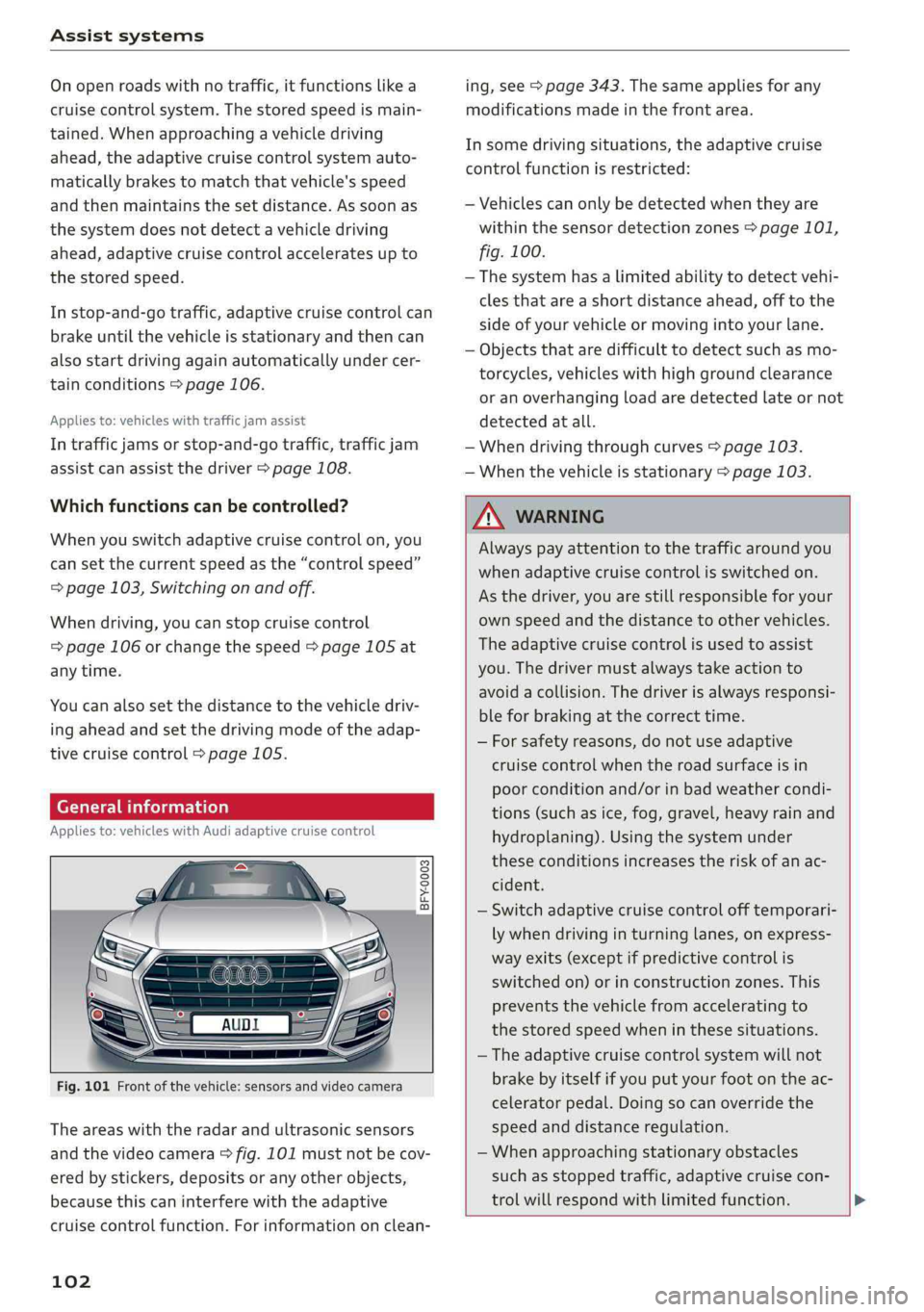
Theareaswiththeradarandultrasonicsensors
andthevideocamera>fig.101mustnotbecov-
ered bystickers,depositsoranyotherobjects,
becausethiscaninterferewiththeadaptive
cruisecontrolfunction.Forinformationonclean-
102
ing,see>page343.Thesameappliesforany
modificationsmadeinthefrontarea.
Insomedrivingsituations,theadaptivecruise
controlfunctionisrestricted:
—Vehiclescanonlybedetectedwhentheyare
withinthesensordetectionzones>page101,
fig.100.
—Thesystemhasalimitedabilitytodetectvehi-
clesthatareashortdistanceahead,offtothe
sideofyourvehicleormovingintoyourlane.
—Objectsthataredifficulttodetectsuchasmo-
torcycles,vehicleswithhighgroundclearance
oranoverhangingloadaredetectedlateornot
detectedatall.
—Whendrivingthroughcurves>page103.
—Whenthevehicleisstationary>page103.
Z\WARNING
Alwayspayattentiontothetrafficaround you
whenadaptivecruisecontrolisswitchedon.
Asthedriver,youarestillresponsibleforyour
ownspeedandthedistancetoothervehicles.
Theadaptivecruisecontrolisusedtoassist
you.Thedrivermustalwaystakeactionto
avoidacollision.Thedriverisalwaysresponsi-
bleforbrakingatthecorrecttime.
—Forsafetyreasons,donotuseadaptive
cruisecontrolwhentheroadsurfaceisin
poorconditionand/orinbadweathercondi-
tions(such asice,fog,gravel,heavyrainand
hydroplaning).Usingthesystemunder
theseconditionsincreasestheriskofanac-
cident.
—Switchadaptivecruisecontrolofftemporari-
lywhendrivinginturninglanes,onexpress-
wayexits(exceptifpredictivecontrolis
switchedon)orinconstructionzones.This
preventsthevehiclefromaccelerating to
thestoredspeedwheninthesesituations.
— Theadaptivecruisecontrolsystemwillnot
brakebyitselfifyouputyourfootontheac-
celeratorpedal.Doingsocanoverridethe
speedanddistanceregulation.
—Whenapproachingstationaryobstacles
suchasstoppedtraffic,adaptivecruisecon-
trol willrespondwithlimitedfunction.
Page 109 of 392
80A012721BG
Assistsystems
Cancelingcruisecontrolwhiledriving
>Movetheleverintoposition@).Themessage
ACC:standbyappears.Or
>Pressthebrakepedal.
>Toresumethestoredspeed,movetheleverto-
wardyouintoposition(2).
Cancelingcruisecontrolwhenstopped
>Pushtheleverawayfromyouintoposition@).
ThemessageACC:standbyappears.
>Toresumecruisecontrol,pressthebrakepedal
andpulltheLevertowardyouintoposition(2).
Z\WARNING
—Itisdangeroustoactivatecruisecontroland
resumethestoredspeedwhenthecurrent
road,trafficorweatherconditionsdonot
permitthis.Thisincreasestheriskofanac-
cident.
—Restingyourfootontheacceleratorpedal
couldoverridethecruisecontrol.Brakingin-
terventionsandcorrectiveactionsbythe
systemmaynotoccur.
SettingAudiadaptivecruisecontrol
Appliesto:vehicleswithAudiadaptivecruisecontrol
>SelectintheInfotainmentsystem:[MENU]but-
ton>Vehicle> leftcontrolbutton>Driveras-
sistance>Audiadaptivecruisecontrol.
Storingthelastdistance!)
Thelastdistancethatwassetwillbestoredafter
theignitionisswitchedoff.Ifthedistanceisnot
stored,Distance3isautomaticallyseteverytime
theignitionisswitchedon.
Drivingprogram
Appliesto:vehicleswithoutAudidriveselect
Dependingontheselecteddrivingprogramand
distance,drivingbehaviorwhenacceleratingwill
varyfromdynamictocomfortable.
D_Thisisnotavailableinsomecountriesand onsomeequip-
mentversions.
Selectingthedrivingmode
Appliesto:vehicleswith Audidriveselect
Depending ontheselectedAudidriveselect
modeandthedistancethatisset,thedrivingbe-
haviorwillvaryfromdynamictocomfortable
whenaccelerating>page127.
(i)Tips
Yoursettings areautomaticallystoredandas-
signedtothevehiclekeybeingused.
Driverinterventionrequest
Appliesto:vehicleswithAudi adaptivecruisecontrol
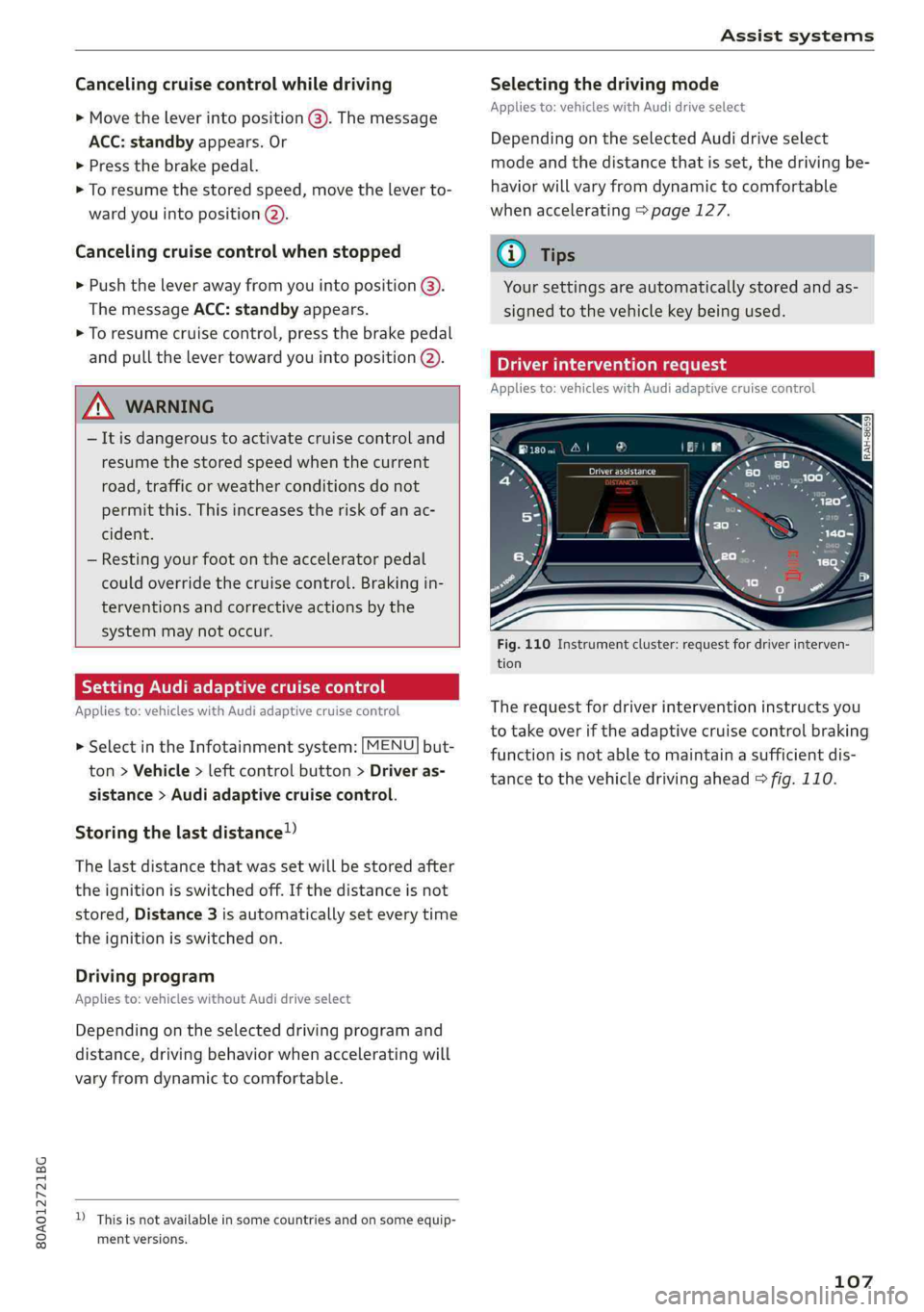
Fig.110Instrumentcluster:requestfordriverinterven-
tion
Therequestfordriverinterventioninstructsyou
totakeoveriftheadaptivecruisecontrolbraking
functionisnotabletomaintainasufficientdis-
tancetothevehicledrivingahead>fig.110.
107