radio AUDI Q5 2019 Owner's Manual
[x] Cancel search | Manufacturer: AUDI, Model Year: 2019, Model line: Q5, Model: AUDI Q5 2019Pages: 392, PDF Size: 99.86 MB
Page 224 of 392
Radio
SiriusXMalerts
Appliesto:vehicleswithSiriusXM
Youcandisplayanoverviewofyourfavoritear-
tistsortracksthatarecurrentlybeingplayedon
aSiriusXMchannel.
Vale
Tee)
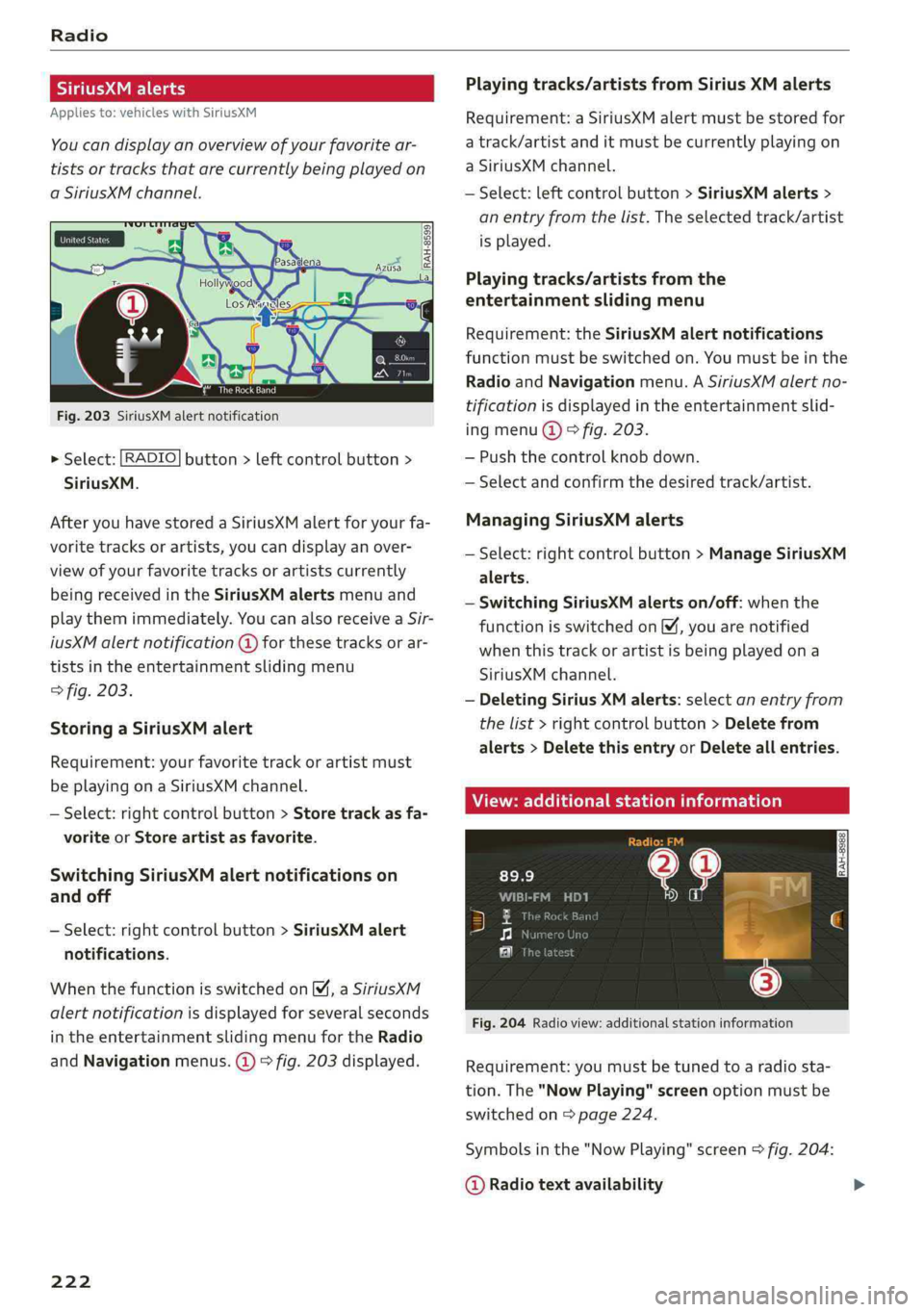
Fig.203SiriusXMalertnotification
>Select:[RADIO]button>leftcontrolbutton>
SiriusXM.
AfteryouhavestoredaSiriusXMalertforyourfa-
voritetracksorartists,youcandisplayanover-
viewofyourfavoritetracksorartistscurrently
beingreceivedintheSiriusXMalertsmenuand
playthemimmediately.YoucanalsoreceiveaSir-
iusXMalertnotification@forthesetracksorar-
tistsintheentertainmentslidingmenu
>fig.203.
StoringaSiriusXMalert
Requirement:yourfavoritetrackorartistmust
beplayingonaSiriusXMchannel.
—Select:rightcontrolbutton>Storetrackasfa-
voriteorStoreartistasfavorite.
SwitchingSiriusXMalertnotificationson
andoff
—Select:rightcontrolbutton>SiriusXMalert
notifications.
WhenthefunctionisswitchedonM,aSiriusXM
alertnotificationisdisplayedforseveralseconds
intheentertainmentslidingmenufortheRadio
andNavigationmenus.@)>fig.203displayed.
222
Playingtracks/artistsfromSiriusXMalerts
Requirement:aSiriusXMalertmustbestoredfor
atrack/artistanditmustbecurrentlyplayingon
aSiriusXMchannel.
—Select:leftcontrolbutton>SiriusXMalerts>
anentryfromthelist.Theselectedtrack/artist
isplayed.
Playingtracks/artistsfromthe
entertainmentslidingmenu
Requirement:theSiriusXMalertnotifications
functionmustbe switchedon.Youmustbeinthe
RadioandNavigationmenu.ASiriusXMalertno-
tificationisdisplayedintheentertainmentslid-
ingmenu@)©fig.203.
—Pushthecontrolknob down.
—Selectandconfirmthedesiredtrack/artist.
ManagingSiriusXMalerts
—Select:rightcontrolbutton>ManageSiriusXM
alerts.
—SwitchingSiriusXMalertson/off:whenthe
functionisswitchedon,youarenotified
whenthistrackorartistisbeingplayedona
SiriusXMchannel.
—DeletingSiriusXMalerts:selectanentryfrom
thelist>rightcontrolbutton>Deletefrom
alerts>DeletethisentryorDeleteallentries.
View:additionalstationinformation
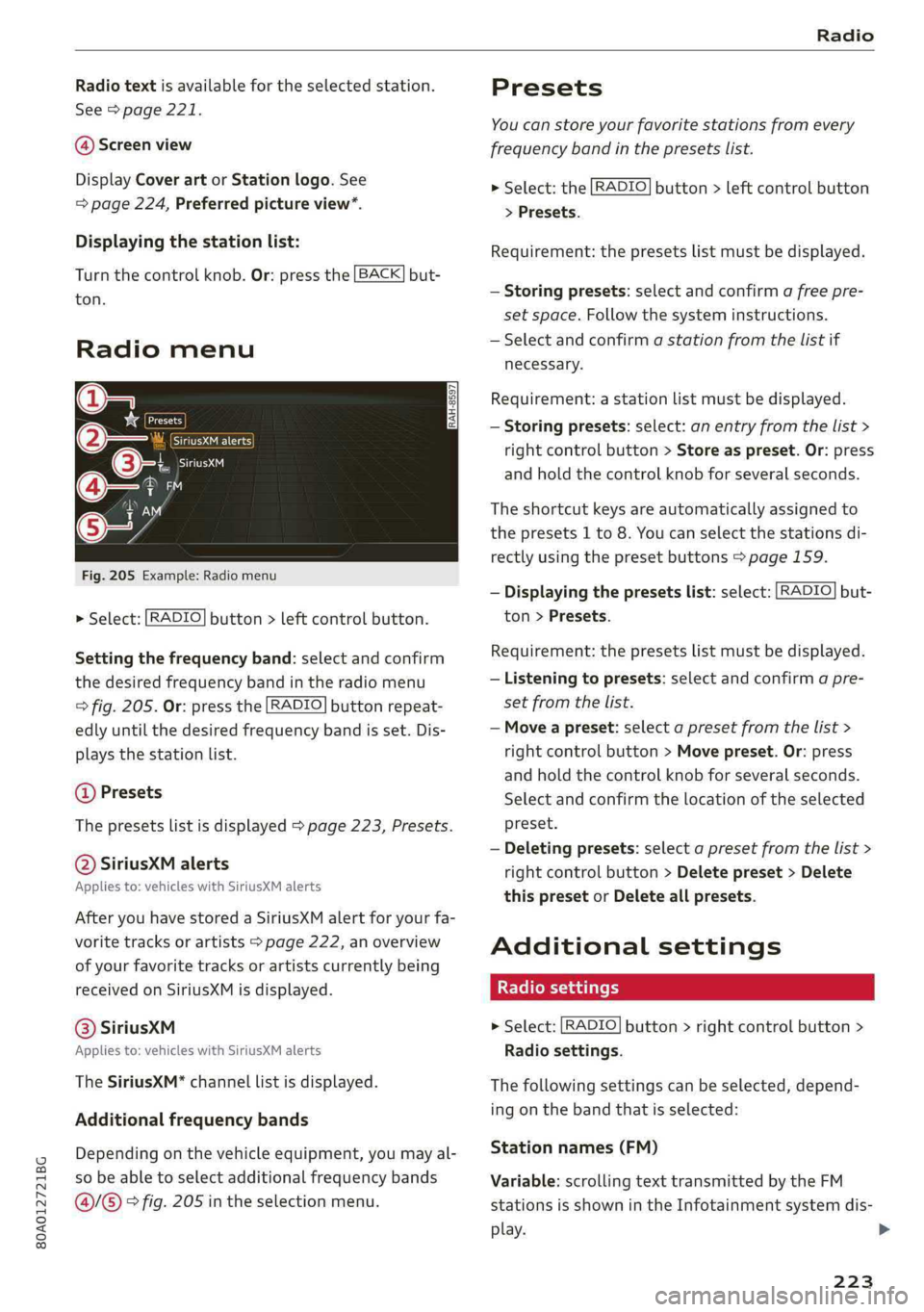
Fig.204Radioview:additionalstationinformation
Requirement:youmustbetunedtoaradiosta-
tion.The"NowPlaying"screenoptionmustbe
switched
on>page224.
Symbolsinthe"NowPlaying"screen>fig.204:
@Radiotextavailability
Page 225 of 392
80A012721BG
Radio
Radiotextisavailable fortheselectedstation.
See>page221.
@Screenview
DisplayCoverartorStationlogo.See
=>page224,Preferredpictureview*.
Displayingthestationlist:
Turnthecontrolknob.Or:pressthe[BACK]but-
ton.
Radiomenu
ee
He[Presets
(2Girne
©-:.Cited
asiM
e-
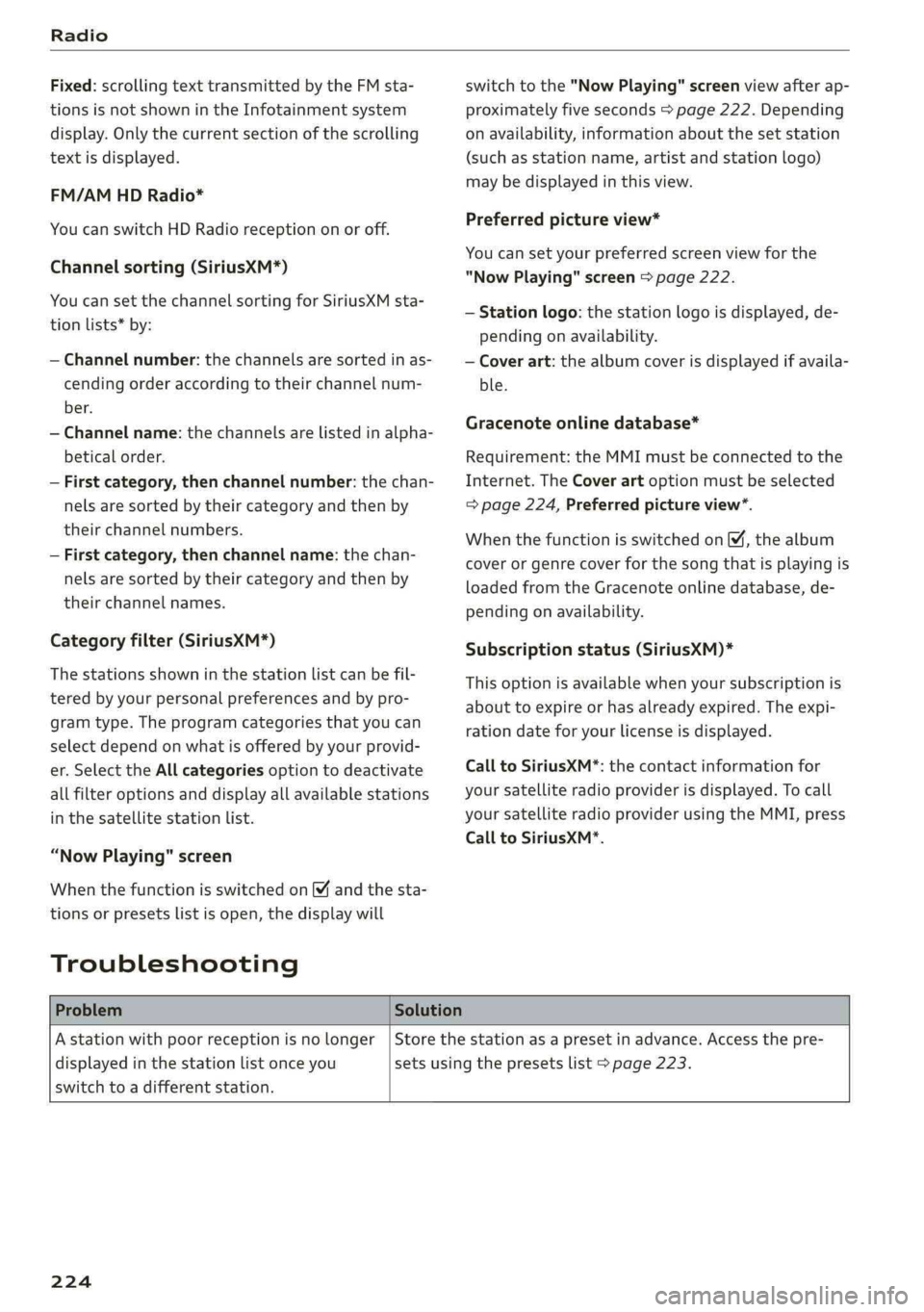
Fig.205Example:Radiomenu
>Select:[RADIO]button>leftcontrolbutton.
Settingthefrequencyband:selectandconfirm
thedesiredfrequencybandintheradiomenu
>fig.205.Or:pressthe[RADIO]buttonrepeat-
edlyuntilthedesiredfrequencybandisset.Dis-
playsthestationlist.
@Presets
Thepresetslistisdisplayed>page223,Presets.
@SiriusXMalerts
Appliesto:vehicleswithSiriusXMalerts
AfteryouhavestoredaSiriusXMalertforyourfa-
voritetracksorartists>page222,an overview
ofyourfavoritetracksorartistscurrentlybeing
receivedonSiriusXMisdisplayed.
©®SiriuskXM
Appliesto:vehicleswithSiriusXMalerts
TheSiriusXM*channellistisdisplayed.
Additionalfrequencybands
Dependingonthevehicleequipment,youmayal-
sobeabletoselectadditionalfrequencybands
@/@®>fig.205intheselectionmenu.
Presets
You canstoreyourfavoritestationsfromevery
frequencybandinthepresetslist.
>Select:the[RADIO]button>leftcontrolbutton
>Presets.
Requirement:thepresetslistmustbedisplayed.
—Storingpresets:selectandconfirm afreepre-
setspace.Followthesysteminstructions.
—Selectandconfirmastationfromthelistif
necessary.
Requirement:astationlistmustbedisplayed.
—Storingpresets:select:anentryfromthelist>
rightcontrolbutton>Storeaspreset.Or:press
andholdthecontrolknobforseveralseconds.
Theshortcutkeysareautomaticallyassignedto
thepresets1to8.Youcanselectthestationsdi-
rectlyusingthepresetbuttons>page159.
—Displayingthepresetslist:select:[RADIO]but-
ton>Presets.
Requirement:thepresetslistmustbedisplayed.
—Listeningtopresets:selectandconfirmapre-
setfromthelist.
—Moveapreset:selectapresetfromthelist>
rightcontrolbutton>Movepreset.Or:press
andholdthecontrolknobforseveralseconds.
Selectandconfirmthelocationoftheselected
preset.
—Deletingpresets:selectapresetfromthelist>
rightcontrolbutton>Deletepreset>Delete
thispresetorDeleteallpresets.
Additionalsettings
>Select:[RADIO]button>rightcontrolbutton>
Radiosettings.
Thefollowingsettingscanbeselected,depend-
ingonthebandthatisselected:
Stationnames(FM)
Variable:scrollingtexttransmittedbytheFM
stationsisshownintheInfotainmentsystemdis-
play.
223
Page 226 of 392
Radio
Fixed:scrollingtexttransmittedby theFMsta-
tionsisnotshownintheInfotainmentsystem
display.Onlythecurrentsectionofthescrolling
textisdisplayed.
FM/AMHDRadio*
YoucanswitchHDRadioreceptiononoroff.
Channelsorting(SiriusXM*)
YoucansetthechannelsortingforSiriusXMsta-
tionlists*by:
—Channelnumber:thechannelsaresortedinas-
cendingorderaccordingtotheirchannelnum-
ber.
—Channelname:thechannelsarelistedinalpha-
beticalorder.
—Firstcategory,thenchannelnumber:thechan-
nelsaresorted bytheircategoryandthenby
theirchannelnumbers.
—Firstcategory,thenchannelname:thechan-
nelsaresorted bytheircategoryandthenby
theirchannelnames.
Categoryfilter(SiriusXM*)
Thestationsshowninthestationlistcanbefil-
teredby yourpersonalpreferencesandbypro-
gramtype.Theprogramcategoriesthatyoucan
selectdependonwhatisofferedbyyourprovid-
er.SelecttheAllcategoriesoptiontodeactivate
allfilteroptionsanddisplayallavailablestations
inthesatellitestationlist.
“NowPlaying" screen
Whenthefunctionisswitchedon¥andthesta-
tionsorpresetslistisopen,thedisplaywill
Troubleshooting
switchtothe"NowPlaying"screenviewafterap-
proximatelyfiveseconds>page222.Depending
onavailability,informationaboutthesetstation
(such asstationname,artistandstationlogo)
maybedisplayedinthisview.
Preferredpictureview*
Youcansetyourpreferredscreenviewforthe
"NowPlaying"screen>page222.
—Stationlogo:thestationlogoisdisplayed,de-
pendingonavailability.
—Coverart:thealbumcoverisdisplayedifavaila-
ble.
Gracenoteonlinedatabase*
Requirement:theMMImustbeconnectedtothe
Internet.TheCoverartoptionmustbeselected
=>page224,Preferredpictureview”.
Whenthefunctionisswitchedon M,thealbum
coverorgenrecoverforthesongthatisplayingis
loadedfromtheGracenoteonlinedatabase,de-
pendingonavailability.
Subscriptionstatus(SiriusXM)*
Thisoptionisavailablewhenyoursubscriptionis
abouttoexpireorhasalreadyexpired.Theexpi-
rationdateforyourlicenseisdisplayed.
CalltoSiriusXM*:thecontactinformationfor
yoursatelliteradioproviderisdisplayed.Tocall
yoursatelliteradioproviderusingtheMMI,press
CalltoSiriusXM*.
ProblemSolution
Astationwithpoorreceptionisnolonger
displayedinthestationlistonceyou
switchtoadifferentstation.
Storethestationasapresetinadvance.Accessthepre-
setsusingthepresetslist>page223.
224
Page 231 of 392
80A012721BG
Media
Wi-Fiaudioplayer
Appliesto:vehicleswithWi-Fiaudioplayer
UsingtheWi-Fiaudioplayermediasourceonthe
MMI, youcanconnectandoperateyourWi-Fi-ca-
pablemediaplayer(suchasasmartphone)to
wirelesslyplaymusicfromyourmediaplayerli-
brary.Themediaplayerisconnectedthroughthe
vehicle'sWi-Fihotspot.AUPnPServerapporan
integratedUPnP/DLNAserveronyourmedia
playerisrequiredtoaccessyourmediaplayerli-
brary.
Requirement:theWi-Fifunctiononyourmedia
playermustbe switchedon.ThemyAudiappora
UPnPserverappmustbeinstalledonyourmedia
player.Or:youmustbeusingamediaplayerwith
anintegratedUPnP/DLNAserver.
—Connectingamediaplayer:pressthe[MEDIA
button.Presstheleftcontrolbuttonuntilthe
sourcesoverview>page234isdisplayed.Se-
lectandconfirm Wi-Fiaudioplayer(7)
=>page234,fig.211.
—Ifnecessary,selectandconfirmWi-Fiturned
off>TurnonWi-FitoactivateWi-Fiinthe
MMI.SelectWi-Fisettings,ifnecessary.Select
thesamesettingsonthewirelessmediaplayer
thatareusedfortheWi-Fihotspot.
—StartingtheWi-Fiaudioplayer:Startthe
myAudiapporanUPnPserverapp,orallow
mediasharingonyourdevice.
Operatingthemediaplayer:themediaplayeris
operatedthroughtheMMI.
—Presstheleftcontrolbuttonrepeatedlyuntil
theFoldersmenuitemappears.Selectandcon-
firmFolders.
—Playingmusicfromthemediaplayer:select
andconfirmMediacenter.
Webradio:see>page230.
objects,theycouldbethrownaroundthein-
sideofthevehicleinacrashandcauseseri-
ousinjuries.Storethesetypesofdevicesse-
curelywhiledriving.
—Donotuseanywirelessdevicesonthefront
seatswithinrangeoftheairbagswhiledriv-
ing.Also readandfollowthewarningsin
=page270,Frontairbags.
ZAWARNING
—Asthedriver,donotallowusageoftheWi-
Fihotspottodistractyoufromdriving,as
thiscouldincreasetheriskofanaccident.
—Itisonlysafe tousetablets,laptops,mobile
devicesandothersimilardeviceswhenthe
vehicleisstationarybecause,likeallloose
C)Note
Alwaysfollowtheinformationfoundin>@in
Generalinformationonpage192.
G)Tips
—Alwaysreadthechapter>page192,Audi
connect.
—PleasenotethataWi-Ficonnectiondoes
notautomaticallymakeitpossible touse
the
Internet.Foradditionalinformation,
see>page193.
—Toavoidinterruptionsduringplayback,de-
activatethepowersavingfunctiononthe
mediaplayer orconnectittoacharger.
—Theloadingtimesfortheaudiodatadepend
onthemediaplayerusedandthenumberof
filesthatitcontains.
—Amaximumof2,000entriesperdirectory
aredisplayedintheMMI.
—Songsdownloadedforofflineuseusingmu-
sicstreamingservicesarestoredonyour
mobiledevice(suchasasmartphone)and
maybeDRMprotected.TheWi-Fiaudio
playerwillnotplayDRMprotectedfiles.
—ContactanauthorizedAudidealeror au-
thorizedAudiServiceFacilityforadditional
informationontheWi-Fiaudioplayer.
229
Page 232 of 392
![AUDI Q5 2019 Owners Manual Media
Onlinemediaand
Internetradio
Appliesto:vehicleswithAudiconnect
Youcanplaybackandoperatevariousonlineme-
diaservicesandInternetradiousingtheMMI.
Fig.208Onlinemedia
> Pressthe[MEDIA]button.](/img/6/57631/w960_57631-231.png "AUDI Q5 2019 Owners Manual Media
Onlinemediaand
Internetradio
Appliesto:vehicleswithAudiconnect
Youcanplaybackandoperatevariousonlineme-
diaservicesandInternetradiousingtheMMI.
Fig.208Onlinemedia
> Pressthe[MEDIA]button.")
Media
Onlinemediaand
Internetradio
Appliesto:vehicleswithAudiconnect
Youcanplaybackandoperatevariousonlineme-
diaservicesandInternetradiousingtheMMI.
Fig.208Onlinemedia
> Pressthe[MEDIA]button.Presstheleftcontrol
buttonuntilthesourcesoverview>fig.208is
displayed.
Appliesto:onlinemediaandInternetradiousage
Requirement:
—ThemyAudiappmustbeinstalledandopenon
yourmobiledevice.
—YoumustbeloggedintoyourmyAudiaccount
inthemyAudiapp andyoumusthaveselected
yourvehicle.
—TheWi-Fifunctiononthemobiledeviceandon
theMMImustbe switchedon.
—Ifnecessary,checkinthe connectionmanager
=>page246ifthemobiledeviceyouconnected
isselectedundertheMMIconnectapp().
—TheMMImustbeconnectedtothenetwork.
—ThesymbolfortheOnlinemediasource(@)
=>fig.208isshownintheMMI.
Appliesto:onlinemediausage
Additionalrequirement:
— Asupportedonlinemediaservicemustbeavail-
ableinthecountrywherethevehicleisbeing
operated.
—Youmusthave anaccountwithasupportedon-
linemediaservice.
—Dependingontheonlinemediaservice,you
mayneedtoinstallandopenanapponyour
mobiledevice.
StartingOnlinemedia
—Pressthe[MEDIA]button.Presstheleftcontrol
buttonuntilthesourcesoverview>page234is
displayed.
230
—Selectandconfirm anonlinemediaservice.
StartingInternetradio
—Pressthe[MEDIA]button.Presstheleftcontrol
buttonuntilthesourcesoverview>page234is
displayed.
—SelectandconfirmInternetradio.TheInternet
radiobrowserorthelaststationthatwasplay-
ingisshown.
—Selectingthestation:ifnecessary,selectand
confirmacategoryintheInternetradioBrows-
er>astation.
OnlinemediaandInternetradio:additionalop-
tions
—Presstherightcontrolbutton.
Thefollowingoptionsmaybeavailable,depend-
ingontheinformationshown(suchasthesta-
tion/trackthatiscurrentlyplaying):
—Soundsettings:see>page249.
—Wi-Fisettings:see>page198,Wi-Fisettings.
—Connectionmanager:see>page246.
—Additionaloptionsmaybeavailable,depending
ontheactiveonlinemediaserviceorInternet
radio.
ZA\WARNING
—Itisonlysafe tousetablets,laptops,mobile
devicesandothersimilardeviceswhenthe
vehicleisstationarybecause,likeallloose
objects,theycouldbethrownaroundthein-
sideofthevehicleinacrashandcauseseri-
ousinjuries.Storethesetypesofdevicesse-
curelywhiledriving.
—Donotuseanywirelessdevicesonthefront
seatswithinrangeoftheairbagswhiledriv-
ing.Also readandfollowthewarningsin
=>page270,Frontairbags.
C)Note
—Alwaysfollowtheinformationfoundin>®
inGeneralinformationonpage192.
—Theregenerallyareadditionalcostswhen
usinganonlinemediaserviceaccount,espe-
ciallywhenitisusedinternationally.
Page 233 of 392
80A012721BG
Media
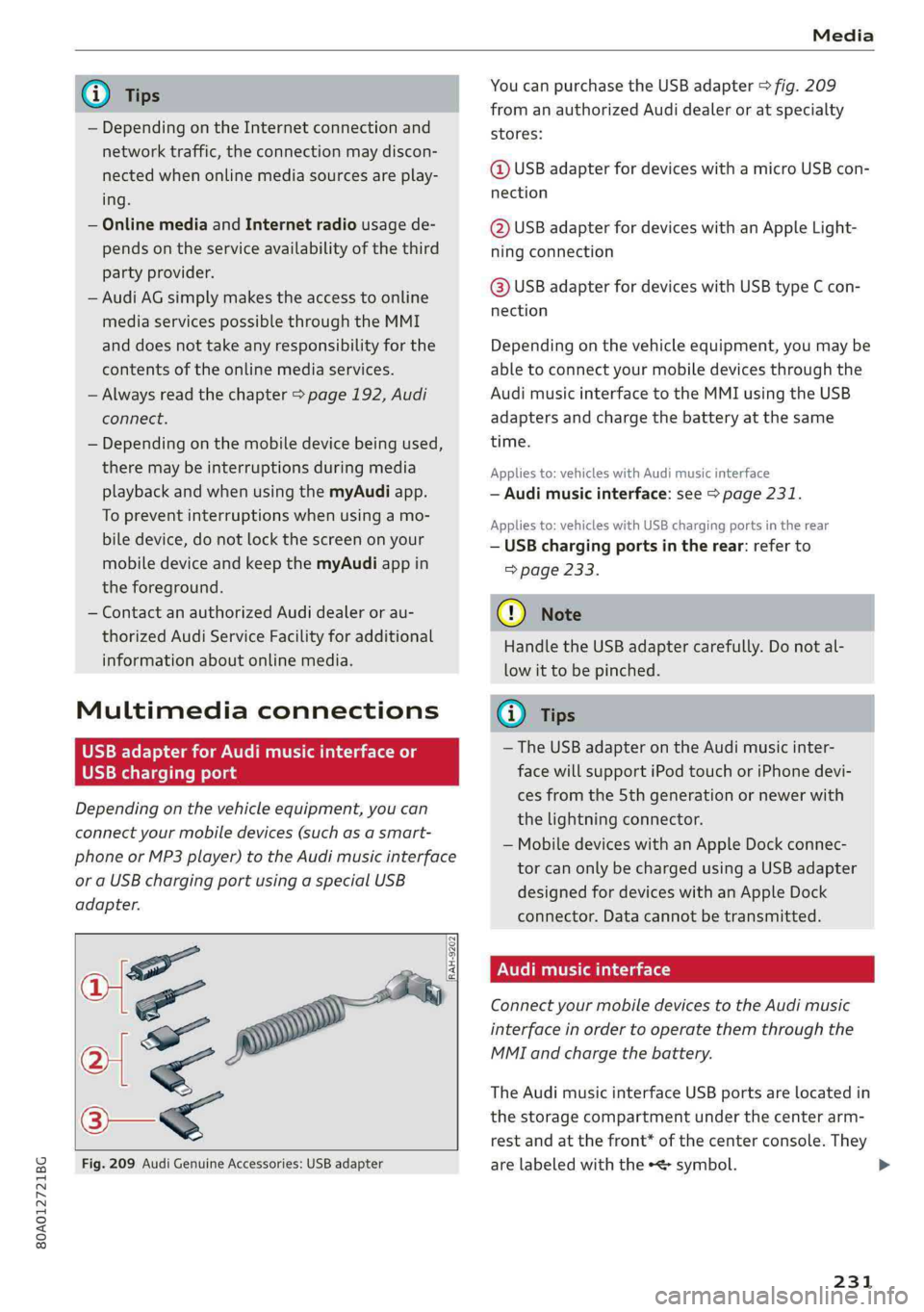
@TipsYoucanpurchasetheUSBadapter>fig.209
fromanauthorizedAudidealeroratspecialty
— Depending ontheInternetconnectionandstores:
networktraffic,the connectionmaydiscon-
nectedwhenonlinemediasourcesareplay-@USBadapterfordeviceswithamicroUSBcon-
ing.nection
—OnlinemediaandInternetradiousagede-@USBadapterfordeviceswithanAppleLight-
pendsontheserviceavailabilityofthethirdningconnection
partyprovider.
—AudiAGsimplymakestheaccesstoonlinehaaSeadsterfardevicesaitUSBGmeEcon
mediaservicespossiblethroughtheMMInection
anddoesnottakeanyresponsibilityfortheDepending onthevehicleequipment,youmaybe
contentsoftheonlinemediaservices.abletoconnectyourmobiledevicesthroughthe
—Alwaysreadthe chapter>page192,AudiAudimusicinterfacetotheMMIusingtheUSB
connect.adaptersandchargethebatteryatthesame
— Depending onthemobiledevicebeingused, time.
theremaybeinterruptionsduringmediaAppliesto:vehicleswithAudimusicinterface
playbackandwhenusingthemyAudiapp.—Audimusicinterface:see>page231.
TopreventinterruptionswhenSSeeAppliesto:vehicleswithUSBchargingportsintherear
biledevice,donotlockthescreenonyour—USBchargingportsintherear:referto
mobiledeviceandkeepthemyAudiappin>page233.
theforeground.
—ContactanauthorizedAudidealeror au-@)Note
thorizedAudiServiceFacilityforadditional
HandletheUSBadaptercarefully.Donotal-
informationaboutonlinemedia.
lowittobepinched.
MultimediaconnectionsG)Tips
—TheUSBadapteronthe Audimusicinter-
USBchargingportfacewillsupportiPodtouchoriPhonedevi-
cesfromthe 5thgenerationornewerwith
thelightningconnector.
—MobiledeviceswithanAppleDockconnec-
torcanonlybechargedusingaUSBadapter
designedfordeviceswithanAppleDock
connector.Datacannotbetransmitted.
Audimusicinterface
ConnectyourmobiledevicestotheAudimusic
interfaceinordertooperatethemthroughthe
MMIandchargethebattery.
Dependingonthevehicleequipment,youcan
connectyourmobiledevices(suchas asmart-
phoneorMP3player)totheAudimusicinterface
oraUSBchargingportusingaspecialUSB
adapter.
af
a|=
TheAudimusicinterfaceUSBportsarelocatedin
o—«thestoragecompartmentunderthecenterarm-
restandatthefront* ofthecenterconsole.They
Fig.209AudiGenuineAccessories:USBadapterarelabeledwiththe«
[RAH-9202
\
231
Page 236 of 392
Media
UsingAudiGenuineAccessoriesisrecommended.
Audihasverifiedtheirreliability,safety,andsuit-
ability.
Wecannotevaluateorendorseotherproductsin
thisway,eveniftheproductisapprovedbyacer-
tifiedtestingagencyorgovernmentagency.
@)Note
Onlyusedevicesthatareapprovedforthe
Rear SeatEntertainmentpreparation.Unap-
provedequipmentcan causedamagetothe
vehicleelectricalsystem.
G)Tips
—Contact anauthorizedAudidealerorau-
thorizedAudiServiceFacilityforadditional
informationonAudiEntertainmentmo-
bile.
—Alwaysreadthechapter>page367.
—TheRear SeatEntertainmentpreparationis
notintendedtochargeexternalelectronic
devices.
Playingmedia
Accessingmedia
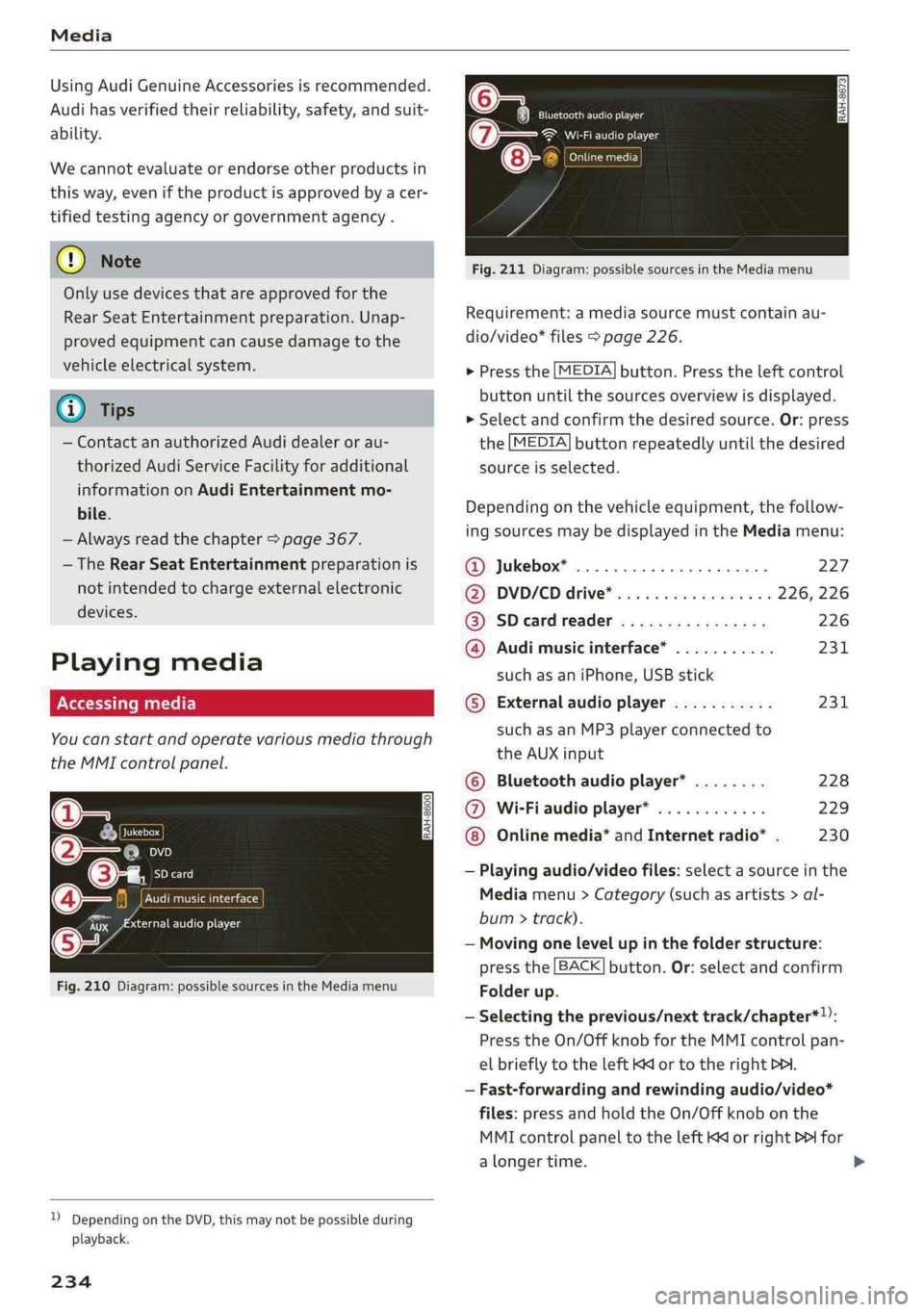
Youcanstartandoperatevariousmediathrough
theMMIcontrolpanel.
PNWTeatCeMial<1aile
fiiEeneN(ta
Fig.210Diagram:possiblesourcesintheMediamenu
Sis3<9 =|Z|
cc|
))DependingontheDVD,thismaynotbepossibleduring
playback.
234
Eltrones
SeeaerEg
Cinetacic)
Fig.211Diagram:possiblesourcesintheMediamenu
Requirement:amediasourcemustcontainau-
dio/video*files>page226.
>Pressthe[MEDIA]button.Presstheleftcontrol
buttonuntilthesourcesoverviewisdisplayed.
>Selectandconfirmthedesiredsource.Or:press
the[MEDIA]buttonrepeatedlyuntilthedesired
sourceisselected.
Dependingonthevehicleequipment,thefollow-
ingsourcesmaybedisplayedintheMediamenu:
@Jukebox*...00...ee.227
DD,DVD/CDidtive®sinoscece¢wieones226,226
@SDeardreader................226
@Audimusicinterface*...........231
suchasaniPhone,USBstick
©®Externalaudioplayer...........231
suchasanMP3playerconnectedto
theAUXinput
©Bluetoothaudioplayer*........228
@Wi-Fiaudioplayer*............229
Onlinemedia*andInternetradio”.230
—Playingaudio/videofiles:selectasourceinthe
Mediamenu>Category(suchasartists>al-
bum>track).
—Movingonelevelupinthefolderstructure:
pressthe[BACK]button.Or:selectandconfirm
Folderup.
—Selectingtheprevious/nexttrack/chapter*)):
PresstheOn/OffknobfortheMMIcontrolpan-
elbrieflytotheleftKdor totherightPHI.
—Fast-forwardingandrewindingaudio/video*
files:pressandholdtheOn/Offknobonthe
MMIcontrolpaneltotheleftKdorrightPofor
alongertime.
Page 237 of 392
80A012721BG
Media
—Pausingorresumingplayback:pressthe
On/OffknobontheMMIcontrolpanelbriefly.
@Tips
—Youcanscrollthroughlong listsquicklyby
turningthecontrolknobquickly.Thescroll-
ingspeeddependsonthenumberoflisten-
tries.
—For safetyreasons,thevideoimageisonly
displayedwhenthevehicleisstationary.On-
lythesoundfromthevideoplayswhiledriv-
ing.
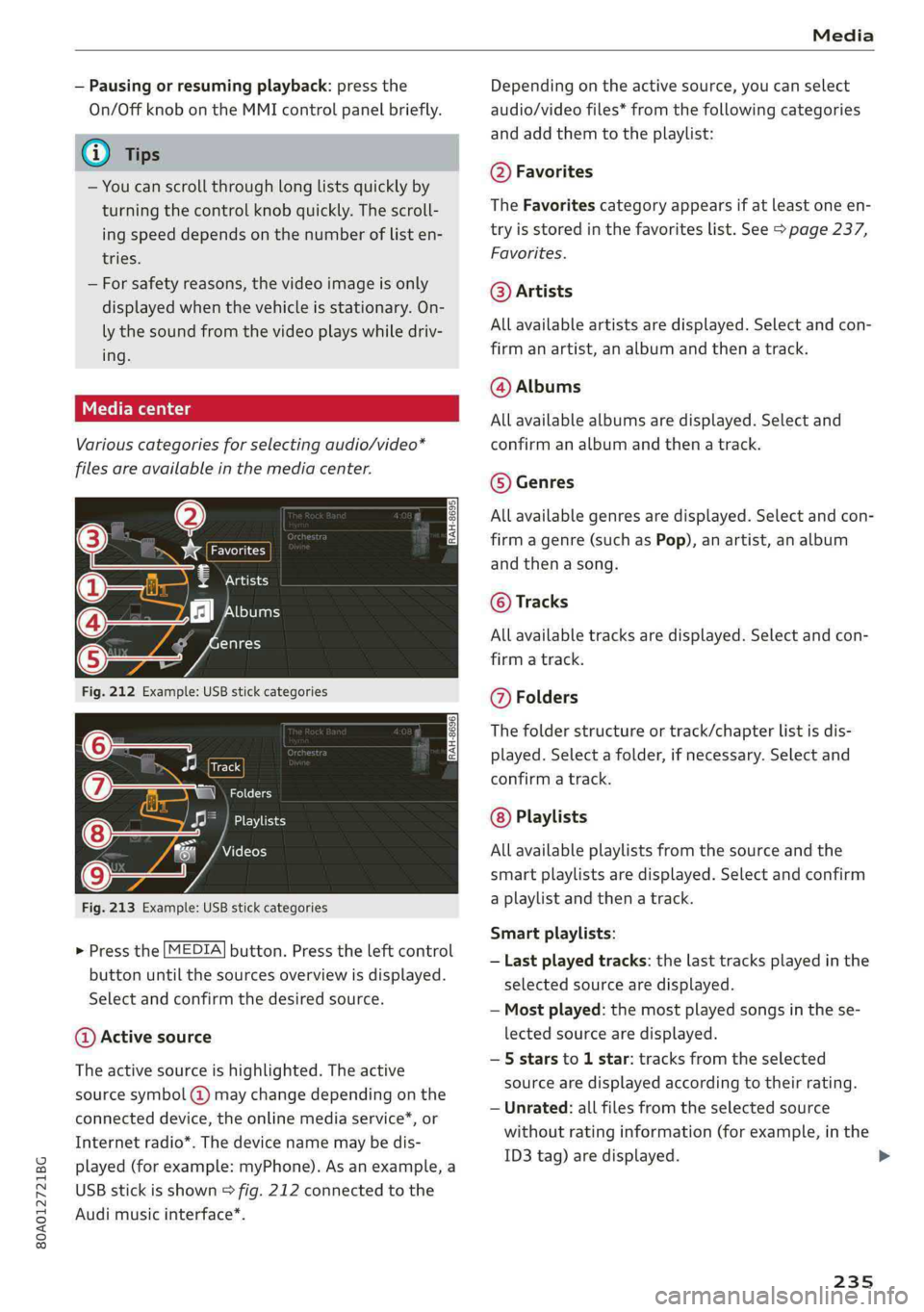
Variouscategoriesfor selectingaudio/video*
filesareavailableinthemediacenter.
3)Favorites
7‘Artists
‘alHeyTsar)
enres
Fig.212Example:USBstickcategories
Track
@|zat
Playlists
Videos
Fig.213Example:USBstickcategories
>Pressthe[MEDIA]button.Presstheleftcontrol
buttonuntilthesourcesoverviewisdisplayed.
Selectandconfirmthedesiredsource.
@Activesource
Theactivesourceishighlighted.Theactive
sourcesymbol(@)maychangedependingonthe
connecteddevice,theonlinemediaservice*,or
Internetradio*.Thedevicenamemaybedis-
played(forexample:myPhone).Asanexample,a
USBstickisshown>fig.212connectedtothe
Audimusicinterface*.
Depending ontheactivesource,youcanselect
audio/videofiles*fromthefollowingcategories
and addthemtotheplaylist:
@Favorites
TheFavoritescategoryappearsifatleastoneen-
tryisstoredinthefavoriteslist.See>page237,
Favorites.
@Artists
Allavailableartistsaredisplayed.Selectandcon-
firmanartist,analbumandthena track.
@Albums
Allavailablealbumsaredisplayed.Selectand
confirm analbumandthenatrack.
©Genres
Allavailablegenresaredisplayed.Selectandcon-
firm
agenre(suchasPop),anartist,analbum
andthenasong.
©Tracks
Allavailabletracksaredisplayed.Selectandcon-
firm
atrack.
@Folders
Thefolderstructureortrack/chapterlistisdis-
played.Selectafolder,ifnecessary. Selectand
confirmatrack.
Playlists
Allavailableplaylistsfromthesourceandthe
smartplaylistsaredisplayed.Selectandconfirm
aplaylistandthena track.
Smartplaylists:
—Lastplayedtracks:thelasttracksplayedinthe
selectedsourcearedisplayed.
— Mostplayed:themostplayedsongsinthese-
lectedsourcearedisplayed.
—5starsto 1star:tracksfromtheselected
sourcearedisplayedaccordingtotheirrating.
—Unrated:allfilesfromtheselectedsource
withoutratinginformation(forexample,inthe
ID3tag)aredisplayed.
235
>
Page 238 of 392
Media
©Videos*
Allavailablevideofilesaredisplayed.Selectand
confirmavideofile.
@)Note
Appliesto:vehicleswithAudiconnectInfotainmentand
useoftheradiocategorywithiPod/iPhone
Alwaysfollowtheinformationfoundin>@in
Generalinformationonpage192.
G@)Tips
—Onlythecategoriessupportedbythemedi-
umareavailable.Forexample,CD/DVD-
ROMtrackscannotbeselectedwithcatego-
riessuchasArtists,AlbumsorGenres.
WithaniPod/iPhone(source:Audimusicin-
terface>page231),the Podcasts,Audio
booksandComposerscategoriesarealso
available.
—For safetyreasons,thevideoimageisonly
displayedwhenthevehicleisstationary.On-
lythesoundfromthevideoplayswhiledriv-
ing.
—Whensynchronizingaportabledevicewith
"Cloud“services,playlistsmaydisplayincor-
rectly
intheMMI.Usethemediacenterin
thedevice.
—WithaniPod/iPhone(mediasource:Audi
musicinterface>page231),the Podcasts,
Audio booksandComposerscategoriesare
alsoavailable.
G)Tips
Appliesto:iPod/iPhoneonAudimusicinterface
—AnInternetconnectionisrequiredtouse
theadditionalRadiocategory,anonline
mediaservice.Alsoseethe chapter
=>page198,Wi-Fisettings.Also readthe
informationonthe Audimusicinterfaceand
thesupporteddevices>page231.
— DependingontheInternetconnectionand
networktraffic,theconnectionmaydiscon-
nectedwhenonlinemediasourcesareplay-
ing.
—Theuseofonlinemediaservicesdependson
theserviceavailabilityofthethirdparty
provider.
236
—AudiAGsimplymakestheaccesstoonline
mediaservicespossiblethroughtheMMI
anddoesnottakeanyresponsibilityforthe
contentsoftheonlinemediaservices.
ac-\Bx-yaestla)
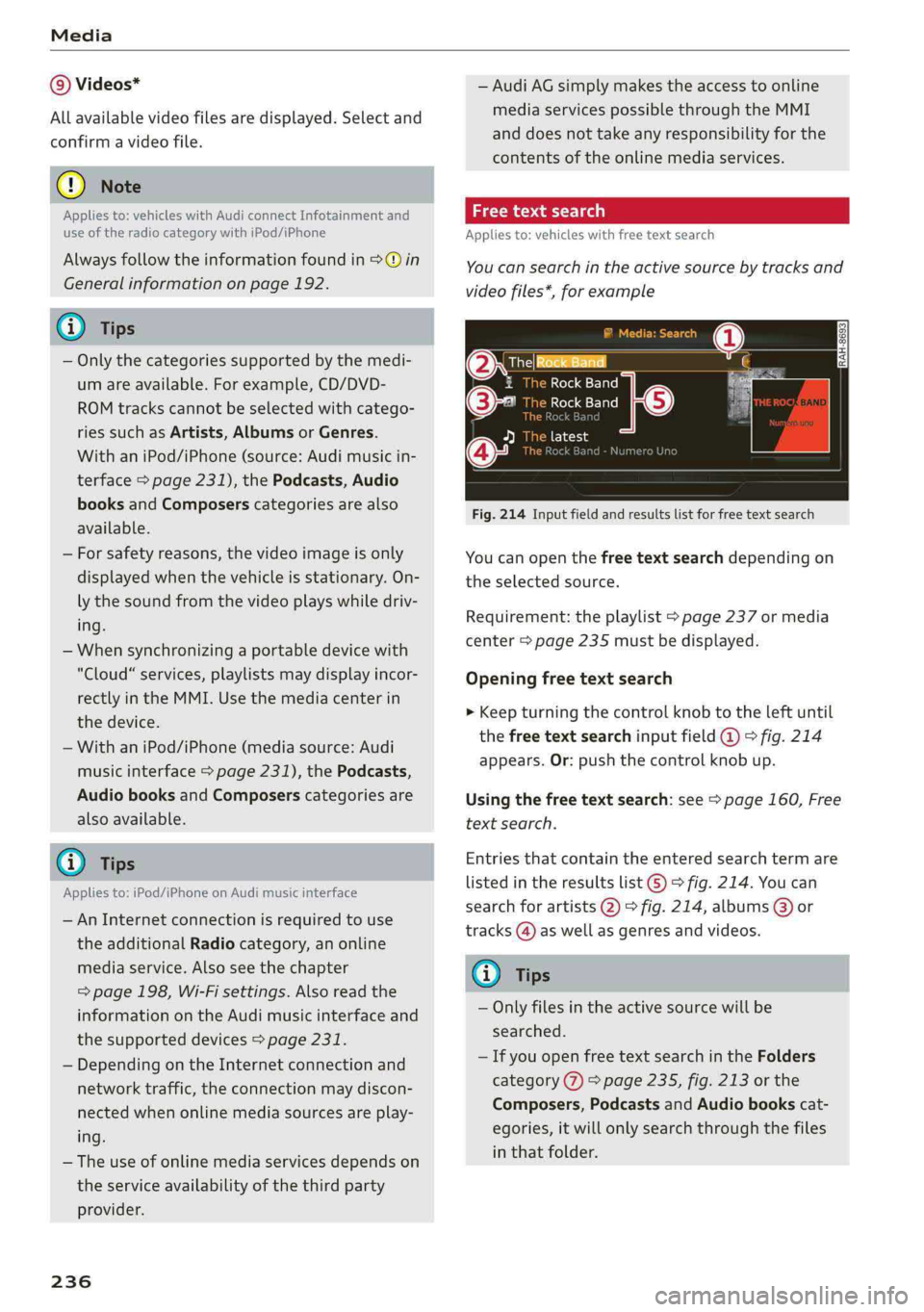
Appliesto:vehicleswithfree textsearch
Youcansearchintheactivesourcebytracksand
videofiles*,forexample
OresRockBandq
1RockBand:
©-RockBand
[eie-hie
a
Fig.214Inputfieldandresultslistforfreetextsearch
Youcanopenthefreetextsearchdependingon
theselectedsource.
Requirement:theplaylist>page237ormedia
center>page235mustbedisplayed.
Openingfreetextsearch
>Keepturningthecontrolknobtotheleftuntil
thefreetextsearchinputfield@°fig.214
appears.Or:pushthecontrolknobup.
Usingthefreetextsearch:see>page160,Free
textsearch.
Entriesthatcontaintheenteredsearchtermare
listedintheresultslist©>fig.214.Youcan
searchforartists2)°fig.214,albums@)or
tracks@)aswellasgenresandvideos.
Gi)Tips
—Onlyfilesintheactivesourcewillbe
searched.
—IfyouopenfreetextsearchintheFolders
category(7)>page235,fig.213orthe
Composers,PodcastsandAudiobookscat-
egories,itwillonlysearchthroughthefiles
inthatfolder.
Page 244 of 392
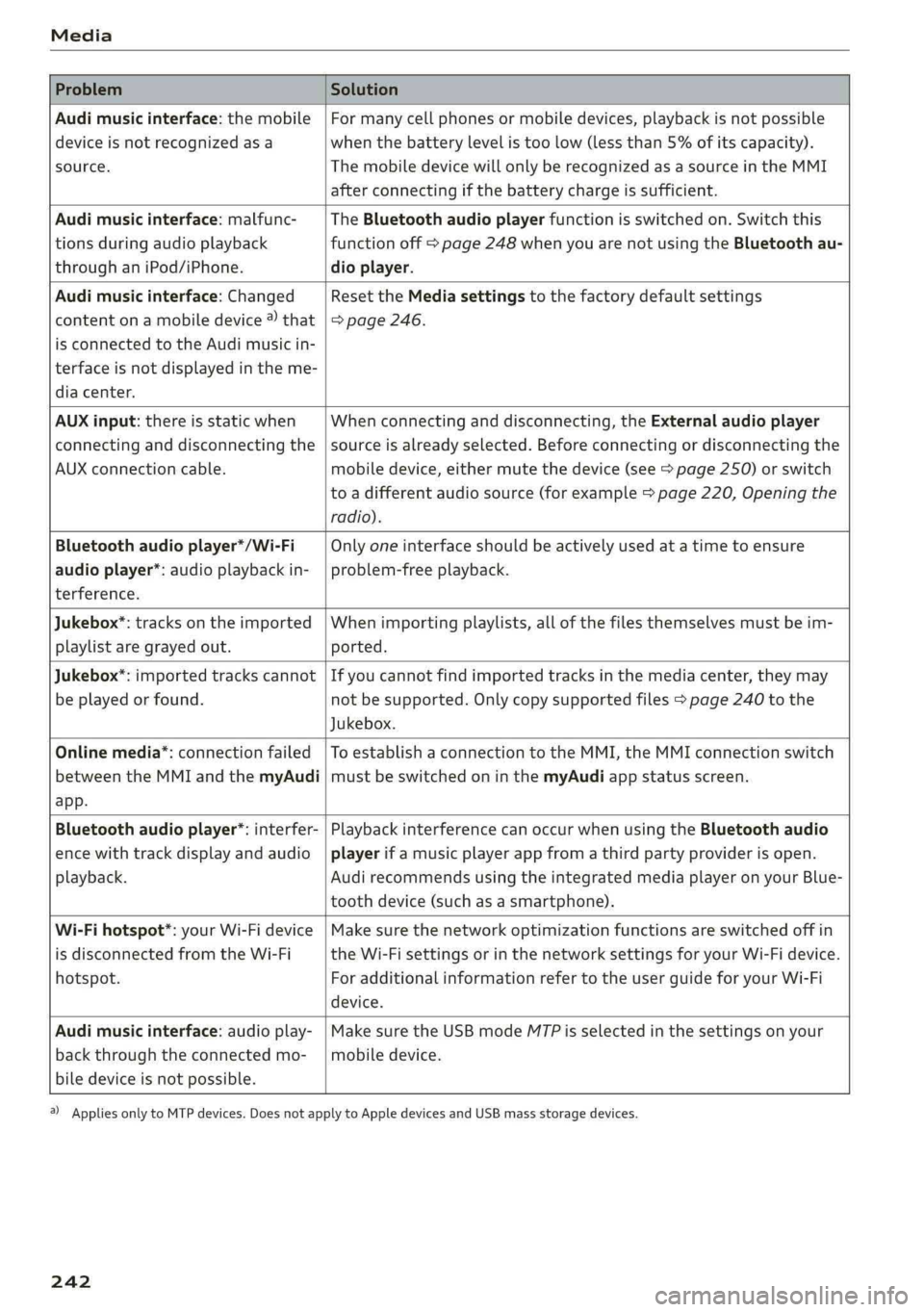
Media
ProblemSolution
Audimusicinterface:themobile
deviceisnotrecognizedasa
source.
Formanycellphonesormobiledevices,playbackisnotpossible
when
thebatterylevelistoolow(lessthan5%ofitscapacity).
ThemobiledevicewillonlyberecognizedasasourceintheMMI
afterconnectingifthebatterychargeissufficient.
Audimusicinterface:malfunc-
tionsduringaudioplayback
throughaniPod/iPhone.
TheBluetoothaudioplayerfunctionisswitchedon.Switchthis
functionoff>page248whenyouarenotusingtheBluetoothau-
dioplayer.
Audimusicinterface:Changed
contentonamobiledevice®that
isconnectedtothe Audimusicin-
terfaceisnotdisplayedintheme-
diacenter.
Reset theMediasettingstothefactorydefaultsettings
=>page246.
AUXinput:thereisstaticwhen
connectinganddisconnectingthe
AUXconnectioncable.
Whenconnectinganddisconnecting,theExternalaudioplayer
sourceisalreadyselected.Beforeconnectingordisconnectingthe
mobiledevice,eithermutethedevice(see>page250)orswitch
toadifferentaudiosource(forexample>page220,Openingthe
radio).
Bluetoothaudioplayer*/Wi-Fi
audioplayer*:audioplaybackin-
terference.
Onlyoneinterfaceshouldbeactivelyusedatatimetoensure
problem-freeplayback.
Jukebox®*:tracks ontheimported
playlistaregrayedout.
Whenimportingplaylists,allofthefilesthemselvesmustbeim-
ported.
Jukebox*:importedtrackscannot
beplayedorfound.
Ifyoucannotfindimportedtracksinthemediacenter,theymay
notbesupported.Onlycopysupportedfiles>page240tothe
Jukebox.
Onlinemedia*:connectionfailed
betweentheMMIandthemyAudi
app.
ToestablishaconnectiontotheMMI,theMMIconnectionswitch
mustbe switchedoninthemyAudiappstatusscreen.
Bluetoothaudioplayer*:interfer-
encewithtrackdisplayandaudio
playback.
PlaybackinterferencecanoccurwhenusingtheBluetoothaudio
playerifamusicplayerappfromathirdpartyproviderisopen.
Audi
recommendsusingtheintegratedmediaplayeronyourBlue-
toothdevice(suchasasmartphone).
Wi-Fihotspot*:yourWi-Fidevice
isdisconnectedfromtheWi-Fi
hotspot.
Makesurethenetworkoptimizationfunctionsareswitchedoffin
theWi-FisettingsorinthenetworksettingsforyourWi-Fidevice.
ForadditionalinformationrefertotheuserguideforyourWi-Fi
device.
Audimusicinterface:audioplay-
backthroughtheconnectedmo-
biledeviceisnotpossible.
MakesuretheUSBmodeMTPisselectedinthesettingsonyour
mobiledevice.
2)Applies onlytoMTPdevices.DoesnotapplytoAppledevicesandUSBmassstoragedevices.
242