turn signal AUDI Q5 2019 Owner's Manual
[x] Cancel search | Manufacturer: AUDI, Model Year: 2019, Model line: Q5, Model: AUDI Q5 2019Pages: 392, PDF Size: 99.86 MB
Page 140 of 392
Parkingaid
system.Forinformationoncleaning,see
=>page343.
Whenparkingspacesaresmall,theparkingsys-
temsignalsacontinuoustonewhenanobstacle
islessthanapproximately0.7feet(0.20m)
away.Donotcontinuedrivingfarther.
ZAWARNING
—Alwaysreadandfollowtheapplicablewarn-
ings>AinGeneralinformationon
page129.
—Pleasenotethat parkassistonlycontrols
thesteering.Thedriverisalwaysresponsi-
bleforbrakingandaccelerating.
— Thedrivermustdecideiftheparkingspace
displayedissuitableforthevehicle.
—Thevehiclewillchangepositionwhenpark-
ing.Makesureyoudonotendangeranyoth-
erdrivers.
—Whenusingparkassisttodriveintoorout
ofaparkingspace,thesteeringwheelturns
quicklyonitsown.Reachingintothesteer-
ing
wheelspokeswhilethisishappeningcan
resultininjury.
@)Note
—Alwaysreadandfollowtheapplicablewarn-
ings>@inGeneralinformationon
page129.
—Parkassistguidesthevehicleeitheraway
fromcurbsorontothemifothervehicles
areparkedonthecurb.Makesurethatyour
vehicle'stiresandrimsarenotdamaged.
Takeoversteeringattherighttime.
—Certainconditionsaroundtheparkingspace
mayresultinthevehiclenotbeingparked
asexpected.
—Objectssuchaspillarsorposts.
—Groundcoveringsuchasgravel,snowor
ice
G)Tips
— TheElectronicStabilizationControl(ESC)
mustnotbe switchedoffduringtheparking
process>page145.
—Parkingintightcurveswith parkassistis
notpossible.
138
—Youcannotparkwith parkassistwhenyou
aretowingatrailerorhavetheconnectorin-
sertedinthetrailersocket.
Sleemela
Appliesto:vehicleswithparkassist
3S
2 x a
oO
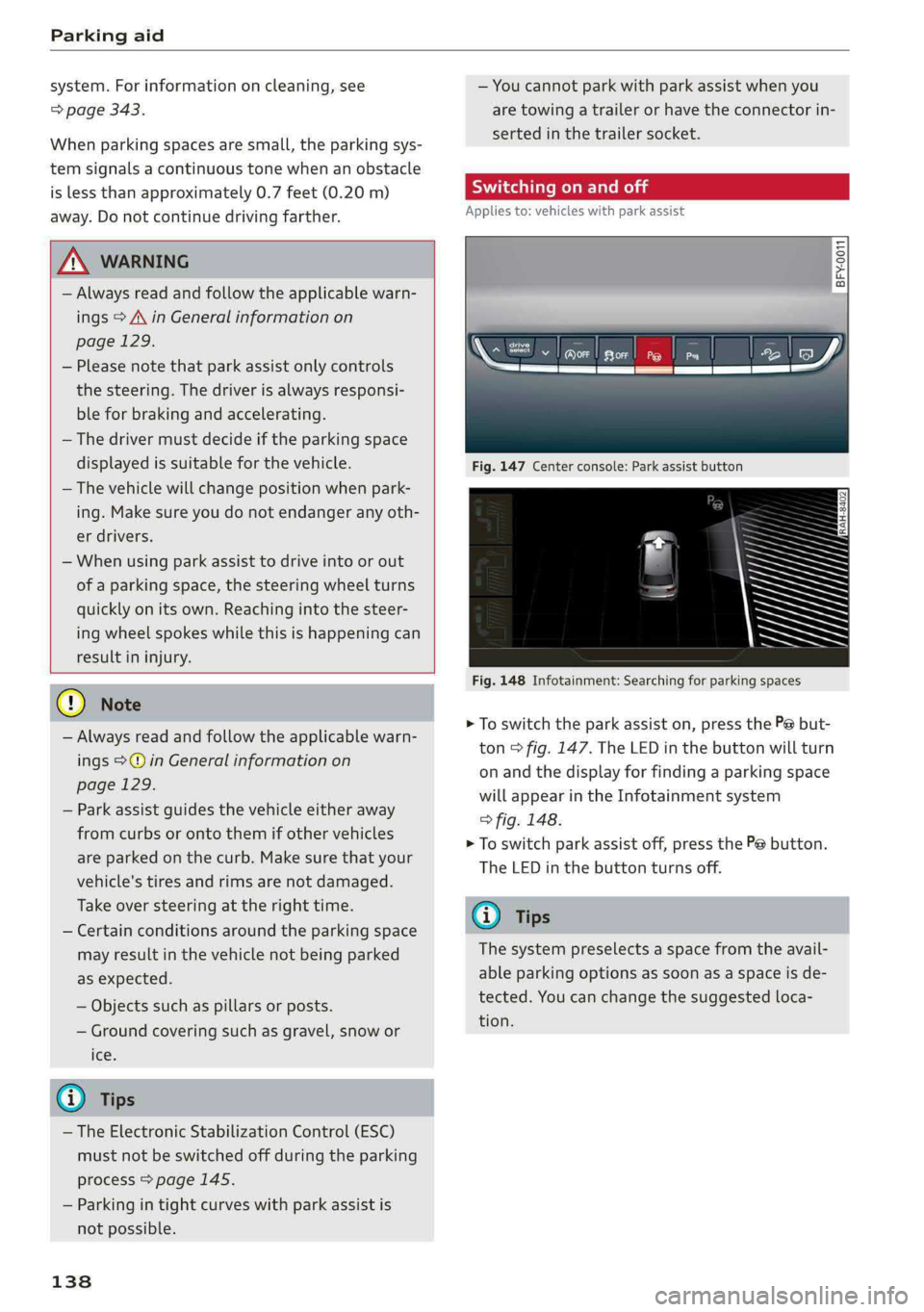
Fig.147Centerconsole:Parkassistbutton
Fig.148Infotainment:Searchingforparkingspaces
>Toswitchtheparkassiston,pressthePebut-
ton>fig.147.The LEDinthebuttonwillturn
onandthedisplayforfindingaparkingspace
willappearintheInfotainmentsystem
>fig.148.
>Toswitchparkassistoff,pressthePebutton.
TheLEDinthebuttonturnsoff.
G)Tips
Thesystempreselectsaspacefromtheavail-
ableparkingoptionsassoonasaspaceisde-
tected.Youcanchangethesuggestedloca-
tion.
Page 141 of 392
80A012721BG
Parkingaid
Parkingspacesearch
Appliesto:vehicleswithparkassist
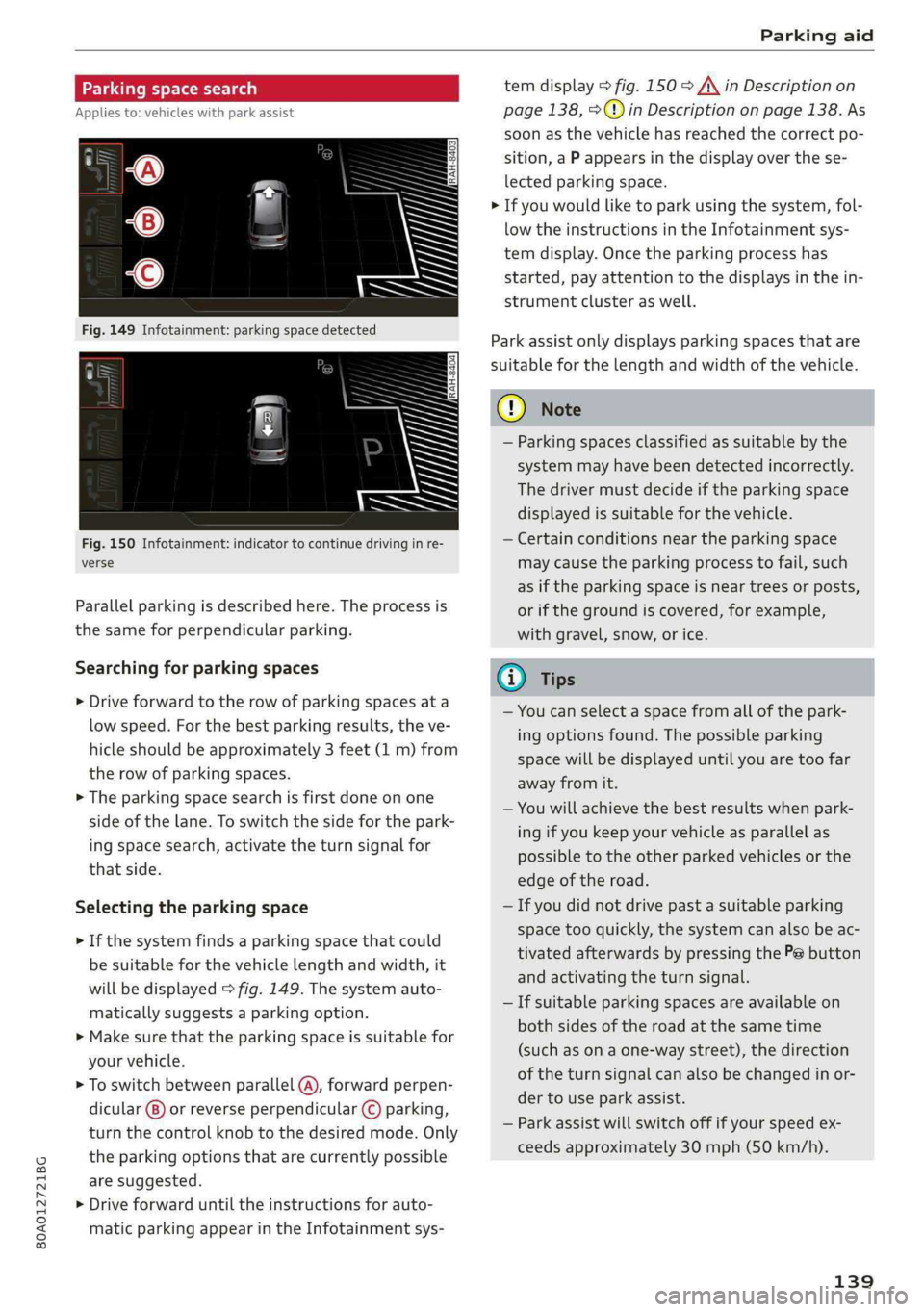
Fig.150Infotainment:indicatortocontinuedrivinginre-
verse
Parallelparkingisdescribedhere.Theprocessis
thesameforperpendicularparking.
Searchingforparkingspaces
>Driveforwardtotherowofparkingspacesata
lowspeed.Forthebestparkingresults,theve-
hicleshould beapproximately3feet(1m)from
therowofparkingspaces.
>Theparkingspacesearchisfirstdoneonone
sideofthelane.Toswitchthesideforthepark-
ingspacesearch,activatetheturnsignalfor
thatside.
Selectingtheparkingspace
>Ifthesystemfindsaparkingspacethatcould
besuitableforthevehiclelengthandwidth,it
willbedisplayed>fig.149.Thesystemauto-
maticallysuggestsaparkingoption.
>Makesurethattheparkingspaceissuitablefor
yourvehicle.
>Toswitchbetweenparallel(@),forwardperpen-
dicular()or reverseperpendicular©parking,
turnthecontrolknobtothedesiredmode.Only
theparkingoptionsthatarecurrentlypossible
aresuggested.
>Driveforwarduntiltheinstructionsforauto-
maticparkingappearintheInfotainmentsys-
temdisplay>fig.150>A\inDescriptionon
page138,>@)inDescriptiononpage138.As
soonasthevehiclehas reachedthecorrectpo-
sition,aPappearsinthedisplayoverthese-
lectedparkingspace.
>Ifyouwouldliketoparkusingthesystem,fol-
lowtheinstructionsintheInfotainmentsys-
temdisplay.Oncetheparkingprocesshas
started,payattentiontothedisplaysinthein-
strumentclusteraswell.
Parkassistonlydisplaysparkingspacesthatare
suitableforthelengthandwidthofthevehicle.
@)Note
—Parkingspacesclassifiedassuitablebythe
systemmayhavebeendetectedincorrectly.
Thedrivermustdecideiftheparkingspace
displayedissuitableforthevehicle.
—Certainconditionsnear theparkingspace
maycausetheparkingprocesstofail, such
asiftheparkingspaceisneartreesorposts,
orifthegroundiscovered,forexample,
withgravel,snow,orice.
@)Tips
—Youcanselectaspacefromallofthepark-
ingoptionsfound.Thepossibleparking
spacewillbedisplayeduntilyouaretoofar
awayfromit.
—Youwillachievethebestresultswhenpark-
ingifyoukeepyourvehicleasparallelas
possibletotheotherparkedvehiclesorthe
edgeoftheroad.
—Ifyoudidnotdrivepastasuitableparking
space tooquickly,thesystemcanalsobeac-
tivatedafterwardsbypressingthePebutton
andactivatingtheturnsignal.
—Ifsuitableparkingspacesareavailableon
bothsidesoftheroadatthesametime
(such asonaone-waystreet),thedirection
oftheturnsignalcanalsobechangedinor-
dertouseparkassist.
—Parkassistwillswitchoffifyourspeedex-
ceedsapproximately30mph(50km/h).
139
Page 142 of 392
Parkingaid
Startingthe parkingprocess
Appliesto:vehicleswithparkassist
Theresponsibilityiswiththedriverwhenpark-
ing.
Requirement:asuitableparkingspacemustbe
foundandselected>page139.Thevehiclemust
initiallybestationary.
> Selectthereversegearafterstoppingbriefly.
>Removeyourhandsfromthesteeringwheel.
>Payattentiontothepathofthevehicle.When
thetrafficsituationallows,presstheaccelera-
torpedalaccordingly>A\inDescriptionon
page138,>@inDescriptiononpage138.
>FollowthevisualinstructionsintheInfotain-
mentsystemdisplayandinstrumentcluster
alongwiththewarningtonesuntiltheparking
processhasended.Thearrowsonthevehicle
indicatethenecessarydirectionoftravel.
Parkassistautomaticallysteersthevehicleinto
theparkingspacewhilethedriverpressesthe
pedals.Themaximumparkingspeedis4mph
(7km/h).
Interruptingtheparkassist
Ifthespeedistoohighand youtakeoversteer-
ing,parkassistswitchesoff.Tocontinueparking,
[email protected]
playswillappearagainintheInfotainmentsys-
temdisplayandtheinstrumentcluster.
G)Tips
Youcanalsocancelthedirectionoftravel
specifiedbythesystembyswitchingbetween
forwardandreversegears.Basedontheposi-
tionofthevehicle,thesystemthencalculates
theadditionalsteeringanddrivingdirections
formaneuvering.
Leavingaparallelparkingspace
Appliesto:vehicleswith parkassist
Theresponsibilityiswiththedriverwhenleaving
aparkingspace.
Ifyouparkedthevehicleinaparallelparking
space,parkassistcanhelpyoudriveoutofit.
140
>Starttheengine.
>PressthePebutton>page138,fig. 147.
>Waituntilamessageappearsthatrequeststhe
directiontotravelinforexitingtheparking
space.
>Activatetheappropriateturnsignal.Themes-
sageStartautomaticunparkingprocedureap-
pears.
>Removeyourhandsfromthesteeringwheel.
>Pressthecontrolknobtostarttheprocedure
forexitingtheparkingspace.
>Payattentiontothepathofthevehicle.When
thetrafficsituationallows,presstheaccelera-
torpedalaccordingly> A\inDescriptionon
page138,>@)inDescriptiononpage138.
>Followthevisualinstructions>page140and
thewarningtoneuntilthevehiclehasfinished
exitingtheparkingspace.
>Driveinthedirectionindicatedbythearrowson
thevehicle.
>Theprocedurehasendedwhenadditionalcor-
rectivemovementsarenolongernecessary.
Takeoversteering.
Parkassistautomaticallysteersthevehicleoutof
theparkingspacewhilethedriverpressesthe
pedals.Themaximumspeedforexitingaparking
spaceis3mph(5km/h).
Interruptingthe parkassist
Ifthespeedistoohighand youtakeoversteer-
ing,parkassistswitchesoff.Tocontinueexiting
theparkingspace,switchtheengineoffandon.
ThenpressthePebuttonagain.Otherwise,leave
theparkingspacewithoutusingparkassist.
Appliesto:vehicleswithparkassist
roo"Parkassist:canceled.Steeringinputbydriv-
er.Pleasetakeoversteering!
Parkassistwascanceledbecausethedrivertook
oversteering.Tocontinueparking, pressthePe
buttonagain.
Parkassist:timelimitexceeded
aor]Parkassist:canceled.Timelimitexceeded.
Pleasetakeoversteering!
Page 148 of 392
IntelligentTechnology
ZXWARNING
Youshouldonlyswitchoffroadmodeonor
switchESC/ASRoffifyourdrivingabilitiesand
thetrafficconditionspermit.Thereisariskof
sliding.
—Thestabilizationfunctionislimitedwhen
offroadmodeisswitchedon.Thedriving
wheelscouldspinandthevehiclecould
swerve,especiallyonslickorslipperyroad
surfaces.
—Thereisnovehiclestabilizationwhen
ESC/ASRareswitchedoff.
Hilldescentassist
Hilldescentassistmakesitpossibletodrive
downahillataconstantspeed.
a
2
g
= ©a
N
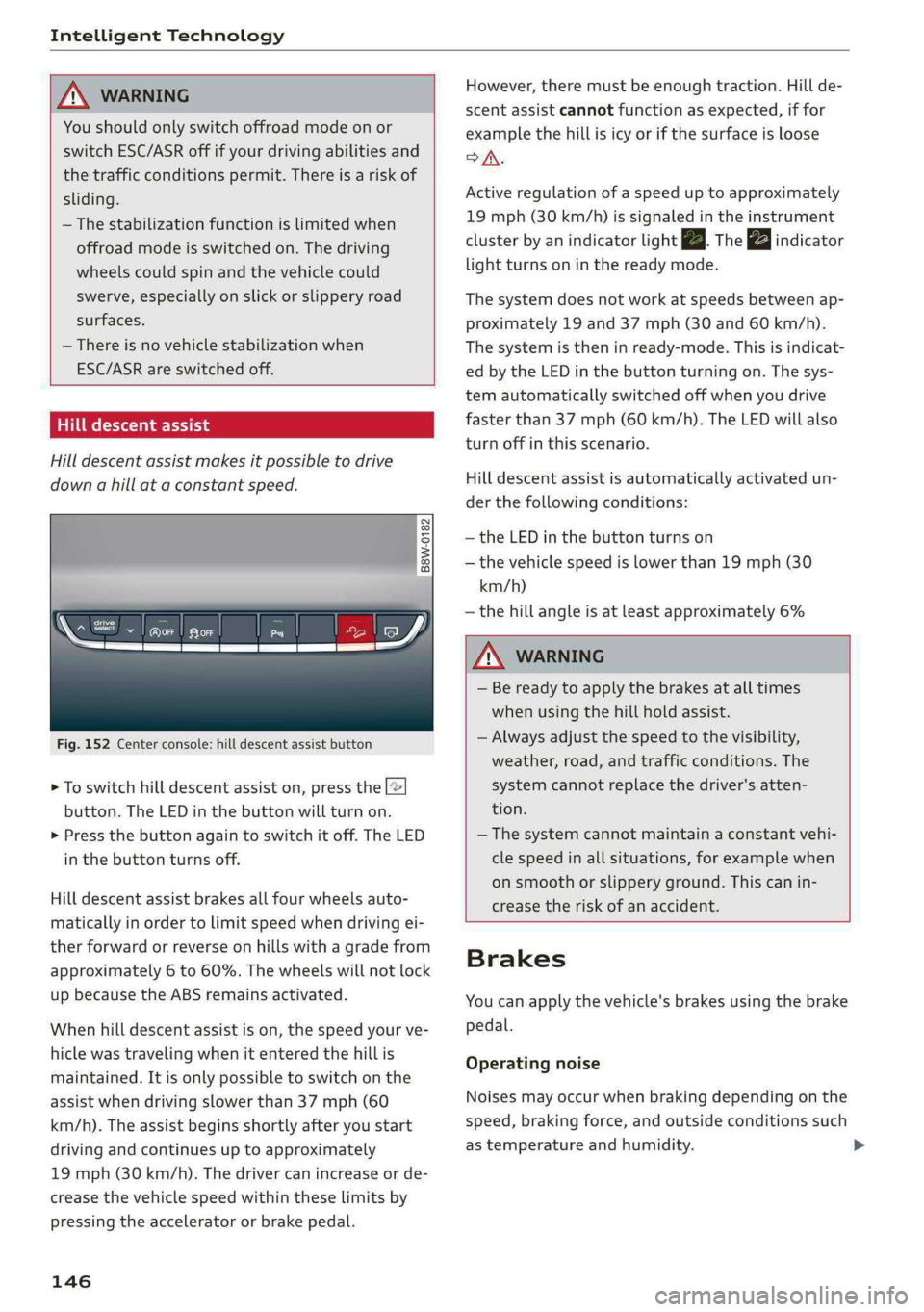
Fig.152Centerconsole:hilldescentassistbutton
>Toswitchhilldescentassiston,pressthe|@
button.TheLEDinthebuttonwillturnon.
>»Pressthebuttonagaintoswitchitoff.The LED
inthe buttonturnsoff.
Hilldescentassistbrakesallfourwheelsauto-
maticallyinordertolimitspeedwhendrivingei-
therforwardorreverseonhillswithagradefrom
approximately6to60%.Thewheelswillnotlock
upbecausetheABSremainsactivated.
Whenhilldescentassistison,thespeedyourve-
hiclewastravelingwhenitenteredthehillis
maintained.Itisonlypossibletoswitchonthe
assistwhendrivingslowerthan37mph(60
km/h).
Theassistbeginsshortlyafteryoustart
drivingandcontinuesuptoapproximately
19mph(30km/h).Thedrivercanincrease or de-
creasethevehiclespeedwithintheselimitsby
pressingtheacceleratororbrakepedal.
146
However,theremustbeenoughtraction.Hillde-
scentassistcannotfunctionasexpected,iffor
examplethehillisicyorifthesurfaceisloose
SA.
Activeregulationofaspeeduptoapproximately
19mph(30km/h)issignaledintheinstrument
clusterby anindicatorlightZB.Thegaindicator
lightturnsoninthereadymode.
Thesystemdoesnotworkatspeedsbetweenap-
proximately19 and 37mph(30and60km/h).
Thesystemistheninready-mode.Thisisindicat-
edbytheLEDinthebuttonturningon.Thesys-
temautomaticallyswitchedoffwhenyoudrive
fasterthan37mph(60 km/h).TheLEDwillalso
turnoffinthisscenario.
Hilldescentassistisautomaticallyactivatedun-
der thefollowingconditions:
—theLEDinthebuttonturnson
—thevehiclespeedislowerthan19mph(30
km/h)
—thehillangleisatleastapproximately6%
ZXWARNING
—Bereadytoapplythebrakesatalltimes
whenusingthehillholdassist.
—Alwaysadjustthespeedtothevisibility,
weather,road,andtrafficconditions.The
systemcannotreplacethedriver'satten-
tion.
—The systemcannotmaintainaconstantvehi-
clespeedinallsituations,forexamplewhen
onsmoothorslipperyground.Thiscanin-
creasetheriskofanaccident.
Brakes
Youcanapplythevehicle'sbrakesusingthebrake
pedal.
Operatingnoise
Noisesmayoccurwhenbrakingdependingonthe
speed,brakingforce,andoutsideconditionssuch
astemperatureandhumidity.
Page 154 of 392
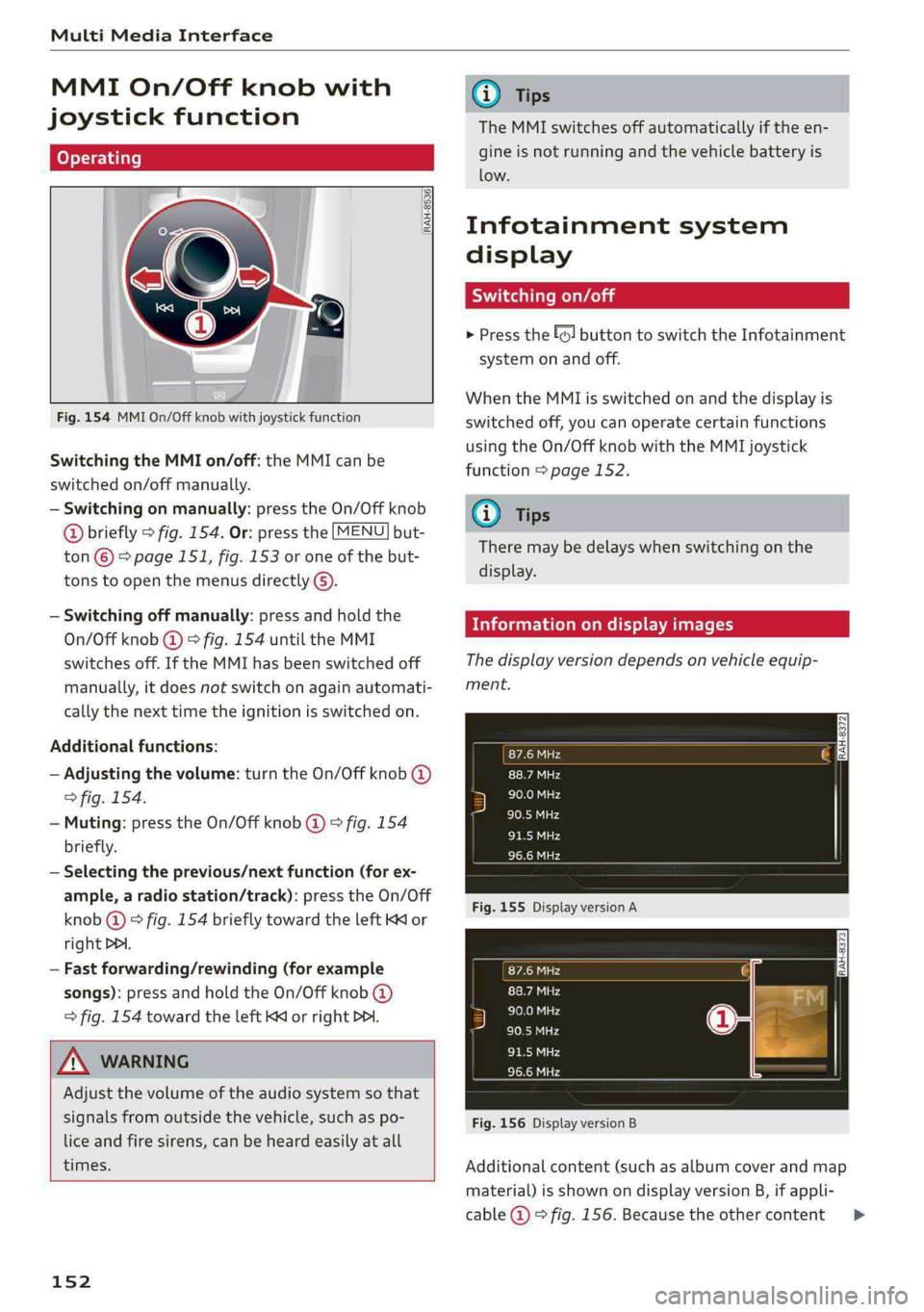
MultiMediaInterface
MMIOn/Offknobwith
joystickfunction
Operating
RAH-8536|
Fig.154MMIOn/Offknobwithjoystickfunction
SwitchingtheMMIon/off:theMMIcanbe
switched
on/offmanually.
—Switchingonmanually:presstheOn/Offknob
@briefly>fig.154.Or:pressthe[MENU]but-
ton©>page151,fig.153oroneofthebut-
tonstoopenthemenusdirectly().
—Switchingoffmanually:pressandholdthe
On/Offknob@)>fig.154untiltheMMI
switchesoff.IftheMMIhasbeenswitchedoff
manually,itdoesnotswitchonagainautomati-
callythenexttimetheignitionisswitchedon.
Additionalfunctions:
—Adjustingthevolume:turntheOn/Offknob@)
>fig.154.
—Muting:presstheOn/Offknob@)©fig.154
briefly.
—Selectingtheprevious/nextfunction(forex-
ample,aradiostation/track):presstheOn/Off
knob@)®fig.154brieflytowardtheleftKKor
rightDPI.
—Fastforwarding/rewinding(forexample
songs):pressandholdtheOn/Offknob@)
>fig.154towardtheleftKdorrightPo.
ZAWARNING
Adjustthevolumeoftheaudiosystemsothat
signalsfromoutsidethevehicle,suchas po-
liceandfiresirens,canbeheardeasilyatall
times.
152
G)Tips
TheMMIswitchesoffautomaticallyiftheen-
gineisnotrunningandthevehiclebatteryis
low.
Infotainmentsystem
display
Siarcelal
>Pressthe[6]buttontoswitchtheInfotainment
systemonandoff.
WhentheMMIisswitchedonandthedisplayis
switchedoff,youcanoperatecertainfunctions
usingtheOn/OffknobwiththeMMIjoystick
function>page152.
G)Tips
Theremaybedelayswhenswitchingonthe
display.
clearleClmemCaley
Thedisplayversiondependsonvehicleequip-
ment.
Fig.155DisplayversionA
Fig.156DisplayversionB
Additionalcontent(suchasalbumcoverandmap
material)isshownondisplayversionB,ifappli-
cable@©fig.156.Becausetheothercontent>
Page 157 of 392
80A012721BG
MultiMediaInterface
MMItouch
MMItouchcontrolpad
Appliesto:vehicleswithMMItouch
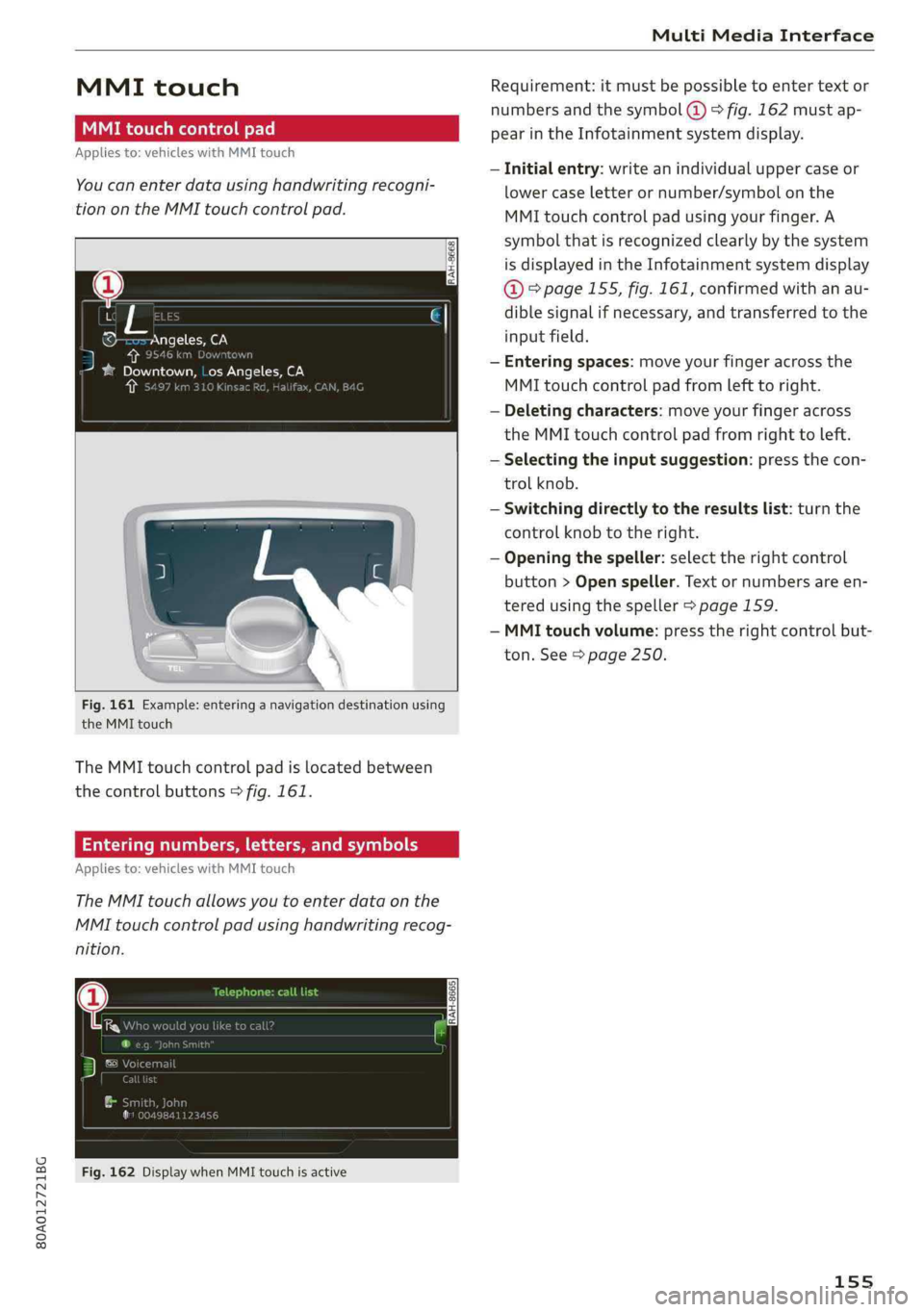
Youcanenterdatausinghandwritingrecogni-
tionontheMMItouchcontrolpad.
®©-co=~Angeles,CA
=>ae)i
Jbgdeewn,LosAngeles,CAYT
Fig.161Example:enteringanavigationdestinationusing
theMMItouch
TheMMItouchcontrolpadislocatedbetween
thecontrolbuttons>fig.161.
Enteringnumbers,letters,andsymbols
Appliesto:vehicleswithMMItouch
TheMMItouchallowsyoutoenterdataonthe
MMItouchcontrolpadusinghandwritingrecog-
nition.
Fig.162DisplaywhenMMItouchisactive
Requirement:itmustbepossible toentertext or
numbersandthesymbol(@>fig.162 mustap-
pearintheInfotainmentsystemdisplay.
—Initialentry:writeanindividualuppercaseor
lowercaseletterornumber/symbolonthe
MMItouchcontrolpadusingyourfinger.A
symbolthatisrecognizedclearlyby thesystem
isdisplayedintheInfotainmentsystemdisplay
@&page155,fig. 161,confirmedwithanau-
diblesignalifnecessary,andtransferredtothe
inputfield.
—Enteringspaces:moveyourfingeracrossthe
MMItouchcontrolpadfromlefttoright.
—Deletingcharacters:moveyourfingeracross
theMMItouchcontrolpadfromrighttoleft.
—Selectingtheinputsuggestion:pressthecon-
trolknob.
—Switchingdirectlytotheresultslist:turnthe
controlknobtotheright.
—Openingthespeller:selecttherightcontrol
button>Openspeller.Textornumbersare en-
tered usingthespeller>page159.
—MMItouchvolume:presstherightcontrolbut-
ton.See>page250.
155
Page 164 of 392
MultiMediaInterface
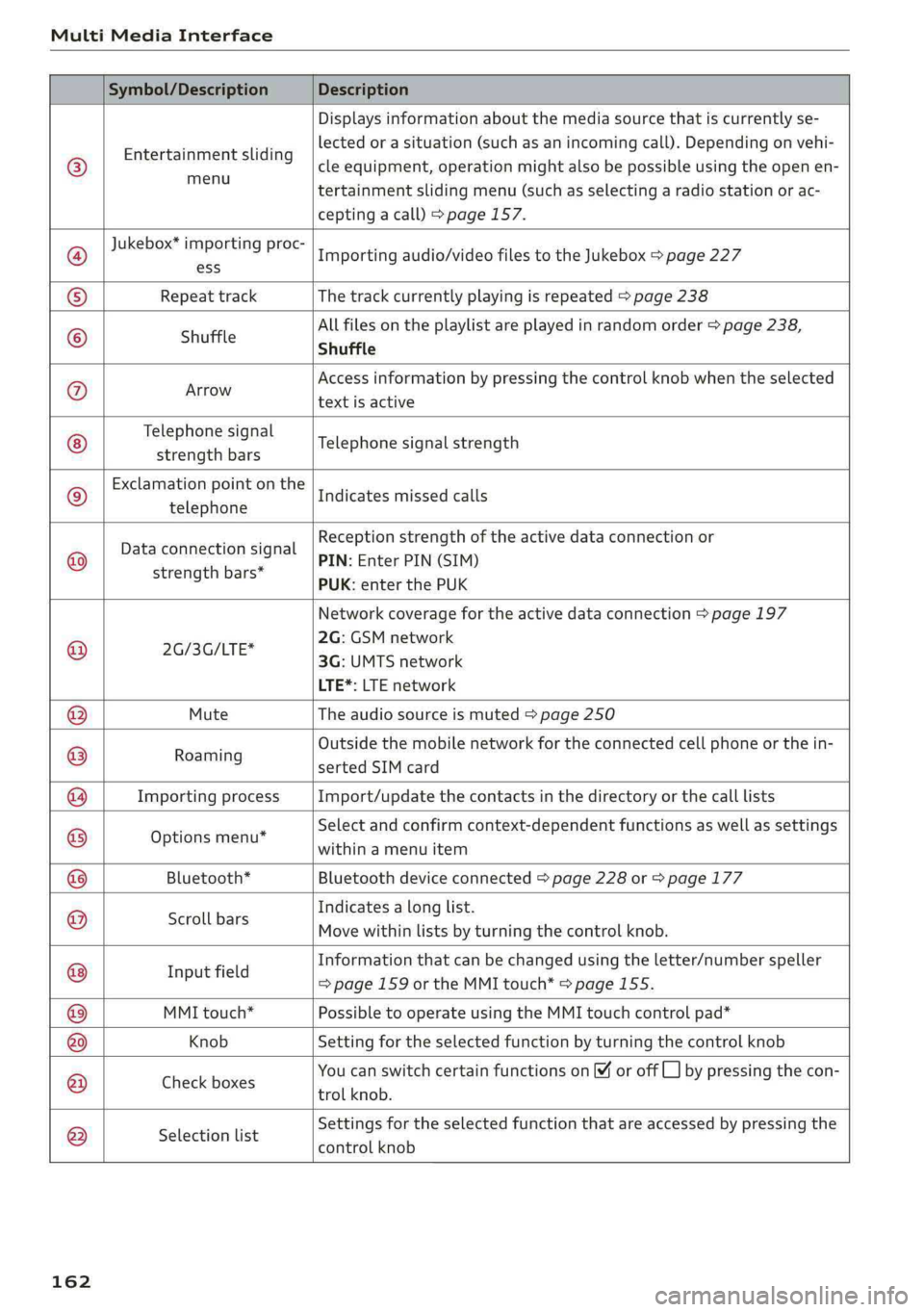
Symbol/DescriptionDescription
©
Entertainmentsliding
menu
Displaysinformationaboutthemediasourcethatiscurrentlyse-
lectedorasituation(suchasanincomingcall).Dependingonvehi-
cleequipment,operationmightalsobepossibleusingtheopenen-
tertainmentslidingmenu(suchasselectingaradiostationorac-
ceptingacall)>page157.
Jukebox*importingproc-
Importingaudio/videofilestotheJukebox>page227
textisactive
Telephonesignal
strengthbars
®ess
®RepeattrackThetrackcurrentlyplayingisrepeated>page238
Allfilesontheplaylistareplayedinrandomorder>page238,
©shuffleShuffle
®AvroAccessinformationbypressingthecontrolknobwhentheselected
Telephonesignalstrength
Exclamationpointonthe
telephone
Indicatesmissedcalls
©
|
©
Dataconnectionsignal
strengthbars*
Receptionstrengthoftheactivedataconnectionor
PIN:EnterPIN(SIM)
PUK:enterthePUK
Networkcoveragefortheactivedataconnection>page197
2G:GSMnetwork
2G/3G/LTE*
3G:UMTSnetwork
LTE*:LTEnetwork
MuteTheaudiosourceismuted>page250
.Outsidethemobilenetworkfortheconnectedcellphoneorthein-
Roaming
sertedSIMcard
ImportingprocessImport/updatethecontactsinthedirectoryorthecalllists
Optionsmenu*
Selectandconfirmcontext-dependentfunctionsaswellas settings
withinamenuitem
@|
©
|©)
©
|O|
©
Bluetooth*Bluetoothdeviceconnected>page228or>page177
Scrollbars
Indicatesalonglist.
Movewithinlistsbyturningthecontrolknob.
Informationthatcanbechangedusingtheletter/numberspeller
I fi
nputfield=>page159ortheMMItouch*>page155.
MMItouch*PossibletooperateusingtheMMItouchcontrolpad*
KnobSettingfortheselectedfunctionbyturningthecontrolknob
CheeenoxesYoucanswitchcertainfunctionsonoroffCL]bypressingthecon-
trolknob.
®
|
®
|\O|@|
©
|
©
Selectionlist
Settingsfortheselectedfunctionthatareaccessedbypressingthe
controlknob
162
Page 179 of 392
80A012721BG
Telephone
Telephone
Introduction
Appliesto:vehicleswithtelephone
Tomakephonecallsinyourvehicleusingthe
MMI,connectyourcellphonetotheMMIvia
Bluetooth.
Handsfree
Afteryouhaveconnectedyourmobiledevice to
theMMIviaBluetooth,youcan use thehandsfree
systemandoperatetelephonefunctionsthrough
yourMMI.Youcanmakecallsusingtheantenna
onyourmobiledevice.
Withthe Audiphonebox’,callsaremadeusing
theexteriorantennaonthevehicle.Usingtheex-
ternalantennahelpswhenthereisalowsignal
andalsoprovidesbetterreceptionquality
=>page180.
ZAWARNING
—Medicalexpertswarnthatmobiledevices
caninterferewiththefunctionofpacemak-
ers.Alwaysmaintainaminimumdistanceof
about8inches(20cm)betweenthecell
phoneantennaandthepacemaker.
—Donotcarrythemobiledeviceinapocket
directlyoverthepacemakerwhenthe
phoneisswitchedon.
—Switchthemobiledeviceoffimmediately
ifyoususpectitmaybeinterferingwith
thepacemaker.
—Donotuse thevoicerecognitionsystem*
=page170inemergenciesbecauseyour
voicemaychangeinstressfulsituations.The
systemmaytakelongertodialthenumber
ormaynotbeabletodialitatall.Dialthe
emergencynumbermanually.
—Switchyourmobiledeviceoffinareaswhere
thereisariskofanexplosion.Theseloca-
tionsarenotalwaysclearlymarked.This
mayincludegasstations,fuelandchemical
storagefacilitiesortransportvehicles,orlo-
cationswherefuelvapors(such aspropane
orgasolinevaporinvehiclesorbuildings),
chemicalsorlargequantitiesofdustparti-
cles(suchasflour,sawdustormetal)may
bepresentintheair.Thisalsoapplies toall
otherlocationswhereyouwouldnormally
turnyourvehicleengineoff.
— Thedemandsoftrafficrequireyourfullat-
tention.Alwaysreadthechapter
=>page151,Trafficsafetyinformation.
@)Note
Alwaysfollowtheinformationfoundin>@in
Generalinformationonpage192.
@)Tips
—TheBluetoothconnectionrangeislimited
toinsidethevehicle.Itcanalsobeaffected
bylocalconditionsandinterferencewith
otherdevices.
—TolearnwhichBluetoothconnectionsand
whichofthefunctionsinyourmobiledevice
aresupported,checkwithyourmobilede-
viceserviceproviderorthedatabaseformo-
biledevicesatwww.audiusa.com/
bluetooth.
Setup
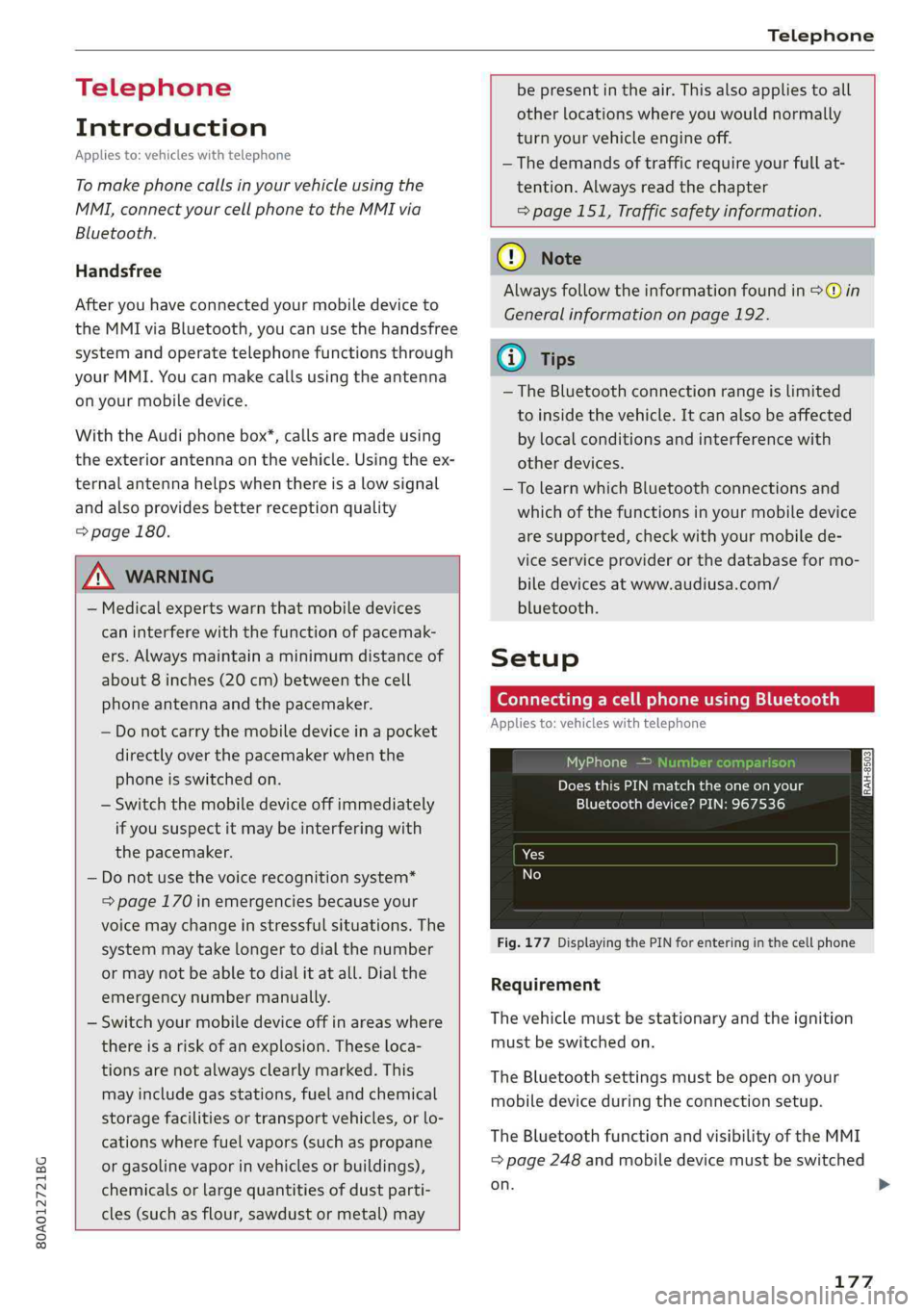
ConnectingacellphoneusingBluetooth
Appliesto:vehicleswithtelephone
Naonro)ated
DoesthisPINmatchtheoneon your
Bluetoothdevice?PIN:967536
Fig.177DisplayingthePINforenteringinthecellphone
Requirement
Thevehiclemustbestationaryandtheignition
mustbe switchedon.
TheBluetoothsettingsmustbeopenonyour
mobiledeviceduringtheconnectionsetup.
TheBluetoothfunctionandvisibilityoftheMMI
=page248andmobiledevicemustbe switched
on.
177
Page 222 of 392
Radio
Radio
Openingtheradio
TheradiosupportstheFM,AMandSiriusXM*
(satelliteradio)bands.UsingtheHDRadiore-
ceiveralsoallowsyoutoreceiveradiostationson
theFMandAMbandsindigitalformat.
0
D)€
aaea
STP
Saale
RAH-8598(6sRadioID:Rectan
evenNoSignal
NoSignal
La)
200n20
eToysNoSignal
Fig.201SiriusXMstationlist
>Pressthe[RADIO]button.
Afteropeningtheradio,thelastopenedstation
listisdisplayed.
Selectingastation:selectandconfirmastation
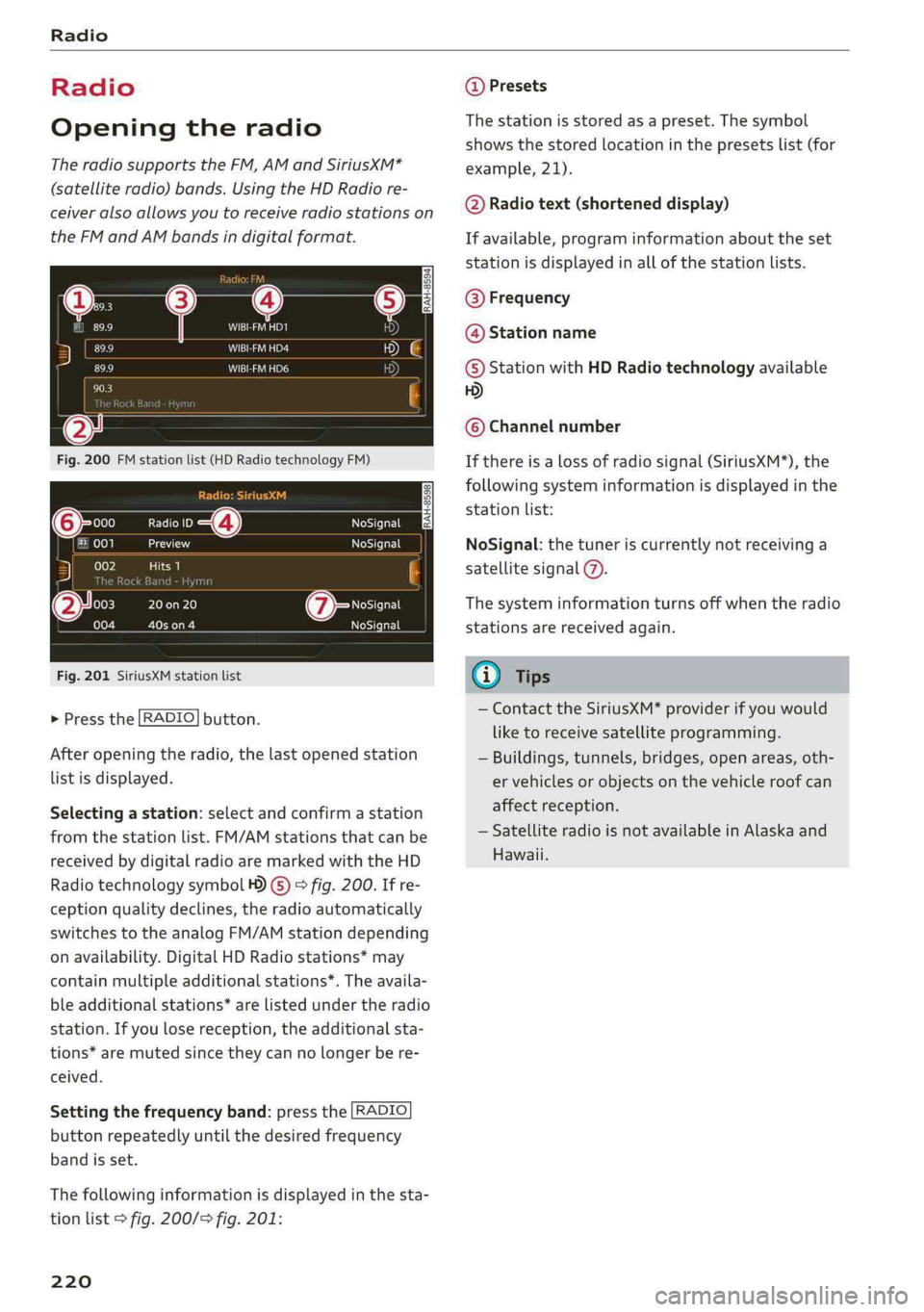
fromthestationlist.FM/AMstationsthatcan be
receivedbydigitalradioaremarkedwiththeHD
Radiotechnologysymbol4)©)>fig.200.Ifre-
ceptionqualitydeclines,theradioautomatically
switchestotheanalogFM/AMstationdepending
onavailability.DigitalHDRadiostations*may
containmultipleadditionalstations*.Theavaila-
bleadditionalstations*arelistedundertheradio
station.Ifyoulosereception,theadditionalsta-
tions*aremutedsincetheycannolongerbere-
ceived.
Settingthefrequencyband:pressthe [RADIO
buttonrepeatedlyuntilthedesiredfrequency
bandisset.
Thefollowinginformationisdisplayedinthesta-
tionlist>fig.200/>fig.201:
220
@Presets
Thestationisstoredasapreset.The symbol
showsthestoredlocationinthepresetslist(for
example,21).
@Radiotext(shorteneddisplay)
Ifavailable,programinformationabouttheset
stationisdisplayedinallofthestationlists.
@Frequency
@Stationname
©StationwithHDRadiotechnologyavailable
5)
©Channelnumber
Ifthereisalossofradiosignal(SiriusXM*),the
followingsysteminformationisdisplayedinthe
stationlist:
NoSignal:thetuneriscurrentlynotreceivinga
satellitesignal@).
Thesysteminformationturnsoffwhentheradio
stationsarereceivedagain.
G)Tips
—ContacttheSiriusXM*providerifyouwould
liketoreceivesatelliteprogramming.
—Buildings,tunnels,bridges,openareas,oth-
ervehiclesorobjectsonthevehicleroofcan
affectreception.
—SatelliteradioisnotavailableinAlaskaand
Hawaii.
Page 247 of 392
![AUDI Q5 2019 Owners Manual 80A012721BG
Systemsettings
Systemsettings
Settingthedateand
time
Youcanset theclocktimemanuallyorusingthe
GPS*,
>Select:[MENU]button>Settings>leftcontrol
button>MMIsettings>Date&time.
>Or:select](/img/6/57631/w960_57631-246.png "AUDI Q5 2019 Owners Manual 80A012721BG
Systemsettings
Systemsettings
Settingthedateand
time
Youcanset theclocktimemanuallyorusingthe
GPS*,
>Select:[MENU]button>Settings>leftcontrol
button>MMIsettings>Date&time.
>Or:select")
80A012721BG
Systemsettings
Systemsettings
Settingthedateand
time
Youcanset theclocktimemanuallyorusingthe
GPS*,
>Select:[MENU]button>Settings>leftcontrol
button>MMIsettings>Date&time.
>Or:select:[MENU]button>Vehicle>leftcon-
trolbutton>Vehiclesettings>Date&time.
Automaticsetting
Whenthisfunctionisswitchedon¥,thetime
anddateareautomaticallyset.
Time
Requirement:theAutomaticsettingmustbe
switchedoff.
Pressthecontrolknob.YoucansettheTime
manuallybyturningandpressingthecontrol
knob.
Date
Requirement:theAutomaticsettingmustbe
switchedoff.
Pressthecontrolknob.YoucansettheDate
manuallybyturningandpressingthecontrol
knob.
Timezone
Whenselectingtheappropriatetimezone,a
samplingofcountriesinthiszonewillbelisted.
Automatictimezone*
Whenthisfunctionisswitchedon@,thetime
willautomaticallyadjusttothecorresponding
timezone.
Automaticdaylightsavingtime*
WhenthisfunctionisswitchedonM,thetime
willautomaticallyswitchtodaylightsavingtime.
D_TheQistandardmakesitpossibletocharge yourmobile
devicewirelessly.
Timeformat
Ifyouselect24h,theclockwilldisplay,forexam-
ple,13:00.IfyouselectAM/PM,theclockwill
display,forexample,1:00PM.
Dateformat
IfyouselectDD.MM.YYYY,thedatedisplaywill
show,forexample,31.08.2018.Ifyouselect
MM/DD/YYVY,thedatedisplaywillshow,forex-
ample,08/31/2018.IfyouselectYYYY-MM-DD,
thedatedisplaywillshow,forexample,
2018-08-31.
MMIsettings
>Select:[MENU]button>Settings>leftcontrol
button>MMIsettings.
Language
Youcanchangethedisplaylanguageaswellas
thelanguageforthevoiceguidance*andvoice
recognitionsystem”*.
Thenumberoflanguagesavailabledependson
themarket.
Measurementunits
Thefollowingmeasurementunitscan besetde-
pendingonavailability:Speed,Distance,Tem-
perature,Fuelconsumption,Volume,Pressure.
Mobiledeviceremindersignal
Appliesto:vehicleswithAudiphonebox
Requirement:yourcellphonemustbeQi-capa-
ble)orconnectedtotheAudimusicinterface@
withaUSBadaptercable>page180,fig.178.
Whenthedeviceremindersignalisswitchedon,
youwillbenotifiedthatyourmobiledeviceisstill
intheAudiphonebox*whenyouleavethevehi-
cle.YoucanselectbetweenSpokencue,Signal
toneandOff.
Mobiledeviceremindersignalvolume:youcan
adjusttheremindersignalvolumebyturningthe
controlknob.
245