Parking AUDI Q5 2019 Service Manual
[x] Cancel search | Manufacturer: AUDI, Model Year: 2019, Model line: Q5, Model: AUDI Q5 2019Pages: 392, PDF Size: 99.86 MB
Page 174 of 392
Voicerecognitionsystem
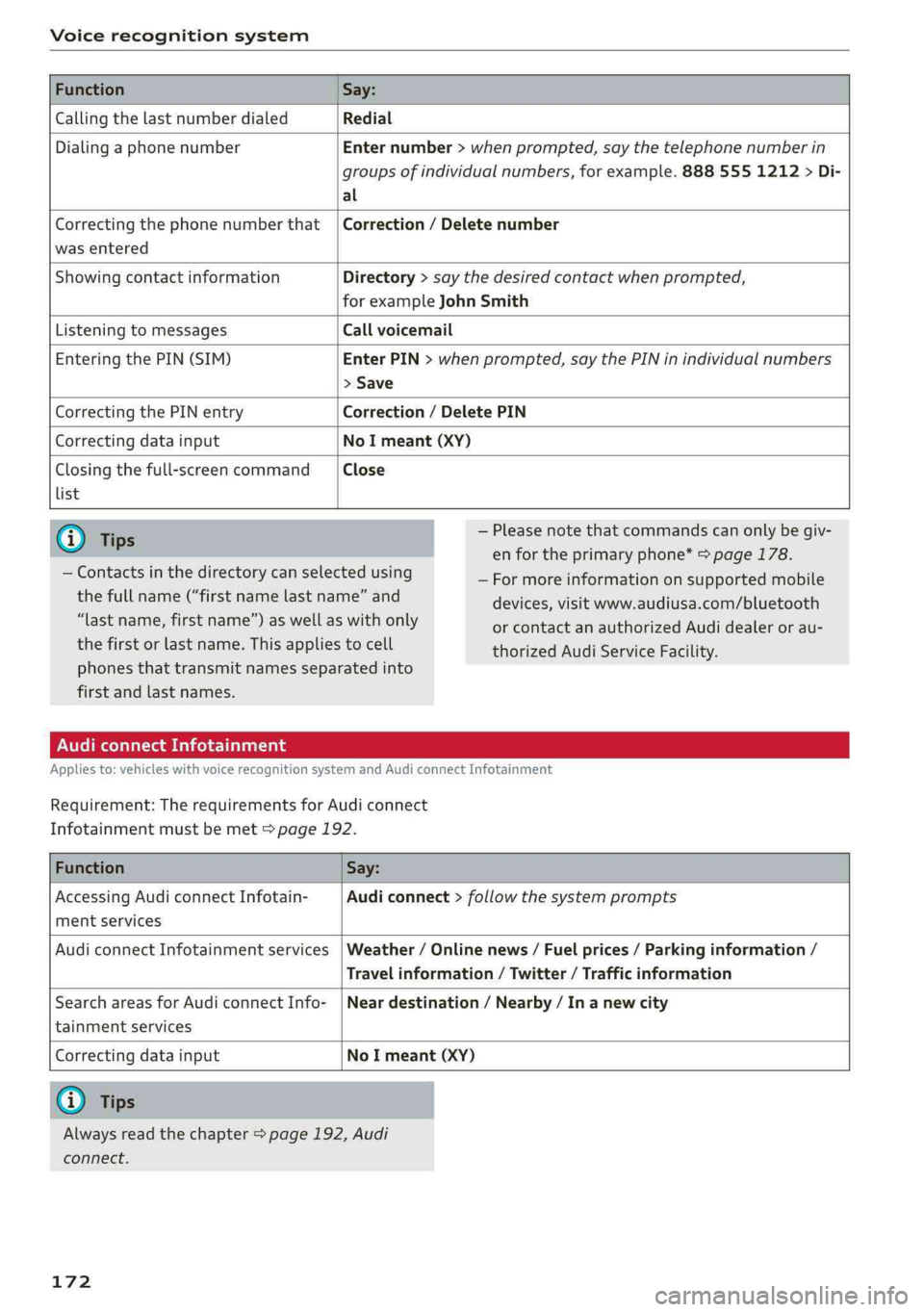
FunctionSay:
CallingthelastnumberdialedRedial
DialingaphonenumberEnternumber>whenprompted,saythetelephonenumberin
groupsofindividualnumbers,forexample.8885551212>Di-
al
Correctingthephonenumberthat
wasentered
Correction/Deletenumber
ShowingcontactinformationDirectory>saythedesiredcontactwhenprompted,
forexampleJohnSmith
ListeningtomessagesCallvoicemail
EnteringthePIN(SIM)EnterPIN>whenprompted,saythePINinindividualnumbers
>Save
CorrectingthePINentryCorrection/DeletePIN
CorrectingdatainputNoImeant(XY)
Closingthefull-screencommand
list
Close
@)Tips
—Contactsinthedirectorycanselectedusing
thefullname(“firstnamelastname”and
“lastname,firstname”)aswellaswithonly
thefirstorlastname.Thisappliestocell
—Pleasenotethatcommandscanonlybegiv-
enfortheprimaryphone*>page178.
—Formoreinformationonsupportedmobile
devices,visitwww.audiusa.com/bluetooth
orcontactanauthorizedAudidealeror au-
thorizedAudiServiceFacility.
phonesthattransmit namesseparatedinto
firstandlastnames.
AudiconnectInfotainment
Appliesto:vehicleswithvoicerecognitionsystem andAudiconnectInfotainment
Requirement:TherequirementsforAudiconnect
Infotainmentmustbemet>page192.
FunctionSay:
AccessingAudiconnectInfotain-
mentservices
Audiconnect>follow thesystemprompts
AudiconnectInfotainmentservicesWeather/Onlinenews/Fuelprices/Parkinginformation/
Travelinformation/Twitter/Trafficinformation
SearchareasforAudiconnectInfo-
tainmentservices
Neardestination/Nearby/In anewcity
Correctingdatainput
NoImeant(XY)
@Tips
Alwaysreadthechapter>page192,Audi
connect.
172
Page 177 of 392
80A012721BG
Voicerecognitionsystem
Appliesto:vehicleswithvoicerecognitionsystem
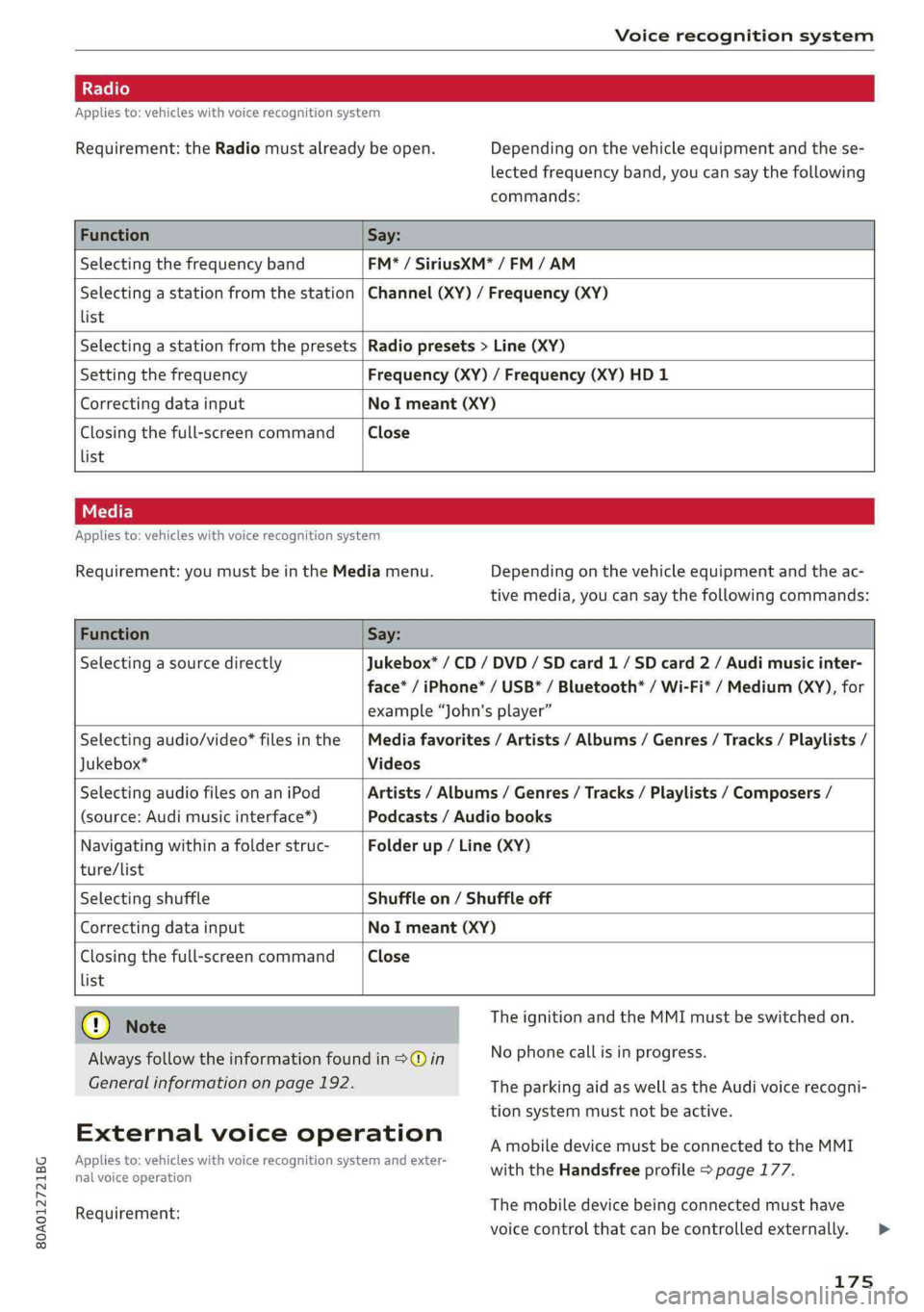
Requirement:theRadiomustalreadybeopen.Depending onthevehicleequipmentandthese-
lectedfrequencyband,youcansaythefollowing
commands:
FunctionSay:
SelectingthefrequencybandFM*/SiriusXM*/FM/AM
Selectingastationfromthestation|Channel(XY)/Frequency(XY)
list
Selectingastationfromthepresets|Radiopresets>Line(XY)
SettingthefrequencyFrequency(XY)/Frequency(XY)HD1
CorrectingdatainputNoImeant(XY)
Closingthefull-screencommandClose
list
Appliesto:vehicleswithvoicerecognitionsystem
Requirement:youmustbeintheMediamenu.Depending onthevehicleequipmentandtheac-
tivemedia,youcansaythefollowingcommands:
FunctionSay:
SelectingasourcedirectlyJukebox*/CD/DVD/SDcard1/SDcard2/Audimusicinter-
face*/iPhone*/USB*/Bluetooth®/Wi-Fi*/Medium(XY),for
example“John'splayer”
Selectingaudio/video"filesinthe|Mediafavorites/Artists/Albums/Genres/Tracks/Playlists/
Jukebox*Videos
SelectingaudiofilesonaniPodArtists/Albums/Genres/Tracks/Playlists/Composers/
(source:Audimusicinterface*)Podcasts/Audiobooks
Navigatingwithinafolderstruc-Folderup/Line(XY)
ture/list
SelectingshuffleShuffleon/Shuffleoff
CorrectingdatainputNoImeant(XY)
Closingthefull-screencommand|Close
list
TheignitionandtheMMImustbe switchedon.
Note
Alwaysfollowtheinformationfoundin>@inNophonecallisinprogress.
Generalinformationonpage192.TheparkingaidaswellastheAudivoicerecogni-
tionsystemmustnotbeactive.
Externalvoiceoperation
Appliesto:vehicleswithvoicerecognitionsystem andexter-
nalvoiceoperation
AmobiledevicemustbeconnectedtotheMMI
withtheHandsfreeprofile>page177.
Themobiledevicebeingconnectedmusthave
voicecontrolthatcanbecontrolledexternally.>
Requirement:
175
Page 199 of 392
80A012721BG
Audiconnect
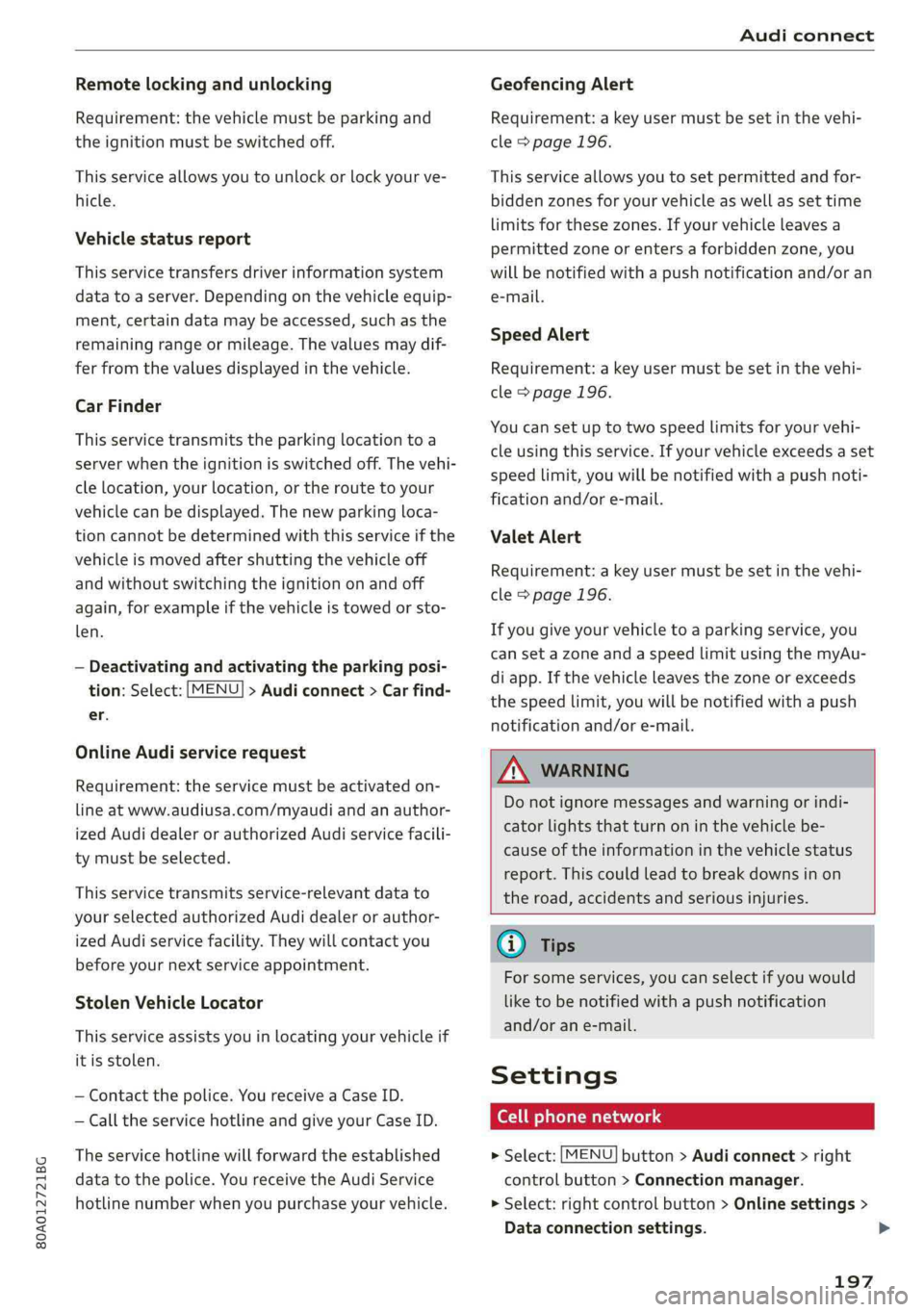
Remotelockingandunlocking
Requirement:thevehiclemustbeparkingand
theignitionmustbeswitchedoff.
Thisserviceallowsyoutounlockorlockyourve-
hicle.
Vehiclestatusreport
Thisservicetransfersdriverinformationsystem
datatoaserver.Dependingonthevehicleequip-
ment,certaindatamaybeaccessed,suchasthe
remainingrangeormileage.Thevaluesmaydif-
ferfromthevaluesdisplayedinthevehicle.
CarFinder
Thisservicetransmitstheparkinglocationtoa
server whentheignitionisswitchedoff.Thevehi-
clelocation,yourlocation,ortheroutetoyour
vehiclecanbedisplayed.Thenewparkingloca-
tioncannotbedeterminedwiththisserviceifthe
vehicleismovedaftershuttingthevehicleoff
andwithoutswitchingtheignitiononandoff
again,forexampleifthevehicleistowedorsto-
len.
—Deactivatingandactivatingtheparkingposi-
tion:Select:[MENU]>Audiconnect>Carfind-
er.
OnlineAudiservicerequest
Requirement:theservicemustbeactivatedon-
lineatwww.audiusa.com/myaudiandanauthor-
izedAudidealerorauthorizedAudiservicefacili-
tymustbeselected.
Thisservicetransmitsservice-relevantdatato
yourselectedauthorizedAudidealerorauthor-
izedAudiservicefacility.Theywillcontactyou
beforeyournextserviceappointment.
StolenVehicleLocator
Thisserviceassistsyouinlocatingyourvehicleif
itisstolen.
—Contactthepolice.YoureceiveaCaseID.
—CalltheservicehotlineandgiveyourCaseID.
Theservicehotlinewillforwardtheestablished
datatothepolice.YoureceivetheAudiService
hotlinenumberwhenyoupurchaseyourvehicle.
GeofencingAlert
Requirement:akeyusermustbesetinthevehi-
cle>page196.
Thisserviceallowsyouto setpermittedandfor-
biddenzonesforyourvehicleaswellassettime
limitsforthesezones.Ifyourvehicleleavesa
permittedzoneorentersaforbiddenzone,you
willbenotifiedwithapushnotificationand/oran
e-mail.
SpeedAlert
Requirement:akeyusermustbesetinthevehi-
cle>page196.
Youcansetuptotwospeedlimitsforyourvehi-
cleusingthis service.Ifyourvehicleexceedsaset
speedlimit,youwillbenotifiedwithapushnoti-
ficationand/ore-mail.
ValetAlert
Requirement:akeyusermustbesetinthevehi-
cle>page196.
Ifyougiveyourvehicletoaparkingservice,you
cansetazoneandaspeedlimitusingthemyAu-
diapp.Ifthevehicleleavesthezoneorexceeds
thespeedlimit,youwillbenotifiedwithapush
notificationand/ore-mail.
ZA\WARNING
Donotignoremessagesandwarningorindi-
catorlightsthatturnoninthevehiclebe-
causeoftheinformationinthevehiclestatus
report.Thiscouldlead tobreakdownsinon
theroad,accidentsandseriousinjuries.
@)Tips
Forsomeservices,youcanselectifyouwould
liketobenotifiedwithapushnotification
and/orane-mail.
Settings
Co)ate-Mar-iancola4
>Select:[MENU]button>Audiconnect>right
controlbutton>Connectionmanager.
>Select:rightcontrolbutton>Onlinesettings>
Dataconnectionsettings.
197
>
Page 208 of 392
Navigation
—ThenselectandconfirmStartrouteguidance.
Additionaldirectoryfunctionsinthenavigation
systemcanbefoundunder>page211.
@)Tips
—Addressesthathavebeenimportedfrom
yourmobiledeviceintotheMMIcanalsobe
usedasadestination.
—If acontactisgrayed outinthedirectory,
thiscontacthasneitheradestinationnoran
addressassignedtoit.
olelmneat)
Appliesto:vehicleswithnavigationsystem
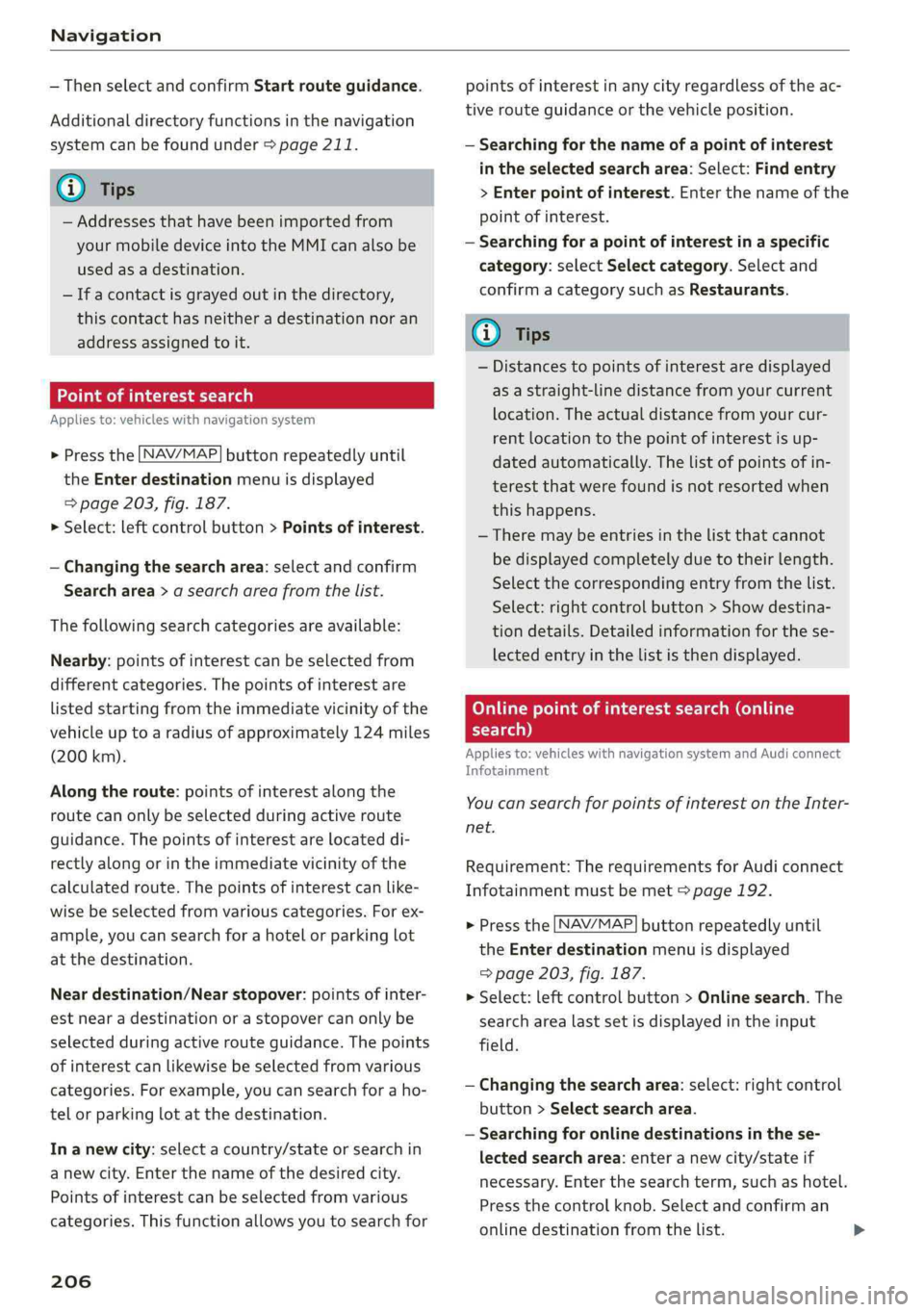
>Pressthe LNAV/MAP]buttonrepeatedlyuntil
the Enterdestinationmenuisdisplayed
=>page203,fig.187.
>Select:leftcontrolbutton>Pointsofinterest.
—Changingthesearcharea:selectandconfirm
Searcharea>asearchareafromthelist.
Thefollowingsearchcategoriesareavailable:
Nearby:pointsofinterestcanbeselectedfrom
differentcategories.Thepointsofinterestare
listedstartingfromtheimmediatevicinityofthe
vehicleuptoaradiusofapproximately124miles
(200km).
Alongtheroute:pointsofinterestalongthe
routecanonlybeselectedduringactiveroute
guidance.Thepointsofinterestarelocateddi-
rectlyalongorintheimmediatevicinityofthe
calculatedroute.Thepointsofinterestcanlike-
wisebeselectedfromvariouscategories.Forex-
ample,youcansearchforahotelorparkinglot
atthedestination.
Neardestination/Nearstopover:pointsofinter-
estnearadestinationorastopover canonlybe
selectedduringactiverouteguidance.Thepoints
ofinterestcanlikewisebeselectedfromvarious
categories.Forexample,youcansearchforaho-
telorparkinglotatthedestination.
In anewcity:selectacountry/stateorsearchin
anewcity.Enterthenameofthedesiredcity.
Points ofinterestcanbeselectedfromvarious
categories.Thisfunctionallowsyoutosearchfor
206
points ofinterestinanycityregardlessoftheac-
tiverouteguidanceorthevehicleposition.
—Searchingforthenameofapointofinterest
intheselectedsearcharea:Select:Findentry
>Enter pointofinterest.Enterthenameofthe
pointofinterest.
—Searchingforapointofinterestinaspecific
category:selectSelectcategory.Selectand
confirmacategorysuchasRestaurants.
(i)Tips
—Distancestopointsofinterestaredisplayed
asastraight-linedistancefromyourcurrent
location.Theactualdistancefromyourcur-
rent locationtothepointofinterestisup-
datedautomatically.Thelistofpointsofin-
terestthatwerefoundisnotresortedwhen
thishappens.
—Theremaybeentriesinthelistthatcannot
bedisplayedcompletelyduetotheirlength.
Selectthecorrespondingentryfromthelist.
Select:rightcontrolbutton>Showdestina-
tiondetails.Detailedinformationforthese-
lectedentryinthelististhendisplayed.
Onlinepointofinterestsearch(online
search)
Appliesto:vehicleswithnavigationsystem andAudiconnect
Infotainment
You cansearchforpointsofinterestontheInter-
net.
Requirement:TherequirementsforAudiconnect
Infotainmentmustbemet>page192.
>Pressthe [NAV/MAP]buttonrepeatedlyuntil
theEnterdestinationmenuisdisplayed
=>page203,fig.187.
>Select:leftcontrolbutton>Onlinesearch.The
searcharealastsetisdisplayedintheinput
field.
—Changingthesearcharea:select:rightcontrol
button>Selectsearcharea.
—Searchingforonlinedestinationsinthese-
lectedsearcharea:enteranewcity/stateif
necessary.Enterthesearchterm,suchashotel.
Pressthecontrolknob.Selectandconfirm an
onlinedestinationfromthelist.
Page 210 of 392
Navigation
Deletingastopover
—Pushthecontrolknobup.Freetextsearchand
activerouteguidancearedisplayed.Or:Turn
the
controlknobtotheleftuntiltheactive
routeguidanceisshown.
—SelectandconfirmDeletestopover(2)
>fig.189.
—Thestopoverisdeleted.
(eTleeET
Appliesto:vehicleswithnavigationsystem
Requirement:routeguidancemustbeactive.
>Pressthe LNAV/MAP]buttonrepeatedlyuntil
the Enterdestinationmenuisdisplayed
=>page203,fig.187.
>Turn thecontrolknobtotheleftuntiltheactive
routeguidanceisshown>page207,fig.189.
> SelectandconfirmDeletedestination(@)
=>page207,fig.189.Thedestinationisdelet-
ed. Or:selecttherightcontrolbutton>Cancel
routeguidance.
Additionaloptionswhenenteringa
Ceeacea)
Appliesto:vehicleswithnavigationsystem
>Presstherightcontrolbutton.
Dependingontheselectedfunction,thefollow-
ingoptionsmaybeavailablewhenenteringa
destination:
Cancelrouteguidance:Requirement:routeguid-
ancemustbeactive.Routeguidanceiscanceled.
Foradditionalinformation,see>page208.
Countryinformation:youcandisplaytheappli-
cableurbanandruralspeedlimitsforanycoun-
try/state.Ifthisfunctionisactivated,theinfor-
mationwillbeautomaticallyshowntoyouinthe
routeinformation@)%page212,fig.194when
thespeedlimitisexceeded>page215.
Country/stateselection:see>page204,Nar-
rowingthesearcharea.
Routecriteria: see>page212,Routecriteria.
208
Showlocationonmap:Requirement:youmust
haveselectedadestinationfromtheresultslist.
Thedestinationenteredisdisplayedonthemap.
Parkingatthislocation*:Requirement:youmust
haveselectedadestinationfromtheresultslist.
Allparkingoptionsnear theselectedlocationare
displayedintheInfotainmentsystem.
Delete:theselectedentryisdeleted.Youcande-
leteindividualentriesorallentries(forexample,
favoritesorlastdestinations).
Audiconnectatthislocation*:Requirement:you
musthaveselectedadestinationfromtheresults
list.Allowsyoutosearchforitemsinthevicinity
oftheselectedlocation,suchasTravelinforma-
tion.
Onlinetrafficdata*:theonlinetrafficinforma-
tion>page218canbe switchedonoroff.
Adddestinationtocontact:see>page211.
Storeasfavorite:see>page211.
Voiceguidance:see>page212.
Navigationsettings:see>page211.
@Tips
Informationononlinetrafficdata*canalso
befoundonlineatwww.audiusa.com.
Page 216 of 392
Navigation
Routelist
Theroutelistcanonlybedisplayedwhenroute
guidanceisactiveandcontainsinformationre-
gardingtheroute,thenamesofthestreetsand
the lengthoftheroutesections.Whentraveling
onhighways,possibleparkinglotsandrestareas
areshown,whichyoucanselectasastopover.
POIsalongtheroute
Requirement:routeguidancemustbeactive.
Searchingforpointsofinterestalongyourcur-
rentrouteForadditionalinformation,see
=>page206.
Additionaloptionsonthemap
Appliesto:vehicleswithnavigationsystem
>Pressthe [NAV/MAP]buttonrepeatedlyuntil
themapisdisplayed>page212,fig.194.
>Presstherightcontrolbutton.
Dependingonthefunctionselected,thefollow-
ingoptionscanalsobeselectedundertheMap
menu:
Cancelrouteguidance:see>page208.
Mapsettings:see>page214.
Routecriteria:see>page212.
Voiceguidance:see>page212.
Navigationsettings:see>page211.
Showalternativeroutes:see>page210.
Parkingalongtheroute”:parkingoptionsnear
thevehiclearedisplayed.
Savecurrentposition:youcansaveyourcurrent
vehiclepositionasafavorite>page211orsave
itasacontactinthedirectory>page211.
Audiconnectatthislocation*:allowsyouto
searchforTravelinformationattheenteredlo-
cation(events,weatheratthedestination,etc.).
Onlinetrafficdata*:youcanswitchtheonline
trafficdataonoroff(M).
2)AUDIAGprovidesaccesstoservicesfromthirdpartypro-
viders.Permanentavailabilitycannotbeguaranteed,be-
causethatdependsonthethirdpartyprovider.
214
Countryinformation:see>page208.
Avoidroute*:whenrouteguidanceisactive,the
calculatedroutewillavoidtheareayouhave
specified(maximum:12mi(20km)),ifpossible.
Thenavigationsystemcalculatesanalternative
route.Theroutetobeavoidedthatyouhaveen-
teredappliesonlytothecurrentrouteandmust
besetagain,ifneeded.Theareasyouhavese-
lectedtoavoidwillappearwithredandwhite
shadingonthemap.
Moveroute*:moveyourfingerovertheMMI
touchcontrolpad*oruse thecontrolknobto ad-
justtherouteonthe overviewmap.
Mapsettings
Appliesto:vehicleswithnavigationsystem
>Pressthe LNAV/MAP]buttonrepeatedlyuntil
themapisdisplayed.
>Select:rightcontrolbutton>Mapsettings.
Dependingontheselectedfunction,thefollow-
ingsettingscanbeselected:
Mapcolors
Day/Night:themapisdisplayedwitha light/
darkbackground.
Automatic:themapdisplayadaptstothelight-
ingconditions(forexample,changingfromDay
toNightwhendrivingthroughatunnel).
Mapdisplay
Standard:see>page212,fig.195.
Satellitemap”:referto>page215,fig. 196.
Maporientation
Destinationmap:Themapshowsthedestination
andisorientedtothenorth.
2Dheading-upmap/2Dnorth-upmap:thecur-
rentvehiclepositionisdisplayed.Themapisori-
entedinthedirectionoftravelor tothenorth.
3Dheading-upmap”:thecurrentvehicleposi-
tionisshownonathree-dimensionalmapandis>
Page 252 of 392
Systemsettings
Volumesettings
Adjustingthevolume
Thevolumeofanaudiosourceorasystemmes-
sage(forexample,fromthevoicerecognition
system*)canbeadjusteddirectlywhilethe
soundisplayingusingtheOn/Offknob.
—Increasingordecreasingthevolume:turnthe
On/Offknob@)>page152,fig.154tothe
rightorleft.
—Mutingorpausing:presstheOn/Offknob
briefly.Or:turntheOn/Offknobtotheleftun-
tilthesymbol@>page161appears.Anactive
audio/videosourceisstopped.
—Unmutingorresuming:presstheOn/Offknob
briefly.Or:turntheOn/Offknobtotheright.
Z\,WARNING
To reducetheriskofanaccident,adjustthe
volumeoftheaudiosystemsothataudible
signalsfromoutsidethevehicle,suchas po-
liceandfiresirens,canbe heardeasilyatall
times.
G)Tips
Volumethatistoohighortoolowisautomat-
icallyadjustedtoasetlevelwhentheMMIis
switchedon.
Adjustingthesystemvolume
>Select:[MENU]button>Sound>leftcontrol
button.
Telephone
Appliesto:vehicleswithtelephone
Mutetelephone:messagesandringtonesareset
tomute.
Ringtone:see>page189,Ringtoneandvolume
settings.
Ringtonevolume:youcanadjustthevolumeof
theselectedringtone byturningthecontrol
knob.
Messagevolume:youcanadjustthevolumeof
thenotificationforanincomingtextmessageby
turningthecontrolknob.
250
Microphoneinputlevel:youcanadjustthecall
volumeduringaphonecallbyturningthecontrol
knob.
Navigation
Appliesto:vehicleswithnavigationsystem
Voiceguidance:see>page212.
Voiceguidanceduringphonecall:see
>page212.
Voiceguidancevolume:youcanadjustthevoice
guidancevolumebyturningthecontrolknob.Or:
youcanadjustthevoiceguidancevolumeduring
activerouteguidancebyturningtheOn/Offknob.
Entertainmentfader:thevolumeofaudioplay-
backcanbetemporarilyloweredwhenthepark-
ingsystemorvoiceguidanceisactive.
Voicerecognitionsystem
Appliesto:vehicleswithvoicerecognitionsystem
Commanddisplay:see>page246.
Shortdialog:see>page246.
Speechdialogsystemvolume:See>page246.
Individualspeechtraining:see>page246.
Parkingaid*
Youcanadjustthevolumeofthesignaltoneby
turningthecontrolknob.
—Adjustingthe Front volume:selectandcon-
firmHigh,MediumorLow.
—AdjustingtheRearvolume:selectandconfirm
High,MediumorLow.
MMItouch*
Turnthecontrolknobtoadjustthevolumeofthe
spokenpromptsfromtheMMItouch*.
Page 313 of 392

80A012721BG
CheckingandFilling
OnBoardDiagnosticSystem(OBD)
TheOnBoardDiagnosticSystemmonitorsthe
engineandtransmissioncomponentsthatinflu-
enceemissions.
aag Ss
°
==oO
OOg
e
ONYON
Fig.255Footwellonleftsideofthevehicle:connection
portfortheOnBoardDiagnosticSystem(OBD)
OnBoardDiagnosticSystem
EnginedatacanbereadoutattheOnBoardDi-
agnosticSystemconnectionportusingaspecial
testingdevice>fig.255.
Indicatorlight
IftheSindicatorlightblinksorturnson,there
isamalfunctionthatiscausingpooremissions
qualityandthatcoulddamagethecatalyticcon-
verter.DriveslowlytoanauthorizedAudidealer
orauthorizedAudiServiceFacilitytohave the
malfunctioncorrected.
Theindicatorlightcanalsoturnonifthefuelfill-
ercapisnotclosedcorrectly>page3081).
ZA\WARNING
Incorrectuseofthe connectionportforthe
OnBoardDiagnosticSystemcancausemal-
functions,whichcanthenresultinaccidents
andseriousinjuries.
—OnlyallowanauthorizedAudidealerorau-
thorizedAudiServiceFacilitytoreadoutthe
enginedata.
))Dependingontheengineandcountry
Enginecompartment
Generalinformation
Specialcareisrequiredifyouareworkinginthe
enginecompartment
Forworkintheenginecompartment,suchas
checkingandfillingfluids,thereisariskofin-
jury,scalding,accidents,andburns.Forthis
reason,followallthewarningsandgeneral
safetyprecautionsprovidedinthefollowingin-
formation.Theenginecompartmentisadan-
gerousarea.>/\.
Z\WARNING
—Turntheengineoff.
—Switchtheignitionoff.
—Settheparkingbrake.
—Selectthe“P”(Park)selectorleverposition.
—Allowtheenginetocool.
—Keepchildrenawayfromtheenginecom-
partment.
—Neverspillfluidsonahotengine.Theseflu-
ids(suchastheanti-freezingagentcon-
tainedinthecoolant)canignite.
—Avoidshortcircuitsintheelectricalsystem.
—Neverreachintotheradiatorfan.Thefanis
temperature-controlledandcanturnon
suddenly,evenwhentheignitionisswitched
off.
—Neveropenthehoodwhenthereissteamor
coolantescapingfromtheenginecompart-
ment,becausethereisariskthatyoucould
beburned.Waituntilnosteamorcoolantis
escaping.
—Neveropenthecaponthecoolantexpan-
siontankwhentheengineiswarm.The
coolingsystemisunderpressure.
—Toprotectyourface,hands,andarmsfrom
hotsteamorcoolant,coverthecapwitha
thick clothwhenopening.
—Donotremovetheenginecoverunderany
circumstances.Thisincreasestheriskof
burns.
311
Page 314 of 392
CheckingandFilling
—Duetotheriskofelectricshock,nevertouch
theignitioncableorothercomponentsin
theelectronichigh-voltageignitionsystem
whentheengineisrunningorisstarting.
—Ifagearisengagedwhilethevehicleissta-
tionaryandtheengineisrunning,donot
presstheacceleratorpedalinadvertently.
Pressingtheacceleratorpedalwillcausethe
vehicletomove,andthiscouldresultinan
accident.
—Ifinspectionsorrepairsmustbeperformed
whiletheengineisrunning,movingcompo-
nents(suchastheribbedbelt,generator,
andradiatorfan)poseanadditionalrisk.
—Set theparkingbrakefirstandselectthe
“P”(Park)selectorleverposition.
—Alwaysmakesurethatnopartsofthe
body,jewelry,ties,looseclothing,and
longhaircanbecaughtinmovingengine
components.Beforeanywork,alwaysre-
moveanyjewelryandties,tiebacklong
hair,andmakesureallclothingfitsclose
tothebodytotoreducetheriskofany-
thingbecomingcaughtinenginecompo-
nents.
—Payattentiontothefollowingwarnings
whenworkonthefuelsystemisrequired:
— Donotsmoke.
—Neverworknearopenflames.
—Alwayshaveaworkingfireextinguisher
nearby.
—Allworkonthebatteryorelectricalsystem
inyourvehiclecanresultininjuries,chemi-
calburns,accidents,or burns.Becauseof
this,allworkmustbeperformedonlyby an
authorizedAudidealerorauthorizedAudi
ServiceFacility.
—Limityour exposuretoexhaustandchemi-
calsto asshortatimeaspossible.
ZXWARNING
CaliforniaProposition65Warning:
—Engineexhaust,someofitsconstituents,
andcertainvehiclecomponentscontainor
emitchemicalsknowntotheStateofCali-
forniatocausecancerandbirthdefectsand
reproductiveharm.Inaddition,certainflu-
312
idscontainedinvehiclesandcertainprod-
uctsofcomponentwearcontainoremit
chemicalsknowntotheStateofCalifornia
tocausecancerandbirthdefectsorother
reproductiveharm.
—Batteryposts,terminalsandrelatedacces-
soriescontainleadandleadcompounds,
chemicalsknowntotheStateofCalifornia
tocausecancerandreproductiveharms.
Washhandsafterhandling.
C)Note
Whenfillingfluids,besurenottoadd anyflu-
idstothewrongreservoirs.Otherwisesevere
malfunctionsandenginedamagewilloccur.
@)Forthesakeoftheenvironment
Youshouldregularlycheckthegroundunder
yourvehicleinordertodetectleaksquickly.If
therearevisiblespotsfromoilorotherfluids,
bringyourvehicletoanauthorizedAudideal-
erorauthorizedAudiServiceFacilitytobe
checked.
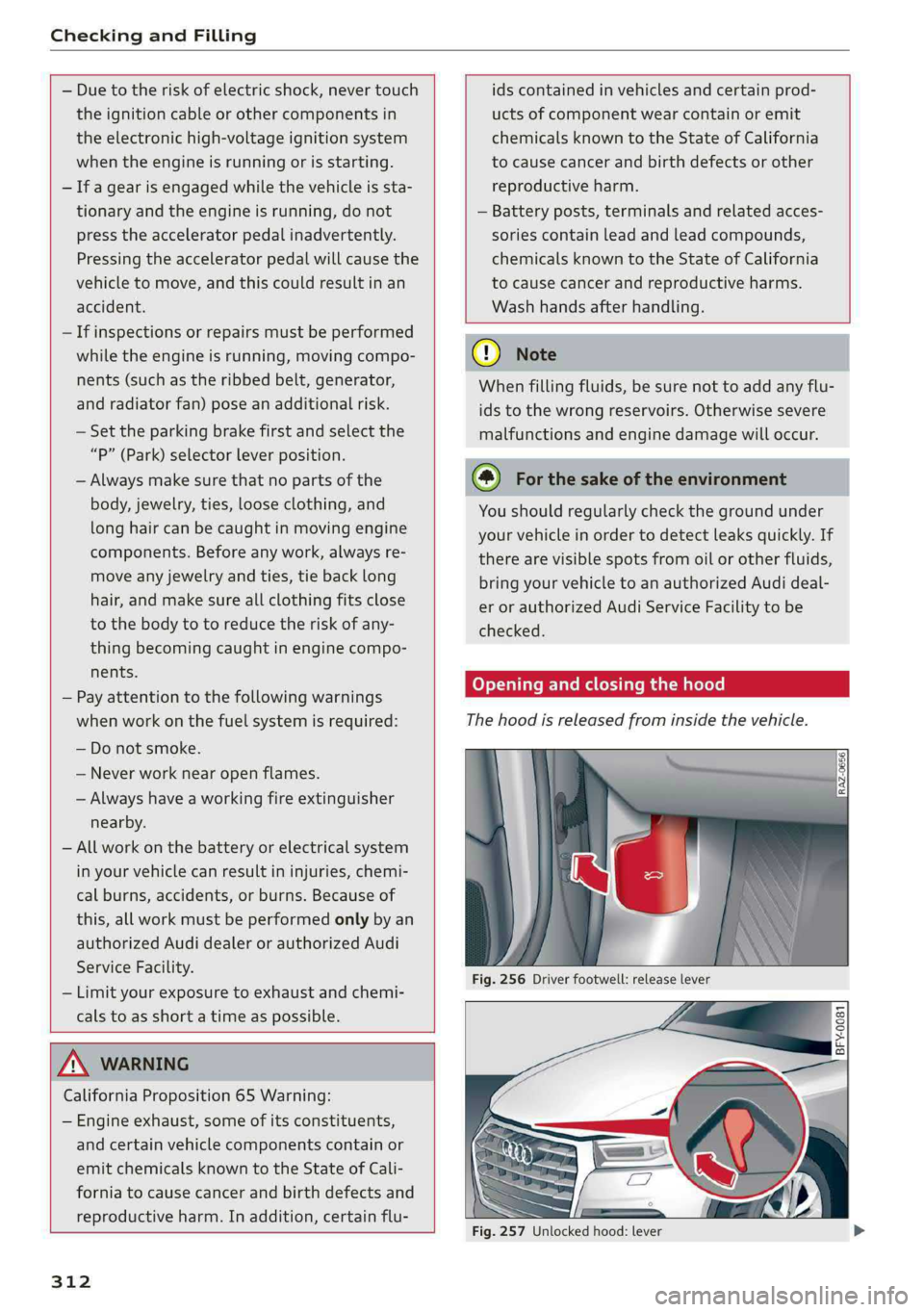
Openingandclosingthehood
Thehoodisreleasedfrominsidethevehicle.
BFY-0081
ibe:
Fig.257Unlockedhood:lever
Page 351 of 392
80A012721BG
Emergencyassistance
Emergencyassistance
Generalinformation
>Parkthevehicleasfaraspossiblefrommoving
trafficinthe eventofabreakdown.Intheevent
ofaflattire,parkthevehicleonalevelsurface.
Ifyouareonasteephill,beespeciallycareful.
>Set theparkingbrake.
>Switchtheemergencyflasherson.
>Havethepassengersexitthevehicle.They
shouldmovetoasafeplace,forexamplebe-
hindaguardrail.
ZAWARNING
Follow thestepsgivenabove.Thisisforyour
protectionandtheforthesafetyof otherson
theroad.
Equipment
Vehicletoolkit,tiremobilitykit,and
vehiclejack
Appliesto:vehicleswiththevehicletoolkit,tiremobilitykit,
andvehiclejack
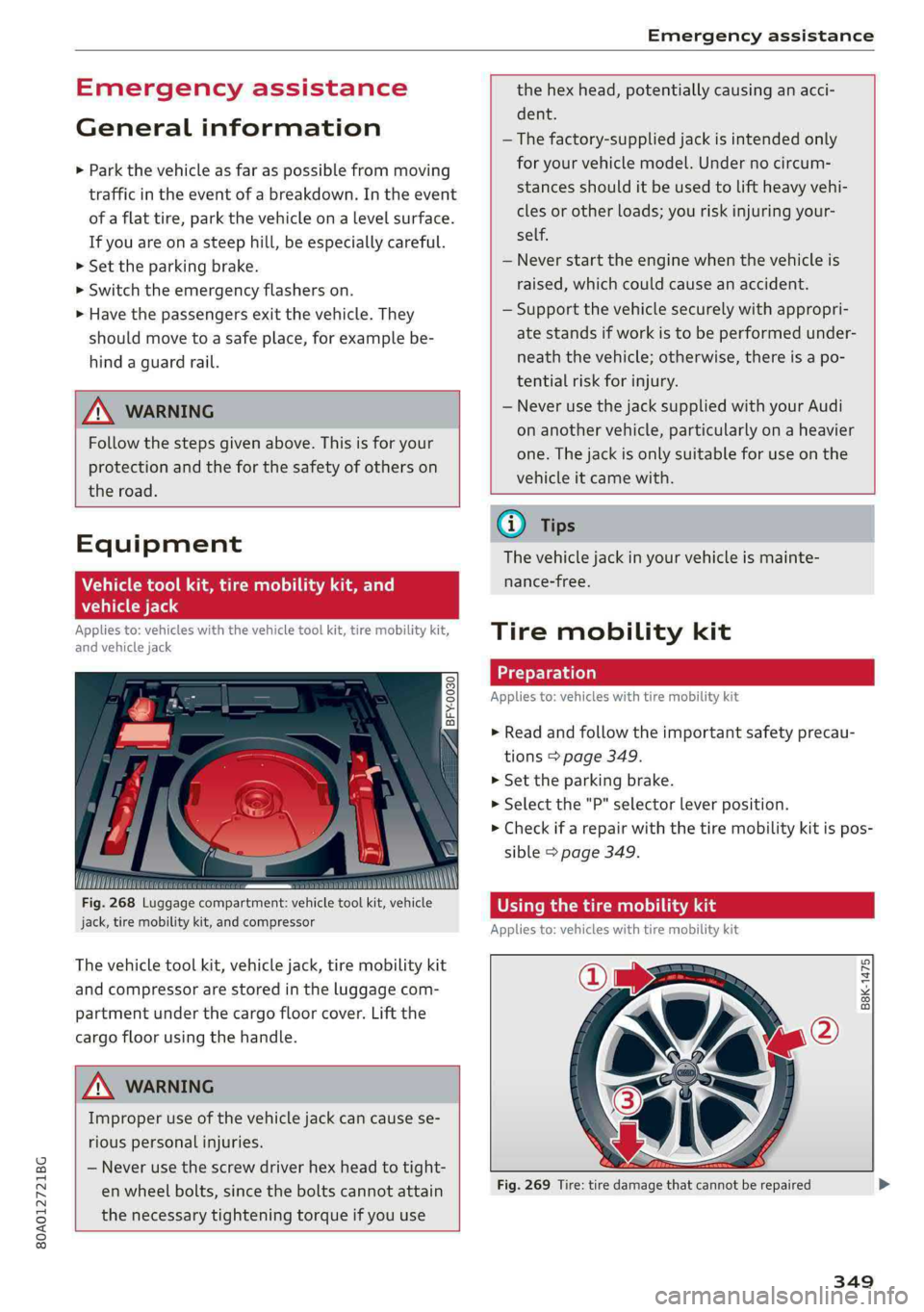
Fig.268Luggagecompartment:vehicletoolkit,vehicle
jack,tiremobilitykit,andcompressor
Thevehicletoolkit,vehiclejack,tiremobilitykit
andcompressorarestoredintheluggagecom-
partmentunderthecargofloorcover.Liftthe
cargofloorusingthehandle.
ZAWARNING
Improperuseofthevehiclejackcan causese-
riouspersonalinjuries.
—Neverusethescrewdriverhexheadtotight-
enwheelbolts,sincetheboltscannotattain
thenecessarytighteningtorqueifyouuse
the hexhead,potentiallycausinganacci-
dent.
— Thefactory-suppliedjackisintendedonly
foryourvehiclemodel.Undernocircum-
stancesshoulditbeusedtoliftheavyvehi-
clesorotherloads;youriskinjuringyour-
self.
—Neverstarttheenginewhenthevehicleis
raised,whichcouldcauseanaccident.
—Supportthevehiclesecurelywithappropri-
atestandsifworkistobeperformedunder-
neaththevehicle;otherwise, thereisapo-
tentialriskforinjury.
—NeverusethejacksuppliedwithyourAudi
onanothervehicle,particularlyonaheavier
one.Thejackisonlysuitableforuseonthe
vehicleitcamewith.
G@)Tips
Thevehiclejackinyourvehicleismainte-
nance-free.
Tiremobilitykit
Appliesto:vehicleswithtiremobilitykit
>Readandfollowtheimportantsafetyprecau-
tions>page349.
>Set theparkingbrake.
>Selectthe"P"selectorleverposition.
> Checkifarepairwiththetiremobilitykitispos-
sible>page349.
OTemaaRieeechaAldi
Appliesto:vehicleswithtiremobilitykit
B8K-1475
Fig.269Tire: tiredamagethatcannotberepaired
349