infotainment AUDI Q5 2019 Manual PDF
[x] Cancel search | Manufacturer: AUDI, Model Year: 2019, Model line: Q5, Model: AUDI Q5 2019Pages: 392, PDF Size: 99.86 MB
Page 194 of 392
Audiconnect
Audiconnect
Generalinformation
Dependingonthecountryandthevehicleequip-
ment,thefollowing functionsmaybeavailable:
—AudiconnectInfotainment
—Audiconnectvehiclecontrol
YoucanalsofindmoreinformationonAudicon-
nect
onlineatwww.audiusa.com.
ZA\WARNING
—Toreducetheriskofanaccident,onlyuse
Audiconnectserviceswhenroadandtraffic
conditionspermit.Alwaysreadandfollow
the
notesin>page151,Trafficsafetyinfor-
mation.
—Itisonlysafe tousetablets,laptops,mobile
devicesandothersimilardeviceswhenthe
vehicleisstationarybecause,likeallloose
objects,theycouldbethrownaroundthein-
sideofthevehicleinacrashandcauseseri-
ousinjuries.Storethesetypesofdevicesse-
curelywhiledriving.
—Asthedriver,donotallowusageoftheWi-
Fihotspottodistractyoufromdriving,as
thiscouldincreasetheriskofanaccident.
—Donotuseanywirelessdevicesonthefront
seatswithinrangeoftheairbagswhiledriv-
ing.Alsoreadthewarningsinthechapter
=page270,Frontairbags.
—Toreducetheriskofanaccident,use theAu-
diconnectInfotainmentserviceswithaWi-
Fihotspotonlyintherearseatwhentheve-
hicleisinmotion,oronlywhenthevehicleis
stationary.
@)Note
—Appliesto:embeddedSIMcardusage:The
connectioncostsofAudiconnectInfotain-
mentservicesareincludedinthepriceof
AudiconnectInfotainmentduring thesub-
scriptionperiodwithsomeexceptions.
Pleasenotethattheremaybeadditional
chargeswhenusingsomeservices.Forex-
ample,thisapplies toInternetradio/
podcastsorforInternetconnectionsand
192
servicesthatusetheWi-Fihotspot,suchas
onlinemediasources.Dependingonthe
country,dataplansmayneedtobepur-
chasedfortheseservices>page199.For
additionalinformation,seewww.audiusa.
com/myaudi.
—Incertainsituations,theWi-Fihotspotdata
connectionmaybeestablishedasareplace-
mentfortheSIMcardonyourWi-Fidevice.
Thisfeature dependsontheconfiguration
ofyourWi-Fideviceandoperatingsystem.
Thiscouldresultinfeesdependingonyour
cellphoneserviceprovider,especiallyifyou
areusingthisfeaturewhileabroad.Aflat
ratedataplanisstronglyrecommended.For
moreinformation,contactyourcellphone
serviceproviderorrefertotheowner'sman-
ualforyourWi-Fidevice.
—Youareresponsibleforallprecautionstaken
fordataprotection,anti-virusprotection,
andprotectionagainstlossofdataonmo-
biledevicesthatareused,forexample,to
accesstheInternetthroughtheWi-Fihot-
spot.
G)Tips
—Theavailabilityofservicesdependsonthe
subscription.
—AUDIAGprovidesaccesstoservicesfrom
thirdpartyproviders.Permanentavailability
cannotbe guaranteed,becausethatde-
pendsonthethirdpartyprovider.
—Useofthemostup-to-datemobilenetwork
standardisnotavailableineverycountry.
ContactanauthorizedAudidealeror au-
thorizedAudiServiceFacilityoryourcell
phoneserviceproviderforadditionalinfor-
mation.
—AudiconnectInfotainmentservicesareonly
availablewithinthecellphonenetworkcov-
eragefromyourcellphoneserviceprovider.
—Availability,scope,providers,screendisplay,
andcosts ofservicesmayvarydependingon
thecountry,model,modelyear,enddevice
andrates.
Page 195 of 392
80A012721BG
Audiconnect
Audiconnect
Infotainment
Appliesto:vehicleswithAudiconnectInfotainment
WithAudiconnectInfotainmentservices,online
informationistransmitteddirectlytothevehicle.
AnInternetconnectionisrequiredtouseAudi
connectInfotainment.Dependingonthecountry
andthevehicleequipment,thefollowingoptions
maybeavailable:
—EmbeddedSIMcard
ZAWARNING
Alwaysfollowtheinformationfoundin>A\
inGeneralinformationonpage192.
@)Note
Alwaysfollowtheinformationfoundin>@in
Generalinformationonpage192.
EmbeddedSIMcard
Appliesto:vehicleswithAudiconnectInfotainmentandan
embeddedSIMcard
ThedataconnectionforAudiconnectInfotain-
mentservicesismadethroughanembeddedSIM
card(eSIMcard)thatisinstalledinthevehicle.
Youcanuse theAudiconnectInfotainmentserv-
icesimmediately.
@)Note
Alwaysfollowtheinformationfoundin>@®in
Generalinformationonpage192.
Audiconnect
Infotainmentservices
Configuration
Appliesto:vehicleswithAudiconnectInfotainment
Requirement:yourvehiclemustbeconnectedto
theInternet>page193.
SomeAudiconnectInfotainmentservicesmust
beconfiguredthroughyourpersonalmyAudiac-
countbeforeusingthemforthefirsttime.
>Registeratwww.audiusa.com/myaudi.
>AddyourvehicletoyourmyAudiaccount.
>Select:[MENU]button>Audiconnect>right
controlbutton>Login.
>LogintomyAudiinthevehicleusingyoure-
mailaddressandpassword.
(i)Tips
—ForsomeAudiconnectInfotainmentserv-
ices,youmayalsohavetoenteryourmyAu-
diaccessinformationwhenaccessingserv-
icesintheMMI.
—SomeAudiconnectInfotainmentservices
mustbeactivatedatwww.audiusa.com/
myaudi.
—Regardlessofthekeyuserandadditional
users,youcanonlyconnectonemyAudiac-
counttoyourvehicle.
—Tomakeloggingineasierinthevehicle,you
willreceivean8-digitmyAudiPINasanal-
ternative toyourmyAudipasswordafteryou
havecreatedamyAudiaccount.
—Fordetailedinformationonconfiguration,
visitwww.audiusa.com/myaudi.
AccessingAudiconnectInfotainment
Appliesto:vehicleswithAudiconnectInfotainment
>Select:the[MENU]button>Audiconnect.
AlistofalloftheavailableAudiconnectInfotain-
mentservicesisshownontheInfotainmentsys-
temdisplay.
YoucanalsofiltertheAudiconnectInfotainment
servicesbycategory:
>Select:[MENU]button>Audiconnect>left
controlbutton>forexample,Navigationfor
theAudiconnectInfotainmentservicesinthe
navigationmenu.
ETtae(ear)
Appliesto:vehicleswith AudiconnectInfotainment
>Select:[MENU]button>Audiconnect>desired
AudiconnectInfotainmentservice>rightcon-
trolbutton.
DependingontheequipmentandtheAudicon-
nectInfotainmentserviceselected,thefollowing
basicfunctionsmaybeavailable:>
193
Page 196 of 392
Audiconnect
Saveaspreview
YoucanalsoseeapreviewoftheselectedAudi
connectInfotainmentservicesontheAudicon-
nectInfotainmenthomepage.
Showonmap
Youcanshowselectedcontentsonthemapand
usethemforrouteguidance.
Login
See>page193.
Readout)
YoucanallowtheMMItoreadouttheselected
contents.
Call
If aphonenumberwasassignedtoanentry,you
cancallthenumber,forexampleto reservetick-
ets.
Refresh
ThecontentsfortheselectedAudiconnectInfo-
tainmentservicearerefreshed.
Startrouteguidance
If alocationwassavedwithanentry,youcan use
itasthenavigationdestination.Routeguidance
startsimmediately.
Changesearcharea
Thesetsearchareacanbechangedatanytime.
Additionalinformationonsearchareascan be
foundunder>page206.
ClosingAudiconnectInfotainmentservices
Regardlessofthefunctionselected,youcan
closean AudiconnectInfotainmentserviceat
anytimeandreturn tothehomescreen.
Services
Appliesto:vehicleswithAudiconnectInfotainment
Dependingonthecountryandthevehicleequip-
ment,thefollowingservicesmaybeavailable:
D_Notavailableinalllanguages.
194
Weather
Informationoncurrentweatherconditionsas
wellasweatherforecastsfortheselectedsearch
area.
>SelectandconfirmWeather.
News
>Select:Onlinenews>desirednewsfeed>a
headline.
IfyouloggedintomyAudiinyourvehicle
=>page193,personalizednewsfeedscanbedis-
played.
Twitter
Requirement:Youmusthaveconnectedyourve-
hiclewithmyAudi>page193.Youmusthave
connectedyourmyAudiaccountwithTwitter.
YoucanonlyconnectoneTwitteraccountwith
yourmyAudiaccount.Notallsettingscanbead-
justedintheMMI.Somecanonlybeadjusted
throughtheTwitterwebsite.
>Select:Twitter>leftcontrolbutton>desired
function(forexample,Trends).
ZA\WARNING
Alwaysfollowtheinformationfoundin>A\
inGeneralinformationonpage192.
@Note
Alwaysfollowtheinformationfoundin>@in
Generalinformationonpage192.
Additionaloptions
Appliesto:vehicleswith AudiconnectInfotainment
>Select:[MENU
controlbutton.
button>Audiconnect>right
Dependingontheequipmentandthecountry,
thefollowingoptionsmaybeavailableinthe
overviewofAudiconnectInfotainmentservices:>
Page 197 of 392
80A012721BG
Audiconnect
AboutAudiconnect
Hereyouwillfindlegalinformationregarding
AudiconnectInfotainmentusage.
Login
See>page193.
Connectionmanager
See>page246.
Licensesubscription
Thevalidityandexpirationdateofyourlicenses
aredisplayed.
Refresh
ThecontentoftheselectedAudiconnectInfo-
tainmentserviceortheentireAudiconnectInfo-
tainmentlistisupdated.
Dataprivacy
Requirement:theignitionmustbe switchedon.
Location,vehicle,andpersonal dataaretransmit-
tedwhenusingAudiconnectservices.
Allowingsendingofdata
—SelectandconfirmActivatedataconnection.
Thedatamoduleforthe useofallAudiconnect
serviceswillbeactive.
Restrictingsendingofdata
—SelectandconfirmActivateprivacy.Thedata
connectionislimitedordeactivateddepending
ontheequipment.ThemajorityofAudiconnect
serviceswillnot beavailable.
Thefollowinginterfacesarenotaffectedbythis
setting:Bluetooth,BluetoothLowEnergy(BLE),
Wi-Ficonnection,Audismartphoneinterface
(ASI),NearFieldCommunication(NFC),charging
communication(e-tron),ElectronicTollCollect
(ETC),ifequipped.
@)Note
Alwaysfollowtheinformationfoundin>@in
Generalinformationonpage192.
)Dependsonthecountryand equipment. Theseservices
are availableforalimitedtime.
@Tips
—Ifthetransmissionofdataislimited,data
willstillbetransmittedtoverifysubscrip-
tions.
—Ifthetransmissionofdataislimited,itwill
havethefollowingeffectsontheexchange
ofdataforAudiconnectservicesandemer-
gencycalls,ifequipped:
—Theemergencycallfunctionwillremain
availablewithoutrestrictionsandwillcon-
tinuetotransmitdata.
—Ifanonlineroadsideassistancecallisini-
tiated,nodatawillbetransmitted,buta
callwillbemade.
—IftheGeofencingAlert,SpeedAlert,
and/orValetAlertserviceshavebeenacti-
vatedbythekeyuser,thentheywillre-
mainavailablewithoutrestrictionsand
continuetotransmitdata.
Audiconnectvehicle
controlservices
Appliesto:vehicleswith Audiconnectvehiclecontrol
WithAudiconnectvehiclecontrolservices)),you
canutilizevariousservicesusingthemyAudiapp
oronlineatwww.audiusa.com/myaudi.
Z\WARNING
Alwaysfollowtheinformationfoundin>AV
inGeneralinformationonpage192.
@Tips
—Accessingspecificdataorcontrollingfunc-
tionsremotelydependsonthechargelevel
ofthevehiclebattery.Therefore,these
functionsonlyhavelimitedavailabilityafter
switchingofftheignition.
— AneSIMcardestablishestheInternetcon-
nectionforAudiconnectvehiclecontrol
services.Thecostsforthisareincludedin
thepriceofAudiconnectvehiclecontrol
195
>
Page 200 of 392
Audiconnect
Dependingonthecountry,vehicleequipment,
andconnectiontype,thefollowingfunctionsmay
beavailable:
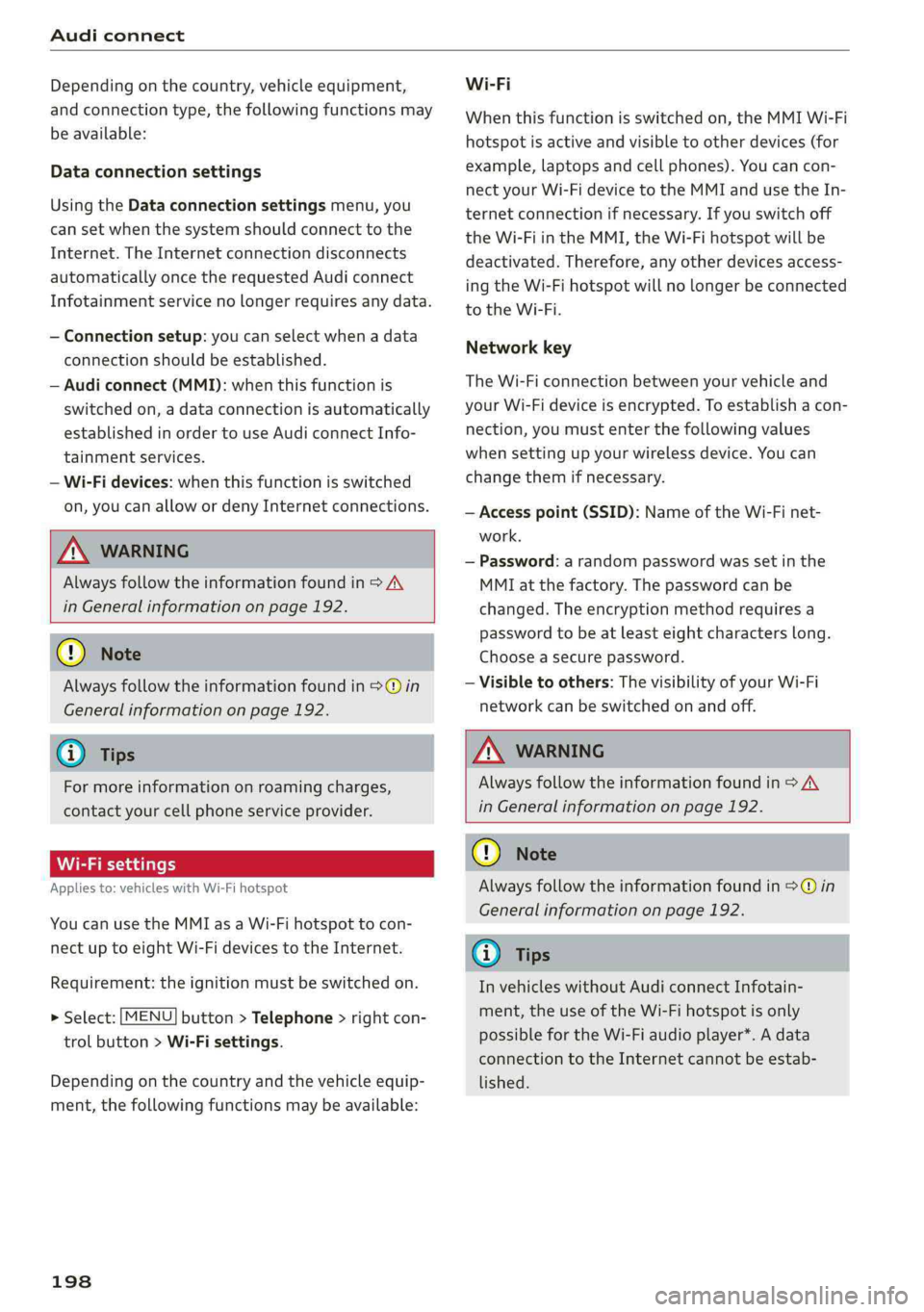
Dataconnectionsettings
UsingtheDataconnectionsettingsmenu,you
cansetwhenthesystemshouldconnecttothe
Internet.TheInternetconnectiondisconnects
automaticallyoncetherequested Audiconnect
Infotainmentservicenolongerrequiresanydata.
—Connectionsetup:youcanselectwhenadata
connection should beestablished.
—Audiconnect(MMI):whenthisfunctionis
switchedon,adataconnectionisautomatically
establishedinordertouseAudiconnectInfo-
tainmentservices.
—Wi-Fidevices:whenthisfunctionisswitched
on,youcanallowordenyInternetconnections.
ZAWARNING
Alwaysfollowtheinformationfoundin>A\
inGeneralinformationonpage192.
@)Note
Alwaysfollowtheinformationfoundin>@in
Generalinformationonpage192.
@Tips
Formoreinformationonroamingcharges,
contactyourcellphoneserviceprovider.
Wi-Fisettings
Appliesto:vehicleswithWi-Fihotspot
YoucanusetheMMIasaWi-Fihotspottocon-
nect
uptoeight Wi-FidevicestotheInternet.
Requirement:theignitionmustbe switchedon.
>Select:[MENU]button>Telephone>rightcon-
trolbutton>Wi-Fisettings.
Dependingonthecountryandthevehicleequip-
ment,thefollowing functionsmaybeavailable:
198
Wi-Fi
Whenthisfunctionisswitchedon,theMMIWi-Fi
hotspotisactiveandvisibletootherdevices(for
example,laptopsandcellphones).Youcancon-
nectyourWi-FidevicetotheMMIandusetheIn-
ternetconnectionifnecessary.Ifyouswitchoff
theWi-FiintheMMI,theWi-Fihotspotwillbe
deactivated.Therefore,anyotherdevicesaccess-
ingtheWi-Fihotspotwillnolongerbeconnected
totheWi-Fi.
Networkkey
TheWi-Ficonnectionbetweenyourvehicleand
yourWi-Fideviceisencrypted.Toestablishacon-
nection,youmustenterthefollowingvalues
whensettingupyourwirelessdevice.Youcan
changethemifnecessary.
—Accesspoint(SSID):NameoftheWi-Finet-
work.
—Password:arandompasswordwassetinthe
MMIatthefactory.Thepasswordcanbe
changed.Theencryptionmethodrequiresa
passwordtobeatleasteightcharacterslong.
Chooseasecurepassword.
—Visibletoothers:ThevisibilityofyourWi-Fi
networkcanbeswitchedonandoff.
Z\WARNING
Alwaysfollowtheinformationfoundin>A\
inGeneralinformationonpage192.
()Note
Alwaysfollowtheinformationfoundin©in
Generalinformationonpage192.
G)Tips
InvehicleswithoutAudiconnectInfotain-
ment,theuseoftheWi-Fihotspotisonly
possiblefortheWi-Fiaudioplayer*.Adata
connectiontotheInternetcannotbeestab-
lished.
Page 201 of 392
80A012721BG
Audiconnect
Dataplans!)
Appliesto:vehicleswith dataplans
Requirement:YoumusthavearegisteredmyAudi
accountatwww.audiusa.com/myaudi.Yourvehi-
clemustberegisteredinyourmyAudiaccount.
Youcanpurchasedataplansatwww.audiusa.
com/myaudi.
ZAWARNING
Alwaysfollow theinformationfoundin>AA
inGeneralinformationonpage192.
@)Note
Alwaysfollowtheinformationfoundin>@®in
Generalinformationonpage192.
(i)Tips
—Pleasenotethatanyvehiclepassengercan
deletetheSIMowner.
— Theassociatedvehicleisnotautomatically
deletedfromthecustomerportalforthe
cellphoneserviceproviderwhenyoudelete
theSIMownerinthevehicle.Ifsellingyour
vehicle,youshoulddeletethevehiclefrom
thecustomerportalforthecellphoneserv-
iceprovidertoavoidbeingchargedforaddi-
tionalpurchases.
DataPrivacy
Appliesto:vehicleswithAudiconnectInfotainment
AUDIAGcollects,uses,storesandsharesyour
personalinformation,suchascontactdata,vehi-
cledata,usagedata,drivingdataandprecisege-
olocation,inordertoprovideyouwiththeprod-
uctsandservicesyouhavepurchasedorrequest-
Troubleshooting
Appliesto:vehicleswithAudiconnectInfotainment
Theinformationthatfollowslistssometrouble-
shootingoptions.Theydependontheequip-
ment.
))_Notavailableineverymarket.
ed,andforanumberofotherpurposes,forex-
ample,totrackqualityissues,toperformance
andsafety,tomeetourinternalcomplianceorle-
galrequirementsandtomarkettocustomers
andpotentialcustomers.Foramorecomplete
listofthedatawecollect,howweuseitandwith
whomweshareit,pleasevisityourAudination-
al/salesregionwebsiteatwww.audi.com.
Thecollection,useandsharingmayvarydepend-
ingonyourmodelandmodelyear,yoursubscrip-
tionstatus,ortheserviceoffering.Forexample,
collection,useandsharingmayvarybetweenAu-
diconnectservices,ifyouhavedesignatedakey
user,orifyouaredrivingamodelequippedwith
persistentdatalogging.Please reviewthecom-
pletePrivacyStatementtounderstandourdata
handlingpracticeswithrespecttoaparticular
service.
Youcanfindadditionalinformationaboutourda-
taprivacypracticesinyourMMI.
>Select:[MENU]button>Audiconnect>right
controlbutton>AboutAudiconnect.
Informationaboutourprivacypracticesincon-
junctionwiththemobileAudiconnectapplica-
tioncanbefoundintheApplication’sPrivacy
Statement.
Foradditionalinformationabouttheprivacy
practicesrelatingtoAudiconnect,myAudi,or
otherwebsites,applicationsoronlineservicesas
wellasyourobligationswithrespecttousing
theseservices,andforadditionalinformationre-
gardingAudiconnectterms andconditions,
pleasevisityourAudinational/salesregionweb-
siteatwww.audi.com.
199
Page 202 of 392
Audiconnect
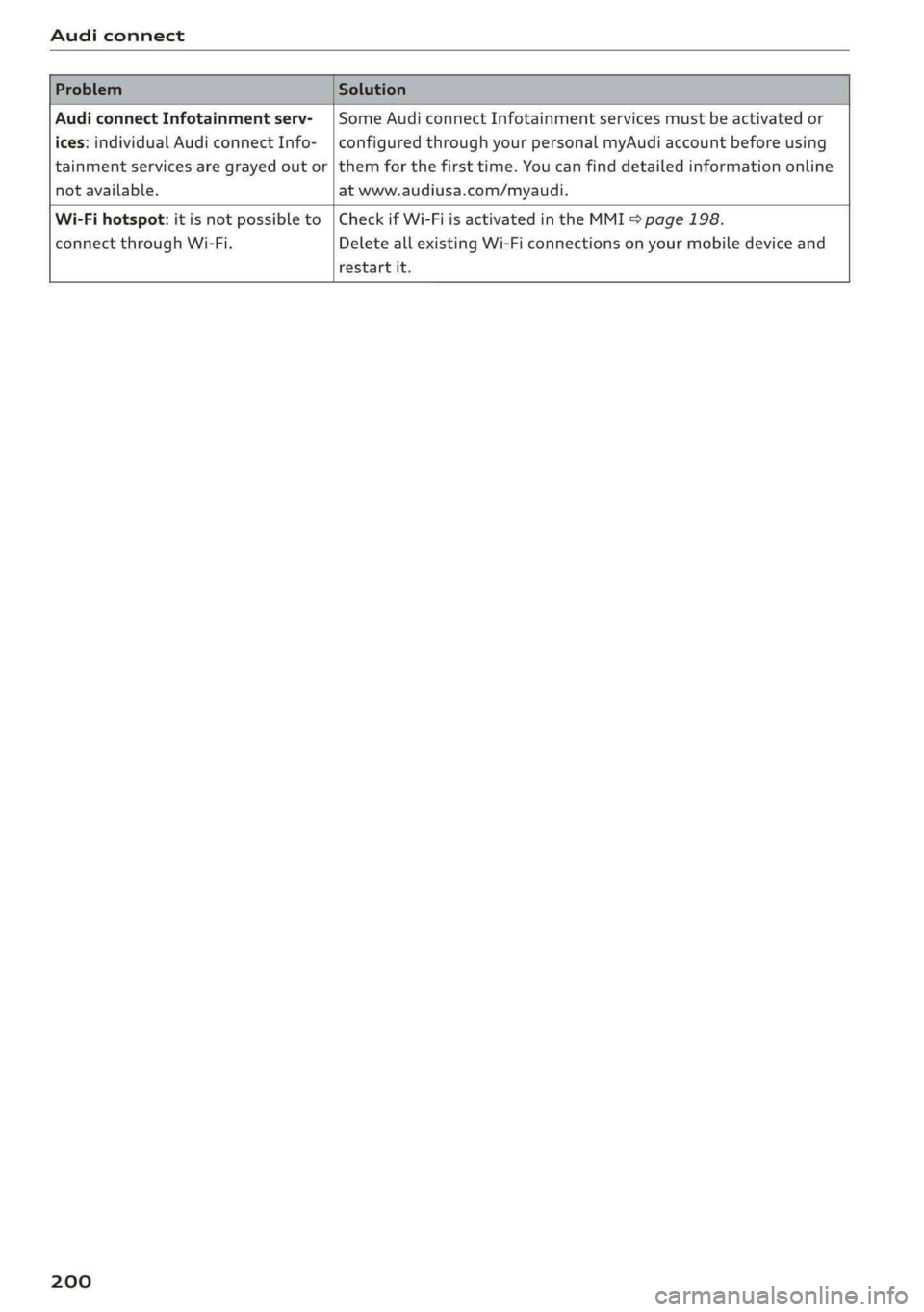
AudiconnectInfotainmentserv-|SomeAudiconnectInfotainmentservicesmustbeactivatedor
ices:individualAudiconnectInfo-|configuredthroughyourpersonalmyAudiaccountbeforeusing
tainmentservicesaregrayed outor|themforthefirsttime.Youcanfinddetailedinformationonline
notavailable.atwww.audiusa.com/myaudi.
Wi-Fihotspot:itisnotpossibleto|CheckifWi-FiisactivatedintheMMI>page198.
connectthroughWi-Fi.DeleteallexistingWi-Ficonnectionsonyourmobiledeviceand
restartit.
200
Page 203 of 392
80A012721BG
Emergencycall
Emergencycall
Introduction
Appliesto:vehicleswithemergencycallfunction
Dependingonthe countryandthevehicleequip-
ment,thefollowing functionsmaybeavailable.
Withtheemergencycall,youcancallforhelpin
dangeroussituationsasquicklyaspossible.Use
thisfunctionwhenemergencyhelpisneeded
=>page201.
Withonlineroadsideassistance,youcanrequest
assistanceifthereisabreakdownoraminoracci-
dent>page202.
@Tips
— TheservicesareprovidedthroughaSIM
cardinstalledinthevehicle.Thecostofthe
callanddataconnectionsisincludedinthe
priceoftheservices.Servicesareprovided
assumingthatthecellphonenetworkre-
quiredfortheinstalledSIMcardisfunction-
ingandavailable foruse.Theavailableserv-
icessetbyAudiAGareonlyavailablewithin
thecellphonenetworkcoverageareafor
thecellphoneserviceprovider selectedby
AudiAG.
—Youcanfindwhatdatawillbetransferredat
www.audiusa.com.
—Theseservicescannot bedeactivatedusing
thesettingsintheInfotainmentsystem.
Emergencycall
Appliesto:vehicleswithemergencycallfunction
Anemergencycallisacombinationofdatatrans-
missionandaphonecall.Thedatatransmission
fromyourvehicleforwardsimportantinforma-
tion,suchasthevehicleandpositiondata,tothe
emergencycallcenter.
@)Tips
Theavailability oftheservicesofferedde-
pendsonthecountryandmaychangeinthe
future.
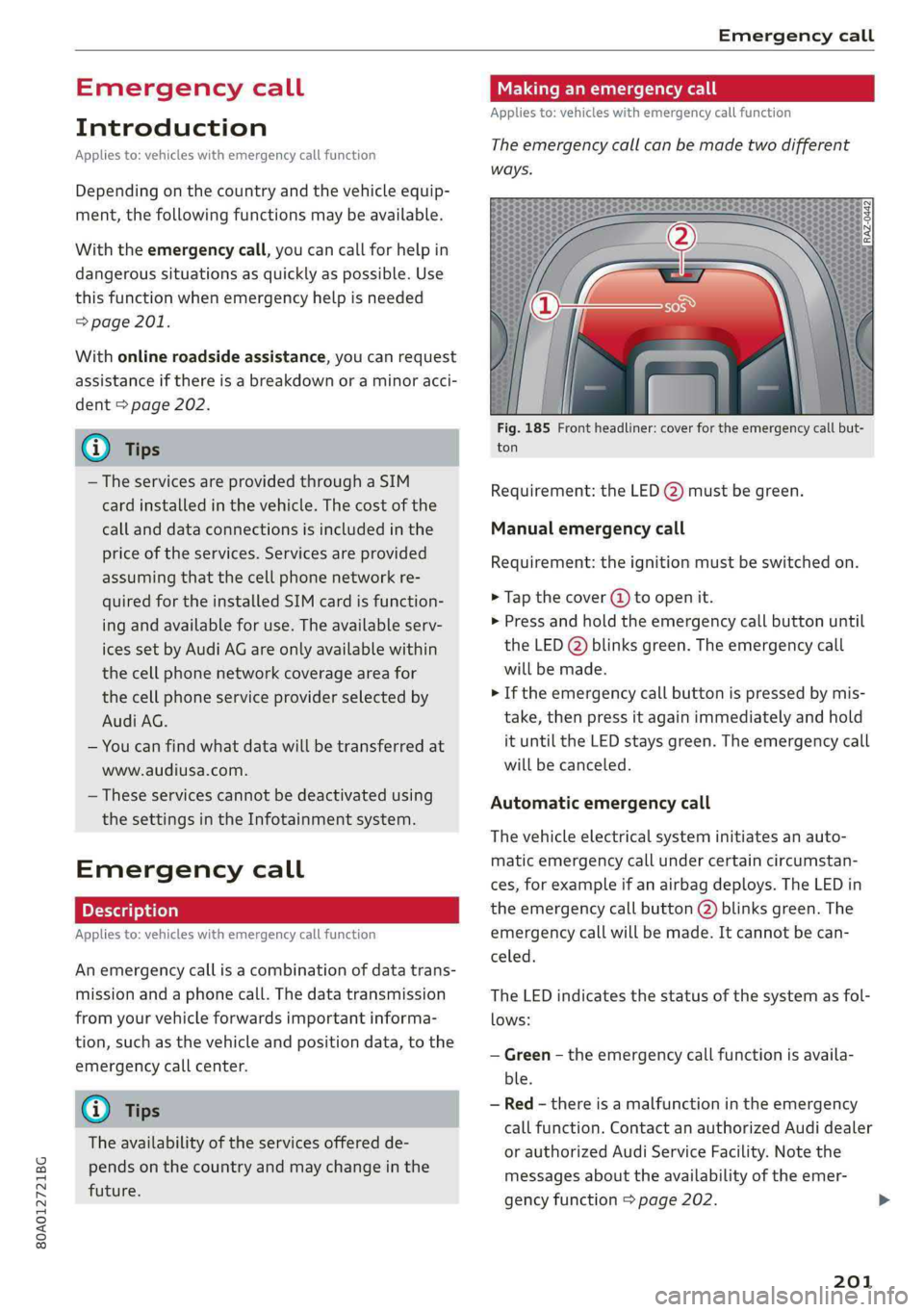
Makinganemergencycall
Appliesto:vehicleswithemergencycallfunction
Theemergencycallcanbemadetwodifferent
ways.
Fig.185Frontheadliner:coverfortheemergencycallbut-
ton
Requirement:theLED@)mustbegreen.
Manualemergencycall
Requirement:theignitionmustbeswitchedon.
>Tapthecover(4)toopenit.
>Pressandholdthe emergencycallbuttonuntil
theLED()blinksgreen.Theemergencycall
willbemade.
>Iftheemergencycallbuttonispressedbymis-
take,thenpressitagainimmediatelyandhold
ituntiltheLEDstaysgreen.Theemergencycall
willbecanceled.
Automaticemergencycall
Thevehicleelectricalsysteminitiatesanauto-
matic emergencycallundercertaincircumstan-
ces,forexampleifanairbagdeploys.TheLEDin
the emergencycallbutton(2)blinksgreen.The
emergencycallwillbe made.Itcannot becan-
celed.
TheLEDindicatesthestatusofthesystemasfol-
lows:
—Green-theemergencycallfunctionisavaila-
ble.
—Red-thereisamalfunctionintheemergency
callfunction.ContactanauthorizedAudidealer
orauthorizedAudiServiceFacility.Notethe
messagesabouttheavailability oftheemer-
gencyfunction>page202.
201
Page 205 of 392
80A012721BG
Navigation
Navigation
Openingnavigation
Appliesto:vehicleswithnavigationsystem
Thenavigationsystemdirectsyoutoyourdesti-
nation,aroundtrafficincidents,andonalterna-
tiveroutes,ifdesired.
Homeaddress
2)Gasstation
4
Senet
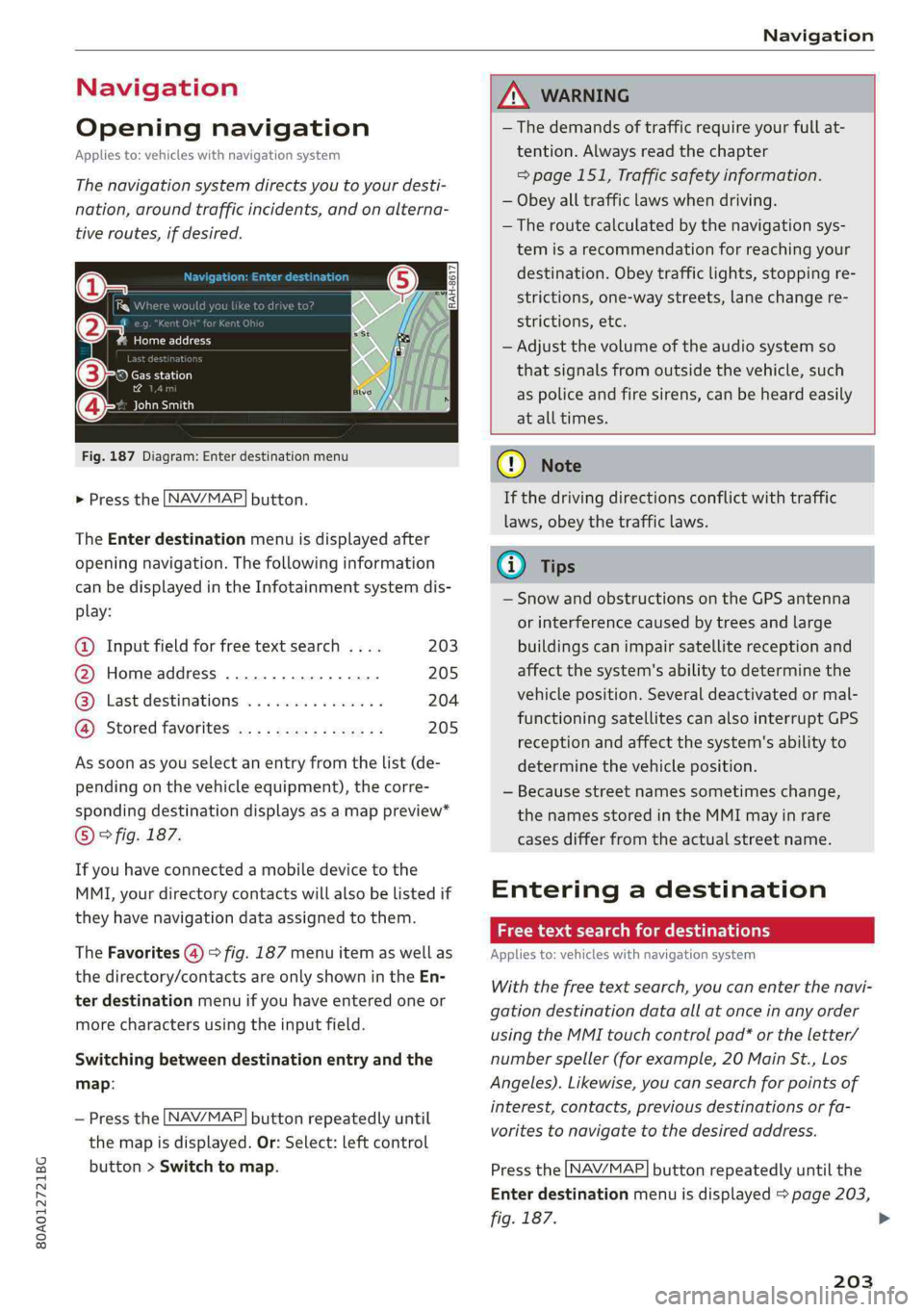
Fig.187Diagram:Enterdestinationmenu
>Pressthe [NAV/MAP]button.
TheEnterdestinationmenuisdisplayedafter
openingnavigation.Thefollowinginformation
canbedisplayedintheInfotainmentsystemdis-
play:
@Inputfieldforfreetextsearch....203
@Homeaddress.................205
@®Lastdestinations...............204
@Storedfavoritescos:ncesynewss205
Assoonasyouselectanentryfromthelist(de-
pendingonthevehicleequipment),thecorre-
spondingdestinationdisplaysasamappreview*
©fig.187.
Ifyouhaveconnectedamobiledevicetothe
MMI,yourdirectorycontactswillalsobelistedif
they havenavigationdataassignedtothem.
TheFavorites(4)>fig.187menuitemaswellas
thedirectory/contactsareonlyshowninthe En-
terdestinationmenuifyouhaveenteredoneor
morecharactersusingtheinputfield.
Switchingbetweendestinationentryandthe
map:
—Pressthe [NAV/MAP|buttonrepeatedlyuntil
themapisdisplayed.Or:Select:leftcontrol
button>Switchtomap.
ZAWARNING
— Thedemandsoftrafficrequireyourfullat-
tention.Alwaysreadthechapter
=page151,Trafficsafetyinformation.
—Obeyalltrafficlawswhendriving.
— Theroutecalculatedbythenavigationsys-
temisarecommendationforreachingyour
destination.Obeytrafficlights,stoppingre-
strictions,one-waystreets,lanechangere-
strictions,etc.
—Adjustthevolumeoftheaudiosystemso
thatsignalsfromoutsidethevehicle,such
aspoliceandfiresirens,can beheardeasily
atalltimes.
C)Note
Ifthedrivingdirectionsconflictwithtraffic
laws,obeythetrafficlaws.
G@)Tips
—SnowandobstructionsontheGPSantenna
or interferencecausedbytreesandlarge
buildingscanimpairsatellitereceptionand
affectthesystem'sabilitytodeterminethe
vehicleposition.Severaldeactivatedormal-
functioningsatellitescanalsointerruptGPS
receptionandaffectthesystem'sabilityto
determinethevehicleposition.
—Becausestreetnamessometimeschange,
thenamesstoredintheMMImayinrare
casesdifferfromtheactualstreetname.
Enteringadestination
Freetextsearchfordestinations
Appliesto:vehicleswithnavigationsystem
Withthefreetextsearch,youcanenterthenavi-
gationdestinationdataallatonceinanyorder
usingtheMMItouchcontrolpad*ortheletter/
numberspeller(forexample,20MainSt.,Los
Angeles).Likewise,youcansearchforpointsof
interest,contacts,previousdestinationsorfa-
voritestonavigatetothedesiredaddress.
Pressthe [NAV/MAP]buttonrepeatedlyuntilthe
Enterdestinationmenuisdisplayed>page203,
fig.187.
203
>
Page 208 of 392
Navigation
—ThenselectandconfirmStartrouteguidance.
Additionaldirectoryfunctionsinthenavigation
systemcanbefoundunder>page211.
@)Tips
—Addressesthathavebeenimportedfrom
yourmobiledeviceintotheMMIcanalsobe
usedasadestination.
—If acontactisgrayed outinthedirectory,
thiscontacthasneitheradestinationnoran
addressassignedtoit.
olelmneat)
Appliesto:vehicleswithnavigationsystem
>Pressthe LNAV/MAP]buttonrepeatedlyuntil
the Enterdestinationmenuisdisplayed
=>page203,fig.187.
>Select:leftcontrolbutton>Pointsofinterest.
—Changingthesearcharea:selectandconfirm
Searcharea>asearchareafromthelist.
Thefollowingsearchcategoriesareavailable:
Nearby:pointsofinterestcanbeselectedfrom
differentcategories.Thepointsofinterestare
listedstartingfromtheimmediatevicinityofthe
vehicleuptoaradiusofapproximately124miles
(200km).
Alongtheroute:pointsofinterestalongthe
routecanonlybeselectedduringactiveroute
guidance.Thepointsofinterestarelocateddi-
rectlyalongorintheimmediatevicinityofthe
calculatedroute.Thepointsofinterestcanlike-
wisebeselectedfromvariouscategories.Forex-
ample,youcansearchforahotelorparkinglot
atthedestination.
Neardestination/Nearstopover:pointsofinter-
estnearadestinationorastopover canonlybe
selectedduringactiverouteguidance.Thepoints
ofinterestcanlikewisebeselectedfromvarious
categories.Forexample,youcansearchforaho-
telorparkinglotatthedestination.
In anewcity:selectacountry/stateorsearchin
anewcity.Enterthenameofthedesiredcity.
Points ofinterestcanbeselectedfromvarious
categories.Thisfunctionallowsyoutosearchfor
206
points ofinterestinanycityregardlessoftheac-
tiverouteguidanceorthevehicleposition.
—Searchingforthenameofapointofinterest
intheselectedsearcharea:Select:Findentry
>Enter pointofinterest.Enterthenameofthe
pointofinterest.
—Searchingforapointofinterestinaspecific
category:selectSelectcategory.Selectand
confirmacategorysuchasRestaurants.
(i)Tips
—Distancestopointsofinterestaredisplayed
asastraight-linedistancefromyourcurrent
location.Theactualdistancefromyourcur-
rent locationtothepointofinterestisup-
datedautomatically.Thelistofpointsofin-
terestthatwerefoundisnotresortedwhen
thishappens.
—Theremaybeentriesinthelistthatcannot
bedisplayedcompletelyduetotheirlength.
Selectthecorrespondingentryfromthelist.
Select:rightcontrolbutton>Showdestina-
tiondetails.Detailedinformationforthese-
lectedentryinthelististhendisplayed.
Onlinepointofinterestsearch(online
search)
Appliesto:vehicleswithnavigationsystem andAudiconnect
Infotainment
You cansearchforpointsofinterestontheInter-
net.
Requirement:TherequirementsforAudiconnect
Infotainmentmustbemet>page192.
>Pressthe [NAV/MAP]buttonrepeatedlyuntil
theEnterdestinationmenuisdisplayed
=>page203,fig.187.
>Select:leftcontrolbutton>Onlinesearch.The
searcharealastsetisdisplayedintheinput
field.
—Changingthesearcharea:select:rightcontrol
button>Selectsearcharea.
—Searchingforonlinedestinationsinthese-
lectedsearcharea:enteranewcity/stateif
necessary.Enterthesearchterm,suchashotel.
Pressthecontrolknob.Selectandconfirm an
onlinedestinationfromthelist.