infotainment AUDI Q5 2019 Manual Online
[x] Cancel search | Manufacturer: AUDI, Model Year: 2019, Model line: Q5, Model: AUDI Q5 2019Pages: 392, PDF Size: 99.86 MB
Page 209 of 392
80A012721BG
Navigation
—Searchingforonlinedestinationsinaspecific
category:selectandconfirmSelect category.
SelectandconfirmacategorysuchasRestau-
rants.
Findwhichsearchareasareavailableunder
=>page206,Pointofinterestsearch.
Youcansearchforonlinedestinationsusingthe
voicerecognitionsystem>tableonpage173.
G)Tips
Alwaysreadthechapter>page192,Audi
connect.
AccessingdestinationsfrommyAudi
account
Appliesto:vehicleswithnavigationsystemandAudiconnect
Infotainment
ImportindividualdestinationsfromyourmyAudi
accountintotheMMI.
Requirement:
TherequirementsforAudiconnectInfotainment
mustbemet>page192.
YoumusthavearegisteredmyAudiaccountat
www.audiusa.com/myaudi.Youmusthaveavehi-
cleassignedtoyourmyAudiaccountandyou
musthavestoredoneormoredestinations.
>Pressthe [NAV/MAP]buttonrepeatedlyuntil
theEnterdestinationmenuisdisplayed
=>page203,fig.187.
>Select:leftcontrolbutton>myAudicontacts.
>Ifnecessary,enteryourmyAudiuserdataor
yourmyAudiPIN>page193.Thecontacts
storedinmyAudiaredisplayed.
—Selectandconfirmacontact.
—Selectandconfirmaprivateorbusinessdesti-
nation.
—SelectandconfirmStartrouteguidance.
@Tips
—YouonlyneedtoenterthemyAudiuserdata
onetime.
—YoucanreceiveyourmyAudiPINifyouhave
setupamyAudiaccount.
—Foradditionalinformation,visitwww.
audiusa.com.
Enteringadestinationusinggeo
coordinates
Appliesto:vehicleswithnavigationsystem
>Pressthe [NAV/MAP]buttonrepeatedlyuntil
theEnterdestinationmenuisdisplayed
=>page203,fig.187.
>Select:leftcontrolbutton>Geographicalcoor-
dinates.
—SelectLatitude/Longitude.
—Pressthecontrolknobtosettheindividualval-
ues.
—Turn thecontrolknobtotheleft/rightto
changetheselectedvalue.
—SelectandconfirmStartrouteguidance.
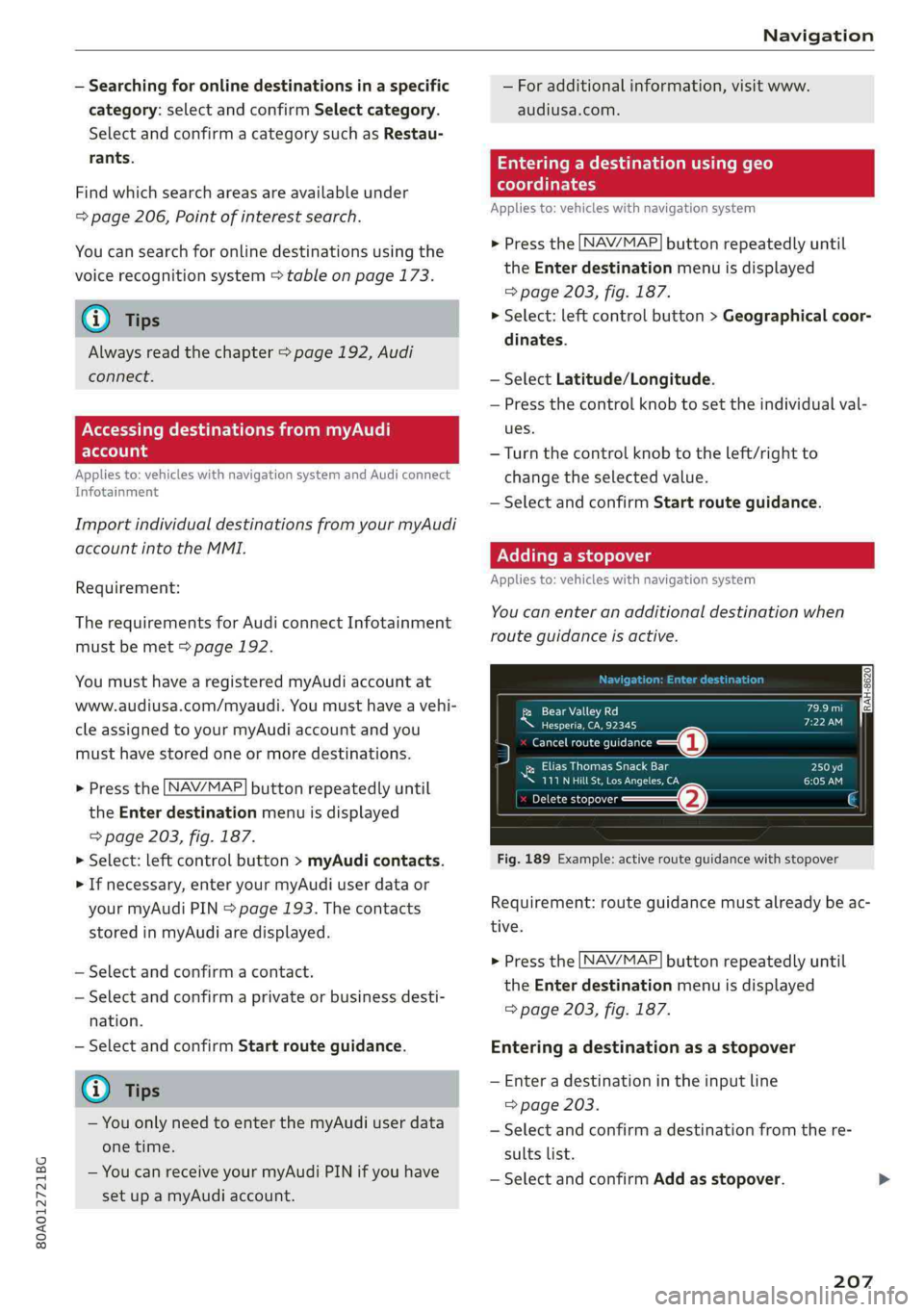
Addingastopover
Appliesto:vehicleswithnavigationsystem
You canenteranadditionaldestinationwhen
routeguidanceisactive.
[RAH-8620|Pend)
ee)
5menortina—@
RecoPra
™111NHilLSt,LosAngeles,CACHOlw)
Deletestopover(2)
Fig.189Example:activerouteguidancewithstopover
Requirement:routeguidancemustalreadybeac-
tive.
>Pressthe [NAV/MAP]buttonrepeatedlyuntil
theEnterdestinationmenuisdisplayed
=>page203,fig.187.
Enteringadestinationasastopover
—Enteradestinationintheinputline
=>page203.
—Selectandconfirmadestinationfromthere-
sultslist.
—SelectandconfirmAddasstopover.
207
Page 210 of 392
Navigation
Deletingastopover
—Pushthecontrolknobup.Freetextsearchand
activerouteguidancearedisplayed.Or:Turn
the
controlknobtotheleftuntiltheactive
routeguidanceisshown.
—SelectandconfirmDeletestopover(2)
>fig.189.
—Thestopoverisdeleted.
(eTleeET
Appliesto:vehicleswithnavigationsystem
Requirement:routeguidancemustbeactive.
>Pressthe LNAV/MAP]buttonrepeatedlyuntil
the Enterdestinationmenuisdisplayed
=>page203,fig.187.
>Turn thecontrolknobtotheleftuntiltheactive
routeguidanceisshown>page207,fig.189.
> SelectandconfirmDeletedestination(@)
=>page207,fig.189.Thedestinationisdelet-
ed. Or:selecttherightcontrolbutton>Cancel
routeguidance.
Additionaloptionswhenenteringa
Ceeacea)
Appliesto:vehicleswithnavigationsystem
>Presstherightcontrolbutton.
Dependingontheselectedfunction,thefollow-
ingoptionsmaybeavailablewhenenteringa
destination:
Cancelrouteguidance:Requirement:routeguid-
ancemustbeactive.Routeguidanceiscanceled.
Foradditionalinformation,see>page208.
Countryinformation:youcandisplaytheappli-
cableurbanandruralspeedlimitsforanycoun-
try/state.Ifthisfunctionisactivated,theinfor-
mationwillbeautomaticallyshowntoyouinthe
routeinformation@)%page212,fig.194when
thespeedlimitisexceeded>page215.
Country/stateselection:see>page204,Nar-
rowingthesearcharea.
Routecriteria: see>page212,Routecriteria.
208
Showlocationonmap:Requirement:youmust
haveselectedadestinationfromtheresultslist.
Thedestinationenteredisdisplayedonthemap.
Parkingatthislocation*:Requirement:youmust
haveselectedadestinationfromtheresultslist.
Allparkingoptionsnear theselectedlocationare
displayedintheInfotainmentsystem.
Delete:theselectedentryisdeleted.Youcande-
leteindividualentriesorallentries(forexample,
favoritesorlastdestinations).
Audiconnectatthislocation*:Requirement:you
musthaveselectedadestinationfromtheresults
list.Allowsyoutosearchforitemsinthevicinity
oftheselectedlocation,suchasTravelinforma-
tion.
Onlinetrafficdata*:theonlinetrafficinforma-
tion>page218canbe switchedonoroff.
Adddestinationtocontact:see>page211.
Storeasfavorite:see>page211.
Voiceguidance:see>page212.
Navigationsettings:see>page211.
@Tips
Informationononlinetrafficdata*canalso
befoundonlineatwww.audiusa.com.
Page 213 of 392
80A012721BG
Navigation
Appliesto:vehicleswithnavigationsystem
>Pressthe [NAV/MAP|buttonrepeatedlyuntil
the Enterdestinationmenuisdisplayed
=>page203,fig.187.
—Storingadestinationasafavorite:searchfor
thedesireddestinationusingtheinputfield.
Or:selectadestinationfromthelist.Select:
rightcontrolbutton>Storeasfavorite.
—Renamingafavorite:selecttheleftcontrol
button>Favorites>afavoritefromthelist>
rightcontrolbutton>Renamefavorite.
—Movefavorite:selectafavoritefromthelist>
rightcontrolbutton>Movefavorite.Select
andconfirmthelocationoftheselectedfavor-
ite.
—Deletingafavorite:selectafavoritefromthe
list>rightcontrolbutton>Deletefavorite>
DeletethisfavoriteorDeleteallfavorites.
Directorycontacts
Appliesto:vehicleswithnavigationsystem
Twoaddresses(private/business)canbeas-
signedasdestinationsforeachcontactinthedi-
rectory.
>Pressthe [NAV/MAP]buttonrepeatedlyuntil
theEnterdestinationmenuisdisplayed
=>page203,fig.187.
Storingadestinationasacontactinthe
directory
Requirement:amobiledevicemustbeconnected
totheMMI>page177.
—Select:adestination>rightcontrolbutton>
Adddestinationtocontact.
—Enterthefirstlettersofthedesiredcontactin
thefreetextsearchinputfield>page203,
fig.187andthenselectacontactfromthelist.
—SelectandconfirmAddbusinessdestinationor
Addprivatedestination.
Navigationsettings
Appliesto:vehicleswithnavigationsystem
>Pressthe [NAV/MAP]buttonrepeatedlyuntil
theEnterdestinationmenuisdisplayed
=>page203,fig. 187.
>Select:rightcontrolbutton>Navigationset-
tings.
Depending ontheselectedfunction,thefollow-
ingsettingscan beselected:
Showalternativeroutes
Uptothreesuggestedroutesareshownonthe
mapwhenthisfunctionisswitchedon4
=>page210.
Lowfuelwarning
Amessageisdisplayedifthefuelgaugegoesbe-
lowthereservemarkingwhenthisfunctionis
switchedonM.Confirmingthismessagedisplays
alistofgasstationsinthearea.Whenagassta-
tionisselected,routeguidancefromthecurrent
vehiclepositioniscalculated.
Trailermode*
Trailermodeisswitchedoffatthefactory.
WhenthefunctionisswitchedonM,themaxi-
mumpermittedspeedforvehicleswithtrailersis
incorporatedintotherouteguidanceandthecal-
culatedarrivaltimeisadjustedaccordingly.Trail-
ermodeisdisplayedusingsymbols"8intheside
menuonthemap.
Personalrouteassistance*
Personalrouteassistanceisswitchedoffatthe
factory.
Yourtripsarerecordedanddestinationsaresug-
gestedbytheMMIwhen thisfunctionisswitched
onpage209.
Thepersonalrouteassistanceisindicatedby the
P&symbolinthestatuslineoftheInfotainment
systemdisplay.
Notificationwhennearby*
Thenotificationwhennearbyisswitchedoffat
thefactory.
211
Page 217 of 392
80A012721BG
Navigation
orientedtothedirectionoftravel.Atascaleof
62mi(100km)andlarger,themaporientation
istothenorth.
Overviewmap:theentireroutefromthevehicle
positiontothedestinationorthenextstopoveris
displayedonthemap.Themapscaledependson
the lengthoftherouteandadaptsautomatically.
Themapisorientedtothenorth.
Routeinformation
Thedisplayofrouteinformation,suchasthecur-
rentstreetbeingdrivenonorpointsofinterest
alongthecurrentroute>page212,fig.194,can
be switchedon/offorcanbeminimizedonthe
displayofupcomingmaneuvers.
Automaticzoom
On:themapscaleisadaptedautomaticallyde-
pendingonthetypeof roadbeingtraveled(ex-
pressway,highway,otherroads)sothatyoual-
wayshaveanoptimaloverviewoftheroadahead.
Thescalewillalsobeautomaticallyadapted
whenthereareupcomingmaneuverstoprovidea
betterdetailedview.
Intersection:whenrouteguidanceisactive,the
maptemporarilyzoomsintoadetailedscale
whenthereareupcomingmaneuverssothatyou
can seethestreetorturnbetter.
Off:themapscaleyouhavechosenismain-
tained.
MMImapcontents
Youcanswitchthedisplayofadditionalinforma-
tiononthemapintheInfotainmentsystemdis-
playonoroff.
Theweatherforecastisdisplayedona3mile(5
km)scaleonthemap.
Instrumentclustermapcontents
Youcanalsosetwhichmapcontentdisplaysin
theinstrumentcluster>page166.
))AUDIAGprovidesaccesstoservicesfromthirdpartypro-
viders.Permanentavailabilitycannotbeguaranteed,be-
causethatdependsonthethirdpartyprovider.
Satellitemap
Appliesto:vehicleswithnavigationsystem andAudiconnect
Infotainment
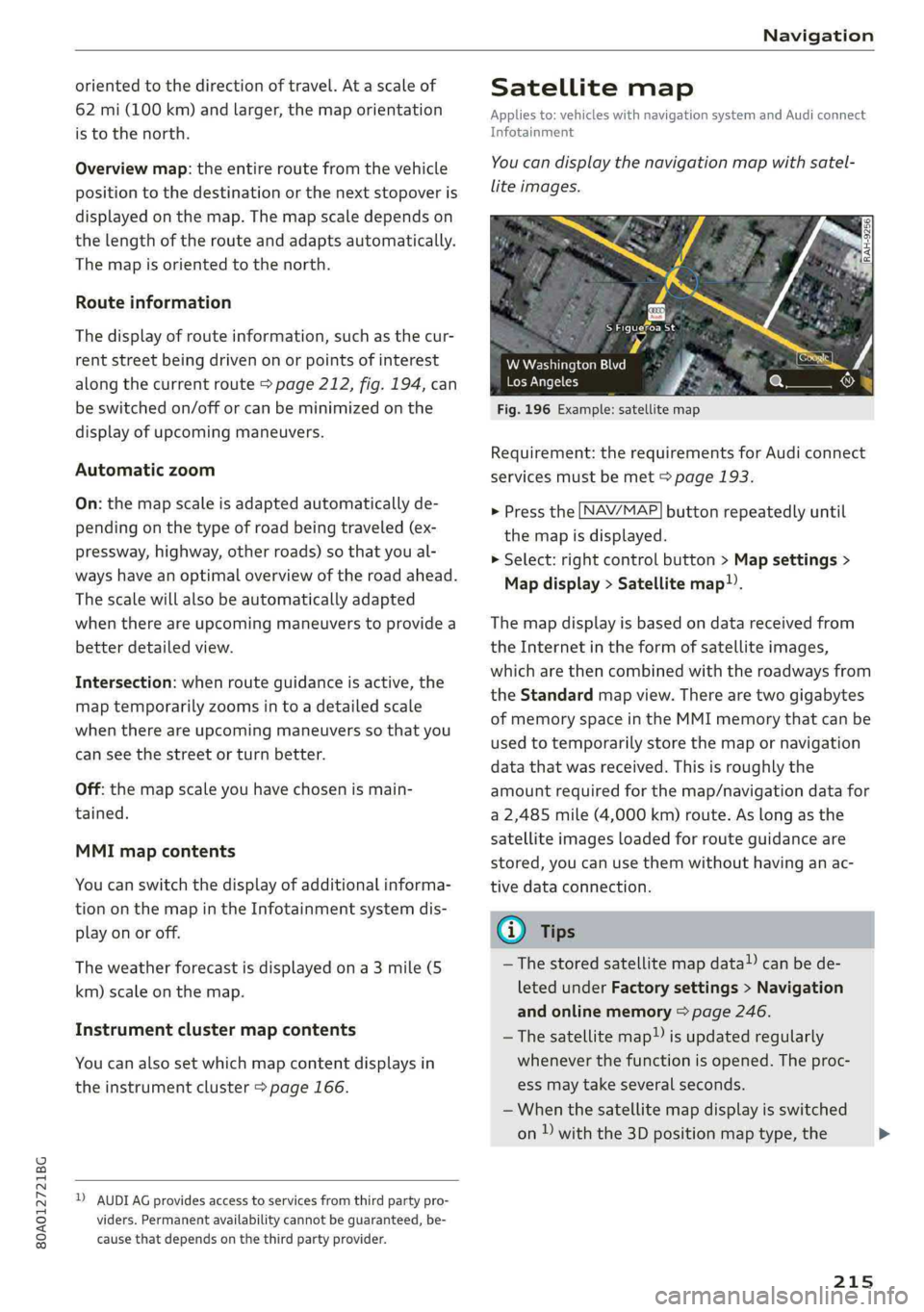
You candisplaythenavigationmapwithsatel-
liteimages.
SFigueroaSt
Fig.196Example:satellitemap
WWashingtonBlvd
LosAngeles
Requirement:therequirementsforAudiconnect
servicesmustbemet>page193.
>Pressthe [NAV/MAP]buttonrepeatedlyuntil
themapisdisplayed.
>Select:rightcontrolbutton>Mapsettings>
Mapdisplay>Satellitemap).
Themapdisplayisbasedondatareceivedfrom
theInternetintheformofsatelliteimages,
whicharethencombinedwiththeroadwaysfrom
theStandardmapview.Therearetwogigabytes
ofmemoryspaceintheMMImemorythatcanbe
usedtotemporarilystorethemapornavigation
datathatwasreceived.Thisisroughlythe
amountrequiredforthemap/navigationdatafor
a2,485mile(4,000km)route.Aslongasthe
satelliteimagesloadedforrouteguidanceare
stored,youcan usethemwithouthavinganac-
tivedataconnection.
GTips
—Thestoredsatellitemapdata!)canbede-
letedunderFactorysettings>Navigation
andonlinememory>page246.
~Thesatellitemap!)isupdatedregularly
wheneverthefunctionisopened.Theproc-
essmaytakeseveralseconds.
—Whenthesatellitemapdisplayisswitched
on)withthe3Dpositionmaptype,the
215
>
Page 218 of 392
Navigation
MMIdisplayautomaticallyswitchestothe
2Dmaptypewhendrivingthroughtunnels.
—Also readtheinformationinthechapter
=page192,Audiconnect.
—Foradditionalinformation,visitwww.
audiusa.com.
Mapupdate
Appliesto:vehicleswithnavigationsystem
Therearemultipleoptionsavailableforupdating
yourmapmaterial:
—Mapupdatesthroughthe onlinemapupdate*
>page216.
—ImportmapupdatesfromtheSDcard*toyour
MMI.Youcanfindadditionalinformationon-
lineatwww.audiusa.com/myaudi.
—MapupdateatanauthorizedAudidealeror au-
thorizedAudiServiceFacility.Thiscanresultin
additionalcosts.
Onlinemapupdate
Appliesto:vehicleswithnavigationsystemandAudiconnect
Infotainment
Usingtheonlinemapupdate,youcanupdate
themapmaterialinyournavigationsystemdi-
rectlyfromyourvehicle.
Recommendedregions->Confirmation
[RAH-8624]LOTRolRUTae
Cannelel
BTCCelTe)
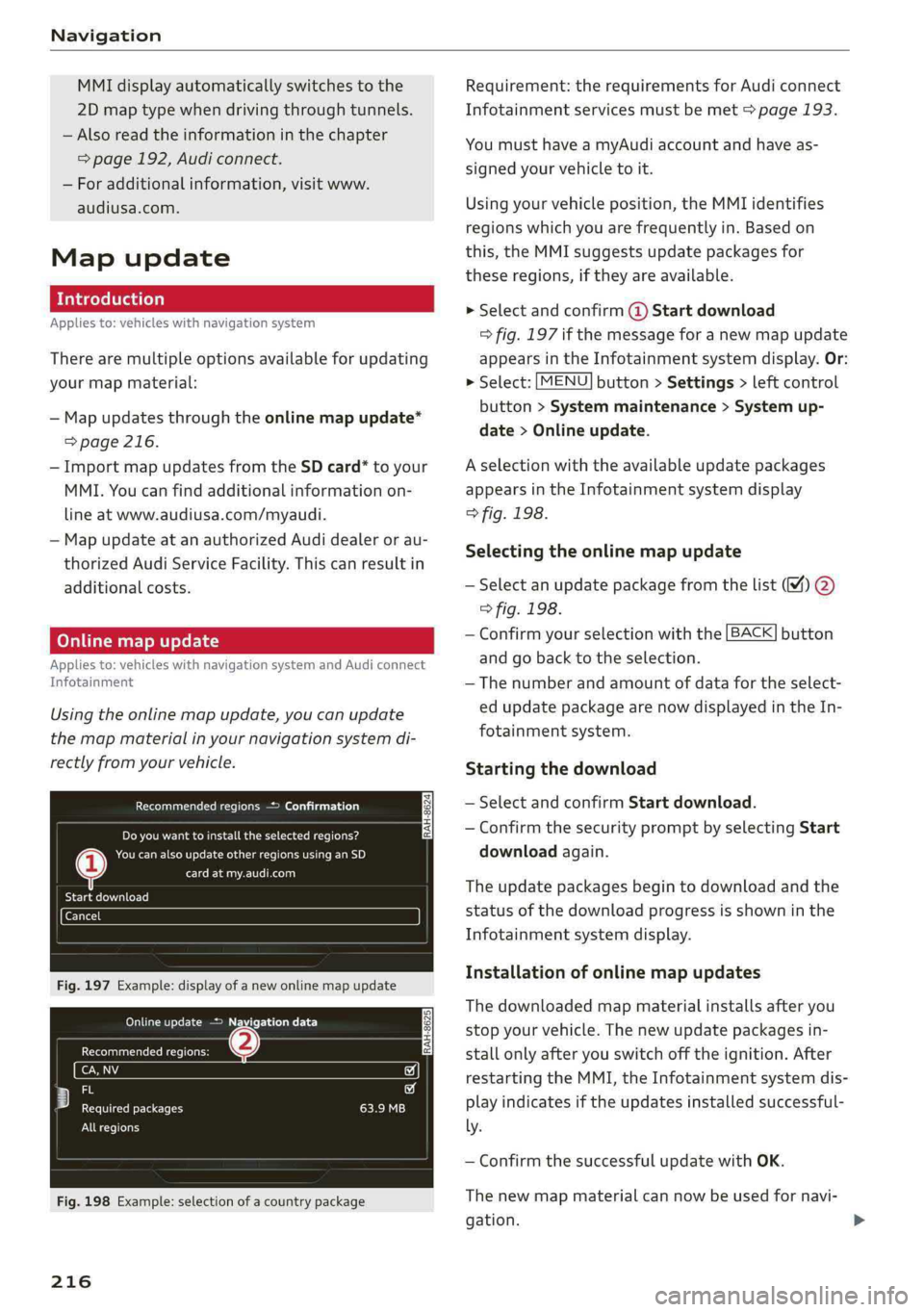
Fig.197Example:displayofanewonlinemapupdate
OMGriceetcare)
GecmaeuteCRiees
io
Fy)iecf
ereReteeleERI)
Allregions
Fig.198Example:selectionofacountrypackage
216
Requirement:therequirementsforAudiconnect
Infotainmentservicesmustbemet>page193.
YoumusthaveamyAudiaccountandhaveas-
signedyourvehicletoit.
Usingyourvehicleposition,theMMIidentifies
regionswhichyouarefrequentlyin.Basedon
this,theMMIsuggestsupdatepackagesfor
theseregions,iftheyareavailable.
»Selectandconfirm@Startdownload
=>fig.197ifthemessageforanewmapupdate
appearsintheInfotainmentsystemdisplay.Or:
>Select:[MENU]button>Settings>leftcontrol
button>Systemmaintenance>Systemup-
date>Onlineupdate.
Aselectionwiththeavailableupdatepackages
appearsintheInfotainmentsystemdisplay
>fig.198.
Selectingtheonlinemapupdate
—Selectanupdatepackagefromthelist%)@
>fig.198.
—Confirmyourselectionwiththe[BACK]button
and gobacktotheselection.
—Thenumberandamountofdatafortheselect-
edupdatepackagearenowdisplayedintheIn-
fotainmentsystem.
Startingthedownload
—SelectandconfirmStartdownload.
—ConfirmthesecuritypromptbyselectingStart
downloadagain.
Theupdatepackagesbegintodownloadandthe
statusofthedownloadprogressisshowninthe
Infotainmentsystemdisplay.
Installationofonlinemapupdates
Thedownloadedmapmaterialinstallsafteryou
stopyourvehicle.Thenewupdatepackagesin-
stallonlyafteryouswitchofftheignition.After
restartingtheMMI,theInfotainmentsystemdis-
playindicatesiftheupdatesinstalledsuccessful-
ly.
—ConfirmthesuccessfulupdatewithOK.
Thenewmapmaterialcannowbeusedfornavi-
gation.
Page 219 of 392
80A012721BG
Navigation
@Tips
—Alwaysreadthechapter>page192.
— Theamountofavailableonlinemapupdates
inthevehicleislimited.Toupdatemorere-
gions,usethemapupdateviaSDcardat
www.audiusa.com/myaudi.
—Alwaysreadthechapter>page192,Audi
connect.
Trafficinformation
Appliesto:vehicleswithnavigationsystem
Coeenaes@
®Westbound#>Eastbound
@)Northbound
©>-@serthvoun
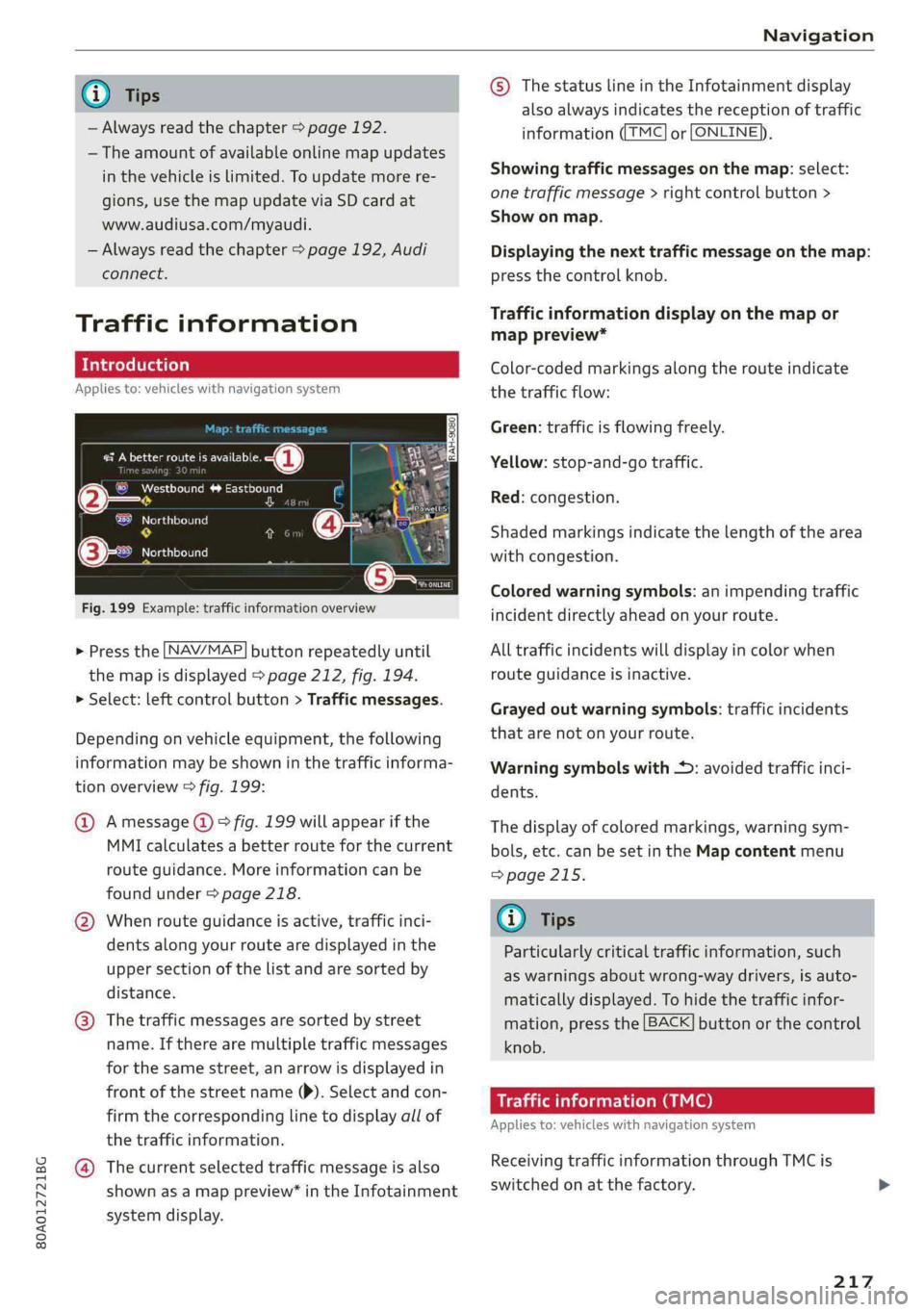
Fig.199Example:trafficinformationoverview
>Pressthe LNAV/MAP]buttonrepeatedlyuntil
themapisdisplayed>page212,fig.194.
>Select:leftcontrolbutton>Trafficmessages.
Dependingonvehicleequipment,thefollowing
informationmaybeshowninthetrafficinforma-
tionoverview>fig.199:
@Amessage(@)>fig.199willappearifthe
MMIcalculatesabetterrouteforthecurrent
routeguidance.Moreinformationcanbe
foundunder>page218.
@Whenrouteguidanceisactive,trafficinci-
dents along yourroutearedisplayedinthe
uppersectionofthelistandaresortedby
distance.
@®Thetrafficmessagesaresorted bystreet
name.Iftherearemultipletrafficmessages
forthesamestreet,anarrowisdisplayedin
frontofthestreetname()).Selectandcon-
firmthecorrespondinglinetodisplayallof
thetrafficinformation.
@Thecurrentselectedtrafficmessageisalso
shownasamappreview”intheInfotainment
systemdisplay.
©)ThestatuslineintheInfotainmentdisplay
alsoalwaysindicatesthereceptionoftraffic
informationTMC]orLONLINE}),
Showingtrafficmessagesonthemap:select:
onetrafficmessage>rightcontrolbutton>
Showonmap.
Displayingthe nexttrafficmessageonthemap:
pressthecontrolknob.
Trafficinformationdisplayonthemapor
mappreview*
Color-codedmarkingsalongtherouteindicate
thetrafficflow:
Green:trafficisflowingfreely.
Yellow:stop-and-gotraffic.
Red:congestion.
Shadedmarkingsindicatethelength ofthearea
withcongestion.
Coloredwarningsymbols:animpendingtraffic
incidentdirectlyaheadonyourroute.
Alltrafficincidentswilldisplayincolorwhen
routeguidanceisinactive.
Grayedoutwarningsymbols:trafficincidents
thatarenotonyourroute.
Warningsymbolswith*:avoidedtrafficinci-
dents.
Thedisplay ofcoloredmarkings,warningsym-
bols,etc.canbesetintheMapcontentmenu
=>page215.
G@)Tips
Particularlycriticaltrafficinformation,such
aswarningsaboutwrong-waydrivers,isauto-
maticallydisplayed.Tohidethetrafficinfor-
mation,pressthe[BACK]buttonorthecontrol
knob.
Trafficinformation(TMC)
Appliesto:vehicleswithnavigationsystem
ReceivingtrafficinformationthroughTMCis
switchedonatthefactory.
217
Page 220 of 392
![AUDI Q5 2019 Manual Online Navigation
>Pressthe LNAV/MAP]buttonrepeatedlyuntil
themapisdisplayed.
>Select:leftcontrolbutton>Trafficmessages.
Anoverviewofallthetrafficmessagesisdis-
playedintheInfotainmentsystem.
—Open](/img/6/57631/w960_57631-219.png "AUDI Q5 2019 Manual Online Navigation
>Pressthe LNAV/MAP]buttonrepeatedlyuntil
themapisdisplayed.
>Select:leftcontrolbutton>Trafficmessages.
Anoverviewofallthetrafficmessagesisdis-
playedintheInfotainmentsystem.
—Open")
Navigation
>Pressthe LNAV/MAP]buttonrepeatedlyuntil
themapisdisplayed.
>Select:leftcontrolbutton>Trafficmessages.
Anoverviewofallthetrafficmessagesisdis-
playedintheInfotainmentsystem.
—Openingadetailedviewoftrafficinformation:
selectandconfirmthetrafficinformationfrom
thelist.
G)Tips
—TMCtrafficreportsarenotavailableinCan-
ada.Formoreinformation,pleasecontact
SiriusCanada.
—Criticaltrafficinformation,suchaswarnings
aboutwrong-waydrivers,isautomatically
displayed.Tohidethetrafficinformation,
pressthe[BACK] buttonorthecontrolknob.
1X1tacoA)
Appliesto:vehicleswithnavigationsystem andbetterroute
ByreceivingtrafficinformationthroughTMC,
yourMMIcalculatesabetterrouteifavailable
andthepossibletimesavedcomparedtothe
currentroute.Youcandecidewhichrouteyou
wouldliketouse.
>Pressthe LNAV/MAP|buttonrepeatedlyuntil
themapisdisplayed.
Requirement:routeguidancemustbeactive.
IfyourMMIhascalculatedabetterroutethan
thecurrentrouteguidance,themessageAbetter
routeisavailable.appearsforseveralseconds
alongwiththetimethatmaybesaved.Abetter
routeisindicatedinthemapviewbythesymbol
"©page212,fig.195.
Amessagewillalsoappearinthetrafficinforma-
tionoverview@)>page217,fig. 199.
Applybetterroute
—Presstherightcontrolbutton.
2)AUDIAGprovidesaccesstoservicesfromthirdpartypro-
viders.Permanentavailabilitycannotbeguaranteed,be-
causethatdependsonthethirdpartyprovider.
218
—Selectandconfirmthebetterroute.Or:Select
andconfirmDetails todisplaydetailsaboutthe
betterroute.Youcanzoominoroutonthe
mapusingtheMMItouchcontrolpad.Require-
ment:theremustbemorethanoneoptimized
routecalculated.Pressthecontrolknobto
switchtothenextrouteinthedetailedview.
Closingthedetailedview:pressthe[BACK
button.
—Afteryouhaveselectedabetterroute,the
routewillberecalculated.
OnlinetraTeemulcd)
Appliesto:vehicleswithnavigationsystem andAudiconnect
Infotainment
TheMMIcanreceivereal-timeonlinetrafficin-
formationaboutcongestion,accidents,road
construction,andotherincidents.
Requirement:TherequirementsforAudiconnect
Infotainmentmustbemet>page193.
>Switchingonlinetrafficinformationonand
off:select[NAV/MAP]button>rightcontrol
button>Onlinetrafficdataon()oroff(
>Pressthe [NAV/MAP]buttonrepeatedlyuntil
themapisdisplayed.
>Select:leftcontrolbutton>Trafficmessages.
Theonlinetrafficinformationwillalsobedis-
playedonthesatellitemap»)>page215oron
thestandardmap>page212,fig. 194.
If[ONLINE]trafficinformationcannotbere-
ceived,thentrafficinformationwillautomatically
bereceivedthrough[TMC]>page217.
@Tips
—Onlinetrafficinformationisnotavailablein
Canada.
—Alwaysreadthechapter>page192,Audi
connect.
—HavingtheOnlinetrafficdatafunction
switchedonprovidesthemostaccuratere-
portsoftrafficsituationsaswellastraffic
forecasting.Yourvehicletransmitsand
Page 225 of 392
80A012721BG
Radio
Radiotextisavailable fortheselectedstation.
See>page221.
@Screenview
DisplayCoverartorStationlogo.See
=>page224,Preferredpictureview*.
Displayingthestationlist:
Turnthecontrolknob.Or:pressthe[BACK]but-
ton.
Radiomenu
ee
He[Presets
(2Girne
©-:.Cited
asiM
e-
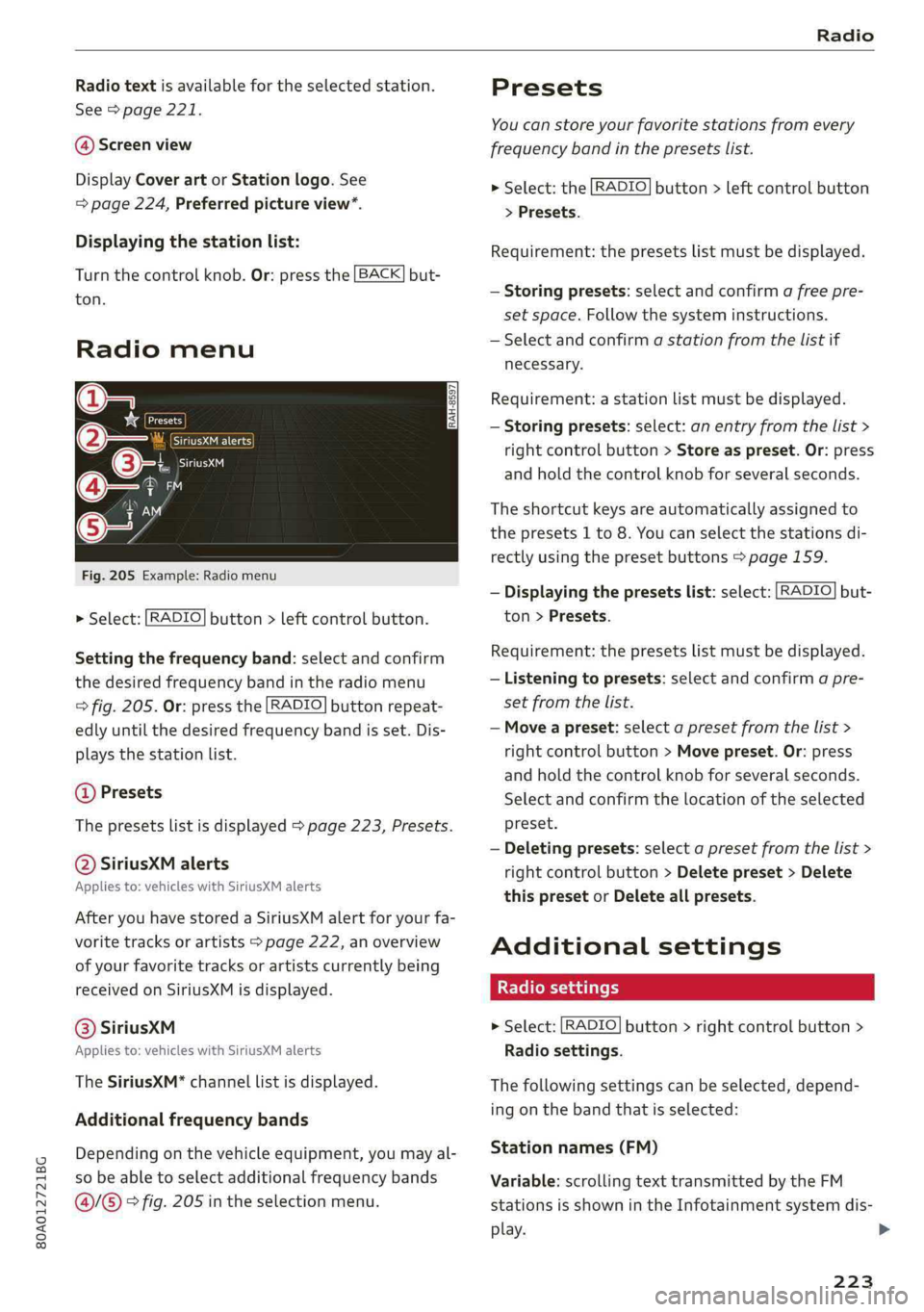
Fig.205Example:Radiomenu
>Select:[RADIO]button>leftcontrolbutton.
Settingthefrequencyband:selectandconfirm
thedesiredfrequencybandintheradiomenu
>fig.205.Or:pressthe[RADIO]buttonrepeat-
edlyuntilthedesiredfrequencybandisset.Dis-
playsthestationlist.
@Presets
Thepresetslistisdisplayed>page223,Presets.
@SiriusXMalerts
Appliesto:vehicleswithSiriusXMalerts
AfteryouhavestoredaSiriusXMalertforyourfa-
voritetracksorartists>page222,an overview
ofyourfavoritetracksorartistscurrentlybeing
receivedonSiriusXMisdisplayed.
©®SiriuskXM
Appliesto:vehicleswithSiriusXMalerts
TheSiriusXM*channellistisdisplayed.
Additionalfrequencybands
Dependingonthevehicleequipment,youmayal-
sobeabletoselectadditionalfrequencybands
@/@®>fig.205intheselectionmenu.
Presets
You canstoreyourfavoritestationsfromevery
frequencybandinthepresetslist.
>Select:the[RADIO]button>leftcontrolbutton
>Presets.
Requirement:thepresetslistmustbedisplayed.
—Storingpresets:selectandconfirm afreepre-
setspace.Followthesysteminstructions.
—Selectandconfirmastationfromthelistif
necessary.
Requirement:astationlistmustbedisplayed.
—Storingpresets:select:anentryfromthelist>
rightcontrolbutton>Storeaspreset.Or:press
andholdthecontrolknobforseveralseconds.
Theshortcutkeysareautomaticallyassignedto
thepresets1to8.Youcanselectthestationsdi-
rectlyusingthepresetbuttons>page159.
—Displayingthepresetslist:select:[RADIO]but-
ton>Presets.
Requirement:thepresetslistmustbedisplayed.
—Listeningtopresets:selectandconfirmapre-
setfromthelist.
—Moveapreset:selectapresetfromthelist>
rightcontrolbutton>Movepreset.Or:press
andholdthecontrolknobforseveralseconds.
Selectandconfirmthelocationoftheselected
preset.
—Deletingpresets:selectapresetfromthelist>
rightcontrolbutton>Deletepreset>Delete
thispresetorDeleteallpresets.
Additionalsettings
>Select:[RADIO]button>rightcontrolbutton>
Radiosettings.
Thefollowingsettingscanbeselected,depend-
ingonthebandthatisselected:
Stationnames(FM)
Variable:scrollingtexttransmittedbytheFM
stationsisshownintheInfotainmentsystemdis-
play.
223
Page 226 of 392
Radio
Fixed:scrollingtexttransmittedby theFMsta-
tionsisnotshownintheInfotainmentsystem
display.Onlythecurrentsectionofthescrolling
textisdisplayed.
FM/AMHDRadio*
YoucanswitchHDRadioreceptiononoroff.
Channelsorting(SiriusXM*)
YoucansetthechannelsortingforSiriusXMsta-
tionlists*by:
—Channelnumber:thechannelsaresortedinas-
cendingorderaccordingtotheirchannelnum-
ber.
—Channelname:thechannelsarelistedinalpha-
beticalorder.
—Firstcategory,thenchannelnumber:thechan-
nelsaresorted bytheircategoryandthenby
theirchannelnumbers.
—Firstcategory,thenchannelname:thechan-
nelsaresorted bytheircategoryandthenby
theirchannelnames.
Categoryfilter(SiriusXM*)
Thestationsshowninthestationlistcanbefil-
teredby yourpersonalpreferencesandbypro-
gramtype.Theprogramcategoriesthatyoucan
selectdependonwhatisofferedbyyourprovid-
er.SelecttheAllcategoriesoptiontodeactivate
allfilteroptionsanddisplayallavailablestations
inthesatellitestationlist.
“NowPlaying" screen
Whenthefunctionisswitchedon¥andthesta-
tionsorpresetslistisopen,thedisplaywill
Troubleshooting
switchtothe"NowPlaying"screenviewafterap-
proximatelyfiveseconds>page222.Depending
onavailability,informationaboutthesetstation
(such asstationname,artistandstationlogo)
maybedisplayedinthisview.
Preferredpictureview*
Youcansetyourpreferredscreenviewforthe
"NowPlaying"screen>page222.
—Stationlogo:thestationlogoisdisplayed,de-
pendingonavailability.
—Coverart:thealbumcoverisdisplayedifavaila-
ble.
Gracenoteonlinedatabase*
Requirement:theMMImustbeconnectedtothe
Internet.TheCoverartoptionmustbeselected
=>page224,Preferredpictureview”.
Whenthefunctionisswitchedon M,thealbum
coverorgenrecoverforthesongthatisplayingis
loadedfromtheGracenoteonlinedatabase,de-
pendingonavailability.
Subscriptionstatus(SiriusXM)*
Thisoptionisavailablewhenyoursubscriptionis
abouttoexpireorhasalreadyexpired.Theexpi-
rationdateforyourlicenseisdisplayed.
CalltoSiriusXM*:thecontactinformationfor
yoursatelliteradioproviderisdisplayed.Tocall
yoursatelliteradioproviderusingtheMMI,press
CalltoSiriusXM*.
ProblemSolution
Astationwithpoorreceptionisnolonger
displayedinthestationlistonceyou
switchtoadifferentstation.
Storethestationasapresetinadvance.Accessthepre-
setsusingthepresetslist>page223.
224
Page 238 of 392
Media
©Videos*
Allavailablevideofilesaredisplayed.Selectand
confirmavideofile.
@)Note
Appliesto:vehicleswithAudiconnectInfotainmentand
useoftheradiocategorywithiPod/iPhone
Alwaysfollowtheinformationfoundin>@in
Generalinformationonpage192.
G@)Tips
—Onlythecategoriessupportedbythemedi-
umareavailable.Forexample,CD/DVD-
ROMtrackscannotbeselectedwithcatego-
riessuchasArtists,AlbumsorGenres.
WithaniPod/iPhone(source:Audimusicin-
terface>page231),the Podcasts,Audio
booksandComposerscategoriesarealso
available.
—For safetyreasons,thevideoimageisonly
displayedwhenthevehicleisstationary.On-
lythesoundfromthevideoplayswhiledriv-
ing.
—Whensynchronizingaportabledevicewith
"Cloud“services,playlistsmaydisplayincor-
rectly
intheMMI.Usethemediacenterin
thedevice.
—WithaniPod/iPhone(mediasource:Audi
musicinterface>page231),the Podcasts,
Audio booksandComposerscategoriesare
alsoavailable.
G)Tips
Appliesto:iPod/iPhoneonAudimusicinterface
—AnInternetconnectionisrequiredtouse
theadditionalRadiocategory,anonline
mediaservice.Alsoseethe chapter
=>page198,Wi-Fisettings.Also readthe
informationonthe Audimusicinterfaceand
thesupporteddevices>page231.
— DependingontheInternetconnectionand
networktraffic,theconnectionmaydiscon-
nectedwhenonlinemediasourcesareplay-
ing.
—Theuseofonlinemediaservicesdependson
theserviceavailabilityofthethirdparty
provider.
236
—AudiAGsimplymakestheaccesstoonline
mediaservicespossiblethroughtheMMI
anddoesnottakeanyresponsibilityforthe
contentsoftheonlinemediaservices.
ac-\Bx-yaestla)
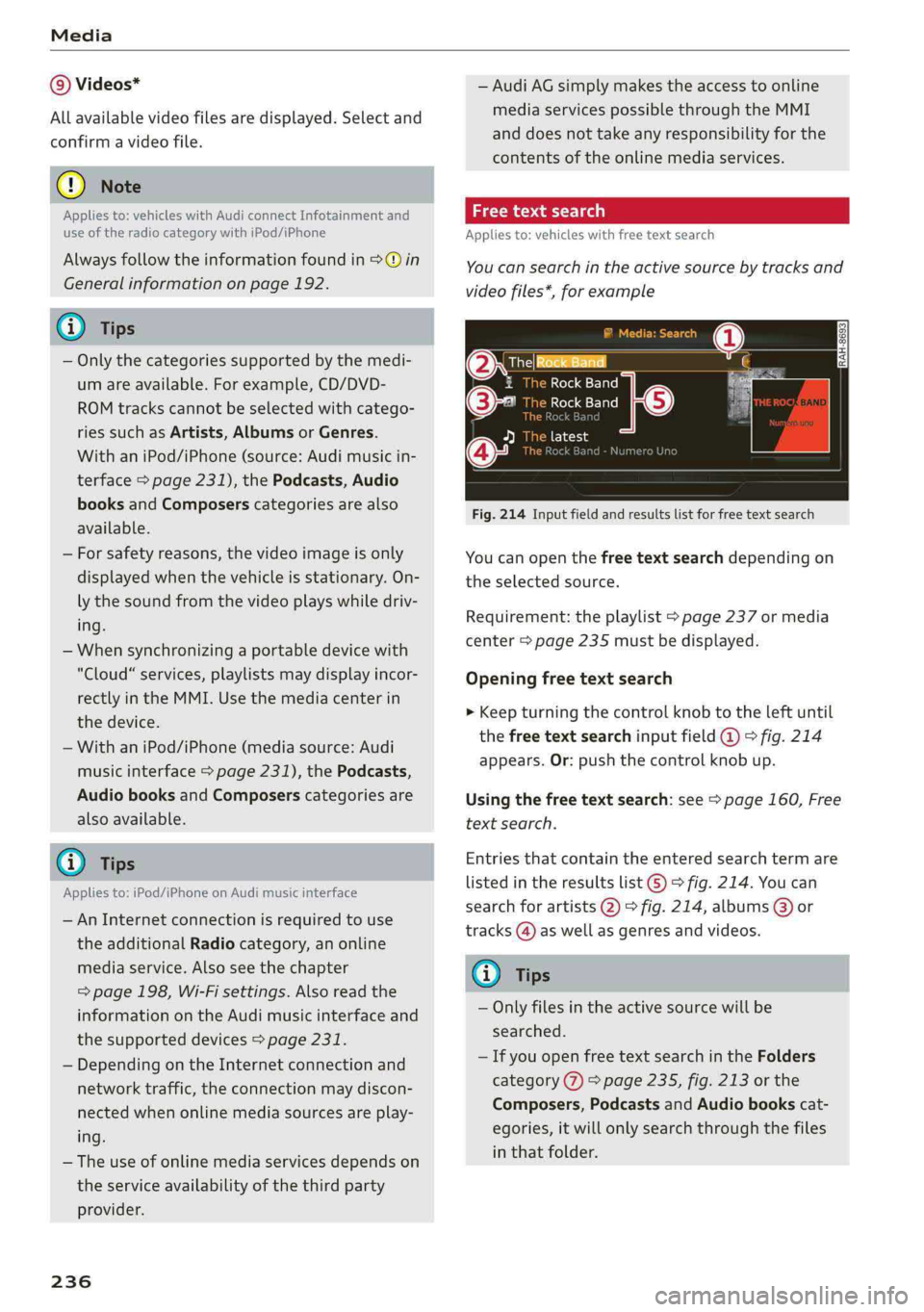
Appliesto:vehicleswithfree textsearch
Youcansearchintheactivesourcebytracksand
videofiles*,forexample
OresRockBandq
1RockBand:
©-RockBand
[eie-hie
a
Fig.214Inputfieldandresultslistforfreetextsearch
Youcanopenthefreetextsearchdependingon
theselectedsource.
Requirement:theplaylist>page237ormedia
center>page235mustbedisplayed.
Openingfreetextsearch
>Keepturningthecontrolknobtotheleftuntil
thefreetextsearchinputfield@°fig.214
appears.Or:pushthecontrolknobup.
Usingthefreetextsearch:see>page160,Free
textsearch.
Entriesthatcontaintheenteredsearchtermare
listedintheresultslist©>fig.214.Youcan
searchforartists2)°fig.214,albums@)or
tracks@)aswellasgenresandvideos.
Gi)Tips
—Onlyfilesintheactivesourcewillbe
searched.
—IfyouopenfreetextsearchintheFolders
category(7)>page235,fig.213orthe
Composers,PodcastsandAudiobookscat-
egories,itwillonlysearchthroughthefiles
inthatfolder.