page 30 AUDI Q5 2021 Owner´s Manual
[x] Cancel search | Manufacturer: AUDI, Model Year: 2021, Model line: Q5, Model: AUDI Q5 2021Pages: 332, PDF Size: 118.86 MB
Page 129 of 332
80B012721BA
High-voltage system
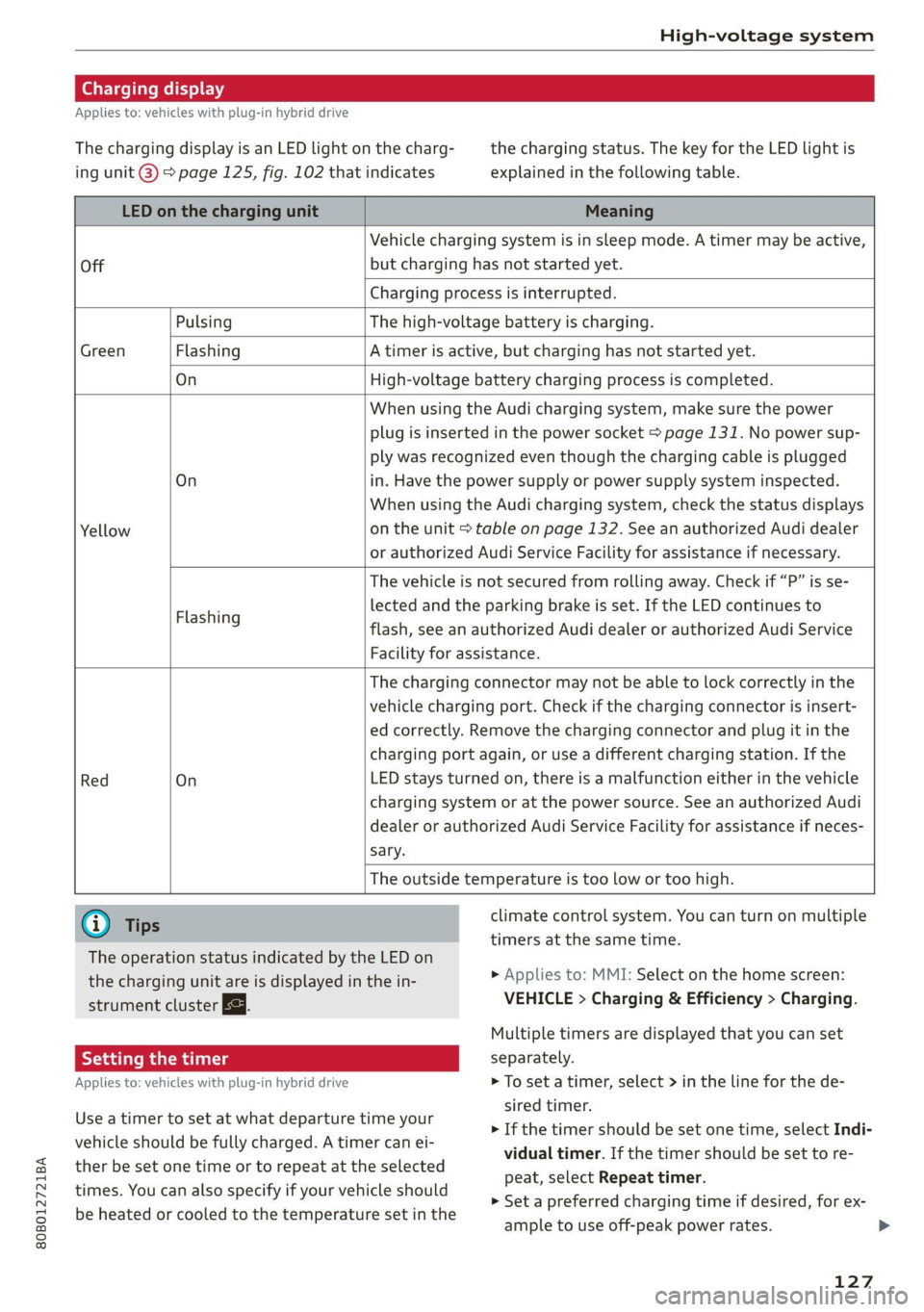
Charging display
Applies to: vehicles with plug-in hybrid drive
The charging display is an LED light on the charg- the charging status. The key for the LED light is
ing unit @) page 125, fig. 102 that indicates explained in the following table.
LED on the charging unit Meaning
Vehicle charging system is in sleep mode. A timer may be active,
Off but charging has not started yet.
Charging process is interrupted.
Pulsing The high-voltage battery is charging.
Green Flashing A timer is active, but charging has not started yet.
On High-voltage battery charging process is completed.
When using the Audi charging system, make sure the power
plug is inserted in the power socket > page 131. No power sup-
ply was recognized even though the charging cable is plugged
On in. Have the power supply or power supply system inspected.
When using the Audi charging system, check the status displays
Yellow on the unit > table on page 132. See an authorized Audi dealer
or authorized Audi Service Facility for assistance if necessary.
The vehicle is not secured from rolling away. Check if “P” is se-
lected and the parking brake is set. If the LED continues to
flash, see an authorized Audi dealer or authorized Audi Service
Facility for assistance.
Flashing
The charging connector may not be able to lock correctly in the
vehicle charging port. Check if the charging connector is insert-
ed correctly. Remove the charging connector and plug it in the
charging port again, or use a different charging station. If the
Red On LED stays turned on, there is a malfunction either in the vehicle
charging system or at the power source. See an authorized Audi
dealer or authorized Audi Service Facility for assistance if neces-
sary.
The outside temperature is too low or too high.
@ Tips climate control system. You can turn on multiple
timers at the same time.
The operation status indicated by the LED on
the charging unit are is displayed in the in-
strument cluster Eg.
> Applies to: MMI: Select on the home screen:
VEHICLE > Charging & Efficiency > Charging.
Multiple timers are displayed that you can set
Applies to: vehicles with plug-in hybrid drive > To set a timer, select > in the line for the de-
sired timer.
> If the timer should be set one time, select Indi-
vidual timer. If the timer should be set to re-
peat, select Repeat timer.
> Set a preferred charging time if desired, for ex-
ample to use off-peak power rates. >
Use a timer to set at what departure time your
vehicle should be fully charged. A timer can ei-
ther be set one time or to repeat at the selected
times. You can also specify if your vehicle should
be heated or cooled to the temperature set in the
127
Page 130 of 332
High-voltage system
> To also activate the climate control with a tim-
er, select CD.
> Select Next and follow the instructions in the
menu.
> To turn ona timer, select CD.
> To activate an enabled timer, select s+ until the
Timer charging mode is displayed.
If the set departure time on the timer is too
close, it may not be possible to charge the vehicle
fully.
It is not possible to charge using the timer at
some charging stations.
Emergency release
Applies to: vehicles with plug-in hybrid drive
In case of malfunction, you can manually release
the charging port door or the charging connec-
tor.
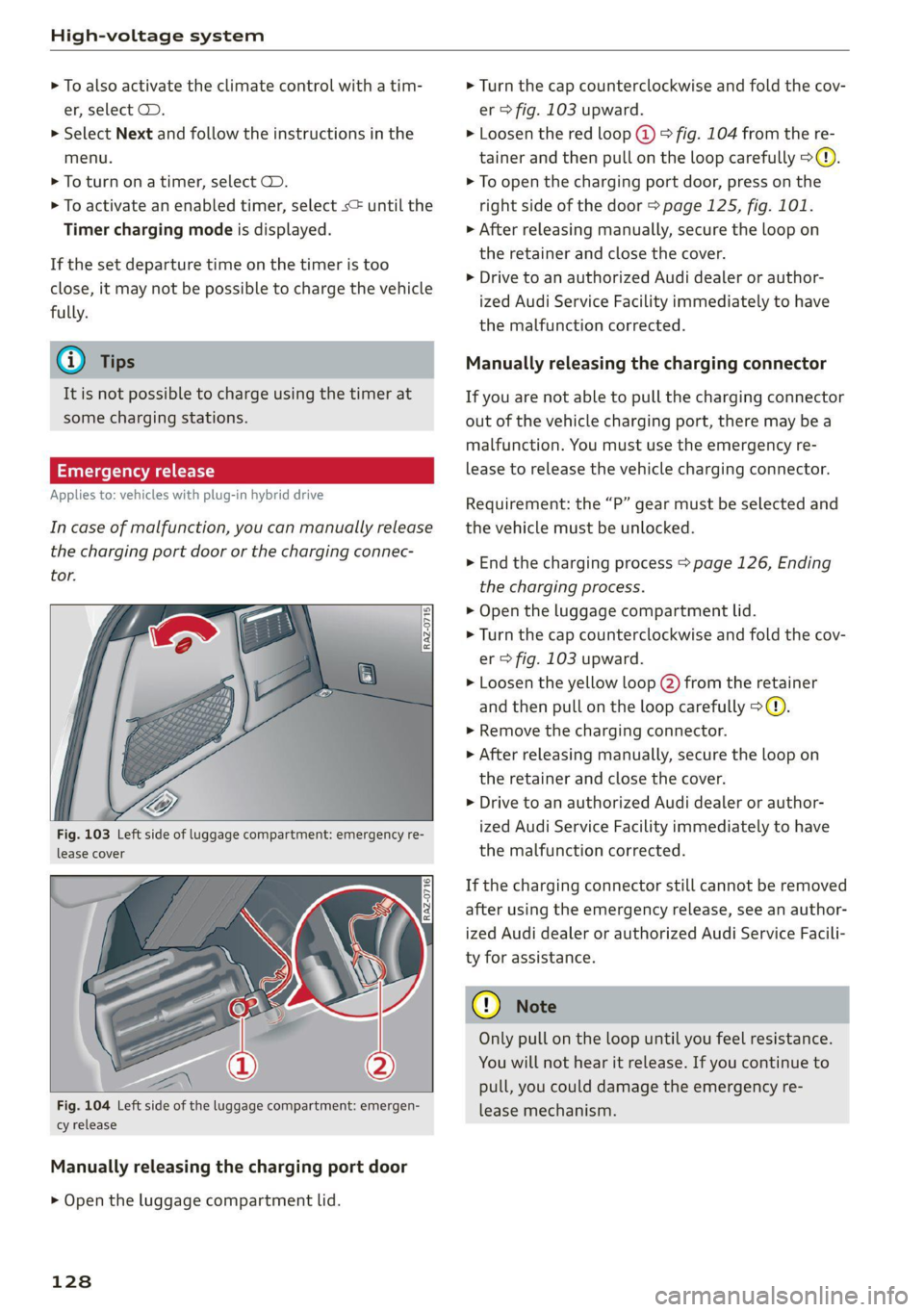
Fig. 103 Left side of luggage compartment: emergency re-
lease cover
[RAz-0716]
Fig. 104 Left side of the luggage compartment: emergen-
cy release
Manually releasing the charging port door
> Open the luggage compartment lid.
128
> Turn the cap counterclockwise and fold the cov-
er > fig. 103 upward.
> Loosen the red loop @) > fig. 104 from the re-
tainer and then pull on the loop carefully >@.
> To open the charging port door, press on the
right side of the door > page 125, fig. 101.
» After releasing manually, secure the loop on
the retainer and close the cover.
> Drive to an authorized Audi dealer or author-
ized Audi Service Facility immediately to have
the malfunction corrected.
Manually releasing the charging connector
If you are not able to pull the charging connector
out of the vehicle charging port, there may bea
malfunction. You must use the emergency re-
lease to release the vehicle charging connector.
Requirement: the “P” gear must be selected and
the vehicle must be unlocked.
> End the charging process > page 126, Ending
the charging process.
> Open the luggage compartment lid.
> Turn the cap counterclockwise and fold the cov-
er > fig. 103 upward.
> Loosen the yellow loop (2) from the retainer
and then pull on the loop carefully >@®.
> Remove the charging connector.
>» After releasing manually, secure the loop on
the retainer and close the cover.
> Drive to an authorized Audi dealer or author-
ized Audi Service Facility immediately to have
the malfunction corrected.
If the charging connector still cannot be removed
after using the emergency release, see an author-
ized Audi dealer or authorized Audi Service Facili-
ty for assistance.
Only pull on the loop until you feel resistance.
You
will not hear it release. If you continue to
pull, you could damage the emergency re-
lease mechanism.
Page 132 of 332
High-voltage system
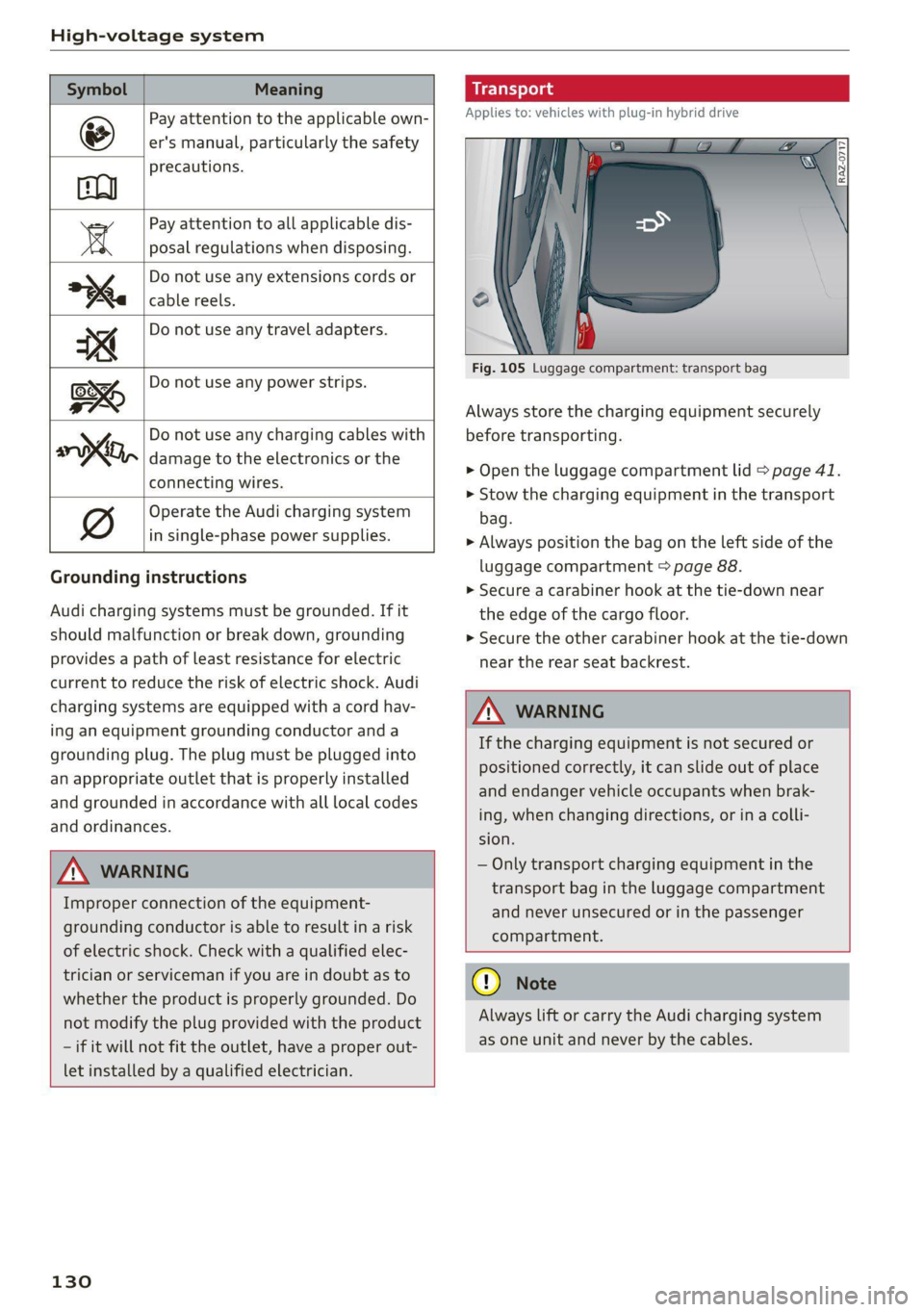
Symbol Meaning
Pay attention to the applicable own-
er's manual, particularly the safety
precautions.
Pay attention to all applicable dis-
a posal regulations when disposing.
Do not use any extensions cords or
cable reels.
Do not use any travel adapters.
Do not use any power strips.
‘ Do not use any charging cables with
KO, damage to the electronics or the
connecting wires.
@ Operate the Audi charging system
in single-phase power supplies.
Grounding instructions
Audi charging systems must be grounded. If it
should malfunction or break down, grounding
provides a path of least resistance for electric
current to reduce the risk of electric shock. Audi
charging systems are equipped with a cord hav-
ing an equipment grounding conductor and a
grounding plug. The plug must be plugged into
an appropriate outlet that is properly installed
and grounded in accordance with all local codes
and ordinances.
Z\ WARNING
Improper connection of the equipment-
grounding conductor is able to result in a risk
of electric shock. Check with a qualified elec-
trician or serviceman if you are in doubt as to
whether the product is properly grounded. Do
not modify the plug provided with the product
- if it will not fit the outlet, have a proper out-
let installed by a qualified electrician.
130
Applies to: vehicles with plug-in hybrid drive
Fig. 105 Luggage compartment: transport bag
Always store the charging equipment securely
before transporting.
> Open the luggage compartment lid > page 41.
> Stow the charging equipment in the transport
bag.
> Always position the bag on the left side of the
luggage compartment > page 88.
> Secure a carabiner hook at the tie-down near
the edge of the cargo floor.
> Secure the other carabiner hook at the tie-down
near the rear seat backrest.
Z\ WARNING
If the charging equipment is not secured or
positioned correctly, it can slide out of place
and endanger vehicle occupants when brak-
ing, when changing directions, or in a colli-
sion.
— Only transport charging equipment in the
transport bag in the luggage compartment
and never unsecured or in the passenger
compartment.
@) Note
Always lift or carry the Audi charging system
as one unit and never by the cables.
Page 133 of 332
80B012721BA
High-voltage system
Audi e-tron compact charging system
Applies to: vehicles with Audi e-tron compact charging system
a |
m=)
[RAZ-0726|
72
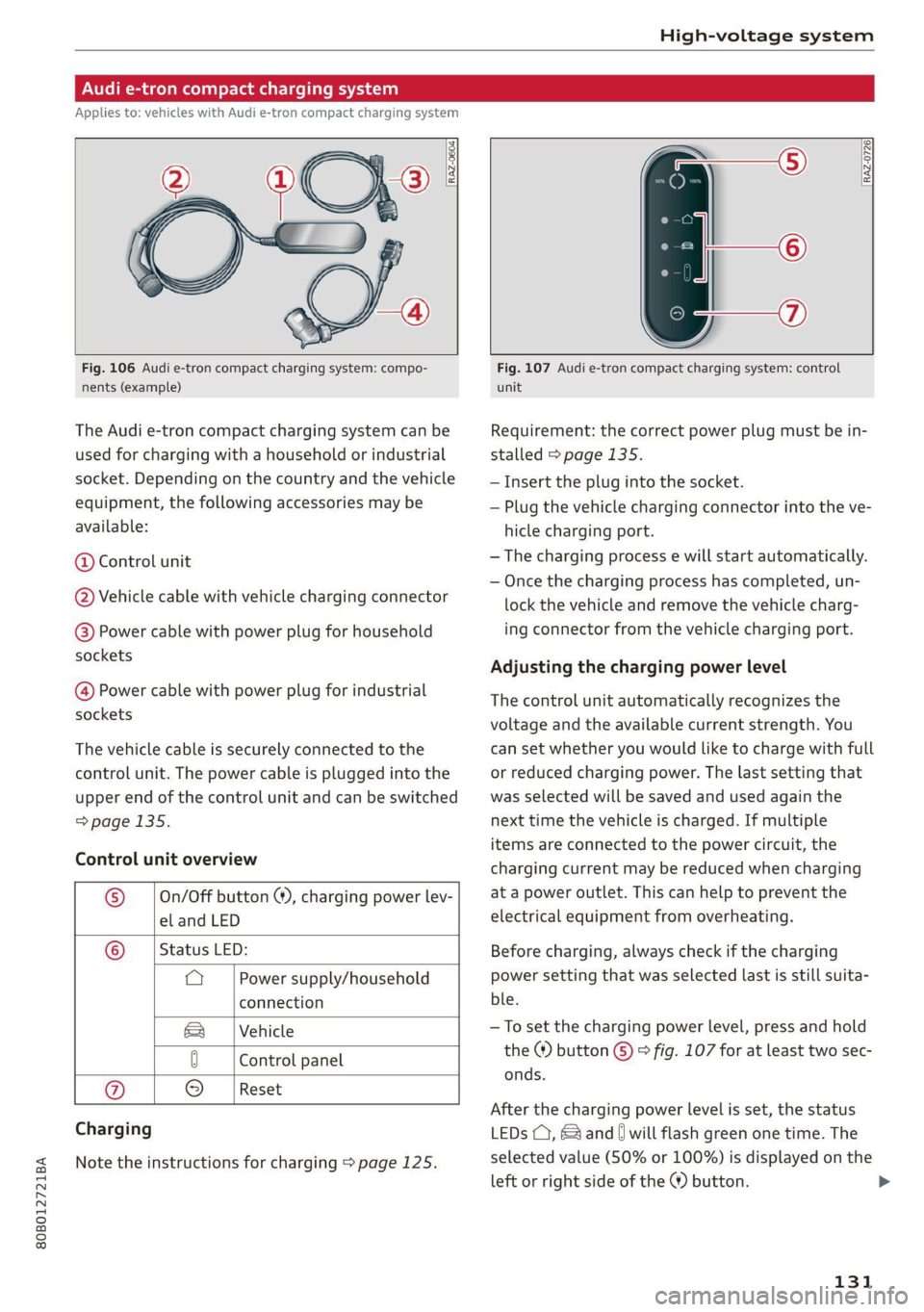
Fig. 106 Audi e-tron compact charging system: compo-
nents (example)
The Audi e-tron compact charging system can be
used for charging with a household or industrial
socket. Depending on the country and the vehicle
equipment, the following accessories may be
available:
@ Control unit
@ Vehicle cable with vehicle charging connector
@®) Power cable with power plug for household
sockets
@ Power cable with power plug for industrial
sockets
The vehicle cable is securely connected to the
control unit. The power cable is plugged into the
upper end of the control unit and can be switched
=> page 135.
Control unit overview
© | On/Off button @, charging power lev-
el and LED
© _ |Status LED:
a Power supply/household
connection
& | Vehicle
0 Control panel
Reset
® 9
Charging
Note the instructions for charging > page 125.
Fig. 107 Audi e-tron compact charging system: control
unit
Requirement: the correct power plug must be in-
stalled > page 135.
— Insert the plug into the socket.
— Plug the vehicle charging connector into the ve-
hicle charging port.
— The charging process e will start automatically.
— Once the charging process has completed, un-
lock the vehicle and remove the vehicle charg-
ing connector from the vehicle charging port.
Adjusting the charging power level
The control unit automatically recognizes the
voltage and the available current strength. You
can set whether you would like to charge with full
or reduced charging power. The last setting that
was selected will be saved and used again the
next time the vehicle is charged. If multiple
items are connected to the power circuit, the
charging current may be reduced when charging
at a power outlet. This can help to prevent the
electrical equipment from overheating.
Before charging, always check if the charging
power setting that was selected last is still suita-
ble.
—To set the charging power level, press and hold
the ® button © © fig. 107 for at least two sec-
onds.
After the charging power level is set, the status
LEDs (, {and [| will flash green one time. The
selected value (50% or 100%) is displayed on the
left or right side of the ® button.
131
>
Page 134 of 332
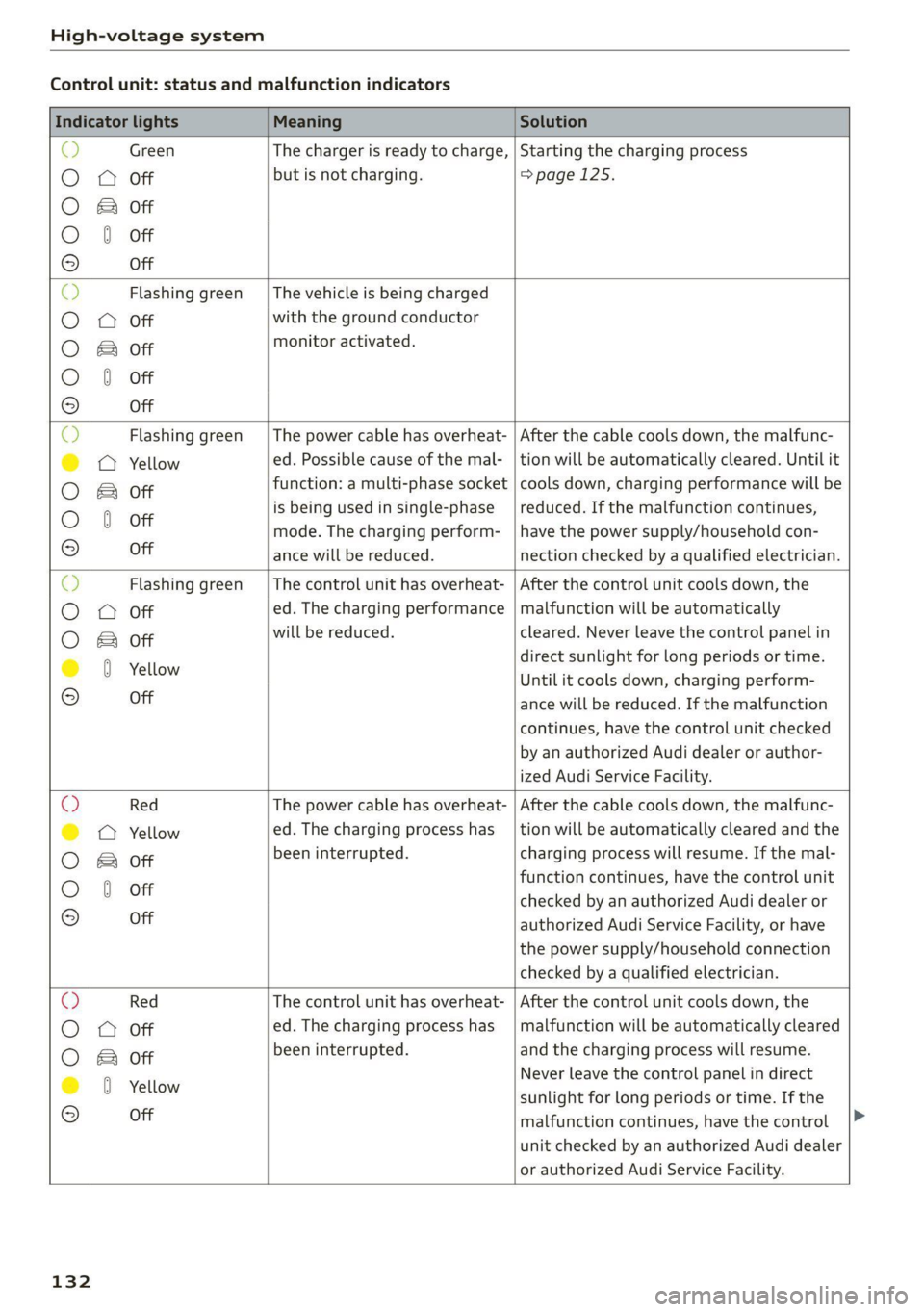
High-voltage system
Control unit: status and malfunction indicators
Indicator lights Meaning Solution
& Green The charger is ready to charge, | Starting the charging process
O 0 Off but is not charging. =>page 125.
O & Off
O 0 of
9 Off
O Flashing green __| The vehicle is being charged
O 0 Off with the ground conductor
O Bot monitor activated.
O 0 of
9 Off
Flashing green | The power cable has overheat- | After the cable cools down, the malfunc-
© a Yellow ed. Possible cause of the mal- | tion will be automatically cleared. Until it
O B& otf function: a multi-phase socket | cools down, charging performance will be
O 0 of is being used in single-phase | reduced. If the malfunction continues,
mode. The charging perform- | have the power supply/household con-
9° Off ance will be reduced. nection checked by a qualified electrician.
O Flashing green |The control unit has overheat- | After the control unit cools down, the
O Q Off ed. The charging performance | malfunction will be automatically
O Bor will be reduced. cleared. Never leave the control panel in
@ 8 Yellow direct sunlight for long periods or time.
Until it cools down, charging perform-
© Off ance will be reduced. If the malfunction
continues, have the control unit checked
by an authorized Audi dealer or author-
ized Audi Service Facility.
O Red The power cable has overheat- | After the cable cools down, the malfunc-
© © Yellow ed. The charging process has __| tion will be automatically cleared and the
O B otf been interrupted. charging process will resume. If the mal-
function continues, have the control unit
O 0 off checked by an authorized Audi dealer or
© Off authorized Audi Service Facility, or have
the power supply/household connection
checked by a qualified electrician.
O Red The control unit has overheat- | After the control unit cools down, the
O O off ed. The charging process has_ | malfunction will be automatically cleared
O Bor been interrupted. and the charging process will resume.
@ 0 Yeltow Never leave the control panel in direct
© -_ sunlight for long periods or time. If the
malfunction continues, have the control
unit checked by an authorized Audi dealer
or authorized Audi Service Facility.
132
Page 135 of 332
80B012721BA
High-voltage system
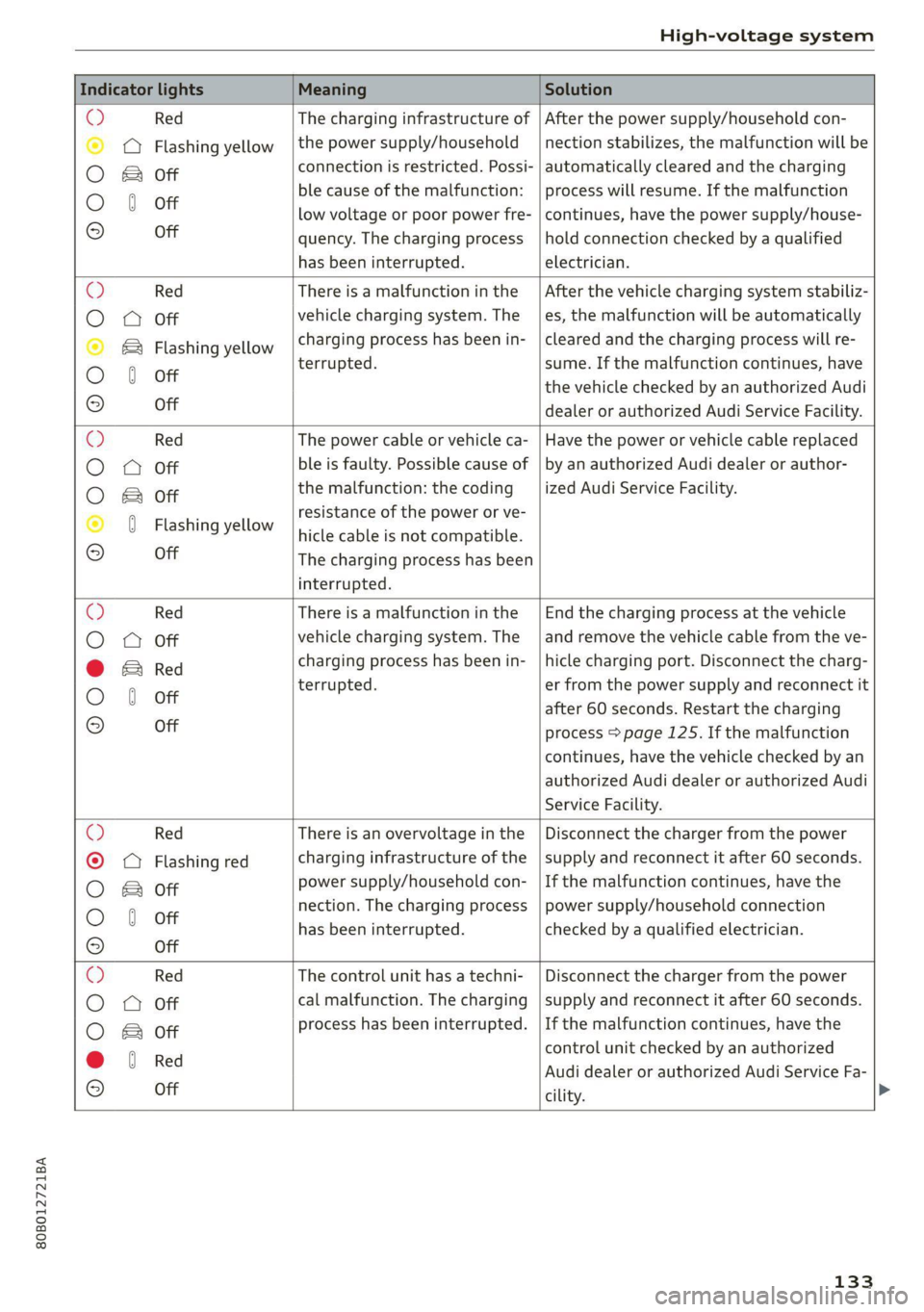
Indicator lights Meaning Solution
© Red The charging infrastructure of | After the power supply/household con-
© @ Flashing yellow |the power supply/household | nection stabilizes, the malfunction will be
O Bor connection is restricted. Possi- | automatically cleared and the charging
O 6 off ble cause of the malfunction: | process will resume. If the malfunction
low voltage or poor power fre- | continues, have the power supply/house-
© Off quency. The charging process | hold connection checked by a qualified
has been interrupted. electrician.
O Red There is a malfunction inthe | After the vehicle charging system stabiliz-
O Q Off vehicle charging system. The es, the malfunction will be automatically
© & Flashing yellow charging process has been in- | cleared and the charging process will re-
O 6 off terrupted. sume. If the malfunction continues, have
the vehicle checked by an authorized Audi
9 Off dealer or authorized Audi Service Facility.
© Red The power cable or vehicle ca- | Have the power or vehicle cable replaced
O 0 Off ble is faulty. Possible cause of | by an authorized Audi dealer or author-
O Bot the malfunction: the coding _| ized Audi Service Facility.
© 0 Flashi ll resistance of the power or ve-
asning YeNow | hicle cable is not compatible.
9 Off The charging process has been
interrupted.
O Red There is a malfunction in the | End the charging process at the vehicle
O 0 off vehicle charging system. The | and remove the vehicle cable from the ve-
@ E& Red charging process has been in- | hicle charging port. Disconnect the charg-
O 6 of terrupted. er from the power supply and reconnect it
after 60 seconds. Restart the charging
© Off process > page 125. If the malfunction
continues, have the vehicle checked by an
authorized Audi dealer or authorized Audi
Service Facility.
© Red There is an overvoltage inthe | Disconnect the charger from the power
© CQ Flashing red charging infrastructure of the | supply and reconnect it after 60 seconds.
O Bot power supply/household con- | If the malfunction continues, have the
O 6 of nection. The charging process | power supply/household connection
© has been interrupted. checked by a qualified electrician.
Off
©) Red The control unit has atechni- | Disconnect the charger from the power
O 0 Off cal malfunction. The charging | supply and reconnect it after 60 seconds.
process has been interrupted. | If the malfunction continues, have the
O & off
@ 8 Red control unit checked by an authorized
© e Audi dealer or authorized Audi Service Fa-
Off
cility.
133
Page 137 of 332
80B012721BA
High-voltage system
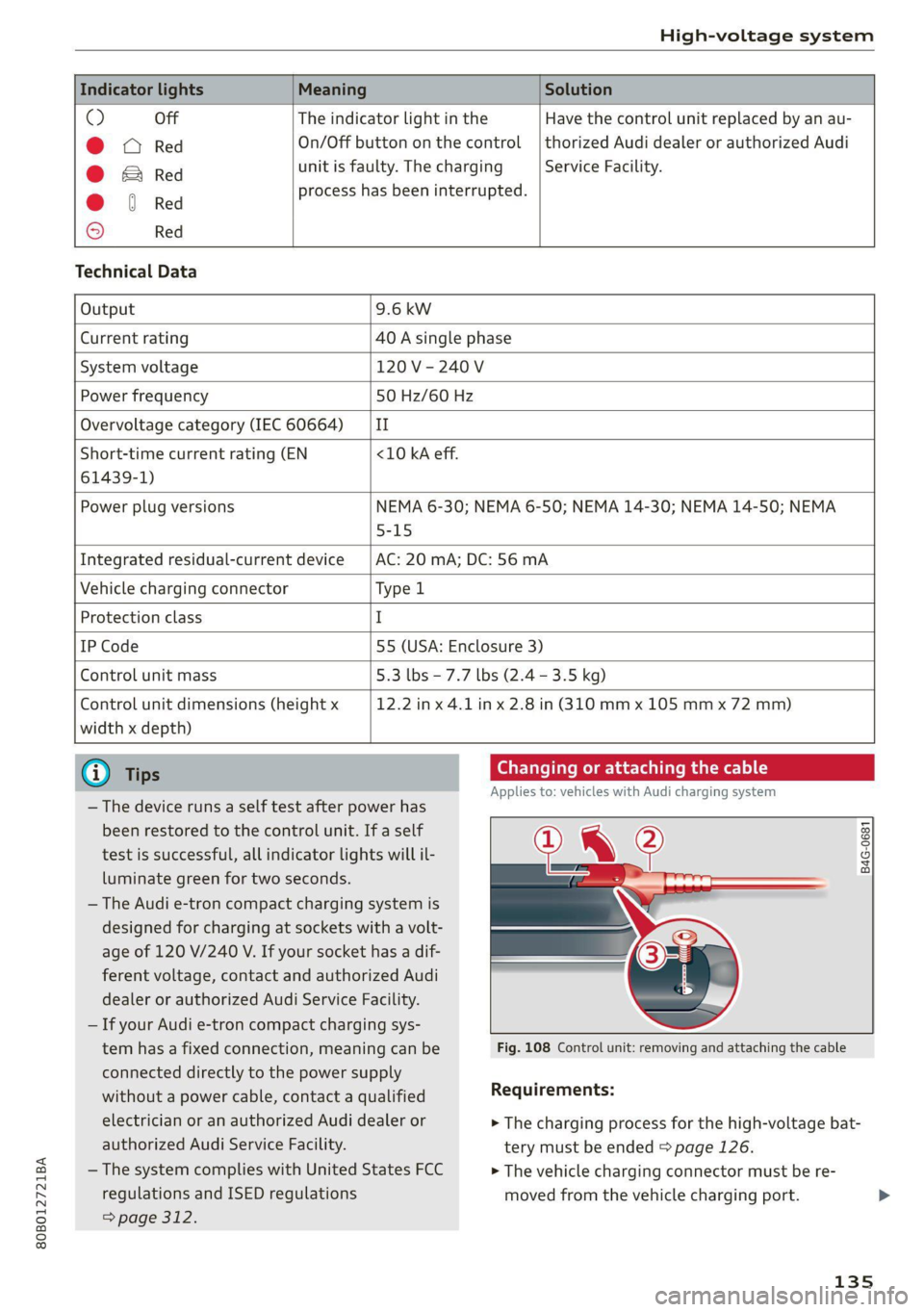
Indicator lights Meaning Solution
O Off The indicator light in the Have the control unit replaced by an au-
@ X Red On/Off button on the control | thorized Audi dealer or authorized Audi
@ B Red unit is faulty. The charging Service Facility.
@ © Red process has been interrupted.
© Red
Technical Data
Output 9.6 kw
Current rating 40 A single phase
System voltage 120V-240V
Power frequency 50 Hz/60 Hz
Overvoltage category (IEC 60664) ‘| II
Short-time current rating (EN <10 kA eff.
61439-1)
Power plug versions NEMA 6-30; NEMA 6-50; NEMA 14-30; NEMA 14-50; NEMA
5-15
Integrated residual-current device AC: 20 mA; DC: 56 mA
Vehicle charging connector Type l
Protection class I
IP Code 55 (USA: Enclosure 3)
Control unit mass 5.3 lbs - 7.7 lbs (2.4 - 3.5 kg)
Control unit dimensions (height x
width x depth)
12.2 in x 4.1 in x 2.8 in (310 mm x 105 mm x 72 mm)
@) Tips
— The device runs a self test after power has
been restored to the control unit. If a self
test is successful, all indicator lights will il-
luminate green for two seconds.
— The Audi e-tron compact charging system is
designed for charging at sockets with a volt-
age of 120 V/240 V. If your socket has a dif-
ferent voltage, contact and authorized Audi
dealer or authorized Audi Service Facility.
— If your Audi e-tron compact charging sys-
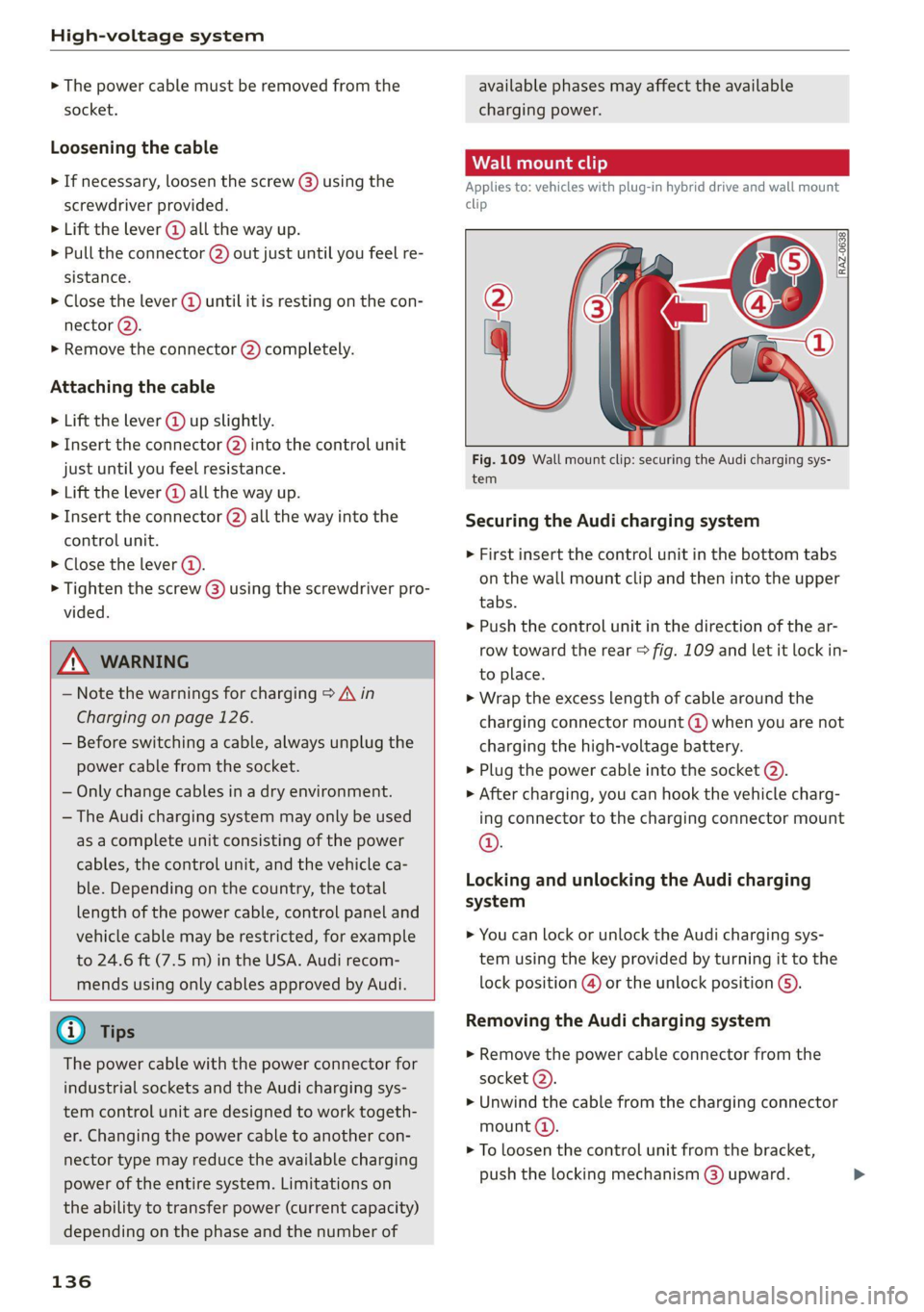
Changing or attaching the cable
Applies to: vehicles with Audi charging system
B4G-0681
tem has a fixed connection, meaning can be Fig. 108 Control unit: removing and attaching the cable
connected directly to the power supply
without a power cable, contact a qualified Requirements:
electrician or an authorized Audi dealer or > The charging process for the high-voltage bat-
authorized Audi Service Facility. tery must be ended > page 126.
— The system complies with United States FCC > The vehicle charging connector must be re-
regulations and ISED regulations
> page 312.
moved from the vehicle charging port.
135
Page 138 of 332
High-voltage system
> The power cable must be removed from the
socket.
Loosening the cable
> If necessary, loosen the screw (8) using the
screwdriver provided.
> Lift the lever @ all the way up.
> Pull the connector (2) out just until you feel re-
sistance.
> Close the lever @ until it is resting on the con-
nector @).
> Remove the connector (2) completely.
Attaching the cable
> Lift the lever @ up slightly.
> Insert the connector @) into the control unit
just until you feel resistance.
> Lift the lever @ all the way up.
> Insert the connector (2) all the way into the
control unit.
> Close the lever @).
> Tighten the screw @) using the screwdriver pro-
vided.
Z\ WARNING
— Note the warnings for charging > A\ in
Charging on page 126.
— Before switching a cable, always unplug the
power cable from the socket.
— Only change cables in a dry environment.
— The Audi charging system may only be used
as a complete unit consisting of the power
cables, the control unit, and the vehicle ca-
ble. Depending on the country, the total
length of the power cable, control panel and
vehicle cable may be restricted, for example
to 24.6 ft (7.5 m) in the USA. Audi recom-
mends using only cables approved by Audi.
@) Tips
The power cable with the power connector for
industrial sockets and the Audi charging sys-
tem control unit are designed to work togeth-
er. Changing the power cable to another con-
nector type may reduce the available charging
power of the entire system. Limitations on
the ability to transfer power (current capacity)
depending on the phase and the number of
136
available phases may affect the available
charging power.
Applies to: vehicles with plug-in hybrid drive and wall mount
clip
RAZ-0638,
Fig. 109 Wall mount clip: securing the Audi charging sys-
tem
Securing the Audi charging system
> First insert the control unit in the bottom tabs
on the wall mount clip and then into the upper
tabs.
> Push the control unit in the direction of the ar-
row toward the rear > fig. 109 and let it lock in-
to place.
> Wrap the excess length of cable around the
charging connector mount @ when you are not
charging the high-voltage battery.
> Plug the power cable into the socket @).
> After charging, you can hook the vehicle charg-
ing connector to the charging connector mount
©.
Locking and unlocking the Audi charging
system
> You can lock or unlock the Audi charging sys-
tem using the key provided by turning it to the
lock position @) or the unlock position ().
Removing the Audi charging system
> Remove the power cable connector from the
socket (2).
> Unwind the cable from the charging connector
mount (4).
> To loosen the control unit from the bracket,
push the locking mechanism @) upward.
Page 140 of 332
Trailer towing
Trailer towing
Driving with a trailer
er else)
Your vehicle is primarily intended for transport-
ing people and luggage. However, if you drive
with a trailer, follow the technical requirements,
the operation and driving tips, and the legal reg-
ulations.
Driving with a trailer affects the vehicle's energy
usage, performance, and wear. It also requires
higher concentration from the driver.
ZA\ WARNING
Do not transport any people in a trailer due to
the risk of fatal injury.
Technical requirements
Trailer hitch
Only use a trailer hitch with a removable ball
hitch mount and ball hitch. The trailer hitch must
be permitted for the vehicle, the trailer and the
permitted total weight of the trailer being
pulled. Above all, it must be securely and safely
attached to the vehicle trailer.
Never mount a trailer hitch on the bumper. The
trailer hitch must be mounted in a way that does
not impair the function of the bumper. Do not
make any changes to the exhaust system and the
brake system.
Check regularly if the trailer hitch is securely
mounted. Always follow the instructions given by
the trailer hitch manufacturer.
Trailer brakes
If the trailer has its own brake system, then fol-
low the manufacturer specifications. However,
the brake system on the trailer must never be
connected to the vehicle brake system.
Engine cooling system
Driving with a trailer means a higher load on the
engine and the cooling system. The cooling sys-
tem must be designed for additional load and
contain enough coolant > @.
138
ZA\ WARNING
— Never mount a "weight-distributing" or
"load-balancing" trailer coupler as the trailer
hitch. The vehicle was not designed for
these types of trailer hitches. The trailer
hitch can malfunction and the trailer can
break off from the vehicle.
— If the trailer is equipped with electronic
brakes, these brakes cannot be activated by
a factory-installed control system, which in-
creases the risk of an accident.
—To reduce the risk of injury, always remove
the ball hitch mount if no trailer is mount-
ed
@) Note
Longer inclines cannot be driven without a
suitable cooling system, especially if the out-
side temperatures are high. Otherwise, this
increases the risk of engine damage.
ey emia aCe
Towing capacity
The permitted towing capacity must not be ex-
ceeded under any circumstances > page 314.
You can drive up larger inclines if you are not us-
ing the maximum towing capacity.
The specified towing weights only apply at eleva-
tions up to 3,200 feet (1,000 m) above sea level.
As the elevation increases, the engine power de-
creases due to the decreasing air pressure. This
reduces the hill climbing ability and towing ca-
pacity. For every additional 3,200 ft (1,000 m),
the maximum permitted towing weight must be
reduced by approximately 10%. The permitted
towing weight is the combined weight of the
(loaded) vehicle and the (loaded) trailer.
Tongue weight
The maximum permitted tongue weight of the
trailer drawbar on the trailer hitch ball head must
not be exceeded.
For driving safety, Audi recommends always us-
ing
the maximum permitted tongue weight, but
do not exceed this weight. Distributing the cargo >
Page 141 of 332
80B012721BA
Trailer towing
in the trailer correctly will help to achieve this
weight. Having the tongue weight too low affects
the vehicle's handling.
You can determine the tongue weight using a
tongue weight scale, a bathroom scale, or a pub-
lic weigh station, for example.
The permitted tongue weight of your vehicle can
be found in the vehicle documentation or in
=> page 314.
Load distribution
Poor cargo load and distribution can negatively
impact vehicle handling. Load the trailer based
on the following criteria as much as possible:
— Store objects in the vehicle luggage compart-
ment, if possible. The vehicle should always
carry the heaviest possible load and the trailer
should have the lightest possible load.
— Distribute the load in the trailer so that the
heavy objects are as close to the axle as possi-
ble.
— Secure objects so that they do not slide.
— Utilize the maximum permitted tongue weight
if possible.
Tires
Set the tire pressure on your vehicle for a “full
load”; see the tire pressure sticker > page 271. If
necessary, also adjust the tire pressure on the
trailer according to the manufacturer's specifica-
tions.
The trailer and the vehicle should be equipped
with winter tires when driving in winter tempera-
tures.
Outside mirrors
If you cannot see the traffic behind the trailer
with the standard exterior mirrors, then you
must attach additional exterior mirrors. Adjust
them so you have a sufficient visibility behind
you.
Exterior lighting
Follow the legal regulations for lighting on your
trailer that are applicable in the country where
you are operating the vehicle. Contact an author-
ized Audi dealer or authorized Audi Service Facili-
ty for more information.
Before you start driving, check all lighting equip-
ment on the trailer while it is hitched to the vehi-
cle.
The headlight range control automatically ad-
justs the light range of the headlights.
When the B indicator light blinks, then the turn
signals are activated in trailer mode. If a turn sig-
nal on the trailer or on the vehicle fails while in
trailer mode, the indicator light will not blink
twice as fast to indicate this.
Safety chains
Make sure the safety chains are correctly applied
when pulling a trailer. The chains should hang
enough so that the trailer can drive around
curves. However, they must not touch the
ground.
Air suspension
Applies to: vehicles with air suspension
The Audi drive select* Comfort mode > page 115
must be selected before you adjust the tongue
weight on the trailer and hitch the trailer >@,
=> page 116.
The air suspension trailer mode must be switched
on.
Applies to MMI: select on the home screen: VE-
HICLE > Settings & Service > Air suspension:
trailer.
Switch trailer mode off again when you are no
longer towing a trailer.
For vehicles with a factory-installed trailer hitch,
the air suspension trailer mode will automatically
switch on if you connect the trailer cable to the
socket.
When using carrier systems that are mounted di-
rectly on the trailer hitch ball head, you can also
switch trailer mode off manually.
If you must drive on roads that are in poor condi-
tion, you can raise the vehicle again after hitching
the trailer or after adjusting the tongue weight
> page 116.
139