page 30 AUDI Q5 2021 Owner´s Manual
[x] Cancel search | Manufacturer: AUDI, Model Year: 2021, Model line: Q5, Model: AUDI Q5 2021Pages: 332, PDF Size: 118.86 MB
Page 87 of 332
80B012721BA
Storage and convenience
bench seat to protect the backrest from
damage.
— If you move the front seat back when the
rear seat backrest is folded forward, you
could damage the head restraints on the
rear seat.
— Make sure that the heating grid strips for
the rear window defogger are not damaged
by abrasive objects.
— Applies to: vehicles with manual luggage
compartment cover: Let the luggage com-
partment cover roll up slowly to reduce the
risk of damage.
—The tire pressure must be adapted to the
load > page 271.
— You can purchase straps at specialty stores.
Luggage compartment cover
Applies to: vehicles with luggage compartment cover
2
S|
2 = +
ao
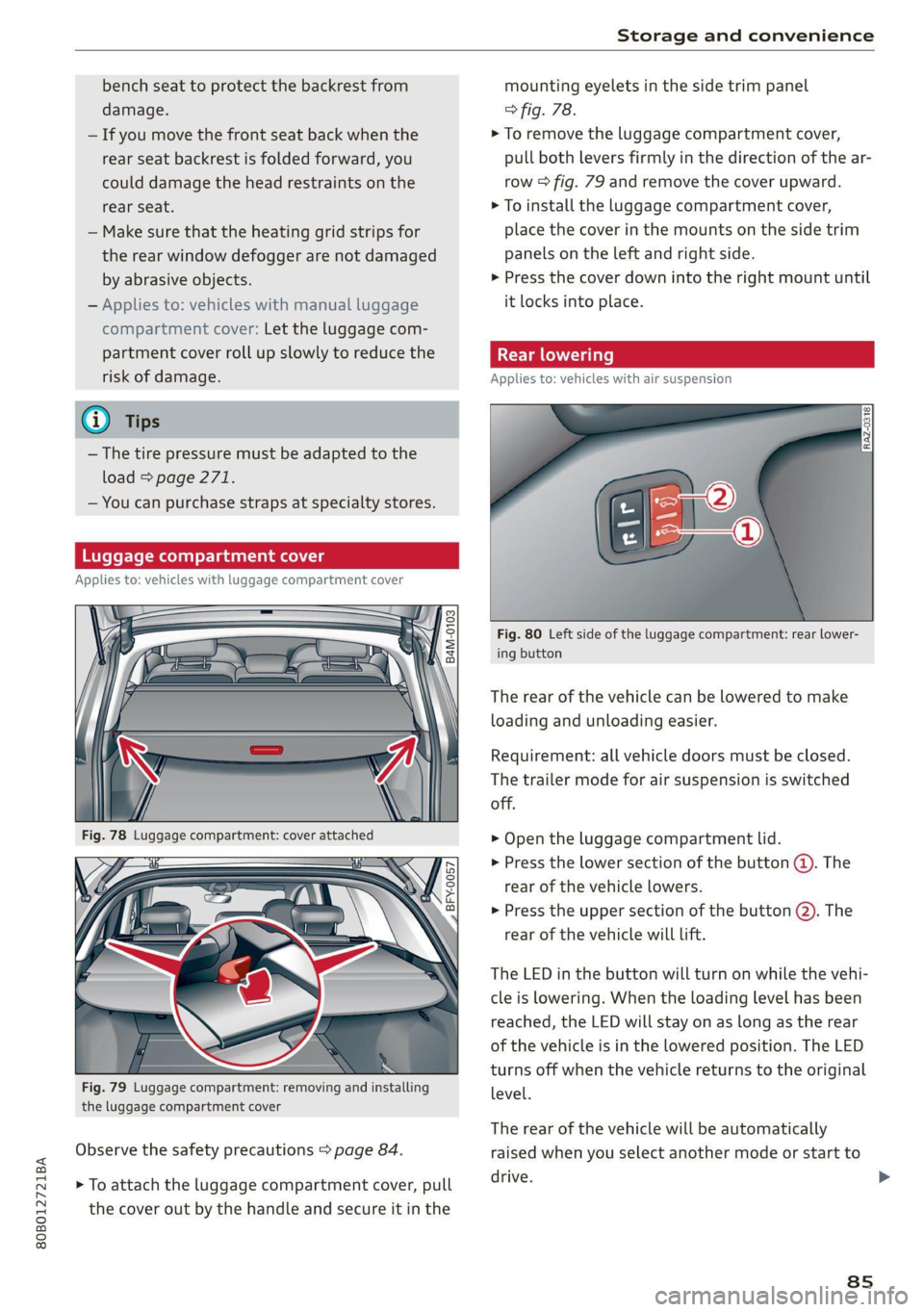
Fig. 79 Luggage compartment: removing and installing
the luggage compartment cover
Observe the safety precautions > page 84.
> To attach the luggage compartment cover, pull
the cover out by the handle and secure it in the
mounting eyelets in the side trim panel
> fig. 78.
> To remove the luggage compartment cover,
pull both levers firmly in the direction of the ar-
row > fig. 79 and remove the cover upward.
> To install the luggage compartment cover,
place the cover in the mounts on the side trim
panels on the left and right side.
> Press the cover down into the right mount until
it locks into place.
Applies to: vehicles with air suspension
Fig. 80 Left side of the luggage compartment: rear lower-
ing button
The rear of the vehicle can be lowered to make
loading and unloading easier.
Requirement: all vehicle doors must be closed.
The trailer mode for air suspension is switched
off.
> Open the luggage compartment lid.
> Press the lower section of the button (@). The
rear of the vehicle lowers.
> Press the upper section of the button @. The
rear of the vehicle will Lift.
The LED in the button will turn on while the vehi-
cle is lowering. When the loading level has been
reached, the LED will stay on as long as the rear
of the vehicle is in the lowered position. The LED
turns off when the vehicle returns to the original
level.
The rear of the vehicle will be automatically
raised when you select another mode or start to
drive.
ss
>
Page 88 of 332
Storage and convenience
— Do not park the vehicle in a lowered loading
level.
— Before the rear lowering ends, make sure
there is enough clearance above the vehicle
and the luggage compartment lid, if it is
open.
Oo
— The vehicle will not lower when the ignition
is switched off if the compressed air reser-
voir is empty. The button LED blinks three
times.
— If the compressed air reservoir is empty, it is
refilled while driving at speeds above
25 mph (40 km/h).
ates Man Mlb 4M) mT Mog [oar]
inside the passenger compartment
Applies to: vehicles with folding backrests
Pho
coxs
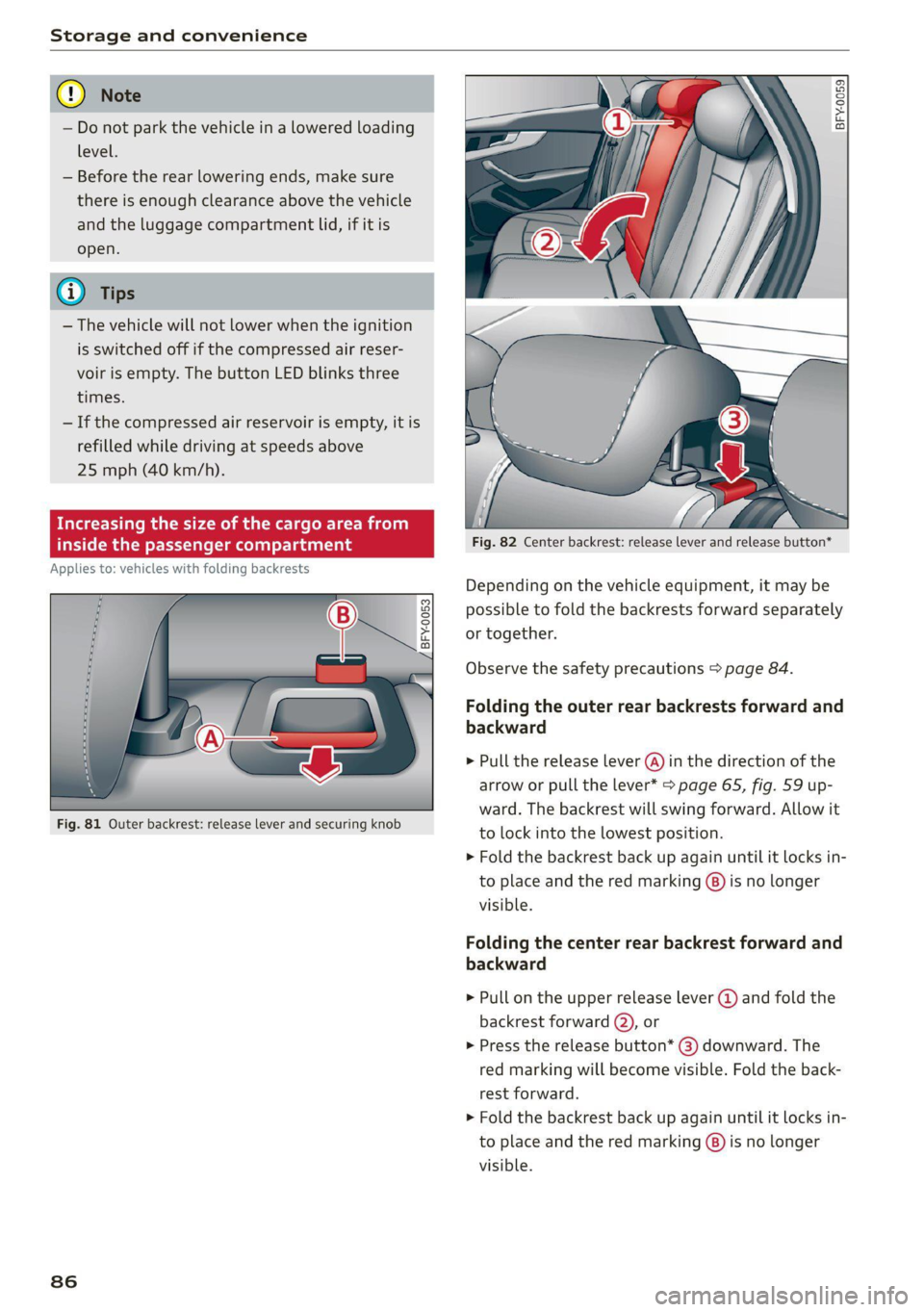
Fig. 81 Outer backrest: release lever and securing knob
86
DQ B 3 S = a
oO
Fig. 82 Center backrest: release lever and release button*
Depending on the vehicle equipment, it may be
possible to fold the backrests forward separately
or together.
Observe the safety precautions > page 84.
Folding the outer rear backrests forward and
backward
> Pull the release lever (@) in the direction of the
arrow or pull the lever* > page 65, fig. 59 up-
ward. The backrest will swing forward. Allow it
to lock into the lowest position.
> Fold the backrest back up again until it locks in-
to place and the red marking @) is no longer
visible.
Folding the center rear backrest forward and
backward
> Pull on the upper release lever @ and fold the
backrest forward (2), or
> Press the release button* @) downward. The
red marking will become visible. Fold the back-
rest forward.
> Fold the backrest back up again until it locks in-
to place and the red marking (@) is no longer
visible.
Page 89 of 332
80B012721BA
Storage and convenience
Increasing the size of the cargo area f
inside the luggage compartment
Applies to: vehicles with release lever in the luggage compart-
ment
B8Ww-0268
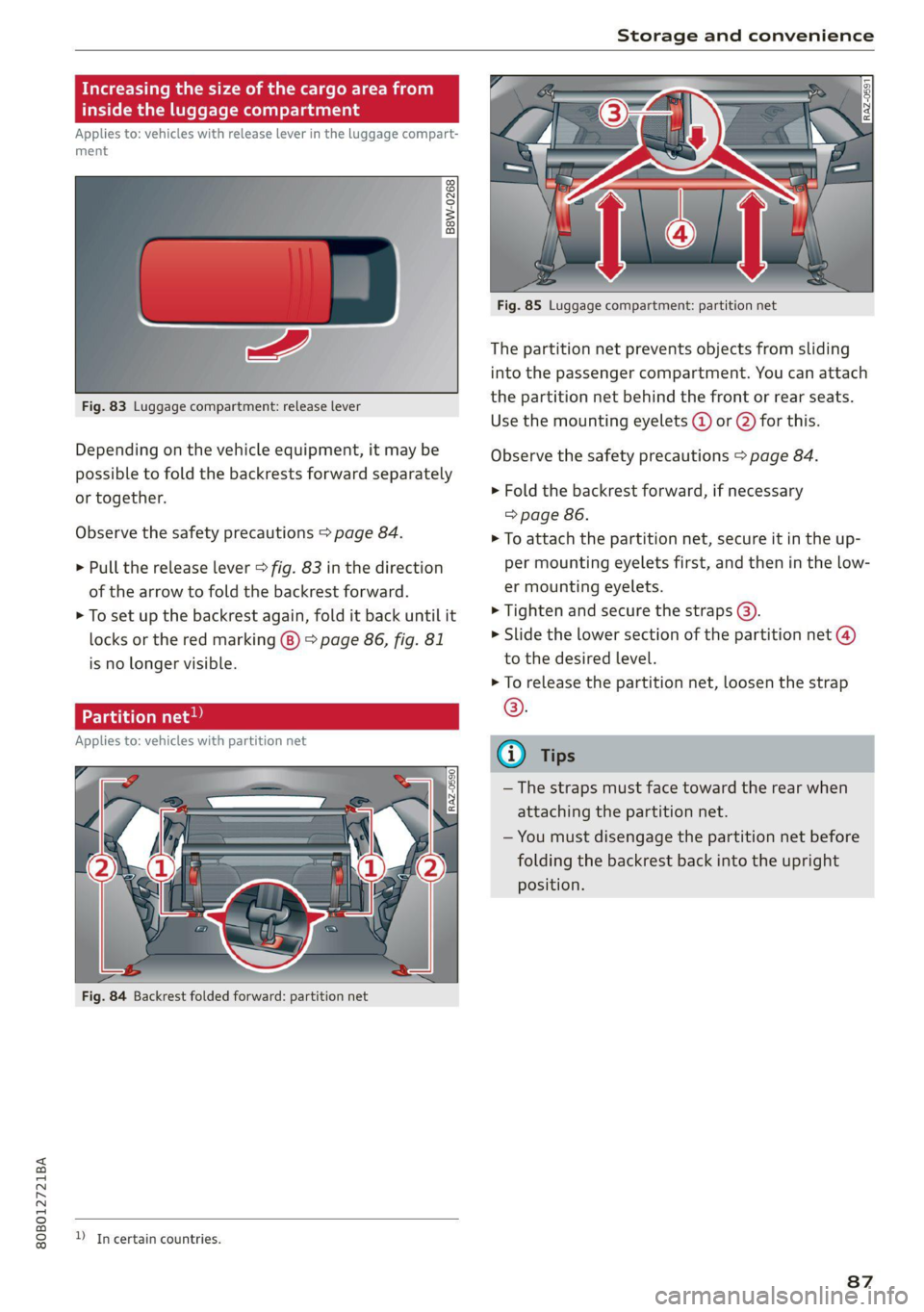
Fig. 83 Luggage compartment: release lever
Depending on the vehicle equipment, it may be
possible to fold the backrests forward separately
or together.
Observe the safety precautions > page 84.
> Pull the release lever > fig. 83 in the direction
of the arrow to fold the backrest forward.
> To set up the backrest again, fold it back until it
locks or the red marking (8) > page 86, fig. 81
is no longer visible.
Pe vaat ated Matte
Applies to: vehicles with partition net
D In certain countries.
Fig. 85 Luggage compartment: partition net
The partition net prevents objects from sliding
into the passenger compartment. You can attach
the partition net behind the front or rear seats.
Use the mounting eyelets @ or @ for this.
Observe the safety precautions > page 84.
» Fold the backrest forward, if necessary
=> page 86.
> To attach the partition net, secure it in the up-
per mounting eyelets first, and then in the low-
er mounting eyelets.
> Tighten and secure the straps @).
> Slide the lower section of the partition net @)
to the desired level.
> To release the partition net, loosen the strap
©.
—The straps must face toward the rear when
attaching the partition net.
— You must disengage the partition net before
folding the backrest back into the upright
position.
87
Page 90 of 332
Storage and convenience
ie-downs and luggage com nt net Car
Applies to: vehicles with removable cargo floor
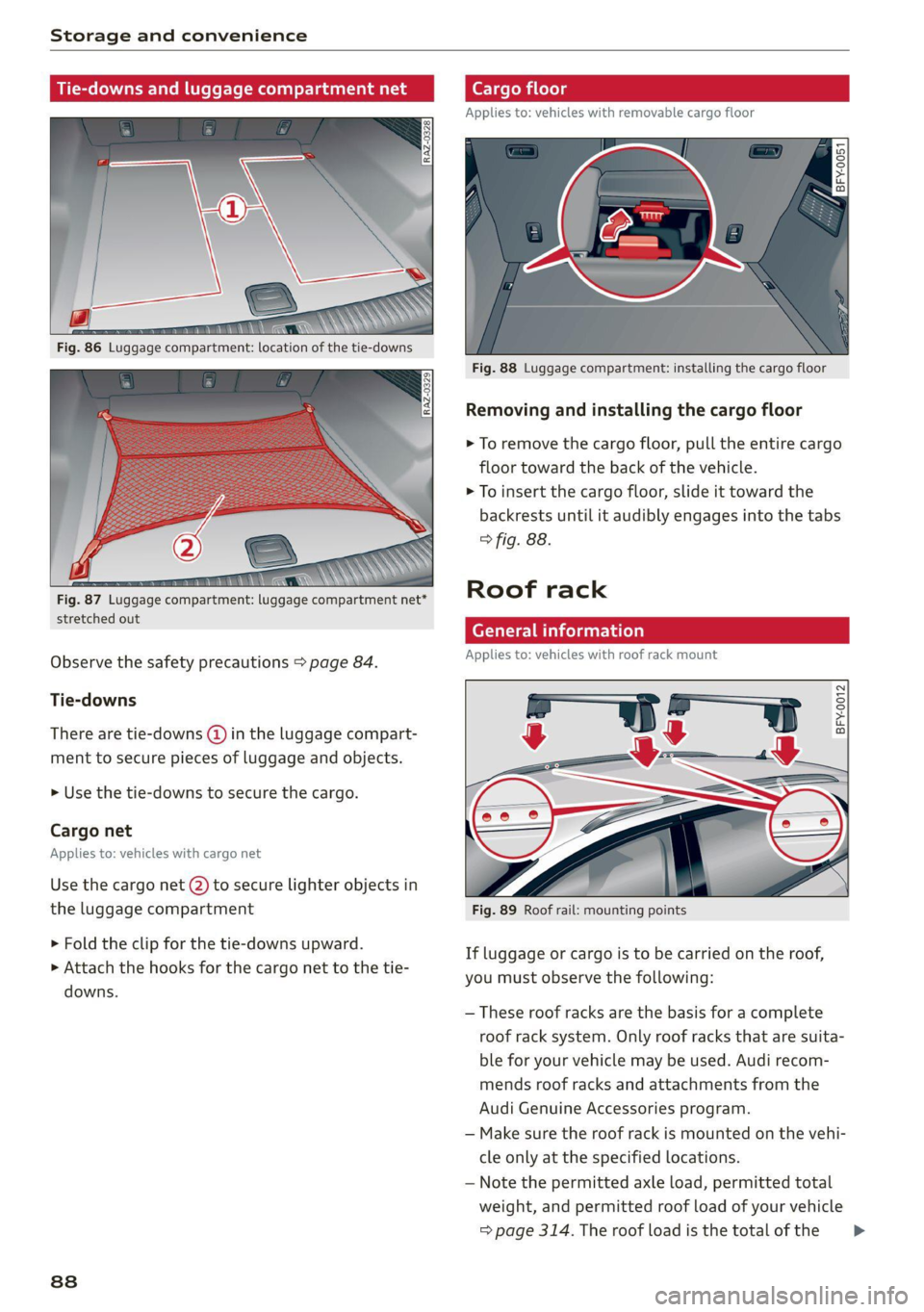
Fig. 88 Luggage compartment: installing the cargo floor
Removing and installing the cargo floor
> To remove the cargo floor, pull the entire cargo
floor toward the back of the vehicle.
> To insert the cargo floor, slide it toward the
backrests until it audibly engages into the tabs
> fig. 88.
Roof rack
stretched out z -
General information
Applies to: vehicles with roof rack mount
Observe the safety precautions > page 84.
Tie-downs
BFY-0012 There are tie-downs (@ in the luggage compart-
ment to secure pieces of luggage and objects.
» Use the tie-downs to secure the cargo.
Cargo net
Applies to: vehicles with cargo net
Use the cargo net (2) to secure lighter objects in
the luggage compartment Fig. 89 Roof rail: mounting points
> Fold the clip for the tie-downs upward.
> Attach the hooks for the cargo net to the tie-
downs.
If luggage or cargo is to be carried on the roof,
you must observe the following:
— These roof racks are the basis for a complete
roof rack system. Only roof racks that are suita-
ble for your vehicle may be used. Audi recom-
mends roof racks and attachments from the
Audi Genuine Accessories program.
— Make sure the roof rack is mounted on the vehi-
cle only at the specified locations.
— Note the permitted axle load, permitted total
weight, and permitted roof load of your vehicle
=> page 314. The roof load is the total of the >
88
Page 91 of 332

80B012721BA
Storage and convenience
weight of the roof rack, the attachments and
the cargo you are carrying. However, you must
also note the permitted load of the carrier sys-
tem being used.
ZA WARNING
— Follow the installation instructions provided
with the roof rack system. If you do not se-
cure the roof rack system and objects on the
roof correctly, they could come loose from
the vehicle and cause an accident.
— The risk of an accident increases when using
a roof rack system, because it changes the
driving characteristics by shifting the center
of gravity and/or the increasing the surface
area exposed to wind. You may need to
adapt your driving style and speed to the
current conditions. Audi recommends that
you do not drive faster than 80 mph (130
km/h).
— Distribute the cargo evenly on the roof rack
and do not exceed the maximum width or
the maximum total roof load weight.
— Before every trip, all bolts and connections
on the roof rack must be checked. Tighten
them if necessary and recheck them regular-
ly. If you do not do this, there is a higher risk
of
the roof rack or the attachments loosen-
ing or falling off.
@) Note
— If you use other roof luggage rack systems
or do not install the roof racks as specified,
then any damage to the vehicle is not cov-
ered by the warranty. Carefully follow the
assembly and installation instructions in-
cluded with the roof rack carrier system.
—To reduce the risk of damage, you must re-
move the roof rack and attachment before
taking your vehicle through an automatic
car wash.
— Make sure that the luggage compartment
lid and the panoramic glass roof* do not
come into contact with objects on the roof
when they are open.
(@) For the sake of the environment
Energy usage will increase because of the in-
creased wind resistance. Remove the roof rack
when you are no longer using it.
Installing the roof rack
Applies to: vehicles with roof racks supplied by the factory
BFY-0041
Fig. 90 Roof rail: installing a roof rack
The roof rack set consists of a front and rear roof
rack, the cover profile and a socket wrench. On
the inner side of the roof rail, there are two holes
for the rear roof rack. To prevent the front and
rear roof racks from being switched during instal-
lation, there are three holes on the inner side of
the left front roof fail, and two holes on the inner
side of the right roof rail > page 88, fig. 89.
> Before mounting the roof rack, open the cap (@)
upward.
» Use the socket wrench (2) to loosen the left and
right screw in the direction of @ until resist-
ance is felt. Make sure the arrow on the socket
wrench and the arrow on the screw line up ex-
actly.
> Clean the rubber washers (4) and the roof rail
around the mounting points.
> Carefully place the roof rack over the holes in
the roof rail. Make sure the sticker is on the left >
89
Page 92 of 332
Storage and convenience
side of the vehicle and the imprinted arrow
points in the direction of travel.
> Place the pins @) into the holes. The claw fas-
tener G) must engage into the edge of the roof
rail. Make sure the rubber washers (4) lie flat on
the roof rail.
> Tighten the screw in the direction of (8) using
the socket wrench. Make sure the arrow on the
socket wrench and the arrow on the screw line
up exactly. The required tightening specifica-
tion is 4.5 ft lbs (6 Nm).
> Repeat these steps for the other mounting
points for the roof rack.
Z\ WARNING
Applies to: vehicles with roof racks supplied
by the factory: when installing the roof rack
supplied by the factory on the roof rail, sensor
technology is used to adjust the ESC to any
possible change in the vehicle's center of
gravity resulting from the load. This does not
occur when using other roof rack systems, so
the risk of an accident will increase.
Installing the attachments
Applies to: vehicles with roof racks supplied by the factory
> Remove the cap ©) to mount attachments on
the roof rack > page 89, fig. 90.
> Slide the attachment into the T-groove (7).
> Tighten the attachment according to the roof
rack installation instructions.
> Close the cap ©.
Installing the cover profile
Applies to: vehicles with roof racks supplied by the factory
> After you have mounted the attachments, seal
the openings in the T-groove (7) > page 89,
fig. 90 with the cover profile (8). The cover pro-
file must not be installed under the caps.
> If you do not want to use the attachment, seal
the whole T-groove (%) with the cover profile @).
> If necessary, shorten the cover profile (8) so
that it matches the length of the open sections
of the T-groove. The caps © must be closed.
Page 94 of 332
Warm and cold
3-zone deluxe automatic climate control
B8W-0137
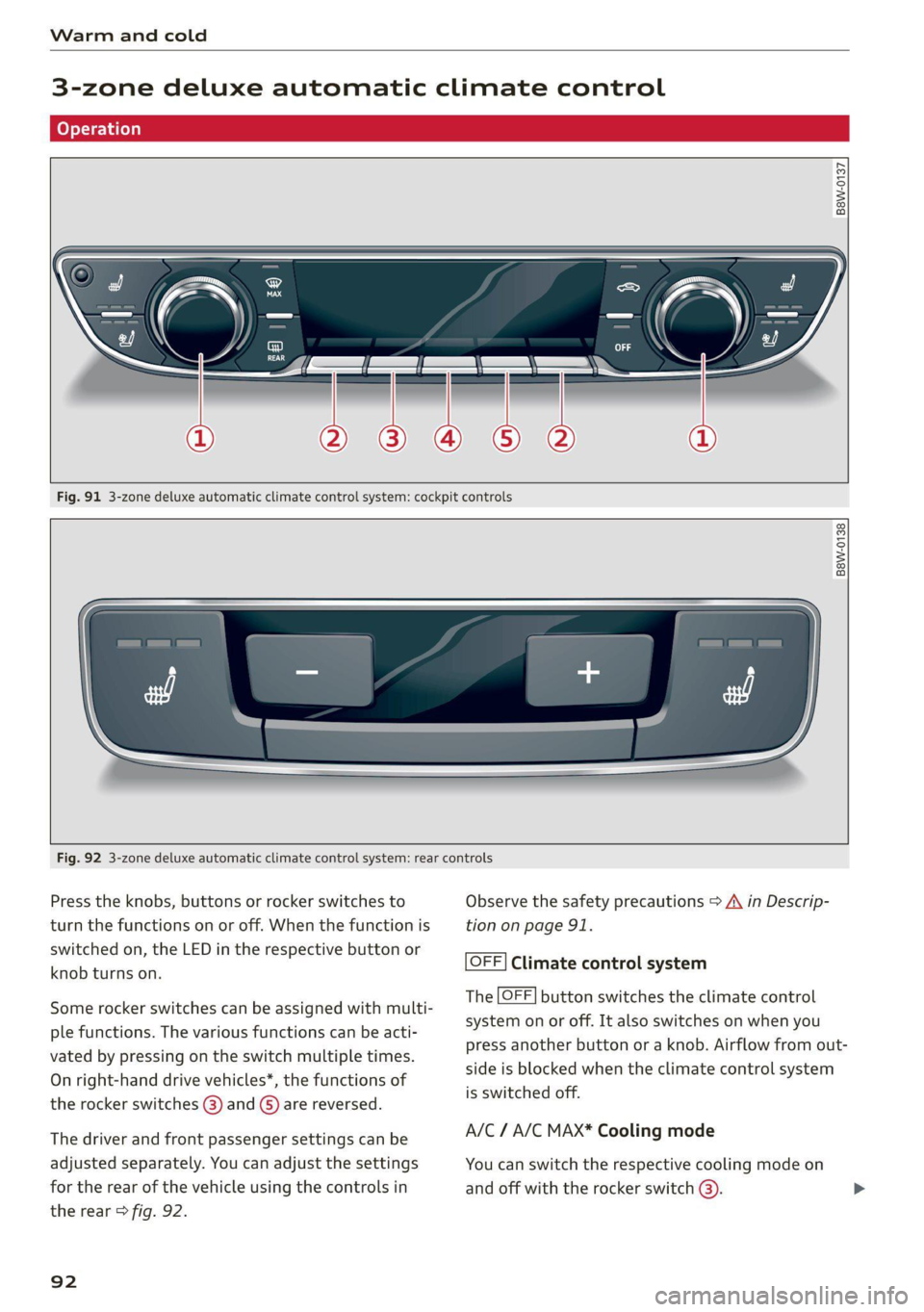
Fig. 91 3-zone deluxe automatic climate control system: cockpit controls
B8W-0138
Fig. 92 3-zone deluxe automatic climate control system: rear controls
Press the knobs, buttons or rocker switches to Observe the safety precautions > A\ in Descrip-
turn the functions on or off. When the function is tion on page 91.
switched on, the LED in the respective button or
knob turns on.
OFF] Climate control system
The [OFF] button switches the climate control
system on or off. It also switches on when you
press another button or a knob. Airflow from out-
side is blocked when the climate control system
is switched off.
Some rocker switches can be assigned with multi-
ple functions. The various functions can be acti-
vated by pressing on the switch multiple times.
On right-hand drive vehicles*, the functions of
the rocker switches (8) and ©) are reversed.
The driver and front passenger settings can be A/C / A/C MAX* Cooling mode
adjusted separately. You can adjust the settings You can switch the respective cooling mode on
for the rear of the vehicle using the controls in and off with the rocker switch @).
the rear > fig. 92.
92
Page 95 of 332
80B012721BA
Warm and cold
The cooling mode only functions with the blower
turned on. The air is not cooled and humidity is
not reduced when cooling mode is switched off.
This can cause fog on the windows. The cooling
mode switches off automatically at low outside
temperatures.
If you activate A/C ON, the cooling mode will be
automatically regulated. A/C OFF switches cool-
ing mode off.
If you activate A/C MAX*, the cooling mode will
operate with maximum output. To reduce unnec-
essary energy usage, only use this function brief-
ly.
= Recirculation mode
In recirculation mode, the air inside the vehicle is
circulated and filtered. This prevents the unfil-
tered air outside the vehicle from entering the
vehicle interior A\ in Description on page 91.
Pressing the <> button switches recirculation
mode on or off manually. You can also switch the
recirculation mode off by pressing the knob (@ or
the §& button.
AUTO Automatic mode
Automatic mode maintains a constant tempera-
ture inside the vehicle. Air temperature, airflow
and air distribution are controlled automatically.
You can switch automatic mode on or off by
pressing the knob (@).
Temperature
You can adjust the temperature between 60°F
(+16°C) and 84°F (+28°C) by turning the knob
©. If outside of this range, LO or HI will appear
in the climate control system display. In both set-
tings, the climate control runs constantly at the
maximum cooling or heating level. The tempera-
ture is not regulated.
The temperature can be adjusted in the rear us-
ing
the rear controls > fig. 92.
=z Blower
You can adjust the volume of air generated by the
blower to your preference using the rocker switch
@. The blower should always run at a low setting
to prevent the windows from fogging and to en-
sure a continuous exchange of air inside the vehi-
cle. To have the blower regulated automatically,
press one of the knobs ().
Air distribution
You can use the rocker switches @) to adjust the
vents where the air will flow out of. Press the
rocker switches (2) repeatedly until the desired
air distribution setting is displayed in the climate
control system controls. To have the air distribu-
tion regulated automatically, press one of the
knobs (a).
SYNC Synchronization
Use the rocker switch (5) to select the function.
When synchronization is switched on, the set-
tings for the driver's side are applied to the front
passenger's side and the rear (except for seat
heating/ventilation*). If the settings on the front
passenger's side or in the rear are changed, the
synchronization will automatically switch off and
3-ZONE will appear in the display.
SET REAR Function
Use the rocker switch (5) to select the function.
When the function is switched on, you can adjust
all settings for the rear using the climate control
system controls in the cockpit. The rear climate
control system controls cannot be operated at
the same time. This function switches off auto-
matically after a certain period of time or after
leaving the menu.
a Seat heating*
The seat heating temperature can be set at mul-
tiple levels. Press the w button once to switch on
the highest level. Press the #/ button again to de-
crease the temperature one level at a time. The
seat heating is off when all of the LEDs are off.
#4 Seat ventilation*
The seat ventilation intensity can be set to multi-
ple levels. Press the &J button once to switch on
the highest level. Press the £4 button again to
decrease the intensity one level at a time. The
seat ventilation is off when all of the LEDs are off. >
93
Page 97 of 332
80B012721BA
Warm and cold
@) Tips
— Using the auxiliary climate control while
charging can also reduce the charge level of
the high-voltage battery.
— Starting or stopping the vehicle will not
switch off the auxiliary climate control auto-
matically.
— The auxiliary climate control system will not
turn on automatically or will turn off earlier
if the high-voltage battery charge level is
too low, even if the vehicle is being charged
at the time.
Applies to: vehicles with auxiliary climate control
Applies to: MMI: Select on the home screen: VE-
HICLE > Air conditioning > Auxiliary air condi-
tioning.
Immediate start
You can immediately switch the auxiliary climate
control on and off using the f button. When this
function is switched on, a colored bar lights up
over the button and the remaining time is dis-
played.
The auxiliary climate control will run for a maxi-
mum of 30 minutes after the immediate start.
Timer programming
You can set up and activate up to two timers for
the departure time.
> Select a timer using >.
> Set the date and press Next.
> Set the time (departure time) and press OK.
The timer will be activated automatically once
itis set.
>» Set the second timer, if necessary.
By setting the departure time, you determine
when your vehicle should reach the desired tem-
perature. The departure time can be a maximum
of six days in the future. The auxiliary climate
control will continue to run approximately ten
minutes after the departure time is reached.
After switching off the ignition
Information about the active timer will appear in
the display after switching off the ignition. You
can start the set climate control settings imme-
diately with the f button, or go to the auxiliary
climate control menu with the > button.
(i) Tips
— Make sure the time and date match in the
system settings so that the timer can func-
tion correctly > page 236.
— The auxiliary climate control can also be
switched on and off immediately when a
timer is set.
— You can operate the climate control in the
vehicle interior when the high-voltage bat-
tery is charging using the charging timer
=> page 123. The climate control output de-
pends on the power supply capacity.
Additional settings
Applies to: vehicles with auxiliary climate control
>» Applies to: MMI: Select on the home screen:
VEHICLE > Air conditioning > Auxiliary air con-
ditioning > ©.
Start A/C after unlocking
If this function is activated, the climate control
will continue to run for five minutes after the ve-
hicle has been unlocked.
Comfort aux. A/C
Applies to: vehicles with comfort auxiliary climate control
You can set if the steering wheel heating* and
seat heating* or seat ventilation* should also be
automatically activated with auxiliary climate
control. You can select the respective zones.
Window and mirror heating*
Applies to: vehicles with comfort auxiliary climate control
You can set if the rear window and mirrors should
also be heated during auxiliary climate control.
Messages
Applies to: vehicles with auxiliary climate control
2— There is a malfunction in the auxiliary air
conditioning.
95
Page 98 of 332
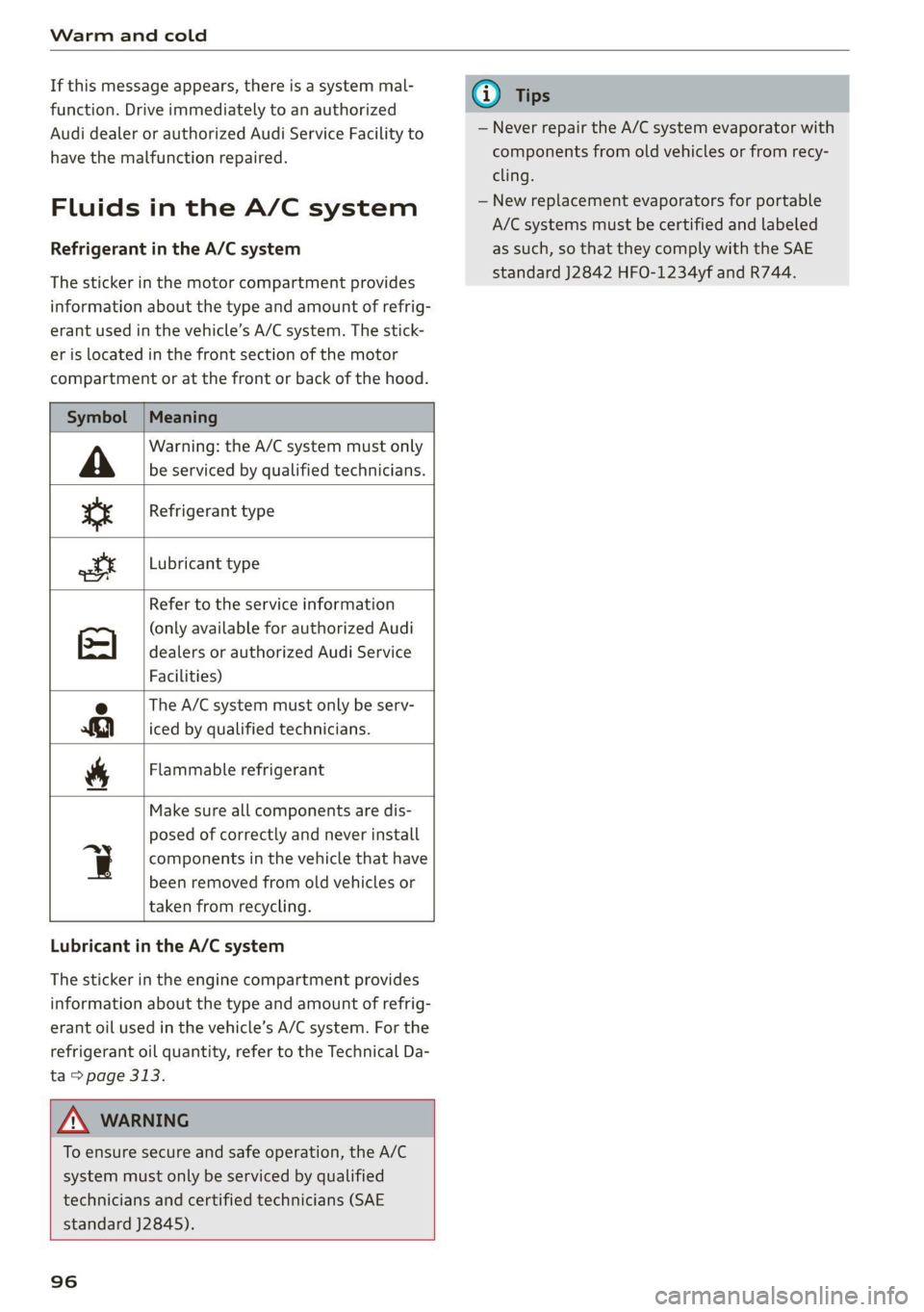
Warm and cold
If this message appears, there is a system mal- @) Tips
function. Drive immediately to an authorized
Audi dealer or authorized Audi Service Facility to — Never repair the A/C system evaporator with
have the malfunction repaired. components from old vehicles or from recy-
cling.
Fluids in the A/C system — New replacement evaporators for portable
A/C systems must be certified and labeled
Refrigerant in the A/C system as such, so that they comply with the SAE
The sticker in the motor compartment provides Se Te eee iS
information about the type and amount of refrig-
erant used in the vehicle’s A/C system. The stick-
er is located in the front section of the motor
compartment or at the front or back of the hood.
Symbol | Meaning
Warning: the A/C system must only
A be serviced by qualified technicians.
Lubricant type
tr Refrigerant type
tt
Refer to the service information
(only available for authorized Audi
dealers or authorized Audi Service
Facilities)
The A/C system must only be serv-
iced by qualified technicians.
Se
Be
Flammable refrigerant
Make sure all components are dis-
posed of correctly and never install
q components in the vehicle that have
been removed from old vehicles or
taken from recycling.
Lubricant in the A/C system
The sticker in the engine compartment provides
information about the type and amount of refrig-
erant oil used in the vehicle’s A/C system. For the
refrigerant oil quantity, refer to the Technical Da-
ta > page 313.
Z\ WARNING
To ensure secure and safe operation, the A/C
system must only be serviced by qualified
technicians and certified technicians (SAE
standard J2845).
96