display cleaning AUDI Q5 2021 Owner´s Manual
[x] Cancel search | Manufacturer: AUDI, Model Year: 2021, Model line: Q5, Model: AUDI Q5 2021Pages: 332, PDF Size: 118.86 MB
Page 6 of 332
Table of contents
Audi smartphone interface...... 234
Setup... eee eee eee eee 234
DOIt YOURSELT sce 5 s woes se meee 5 2 ee 235
Additional settings.............. 236
System Settings: : s eens s i vows ve sews es 236
Software update...............2..-0. 237
Connected devices.............000005 238
Legalinformation................... 239
Additional information.......... 240
Brands and licenses..............0005 240
Maintenance and Care........... 241
Checking and Filling............. 241
FUGles « = seam = = sews ez nes eg eee Eee 241
RefaelinGuecs « sess oo wea 2 wen 2 wenn 242
Emissions control system............. 245
Motor compartment................. 246
Engine@iOiles esive s+ wacom ov soe 3 v ema ¥ vs 249
Cooling systeM............0 0.002 253
Brake fluid): < s asws s ¢ qa > § eee + tf eee 255
Electrical:system iiss ee sccwe owe 2 x ere 256
Battery... .. eee eee eee eee 256
Windshield washer system...........- 259
Service interval display............... 259
Wheels............. 6.0. c eee eee 261
Wheels and Tires...........--0000005 261
Tire pressure monitoring system....... 278
Run-flat tires... 2.2... eee eee eee 280
Care and cleaning................ 282
Generalinformation................. 282
Car washes « swas 5 ¢ sams se pean co eee Gs 282
Cleaning and care information......... 283
Taking your vehicle out of service....... 287
Do'lt Yourself sos so isis é genes scene 288
Emergency assistance........... 288
Generalinformation................. 288
EQUIPMENE wees + « wees = nae go wees 8 2 ee 288
Tire MOBILE KEE scccee x © creases we © anairers 6% cenie 288
Changingatire...................000- 290
Collapsible spare tire.............000. 293
JUIMIPFSTANEING 5 x exces 6 w erates @ a cawcens vw ae 294
TOWING... cece ete 296
Fuses and bulbs.................. 299
Fuses... 0... eee ee eee eee 299
BUILDS: sss s = wavs & & ees 5 2 ctetDs sb eG ee 303
Customer information........... 304
Data privacy................000 eee 304
Privacy NOLICE « naw, 2 w aay ¥ Kaew + Meee © 304
Timage reGOrding). « « canew + sect ws caver a os 304
Data memories............00.00e eee 304
Transmitted information.............. 305
Accessories and technical
CINERGSS:. « » sem: : x ews ce ee be ee ee 308
Warranty’ « = eon x 2 manors 6 o ois wv ee 6 308
Audi Literature Shop.............000- 308
Driving in other countries............. 308
Maintenance, repairs, and technical
modifications..................00008 308
Accessories and parts..............-. 310
Reporting Safety Defects.............. 310
Declaration of compliance for
telecommunications equipment and
electroniesystems's « «cows se mean 2 news 314,
Technical data.................... 373
Identification data................... 313
Vehicle datatics ss saves o srewa sv awe 0 ve 313
TAAGK es = see « = wee « = owe Be nee eg oe 315
Page 28 of 332
Head-up display
Head-up display
Description
Applies to: vehicles with head-up display
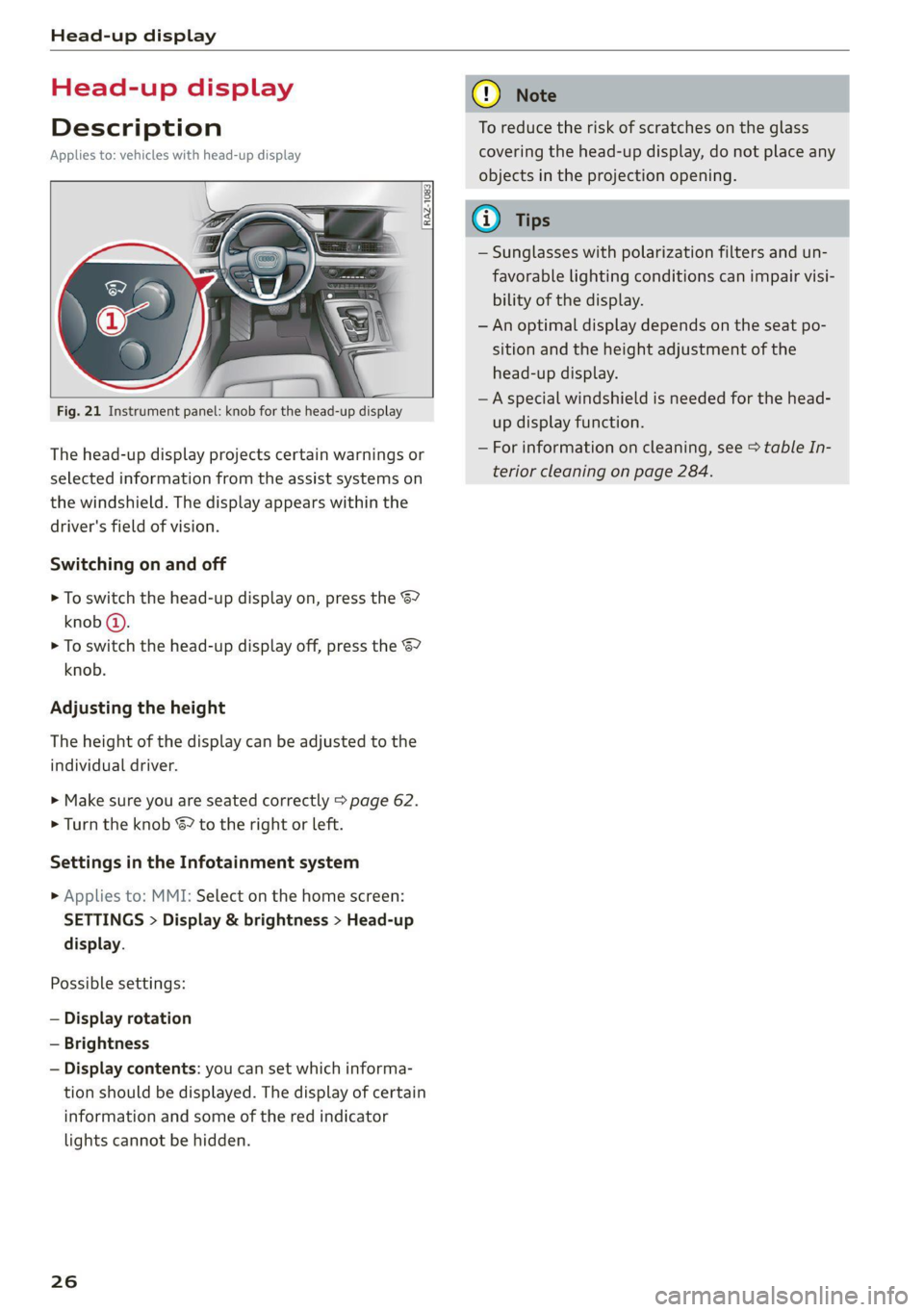
RAZ-1083.
Fig. 21 Instrument panel: knob for the head-up display
The head-up display projects certain warnings or
selected information from the assist systems on
the windshield. The display appears within the
driver's field of vision.
Switching on and off
> To switch the head-up display on, press the 67
knob @).
> To switch the head-up display off, press the S7
knob.
Adjusting the height
The height of the display can be adjusted to the
individual driver.
> Make sure you are seated correctly > page 62.
> Turn the knob & to the right or left.
Settings in the Infotainment system
» Applies to: MMI: Select on the home screen:
SETTINGS > Display & brightness > Head-up
display.
Possible settings:
— Display rotation
— Brightness
— Display contents: you can set which informa-
tion should be displayed. The display of certain
information and some of the red indicator
lights cannot be hidden.
26
@) Note
To reduce the risk of scratches on the glass
covering the head-up display, do not place any
objects in the projection opening.
@ Tips
— Sunglasses with polarization filters and un-
favorable lighting conditions can impair visi-
bility of the display.
— An optimal display depends on the seat po-
sition and the height adjustment of the
head-up display.
— A special windshield is needed for the head-
up display function.
— For information on cleaning, see > table In-
terior cleaning on page 284.
Page 61 of 332
80B012721BA
Lights and Vision
> Switch the windshield wipers off (position @
=> page 57, fig. 50).
> Applies to MMI: Select on the home screen: VE-
HICLE > Settings & Service > Wiper change po-
sition.
Cleaning the wiper blades
Requirement: the windshield wipers must be in
the wiper blade replacement position.
> Fold the windshield wiper arm away from the
windshield.
> For information on cleaning, see > table on
page 283.
Replacing the wiper blades
Requirement: the windshield wipers must be in
the wiper blade replacement position.
> Fold the windshield wiper arm away from the
windshield.
> Press the locking knob (@) on the wiper blade.
Hold the wiper blade firmly.
> Remove the wiper blade from the windshield
wiper arm mount (2).
> Insert the new wiper blade into the mount on
the wiper arm until it clicks into place.
> Place the wiper arm back on the windshield.
> Exit the wiper blade replacement position.
ZA\ WARNING
— For safety reasons, the windshield wiper
blades should be replaced once or twice
each year.
— Dirty windshield wiper blades can impair vi-
sion, which increases the risk of an accident.
@) Note
— The windshield wipers must only be lifted
up when in the wiper blade replacement po-
sition. Otherwise, you risk damaging the
paint on the hood or the windshield wiper
motor.
— You should not move your vehicle or press
the windshield wiper lever when the wiper
arms are folded up from the windshield. The
windshield wipers would move back into
their original position and could damage the
hood and windshield.
@) Tips
— You can also use the wiper blade replace-
ment position for other reasons, for exam-
ple if you want to protect the windshield
from icing by using a cover.
— You cannot activate the wiper blade replace-
ment position when the hood is open.
Cleaning/changing the rear wiper blade
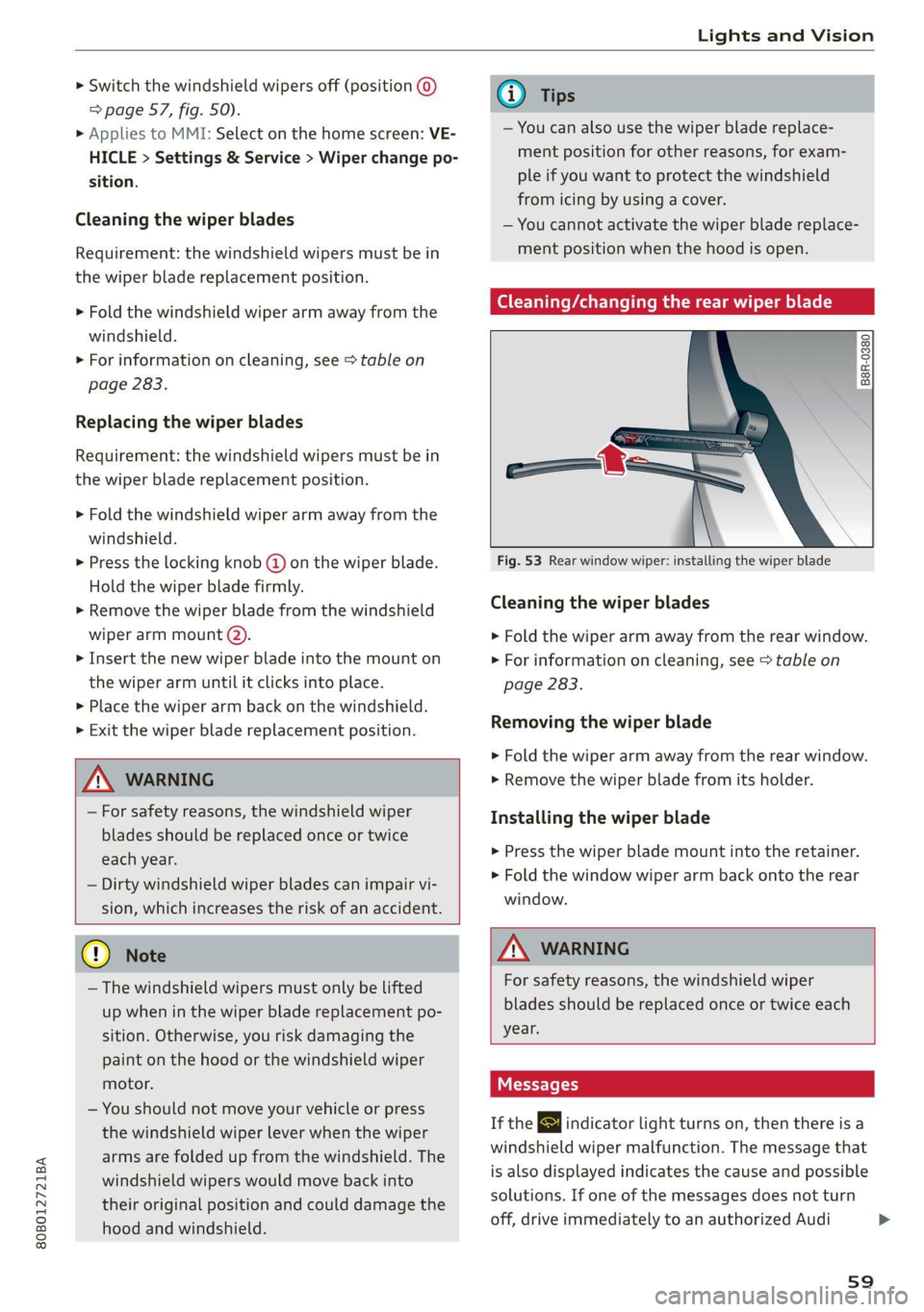
B8R-0380
Fig. 53 Rear window wiper: installing the wiper blade
Cleaning the wiper blades
> Fold the wiper arm away from the rear window.
> For information on cleaning, see > table on
page 283.
Removing the wiper blade
> Fold the wiper arm away from the rear window.
> Remove the wiper blade from its holder.
Installing the wiper blade
> Press the wiper blade mount into the retainer.
> Fold the window wiper arm back onto the rear
window.
Z\ WARNING
For safety reasons, the windshield wiper
blades should be replaced once or twice each
year.
Messages
If the & indicator light turns on, then there is a
windshield wiper malfunction. The message that
is also displayed indicates the cause and possible
solutions. If one of the messages does not turn
off, drive immediately to an authorized Audi
59
Page 118 of 332
Driving dynamic
Suspension
CET aR Cn) Led
Applies to: vehicles with suspension control
The adaptive dampers are an electronically-con-
trolled damping system. The firmness of the sus-
pension will adapt to the driving conditions and
the driving situation. The settings depend on the
selected Audi drive select* mode.
Air suspension
Applies to: vehicles with air suspension
The air suspension is an electronically-controlled
suspension and leveling system. The firmness of
the suspension will adapt to the driving condi-
tions and the driving situation. The system balan-
ces out changes in load. The vehicle level will also
adapt gradually to the vehicle speed in order to
reduce the wind resistance at high speeds and in-
crease the ground clearance at low speeds. The
settings depend on the selected Audi drive se-
lect* mode.
Displaying the vehicle level
» Applies to MMI: Select on the home screen: VE-
HICLE > Audi drive select.
The filled-in boxes represent the current vehicle
level. The more boxes that are filled in, the high-
er the ground clearance. The box that corre-
sponds with the current vehicle level will flash
while the vehicle is lifting or lowering. The target
level is highlighted in color.
Raising the vehicle
» Applies to MMI: Select on the home screen: VE-
HICLE > Audi drive select.
> Press Raise to reach the highest vehicle level
and thus the maximum ground clearance.
> Press Lower to lower the vehicle down again.
The Audi drive select* mode will be changed if
necessary when the vehicle is raised.
The vehicle will lower at speeds of approximately
22 mph (35 km/h) and below. This function may
only be used temporarily when increased ground
clearance is necessary. It is not intended for long
drives.
116
@) Note
— Also refer to the information about ground
clearance > page 116.
— When transporting the vehicle on a road
carrier, rail carrier, ship carrier, or other car-
rier, it may only be secured at the running
surfaces of the tires (circumference). Secur-
ing the vehicle at the axle components, sus-
pension struts, or towing eyes is not permit-
ted because the pressure in the air suspen-
sion struts can change during transport. The
vehicle might not be secured sufficiently if
this happens.
Ground clearance
The vehicle height and clearance can be influ-
enced by the following factors:
— Change in temperature
— Change in load
— Change to the Audi drive select* mode
— Lifting and lowering via the air suspension*
— Lower the rear* of the vehicle
ZA WARNING
To reduce the risk of injury, make sure no one
gets pinched when the vehicle level is chang-
ing, for example when cleaning the under-
body or the wheel housings.
() Note
Always make sure there is enough clearance
above and below the vehicle. This is especially
important for entrances with height restric-
tions, for example, before driving into under-
ground garages. You could also scrape the
ground when driving over the edges of curbs
or on steep ramps, which could damage your
vehicle.
Messages
Bair suspension: malfunction! You may con-
tinue driving slowly at max. XX mph (km/h)
There is a malfunction. Driving stability may be
limited. Drive to an authorized Audi dealer or >
Page 147 of 332
80B012721BA
Driving information
Driving information
Speed warning system
Applies to: vehicles with speed warning system
The speed warning system helps the driver to
stay below a specified maximum speed. A warn-
ing threshold can be set in the MMI for this pur-
pose.
Once the speed slightly exceeds the stored
threshold, the speed warning system will alert
the driver with an indicator in the instrument
cluster and a warning tone. Once the speed drops
below the stored maximum speed, the indicator
will turn off.
Setting a threshold is recommended if you would
like to be reminded when you reach a certain
maximum speed. Situations where you may want
to do so include driving in a country with a gener-
al speed limit or if there is a specified maximum
speed for winter tires.
@) Tips
Regardless of the speed warning system, you
should always monitor your speed using the
speedometer and make sure you are adhering
to the legal speed limit.
Setting the warning threshold
Applies to: vehicles with speed warning system
> Applies to: MMI: Select on the home screen:
VEHICLE > Driver assistance > Speed warning.
Messages
Applies to: vehicles with speed warning system
iol Manually set speed limit XX mph
(km/h) exceeded
The stored speed was exceeded.
Camera-based traffic
sign recognition
Applies to: vehicles with camera-based traffic sign recognition
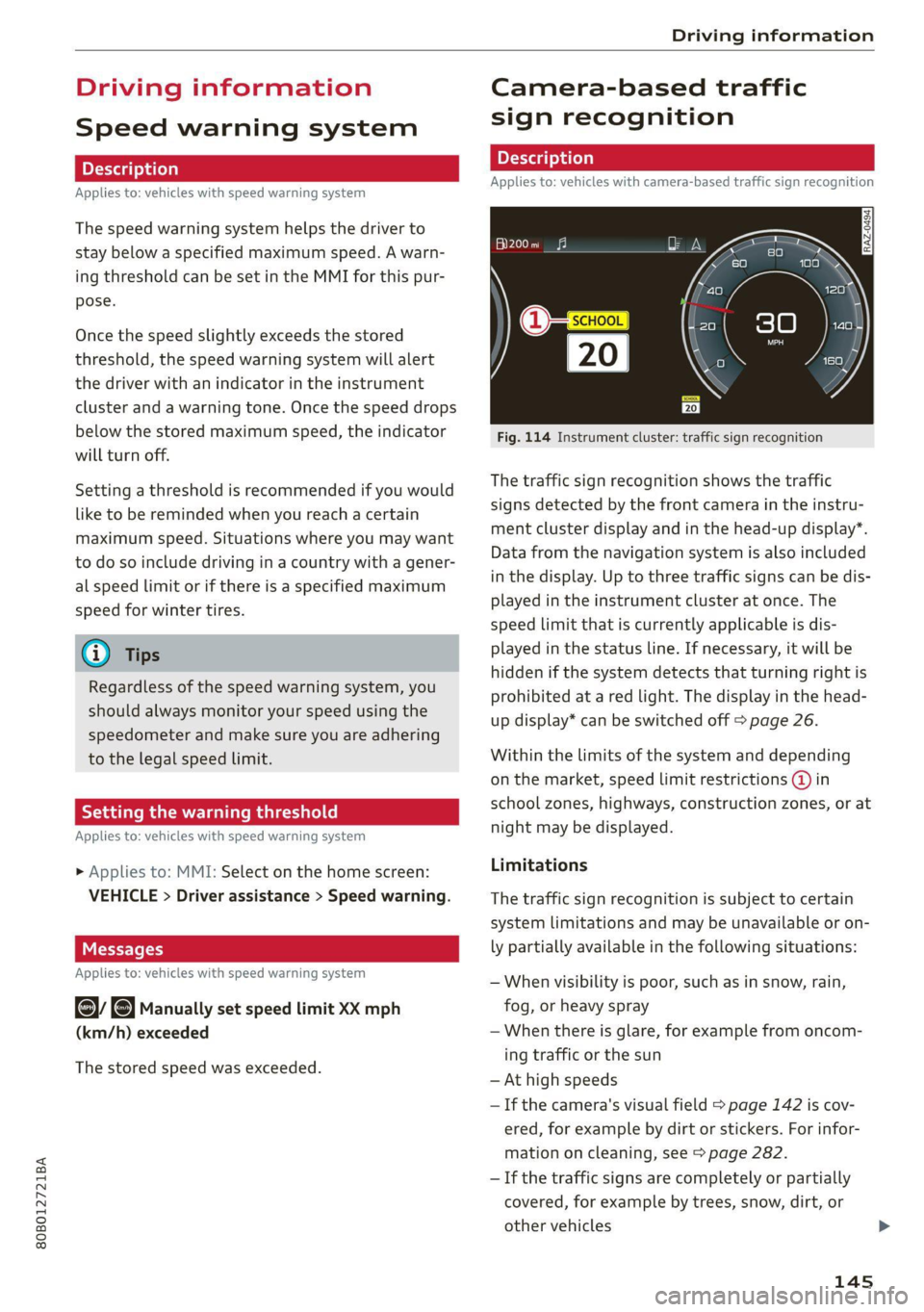
Fig. 114 Instrument cluster: traffic sign recognition
The traffic sign recognition shows the traffic
signs detected by the front camera in the instru-
ment cluster display and in the head-up display”.
Data from the navigation system is also included
in the display. Up to three traffic signs can be dis-
played in the instrument cluster at once. The
speed limit that is currently applicable is dis-
played in the status line. If necessary, it will be
hidden if the system detects that turning right is
prohibited at a red light. The display in the head-
up display* can be switched off > page 26.
Within the limits of the system and depending
on the market, speed limit restrictions @ in
school zones, highways, construction zones, or at
night may be displayed.
Limitations
The traffic sign recognition is subject to certain
system limitations and may be unavailable or on-
ly partially available in the following situations:
— When visibility is poor, such as in snow, rain,
fog, or heavy spray
— When there is glare, for example from oncom-
ing traffic or the sun
— At high speeds
— If the camera's visual field > page 142 is cov-
ered, for example by dirt or stickers. For infor-
mation on cleaning, see > page 282.
— If the traffic signs are completely or partially
covered, for example by trees, snow, dirt, or
other vehicles
145
Page 179 of 332
80B012721BA
Parking and maneuvering
The rearview camera helps you to park or maneu-
ver using the orientation lines.
The peripheral cameras expand the vehicle over-
view to include various views around the vehicle
that can be selected.
Z\ WARNING
Observe the safety precautions and note the
limits of the assist systems, sensors, and
cameras > page 141.
Activating and deactivating
Applies to: vehicles with rearview camera/peripheral cameras
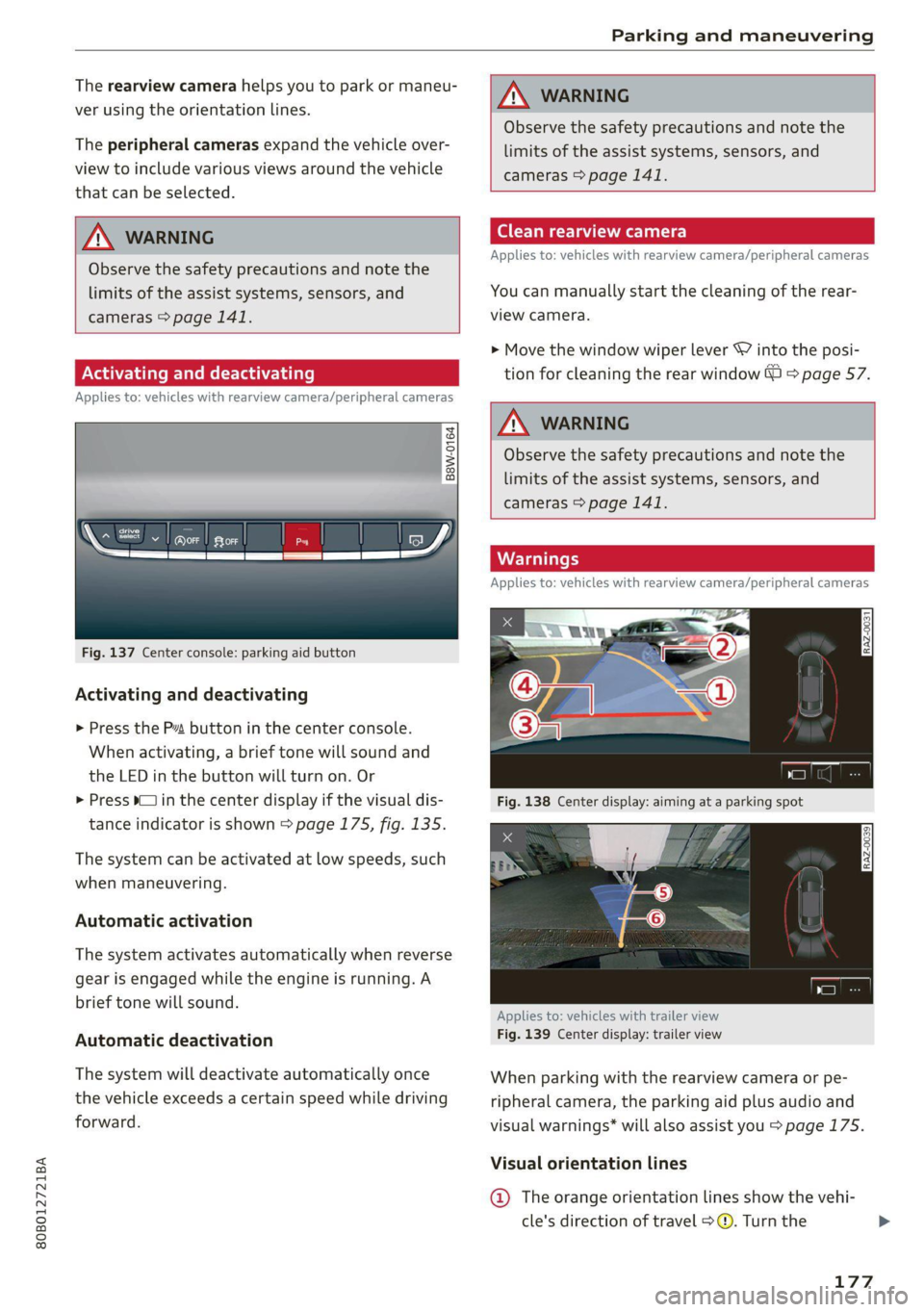
B8W-0164
Fig. 137 Center console: parking aid button
Activating and deactivating
> Press the Pa button in the center console.
When activating, a brief tone will sound and
the LED in the button will turn on. Or
> Press bin the center display if the visual dis-
tance indicator is shown > page 175, fig. 135.
The system can be activated at low speeds, such
when maneuvering.
Automatic activation
The system activates automatically when reverse
gear is engaged while the engine is running. A
brief tone will sound.
Automatic deactivation
The system will deactivate automatically once
the vehicle exceeds a certain speed while driving
forward.
ZX WARNING
Observe the safety precautions and note the
limits of the assist systems, sensors, and
cameras > page 141.
(eT Tada Len)
Applies to: vehicles with rearview camera/peripheral cameras
You can manually start the cleaning of the rear-
view camera.
> Move the window wiper lever S7 into the posi-
tion for cleaning the rear window © > page 57.
Z\ WARNING
Observe the safety precautions and note the
limits of the assist systems, sensors, and
cameras > page 141.
Warnings
Applies to: vehicles with rearview camera/peripheral cameras
Applies to: vehicles with trailer view
Fig. 139 Center display: trailer view
When parking with the rearview camera or pe-
ripheral camera, the parking aid plus audio and
visual warnings* will also assist you > page 175.
Visual orientation lines
@ The orange orientation lines show the vehi-
cle's direction of travel > @. Turn the
177
Page 261 of 332
80B012721BA
Checking and Filling
> Close the cover on the positive terminal.
> Close the hood > page 247.
ZA WARNING
— Never connect a charging cable or jump
start cable directly to the 12 Volt vehicle
battery. Only use the connections in the en-
gine compartment > page 258.
— A highly explosive mixture of gases can form
when charging batteries. Only charge the
battery in well-ventilated areas.
— A drained battery can freeze at tempera-
tures around 32 °F (0 °C). Do not charge or
use a frozen or thawed battery. If ice forms,
the battery housing can crack and battery
electrolyte can leak out, which increases the
risk of an explosion and chemical burns.
Contact an authorized Audi dealer or author-
ized Audi Service Facility for more informa-
tion.
— Do not connect or disconnect the charging
cable while charging because this increases
the risk of an explosion.
@) Tips
Read all of the manufacturer's instructions
for the charger before charging the battery.
Windshield washer
system
B4M-0135)
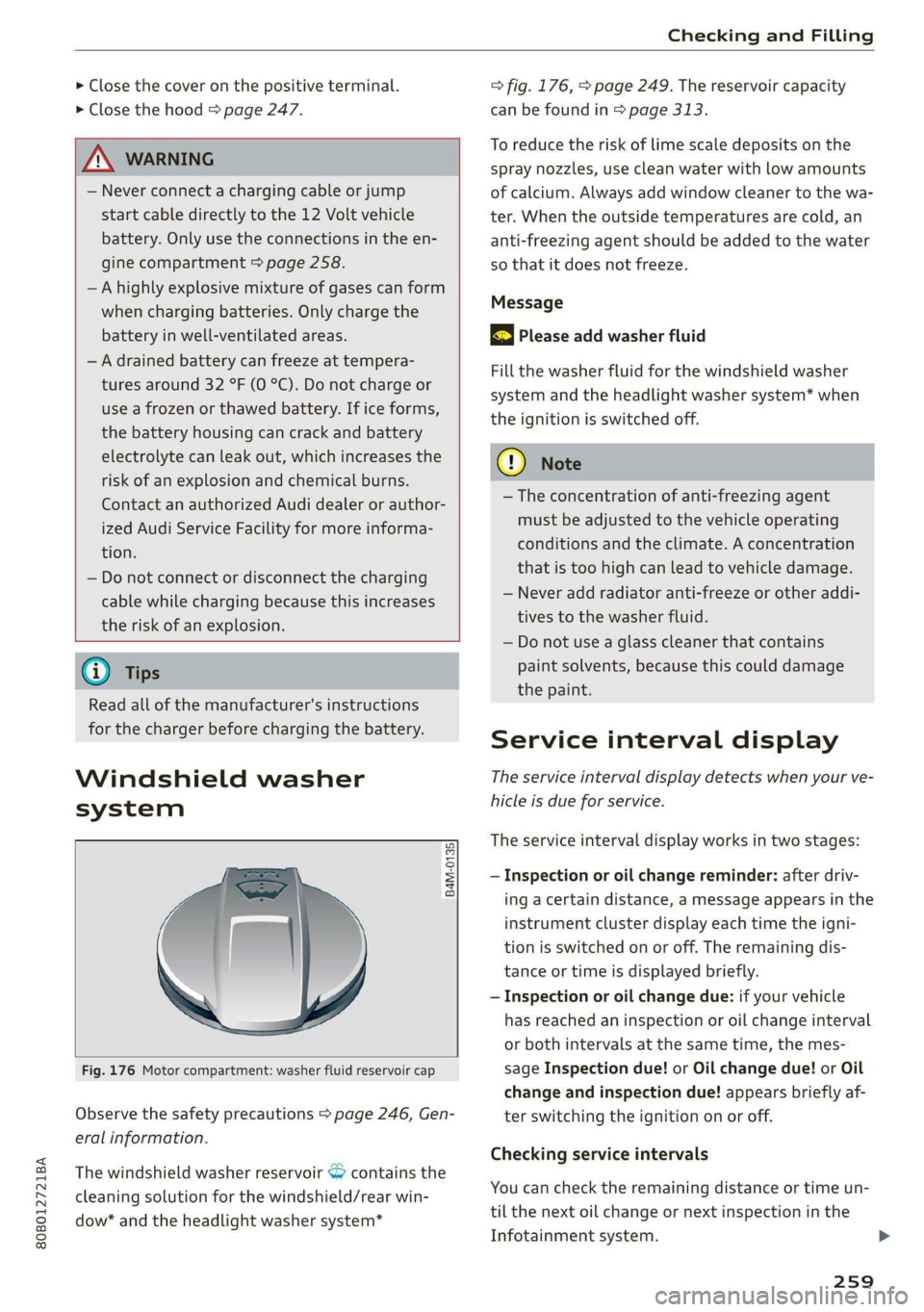
Fig. 176 Motor compartment: washer fluid reservoir cap
Observe the safety precautions > page 246, Gen-
eral information.
The windshield washer reservoir <> contains the
cleaning solution for the windshield/rear win-
dow* and the headlight washer system*
=> fig. 176, > page 249. The reservoir capacity
can be found in > page 313.
To reduce the risk of lime scale deposits on the
spray nozzles, use clean water with low amounts
of calcium. Always add window cleaner to the wa-
ter. When the outside temperatures are cold, an
anti-freezing agent should be added to the water
so that it does not freeze.
Message
BS Please add washer fluid
Fill the washer fluid for the windshield washer
system and the headlight washer system* when
the ignition is switched off.
CG) Note
—The concentration of anti-freezing agent
must be adjusted to the vehicle operating
conditions and the climate. A concentration
that is too high can lead to vehicle damage.
— Never add radiator anti-freeze or other addi-
tives to the washer fluid.
— Do not use a glass cleaner that contains
paint solvents, because this could damage
the paint.
Service interval display
The service interval display detects when your ve-
hicle is due for service.
The service interval display works in two stages:
— Inspection or oil change reminder: after driv-
ing a certain distance, a message appears in the
instrument cluster display each time the igni-
tion is switched on or off. The remaining dis-
tance or time is displayed briefly.
— Inspection or oil change due: if your vehicle
has reached an inspection or oil change interval
or both intervals at the same time, the mes-
sage Inspection due! or Oil change due! or Oil
change and inspection due! appears briefly af-
ter switching the ignition on or off.
Checking service intervals
You can check the remaining distance or time un-
til the next oil change or next inspection in the
Infotainment system.
259
Page 287 of 332
80B012721BA
Care and cleaning
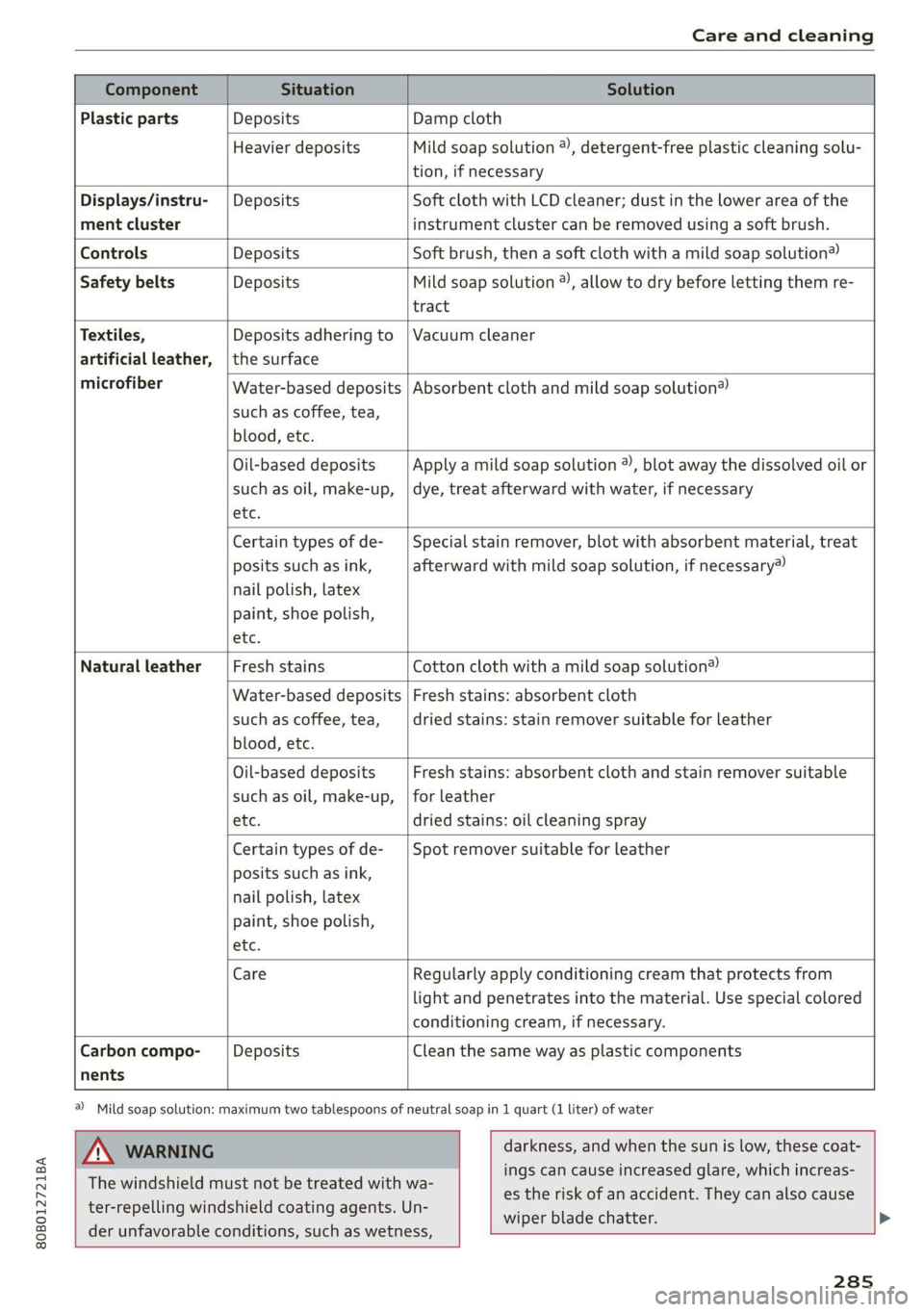
Component Situation Solution
Plastic parts Deposits Damp cloth
Heavier deposits Mild soap solution ®), detergent-free plastic cleaning solu-
tion, if necessary
Water-based deposits
such as coffee, tea,
blood, etc.
Displays/instru- | Deposits Soft cloth with LCD cleaner; dust in the lower area of the
ment cluster instrument cluster can be removed using a soft brush.
Controls Deposits Soft brush, then a soft cloth with a mild soap solution®)
Safety belts Deposits Mild soap solution ), allow to dry before letting them re-
tract
Textiles, Deposits adhering to | Vacuum cleaner
artificial leather, |the surface
microfiber Absorbent cloth and mild soap solution®
Oil-based deposits
such as oil, make-up,
etc.
Apply a mild soap solution ®), blot away the dissolved oil or
dye, treat afterward with water, if necessary
Certain types of de-
posits such as ink,
nail polish, latex
paint, shoe polish,
etc.
Special stain remover, blot with absorbent material, treat
afterward with mild soap solution, if necessary)
Natural leather Fresh stains Cotton cloth with a mild soap solution®
Water-based deposits
such as coffee, tea,
blood, etc.
Fresh stains: absorbent cloth
dried stains: stain remover suitable for leather
Oil-based deposits
such as oil, make-up,
etc.
Fresh stains: absorbent cloth and stain remover suitable
for leather
dried stains: oil cleaning spray
Certain types of de-
posits such as ink,
nail polish, latex
paint, shoe polish,
etc.
Spot remover suitable for leather
nents
Care Regularly apply conditioning cream that protects from
light and penetrates into the material. Use special colored
conditioning cream, if necessary.
Carbon compo- Deposits Clean the same way as plastic components
a) Mild soap solution: maximum two tablespoons of neutral soap in 1 quart (1 liter) of water
ZA WARNING
The windshield must not be treated with wa-
ter-repelling windshield coating agents. Un-
der
unfavorable conditions, such as wetness,
darkness, and when the sun is low, these coat-
ings can cause increased glare, which increas-
es the risk of an accident. They can also cause
wiper blade chatter.
285
Page 288 of 332
Care and cleaning
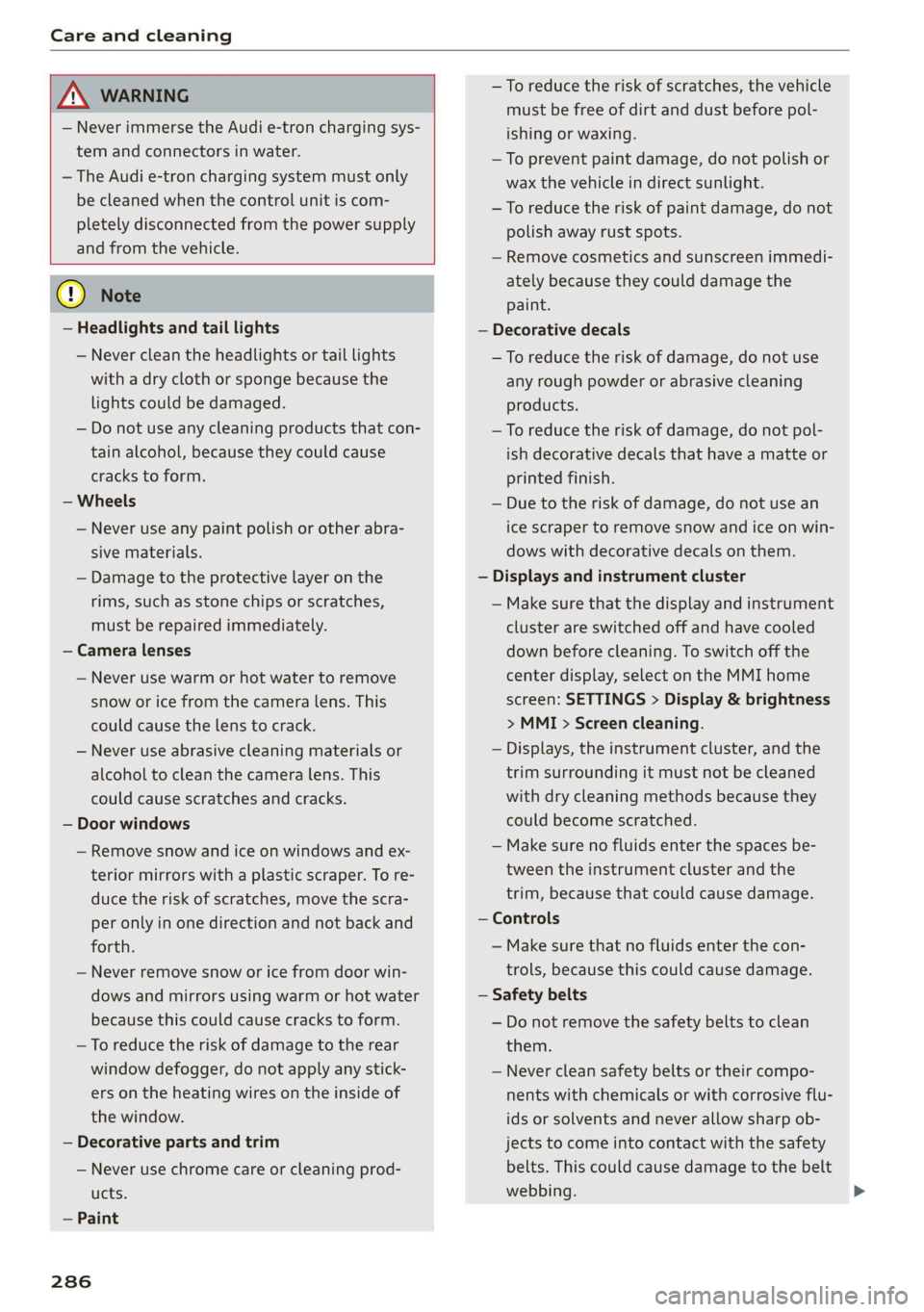
ZA\ WARNING
— Never immerse the Audi e-tron charging sys-
tem and connectors in water.
— The Audi e-tron charging system must only
be cleaned when the control unit is com-
pletely disconnected from the power supply
and from the vehicle.
@) Note
— Headlights and tail lights
— Never clean the headlights or tail lights
with a dry cloth or sponge because the
lights could be damaged.
— Do not use any cleaning products that con-
tain alcohol, because they could cause
cracks to form.
— Wheels
— Never use any paint polish or other abra-
sive materials.
— Damage to the protective layer on the
rims, such as stone chips or scratches,
must be repaired immediately.
— Camera lenses
— Never use warm or hot water to remove
snow or ice from the camera lens. This
could cause the lens to crack.
— Never use abrasive cleaning materials or
alcohol to clean the camera lens. This
could cause scratches and cracks.
— Door windows
— Remove snow and ice on windows and ex-
terior mirrors with a plastic scraper. To re-
duce the risk of scratches, move the scra-
per only in one direction and not back and
forth.
— Never remove snow or ice from door win-
dows and mirrors using warm or hot water
because this could cause cracks to form.
—To reduce the risk of damage to the rear
window defogger, do not apply any stick-
ers on the heating wires on the inside of
the window.
— Decorative parts and trim
— Never use chrome care or cleaning prod-
ucts.
— Paint
286
— To reduce the risk of scratches, the vehicle
must be free of dirt and dust before pol-
ishing or waxing.
—To prevent paint damage, do not polish or
wax the vehicle in direct sunlight.
—To reduce the risk of paint damage, do not
polish away rust spots.
— Remove cosmetics and sunscreen immedi-
ately because they could damage the
paint.
— Decorative decals
—To reduce the risk of damage, do not use
any rough powder or abrasive cleaning
products.
—To reduce the risk of damage, do not pol-
ish decorative decals that have a matte or
printed finish.
— Due to the risk of damage, do not use an
ice scraper to remove snow and ice on win-
dows with decorative decals on them.
— Displays and instrument cluster
— Make sure that the display and instrument
cluster are switched off and have cooled
down before cleaning. To switch off the
center display, select on the MMI home
screen: SETTINGS > Display & brightness
> MMI > Screen cleaning.
— Displays, the instrument cluster, and the
trim surrounding it must not be cleaned
with dry cleaning methods because they
could become scratched.
— Make sure no fluids enter the spaces be-
tween the instrument cluster and the
trim, because that could cause damage.
— Controls
— Make sure that no fluids enter the con-
trols, because this could cause damage.
— Safety belts
— Do not remove the safety belts to clean
them.
— Never clean safety belts or their compo-
nents with chemicals or with corrosive flu-
ids or solvents and never allow sharp ob-
jects to come into contact with the safety
belts. This could cause damage to the belt
webbing.
Page 318 of 332
Index
B
Bag hooks .......... 0... c eee eee eee ee 83
Band
refer to Frequency band............... 217
Battery
Charging (12 Volt vehicle battery)....... 258
High-voltage battery...............0.. 122
Vehicle battery (12 Volt)............0.8. 256
Winter operation (12 Volt vehicle battery) . 257
Battery (vehicle)
refer to High-voltage battery........... 122
BLOCK FOULS caus + & eau o » Rees ov REwW 3 eR 211
BlOWEP's = sours = © egups 3 ¥ saws 7 e Seon ze pees ze 93
Bluetooth
‘Audio player « sii 3 6 wes ao nese ee wenn o 225
Connecting adevice...............00-. 238
Connecting a mobile phone............ 186
Deleting
adevice................0000- 239
Device overview... . 6... 00. eee eee eee 238
Disconnecting a device................ 238
Displaying Profiles « caves x « xayre a 2 waurs a « 239
Selecting adevice.................00. 238
Specifying a favorite.............0000- 239
Boost... 2... cece 16
Boost function.................000000. 102
Boost pressure indicator................. 16
Brake fluid
Checking the brake fluid level........... 255
Brakes... 2... eee 109
Brake tluidis « « mays ¢ gave © saan ¢ 8 meres F 255
Emergency braking function............ 112
HOt. cece eee eee eee 112
New brake pads..............----000-- 110
Brands............2..02. 000 e cece ee 240
Break-in security feature..............00- 37
Breaking in
New brake pads..............---000-- 110
New tires’: « + soe « + cagme 5 2 eeuwe oe ae oo 268
Browser
refer to Mediacenter.................. 228
Business. addressii. : viii 6 < aes eo soaom oo 211,
Cc
California Proposition 65 Warning........ 247
Battery specific.................-000. 257
CALGUISE & cciwass so cusetie oo examen sa avawans & @ wesw a 190
Cameras
Coverage areaS.... 6... eee eee eee 142
LOGALIONS ccm s 2 wom « § aoe 5s REE 3s eee 143
Capacities
Fuel tant. so wesc oo seems o wand ov sae 2 2 313
Washer fluid reservoir.............0005 313
Carg@Plembiscns x x cscacn wx rans we re oe Moa 88
Cat KO Ybiwiue © sveveware o seam @ 6 anccoms a 8 asuwone ww vomeT 38
Gar WaShiy 2 aicscs ss swcna © & swam wo orem © oe 282
Catalytic converter.............--00000- 245
Cell phone
refer to Telephone............00eee eae 186
Cell phone compartment
refer to Audi phone box............... 188
Central lockingeins «+ ccs + 2 ances 0 comsens « & ose 34
Auto Lock... 0... cece eee eee eee eee 34
Convenience key...... 0... eseee eevee 39
Convenience opening and closing......... 46
Luggage compartment lid.............0. 42
Mechanically unlocking and locking....... 37
Messages « anise «seas 3 3 mara @ wavimin © wave 36
Remote control key.............--.00-- 39
SECUG: o x sure x = swe & a eR Fe ee 2 5 ee 35
Vehicle key sais xs cers se namie 6 ceri wo rete 39
Central locking switch.............000005 36
COrtifiCatienins « « waws « « eews 4 e cows 9 o eee 311
Charging
refer to Power sourceS..............00-- 82
Charging clip
referto Wall mount clip............... 136
Charging display ccc. «eves ao eases oo oes x 127,
Charging the battery
Mobile devices. ..........00 cece eee 226
USB... eee 188
Wirelessi: = » aeons « 2 waves x 5 wayne 4 & Haus 8 = 189
GharGiniG titties: « sass = 2 neue x = neem & o weer 2 123
Child safety lock
Climate control system controls in the rear. 44
Power windows............00000e eee ee 44
Rear dOGrsion x s anan ¢ a ecwe i Kamen ¢ BORE Ee 44
Child safety seats........ 0... cece eee eee 76
Securing to the top tether anchor........ 80
Securing with a safety belt.............. 79
Securing with LATCH.............000005 78
Cleaning... 0... . cece eee 282
Cleaning artificial leather............... 285
Cleaning carbon components........ 284, 285