buttons AUDI Q7 2009 Owner´s Manual
[x] Cancel search | Manufacturer: AUDI, Model Year: 2009, Model line: Q7, Model: AUDI Q7 2009Pages: 426, PDF Size: 97.13 MB
Page 100 of 426
Seats and storage
time. When the vehicle is unlocked , the settings stored on the
remote control key are restored.
If your vehicle is driven by other persons using your remote control
key, you should save your individual seat position on one of the
memory buttons. You can recall your settings again simply and
conveniently by pressing the corresponding memory button. When
the vehicle is locked, these settings are automatically re-assigned to
the remote control key and stored.
& WARNING
• For safety reasons , the seat setting can only be recalled when
the vehicle is stationary -otherwise you risk having an accident.
• In an emergency, the recall operation can be stopped by
pressing the [
ON/OFF l button or by briefly pressing any given
memory button. •
Applies to vehic les: w ith seat memory
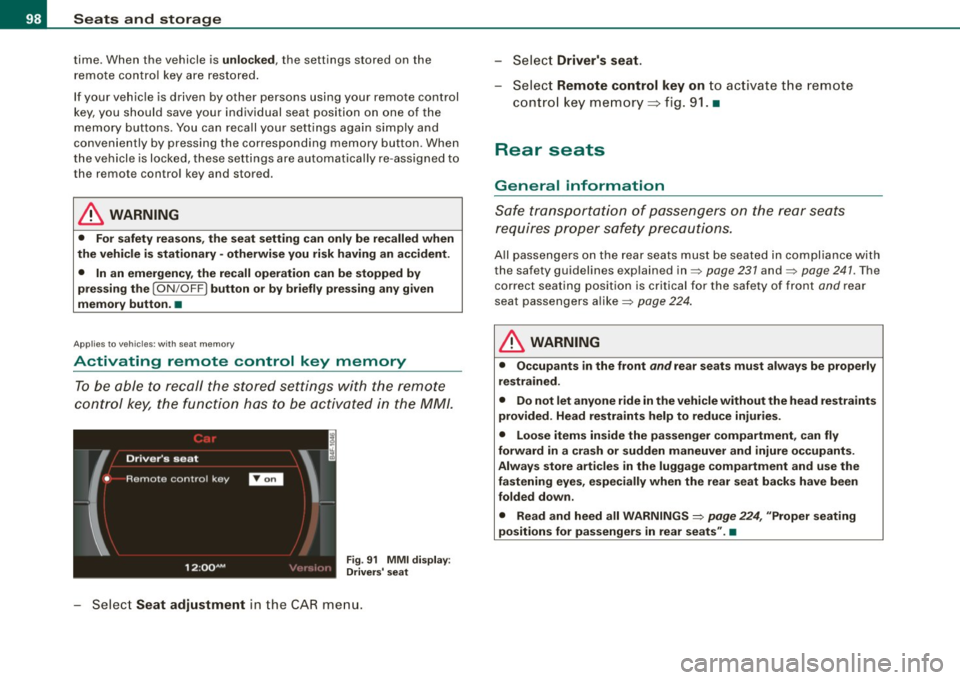
Activating remote control key memory
To be able to recall the stored settings with the remote
control key, the function has to be activated in the MM/.
Fig. 91 MMI display :
Drivers' seat
Select Seat adjustment in the CAR menu. -
Select
Driver's seat.
-Select Remote control key on to activate the remote
control key memory=> fig. 91. •
Rear seats
General information
Safe transportation of passengers on the rear seats
requires proper safety precautions.
All passengers on the rear seats must be seated in compliance with
the safety guidelines explained in=> page 231 and=> page 241. The
correct seating position is critical for the safety of front and rear
seat passengers alike=> page 224.
& WARNING
• Occupants in the front and rear seats must always be properly
restrained.
• Do not let anyone ride in the vehicle without the head restraints
provided. Head restraints help to reduce injuries.
• Loose items inside the passenger compartment, can fly
forward in a crash or sudden maneuver and injure occupants.
Always store articles in the luggage compartment and use the
fastening eyes, especially when the rear seat backs have been
folded down .
• Read and heed all WARNINGS =>
page 224, "Proper seating
positions for passengers in rear seats" .•
Page 128 of 426
• .___w_ a_ rm __ a_ n_ d_ c_o _l_d ________________________________________________ _
passenger's side and to the outer rear seats. The new temperature
is shown in the display .
By simultaneously pressing and holding the contro l knobs on the
driver's side and front passenger's side, the temperature setting on
the driver's side can be switched to the front passenger's side. The new temperature is shown in the disp lay.
[ i J Tip s
The gri lle between the (ECON ON/OFF] and (SETUP] buttons must
remain unobstructed and must not be taped over. Measur ing
sensors are located behind it. •
Turning on and off [ECON ON/OFF]
Turning the air conditioning on
- Press [ECON ON/O FF] briefly, or
- Press [AUTO].
Turning the air conditioning off
Press the I ECON ON/OFF I button for at least 2 seconds to
switch the a ir cond itioning off and to block the air supply
f rom t he ou tside .
"OFF" appears in the display .
Switching air conditioning on /off
- Switching the a ir conditioning system on/off is done wit h
c limate control switched on .
- Press the [ECON ON/OFF] button just
briefly.
The air conditioner tu rns back on if you press one of the control
buttons or the control knob.
ECON operation is indicated by the glowing LED on the right next to
the word ECON. T
he air conditioning (compressor) is turned off in ECON mode.
"ECON" means "Economy". You save fuel by switching off the air
conditioning=>
page 131.
Please note that vehic le interior temperature cannot be lower than
t he outside temperature in the ECON mode. The air is not cooled or
dehumidified. This can cause the windows to fog up.
[ i J Tip s
With the ignition turned off, you can activate the residual heat func
tion by pressing the
[ECON ON/OFF] button . The residual heat from
the coolant can be used to heat the vehicle interior. •
Automatic mode [AUTO)
The automatic mode is the standard setting for all
seasons.
Turning on AUTO
Select temperature between 60 °F (+16 °C) and 84 °F
(+28 °C).
P ress [ AUTO I => page 125, fig . 135.
Automatic operation ensures constant temperatures in the interior
and dehumidifies the air inside the vehicle. Air temperature, vo lume
and distribution are contro lled automatica lly to reach or maintain
the desired inter ior temperature as quickly as possible. Fluctuations
in exterior temperature and the effects of temperature from the
pos ition o f the sun are compensated for automatica lly.
T his operating mode works only in the adjustable temperature
r ange, from 60 °F (+ 16 °C) to 84 °F (+28 °C). If a temperature below
60 °F
( + 16 °C) is selected, LO appears in the disp lay. At temperatures
above 84 °F ( +28 °C),
HI is d isplayed . At both extreme settings,
climate contro l runs continuously at maximum cooling or heating
power. There is no temperature regu lation .•
Page 134 of 426
![AUDI Q7 2009 Owner´s Manual -W
arm and cold --------------------
Butt on(s ) Function Pa g e
Turning rear air condition -
ION /OFF] ing on and off => page 132
[AUTO] => page 132
Control knob G) Temperature selec](/img/6/40274/w960_40274-133.png "AUDI Q7 2009 Owner´s Manual -W
arm and cold --------------------
Butt on(s ) Function Pa g e
Turning rear air condition -
ION /OFF] ing on and off => page 132
[AUTO] => page 132
Control knob G) Temperature selec")
-W
arm and cold --------------------
Butt on(s ) Function Pa g e
Turning rear air condition -
ION /OFF] ing on and off => page 132
[AUTO] => page 132
Control knob G) Temperature select ion => page 133
Q) Seat heating* => page 136or
=> page 137
00 Air distribution => page 133
00 Blower => page 133
S yn chr oniz ing rear a ir conditi oning : By pressing and holding the
control knob on the rear left side, the t emperature setting of the rear
left side can be switched to the rear right side and vice versa. The new t emp eratur e is shown in th e disp lay .•
Ap plies to vehicles: with four-zone automatic comfort air condition in g
Turning rear air conditioning on and off
[ON /OFF ]
Turning on r ear air conditioning
- Press [ ON/OFF] briefly, or
- Press [AUTO ].
Turning off re ar air conditioning
-Press t he I ON /OFF ] button for at least 2 seconds to switc h
the rear air conditi oning of f.
OFF appears in the display.
Turning th e cooling syst em on /off
- Turn ing the cool ing sys tem on/off is done when the air
condit ioning is on. -
Press the
(ON /OFF] b utton jus t briefly.
The air conditioner turns bac k on if you press one of the control
buttons o r th e con tro l knob.
[ i ] T ip s
If the e le ctron ic ch ild safety syst em is on , th e re ar air conditioning
control element will not operate. In this case, dashes"---" wi ll
appear in the air conditioning control element display .•
App lies to veh ic les: with four-zone automatic comfo rt a ir condition in g
Automatic mode in rear [AUTO )
The automatic mode is the standard setting for all
seasons .
Turning on AUTO
-Select temperature between 60 °F (+ 16 °C) and 84 °F
(+28 °C) .
Press [AUTO] ~ page 131.
Automatic opera tion ensures cons tant temperatures in the interior
and dehumidifies the air inside the vehicle. Air temperature, vo lume
and distribution are contro lled automatically to reach or maintain
the desired in terior temperature as quickly as possible . Fluctuat ions
in exterior temperature and the effects of temperature from the
position of the sun are compensated for automatically.
This operating mode works only in the adjustable tempera ture
range, from 60 °F ( + 16 °C) to 84 °F ( +28 °C) . If a temperatu re below
60 °F
(+ 1 6 °C) is selected, LO appears in the disp lay. At temperatures
above 84 °F ( +28 °Cl,
HI is displayed. At both ext reme settings,
climate control runs continuously at maximum cooling or heating
power . There is no temperature regu lation. •
Page 191 of 426

_________________________________________________ A_ u_t_ o_ m_ a_t _i _ c _ t _ra_ n_s_ m __ is_s_ io_ n _ __.11111
Ap plies to vehi cles : wi th tip troni c-st eerin g wh eel
Steering wheel with tiptronic ®
The shift buttons on the steering wheel allow the driver to
shift gears manually.
Fig . 202 Steering
wheel: Shift buttons
- To downshift, touch the button on the left Q.
- To upshift , touch the button on the right G) .
The shift buttons are activated when the selector lever is in D, Sor
in the manual shift program (tip tronic) .
Of course, you can continue to use the manual shift program with
the selector lever on the center console .•
Automatic transmission malfunction ~
In the event of a system malfunction, the automatic transmission
switches to emergency operation mode.
Gearbox malfunction: You can continue driving
You can continue to drive the vehicle. See an authorized Audi dealer or other qualified workshop at the next opportunity.
Gearbox malfunction: You can continue driving but functions
are restricted
Con tro ls and eq uip
ment
There is a serious system malfunction:
• The program shifts only into certain gears.
• The engine may stall.
• It is not possible to restart the engine if it has been switched off .
• Continuing to drive could result in subsequent damage .
0 Note
If the transmission switches to fail -safe mode , you should take the
vehicle to an authorized Audi dealership as soon as possible to have
the condition corrected .•
Emergency release for selector lever
If the vehicle's power supply fails, the selector lever can
be released in an emergency.
Fig . 203 Remove the
ashtray insert
~
Vehicle care I I Technical data
Page 217 of 426
HomeLink® -_______________ ___.
Applies to vehicles: with Homelin k® un iversal remote contro l
Programming the Homelink ® transmitter
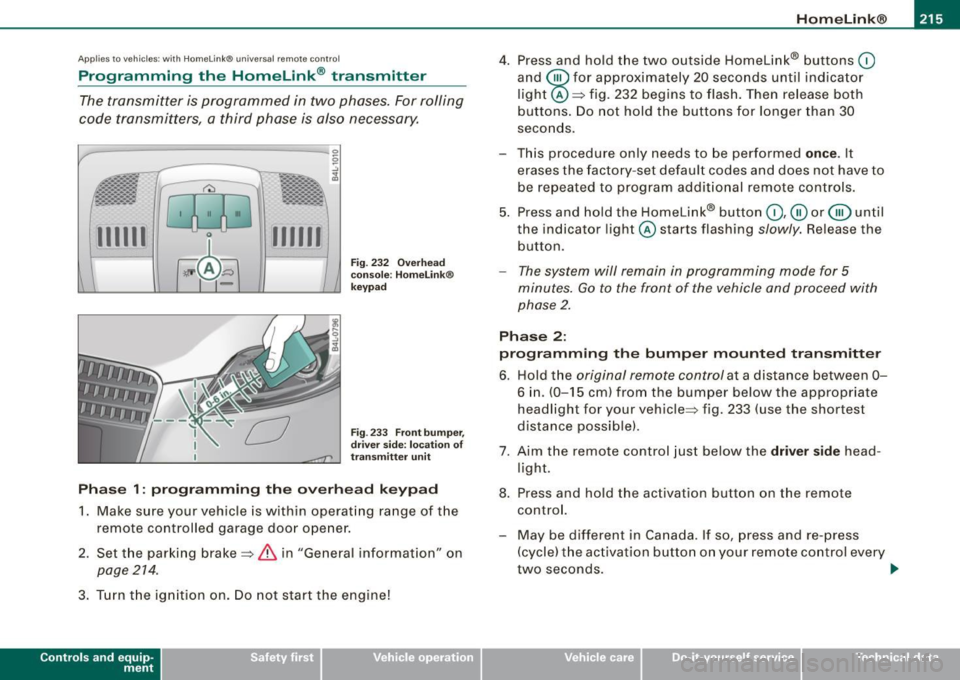
The transmitter is programmed in two phases. For rolling
code transmitters, a third phase is also necessary.
111111 111111
-
Fig . 232 Overhead
console : Homelink®
keypad
Fig . 233 Front bumper,
driver side: location of
transmitter unit
Phase 1: programming the overhead keypad
1. Make sure your vehicle is with in operating range of the
remote controlled garage door opener.
2. Set the parking brake=>
& in "General informat ion" on
page 214 .
3. Turn the ignition on . Do not start the engine!
Contro ls and eq uip
ment
4. Press and hold the two outside Homelink® buttons 0
and @for approximately 20 seconds until indicator
light @=> fig. 232 begins to flash. Then release both
buttons. Do not hold the buttons for longer than 30
seconds.
- This procedure only needs to be performed
once . It
erases the factory-set default codes and does not have to
be repeated to program additional remote controls.
5. Press and hold the Homelink® button
0,@ or @ until
the indicator light @starts flashing
slowly. Release the
button.
- The system will remain in programming mode for 5
minutes.
Go to the front of the vehicle and proceed with
phase 2.
Phase 2:
programming the bumper mounted transmitter
6. Hold the original remote control at a distance between 0-
6 in . (0-15 cm) from the bumper below the appropriate
headlight for your vehicle => fig . 233 (use the shortest
distance possible).
7. Aim the remote control just below the driver side head
light.
8. Press and hold the activation button on the remote control.
- May be different in Canada. If so, press and re-press
(cycle) the activation button on your remote control every
two seconds. .,_
Vehicle care I I irechnical data
Page 219 of 426
___________________________________________________ H_ o_m....:..: e:..; L::. i;,,;. n.;,,; k;,,;. ®.:. R __ III
- Press the appropriate programmed button G),@ or @
to activate the desired remote control function~
& in
"General information" on
page 214. •
Applies t o ve hicl es: wit h Hom elin k® universal re mote co nt ro l
Reprogramming a single button
A Homelink ® button can be reprogrammed individually
without affecting the other button a/locations.
Programming the overhead keypad
- Press the appropriate Homelink® button unt il the indi
cator light begins flashing slowly.
Programming the bumper mounted transmitter
1. Hold the original remote control at a distance between 0-
5 in. (0-13 cm) from the bumper below the appropriate
headlight for your vehicle (use the sho rtest distance
possible) .
2. Aim the remote control just below the
driver side head
light.
3. Press and hold the activation button on the remote control.
4. The emergency flashers will flash
three times (after
about
15-60 seconds) when the programm ing is
successful. Now release the button on the remote
control.
- If the device ut ilizes a rolling code, please follow phase 3
of ~
page 215, "Programming the Homelink® trans
mitter" for rolling code programming.
Controls and equip
ment This procedure
will cause
the existing programming on the
Homelink ® button to be erased! •
App lies t o ve hicles : with Homeli nk® universa l re m ote contro l
Erasing the programming of the Homelink ®
transmitter
When you erase the programming , the programming on
all three of the transmitter channels with be lost!
- Perform steps 1 to 4 as descr ibed on~ page 215, "Phase
1: programm ing the overhead keypad ".
When completed , the Homelin k® system will be in the program
ming mode and is then ready to learn the cod es for remote
controlled devices.
(I) Tips
• Programmed buttons cannot be erased individually.
• For security reasons you ar e advis ed to erase the programming
of the Homelink ® system befo re you sell your vehicle. •
I • •
Page 279 of 426

Child Safety -
--------------------''---
(The term "ISOFIX" regarding lower anchorages had been used by
Audi and other manufacturers in the past, but LATCH is now the
standard name for the new child restraint anchorage system.)
Some child restraint system manufacturers have been providing
tether straps on certain models of their child restraint systems, either as standard equipment or as a retrofit, for several years .
Check with the manufacturer of the child restraint system for tether
strap availability .
To provide a simpler and more practicable way to attach the child
restraint system on the vehicle seat, U.S. Federal regulations require
the phase -in of lower anchorages in vehicles and devices on new
child restraint systems to attach to the vehicle anchorages.
Child restraint system manufacturers will probably offer two kinds
of lower anchorages on their child safety seats
They could come with:
• hooks or other latches attached to adjustable straps or
• rigid latches on bars that extend out the back of the child
restraint and are released with release buttons at the bottom of the
child restraint.
In addition to the LATCH lower anchorages, both of these child
restraint systems use tether straps to help keep the child restraint
system firmly in place .•
Where can I get additional information about
child restraint application and usage?
There are a number of sources of additional information about child
restraint selection, installation and usage :
NHTSA advises that the best child safety seat is the one that fits
your child and fits in your vehicle, and that you will use correctly and
consistently.
Try before you buy!
Controls and equip ment Safety first Vehicle operation National Highway Traffic Safety Administration
Tel.: (888) DASH -2 -DOT
www.nhtsa .dot .gov
National SAFE KIDS Campaign
Tel.: (202) 662 -0600
www.safekids.org
Safety BeltSafe U.S.A
Tel.: (800) 745-SAFE (English)
Tel.: (800) 747 -SANO (Spanish)
www.carseat .org
Transport Canada
Tel.: (800) 333-0371
www.tc.gc.ca
Audi Client Relations
Tel.: (800) 822-2834 •
Vehicle care Do-it-yourself service Technical data
Page 280 of 426
___ C_h_ i_ld _ S_ a_ f_ e_ t-= y'------------------------------------------------
Lower anchorages and tether for
children (LATCH)
Location
LATCH is the acronym for Lower Anchor and Tethers for
Children and designates a special child safety seat
restraint system. In Canada, the terms "top tether" with
"lower universal anchorages" (or "lower universal
anchorage bars") are used to describe the system.
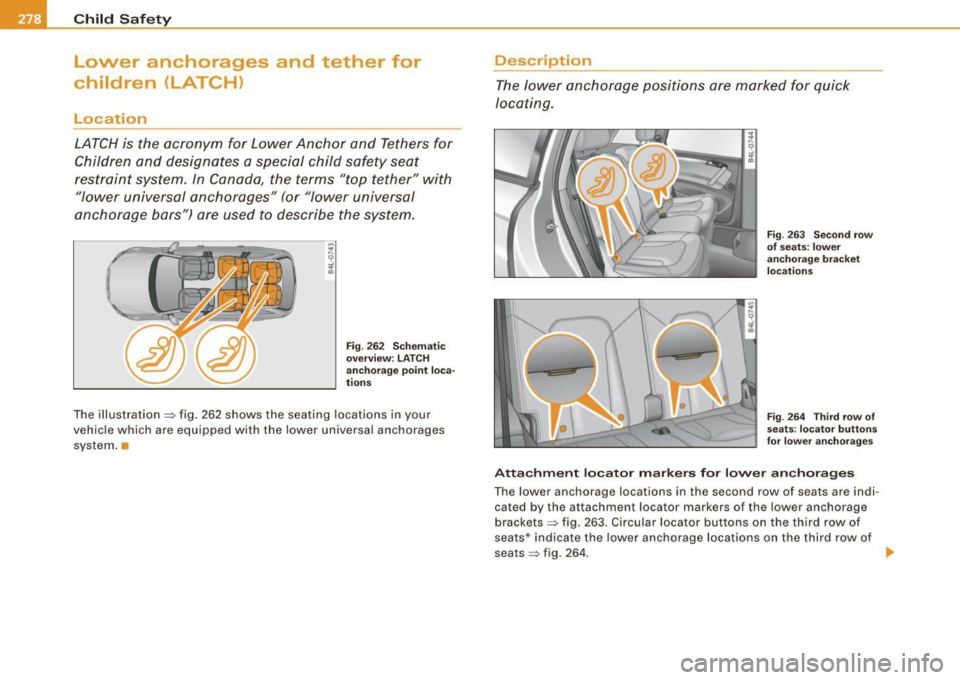
Fig . 262 Schematic
overview: LATCH
anchorage point loca-
tions
The illustration => fig. 262 shows the seating locations in your
vehicle which are equipped with the lower universal anchorages
system.
Description
The lower anchorage positions are marked for quick
locating.
Fig. 263 Second row
of seats: lower
anchorage bracket
locations
Fig. 264 Third row of
seats: locator buttons
for lower anchorages
Attachment locator markers for lower anchorages
The lower anchorage locations in the second row of seats are indi
cated by the attachment locator markers of the lower anchorage
brackets => fig. 263. Circular locator buttons on the third row of
seats* indicate the lower anchorage locations on the third row of
seats
=> fig . 264. ~
Page 321 of 426
_____________________________________________ C_ l_ e _a_ n_ in_ g_a _ n_d_ p_ r_ o_ t _e_ c_t _io _ n __ lftlll
•
Any damage to the undercoating caused by road hazards should be
repa ired promptly.
& WARNING
Too mu ch undercoating in the wro ng pl ace s can cause a fir e.
• Do not appl y ad ditional und ercoating or ru stproofing on or
n ea r the e xhaus t man ifold , ex haust pipe s, catalyt ic c onverter or
heat shields . While d riving , the s ub stan ce used for undercoating
c ould overheat and cau se a fire.
• Alw ays read and heed all WARNINGS and other informat ion
=> pag e 312 . •
Care of interior
MMI display
- C lean the M MI display with a soft c lean cloth and an LCD
cleaner.
The MM I display can be cleaned with a professional ly available "LCD
cleaner". The clot h should be s lightly dampened with the c leaning
fluid to clean the display.
0 Note
T o avoid scratching the MMI display, you should never c lean it dry. •
MMI terminal
- First clean the MMI terminal with a brush to remove dust
from the housing . T
hen w ipe the MM I terminal wit h a clean, so ft, s light ly
dam p cloth.
The M MI termina l shou ld be c leaned w ith a brush first so that no
dirt is trapped between the buttons and the housing. We recom
mend giving the MMI terminal a fina l w ipe with a c loth moistened
with water and dish washing detergent.
0 Note
To prevent damage, make sure that no fluid ever gets into the MMI
terminal. •
Aluminum trim
Use only neutral -pH produc ts to remove spots and deposits from
aluminum surfaces. Chrome care products and alkaline cleaners
wi ll attack aluminum surfaces and can damage them over time.
& WARNING
Al way s read and h eed all WARNINGS and oth er information
=> page 31 2. •
Fabrics and fabric coverings
Fabrics and fabric coverings (e.g . seats, door trim panels, etc.)
shou ld be c leaned at regular inte rvals with a vacuum cleaner . This
removes surface dirt particles which could become embedded in
the fabric th rough use. Steam cleaners shou ld not be used, because
the steam tends to push the dirt deeper into the fabric and lock it
there .
~
Vehicle care I t •
Page 411 of 426

______________________________________________ A_ l_,_ p _h_ a_ b_e _t_ic _ a _ l _in _ d_e _ x __ lll
Important things to know . ... .. .... 241
Indi cator light ...... .. .... ... ..... 252
Monitoring ... .... .... ..... .. .... 252
PASSENGER AIR BAG OFF light ... .. 253
Repairs .. .... .... .... ... .... .... 255
Safety instructions ... .... ..... .. . 254
Side airbags ... .. .... .... ...... .. 257
Side curtain airbags ... .. .... .... . 260
Weight -sensing mat .... ........ .. 264
When must the system be inspected? ..
252
All Wheel Drive .. .... ....... ...... .. 294
Alloy wheels ... .. .... .... ..... .. .... 318
All-whee l drive
Winter tires .... .. .... ...... ... .. . 363
Alternator Malfunction . .... .... ........ ..... 32
Anti-freeze
See Engine coo lant system .. ...... . 337
Anti-glare inside day-night mirror .... 86, 87
Anti -lock brake system
How the ABS system works . .... ... 292
Warning/indicator lights .. .... .... .. 22
Anti-Slip Regulation System (ASR)
How the system works ........ .... 290
Anti-theft systems
Anti-theft alarm system ... ......... 63
Elec tronic immobilizer .. ... .... .... 51
Approach/departure angle ............ 302
Ashtray Front .. .... ... .. .... .... ...... .. 116
R ear .... ... .. .... .... ........... 116
Controls and equip
ment Safety first
ASR
How the Anti-Slip Regulation System
works ...... ............. ...... 290
Asterisk What does it mean when something is
marked with an asterisk? .. ....... .. 6
Audi braking guard ....... .... ... .... 168
Error messages ....... .... ... .... 170
Settings ........... ... .... .... ... 169
Status messages .......... .... ... 170
Switching on and off .. .... .... .... 169
Audi Service Repair Manuals and Literature
401
AUTO mode AC climate contro ls ..... ...... .... 126
Auto Safety Hotline ..... ... ... .. .... . 229
Auto -Check Control ...... ..... ... .... . 30
Automatic belt retractor ... .. .... .... . 235
Automatic car wash
See Washing ............... .... .. 313
Au tomatic mode
Four -zone automatic comfort air
conditioning .... ...... ...... ... 132
Automatic Shif t Lock (ASU ...... ... ... 186
Automatic transmission
6 -speed automatic transmission .... 184
Automatic Shift Lock (ASU ...... .. . 186
Driving ...... ....... ...... .... ... 1 84
Dynamic shift program .... ........ 187
Emergency release for selector lever 189
F ail-safe mode ...... ... .. .... ... . 189
Ignition key safety lock ..... .. .... . 143 Manua
l sh ift program .. .. ....... .. 188
Selector lever .................... 185
Shift buttons ...... .... .... ...... . 189
Steering wheel with tiptronic® ..... 189
Average speed ....................... 40
Avo id damaging the vehicle ... .... .... 299
B
Background lighting
Lighting profiles . ......... ......... 79
Bass box ........... ... .. .... ...... . 371
Battery ...... .... ... .... .... .... ... 342
Battery location .......... .... .... 343
Charging ........................ 344
Important warnings when working on the
battery ...... ....... .... ...... . 343
Jump starting ................ .... 387
Low ...... ........... ....... .. .. 295
Replacing the battery ............ . 346
State of charge ................... 295
Voltage ........... ...... .... .... . 36
Winter operation ............ ... .. 342
Working on the battery ... ....... .. 343
Before driving ... .... .... ...... .... . 221
Blended gasoline .................... 325
Body cavity sealing .. .... .... .... ... . 318
Booster seats ...... ... .. .... .... .... 271
How do I properly insta ll a booster seat in
my vehic le? . .... .... .... ... .... 271
Safety instructions .... .......... .. 271
Brake assistant .......... .... .... ... 293
K ick -down .... .... ...... ...... ... 187 Brake booster ....................... 292
Vehicle operation Vehicle care Do-it-yourself service Technical data