switches off AUDI Q7 2009 Owner´s Manual
[x] Cancel search | Manufacturer: AUDI, Model Year: 2009, Model line: Q7, Model: AUDI Q7 2009Pages: 426, PDF Size: 97.13 MB
Page 125 of 426
Warm and cold -______________ ....:...:...:..:..;______
Warm and cold
Climate control
Description
The air conditioner is fully automatic and is designed to
maintain a comfortable and uniform climate inside the
vehicle.
We recommend the following settings:
- Set the temperature to 72 °F (+22 °C).
- Press the [AUTO
I button.
With this setting, you attain maximum comfort in the least amount
of time. Change this setting, as desired, to meet your personal
needs .
The climate controls are a combination of heating, ventilation and cooling systems, which automatically reduce humidity and cool the
air inside your vehicle.
The air temperature, air flow and air distribution are automatically
regulated to achieve and maintain the desired passenger compart
ment temperature as quickly as possible.
The system automatically compensates for changes in outside
temperature and for the intensity of the sunlight entering the
vehicle. We recommend you use the
Automatic mode:::::, page 126
for year -round comfort.
Please note the following:
Turn on the air conditioner to reduce humidity in the vehicle. This
also prevents the windows from fogging up.
When the outside temperature is high and the air is very humid,
condensation from the evaporator may drip under the vehicle . Th is
is normal and does not indicate a leak.
Controls and equip
ment
If the outside temperature is low, the fan normally only switches to
a higher speed once the engine coolant has warmed up sufficiently.
The air conditioner temporarily switches off when you drive off from
a standstill using full throttle to save engine power.
The compressor also switches off if the coolant temperature is too
high, so that the engine can be adequately cooled under extreme
loads.
Air pollutants filter
The air pollutants filter (a combined particle filter and activated
charcoal filter) reduces or prevents outside air pollution (dust, or
pollen) from entering the vehicle. The air is also filtered in air recir
culation mode.
The air pollutants filter must be changed at the intervals specified in your Warranty
& Maintenance booklet, so that the air conditioner
can properly work.
If you drive your vehicle in an area with high air pollution, the filter
may need to be changed more frequently than specified in your
Audi Warranty
& Maintenance booklet . If in doubt, ask your autho
rized Audi Service Advisor for advice.
Key coded settings
The air conditioner settings selected are automatically stored and assigned to the key being used. When the vehicle is started, the air
conditioner automatically selects the settings assigned to that key.
This way every driver will maintain his/her own personal settings
and does not have to reset them manually.
If a different driver uses your key and changes the air conditioner
settings, the latest adjustments will erase and replace the settings
you have stored. _.,
I • •
Page 136 of 426
![AUDI Q7 2009 Owner´s Manual • .___w_ a_ rm __ a_ n_ d_ c_o _l_d ________________________________________________ _
Basic settings (SETUP]
General
The basic settings for the climate control are performed in
the!S](/img/6/40274/w960_40274-135.png "AUDI Q7 2009 Owner´s Manual • .___w_ a_ rm __ a_ n_ d_ c_o _l_d ________________________________________________ _
Basic settings (SETUP]
General
The basic settings for the climate control are performed in
the!S")
• .___w_ a_ rm __ a_ n_ d_ c_o _l_d ________________________________________________ _
Basic settings (SETUP]
General
The basic settings for the climate control are performed in
the!SETUP] menu.
Fig . 142 MM I D isp lay:
Set up c li m ate control
T he basic settings for the air cond itioning can only be made
with MM I turned on .
- Press the (SETUP) button in the controls to access the menu.
- Selec t the des ired fu nction using t he co ntrol knob (dr iver
or passenger) in t he air conditioning contro ls.
The fol lowing functions can be selected :
• ECON~
page 134
• Auto recirc. ~ page 134
• Synchron. ~ page 135 or~ page 135
• Rear operation*~ page 135
G)ECON
When the EC ON function is on~ page 134, this symbol appears in
the status line.
0 Synch ron.
When the Synchron. function is on~ page 135 or~ page 135, this
symbo l appears in the status line .
© Auto recirc.
When the Auto rec irc. function is on~ page 134, this symbol
appears in the status line. •
ECON
The ECON mode helps to save fuel .
The air conditioning is turned off in ECON mode. "ECON" means
"Economy" . By switching off the air conditioning (compressor) , you
save fuel.
P lease note that vehic le interior temperature cannot be lower than
the outside temperature in the ECON mode. The air is not cooled or
dehum id ified.
If the vehic le interior becomes too hot or if the windows fog up,
ECON mode should be turned off . As soon as the [AUTO ] button in
the air conditioning controls is pressed , the system automatically
leaves the ECO N mode, and the air conditioning compressor is
turned on again .•
Automatic recirculation mode
An air q uality sensor detects increased concentrations of
pollu tants in the outside air and automatically switches
t o recirculation mode.
We recommend that you always keep automatic air recirculation ON
to prevent polluted outside air from entering the vehicle interior.
If the
air quality sensor located in the air conditioning system
detects po lluted outside air, the sensor decides whether the air
po llution can be reduced by the factory -installed pollutant filter or
whether it is necessary to switch to air recirculation. With heavy ...
Page 147 of 426
![AUDI Q7 2009 Owner´s Manual On th e road 11111 _________________________________ __::..:....:.......;,;_;_;_ _ __;____,J
Switching the ignition on
- Press t he [ S TART] button once to the first stage to switch
on](/img/6/40274/w960_40274-146.png "AUDI Q7 2009 Owner´s Manual On th e road 11111 _________________________________ __::..:....:.......;,;_;_;_ _ __;____,J
Switching the ignition on
- Press t he [ S TART] button once to the first stage to switch
on")
On th e road 11111 _________________________________ __::..:....:.......;,;_;_;_ _ __;____,J
Switching the ignition on
- Press t he [ S TART] button once to the first stage to switch
on on ly the ignition.
Starting the engine
- Step on t he brake.
- Move the se lector leve r to t he P or N posit ion
~ & .
- Press the [ STA RT ] button to t he second s tage to star t the
engine.
After a cold engine is started, there may be a brief period of
increased noise because oil pressure must first bui ld up in the
hydraulic valve adjusters . This is norma l and not a cause for
concern.
If the engine does not start immed iately, stop trying after 10
seconds and then try to restart the engine about 30 seconds later.
& WARNING
Nev er allow the engine to run in confined spa ce s · danger of
asphyxi atio n.
0 Note
• Avo id high engi ne rp m, full throttle and heavy engine loads unti l
the engine has reached operating temperature · otherwise you risk
engine damage .
• T he engin e cannot be started by pushing or towing the vehic le.
c£> For the sake of the environment
Do not allow the engine to warm up with the vehicl e stationary . Star t
driving right away . In this way you avo id unnecessary emissions .
Contro ls and eq uip
ment
[ i ] Tip s
If you open the driver's door when t he ign itio n is switched on, a
buzzer sounds and the message
Ign ition i s on appears in the instru
ment cluster display. P lease switch the ignition off. •
Applies to vehic les : w ith C onv en ien ce key
Switching engine off with the [STOP] button
Bring yo ur vehicle to a comp le te sto p.
Fig. 155 Convenien ce
key: E NGIN E STO P
button
Move the se lector lever to the P o r N position .
Press the [
STOP I button ~ fig. 15 5.
Pressing the ( STO P] but ton once switches off the engine and the
ignition . If you press the ( S T O P! button again for more than 1
second, the steering is locked, provided that the selector leve r is in
the P position
~ & .
Emergency OFF function
If necessary , the engine can be switched off with the selector leve r
in the R, Dor S positions. To do so, step on the brake peda l and
press and hold the ( STOP] button (vehicle speed must be less than
6 mph/ 10 km /h. .,,_
Vehicle care I I irechnical data
Page 191 of 426

_________________________________________________ A_ u_t_ o_ m_ a_t _i _ c _ t _ra_ n_s_ m __ is_s_ io_ n _ __.11111
Ap plies to vehi cles : wi th tip troni c-st eerin g wh eel
Steering wheel with tiptronic ®
The shift buttons on the steering wheel allow the driver to
shift gears manually.
Fig . 202 Steering
wheel: Shift buttons
- To downshift, touch the button on the left Q.
- To upshift , touch the button on the right G) .
The shift buttons are activated when the selector lever is in D, Sor
in the manual shift program (tip tronic) .
Of course, you can continue to use the manual shift program with
the selector lever on the center console .•
Automatic transmission malfunction ~
In the event of a system malfunction, the automatic transmission
switches to emergency operation mode.
Gearbox malfunction: You can continue driving
You can continue to drive the vehicle. See an authorized Audi dealer or other qualified workshop at the next opportunity.
Gearbox malfunction: You can continue driving but functions
are restricted
Con tro ls and eq uip
ment
There is a serious system malfunction:
• The program shifts only into certain gears.
• The engine may stall.
• It is not possible to restart the engine if it has been switched off .
• Continuing to drive could result in subsequent damage .
0 Note
If the transmission switches to fail -safe mode , you should take the
vehicle to an authorized Audi dealership as soon as possible to have
the condition corrected .•
Emergency release for selector lever
If the vehicle's power supply fails, the selector lever can
be released in an emergency.
Fig . 203 Remove the
ashtray insert
~
Vehicle care I I Technical data
Page 210 of 426
IIIII..__A_ d_ a--=- p_t _iv _ e_ A_ i _r_ S _ u_ s_ p ,.._ e_ n_ s _ io_ n _____________________________________________ _
comfort
Select the comfort mode if you desire a suspension setting with a
special emphasis on comfort . Damping characteristics with a clear
emphasis on comfort are selected in this mode .
• Automatic lowering: When a speed of about 75 mph (120 km/h)
is exceeded for more than 30 seconds , the vehicle is automatically
lowered by 0.6 inch (15 mm) to /ow level.
• Automatic raising: The vehicle is automatically raised to normal
level again, if the speed falls below about 44 mph (70 km/h) for a
period of 2 minutes . The vehicl e is raised immediately when speed
falls below about 22 mph (35 km/h).
offroad
Select the offroad mode when you have to travel over poor quality
sections of road (e.g . trails). In this mode, th e vehicle is rais ed to
high level 1, and damping characteristics for poor road stretches are
selected. When switching to offroad mode, th e Adaptive Air Suspen
sion indicator appears automatically in the instrument cluster
display => page 209 .
• Automatic lowering: When a speed of about 62 mph (100 km/h)
is exceeded , the vehicle is lowered by 1 inch (25 mm) to normal level.
• Automatic raising: The vehicle is ra ised to high level 1 again
when the speed falls below about 43 mph (70 km/h).
lift
Select the lift mode when exceptionally high ground clearance is
needed at a reduced speed. In this mode, the vehicle is raised to
high level 2 . When switching to lift mode, the Adaptive Air Suspen
sion indicator appears automatically in the instrument cluster
display=> page 209.
The lift mode can be activated only a t spe eds b elow 12 mph (20
km/h). When a speed of about 25 mph (40 km/h) is exceeded, the
system automatically leaves lift mode and the offroad mode is acti
vated. The instrument cluster display automatically switches the
display to Adaptive Air Suspension to indicate reduced ground
clearance.
[ i] Tips
Please note that driving at high speeds on paved roads while in
offroad mode for extended periods of time leads to increased tire
wear. •
App lies to vehicles : with Adap tive Air Su spens io n
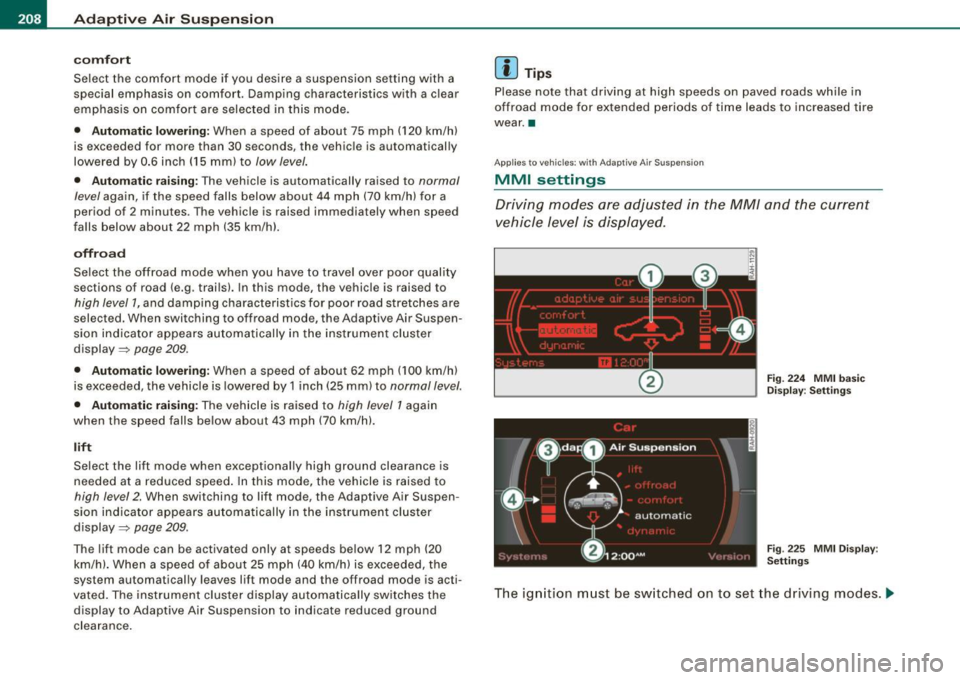
MMI settings
Driving modes ore adjusted in the MM/ and the current
vehicle level is displayed.
Fig. 224 MMI basic
Display : Settings
Fig . 225 MMI Display :
Settings
The ignition must be switched on to set the driving modes . .,,,
Page 292 of 426
--~ln~ t ~e~ ll~ig ;t e~ n~t ...:t~ e::_: c::,: h '..!.'..: n~o ~ l.!::o
3g
:t; yL __________________________________________ _
& WARNING (continued)
tendency to spin and the vehicle may break away -danger of skid
ding!
• Stability is limited in the ESP offroad mode. •
Electronic differential lock (EDL)
The electronic differential lock monitors the rotational
speed of the drive wheels.
General notes
The electronic differential lock (EDU helps the car to start moving,
accelerate and climb a gradient on surfaces providing poor or
almost no grip . Without EDL, this would be difficult, if not impos
sible.
How the system works
The EDL operates automatically. It monitors the rotational speed of
wheels with the help of the ABS sensors=> page 292. If a noticeable
slip is detected at the wheels (e.g. on slippery ground on one side),
the spinning wheels are braked and power is transferred to the
other wheels. This is done up to a speed of about 60 mph (100 km/h).
Noises from the brake system signal that wheel spin is being
controlled.
Driving off
When driving off, always be sure to keep road conditions in mind as
you accelerate. If one drive wheel spins because it is on a surface
with less grip, apply plenty of throttle until the car starts to move.
Overheating of brakes
To prevent the disc brake of the braked wheel from overheating if
subjected to excessive loads on this wheel, the EDL cuts out tempo
rarily. The vehicle remains operational and behaves in the same way
as a vehicle without EDL. As soon as the brake has cooled down, EDL switches on again auto
matically.
& WARNING
• When accelerating on slippery surfaces, such as on ice or snow,
always be careful when depressing the accelerator pedal . Even
with the EDL working, the drive wheels can spin and reduce your ability to control your car. Risk of crash!
• The increased safety afforded by EDL does not mean that you
can take safety risks. Always adapt your driving style to the road
conditions and traffic situation.
[ i] Tips
If a fault occurs in the ABS, the EDL is also not functioning. This is
indicated by the ABS warning light=> page 22. •
Anti-Slip Regulat ion System (ASR)
The Anti-Slip Regulation System prevents the driven
wheels from spinning when the car is accelerating.
General notes
The Anti -Slip Regulation System (ASR) is integrated in the electronic
stabilization program (ESP) . When the vehicle starts up and acceler
ates, the wheels are prevented from spinning by adjusting the
engine power to match the amount of grip available from the road
surface.
How the system works
ASR performs automatically, i.e. without the driver's intervention.
With the aid of the ABS sensors=> page 292, ASR monitors the
speed of the driven wheels. If the wheels start to spin, engine torque
is reduced automatically until the tires find enough grip to lock onto
the road surface. The system is active across the entire speed range . ..,
Page 295 of 426

If an individual wheel begins to rotate too slowly in relation to
vehicle speed and tends to lock, the ABS automatically reduces
brake pressure to prevent that wheel from locking.
This automatic adjustment process will cause a
slight vibration of
the brake pedal and some noises to alert you that vehicle speed
must be adapted to existing road and traffic conditions .
_& WARNING
Although the ABS is very effective, always remember that braking
capability is limited by tire traction. Always adjust your driving
speed according to the road and traffic conditions. Do not let the
extra safety afforded by the ABS tempt you into taking extra risks.
The ABS cannot overcome the laws of physics.
[ i] Tips
• If ABS is not functioning properly , a warning light will come on .
See
=> page 22.
• If a fault occurs in the ABS, the EDL is also not functioning. This
is indicated by the ABS warning light.•
Brake assistant
The brake assistant is designed to achieve the optimum
braking effect.
The brake assistant helps to increase the effective braking power
and thus to achieve
a shorter stopping distance . If the driver
presses the brake pedal very quickly , the brake assistant automati
cally boosts the braking force to the maximum level, up to the point
where the anti-lock brake function (ABS) intervenes to stop the
wheels from locking. You should then keep th e brake pedal pressed
until the vehicle has braked to the required speed. The brake assis
tant swi tches its elf off as soon as you release the brake pedal.
Controls and equip
ment Safety first Vehicle operation
Intelligent technology
Automatic full braking assist
This function allows full braking
in spite of high brake pedal forces
(e.g . when the brakes are severely stressed because the vehicle is
fully loaded) . The driver notices this function through a reduction of
pedal force and increased pedal travel. When the brake pedal is
released, full braking assist switches off again automatically.
If there is an ABS failure, the brake assistant and automatic full
braking assist ar e not available .
The brake assistant will not be operative if there is a malfunction in
the ABS.
_& WARNING
Please remember that the accident risk always increases if you
drive too fast, especially in corners or on a slippery road, or if you
follow the vehicle ahead of you too closely . Increased risk of an
accident cannot be compensated for even by the brake assistant,
so always maintain a safe speed. iJ
Servotronic® -advanced power
steering system
The power steering systems uses the power of the
running engine to allow precise steering with little effort.
The advanced Servotronic ® power steering system senses the road
speed and electronically adjusts power assistance to provide
comfortable and safe steering response exactly matched to the
vehicle speed.
Power steering will not work if the engine is off. As a result, the
s teering whe el will be hard to turn.
The power steering fluid level is checked during the scheduled
maintenance services .
•
Vehicle care Do-it-yourself service Technical data
Page 302 of 426
___ D_ r_i v_ in_... g"'- a_ n_ d_ e_ n_ v_i_r _ o _n_ m __ e_n _ t _______________________________________________ _
one half. Never drive faster than the posted speed limit and weather
conditions permit. •
Reducing unnecessary =citing
Even when your car is just idling it burns up fuel.
- Shut the eng ine off when you are not driving the vehicle .
- Do not warm up the vehicle by letting the engine run at
idle.
It makes sense to shut off the engine in traffic jams, when waiting
for trains to pass at rai lroad crossings , or at traffic lights that have
long waits on red. Turning the engine off for just 30 -40 seconds
saves more fuel than is burned starting the engine again .
It takes a long time for the engine to warm up fu lly when it is
running at idle. However, wear and noxious emissions are especially
high when the engine is warming up. So you should drive away as
soon as you start the engine and avoid running at high rpms while
the engine is still warming up.
0 Note
Do not leave engine idling unattended after starting . If warning
lights should come on to indicate improper operation, they would
go unheeded. Extended idling also produces heat, which could result in overheating or other damage to the vehicle or other
property .•
Regu1ar ma1--.tenance
A badly tuned engine unnecessarily wastes a lot of fuel.
- Have your vehic le serviced at regular intervals . By having your vehicle regularly serviced by an authori
zed Audi
dea ler helps to ensure that it runs properly and economica lly. The
condition of your vehicle not only affects its safety and ability to
hold its value, it a lso affects
fu el con sumpti on.
C he ck your oil each time you fill your t ank .
The amount of oil used is related to engine load and speed.
It is norma l for the oil consumption of a new engine to reach its
lowest va lue after a certain mileage has been driven.
You must drive your vehicle about 3,000 miles (5,000 kilometers) before you can properly assess oil consumption .
T his also applies to fuel consumption and engine output .
0 Note
• Have your vehicle maintained properly and in accordance with
the service recommendations in your Warranty
& Maintenance
booklet. Lack of proper ma intenance as well as improper use of the
vehic le wi ll impair the function of the emission control system and
cou ld lead to damage.
• Do not alter or remove any component of the Emiss ion Control
System unless approved by the manufacturer.
• Do not alter or remove any device, such as heat shields,
switches, ignition wires, valves, which are designed to protect your
vehicle 's Em ission Control System and other important vehicle
components .•
Fewer short tr ips
Fuel consumption will always be relatively high on short
trips.
- Try to avoid driving short dista nces wi th a cold engine. _,
Page 330 of 426
Fuel supply and filling your fuel tank Refuelling procedure
- Insert the fuel nozzle from the gasoline pump into the
fuel filler neck as far as it will go.
- Select a medium refuelling rate so that the nozzle switches off automatically when the tank is full.
Putting the fuel cap back on
- After filling your tank, twist the fuel filler cap clockwise as
far as it will go.
Close the fuel filler flap.
To avoid fuel spilling or evaporating from the fuel tank always close
fuel filler cap properly and completely. An improperly closed fuel
filler cap may also cause the MIL lamp=>
page 29 to come on.
& WARNING
Improper refueling or handling of fuel can cause fire, explosion
and severe burns.
• Fuel is highly flammable and can cause severe burns and other
injuries.
• Failure to shut the engine off while refueling and/or to insert
the pump nozzle fully into the fuel filler neck could cause fuel to spray out of filler neck or to overflow. Fuel spray and overflowing
fuel can cause a fire.
• Never use a cellular telephone while refueling . The electromag
netic radiation can cause sparks that can ignite fuel vapors and
cause a fire.
• Never get back into your vehicle while refueling. If in excep
tional circumstances you must get back in your vehicle while refu
eling, make certain that you close the door and touch metal to
discharge static electricity before touching the filler nozzle again.
Static electricity can cause sparks that can ignite fuel vapors
released during refueling .
& WARNING (continued)
• Never smoke or have an open flame anywhere in or near your
vehicle when refueling or filling a portable fuel container.
• For your safety, we strongly recommend that you do not travel
with a portable fuel container in your vehicle. The container, full or
empty may leak and could cause a fire, especially in a crash.
• If, under exceptional circumstances, you must transport a
portable fuel container, please observe the following:
-Never fill a portable fuel container while it is anywhere in or
on the vehicle (for example, in the luggage compartment, or on
the trunk). Static electricity can build up while filling and can
ignite fuel vapors causing a fire.
- Always place a portable fuel container on the ground before
filling.
- Always keep the filler nozzle completely inside the portable
container before and during filling.
- If filling a portable container made of metal, the filler nozzle
must always be in contact with the container. This will help
prevent static electricity from discharging and cause a fire.
- Never spill fuel inside the vehicle or luggage compartment. Fuel vapors are highly flammable .
- Always observe local and state/provincial laws regarding the
use, storage and transportation of fuel containers.
- Make certain the fuel container meets industry standards
(ANSI / ASTM F852-86l.
0 Note
If any fuel has spilled onto the car, it should be removed immedi -
ately to prevent damage to the paint. _.,
Page 331 of 426
<£> For the sake of the environment
As soon as the correctly operated nozzle switches off automatically
for the first time, the tank is full. Do not try to add more fuel because
fuel may spill out. In addition, the expansion space in the fuel tank
will be filled -causing the fuel to overflow when it becomes warm
and pollute the environment.
[ i] Tips
• Running your engine while refuelling may cause vapors to
escape or even cause fuel to spill out of the tank. This would then
shut off the fuel nozzle before the tank is full.
• Do not refuel your vehicle with the ignition turned on . The fuel
gauge may otherwise not indicate the correct fuel level after
refuelling. •
Unlocking the fuel filler flap by hand
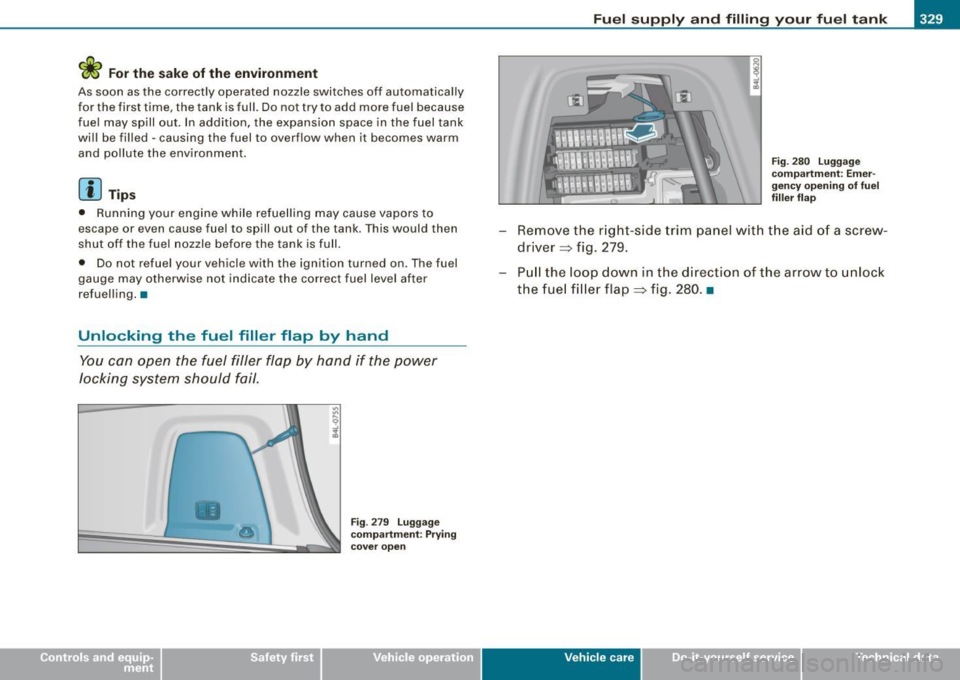
You can open the fuel filler flap by hand if the power
locking system should fail .
•
Fig. 279 Luggage
compartment : Prying
cover open
Fuel supply and filling your fuel tank
Fig. 280 Luggage
compartment : Emer
gency opening of fuel
filler flap
- Remove the right-side trim panel with the aid of a screw
driver => fig. 279.
- Pull the loop down in the direction of the arrow to unlock
the fuel filler flap=> fig. 280. •
Vehic le care I I irechnical data