key AUDI Q7 2009 Owner´s Manual
[x] Cancel search | Manufacturer: AUDI, Model Year: 2009, Model line: Q7, Model: AUDI Q7 2009Pages: 426, PDF Size: 97.13 MB
Page 189 of 426
_______________________________________________ A_ u_t _o _ m_ a_ t _i_ c_ t_r _a _n _ s_ m __ is_s_ i _o _ n __ !II
Autom ati c selec to r l eve r lock
The se lector lever is locked in the P and N positions when the igni
tion is turned on. To move the lever from these positions the driver
must depress the brake pedal. As a reminder to the driver, the
follow ing warning appears in the instrument cluster disp lay when
the selector is in
P and N:
When stationary app ly foot brake while s electing gear
A time delay e lement prevents the selector lever from locking when
it is moved through the
N position (going from R to Dl. The locking
e lement will lock the selector lever if the lever is left in N (Neutral)
for more than approximately 1 second, without the brake peda l
being pressed.
At speeds above about 3 mph (5 km/h) the Automatic Shift Lock is
automatically deactivated in the
N posi tion .
Interl ock button
The lock button on the selector lever prevents the lever from being
accidentally shifted into certain positions. Pressing this button
deactivates the selector leve r lock. Dependi ng on the direction of
the shift, the selector lever locks at different positions. The positions
are highligh ted in the illus trati on =>
page 186, fig . 199.
Igniti on k ey saf ety in te rlo ck
The key canno t be removed from the ignition un less the selector
lever is in the
P park position. When the ignition key is removed, the
selector lever wil l be l ocked in the
P posi tion .•
Kick -down
T he kick-down feature allows the vehicle to genera te
maximum accelera tion.
When you press the acce lerator pedal beyond the resistance point
that is reached at ful l throttle, the transmission wi ll select a lower
gear ratio based on vehic le speed and engine RPM . The engine RPM
wil l be control led to produce maximum vehic le acceleration as long
Controls and equip
ment
as you continue to press the acce lerator pedal beyond this resis
t ance poin t.
& WARNING
Be careful when u sing the ki ck -down feature on slippery road s.
Rapid acceleration ma y cause the vehicle to skid . •
Dynamic shift program (DSP)
T he aut omatic tr ans mission is electro nically c ontrolle d.
The transmission is se lf adapting and will automaticall y select the
b est shi ft program su ited to the driving conditio ns and driving style.
The transmission will select one of the
e conomy programs when
you drive at a s teady speed or a g radually changing speed without
heavy acceleration. This achieves optimum fuel efficiency, with ear ly
upshifting and delayed downshifting .
The trans mission will au tomatically select the
sporty shift progra ms
when you drive at higher speeds, or with heavy acce leration and
frequent ly cha nging speeds . Upshifts ar e delayed t o make f ull use
of engine power . Downshifting takes place at higher engine speeds
than in t he ec onomy p rograms .
The selection of the most su itable shift program is a continuous,
automatic process . The driver can a lso make the transmission
sw itch to a sporty progra m by
quickly pressing down the gas peda l.
This causes the transmission to shift down to a lower gear to
achiev e rapid acc elerati on, e.g . fo r q uickly pass ing another vehicle .
You do not need to press the gas pedal into the kick-down range.
After the transm ission has upshifted, the original progra m is
selected according to your driving sty le.
An additiona l shift program allows the automatic transmission to
select the proper gear fo r uph ill and downhi ll gradients.
This keeps the transmission from shifting up and down unneces sari ly on hi lls. The transmissio n will shift down t o a lowe r gear when _,.
I • •
Page 192 of 426
• ..__A_ u_ t_ o_ m_ a_t _i c_ t_ r_ a _ n_ s_m _ is_ s _ io_ n _____________________________________________ _
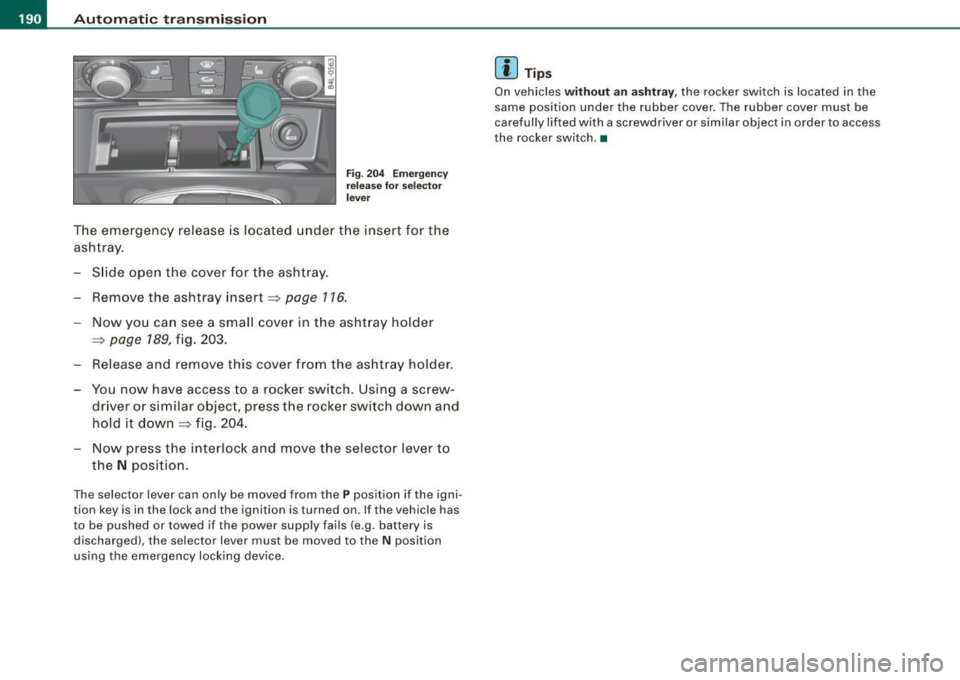
Fig. 204 E merge ncy
re lease for sel ecto r
l ever
T he emergency release is located under the insert for the
ashtray.
- Slide open the cover for the ashtray.
- Remove the ashtray insert ~
page 116.
-Now you can see a small cover in the ashtray holder
~ page 189, fig. 203.
- Release and remove this cover from the ashtray holder .
- You now have access to a rocker switch. Using a screw-
driver or similar objec t, press the rocker switch down and
hold it down~ fig. 204.
- Now press the interlock and move the selector lever to
the
N position .
The selector lever can only be moved from the P position if the igni
tion key is in the lock and the ignition is turned on. If the vehicle has
to be pushed or towed if the power supply fails (e.g. battery is
discharged), the selector lever must be moved to the
N position
using the emergency lock ing device .
[ i ] Tip s
On vehicles without an ashtray, the rocker switch is located in the
same position under the rubber cover . The rubber cover must be
carefully lifted with a screwdriver or similar object in order to access
the rocker switch. •
Page 204 of 426
IIIII..__A_ d_v _ a_ n_c _e _ d_ P_ a_r _k _in ---== g'-- S...:y _ s_ t_ e_ m ___________________________________________ _
The volume and frequency settings are automatically stored and
assigned to the remote master key.
& WARNING
Always make sure that the volume and frequency of the chimes is
adjusted so that you can easily hear the acoustic distance signal
even if the radio is playing, the air-conditioner blower is on High or
there is a high level of outside noise. Check the settings whenever
someone else has driven the vehicle before you. •
Applies to veh icles: with Advanced Parking System with rear view ca me ra
Adjusting the chimes -option 2
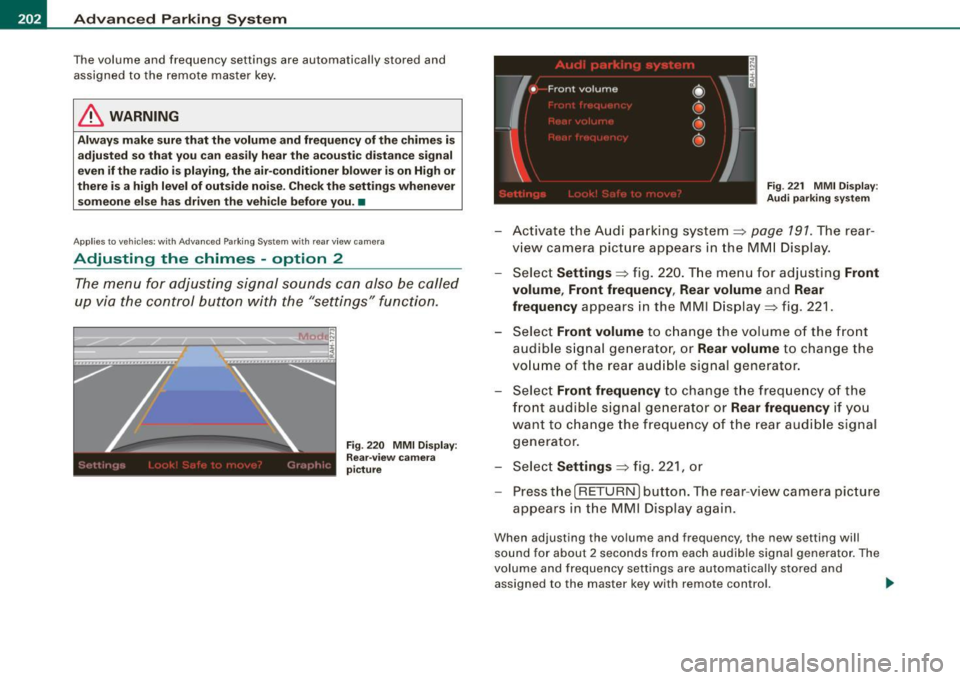
The menu for adjusting signal sounds can also be called
up via the control button with the "settings" function.
Fig . 220 MMI Display:
Rear-view camera
picture Fig
. 221 MMI Display:
Audi parking system
-Activate the Audi parking system:::::, page 791 . The rear
view camera picture appears in the MMI Display.
- Select
Settings :::::, fig. 220. The menu for adjusting Front
volume, Front frequency , Rear volume
and Rear
frequency
appears in the MMI Display:::::, fig. 221.
Select
Front volume to change the volume of the front
audible signal generator, or
Rear volume to change the
volume of the rear audible signal generator.
- Select
Front frequency to change the frequency of the
front audible signal generator or
Rear frequency if you
want to change the frequency of the rear audible signal
generator.
- Select
Settings :::::, fig. 221, or
- Pressthe[RETURN]button. The rear -view camera picture
appears in the MMI Display again.
When adjusting the volume and frequency, the new setting will
sound for about 2 seconds from each audible signal generator. The
volume and frequency settings are automatically stored and
assigned to the master key with remote control. _..
Page 217 of 426
HomeLink® -_______________ ___.
Applies to vehicles: with Homelin k® un iversal remote contro l
Programming the Homelink ® transmitter
The transmitter is programmed in two phases. For rolling
code transmitters, a third phase is also necessary.
111111 111111
-
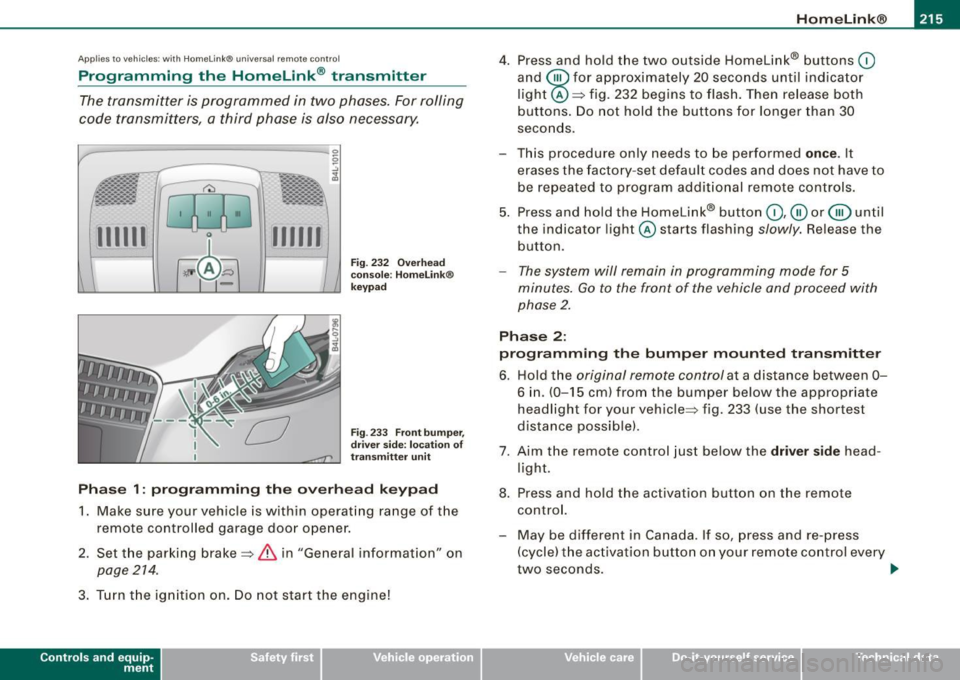
Fig . 232 Overhead
console : Homelink®
keypad
Fig . 233 Front bumper,
driver side: location of
transmitter unit
Phase 1: programming the overhead keypad
1. Make sure your vehicle is with in operating range of the
remote controlled garage door opener.
2. Set the parking brake=>
& in "General informat ion" on
page 214 .
3. Turn the ignition on . Do not start the engine!
Contro ls and eq uip
ment
4. Press and hold the two outside Homelink® buttons 0
and @for approximately 20 seconds until indicator
light @=> fig. 232 begins to flash. Then release both
buttons. Do not hold the buttons for longer than 30
seconds.
- This procedure only needs to be performed
once . It
erases the factory-set default codes and does not have to
be repeated to program additional remote controls.
5. Press and hold the Homelink® button
0,@ or @ until
the indicator light @starts flashing
slowly. Release the
button.
- The system will remain in programming mode for 5
minutes.
Go to the front of the vehicle and proceed with
phase 2.
Phase 2:
programming the bumper mounted transmitter
6. Hold the original remote control at a distance between 0-
6 in . (0-15 cm) from the bumper below the appropriate
headlight for your vehicle => fig . 233 (use the shortest
distance possible).
7. Aim the remote control just below the driver side head
light.
8. Press and hold the activation button on the remote control.
- May be different in Canada. If so, press and re-press
(cycle) the activation button on your remote control every
two seconds. .,_
Vehicle care I I irechnical data
Page 218 of 426
ll9..__H_ o_m_ e_ L_ i_ n _k_ @_R __________________________________________________ _
9. The emergency flashers will flash three times (after
about 15-60 seconds) when the programming is
successful. Release the button on the remote control.
- To program more devices, repeat steps 4 to 9.
10. Press and hold the trained Homelink® button and
observe the indicator light@=> page 215, fig. 232.
- If the indicator light is solid/continuous, programming is
complete and your device should activate when you press and release the trained Homelink® button.
- If the indicator light blinks rapidly for 2 seconds and is
then a solid/continuous light, proceed with phase 3 to program a rolling code device.
Phase 3: rolling code programming
- A second person on a ladder who can safely reach the
garage door opener motor is recommended.
11. Locate the "learn" button on the garage door opener
motor (refer to the operating instructions for the opener,
as the location of this button may vary by manufacturer).
12. Press and release the learn button on the garage door
opener motor.
- Note: once the button is pressed, there are 30 seconds in
which to initiate the next step.
13. On the Homelink® keypad inside the vehicle, firmly
press and hold the Homelink® button previously
programmed in phases 1 and 2 for two seconds and
release. Repeat this sequence
twice .
- Some vehicles may require the press/hold/release
sequence up to three times to complete the training
process.
- Homelink® should now activate your rolling code
equipped device.
If the 5 minute time limit is exceeded, the emergency flashers will
flash one time
to indicate that the process has been terminated. In
this case, repeat steps 4 through 9.
If the emergency flashers do not flash
three times (after about 15-
60 seconds), programming was not successful. In this case, repeat
steps 4 through 9 .
Remote control units for garage door openers in Canada are set to
stop transmitting radio frequency signals after two seconds. This
time may not b e sufficient for the Homelink® system to learn the
radio frequency signal. Perform all other steps as described
above. •
Applies to v ehi cles: with Horn e link ® uni versa l re mo te contro l
Operating the HomeLink ® transmitter
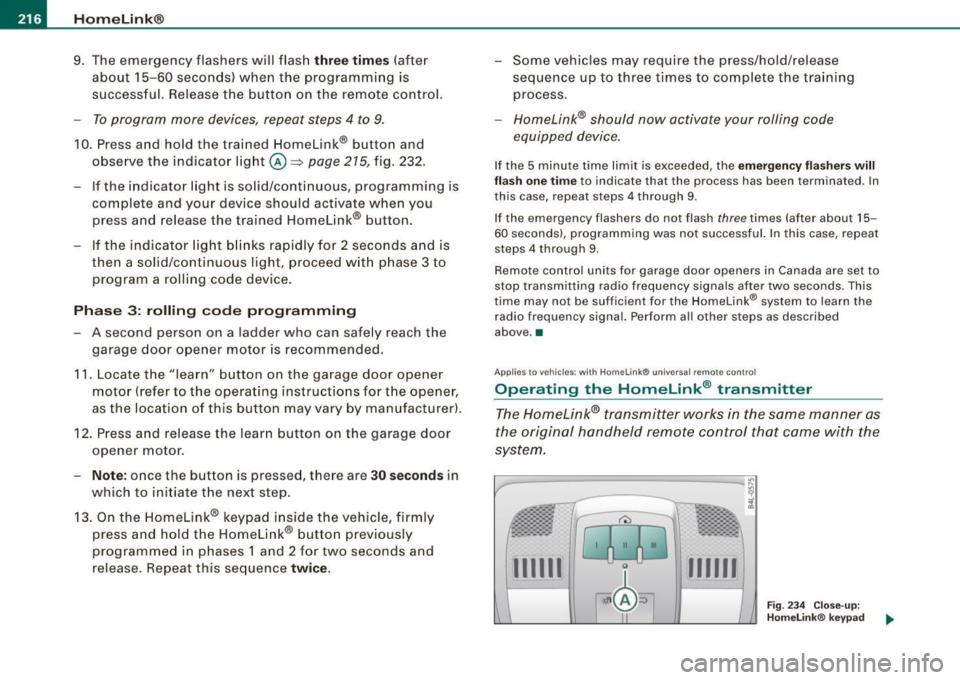
The Homelink® transmitter works in the same manner as
the original handheld remote control that came with the
system.
-----------------:c
i
Gl0 0
l
·~ ± b ~ / Fig. 234 Close-up:
Homelink® keypad
...._...._ __ __,..._......__......__...._ ........ ___ ___.__..
111111 111111
Page 219 of 426
___________________________________________________ H_ o_m....:..: e:..; L::. i;,,;. n.;,,; k;,,;. ®.:. R __ III
- Press the appropriate programmed button G),@ or @
to activate the desired remote control function~
& in
"General information" on
page 214. •
Applies t o ve hicl es: wit h Hom elin k® universal re mote co nt ro l
Reprogramming a single button
A Homelink ® button can be reprogrammed individually
without affecting the other button a/locations.
Programming the overhead keypad
- Press the appropriate Homelink® button unt il the indi
cator light begins flashing slowly.
Programming the bumper mounted transmitter
1. Hold the original remote control at a distance between 0-
5 in. (0-13 cm) from the bumper below the appropriate
headlight for your vehicle (use the sho rtest distance
possible) .
2. Aim the remote control just below the
driver side head
light.
3. Press and hold the activation button on the remote control.
4. The emergency flashers will flash
three times (after
about
15-60 seconds) when the programm ing is
successful. Now release the button on the remote
control.
- If the device ut ilizes a rolling code, please follow phase 3
of ~
page 215, "Programming the Homelink® trans
mitter" for rolling code programming.
Controls and equip
ment This procedure
will cause
the existing programming on the
Homelink ® button to be erased! •
App lies t o ve hicles : with Homeli nk® universa l re m ote contro l
Erasing the programming of the Homelink ®
transmitter
When you erase the programming , the programming on
all three of the transmitter channels with be lost!
- Perform steps 1 to 4 as descr ibed on~ page 215, "Phase
1: programm ing the overhead keypad ".
When completed , the Homelin k® system will be in the program
ming mode and is then ready to learn the cod es for remote
controlled devices.
(I) Tips
• Programmed buttons cannot be erased individually.
• For security reasons you ar e advis ed to erase the programming
of the Homelink ® system befo re you sell your vehicle. •
I • •
Page 237 of 426
& WARNING !continued)
• Never let any person ride with their feet on the instrument
panel or sticking out the window or on the seat.
• Never remove a safety belt while the vehicle is moving. Doing
so will increase your risk of being injured or killed.
• Never wear belts twisted.
• Never wear belts over rigid or breakable objects in or on your
clothing, such as eye glasses, pens, keys, etc. , as these may cause
injury .
• Never allow safety belts to become damaged by being caught
in door or seat hardware.
• Do not wear the shoulder part of the belt under your arm or
otherwise out of position.
• Several layers of heavy clothing may interfere with correct posi
tioning of belts and reduce the overall effectiveness of the system.
• Always keep belt buckles free of anything that may prevent the
buckle from latching securely.
• Never use comfort clips or devices that create slack in the
shoulder belt. However, special clips may be required for the
proper use of some child restraint systems.
• Torn or frayed safety belts can tear , and damaged belt hard
ware can break in an accident . Inspect belts regularly . If webbing,
bindings, buckles, or retractors are damaged, have belts replaced
by an authorized Audi dealer or qualified workshop .
• Safety belts that have been worn and loaded in an accident
must be replaced with the correct replacement safety belt by an
authorized Audi dealer. Replacement may be necessary even if
damage cannot be clearly seen. Anchorages that were loaded
must also be inspected.
• Never remove, modify, disassemble, or try to repair the safety
belts yourself.
Safety first
Safety belts
& WARNING !continued)
• Always keep the belts clean. Dirty belts may not work properly
and can impair the function of the inertia reel
~ page 323, "Safety
belts" .•
Safety belts
Fastening safety belts
Seat first -everybody buckle up!
Fig. 245 Belt buckle
and tongue on the
driver's seat
To provide maximum protection, safety belts must always
be positioned correctly on the wearer's body.
Adjust the front seat and head restraint properly
=> page 92, "General recommendations" .
Make sure the seat back of the rear seat bench is in an
upright position and securely latched in place before
using the belt
=> & .
Hold the belt by the tongue and pull it evenly across the
chest and pelvis
=> &. _,.
Vehicle care I I irechnical data
Page 238 of 426
___ S_a_ f_ e_ t-= y_ b_e_ l_ t _s _______________________________________________ _
-Insert the tongue into the correct buckle of your seat
until you hear it latch securely~ fig. 245.
Pull on the belt to make sure that it is securely latched in
the buckle.
Automatic safety belt retractors
Every safety belt is equipped with an automatic belt retractor on the
shoulder belt. This feature locks the belt when the belt is pulled out
fast, during hard braking and in an accident. The belt may also lock
when you drive up or down a steep hill or through a sharp curve. During normal driving the belt lets you move freely.
Safety belt pretensioners
The safety belts are equipped with a belt pretensioner that helps to
tighten the safety belt and remove slack when the pretensioner is
activated. The function of the pretensioner is monitored by a
warning light=>
page 19.
Switchable locking feature
Every safety belt except the one on the driver seat is equipped with
a switchable locking feature that
must be used when the safety belt
is used to attach a child safety seat. Be sure to read the important
information about this feature=>
page 273.
& WARNING
Improperly positioned safety belts can cause serious injury in an
accident =>
page 236, "Safety belt position".
• Safety belts offer optimum protection only when the seat back
is upright and belts are properly positioned on the body.
• Always make sure that the rear seat backrest to which the
center rear safety belt is attached is securely latched whenever
the rear center safety belt is being used. If the backrest is not
securely latched, the passenger will move forward with the back
rest during sudden braking, in a sudden maneuver and especially
in a crash.
& WARNING (continued)
• Never attach the safety belt to the buckle for another seat.
Attaching the belt to the wrong buckle will reduce safety belt
effectiveness and can cause serious personal injury.
• A passenger who is not properly restrained can be seriously
injured by the safety belt itself when it moves from the stronger
parts of the body into critical areas like the abdomen.
• Always lock the convertible locking retractor when you are
securing a child safety seat in the vehicle
=> page 275. •
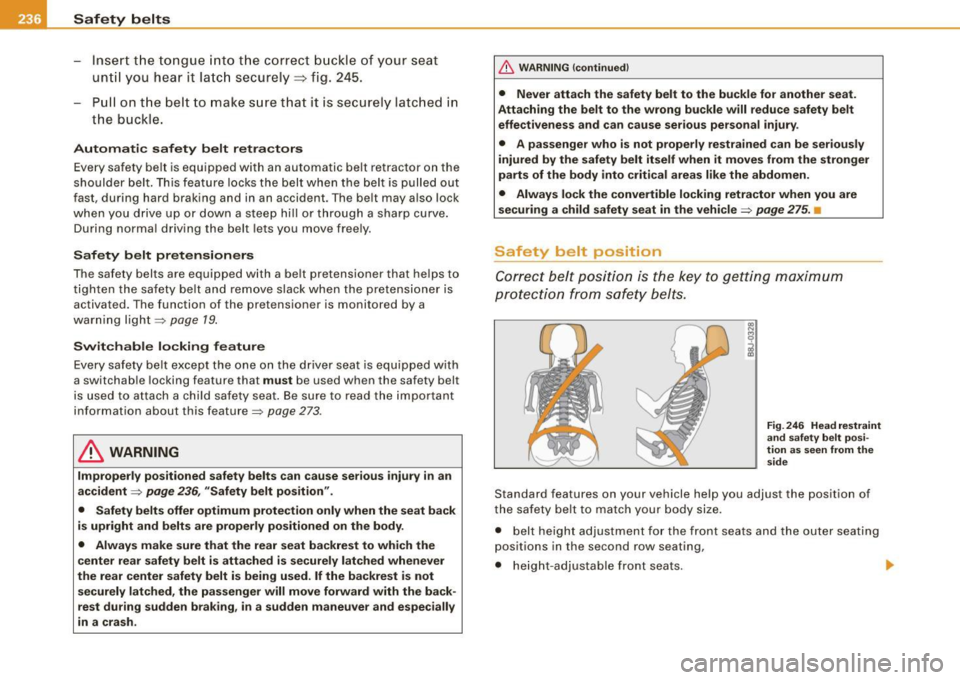
Safety belt position
Correct belt position is the key to getting maximum
protection from safety belts.
Fig. 246 Head restraint
and safety belt posi
tion as seen from the
side
Standard features on your vehicle help you adjust the position of
the safety belt to match your body size .
• belt height adjustment for the front seats and the outer seating
positions in the second row seating,
• height-adjustable front seats. .,
Page 298 of 426
llffl __ ln_ t _e_ ll-'"ig ...,_ e_ n_t _t_ e_ c_ h _ n_o _ l_o _,.g= y,_ __________________________________________ _
Vehicle stands for an extended period
If you do not drive your vehicle over a period of several days or
weeks, electrical components are gradually cut back or switched off.
This reduces energy consumption and maintains starting capability
over a longer period.
Take into consideration that when you unlock your vehicle, some
convenience functions, such as the remote key or power seat
adjustment, may not be available. The convenience functions will be
available again when you turn on the ignition and start the engine.
With the engine turned off
If you listen to the radio, for example, with the engine turned off or
use other MMI functions, the battery is being discharged.
If starting capability is jeopardized due to energy consumption, the
following warning appears in the MMI display:
Please start engine, otherwise system will switch off in
3 minutes.
The warning indicates that the system will be turned off automati
cally after 3 minutes. If you wish to continue using the functions,
you have to start the engine.
With the engine running
Although electrical energy is generated when the vehicle is being
driven, the battery can become discharged. This happens mostly
when little energy is being generated and a great deal consumed and the battery's state of charge is not optimal.
To bring the energy balance back into equilibrium, consumers
which require especially large amounts of energy are temporarily
cut back or switched off. Heating systems in particular require a
great deal of energy. If you notice, for example, that the heated
seats* or the heated rear window are not heating, they have been
temporarily cut back or switched off. These systems will be available
again as soon as the energy balance has been restored.
You will also notice that engine idle speed has been increased
slightly. This is normal and not a cause for concern. By increasing engine idle speed the additional energy required is generated and
the battery is charged. •
Driver notification in the instrument cluster
display
If battery power drops into the range where it can limit the ability of
the engine to start, this is shown in the instrument cluster display
with the following driver message:
C Low battery charge: battery will be charged while driving
This notification reminds you that the starting capability of the
engine may be limited. As soon as you start driving again, the
battery will be recharged and the notification will go out.
Driver notification appears and goes out again
If this driver notification appears after the ignition is turned on or
while driving and it goes out again after a while, the battery has
been adequately recharged.
Driver notification appears and does not go out again
If this driver notification appears after the ignition is turned on or
while driving and does not go out again, the battery's state of
charge is not in the optimal range. Starting ability is restricted. Have
the battery checked as soon as possible by an authorized Audi dealer or qualified workshop. •
Page 326 of 426
lll'ft __ C_ le_ a _ n_i_n ~g _ a_ n_ d __ p_r _o _t _e _c_ t_ i_o _n ___________________________________________ _
Engine compartment
Be especially careful when cle aning the engine compart
ment.
Alw ays sw itch off the ignition before cle aning the en gine ~ &.
Ple num p anel
Remove leaves from the p lenum pane l in front of the windshield
under the engine hood. This prevents the water drain ho les from
becoming blocked, and it prevents debris from entering the vehicle
inter ior through the hea ting and ventilation ducts .
Corrosion protection
The engine compartment and transmission have been corrosion
protected at the factory .
Good anti-corros ion treatment is very important, particularly in the
winter. If the vehicle is frequently driven on salt treated roads, the
en tire engine compartment and plenum pa nel sh ould be tho r
oughly c leaned at the end of winter and retreated to prevent salt
damage. A t the same time, the underside o f the vehicle shou ld be
washed as well.
If the engine compartment is cleaned at any t ime with grease
removin g solutions
3
l, or if you have the eng ine washed, the anti
corrosion treatment is almost a lways removed as well. It is therefore
essential to have a long -lasting corrosion protection reapplied to all
surfaces, seams, joints and components in the engine compart
ment .
& WARNING
Be awa re: The engi ne compa rtment of any moto r vehicle i s a
potenti ally ha zardou s area .
• Before workin g in the eng ine compartment , be sure to read the
inform ation
~ page 324 .
31 Use on ly the correct cleaning solutions. Never use gasoline or diesel fuel.
& WARN ING (continued )
• Before reaching into the front plenum panel , always remove the
ignition key . Otherw ise, the windshield wiper system could unin
tentionally be swit ched on , po ssibl y causing personal injury from
the moving wiper link age .
• Never re ach into the are a a round or touch the radiator fan . The
au xilia ry fan i s temper ature cont rolled and can swit ch on suddenly
- even when the ignition is off .
• Do not w ash, w ax or dry the engine with the engine run ning.
Moving or hot parts could injure you .
• Do not clean the underside of the cha ssis , fenders , wheel
cover s, or other hard to rea ch parts without protecting your hands
and arm s. You ma y cut your self on sh a rp -edged metal part s.
• Always read and heed all WARNINGS and other inform ation
~ poge312. •