fog light AUDI Q7 2009 Owner´s Manual
[x] Cancel search | Manufacturer: AUDI, Model Year: 2009, Model line: Q7, Model: AUDI Q7 2009Pages: 426, PDF Size: 97.13 MB
Page 29 of 426

Digital speedometer
Fig. 11 Display: Digital
speedometer
Current speed appears in the display . Speed is shown in 1 mph
measures (USA models) or 1 km/h measures (Canada models).
You can switch the display from miles to kilometers and vice versa
via the MMI. •
Open door or trunk lid warning
The pictogram alerts you when doors or the rear lid have
been left open.
Fig . 12 Display: open
door or rear
lid
warning
With the ignition switched on, the open door or rear lid warning illu
minates when at least
one door or the hood or the trunk lid is not
Con tro ls and eq uip
ment
Driver information display
closed. The symbol also shows you which door(s) or lid is not
closed.
In the illustration=> fig. 12 it is the driver's door, the left rear door
and the rear lid. As soon as all the doors, the hood, the rear lid and
the fuel filler cap are properly closed, the door and rear lid warning
turns off and the Driver Information System functions selected are
displayed again .•
Defective light bulb warning
The defective light bulb warning tells you when a vehicle
light bulb has become defective.
Fig. 13 Display: defec
tive light bulb warning
The defective light bulb warning monitors the function of the light
bulbs . If this symbol illuminates, a brake light, a turn signal (front
or rear), a headlight, the backup light, a fog light or a rear fog light
has failed.
& WARNING
• Light bulbs are pressurized and could explode while they are
being changed causing serious personal injury.
• Work with due care when handling the high-voltage section of
gas discharge (xenon) lights. Failure to do so could result in death
or serious injury . ..,
Vehicle care I I Technical data
Page 76 of 426

Clear vision
ambient brightness increases again, the low beams are turned off
again automatica lly => & .
In the
AUTO pos ition the low beams are switched off automatically
when the ignition is turned off .
L ight S ensor M alfu nction *
In the event of a ligh t sensor mal func tion, the drive r is notified in the
ins trument cluster display :
e. Automatic headlights /autom ati c w ipers defe ctive
For safety reasons the low beams are turned on permanently with
the switch in
AUTO . However , you can continue to turn the lights on
and off using the light switch . Have the light sensor checked as soon
as possible at an authorized Audi dealer or qualified workshop.
& WARNING
• Never use d ayt ime running lights to see where you are going.
The y are no t bright enough and will not let you see far enough
ahead for safety , espe cially at du sk or when it is d ark . Al way s
switch on the low beams at du sk or when it is dark .
• Automati c he adlights* are onl y intended to assist the driver .
They do not relieve the driver of his re sponsibility to check the
headlight s and to turn them on manually a ccording t o th e cur rent
light and visibility condit ion s. For example , fog and ra in cannot be
dete cted by the l ight sen sor s. S o alwa ys sw itch on the headlight s
under th ese weather condition s and wh en driv ing in the dark
t D .
• Cras hes c an happen when y ou cannot see th e road ahead and
when you cannot be seen by other motori sts.
- Alway s turn on the headlights s o that you can see ahead a nd
s o that others can see your c ar from the ba ck.
[ i ] Tips
• With the switch in AUTO front fog lights and rear f og lights
cannot be turned on in addition . • T
he light sensor * for headlight control is located in the rear view
mirror mount . Do no t apply any stickers to the windshie ld in this
area to prevent malfunctions or failures .
• I f you remove the ign itio n from the ign ition lock while the head
lights are still on, a bu zzer will sound as long as the driver's door is
open to remind you to turn off the lig hts.
• Always observe the specific local regulations for your ar ea as to
when to use you r lights .•
Adjusting exterior lighting
The functions are set in the MM/ .
Fig . 61 MM I display :
E x te rior lighting
- Press the [ CAR ] fu nct io n butto n.
- Selec t
Exterior lighting . The menu Exterior lighting
appears=> fig. 61.
C oming h om e*
T he
Com ing home function ensures that after turn ing off the igni
tion and op ening the driver's doo r
the vehicle periphery is il lumi
nated in the dark. In addition , the front fog lights, the tail lights and
the license plate light are turned on . On- time can be set fo r a period
from
O (off) to 60 seconds. .,,_
Page 77 of 426
Le avi ng hom e*
The Leaving home function ensures that when unlocking the vehicle
periphery is illuminated in the dark. In addit ion, the front fog lights,
t he tail lights and the licen se plate light are tu rned on . This func tion
can be turned on and off.
Daytime running light s
USA models :
On vehicles with xenon lights the daytime running
lights can be turned on or off using this function . On vehicles with
halogen lights , daytime running lights can be activated by your
authorized Audi dea ler .
Canada model s: The function cannot be turned off. It is activate d
automatically each time the ignition is turned on. This menu item is
shown "greyed out". •
Front fog lights }0
Fig. 6 2 Instru ment
pane l: light switch
The light switch must not be overturned past the stops in
either direction.
Switching on the front fog lights tD
- Tur n t he light switch to ;oo~ o r to io .
- P ull the light switch to t he first sto p G).
Con tro ls and eq uip
ment
Clear vision
When the front fog lights are on, the symbo l }0 next to the light
switch will illuminate .
[ i ] Tips
Wi th the switch i n AUTO front fog lights and rear fog lights cannot
be turned on in addition .•
Rear fog lights 0$
Fig . 6 3 Instrument
p anel : light switch
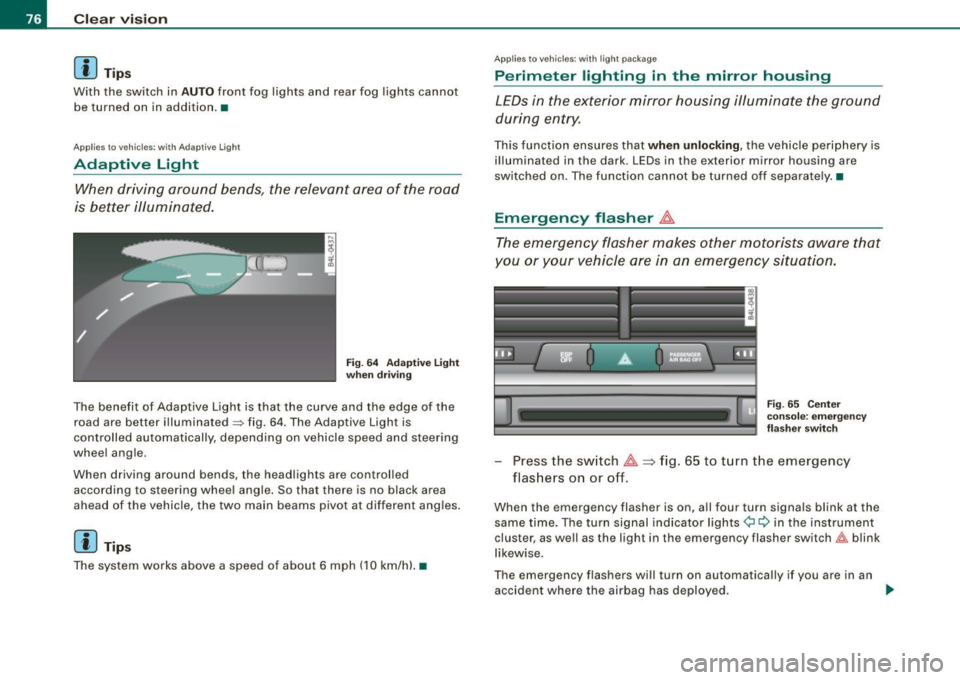
The ligh t switch must no t be overt urned pas t th e stops in
either direct ion.
- Tu rn t he ligh t sw itch to
;oo~ or to io .
- Pull the ligh t switch to t he second sto p (v.
When the rear fog lights are on, both the }O and symbols next to
the light switch wi ll i lluminate .
0 Note
The rear fog lights can distract dr ive rs beh ind you, so, they should
be turned on
only in cond itions of very poor visibility. Always
obse rve local regulations when u sing the rea r fog lights . ...
Vehicle care I I irechnical data
Page 78 of 426
Clear vision
[ i J Tips
With the switch in AUTO front fog lights and rear fog lights cannot
be turned on in addition.•
App lies to veh icles: with Adaptive Ligh t
Adaptive Light
When driving around bends, the relevant area of the road
is better illuminated.
Fig. 64 Adaptive light
when driving
The benefit of Adaptive Light is that the curve and the edge of the
road are better illuminated~ fig. 64. The Adaptive Light is
controlled automatically, depending on vehicle speed and steering
wheel angle.
When driving around bends, the headlights are controlled
according to steering wheel angle. So that there is no black area
ahead of the vehicle, the two main beams pivot at different angles.
[ i J Tip s
The system works above a speed of about 6 mph (10 km/h) .•
Appl ies to vehicles: with light package
Perimeter lighting in the mirror housing
LEDs in the exterior mirror housing illuminate the ground
during entry.
This function ensures that when unlocking, the vehicle periphery is
illuminated in the dark. LEDs in the exterior mirror housing are
switched on. The function cannot be turned off separate ly .•
Emergency flasher J1.
The emergency flasher makes other motorists aware that
you or your vehicle are in an emergency situation.
Fig. 65 Center
console: emergency
flasher switch
-Press the switch J1. => fig. 65 to turn the emergency
flashers on or off.
When the emergency flasher is on, all four turn signals blink at the
same time. The turn signal indicator lights¢ Q in the instrument
cluster, as well as the light in the emergency flasher switch&:, blink
likewise.
The emergency flashers will turn on automatically if you are in an
accident where the airbag has deployed.
~
Page 125 of 426
Warm and cold -______________ ....:...:...:..:..;______
Warm and cold
Climate control
Description
The air conditioner is fully automatic and is designed to
maintain a comfortable and uniform climate inside the
vehicle.
We recommend the following settings:
- Set the temperature to 72 °F (+22 °C).
- Press the [AUTO
I button.
With this setting, you attain maximum comfort in the least amount
of time. Change this setting, as desired, to meet your personal
needs .
The climate controls are a combination of heating, ventilation and cooling systems, which automatically reduce humidity and cool the
air inside your vehicle.
The air temperature, air flow and air distribution are automatically
regulated to achieve and maintain the desired passenger compart
ment temperature as quickly as possible.
The system automatically compensates for changes in outside
temperature and for the intensity of the sunlight entering the
vehicle. We recommend you use the
Automatic mode:::::, page 126
for year -round comfort.
Please note the following:
Turn on the air conditioner to reduce humidity in the vehicle. This
also prevents the windows from fogging up.
When the outside temperature is high and the air is very humid,
condensation from the evaporator may drip under the vehicle . Th is
is normal and does not indicate a leak.
Controls and equip
ment
If the outside temperature is low, the fan normally only switches to
a higher speed once the engine coolant has warmed up sufficiently.
The air conditioner temporarily switches off when you drive off from
a standstill using full throttle to save engine power.
The compressor also switches off if the coolant temperature is too
high, so that the engine can be adequately cooled under extreme
loads.
Air pollutants filter
The air pollutants filter (a combined particle filter and activated
charcoal filter) reduces or prevents outside air pollution (dust, or
pollen) from entering the vehicle. The air is also filtered in air recir
culation mode.
The air pollutants filter must be changed at the intervals specified in your Warranty
& Maintenance booklet, so that the air conditioner
can properly work.
If you drive your vehicle in an area with high air pollution, the filter
may need to be changed more frequently than specified in your
Audi Warranty
& Maintenance booklet . If in doubt, ask your autho
rized Audi Service Advisor for advice.
Key coded settings
The air conditioner settings selected are automatically stored and assigned to the key being used. When the vehicle is started, the air
conditioner automatically selects the settings assigned to that key.
This way every driver will maintain his/her own personal settings
and does not have to reset them manually.
If a different driver uses your key and changes the air conditioner
settings, the latest adjustments will erase and replace the settings
you have stored. _.,
I • •
Page 131 of 426

_________________________________________________ W_ a_ r_ m __ a_n_ d_ c_ o_ld _ __.911
Rear window defogger QW
The rear window defogger clears the rear wind ow of
condensation.
F ig . 138 Sw itc h for
re ar window d efogger
- Press t he QW switch to turn the rear window defogger o n
and off=> fig. 138 .
The rear window defogger works only when the eng ine is running .
T he light in the switch will illuminate when the defogger is on.
The rear window defogger will switch off automatically after a short time. The time the rear window defogger remains on will vary
depending on the outside temperature .
At very low outside temperatures, the rear window defogger can be switched on continuously by pushing the
[ffi) button for more than 2
seconds. This remai ns s tored unti l the ignition is switched off.
A rear window defogger that was switched on also remains stored
for 15 minutes after the igni tion is switched off . If the engine is
restarted within these 15 minutes, the rear window defogger is also
activated, depending on outside temperature. With a veh ic le that is
parked for a short time, the rear window defogger does not need to
be manua lly activated again.
Con tro ls and eq uip
ment
ffi For the sake of th e environm ent
Turn the defogger off when the rear window is c lear . When you save
e lectricity, you save fuel. •
Vehicle care I I Technical data
Page 151 of 426

___________________________________________________ O_ n_ t_h _e_ r_o _a_ d _ ___.BIII
& WARNING !continued )
• In order to prevent the vehicle from rolling back unintentionally
when starting in stop -and -go traffic , keep the brake pedal
depressed for a few se conds before driving off .
• When you leave the vehicle -eve n if only briefly -, switch off the
ignition and make sure to remove the ignition key. Also engage the
parking brake to prevent your vehicle from rolling unintentionally .
This particularly applies if ch ildren are left in the vehicle -danger
of accident! •
Cruise control
Switching the system on
The cr uise c ontro l syst em makes i t possible to drive a t a
c o ns tan t spee d star ting at 20 mph (30 km /h).
A ---....,;;
Con tro ls and eq uip
ment
-
Fi g. 15 7 Control lever
with set button
Fig . 158 D ispl ay:
Selected speed
P ull t he lev er t o po siti on G) => fig. 1 57 to sw itch the
sy stem on.
D riv e at th e s peed yo u wish to set .
P ress b utton
© to set th at speed.
T he display => fig. 158 wi ll show the set speed. The display may vary
d epend ing on the type o f dis play i n yo ur vehicle. The indi cator lig ht
CRUISE (US model)/ 0" (Canadian model) will a lso light up in the
instr ument clus te r.
& WARNING
• Always pay attention to traffic even when the cruise control is
switched on . You are always responsible for your speed and the
distance between your vehicle and other vehicles.
• For safety reasons, the cruise control should not be used in the
city, in stop -and -go traffic, on twisting roads and when road condi
tions are poor (such as ice , fog , gravel , heavy rain and hydro
planing ) -risk of accident.
• Turn off the cruise control temporar ily when entering turn
lanes, highway exit lanes or in constru ction zones.
• Please note that inadvertently "rest ing " your foot on the accel
erator pedal cau ses the cruise control not to brake . This is because
the cruise control is overridden by the driver's acceleration . ..
Vehicle care
I I irechnical data
Page 174 of 426
-Audi lane
assist --------------------
I Not ready: The yellow indicator light shows that the system is
turned on but unable to send a warn ing. This can be due to the
following:
• There are no boundary lines, or there is on ly one boundary line
present .
• The boundary lines are not detected (e.g. due to snow, dirt, wet
conditions or light shining into the camera lens).
• More than two boundary lines (such as at construction sites) are
located in the vehicle's lane.
• The vehicle's speed is below the speed needed to activate it,
which is about 40 mph (65 km/h).
• The lane is narrower than about 8 ft . (2.5 ml, or wider than about
16 ft. (5 ml.
• The curve is too sharp.
Notes on the instrument cluster display
When the lane assist turns off automatically, the instrument cluster
indicator goes out and one of the following messages appears on
the display:
Audi lane assist not available: Currently no sensor vision
This message appears when the camera can no longer function
because it cannot detect the boundary lines. This may be due to the
following :
• The exterior s ide of the camera viewing window=>
page 171,
fig. 183 is covered with dirt or ice. Clean this part of the windshield.
• The camera v iewing window is fogged up on the inside. In this
case, wait until the fog disappears before turning lane assist on
again.
• The system was unable to detect boundary lines over an
extended period of time due to road conditions (such as snow
covered lanes). Do not turn lane assist on again until the lines can
be more easily detected.
Audi lane assist not available
A temporary malfunction is preventing lane assist from operating .
Try turning on lane assist again a t a later time.
Audi lane assist: system fault
The system should be checked by an authorized Audi dealer or other
qualified workshop .
[ i ] Tips
• Make sure that the camera viewing window:::> page 171, fig. 183
is not covered by stickers or similar objects .
• Always keep the camera viewing window clean. This can usually
be done by operating the windshield wipers. •
Applies to vehicles: with lane assist
MMI settings
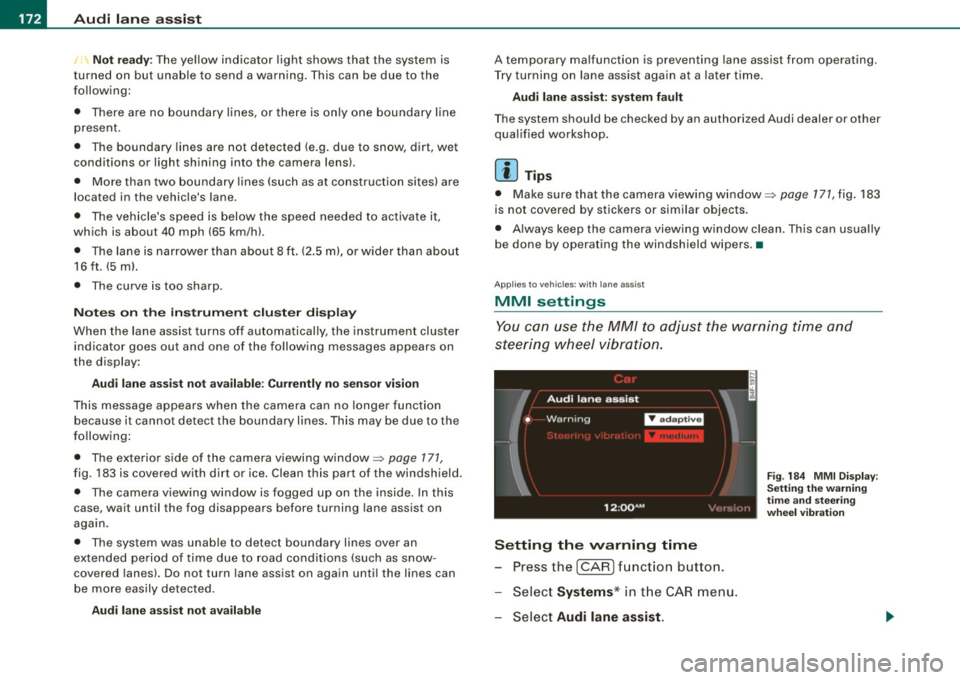
You can use the MM/ to adjust the warning time and
steering wheel vibration.
Setting the warning time
Press the I CAR] function button.
- Select
Systems * in the CAR menu .
- Select
Audi lane assist.
Fig. 184 MMI Display :
Setting the warning
time and stee ring
wheel vibration
Page 344 of 426
-~_C_ h_e _c _ k_ i_n ...:::g::;...._ a_n_ d_ f_ i_ll _in -'g:::;.._ ___________________________________________ _
& WARN ING (c o ntinued )
• Brake failure can re sult from old or inappr opriate brake fluid .
Ob serve the se precautio ns:
- Use only brake fluid that meets SAE specific ation J 1703 and
c onform s to Fed era l Moto r Vehi cle St anda rd 116. Al ways c heck
with your authori zed Audi dealer to make sure you are u sin g
the corre ct brake fluid. The correct typ e of brake fluid i s also
indicated o n the brake fluid reser vo ir .
- The br ake flu id mu st be ne w. Heavy u se of the brake s can
c au se a vapor lock if the brake fluid i s left in the s ystem too
long. Thi s can seriou sly affect the effi cien cy of the brake s as
w ell a s your safet y. Thi s could re sult in an acci dent .
0 Note
Brake fluid will damage the paint of your vehicle .
For the sake of the environment
Because of the problem of proper disposal of brake fluid as well as
the special too ls required and the necessa ry expertise, we recom
mend that you have the brake fluid changed by your authorized Audi
dea ler .•
Battery
General information
Under normal operating condi tions, the battery in your Audi does
not need any maintenance. With
high outside temperatures or long
daily drives we recommend that you have the e lectrolyte level
checked by an au thorized Audi dealer or qualified workshop . The
e lectrolyte level should also be ch ecked each time the battery is
charged ~
page 344.
Have the battery checked when you take your vehicle in for service .
Yo u are well advised to replace a battery that is o lder than 5 years .
With certain types of airbag dep loyment, the battery is discon
nected from the vehicle electrical system for safety reasons~
& in
"Repair, care and disposal of the airbags" on
page 255.
Disconnecti ng th e batt ery termin als
Some vehicle functions (power window regulators , for example) are
lost if the battery termina ls are disconnected. These functions have
to be relearned after the battery terminals are connected again . To
prevent this, the battery should only be disconnected from the
vehic le electrical sys tem when abso lutely necessary for repairs .
Vehicles not driven for long per iods
If you do not drive your vehicle ove r a period of several days or
weeks, electrical components are gradually cut back or switched off .
T his reduces energy consumption and maintains starting capab ility
over a longer period
~ page 295 .
Take i nto consideration that whe n you u nlock your vehicle, some
convenience functions, such as the master key remote function or
powe r seat adjustme nt, may not be ava ilable. The convenience
functions will be available again when you turn on the ignition and
start the engine .
Wint er op erati on
Duri ng the winter mont hs, batte ry capacity tends to decrease as
temperatures drop . This is because more power is also consumed
whi le star tin g, and the headlights, rear window defogger, etc ., are
used more often.
Avoid unnecessary power consumption, particular ly in city traffic or
when trave li n g o nly short dis tances . Let your authorized Audi dea ler
check the capacity of the vehicle battery before winter sets in
~ page 344. A we ll cha rged battery w ill not only preven t starting
problems when the weather is cold, but will also last longer . ..,_
Page 413 of 426

______________________________________________ A_ l_,_ p _h_ a_ b_e _t_ic _ a _ l _in _ d_e _ x __ _
Child safety lock
rear doors (powe r) .. ... .. ... ... .... 61
Child safety seats . ................. . 268
Convertible locking retractor .... ... 273
Danger of using child restraints in the front seat ...... .... .... ...... .. 243
How do I properly install a child safety
s e at in my vehicle? .. .... ... .... . 266
Installing .. .. .... ... ..... ...... .. 273
LATCH system ...... .. ... .. .. ... . 281
Safety instructions .. ... ....... ... 266
Cigar ette light er ... ... ... .. ... .... .. 117
Cleaning Alcantara (synthetic suede) ... .. ... 323
Engine compartment .. ...... .... . 324
Fabrics and fabric coverings ....... 319
Ins trument pane l ...... ........... 320
Int erior ... ....... .... .... ... .... 319
L eather .... .... ......... ........ 322
MMI display ..... .. ... ... .... .... 319
MMI terminal ...... ....... .... ... 319
Plastic and vinyl ......... .... ..... 316
Plas tic parts .. .. .... .... ... .. ... . 320
Safety belts .. .... ....... .... .... 323
Trim strips ... .... .... ... .... .... 315
trim strips .. ...... .... ..... ...... 316
Cleaning and pro tection .. .... ... ... .. 312
Climate control ..... .... .... ....... . 123
Synchronizing .. ...... ...... ..... 125
Warm and cold .. .... .... .... .... . 123
Climate controls Air distribution ... .... .... .... .... 127
Air outlets .... ... .... .... .... .... 130
Air outlets (rear) .... ........... ... 130
Controls and equip
ment Safety first
Air recirculation
...... .... .... .... 128 Starting engine ....... .. .. ... .... 144
AUTO (standard set ting) .. .... ..... 126 STOP button .. .. ... ... .... ..... .. 145
Basic settings .... .... ... .... ..... 134 Switching engine off ... ... ... ... .. 145
Blower ...... ... .... .... .... ..... 128 Switching on ignition ... .. .... .... 144
Controls . .... .... .... .... ... .... 125 Unlocking vehicle ...... ... .... .... . 62
Defrosting/defogging ...... ....... 127
Convertible child seats
Description .. ...... ... .... .... ... 123
How do I properly install a convertib le
ECON mode .... . .. .. ..... ... .... 126 child seat in my vehic le? ...... ... 269
ECON operation ........... ....... 134 Safety instructions ........ ........ 269
Energy manageme int .. .... .... .... 123
Convertible locking retractor
Heated seats, fron t .... ... ..... ... 136
Activating ........ .... ... .... .... 275
Key coded setting ........ ........ 123
Deactivating ... ... .... .... .... ... 276
Recirculation mode (automatic) ... .. 134
Using to secure a chi ld safety seat . 273,
Recommended settings .. ... .... .. 123 275
Residual heat ................... . 126
Coolant system ....... ... ........... 337
Setting the temper .ature .. ... ... .. . 127
Cooling box in glove compartment .... . 120
SETUP ...... ... .. .... .... .... ... 134
Synchronization ... .... .... .... ... 135 Cooling System
Expansion tank ... ..... .. .... .... . 338
Turning on and off ......... ... .... 126
Using climate control economically . 131 Cornering
light ....................... 76
Cruise control
Clock ......... .... . ...... ........ ... 14
Changing speed ............ .. .... 150
Closing Presetting your speed ........ ..... 150
Panoramic sliding sunroof .......... 68
Switching off ..... ... .... .... .... 150
Coat hooks ... .. .... .... ........ .... 121
Switching on ... .... ... ..... ... ... 149
Cold tire inflation pressur e ..... ... ... 351
Warning/indicator lights ........ .... 22
Compass mirror ........... ......... .. 89
See also Adaptive Cruise Control . ... 152
Compliance ......... ...... ... .. .... 404 Cruising range ......... ....... .. ..... 40
Consumer Information ........... 229, 401 Cupholder ........... ....... 103,114,115
Contacting NHTSA ... .... ... .... .... 229
Convenience key ..... ...... .... ... ... 61
D
Driver messages ... ... .... .. .. ... 146
Locking vehicle ... .... .... .... ..... 63
START button .................... 144 Damping
See Adaptive Air
Suspension .... ... 206
Vehicle operation Vehicle care Do-it-yourself service Technical data