parking brake AUDI Q7 2010 Owner´s Manual
[x] Cancel search | Manufacturer: AUDI, Model Year: 2010, Model line: Q7, Model: AUDI Q7 2010Pages: 390, PDF Size: 93.04 MB
Page 164 of 390
1111 ...... _A_ u_ t_o _m_ a_ t_ic _ t_ r_ a_ n_s _ m __ is_s_ , _·o _ n ____________________________________________ _
The selector lever must be in Nor P. If one of the driv ing positions is
eng aged a sa fety swi tch will p reven t the eng ine fr om being s tarted.
See also=>
page 125.
Before you move t he selecto r lever from t he P position, yo u m ust
a lw ay s a pply the brake ped al befo re a nd whi le de press ing the bu tton
in the handle of the selector lever.
& WARNING
• Unintended vehicle movement can cause serious injury.
- When the selector lever is in a driving position, the vehicle
may creep , even at idle speed. Therefore do not release the
parking brake or foot brake until you are ready to move,
because power is transmitted to the wheels as soon as a driving
position i s engaged .
- Do not accelerate while selecting a driv ing position . At this
time the engine must be at idle speed so that undue stre ss is
not placed on the clutches in the transmission .
- Remember: • even when stopped briefly with the automatic
transmission in "D", "S " or "R", engine power is being trans·
mitted to the wheels . Your vehicle could "creep " forward or
backward. When stopped, keep the brake pedal fully
depre ssed and use the parking brake if necessary to keep the
vehicle from roll ing .
• If the selector lever is unintentionally moved into N while you
are driving, take your foot off the accelerator pedal and wait for
the engine to return to idle speed before selecting a driving posi
tion .
• Never shift into "R" or "P " when the vehicle is in motion.
• Never get out of the d riv er 's seat when the engine is running.
• If you must get out of the vehicle, move the selector lever
securely into the P position and apply the parking brake firmly.
• If the engine must remain running, nev er have any driving
position engaged when checking under the hood. Make sure the
s e lector lever has securely engaged and is locked in "P " with the
& WARNING (co ntinued )
parking brake firmly set=> page 286, "Engine compartment".
Otherwise, any increa se in engine speed may set the vehicle in
motion, even with the parking brake applied. •
Selector Lever positions
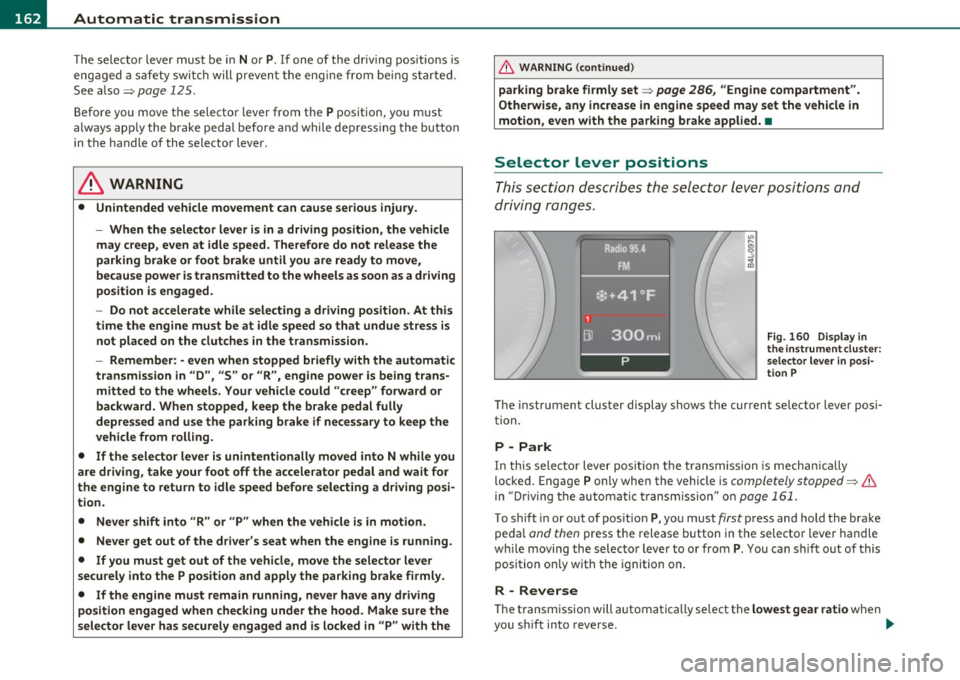
Thi s sec tion describes the select or le ver p osit io ns and
driving ranges.
Fig. 160 Di spl ay in
th e in strument clu ster :
s elect or lever in posi·
t ion P
The instrument cluster display shows the current se lector lever posi
t ion.
P -Park
In th is selector lever posi tion t he transmission is mecha nically
loc ked. Engage P only when th e vehicle is
completely stopped=> &
in "Driving t he automatic transm ission" o n page 161.
To shift in or out of pos ition P, yo u must first press and hold the brake
pe dal
and then press t he release button in the selector leve r handle
w hil e moving the selec to r lever to or from P. Y ou ca n shi ft out of this
position on ly w it h the ignition o n.
R -Reverse
Th e transm ission will automatica lly select the lowest gear ratio when
you s hift into reverse . _,,
Page 185 of 390
_____________________________________________________ H_ o_m_ e_ L_i_n _k_ ®_ • __ _
Homelink ®
Universal remote control
Applies to veh icles: w ith Hom eli nk ® universal remote control
General information
The Homelink ® feature can learn up to three radio
frequency codes for most current transmitters used for
operating garage doors, estate gates, home or outdoor
lighting systems, and other devices.
You must first program the Homelink ® transm itter before you can
use the system=>
page 184, "Programming the Home link® trans
mitter".
I n order to program the Homelink ® transmitter for devices utilizing
rolling code, a second person on a ladder who can safe ly reach the
garage door opener motor is recommended. It is also necessary to
locate the "learn" button on your garage door opener motor. Refer to
the operating instructions for the opener, as the location and color of
this button may vary by manufacturer.
You can still use the original remote control for the device at any
time.
& WARNING
• Never use the Homelink'"' transmitter with any garage door
opener that does have not the safety stop and reverse feature as
required by federal safety standards. This includes any garage
door opener model manufactured before Aprill, 1982.
• A garage door opener which cannot detect an object, signaling
the door to stop and reverse does not meet current federal safety
standards. Using a garage door opener without these features
increases risk of serious injury or death.
Controls and equip
ment Safety first
& WARNING
(continued)
• For safety reasons never release the parking brake or start the
engine while anyone is standing in front of the vehicle.
• A garage door or an estate gate may sometimes be set in
motion when the Homelink ® remote control is being
programmed. If the device is repeatedly activated, this can over
strain motor and damage its electrical components -an over
heated motor is a fire hazard!
• To avoid possible injuries or property damage, please always
make absolutely certain that no persons or objects are located in
the range of motion of any equipment being operated.
rn Tips
• If you would like more information on Homelink ®, where to
purchase the Homelink ® compatible products, or would like to
purchase the Homelink ® Home Lighting Package, please call toll
free: 1-800-355-3515.
• For Declaration of Compliance to United States FCC and Industry
Canada regulations=>
page 369. •
Vehicle care Technical data
Page 186 of 390

1111..__H_ o_m_ e_ L_ i _n_ k_ ® _______________________________________________ _
Applies to veh icles : w ith Homelin k® un iversa l remote control
Programming the Homel ink ® transmitter
The transmitter is programmed in two phases . For rolling
code transmitters, a third phase is also necessary .
111111
-
1111111
Fig. 180 Over head
console: Homelink ®
keypad
Fig. 181 F ront
bumper, dri ver side:
locat ion of transmitter
unit
Phase 1: progr amming th e overhead k eypad
1. Make sure your vehicle is within operating range of the
remote controlled garage door opener .
2. Set the parking brake~
& in "General information " on
page 183 .
3. Turn the ignition on . Do not start the engine! 4
. Press and hold the two outside Homelink ® buttons
G) and
@ for approximately 20 seconds until indicator light@
=> fig.
180 begins to flash . Then release both buttons . Do
not hold the buttons for longer than 30 seconds .
- This procedure only needs to be performed
once. It erases
the factory-set default codes and does not have to be repeated to program additional remote controls .
5. Press and hold the Homelink ® button
G) , @ or@ until
the indicator light@ starts flashing
slowly . Release the
button .
-The system will remain in programming mode for 5
minutes. Co to the front of the vehicle and proceed with
phase
2 .
Phase 2:
programming the bumper mounted transmit
ter
6. Hold the original r emote control at a distance between 0-
6 in.
(0 -15 cm) from the bumper below the appropriate
headlight for your vehicle => fig .
181 (use the shortest
distance possible) .
7. Aim the remote control just below the
driver side head
light .
8. Press and hold the activation button on the remote control.
- May be different in Canada . If so, press and re-press
(cycle) the activation button on yo ur remote control every
two seconds. .-,,
Page 274 of 390
Trailer towing
"---------------------------------------------------
in. WARNING
Anyone not properly restrained in a moving vehicle is at a much
greater risk in an a ccident . Never let an yone ride in y our car who i s
not prop erly wearing the re straints provided by Audi. •
Trailer towing tips
Important to know
Your vehicle handles differe ntly when tow ing a tra iler because of the
additiona l weight and different we ight distribution. Safety, perfor
man ce and economy w ill greatly depend on how ca refu lly yo u load
your trailer and operate your rig.
Be fore you actua lly tow your tra ile r, prac tice turning, stopp ing and
back ing u p in a n area away from traffic. Keep pract ic in g until you have
become completely familiar with the way your vehicle -trailer combi
nation behaves and responds .
Backing up is diff icult and requ ires pract ice. Backing up w ith a trailer
gene rally requires s teer ing a ction opposi te to th at when ba cki ng up
your vehicle witho ut a trailer.
Maintain a greate r d istance between your ve hicl e and the one in front
of yo u. You will need more room to stop . T o compensate fo r the
trai ler, you will need a larger than normal turning radius .
W hen p assing, remember that you c annot acceler ate as fast as yo u
normally wou ld because of the added load. Make sure yo u have
enoug h room to pass. After passi ng, allow plen ty of room fo r yo ur
tra iler before changing lanes again .
Avoid jerky starts, sharp turns or rapid lane changes .
[ i ] Tips
• Do not tow a trai ler d uring the brea k-in perio d of your vehicle. •
If you tow a tra iler, your Aud i may require more frequent mai nte
n an ce due to the ex tra load:::::>
page 366. •
Parking on a slope
Do not park on a slope with a trailer. If it cannot be
av oided, do so only after doing the following:
When parking:
- Apply the foot brak e.
- Have someone p lac e chocks un der bo th the vehicle and t he
traile r w he els .
- With c hoc ks i n place, slowly release the brakes u ntil the
wheel c hoc ks absorb t he load.
- Turn the w hee ls towards t he curb .
- A pply the parking brake.
- M ove th e selector le v er to
P.
When restarting after parking:
- A pply the foot brake .
- Start the engine .
- Mov e th e s elector lever to
D .
- Release the par king brake a nd s low ly pull o ut and away
fro m the w heel chocks.
- Stop a nd have someone retr ieve the w heel chocks .
(I) Tips
If you move the se lector lever of the a utomat ic t ransmiss ion to P
befo re applying t he par king br ake an d befo re blo cking the w heels, II-
Page 299 of 390
___________________________________________ C..:...._ h:....:e :....:c:..:. k.::..: i..:.. n .:..:g:!:....:: a....:. n..:.. d~ f:....:. i.:..ll :.:.i:....:n :.:g !....- _1!'11
Closing the engine hood
- Pull the hood down until the pressure from the struts is
reduced.
- Let the hood
drop down and latch in place. Do not try to
push it shut;
it may fail to engage=:> &.
& WARNING
A hood that is not completely latched could fly up and block your
view while driving.
• When you close the engine hood, check it to make sure the
safety catch has properly engaged. The hood should be flush with
the surrounding vehicle body parts.
• If you notice while driving that the hood is not secured prop
erly, stop at once and close it. •
Working in the engine compartment
Be especially careful whenever you work in the engine
compartment.
Whenever you must perform any work in the engine compartment,
for example checking and filling different fluids, there is a risk of injury, burns and accidents. To prevent personal injury always
observe the following WARNINGS. The engine compartment of any
vehicle is a hazardous area=>& .
& WARNING
To help avoid injury, before you check anything under the hood:
• Turn off the engine.
• Remove the ignition key.
• Apply the parking brake.
Safety first
& WARNING (continued)
• Move selector lever to "P" (Park).
• Always let the engine cool down. Hot components will burn
skin on contact.
• To reduce the risk of being burned, never open the hood if you
see or hear steam or coolant escaping from the engine compart
ment. Wait until no steam or coolant can be seen or heard before
carefully opening the hood.
• Keep children away from the engine compartment.
• Never spill fluids on hot engine components. They can cause a
fire. • Never touch the radiator fan. The auxiliary electric fan is
temperature controlled and can switch on suddenly.
• Never open the coolant reservoir cap when the engine is still
warm. The coolant system is pressurized and hot coolant could
spray out.
• Protect your face, hands and arm from steam or hot engine
coolant by placing a thick rag over the cap when you open the
coolant reservoir.
• If work on the fuel system or the electrical system is necessary:
- Always disconnect the battery.
- Never smoke or work near heaters or open flames. Fluids in
the engine compartment could start a fire.
- Keep an approved fire extinguisher immediately available.
• To avoid electrical shock and personal injury while the engine is
running or being started, never touch:
-Ignition cables
- Other components of the high voltage electronic ignition
system.
• If you must perform a check or repair with the engine running:
- First, fully apply the parking brake, move selector lever to
"P" (Park). .,
Vehicle care Technical data
Page 341 of 390

_____________________________________________ W __ h_a_ t_ d_o_ I_ d_o _ n_ o_ w _ ? __ _
& WARNING (continued)
-Never store the inflatable spare tire or jack and tools in the
passenger compartment.
- Always store all jacking equipment, tools, and the inflatable
spare tire in the luggage compartment.
- Tighten the knurled retaining screw for the inflatable spare
tire securely.
0 Note
• The inflatable spare tire has been developed specifically for this
vehicle model. It must not be exchanged or used for other vehicle
models . Similarly, inflatable tires from other vehicle models must
not be used.
• Normal summer or winter tires must not be installed on the inflat
able tire rim. •
Inflating inflatable spare tire
-Remove the compressor from the luggage compartment
~ page 338, fig. 250.
- Unscrew the valve stem from the spare tire.
- Screw the tire filler hose from the compressor firmly onto
the valve of the spare tire.
- Insert the plug from the compressor into a socket of the
vehicle ~
page 104.
- Switch the compressor on .
- Let the compressor run until it has reached SO PSI (3.5
bar). Switch the compressor off after running for
12 minutes at the most - danger of overheating!
Safety first
& WARNING
The compressor and the tire filler hose can become extremely hot
while they are running · danger of burns!
0 Note
Switch the compressor off after running for 12 minutes at the most
danger of overheating! Allow the compressor to cool down for a few
minutes before you use it again.
[ i] Tips
The compressor must not be connected to the cigarette lighter
socket, as this socket does not provide the required power.•
Changing a wheel
Before changing a wheel
Observe the following precautions for your own and your
passenger's safety when changing a wheel.
- After you experience a tire failure, pull the car well away
from moving traffic and try to reach
level ground before
you stop ~& -
- All passengers should
leave the car and move to a safe
location (for instance, behind the guardrail)~ &.
- Engage the
parking brake to prevent your vehicle from
rolling unintentionally~ &.
- Move
selector lever to position P ~ & .
- If you are tow ing a trailer: unhitch the trailer from your
vehicle. ..,_
Vehicle care Do-it-yourself service Technical data
Page 342 of 390
111.___W_ h_ a_t _ d_ o_ I_d_ o_ n_o _w_ ? ____________________________________________ _
-Block the diagonally opposite wheel with the folding
chocks or other objects.
- Take the
jack and the inflatable spare tire out of the
luggage compartment =>
page 336.
& WARNING
You or your passengers could be injured while changing a wheel if
you do not follow these safety precautions:
• If you have a flat tire, move a safe distance off the road. Turn
off the engine, turn the emergency flashers on and use other
warning devices to alert other motorists.
• Make sure that passengers wait
in a safe place away from the
vehicle and well away from the road and traffic.
• To help prevent the vehicle from moving suddenly and possibly
slipping off the jack, always fully set the parking brake and block
the wheel diagonally opposite the wheel being changed with the
folding chocks or other objects. When one front wheel is lifted off
the ground, placing the Automatic Transmission in "P" (Park) will
not prevent the vehicle from moving.
• Before you change a wheel, be sure the ground is level and
firm. If necessary, use a sturdy board under the jack.
• After installing the inflatable spare tire, make sure that you
replace the flat tire/wheel in its storage area properly and tighten
the knurled retaining screw securely. •
Changing a wheel
When you change a wheel, follow the sequence described
below step-by-step and in exactly that order .
1. Activate the vehicle jack mode (only vehicles with Adaptive
Air Suspension) =>
page 180.
2. Remove the decorative wheel cover*. For more details see
also =>
page 341, "Decorative wheel covers" or
=>
page 341, "Wheels with wheel bolt caps".
3. Loosen the
wheel bolts=> page 342.
4. Locate the proper mounting point for the jack and align
the jack below that point=>
page 342.
5. Lift the car with the jack=> page 342.
6. Remove the wheel with the flat tire and then install the
inflatable spare tire=> page 344.
7. Tighten all wheel bolts lightly.
8.
Lower the veh icle with the jack .
9. Use the wheel bolt wrench and
firmly tighten all wheel
bolts =>
page 342.
10. Replace the decorative wheel cover*.
11. Deactivate the vehicle jack mode (only vehicles with
Adaptive Air Suspension)=>
page 180.
& WARNING
Always read and follow all WARNINGS and information:::::, & in
"Raising the vehicle" on
page 342 and=> page 345. •
After changing a wheel
A wheel change is not complete without the doing the
following.
- Store and secure the wh eel you replaced in the spare
wheel well.
- Replace the tools and the jack in their proper location .
Page 345 of 390
_____________________________________________ W __ h_a _ t_ d_o_ I_ d _ o_ n_o_ w_ ? _ ___._
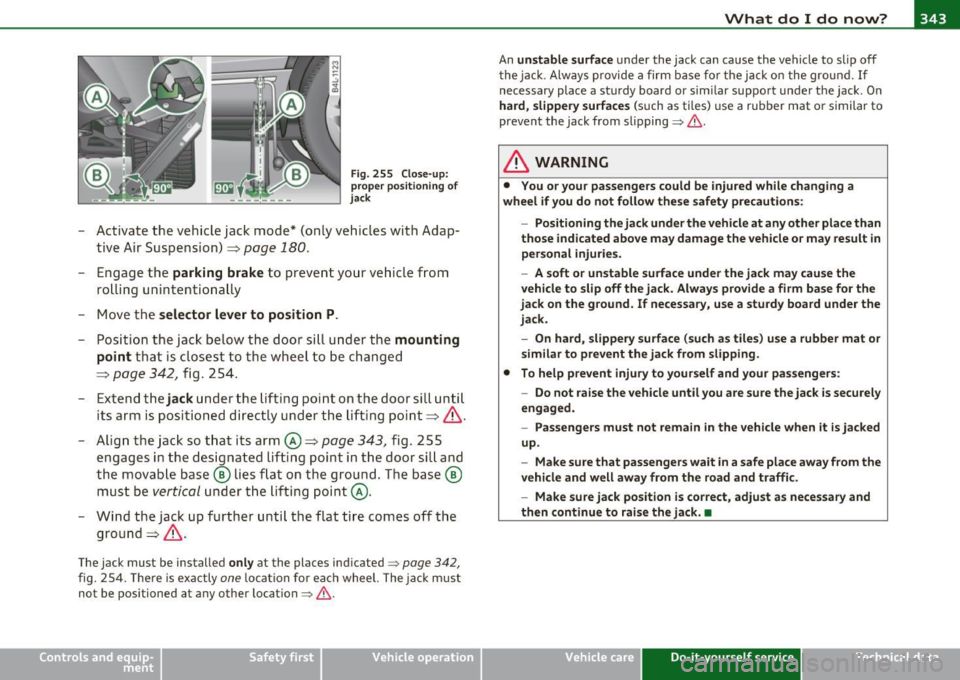
Fig. 255 Close-up:
proper positioning of
jack
-Activate the vehicle jack mode* (only vehicles with Adap
tive Air Suspension) =>
page 180.
- Engage the parking brake to prevent your vehicle from
rolling unintentionally
- Move the
selector lever to position P.
- Position the jack below the door sill under the mounting
point
that is closest to the wheel to be changed
=>
page 342 , fig. 254.
- Extend the
jack under the lifting point on the door sill until
its arm is positioned directly under the lifting point=>&.
- Align the jack so that its arm©=>
page 343, fig. 255
engages in the designated lifting point in the door sill and
the movable base® lies flat on the ground. The base ®
must be
vertical under the lifting point@.
- Wind the jack up further until the flat tire comes off the
ground =>& .
The jack must be installed only at the places indicated=> page 342,
fig. 254. There is exactly one location for each wheel. The jack must
not be positioned at any other location=>& .
Vehicle OP-eration
An unstable surface under the jack can cause the vehicle to slip off
the jack . Always provide a firm base for the jack on the ground. If
necessary place a sturdy board or similar support under the jack . On
hard, slippery surfaces (such as tiles) use a rubber mat or similar to
prevent the jack from slipping=>&.
& WARNING
• You or your passengers could be injured while changing a
wheel if you do not follow these safety precautions:
-Positioning the jack under the vehicle at any other place than
those indicated above may damage the vehicle or may result in personal injuries.
- A soft or unstable surface under the jack may cause the
vehicle to slip off the jack. Always provide a firm base for the
jack on the ground. If necessary, use a sturdy board under the
jack.
- On hard, slippery surface (such as tiles) use a rubber mat or
similar to prevent the jack from slipping.
• To help prevent injury to yourself and your passengers:
-Do not raise the vehicle until you are sure the jack is securely
engaged.
- Passengers must not remain in the vehicle when it is jacked
up.
- Make sure that passengers wait in a safe place away from the
vehicle and well away from the road and traffic.
- Make sure jack position is correct, adjust as necessary and
then continue to raise the jack. •
Vehicle care Do-it-yourself service iTechnical data
Page 355 of 390
_____________________________________________ E_ m___;, e_r-=g ~ e_ n_c,_:!y:.__: s_i:..:t ..:..u :..:a;;,. t.:.; i...: o :..: n...:..:. s _ __,J_
& WARNING (continued)
• Before you check anything in the engine compartment, always
read and heed all WARNINGS~
page 286, "Engine compart
ment".
0 Note
• Applying a higher voltage booster battery will cause expensive
damage to sensitive electronic components, such as control units,
relays, radio, etc.
• There must be no electrical contact between the vehicles as other
wise current could already start to flow as soon as the positive(+)
terminals are connected.
[I] Tips
• The discharged battery must be properly connected to the
vehicle's electrical system . When jump starting or charging the
battery, never connect the negative ground cable to the battery nega
tive post because the battery manager system must be able to detect
the battery's state of charge. Always connect the negative ground
cable to the negative ground post of the battery manager control
unit. •
Vehicle OP-eration
Use of jumper cables
Make sure to connect the jumper cable clamps in exactly
the order described below!
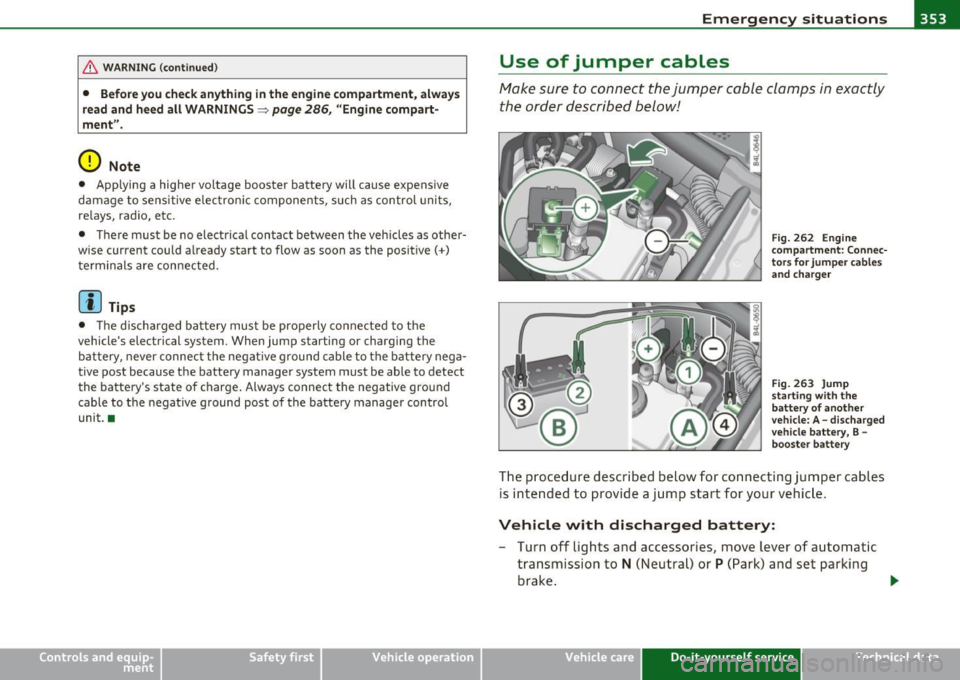
Fig. 262 Engine
compartment: Connec
tors for jumper cables and charger
Fig. 263 Jump
starting with the
battery of another
vehicle: A -discharged
vehicle battery, B -
booster battery
The procedure described below for connecting jumper cables
is intended to provide a jump start for your vehicle.
Vehicle with discharged battery:
- Turn off lights and accessories, move lever of automatic
transmission to
N (Neutral) or P (Park) and set parking
brake.
~
Vehicle care Do-it-yourself service iTechnical data
Page 375 of 390
Alphabetical index -________________ fWI
Alternator Auto-Check Control ..... .. .. .... ...... 27 Replacing the battery .. .... .. .. .. . 312
Malfunction ............. ........ . 29 Automatic belt retractor ............. 203 State of charge
.................. 259
Ambience lighting Lighting profiles ................. . 71
Anti -freeze
See Engine coolant system ......... 304
Anti-glare inside day-night mirror ... 77, 78
Anti -lock brake system
How the ABS system works ......... 256
Warning/indicator lights ... .. .... .. 19
Anti-S lip Regulation System (ASR)
How the system works ... .... .. .. . 254
Anti-theft systems
Anti-theft alarm system ........ .. .. 55
Electronic immobilizer ............. 43
Approach/departure angle ............ 266
Ashtray . ............. .. .. .. .. .... . 103
ASR How the Anti-Slip Regulation System works . ..... ... ... .. .. ......... 254
Asterisk What does it mean when something is
marked with an asterisk? ........... 6
Audi braking guard .................. 149
Error messages ............... ... 151
Settings ................ ..... ... 15 1
Status messages ................. 151
Switching on and off .............. 151
Audi Service Repair Manuals and Literature
366
AU TO mode
AC climate contro ls ...... .... .. .. . 112
Auto Safety Hotline .... ... ... ....... 197
Controls and equip
ment Safety first
Automatic car wash
See Washing
.................... 275
Automatic mode Four-zone automatic comfort air
conditioning ........... ...... .. 117
Automatic Sh ift Lock (ASL) ............ 163
Automatic transmission
6-speed automatic transmiss ion .. .. 161
Automatic Shift Lock (ASL) ......... 163
Driving ......................... 161
Dynamic shift program ............ 164
Emergency release for selector lever . 166
Fail-safe mode ................ ... 166
Ignition key safety lock .... ... .. .. . 125
Kick-down . ...... .. .. .. .. ....... 164
Manual shift program .. .. .. .. .. .. . 165
Selector lever ............ ........ 162
Shift buttons .................... 166
Steering wheel with tiptronic ® .... .. 166
Average speed ....................... 3 7
Avoid damaging the vehicle ........... 263
B
Bass box ... .. .. ................. .. 337
Battery . .. .. .. .. .. ........ ......... 308
Battery location .. ... ............. 309
Charging ................ .. ... ... 311
Important warnings when working on the battery . .. .... ....... ..... .. ... 309
Jump start ing ................. ... 352
Low . .. .... .. .. .... ... ...... .... 259 Voltage
............. .... ... ...... 33
Winter operation ............... .. 308
Work ing on the battery ............ 309
Before driving .. .... .. ...... ....... . 189
Blended gasoline . .. .. ...... ....... . 287
Body cavity sealing .................. 280
Booster seats .................... .. 239
Brake ass istant . .. .... .............. 257
Brake booster ..................... . 256
Brake fluid Changing the brake fluid ........... 308
Checking the brake fluid level ....... 307
Reservoir ...................... . 307
What is the correct brake fluid level? . 307
What should I do if the brake fl uid wa rning
light comes on? ... .. .. .. ........ 307
Brake light
Defective .... .................... 24
Brake system ..... .......... ...... .. 307
Anti -lock brake system ............. 19
Brake fluid .. ...... ...... ....... . 307
Brake fluid specificat ions for refill and
replacement ................. .. 308
Brake pads .. .. ................ .. 262
General information ............ .. 255
How does moisture or road salt affect the
brakes? . ...................... 255
Malfunction ........ ...... ...... .. 29
Parking b rake .................... 129
Warning/indicator lights ..... .. .. .. 20
Worn brake pads symbol ........... 34
Vehicle operation Vehicle care Do-it-yourself service Technical data