tow AUDI Q7 2010 Owner´s Manual
[x] Cancel search | Manufacturer: AUDI, Model Year: 2010, Model line: Q7, Model: AUDI Q7 2010Pages: 390, PDF Size: 93.04 MB
Page 98 of 390
Seats and storage
Applies to veh icles : w ith cargo net
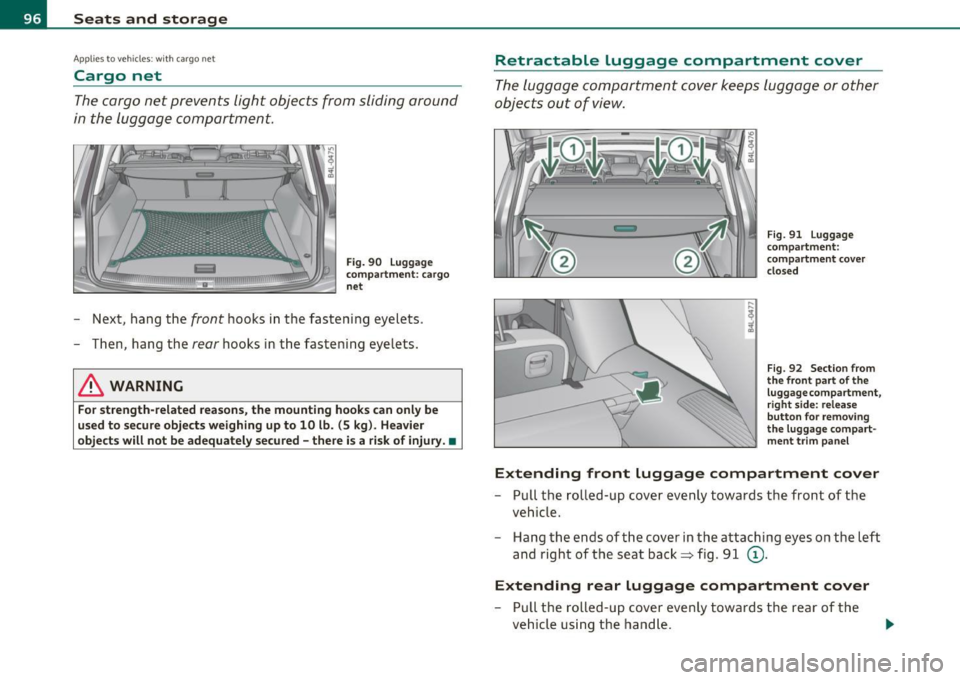
Cargo net
The cargo net prevents light objects from sliding around
in the luggage compartment.
Fig. 90 Luggage
compartment: cargo
net
- Next , hang the front hooks in the fastening eyelets .
- Then, hang the
rear hooks in the fastening eyelets.
& WARNING
For strength-related reasons, the mounting hooks can only be
used to secure objects weighing up to 10 lb. (5 kg). Heavier
objects will not be adequately secured -there is a risk of injury. •
Retractable luggage compartment cover
The luggage compartment cover keeps luggage or other
objects out of view.
Fig. 91 Luggage
compartment:
compartment cover
closed
Fig. 92 Section from
the front part of the
luggage compartment,
r ight side: release
button for removing
the luggage compart
ment trim panel
Extending front Luggage compartment cover
- Pull the rolled-up cover evenly towards the front of the
vehicle.
- Hang the ends of the cover in the attaching eyes on the left
and right of the seat back~ fig . 91
(D .
Extending rear Luggage compartment cover
- Pull the rolled-up cover evenly towards the rear of the
vehicle using the handle .
I})-
Page 101 of 390
Applies to veh icles : w ith ski sac k
Ski sack
The ski sack allows a maximum of 4 pairs of skis or 2
snowboards to be carried inside the vehicle.
Loading
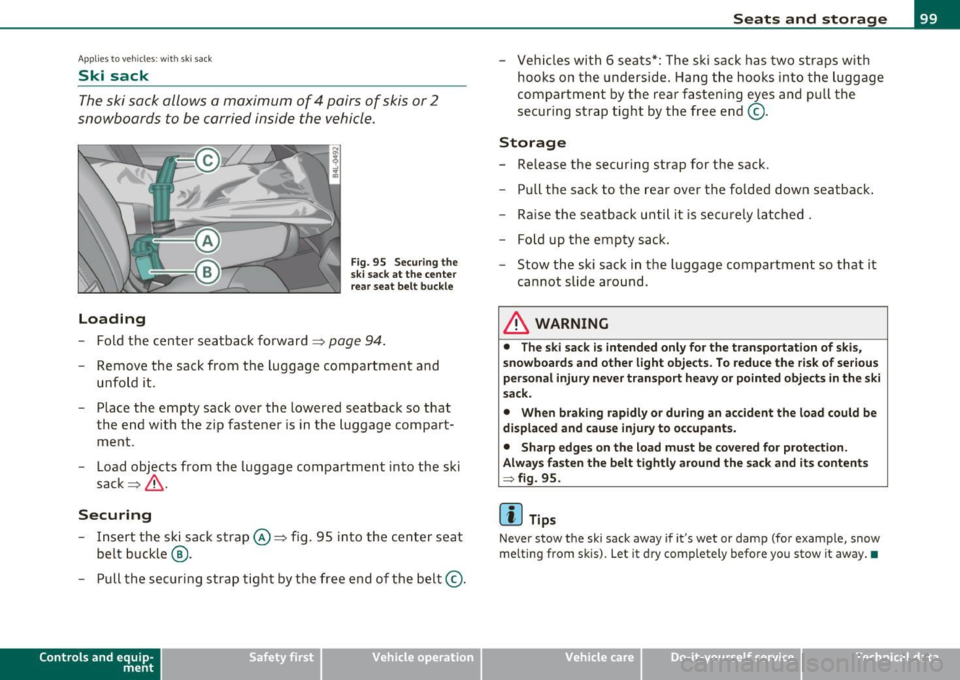
Fig. 95 Securing the
ski sack at the center
rear seat belt buckle
- Fold the center seatback forward==> page 94.
-Remove the sack from the luggage compartment and
unfold it.
- Place the empty sack over the lowered seatback so that the end with the zip fastener is in the luggage compart
ment .
- Load objects from the luggage compartment into the ski
sack ==>& .
Securing
- Insert the ski sack strap©==> fig. 95 into the center seat
belt buckle @.
- Pull the securing strap tight by the free end of the belt ©.
Con tro ls a nd e quip
m en t Vehicle
OP-eration
Seats and storage
-Vehicles with 6 seats*: The ski sack has two straps with
hooks on the underside. Hang the hooks into the luggage
compartment by the rear fastening eyes and pull the
securing strap tight by the free end ©-
Storage
- Release the securing strap for the sack.
- Pull the sack to the rear over the folded down seatback.
- Raise the seatback until it is securely latched .
- F old up the empty sack.
- Stow the ski sack in the luggage compartment so that it
cannot slide around .
& WARNING
• The ski sack is intended only for the transportation of skis,
snowboards and other light objects. To reduce the risk of serious
personal injury never transport heavy or pointed objects in the ski
sack.
• When braking rapidly or during an accident the load could be
displaced and cause injury to occupants.
• Sharp edges on the load must be covered for protection.
Always fasten the belt tightly around the sack and its contents
:::} fig. 95.
(I] Tips
Never stow the ski sack away if it's wet or damp (for example, snow
melting from skis). Let it dry completely be fore you stow it away. •
Vehicle care Do-it-yourselt service iTechnical data
Page 128 of 390

-L~O~n~t:_!h~e=....!:r~o~a~d~ --------------------------------------------
- Turn the ig nition key to position (D -the glow plu g i nd i
cator lig ht
~ ill um inates when t he g low plug system is
act ive.
- When the indica tor light
'1.., swi tches off, turn the ignition
k e y to position @ but do not p ress the acce lerator pe dal.
- Re lease the ignition key once the e ngi ne starts. The
s ta rter m ust not conti nue r unning .
A cold engine may sound loud after it has been started . This is due to
t he hydra ulic valves building up o il pressure . This is norma l an d is not
a need for concern .
If the engine does not start immediately, stop trying after 10 seconds
and then try to rest art the engi ne about 30 seco nds la ter.
Glow plug system*
Diesel engines are eq uipped with a glow p lug system whose
preheating t ime is controlled
by the coo lant and outs ide tempera
ture. Sta rt the engi ne
immediat ely after the glow pl ug ind icator lig ht
switches off.
Th e g low pl ug indica tor light w ill on ly ill uminate fo r approximately 1
second when the engine is warm or the outside temperature is higher
t han 46 ° F (8 °C). That means you can sta rt the eng ine
immediately .
& WARNING
Never start or let the engine run in a confined or enclosed area.
Exhaust fumes from the engine contain carbon mono xide, a color
le ss and odorless gas. Carbon monoxide can be fatal if inhaled .
• Never leave the engine idling unattended. An unattended
vehicle with a running engine poses a danger of person al injury or
theft.
0 Note
• Avoid high e ng ine speeds, fast a cce le ration or heavy eng ine loads
w hile the engine is still co ld. This co uld damage the engine .
• The eng ine ca nnot be sta rted by p ush ing or tow ing the veh icle.
'ii? For the sake of the environment
T o avoid unnecessa ry engine w ea r and to reduce exhaust em iss ions,
do not let your vehicle stand and warm up . Be ready to drive off imme
diately after sta rting yo ur vehicle . M aintain mode rate speed u ntil the
eng ine is complete ly warm . Remember, the engine performs best at
operat ing temper ature. •
Stopping the engine
- Tur n the ign it ion key to position @ ==> page 125, fig. 12 2.
& WARNING
• Never turn off the engine until the vehicle has come to a
complete stop .
• The brake booster and servotronic only work when the engine
i s running . With the ignition turned off, you have to apply more
force when steering or b raking. Since you cannot stee r and stop
normally, this can lead to accidents and serious injuries.
• The radi ator fan can continue to run for up to 10 minute s even
after you have turned off the engine and removed the ignition key.
The radiator fan can also turn on again if the engine coolant heats up because of intense sunlight or heat build-up in the engine
compartment. ..,,
Page 130 of 390

1111..__0_ n_ t_h _e_ r_o _ a_ d _________________________________________________ _
0 Note
• Avoid high eng ine rpm, full thrott le and heavy engine loads unt il
the eng ine has reached operating tempe ratur e -othe rwise you risk
eng ine damage.
• T he engine cannot be started by p ushing or tow ing the vehicle.
dr iving right away. In this way yo u avoid unnecessary emiss io ns.
(I] Tips
If you open the drive r's door when the ignition is switched on, a
bu zzer sounds and the message
Ignit ion is on appears in the instru
me nt cl uste r display. Please swi tch t he ig nition off. •
Applies to ve hicle s: with Co nve nie n ce ke y
Switching engine off with the !STOP] button
-Bring your vehicle to a comp lete stop .
Fig. 124 C onv enience
k ey:
ENGINE STO P
bu tt on
- Move the se lector lever to the P or N position.
- P ress the [S T OP] button ~ fig . 12 4.
Pressing the (S T OP] button once switches off the engine and the igni
t ion .
If you press the I ST OP I bu tto n ag ain for more tha n 1 second,
the steering is loc ked, provided that the selector lever is in the P posi
tion =>& .
Emergency OFF function
If necessary, the en gine can be sw itched off w ith the se lec tor lever in
the
R, Dor S positions . To do so, step on the brake pedal and press
and hold t he [STOP) but ton (veh icle speed mus t be less than
6 mph
/ 10 km/h .
& WARNING
• Never turn off the engine until the vehicle has come to a
c omplete stop.
• The brake booster and servotronic only work when the engine
i s running. With the ignition turned off , you have to apply more
force when steering or b raking. Since you cannot steer and stop
normally, this can lead to accident s and seriou s injuries.
• For safety rea sons , you should always park your vehicle with
the selector lever in P. Otherwi se, the vehicle could inadvertently
roll away.
• After the engine has been switched off, the radiator fan can
continue to
run for up to 10 minutes -even with the ignition
switched off . It can al so swit ch on again after some time if the
coolant temperature r ises as the result of a heat buildup or if the
engine i s hot and the engine compartment is additionally he ated
by the sun's rays.
0 Note
If the eng ine has bee n under heavy load for an extended period, heat
builds up in the engine compartment after the engine is switched off
- there is a risk of damaging the eng ine. Allow the engine to run at idle
for abo ut 2 min utes befo re switching it off .•
Page 132 of 390

IIIIL-_O.::...:. n.:....: t:.:.h.:.. e::....: r...: o:.. a .::..: d,;__ ________________________________________________ _
Applying parking brake
- Press the pedal down forcefully=> page 129, fig. 125 @
in the direc tion of the a rrow.
Releasing parking brake
- Pull the handle to the rear @in the d irection of the arrow
=> & .
If yo u shou ld drive off w it h the pa rking brake still set, a warning tone
w ill sou nd and the following will appear in t he instrument cluste r to
remind you to release the parking brake:
Parking brake i s applied
The park ing brake warning comes on only after you have driven for
longer than 3 seconds and fas ter than 5 mph (5 km/h).
Th e parking b rake wa rni ng light
:Ill , (USA)/ © (CON ) illuminates when
the parking brake is set and you switch on the ignition .
& WARNING
Always release the pa rking brake completely . A partially engaged
brake will overheat the rear brakes, reduce th eir effectivene ss and
c ause ex cessive we ar. This could lead to brake failure and an acci·
dent .
0 Note
Only af ter the veh icle h as come to complete stop, sho uld you firmly
set the park ing brake and move the se lector lever into "P". •
Parking
To p re vent a p arked vehicle f ro m rolling away, th ere ar e
a fe w things you sh ould do.
When you park your vehicle, do the following
- Stop the veh icle using the brake pedal.
- Apply the pa rking brake firm ly .
- Mov e the selector lever i nto the
P posi tion =>& .
- Switch o ff the e ngi ne and remove t he ignition key from
the ig nition loc k.
When you park your vehicle on hills, do the
following
- Stop the veh icle us ing t he brake pedal.
- Apply the par king b rake firm ly .
- If you are par king h eaded downhill , turn th e fro nt wheels
toward th e curb.
- If you are parking headed
uphill , turn the front wheels
away from the cu rb .
- M ove the selector lever i nto the
P position.
- Swit ch off t he engine and remove t he ig nition key from
the ignit ion loc k.
& WARNING
This i s how you can reduce the risk of injury when leaving your
vehicle.
• Never park the vehicle where it can come in contact with dry
grass, spilled fuel or any othe r flammable materials.
Page 135 of 390
On the road -
----------------
Change speed in increments of 1 mph (1 km/h) by lightly pressing the
lever. If you keep the lever pressed down, you w ill alter your speed in
5 mph (10 km/h) increments.
You can also press the accelerator pedal down to increase your speed,
e .g . if you want to pass someone. The speed you saved earlier will
resume as soon as you release the accelerator pedal.
If, however, you exceed your saved speed by 5 mph (10 km/h) for
longer than 5 minutes, the cruise control will turn off temporarily .
The symbo l will go out but the saved speed will be retained. •
Presetting your speed
You can preset your desired speed while the vehicle is not
moving.
- Turn on the ignition.
- Pull lever into position
(D => page 132, fig. 126.
- Press the lever in the 0 or O direction to increase or
decrease your speed .
- Re lease the lever to save that speed .
This function makes it possible, for example, to save the speed you
want befo re driving on the h ighway . Once on the h ighway, act ivate
the cruise control by pulling the lever toward
(D. •
Switching the system off
Temporary deactivation
- Press the brake pedal, or
- Press the lever into position@ (not clicked into place)
=> page 132, fig. 126, or
Controls and equip
ment Safety first
-
Drive for longer than 5 m inutes at more than 5 mph
(10 km/h) above the stored speed.
Sw itching off completely
- Press lever into position@ (clicked into place), or
- Switch the ignition off.
The system retains the saved speed if you deactivate the cruise
cont rol tempo rar ily. To resume the saved speed, release the brake
pedal and pull the lever to position
(D.
Switching the ignition off e rases the saved speed.
& WARNING
You sho uld onl y retu rn to the saved sp ee d if it i s not t oo fast f or
the cu rrent tr affic condition s -ris k of an accident! •
Vehicle care Technical data
Page 136 of 390
IIIIL---=..A...;:.=: d:...:a ;;.i:p;;;... t.=. i:....: v :....: e::.....: C::.: r:....: u:;.:....: is:...e::.....: C;;;... o.::....:.. n:....:t :.:. r:....:o :....: l;__ ________________________________________ _
Adaptive Cruise Control
Speed and distance control system
Applies to veh icles : w it h Adap tive Cru ise Cont ro l
Description
Th e Adaptiv e Cruis e Control driver a ssistanc e program is
a co mbine d speed and d istan ce contr ol s ys tem.
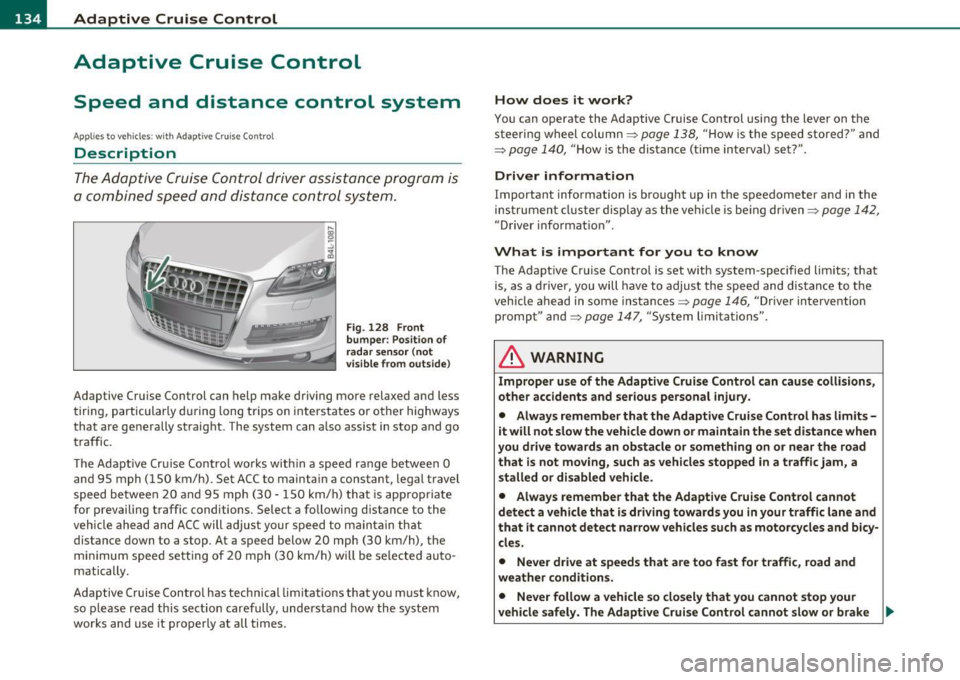
Fig. 128 Front
bumper: Po sition of
rada r sensor (not
v isible from outs ide )
Adaptive Cru ise Cont rol can h elp ma ke driving mo re relaxed and less
t iri ng , par ticularly d uring lon g trips on i nte rs t a tes o r oth er hig hways
that are generally straig ht. The system can a lso assist in stop and go
tr aff ic.
T he A da pti ve Cr uise Co ntro l w ork s w ithin a spee d ran ge between 0
and 95 mph ( 150 km/h). Set ACC to mainta in a constant, legal t ravel
speed betwee n 20 and 95 m ph ( 30 -15 0 km/ h) that is appropr iate
for p revailing traffic conditions . Select a followi ng distance to the
vehicle ahe ad and A CC will adjust your s peed to mai ntain that
distance down to a stop . At a speed below 20 mph (30 km/h) , the
m inim um sp eed s ett ing of 2 0 mp h (30 k m/h) w ill be se le cte d a uto
matically .
Adaptive Cruise Control has technica l limitat ions that you must know ,
so p lease re ad th is s ect io n car efully, und erstan d how th e syst em
works and use it proper ly at all times.
How does it work?
You can operate the Adaptive Cruise Control usi ng the lever on t he
stee ring wheel col umn =:>
page 13 8, "Ho w is t he s peed stored?" and
=:>
page 140 , "H ow is the distance (time interval) set?".
Driver information
Important information is bro ught up in the speedometer a nd in the
i n stru men t cluster dis play as the ve hicle is be ing dr iven =:>
page 142 ,
"Driver i nfo rmat io n".
What is important for you to know
The Adapt ive Cruise Contro l is set with system -specifie d limits; that
i s , as a drive r, you will hav e to adjus t the sp eed and dis tance to the
v ehicle ahead in some instances =:>
page 146, "Drive r inte rve ntion
pro mpt" and =:>
page 147 , "Sy stem limi ta tio ns".
& WARNING
Improper use of the Adaptive Cruise Control can cause collisions,
other accidents and serious personal injury.
• Always remember that the Adaptive Cruise Control has limits -
it will not slow the vehicle down or maintain the set distance when
you drive towards an obstacle or something on or near the road
that is not moving, such as vehicles stopped in a traffic jam, a
stalled or disabled vehicle.
• Always remember that the Adaptive Cruise Control cannot
detect a vehicle that is driving towards you in your traffic lane and
that it cannot detect narrow vehicles such as motorcycles and bicy
cles.
• Never drive at speeds that are too fast for traffic, road and
weather conditions.
• Never follow a vehicle so closely that you cannot stop your
vehicle safely. The Adaptive Cruise Control cannot slow or brake _.,
Page 147 of 390

Adaptive Cruise Control IJ!II __________________________ ...:....:..;:_....;_,,!,_ ______ _
App lies to vehicl es: wi th Adaptive Cru ise Con trol
System status indicator
The text messages and symbols shown in this area of the
displ ay are not displayed permanently .
Time intervals (such as e::::, ____ e::::,)
Fig. 139 Sy stem
st atu s indicator
The d ifferent symbols for the time interva ls (distance) appear if you
change the settings~ fig . 139.
Thr ee wh ite dots .. . ap pear if a set ting c annot be made w ith the o pe r
ating lever . The following are possible reasons
• If you pull the control lever towa rds you to resume speed but no
requested speed was set .
• If you push the lever up to increase (or down to re d uce) speed
when no speed has been set previo usly .
• If yo u push the lever up to increase (o r down to red uce) spee d and
this speed is outside the 20 to 95 mph (30 to 150 km/h) speed ra nge .
ACC not available
The text message ACC not ava ilable appears, for examp le, if the
t empe ra tu re o f the brakes is excessive. Adap tive Cru ise Con trol is
temporar ily not avai lab le. A warning tone sounds as a reminder .
Controls and equip
ment Safety first
ACC not available !
Th
e text message ACC not available! appears in the event o f a
ma lfunction . Adaptive Cru ise Contro l is tur ned off .
A warn in g tone
so unds as a reminder. Have the system inspected by a q ualified dea l
ersh ip .
ACC sensor blocked !
The text message ACC sensor blocked ! appears w hen the ACC System
can no longer acc urately detect vehi cles movi ng up ahead in your lane
o f travel. Adaptive C ruise Cont rol is tu rned off. A wa rning tone a lso
so unds as a reminder .
T o decide w hethe r it is ne cess ary to switch off the ACC (ACC senso r
blocked
!) or if it is only a temporary condition (ACC Functionally
limited), the sys tem w ill also takes into considera tion the outside
temperature and/or the w indshield wiper operation .
T he ACC sensor is d irty or b locked (e .g . leaves, snow).
Th e ACC senso r is lo ca ted be hind t he a rea to the right o f th e front
license plate.
If the ACC sensor is dirty or blocked, clean the area to
restore sy stem o per ation.
ESP activation
T he text message ESP activation appears if the Electro nic St abil iz a
tion Program (ESP) has intervened. In this case the Adaptive Cruise
Con trol is au tomat ica lly tu rned off. This is accompan ied by a warn ing
tone.
Speed
The set speed in mph (Canada km/h) always appears when saving or
c hangi ng the speed in Ad aptive C ruise Cont rol~
page 138, "How is
the speed stored?" and~
page 138, "Changing stored speed" .
ACC functionality Limited
The message ACC functionality limited appears when the ACC
System does no t detec t any moving vehicles up a head in your lane of
trave l for a longer period of time. Dur ing t his time, the d istance to
movi ng ve hicles in you r lan e of tra ve l up ahead i s not being m ain-
~
Vehicle care Technical data
Page 152 of 390
1111....__A_ d_ a_,_ p_t _i_ v _e _ C_r_ u_ i_ s_ e_ C_ o_ n_ t_ r_ o_ l __________________________________________ _
The Audi braking guard is active from a speed of approx. 20 mph
(30 km/h) and works within the system limits=>
page 147 even when
the Adaptive Cruise Control is deactivated.
A radar sensor is built into the front of the vehicle=>
page 136,
fig. 129. The system is intended to measure the distance to reflective
surfaces. If a measurement is not possible, the system does not
respond.
When the measurement has been taken, the system can recognize a
possibly hazardous situation, for example, when a vehicle up ahead in
your lane of travel suddenly brakes or when your own vehicle is moving at high speed towards a much s lower vehicle up ahead . As
soon as the system senses that a possible collision w ith the vehicle up
ahead can only be avoided by immediate full brake application or by
an avoidance maneuver, a warning appears.
The system has a default response time to be able to signal before a
collision occurs. This system response time is automatically reduced
if you accelerate actively, for example to join a highway . Braking,
transverse acceleration and the steering ang le can lead to a reduced
system response time . The warning is deactivated if you begin to
overtake with full acceleration.
Th e system can make you aware of two different hazardous situa
tions:
Distance
T he distance warning is given if the system calculates that there is not
enough distance to the vehicle up ahead a period of more than 5
seconds. If the distance is less than 30 feet (9 meters) at 50 mph (80
km/h) , fo r example, an optical disp lay comes on in the inst rument
cluster=> fig. 148.
If the vehicle ahead brakes sharply, Audi braking guard cannot he lp
you to avoid a coll is ion, even in the case of an immed iate response.
T ake immediate action to avoid the collision and increase the
distance to the vehicle up ahead.
Speed
If there is a much s lower vehicle moving up ahead in your lane, or if
the vehicle a head brakes sharply, the Audi braking guard calculates
the point from which a collision can only be avo ided by full braking or
by an avo idance maneuver. If a warn ing does sound, a possible colli
sion with the vehicle in front can only be avoided through an evasive
maneuver or by braking.
The warn ing is given in two stages:
• Pre-warning : A visual display appears in the instrument cluste r
and a warning tone sounds .
• Acute warning: If you do not respond to the pre-warning, the
second stage warni ng is given . A quick brake application helps to
direct your attention to the road and traffic situation .
Under heavy braking, the brake assistant=>
page 136 also helps you
benefit from maximum braking effic iency.
& WARNING
Inattention can cause collisions, other accidents and serious
personal injuries.
• Always pay close attention to the traffic , even when the Audi
braking guard is switched on. The Audi braking guard provides a
warning but does not brake the car for you. You must apply the
brakes yourself!
• Always keep the safe and legal distance between your vehicle
and vehicles up ahead.
• Audi braking guard works within limits and will not respond
outside the system limits, for example when approaching a
stopped vehicle or stationary obstacle (end of a traffic jam or
vehicle that has broken down in traffic).
• Always remember that the radar sensor for the Audi braking
guard works within defined detection and range limits that may
prevent the proper detection of other vehicles. _,.,
Page 155 of 390
Audi side assist Ill
----------------
Deactivating
-Pre ss th e b utton again . Th e ind icator light on the button
goes o ut.
The system works at speeds faster than 19 mph (30 km/h) .
& WARNING
• Improper reliance on the side assist system can cause collisions
and seriou s per sonal injury:
- Never rely only on side assist when changing lanes.
- Alway s check rear view mirrors to make sure that it is safe to
change lanes.
• Side assist cannot detect all vehicles under all condition s
danger of accident!
• Side a ssist cannot detect vehicle s in time to alert you when
they approach from behind at very high speed , or fall drop bac;k
very quickly .
• The radar sensor's
vision can be reduced o r entirely blocked by
rain, snow, and heavy spray . Thi s can result in side a ssist not
adequately detecting vehicles o r, in some cases , not detecting
them at all. Always keep an eye on the direction you are traveling
and the relevant area around the vehicle.
• Plea se note that side assi st indi cates there are approaching
veh icles, or vehicles in your blind spot, only after your vehicle has
reached a driving speed of at lea st 19 mph (30 km/h).
• Side assist signal does not work around tight corners (turning
radius le ss than 328 feet, or 100 m ).
• Side assist is no replacement for the driver's full attention. The
driver alone is respon sible for lane changes and similar driving
maneuvers. Always keep an eye on the direction you are traveling
and the relevant area around the vehicle .
Controls and equip
ment Safety first
0 Note
• T
o ens ure t hat you do not adve rsely affec t side assist, do not blo ck
the area on the rear bumper where the radar sensors are located with
foreign obje cts (s uch as stickers or bicy cle ra cks).
• Make s ure that the s ignal light on the outside mirror is not
blo cked by st ickers or o ther ite ms.
W Tips
• Side assist a utoma tically deact iva tes if it de tects that the rada r
sensors are blocked=>
page 159. The indicator light on the button
goe s out.
• Th e area on the bumpe r w here the ra dar sensors are located must
c o nsistent ly remain free of snow, i ce, a nd heavy soiling so tha t side
assist can funct ion p roper ly. Follow the add itiona l notes on
=>
page 160 .
• F or vehicles with a factory installed towing hitc h* or a tra ile r
hi tc h* that was i nstalled late r according to f actory specifications,
side ass ist is automat ically deact ivated as soon as the electrical
c o nne ct io n to the tra ile r electr ical socket is made=>
page 15 9.
• For vehicles with a trai le r h itch that was not installed accor ding to
fac tory spe cifica tions, sw itch off the s ide ass ist whe n tow ing a tra iler.
• Additiona l t int ing on the front si de windows can make it ha rder to
se e and co rrectly unde rs tand t he signa l light o n the outs ide m irro r.
• For Declaration of Compliance to United States FCC an d Industry
Canada regulations=>
page 369 . •
Vehicle care Technical data