instrument cluster AUDI Q7 2010 Owner´s Manual
[x] Cancel search | Manufacturer: AUDI, Model Year: 2010, Model line: Q7, Model: AUDI Q7 2010Pages: 390, PDF Size: 93.04 MB
Page 70 of 390
Clear vision
Applies to vehicles : with Adaptive Light
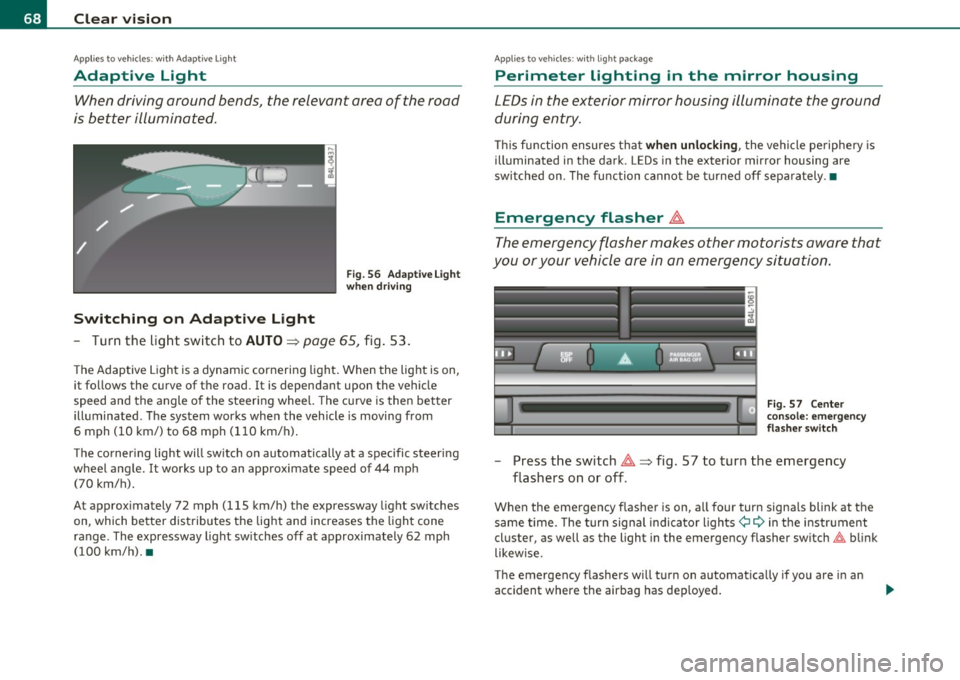
Adaptive Light
When driving around bends, the relevant area of the road
is better illuminated.
Switching on Adaptive Light
Fig . 56 Adaptive Light
when driving
- Turn the light switch to AUTO~ page 65, fig. 53.
The Adaptive Light is a dynamic cornering light. When the light is on,
it follows the curve of the road. It is dependant upon the vehicle
speed and the angle of the steering wheel. The curve is then better
illuminated. The system works when the vehicle is moving from
6 mph (10 km/) to 68 mph (110 km/h).
The cornering light will switch on automatically at a specific steering
wheel angle. It works up to an approximate speed of 44 mph
(70 km/h).
At approximately 72 mph (115 km/h) the expressway light switches
on, which better distributes the light and increases the light cone
range . The expressway light switches off at approximately 62 mph
(100 km/h). •
Applies to vehicles : w ith light package
Perimeter lighting in the mirror housing
LEDs in the exterior mirror housing illuminate the ground
during entry.
This function ensures that when unlocking, the vehicle periphery is
illuminated in the dark. LEDs in the exterior mirror housing are
switched on. The function cannot be turned off separately .•
Emergency flasher ~
The emergency flasher makes other motorists aware that
you or your vehicle are in an emergency situation.
Fig. 57 Center
console: emergency
flasher switch
-Press the switch~~ fig. 57 to turn the emergency
flashers on or off .
When the emergency flasher is on, all fou r turn signals blink at the
same time. The turn signal indicator lights¢
9 in the instrument
cluster, as well as the light in the emergency flasher switch~ blink
likewise.
The emergency flashers will turn on automatically if you are in an
accident where the airbag has deployed.
Page 71 of 390
![AUDI Q7 2010 Owner´s Manual (]] Tips
You shou ld turn on t he emergency flashers when :
• you are the last vehicle stand ing in a traffic jam so that any other
vehicles com ing can see you , or w hen](/img/6/40275/w960_40275-70.png "AUDI Q7 2010 Owner´s Manual (]] Tips
You shou ld turn on t he emergency flashers when :
• you are the last vehicle stand ing in a traffic jam so that any other
vehicles com ing can see you , or w hen")
(]] Tips
You shou ld turn on t he emergency flashers when :
• you are the last vehicle stand ing in a traffic jam so that any other
vehicles com ing can see you , or w hen
• your vehicle has broken down o r yo u are in an eme rgency s itua
tion, or when
• your vehicle is be ing towed by a tow tr uck o r if you are tow ing
another vehicle behind you .•
Turn signal ¢¢ and high beam ~D Lever
The lever on the le~ side of the s teering column is used to
operate the turn signals and the high beam as well a s the
headlight flasher .
-"' M
-w ... m
Fig. 5 8 Tu rn sig nal
and hi gh bea m l ever
The tu rn s ignal and high beam lever has the follow ing func
tions:
Turn signals ¢ ¢
- Lift the lever up all the way~ fig. 58 (D to use the right
turn signals, or push the lever down all the way@ to use
the left turn signals.
Con tro ls a nd e quip
m en t Vehicle
OP-eration
Clear vision
Auto -blink
- Move the lever (up or down) just to the point of resistance
to use the turn signa ls for as long as you need them, for
examp le when chang ing lanes.
- M ove the lever (up or down) just to the poi nt of res istance
and t hen re lease it right away to make the turn signa ls
blink
three times . You can use this feature for examp le
w hen changing lanes on highways.
High beam ~D
- Push the lever forward @ to switch on the high beam .
- Pull the lever back towa rds you to switc h off the high
beam .
Headlight flasher ~D
Pull the lever toward the steering wheel© to use the
head light flasher .
Notes on these features
• The turn signals only work with the ignition t urned on. The indi
cato r lights ¢ or¢ in the instrument cluster=>
page 14 a lso blink.
• After you have t urned a co rner, the tu rn signal switches off auto
matically .
• Th e
high beam works only when the hea dlights are o n. Th e ind i
ca tor light
aD in the instrument cluster illuminates when the high
beams are on.
• The
headligh t flasher works only as long as you ho ld the lever -
even if there are no l igh ts turned o n. Th e indic ator lig ht
aD in the
instrument clus ter illuminates when you use the headlight flasher. .,,_
Vehicle care Do-it-yourselt service iTechnical data
Page 123 of 390

Warm and cold -_______________ __.
Applies to veh icles: w ith stee ring whee l hea ting
Steering wheel heat ing (j)
The steering wheel can be heated electrically .
Fig. 118 Multifunc
tion steering wheel:
Button for steering
wheel heating
-Press the I~] button to turn the steering wheel heating on
and off =>fig. 118. The message
Steering wheel heating on ! or
Steering wheel heating off! appears in the instrument
cluster display .
When the steering wheel heating is switched on, the steering wheel
is heated to about 82 °F (+28 °C) and held there .
The last sett ing se lected for the steer ing wheel heating (on or off) is
automatically saved when the vehicle is shut off and is assigned to the
remote key. •
Contro ls a nd e quip
m en t Vehicle
OP-eration Vehicle care Do-it-yourselt service iTechnical data
Page 131 of 390
_________________________________________________ O_ n_ t_ h_ e_ r _o_ a_d _ __.ffl'I
A ppli es to veh icl es: wi th Conven ie nc e key
Driver messages in the instrument cluster
display
If a function is not present, a driver message appears.
No key identified
This message appears when the [START] button is pressed if there is
no master key inside the vehicle or if the system does not recognize
it. For example, the master key cannot be recognized if it is covered
by an object (e.g. aluminum brief case) which
screens the radio
signal. Electronic devices such as cell phones can also interfere with
the radio signal.
Press brake pedal to start engine
This message appears if you press the I ST ART ] button to start the
engine and do not depress the brake pedal. The engine can only be
started if the brake pedal is depressed.
Engage Nor P to start engine
This message appears when the engine is started if the selector lever
for the automatic transmission is not in the P or N position . The
engine can only be started with the selector in these positions.
Key not in vehicle
This message appears along with the ' symbol if the master key is
removed from the vehicle with the engine running . It is intended to
remind you (e.g. when changing drivers) not to continue the journey
without the master key.
If the master key is no longer in the vehicle, you cannot switch off the
ignition after stopping the engine and you also cannot start the
engine again. Moreover, you cannot lock the vehicle from the outside
with the key.
Con tro ls a nd e quip
m en t Vehicle
OP-eration
Shift to P otherwise vehicle can roll away. Doors do not lock if you
are not in P.
This message appears for safety reasons along with a warning buzzer
if the selector lever for the automatic transmission is not in the P
position when the ignition is switched off with the
[STOP] button and
the driver's door is opened. Move the selector lever to the P position,
otherwise the vehicle is not secured against rolling away. You also
cannot lock the vehicle using the locking button on the door handle
or using the remote key.
To engage steering lock, press and hold STOP button
This message appears for safety reasons if the engine and the ignition
have been switched off by pressing the
[STOP] button once, and then
the driver's door is opened. In this instance, the steering is not
locked. The steering is locked:
• If you press the
[STOP] button again for more than 1 second.
• If you close the driver's door and lock your vehicle from the
outside. •
Parking brake
Operation
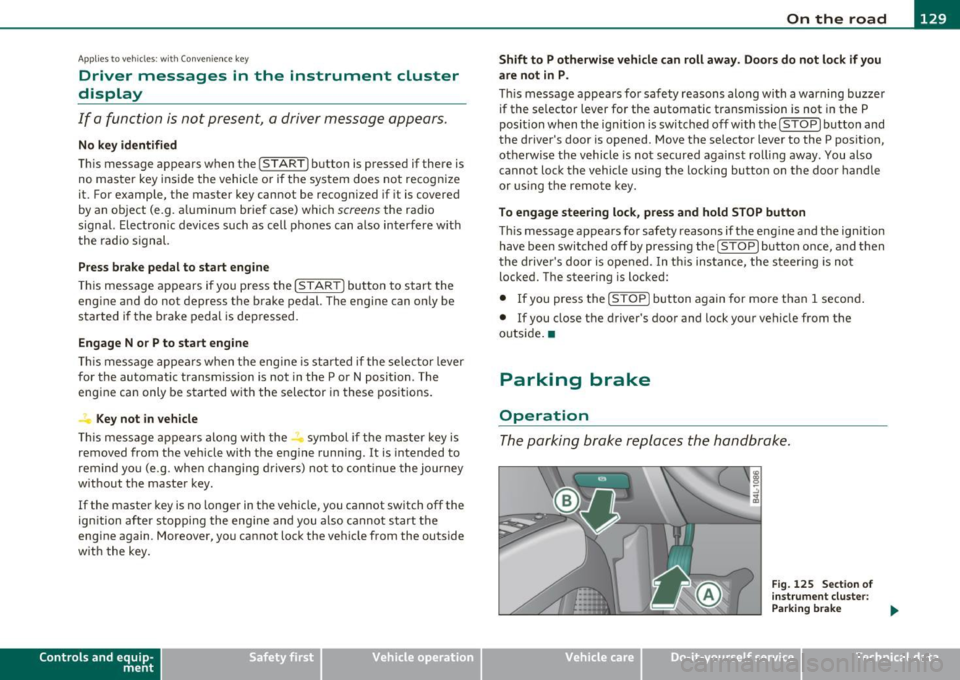
The parking brake replaces the handbrake.
Vehicle care
Fig. 125 Section of
instrument cluster:
Parking brake
~
Do-it-yourselt service iTechnical data
Page 138 of 390
1111....__A_ d_ a_,_ p_t _i_ v _e _ C_r_ u_ i_ s_ e_ C_ o_ n_ t_ r_ o_ l __________________________________________ _
Applie s to veh icles : wi th Adap tiv e Crui se Con tro l
How does Adaptive Cruise Control work?
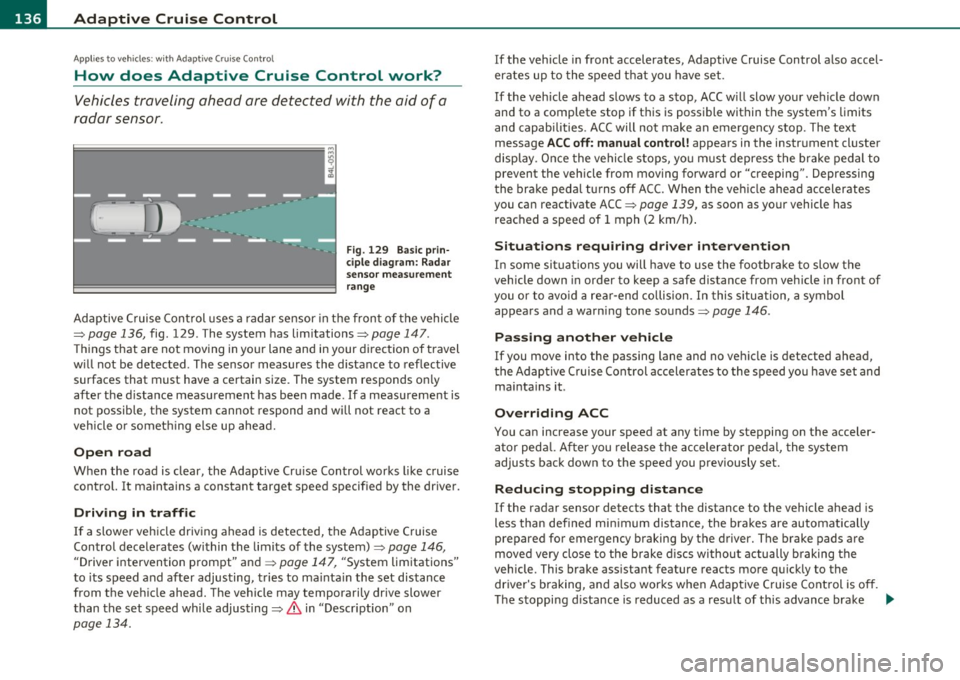
Vehicles traveling ahead ore detected with the aid of a
radar sensor.
Fig. 129 Basic prin
ciple diagram: Radar
sensor measurement
range
Adaptive Cruise Control uses a radar sensor in the front of the vehicle
=>
page 136, fig. 129 . The system has limitations=> page 147.
Things that are not moving in your lane and in your direction of travel
w ill not be detected. The sensor measures the distance to reflective
surfaces that must have a certain size. The system responds only
after the distance measurement has been made . If a measurement is
not possible, the system cannot respond and will not react to a
vehicle or someth ing else up ahead.
Open road
When the road is clear, the Adaptive Cru ise Control works like cruise
control. It maintains a constant target speed specified by the driver .
Driving in traffic
If a slower veh icle driv ing ahead is detected, the Adaptive Cruise
Control decelerates (within the limits of the system)=>
page 146,
"Driver intervention prompt" and => page 147, "System limitations"
to its speed and after adjusting, tries to ma inta in the set distance
from the vehicle ahead. The vehicle may temporarily drive slower
than the set speed whi le adjusting=>
& in "Descr iption" on
page 134.
If the vehicle in front accelerates, Adaptive Cruise Control also accel
erates up to the speed that you have set.
If the vehicle ahead slows to a stop, ACC w ill slow your vehicle down
and to a complete stop if this is possible within the system's limits
and capabilities . ACC will not make an emergency stop. The text
message
ACC off: manual control! appears in the instrument cluster
display . Once the vehicle stops, you must depress the brake pedal to
prevent the veh icle from moving forward or "creeping" . Depressing
the brake pedal turns off ACC. When the vehicle ahead accelerates
you can reactivate ACC =>
page 139, as soon as your vehicle has
reached a speed of 1 mph (2 km/h) .
Situations requiring driver intervention
In some situations you will have to use the footbrake to slow the
vehicle down in order to keep a safe distance from vehicle in front of
you or to avoid a rear-end collision. In this situation, a symbol
appears and a warning tone sounds=>
page 146.
Passing another vehicle
If you move into the passing lane and no vehicle is detected ahead,
the Adaptive Cruise Control accelerates to the speed you have set and
maintains it.
Overriding ACC
You can increase your speed at any time by stepping on the acceler
ator pedal. After you release the accelerator pedal, the system
adjusts back down to the speed you previously set.
Reduc ing stopping distance
If the radar sensor detects that the distance to the vehicle ahead is
less than defined minimum distance, the brakes are automatically
prepared for emergency braking by the drive r. The brake pads are
moved very close to the brake discs withou t actually bra king the
vehicle. This brake assistant feature reacts more quickly to the driver's braking, and also works when Adaptive Cruise Control is off.
The stopping d istance is reduced as a result of this advance brake .,_
Page 144 of 390
lll'..__A_ d_a_ p,__ t_iv _ e_ C_r _u _ i_ s _e _ C_ o_ n_t _ r_ o _ L ___________________________________________ _
& WARNING
Following other v ehicles too clo sely increases the risk of a crash
and serious per sonal injury.
• Following other vehicles too closely, particularly at higher
speeds in crea ses the ri sk of collisions and seriou s personal injury.
• Setting short distances to the traffic ahe ad reduces the time
and distance avail able to bring your vehicl e to a safe stop and
makes it even more necessary to pay close attent io n to t raffic.
• Always select a speed and distance to traffic ahead that is safe
and appropriate under the pre vailing traffic, road , weathe r and
lighting conditions.
• Never rely on the distance control feature of ACC alone to
prevent rear-end collisions . Always be pr epared to brake and take
evasive action to a void collisions and other accident situations.
• Never allow the closing sp eed b etween you and other vehicles
to be so high that the Adapti ve Cruise Control may not be able to
s low your vehicle safely . If closing speed is too high, you must
apply the brakes yourself to reduce the r isk of a rear -end crash.
• Always select a greater following di stance to the vehicle ahead
on wet roads than on dry roads.
• Always read and h eed the information and WARNINGS=>
& in
"Description" on page 134.
(I] Tips
The distance setting is reset to the factory de fault DIS TANCE 3 the
next time the igni tion is t urn ed on .•
Driver information
Applies to veh icles: with Adapt ive Cruise Control
Displays in the instrument cluster
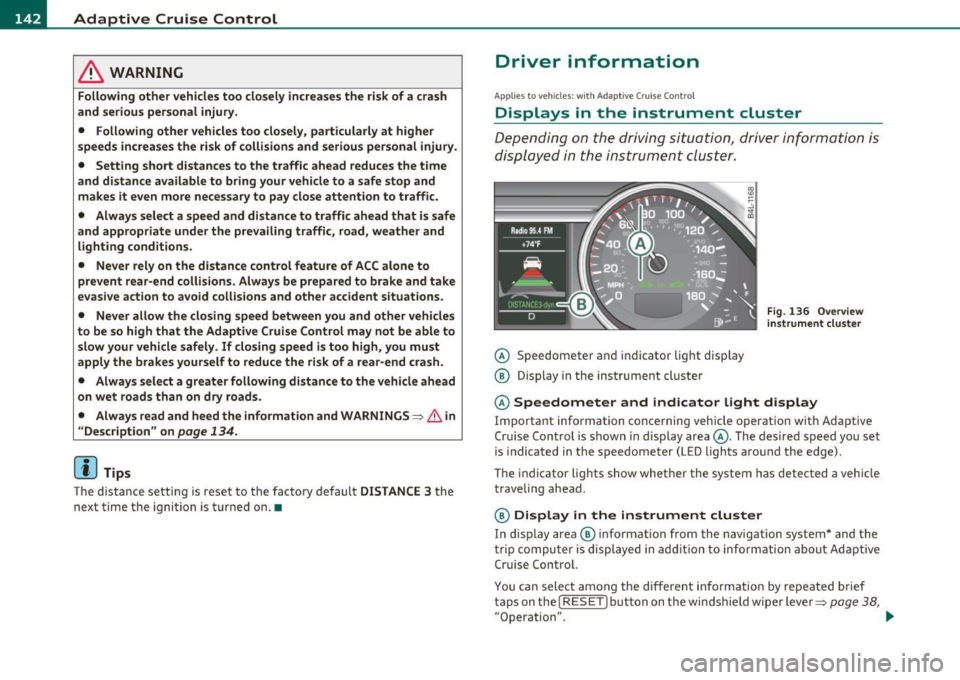
Depending on the driving situation, driver info rmation is
displayed in the instrument cluster.
@ Speedometer an d indicator lig ht disp lay
@ Display in the instrument cluster
Fig . 136 O ve rvi ew
in strum ent clu ster
@ Speedometer and indicator Light d isplay
Important information concerning vehicle operation w ith Adaptive
Cru ise Control is shown in d isp lay area @. The des ired speed yo u set
is indicated in the speedometer (LED lights around the edge).
T he in dicator lights show whe ther the system has detec ted a veh icle
traveli ng ahead .
@ Display in the instrument cluster
In display area ® informat ion from the navigation system * and the
t rip compu ter i s displayed in a dditio n t o info rmation abou t Ad aptive
Cru ise Contro l.
You ca n sele ct among the dif ferent informatio n by repeated brief
t aps on the!
RESET) button on the windsh ield w ipe r leve r=> page 38,
"Operation". .,.
Page 146 of 390
1111..__A_ d_a_ p,__ t_iv _ e_ C_r _u _ i_ s _e _ C_ o_ n_t _ r_ o _ L ___________________________________________ _
Appli es to veh icles : wi th Adap tiv e Crui se Con tro l
Display in the instrument cluster
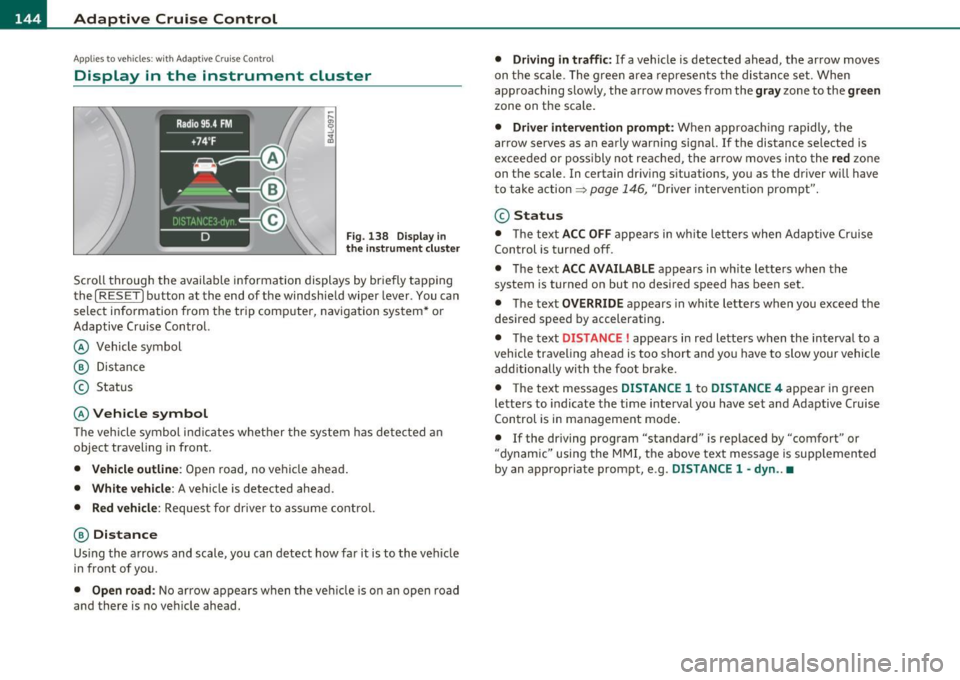
Fig. 138 Dis pl ay in
the instrum ent clu ster
Scroll throug h the available informa tion displays by briefly tapping
the
[ RESE T] button at the end of the windshie ld wiper lever . You can
select information from the tr ip comp uter, navigation sys tem * or
Adaptive Cr uise Control.
@ Vehicle symbol
@ Dis tance
© Status
© Vehicle symbol
Th e veh icle symbol i ndi cates w het her the sys tem has de te ct ed an
object traveling in front .
• Vehicle outline : Open road, no vehicle ahead .
• White vehicle : A vehicle is detected ahead.
• Red vehicle : Request for driver to ass ume control.
® Distance
Us ing the a rrows and scale, you can det ect how far it is to the vehi cle
in front of you.
• Open road : No ar row app ears when the ve hicle is o n an o pen road
and there is no ve hicle ahead.
• Driving in t raffic : If a vehicle is detected ahead, the arrow moves
on t he sc ale. The g ree n area represents the distan ce set . When
approaching slow ly, the arrow moves from the
gray zone to the green
zone on the scale .
• Driver intervention prompt: When appro aching rapid ly, the
arrow serves as an early warn ing signa l.
If the distance selected is
excee ded or poss ibly no t reache d, t he arrow moves in to the
red zon e
on t he scale. In certain dr iving s ituations , you as the driver wi ll have
t o take action =>
page 146, "Driver in tervent io n prompt".
@ Status
• T he text ACC OFF ap pears in wh ite le tters when Ad aptive Cr uise
Control is turned off .
• T he text
ACC AVAILABLE appears in wh ite lette rs when t he
system is turned on but no desired speed has been set .
• T he text
OVERRIDE appears in white l etters when you exceed the
desired speed by accelerating .
• T he text
DISTANCE! appears in red letters when the in terva l to a
vehicle traveling ahead is too short and you have to slow your vehicle
add itionally with the foot brake .
• T he te xt messages
DISTANCE 1 to DISTANCE 4 appea r in gree n
le tte rs to indicate the time interval you have se t and Adaptive Cruise
Con trol is in management mo de.
• If the driving program "standard" is replaced by "comfort" or
"dynam ic" usin g the M MI, the above text message is supp lemen ted
by an appropriate prom pt, e .g .
DISTANCE 1 -dyn .. •
Page 148 of 390

llffl..__A_ d_a_ p,__ t_iv _ e_ C_r _u _ i_ s _e _ C_ o_ n_t _ r_ o _ L ___________________________________________ _
tained. The ACC system is not switched off, and increased attention
to the traffic situation is absolutely necessary. The followi ng may be
reasons why the message
ACC functionality limited appears:
• The ACC sensor is dirty . The ACC system is not reacting, or is not
reacting correctly, to moving vehicles up ahead in yo ur la ne of travel.
• There may be very light traffic on and there is nothing that marks
the side of the road (for example , guard rai ls, traffic signs, trees). As
soon as a moving vehicle up ahead is detected aga in, ACC becomes
active again and the message disappears.
The ACC sensor is located behind the area to the right of the front
license plate.
If the ACC sensor is dirty or blocked, clean the area to
restore system operation .
Parking brake !
The text message Parking brake! appears, when the parking brake is
applied. ACC is turned off. A warning tone so unds as a reminder.
Stationary object ahead
The text message Stationary object ahead appears, when you want
to activate the system and there is a stationary vehicle or an object
immediately in front of you.
Gradient too steep
The text message Gradient too steep appears when the max imum
gradient for proper ACC operation has been exceeded. Adaptive
Cru ise Control is turned off . A warning tone also sounds as a
reminder.
ACC off: manual control !
The text message ACC off: manual control! appears after the vehicle
has been brought to a standst ill by the Adapt ive Cruise Control. In
this case you must depress the brake pedal to prevent the vehicle
from rolling . A warn ing tone sounds as a reminder.
Selector lever position I
Th e text message Selector lever position! appears when the selector
lever is moved to position
N. In th is position, Adaptive Cruise Cont rol
is not available. •
Applies to vehicles : w it h Adap tiv e Cru ise Control
Driver intervention prompt
The driver intervention prompt calls on the driver to take
over the situation.
Fig . 140 I nstrument
cluster: Driver inter·
vention prompt
In certain situations, the brak ing power of the Adaptive Cruise
Control is not enough to maintain an adequate distance to the vehicle
up ahead. In these situations, the Adaptive C ruise Control calls the
driver to take action.
The
driver intervention prompt a lerts you vis ually and aud ibly to take
over .
• A red vehicle is shown in the instrument cluster display
:::::,fig. 140.
• T he text
DISTANCE! appears in the status line.
• The indicator light
<::::>11, ,~ in the speedometer blinks red .
• A warning tone sounds.
Page 151 of 390
__________________________________________ A_ d_a""" p:....- t_iv _ e_ C_ r_ u _is _ e_C_ o_n_ t_ r_ o_ L_....J_
A pp lies to veh icles : with Adapt ive C ru ise C ontro l
Vehicles that are difficult to detect
------------------1
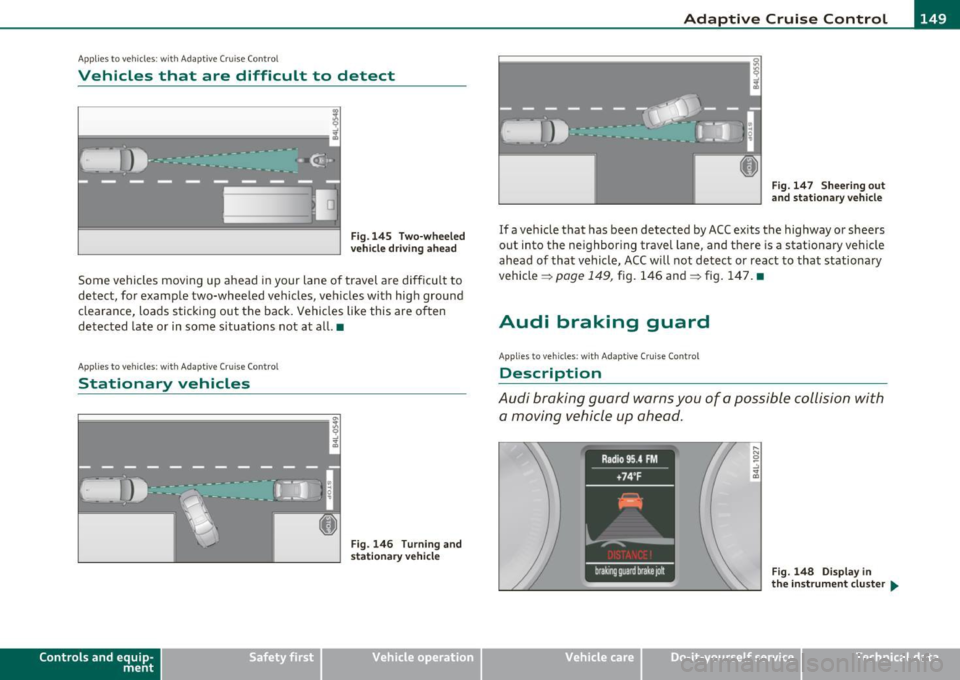
Fig .145 Two-wheeled
vehicle driving ahead
Some vehicles moving up ahead in your lane of travel are difficult to
detect, for example two-wheeled vehicles, vehicles with high ground
clearance, loads sticking out the back. Vehicles like this are often
detected late or in some situations not at all. •
Applies to v ehicles: with Adap tiv e Cruis e Contro l
Stationary vehicles
Contro ls a nd e quip
m en t
Fig. 146 Turning and
stationary vehicle
Vehicle OP-eration
Fig. 147 Sheering out
and stationary vehicle
If a vehicle that has been detected by ACC exits the highway or sheers
out into the neighboring travel lane , and there is a stationary vehicle
ahead of that vehicle, ACC will not detect or react to that stationary
vehicle =>
page 149, fig. 146 and=> fig. 147. •
Audi braking guard
App lies to ve hicles: w ith Adaptive Crui se Cont rol
Description
Audi braking guard warns you of a possible collision with
a moving vehicle up ahead.
Fig. 148 Display in
the instrument cluster ...
Vehicle care Do-it-yourselt service iTechnical data
Page 152 of 390
1111....__A_ d_ a_,_ p_t _i_ v _e _ C_r_ u_ i_ s_ e_ C_ o_ n_ t_ r_ o_ l __________________________________________ _
The Audi braking guard is active from a speed of approx. 20 mph
(30 km/h) and works within the system limits=>
page 147 even when
the Adaptive Cruise Control is deactivated.
A radar sensor is built into the front of the vehicle=>
page 136,
fig. 129. The system is intended to measure the distance to reflective
surfaces. If a measurement is not possible, the system does not
respond.
When the measurement has been taken, the system can recognize a
possibly hazardous situation, for example, when a vehicle up ahead in
your lane of travel suddenly brakes or when your own vehicle is moving at high speed towards a much s lower vehicle up ahead . As
soon as the system senses that a possible collision w ith the vehicle up
ahead can only be avoided by immediate full brake application or by
an avoidance maneuver, a warning appears.
The system has a default response time to be able to signal before a
collision occurs. This system response time is automatically reduced
if you accelerate actively, for example to join a highway . Braking,
transverse acceleration and the steering ang le can lead to a reduced
system response time . The warning is deactivated if you begin to
overtake with full acceleration.
Th e system can make you aware of two different hazardous situa
tions:
Distance
T he distance warning is given if the system calculates that there is not
enough distance to the vehicle up ahead a period of more than 5
seconds. If the distance is less than 30 feet (9 meters) at 50 mph (80
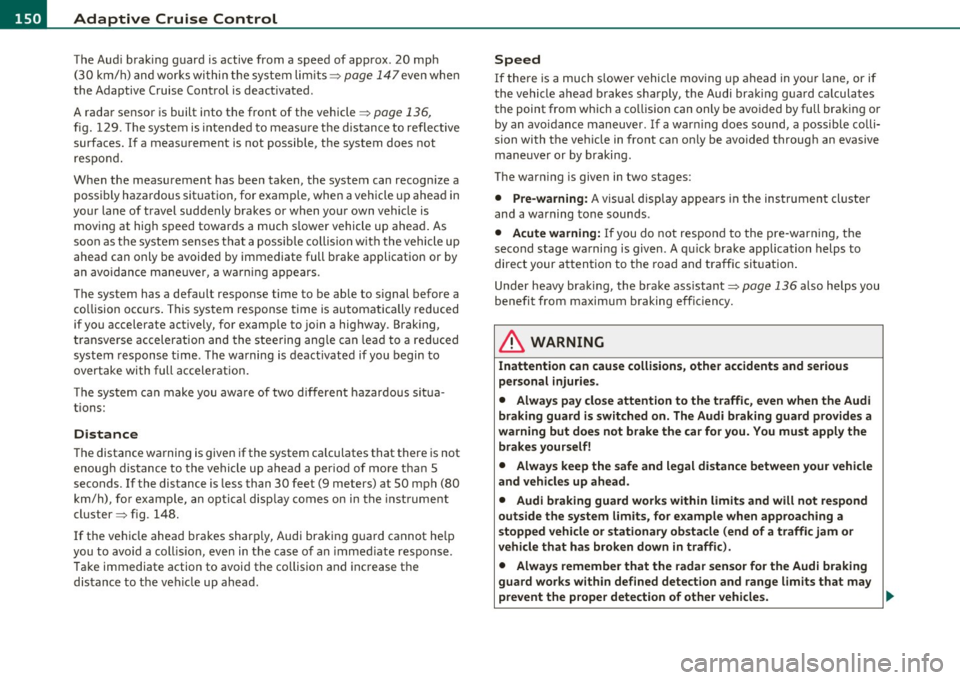
km/h) , fo r example, an optical disp lay comes on in the inst rument
cluster=> fig. 148.
If the vehicle ahead brakes sharply, Audi braking guard cannot he lp
you to avoid a coll is ion, even in the case of an immed iate response.
T ake immediate action to avoid the collision and increase the
distance to the vehicle up ahead.
Speed
If there is a much s lower vehicle moving up ahead in your lane, or if
the vehicle a head brakes sharply, the Audi braking guard calculates
the point from which a collision can only be avo ided by full braking or
by an avo idance maneuver. If a warn ing does sound, a possible colli
sion with the vehicle in front can only be avoided through an evasive
maneuver or by braking.
The warn ing is given in two stages:
• Pre-warning : A visual display appears in the instrument cluste r
and a warning tone sounds .
• Acute warning: If you do not respond to the pre-warning, the
second stage warni ng is given . A quick brake application helps to
direct your attention to the road and traffic situation .
Under heavy braking, the brake assistant=>
page 136 also helps you
benefit from maximum braking effic iency.
& WARNING
Inattention can cause collisions, other accidents and serious
personal injuries.
• Always pay close attention to the traffic , even when the Audi
braking guard is switched on. The Audi braking guard provides a
warning but does not brake the car for you. You must apply the
brakes yourself!
• Always keep the safe and legal distance between your vehicle
and vehicles up ahead.
• Audi braking guard works within limits and will not respond
outside the system limits, for example when approaching a
stopped vehicle or stationary obstacle (end of a traffic jam or
vehicle that has broken down in traffic).
• Always remember that the radar sensor for the Audi braking
guard works within defined detection and range limits that may
prevent the proper detection of other vehicles. _,.,