warning light AUDI Q7 2010 Owner´s Manual
[x] Cancel search | Manufacturer: AUDI, Model Year: 2010, Model line: Q7, Model: AUDI Q7 2010Pages: 390, PDF Size: 93.04 MB
Page 37 of 390
Please go to an authorized Audi dealer or other qualified workshop to
have the malfunction repaired .•
Appli es to ve hicl es : wit h diesel e ngine and di ese l part ic ulate filt e r
Diesel particulate filter clogged ii1-
Particulate filter See owner's manual
When the symbol illuminates, you can alter your driving sty le to
assist the filter self-cleaning process. Drive for approximately 15
minutes with the selector lever in the S position at a minimum speed
of 37 mph (60 km/h) and an engine speed of approximately 2,000
RPM. The temperature increase that will resu lt from th is can burn off
the soot in the filter. The symbol will switch off when the cleaning is
successful. After a successful cleaning, there is no need to bring the
car to an authorized dealer or qualified workshop because this is part
of normal vehicle operation .
If the symbo l does not switch off, see your authorized dealer or
other qualified workshop to have the problem co rrected.
For more information on the diesel particulate filter, refer to
:::>page 263.
& WARNING
Always adapt your speed to the current weather, road and traffic
conditions. You should never disobey traffic laws in order to
follow driving recommendations. •
Applies to veh icles: w it h A daptive light
Adaptive Light defective i :
t".J adaptive light defective
When this symbol illum inates, it means that Adaptive Light is
defective . Go to an au thorized dealership to have the headlights or
the control unit for the Adaptive Light repaired .•
Controls and equip ·
ment Safety first
Driver information display
Ignition Lock malfunction :;ie
If the
symbol in the display comes on, there is a malfunc·
tion in the electronic ignition lock. An additional driver
message can be displayed by pressing the
[CHECK] button:
Ignition lock defective
-Drive to an authorized Audi dealer or qualified workshop
at your earliest convenience to have the malfunction
corrected. •
Windshield wipers faulty<..:>
Windshield wiper defective
When this symbol illuminates, it means that the electronics for
the windsh ield wipers are defective . Please go to an author ized Aud i
dealer or qualified workshop to have the w indshield wiper system
repa ired. •
Speed warning system
Overview
The speed warning system helps you to keep your driving
speed below a set speed limit.
The speed wa rning system warns the driver if he exceeds a previously
stored max imum speed . A warning tone w ill sound as soon as the
vehicle speed exceeds the set speed by about 3 mph (3 km/h) . At the
same time, a warn ing symbol appears in the display.
Th e speed warning system has
two warning thresholds that function
independently of each other and that have somewhat different
purposes: .,_
Vehicle care Technical data
Page 45 of 390
- Place the cov er w ith t he new battery on t he k ey bas e and
press bot h parts together .
For the sake of the environment
Dispose of dead batter ies proper ly so as not to po llute the envi ron
ment.
(I) Tips
Th e replaceme nt ba ttery mus t be the same spec ifica tion as the
orig inal. •
Electronic immobilizer
The immo bili zer helps t o prevent unauth ori zed use of
your v ehicl e.
A compu ter chip ins ide you r key au toma tically deac tiva tes the elec
tr on ic immob ilizer whe n you inse rt the key in the ignition lock, o r on
vehicles with Convenience key *, when the key is inside the ve hicle.
W hen you remove the key from the ignition lock, or on vehicles with
Conven ience key, when you remove the key from the vehicle, the elec
tr on ic immo biliz er is a utomat ic al ly activa ted once aga in.
& WARNING
Always take the key with you when you leave the vehicle . The key
can di sarm the elect ronic engine immobilizer and permit an unau
thor ized per son to start the engine and enable operation of the
vehicle systems such a s power w indow or Panoramic sliding
s unroof* leading to serious personal injur y.
(I) Tips
• Th e immobi lize r prevent s unauthori zed use of t he ve hicle. The
vehicle cannot be started if an unauthorized key is used. The vehicle
Controls and equip
ment Safety first
Opening and closing
may not start if another rad
io dev ice such as a key for another vehicle
or a transponder is loc ated on t he key ring.
• For Declaration of Compliance to United States FCC and Industry
Ca nad a regulat ions :::>
page 369. •
Valet key function
The val et key function prevents unauthorized persons
from opening the glove compartment or rear lid.
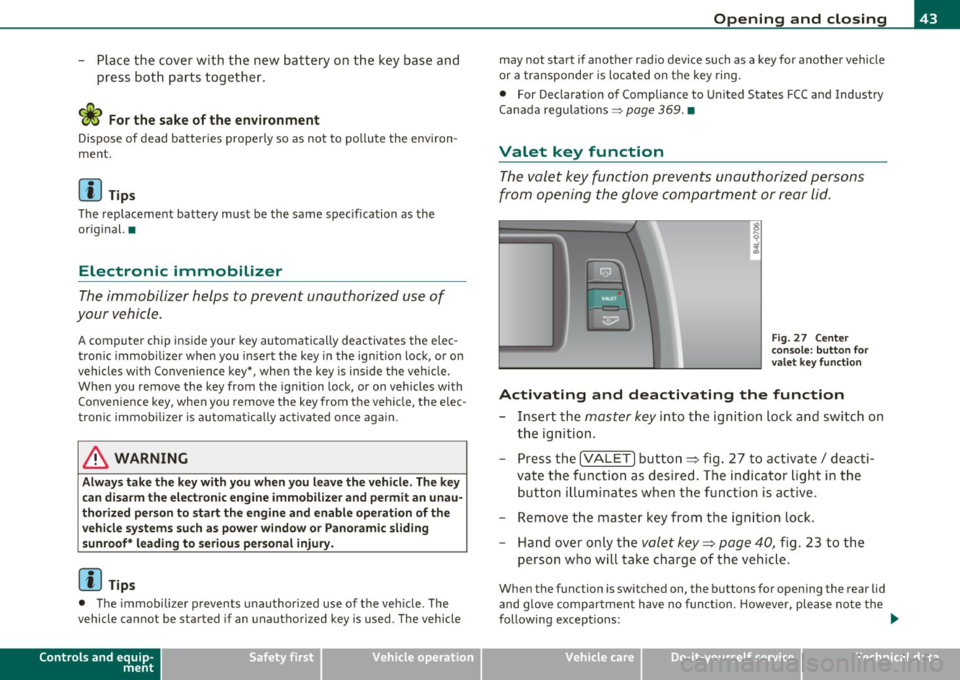
Fig. 27 Center
cons ole : butt on for
v a le t key functio n
Activating and deactivating the function
- Insert t he master key into the ignition lock a nd switch on
t h e ign it ion .
- Press th e
[VA LET] button~ fig . 27 to activate/ deac ti
va te the fu nction a s desired. The indicato r light in t he
butto n illum inates when the f uncti on is ac tive.
- Remove the mas ter key f rom t he ign ition lock.
- Hand ove r on ly t he
valet key~ page 40, fig. 23 to t he
person w ho will take charge of the vehi cle.
Whe n the function is switched on, the b uttons fo r open ing the rear lid
and glove comp artment have no funct ion. However, please note the
following exceptions:
~
Vehicle care Technical data
Page 48 of 390
Open ing and closing
- Watch that all turn signal lights flash once .
To unlock rear lid only ~
-Press button © for approximately one second.
PANIC Button
Push the red button @to activate the panic function . The
horn sounds and the turn signals flash.
Push the button @ again to deactivate the panic function.
On vehicles with Convenience key*, the selector lever must be in the P
position, otherwise the vehicle cannot be locked.
& WARNING
R ead and f ollo w all W ARNING S~ & in "G eneral de scription " on
page 44 .
(I] Tips
• In order to make sure the locking function is work ing, you should
always keep your eye on the vehicle to make sure it is properly locked.
• Do not use the remote control if you are ins ide the car, otherwise
you may uninten tionally lock the vehicle, and then you wo uld se t off
the ant i- theft alarm when you try to start the eng ine or open a door .
In case this happens anyhow, push the unlock button@.
• Use the panic function only if you are in an emergency situation .•
Operating tocks with the key
To lock and unlock the vehicle from the outside, turn the
key in the lock of the driver's door .
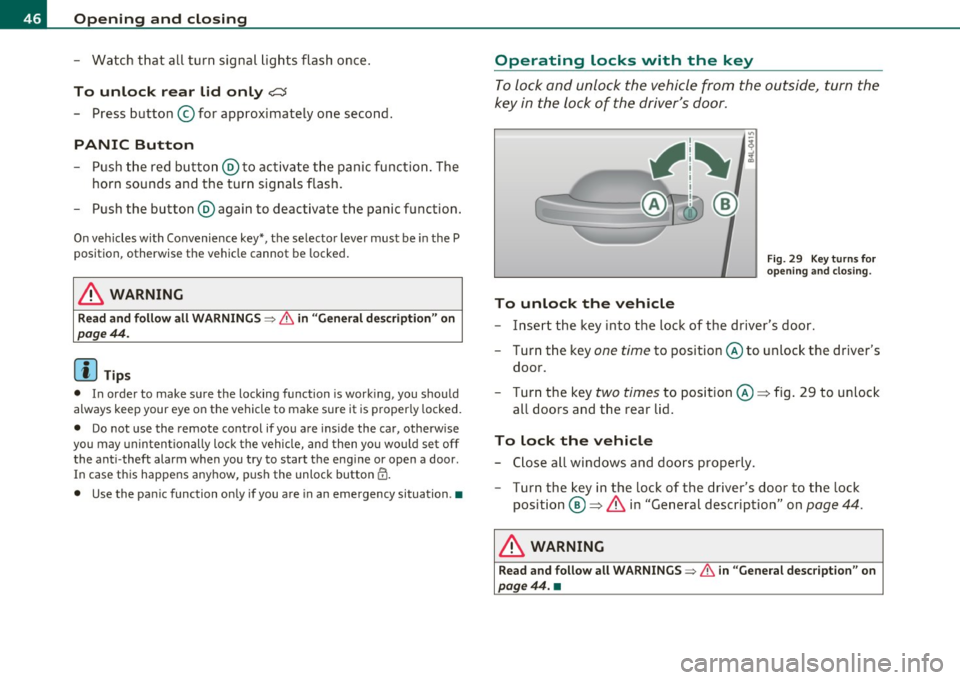
To unlock the vehicle
Fig. 2 9 K ey turn s fo r
openi ng an d closi ng .
- Insert the key into the lock of the driver's door.
- Turn the key one
time to position @to unlock the driver's
door .
- Turn the key
two times to posit ion @ => fig. 29 to unlock
al l doors and the rear lid.
To lock the vehicle
- Close all windows and doors properly.
- Turn the key in the lock of the driver's door to the lock
position @=>
& in "General description" on page 44.
& WARNING
Read and foll ow all WARNING S~ & in "General de sc ription " on
pag e 44. •
Page 50 of 390
Opening and closing How to unlock each door separately using the
door handle (front doors)
-Pull the handle to op en the door.
How to unlock each door separately using the
door handle (rear doors)
- Pull the door handle once to release the lock .
- Pull the handle
twice to open t he door .
You will find a power locking sw itch in eac h door. You can lo ck and
unlock the vehicle using the switches in the dr iver's or passenger's
door =>
page 47, fig. 30. Yo u can only lo ck the vehicle usi ng the
switches in the rear doors=>
page 47, fig . 31. If you lock the vehicle
using the
power l ocking switch , please note the following :
• You can not open the doo rs or the rea r lid from the
outside
(increased security, for example when you are stopped at a red light).
• The d iodes in the power locking switch illuminate when all the
doors and the rear lid are closed and locked .
• All d iodes turn dark as soon as one of the doors has been
unlocked .
• You can unlock and open the doors from the inside by pu lling on
t he doo r handle .
• If the driver's door is opened (after yo u have locked the vehicle
from the inside usi ng the power locking sw itch), the door will rem ain
unlocked to prevent you from locking yourse lf out of your vehicle .
After you close t he doo r, you have to lock the driver's door aga in.
• If you have a cras h and the airbag is act ivated, the doors automat
ically unlo ck.
& WARNING
• If you use the power locking switch with the doors closed ,
remember th at all the vehicle doors w ill lock .
& WARNING (contin u ed )
• Locking doors from the inside can help prevent inad vertent
d oor opening during an a ccident and can also prevent unwanted
entry from the outside . Lo cked doors can , howe ver , delay assis
tance to vehicle occupants and hold up rescue efforts from the outside in an accident or other emergen cy.•
Emergency Locking
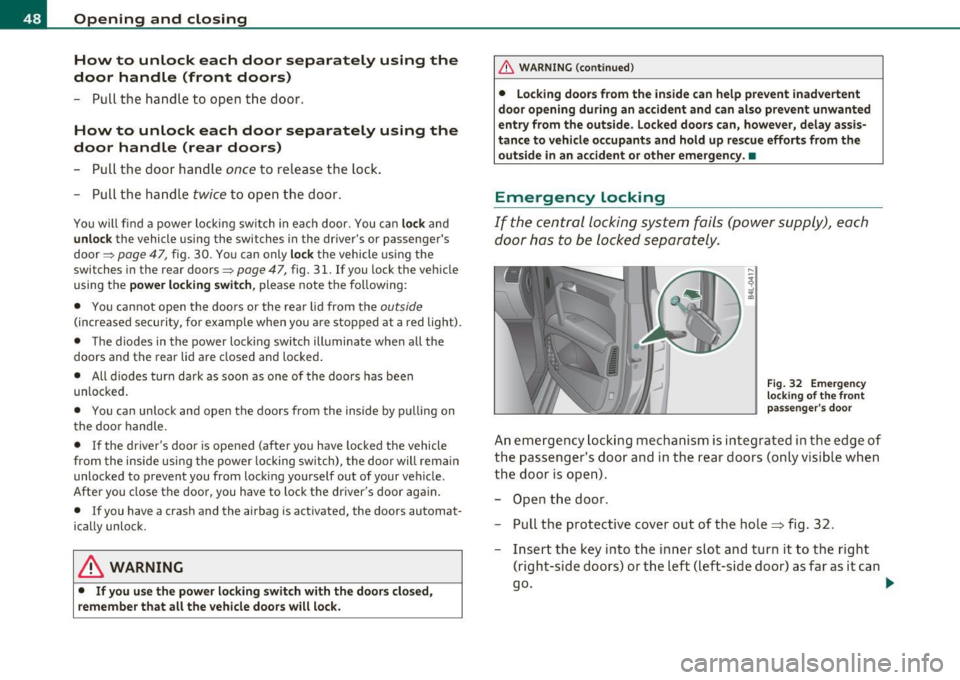
If the centra l locking system fails (power supply), each
door has to be locked separately.
Fi g. 3 2 Eme rgen cy
lo cking of th e fr ont
p ass enger's doo r
An em ergency lock ing mechan ism is inte grated i n th e edge of
the passe nger's doo r and in the rear doors (only v isib le wh en
the door is op en) .
- Ope n the door .
- Pull t he protective cover out of the hole => fig. 32 .
- Inse rt the key into the inner slot an d tu rn it to the right
(right-side doors) or the left (left-side door) as far as it can
go .
~
Page 51 of 390

After you close the door, you will no longer be able to open it from the
ou tside .
The door can be opened from the inside by pulling once respective ly
twice (rear doors) on the door handle. If the chi ld safety lock is
engaged in one of the rea r doors, the doo r has to be opened from the
outs ide after pulling on the handle once from the inside. •
Rear Lid
Opening and closing rear lid
Yo u can open the rear lid from inside the vehicle using a
switch in the driver's door.
Con tro ls a nd e quip
m en t
Fig . 33 Drive r's doo r:
r em ote re ar lid r elea se
F ig . 3 4 P osition of
h an dle in t he re ar lid
Vehicle OP-eration
Opening and closing
Opening the rear lid
- Press the middle button cC:5 on the remote contro l master
key,or
- Press the unlock button
cC:5 in the driver's door:::;, fig . 33 ,
or
- Press the handle on the rear lid :::;, fig. 34 .
- The rea r lid unlocks automatically and opens slightly .
- Lift the rear lid.
Closing the rear lid
-Pull the rear lid down and allow itto drop gently . The lid is
then closed automatically~ &.
& WARNING
• Afte r cl osing the re ar lid , alw ay s pull up on it to make sure that
it i s properly closed . Otherwise it c ould open suddenl y when the
veh icle is moving .
• To help preven t poisonous exhaust gas from being d raw n into
the vehicle , alwa ys keep the rear lid clo sed whil e driv in g. N ever
tran sport object s larger than tho se w hich fit c ompl etel y into th e
luggage area , bec au se then the rea r lid can not be fully closed .
• Never leav e your vehi cle unatt end ed es pecially with th e re ar lid
left open. A child could c rawl into th e ca r th rough the lugg age
c om partment and pull the lid shut , bec omin g trapped and un able
to get out. To reduc e the risk o f pers onal inju ry, never let children
p la y in or around your v ehicle . Alway s ke ep the rear lid as w ell as
the veh icle doors clo sed whe n no t in u se.
• Alway s en sure that no one i s with in ran ge of th e rea r lid when
it i s m ov in g , in p articular clo se to the hinge s -fingers or hand s can
be pinch ed . .,
Vehicle care Do-it-yourselt service iTechnical data
Page 53 of 390
- Press the button in the rear lid => page 50, fig. 36 for at
least fo ur seconds in o rder to save the desired opening
pos it ion . T he posi tio n ca n on ly be saved s tarting at a
certai n level.
& WARNING
• Never clo se the rear lid inattentively or without che cking fi rst.
Although the closing forc e of the r ear lid is limited, you can still
seriously injure you rself or others .
• Always ensure that no one i s within range of the rear l id when
it i s moving, in particular clo se to the hinge s and the upper and
lower edge s -finger s or hands can be pinched .
• To help prevent poisonous exhaust ga s from being drawn into
the vehicl e, always keep the rear lid closed while driving. Never
transport objects larger than tho se which fit completely into the
luggage ar ea, b eca use then the rear lid cannot be fully clo sed.
• Never leave your vehicle unattended e specially with the rear lid
l e ft open . A child could crawl into the car through the luggage
c ompartment and pull the lid shut , be coming trapped and unable
to get out. To reduce the r isk of per sonal injury, never let children
play in o r around your vehicle. Always keep the rear lid as well a s
the v ehicle doors closed when not in u se.
• If there i s a luggage rack or bicycle rack mounted on the rear
lid, it may not be able to open completely or an opened rear lid
may close by itself because of the added weight. So the open rear
lid must be supported or the we ight must be removed from the
luggage rack fir st.
[I) Tips
• If the rea r lid is open or not properly loc ked when the ig nit ion is
tur ned on, t he doo r and rear lid warning=>
page 24 appears in t he
instrument cluster display.
Controls and equip
ment Safety first
Opening and closing
•
The a utomat ic rear lid ope ning/closing process can be stopped by
holdi ng the re ar l id w it h your h and. The lid can the n be f urther
opened/closed by hand.
• If the re is a mech anic al prob lem wi th the au tomatic re ar lid
opening process or there is a n obstruction, the process is stopped
immedia tely.
• If there is a mechanical problem with
automati c closing for the
re ar lid or there is an o bst ru ct io n, i t opens ag ain slightly righ t aw ay .
Check to see why the rea r lid could not be closed before attempting
t o close it again .
• If the rea r lid on a locked vehicle is unlocked w ith the midd le
bu tton .::::so n the remo te key, the rear l id is au tom atically loc ke d
again immediately after closing. T his is indicated by the tur n signa ls
blinking.
• The following app lies to veh icles equipped with the Convenience
key * fea ture: if t he re mote cont rol key is left in the l ugg age compart
me nt, luggage compartment will automatically un lock itself after
you lock the vehicle. This prevents yo u from unin tentionally lock ing
your key in the luggage compartment .
• If the veh icle ba tte ry c ha rge drops be low a cer tain level, you c an
st ill open or close the rear lid manually, however, you will need to
apply more fo rce to close it.
• As soon as the elect rical connec tion to the t railer socket is
c omple ted o n veh icles with a fa cto ry ins talled towing hi tch , or a
trai ler hitch that was installed later accord ing to factory spec ifica
ti ons, the a utoma tic rear li d fu nct io n can only be opera ted v ia the
hand le in the rear lid .•
Vehicle care Technical data
Page 55 of 390

If the child safety lock has been activated on the left and on the right
side, t he rear cont rols are locke d on veh icles wi th re ar a ir-c ondi
tioning* . Dashes" ---" are shown in the displays for the rear climate
controls, and t he rear ai r-conditioning can only be operate d from the
cl imate contro ls in the cabin ::::;, page 116 .
[I) Tips
• In order to activate t he child safety lock on the left and the r ight
side, yo u have to press the two safety b uttons in success ion.
• Make certain that the c heck light comes on in t he correspondi ng
safety switch when the c hild safety loc k is activated. •
Convenience key
App lies to vehicl es: w ith Conven ience key
Description
A ccess and vehicl e opera tion based on: Mas ter key
remains in driver 's pocket.
Th e Conve nience key vehicle a uth o rization syste m allows keyless
unlocking, lock ing and start ing of the vehicle. You only have to car ry
th e master key on your perso n.
It makes no d ifference whether the master key is i n your jacke t pocke t
or in your br ief case . As soon as you approach yo ur vehicle, the Conve
nie nce key recog nizes the reques t fo r access, checks for author izat io n
and enab les the fo llow ing functions:
• Unlo cking the vehicle ::::;, page 54.
• Locking the vehicle ::::;, page 54.
• Switching on ignition and start ing the eng ine by press ing the
[ S T ART ] button; the master key does not have to be in t he ign it ion
switch::::;, page 12 7.
Controls and equip
ment Safety first
Opening and closing
& WARNING
•
When you lock your vehicle from outside, nobody -especially
children - should remain in side the vehicle . Remember, when you
lock the vehicle from the outside the windows cannot be opened
from the inside .
• When you leave the vehicle, always remove the ignition key
and take it with you. This will prevent pa ssenger s (children, for
example ) from accidentally being locked in the vehicle should
they accidentally press the power locking switch in the front
doors .
• Do not leave children in side the vehicle unsupervised. In an
emergency it would be impossible to open the doors from the
outside w ithout the key .
[ i ] Tips
• In order for the Convenience key to function , you must a lways
carry the master key with yo u.
• In order to be able to unloc k or loc k the vehicle, the a utho rized
master key must be within a range of about S feet (1.5 meters) from
the door o r the rear lid.
• Of course, you can still unlock and lock your veh icle using the
buttons on the master key . T he se lecto r lever must be in the P posi
tion .
• F or Declar ation o f Compliance to Uni ted St ates FCC a nd I ndu stry
Canada regulations::::;, page 369 . •
Vehicle care Technical data
Page 57 of 390
& WARNING
• Wh en you lock your vehicle from outs ide , nobody - especially
c hildren - should remain in side the vehicle . Remember , when you
lo ck the vehicle from the outside the windows cannot b e opened
from the inside .
• When you lea ve the vehicle, always remove the ignit ion key
and take it with you. This will prevent pa ssenger s (c hildren, for
e xample ) from a ccidentally be ing locked in the vehicle should
they accidentally pres s the power locking switch in the front
doors .
• Do not leave children inside the vehicle unsuperv ised . In an
e mergency it would be impossible to open the door s from the
outside without the key.
[I] Tips
It is not possible to re -open the door fo r a b rief period directly after
clos ing it . This a llows you to ensure that the doors are p roper ly
loc ked .•
Anti-theft alarm system
The an ti-theft alarm triggers an al arm if any one
attempts to break into the vehicle .
The a nti-theft alarm system trigge rs an a udible a larm and t urns o n
th e emergen cy flas her if an unau thori zed inte rfe rence wi th t he
vehicle is sensed by the system.
How is the anti-theft alarm system sw itched on?
T he anti-theft alarm system is switched on when you lock the vehicle.
Th e system is activa ted app rox ima tely 30 seconds after the vehicle is
locked. The indicator light on top o f the doo r trim start flashing
r a pidly fo r 30 seconds and then blink s low ly .
Controls and equip
ment Safety first
Opening and closing
How is the anti-theft alarm system switched off?
Th
e an ti- the ft alarm system is switche d off on ly when yo u unlock your
veh icle . If you do not o pen a door wit hin 60 seconds after you have
unlocked wit h the remote control , the vehicle will lock itself again
automa tically .
When will the anti-theft alarm system be
triggered?
When the vehicle is locked, the a larm system monitors and protects
the following parts of the veh icle:
• engine compartment
• lu ggage compa rtment
• doors
• ignition
Whe n the system is activated, the alarm will be triggered if one of the
doors, the engine hood or the rear lid are opened, or if the ignition is
t ur ne d on . The anti-t heft a la rm system will a lso go off when the
ba ttery is d isco nnected.
You can also trigger the alarm by pressing the PANIC button on your remote con trol. This will alert o ther peop le in case of eme rge ncy.
Press the
PANIC butto n aga in to turn off the a larm .
How is the anti-theft alarm switched off when
triggered?
Th e alarm sys tem is swi tched off whe n yo u un lo ck the veh icle o r whe n
the ignit ion is sw itched on . The a larm will also switch itself off when
i t comes to the end o f its cy cl e.
Emergency flasher and horn
Th e emerge ncy fl ashe r will blink briefly and the hor n sounds whe n
the doo rs, engine hood and rear lid a re prope rly closed.
If the eme rgency flashers do not blink, o r th e horn does no t soun d,
check the doo rs, eng ine hood and rear lid to make s ure they a re prop
er ly closed.
If you close a door, the hood o r the rear lid with the anti -
Vehicle care Technical data
Page 65 of 390
& WARNING (continued)
• The Panoramic sliding sunroof will continue to operate until
the ignition key has been removed and one of the front doors has
been opened .•
A pp lies to vehicles : w ith Panoram ic sl iding sunroof
Mechanical emergency closing for front
roof segment (Step 1)
The Panoramic sliding sunroof can be closed manually in
an emergency.
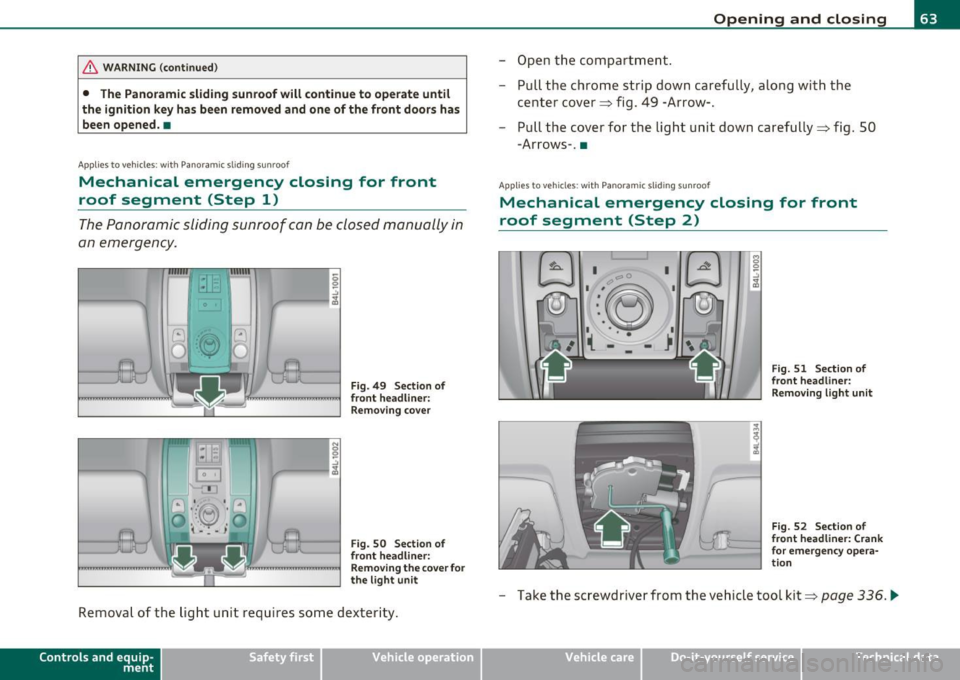
Fig. 49 Section of
front headliner: Removing cover
Fig. 50 Section of
front headliner:
Removing the cover for
the light unit
Removal of the light unit requires some dexterity.
Contro ls a nd e quip
m en t Vehicle
OP-eration
Opening and closing
-Open the compartment.
- Pull the chrome strip down carefully, along with the
center cover~ fig. 49 -Arrow-.
- Pull the cover for the light unit down carefully~ fig. 50
-Arrows-. •
Applies to v ehicles: w ith Pano ramic slid ing sun roof
Mechanical emergency closing for front
roof segment (Step 2)
I 0
'-:'~
-~ •-- 1 I • • •
( -
I
I I
Fig. 51 Section of
front headliner:
Removing light unit
Fig. 52 Section of
front headliner: Crank
for emergency opera
tion
- Take the screwdriver from the vehicle tool kit~ page 336 . .,_
Vehicle care Do-it-yourselt service iTechnical data
Page 67 of 390
Clear vision
Lights
Switching the headlights on and off -'t!-
In the "AUTO" position, a light sensor* automatically
swit ches the head- and tai llights on and off in response
to light condition s.
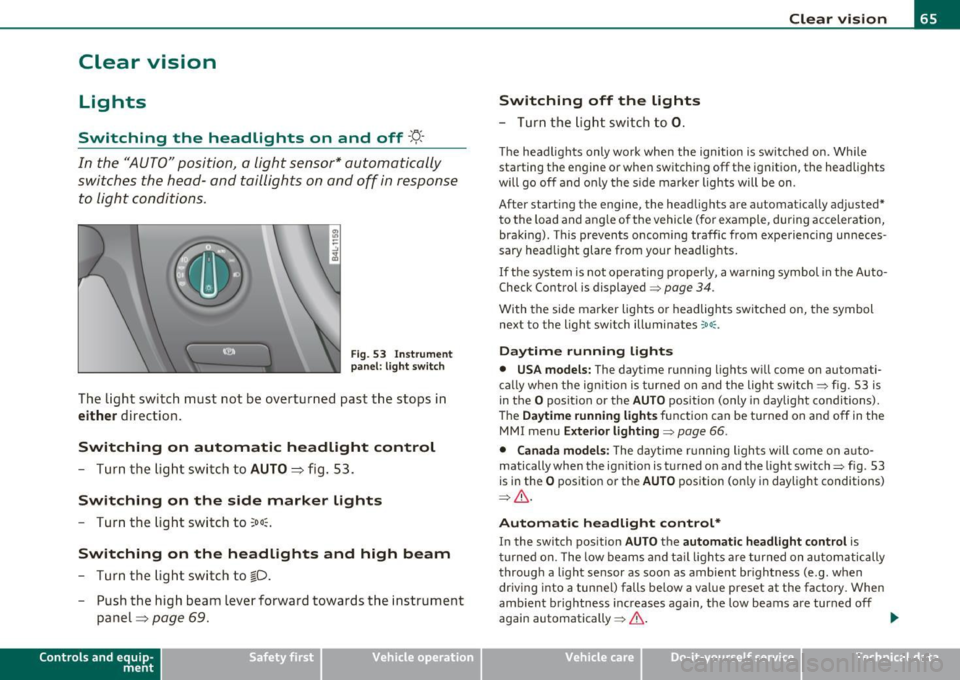
F ig . 5 3 Inst rum ent
pan el: li ght swit ch
The light switch must not be overturned past the stops in
either direction.
Switching on automatic headlight control
-Turn the light swi tch to AUTO ::::, fig. 53.
Switching on the side marker lights
-Tur n the light sw itch to 300~.
Switching on the headlights and high beam
- Turn the light swi tch to ~D.
- Push the high beam lever forward towards the instrume nt
panel=>
page 69.
Con tro ls a nd e quip
m en t Vehicle
OP-eration
Switching off the lights
-Turn the lig ht swit ch to 0.
Clear vision
The headligh ts only work when the ignition is switched on. Whi le
sta rting the engine or when switchi ng off the ignition, the headlights
will go off and o nly the s ide marker lights will be on.
After start ing th e engine, the headlights are automatically adjusted*
to the load and a ng le of the vehicle (fo r example, during acceleration,
braking) . This prevents oncoming traffic from experiencing unneces
sary head light glare from your head lig hts.
If the system is not operati ng p roperly, a warning symbol in t he Auto
Check Control is displayed =>
page 34.
With the side marker lights o r headlights switched on, the symbol
next to the light switch illuminates
coo:.
Daytime running lights
• USA models: The daytime running lights w ill come on automati
ca lly when the ign ition is turned on and the light switch => fig. 53 is
in the
O position or the AUTO position (only in daylight conditions).
Th e
Daytime running light s function can be tu rned on and off in the
MMI menu
Exterior lighting=> page 66.
• Canada model s: The d ay time r unning ligh ts w ill come on a uto
matically when the ig nitio n is turned on and the light switch=> fig. 53
is in the
O pos itio n or the AUTO position (on ly in daylight conditions)
=> & .
Automatic headlight control *
In the switch pos ition AUTO t h e automatic headlight control is
tu rned on. The low beams and tail lights a re turned on au tomatically
throug h a light sensor as soon as ambient br ightness (e .g . when
driving into a tunnel) falls below a va lue preset at the factory . When
amb ient b rightness increases again, the low beams are turned off
again automatically =>& . ..,_
Vehicle care Do-it-yourselt service iTechnical data