lock AUDI Q7 2010 Owner´s Manual
[x] Cancel search | Manufacturer: AUDI, Model Year: 2010, Model line: Q7, Model: AUDI Q7 2010Pages: 390, PDF Size: 93.04 MB
Page 58 of 390
![AUDI Q7 2010 Owner´s Manual Opening and closing
theft alarm switched on, the emergency flashers will blink and the ....
horn will so und only after you have closed the doo r o r li d.
[ i ] Tips
For the](/img/6/40275/w960_40275-57.png "AUDI Q7 2010 Owner´s Manual Opening and closing
theft alarm switched on, the emergency flashers will blink and the ....
horn will so und only after you have closed the doo r o r li d.
[ i ] Tips
For the")
Opening and closing
theft alarm switched on, the emergency flashers will blink and the ....
horn will so und only after you have closed the doo r o r li d.
[ i ] Tips
For the anti -t h eft a larm system to function p rope rly, ma ke sure all
vehicle doors a nd windows are closed before leaving the vehicle .•
Power windows
Controls
Switches for front door windows
@ operates the window in the driver's door.
Fig. 42 Drive r's doo r:
power wind ow
switche s
® operates the window in the front passenger 's door .
Switches for rear w indows
© operates the left rear window .
® operates the right rear window .
Safety switch
© Safety switch for rear w indow operat io n.
& WARNING
• Do not leav e children unatt ended in the vehicle , especially with
a cces s to vehicle key s. Un supervi sed use of the keys can re sult in
starting of the engine and use of vehicle sy stems such as power
window s, etc . which could result in seriou s injury .
• Remember -you can still open or close the power windows for
about ten minutes after the ignition is switched off . Only when
e ith er of the front doors are opened are the power windows
s witched off.
• Be careful when clos ing th e window s. Check to see that no one
is in the way, or serious injury could re sult !
• Always remo ve the ign ition key whenever you leave your
vehicle.
• If you lock your vehicle f rom the outside, no one, especially
children, should remain in the vehicle.
• Do not st ick anything on the windows o r the windshield that
may interfere with the driver 's field of vi sion .
[I] Tips
In a ddit ion to the sw itches in t he driver's doo r there is a separate
switch in each door for the power window in that door =>
page 57,
fig. 4 3. a
Switches in the driver 's door
The driver can operate all windows.
If the respective sw itch is pus hed or pu lled the w indow will
open or close . T he power window switches have a
two-posi-
tion function : ..,
Page 59 of 390

Opening the windows
-Push the s witch to the first stop and hold it t here u ntil t he
win dow has lowered to the desired posi tio n.
- Push t he switch briefly to the
second stop : the window
w ill automa tically o pen all t he way .
Closing the windows
-Pull t he swi tch up to the first stop and h old it th ere until
the wi ndow has risen to th e desired pos it ion .
- P ull the swit ch quickly to the
second position: the window
wi ll auto matically c lose all th e way ~
& in "Co ntrols" .
Activating/deactivating the rear windows
- P ress the left (!) switch ~ page 56, fig . 42 to deactivate
on ly the window regulator in the left door. The indicator
light in t he switch illu minates .
-Press t he r ight ff) switch~ page 56, fig . 42 to deactivate
only t he window reg ulator in the right door. The ind icator
li ght in the switch illuminates.
- Press the
ff) sw itch again to reac tivate t he win dow reg u-
lator. The indicator lig ht in the switch goes ou t.
If you press both(!) switches ® in succession, the fo llowing func
t ions are switc hed off in the rea r of the ve hicle:
• The window reg ulator sw itches in the rear doors.
• The buttons fo r th e Pano ram ic s liding su nroof *.
• On vehicles with rear climate cont rol *, ope ration from the rear is
blocked . Dashes" ---" are shown in the displays fo r the rear climate
controls, a nd the rear air -conditioning can only be operate d from the
cl ima te contro ls in th e cabin:::::,
page 116 .
Controls and equip
ment Safety first
Opening and closing
•
If only the left (!)switc h was pressed, t he window regulator in the
left rear door an d t he buttons in the re ar for the Panoramic sli ding
sunroof* are deactivated. In addition, the door is locked.
• If
only the right(!) switch wa s presse d, the win dow regu lator in
the
right rear door and the buttons in the rear for the Pa noramic
sliding s unroof * are dea ctiva ted. In addi tion, the door is locked .
T hi s fea ture has been provided for the safety of sma ll chi ldren r iding
in the rear of the vehicle .
[ i ] Tips
• T he windows can st ill be opened and closed for about ten minutes
after the ign ition has been tu rned off. The power w indows are no t
shut off unt il one of the front doors is opened.
• In order to ac tivate the child safe ty lock on the left and the rig ht
side, you have to p ress the two safety switches in succession. Make
c ertain that t he check light comes on the co rrespond ing safe ty sw itch
when the child safety lock is activated. •
Switch in the front passenger's door and on
the rear doors
Fig. 43 Swit ch loc a
t ion fr ont pa ssenge rs
door
The pow er window switc h has a two-position function:
Vehicle care Technical data
Page 60 of 390
Opening and closing
Opening the windows
-Press the switch to the first position and hold it until you
have opened the window as far as you want.
- Press the switch quickly to the
second position and the
window will automatically open all the way.
Closing the windows
Pull the switch to the first position and hold it until you
have closed the window as far as you want .
- Pull the switch quickly to the
second position and the
window will automatically close all the way .
[ i ] Tips
The windows can still be opened and closed for about ten minutes
after the ignition has been turned off . The power windows are not
shut off until one of the front doors is opened .•
Convenience close/open feature with the
lock in the driver 's door
You can close or open the windows from outside when you
lock or unlock your car with the key in the driver's door
lock.
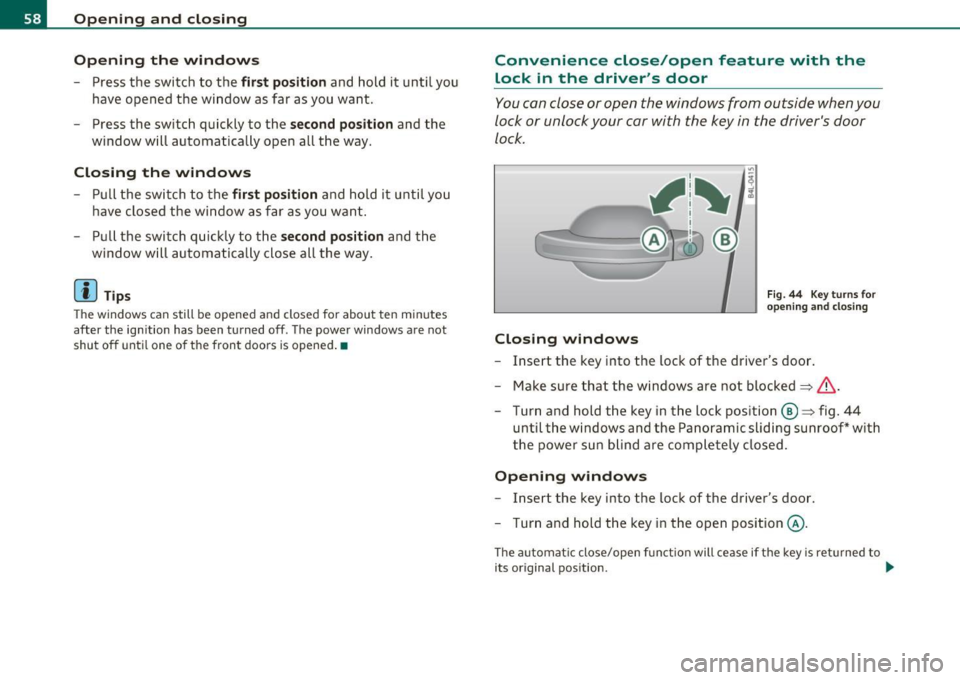
Closing windows
Fig . 44 Key turns for
opening and closing
-Insert the key into the lock of the driver's door .
- Make sure that the windows are not blocked
=> &.
- Turn and hold the key in the lock position @=> fig. 44
until the windows and the Panoramic sliding sunroof* with
the power sun blind are completely closed .
Opening windows
-Insert the key into the lock of the driver's door.
- Turn and hold the key in the open position @.
The automat ic close/open function will cease if the key is returned to
its original position . .._
Page 63 of 390

-To set an intermediate position manually, press the rocker
switch in the front area
e:> until the roof segment has
reached the desired tilt position==>& .
& WARNING
Improper use of the Panoramic sliding sunroof can cause serious
personal injury.
• Be careful when closing the Panoramic sliding sunroof. Not
paying attention could cause you or others to be trapped and
injured as the Panoramic sliding sunroof closes.
• Always take the key with you when you leave the vehicle to
prevent injuries caused by the Panoramic sliding sunroof closing
• Never leave children or persons requiring assistance alone in
the vehicle, especially when they could access the vehicle keys.
Unsupervised use of the keys can result in the engine being started
or use of vehicle systems such as the power windows, etc. which
could result in serious injury. The doors could be locked with the
remote key, delaying help in an emergency.
• The Panoramic sliding sunroof will continue to operate until
the ignition key has been removed a nd one of the front doors has
been opened. •
Applies to vehicles : w ith Panoram ic sliding sunroof
Convenience closing feature
The Panoramic sliding sunroof can be closed from outside
with the key in the driver's door lock .
-Insert the key into the driver's door lock.
- Turn and hold the key in the lock position ®==>
page 46,
fig. 29 until the Panoramic sliding sunroof is completely
closed ==> & in "Closing Panoramic sliding sunroof" on
page 60. The power sun blind is also closed.
Con tro ls a nd e quip
m en t Vehicle
OP-eration
Opening and closing
& WARNING
Be careful when closing the Panoramic sliding sunroof. Not paying
attention could cause you or others to be trapped and injured as
the Panoramic sliding sunroof closes. •
Applies to v ehicl es: w ith Panoramic slid in g sunroof
Opening and closing sunshade
I .~ "'
r~ 1~· I
0 g
"I ..!J
"' a,
' ~
G
{(e)
B
0
0 ..
~ ~ ffl ""'
[f 'd 11 -I
t _, $
b l•,:,,,;; =·:::"' == ;'·== ··.••,:::-= ·•,::: ::::= ·•=·· = ·=· ======· •=··•·•-,· =,~=·,., .. c":::'• .. ·= '·"•' :::· ,=••,•s ::::::::: j ~
Fig. 47 Section of
front headliner: Switch
for sunshade
Fig. 48 Section of
headliner in rear:
I>· .. ,.:._::;::-_·;r .,;:;, :::;>:,: -:-·. _::: ;:::'·;-}.- .::,.:.-: ::::: :~ ,.:.·-:- -":-· Switch for sunshade
The two segments of the Panoramic sliding sunroof are each
equipped with a sunshade for protection against the sun's
rays. The front shade is power operated, the rear shade is
opened and closed manually . To prevent the vehicle interior _.,
Vehicle care Do-it-yourselt service iTechnical data
Page 64 of 390

Opening and closing
from heating up, you should close both sunshades when you
park your vehicle in the sun.
Opening and closing front sunshade
Tap the rear -:c;"J" of the rocker switch~ page 61, fig. 47 or
the rocker switch for rear-seat passengers~
page 61,
fig. 48 briefly to open the sunshade fully.
- Tap the front
·'J.rT of the rocker switch briefly to close the
sunshade fully~& .
- To set an intermediate position manually, press the front or rear of the rocker switch (depending on the position of
the shade)
until the desired position is reached ~ & .
Opening and closing rear sunshade
-Hold the sunshade by the grip and push it to the desired
position.
& WARNING
Never close the sunshade without paying attention or checking -
danger of injury! •
Applies to veh icles : w ith Panoram ic sliding sunroof
Emergency closing
In an emergency, the Panoramic sliding sunroof can be
closed electrically.
If the Panoramic sliding sunroof detects an object in its path
when it is closing, it will open again automatically. In this
case, you can close the roof with the power emergency
closing function .
Emergency closing of front roof segment
- Turn the switch~ page 59, fig . 45 @ to the normal posi
tion @.
- Within five seconds after the sunroof opens automati
cally, pull the switch until the roof segment closes.~&.
The driver's and front passenger's doors must be closed.
- If the power emergency closing function is not possible, you must close the roof manually~
page 63.
Emergency closing of rear roof segment
-Within five seconds after the sunroof opens automati
cally, press the front
e:> of the rocker switch~ page 59,
fig. 45 ® until the roof segment closes~&. The driver's
and front passenger's doors must be closed.
- If the power emergency closing function is not possible,
you must close the roof manually ~
page 64.
& WARNING
Improper use of the Panoramic sliding sunroof can cause serious
personal injury.
• Be careful when closing the Panoramic sliding sunroof. Not
paying attention could cause you or others to be trapped and
injured as the Panoramic sliding sunroof closes.
• Always take the key with you when you leave the vehicle to
prevent injuries caused by the Panoramic sliding sunroof closing
• Never leave children or persons requiring assistance alone in
the vehicle, especially when they could access the vehicle keys.
Unsupervised use of the keys can result in the engine being started
or use of vehicle systems such as the power windows, etc. which
could result in serious injury. The doors could be locked with the
remote key, delaying help in an emergency. .,,.
Page 68 of 390

Clear vision
In the AUTO positio n the low beams are switched off automatically
w hen the ign it ion is turned o ff.
Light Sensor Malfunction*
In the event of a light senso r m alfun ction, the driver is not ified in the
instrument cluster display:
~ Automatic headlight s/ automatic wipers defective
For safety reasons the low beams a re turned on permane ntly with the
switch in
AUTO . However, you can contin ue to turn the lights on and
off using the light sw itch. Have the light sensor checked as soon as
possible at an autho rized Audi dealer or q ua lified workshop.
& WARNING
• Never u se daytime running lights to see where you are going .
They are not bright enough and w ill not let you see far enough
ahead for safety, especially at dusk o r when it i s dark . Always
s witch on the low beams at du sk or when it i s dark.
• Automati c headlights* are only intended to a ssist the driver .
They do n ot relieve the driver of h is re spon sibility to check the
headlights and to turn them on manually according to the current
light and visibility condition s. For example, fog and rain cannot be
detected by the light sensors. So alw ays sw it c h on the headl ights
under the se weather condition s and when driving in th e dark
io.
• Crashes can happen when you cannot see the road ahead and
when you cannot be seen by other motori sts.
- Always tu rn on the headlights so that you can see ahead and
so that others can se e your car from the back.
(I) Tips
• With the swit ch in AUTO front fog lig hts a nd rea r fog l ights ca nnot
be t urned on in addition. •
The lig ht sensor* for headlight contro l is located in the rear view
mi rror moun t. D o no t apply any stickers to the w indshield in this area
to prevent malfunctions or failures .
• If you remove the ign ition from t he ignit ion lock wh ile the head
lights are still on, a buzzer wi ll sound as long as the driver's door is
open to remind you to t urn off the lights.
• Always observe the spec ific local regulations for your area as to
when to use your lig hts .•
Adjusting exterior lighting
T he functions are set in the f\1f\1J.
- Select: Function button [CAR ]> Systems *> Exterior
lighting .
Coming home
The Corning hom e function ensures tha t a fter turning off the igni
tion and open ing the driver 's door
the veh icle per iphery is illum i
nated in the dark. I n addition, the front fog lights, the ta il lights an d
the license plate l ight are turned on . On-time can be set for a period
from O (o ff) to 60 seconds .
Leaving home
The Leaving home function ens ures tha t when unlocking the vehicle
periphery is illuminated in the dark. In add ition, the front fog lights,
the tai l lights and the license p late light are turned on . This funct ion
can be turned on and off .
Daytime running ligh ts
USA models : The daytime running lights can be turned on or off using
this funct ion .
Canada model s: The function cannot be t urned off. It is activated
automatically each time the ignition is t urned on. This men u item is
shown "greyed out". •
Page 70 of 390
Clear vision
Applies to vehicles : with Adaptive Light
Adaptive Light
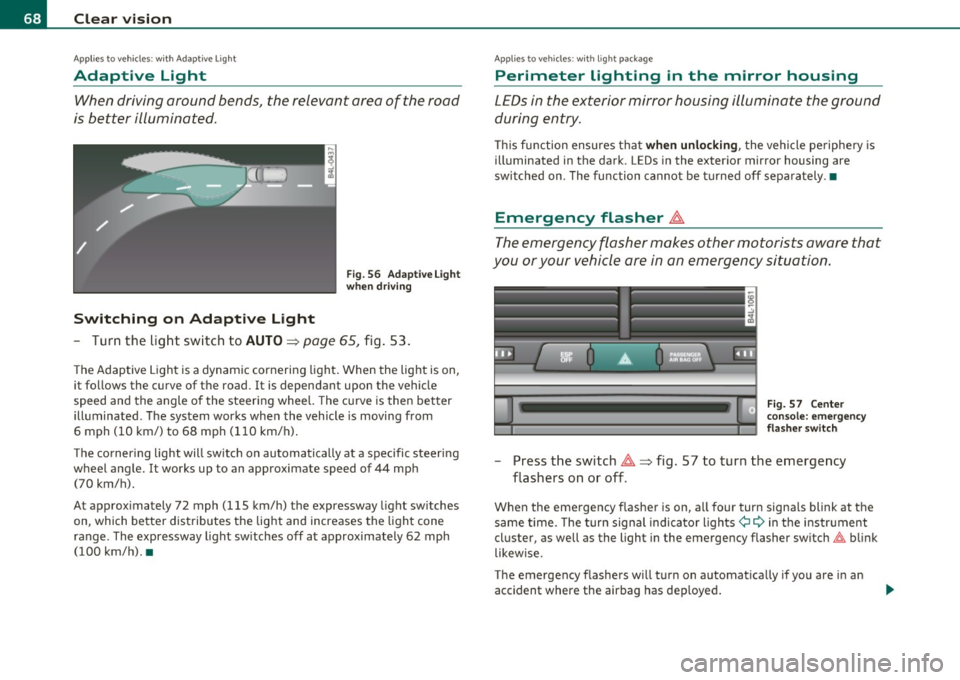
When driving around bends, the relevant area of the road
is better illuminated.
Switching on Adaptive Light
Fig . 56 Adaptive Light
when driving
- Turn the light switch to AUTO~ page 65, fig. 53.
The Adaptive Light is a dynamic cornering light. When the light is on,
it follows the curve of the road. It is dependant upon the vehicle
speed and the angle of the steering wheel. The curve is then better
illuminated. The system works when the vehicle is moving from
6 mph (10 km/) to 68 mph (110 km/h).
The cornering light will switch on automatically at a specific steering
wheel angle. It works up to an approximate speed of 44 mph
(70 km/h).
At approximately 72 mph (115 km/h) the expressway light switches
on, which better distributes the light and increases the light cone
range . The expressway light switches off at approximately 62 mph
(100 km/h). •
Applies to vehicles : w ith light package
Perimeter lighting in the mirror housing
LEDs in the exterior mirror housing illuminate the ground
during entry.
This function ensures that when unlocking, the vehicle periphery is
illuminated in the dark. LEDs in the exterior mirror housing are
switched on. The function cannot be turned off separately .•
Emergency flasher ~
The emergency flasher makes other motorists aware that
you or your vehicle are in an emergency situation.
Fig. 57 Center
console: emergency
flasher switch
-Press the switch~~ fig. 57 to turn the emergency
flashers on or off .
When the emergency flasher is on, all fou r turn signals blink at the
same time. The turn signal indicator lights¢
9 in the instrument
cluster, as well as the light in the emergency flasher switch~ blink
likewise.
The emergency flashers will turn on automatically if you are in an
accident where the airbag has deployed.
Page 72 of 390
Clear vision
0 Note
Do no t use the hig h beam or hea dlight fl asher if you know that these
cou ld blind oncoming traffic.•
Interior lights
Front interior Lights
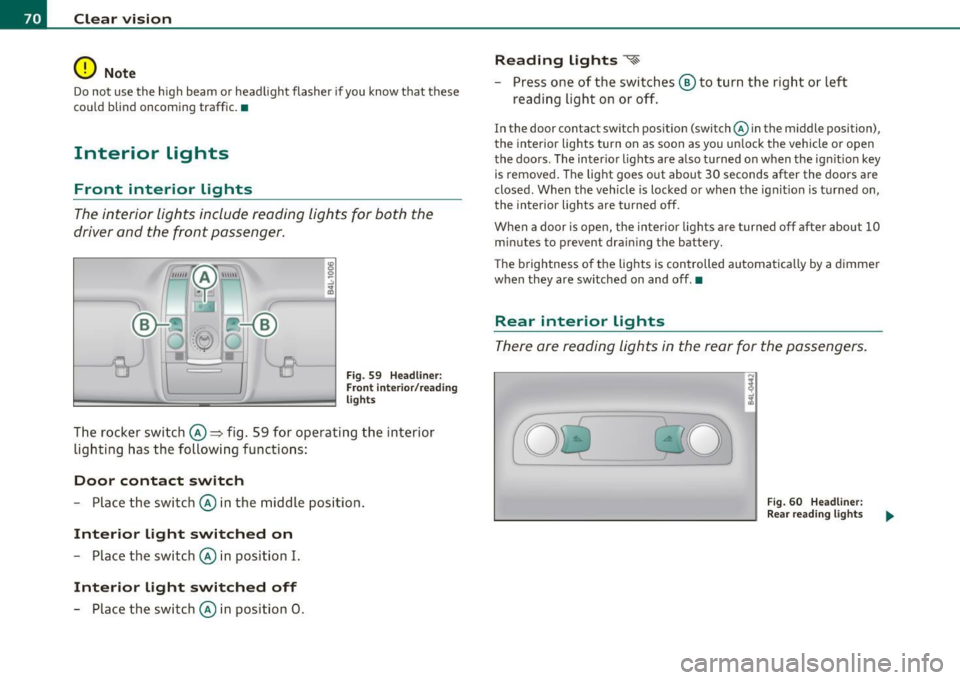
The interior lights include reading lights for both the
driver and the f ront passenger .
Fig . 5 9 Headlin er:
Fr ont inte ri or/ rea ding
lights
The rocker switch©=> fig . 59 for operating the interior
lighti ng has the followi ng functions :
Door contact switch
-Place the switc h© in the middle position.
Interior light switched on
-Place the switch © in position I.
Interior light switched off
- Place the switch © in position 0 .
Reading lights ~
- Press one of the switches ® to turn the right or left
reading light on or off.
In the door contact sw itch position (switch @in the middle position),
the interior lights turn on as soon as you un lock the vehicle or open
the doors . The inter io r lights are also t urned on when the ign it ion key
is removed . The light goes out about 30 seconds after the doors are
closed. W hen the vehicle is locked or when the ignit ion is t urned on,
the interior lights are turned off.
When a door is ope n, the interior lights a re turned o ff afte r about 10
m inutes to prevent dra in ing the battery.
T he brightness o f the lights is controlled automatica lly by a dimmer
when they are sw itched on and off. •
Rear interior Lights
The re are reading lights in the rear for the passengers.
Fi g. 6 0 He adli ner:
Rear re a din g ligh ts
Page 73 of 390
r ,:le,
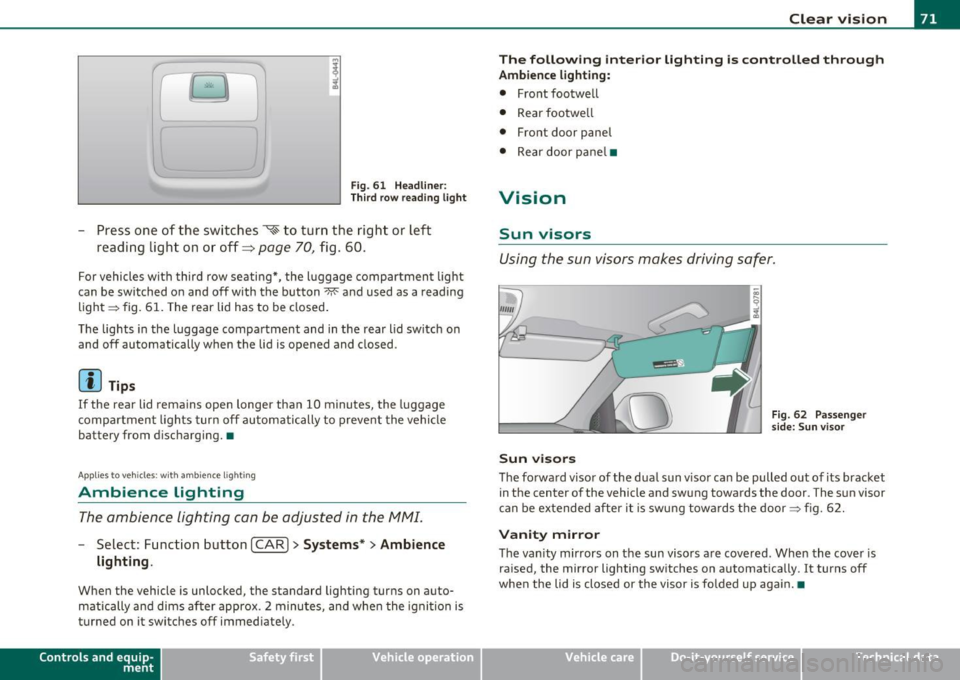
Fig. 61 Headliner :
Third row reading light
-Press one of the switches ~ to turn the right or left
reading light on or off~
page 70, fig . 60.
For vehicles with third row seating*, the l uggage compartmen t light
can be switched on and off with the button~ and used as a reading
light => fig. 61. The rear lid has to be closed.
The lights in the luggage compartment and in the rear lid switch on
and off automatically when the lid is opened and closed.
[ i ) Tips
If the rear lid remain s open longer than 10 minutes, the luggage
compartment lights turn off automatically to prevent the vehicle
battery from discharging. •
Applies to veh icles: with ambience light ing
Ambience Lighting
The ambience lighting can be adjusted in the MMI.
-Select: Function button I CAR]> Systems *> Ambience
lighting .
When the vehicle is unlocked, the standard lighting turns on auto
matically and dims after approx. 2 minutes, and when the ignition is
turned on it switches off immediately.
Con tro ls a nd e quip
m en t Vehicle
OP-eration
Clear vision
The following interior lighting is controlled through
Ambience lighting:
• Front footwell
• Rear footwe ll
• Front door panel
• Rear door pane l•
Vision
Sun visors
Using the sun visors makes driving safer.
Sun visors
Fig. 62 Passenge r
side: Sun v isor
The forward visor of the dua l sun v isor can be pulled out of its bracket
in the center of the vehicle and swung towards the door. The sun visor
can be extended after it is swung towards the door => fig. 62.
Vanity mirror
The vanity mirrors on the sun visors are covered. When the cover is
ra ised, the mirror lighting switches on automatically . It turns off
when the lid is closed or the visor is fo lded up aga in.•
Vehicle care Do-it-yourselt service iTechnical data
Page 89 of 390
Seat memory
Applies to veh icles: with seat memory
Driver's seat memory
The seat adjustment settings for two drivers can be
stored using the memory buttons in the driver's door.
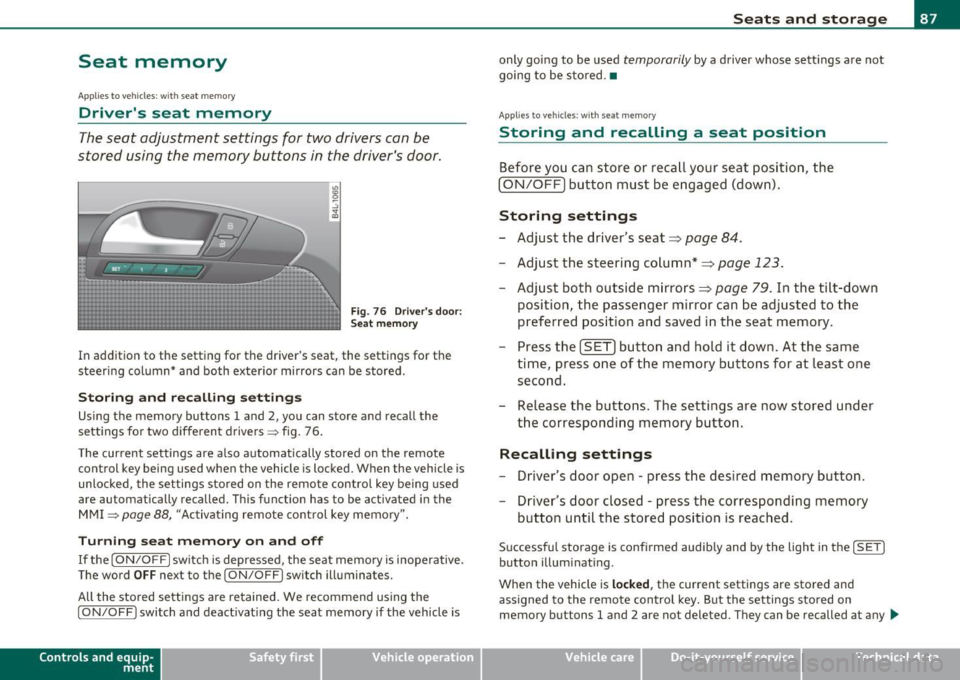
Fig . 76 Driver's door:
Seat memory
In addition to the setting for the driver's seat, the settings for the
steering column* and both exterior mirrors can be stored.
Storing and re calli ng setting s
Using the memory buttons 1 and 2, you can store and recall the
settings for two different drivers => fig . 76 .
T he current settings are also automatically stored on the remote
control key being used when the vehicle is locked. When the vehicle is
unlocked, the settings stored on the remote contro l key being used
a re automatically recalled. This function has to be activated in the
MMI
=> page 88, "Activat ing remote control key memory ".
T urning se at m em ory on and off
If the [ ON/OFF] switch is depressed , the seat memory is inoperative .
The word
OFF next to the [ ON/OFF] switch illuminates.
All the stored settings are retained. We recommend using the
[ ON/OFF ] switch and deact ivat ing the seat memory if the vehicle is
Con tro ls a nd e quip
m en t Vehicle
OP-eration
Seats and storage
only going to be used temporarily by a driver whose settings are not
going to be stored .•
App lies to vehi cles : w it h seat memo ry
Storing and recalling a seat position
Before you can store or recall your seat position, the
(ON/OFF) button must be engaged (down) .
Storing settings
-Adjust the driver 's seat => page 84.
- Adjust the steering column*=> page 123.
Adjust both outside mirrors=> page 79. In the tilt -down
position, the passenger mirror can be adjusted to the
preferred position and saved in the seat memory.
- Press the
(SET) button and hold it down. At the same
time, press one of the memory buttons for at least one second.
- Release the buttons. The settings are now stored under
the corresponding memory button.
Rec alling settings
- Driver's door open -press the desired memory button.
- Driver's door closed -press the corresponding memory
button until the stored position is reached .
Successful storage is confirmed audib ly and by the light in the [ SET]
button illuminating.
When the vehicle is
loc ked , the current settings are stored and
assigned to the remote control key. But the settings stored on
memory buttons 1 and 2 are not deleted. They can be recalled at any
~
Vehicle care Do-it-yourselt service iTechnical data