oil level AUDI Q7 2010 Owner´s Manual
[x] Cancel search | Manufacturer: AUDI, Model Year: 2010, Model line: Q7, Model: AUDI Q7 2010Pages: 390, PDF Size: 93.04 MB
Page 13 of 390
If the needle is well in the upper area of the gauge, the coolant
tempe rat ure is too high.
Stop the vehicle , switch the engine off and
allow the engine to cool.
If the warning light comes on again after
driving a short distance, contact an authorized dealer.
& WARNING
• Alway s observe th e warning in=> page 286 , "Engine comp art
ment ", before opening the hood and checking the engine coolant
level.
• Never open the engine hood if you see or hear steam, or if you
s ee engin e coolant dripping from the engine compartment. You
could burn yourself. Let the engine cool off first so that you cannot
hear or see any steam or engine coolant .
0 Note
• Mounting additiona l lights or accessories in fron t of the a ir inlets
reduces the cooling effect of the radiator . At high outside tempera
t ur es o r high engine load, the engine could overheat.
• The front spo iler has bee n des igned to prope rly d istribute the
coo ling air when the vehicle is moving.
If the spoiler is damaged, this
cou ld reduce the coo ling effect and the eng ine could then overheat .
Ask your author ized A udi dealer for assistance .•
Tachometer (engine rev counter)
The tachometer indicat es th e engine RPM (revolutions
per minutes).
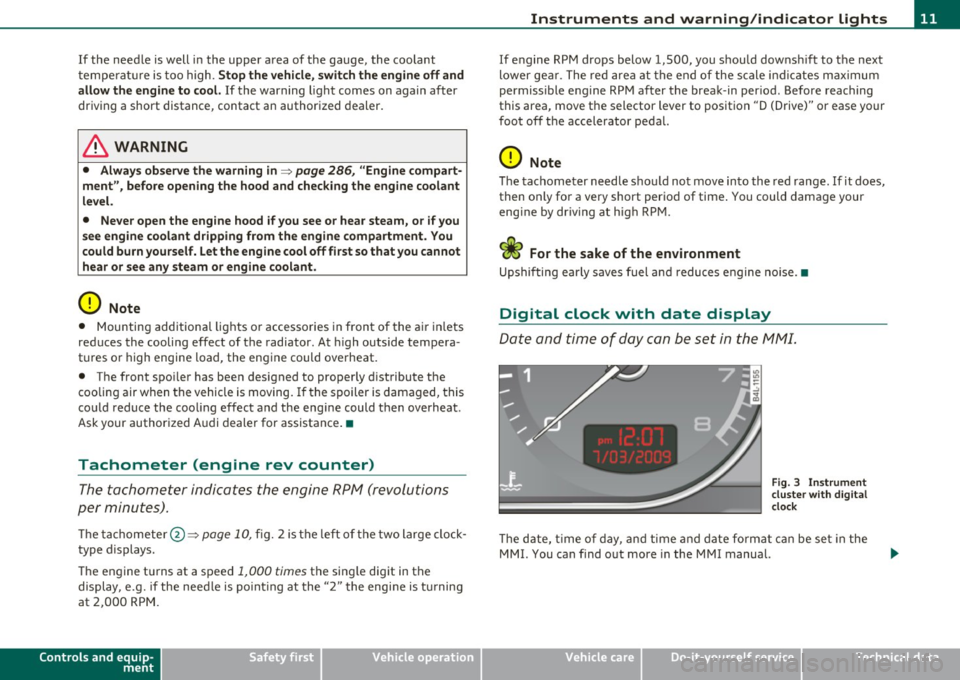
Th e ta chomete r@ ::::> page 1 0, fig. 2 is the left of the tw o large clock
type displays.
Th e engine tu rns at a speed
1,000 times the si ng le dig it in the
display, e.g. if the need le is po int ing at the "2 " the engi ne is t urning
at 2,000 RP M.
Controls and equip
ment Safety first
Instruments and warning
/indicator lights
If e ngine RPM drops below 1,500, you s hould dow nsh ift to t he next
lower ge ar. T he re d area at t he e nd of the s cale i ndic ates m aximum
permissible e ngine RPM after the break-in per iod . Before reaching
this area, move the selector lever to posit ion "D (Drive)" or ease yo ur
foot off the accelerator pedal.
0 Note
T he tachome ter needle s houl d not move into the red range. If it does,
then only fo r a very short period of time . You could damage your
e n g in e by driv ing at h igh RPM .
c£> For the sake of the environment
Upshifting early saves fuel a nd reduces e ngine noise. •
Digital clock with date display
Date and time of day can be set in the MM I.
Fig. 3 Instrumen t
cluster with digital
clock
Th e d ate, t ime o f day, and time and date fo rmat c an be se t in the
MMI. You can find o ut more in the MMI manual.
Vehicle care Technical data
Page 29 of 390
& WARNING
Always observe the post ed speed limits and adjust your speed to
s uit prevailing road , traffic and weather condition s. Never drive
your vehi cle faster than the m aximum sp eed rating of the tires
installed .•
Auto Check Control
Introduction
The Auto-Check control monitors the function of certain vehicle
featu res a nd compo nents. It s imp ly makes su re t hese featu res and
components are working properly. The Auto-Check contro l works as
long as the igni tion is on, as we ll as whenever the veh icle is d riven.
If a compone nt is malfunctioning or if the need for an urgent repair
has been detected, this will appea r in the instrument cluster display .
You will also hear an audible warn ing tone . The d isp lays are colo r
coded in e ither red or yellow depend ing on their level of prior ity.
A red symbol means
Danger , a yellow symbol ind ic a tes Warning . In
certain situations, information message for the driver appear in addi
t ion to the red and ye llow symbo ls.
Function test: automatic transmission
Th e Auto- Che ck Contro l will a utomat ica lly perfo rm a test ea ch t ime
you switch on the ignition. With the selector lever in
P or N, the
f ollowing mess age appears in t he disp lay:
When stationary apply foot brake while selecting gear.
When you a se lect a diffe rent gea r (for example : R, D , etc .), the
message w ill dis appea r and t he Auto-Check f unctio n is d isplayed.
If there is a ma lfunction, then the malfunction message will appear
abou t 15 seconds after the you start the veh icle . A t the same time
you will hea r a warni ng tone .•
Controls and equip
ment Safety first
Driver information display
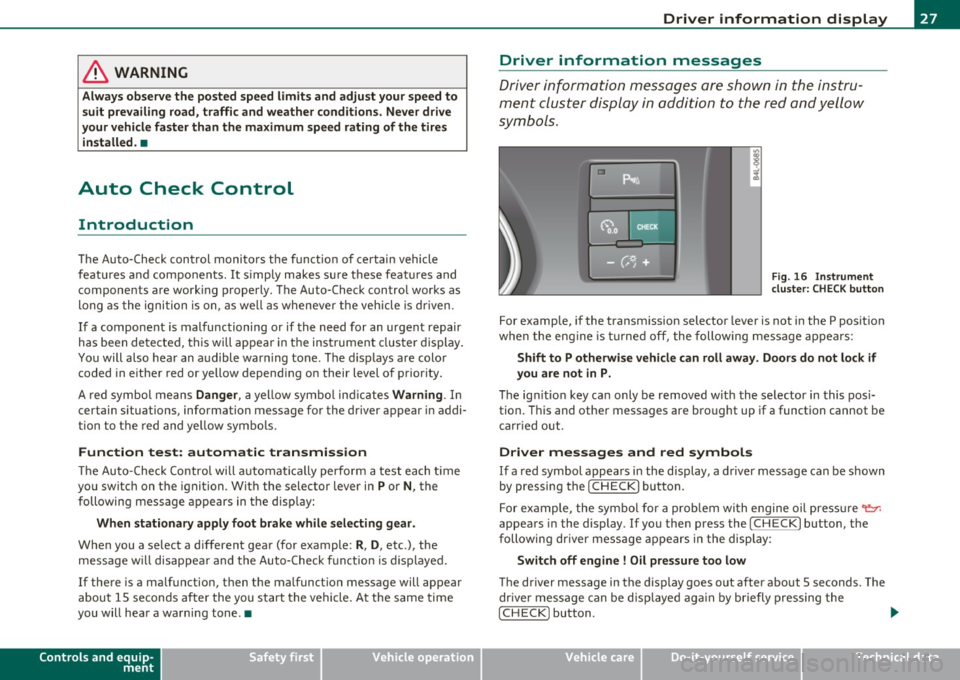
Driver information messages
Dr
ive r inf orma tion messa ges a re sh ow n in the instru
ment clus ter dis play i n addition to t he red a nd yell ow
symbols.
Fig . 16 Instrumen t
clu ster: CHE CK button
For examp le, if the transm ission selector lever is not in the P posit ion
w hen the eng ine is tur ned off , the foll owing message appea rs :
Shift to P otherwise vehicle can roll away. Doors do not lock if
you are not in P.
Th e ig nitio n key can only be removed w ith the se lector in this pos i
tion. This and othe r messages are bro ught up if a function cannot be
c a rried out .
Driver messages and red symbols
If a red symbol appears i n the d isplay, a driver message can be s hown
by pressing the
! CHECK) button.
F or ex ample, the sym bo l for a prob lem wi th engine o il press ure~
appears in the display.
If you the n press the I CH ECK ) button, the
f ollowin g dr iver mes sage appears in the displ ay :
Switch off engine ! Oil pressure too low
The driver message in the display goes o ut after about 5 seconds . The
dr ive r m essage can be d isp laye d a gai n by briefly pres sing the
!CHECK ) button. .,.
Vehicle care Technical data
Page 30 of 390
Driver information display
Driver messages and yellow symbols
If a yellow symbol appears in the display, a driver message is also
displayed automatically.
F o r example, the symbol appears in the display, indicating low
windshield washer fluid level. The following message also appears :
Please refill washer fluid
The driver message disappears after a few seconds. The driver
message can be displayed again by briefly pressing the [
CHECK]
button.•
Red symbols
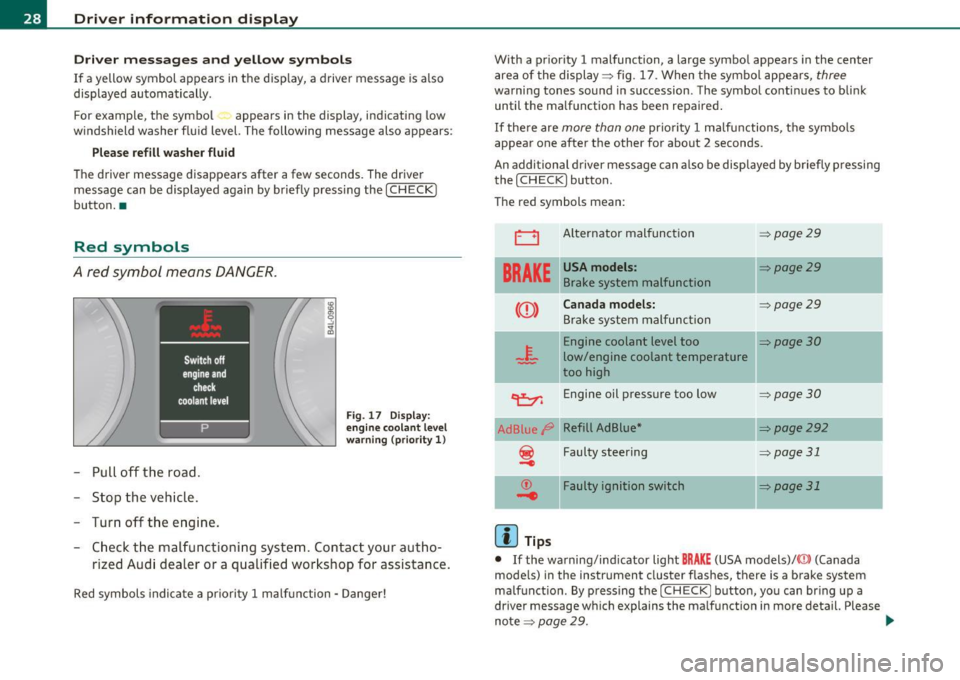
A red symbol means DANGER.
-Pull off the road.
- Stop the vehicle.
- Turn off the engine.
Fig. 17 Display:
engine coolant level
warning (priority 1)
-Check the malfunctioning system. Contact your autho-
rized Audi dealer or a qualified workshop for assistance.
Red symbols indicate a priority 1 malfunction. Danger! With a priority 1 malfunction, a large symbol appears
in the center
area of the display => fig .
17. When the symbol appears, three
warning tones sound in succession . The symbol continues to blink
until the malfunction has been repaired.
If there are
more than one priority 1 malfunctions, the symbols
appear one after the othe r for about
2 seconds .
An additional driver message can also be displayed by briefly pressing
the (
CHECK ] button.
The red symbols mean :
0
BRAKE
CCD>
Alternator malfunction
USA models:
Brake system malfunction
Canada models:
Brake system malfunction
Engine coolant level too
low/engine coolant temperature
too high
~ Engine oil pressure too low
Ad Blue
/8' Refill AdBlue*
f Faulty steering
Faulty ignition switch
(I) Tips
=> page29
=> page29
=> page29
=>page 30
=> page 30
=>page292
=> page 31
~page31
• If the warning/indicator light BRAKE (USA models)/ ((!)) (Canada
models) in the instrument cluster flashes, there is a brake system
malfunction . By pressing the (
CHECK) button, you can bring up a
driver message which explains the malfunction in more detail. Please
note =>
page 29. .,_
Page 32 of 390
Driver information display
& WARNING (continued)
vehicle control and an accident. Have your vehicle repaired imme·
diately by your authorized Audi dealer or a qualified workshop.
Drive slowly and avoid sudden, hard brake applications.•
Engine cooling system malfunction -L
A malfunction in the engine cooling system must be
repaired as soon as possible.
When the .J_ symbol in the display blinks, then either the
engine coolant
temperature is too high, or the coolant level
is too low. An additional driver message can also be displayed
by pressing the
[CHECK) button:
Switch off engine and check coolant level
-Pull off the road.
- Stop the vehicle.
- Turn off the engine .
- Check coolant level~
page 305.
-Add coolant if necessary~ page 306.
-Continue driving only after the engine coolant
warning/indicator light goes out.
- Contact your authorized Audi dealer for assistance if
necessary.
If the engine coolant level is correct, then the radiator fan may be the
cause of the malfunction.
If the
D wa rning symbol (alternato r malfunction) also lights up on
the instrument panel~
page 29, then the fan belt may be damaged .
& WARNING
• If your vehicle should break down for mechanical or other
reasons, park at a safe distance from moving traffic, turn off the
engine and turn on the hazard warning lights~
page 68, "Emer
gency flasher
A".
• Never open the hood if you see or hear steam or coolant
escaping from the engine compartment· you risk being scalded.
Wait until you can no longer see or hear steam or coolant
escaping.
• The engine compartment of any vehicle is a dangerous area.
Before you perform any work in the engine compartment, turn of
the engine and allow it to cool. Follow the warning stickers
~ page 286, "Engine compartment".
0 Note
Do not continue driving if the _f_ symbol illuminates. There is a
malfunction in the engine cooling system -you could damage your
engine .•
Engine oil pressure malfunction "l::,r:
The red engine oil pressure warning symbol requires
immediate service or repair. Driving with a low-oil-pres
sure indication is likely to inflict severe damage to the
engine .
If the
displayed by pressing the
[CH ECK) button:
Switch off engine ! Oil pressure too low
Immediate actions
-Pull off the road .
Page 33 of 390
-Stop the vehicle.
- Turn off the engine .
-Check the engine oil level with the dipstick~ page 301.
Dipstick readings checks too Low
-Top off oil to the proper level~ page 302.
- Make sure that the oil pressure warning symbol "e:7':
appears no longer in the display before you start driving
again.
Dipstick reading checks OK
If the oil pressure warning symbol "e:7': starts flashing
again even though the engine oil level checks
OK on the
dipstick ,
do not continue driving and do not let the
engine run in idle.
Instead , contact your authorized Audi
dealer for assistance.
W Tips
• The engine oil pressure symbol~ is not an indicator for a low
engine oil level. Do not rely on it. Instead, check the oil level in your
engine at regular intervals, preferably each time you refuel, and
always before going on a long trip.
• The yellow oil level warning indication requires oil refill or
workshop service without delay. Do not wait until the red oil pres
sure warning ~ starts to flash before you respond to the low oil
level warning
:!:':! • By then, your engine may already have suffered
serious damage. •
Controls and equip
ment Safety first
Driver information display
Steering malfunction
i
If there is a malfunction in the electronic steering column lock, the steering cannot be unlocked.
If the i symbol in the display blinks, there is a malfunction
in the electronic steering column lock . An additional driver
message can also be displayed by pressing the[CHECK]
button :
Do not drive vehicle: steering defective
-Contact your nearest authorized Audi dealer or qualified
workshop .
- Do
not tow your vehicle.
& WARNING
Your vehicle must not be towed in the event of a malfunction in
the electronic steering column lock because it cannot be steered
due to the locked steering. If it is towed with the steering locked,
there is the risk of an accident. •
Ignition lock malfunction .Pe
A malfunction in the ignition lock must be repaired imme
diately.
If the .Pe symbol in the display blinks, there is a malfunction
in the electronic ignition lock. An additional driver message
can also be displayed by pressing the [ CHECK] button:
Ignition lock defective. Contact workshop !
- Do not turn the engine off.
- Drive immediately to an authorized Audi dealer to have
the malfunction corrected . ..,
Vehicle care Technical data
Page 34 of 390
Driver information displ ay
If there is a malfunction in the electronic ignition lock, the ign ition
cannot be turned off. Drive immediately to an authorized Aud i dealer
to have the cause of the malfunction corrected.
On vehicles with Convenience key*, the engine should not be switched
off using the
I STOP] button because the eng ine can not be started
again after the ignition is switched off. •
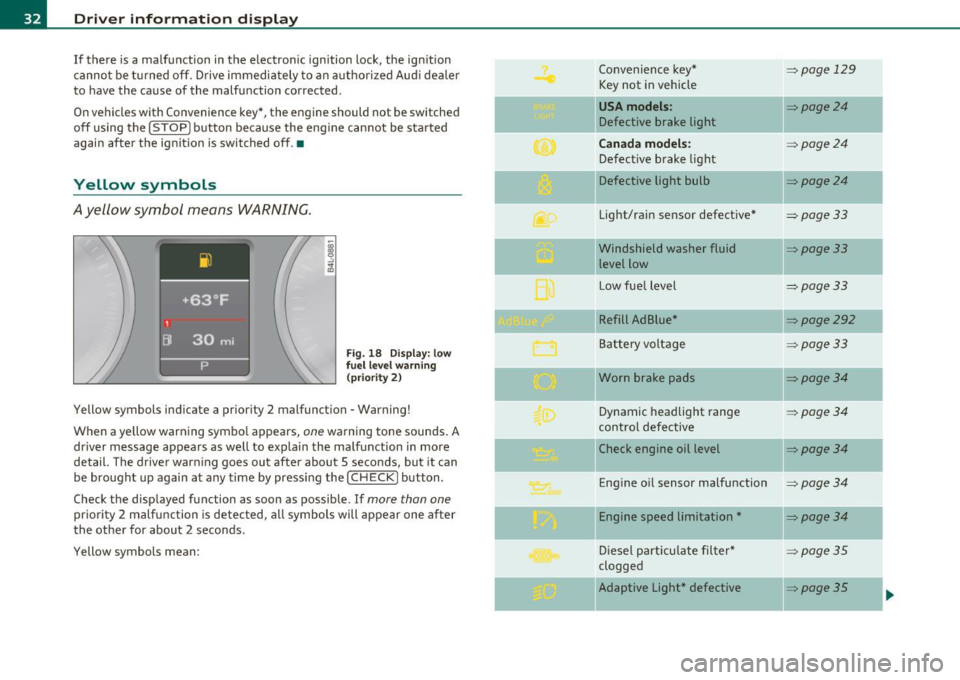
Yellow symbols
Ayellow symbol means WARNING.
Fig. 18 Display: low
f ue l leve l warn ing
(pr iority 2)
Yellow symbols indicate a priority 2 malfunction - Warning!
When a ye llow warning symbol appears,
one warning tone sounds. A
dr iver message appears as well to explain the ma lfunction in more
detail. The driver warning goes out after about 5 seconds, but it can
be brought up again at any time by pressing the
I CHECK] button .
Check the displayed function as soon as possible. If
more than one
priority 2 malfunction is detected, all symbo ls will appear one after
the other for about 2 seconds.
Yellow symbols mean: Convenience key*
=>page
129
Key not in vehicle
USA models : =>page24
Defective brake light
Can ada mod els: => page24
Defect ive b rake light
Defective light bulb
=>poge24
Light/rain sensor defective* =>page33
Windshield washer fluid =>page33
level low
L ow fue l level
=>page33
Refill Ad Blue* =>page292
Battery voltage =>page33
Worn brake pads =>page34
Dynamic headlight range = page34
contro l defective
II Check engine oil level
=>poge34
-
Engine o il sensor malfunction =>page 34
II Engine speed limitation* =page34
-
Diesel part icu late filter* =>page35
clogged
-Adaptive Light* defective => poge35 ..
Page 36 of 390
Driver information display
Driver message appears and goes out again
If this dr iver message appears af ter the ignition is t urned on or w hile
dr iving and it goes out aga in afte r a while , the battery has been
adeq uate ly recharged.
Driver message appears and does not go out again
If t his dr iver no tifica tion appears after the ignition is turned on or
w hile dr iv in g and does not go out again , the battery's state of charge
is not in t he optima l range. Starting ca pability is restricte d. Have the
ba ttery checked by a n author ized A udi deale r as soon as possible .•
Worn brake pads U
J Brake pads !
If the warn ing light illum inates, immediate ly contact your a uthorized
Aud i dealer or qualified workshop to have all b rake pads inspe cted.
On USA mode ls the warn ing light
.:l comes on together w ith the
w ar ning light
BRAKE . Both sets of b rake pad s on an ax le mus t alway s
be rep laced at the same time.
& WARNING
Driving with bad brakes can c ause a collision and serious personal
injury.
• If the warning light and the warning light BRAKE1> with the
mes sage Brak e pads! comes on in the instrument cluster di splay,
immediately contact your authorized Audi dealer or qualified
workshop to have all brake pads checked or replaced if necessary. •
ll BRAKE: USA mo dels only
Headlight range control ~[)
, Headlight range control defective !
If the sym bo l i llum inat es , the dyn ami c he adlig ht range co nt rol is no
longer wo rking properly . H ave t he system ch ecked and repaired at
your aut horize d Au di dea ler. •
Engine oil level
W hen th e symbo l illuminates, check th e eng ine o il level as soo n as
possible =>
page 301. Top off the oil at yo ur earliest o pportunity
=>page 3 02. •
Engine oil sensor defective
Oil level ! Sensor defective
C
-
If the symbo l illuminates, contact your author ized Audi dealer and
h ave the o il sensor inspec ted . Unti l y ou have this d one, check t he oil
level each time you refue l just to be on the safe side=>
page 301 . •
A pplie s to v eh icl es: w ith eng in e s peed l imitat io n
Engine speed limitation .?i
!'"') Do not exceed max . engine speed of XXXX rpm
T he ; symbol illuminates when there is an engine con trol malfunc
tion. The indicator light • in t he instrument cl uster also illuminates.
T he eng ine speed is limi ted to the speed displaye d in the d river info r
mation system . Keep in m ind that t he engine s peed will not exceed
th e v alu e disp laye d in th e d river infor mati on sy ste m, for examp le
w hen downshift ing. .,_
Page 129 of 390
_________________________________________________ O_ n_ t_ h_ e_ r _o_ a_d _ __.fflll
0 Note
Do not stop the engine immediately after hard or extended driving .
Keep the engine running for approximately two minutes to prevent
excessive heat build-up.•
Starting and stopping the engine
with Convenience key
Applies to veh icle s: with Con venie nce ke y
Starting the engine with the {START) button
This button switches on the ignition and starts the
engine.
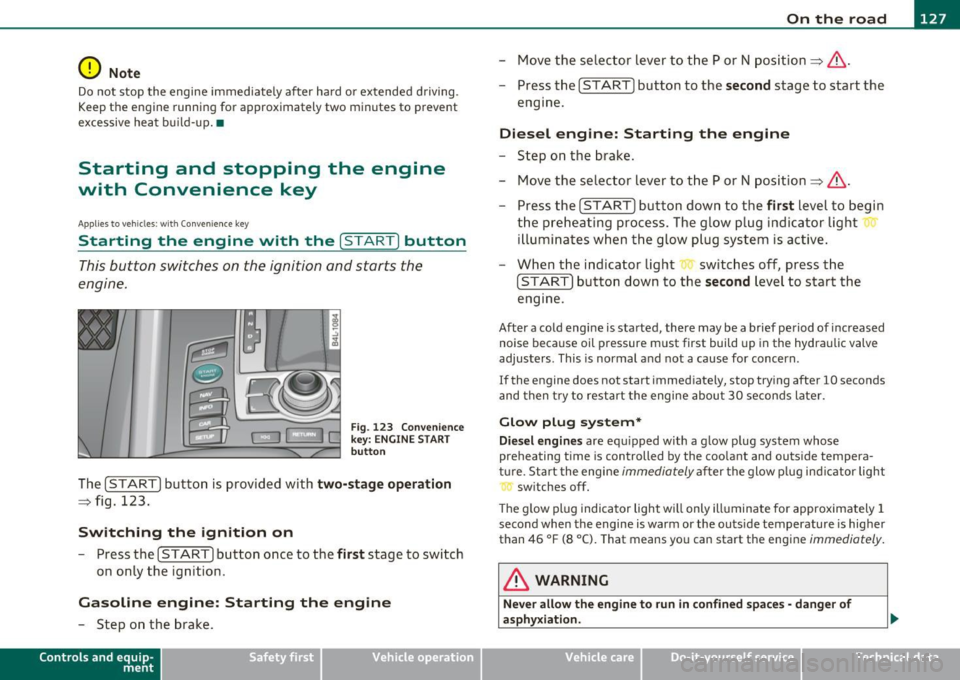
Fig . 123 Convenience
key: ENGINE START
button
The [START] button is provided with two-stage operation
=:> fig. 123.
Switching the ignition on
- Press the [ START] button once to the first stage to switch
on only the ignition .
Gasoline engine: Starting the engine
-Step on the brake.
Contro ls a nd e quip
m en t Vehicle
OP-eration
-Move the selector lever to the P or N position =:>& .
- Press the
[START] button to the second stage to start the
engine.
Diesel engine: Starting the engine
- Step on the brake.
- Move the selector lever to the P or N position =:>& .
- Press the
[START] button down to the first level to begin
the preheating process. The glow plug indicator light
illuminates when the glow plug system is active.
- When the indicator light switches off, press the
[START] button down to the second level to start the
engine.
After a cold engine is started, there may be a brief period of increased
noise because oil pressure must first build up in the hydraulic valve
adjusters . This is normal and not a cause for concern .
If the engine does not start immediately, stop trying after 10 seconds
and then try to restart the engine about 30 seconds later.
Glow plug system*
Diesel engines are equipped with a glow plug system whose
preheating time is controlled by the coolant and outside tempera
ture . Start the engine
immediately after the glow plug indicator light
switches off.
Th e glow plug indicator light will only illuminate for approximately 1
second when the engine is warm or the outs ide temperature is higher
than 46 °F (8 °C). That means you can start the engine
immediately.
& WARNING
Never allow the engine to run in confined spaces· danger of
asphyxiation.
Vehicle care Do-it-yourselt service iTechnical data
Page 133 of 390
On the road -
----------------
& WARNING (co ntinued )
• When parking on hills, always turn the wheel s so that the front
wheels will fir st roll into the curb, if the vehicle should start to
roll.
• Never allow anyone -especially small children -to remain in
the vehicle when it i s locked. Locked door s make it more d ifficult
for rescuer s to acce ss the pa ssenger compartment in the event of
an emergency. Danger to life!
• Never leave children un supervised in the vehicle . Children
could release the parking brake or mo ve the gearshift lever out of
gear . The vehicle could start to roll away and cause an accident .
• No matter what the season is , the temperature in a parked
vehicle can reach dangerou s levels.
0 Note
• Please exerc ise care when you park your vehicle in parking areas
with park ing barriers or c urbs. Pa rking barriers and c urbs vary in
height and co uld damage you r bumpe r and related componen ts as
the front of your vehicle moves over a barrier or curb that is too h igh,
as you par k or a s yo u back out of a p arking s pot. I n or der to be s ure
that no such damage can occ ur, yo u may wish to stop short of having
t he fro nt t ires of you r ca r tou ch the pa rk in g barrier or curb.
• Please a lso exerc ise except ional care when yo u drive up or down
s t eep ram ps or drive ove r curb s or other obst acles, for which t he
vehicle is not designed, because components of the vehicle close to
t he g roun d, s uch as bumpe r cove rs, spoilers and s uspension and
exhaust system components, may become damaged. •
Starting on hills
Hill Hold makes it easier to start on hills.
Controls and equip
ment Safety first
T
he system is activated whe n the brake peda l is depressed for a few
s econds .
For this, t he vehicle mus t be st andi ng in u phill driving direc
t ion .
After releas ing the brake pedal, the brake power is he ld for a
brief
moment to preve nt the vehi cle from rolling back when s tarting. At
this time, you can easi ly begin to move your vehicle .
& WARNING
• If you did not begin moving immediately after releasing the
brake pedal, under certain circumstances, the vehicle wou ld begin
to roll backward. Depress the brake pedal immediately or engage
the parking brake .
• Should the engine stall , depress the brake pedal immediately
or engage the parking brake .
• In order to prevent the vehicle from rolling back unintention
ally when starting in stop-and-go traffic, keep the brake pedal
depressed for a few seconds before driving off .
• When you leave the vehicle -even if only briefly - , sw itch off
the ignition and make sure to remove the ignition key . Also
engage the parking brake to prevent your vehicle from rolling
unintentionally. This particularly applies if children are left in the
vehicle -danger of accident! •
Vehicle care Technical data
Page 265 of 390
Driving and environment
------------------------------------------------'
- Lack of proper maintena nce as well as improper use of the
vehicle w ill imp air t he funct io n of t he emission con trol system and
could lead to damage.
<£> For the sake of the environment
Even when the Emiss ion Contro l System is operating properly, the
exhaust gas can have a sulfur-like exhaust gas sme ll under some
operat ing states. This depends on the s ulfur content of the fue l being
used. Using a differe nt brand of fuel may help, or filling the tank with
lead-free supe r grade gasoline. •
Applies to vehicles: w ith diesel eng ine
Diesel particulate filter
The d iese l part iculate filter fi lters nearly all of the soot particles out
of the exhaus t. T he filte r cleans i tself automa ticall y unde r no rm al
driving con dit io ns. If the f ilter cannot clea n itself (for example,
because yo u are on ly driving short dis tances), the f ilter becomes
clogged w it h soot and the symbo l for the diesel particulate fi lter
illuminates ~
page 35.
& WARNING
• Do not park your vehicle over flammable materials such as
grass or leaves because the high temperature of the diese l partic
ulate filter could start a fire .
• Do not apply an underbody protectant in the exhaust system
area or a fire could start .•
Controls and equip ment Safety first Vehicle operation
Avoid damaging the vehicle
Whe
n you are driving on poor roads, or over curbs, steep ramps, etc.,
m ake ce rtain that low-lying p art s s uch as spoilers and e xhaust system
parts do not bottom out and get damaged.
Thi s is espec ia lly t rue for vehicles with low-s lung chassis (sports
chass is) * and f ully loaded vehicles. •
Operate your vehicle economically
and minimize pollution
General
Your personal style of driving will det ermine the economy
of your vehicle, as well as exhaust and noise levels.
Fuel economy, env ironmenta l im pact , and wea r on your e ng ine,
brakes and tires largely depend on t hree factors:
• your person al driv in g style
• operating conditions
• techni cal lim itations
If you anticipate what you need to do next and drive economically,
you can e asily cut you r fu el consum ptio n by 10- 15 pe rcen t. T his
sect io n w ill give you some tips on how you can help the environment
and yo ur po cketbook.
rn Tips
Th e consumption est ima tes as published by E NVIRO NMEN TAL
PROT ECTION AGENCY ( EPA) and Transport Canada may not corre
spond to your act ual consumption on the roa d, which will vary
depend ing upon vehicle load and speed, road and weather co ndit ions,
trip length, etc.•
Vehicle care Do-it-yourself service Technical data