park assist AUDI Q7 2010 Owner´s Manual
[x] Cancel search | Manufacturer: AUDI, Model Year: 2010, Model line: Q7, Model: AUDI Q7 2010Pages: 390, PDF Size: 93.04 MB
Page 4 of 390
Table of contents
Table of contents
Vehicle literature ..... .
About this Owner's Manual .......... ......... .
Controls and
equipment .............. .
Instruments an d contr ols ... .
Gene ral illus tration ........... .
Instruments and
wa rni ng/indi cator Ligh ts ..... .
Instrumen ts ... ... .......... .
Warning/ indicator ligh ts ..... . .
Driver inform atio n dis pla y ... .
Introduction ...... ...... ... . .
On-Board D iagno stic sy ste m
(OBD) . ..... ....... .......... .
Auto Ch eck Control ........... .
Speed warning system ........ .
Tr ip compu ter ....... ........ .
Opening and closing ......... .
Keys ............ ............ .
Power locki ng sys tem .... .... .
Rear lid .... ..... ............ .
Child safety Lock ............. .
Convenience key ............. .
An ti-thef t alarm sys tem .... .. .
Power w indows .............. .
Panoram ic sliding sunroof ..... .
C lea r vision .. .... ............ .
L igh ts ... .. ........ ......... .
Interior ligh ts ... ... .. ....... .
5
6
8
9
9
1 0
1 0
1 4
22
2 2
2 6
27
35
37
4 0
40
4 4
49 52
53
55
56
59
65
65 7 0 Vi
sion .................... .. .
W iper and washer system
Mi rrors ... ............ ...... .
Digi tal compass ............ .
Sea ts a nd storage ..... ...... .
General recommendations .... .
Power front seat adjus tmen t .. .
A dj usting fron t pa sse nger's se at
ma nually .... ............... .
Seat m emory ......... ....... .
Rear sea ts .... .. .. .......... .
Head res tra in ts ........ ...... .
A rmrest .. .... .............. .
Long ce nter conso le ... ....... .
L uggag e com par tm en t ....... .
Roof rack . .... .... .......... .
Cupho lder .... .............. .
Rear ashtray . ... .. .......... .
Outl et ....... ............. .. .
S torage .................... .
Warm and cold .............. .
Climat e contro l .......... .... .
Rear A ir Condi tioning ......... .
Basi c se tting s ............ ... .
Heated Seats ................ .
On the road ................. .
Steering .. ... ..... ...... .... .
I gn ition lock a nd ign it ion sw itch
S ta rti ng and stopp ing th e e ngin e
S tar ting and s to pping the engine
w ith Conv eni ence key .. ..... .. .
Parking brake ............... .
Starting on h ills .. ... ...... . .
C ruise contro l ............... . 7
1
7 2
7 7
81
83
83
84
86
87
88
90
92
93
94
100
1 02
103
1 04
105
109
109
116
1 18
1 19
1 22
1 22
12 4
125
1 27
129
131
1 32
A dap tive C ruise Contro l ... .... 1 34
Speed and d istance contro l
system .... .................. . 134
Dr iver info rma tion . . . . . . . . . . . . . 14 2
Sy ste m Limitation s ............ 147
Au di braking guard . . . . . . . . . . . . 149
Audi side assist ............ ... 152
L an e Chang e Ass ist ant .. .. ..... 152
No tes .................... .... 159
Automatic transmiss io n 161
tiptroni c® (6-sp ee d au toma tic
t ra nsmiss ion) ........... ... ... 161
Par king system ............. .. 1 68
Ge nera l information . . . . . . . . . . . 168
R ear pa rk assis t . . . . . . . . . . . . . . . 168
Parking sy stem advan ced .... ... 169
Ad justing the display and warn ing
tone s ................ ..... ... 174
Traile r hitch ...... ........ .... 175
E rror messages .............. . 175
Adaptive A ir Suspension ... ... 176
A ir suspens ion and damp ing . . . . 17 6
Homelink ® ............. ... ... 183
Un ive rsal remote control 183
Safety first ............... 188
D riving Safely .............. ... 188
Ge nera l note s ...... ......... .. 188
Proper occupant seati ng
pos itions . . . . . . . . . . . . . . . . . . . . . 190
Pedal area ................ .... 194
Stowing Luggag e .............. 195
R ep o rting Saf ety D efects . . . . . . . 197
Page 11 of 390
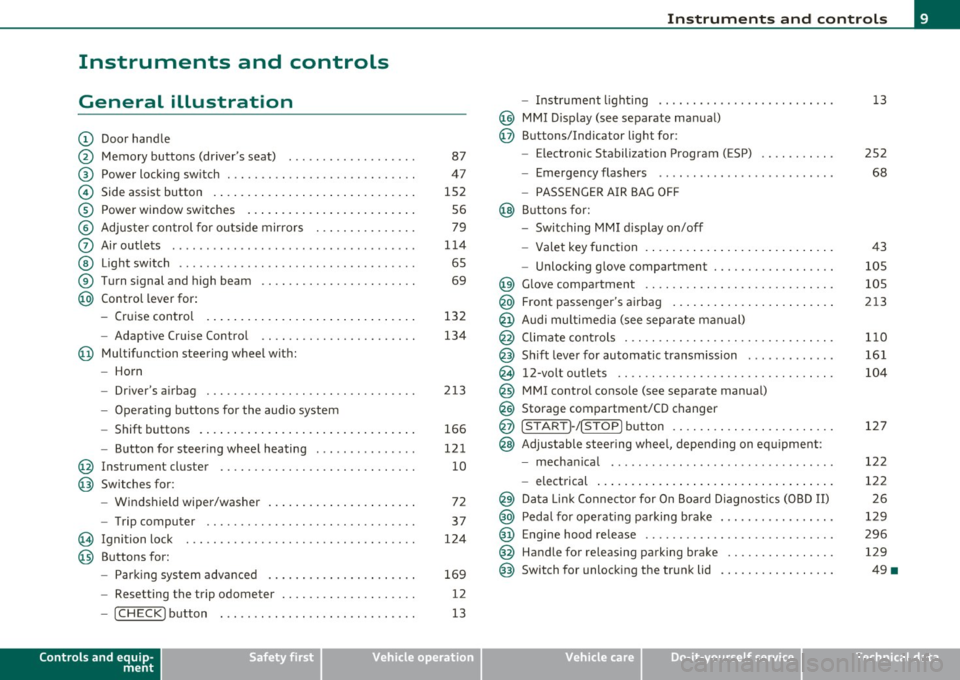
Instruments and controls
General illustration
(D Door handle
@ Memory buttons (driver's seat) .................. .
@ Power locking sw itch ........................... .
© Side assist button ... .. ... ... ... .. .. .. ... . .. ... .
® Power window sw itches ... .... .. .. .. .. .. ... ... . .
© Adjuster con trol for outs ide mir rors .............. .
0 Air outlets .......... .... .. .... ............... .
@ Light switch ...... .. .... ... .. .. .. ... ... .. .. ... .
® Turn s ignal and high beam ...................... .
@ Control lever for:
- Cru ise control . .... ... ... .. .. .. .. .. .. .. .. ... .
- Adaptive Cruise Control .. .. ................ .. .
@ Mu ltifunction steering wheel with:
- Horn
- Driver's airbag .............................. .
- O pera ti ng butto ns for the audio system
- Shift buttons . ... .. .. .. .... .. .. .. .. .. ...... . .
- Button for steer ing whee l heating ..... ... ...... .
@ Instrument cluster ............................ .
@ Switches for:
- Windshield wiper/washer ... ...... .. ..... .... . .
- Trip computer .............................. .
@ Ignition lock ................................. .
@ Buttons for:
- Par king sys tem advance d .... ..... .. .. ... .. .. . .
- Resetting the trip odometer ................... .
- ICHECK ]button ......................... ... .
Controls and equip
ment Safety first
87
47
1S2 S6
79
1 14
6S
69
132
134
2 13
166
12 1
10
72
37
124
169
12
13
Instruments and controls
- Instrument lighting ......................... .
@ MMI Disp lay (see separate ma nual)
@ Buttons/Indicator light for:
- Electronic Stabilization Program (ESP) .......... .
- Emergency flashers ...... .. ................. .
- PASS ENGER A IR BAG O FF
@ B uttons for:
- Switching MMI d isplay on/off
- Valet key function .. .. .. .. .. .. .. ...... ... .. .. .
- Unlocking g love compartment ................. .
@ Glove compartment ........................... .
@ Front passenger's airbag ...... ..... .. ..... .. .. . .
@ Audi mu ltime dia (see separate man ual)
@ Climate cont rols .............................. .
@ Shift leve r for automatic transmission ............ .
@ 12-volt outlets ............................... .
@ MMI contro l console (see separate manua l)
@ Storage compartment/CD changer
@ ISTART]-/ISTOP] button ....................... .
@ Adjustable stee ring whee l, depending on eq uipme nt:
- mecha nical .... .. .... ... .. .. .. ... .... ..... . .
- electrical ..... . ... .. .. .. .... .... .. .. .. ... .. .
@ Da ta Lin k Connecto r for On Boa rd Diagnos tics (OBD II)
@ Peda l for operating pa rking brake ................ .
@ Engine hood release ............. ... .. ......... .
@ Handle for releasing parking brake ............... .
@ Switch for unlocking the trunk lid ................ .
Vehicle care
13
2S2
68
43
105
105
213
1 10
161
104
127
12 2
122 2 6
129
296 129
49 •
Technical data
Page 32 of 390
Driver information display
& WARNING (continued)
vehicle control and an accident. Have your vehicle repaired imme·
diately by your authorized Audi dealer or a qualified workshop.
Drive slowly and avoid sudden, hard brake applications.•
Engine cooling system malfunction -L
A malfunction in the engine cooling system must be
repaired as soon as possible.
When the .J_ symbol in the display blinks, then either the
engine coolant
temperature is too high, or the coolant level
is too low. An additional driver message can also be displayed
by pressing the
[CHECK) button:
Switch off engine and check coolant level
-Pull off the road.
- Stop the vehicle.
- Turn off the engine .
- Check coolant level~
page 305.
-Add coolant if necessary~ page 306.
-Continue driving only after the engine coolant
warning/indicator light goes out.
- Contact your authorized Audi dealer for assistance if
necessary.
If the engine coolant level is correct, then the radiator fan may be the
cause of the malfunction.
If the
D wa rning symbol (alternato r malfunction) also lights up on
the instrument panel~
page 29, then the fan belt may be damaged .
& WARNING
• If your vehicle should break down for mechanical or other
reasons, park at a safe distance from moving traffic, turn off the
engine and turn on the hazard warning lights~
page 68, "Emer
gency flasher
A".
• Never open the hood if you see or hear steam or coolant
escaping from the engine compartment· you risk being scalded.
Wait until you can no longer see or hear steam or coolant
escaping.
• The engine compartment of any vehicle is a dangerous area.
Before you perform any work in the engine compartment, turn of
the engine and allow it to cool. Follow the warning stickers
~ page 286, "Engine compartment".
0 Note
Do not continue driving if the _f_ symbol illuminates. There is a
malfunction in the engine cooling system -you could damage your
engine .•
Engine oil pressure malfunction "l::,r:
The red engine oil pressure warning symbol requires
immediate service or repair. Driving with a low-oil-pres
sure indication is likely to inflict severe damage to the
engine .
If the
displayed by pressing the
[CH ECK) button:
Switch off engine ! Oil pressure too low
Immediate actions
-Pull off the road .
Page 43 of 390
• For security reasons, replacement keys are only available from
Audi dealers. •
Master key with remote control
The remote control allows you to lock or unlock the
vehicle electronically .
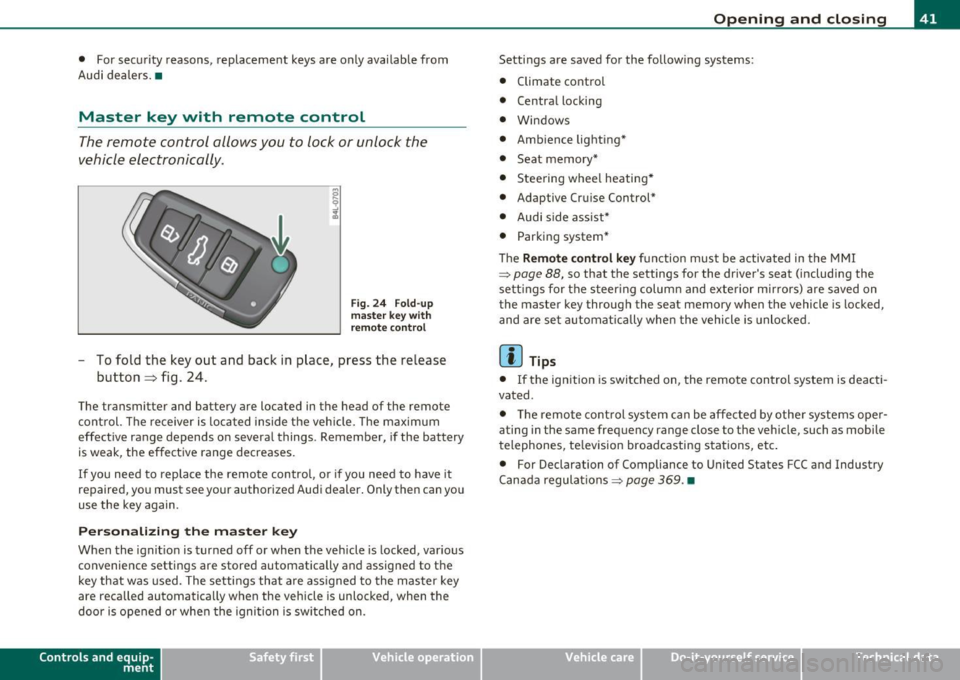
Fig. 24 Fold-up
master key with
remote control
- To fold the key out and back in place, press the release
button~ fig. 24.
The transmitter and battery are located in the head of the remote
control. The receiver is located inside the vehicle. The maximum
effective range depends on several things . Remember, if the battery
is weak, the effective range decreases.
If you need to replace the remote control, or if you need to have it
repaired, you must see your authorized Audi dealer. Only then can you
use the key again.
Personalizing the master key
When the ignition is turned off or when the vehicle is locked, various
convenience settings are stored automatically and assigned to the
key that was used. The settings that are assigned to the master key
are reca lled automatically when the vehicle is unlocked, when the
door is opened or when the ignition is switched on.
Contro ls a nd e quip ·
m en t Vehicle
OP-eration
Opening and closing
Settings are saved for the follow ing systems:
• Climate control
• Central locking
• Windows
• Ambience lighting*
• Seat memory*
• Stee ring wheel heating*
• Adaptive Cruise Control*
• Audi side assist*
• Parking system*
Th e
Remote control key function must be activated in the MMI
~ page 88, so that the settings for the driver's seat (including the
settings for the steering column and exterior mirrors) are saved on
the master key through the seat memory when the vehicle is locked,
and are set automatically when the vehicle is unlocked.
[ i ] Tips
• If the ignition is switched on, the remote control system is deacti·
vated .
• The remote control system can be affected by other systems oper·
ating in the same frequency range close to the vehicle, such as mobile
telephones, television broadcasting stations, etc.
• For Declaration of Compliance to United States FCC and Industry
Canada regulations~
page 369. •
Vehicle care Do-it-yourselt service iTechnical data
Page 64 of 390

Opening and closing
from heating up, you should close both sunshades when you
park your vehicle in the sun.
Opening and closing front sunshade
Tap the rear -:c;"J" of the rocker switch~ page 61, fig. 47 or
the rocker switch for rear-seat passengers~
page 61,
fig. 48 briefly to open the sunshade fully.
- Tap the front
·'J.rT of the rocker switch briefly to close the
sunshade fully~& .
- To set an intermediate position manually, press the front or rear of the rocker switch (depending on the position of
the shade)
until the desired position is reached ~ & .
Opening and closing rear sunshade
-Hold the sunshade by the grip and push it to the desired
position.
& WARNING
Never close the sunshade without paying attention or checking -
danger of injury! •
Applies to veh icles : w ith Panoram ic sliding sunroof
Emergency closing
In an emergency, the Panoramic sliding sunroof can be
closed electrically.
If the Panoramic sliding sunroof detects an object in its path
when it is closing, it will open again automatically. In this
case, you can close the roof with the power emergency
closing function .
Emergency closing of front roof segment
- Turn the switch~ page 59, fig . 45 @ to the normal posi
tion @.
- Within five seconds after the sunroof opens automati
cally, pull the switch until the roof segment closes.~&.
The driver's and front passenger's doors must be closed.
- If the power emergency closing function is not possible, you must close the roof manually~
page 63.
Emergency closing of rear roof segment
-Within five seconds after the sunroof opens automati
cally, press the front
e:> of the rocker switch~ page 59,
fig. 45 ® until the roof segment closes~&. The driver's
and front passenger's doors must be closed.
- If the power emergency closing function is not possible,
you must close the roof manually ~
page 64.
& WARNING
Improper use of the Panoramic sliding sunroof can cause serious
personal injury.
• Be careful when closing the Panoramic sliding sunroof. Not
paying attention could cause you or others to be trapped and
injured as the Panoramic sliding sunroof closes.
• Always take the key with you when you leave the vehicle to
prevent injuries caused by the Panoramic sliding sunroof closing
• Never leave children or persons requiring assistance alone in
the vehicle, especially when they could access the vehicle keys.
Unsupervised use of the keys can result in the engine being started
or use of vehicle systems such as the power windows, etc. which
could result in serious injury. The doors could be locked with the
remote key, delaying help in an emergency. .,,.
Page 170 of 390
lffll.___P_ a_r_k _ i_n ...::g::- s_, y...._ s_t _e _m ________________________________________________ _
Parking system
Applies to vehicles: w it h rear park ass ist/parking system advanced
General information
T here are two different park assist systems ava ilab le depending on
your veh icle's equipment leve l.
The
r ear park ass ist is an acoust ic park assist system that will give you
a sou nd warn ing to let you know the re is something
behind t h e
veh icle=>
page 168.
T he parking system advanced audibly and visually te lls you there is
something
in front of a nd behind the vehicle. A rearv iew camera also
shows you what is behind the vehicle. This image helps you when
para lle l par king or reverse parking=>
page 169.
[I) Tips
The senso rs must be ke pt cl ean and free of snow and ice fo r the park
assist to operate.•
Rear park assist
Applies to vehicles: with rear park assist
Description
The rear park assist is an audible system.
Sensors are located in the rear bumpers. If these detect an obstacle,
audib le signa ls warn you . The ra nge at wh ic h the sensors begin to
measure is approximate ly:
rear side
cen
ter
2 ft (0 .60 m)
5.2 ft (1.60 m)
The close r you get to the obstacle, t he shorte r the interval between
the audible s ignals. A continuous tone sounds when the obstacle is
less than approximate ly 1 foot (0.30 meters) away. Do not continue
dr iving farther .
If the dis tance to an obstacle remains constant, the volume of the
distance warning gradually drops after about four seconds (this does
no t app ly in the co ntin uous tone range).
Th e pa rk assist is act ivated automat ically when reve rse gear is
engaged. A short confirmation tone sounds.
& WARNING
• The pa rking system cannot repla ce the dri ve r's attention . The
driver alone i s re sponsible for parking and similar driv ing man eu
v ers.
• Sen sor s have blind spots in which objects cannot be detected .
Pay special attention to small children and animal s becau se the
s ensors cannot alwa ys detect them .
• Always keep your e yes on the vehicle' s surrounding s, using the
rear view mirror as w ell.
0 Note
Low obstacles a lready s ignaled by a warning can disappea r from the
system's detection range as they are approached and will not
cont inue to be s ignaled . Objects such as bar rier chai ns, trai ler draw
bars, thin pa inted vertical po les or fences may not be detected by the
system , posing risk of damage .
[I) Tips
• Please follow the ins truc tion s fo r towing a trailer=> page 175.
• You can change the volume and pitch of the signals =>
page 174. •
Page 173 of 390

Parking system -
----------------=-------'
Applies to veh icles : w ith par king system advanced
Switching on and off
Th e rear view camera switches on automatically together
with the acoustic and visual park assist when you put the
vehicle in reverse.
Switching on
F ig. 170 Cente r
c on sole: Pa rki ng
sys tem swi tch
Fig . 171 MMI display:
v is ual d istance disp la y
- Switch the MMI on and select reverse gear.
- Switch on the Adaptive Air Suspension * comfort or auto-
matic mode .
Contro ls a nd e quip
m en t Vehicle
OP-eration
-To use the front parking system , press the switch P11.1A in the
center console ~ fig . 170 . A short confirmat ion tone
sou nds an d the indicator light in the sw itch lights up.
Switching between the rear view camera and
visual display
- Press the Graphic control button~ page 172, fig. 172 ®
to see the visual dis pla y.
- P ress the
Rear view control button to see the rear view
camera image~ fig . 171.
Switching off
Drive faster than 6 mph ( 10 km/h), or
- press th e swi tch
P111 A or
- switch off the ignition .
Segments in the visual display
The red segments i n front of and behind the vehicle=> fig . 171 help
you to determine the distan ce between you and an obstacle . As your
vehicle comes closer to the obstacle, the segm ents move closer to the
veh icle . The co llision area has been reached when t he next to last
segmen t is displayed . Do not cont inue dr iv ing farthe r=>
& in
"Ge neral Information " on
page 169!
& WARNING
• The MMI display cannot show , or cannot adequately show ,
c ertain objects (such a s small posts or grating ), reces ses in the
ground and protruding parts on another car.
• Onl y use the rear view camera to a ssist you if it show s a good ,
clear picture. For e xample, the image may be affected by the sun
shining into the lens , dirt on the len s or if there is a defect. .,_
Vehicle care Do-it-yourselt service iTechnical data
Page 174 of 390
Ill Parking system
"---~--------------
& WARNING (continued)
• Use the rear view camera only with the rear lid completely
closed. Make sure any objects you may have mounted on the rear
lid do not block the rear view camera.
[ i ) Tips
• The sensors must be kept clean and free of snow and ice for the
park assist to operate.
• The visual display is shown in the illustration of the rear view
camera . This display shows where the sensors have detected an
obstacle.
• You can change the volume and pitch of the signals as well as the
display =>poge
174.
• Please follow the instructions for towing a trailer=> page 175 .
• What appears in the display is time-delayed. •
Applies to veh icles: wit h pa rking sy ste m adv anc ed
Reverse Parking
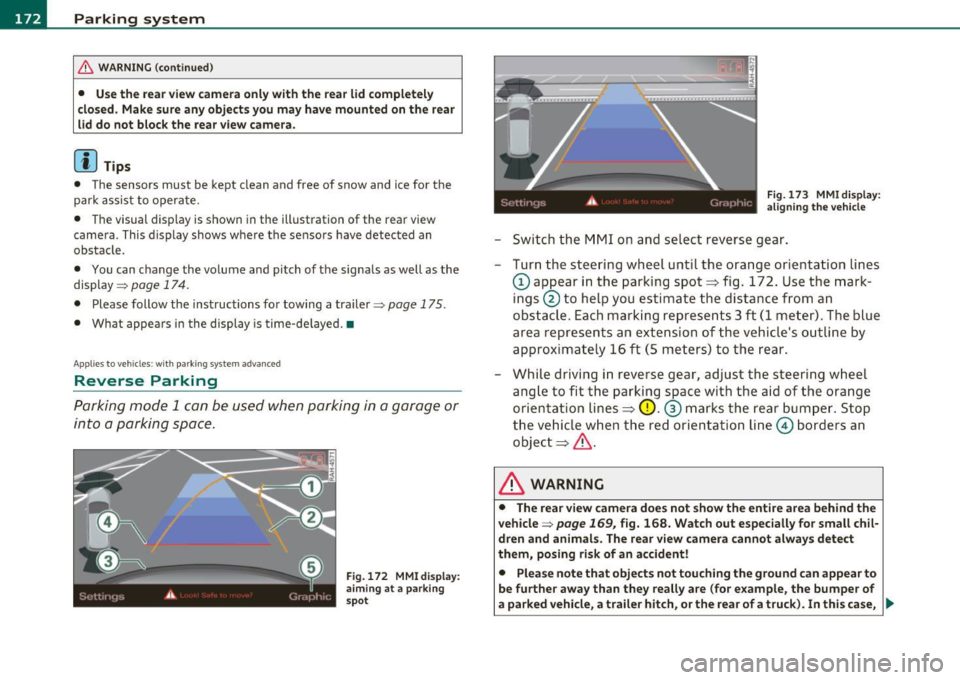
Parking mode 1 can be used when parking in a garage or
into a parking space.
Fig. 172 MMI display:
aiming at a parking
spot Fig. 173
MMI display:
aligning the vehicle
-Switch the MMI on and select reverse gear.
- Turn the steering wheel until the orange orientation lines
(D appear in the parking spot=> fig. 172. Use the mark
ings @to help you estimate the distance from an
obstacle. Each marking represents 3
ft (1 meter) . The blue
area represents an extension of the vehicle's outline by
approximately 16 ft (5 meters) to the rear.
- While driving in reverse gear, adjust the steering wheel
angle to fit the parking space with the aid of the orange
orientation lines=>
0. ® marks the rear bumper. Stop
the vehicle when the red orientation line© borders an
object=> &.
& WARNING
• The rear view camera does not show the entire area behind the
vehicle =>
page 169, fig. 168. Watch out especially for small chil·
dren and animals . The rear view camera cannot always detect
them, posing risk of an accident!
• Please note that objects not touching the ground can appear to
be further away than they really are (for example, the bumper of
a parked vehicle, a trailer hitch, or the rear of a truck). In this case, .,
Page 177 of 390

Parking system -
--------------=--=---
[I) Tips
• The warn ing tones can also be adjusted d irectly by the v isua l
display* or the picture from the rear view camera* . Simply press t he
S ettings * control butto n.
• Changed settings are activated when park ing system is switched
on again.
• T he settings are automatically stored and assigned to the remote
control key. •
Applies to veh icles: w ith rear park assist/park ing system advanced and t ra iler h itch
Trailer hitch
For vehicles with a factory installed trailer hitch, or a trailer hitch
ins talled a cco rding to factory specifica tions, the p arking sys tem rear
sensors do not come on whenever you shift into reverse gear or when
you p ress the
P,.,1~ swit ch*. If yo u install a hitch yourse lf, this f unction
may not work. In genera l the follow limitations may come up:
Rear park assist*
There is no warning for distances to the rear.
Parking system advanced *
There is no warning for d istances to the rear. The front sensors
remain act ivated. The v isua l display sw itches to the trailer tow ing
mode. The p icture from the rear v iew camera will not show the orien
tat ion li nes nor the bl ue surfaces. •
Applies to veh icles: with rear park ass ist/park ing sys tem advanced
Error messages
There is an erro r in the system if the LED on the Pwi switc h* is blink ing
and you he ar a continuous alarm for a few se con ds afte r swi tching on
Controls and equip
ment Safety first
the parking system or when the parking system
is a lready activated.
Have your au thor ize d Aud i deale r co rrec t th e error.
[I) Tips
If the er ror is not corrected befo re yo u switch off the ignition, when
you sw itch on the parking system again, the LED in the
P'#A sw itch * will
blink. •
Vehicle care Technical data
Page 383 of 390
Alphabetical index fflll ___________________________________ ____._ _______ _
Power locking system .. .. .... .... ... .. 44
Convenience close/open feature .. .... 58
Locking and unloc king the veh icle from
inside ..... .. .. ... .. .. .. .... .. ..
47
Opening and closing the windows . .. . 58
Rear lid/trunk lid .... .. .. .. .. .. .. .. 49
Remote control key .. ...... .. .... .. 41
Selective unlock feature .. ...... .. ..
47
Sett ings .. .. ... .... ..... .. .. . .... 47
Unlocking a nd lock ing vehicle .. .. .. .. 45
Power outlets ............. .. .. .. .. . 104
Power seat Con tro ls .. .. ........... ...... .. ..
84
Sea t adju stmen t .... ...... .. .. .. .. 85
Power steering ..... ... . .... ... .. .. . 257
Power window switches . ..... .. .. ..... 56
In the driver's door ........... .... . 56
In the front passenger 's door .... .. .. 57
Reactivating the system .. ...... .. .. 59
Pregnan t women
Special considerations when wearing a safety be lt ..... ... .. ... ... .. .. . 205
Programming the Homelink ® universa l re-
mote cont rol .......... .. .... .. . 183
Proper occupant seating pos it ions . .... . 190
Proper sa fe ty belt posi tion ......... .. . 2 04
Prope r seat ing position
Front passenge r .. .. .... ......... . 191
Oc cupants ......... .. .. .. ... ... . 190
Rear passe ngers .. ...... ....... ... 19 2
Protective tray ............... .. .. .. .. 97
Controls and equip
ment Safety first
Q
Quartz clock
...... .................. 11
quattro ®
See All Whee l Drive ....... .. .... .. 258
Ques tion
Wh at happe ns to u nbe lte d occ upan ts? . .
201
Why safety belts? ................ 199
R
Rad iator fan .. .... .... ......... .... 307
Rain sensor ... .. .. .... ... . ... .... .. . 72
Rain sensor defe ctive ........ ...... .. . 33
Readi ng lights
Front ........................... 70
Rear .. .. .. .. .. .... ... ... .... .. .. 70
Rear ashtray . ... .... .. .. .. .. .. .. ... 103
Rear fog lig hts .. ....... .... .. .. .. .. . 67
Rear lid Automatic operation ............ .. . 50
Emergency unlocking .. .. .. ... ... .. 52
Ope ning and closing .............. . 49
Valet key funct ion ...... ... ........ 43
Rear light Defective .. .. .. ... ... ............ 24
Rear ope ra tion
Four -zone automatic comfort air
conditioning ...... ... ... .... .. . 119 Rear park assist ..
... ..... ... ... .. .. . 168
Adjusting the display ....... .. .. ... 17 4
Adjusting the warning tones ........ 17
4
Trailer hitch . .. .. .. .. .. ... ..... .. 175
Rear seats Adjusting seat ...... ...... .. . ... .. 88
Entry assist . .. .. .. ............... 89
Folding seat back up and down .. .. ... 90
Rear view camera Parking mode 1 . ... ...... ... . ... . 172
Parking mode 2 . ... ...... .. .. ... . 173
Re ar view mir ror
I ns ide rear view m irro r . . . . . . . . . 7 7, 78
Rear window defogger ............. .. 113
Red symbols ... .. .. .. ...... .. .. ... .. 28
Ref ue lli ng ... .... ........... .... .. . 290
Gaso line inh ibitor fl ap ............ . 290
Release lever for hood . ....... .. .. .. . 296
Remote cont rol ga rage door o pener
(Homeli nk® ) .... ....... ... .. ... 183
Remote control key ... ... .... ... . .. ... 41
Unloc king and locking ... .. .. .. .. .. .
45
Remote rear lid release ............... 49
Repa ir manuals ..... .... ... .. .. .. ... 366
Repai rs
Airbag system ..... .. . .... .... .. . 223
Rep lacing a fuse ....... .. .. .. .. .. .. . 346
Replacing light bulbs .. .. .. .......... 350
Rep lacing tires and w heels .. .......... 3 26
Report ing Safety Defects . . . . . . . . 19 7, 198
Reset button ...... . .. .. .. .. ... .... .. 12
Residua l heat .. .. .. .. .............. 110
Vehicle operation Vehicle care Do-it-yourself service Technical data