towing AUDI Q7 2010 Owner´s Manual
[x] Cancel search | Manufacturer: AUDI, Model Year: 2010, Model line: Q7, Model: AUDI Q7 2010Pages: 390, PDF Size: 93.04 MB
Page 4 of 390
Table of contents
Table of contents
Vehicle literature ..... .
About this Owner's Manual .......... ......... .
Controls and
equipment .............. .
Instruments an d contr ols ... .
Gene ral illus tration ........... .
Instruments and
wa rni ng/indi cator Ligh ts ..... .
Instrumen ts ... ... .......... .
Warning/ indicator ligh ts ..... . .
Driver inform atio n dis pla y ... .
Introduction ...... ...... ... . .
On-Board D iagno stic sy ste m
(OBD) . ..... ....... .......... .
Auto Ch eck Control ........... .
Speed warning system ........ .
Tr ip compu ter ....... ........ .
Opening and closing ......... .
Keys ............ ............ .
Power locki ng sys tem .... .... .
Rear lid .... ..... ............ .
Child safety Lock ............. .
Convenience key ............. .
An ti-thef t alarm sys tem .... .. .
Power w indows .............. .
Panoram ic sliding sunroof ..... .
C lea r vision .. .... ............ .
L igh ts ... .. ........ ......... .
Interior ligh ts ... ... .. ....... .
5
6
8
9
9
1 0
1 0
1 4
22
2 2
2 6
27
35
37
4 0
40
4 4
49 52
53
55
56
59
65
65 7 0 Vi
sion .................... .. .
W iper and washer system
Mi rrors ... ............ ...... .
Digi tal compass ............ .
Sea ts a nd storage ..... ...... .
General recommendations .... .
Power front seat adjus tmen t .. .
A dj usting fron t pa sse nger's se at
ma nually .... ............... .
Seat m emory ......... ....... .
Rear sea ts .... .. .. .......... .
Head res tra in ts ........ ...... .
A rmrest .. .... .............. .
Long ce nter conso le ... ....... .
L uggag e com par tm en t ....... .
Roof rack . .... .... .......... .
Cupho lder .... .............. .
Rear ashtray . ... .. .......... .
Outl et ....... ............. .. .
S torage .................... .
Warm and cold .............. .
Climat e contro l .......... .... .
Rear A ir Condi tioning ......... .
Basi c se tting s ............ ... .
Heated Seats ................ .
On the road ................. .
Steering .. ... ..... ...... .... .
I gn ition lock a nd ign it ion sw itch
S ta rti ng and stopp ing th e e ngin e
S tar ting and s to pping the engine
w ith Conv eni ence key .. ..... .. .
Parking brake ............... .
Starting on h ills .. ... ...... . .
C ruise contro l ............... . 7
1
7 2
7 7
81
83
83
84
86
87
88
90
92
93
94
100
1 02
103
1 04
105
109
109
116
1 18
1 19
1 22
1 22
12 4
125
1 27
129
131
1 32
A dap tive C ruise Contro l ... .... 1 34
Speed and d istance contro l
system .... .................. . 134
Dr iver info rma tion . . . . . . . . . . . . . 14 2
Sy ste m Limitation s ............ 147
Au di braking guard . . . . . . . . . . . . 149
Audi side assist ............ ... 152
L an e Chang e Ass ist ant .. .. ..... 152
No tes .................... .... 159
Automatic transmiss io n 161
tiptroni c® (6-sp ee d au toma tic
t ra nsmiss ion) ........... ... ... 161
Par king system ............. .. 1 68
Ge nera l information . . . . . . . . . . . 168
R ear pa rk assis t . . . . . . . . . . . . . . . 168
Parking sy stem advan ced .... ... 169
Ad justing the display and warn ing
tone s ................ ..... ... 174
Traile r hitch ...... ........ .... 175
E rror messages .............. . 175
Adaptive A ir Suspension ... ... 176
A ir suspens ion and damp ing . . . . 17 6
Homelink ® ............. ... ... 183
Un ive rsal remote control 183
Safety first ............... 188
D riving Safely .............. ... 188
Ge nera l note s ...... ......... .. 188
Proper occupant seati ng
pos itions . . . . . . . . . . . . . . . . . . . . . 190
Pedal area ................ .... 194
Stowing Luggag e .............. 195
R ep o rting Saf ety D efects . . . . . . . 197
Page 5 of 390
Safety belts ................... 199
General notes ................. 199
Why safety belts? . . . . . . . . . . . . . 200
Safe ty be lts . . . . . . . . . . . . . . . . . . 203
Safety belt pretensioners . . . . . . . 207
Airbag system ................ 209
I mpor tant things to know . . . . . . 209
Front airbags ............ ..... 213
Monitoring the Advanced Airbag
System ................... ... 220
Side airbags . . . . . . . . . . . . . . . . . . 225
Side curtain airbags . . . . . . . . . . . . 228
Child Safety ................... 231
Important things to know ...... 231
Child safety sea ts . . . . . . . . . . . . . 236
Installing a child safety sea t . . . . 241
LATCH Lower anchorages and
t ethers for children . . . . . . . . . . . . 244
Additional Information ......... 251
Vehicle operation ...... 2s2
Intelligent technology ........ 252
Notice about data recorded by
vehicle control modules . . . . . . . . 252
Electronic Stabilization Program
( E SP) ........................ 252
Braking . . . . . . . . . . . . . . . . . . . . . . 255
Servotronic® -advanced power
steering system ............... 257
Dr iving with your quattro® . . . . . . 258
Energy management . . . . . . . . . . . 259
Driving and environment ...... 261
The first 1,000 miles (1,500 km)
and afterwards ........... .... 261
Catalytic converter . . . . . . . . . . . . 262
Diesel pa rt ic u late filter . . . . . . . . . 263
Controls and equip
ment Safety first
Avoid damaging
the veh icle 263
Ope rate your vehicle economically
and m inimize pollution . . . . . . . . 263
Driving off road ............... 266
Dr iving in difficult road cond itions
and offroad . . . . . . . . . . . . . . . . . . 266
Trailer towing . . . . . . . . . . . . . . . . 269
Driving with a trailer . . . . . . . . . . . 269
Trailer towing tips . . . . . . . . . . . . . 272
Vehicle care .............. 274
Cleaning and protection ...... 274
General informa tion . . . . . . . . . . . 274
Care of ex terior . . . . . . . . . . . . . . . 274
Care of interior . . . . . . . . . . . . . . . 281
Fuel supply and filling your fuel
tank ..........................
287
Fuel supply . . . . . . . . . . . . . . . . . . . 287
Diesel fuel
Fuel tank ............. ....... .
TOI clean diesel .... ....... ... . 288
289
292
Checking and filling . . . . . . . .
. . . 296
Engine hood . . . . . . . . . . . . . . . . . . 296
Engine oil . . . . . . . . . . . . . . . . . . . . 299
Engine cooling system . . . . . . . . . 304
Brake fluid . . . . . . . . . . . . . . . . . . . 307
Battery . . . . . . . . . . . . . . . . . . . . . . 308
W indshield/headl igh t washer
container .................... 312
Tires and wheels ......... ..... 314
T ires
Tire pressure monitoring system 314
333
Table of contents
Do-it-yourself service
What do I do now? ..........
.
Jack, tools and infla table spare
tire ........................ .
Changing a wheel .... ........ .
Fuses and bulbs ............. .
Fuses ...................... .
Bulbs ......... .......... ... .
Emergency situations ....... .
General ..................... .
Starting by pushing or towing ..
Starting with jumper cables ... .
Use of jumper cables ......... .
Emergency towing with
commercial tow truck ........ .
Lifting vehicle ............... .
Technical data
General information
Explana tion of technical data .. .
Vehicle iden tification ......... .
We ights .................... .
Dimensions ................. .
Data ........... ........ .... .. .
280 hp, 6-cylinder engine, with all
whee l dr ive ................. .
350 hp, a-cylinder engine, with all
whee l dr ive ................. .
225 hp, 6-cylinder engine, with all
wheel dr ive .............. ... .
Consumer Information ...... .
War ranty cove rages ......... . .
Operating your vehicle ou ts ide the
U.S .A. or Canada ......... .... .
Aud i Service Repair Ma nuals and
Li terature . .................. . 336
336
336
339
346
346
350
352
352
352
352
353
355
357
360
360
360
360
361
362
363
363
364
365
366
366
366
366
Ma intenance . . . . . . . . . . . . . . . . . 366
Vehicle operation Vehicle care Do-it-yourself service Technical data
Page 19 of 390
For more informat io n about the ESP~ page 252. •
Airbag system
~ (USA models) J !,'q· (Canada models)
This warning/indicator light monitors the airbag and the
tensioner systems.
T he I (USA models) /Jl (Canada models) warning light illuminates
for a few seconds each time you switch on the ignition .
If the
I (USA models)/ Jl (Canada mode ls) warning light does not go
o ut , or if it illum ina tes while you are d riving, o r if it starts to blink,
then there is a malfunct io n somewhere i n the system. If the light
does no t illum inate whe n you sw itch on t he igni tion, this also me ans
there is a malfunction.
& WARNING
If you have a malfunction in the ai rbag system , cont act your
authorized Audi dealer immediately . Otherwise the airbag or th e
belt tensioner may not work properly in an accident. •
Turn signals ¢ ¢
The indicator light blinks when you use either tur n signal .
Whenever you use the left ¢ or the right ¢ turn signal, the indicator
ligh t bl inks. W he n you use the eme rgency flashers, both indicator
lights flash .
If one of the turn signa l light bu lbs burn out, the tu rn s ignal will blink
t wice as fast as no rmal.
Th is does not app ly, however, in towing mode. The indicator light
does not fl ash i f a turn s ignal is o ut on t he tra ile r or the tow ing
vehicle . Addi tional informat ion on the turn signals~
page 69. •
Controls and equip
ment Safety first
Instruments and warning
/indicator lights
Applies to vehicles : with towing hitch
Trailer turn signal assembly ~,1<>
The indicator light also blinks if the turn signal is oper
ated when towin g a trailer.
Th e ind icator light ¢ 1¢ blinks when t
he turn signa l is used, if a trail er
has been prope rly connected to the vehicle.
If o ne of the turn sign al b u lbs o n th e trail er is burned out o r defe ct ive,
t he indicato r light will not bli nk when you use the turn signa ls.
(I) Tips
For vehicles w ith a factory installed towi ng hitch or a trailer hitch that
was insta lled later according to factory s pec ifications, the trailer tu rn
signa l assembly is act uated. •
Malfunction Indicator Lamp (MIL) 1:1
The Ma lf u nct io n Indicato r Lamp (MIL) is part of the On-Board D iag
nostic (OBD II) system. The symbol -.. lights up when the ignition is
t ur ned on and w ill tur n off after the eng ine has sta rted a nd has
sett le d at a constant idle speed . This indicates that the MIL is wo rking
prope rly.
T he warning lig ht illuminates whe n there is a malfunction in the
engine e lec tron ic system . Contact your author ize d Audi dealer and
have the malfunction corrected.
An improperly closed fuel filler cap may also cause the MIL light to
illuminate (only vehicles with gasoline engine )
~ page 290.
For more informat ion~ page 26. •
Vehicle care Technical data
Page 53 of 390
- Press the button in the rear lid => page 50, fig. 36 for at
least fo ur seconds in o rder to save the desired opening
pos it ion . T he posi tio n ca n on ly be saved s tarting at a
certai n level.
& WARNING
• Never clo se the rear lid inattentively or without che cking fi rst.
Although the closing forc e of the r ear lid is limited, you can still
seriously injure you rself or others .
• Always ensure that no one i s within range of the rear l id when
it i s moving, in particular clo se to the hinge s and the upper and
lower edge s -finger s or hands can be pinched .
• To help prevent poisonous exhaust ga s from being drawn into
the vehicl e, always keep the rear lid closed while driving. Never
transport objects larger than tho se which fit completely into the
luggage ar ea, b eca use then the rear lid cannot be fully clo sed.
• Never leave your vehicle unattended e specially with the rear lid
l e ft open . A child could crawl into the car through the luggage
c ompartment and pull the lid shut , be coming trapped and unable
to get out. To reduce the r isk of per sonal injury, never let children
play in o r around your vehicle. Always keep the rear lid as well a s
the v ehicle doors closed when not in u se.
• If there i s a luggage rack or bicycle rack mounted on the rear
lid, it may not be able to open completely or an opened rear lid
may close by itself because of the added weight. So the open rear
lid must be supported or the we ight must be removed from the
luggage rack fir st.
[I) Tips
• If the rea r lid is open or not properly loc ked when the ig nit ion is
tur ned on, t he doo r and rear lid warning=>
page 24 appears in t he
instrument cluster display.
Controls and equip
ment Safety first
Opening and closing
•
The a utomat ic rear lid ope ning/closing process can be stopped by
holdi ng the re ar l id w it h your h and. The lid can the n be f urther
opened/closed by hand.
• If the re is a mech anic al prob lem wi th the au tomatic re ar lid
opening process or there is a n obstruction, the process is stopped
immedia tely.
• If there is a mechanical problem with
automati c closing for the
re ar lid or there is an o bst ru ct io n, i t opens ag ain slightly righ t aw ay .
Check to see why the rea r lid could not be closed before attempting
t o close it again .
• If the rea r lid on a locked vehicle is unlocked w ith the midd le
bu tton .::::so n the remo te key, the rear l id is au tom atically loc ke d
again immediately after closing. T his is indicated by the tur n signa ls
blinking.
• The following app lies to veh icles equipped with the Convenience
key * fea ture: if t he re mote cont rol key is left in the l ugg age compart
me nt, luggage compartment will automatically un lock itself after
you lock the vehicle. This prevents yo u from unin tentionally lock ing
your key in the luggage compartment .
• If the veh icle ba tte ry c ha rge drops be low a cer tain level, you c an
st ill open or close the rear lid manually, however, you will need to
apply more fo rce to close it.
• As soon as the elect rical connec tion to the t railer socket is
c omple ted o n veh icles with a fa cto ry ins talled towing hi tch , or a
trai ler hitch that was installed later accord ing to factory spec ifica
ti ons, the a utoma tic rear li d fu nct io n can only be opera ted v ia the
hand le in the rear lid .•
Vehicle care Technical data
Page 155 of 390
Audi side assist Ill
----------------
Deactivating
-Pre ss th e b utton again . Th e ind icator light on the button
goes o ut.
The system works at speeds faster than 19 mph (30 km/h) .
& WARNING
• Improper reliance on the side assist system can cause collisions
and seriou s per sonal injury:
- Never rely only on side assist when changing lanes.
- Alway s check rear view mirrors to make sure that it is safe to
change lanes.
• Side assist cannot detect all vehicles under all condition s
danger of accident!
• Side a ssist cannot detect vehicle s in time to alert you when
they approach from behind at very high speed , or fall drop bac;k
very quickly .
• The radar sensor's
vision can be reduced o r entirely blocked by
rain, snow, and heavy spray . Thi s can result in side a ssist not
adequately detecting vehicles o r, in some cases , not detecting
them at all. Always keep an eye on the direction you are traveling
and the relevant area around the vehicle.
• Plea se note that side assi st indi cates there are approaching
veh icles, or vehicles in your blind spot, only after your vehicle has
reached a driving speed of at lea st 19 mph (30 km/h).
• Side assist signal does not work around tight corners (turning
radius le ss than 328 feet, or 100 m ).
• Side assist is no replacement for the driver's full attention. The
driver alone is respon sible for lane changes and similar driving
maneuvers. Always keep an eye on the direction you are traveling
and the relevant area around the vehicle .
Controls and equip
ment Safety first
0 Note
• T
o ens ure t hat you do not adve rsely affec t side assist, do not blo ck
the area on the rear bumper where the radar sensors are located with
foreign obje cts (s uch as stickers or bicy cle ra cks).
• Make s ure that the s ignal light on the outside mirror is not
blo cked by st ickers or o ther ite ms.
W Tips
• Side assist a utoma tically deact iva tes if it de tects that the rada r
sensors are blocked=>
page 159. The indicator light on the button
goe s out.
• Th e area on the bumpe r w here the ra dar sensors are located must
c o nsistent ly remain free of snow, i ce, a nd heavy soiling so tha t side
assist can funct ion p roper ly. Follow the add itiona l notes on
=>
page 160 .
• F or vehicles with a factory installed towing hitc h* or a tra ile r
hi tc h* that was i nstalled late r according to f actory specifications,
side ass ist is automat ically deact ivated as soon as the electrical
c o nne ct io n to the tra ile r electr ical socket is made=>
page 15 9.
• For vehicles with a trai le r h itch that was not installed accor ding to
fac tory spe cifica tions, sw itch off the s ide ass ist whe n tow ing a tra iler.
• Additiona l t int ing on the front si de windows can make it ha rder to
se e and co rrectly unde rs tand t he signa l light o n the outs ide m irro r.
• For Declaration of Compliance to United States FCC an d Industry
Canada regulations=>
page 369 . •
Vehicle care Technical data
Page 161 of 390
_________________________________________________ A_ u_d _ i_ s_id _ e_ a_s _s_ i_s _t __ _
App lies to vehicles : with sid e assist
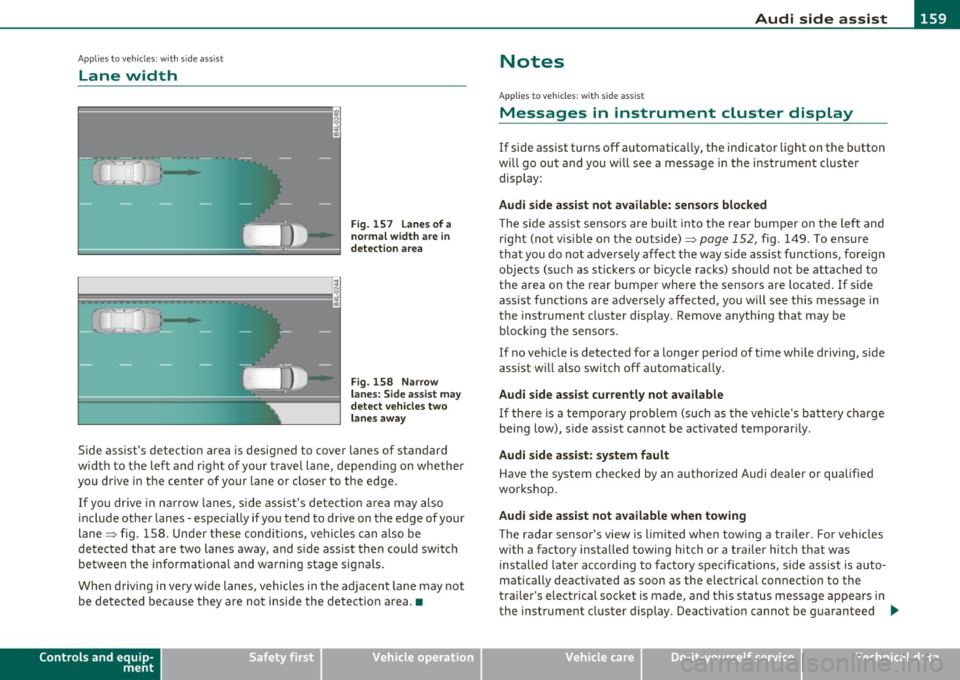
Lane width
Fig. 157 Lanes of a
normal width are
in
detection area
Fig. 158 Narrow
lanes: Side assist may
detect vehicles two
lanes away
Side assist's detection area is designed to cover lanes of standard
width to the left and right of your travel lane, depending on whether
you drive in the center of your lane or closer to the edge.
If you drive in narrow lanes, side assist's detection area may also
include other lanes - especially if you tend to drive on the edge of your
lane => fig . 158. Under these conditions, vehicles can also be
detected that are two lanes away, and side assist then could switch
between the informational and warning stage signals.
When driving in very wide lanes, vehicles in the adjacent lane may not
be detected because they are not inside the detection area .•
Controls and equip
ment Safety first
Notes
Ap
plies to veh icles: with s ide ass ist
Messages in instrument cluster display
If side assist turns off automatically, the indicator light on the button
will go out and you will see a message in the instrument cluster
display :
Audi side assist not available: sensors blocked
The side assist sensors are built into the rear bumper on the left and
right (not visible on the outside)=>
page 152, fig. 149 . To ensure
that you do not adversely affect the way side assist functions, foreign
objects (such as stickers or bicycle racks) should not be attached to
the area on the rear bumper where the sensors are located. If side
assist functions are adversely affected, you will see this message in
the instrument cluster display . Remove anything that may be
blocking the sensors.
If no vehicle is detected for a longer period of time while driving, side
assist will also switch off automatically.
Audi side assist currently not available
If there is a temporary problem (such as the vehicle's battery charge
being low), side assist cannot be activated temporarily .
Audi side assist: system fault
Have the system checked by an authorized Audi dealer or qualified
workshop.
Audi side assist not available when towing
The radar sensor's view is limited when towing a trailer. For vehicles
with a factory installed towing hitch or a trailer hitch that was
installed later according to factory specifications, side assist is auto
matically deactivated as soon as the electrical connection to the
trailer's electrical socket is made, and this status message appears in
the instrument cluster display . Deactivation cannot be guaranteed .,,_
Vehicle care Technical data
Page 170 of 390
lffll.___P_ a_r_k _ i_n ...::g::- s_, y...._ s_t _e _m ________________________________________________ _
Parking system
Applies to vehicles: w it h rear park ass ist/parking system advanced
General information
T here are two different park assist systems ava ilab le depending on
your veh icle's equipment leve l.
The
r ear park ass ist is an acoust ic park assist system that will give you
a sou nd warn ing to let you know the re is something
behind t h e
veh icle=>
page 168.
T he parking system advanced audibly and visually te lls you there is
something
in front of a nd behind the vehicle. A rearv iew camera also
shows you what is behind the vehicle. This image helps you when
para lle l par king or reverse parking=>
page 169.
[I) Tips
The senso rs must be ke pt cl ean and free of snow and ice fo r the park
assist to operate.•
Rear park assist
Applies to vehicles: with rear park assist
Description
The rear park assist is an audible system.
Sensors are located in the rear bumpers. If these detect an obstacle,
audib le signa ls warn you . The ra nge at wh ic h the sensors begin to
measure is approximate ly:
rear side
cen
ter
2 ft (0 .60 m)
5.2 ft (1.60 m)
The close r you get to the obstacle, t he shorte r the interval between
the audible s ignals. A continuous tone sounds when the obstacle is
less than approximate ly 1 foot (0.30 meters) away. Do not continue
dr iving farther .
If the dis tance to an obstacle remains constant, the volume of the
distance warning gradually drops after about four seconds (this does
no t app ly in the co ntin uous tone range).
Th e pa rk assist is act ivated automat ically when reve rse gear is
engaged. A short confirmation tone sounds.
& WARNING
• The pa rking system cannot repla ce the dri ve r's attention . The
driver alone i s re sponsible for parking and similar driv ing man eu
v ers.
• Sen sor s have blind spots in which objects cannot be detected .
Pay special attention to small children and animal s becau se the
s ensors cannot alwa ys detect them .
• Always keep your e yes on the vehicle' s surrounding s, using the
rear view mirror as w ell.
0 Note
Low obstacles a lready s ignaled by a warning can disappea r from the
system's detection range as they are approached and will not
cont inue to be s ignaled . Objects such as bar rier chai ns, trai ler draw
bars, thin pa inted vertical po les or fences may not be detected by the
system , posing risk of damage .
[I) Tips
• Please follow the ins truc tion s fo r towing a trailer=> page 175.
• You can change the volume and pitch of the signals =>
page 174. •
Page 174 of 390
Ill Parking system
"---~--------------
& WARNING (continued)
• Use the rear view camera only with the rear lid completely
closed. Make sure any objects you may have mounted on the rear
lid do not block the rear view camera.
[ i ) Tips
• The sensors must be kept clean and free of snow and ice for the
park assist to operate.
• The visual display is shown in the illustration of the rear view
camera . This display shows where the sensors have detected an
obstacle.
• You can change the volume and pitch of the signals as well as the
display =>poge
174.
• Please follow the instructions for towing a trailer=> page 175 .
• What appears in the display is time-delayed. •
Applies to veh icles: wit h pa rking sy ste m adv anc ed
Reverse Parking
Parking mode 1 can be used when parking in a garage or
into a parking space.
Fig. 172 MMI display:
aiming at a parking
spot Fig. 173
MMI display:
aligning the vehicle
-Switch the MMI on and select reverse gear.
- Turn the steering wheel until the orange orientation lines
(D appear in the parking spot=> fig. 172. Use the mark
ings @to help you estimate the distance from an
obstacle. Each marking represents 3
ft (1 meter) . The blue
area represents an extension of the vehicle's outline by
approximately 16 ft (5 meters) to the rear.
- While driving in reverse gear, adjust the steering wheel
angle to fit the parking space with the aid of the orange
orientation lines=>
0. ® marks the rear bumper. Stop
the vehicle when the red orientation line© borders an
object=> &.
& WARNING
• The rear view camera does not show the entire area behind the
vehicle =>
page 169, fig. 168. Watch out especially for small chil·
dren and animals . The rear view camera cannot always detect
them, posing risk of an accident!
• Please note that objects not touching the ground can appear to
be further away than they really are (for example, the bumper of
a parked vehicle, a trailer hitch, or the rear of a truck). In this case, .,
Page 182 of 390
1111....__A_ d_ a_,_ p_t _i_ v _e _ A_i_ r_ S_ u_ s ... p,_ e_n_ s_ io_ n __________________________________________ _
Raising and l owering
If a rrow (Dis solid re d => pag e 179 , fig. 177 or whit e=> pag e 179,
fig . 178, the veh icle is raised .
I f arrow
0 is solid red or white, the vehicle is lowered .
T he respective arrow stays on until the level change is complete . The
time required for a level change can vary, depending on the current
dr iving cond it ions .
Displ aying the vehicle le vel
The current vehicle leve l is show n wit h segments fi lled ou t in the
segment display@. If only the bot tom segment is filled out, the
vehicle is at highway leve l. If all segments a re filled o ut, the vehicle is
at high level 2 and has the greatest amount o f ground clearance
possible.
W hile the vehicle is being ra ised or lowe red, t he target leve l is ind i
cated by an arrow © next to the correspond ing segment . The arrow
disappe ars aga in whe n the vehicle is a t the target level. •
Applies to vehicles: w it h Ad ap tiv e Ai r Suspens ion
Jacking mode when changing a flat tire
This mod e must be activated in the MMI bef ore raising
the vehicle with a jack or on a vehicle
li~ .
-Select: Fu nction button [CAR)> function butto n [SETUP ]
> Jacking mode .
The veh icle jack mode must be activated before c hanging a whee l so
that the automatic contro l processes for t he air s uspensio n do not
make lifting w ith the vehicle jack more difficult .
The check lamp in the instr ument cluster display illuminates in
vehicle jac k mode.
W Tips
Th e veh icle ja ck mode is switc hed off automat ica lly at speeds above 9
mph (15 km/h). •
App lies to veh icles: with towing hitch and Adaptive Air Suspe nsion
Towing a trailer
Automatic lowering is not desirable when towing a
trailer.
- Selec t: Fu nct ion button [CARI > fun ction but ton [S ETUP I
> Towing mode .
As long as towing mode is activated, a ve hicl e w ith a t railer appears
in the
adaptive air suspension main menu .
Level Adjustment when towing a trailer
• Before h itching up the trailer and befo re adjust ing the tongue
we igh t at the trailer, the automatic or com fort mode mu st be
selected so that the vehicle can be at normal leve l=>
page 178, "MMI
se ttings" .
• If dr iv ing in dynamic mode is desired, this mode
must be selected
befo re hitc hing up the tra iler and before adjus ting the tongue
we ight. However, note that yo ur vehicle is lowered and ground clear
ance is reduced.
• If you have to drive under diff icu lt road conditions, you can selec t
offroad or li ft mode, aft er hitching up the trai le r or after adjust ing
the tongue weight .
• If the vehicle is at
normal level, an d you se lec t offro ad mode wh ile
traveling a t speeds higher than 22 mph (35 km/h), the vehicle will
no t b e raised. O ffroad mode will a ppear as t he active mode in the
MMI D isplay.
• If the veh icle is in o ffro ad mode at
high level 1, it automatic a lly
lowers to
normal level when the vehicle is traveling at speeds
exceeding approximate ly 31 mph ( SO km/h). The vehicle is automat -...
Page 183 of 390

____________________________________________ A_ d_a_ p ,_ t_iv _ e_ A _ i_ r _ S_ u_s_, p __ e_n _ s_ i _o_ n __ _
ically raised to high level 1 again when the traveling speed falls below
approximately 25 mph (40 km/h) .
Restrictions when operating with a trailer
When operating with a trailer, the lift mode can only be selected up
to about 12 mph (20 km/h). Lift mode is automatically canceled
agai n when a speed of about 25 mph (40 km/h) is exceeded.
If the vehicle is in automatic , comfort, offroad or lift mode before the
trailer towing mode is activated, the dynamic mode cannot be acti
vated .
If the vehicle is in dynam ic mode before towing operation is acti
vated, it can be driven in this mode. If the suspension is switched
from th is mode to another mode, dynamic mode cannot be re
selected.
[I) Tips
• For vehicles with a factory installed towing hitch or a trai ler hitch
that was installed later according to factory specifications, the
system recognizes "Trailer towing mode" and activates this specia l
mode automat ically , as soon as the electr ical connection on the
trailer socket is connected. The mode ceases automatically when the
electrical connection to the trailer socket is disconnected.
• If the trai ler towing mode has been activated, the vehicle will not
drop to the low o r highway level. •
Controls and equip
ment Safety first
A
pp lies to vehicles : w ith Adapt ive Air Sus pens ion
Cargo mode
The rear of the vehicle can be lowered to make it easier to
load .
Fig. 179 Luggage
compartment detail:
Cargo mode switch
Activating cargo mode in the MMI
-Select: Function button [CARI> function button [SETUP)
> Lower for loading.
Using switch for activating cargo mode
- Close all vehicle doors.
- Open the trunk lid.
- Press the lower part of the switch ®~ fig. 179. The rear
of the vehicle is lowered.
- Press the upper part of the switch
(D. The rear of the
veh icle is raised again.
In cargo mode, the rear axle is lowered by 2.2 inches (55 mm),
compa red to the normal level.
While the vehicle is in cargo mode, the segments do not appear as
filled in the segment d isplay. .,,
Vehicle care Technical data