ECO mode AUDI Q7 2011 Owner´s Manual
[x] Cancel search | Manufacturer: AUDI, Model Year: 2011, Model line: Q7, Model: AUDI Q7 2011Pages: 392, PDF Size: 93.29 MB
Page 70 of 392

Clear vision
In the AUTO positio n the low beams are switched off automatically
w hen the ign it ion is turned o ff.
Light Sensor Malfunction
In the event of a light senso r m alfun ction, the driver is not ified in the
instrument cluster display:
~ Automatic headlight s/ automatic wipers defective
For safety reasons the low beams a re turned on permane ntly with the
switch in
AUTO . However, you can contin ue to turn the lights on and
off using the light sw itch. Have the light sensor checked as soon as
possible at an autho rized Audi dealer or q ua lified workshop.
& WARNING
• Never u se daytime running lights to see where you are going .
They are not bright enough and w ill not let you see far enough
ahead for safety, especially at dusk o r when it i s dark . Always
s witch on the low beams at du sk or when it i s dark.
• Automati c headlights are only intended to as sist the dri ver.
They do n ot relieve the driver of h is re spon sibility to check the
headlights and to turn them on manually according to the current
light and visibility condition s. For example, fog and rain cannot be
detected by the light sensors. So alw ays sw it c h on the headl ights
under the se weather condition s and when driving in th e dark
io.
• Crashes can happen when you cannot see the road ahead and
when you cannot be seen by other motori sts.
- Always tu rn on the headlights so that you can see ahead and
so that others can se e your car from the back.
(I) Tips
• With the swit ch in AUTO front fog lig hts a nd rea r fog l ights ca nnot
be t urned on in addition. •
The light sensor for headlight control is located in the rear view
mi rror moun t. D o no t apply any stickers to the w indshield in this area
to prevent malfunctions or failures .
• If you remove the ign ition from t he ignit ion lock wh ile the head
lights are still on, a buzzer wi ll sound as long as the driver's door is
open to remind you to t urn off the lights.
• Always observe the spec ific local regulations for your area as to
when to use your lig hts .•
Adjusting exterior lighting
T he functions are set in the f\1f\1J.
- Select: Function button [CAR ]> Systems *> Exterior
lighting .
Coming home
The Corning hom e function ensures tha t a fter turning off the igni
tion and open ing the driver 's door
the veh icle per iphery is illum i
nated in the dark. I n addition, the front fog lights, the ta il lights and
the license plate l ight are turned on . On-time can be set for a period
from O (o ff) to 60 seconds .
Leaving home
The Leaving home function ens ures tha t when unlocking the vehicle
periphery is illuminated in the dark. In add ition, the front fog lights,
the tai l lights and the license p late light are turned on . This funct ion
can be turned on and off .
Daytime running ligh ts
U SA models : The daytime running lights can be turned on or off using
this funct ion .
Canada model s: The function cannot be t urned off. It is activated
automatically each time the ignition is t urned on. This men u item is
shown "greyed out". •
Page 77 of 392

One-touch wiping
- Move the lever to position@, when you want to wipe the
windshield
briefly.
Automatic wiper /washer
- Pull the lever to position © (toward the steeri ng w heel)
and hold .
- Re lease the lever. The washer stop s and t he wip ers keep
going for about four seconds . Depending on how long the
lever is held, d ifferent numbers of was h cyc les are
performed.
Turning off the wipers
- Move the lever back to positio n@ .
Gen eral information
The windshield wipers and the windshield washer system operate
only with the ign it ion on .
Dur ing a temporary stop, e.g. at a traff ic signa l, the set wipe speed is
automatica lly red uced by one stage.
Th e windshie ld washer noz zles a re heated at low tempe ratures when
the ignition is on .
Removing water droplets
About 5 seconds afte r the was h cycle is complete, the wipe r system
performs a single automat ic wipe cycle to remove any water droplets
that remain on the windshie ld w hile driving.
If you would like to deact ivate this delayed wipe cy cle w hile d riving,
you have to pull the lever to position ® aga in w it hi n 10 seconds after
this wipe cycle.
Water droplet removal is react ivated after the ign ition is sw itched off
and then on again.
Controls and equip
ment Safety first
Clear v
ision
W int er pos ition
T o speed up de -icing of the windshield wipers, they move to the
w inter position when the ig nitio n is switched off and at an outs ide
temperature below 39 °F (4 °C). In this position, the windshield
wipers a re in an a rea on the g lass which is reached by the air vents
below the g lass. It is also easier to remove snow and ice from the
windshield wipers in this position.
The w ipers leave the w inter pos it ion, when the ign it ion is switched
on, if the windshield wiper lever is oper ated or the active ra in sensor
reacts to moisture .
Rain sensor
The rain sensor operates on ly in the interval wiper position. When it
sta rts to rai n, the in terv al wiper mode is a ctivated a utomat ic al ly.
If the w indshield wipe r leve r is in the inte rval wipe position with the
ignition switched off, the rain sensor is not act ivated until vehicle
speed is above 4 mph (6 km/h) .
To reduce the sens itivity of the rain sensor, the switch © must be
moved down. To i ncrease t he se nsitivi ty of the ra in se nso r, the sw itch
must be moved up.
Th e higher the sensitivity setting, the sooner the windshie ld wipers
react to mo isture on the windshie ld . Increased sensit ivity is signa led
by the windshie ld wipers making a s ingle pass over the windshie ld.
Th e rain se nsor wiper inte rvals de pend on the se nsi tivity se tt ing as
well as veh icle speed . During br ief stops, w iper motion will ad just in
re lation to the amoun t of rain on the w indshield.
& WARNING
• Wiper blade s are crucial for safe dr iving! Only wh en they are in
good condition are the y able to clear the windows properly to
provide uncompromi sed vi sibility. Worn or damaged wiper blades
are a safety hazard~
page 78, "Replacing windshield wiper
blade s"! _..
Vehicle care Technical data
Page 85 of 392

Digital compass
Applies to veh icles: wit h digita l co mp ass
Activating or deactivating the compass
The direction is displayed on the interior rear view mirror.
Fig. 75 Inside rear
view mirror: digital
compass activated
To activate or deactivate, hold the@ button down until
the red display appears or disappears .
The digital compass only works with the ignition turned on. The direc
tions are displayed as initials:
N (North), NE (Northeast), E (East), SE
(Southeast), S (South) , SW (Southwest), W (West), NW (Northwest).
(I) Tips
To avoid inaccurate directions, do not allow any remote controls ,
electr ical systems, or metal parts close to the mirr or.•
Con tro ls a nd e quip
m en t Vehicle
OP-eration
Clear vision
Applies to veh icles : w ith d ig ita l compass
Setting the magnetic deflection zone
The correct magnetic deflection zone must be set in order
to display the directions correctly .
.
,_ ,;=.~a,, I I
I I
I I
I ' I I
I I
1 ! ©
l 4
l
l
I ' I ,,
l ----
'
'
'
®
\, ,, ...... _______ ,.,.
©
@
Fig. 76 North America: magnetic deflection zone boundaries
-Hold the@=> fig . 75 button down until the number of
the set magnetic deflection zone appears on the interior rear view mirror .
- Adjust the magnetic deflection zone by repeatedly pressing on the@ button . The set mode automatically
deactivates after a few seconds. •
Vehicle care Do-it-yourselt service iTechnical data
Page 104 of 392
IIII.___S_ e_a _t_ s_ a_ n_ d_ s_t _o _r_ a...: g,,._ e ______________________________________________ _
Roof rack
First things first
A roof rack can be fitted to carry additional luggage on
the roof.
- A lways read and follow the instruct io ns prov ided by the
roof rack manufacturer when the roof rack system m ust
be installed .
If you are tra nspo rting l uggage or other objects on the roof, please
note the following:
• Your vehicle has specially designed aerodynamic roof rails. Only
install a roof rack specifica lly designed fo r you r model. Contact the
nearest authorized Audi dea ler for information on approved mod ular
roof rac ks for your vehicle .
• T hese approved roof racks a re the basis for a complete roof rack
system. Add itiona l attachments for the basic roof rack are necessary
to safe ly transport luggage, bicycles, surf boa rds, skis or sma ll boats .
All necessary hardwa re for these systems is ava ilable at yo ur a utho
r ized Audi dealer .
• We recommend that you keep t he installat ion inst ruct ions for
your roof rack system together with your Owner's literature in the
vehicle.
When should the roof rack be remo ved?
• Before going through an automat ic car wash (it is best to ask the
car wash operator for advice) .
• When not in use, to reduce fuel consumption, wind noise and to
guard against theft .
& WARNING
• Use of an unapproved roof rack or incorrect mounting of an
approved roof r ack can cau se the roof rack or the items atta ched
to it to fall off the roof onto the road.
• Object s falling from the roof of a v ehicle can cau se a crash and
personal injury .
• Only mount the system b etween the markings shown in
=> fig. 99 .
• The roof rack sy stem must be in stall ed e xactly ac cording to the
instructions provided.
0 Note
• Your vehicle warranty does not cover any damages to the vehicle
caused by using roof ra ck s or mounting s truc tures not appr oved by
Audi for your veh icle . The same applies to damage result ing from
incor re ct roof rac k ins tallat io n.
• Always check the roof rack mountings and hardware before each
t rip and dur ing a trip to ma ke sure everyth ing is sec urely tig htened. If
necessary, ret ighten the mountings and check the entire system from
t ime to time.
• After mounting a roof rack system, or when yo u transport objects
on the roof of your veh icle, t he heigh t of the vehicle is natura lly
increased . Be careful whe n driving under low br idges or in park ing
g ar ages for ex ample . This could ca use damage to the lo ad and even
the vehicle itself .•
Page 110 of 392
ffl..__S_e _ a_t _s _ a_n_ d_ s_t _o _r _a _,g:.- e ______________________________________________ _
& WARNING
To reduce the risk of personal injury in an accident or sudden stop,
always keep the glove compartment closed while driving.
(I] Tips
Should you not be able to open the glove compartment as described,
make sure the valet key function is not activated~
page 45. •
Cooling box in glove compartment
The cooling box works only when the air-conditioning is in
cooling mode.
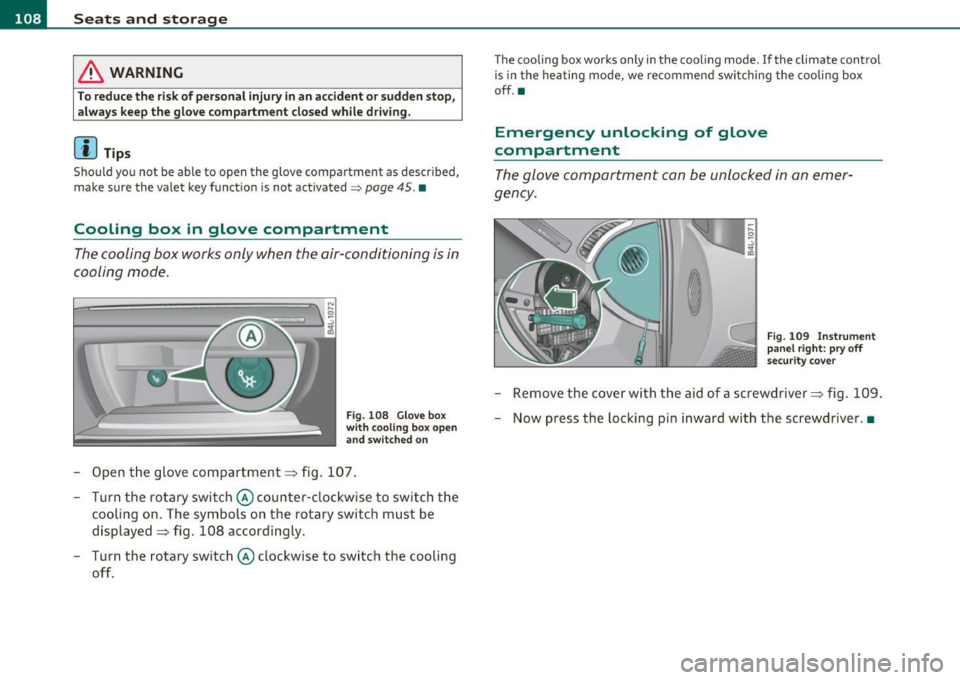
Fig. 108 Glove box
with cooling box open
and switched on
- Open the glove compartment=> fig. 107.
- Turn the rotary switch © counter-clockwise to switch the
cooling on. The symbols on the rotary switch must be
displayed=> fig. 108 accordingly.
- Turn the rotary switch © clockwise to switch the cooling
off.
The cooling box works only in the cooling mode. If the climate control
is in the heating mode, we recommend switching the cooling box
off.•
Emergency unlocking of glove
compartment
The glove compartment can be unlocked in an emer
gency.
Fig. 109 Instrument
panel right: pry off
security cover
- Remove the cover with the aid of a screwdriver => fig. 109.
- Now press the locking pin inward with the screwdriver .•
Page 113 of 392
Warm and cold -
----------------
Warm and cold
Climate control
Description
The air conditioner is fully automatic and is designed to
maintain a comfortable and uniform climate inside the
vehicle.
We recommend the following settings:
- Set the temperature to 72
°F (+22 °C).
- Press the
[AUTO] button.
With this setting, you attain maximum comfort in the least amount
of time. Change this setting , as desired , to meet your personal needs.
The climate controls are a combination of heating, ventilation and cooling systems, which automatically reduce humidity and cool the
air inside your vehicle .
The air temperature, air flow and air distribution are automatically regulated to achieve and maintain the desired passenger compart
ment temperature as quickly as possible.
The system automatically compensates for changes in outside
temperature and for the intensity of the sunlight entering the
vehicle. We recommend you use the
Automatic mode ~ page 114
for year-round comfort .
Please note the following:
Turn on the air conditioner to reduce humidity in the vehicle. This also
prevents the windows from fogging up.
When the outside temperature is high and the air is very humid,
condensation from the evaporator may drip under the vehicle . This is
normal and does not indicate a leak.
Controls and equip
ment Safety first
If the outside temperature is
low, the fan normally only switches to a
higher speed once the engine coolant has warmed up sufficiently .
The air conditioner temporarily switches off when you drive off from
a standstill using full throttle to save engine power.
The compressor also switches off if the coolant temperature is too
high, so that the engine can be adequately cooled under extreme
loads.
Air pollutants filter
The air pollutants filter (a combined particle filter and activated char
coal filter) reduces or prevents outside air pollution (dust, or pollen)
from entering the vehicle. The air is also filtered in air recirculation
mode.
The air pollutants filter must be changed at the intervals specified in
your Warranty
& Maintenance booklet, so that the air conditioner can
properly work.
If you drive your vehicle in an area with high air pollution, the filter
may need to be changed more frequently than specified in your Audi
Warranty
& Maintenance booklet. If in doubt, ask your authorized
Audi Service Advisor for advice .
Key coded settings
The air conditioner settings selected are automatically stored and
assigned to the key being used. When the vehicle is started, the air
conditioner automatically selects the settings assigned to that key.
This way every driver will maintain his/her own personal settings and
does not have to reset them manually.
If a different driver uses your key and changes the air conditioner
settings, the latest adjustments will erase and replace the settings
you have stored. _.,
Vehicle care Technical data
Page 115 of 392
Warm and cold -
----------------
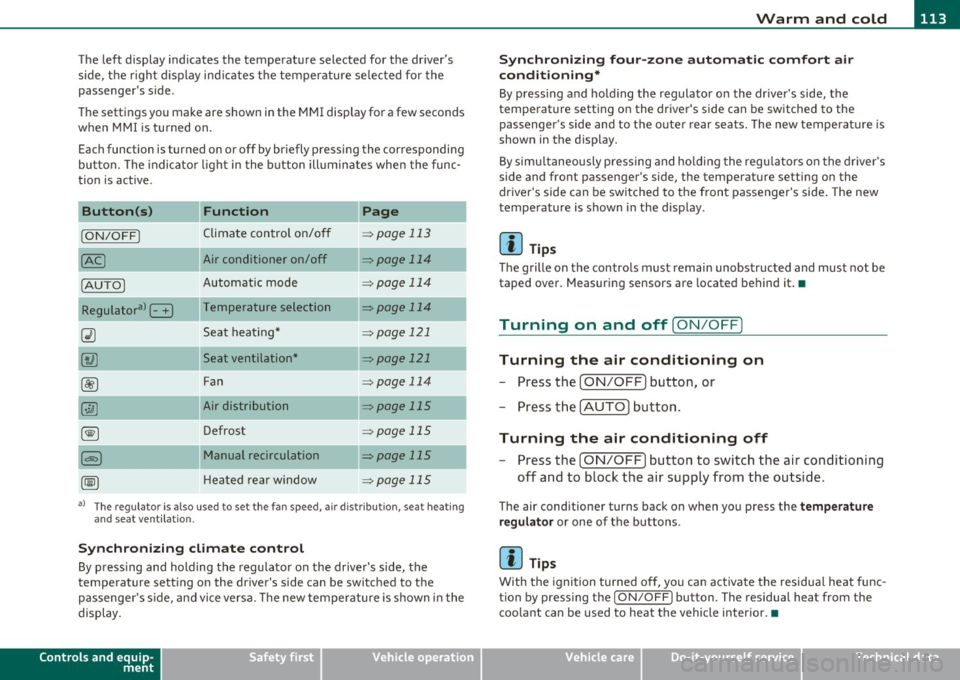
The left display indicates the temperature selected for the driver's
side, the r ight d isplay ind icates the temperature se lected for the
passenger's side.
T he settings you make are shown in the MMI display for a few seconds
when MMI is tu rned on.
Each function is turned on or off by briefly pressing the corresponding
button. The indicator l ight in the b utton ill uminates when the func
tion is act ive.
Button (s)
Function Page
ION/OFFI Climate control on/off => page 113
Air conditioner on/off =:;,page 114
Automatic mode => page 114
Temperature selection => page 114
Seat heating* => page 121
Seat ventilation* -::::;, page 121
Fan => page 114
Air distribution => page 115
Defrost => page 115
Manual recirculation -::::;, page 115
Heated rear window ::::> page 115
a) The regulator is also used to set the fan speed, air dis tr ibution, seat heating
and seat ventilation.
Synch ro nizing clim ate co ntr ol
By pressing and holding the regulator on the driver's side, the
temperature setting on the driver's side can be sw itched to the
passenge r's s ide, and vice ve rsa. T he new temperature is shown in the
display.
Controls and equip
ment Safety first
S
ynchr onizing four-z one a utom ati c c omfor t air
c ondi tioning *
By press ing and ho ld ing the regulator on the dr iver's side, the
temperature sett ing on the driver 's side can be switched to the
passenger 's side and to the outer rear seats . The new temperature is
shown in the display.
By simu ltaneously pressing and ho lding the regu lators o n the driver 's
side and front passenger's side, the temperature setting on the
driver's side can be switched to the front passenger's side . The new
temperature is shown in the display .
[I] Tips
The grille on the controls must remain unobstructed and must not be
taped over. Measuring sensors are located behind it.•
Turning on and off [ ON/OFF]
Turning the air conditioning on
-Press the [ ON/OFF] button , or
- Press the [AUTO] button.
Turning the air conditioning off
-Press the [ ON/OFF] button to switch the air conditioning
off and to block the air supply from the outside.
The air conditioner turns back on when you press the te mper ature
reg ulato r
or one of the buttons.
[I] Tips
With the ignition turned off, you can activate the residua l heat func
tion by pressing the
I ON/OFF) button. The residual heat from the
coo lant can be used to heat the vehicle interior.•
Vehicle care Technical data
Page 116 of 392
![AUDI Q7 2011 Owner´s Manual 1111....__w __ a _r_ m __ a_n_ d_ c_ o _ l_d _______________________________________________ _
Air Condition er On /Off
!AC]
Switching off the air conditioner saves fuel.
- Press the [](/img/6/40276/w960_40276-115.png "AUDI Q7 2011 Owner´s Manual 1111....__w __ a _r_ m __ a_n_ d_ c_ o _ l_d _______________________________________________ _
Air Condition er On /Off
!AC]
Switching off the air conditioner saves fuel.
- Press the [")
1111....__w __ a _r_ m __ a_n_ d_ c_ o _ l_d _______________________________________________ _
Air Condition er On /Off
!AC]
Switching off the air conditioner saves fuel.
- Press the [AC] button to switch the air conditioner on or
off.
When the air conditioner is switched on, the indicator lamp in the
button will illuminate and the heating/ventilation system is
controlled automatically.
Please keep in mind that with the air conditioner switched off, the
interior temperature cannot be lower than the outside temperature.
The air will not be cooled or dehumidified. The windows can fog up.•
Automatic mode !AUTO]
The automatic mode is the standard setting for all
seasons.
- Select temperature between 60 °F (+16 °() and 84 °F
(+28 °().
- Press the [AUTO] button.
Automatic operation ensures constant temperatures in the interior
and dehumidifies the air inside the vehicle. Air temperature, volume
and distribution are controlled automatically to reach or maintain the
desired interior temperature as quickly as poss ible. Fluctuations in
exterior temperature and the effects of temperature from the posi
tion of the sun are compensated for automatically.
This operating mode works only in the adjustable temperature range,
from
60 °F (+16 °() to 84 °F ( + 28 °() . If a temperature below 60 °F
( + 16 °C) is selected, LO appears in the display. At temperatures above
84 °F (+28 °C) , HI is displayed. At both extreme settings , climate
control runs continuously at maximum cooling or heating power.
There is no temperature regulation. •
Setting the temperatur e
Separate temperatures can be selected for the driver's
and front passenger's side.
- Rotate the regulator to the left to reduce the tempera-
ture, or to the right to increase the temperature.
The selected temperature appears on the climate control display . The
temperature setting will also appear for a few seconds in the MMI
display .•
Fan @
The automatically preset fan speed can be reduced or
increased.
- Press the I~] button.
- Rotate the regulator to the desired fan speed.
The climate control system automatically regulates fan speed
depending on interior temperature. You can adjust the volume of air
produced by the fan to your own requirements.
The fan speed setting will appear for a few seconds in the MMI display.
[ i] Tips
It is possible that the fan speed may change automatically. This
occurs to ensure that the desired temperature setting is reached as
quickly as possible.•
Page 117 of 392
![AUDI Q7 2011 Owner´s Manual Warm and cold Ill
----------------
Air distribution [i9 ]
The automatically controlled air distribution can be
changed manually.
-Press the [·.YI button.
- Rotate the regulator to th](/img/6/40276/w960_40276-116.png "AUDI Q7 2011 Owner´s Manual Warm and cold Ill
----------------
Air distribution [i9 ]
The automatically controlled air distribution can be
changed manually.
-Press the [·.YI button.
- Rotate the regulator to th")
Warm and cold Ill
----------------
Air distribution [i9 ]
The automatically controlled air distribution can be
changed manually.
-Press the [·.YI button.
- Rotate the regulator to the desired setting.
You can adjust the air distribution so that air flows from specific
vents. In position
:J air flows only to the windows, in position :J, it
flows to the driver or passenger, and in position
!,8 it flows to the
footwell. There are additional combinations available to adjust air distribution as needed.
To regu late air distribution automatically, switch to
[AUTO].
The air distribution setting will appear for a few seconds in the MMI
display. •
Defrosting [@]
The windshield and side windows are rapidly defrosted or
defogged.
- Press the[@) button to turn on the defroster.
- Press the
[®I button again, or press the [ AUTO I button to
turn it off.
Temperature is controlled automatically. The maximum amount of
air flows mainly from the vents below the windshield.
To defog the rear side windows, the air vents in the door pillars
should be open and directed at the windows. •
Controls and equip
ment Safety first
Manual air circulation [<::S::>
]
Air recirculation prevents exhaust fumes or other pollu
tion from entering the vehicle.
Turning on air recirculation
-Press the[~) button=> &
Turning off air recirculation
-Press the~ button again, or
- press the [ AUTO
I button , or
- press the[@] button.
In the air recirculation mode, the air in the passenger compartment
is recirculated and filtered to prevent exhaust fumes and other pollu
tion from entering the vehicle. We recommend that you use the
manual air recircu lation under the following conditions :
• when driving through tunnels
• inatrafficjam.
& WARNING
Do not use this setting for extended periods of time. The windows
could fog up since no fresh air can enter the vehicle. If the
windows fog up, press the air recirculation button again immedi
ately to switch off the air recirculation function or select defrost.•
Rear window defogger [QiiJ ]
The rear window defogger clears the rear window of
condensation.
- Press the QW button to turn the rear window defogger on
and off . _.,
Vehicle care Technical data
Page 119 of 392
_______________________________________________ w __ a _r _m _ a_ n_d _ c_o _ l_ d __ ffl'II
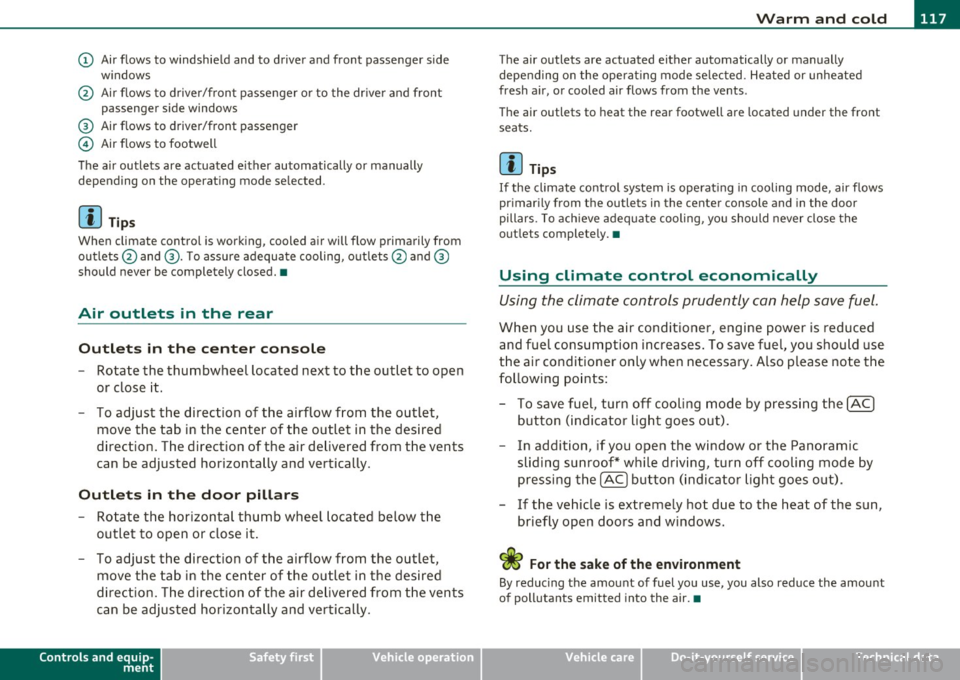
(D Air flows to windshield and to driver and front passenger side
w indows
@ Air flows to driver/front passenger or to the dr iver and front
passenger side windows
® Air flows to driver/front passenger
© Air flows to footwell
The air outlets are actuated e ither automatically or manually
depending on the operating mode selected.
[ i ] Tips
When climate control is working, cooled air will flow primarily from
outlets @and ®· T o assure adequate cooling, outlets @and ®
should never be completely closed. •
Air outlets in the rear
Outlets in the center console
-Rotate the thumbwheel located next to the outlet to open
or close it.
- To adjust the direction of the airflow from the outlet,
move the tab in the center of the outlet in the desired
direction. The direction of the air delivered from the vents
can be adjusted horizontally and vertically .
Outlets in the door pill ars
- Rotate the horizontal thumb wheel located below the
outlet to open or close it .
- To adjust the direction of the airflow from the outlet,
move the tab in the center of the outlet in the desired
direction. The direction of the air delivered from the vents
can be adjusted horizontally and vertically.
Controls and equip
ment Safety first
The air
outlets are actuated either automatically or manually
depending on the operat ing mode se lected. Heated or unheated
fresh air, or cooled air flows from the vents.
T he air outlets to heat the rear footwell are located under the front
seats.
[I) Tip s
If the climate cont rol system is operat ing in cooling mode, air flows
primarily from the outlets in the center console and in the door
pillars . To ach ieve adequate cooling, you should never close the
outlets completely. •
Using climate control economically
Using the climate controls prudently can help save fuel.
When you use the air conditioner, engine power is reduced
and fuel consumption increases . To save fuel, you should use
the air conditioner only when necessary . Also p lease note the
following points:
- To save fuel, turn off cooling mode by pressing the
[AC)
button (indicator light goes out).
- In addition, if you open the window or the Panoramic
sliding sunroof* while driving, turn off cooling mode by
pressing the
[AC] button (indicator light goes o ut).
- If the vehic le is extremely hot due to the heat of the sun,
briefly open doors and windows.
<£' For the sake of the environment
By reducing the amount of fuel you use, you also reduce the amount
of pollutants emitted into the air.•
Vehicle care Technical data