ECO mode AUDI Q7 2011 Owner´s Manual
[x] Cancel search | Manufacturer: AUDI, Model Year: 2011, Model line: Q7, Model: AUDI Q7 2011Pages: 392, PDF Size: 93.29 MB
Page 122 of 392
![AUDI Q7 2011 Owner´s Manual lffl!l.___w __ a _r_ m __ a_n_ d_ c_ o _ l_d _______________________________________________ _
To regulate air distribution automatically, switch to [AUTO].•
Basic settings
General
The ba](/img/6/40276/w960_40276-121.png "AUDI Q7 2011 Owner´s Manual lffl!l.___w __ a _r_ m __ a_n_ d_ c_ o _ l_d _______________________________________________ _
To regulate air distribution automatically, switch to [AUTO].•
Basic settings
General
The ba")
lffl!l.___w __ a _r_ m __ a_n_ d_ c_ o _ l_d _______________________________________________ _
To regulate air distribution automatically, switch to [AUTO].•
Basic settings
General
The basic climate control settings can be adjusted in the
fv1fv1I.
-Select: Function button I CAR]> Control button AC.
The following functions can be selected:
• Auto recirculate=>
page 120
• Synchronization :::::, page 120
• Supply. heater*=> page 121
• Rear operation*=> page 121 •
Automatic recirculation mode
An air quality sensor detects increased concentrations of
pollutants in the outside air and automatically switches
to recirculation mode.
We recommend that you always keep automatic air recirculation ON
to prevent polluted outside air from entering the vehicle inter io r.
If the
air quality sensor located in the air cond it ion ing system detects
polluted outside air, the sensor decides whether the air pollution can
be reduced by the factory-installed pollutant filter or whether it is
necessary to switch to air recirculation. With heavy concentrations of
pollutants, the a ir cond it ion ing system is switched automat ically to
recircu lation mode and the supply of outside air is b locked . As soon
as the concentration of pollutants in the outside air drops , fresh air is
supplied to the vehicle interior again. In the event that the windows fog up during automatic air recircula
tion, you must press the® button immediately.
Under certa in operating conditions, automatic a ir recirculation is
switched off automatically. With outside temperatures below about
SO °F
(+10 °C), automatic air recirculation is lim ited to 30 seconds.
With outside temperatures below about
30 °F (-1 °() and with the air
conditioner switched off, the automatic air recirculation is limited to
15 seconds. •
Synchronization
One climate control setting for the driver and front
passenger seats.
With synchronization active, the driver's settings are adopted for the
passenger or vic e versa. All the other sett ings that were made are
transferred to the other seat. Th is includes a ll the climate control
settings , except fo r the seat heating/ventilation* .
If a different setting is selected at a "synchronized seat", synchroni
zation is cancelled. •
Applies to veh icles : with four -zone a uto ma tic c om fo rt air co nd itionin g
Synchronization
One climate control setting for all seats.
With synchron izat ion act ive, the driver's settings are adopted for the
front passenger and the rear left and right seats . All the other
sett ings that were made are transferred to the other seats . This
includes a ll the climate control settings, except for the seat
heating/ventilation*.
If a different setting is selected at a "synchronized seat", synchroni
zation is cancelled .•
Page 130 of 392
1111....__0_ n_ t_h_ e_ r_ o_ a _ d _________________________________________________ _
Vehicles with diesel engine:
- Step o n the brake .
- Move the selector lever into P or N
~ &.
- Turn the ig nition key to position (D -th e g low plu g i nd i-
cator lig ht ill uminates when t he g low plug sys tem is
active.
- When the in dicator light " swi tch es off , turn t he ignition
k ey to posit ion @ but do not p ress the acce lerator pedal.
- Release the ignition key o nce the e ngin e s tarts. The
s ta rt er mus t not conti nue r unning .
A cold eng ine may sound loud after it has been s tarted . This is due to
the hydra ulic valves b uilding up o il pressure. Th is is norma l and is not
a need for concern .
If the engine does not start immediately, stop trying afte r 10 seconds
and then try to rest art the eng ine about 30 seco nds la te r.
Glow plug system*
Diesel engines are eq uipped with a glow p lug sys tem whose
preheating t ime is controlled by the coo lant and outs ide tempera
tu re. Start t he engine
immedia tely a ft er the glow plug indicator ligh t
sw itches off.
T he g low pl ug indicator light w ill on ly ill umina te for approximately 1
second when the engine is warm o r the ou tside temperatur e is hig her
than 46 °F (8 °C). That means yo u can start the eng ine
immediately.
& WARNING
Never start or let the engine run in a confined or enclosed area.
Exhaust fumes from the engine contain carbon monoxide, a color
less and odorless gas. Carbon monoxide can be fatal if inhaled.
& WARNING (co ntinued )
• Never leave the engine idling unattended. An unattended
vehicle w ith a running engine poses a danger of personal injury or
theft .
0 Note
• Avoid high engine speeds, fast acce leration or heavy eng ine loads
w hil e the eng ine is st ill co ld. Th is could dam age t he e ng ine .
• T he engine ca nnot be sta rted by p ushi ng o r tow ing the veh icle.
~ For the sake of the environment
T o avoid unnecessary engine wea r and to reduce exhaust emiss ions,
do not let your vehicle stand and w arm up . B e re ady to dr ive off i mme
diately after sta rting yo ur vehicle. Maintain mode rate speed unt il the
eng ine i s co mpl ete ly w arm . R emembe r, the eng ine pe rfor ms best at
operat ing temperature. •
Stopping the engine
- Turn the ign it ion k ey to posit ion ®~ page 12 7, fig. 125.
& WARNING
• Never turn off the engine until the vehicle has come to a
complete stop.
• The brake booster and servotronic only work when the engine
is running . With the ignition turned off, you have to apply more
force when steering or braking. Since you cannot steer and stop no rmally , this can lead to accidents and serious injuries .
• The radiator fan can continue to run for up to 10 minutes even
after you have turned off the engine and removed the ignition key.
The radiator fan can also turn on again if the engine coolant heats .,,,
Page 155 of 392

Adaptive Cruise Control Ill
----------------
& WARNING (continued)
• The r adar sen sor's function and range can be reduced b y rain ,
s now and heavy spray . Moving vehicl es up ahead may not b e
p romptl y detected or may not be detected at all .
• Always pay careful attention to th e traffic situation and be
ready to intervene and be ready to take complete control when
ever necessary.
• Refle cti ve surfaces including cr ash barriers or tunnel ent rances
may impair the function of the radar sensor .•
Applies to vehicle s: wit h A dap tiv e Cru is e Contro l
Settings in the MMI
The settings of the Audi braking guard are performed in
the MMI.
- Selec t: Funct io n button I CA R]> Systems *> Audi braking
guard .
• System -the Audi braking guard system can be switched On and
Off .
• Early warning -
the acoustic warn ing and the messages can be
s witched
On and Off .
(I] Tips
When handing ove r th e keys to another per son, the p revious settings
are adopted if the Audi braking guard is activated~ page
47. •
Controls and equip
ment Safety first
A
pp lies to vehicles : w ith Ad apt ive Cr uise Cont rol
Driver's information in the instrument
cluster display
braking guard activat ed
Th is message appears when the Audi braking guard applies the
bra kes dur ing a second st age ( acu te) warn ing.
brak ing guard off
Thi s message appea rs when t he system has bee n deactivated v ia the
MMI. This message a lso appears briefly at each beginn ing of a t rip if
t he system is swit ched off.
Th is message also appears when the system is not available because
o f a mal function or i f ESP is switched to the Offroad
mode ~ page
256 . The system can no longer warn of an impending
co llision. •
Vehicle care Technical data
Page 174 of 392

IIIJL-___;P:....:: a:.:.r..:.k .:.: i.:..n .:.:g:!....: s:.: y~ s..:t ..:e ..:.m .:..:... _______________________________________________ _
The closer you get to the obstacle, the shorter the interval between
t he audible s ignals. A contin uous tone sounds whe n the obstacle is
less than approximately 1 foot (0 .30 meters) away . Do not co ntin ue
driving farther.
If the distance to an obstacle remains constant, the volume of the
distance warning gradually drops after about four seconds (this does
no t a pply in the co nti nuous to ne range).
Rear view camer a coverage area
The MMI display shows the area covered by the rear v iew camera
=.> page 171, fig . 171 (D . Objects that are not in the area covered@
are not shown on the M MI display.
We recommend that you practice parking with the rear v iew camera
in a traff ic -free location o r parki ng lo t to become fam iliar wi th t he
system, the orientation lines, and the ir funct ion . When do ing th is,
there should be good lig ht and weather cond itions.
In the MM I disp lay, objects o r vehicles appea r closer or fu rther away
if:
• you are dr iv ing in r everse gea r from a level surface onto an incline,
or a downwa rd slope,
• you a re driving i n reve rse gear toward p rot ruding objec ts,
• the vehicle is carry ing too much load in the rear.
T he accur acy of the or ien tat io n lines and blue su rf a ces dimin ishes if:
• the Adaptive Air Suspens ion* is faulty or the dynamic, offroad or
lift mode is on,
• the rear view camera does not prov ide a reliable image, for
example, in poor visib ility conditions or if the lens is dirty,
• the image on the screen is not visible due to sun g lare and ref lec
ti on .
Caring for the rear view camera lens
The rear view came ra is lo cated above the rea r license plate bracke t.
For the parking system to ope rate, the lens=>
page 171, fig. 172
must be kept clean: •
Dampen the lens with a househo ld alcoho l-based glass cleaner,
and then wipe the lens clean with a dry cloth =>
CD.
• Remove snow with a hand brush and ice preferably with a de-ic ing
spray =>
CD.
& WARNING
• The parking sy stem cannot replace the dri ver's attention . The
d river alone i s respo nsible for p arking and sim ila r dri ving maneu
ver s.
• Sensor s hav e blind spots in which objects cannot be detected.
Pa y s peci al att ention to small children and animal s beca u se the
sen so rs cannot al ways detect them.
• Alway s keep your e yes on the v ehicle's surr ound ing s, u sing the
r ear view mirror as well.
• Do not all ow your self to be distract ed from traffic by the r ear
v iew camera pictu res .
• If the position and the installation angle of th e camera has
changed , for e xample, after a rear end colli sion, do not continu e
to use th e system for safety r ea son s. Hav e it check ed by a qualified
deale rship.
0 Note
• Low obstacles a lready signaled by a warning can disappear from
the system's detection range as they are approached and will not
continue to be signaled . Objects such as barrier chains, trai ler draw
bars, th in pa inted vertical po les or fences may not be detec ted by the
system, posing risk of damage.
• Never use warm or hot water to remove snow or ice from the rear
view camera lens -this co uld cause the lens to crack!
• When cleaning the lens , never use products that are abrasive .•
Page 181 of 392
____________________________________________ A_ d_a_ p ,_ t_iv _ e_ A _ i_ r _ S_ u_s_, p __ e_n _ s_ i _o_ n __ _
App lies to ve hicles : with A dap tive Air Su spen sion
Chassis controls
Five different driving modes can be set by the driver.
The automatic control processes are speed- and time-dependent. For
example, it is not possible to raise the suspension to a high level
above certain speeds.
When a speed of about 75 mph (120 km/h) is exceeded for more than
30 seconds, the vehicle is automatically lowered to
low level when in
comfort and automatic mode. Ground clearance is about 0.6 inch (15
mm) less, compared to the
normal level.
When a speed of about 100 mph (160 km/h) is exceeded for more
than 20 seconds, the vehicle is automatically lowered to
highway
level
when in automatic and dynamic mode . Ground clearance is
about 1.4 inches (35 mm) less, compared to the
normal level. Road
holding is optimized as a resu lt of the lower center of gravity, and fuel
consumption is reduced as a result of reduced wind resistance .
Level adjustment
high level 2
normal level
highway level
Ground clearance
about 9.4 inches (240 mm)
about 8 inches (205 mm)
about 7 inches (180 mm)
about 6.5 inches (165 mm)
about 5. 7 inches (145 mm)
The segment display @ in the MMI Display =>
page 180 or in the
instrument cluste r display =>
page 181 shows the current vehicle
level.
Automatic
Select the automatic mode if you prefer a balanced, comfortable
suspension setting. The damp ing characteristics are adjusted accord
ing ly .
Controls and equip
ment Safety first •
Automatic lowering: When a speed of about 75 mph (120 km/h)
is exceeded for more than 30 seconds, the veh icle is automatically
lowered by about 0 .6 inch (15 mm) to the
low level, which is more
suitable for highway speeds. Road holding is optimized as a result of
the lower center of gravity and fuel consumpt ion is reduced as a
result of reduced wind resistance . When a speed of about 100 mph
(160 km/h) is exceeded fo r more than 20 seconds, the vehicle is auto
matically lowered by an additional 0.8 inch (20 mm) to
highway level.
• Automatic raising: When the vehicle is at highway level and the
speed falls below about 80 mph (130 km/h) for more than 20
seconds, the vehicle is automat ically raised to
low level. The vehicle is
automatically raised again to
normal level if the speed falls below
about 44 mph (70 km/h) for a period of 2 minutes. The vehicle is
raised immediately when speed falls below about 22 mph (35 km/h).
Dynamic
Select the dynamic mode if you prefer a sporty suspension setting . In
this mode, the vehi cle is lowe red to
low level wh ile it is still stationary
and sporty damp ing characteristics a re selected . The warning light
c.:> in the instrument cluster wi ll come on for a few seconds just to
remind you of the reduced ground clearance.
If you switch off the engine whi le the vehicle is in the dynamic mode
and then switch on the ignition once again, the
c.:> warning light will
also come on again for a few seconds as a reminder .
• Automatic lowering : When a speed of about 100 mph (160 km/h)
is exceeded fo r more than 20 seconds, the vehicle is automatically
lowered by 0.8 inch (20 mm) to
highway level.
• Automatic raising: The vehicle is automatically raised to low level
again, if the speed falls below about 80 mph (1 30 km/h) for a per iod
of 20 seconds. The vehicle is raised immediately when speed falls
below about 22 mph (35 km/h).
Comfort
Select the comfort mode if you desire a suspension setting with a
special emphasis on comfort. Damping characteristics with a clear
emphasis on comfort are selected in this mode.
~
Vehicle care Technical data
Page 182 of 392
ffl..__A_ d_a_ p,__ t_iv _ e_ A_ i_r _ S_ u_s _, p'--- e_n _ s_ i_ o _ n ___________________________________________ _
• Automatic lowering: When a speed of about 75 mph ( 120 km/h)
is exceeded for more than 30 seconds, the vehicle is automatically
lowered by 0 .6 inch (15 mm) to
low level .
• Automatic raising: The vehicle is automatically raised to normal
level
again, if the speed falls below about 44 mph (70 km/h) for a
period of 2 minutes . The vehicle is raised immediately when speed
falls below about 22 mph (35 km/h) .
Offroad
Select the offroad mode when you have to travel over poor quality
sections of road (e.g. trails) . In this mode, the vehicle is raised to
high
level 1,
and damping characteristics for poor road stretches are
selected. When switching to offroad mode, the Adaptive Air Suspen
sion indicator appears automatically in the instrument cluster display
~page 181 .
The offroad mode can only be activated at speeds below 37 mph
(60 km/h). Offroad mode ends automatically and the automatic
mode is activated when a speed of approximately 50 mph (80 km/h)
is exceeded.
Lift
Select the lift mode when exceptionally high ground clearance is
needed at a reduced speed. In this mode, the vehicle is raised to
high
level
2 . When switching to lift mode , the Adaptive Air Suspension
indicator appears automatically in the instrument cluster display
~page 181 .
The lift mode can be activated only at speeds below 12 mph (20
km/h) . When a speed of about 25 mph (40 km/h) is exceeded, the
system automatically leaves
lift mode and the offroad mode is acti
vated . The instrument cluster display automatically switches the
display to Adaptive Air Suspension to indicate reduced ground
clearance. •
Appli es to veh icles : with Adapt ive Air Su spens ion
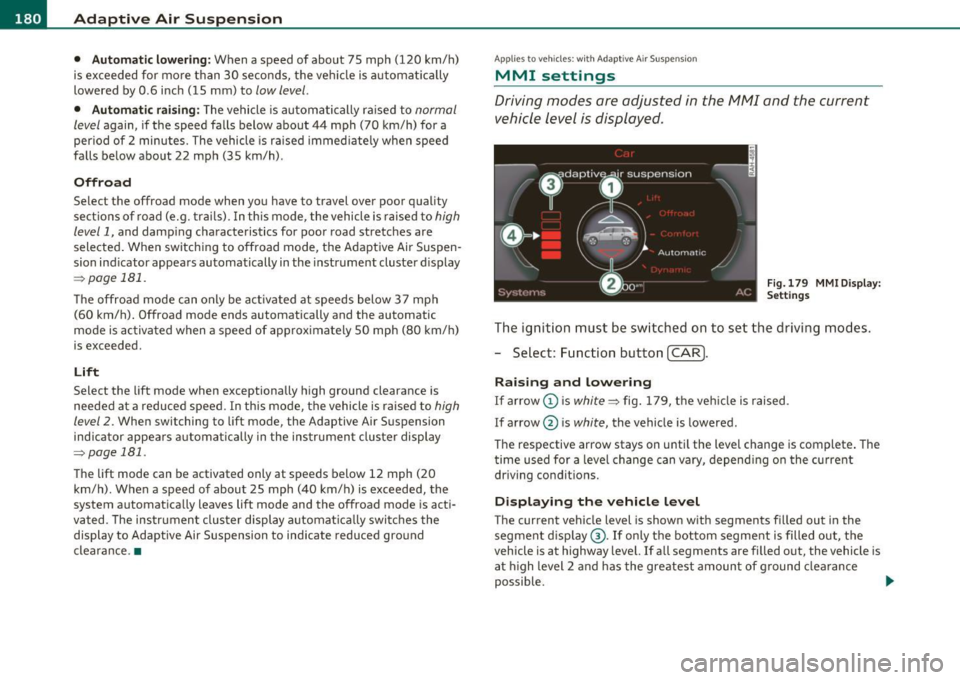
MMI se ttings
Driving modes are adjusted in the MMI and the current
vehicle level is displayed.
Fig.179 MMI Display:
Settings
The ignition must be switched on to set the driving modes.
- Select: Function button
(CAR].
Raising and lowering
If arrow (Dis white ~ fig. 179, the vehicle is raised.
If arrow @ is
white, the vehicle is lowered .
The respective arrow stays on until the level change is complete. The
time used for a level change can vary, depending on the current
driving conditions.
Displaying the vehicle level
The current vehicle level is shown with segments filled out in the
segment display ®·
If only the bottom segment is filled out, the
vehicle is at highway level. If all segments are filled out, the vehicle is
at high level 2 and has the greatest amount of ground clearance
possible. .,_
Page 185 of 392

____________________________________________ A_ d_a_ p ,_ t_iv _ e_ A _ i_ r _ S_ u_s_, p __ e_n _ s_ i _o_ n __ _
ically raised to high level 1 again when the traveling speed falls below
approximately 25 mph (40 km/h) .
Restrictions when operating with a trailer
When operating with a trailer, the lift mode can only be selected up
to about 12 mph (20 km/h). Lift mode is automatically canceled
agai n when a speed of about 25 mph (40 km/h) is exceeded.
If the vehicle is in automatic , comfort, offroad or lift mode before the
trailer towing mode is activated, the dynamic mode cannot be acti
vated .
If the vehicle is in dynam ic mode before towing operation is acti
vated, it can be driven in this mode. If the suspension is switched
from th is mode to another mode, dynamic mode cannot be re
selected.
[I) Tips
• For vehicles with a factory installed towing hitch or a trai ler hitch
that was installed later according to factory specifications, the
system recognizes "Trailer towing mode" and activates this specia l
mode automat ically , as soon as the electr ical connection on the
trailer socket is connected. The mode ceases automatically when the
electrical connection to the trailer socket is disconnected.
• If the trai ler towing mode has been activated, the vehicle will not
drop to the low o r highway level. •
Controls and equip
ment Safety first
A
pp lies to vehicles : w ith Adapt ive Air Sus pens ion
Cargo mode
The rear of the vehicle can be lowered to make it easier to
load .
Fig. 182 Luggage
compartment detail:
Cargo mode switch
Activating cargo mode in the MMI
-Select: Function button [CARI> function button [SETUP)
> Lower for loading.
Using switch for activating cargo mode
- Close all vehicle doors.
- Open the trunk lid.
- Press the lower part of the switch ®~ fig. 182. The rear
of the vehicle is lowered.
- Press the upper part of the switch
(D. The rear of the
veh icle is raised again.
In cargo mode, the rear axle is lowered by 2.2 inches (55 mm),
compa red to the normal level.
While the vehicle is in cargo mode, the segments do not appear as
filled in the segment d isplay. .,,
Vehicle care Technical data
Page 187 of 392
_____________________________________________________ H_ o_m_ e_ L_i_n _k_ ®_ • __ _
Homelink ®
Universal remote control
Applies to veh icles: w ith Hom eli nk ® universal remote control
General information
The Homelink ® feature can learn up to three radio
frequency codes for most current transmitters used for
operating garage doors, estate gates, home or outdoor
lighting systems, and other devices.
You must first program the Homelink ® transm itter before you can
use the system=>
page 186, "Programming the Home link® trans
mitter".
I n order to program the Homelink ® transmitter for devices utilizing
rolling code, a second person on a ladder who can safe ly reach the
garage door opener motor is recommended. It is also necessary to
locate the "learn" button on your garage door opener motor. Refer to
the operating instructions for the opener, as the location and color of
this button may vary by manufacturer.
You can still use the original remote control for the device at any
time.
& WARNING
• Never use the Homelink'"' transmitter with any garage door
opener that does have not the safety stop and reverse feature as
required by federal safety standards. This includes any garage
door opener model manufactured before Aprill, 1982.
• A garage door opener which cannot detect an object, signaling
the door to stop and reverse does not meet current federal safety
standards. Using a garage door opener without these features
increases risk of serious injury or death.
Controls and equip
ment Safety first
& WARNING
(continued)
• For safety reasons never release the parking brake or start the
engine while anyone is standing in front of the vehicle.
• A garage door or an estate gate may sometimes be set in
motion when the Homelink ® remote control is being
programmed. If the device is repeatedly activated, this can over
strain motor and damage its electrical components -an over
heated motor is a fire hazard!
• To avoid possible injuries or property damage, please always
make absolutely certain that no persons or objects are located in
the range of motion of any equipment being operated.
rn Tips
• If you would like more information on Homelink ®, where to
purchase the Homelink ® compatible products, or would like to
purchase the Homelink ® Home Lighting Package, please call toll
free: 1-800-355-3515.
• For Declaration of Compliance to United States FCC and Industry
Canada regulations=>
page 371 . •
Vehicle care Technical data
Page 188 of 392
ffl..__H_ o_m_ e_ L_ i _n_ k_ ® _______________________________________________ _
Applies to veh icles : w ith Homelin k® un iversa l remote control
Programming the Homel ink ® transmitter
The transmitter is programmed in two phases . For rolling
code transmitters, a third phase is also necessary .
111111
-
1111111
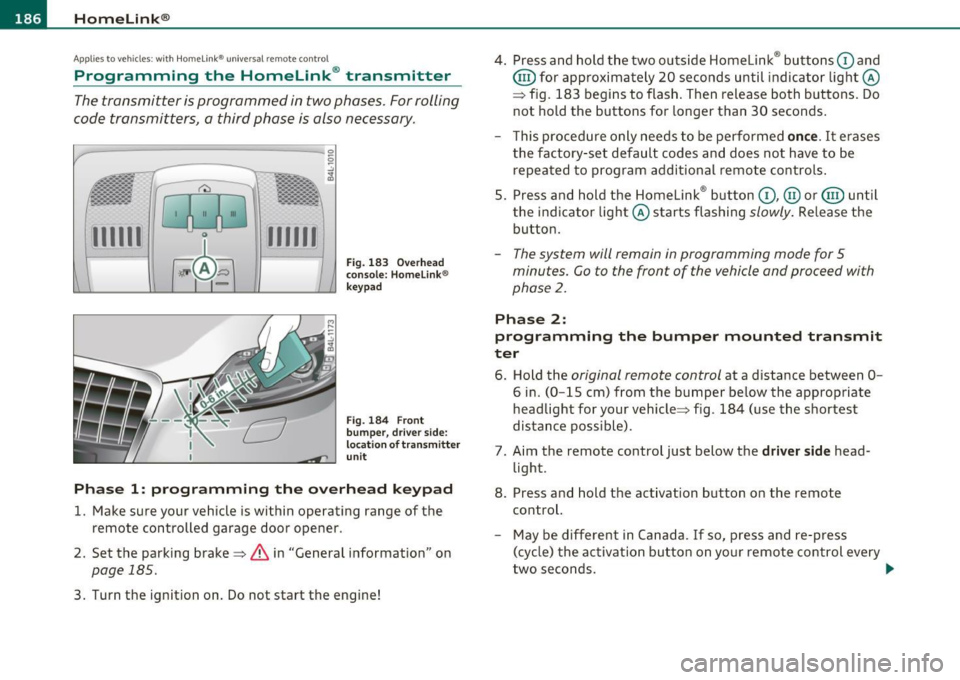
Fig. 183 Over head
console: Homelink ®
keypad
Fig. 184 F ront
bumper, dri ver side:
locat ion of transmitter
unit
Phase 1: progr amming th e overhead k eypad
1. Make sure your vehicle is within operating range of the
remote controlled garage door opener .
2. Set the parking brake~
& in "General information " on
page 185 .
3. Turn the ignition on . Do not start the engine! 4
. Press and hold the two outside Homelink ® buttons
G) and
@ for approximately 20 seconds until indicator light@
=> fig. 183 begins to flash . Then release both buttons. Do
not hold the buttons for longer than 30 seconds .
- This procedure only needs to be performed
once. It erases
the factory-set default codes and does not have to be repeated to program additional remote controls .
5. Press and hold the Homelink ® button
G) , @ or@ until
the indicator light@ starts flashing
slowly . Release the
button .
-The system will remain in programming mode for 5
minutes. Co to the front of the vehicle and proceed with
phase
2 .
Phase 2:
programming the bumper mounted transmit
ter
6. Hold the original remote control at a distance between 0-
6 in. (0 -15 cm) from the bumper below the appropriate
headlight for your vehicle => fig . 184 (use the shortest
distance possible) .
7. Aim the remote control just below the
driver side head
light .
8. Press and hold the activation button on the remote control.
- May be different in Canada . If so, press and re-press
(cycle) the activation button on yo ur remote control every
two seconds. .-,,
Page 190 of 392
lffll.___H_ o_ m __ e_L_ i_n _k_ ®_ • _________________________________________________ _
-Press th e ap pro priate programmed button G) , @ or@
to activate the desired remote control function ::::>
& in
"Genera l informat io n" on
page 185. •
Applies to ve hicles : w ith Hom eli nk® univer sa l rem ote c ont rol
Reprogramming a single button
A Homelink ® button can be reprogrammed individually
without affecting the other button allocations.
Programming the ov erh ead keypad
- Press the appropriate Homelink ® button until the indi-
cator light begins flashing slowly .
Programming the bumper mounted transmit
ter
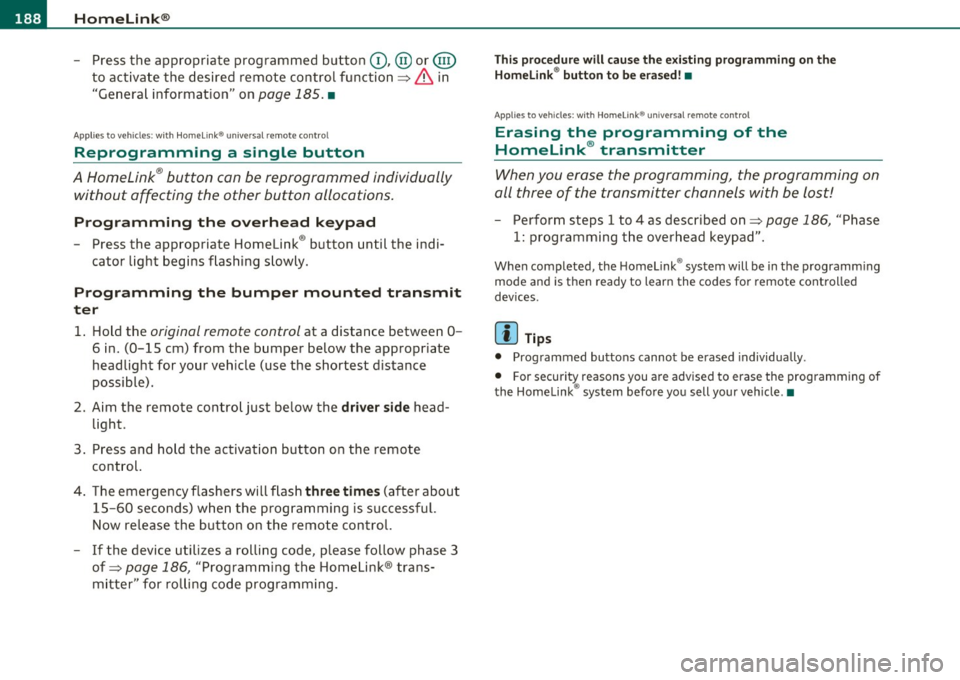
1. Hold the original remote control at a distance between 0 -
6
in . (0 -15 cm) from the bumper below the appropriate
headlight for your vehicle (use the shortest distance
possible).
2. Aim the remote control just below the
driver side head
light .
3 . Press and hold the ac tivation button on the remote
control.
4 . The emergency flashers will flash
three times (after about
15 -60 seconds) when the programm ing is successful.
N ow release the b utton on the remote control.
- If the device utilizes a rolling code , please follow phase 3
of =>
page 186 , "Programming the Homelink ® trans
mitter" for rolling code programming.
This pro cedur e will caus e th e ex is ting pr ogramming on th e
Homelink ® button to be era sed !•
Ap plies to veh icles: w ith Ho meli nk® un ive rsa l rem ote c ont rol
Erasing the programming of the
Homelink ® tr ansmitter
When you erase the programming, the programming on
all three of the transmitter channels with be lost!
- Perform steps 1 to 4 as described on ::::> page 186, "Phase
1 : programming the overhead keypad".
When completed , the Homel ink ® system will be in the programm ing
mode and is then ready to learn the codes for remote controlled
devices .
[I) Tips
• Programmed buttons cannot be erased individually.
• For security reasons you are advised to erase the programming of
the Homelink ® system before you sell your veh icle .•