air condition AUDI Q7 2011 Owner´s Manual
[x] Cancel search | Manufacturer: AUDI, Model Year: 2011, Model line: Q7, Model: AUDI Q7 2011Pages: 392, PDF Size: 93.29 MB
Page 115 of 392
Warm and cold -
----------------
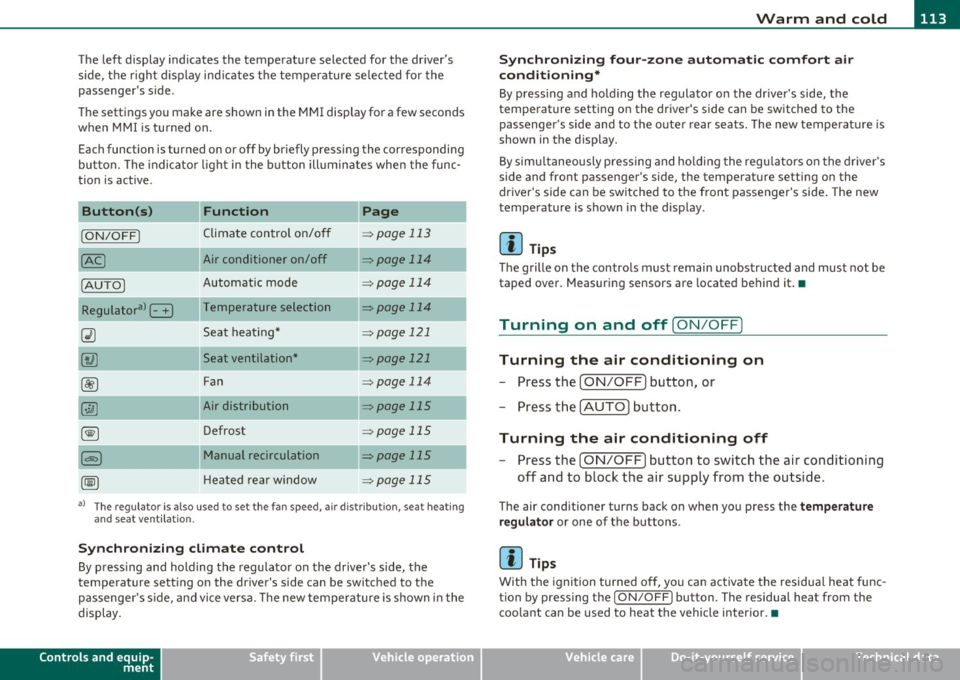
The left display indicates the temperature selected for the driver's
side, the r ight d isplay ind icates the temperature se lected for the
passenger's side.
T he settings you make are shown in the MMI display for a few seconds
when MMI is tu rned on.
Each function is turned on or off by briefly pressing the corresponding
button. The indicator l ight in the b utton ill uminates when the func
tion is act ive.
Button (s)
Function Page
ION/OFFI Climate control on/off => page 113
Air conditioner on/off =:;,page 114
Automatic mode => page 114
Temperature selection => page 114
Seat heating* => page 121
Seat ventilation* -::::;, page 121
Fan => page 114
Air distribution => page 115
Defrost => page 115
Manual recirculation -::::;, page 115
Heated rear window ::::> page 115
a) The regulator is also used to set the fan speed, air dis tr ibution, seat heating
and seat ventilation.
Synch ro nizing clim ate co ntr ol
By pressing and holding the regulator on the driver's side, the
temperature setting on the driver's side can be sw itched to the
passenge r's s ide, and vice ve rsa. T he new temperature is shown in the
display.
Controls and equip
ment Safety first
S
ynchr onizing four-z one a utom ati c c omfor t air
c ondi tioning *
By press ing and ho ld ing the regulator on the dr iver's side, the
temperature sett ing on the driver 's side can be switched to the
passenger 's side and to the outer rear seats . The new temperature is
shown in the display.
By simu ltaneously pressing and ho lding the regu lators o n the driver 's
side and front passenger's side, the temperature setting on the
driver's side can be switched to the front passenger's side . The new
temperature is shown in the display .
[I] Tips
The grille on the controls must remain unobstructed and must not be
taped over. Measuring sensors are located behind it.•
Turning on and off [ ON/OFF]
Turning the air conditioning on
-Press the [ ON/OFF] button , or
- Press the [AUTO] button.
Turning the air conditioning off
-Press the [ ON/OFF] button to switch the air conditioning
off and to block the air supply from the outside.
The air conditioner turns back on when you press the te mper ature
reg ulato r
or one of the buttons.
[I] Tips
With the ignition turned off, you can activate the residua l heat func
tion by pressing the
I ON/OFF) button. The residual heat from the
coo lant can be used to heat the vehicle interior.•
Vehicle care Technical data
Page 116 of 392
![AUDI Q7 2011 Owner´s Manual 1111....__w __ a _r_ m __ a_n_ d_ c_ o _ l_d _______________________________________________ _
Air Condition er On /Off
!AC]
Switching off the air conditioner saves fuel.
- Press the [](/img/6/40276/w960_40276-115.png "AUDI Q7 2011 Owner´s Manual 1111....__w __ a _r_ m __ a_n_ d_ c_ o _ l_d _______________________________________________ _
Air Condition er On /Off
!AC]
Switching off the air conditioner saves fuel.
- Press the [")
1111....__w __ a _r_ m __ a_n_ d_ c_ o _ l_d _______________________________________________ _
Air Condition er On /Off
!AC]
Switching off the air conditioner saves fuel.
- Press the [AC] button to switch the air conditioner on or
off.
When the air conditioner is switched on, the indicator lamp in the
button will illuminate and the heating/ventilation system is
controlled automatically.
Please keep in mind that with the air conditioner switched off, the
interior temperature cannot be lower than the outside temperature.
The air will not be cooled or dehumidified. The windows can fog up.•
Automatic mode !AUTO]
The automatic mode is the standard setting for all
seasons.
- Select temperature between 60 °F (+16 °() and 84 °F
(+28 °().
- Press the [AUTO] button.
Automatic operation ensures constant temperatures in the interior
and dehumidifies the air inside the vehicle. Air temperature, volume
and distribution are controlled automatically to reach or maintain the
desired interior temperature as quickly as poss ible. Fluctuations in
exterior temperature and the effects of temperature from the posi
tion of the sun are compensated for automatically.
This operating mode works only in the adjustable temperature range,
from
60 °F (+16 °() to 84 °F ( + 28 °() . If a temperature below 60 °F
( + 16 °C) is selected, LO appears in the display. At temperatures above
84 °F (+28 °C) , HI is displayed. At both extreme settings , climate
control runs continuously at maximum cooling or heating power.
There is no temperature regulation. •
Setting the temperatur e
Separate temperatures can be selected for the driver's
and front passenger's side.
- Rotate the regulator to the left to reduce the tempera-
ture, or to the right to increase the temperature.
The selected temperature appears on the climate control display . The
temperature setting will also appear for a few seconds in the MMI
display .•
Fan @
The automatically preset fan speed can be reduced or
increased.
- Press the I~] button.
- Rotate the regulator to the desired fan speed.
The climate control system automatically regulates fan speed
depending on interior temperature. You can adjust the volume of air
produced by the fan to your own requirements.
The fan speed setting will appear for a few seconds in the MMI display.
[ i] Tips
It is possible that the fan speed may change automatically. This
occurs to ensure that the desired temperature setting is reached as
quickly as possible.•
Page 117 of 392
![AUDI Q7 2011 Owner´s Manual Warm and cold Ill
----------------
Air distribution [i9 ]
The automatically controlled air distribution can be
changed manually.
-Press the [·.YI button.
- Rotate the regulator to th](/img/6/40276/w960_40276-116.png "AUDI Q7 2011 Owner´s Manual Warm and cold Ill
----------------
Air distribution [i9 ]
The automatically controlled air distribution can be
changed manually.
-Press the [·.YI button.
- Rotate the regulator to th")
Warm and cold Ill
----------------
Air distribution [i9 ]
The automatically controlled air distribution can be
changed manually.
-Press the [·.YI button.
- Rotate the regulator to the desired setting.
You can adjust the air distribution so that air flows from specific
vents. In position
:J air flows only to the windows, in position :J, it
flows to the driver or passenger, and in position
!,8 it flows to the
footwell. There are additional combinations available to adjust air distribution as needed.
To regu late air distribution automatically, switch to
[AUTO].
The air distribution setting will appear for a few seconds in the MMI
display. •
Defrosting [@]
The windshield and side windows are rapidly defrosted or
defogged.
- Press the[@) button to turn on the defroster.
- Press the
[®I button again, or press the [ AUTO I button to
turn it off.
Temperature is controlled automatically. The maximum amount of
air flows mainly from the vents below the windshield.
To defog the rear side windows, the air vents in the door pillars
should be open and directed at the windows. •
Controls and equip
ment Safety first
Manual air circulation [<::S::>
]
Air recirculation prevents exhaust fumes or other pollu
tion from entering the vehicle.
Turning on air recirculation
-Press the[~) button=> &
Turning off air recirculation
-Press the~ button again, or
- press the [ AUTO
I button , or
- press the[@] button.
In the air recirculation mode, the air in the passenger compartment
is recirculated and filtered to prevent exhaust fumes and other pollu
tion from entering the vehicle. We recommend that you use the
manual air recircu lation under the following conditions :
• when driving through tunnels
• inatrafficjam.
& WARNING
Do not use this setting for extended periods of time. The windows
could fog up since no fresh air can enter the vehicle. If the
windows fog up, press the air recirculation button again immedi
ately to switch off the air recirculation function or select defrost.•
Rear window defogger [QiiJ ]
The rear window defogger clears the rear window of
condensation.
- Press the QW button to turn the rear window defogger on
and off . _.,
Vehicle care Technical data
Page 119 of 392
_______________________________________________ w __ a _r _m _ a_ n_d _ c_o _ l_ d __ ffl'II
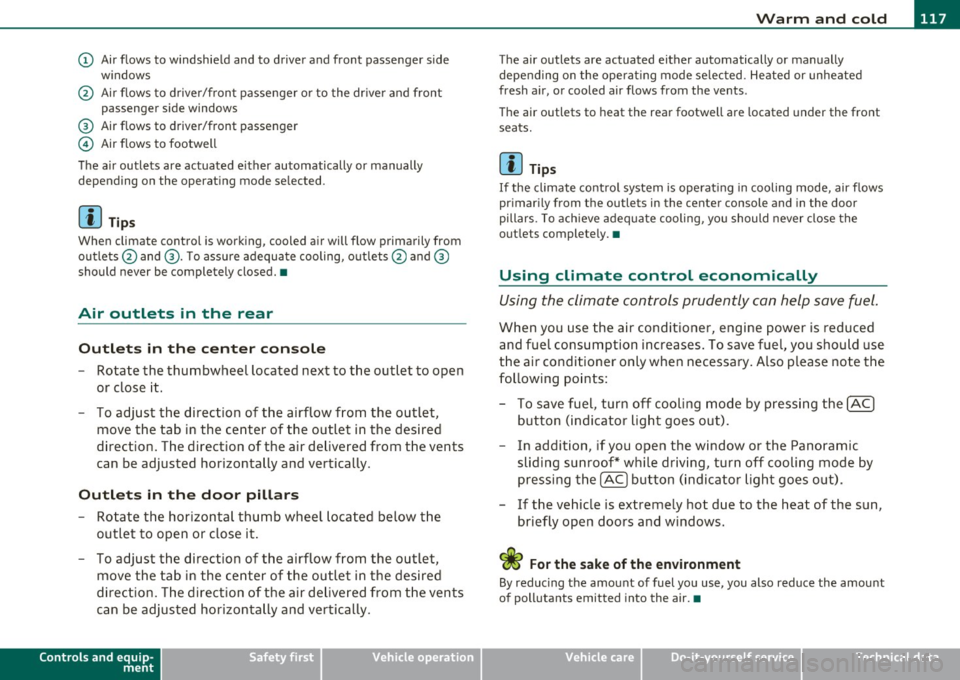
(D Air flows to windshield and to driver and front passenger side
w indows
@ Air flows to driver/front passenger or to the dr iver and front
passenger side windows
® Air flows to driver/front passenger
© Air flows to footwell
The air outlets are actuated e ither automatically or manually
depending on the operating mode selected.
[ i ] Tips
When climate control is working, cooled air will flow primarily from
outlets @and ®· T o assure adequate cooling, outlets @and ®
should never be completely closed. •
Air outlets in the rear
Outlets in the center console
-Rotate the thumbwheel located next to the outlet to open
or close it.
- To adjust the direction of the airflow from the outlet,
move the tab in the center of the outlet in the desired
direction. The direction of the air delivered from the vents
can be adjusted horizontally and vertically .
Outlets in the door pill ars
- Rotate the horizontal thumb wheel located below the
outlet to open or close it .
- To adjust the direction of the airflow from the outlet,
move the tab in the center of the outlet in the desired
direction. The direction of the air delivered from the vents
can be adjusted horizontally and vertically.
Controls and equip
ment Safety first
The air
outlets are actuated either automatically or manually
depending on the operat ing mode se lected. Heated or unheated
fresh air, or cooled air flows from the vents.
T he air outlets to heat the rear footwell are located under the front
seats.
[I) Tip s
If the climate cont rol system is operat ing in cooling mode, air flows
primarily from the outlets in the center console and in the door
pillars . To ach ieve adequate cooling, you should never close the
outlets completely. •
Using climate control economically
Using the climate controls prudently can help save fuel.
When you use the air conditioner, engine power is reduced
and fuel consumption increases . To save fuel, you should use
the air conditioner only when necessary . Also p lease note the
following points:
- To save fuel, turn off cooling mode by pressing the
[AC)
button (indicator light goes out).
- In addition, if you open the window or the Panoramic
sliding sunroof* while driving, turn off cooling mode by
pressing the
[AC] button (indicator light goes o ut).
- If the vehic le is extremely hot due to the heat of the sun,
briefly open doors and windows.
<£' For the sake of the environment
By reducing the amount of fuel you use, you also reduce the amount
of pollutants emitted into the air.•
Vehicle care Technical data
Page 120 of 392
llffl..__w __ a _r _m __ a_n _ d_ c_ o_ ld ________________________________________________ _
Rear Air Conditioning
Applies to veh icles: with fou r-zone automat ic co mfort air condit ioning
Rear air conditioning -controls
This overview is to assist you in familiarizing yourself with
the rear air conditioning controls.
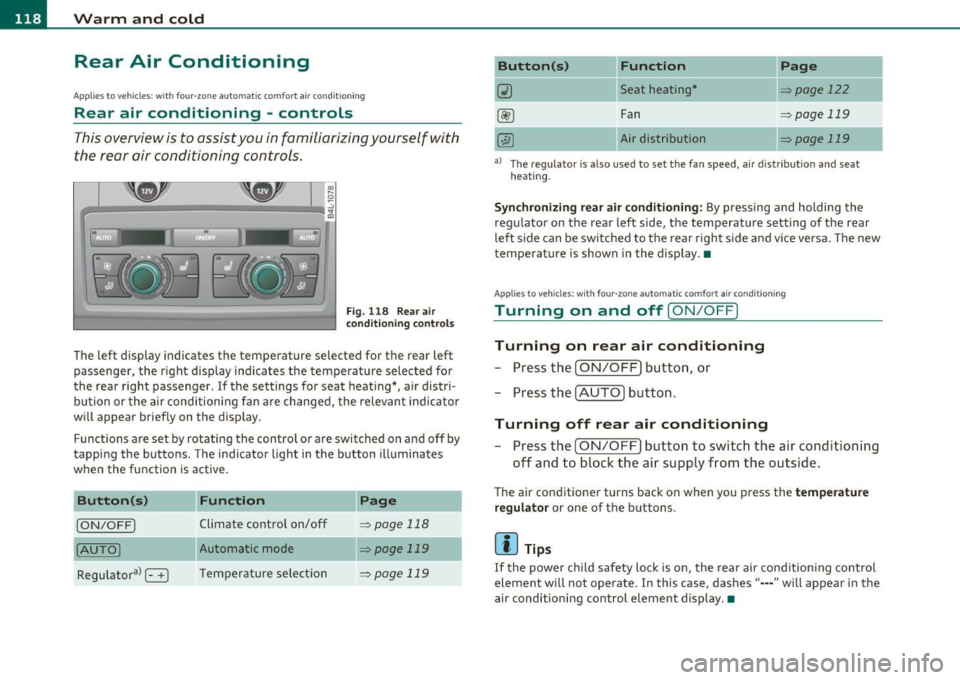
F ig. 1 18 Rear air
con diti on in g con trol s
The left display indicates the temperature selected for the rear left
passenger, the right display indicates the tempe rature selected fo r
the rear right passenger. If the settings for seat heat ing *, air distr i
bu tion or the a ir conditioni ng fan are changed, the relev ant indicator
w ill appear briefly on the disp lay.
Func tions are set by rotating the contro l o r are swi tched o n and
off by
tapping the butto ns. The indicator light in the button illuminates
when the function is active .
Button(s)
Function Page
[ON/OFF) Climate control on/off => page 118
(AU TO ) Automa tic mode => page 119
Regulatora> G T emper ature se lec tion => page 119
Button(s) Function
~ Seat heating*
-
Fan
Air dis tribution
Page
::!> page 122
-
=> page 119
::!> page 119
al T he regulator is also used to set the fan speed, a ir d istr ibut ion and seat
heating.
-
Synchronizing r ear air conditioning: By pressing and holding the
regu lator on the rear left side, the temperature setting of the rear
left side can be switched to the rear right s ide a nd v ice versa. The new
temperature is shown in the display. •
Appli es to vehicles : with four -zone auto matic co mfort air condition ing
Turning on and off [ ON/OFF ]
Turning on rear air conditioning
-Press th e I ON/OFF) butt on, o r
- Press the !A UTO] button .
Turning off rear air conditioning
- Press the [ O N/OFF] but ton to sw itch the air condition ing
off and to bloc k th e air supply from the outs ide .
The air conditioner turns back on when yo u press the temperature
regu lator
or one of t he buttons .
[ i ] Tips
If the power child safety loc k is o n, the rear ai r cond ition ing contro l
element wi ll not operate. In this case, dashes" ••• " will appear in the
a ir conditioning con trol element display. •
Page 121 of 392
_______________________________________________ w __ a _r _m _ a_ n_d _ c_o _ l_ d __ _
Applies to vehicles : with four-zone automatic comfort ai r cond ition ing
Automatic mode in rear [AUTO )
The automatic mode is the standard setting for all
seasons.
- Select temperature between 60 °F (+16 °() and 84 °F
(+28 °().
-Press the [AUTO] button.
Automatic operation ensures constant tempe ratures in the interior
and dehumidifies the air inside the vehicle. Air temperature, volume
and distribution are controlled automatically to reach or maintain the
desired interior temperature as quickly as possible. Fluctuations in
exterior temperature and the effects of temperature from the posi
tion of the sun are compensated for automatically.
This operating mode works only in the adjustable temperature range,
from
60 °F (+16 °() to 84 °F (+28 °C). If a temperat ure below 60 °F
(+16 °() is selected, LO appears in the display. At temperatures above
84 °F (+ 28 °C), HI is displayed. At both extreme settings, climate
control runs continuously at maximum cooling or heating power.
There is no temperature regu lation. •
Applies to vehicles : w ith four -zone automat ic comfort air condition ing
Setting rear temperature
The temperature can be separately adjusted for the rear
left and right sides .
-Rotate the regulator to the left to reduce the tempera
ture, or to the r ight to increase the temperature.
T he selected temperature appears on the climate control disp lay. •
Controls and equip
ment Safety first
Applies
to vehicles : with four-zone automatic comfort air cond itio ning
Rear fan[~ )
The automatically preset fan speed can be reduced or
increased_
- Press the[~] button.
- Rotate the regulator to the desired fan speed .
The climate co ntrol system a utomatically regu lates fan speed
depending on interior temperature. You can adjust the volume of air
produced by the fan to your own requirements.
[ i ] Tips
It is possible that the fan speed may change automatically . This
occurs to ensure that the desired temperature setting is reached as
quickly as possib le .•
Applies to vehicles : w ith four -zone automat ic co mfort air cond itio ning
Rear air distribution [..Y ]
The automatically controlled air distribution can be
changed manually .
-Press the [·JAi button .
- Rotate the regulator to the desired setting.
You can adjust the air circulation so that air flows from specific vents.
• In position
;J, all air flows from the vents in the center console
and the outlets to the door pi llars .
• In position
:,J, air flows from the outlets in the door pillars.
• In position
}O, air flows from the outlets under the front seats.
There are additional combinations available to adjust air distribut ion
as needed. .,_
Vehicle care Technical data
Page 122 of 392
![AUDI Q7 2011 Owner´s Manual lffl!l.___w __ a _r_ m __ a_n_ d_ c_ o _ l_d _______________________________________________ _
To regulate air distribution automatically, switch to [AUTO].•
Basic settings
General
The ba](/img/6/40276/w960_40276-121.png "AUDI Q7 2011 Owner´s Manual lffl!l.___w __ a _r_ m __ a_n_ d_ c_ o _ l_d _______________________________________________ _
To regulate air distribution automatically, switch to [AUTO].•
Basic settings
General
The ba")
lffl!l.___w __ a _r_ m __ a_n_ d_ c_ o _ l_d _______________________________________________ _
To regulate air distribution automatically, switch to [AUTO].•
Basic settings
General
The basic climate control settings can be adjusted in the
fv1fv1I.
-Select: Function button I CAR]> Control button AC.
The following functions can be selected:
• Auto recirculate=>
page 120
• Synchronization :::::, page 120
• Supply. heater*=> page 121
• Rear operation*=> page 121 •
Automatic recirculation mode
An air quality sensor detects increased concentrations of
pollutants in the outside air and automatically switches
to recirculation mode.
We recommend that you always keep automatic air recirculation ON
to prevent polluted outside air from entering the vehicle inter io r.
If the
air quality sensor located in the air cond it ion ing system detects
polluted outside air, the sensor decides whether the air pollution can
be reduced by the factory-installed pollutant filter or whether it is
necessary to switch to air recirculation. With heavy concentrations of
pollutants, the a ir cond it ion ing system is switched automat ically to
recircu lation mode and the supply of outside air is b locked . As soon
as the concentration of pollutants in the outside air drops , fresh air is
supplied to the vehicle interior again. In the event that the windows fog up during automatic air recircula
tion, you must press the® button immediately.
Under certa in operating conditions, automatic a ir recirculation is
switched off automatically. With outside temperatures below about
SO °F
(+10 °C), automatic air recirculation is lim ited to 30 seconds.
With outside temperatures below about
30 °F (-1 °() and with the air
conditioner switched off, the automatic air recirculation is limited to
15 seconds. •
Synchronization
One climate control setting for the driver and front
passenger seats.
With synchronization active, the driver's settings are adopted for the
passenger or vic e versa. All the other sett ings that were made are
transferred to the other seat. Th is includes a ll the climate control
settings , except fo r the seat heating/ventilation* .
If a different setting is selected at a "synchronized seat", synchroni
zation is cancelled. •
Applies to veh icles : with four -zone a uto ma tic c om fo rt air co nd itionin g
Synchronization
One climate control setting for all seats.
With synchron izat ion act ive, the driver's settings are adopted for the
front passenger and the rear left and right seats . All the other
sett ings that were made are transferred to the other seats . This
includes a ll the climate control settings, except for the seat
heating/ventilation*.
If a different setting is selected at a "synchronized seat", synchroni
zation is cancelled .•
Page 123 of 392
![AUDI Q7 2011 Owner´s Manual Warm and cold -
----------------
App lies to veh icles : with di esel e ngine
Supplementary heater
- Select: Function button !CAR]> Control button AC>
Suppl. h eat er.
Vehicles with](/img/6/40276/w960_40276-122.png "AUDI Q7 2011 Owner´s Manual Warm and cold -
----------------
App lies to veh icles : with di esel e ngine
Supplementary heater
- Select: Function button !CAR]> Control button AC>
Suppl. h eat er.
Vehicles with")
Warm and cold -
----------------
App lies to veh icles : with di esel e ngine
Supplementary heater
- Select: Function button !CAR]> Control button AC>
Suppl. h eat er.
Vehicles with diesel engines are equipped with a supplementary
heater to warm the inte rior of the veh icle more qu ickly. The supple
mentary heater switches itself on and off automatically when the
outs ide temperature is below SO
°F (10 °() and the engine is running,
depending on the coolant temperature, interior temperature and the
selected temperature .•
Applies to veh icles: with four -zone automat ic co mfort air co nditioning
Rear operation
The air conditioning in the rear of the vehicle can be
controlled from the cockpit.
-Select: Function button I CAR]> Control button AC > Re ar
operat ion.
T he d river or front passenger can contro l the a ir co ndit ion ing in the
rear of the vehicle using
his/her own contro ls. •
Heated Seats
Applies to vehicles: with ele ctrica lly heated front seats
Heated front seats ~
The seat cushion and the seatback of the front seats can
be heated electrically.
- Press the~ button.
- Rotate the regulator to the desired setting .
Controls and equip
ment Safety first
In
position O the heating for the seats is turned off. The range of
adjustment is between 1 and 6.
The heater for the front seats can be turned on when the weight of
the particular seat's occupant is detected. However, the front seats
can be pre-heated for about 10 minutes using the activated seat
heater. After this time has e lapsed, the seat heater automatically
t u rns off if it does not detect an occupant's weight for the particular
seat.
0 Note
To avoid damage to the heating elements in the seats, do not kneel
on the seats or p lace heavy loads on a small area of the seat.
[I] Tips
Please no te that the weight of objects placed on the seat wi ll also be
detected. This weight may be enough to cause the seat heater to turn
on. •
Applies to vehicles: w it h front seat ventilat ion
Front seat ventilation [~]
The seat cushion and the seatback on the front seats can
be ventilated.
- Press the Iv] button .
- Rotate the regulator to the desired setting.
When the regulator is in the O position, the seat ventilat ion is
switched off . The range of adjustment is between 1 and 6. •
Vehicle care Technical data
Page 124 of 392
-Warm and cold .Ml..__ ______________ _
Applie s to vehicles : wi th heated rear seats
Heated rear seats [JI
The seat cushions and seatbacks of the two outer rear
seats can be heated electrically.
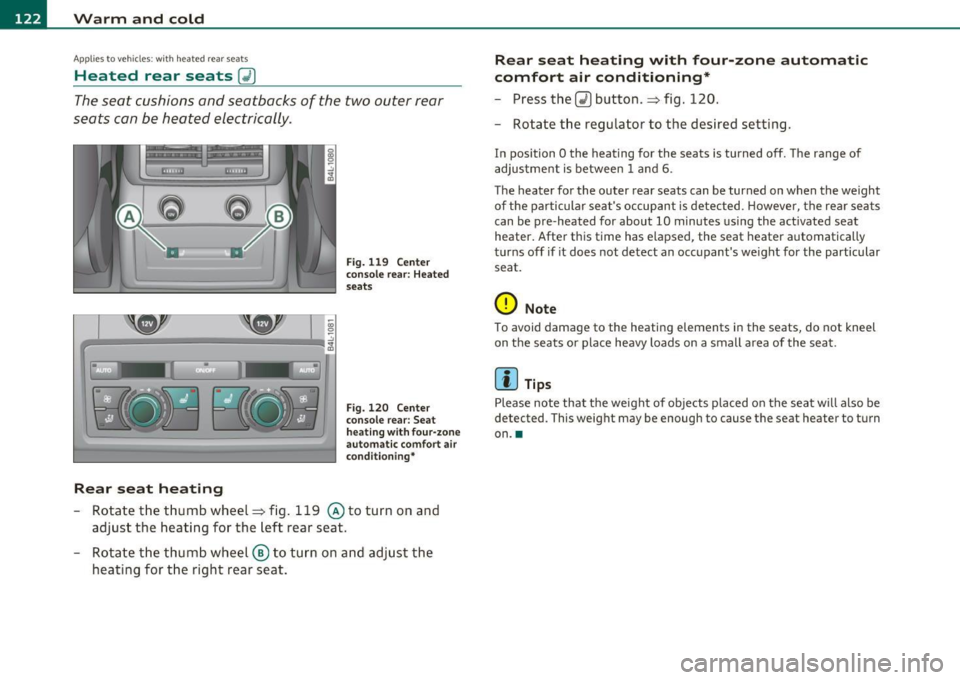
Rear seat heating
Fig. 119 Center
conso le rear: Heated
seats
Fig. 120 Center
console rear: Seat
h eat ing with four-zone
automa tic comfort air
condi tioning*
-Rotate the thumb wheel~ fig. 119 @to turn on and
adjust the heating for the left rear seat.
- Rotate the thumb wheel ® to turn on and adjust the
heating for the right rear seat.
Rear seat heating with four -zone automatic
comfort air conditioning*
- Press the Q) button .~ fig. 120.
- Rotate the regulator to the desired setting.
In position O the heating for the seats is turned off. The range of
adjustment is between
1 and 6.
The heater for the outer rear seats can be turned on when the weight
of the particular seat's occupant is detected. However, the rear seats
can be pre-heated for about
10 minutes using the act ivated seat
heater. After this time has elapsed, the seat heater automatically
turns off if it does not detect an occupant's weight for the particular
seat.
0 Note
To avoid damage to the heating elements in the seats, do not kneel
on the seats or place heavy loads on a small a rea of the seat.
[I] Tips
Please note that the weight of objects placed on the seat will also be
detected . This weight may be enough to cause the seat hea ter to turn
on .•
Page 174 of 392

IIIJL-___;P:....:: a:.:.r..:.k .:.: i.:..n .:.:g:!....: s:.: y~ s..:t ..:e ..:.m .:..:... _______________________________________________ _
The closer you get to the obstacle, the shorter the interval between
t he audible s ignals. A contin uous tone sounds whe n the obstacle is
less than approximately 1 foot (0 .30 meters) away . Do not co ntin ue
driving farther.
If the distance to an obstacle remains constant, the volume of the
distance warning gradually drops after about four seconds (this does
no t a pply in the co nti nuous to ne range).
Rear view camer a coverage area
The MMI display shows the area covered by the rear v iew camera
=.> page 171, fig . 171 (D . Objects that are not in the area covered@
are not shown on the M MI display.
We recommend that you practice parking with the rear v iew camera
in a traff ic -free location o r parki ng lo t to become fam iliar wi th t he
system, the orientation lines, and the ir funct ion . When do ing th is,
there should be good lig ht and weather cond itions.
In the MM I disp lay, objects o r vehicles appea r closer or fu rther away
if:
• you are dr iv ing in r everse gea r from a level surface onto an incline,
or a downwa rd slope,
• you a re driving i n reve rse gear toward p rot ruding objec ts,
• the vehicle is carry ing too much load in the rear.
T he accur acy of the or ien tat io n lines and blue su rf a ces dimin ishes if:
• the Adaptive Air Suspens ion* is faulty or the dynamic, offroad or
lift mode is on,
• the rear view camera does not prov ide a reliable image, for
example, in poor visib ility conditions or if the lens is dirty,
• the image on the screen is not visible due to sun g lare and ref lec
ti on .
Caring for the rear view camera lens
The rear view came ra is lo cated above the rea r license plate bracke t.
For the parking system to ope rate, the lens=>
page 171, fig. 172
must be kept clean: •
Dampen the lens with a househo ld alcoho l-based glass cleaner,
and then wipe the lens clean with a dry cloth =>
CD.
• Remove snow with a hand brush and ice preferably with a de-ic ing
spray =>
CD.
& WARNING
• The parking sy stem cannot replace the dri ver's attention . The
d river alone i s respo nsible for p arking and sim ila r dri ving maneu
ver s.
• Sensor s hav e blind spots in which objects cannot be detected.
Pa y s peci al att ention to small children and animal s beca u se the
sen so rs cannot al ways detect them.
• Alway s keep your e yes on the v ehicle's surr ound ing s, u sing the
r ear view mirror as well.
• Do not all ow your self to be distract ed from traffic by the r ear
v iew camera pictu res .
• If the position and the installation angle of th e camera has
changed , for e xample, after a rear end colli sion, do not continu e
to use th e system for safety r ea son s. Hav e it check ed by a qualified
deale rship.
0 Note
• Low obstacles a lready signaled by a warning can disappear from
the system's detection range as they are approached and will not
continue to be signaled . Objects such as barrier chains, trai ler draw
bars, th in pa inted vertical po les or fences may not be detec ted by the
system, posing risk of damage.
• Never use warm or hot water to remove snow or ice from the rear
view camera lens -this co uld cause the lens to crack!
• When cleaning the lens , never use products that are abrasive .•