brake light AUDI Q7 2011 Owner´s Manual
[x] Cancel search | Manufacturer: AUDI, Model Year: 2011, Model line: Q7, Model: AUDI Q7 2011Pages: 392, PDF Size: 93.29 MB
Page 40 of 392
Driver information display
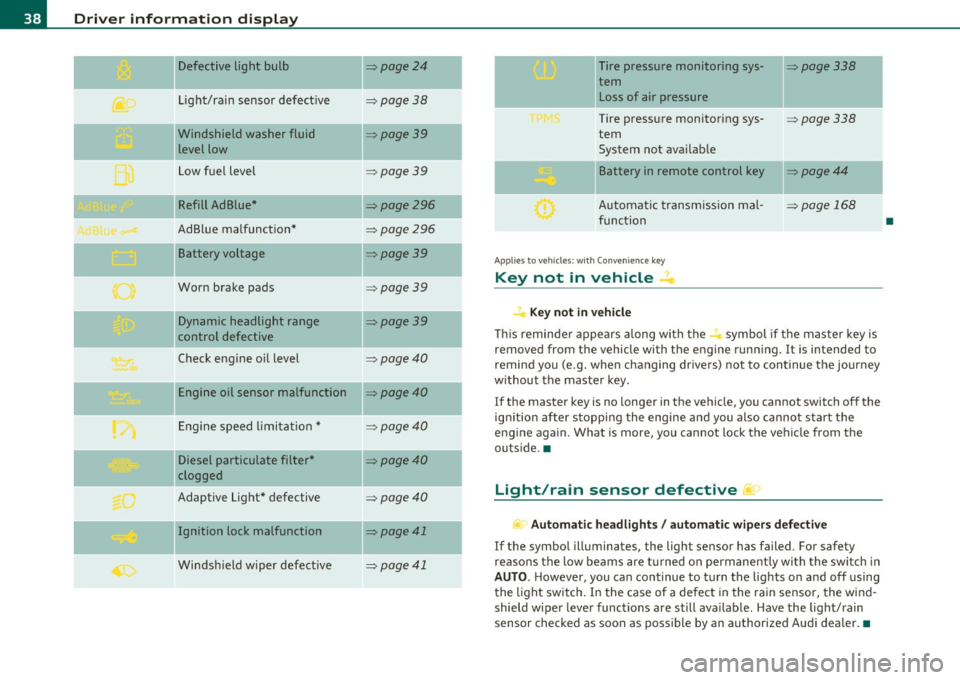
Defective light bulb ::::>page24
._ -
Light/rain sensor defective :::>page 38
-Windshield washer fluid =>page39
level low
Low fuel level
::::>page39
Refill Ad Blue* ::::>page296
AdBlue malfunction* =>page 296
-Battery voltage ::::>page39
Worn brake pads ::::>page39
Dynamic headlight range ::::>page39
control defective
-
Check engine oil level ::::>page40
Engine oil sensor malfunction =>page40
Engine speed limitation* ::::>page40
Diesel particulate filter* ::::>page40
clogged
Adaptive Light* defective
=>page40
Ignition lock malfunction ::::>page41
--
Windshield wiper defective => page 41
-
-
-
-
-
-
Tire pressure monitoring sys-::::>page338
tern Loss of air pressure
Tire pressure monitoring sys-=> page338
tern
System not available
- -
11
sattery in remote control key ::::>page44
Automatic transmission mal-=> page 168
function
Applies to veh icles: with Conven ience key
Key not in vehicle ..Z..
Key not in vehicle
This reminder appears along with the -i. symbol if the master key is
removed from the vehicle with the engine running. It is intended to
remind you (e.g. when changing drivers) not to continue the journey
without the master key.
If the master key is no longer in the vehicle, you cannot switch off the
ignition after stopping the engine and you also cannot start the
engine again. What is more, you cannot lock the vehicle from the
outside. •
Light/rain sensor defective ~'j.
Automatic headlights/ automatic wipers defective
If the symbol illuminates, the light sensor has failed. For safety
reasons the low beams are turned on permanently with the switch in
AUTO. However, you can continue to turn the lights on and off using
the light switch. In the case of a defect in the rain sensor, the wind
shield wiper lever functions are still available. Have the light/rain
sensor checked as soon as possible by an authorized Audi dealer. •
•
Page 41 of 392
Windshield washer fluid Level too Low :5
Please refill washer fluid
If the symbol illumi nates, add winds hield washe r fluid to the washer
system and also to the headlight washer system=>
page 316. •
Fuel supply too Low ""~
A Plea se refuel
When t his symbo l illuminates for t he first time, the fuel reserve in
your vehicle is still between 2 .6 and 3 .2 gallons (10- 12 li te rs) . Refuel
as soon as possible =>
page 293.
If the symbol lights up, even whe n there is ample fue l in the t ank, and
the text Tank system malfunction! Contact workshop appears in the
displ ay, the re is a fa ult in the system. Con tact a qualified workshop to
have the fault rectified .•
Battery voltage U
If the battery's state of charge is not in the optima l range, the -,
s ymbo l is show n in the display and the d river mess age Low battery
charge: battery will be charged while driving appears.
Wh ile this driver notification is displayed, you have to be prepared for
limited sta rting capabili ty .
Driver message appears and goes out again
If th is driver message appears a fter the ignit ion is t urned on or while
driving and it goes o ut again after a while, the battery has been
adequate ly recharged.
Driver message appears and does not go out again
If th is dr iver no tification appears after the ign ition is turned o n or
whi le driving and does not go ou t agai n, the battery 's s ta te of charge
Controls and equip
ment Safety first
Driver information display
is not in the opt
imal range . Starting capability is restricted. Have the
ba ttery che cked by an au thor ized A udi dealer as soon as possible. •
Worn brake pads ~
-Brake pad s !
If the warning light illum inates, immediately contact your a uthorized
Audi dealer or qualified wo rkshop to have all brake pads inspected.
On USA mode ls the warn ing light
t comes o n together w it h the
warning light
BRAKE . Both sets of brake pads on an axle must a lways
be re place d at the same time.
& WARNING
Driving with bad brakes can cause a collision and serious personal
injury.
• If the warning light', and the warning light
8RAKE1l with the
me ssage Brake pads! comes on in the in strument cluster display ,
immediately contact your authorized Audi dealer or qualified
workshop to have all brake pads checked or replaced if necessary. •
Headlight range control 1©
"'Headl ight range control defective !
If the symbo l illuminates, the dynamic headlight range contro l is no
longer wo rking prope rly. Have the syste m checked and repaired at
your authorized Aud i dea ler. •
ll BRAKE : USA mode ls on ly
Vehicle care Technical data
Page 109 of 392
_______________________________________________ S_ e_a _t_ s_ a_n_ d_ s_ t_o _r_a _, g::;.,_ e __ ffl'II
[I) Tips
When the engi ne is off and accessories are st ill plugged in and a re o n,
the vehicle battery can sti ll be drained .•
Storage
General overview
There are numerou s places to store items in your vehi cle .
Glove com pa rt me nt
Cooling box in glove compartment
Sto ra g e com partmen t in roof
Coat hooks
Storage in the door panels
Storage net in footwell
Storage net in the front seatbacks
Storage net in luggage compartment
=> page 107
=> page 109
=> page 109
=> page 109
=> page 110
=> page 11 0
Sto rage com partment bene ath car go floo r => page 99
& WARNING
• Always remove objects from the inst rument panel. Any items
not stored could slide around inside the vehicle while driving or
when accelerating or when applying the brakes or when driv ing
around a corner .
• When you are dri ving make sure that anything you may have
pla ced in the center console or other storage locations cannot fall
out into the footwells. In case of sudden braking you would not be
able to brake or accelerate.
Controls and equip
ment Safety first
& WARNING (
co ntinued )
• Any articles of clothing that you have hung up must not inter
fere with the driver's view. The coat hooks are designed only for lightweight clothing. Never hang any clothing with hard, pointed
or heavy objects in the pockets on the coat hooks . Dur ing sudden
braking or in an accident - especially if the airbag is deployed -
these objects could injure any passengers in side the vehicle. •
Glove compartment
To open glove compartment
Fig. 107 Unlock in g
button for g love
c ompartment
- Press th e button ::!I----~ fi g. 107 (arrow) - t he lid opens
au tomatica lly .
To close glove compartment
- Push t he g love compartme nt li d up u nti l the lock e ngag es.
In the g love compartment lid yo u w ill find a place to store a pen and
a pad of paper. _.,
Vehicle care Technical data
Page 130 of 392
1111....__0_ n_ t_h_ e_ r_ o_ a _ d _________________________________________________ _
Vehicles with diesel engine:
- Step o n the brake .
- Move the selector lever into P or N
~ &.
- Turn the ig nition key to position (D -th e g low plu g i nd i-
cator lig ht ill uminates when t he g low plug sys tem is
active.
- When the in dicator light " swi tch es off , turn t he ignition
k ey to posit ion @ but do not p ress the acce lerator pedal.
- Release the ignition key o nce the e ngin e s tarts. The
s ta rt er mus t not conti nue r unning .
A cold eng ine may sound loud after it has been s tarted . This is due to
the hydra ulic valves b uilding up o il pressure. Th is is norma l and is not
a need for concern .
If the engine does not start immediately, stop trying afte r 10 seconds
and then try to rest art the eng ine about 30 seco nds la te r.
Glow plug system*
Diesel engines are eq uipped with a glow p lug sys tem whose
preheating t ime is controlled by the coo lant and outs ide tempera
tu re. Start t he engine
immedia tely a ft er the glow plug indicator ligh t
sw itches off.
T he g low pl ug indicator light w ill on ly ill umina te for approximately 1
second when the engine is warm o r the ou tside temperatur e is hig her
than 46 °F (8 °C). That means yo u can start the eng ine
immediately.
& WARNING
Never start or let the engine run in a confined or enclosed area.
Exhaust fumes from the engine contain carbon monoxide, a color
less and odorless gas. Carbon monoxide can be fatal if inhaled.
& WARNING (co ntinued )
• Never leave the engine idling unattended. An unattended
vehicle w ith a running engine poses a danger of personal injury or
theft .
0 Note
• Avoid high engine speeds, fast acce leration or heavy eng ine loads
w hil e the eng ine is st ill co ld. Th is could dam age t he e ng ine .
• T he engine ca nnot be sta rted by p ushi ng o r tow ing the veh icle.
~ For the sake of the environment
T o avoid unnecessary engine wea r and to reduce exhaust emiss ions,
do not let your vehicle stand and w arm up . B e re ady to dr ive off i mme
diately after sta rting yo ur vehicle. Maintain mode rate speed unt il the
eng ine i s co mpl ete ly w arm . R emembe r, the eng ine pe rfor ms best at
operat ing temperature. •
Stopping the engine
- Turn the ign it ion k ey to posit ion ®~ page 12 7, fig. 125.
& WARNING
• Never turn off the engine until the vehicle has come to a
complete stop.
• The brake booster and servotronic only work when the engine
is running . With the ignition turned off, you have to apply more
force when steering or braking. Since you cannot steer and stop no rmally , this can lead to accidents and serious injuries .
• The radiator fan can continue to run for up to 10 minutes even
after you have turned off the engine and removed the ignition key.
The radiator fan can also turn on again if the engine coolant heats .,,,
Page 131 of 392

_________________________________________________ O_ n_ t_ h_ e_ r _o_ a_d _ __.ffl'I
& WARN ING (conti nued)
up be cause of intense s unlig ht or h eat build -up in the engin e
co mp artmen t.
0 Note
Do not stop the engine immediate ly after hard or extended driving .
Keep the engine running for approximately two minutes to prevent
excessive heat build -up. •
Starting and stopping the engine
with Convenience key
A ppli es to veh icles : w it h Con venien ce ke y
Starting the engine with the (START ) button
This button switches on the ignition and starts the
engine.
Fig. 126 C onven ience
k ey : E N GI NE STA RT
but ton
The [S TART] button is provided with two -stag e op eration
=:> fig. 126 .
Con tro ls a nd e quip
m en t Vehicle
OP-eration
Switching the ignition on
-Press the I ST ART] button once to the first stage to switch
on only the ignition.
Gasoline engine: Starting the engine
- Step on the brake.
- Move the selector lever to the P or N position:::::,.
&-
- Press the I START ] button to the second stage to start the
engine.
Diesel engine : Starting the engine
- Step on the brake.
- Move the selector lever to the P or N position::::;,
&-
- Press the [START] button down to the first level to begin
the preheating process. The glow p lug indicator light
~
illuminates when the glow plug system is active .
- When the indicator light switches off, press the
[START] button down to the sec ond level to start the
engine.
After a cold engine is started, there may be a brief period of increased
noise because oil pressure must first build up in the hydraulic valve
adjusters . This is normal and not a cause for concern.
If the engine does not start immed iately, stop trying after 10 seconds
and then try to restart the engine about 30 seconds later.
Glow plu g syste m *
Diese l en gin es are equipped with a glow p lug system whose
preheating time is controlled by the coolant and outside tempera
ture . Start the engine
immediately after the glow plug indicator light
switches off. .,,_
Vehicle care Do-it-yourselt service iTechnical data
Page 132 of 392

IIIJL--_O=-:.. n.:.....: t;,:.h .:...:e~ r...::o =-- a=-.:. d;__ ________________________________________________ _
The glow plug indicator light w ill only ill uminate for approximately 1
se cond when the engine is w arm o r the ou tside temperature is hig her
than 46
°F (8 °() . That means you can sta rt the eng ine immediately .
& WARNING
Never allow the engine to run in confined spaces · danger of
asphyxiation.
0 Note
• Avoid high eng ine rpm, full th rottle and heavy engine loads until
the engine has reached operat ing temperature - ot herw ise you risk
eng ine damage.
• The engine cannot be started by push ing or tow ing the veh icle .
dr iving right away . In this way you avoid unnecessary emissio ns .
[ i J Tips
If you open the driver 's door when the ignition is switched on, a
buz zer sounds and the message
Ignition i s on appea rs in the instru
ment cluste r display . Please switch the ignition off .•
A ppli es to veh icles: w ith Conve nienc e key
Switching engine off with the !STO P] button
- Bring your vehic le to a comp lete stop.
Fig . 1 27 Co nveni ence
key : ENGI NE STOP
bu tt o n
- Move t he selector lever to the P or N pos ition .
- Presst he(STOP]butt on =:> fig .12 7 .
Pressi ng the !STOP I bu tton on ce sw itches off the engine and the igni
tion. If yo u press the
I STOP ) button aga in for more than 1 second,
t he steeri ng is locked, provided th at the sele cto r lever is in the P posi
tion =>& .
Emergency OFF function
If necessary, the eng ine can be switched off with the se lector leve r in
t he R, Do r S posi tions. To do so, step o n the brake pedal and press
and hold the !STOP] button (veh icle speed must be less than 6 mph
/ 10 km/h.
& WARNING
• Never turn off the engin e until the vehicle has come to a
complete stop.
• The brake booster and servotronic only work when the engine
is runn ing. With the ignition turned off , you h ave to apply more
ai,,,
Page 134 of 392
Ill On the road ..___ ______________ _
• If you close the driver's door and lock your vehicle from the
outs ide. •
Parking brake
Op eration
The parking brake replaces the handbrake.
Applying parking brake
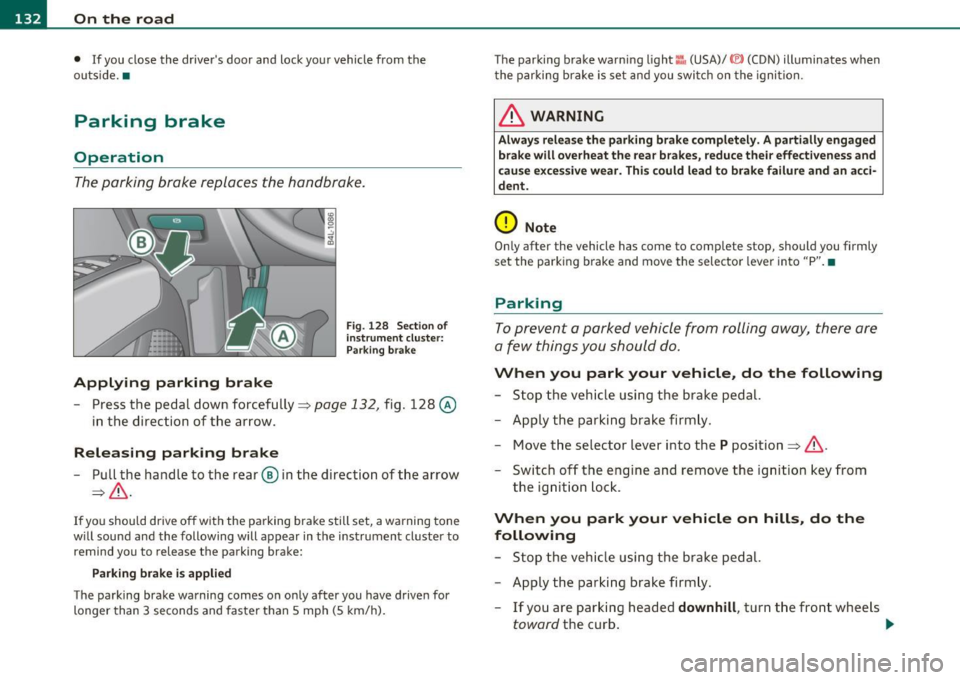
Fig. 128 Sect ion of
instrument cluster: Par king brake
- Press the pedal down forcefully~ page 132, fig. 128 @
in the d irection of the arrow.
Releasing parking brake
-Pull the handle to the rear ® in the direction of the arrow
~& -
If you should drive off with the parking brake still set, a warning tone
w ill sou nd and the following will appear in the instrument cluster to
remind you to release the parking brake:
Parking brake i s applied
The parking brake warning comes on only after you have driven for
longer than 3 seconds and faster than 5 mph (5 km/h). The parking brake warn
ing light ::, (USA)/ © (CON) illuminates when
the parking brake is set and you switch on the ignition.
& WARNING
Always release the parking brake completely. A partially engaged
brake will overheat the rear brakes, reduce their effectiveness and
c ause excessive wear. This could lead to brake failure and an acci
dent.
0 Note
Only after the vehicle has come to complete stop, should you firmly
set the parking brake and move the selector leve r into "P". •
Parking
To prevent a parked vehicle from rolling away, there are
a few things you should do.
When you park your vehicle, do the following
-Stop the vehicle using the brake pedal.
- Apply the parking brake firmly.
- Move the selector lever into the
P position =;,& .
- Switch off the engine and remove the ignition key from
the ignition lock .
When you park your vehicle on hills, do the
following
- Stop the vehicle using the brake pedal.
- Apply the parking brake firmly.
- If you are parking headed
downhill , turn the front wheels
toward the curb . .,_
Page 136 of 392

1111..__0_ n_ t_h _e_ r_o _ a_ d _________________________________________________ _
Cruise control
Switching the system on
The cruise control sys te m mak es it possibl e to d rive at a
cons tant sp eed sta rting at 20 mp h (30 km /h).
Fig . 129 Control lever
w it h set button
Fig . 130 Di spl ay:
Selected spee d
-Pull t he leve r to pos ition (D => fig . 12 9 to s witch the
system on.
- Driv e at the speed you wish to s et.
- Press bu tton @to se t th at sp eed .
The disp lay=> fig. 130 will show the se t speed . The d isplay may va ry
depending on the type of display in your vehicle. The indicator light
CRUISE (US mode l)/ 0 (Ca nadian mod el) will a lso ligh t up in t he
i n strum ent cluste r.
& WARNING
• Always pay attention to traffic even when the cruise control is
switched on. You are always responsible for your speed and the
di stan ce between your vehicle and other vehicle s.
• For safety reasons , the cruise control should not be used in the
city, in stop-and -go traffic, on twisting roads and when road
conditions are poor (such as ice , fog, gravel , heavy rain and hydro
planing) -risk of accident.
• Turn off the cruise control temporarily when entering turn
lanes , highway exit lane s or in construction zone s.
• Please note that inadvertently " re sting" you r foot on the accel
erator pedal causes the cruise control not to brake. This is because
the cruise control is overridden by the driver's acceleration .
• Never use the cruise control when driving off-road or on
unpaved roads . The Cruise control is intended for use only when
the vehicle is being operated on paved roads, and is not suitable
for use off-road or on unpaved roads.
[ i ] Tips
The cruise control cannot ma inta in a constant speed when d riving
dow nhill. The ve hicl e will accele rate unde r its own we igh t. D ownshift
to a Lower gear or use the brakes to slow down .•
Changing speed
- Press lever in the 0 or O d ire ct ion=> fig. 1 29 to i ncrease
or decre as e your s peed.
- Release the lever to save that s peed.
Page 137 of 392

On the road -________________ lff'II
Change speed in increments of 1 mph (1 km/h) by lightly pressing the
lever. If you keep the lever pressed down, you w ill alter your speed in
5 mph (10 km/h) increments.
You can also press the accelerator pedal down to increase your speed,
e .g . if you want to pass someone. The speed you saved earlier will
resume as soon as you release the accelerator pedal.
If, however, you exceed your saved speed by 5 mph (10 km/h) for
longer than 5 minutes, the cruise control will turn off temporarily .
The symbo l will go out but the saved speed will be retained. •
Presetting your speed
You can preset your desired speed while the vehicle is not
moving.
- Turn on the ignition.
- Pull lever into position
(D => page 134, fig. 129.
- Press the lever in the 0 or O direction to increase or
decrease your speed .
- Re lease the lever to save that speed .
This function makes it possible, for example, to save the speed you
want befo re driving on the h ighway . Once on the h ighway, act ivate
the cruise control by pulling the lever toward
(D. •
Switching the system off
Temporary deactivation
- Press the brake pedal, or
- Press the lever into position@ (not clicked into place)
=> page 134, fig. 129, or
Controls and equip
ment Safety first
-
Drive for longer than 5 m inutes at more than 5 mph
(10 km/h) above the stored speed.
Sw itching off completely
- Press lever into position@ (clicked into place), or
- Switch the ignition off.
The system retains the saved speed if you deactivate the cruise
cont rol tempo rar ily. To resume the saved speed, release the brake
pedal and pull the lever to position
(D.
Switching the ignition off e rases the saved speed.
& WARNING
You sho uld onl y retu rn to the saved sp ee d if it i s not t oo fast f or
the cu rrent tr affic condition s -ris k of an accident! •
Vehicle care Technical data
Page 142 of 392

IIIJL......:.A:::::: d:.::a :.!p:.. t.::: i:...: v :...: e::...: C:.: r:..: u::.:.: i s:.: e::...: C:.. o::.:.. n:..:t :.:. r_:o :.: l:..._ ________________________________________ _
Applies to veh icles : w ith Adaptive C ru ise Contro l
How is the speed stored?
Fig. 1 34 Co ntro l
lever : Sto ring spee d
With the sys tem sw itch ed on the speed is stored as follows:
- Drive at the speed you want .
- Press the [SET ] button =>
page 140, fig. 134 to store the
desired speed.
After the ! SET I button is released , the current speed is stored and
maintained . If you are dr iv ing at a speed below 20 mph (30 km/h),
t he min imum speed setting of 20 mph (30 km/h) wi ll be set.
The saved speed is now shown in the LED display in the speedometer
by one or two illumina ted red lig ht diodes ~
page 145. At the sam e
time, the saved speed is also shown for a short time in the Informa·
tion line~
page 147 .
[ i J Tip s
Fo r safety re asons, the stored speed is eras ed wh en the ignition o r
the ACC is turned off .•
App lies to veh icles : w ith Adaptive C ruise Control
Changing stored speed
The speed can be changed without touching the acceler
ator or brake pedal.
Incre asing speed
....
"' M ~ w .,
"'
Fig . 1 3S Contro l
l eve r: C hangi ng spee d
Press the lever briefly upwards 0 => fig. 135. USA
models : the speed increases by about 2 .5 mph . Canada
models : speed will increase by one mark on the speedom
eter scale .
- Press the lever upwards
0 and hold it. As long as you hold
the control switch down, the light diode display in the
speedometer LED display in the speedometer moves
forward and the speed is increased .
Reducing spe ed
- Press the lever briefly downwards Q. USA models : the
speed decreases by 2 .5 mph . Canada models: speed will
decrease by one mark on the speedometer scale . _,,.