brake light AUDI Q7 2011 Owner´s Manual
[x] Cancel search | Manufacturer: AUDI, Model Year: 2011, Model line: Q7, Model: AUDI Q7 2011Pages: 392, PDF Size: 93.29 MB
Page 146 of 392

1111..__A_ d_a_ p,__ t_iv _ e_ C_r _u _ i_ s _e _ C_ o_ n_t _ r_ o _ L ___________________________________________ _
& WARNING
Following other v ehicles too clo sely increases the risk of a crash
and serious per sonal injury.
• Following other vehicles too closely, particularly at higher
speeds in crea ses the ri sk of collisions and seriou s personal injury.
• Setting short distances to the traffic ahe ad reduces the time
and distance avail able to bring your vehicl e to a safe stop and
makes it even more necessary to pay close attent io n to t raffic.
• Always select a speed and distance to traffic ahead that is safe
and appropriate under the pre vailing traffic, road , weathe r and
lighting conditions.
• Never rely on the distance control feature of ACC alone to
prevent rear-end collisions . Always be pr epared to brake and take
evasive action to a void collisions and other accident situations.
• Never allow the closing sp eed b etween you and other vehicles
to be so high that the Adapti ve Cruise Control may not be able to
s low your vehicle safely . If closing speed is too high, you must
apply the brakes yourself to reduce the r isk of a rear -end crash.
• Always select a greater following di stance to the vehicle ahead
on wet roads than on dry roads.
• Always read and h eed the information and WARNINGS=>
& in
"Description" on page 136.
(I] Tips
The distance setting is reset to the factory de fault DIS TANCE 3 the
next time the igni tion is t urn ed on .•
Driver information
Applies to veh icles: with Adapt ive Cruise Control
Displays in the instrument cluster
Depending on the driving situation, driver info rmation is
displayed in the instrument cluster.
@ Speedometer an d indicator lig ht disp lay
@ Display in the instrument cluster
Fig . 1 39 Ove rvi ew
in strum ent clu ster
@ Speedometer and indicator Light d isplay
Important information concerning vehicle operation w ith Adaptive
Cru ise Control is shown in d isp lay area @. The des ired speed yo u set
is indicated in the speedometer (LED lights around the edge).
T he in dicator lights show whe ther the system has detec ted a veh icle
traveli ng ahead .
@ Display in the instrument cluster
In display area ® informat ion from the navigation system * and the
t rip compu ter i s displayed in a dditio n t o info rmation abou t Ad aptive
Cru ise Contro l.
You ca n sele ct among the dif ferent informatio n by repeated brief
t aps on the!RESET)button on the windsh ield w ipe r leve r=>
page 27,
"Operation". .,.
Page 147 of 392
__________________________________________ A_ d_a""" p:....- t_iv _ e_ C_ r_ u _is _ e_C_ o_n_ t_ r_ o_ L_....J_
Certa in pieces of information in the bottom part of the display are not
shown permanent ly. Information is displayed only if you set or
change the speed setting, change the t ime interval, when messages
are displayed or if the Adapt ive Cruise Control is turned off for safety
reasons. •
Applies to veh icles: with Adaptiv e Cruise Contro l
Display in the speedometer
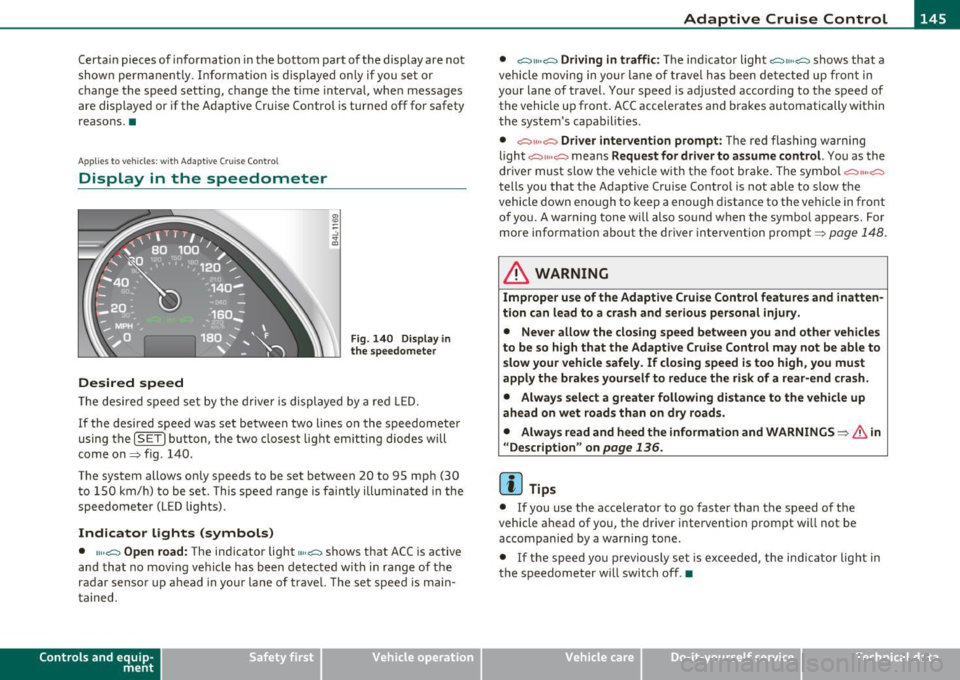
Desired speed
Fig . 140 Display in
the speedometer
Th e desired speed set by the driver is displayed by a red LED.
If the desired speed was set between two lines on the speedometer
using the
[SET) bu tton, the two closest light emitting diodes w ill
come on=> fig. 140.
The system allows only speeds to be set between 20 to 95 mph (30 t o 150 km/h) to be set. This speed range is fa int ly illumina ted in the
speedometer (LED lights).
Indicator lights (symbols)
• ""~ Open road: The indicator light""~ shows that ACC is active
and that no mov ing vehicle has been detected with in range of the
radar sensor up ahead in your lane of travel. The set speed is main
ta ined.
Con tro ls a nd e quip
m en t Vehicle
OP-eration •
~" "~ Driving in traffic:
The indicator light ~11 .. c::::., shows that a
vehicle moving in yo ur lane of travel has been detected up front in
your lane of travel. Your speed is adjusted accord ing to the speed of
the vehicle up front. ACC accelerates and brakes automatically within
the system's capabilit ies .
• ~" "~ Driver intervention prompt: The red flashing warning
light
c::::., 11 .. o::::::) means Request for driver to assume control. You as the
driver must slow the veh icle with the foot brake . T he symbol
~""o::::::)
tells you that the Adaptive Cruise Control is not able to slow the
vehicle down enough to keep a enough distance to the vehicle in front
of you. A warning tone will also sound when the symbol appears. For
more information about the driver intervention prompt=>
page 148.
& WARNING
Improper use of the Adaptive Cruise Control features and inatten
tion can lead to a crash and serious personal injury.
• Never allow the closing speed between you and other vehicles
to be so high that the Adaptive Cruise Control may not be able to
slow your vehicle safely. If closing speed is too high, you must
apply the brakes yourself to reduce the risk of a rear-end crash.
• Always select a greater following distance to the vehicle up
ahead on wet roads than on dry roads.
• Alway s read and heed the information and WARNINGS=>
& in
" Description" on
page 136.
[ i ] Tips
• If you use the accelerator to go faster than the speed of the
vehicle ahead of you, the driver intervention prompt will not be
accompanied by a warn ing to ne.
• If the speed yo u previously set is exceeded, the indica tor light in
the speedometer will switch off .•
Vehicle care Do-it-yourselt service iTechnical data
Page 150 of 392
ffl..__A_ d_a_ p,__ t_iv _ e_ C_r _u _ i_ s _e _ C_ o_ n_t _ r_ o _ L ___________________________________________ _
tained. The ACC system is not switched off, and increased attention
to the traffic situation is absolutely necessary. The followi ng may be
reasons why the message
ACC functionality limited appears:
• The ACC sensor is dirty . The ACC system is not reacting, or is not
reacting correctly, to moving vehicles up ahead in yo ur la ne of travel.
• There may be very light traffic on and there is nothing that marks
the side of the road (for example , guard rai ls, traffic signs, trees). As
soon as a moving vehicle up ahead is detected aga in, ACC becomes
active again and the message disappears.
The ACC sensor is located behind the area to the right of the front
license plate.
If the ACC sensor is dirty or blocked, clean the area to
restore system operation .
Parking brake !
The text message Parking brake! appears, when the parking brake is
applied. ACC is turned off. A warning tone so unds as a reminder.
Stationary object ahead
The text message Stationary object ahead appears, when you want
to activate the system and there is a stationary vehicle or an object
immediately in front of you.
Gradient too steep
The text message Gradient too steep appears when the max imum
gradient for proper ACC operation has been exceeded. Adaptive
Cru ise Control is turned off . A warning tone also sounds as a
reminder.
ACC off: manual control !
The text message ACC off: manual control! appears after the vehicle
has been brought to a standst ill by the Adapt ive Cruise Control. In
this case you must depress the brake pedal to prevent the vehicle
from rolling . A warn ing tone sounds as a reminder.
Selector lever position I
Th e text message Selector lever position! appears when the selector
lever is moved to position
N. In th is position, Adaptive Cruise Cont rol
is not available. •
Applies to vehicles : w it h Adap tiv e Cru ise Control
Driver intervention prompt
The driver intervention prompt calls on the driver to take
over the situation.
Fig . 143 I nstrument
cluster: Driver inter·
vention prompt
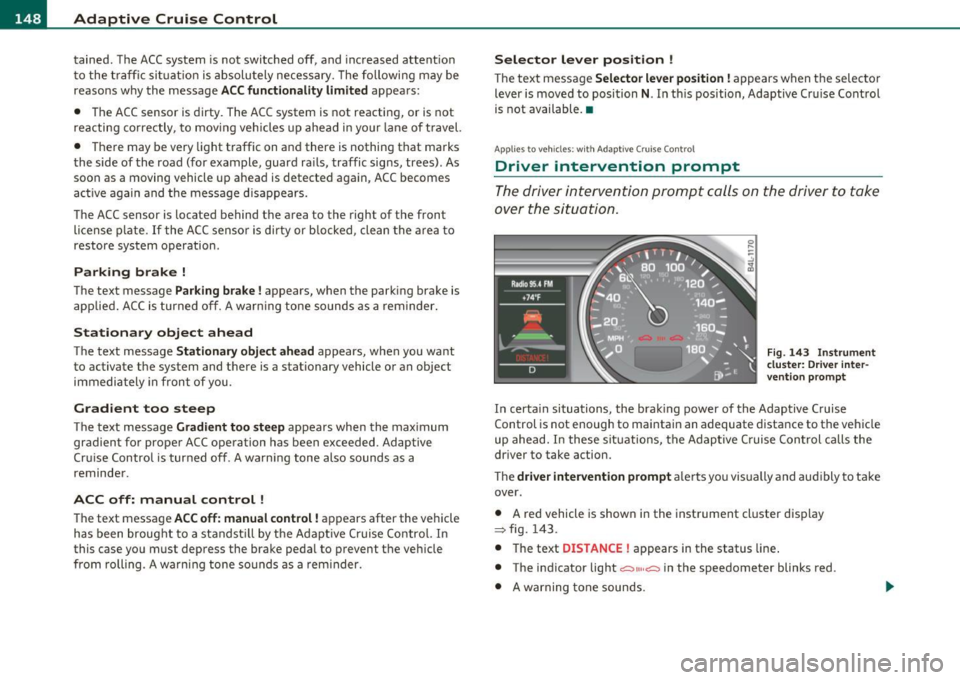
In certain situations, the brak ing power of the Adaptive Cruise
Control is not enough to maintain an adequate distance to the vehicle
up ahead. In these situations, the Adaptive C ruise Control calls the
driver to take action.
The
driver intervention prompt a lerts you vis ually and aud ibly to take
over .
• A red vehicle is shown in the instrument cluster display
:::::, fig. 143.
• T he text
DISTANCE! appears in the status line.
• The indicator light
<::::>11, ,~ in the speedometer blinks red .
• A warning tone sounds.
Page 151 of 392

__________________________________________ A_ d_ a_,_ p_t _iv _ e_C_ r_u _i _ s _e _C_ o_n_ t_ r_ o_ l __ _
[I) Tips
• Adaptive Cru ise Control is sw itched off after pressing the foo t
brake . The speed saved up this poi nt can be resumed.
• T o resume the saved speed, release the brake pedal and p ress the
control lever~
page 141, "Turning Adaptive Cruise Control off
temporar ily ".
• If you use the accelerato r to go faster than the speed of the
vehicle ahead of you, the driver intervention prompt will not be
accompanied by a warning signal.
• If the speed you prev iously set is exceeded, the indicator light in
the speedometer will switch off. •
Appli es to vehi cles : w ith A dap tive Cru ise Cont rol
MMI settings
Individual settings for Adaptive Cruise Control c an be
selected in the MMI.
Settings for t he Driving program ca n be adjusted ind ividually
to the par ticu lar user and save d in the MMI. Th is can only be
done with the engi ne r unning .
- Sele ct : F unc tion b utt on
I C A R]> Systems* > adaptive
cruise control
> Driving program .
Setting the driving program
In the Driving program menu you can ad just the characteristics o f
Ad aptive Crui se Con trol to yo ur own preferences u sing Dynamic ,
Standard or Comfort .
Saving settings
Your individ ual sett ings are automatica lly saved and ass igned to the
remote con trol key being used (remote key sto rage) . If the key is
given to anothe r person, t he saved sett ings rema in as they are. •
Controls and equip
ment Safety first
System Limitations
App
lies to ve hicle s: with Adap tive C ru ise Co ntro l
General information
The radar sensor has limits that the driver must kno w to
be a ble t o use ACC proper ly.
Th e Ad apt ive Cr uise Con trol works wi thin limi ts th at a re also rela ted
to radar sensor range and sight distance. In some situations ACC may react unus ually or late from the drive r's point of view. Therefore,
always be atte ntive to what is happe ning around you and always be
ready to interve ne, if necessary:
• when driving aro und curves ~
page 150
• when ve hicles up front are not in line wit h your vehicle
~ page 15 0
• when other ve hicles are changing lanes~ page 150
• when other vehicles are difficult to detect~ page 151
• when ve hicles up ahe ad are not mov ing o r o bst acle s ar e in you r
trave l lane ~
page 151
& WARNING
The radar sensor's function and range can be reduced by rain , snow
and heavy spray . Moving vehicles up ahead may not be promptly
detected or may not be detected at all.
• Always pay careful attention to the traffic situation and be
ready to intervene and be ready to take complete control when
ever necessary .•
Vehicle care Technical data
Page 165 of 392

____________________________________________ A_ u_ t_ o_ m_ a_ t_ i_ c _ t_ra _ n_s_ m __ is_s_ i_ o _ n _ __.lJII
Automatic transmission
• • ®
t1ptron1c
General information
Your vehicle is equipped with an e lectron ically contro lled automatic
transmission. Upshifting and downshifting takes place
automati
cally.
The transmiss ion is also equipped with tiptronic ®. It allows the driver
to shift gears
manually if desired => page 167. •
Driving the automatic transmission
Starting the engine
-The selector lever must be in Nor P.
Starting off
- Press a nd hold the brake pedal.
Fig. 162 Shift gate on
th e ce nte r co nso le :
selec tor lever w it h
r ele ase bu tton
-Press and hold the release button in the selector lever
handle and move the selector lever from
P or N to D and
release the button => & .
Con tro ls a nd e quip
m en t Vehicle
OP-eration
- Wait briefly until the transmission has shifted (you will
feel a slight movement).
- Remove your foot from the brake pedal and accelerate .
Rocking back and forth to become unstuck
-Shift only between D and R when the vehicle is at a full
stop and the engine is running at idle speed .
Stopping
-Press and ho ld the brake pedal until the vehicle has come
to a complete stop .
- Keep the b rak e pedal depr essed so that the vehicle ca nnot
roll forward or backward while it is idling => & .
- Once stopped,
do not depress the accelerator pedal to rev
up the engine=> &.
Parking
-Press and hold the brake pedal until the vehicle has come
to a complete stop.
- Set the park ing brake firmly=>
page 132, "Park ing".
- Press and hold the release button in the selector lever
hand le, move the se lector l ever int o
P and the n let go of
the release button => & .
The selecto r lever must be in Nor P. If one of the dr iv ing positions is
engaged a safety switch will prevent the engine from being started.
See also =>
page 127. _,.
Vehicle care Do-it-yourselt service iTechnical data
Page 167 of 392

______________________________________________ A_ u_ t.:.. o_;__ m_ a_ t_;__ ic.......; t_r_a _ n_:.. s_m _:_: i.:: s ..:s:....: i..:o :....: n_;____,J-
When the ignition is on, the backup lights illuminate when the
selector lever is moved into
R.
N -Neutral
The transmission is in neutral in th is posi tion . Sh ift to this posit ion
for standing with the brakes applied~
page 165.
When the vehicle is stationary or at speeds below 3 mph (5 km/h),
you must always apply the footbrake before and wh ile moving the
lever out of
N .
D -Normal position for driving forward
Position D is for normal city and highway driving. It ranges from zero
to top speed and all gears shift automatically, depending on engine
load, driving speed and automatically selected shift programs.
When the vehicle is stat ionary or at speeds below 3 mph (5 km/h),
you must always app ly the foot brake before and while moving the
lever to
D out of N.
In certain circumstances it may be advantageous to temporarily
switch to the manual shift program to manua lly select gear rat ios to
match specific driving conditions~
page 167.
S -Sport position
Select this position for sportier performance. In this position, the
transmission will not upshift as soon, allowing the vehicle to use the
increased power available at higher engine speeds to ach ieve livelier
acceleration.
When the vehicle is stat ionary or at speeds below 3 mph (5 km/h),
you must always apply the foot brake before and while moving the
lever to
S out of N.
& WARNING
Read and follow all WARNINGS ~ & in "Driving the automatic
transmission " on page
163 .
Contro ls a nd e quip
m en t Vehicle
OP-eration
0 Note
Coasting downh ill with the transmission in N and the engine not
running will result in damage to the automatic transmission and
poss ibly the catalytic converter .•
Automatic Shift Lock (ASL)
The Automatic Shift Lock safeguards you against acci
dentally shifting into a forward or the reverse gear and
causing the vehicle to move unintentionally .
Fig. 164 Shift gate:
selector lever lock posi
tions and interlock
button highlighted
The selector lever lock is released as follows:
- Turn the ignition on.
- Step on the brake pedal.
At the same time press and hold
the interlock button on the side of the gear selector knob
=> fig . 164 with your thumb un til you have moved the
selector lever to the desired position.
Automatic selector lever lock
The selector lever is locked in the P and N positions when the ignition
is turned on. To move the lever from these positions the driver must
depress the brake pedal. As a reminder to the driver, the following
~
Vehicle care Do-it-yourselt service iTechnical data
Page 168 of 392

lffll.___A_ u_ t_o _m_ a_ t_ic _ t_ r_ a_ n_s _m_ i _s_ s_ i_ o_ n ____________________________________________ _
warning appears in the instrument cluster display when the selector
is in
P and N:
When stationary apply foot brake while selecting gear
A time delay element prevents the selector lever from locking when
it is moved through the
N position (going from R to D). The locking
element will lock the selector lever if the lever is left in N (Neutral) for
more than approximately 1 second, without the brake pedal be ing
pressed.
At speeds above about 3 mph (5 km/h) the Automatic Shift Lock is
automatically deactivated in the
N position.
Interlock button
The lock button on the selector lever prevents the lever from being
accidentally shifted into certain positions. Pressing this button deac
tivates the selector lever lock. Depending on the direction of the
shift, the selector lever locks at different positions. The positions are
high light ed in the illustrat ion~
page 165, fig. 164.
Ignition key safety interlock
The key cannot be removed from the ignition unless the selector lever
is in the
P park position. When the ignition key is removed, the
selector lever w ill be locked in the
P pos it ion .•
Kick-down
The kick-down feature allows the vehicle to generate
maximum acceleration.
When you press the accelerator pedal beyond the resistance point
that is reached at full throttle, the transmission will select a lower
gear rat io based on vehicle speed and engine RPM . The engine RPM
will be contro lled to produce maximum vehicle acceleration as long
as you continue to press the accelerator pedal beyond th is resistance
point .
& WARNING
Be careful when using the kick-down feature on slippery roads.
Rapid acceleration may cause the vehicle to skid. •
Dynamic shift program (DSP)
The automatic transmission is electronically controlled.
The transmission is self adapting and will automatically select the
best sh ift program suited to the dr iving cond it ions and dr iving style .
The transmission will select one of the
economy programs when you
dr ive at a steady speed or a gradua lly changing speed w ithout heavy
acceleration. This achieves optimum fuel efficiency, with early
upshifting and delayed downshifting.
The transm ission will automatically select the
sporty shift programs
when you drive at higher speeds, or w ith heavy acceleration and
frequently changing speeds. Upshifts a re delayed to make full use of
engine power. Downshifting takes place at higher engine speeds than
in the economy programs.
The selection of the most suitable shift program is a continuous, automatic process. The driver can also make the transmission switch
to a sporty program by
quickly pressing down the gas pedal.
Thi s causes the transmission to shift down to a lower gear to achieve
rapid accelerat ion, e .g . for quickly passing another vehicle . You do
not need to press the gas pedal into the kick-down range. After the
transmission has upshifted, the orig inal program is selected
according to your driving sty le.
An additional shift program allows the automatic transmission to
select the proper gear for uph ill and downh ill grad ients.
Thi s keeps the transmission from shifting up and down unnecessarily
on hills. The transmission will shift down to a lowe r gear when the
driver presses the brake pedal on a downhill gradient. This makes use .,_
Page 187 of 392
_____________________________________________________ H_ o_m_ e_ L_i_n _k_ ®_ • __ _
Homelink ®
Universal remote control
Applies to veh icles: w ith Hom eli nk ® universal remote control
General information
The Homelink ® feature can learn up to three radio
frequency codes for most current transmitters used for
operating garage doors, estate gates, home or outdoor
lighting systems, and other devices.
You must first program the Homelink ® transm itter before you can
use the system=>
page 186, "Programming the Home link® trans
mitter".
I n order to program the Homelink ® transmitter for devices utilizing
rolling code, a second person on a ladder who can safe ly reach the
garage door opener motor is recommended. It is also necessary to
locate the "learn" button on your garage door opener motor. Refer to
the operating instructions for the opener, as the location and color of
this button may vary by manufacturer.
You can still use the original remote control for the device at any
time.
& WARNING
• Never use the Homelink'"' transmitter with any garage door
opener that does have not the safety stop and reverse feature as
required by federal safety standards. This includes any garage
door opener model manufactured before Aprill, 1982.
• A garage door opener which cannot detect an object, signaling
the door to stop and reverse does not meet current federal safety
standards. Using a garage door opener without these features
increases risk of serious injury or death.
Controls and equip
ment Safety first
& WARNING
(continued)
• For safety reasons never release the parking brake or start the
engine while anyone is standing in front of the vehicle.
• A garage door or an estate gate may sometimes be set in
motion when the Homelink ® remote control is being
programmed. If the device is repeatedly activated, this can over
strain motor and damage its electrical components -an over
heated motor is a fire hazard!
• To avoid possible injuries or property damage, please always
make absolutely certain that no persons or objects are located in
the range of motion of any equipment being operated.
rn Tips
• If you would like more information on Homelink ®, where to
purchase the Homelink ® compatible products, or would like to
purchase the Homelink ® Home Lighting Package, please call toll
free: 1-800-355-3515.
• For Declaration of Compliance to United States FCC and Industry
Canada regulations=>
page 371 . •
Vehicle care Technical data
Page 188 of 392
ffl..__H_ o_m_ e_ L_ i _n_ k_ ® _______________________________________________ _
Applies to veh icles : w ith Homelin k® un iversa l remote control
Programming the Homel ink ® transmitter
The transmitter is programmed in two phases . For rolling
code transmitters, a third phase is also necessary .
111111
-
1111111
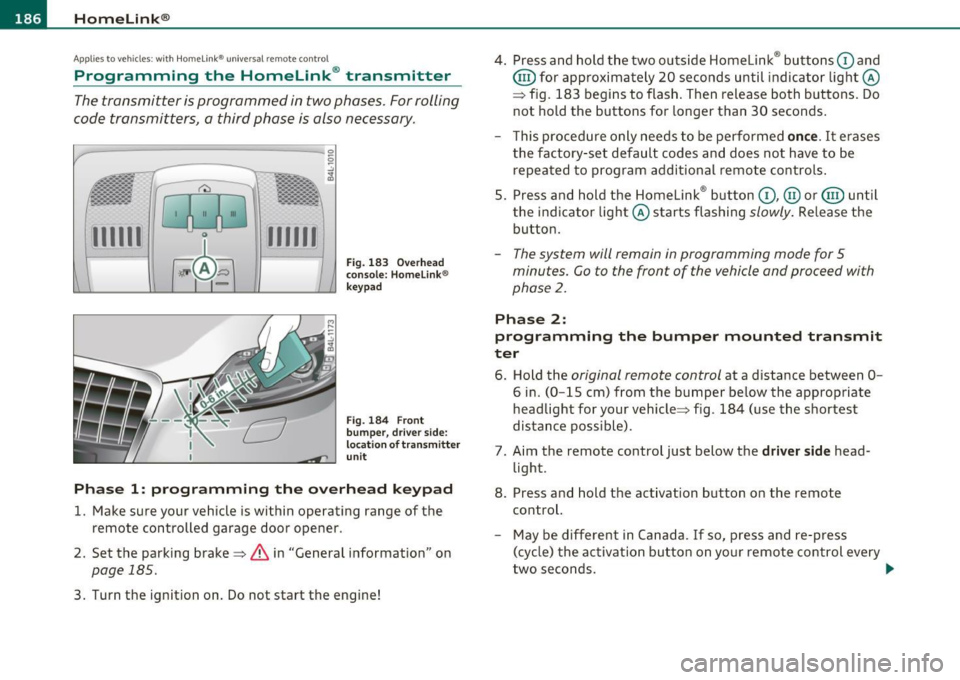
Fig. 183 Over head
console: Homelink ®
keypad
Fig. 184 F ront
bumper, dri ver side:
locat ion of transmitter
unit
Phase 1: progr amming th e overhead k eypad
1. Make sure your vehicle is within operating range of the
remote controlled garage door opener .
2. Set the parking brake~
& in "General information " on
page 185 .
3. Turn the ignition on . Do not start the engine! 4
. Press and hold the two outside Homelink ® buttons
G) and
@ for approximately 20 seconds until indicator light@
=> fig. 183 begins to flash . Then release both buttons. Do
not hold the buttons for longer than 30 seconds .
- This procedure only needs to be performed
once. It erases
the factory-set default codes and does not have to be repeated to program additional remote controls .
5. Press and hold the Homelink ® button
G) , @ or@ until
the indicator light@ starts flashing
slowly . Release the
button .
-The system will remain in programming mode for 5
minutes. Co to the front of the vehicle and proceed with
phase
2 .
Phase 2:
programming the bumper mounted transmit
ter
6. Hold the original remote control at a distance between 0-
6 in. (0 -15 cm) from the bumper below the appropriate
headlight for your vehicle => fig . 184 (use the shortest
distance possible) .
7. Aim the remote control just below the
driver side head
light .
8. Press and hold the activation button on the remote control.
- May be different in Canada . If so, press and re-press
(cycle) the activation button on yo ur remote control every
two seconds. .-,,
Page 259 of 392

_________________________________________ I_ n_ t_ e_ ll_,igent technology ,__E~-
fore-and-aft and lateral directions, the brake pressure and the
steering angle are all measured.
The direction in which the driver wishes to travel is determined with
the aid of the steering angle and vehicle speed and is continually
compared with the actual behavior of the vehicle. If the two do not
match, for example, when the vehicle starts hydroplaning on a wet
road, ESP will automatically brake the appropriate whee l to correct
the problem.
The vehicle is then stabi lized by the forces acting on the whee l during
braking. If the vehicle is
oversteering (rear tends to skid out of the
turn), the brakes are main ly applied on the wheel that is on the
outs ide of the curve. In the case of a vehicle that is
understeering
(tendency to slide out of the curve), the brakes are applied as needed
on the wheel that is on the inside of the curve or additionally on the
other wheels. An acoustic s ignal indicates when ESP brake application
cuts in=> &.
The system operates across the entire speed range in combination
with the ABS system ~
page 260 . If the Anti -Lock Brake System
(ABS) ma lfunctions, the ESP wi ll be out of action as well.
Activating
When you turn on the engine, ESP will automatically be activated and
wi ll perform a self-test. As soon as the test is comp leted, the system
is in normal operating mode .
Offroad mode
ESP should normally be operated in normal mode because this
ensures maximum vehicle stability. If necessary, you can activate the
ESP offroad mode by pressing the button=>
page 256, fig. 222 to
obtain maximum traction and braking ability when driving off paved
roads at low speeds. In ESP offroad mode, the indicator light illu
minates and the message
ESP Offroad Caution! Limited driving
stability
appears briefly in the d isp lay.
The ESP offroad mode can be useful in the following exceptiona l situ
ations when slip or a highly effe ctive different ial loc king funct ion is
desirable. Examples:
Controls and equip ment Safety first Vehicle operation
•
when driving w ith tire chains,
• when driving in deep snow or on loose ground,
• when driving on uneven surfaces with the wheels severely
unloaded (articulation), and
• when rocking the vehicle loose a fter it has become stuck.
When the unusual situation is past, you should sh ift back to the
normal ESP operating mode by pushing the button again. The
message
ESP/ ASR on then appears briefly in the display.
Hill descent control
The hill descent control is switched on in ESP offroad mode. When
slowly descending steep gradients on loose ground or when the axles
are art iculated, hill descent control provides assistance by automati
cally applying the brakes to keep vehicle speed constant. The vehicle
is also rende red easier to steer by select ive distribution of braking
force. Hill descent control intervenes when:
• the accelerator pedal is not pressed,
• the vehicle is travelling less than 12 mph (20 km/h),
• a steep gradient is detected,
• wheel behavior indicates loose ground or conditions with poor
adhesion (e.g. also axle articulat ion).
Hill descent control operates both dr iving forward and in reverse.
Active hi ll descent control is deactivated by pressing the accelerator
pedal until the conditions for activation already listed are met aga in.
& WARNING
• The Electronic Stabilization Program is nevertheless subject to
the laws of physics . It is particularly important to pay attention to
this fact on wet and slippery roads. It is therefore important that
you always adapt your driving to the condition of the road and
traffic conditions. Do not allow the increased safety provided by
the Electronic Stabilization Program system to lull you into
accepting additional safety risks. ..
Vehicle care Do-it-yourself service Technical data