instrument cluster AUDI Q7 2011 Owner´s Manual
[x] Cancel search | Manufacturer: AUDI, Model Year: 2011, Model line: Q7, Model: AUDI Q7 2011Pages: 392, PDF Size: 93.29 MB
Page 34 of 392
![AUDI Q7 2011 Owner´s Manual Driver info rmation d isplay
Res etting the ma ximum speed
- Drive the vehicle at a speed of at least 3 mph (5 km/h)
- Press the
[CHECK] button for more than 2 seconds .
The](/img/6/40276/w960_40276-33.png "AUDI Q7 2011 Owner´s Manual Driver info rmation d isplay
Res etting the ma ximum speed
- Drive the vehicle at a speed of at least 3 mph (5 km/h)
- Press the
[CHECK] button for more than 2 seconds .
The")
Driver info rmation d isplay
Res etting the ma ximum speed
- Drive the vehicle at a speed of at least 3 mph (5 km/h)
- Press the
[CHECK] button for more than 2 seconds .
The speed warning symbol 8 (USA mode ls)/ 8 (Canada models) will
appear br iefly in the display when you release the
I CHECK] button to
indicate that the maximum speed has been stored successfully.
T he maxim um speed rema ins stored until it is cha nged by pressing
the
I CHECK ] bu tton again briefly or un til it is deleted by a lengthy
push on the button. •
Speed warning 2: setting a speed limit
Warning threshold 2 is set, changed and deleted in the
fv1fv1I.
-Select: Function button (CAR ) > System s* > Instrument
clu st e r > Sp eed warning .
Warning thresho ld 2 can be set in the speed range starting from
20 mph to 150 mph (30 km/h to 240 km/h). Settings can each be
adjusted in intervals of 5 mph (10 km/h). •
Auto Check Control
Introduction
The Auto-Check control monitors the function of certain vehicle
features and components. It simply makes sure these features and
components are work ing properly . The Auto -Check control works as
long as the ignition is on, as well as whenever the vehicle is driven.
If a component is malfu nctioning or if the need for an urgent repair
has been detected, this will appear in the instrument cluster d isplay. You will also hear an audible warning tone. The d
isplays are color
coded in e ither red or yellow depend ing on their leve l of prior ity.
A red symbol means
Danger , a yellow symbol indicates Warning . In
certain situations, information message for the driver appear in addi
tion to the red and yellow symbols.
Fun ction test : au tom atic tran smi ssio n
The Auto-Check Control will automat ically perform a test each time
you switch on the ignition . With the se lector lever in
P or N , the
following message appears in the d isplay:
Wh en st ationa ry appl y foot br ake w hile select ing g ear.
When you a se lect a different gea r (f or examp le: R , D , etc.), the
message w ill disappear and the Auto -Check function is displayed.
If there is a malfunction, then the ma lfunction message will appear
about 15 seconds after the yo u start the vehicle. At the same time
you will hear a warning tone. •
Driver information messages
Driver information messages are shown in the instru
ment cluster display in addition to the red and yellow
symbols .
Fig. 23 Instrument
cl uster : C HE CK but ton ...
Page 36 of 392

Driver information d isplay
0 Alternator ma lfunction =>page 34
BRAKE
USA model s: =>page 34
Brake system malfunction
Can ad a m odel s: ::>page 34
Brake system malfunction
- --
-~-
Engine coolant level too => page 35
low/engine coolant temperature
-too high
~ Engine o il pressure too low ::> page36
Ad Blue /7 =>page296
Ad Blue c,,,.c AdBlue malfunction * =>page296
•
~ ....
Faulty steering =>page 36
© Faulty ignition switch =>page37
~
[ i J Tips
• If the warning/indicator light BRAKE (USA models)/ «D> (Canada
mode ls) in the instrument cluster flashes, the re is a brake system
malfunction. By press ing the [ CHECK] button, you can bring up a
dr iver message which explains the ma lfunct ion in more deta il. Please
note =>
page 34 .
• Speed wa rnings threshold 1 9 (USA mode ls)/ 0 (Canada models)
and threshold 2
8 , (USA mode ls)/ 8, (Canada models) are also shown
as red symbols . T he warning is a lways shown as a sma ll symbol in the
upper area of the display=>
page 31. •
Alternator malfunction 0
If the D symbol in the instrument panel display flashes, then there
is a malfunction in the a lternato r or the veh icle electronics. A warning
to the driver will appear, too. The driver warning goes out after about
5 seconds, but it can be b ro ught up at any time by pressing the
I CHECK] button again .
Usua lly, you can still drive to the next dealership. Turn off a ll but the
most necessary electr ica l consumers, since these drain the veh icle's
battery.
0 Note
If the _ f_ warning symbol (coolant system malfunction) also lights up
on the instrument panel dur ing the trip=>
page 35, then you have to
stop immediately and turn off the engine. The coolant pump is not
working anymore -danger of damage to the engine! •
Brake system malfunction
A malfunction in the brake system must be repaired as
soon as possible.
If the warning /indicator light BRAKE (USA models)/ (CD)
(Canada models) in the instrument cluster flashes, there is a
brake system malfunction. By pressing the
[CHECK] button,
you can bring up a driver message which explains the malfunction in more detail.
Stop v ehicle and check brake fluid level
- Pull off the road.
- Stop the vehicle.
- Turn off the engine .
- Check the brake fluid level:::::,
page 311.
Page 46 of 392

Opening and closing
Check Light in the master key
The check light in the master key provides information
about different conditions.
Check light functions in the master key:
Vehicle within range of the key
Fig. 28 Check light in
the master key
If the vehicle is within range of the key, the check light comes on
briefly once when a button is pressed.
Vehicle outside the range of the key
If the vehicle is outside the range of the key, the check light comes on
briefly once and then shows the status of the vehicle door locks:
• If the light is flashing quickly, the vehicle is not locked.
• If the light is flashing slowly, the vehicle is locked.
State of master key battery
If the check light does not come on, the battery is dead and has to be
replaced. In addition, when the battery is dead the symbol appears
in the instrument cluster display as well as the message:
Please change key battery
Battery replacement=:> page 44.
[I] Tips
Please note that the current state of the vehicle door locks can only
be recalled with the master key that was last used to lock the vehicle.
It is possible that a different state is shown for the door locks on the
other master key which is not the same as that of the vehicle. •
Master key battery replacement
Each master key contains a battery housed under the
cover.
Fig. 29 Master key:
opening the cover
We recommend having the battery changed by an authorized
Audi dealer. However, if you wish to replace the dead battery
yourself, proceed as follows:
- Pry apart the base~ fig. 29
© and the cover @ carefully
with a coin.
- Remove the cover (arrow).
- Remove the dead battery from the cover.
- Install the new battery. Please make certain that the"+"
sign on the battery faces down. Correct polarity is shown
on the cover. _..
Page 54 of 392
Open ing and closing
(I) Tip s
• If the rear lid is open or not properly closed when the ignition is
turned on, the door and rear lid warning ~
page 24 appears in the
instrument cluster display.
• Should you not be able to open the rear lid as described, make sure
the valet key function is not activated~
page 45. •
App lies to veh icles: with automatic rear lid /trunk lid ope rat ion
Automatic rear lid/trunk lid operation
The trunk lid can be opened and closed automatically.
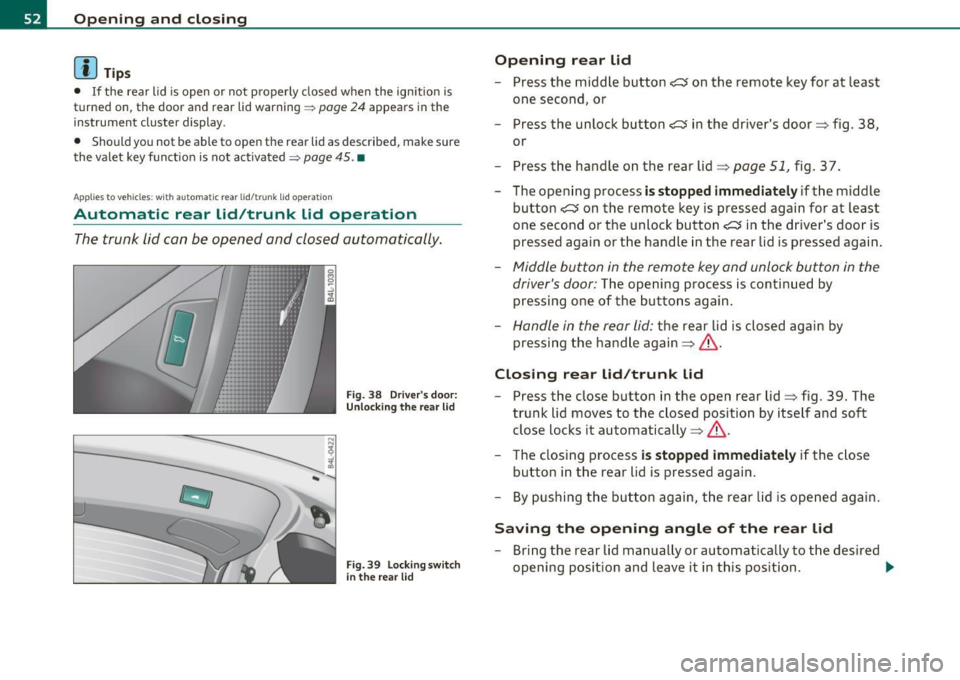
F ig. 38 Drive r's door:
Unlocki ng the re ar lid
F ig. 39 Lock ing sw itch
i n t he rear lid
Op ening rear lid
- Press the middle button e:> on the remote key for at least
one second, or
- Press the unlock button
e:> in the driver's door=> fig . 38 ,
or
- Press the handle on the rear lid=>
page 51, fig. 37.
- The opening process
is stopped immediate ly if the middle
button
e:> on the remote key is pressed again for at least
one second or the unlock button
e:> in the driver's door is
pressed again or the handle in the rear lid is pressed again .
-Middle button in the remote key and unlock button in the
driver's door:
The opening process is continued by
pressing one of the buttons again .
Handle in the rear lid: the rear lid is closed again by
pressing the hand le again =>& .
Closing rear lid /trunk lid
Press the close button in the open rear lid=> fig . 39. The
trunk lid moves to the closed position by itself and soft
close locks it automatically =>& .
- The closing process
i s stopped immediately if the close
button in the rear lid is pressed again.
- By pushing the button again, the rear lid is opened again.
Saving the opening angle of the rear lid
- Bring the rear lid manually or automatically to the desired
opening position and leave it in this position. ..,_
Page 55 of 392
- Press the button in the rear lid => page 52, fig. 3 9 for at
leas t fo ur secon ds in o rder to save th e desi red opening
pos it io n. The posi tio n ca n o nly be save d st art ing at a
certai n level.
& WARNING
• Never clo se the rear lid inattentively or without che cking fi rst.
Although the closing force of the rear lid is limited, you can still
seriously injure you rself or others .
• Always ensure that no one i s within range of the rear lid when
it i s moving, in particular close to the hinge s and the upper and
lower edges -finger s or hands can be pinched .
• To help prevent poisonous exhaust ga s from being drawn into
the vehicle, always keep the rear lid closed while driving. Never
transport objects larger than those which fit completely into the
luggage ar ea, b eca use then the rear lid cannot be fully closed.
• Never leave your vehicle unattended especially with the rear lid
left open . A child could crawl into the car through the luggage
c ompartment and pull the lid shut , becoming trapped and unable
to get out. To reduce the r isk of per sonal injury, never let children
play in o r around your vehicle. Always keep the rear lid as well a s
the vehicle doors closed when not in u se.
• If there i s a luggage rack or bicycle rack mounted on the rear
lid, it may not be able to open completely or an opened rear lid
may close by itself because of the added weight. So the open rear
lid must be supported or the we ight must be removed from the
luggage rack fir st.
[I) Tips
• If the rea r lid i s open or not properly loc ked when the ig nition is
tur ned on, t he doo r and rear lid warning =>
page 24 appea rs in t he
instrument cluster display.
Controls and equip
ment Safety first
Opening and closing
•
The a utomat ic rear lid ope ning/closing process can be stopped by
holdi ng the re ar l id w it h your h and . Th e lid can the n be f urth er
opened/closed by hand.
• If the re is a mech anic al prob lem wi th the au tom atic re ar lid
opening process or there is a n obstruction, the process is stopped
immedia tely.
• If there is a mechanical problem with
automati c closing for the
re ar lid or there is an o bst ru ct io n, i t opens ag ain slightly righ t aw ay .
Check to see why the rea r lid could not be closed before attempting
t o close it again .
• If the rea r lid on a locked vehicle is unlocked w ith the midd le
bu tton .::::so n the remo te key, the rear l id is au tom atically loc ke d
again immediately after closing. T his is indicated by the tur n signa ls
blinking.
• The following app lies to veh icles equipped with the Convenience
key * fea ture: if t he re mote cont rol key is left in the l ugg age compart
me nt, luggage compartment will automatically u nlock itself after
you lock the vehicle. This p revents yo u from unin tentionally lock ing
your key in the l uggage compartment .
• If the veh icle ba tte ry c ha rge drops be low a cer tain level, you can
st ill open or close the rear lid manually, however, you will need to
apply more fo rce to close it.
• As soon as the elect rical connec tion to the t railer socket is
c omple ted o n veh icles with a fa cto ry ins talled towing hi tch , or a
trai ler hitch that was installed later accord ing to factory spec ifica
ti ons, the a utoma tic rear li d fu nct io n can only be opera te d via the
hand le in the rear lid .•
Vehicle care Technical data
Page 70 of 392

Clear vision
In the AUTO positio n the low beams are switched off automatically
w hen the ign it ion is turned o ff.
Light Sensor Malfunction
In the event of a light senso r m alfun ction, the driver is not ified in the
instrument cluster display:
~ Automatic headlight s/ automatic wipers defective
For safety reasons the low beams a re turned on permane ntly with the
switch in
AUTO . However, you can contin ue to turn the lights on and
off using the light sw itch. Have the light sensor checked as soon as
possible at an autho rized Audi dealer or q ua lified workshop.
& WARNING
• Never u se daytime running lights to see where you are going .
They are not bright enough and w ill not let you see far enough
ahead for safety, especially at dusk o r when it i s dark . Always
s witch on the low beams at du sk or when it i s dark.
• Automati c headlights are only intended to as sist the dri ver.
They do n ot relieve the driver of h is re spon sibility to check the
headlights and to turn them on manually according to the current
light and visibility condition s. For example, fog and rain cannot be
detected by the light sensors. So alw ays sw it c h on the headl ights
under the se weather condition s and when driving in th e dark
io.
• Crashes can happen when you cannot see the road ahead and
when you cannot be seen by other motori sts.
- Always tu rn on the headlights so that you can see ahead and
so that others can se e your car from the back.
(I) Tips
• With the swit ch in AUTO front fog lig hts a nd rea r fog l ights ca nnot
be t urned on in addition. •
The light sensor for headlight control is located in the rear view
mi rror moun t. D o no t apply any stickers to the w indshield in this area
to prevent malfunctions or failures .
• If you remove the ign ition from t he ignit ion lock wh ile the head
lights are still on, a buzzer wi ll sound as long as the driver's door is
open to remind you to t urn off the lights.
• Always observe the spec ific local regulations for your area as to
when to use your lig hts .•
Adjusting exterior lighting
T he functions are set in the f\1f\1J.
- Select: Function button [CAR ]> Systems *> Exterior
lighting .
Coming home
The Corning hom e function ensures tha t a fter turning off the igni
tion and open ing the driver 's door
the veh icle per iphery is illum i
nated in the dark. I n addition, the front fog lights, the ta il lights and
the license plate l ight are turned on . On-time can be set for a period
from O (o ff) to 60 seconds .
Leaving home
The Leaving home function ens ures tha t when unlocking the vehicle
periphery is illuminated in the dark. In add ition, the front fog lights,
the tai l lights and the license p late light are turned on . This funct ion
can be turned on and off .
Daytime running ligh ts
U SA models : The daytime running lights can be turned on or off using
this funct ion .
Canada model s: The function cannot be t urned off. It is activated
automatically each time the ignition is t urned on. This men u item is
shown "greyed out". •
Page 72 of 392
Clear vision
Applies to vehicles : with Adaptive Light
Adaptive Light
When driving around bends, the relevant area of the road
is better illuminated.
Switching on Adaptive Light
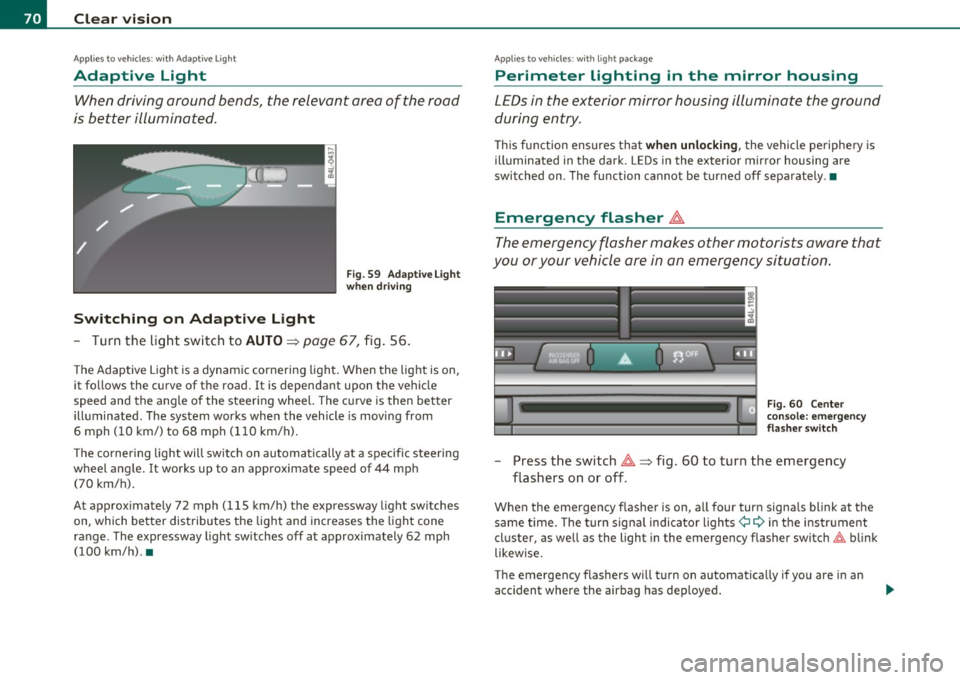
Fig . 59 Adaptive Light
when driving
- Turn the light switch to AUTO~ page 67, fig. 56.
The Adaptive Light is a dynamic cornering light. When the light is on,
it follows the curve of the road. It is dependant upon the vehicle
speed and the angle of the steering wheel. The curve is then better
illuminated. The system works when the vehicle is moving from
6 mph (10 km/) to 68 mph (110 km/h).
The cornering light will switch on automatically at a specific steering
wheel angle. It works up to an approximate speed of 44 mph
(70 km/h).
At approximately 72 mph (115 km/h) the expressway light switches
on, which better distributes the light and increases the light cone
range . The expressway light switches off at approximately 62 mph
(100 km/h). •
Applies to vehicles : w ith light package
Perimeter lighting in the mirror housing
LEDs in the exterior mirror housing illuminate the ground
during entry.
This function ensures that when unlocking, the vehicle periphery is
illuminated in the dark. LEDs in the exterior mirror housing are
switched on. The function cannot be turned off separately .•
Emergency flasher ~
The emergency flasher makes other motorists aware that
you or your vehicle are in an emergency situation.
Fig. 60 Center
console: emergency
flasher switch
-Press the switch~~ fig. 60 to turn the emergency
flashers on or off .
When the emergency flasher is on, all fou r turn signals blink at the
same time. The turn signal indicator lights¢
9 in the instrument
cluster, as well as the light in the emergency flasher switch~ blink
likewise.
The emergency flashers will turn on automatically if you are in an
accident where the airbag has deployed.
Page 73 of 392
![AUDI Q7 2011 Owner´s Manual (]] Tips
You shou ld turn on t he emergency flashers when :
• you are the last vehicle stand ing in a traffic jam so that any other
vehicles com ing can see you , or w hen](/img/6/40276/w960_40276-72.png "AUDI Q7 2011 Owner´s Manual (]] Tips
You shou ld turn on t he emergency flashers when :
• you are the last vehicle stand ing in a traffic jam so that any other
vehicles com ing can see you , or w hen")
(]] Tips
You shou ld turn on t he emergency flashers when :
• you are the last vehicle stand ing in a traffic jam so that any other
vehicles com ing can see you , or w hen
• your vehicle has broken down o r yo u are in an eme rgency s itua
tion, or when
• your vehicle is be ing towed by a tow tr uck o r if you are tow ing
another vehicle behind you .•
Turn signal ¢¢ and high beam ~D Lever
The lever on the le~ side of the s teering column is used to
operate the turn signals and the high beam as well a s the
headlight flasher .
-"' M
-w ... m
Fig. 61 Tu rn signal
and hi gh bea m l ever
The tu rn s ignal and high beam lever has the follow ing func
tions:
Turn signals ¢ ¢
- Lift the lever up all the way~ fig. 61 (D to use the right
turn signals, or push the lever down all the way@ to use
the left turn signals.
Con tro ls a nd e quip
m en t Vehicle
OP-eration
Clear vision
Auto -blink
- Move the lever (up or down) just to the point of resistance
to use the turn signa ls for as long as you need them, for
examp le when chang ing lanes.
- M ove the lever (up or down) just to the poi nt of res istance
and t hen re lease it right away to make the turn signa ls
blink
three times . You can use this feature for examp le
w hen changing lanes on highways.
High beam ~D
- Push the lever forward @ to switch on the high beam .
- Pull the lever back towa rds you to switc h off the high
beam .
Headlight flasher ~D
Pull the lever toward the steering wheel© to use the
head light flasher .
Notes on these features
• The turn signals only work with the ignition t urned on. The indi
cato r lights ¢ or¢ in the instrument cluster=>
page 14 a lso blink.
• After you have t urned a co rner, the tu rn signal switches off auto
matically .
• Th e
high beam works only when the hea dlights are o n. Th e ind i
ca tor light
aD in the instrumen t cluster illuminates when the high
beams are on.
• The
headligh t flasher works only as long as you ho ld the lever -
even if there are no l igh ts turned o n. Th e indic ator lig ht
aD in the
instrument clus ter illuminates when you use the headlight flasher. .,,_
Vehicle care Do-it-yourselt service iTechnical data
Page 125 of 392

Warm and cold Ill _______________ __.
Appli es to veh icles: wi th st eering whee l he atin g
Steering wheel heat ing (j)
The steering wheel can be heated electrically.
F ig . 12 1 Stee rin g
wheel: butto n for
st ee rin g whe el heati ng
-Press the I~] button to turn the steering wheel heating on
and off=> fig. 121 . The message
Steering wheel heat ing on ! or
Steering whee l heat ing off ! appears in the instrument
cluster display .
A nearly constant temperature is maintained when the steer ing
wheel heating is switched on.
T he last sett ing se lected for the steer ing wheel heat ing (on or off) is
automatically saved when the veh icle is shut off and is assigned to the
remote key. •
Contro ls a nd e quip
m en t Vehicle
OP-eration Vehicle care Do-it-yourselt service iTechnical data
Page 133 of 392

On the road -
----------------
& WARNING (co ntinued )
force when steering or braking. Since you cannot stee r and stop
normally, thi s can le ad to accident s and serious injuries .
• For safety rea sons , you should always park your vehicle with
the selector lever in P . Otherwise, the vehicle could inad vertently
roll away.
• After the engine has been switched off, the radiator fan can
continue to run fo r up to 10 minutes · even with the ignition
switched off . It can also switch on again after some time if the
coolant temperature r ises as the result of a heat buildup or if the
engine i s hot and the engine compartment is additionally heated
by the sun 's rays .
0 Note
If the engine has bee n under heavy load for an exte nded period, hea t
builds up in the engine comp art me nt aft e r t he eng ine is swit ched off
- there is a r isk of damaging the eng ine . Allow the engine to run at id le
for about 2 m inutes befo re switching it off. •
Appli es to ve hicles : w ith Con venience key
Driver messages in the instrument cluster
display
If a f unc tio n is no t pr ese nt, a driver mess age ap pea rs .
No key identified
This message appears w hen the ISTART I butt on is presse d if there is
no maste r key ins ide the vehicle o r if the system does not recog nize
it . F or examp le, the master key can not be recognized if it is covere d
by an ob ject (e .g . a luminum brief case) which
scr eens the ra dio
signal. Electron ic devices such
as cell p hones can a lso interfere w it h
the rad io s ignal.
Controls and equip
ment Safety first Press brake pedal to start engine
Thi
s message appea rs i f yo u press the I ST ART I button to start the
eng ine a nd do no t dep ress t he b rake pedal. The engine can o nly be
sta rted if t he b rake pedal is dep ressed.
Engage Nor P to start engine
Thi s message appea rs w hen the engine is started i f the selec to r lever
for the automatic transmission is not in the P o r N pos it ion . T he
engine can only be starte d wit h the selector i n these pos itio ns.
Key not in veh icle
Thi s mess age appea rs along w it h t he sym bol if th e mas te r k ey is
removed from the vehicle with t he eng ine runn ing. It is intended to
remind yo u (e .g . when cha nging drive rs) not to cont inue the journey
without the maste r key .
If the master key is no longer in the vehicle, yo u cannot switch off the
ignition after stop ping the engi ne and you also ca n no t sta rt th e
eng ine again . Moreover, you cannot lock the veh icle from the outs ide
with the key.
Shift to P otherwise vehicle can roll away. Doors do not lock if you
are not in P.
Th is message appears for safety reasons along with a warning buzze r
if the se lec tor lever f or the au toma tic tran smis sio n is no t in t he P
position when the ignition is switched off with t he
!STOP] butto n and
t he d river's door is opened. Move the sele ctor lever to the P posit io n,
otherwise the vehicle is not secured aga ins t rolling away . You also
cannot loc k the vehi cle using the locking button on the doo r handle
or us ing t he remote key .
To engage steering lock, press and hold STOP button
Th is message appea rs fo r safety reasons if the eng ine and the ign ition
h ave been swi tched o ff by pres sing t he
IS T OP I butt on once, a nd th en
t he d river's door is ope ned. In t his instance, the s teer ing is no t
locke d. The steer in g is locke d:
• If you press the
I ST O P] but ton again for mo re t han 1 second. .,,
Vehicle care Technical data