lock AUDI Q7 2011 Owner´s Manual
[x] Cancel search | Manufacturer: AUDI, Model Year: 2011, Model line: Q7, Model: AUDI Q7 2011Pages: 392, PDF Size: 93.29 MB
Page 35 of 392

For example, if the transmission selector lever is not in the P position
when the engine is turned off, the following message appears:
Shift to P otherwise vehicle can roll away. Doors do not lock if
you are not in P.
The ignition key can only be removed with the selector in this posi
tion . This and other messages are brought up if a function cannot be
carried out.
Driver messages and red symbols
If a red symbol appears in the display, a driver message can be shown
by pressing the (CHECK] button.
For example, the symbol for a problem with engine oil pressure~
appears in the display .
If you then press the I CH ECK] button, the
following driver message appears in the display:
Switch off engine ! Oil pressure too low
The driver message in the display goes out after about 5 seconds . The
driver message can be displayed again by briefly pressing the
[CHECK] button .
Driver messages and yellow symbols
If a yellow symbol appears in the display, a driver message is also
displayed automatically.
For example, the symbol ., appears in the display, indicating low
windshield washer fluid level. The following message also appears:
Please refill washer fluid
The driver message disappears after a few seconds. The driver message can be displayed again by briefly pressing the [ CHECK]
button. •
Controls and equip
ment Safety first
Driver information display
Red symbols
A red symbol means DANCER.
-Pull off the road.
- Stop the vehicle.
- Turn off the engine .
Fig. 24 Display:
engine coolant level
warning (priority 1)
Check the malfunctioning system. Contact your autho
rized Audi dealer or a qualified workshop for assistance.
Red symbols indicate a priority 1 malfunction -Danger!
With a priority 1 malfunction, a large symbol appears in the center
area of the display~ fig . 24 . When the symbol appears,
three
warning tones sound in succession. The symbol continues to blink
until the malfunction has been repaired.
If there are
more than one priority 1 malfunctions, the symbols
appear one after the other for about 2 seconds .
An additional driver message can also be displayed by briefly pressing
the
I CHECK ] button.
The red symbols mean:
Vehicle care Technical data
Page 37 of 392
- Contact your nearest authorized Audi dealer or qualified
workshop if necessary.
Warning ! Fault in brake system. Contact
workshop
- Drive carefully to the nearest authorized Audi dealer or
qualified workshop and have the malfunction corrected
=>& .
If the ABS system malfunctions, the ABS warning/indicator light illu
minates together with the brake system malfunction warning/indi
cator light:::::, &.
& WARNING
• Always observe the warnings in:::::, page 290, "Engine compart
ment", before opening the hood and checking the brake fluid.
• Driving with low brake fluid is a safety hazard. Stop the car and
get professional assistance.
• USA models: If the BRAKE warning light and the S warning
light come on together, the rear wheels could lock up first under
hard braking. Rear wheel lock-up can cause loss of vehicle control
and an accident. Have your vehicle repaired immediately by your
authorized Audi dealer or a qualified workshop. Drive slowly and
avoid sudden, hard brake applications.
• Canada models: If the brake warning light((]:» and the ABS
warning light come on together, the rear wheels could lock up
first under hard braking. Rear wheel lock-up can cause loss of
vehicle control and an accident. Have your vehicle repaired imme
diately by your authorized Audi dealer or a qualified workshop.
Drive slowly and avoid sudden, hard brake applications. •
Controls and equip
ment Safety first
Driver information display
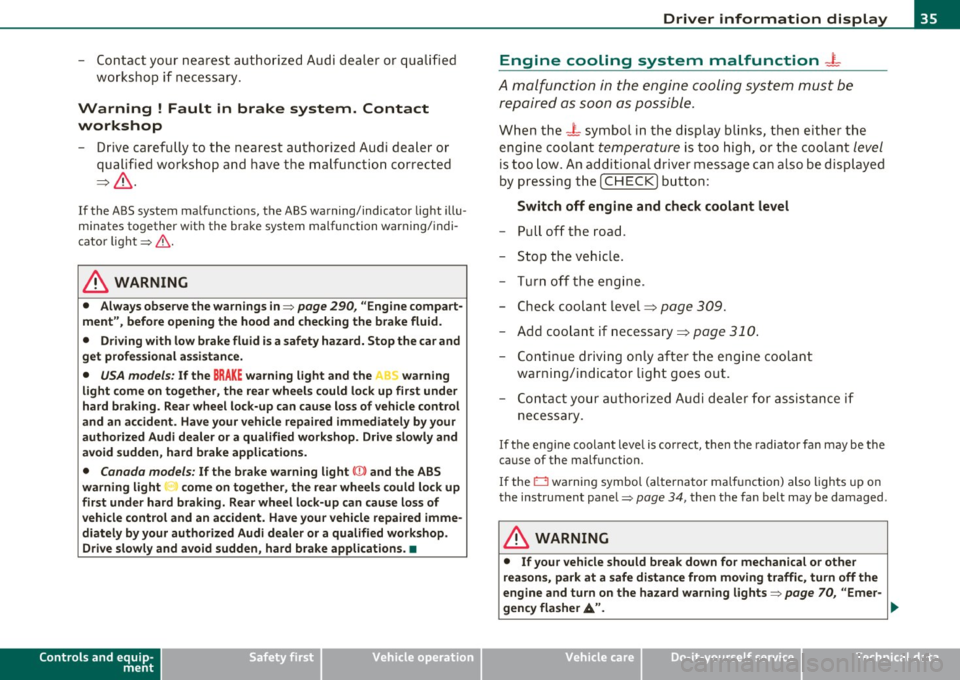
Engine cooling system malfunction _
t_
A malfunction in the engine cooling system must be
repaired as soon as possible.
When the -L symbol in the display blinks, then either the
engine coolant
temperature is too high, or the coolant level
is too low. An additional driver message can also be displayed
by pressing the [CHECK] button:
Switch off engine and check coolant level
- Pull off the road .
- Stop the vehicle.
- Turn off the engine.
- Check coolant level :::>
page 309.
-Add coolant if necessary=> page 310.
-Continue driving only after the engine coolant
warning/indicator light goes out.
- Contact your authorized Audi dealer for assistance if
necessary.
If the engine coolant level is correct, then the radiator fan may be the
cause of the malfunction.
If the O warning symbol (alternator malfunction) also lights up on
the instrument panel:::::,
page 34, then the fan belt may be damaged .
& WARNING
• If your vehicle should break down for mechanical or other
reasons, park at a safe distance from moving traffic, turn off the
engine and turn on the hazard warning lights:::::,
page 70, "Emer-
gency flasher
A". ..,.
Vehicle care Technical data
Page 38 of 392

Driver information display
& WARNING (continued)
• Never open the hood if you see or hear steam or coolant
escaping from the engine compartment -you risk being scalded.
Wait until you can no longer see or hear steam or coolant
escaping.
• The engine compartment of any vehicle is a dangerous area.
Before you perform any work in the engine compartment, turn of
the engine and allow it to cool. Follow the warning stickers
=> page 290, "Engine compartment".
0 Note
Do not continue driving if the_¥_ symbol illuminates. There is a
malfunction in the engine cooling system -you could damage your
engine. •
Engine oil pressure malfunction 't:::f:
The red engine oil pressure warning symbol requires
immediate service or repair. Driving with a low-oil-pres
sure indication is likely to inflict severe damage to the
engine.
If the ~ symbol appears in the display and blinks, the oil
pressure is too low. An additional driver message can also be
displayed by pressing the
[CHECK] button :
Switch off engine! Oil pressure too low
Immediate actions
- Pull off the road.
- Stop the vehicle.
- Turn off the engine .
-Check the engine oil level with the dipstick => page 305.
Dipstick readings checks too low
- Top off oil to the proper level=> page 306 .
Make sure that the oil pressure warning symbol~
appears no longer in the display before you start driving
again.
Dipstick reading checks OK
- If the oil pressure warning symbol ~ starts flashing
again even though the engine oil level checks OK on the
dipstick,
do not continue driving and do not let the
engine run in idle.
Instead, contact your authorized Audi
dealer for assistance.
[I) Tips
• The engine oil pressure symbol~ is not an indicator for a low
engine oil level. Do not rely on it. Instead, check the oil level in your
engine at regular intervals, preferably each time you refuel, and
always before going on a long trip.
• The yellow oil level warning indication
~ requires oil refill or
workshop service without delay. Do not wait until the red oil pres
sure warning ~ starts to flash before you respond to the low oil
level warning
..'!' . By then, your engine may already have suffered
serious damage. •
Steering malfunction i
If there is a malfunction in the electronic steering column
lock, the steering cannot be unlocked.
If the i symbol in the display blinks, there is a malfunction
in the electronic steering column lock. An additional driver
~
Page 39 of 392

message can also be dis played by press ing the [ CHECK)
butto n:
Do not drive vehicle: steering defective
- Contact your nearest author ized Audi dealer or q uali fied
wor kshop.
- Do
not tow your veh icle.
& WARNING
Your veh icle must not be towed in the event of a malfunction in
the electronic steering column lock because it cannot be steered
due to the locked steering.
If it is towed with the stee ring locked ,
there i s the risk of an ac cident. •
Ignition lock malfunction ~
A malfunction in the ignition lock must be repaired imme
d iately .
If the .Pe symbo l in t he display b links, the re is a malfunc tion
in the electronic ignition lock . A n add itional driver message
can a lso be disp laye d by pressing the [
CHE CK) button:
Ignition lock defective. Contact workshop !
- Do not tu rn th e engine off .
- Drive immed iately to an authorized Aud i dea ler to have
the malfu nct io n correc ted .
If there is a malfunction in the e lectron ic ignition loc k, the ignit ion
c anno t be t urned off. D rive immediate ly to an au th o rized Audi dea le r
to have the cause of the malfunction corrected.
Controls and equip
ment Safety first Driver information display
On veh icles with Convenience key*, the eng ine should not be switched
o ff using the
!STO P] button be ca u se the eng ine c annot be st arted
again after the ignitio n is switched off .•
Yellow symbols
Ay ello w symbo l means WARNING.
Fig . 2 5 Displ ay: lo w
fuel leve l w arning
( pr io ri ty 2 )
Yellow symbols ind icate a p rior ity 2 malfunct ion - Warn ing!
When a yellow warning symbo l appears,
one warning tone sounds. A
dr ive r message appe ars as we ll to exp la in the ma lf u nction in more
detail. The driver warn ing goes out after about 5 seconds, but it can
be brought up again a t any time by pressi ng the
I CHECK ] button.
Check the d isp layed fu nction as soon as possible . If
more than one
pr iority 2 malfunction is detected, all symbo ls will appear one after
the othe r for about 2 seconds.
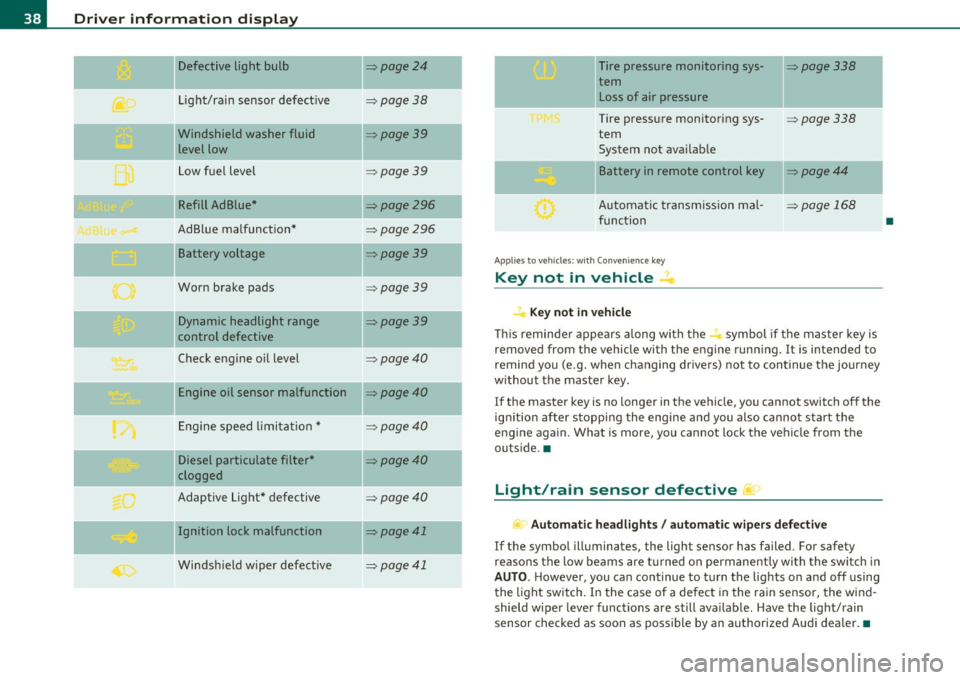
Yellow symbols mean:
Convenience key*
K ey no t in vehicle
USA models:
Defective b ra ke light
Canada models: Defective b rake light
Vehicle care
~ page 131
~page24
~page2 4
Technical data
Page 40 of 392
Driver information display
Defective light bulb ::::>page24
._ -
Light/rain sensor defective :::>page 38
-Windshield washer fluid =>page39
level low
Low fuel level
::::>page39
Refill Ad Blue* ::::>page296
AdBlue malfunction* =>page 296
-Battery voltage ::::>page39
Worn brake pads ::::>page39
Dynamic headlight range ::::>page39
control defective
-
Check engine oil level ::::>page40
Engine oil sensor malfunction =>page40
Engine speed limitation* ::::>page40
Diesel particulate filter* ::::>page40
clogged
Adaptive Light* defective
=>page40
Ignition lock malfunction ::::>page41
--
Windshield wiper defective => page 41
-
-
-
-
-
-
Tire pressure monitoring sys-::::>page338
tern Loss of air pressure
Tire pressure monitoring sys-=> page338
tern
System not available
- -
11
sattery in remote control key ::::>page44
Automatic transmission mal-=> page 168
function
Applies to veh icles: with Conven ience key
Key not in vehicle ..Z..
Key not in vehicle
This reminder appears along with the -i. symbol if the master key is
removed from the vehicle with the engine running. It is intended to
remind you (e.g. when changing drivers) not to continue the journey
without the master key.
If the master key is no longer in the vehicle, you cannot switch off the
ignition after stopping the engine and you also cannot start the
engine again. What is more, you cannot lock the vehicle from the
outside. •
Light/rain sensor defective ~'j.
Automatic headlights/ automatic wipers defective
If the symbol illuminates, the light sensor has failed. For safety
reasons the low beams are turned on permanently with the switch in
AUTO. However, you can continue to turn the lights on and off using
the light switch. In the case of a defect in the rain sensor, the wind
shield wiper lever functions are still available. Have the light/rain
sensor checked as soon as possible by an authorized Audi dealer. •
•
Page 43 of 392

Ignition Lock malfunction
If the ~ symbol in the display comes on, there is a malfunc
tion in the electronic ignition lock. An addi tional driver
message can be displayed by pressing the
[CHECK] button :
Ignition lock defecti ve
- Drive to an authorized Audi dealer or qualified workshop
at your earliest convenience to have the malfunction
corrected .•
Windshield wipers faulty ~
0 W ind shi eld wi per d efe cti ve
When this symbol illum inates, it means that the electronics for
the windshield wipers are defective . Please go to an authorized Audi
deale r o r qualified workshop to have the w indshield w ipe r system
repaired. •
Controls and equip
ment Safety first
Dri
ver information display
Vehicle care Technical data
Page 44 of 392
Opening and closing
Opening and closing
Keys
Key set
C !
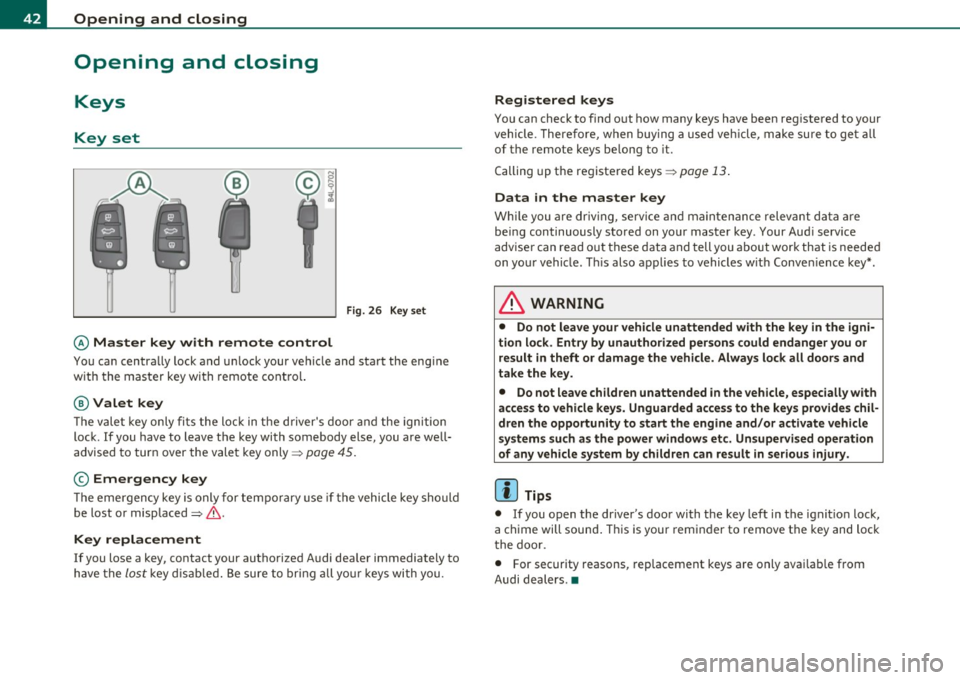
Fig. 26 Key set
© Master key with remote control
You can centra lly lock and u nlock your vehicle and sta rt the eng ine
w ith the mas ter key w ith remote cont ro l.
@ Valet key
The vale t k ey o nly fi ts the l ock in the d river' s door and t he ignition
lock . If you have to leave t he key with somebody else, you are well
advise d to tur n over the vale t key only =>
page 45.
© Emergency key
T he e mergen cy key is only for te mpora ry use if t he vehicle key sho uld
be lost or misplaced=> &.
Key replacement
If you lose a key, contact your autho rize d Audi dea ler immediately to
h ave the
lo st key d is abl ed. Be sure to bring a ll your keys wi th you.
Registered keys
You can check to find o ut how many keys have b een reg iste red to your
veh icle . T here fore, w hen buying a used ve hicle, make su re to get all
of the remote keys be long to it .
C alling up the re giste red keys =>
pag e 13 .
Data in the master key
W hile you a re driv in g, se rv ic e and maintenance relev ant da ta ar e
b ein g continuously s to red on yo ur mas ter key . Your Aud i serv ice
a dvise r ca n re ad out th ese d ata and tell you a bout work th at is neede d
on yo ur vehicle. T his also a pplies to vehicles w it h Conv enience key *.
& WARNING
• Do not leave your vehicle unattended with the key in the igni
tion lo ck. Entry by unauthorized persons could endanger you or
result in theft or damage the vehicle. Always lock alt doors and
take the key.
• Do not leave children unattended in the vehicle, especially with
access to vehicle key s. Unguarded access to the keys provides chil
dren the opportunity to start the engine and/or activate vehicle
systems such as the power windows etc. Unsupervised operation
of any vehicle system by children can result in serious injury .
(I] Tips
• If you o pen the dr iver 's doo r wi th the key left in the ig niti on loc k,
a c hime will sound . T hi s is your remin der to remove t he key and loc k
t he doo r.
• For security reasons, rep lacement keys a re o nly ava ilab le from
Audi dealers .•
Page 45 of 392
Master key with remote control
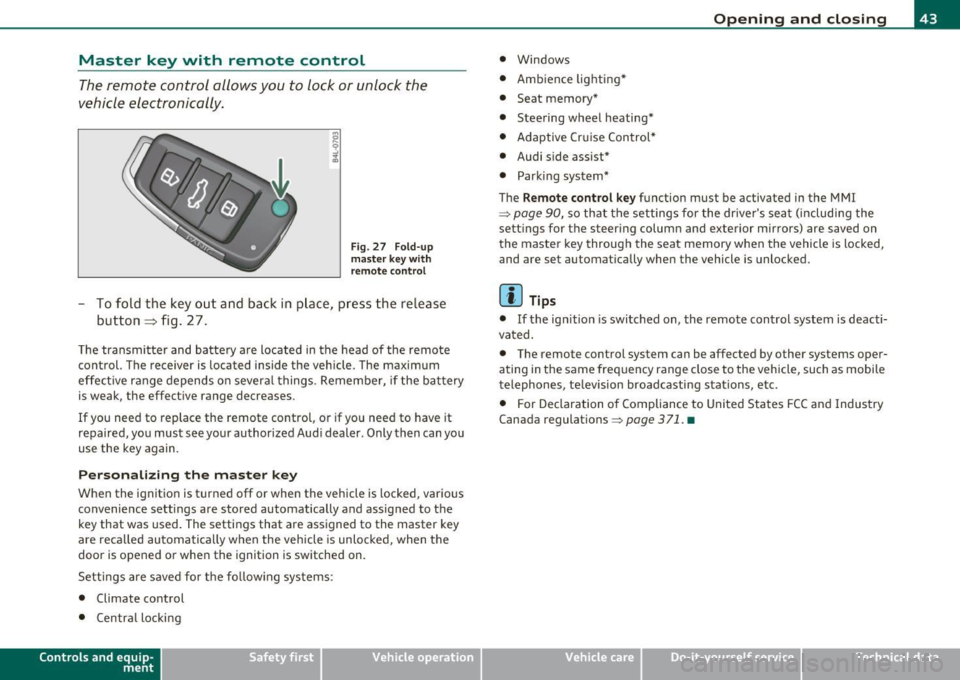
The remote control allows you to lock or unlock the
vehicle electronically .
Fig. 27 F old-u p
ma ster key w ith
re mote co ntrol
- To fold the key out and ba ck in pl ace, pre ss the re lease
button => fig . 27 .
The transmi tter and batte ry a re located in the head of the remote
control. The receiver is located inside the veh icle. The maximum
effe ct ive range depends o n severa l things . Remember, if the ba ttery
is weak, the effect ive range decreases .
If you need to replace the remote control, or if you need to have it
repaired, yo u must see your author ized Aud i dealer. Only then can yo u
use the key again.
Personalizing the ma ster key
When the ignition is turned off or when the vehicle is locked, vario us
convenience sett ings are stored automatically and assigned to the
key that was used. The settings that are ass igned to the master key
are reca lled automatica lly when the vehicle is unlocked , when the
door is opened or whe n the ignition is switched on.
Setti ngs are saved for the fo llow ing sys tems :
• Climate control
• Centra l loc king
Con tro ls a nd e quip
m en t Vehicle
OP-eration
Opening and closing
• Windows
• Amb ien ce lig hti ng*
• Seat memory*
• Steering wheel heating*
• Adaptive Cr uise Control*
• Audi side assist*
• Parking sys tem*
The
Remo te control ke y function must be activated in the MM I
~ page 90, so that the settings for the driver's sea t (includi ng the
sett ings for the steer ing column and exterior mirrors) are saved on
the master key through the seat memory when the vehicle is locked,
and are set automat ically when the vehicle is unlocked.
[ i ] Tips
• If the ign ition is switched on, the remote control system is deacti
vated .
• The remote control system can be affected by other systems oper
ating in the same frequency range close to the vehicle, such as mobi le
telephones, television broadcasting stations, etc.
• For Declaration o f Compliance to United Sta tes FCC and Industry
Canada regulations ~
page 371 . •
Vehicle care Do-it-yourselt service iTechnical data
Page 46 of 392

Opening and closing
Check Light in the master key
The check light in the master key provides information
about different conditions.
Check light functions in the master key:
Vehicle within range of the key
Fig. 28 Check light in
the master key
If the vehicle is within range of the key, the check light comes on
briefly once when a button is pressed.
Vehicle outside the range of the key
If the vehicle is outside the range of the key, the check light comes on
briefly once and then shows the status of the vehicle door locks:
• If the light is flashing quickly, the vehicle is not locked.
• If the light is flashing slowly, the vehicle is locked.
State of master key battery
If the check light does not come on, the battery is dead and has to be
replaced. In addition, when the battery is dead the symbol appears
in the instrument cluster display as well as the message:
Please change key battery
Battery replacement=:> page 44.
[I] Tips
Please note that the current state of the vehicle door locks can only
be recalled with the master key that was last used to lock the vehicle.
It is possible that a different state is shown for the door locks on the
other master key which is not the same as that of the vehicle. •
Master key battery replacement
Each master key contains a battery housed under the
cover.
Fig. 29 Master key:
opening the cover
We recommend having the battery changed by an authorized
Audi dealer. However, if you wish to replace the dead battery
yourself, proceed as follows:
- Pry apart the base~ fig. 29
© and the cover @ carefully
with a coin.
- Remove the cover (arrow).
- Remove the dead battery from the cover.
- Install the new battery. Please make certain that the"+"
sign on the battery faces down. Correct polarity is shown
on the cover. _..
Page 47 of 392

- Place the cov er w ith t he new battery on t he k ey bas e and
press bot h parts together .
For the sake of the environment
Dispose of dead batter ies proper ly so as not to po llute the envi ron
ment.
(I) Tips
Th e replaceme nt ba ttery mus t be the same spec ifica tion as the
orig inal. •
Electronic immobilizer
The immo bili zer helps t o prevent unauth ori zed use of
your v ehicl e.
A compu ter chip ins ide you r key au toma tically deac tiva tes the elec
tr on ic immob ilizer whe n you inse rt the key in the ignition lock, o r on
vehicles with Convenience key *, when the key is inside the ve hicle.
W hen you remove the key from the ignition lock, or on vehicles with
Conven ience key, when you remove the key from the vehicle, the elec
tr on ic immo biliz er is a utomat ic al ly activa ted once aga in.
& WARNING
Always take the key with you when you leave the vehicle . The key
can di sarm the elect ronic engine immobilizer and permit an unau
thor ized per son to start the engine and enable operation of the
vehicle systems such a s power w indow or Panoramic sliding
s unroof* leading to serious personal injur y.
Controls and equip
ment Safety first
Opening and closing
(I) Tips
• Th
e vehicle ca nnot be started if an unauthori zed key is u sed. The
vehicle may not start if anothe r rad io device such as a key for another
vehicle o r a tra nsponder is loca ted o n the key r ing.
• For Declaration of Compliance to United States FCC an d Industry
Canada regulations=:>
page 371. •
Valet key function
The valet key function prevents unauthorized persons
from opening the glove compartment.
Fig . 30 Ce nter
con sole: button for
v alet ke y fu nctio n
Activating and deactivating the function
- Ins ert th e master key into the ig nition lock a nd swi tch on
t he ign it ion .
- P ress the
[V AL ET] butto n~ fig . 30 to activate/ deacti
vate the fu nct ion as desire d. The ind icator light in the
bu tto n illumina tes whe n the f unct ion is ac tiv e.
- Remove t he m aster key f rom t he ign it ion lock.
- Hand ove r onl y the
valet key~ page 42, fig. 26 to t he
person w ho will ta ke charge of the veh icle.
Vehicle care Technical data