lock AUDI Q7 2011 Owner´s Manual
[x] Cancel search | Manufacturer: AUDI, Model Year: 2011, Model line: Q7, Model: AUDI Q7 2011Pages: 392, PDF Size: 93.29 MB
Page 127 of 392

On the road Ill _______________ __.
Applies to veh icles : w ith electrically adju stab le steer ing wheel
Electrically adjustable steering wheel
The height and reach of the stee ring wheel ca n be ele ctri
c ally adj usted to sui t th e d river.
Firs t, a djust t he dr iver's se at correct ly.
Height adjustment
Fig . 123 Sw itch for
s teering whee l ad ju st
ment
- Push t he s witch © up or down=> fig. 12 3. The st ee ring
w he el heig ht chang es f or as long as you press t he swi tch .
Reach adjustment
- Push t he switc h© forward or backward=> fig . 123 . T he
ste ering w hee l reac h changes for as long as you press the
swi tch .
The re m ust be at least 10 inches (25 cm) between you r chest and the
cen ter of the steering whee l. If you cannot sit more than 10 inches
(25 cm) from the steer ing wheel, see if adapt ive equ ipment is ava il
able to h elp you reach the pedals and increase the distance from the
steeri ng wheel.
For detailed information on how to adjust the dr iver 's seat , see
~ page 86.
Con tro ls a nd e quip
m en t Vehicle
OP-eration
The steering wheel ca n be adjusted even when the ign ition is turned
O ff. For veh icles with sea t memory, the individu al pos it io ns for the
steer ing wheel can be sto red along with t he seat pos it ion.
& WARNING
Improper use of steering wheel adjustment and imprope r seating
position can cau se seriou s per sonal injury.
• Adjust the steering wheel column only when the vehicle i s not
moving to prevent loss of vehicle control.
• Adjust the driver 's seat or steering wheel so that there is a
minimum of 10 in ches (25 cm) between your chest and the
steering wheel~
page 192, fig. 186. If you cannot maintain this
minimum distance , the airbag system cannot prote ct you prop
erly.
• If phy sical limitations prevent you from sitting 10 inches (25
cm ) or more from the steering wheel, check with you r authorized
Audi dealer to see if adaptive equipment is available .
• If the steering wheel is aligned with your face , the supple·
mental driver 's airbag cannot provide as much protection in an
accident. Always make sure that the steering wheel is aligned with
your che st.
• Always hold the steering wheel with your hands at the 9 o'clock
and 3 o'clock po sition s to reduce the risk of personal injury if the
drive r's airbag deploys.
• Never hold the steering wheel at the 12 o'clock po sition or with
your hands inside the steering wheel rim or on the steering wheel
hub. Holding the steering wheel the wrong way can cause serious
injuries to the hands, arms and head if the driver's airbag
deploy s.•
Vehicle care Do-it-yourselt service iTechnical data
Page 128 of 392
1111..__0_ n_ t_h _e_ r_o _ a_ d _________________________________________________ _
Easy entry feature
The easy entry feature makes it easier to enter and e xit
the vehicle by automatically adjusting the steering
wheel.
Press the button®~ page 125, fig. 123 to turn the easy
entry feature on or off .
When the easy entry feature is turned on (button depressed), the
steering wheel moves up to the parked position when the ignition is
t urned off . After you enter the vehicle, the steer ing wheel moves to
the stored pos ition as soon as you t urn on the ign ition .
Easy entry feature on vehi cles with memory seat *
For the stored steering whee l position to be recalled, t he driver's seat
memory must be switched on ( ( ON/OFFI switch in depressed posi
tion) .
If the easy e ntry feature i s sw itched off, the steer ing wheel mov es to
the stored pos ition as soon as you press the seat memory button. •
Ignition Lock and ignition switch
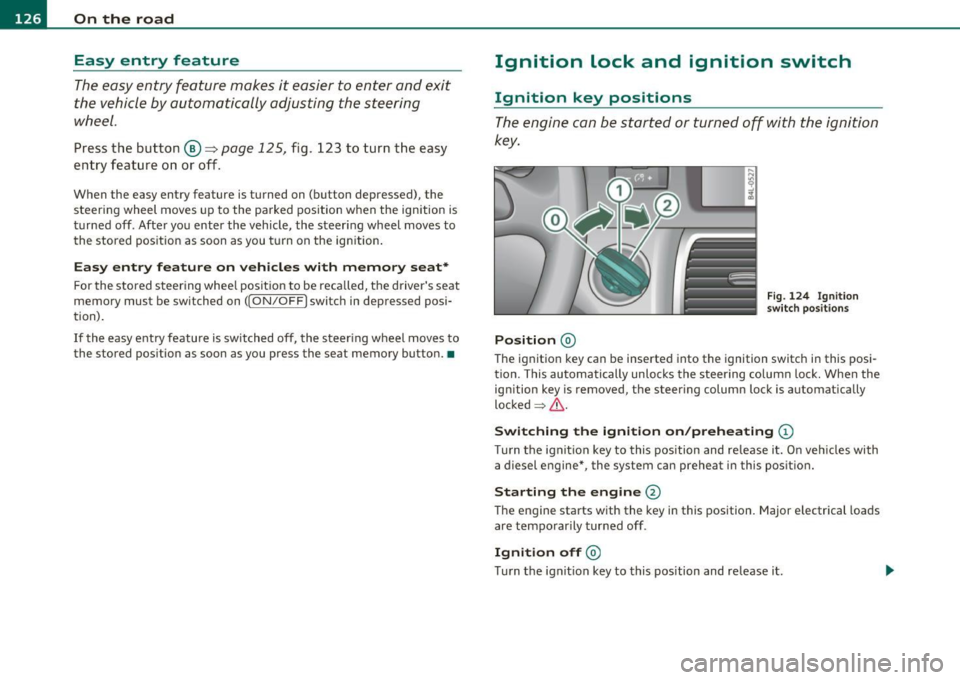
Ignition key positions
The engine can be st arted or turned off with the ign ition
key .
Position @
Fig. 124 Ign ition
sw itch position s
The ig nition key can be inserted into the ignition switch i n this posi
tion. This automatically unlo cks the steering co lumn lo ck. When the
ign ition key is removed, the steer ing colum n lock is automat ically
lo ck ed
~ & .
Switching the ignition on /preheating (D
Tu rn the ignit ion key to this position and re lease i t. On veh icles wi th
a diesel engine *, the system can preheat in this position.
Starting the engine@
The engine starts with the key in this position. Major e lectrical loads
are tempo rar ily tur ned off .
Ignition off@
Turn t he ign it ion key to this pos ition and re lease i t.
Page 129 of 392

_________________________________________________ O_ n_ t_ h_ e_ r _o_ a_d _ __.fflll
& WARNING
• Never remove the key from the ignition lock while the vehicle
is moving. The steering wheel will lock , cau sing loss of control.
• If you ha ve to leave your vehicle, even for ju st a minute, alw ays
remove the ignition key and take it with you. This i s especially
important if you are going to leave children unattended in the
vehicle. The children could start the engine or use other vehicle c ontrols . Unsupervised us e of vehicle controls (for example, power
windows) can cause serious personal inju ries.
0 Note
• If the ~ symbol in the display blinks, there is a malfunction in the
electronic stee ring column lock. Follow the instr uctions in
~ page 36, "Steering malfu nction i" .
• If the ~ symbol in the display blinks, there is a malfunction in the
electronic ignition lock . Follow the instr uctions in~
page 37, "Igni
t ion lock malfunct ion ~" .
(I] Tips
• If you release the ignit ion key i n pos it io n @ , the key automatically
returns to pos ition
(D .
• If you open the driver 's doo r whe n the ignition is sw itched on, a
buzze r sounds and the message
Ignition is on appears in the instru
ment cl uster d isplay. Please swi tch the ignition off.
• T o prevent malf unctions in the ignition lock, remove any dirt or
deposits from t he key bit so that t hey do not ente r th e ignit ion lock. •
Contro ls a nd e quip
m en t Vehicle
OP-eration
Ignition key safety Lock
The ignition key can only be r emoved when the selector
le ver is in the "P" (Park) position .
After turning off the ignition, the ignition key can only be removed
from the igni tion lock when t he se lector lever is in the "P" (Park) posi
tion. A fter you have removed the key, the selector lever is locked and
cannot be move d.•
Starting and stopping the engine
Starting the engine
The engine can only be sta rted with you r origina l A udi
key.
Fig . 125 I gnition key
pos iti ons
Vehicles with gasoline engine:
- Step on the brake.
- Move the se lector leve r into P or N
=> &.
- Turn the ig nition key to position @=> fig . 125 -do not
dep ress th e gas pedal when s tarting the engine .
Vehicle care Do-it-yourselt service iTechnical data
Page 132 of 392

IIIJL--_O=-:.. n.:.....: t;,:.h .:...:e~ r...::o =-- a=-.:. d;__ ________________________________________________ _
The glow plug indicator light w ill only ill uminate for approximately 1
se cond when the engine is w arm o r the ou tside temperature is hig her
than 46
°F (8 °() . That means you can sta rt the eng ine immediately .
& WARNING
Never allow the engine to run in confined spaces · danger of
asphyxiation.
0 Note
• Avoid high eng ine rpm, full th rottle and heavy engine loads until
the engine has reached operat ing temperature - ot herw ise you risk
eng ine damage.
• The engine cannot be started by push ing or tow ing the veh icle .
dr iving right away . In this way you avoid unnecessary emissio ns .
[ i J Tips
If you open the driver 's door when the ignition is switched on, a
buz zer sounds and the message
Ignition i s on appea rs in the instru
ment cluste r display . Please switch the ignition off .•
A ppli es to veh icles: w ith Conve nienc e key
Switching engine off with the !STO P] button
- Bring your vehic le to a comp lete stop.
Fig . 1 27 Co nveni ence
key : ENGI NE STOP
bu tt o n
- Move t he selector lever to the P or N pos ition .
- Presst he(STOP]butt on =:> fig .12 7 .
Pressi ng the !STOP I bu tton on ce sw itches off the engine and the igni
tion. If yo u press the
I STOP ) button aga in for more than 1 second,
t he steeri ng is locked, provided th at the sele cto r lever is in the P posi
tion =>& .
Emergency OFF function
If necessary, the eng ine can be switched off with the se lector leve r in
t he R, Do r S posi tions. To do so, step o n the brake pedal and press
and hold the !STOP] button (veh icle speed must be less than 6 mph
/ 10 km/h.
& WARNING
• Never turn off the engin e until the vehicle has come to a
complete stop.
• The brake booster and servotronic only work when the engine
is runn ing. With the ignition turned off , you h ave to apply more
ai,,,
Page 133 of 392

On the road -
----------------
& WARNING (co ntinued )
force when steering or braking. Since you cannot stee r and stop
normally, thi s can le ad to accident s and serious injuries .
• For safety rea sons , you should always park your vehicle with
the selector lever in P . Otherwise, the vehicle could inad vertently
roll away.
• After the engine has been switched off, the radiator fan can
continue to run fo r up to 10 minutes · even with the ignition
switched off . It can also switch on again after some time if the
coolant temperature r ises as the result of a heat buildup or if the
engine i s hot and the engine compartment is additionally heated
by the sun 's rays .
0 Note
If the engine has bee n under heavy load for an exte nded period, hea t
builds up in the engine comp art me nt aft e r t he eng ine is swit ched off
- there is a r isk of damaging the eng ine . Allow the engine to run at id le
for about 2 m inutes befo re switching it off. •
Appli es to ve hicles : w ith Con venience key
Driver messages in the instrument cluster
display
If a f unc tio n is no t pr ese nt, a driver mess age ap pea rs .
No key identified
This message appears w hen the ISTART I butt on is presse d if there is
no maste r key ins ide the vehicle o r if the system does not recog nize
it . F or examp le, the master key can not be recognized if it is covere d
by an ob ject (e .g . a luminum brief case) which
scr eens the ra dio
signal. Electron ic devices such
as cell p hones can a lso interfere w it h
the rad io s ignal.
Controls and equip
ment Safety first Press brake pedal to start engine
Thi
s message appea rs i f yo u press the I ST ART I button to start the
eng ine a nd do no t dep ress t he b rake pedal. The engine can o nly be
sta rted if t he b rake pedal is dep ressed.
Engage Nor P to start engine
Thi s message appea rs w hen the engine is started i f the selec to r lever
for the automatic transmission is not in the P o r N pos it ion . T he
engine can only be starte d wit h the selector i n these pos itio ns.
Key not in veh icle
Thi s mess age appea rs along w it h t he sym bol if th e mas te r k ey is
removed from the vehicle with t he eng ine runn ing. It is intended to
remind yo u (e .g . when cha nging drive rs) not to cont inue the journey
without the maste r key .
If the master key is no longer in the vehicle, yo u cannot switch off the
ignition after stop ping the engi ne and you also ca n no t sta rt th e
eng ine again . Moreover, you cannot lock the veh icle from the outs ide
with the key.
Shift to P otherwise vehicle can roll away. Doors do not lock if you
are not in P.
Th is message appears for safety reasons along with a warning buzze r
if the se lec tor lever f or the au toma tic tran smis sio n is no t in t he P
position when the ignition is switched off with t he
!STOP] butto n and
t he d river's door is opened. Move the sele ctor lever to the P posit io n,
otherwise the vehicle is not secured aga ins t rolling away . You also
cannot loc k the vehi cle using the locking button on the doo r handle
or us ing t he remote key .
To engage steering lock, press and hold STOP button
Th is message appea rs fo r safety reasons if the eng ine and the ign ition
h ave been swi tched o ff by pres sing t he
IS T OP I butt on once, a nd th en
t he d river's door is ope ned. In t his instance, the s teer ing is no t
locke d. The steer in g is locke d:
• If you press the
I ST O P] but ton again for mo re t han 1 second. .,,
Vehicle care Technical data
Page 134 of 392
Ill On the road ..___ ______________ _
• If you close the driver's door and lock your vehicle from the
outs ide. •
Parking brake
Op eration
The parking brake replaces the handbrake.
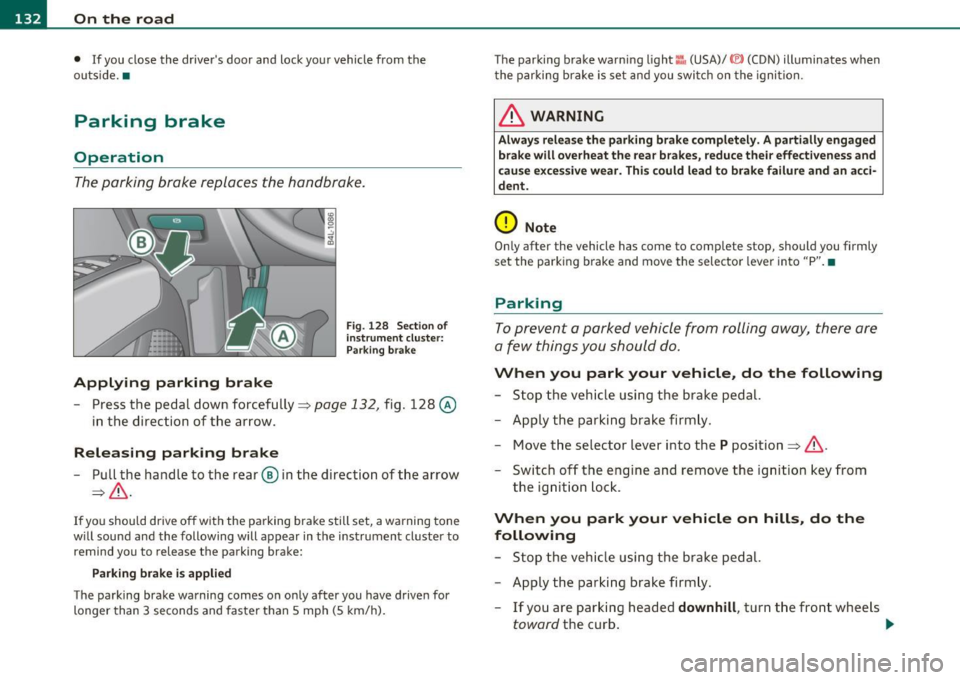
Applying parking brake
Fig. 128 Sect ion of
instrument cluster: Par king brake
- Press the pedal down forcefully~ page 132, fig. 128 @
in the d irection of the arrow.
Releasing parking brake
-Pull the handle to the rear ® in the direction of the arrow
~& -
If you should drive off with the parking brake still set, a warning tone
w ill sou nd and the following will appear in the instrument cluster to
remind you to release the parking brake:
Parking brake i s applied
The parking brake warning comes on only after you have driven for
longer than 3 seconds and faster than 5 mph (5 km/h). The parking brake warn
ing light ::, (USA)/ © (CON) illuminates when
the parking brake is set and you switch on the ignition.
& WARNING
Always release the parking brake completely. A partially engaged
brake will overheat the rear brakes, reduce their effectiveness and
c ause excessive wear. This could lead to brake failure and an acci
dent.
0 Note
Only after the vehicle has come to complete stop, should you firmly
set the parking brake and move the selector leve r into "P". •
Parking
To prevent a parked vehicle from rolling away, there are
a few things you should do.
When you park your vehicle, do the following
-Stop the vehicle using the brake pedal.
- Apply the parking brake firmly.
- Move the selector lever into the
P position =;,& .
- Switch off the engine and remove the ignition key from
the ignition lock .
When you park your vehicle on hills, do the
following
- Stop the vehicle using the brake pedal.
- Apply the parking brake firmly.
- If you are parking headed
downhill , turn the front wheels
toward the curb . .,_
Page 135 of 392

On the road -
----------------
- If you are parki ng h eaded uphill, turn t he fro nt w heel s
away from t he curb.
- Move th e se lector lever i nto t he
P posit ion.
- Swi tc h off the eng ine and rem ove t he ignit ion key from
t h e ign ition loc k.
& WARNING
This is how you can reduce the risk of injury when leaving your
vehicle.
• Never park the vehicle where it can come in contact with dry
grass, spilled fuel or any other flammable material s.
• When parking on hills, always turn the wheel s so that the front
wheel s will fir st roll into the curb, if the vehicle should start to
roll.
• Never allow anyone -especially small children -to remain
in
the vehicle when it is loc ked. Locked doors make it more difficult
for res cuer s to ac ce ss the pa ssenger compartment in the event of
an emergency. Danger to life!
• Never leave children un supervised in the vehicle . Children
could release the parking brake or move the gearshift lever out of
gear . The vehicle could start to roll away and cause an accident.
• No matter what the season is , the temperature in a parked
vehicle can reach dangerou s levels.
0 Note
• Please exer cise care w hen you par k your vehicle in pa rking areas
with park ing barriers or c urbs. Pa rking barriers and c urbs vary in
heig ht and co uld dam age yo ur bumpe r and related co mponen ts as
the front of your vehicle moves over a barrier or curb that is too h igh,
as yo u p ark or as you back out of a par king s pot. I n or der to be sure
that no such damage can occur, you may wish to stop short of havi ng
t he front t ires of your car touch the park ing barrier or c urb.
Controls and equip
ment Safety first
•
Please also exerc ise exceptiona l care w hen you dr ive up or dow n
stee p ramps or dr ive ove r cur bs or o ther obs ta cl es, for w hich t he
vehicle is not des igned, beca use components of the vehicle close to
the groun d, such as bumper covers, spoilers and s uspension and
ex haust system componen ts, may become damaged .•
Starting on hills
H ill Hold makes it easier to s tart on hills .
The system is activated when the brake peda l is depressed
for a few
seconds .
Fo r t his, t he vehicle mus t be st anding in uphill driving direc
tion.
After releas ing t he brake pedal, the brake power is he ld for a
brief
moment to prevent the vehicle from rolling back when sta rt ing . At
this time, you can easi ly begin to move your vehicle .
& WARNING
• If you did not begin moving immediately after relea sing the
brake pedal, under certain circumstances, the vehicl e would begin
to roll backward. Depress the brake pedal immediately or engage
the parking brake .
• Should the engine stall, depre ss the brake pedal immediately
or engage the parking brake.
• In order to prevent the vehicle from rolling back unintention
ally when starting in stop-and-go traffic , keep the brake pedal
depre ssed for a few se cond s before driving off .
• When you leave the vehicle -even if only briefly -, sw itch off
the ignition and make sure to remove the ignition key . Also
engage the parking brake to prevent your vehicle from rolling
unintentionally . This particularly applies if children are left in the
veh icle -danger of accident! •
Vehicle care Technical data
Page 139 of 392

Adaptive Cruise Control I'll __________________________ ...:....:..;:_....;_,,!,_ ______ _
& WARNING (continued)
the veh icle s afely when you follow another vehicle too closely.
Alway s rem ember that the Adaptive Cruise Control has a braking
powe r that is only about 30 % of the vehicle's maximum braking
ability. The automatic braking function cannot bring th e ve hicle to
a sudden or emergency stop . Always be prepared to brake and take
evasive action to avoid collisions and other accident situations .
• Never allow the closing speed between you and other vehicles
to be so high that the Adaptive Cruise Control may not be able to
slow your vehicle safely. If closing speed is too h igh, you must
apply the brake s your self to reduce the ri sk of a rear-end cra sh .
• Never rest your foot on the accelerator pedal , especially when
the Adaptive Crui se Control is being used. Pressure on the acceler
ator will overr ide the ACC braking function and prevent the brakes
from being applied when ACC detects a situation when the brake s
must be applied .
• Never u se Adaptive Cruise Control when you cannot drive safely
at a steady speed, including on city streets , on winding roads or
when road conditions are poor (for example , on ice, gravel, in fog ,
heavy rain or on wet roads that increase the risk of hydroplaning ).
• The radar sensor's
vi sion can be redu ced by rain, snow and
heavy road spray. These and similar conditions can prevent vehi
cle s up ahead from being accurately detected and in some cases
they may not be detected at all. Do not use ACC when the radar
sensors cannot accurately detect vehicles mo ving ahead of you in
traffic .
• Always turn off Adaptive Crui se Control when entering turn
lanes, exit lanes and con struction zones or in similar situat ions
because the vehicle will automatically accelerate to the stored
speed when the road ahead i s clear .
• To prevent unintended operation , always switch ACC off when
it is not being used .
Controls and equip
ment Safety first
(I] Tips
•
For safety reaso ns, t he stored speed is deleted when the igni tion
is turned off .
• T he Elect ronic Stabilization Program (ESP) and the Ant i- Slip Regu
lat ion (ASR) cannot be deactivated when the Adaptive Cruise Contro l
is sw itched on . If the ES P and t he Anti -S li p Reg ula tio n (ASR) has been
deactivated and you then switch on the Adaptive Cruise Control, the
E S P fu nction will also be a ctivated au toma tically.
• Damage cause d by accidents and some minor coll is ions can affect
t he radar se nsor se ttings and cause the syste m to malfunction o r
switch off completely .
• Th e radar sensor cover is heated. In win ter conditions, you should
st ill chec k befo re dr iv ing to make sure it is free of ice and snow. If
ne cessa ry, clean the area nea r the rada r sensor carefully ::}
page 136,
fig . 131.
• T o ensure tha t the radar sensor is not block ed, fore ign objects
(e.g. stickers, la rger license plate mo unts, add·on parts) must not
cove r th e ar ea nea r the radar senso r::} page 136, fig. 131. The area
near the ra dar senso r must not be painted, e ither.
• For Declaration o f Compliance to United Sta tes FCC and Indus try
Cana da regulat ions ::}
page 371. •
Vehicle care Technical data
Page 149 of 392

Adaptive Cruise Control I'll __________________________ ...:....:..;:_....;_,,!,_ ______ _
App lies to vehicl es: wi th Adaptive Cru ise Con trol
System status indicator
The text messages and symbols shown in this area of the
displ ay are not displayed permanently .
Time intervals (such as e::::, ____ e::::,)
Fig. 142 Sy stem
st atu s indicator
The d ifferent symbols for the time interva ls (distance) appear if you
change the settings~ fig . 142.
Thr ee wh ite dots .. . ap pear if a set ting c annot be made w ith the o pe r
ating lever . The following are possible reasons
• If you pull the control lever towa rds you to resume speed but no
requested speed was set .
• If you push the lever up to increase (or down to re d uce) speed
when no speed has been set previo usly .
• If yo u push the lever up to increase (o r down to red uce) spee d and
this speed is outside the 20 to 95 mph (30 to 150 km/h) speed ra nge .
ACC not available
The text message ACC not ava ilable appears, for examp le, if the
t empe ra tu re o f the brakes is excessive. Adap tive Cru ise Con trol is
temporar ily not avai lab le. A warning tone sounds as a reminder .
Controls and equip
ment Safety first
ACC not available !
Th
e text message ACC not available! appears in the event o f a
ma lfunction . Adaptive Cru ise Contro l is tur ned off .
A warn in g tone
so unds as a reminder. Have the system inspected by a q ualified dea l
ersh ip .
ACC sensor blocked !
The text message ACC sensor blocked ! appears w hen the ACC System
can no longer acc urately detect vehi cles movi ng up ahead in your lane
o f travel. Adaptive C ruise Cont rol is tu rned off. A wa rning tone a lso
so unds as a reminder .
T o decide w hethe r it is ne cess ary to switch off the ACC (ACC senso r
blocked
!) or if it is only a temporary condition (ACC Functionally
limited), the sys tem w ill also takes into considera tion the outside
temperature and/or the w indshield wiper operation .
T he ACC sensor is d irty or b locked (e .g . leaves, snow).
Th e ACC senso r is lo ca ted be hind t he a rea to the right o f th e front
license plate.
If the ACC sensor is dirty or blocked, clean the area to
restore sy stem o per ation.
ESP activation
T he text message ESP activation appears if the Electro nic St abil iz a
tion Program (ESP) has intervened. In this case the Adaptive Cruise
Con trol is au tomat ica lly tu rned off. This is accompan ied by a warn ing
tone.
Speed
The set speed in mph (Canada km/h) always appears when saving or
c hangi ng the speed in Ad aptive C ruise Cont rol~
page 14 0, "How is
the speed stored?" and~
page 140, "Changing stored speed" .
ACC functionality Limited
The message ACC functionality limited appears when the ACC
System does no t detec t any moving vehicles up a head in your lane of
trave l for a longer period of time. Dur ing t his time, the d istance to
movi ng ve hicles in you r lan e of tra ve l up ahead i s not being m ain-
~
Vehicle care Technical data
Page 150 of 392
ffl..__A_ d_a_ p,__ t_iv _ e_ C_r _u _ i_ s _e _ C_ o_ n_t _ r_ o _ L ___________________________________________ _
tained. The ACC system is not switched off, and increased attention
to the traffic situation is absolutely necessary. The followi ng may be
reasons why the message
ACC functionality limited appears:
• The ACC sensor is dirty . The ACC system is not reacting, or is not
reacting correctly, to moving vehicles up ahead in yo ur la ne of travel.
• There may be very light traffic on and there is nothing that marks
the side of the road (for example , guard rai ls, traffic signs, trees). As
soon as a moving vehicle up ahead is detected aga in, ACC becomes
active again and the message disappears.
The ACC sensor is located behind the area to the right of the front
license plate.
If the ACC sensor is dirty or blocked, clean the area to
restore system operation .
Parking brake !
The text message Parking brake! appears, when the parking brake is
applied. ACC is turned off. A warning tone so unds as a reminder.
Stationary object ahead
The text message Stationary object ahead appears, when you want
to activate the system and there is a stationary vehicle or an object
immediately in front of you.
Gradient too steep
The text message Gradient too steep appears when the max imum
gradient for proper ACC operation has been exceeded. Adaptive
Cru ise Control is turned off . A warning tone also sounds as a
reminder.
ACC off: manual control !
The text message ACC off: manual control! appears after the vehicle
has been brought to a standst ill by the Adapt ive Cruise Control. In
this case you must depress the brake pedal to prevent the vehicle
from rolling . A warn ing tone sounds as a reminder.
Selector lever position I
Th e text message Selector lever position! appears when the selector
lever is moved to position
N. In th is position, Adaptive Cruise Cont rol
is not available. •
Applies to vehicles : w it h Adap tiv e Cru ise Control
Driver intervention prompt
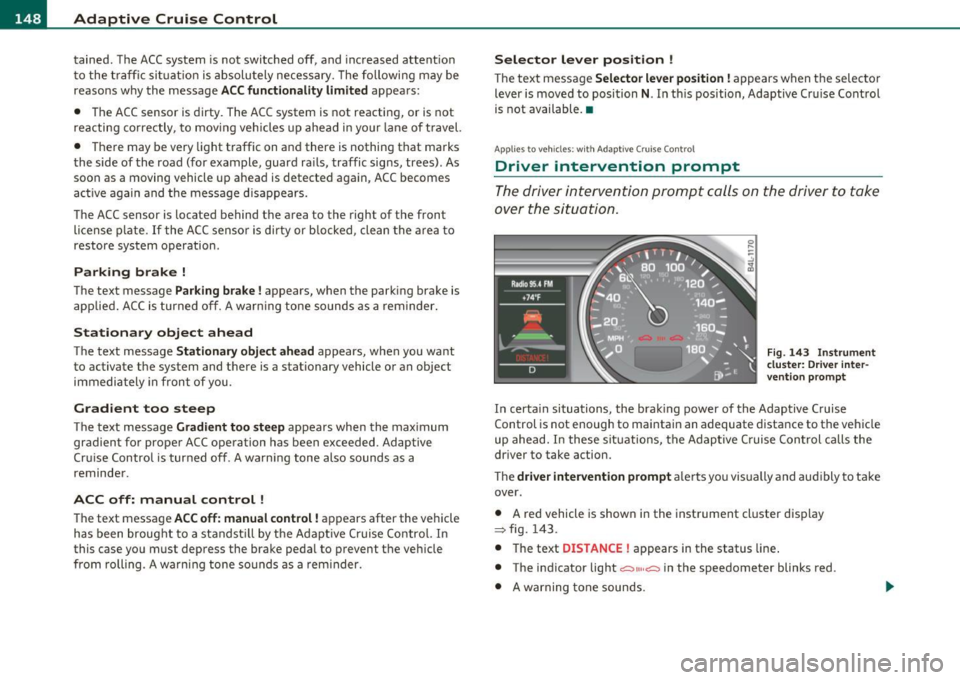
The driver intervention prompt calls on the driver to take
over the situation.
Fig . 143 I nstrument
cluster: Driver inter·
vention prompt
In certain situations, the brak ing power of the Adaptive Cruise
Control is not enough to maintain an adequate distance to the vehicle
up ahead. In these situations, the Adaptive C ruise Control calls the
driver to take action.
The
driver intervention prompt a lerts you vis ually and aud ibly to take
over .
• A red vehicle is shown in the instrument cluster display
:::::, fig. 143.
• T he text
DISTANCE! appears in the status line.
• The indicator light
<::::>11, ,~ in the speedometer blinks red .
• A warning tone sounds.