door lock AUDI Q7 2011 Owner´s Manual
[x] Cancel search | Manufacturer: AUDI, Model Year: 2011, Model line: Q7, Model: AUDI Q7 2011Pages: 392, PDF Size: 93.29 MB
Page 62 of 392
Opening and closing
Opening the windows
-Press the switch to t he first position and hold it until you
have opened the window as far as you want.
- Press the switch quickly to the
second position and the
window w ill automatica lly open all the way.
Closing the windows
Pull the sw itch to the first position and hold it u ntil you
have closed t he win dow as fa r as you wa nt.
- Pu ll t he swi tch quic kly to the
second position and th e
wi ndow w ill automatically close all the way .
[ i ] Tips
T he windows can still be opened a nd closed for about ten mi nutes
after the ign ition has been turned off . The power windows are not
shu t off unt il one o f the front doors is opened .•
Convenience close/open feature with the
lock in the driver 's door
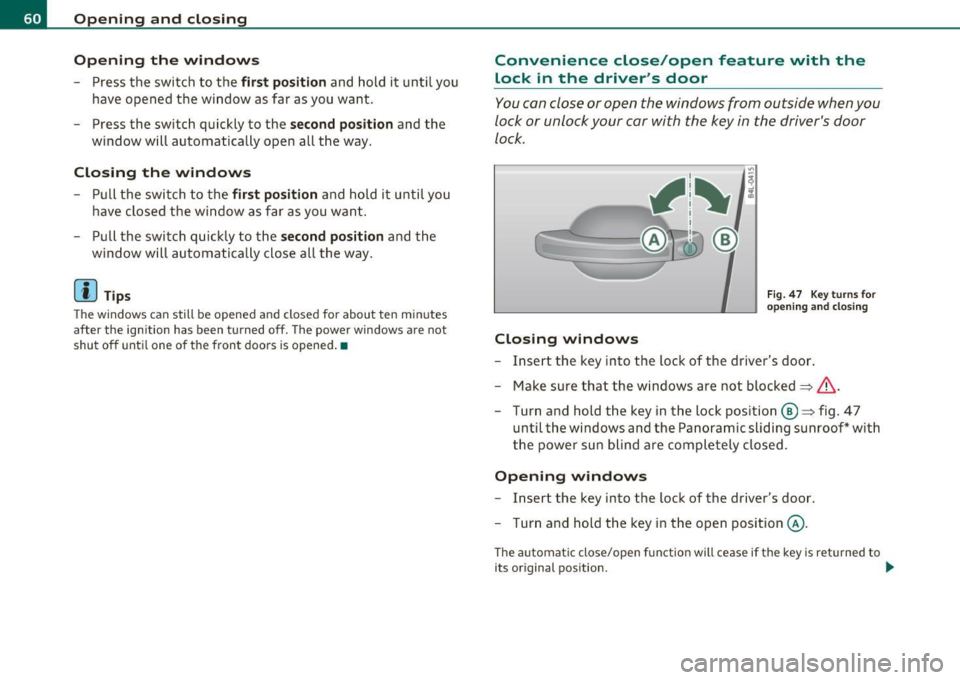
You can cl ose or o pen the windows from outside when you
loc k or unlock your car with the key in the driver 's door
lock.
Closing windows
Fig . 47 Key turns for
o pen ing and clos ing
- Insert the key into the loc k of the driver's door .
- Make sure that the w indows ar e not bl ocke d
=> &.
- Tur n and hold t he k ey in t he loc k position @=> fi g. 4 7
until t he w indows an d the Pa noramic sli ding sunroo f* with
th e p ower su n blind ar e comp lete ly clos ed .
Opening windows
- Insert the key into the loc k of the dr iver's door.
- Tur n and hold t he key in the open posi tion @.
The a utomat ic close/open f unct io n will ce ase if t he key is re turned to
its original pos ition . .._
Page 65 of 392

-To set an intermediate position manually, press the rocker
switch in the front area
e:> until the roof segment has
reached the desired tilt position==>& .
& WARNING
Improper use of the Panoramic sliding sunroof can cause serious
personal injury.
• Be careful when closing the Panoramic sliding sunroof. Not
paying attention could cause you or others to be trapped and
injured as the Panoramic sliding sunroof closes.
• Always take the key with you when you leave the vehicle to
prevent injuries caused by the Panoramic sliding sunroof closing
• Never leave children or persons requiring assistance alone in
the vehicle, especially when they could access the vehicle keys.
Unsupervised use of the keys can result in the engine being started
or use of vehicle systems such as the power windows, etc. which
could result in serious injury. The doors could be locked with the
remote key, delaying help in an emergency.
• The Panoramic sliding sunroof will continue to operate until
the ignition key has been removed and one of the front doors has
been opened. •
Applies to vehicles : w ith Panoram ic sliding sunroof
Convenience closing feature
The Panoramic sliding sunroof can be closed from outside
with the key in the driver's door lock .
-Insert the key into the driver's door lock.
- Turn and hold the key in the lock position ®==>
page 48,
fig. 32 until the Panoramic sliding sunroof is completely
closed ==> & in "Closing Panoramic sliding sunroof" on
page 62. The power sun blind is also closed.
Con tro ls a nd e quip
m en t Vehicle
OP-eration
Opening and closing
& WARNING
Be careful when closing the Panoramic sliding sunroof. Not paying
attention could cause you or others to be trapped and injured as
the Panoramic sliding sunroof closes. •
Applies to v ehicl es: w ith Panoramic slid in g sunroof
Opening and closing sunshade
I .~ "'
r~ 1~· I
0 g
"I ..!J
"' a,
' ~
G
{(e)
B
0
0 ..
~ ~ ffl ""'
[f 'd 11 -I
t _, $
b l•,:,,,;; =·:::"' == ;'·== ··.••,:::-= ·•,::: ::::= ·•=·· = ·=· ======· •=··•·•-,· =,~=·,., .. c":::'• .. ·= '·"•' :::· ,=••,•s ::::::::: j ~
Fig. SO Section of
front headliner: Switch
for sunshade
Fig. 51 Section of
headliner in rear:
I>· .. ,.:._::;::-_·;r .,;:;, :::;>:,: -:-·. _::: ;:::'·;-}.- .::,.:.-: ::::: :~ ,.:.·-:- -":-· Switch for sunshade
The two segments of the Panoramic sliding sunroof are each
equipped with a sunshade for protection against the sun's
rays. The front shade is power operated, the rear shade is
opened and closed manually . To prevent the vehicle interior _.,
Vehicle care Do-it-yourselt service iTechnical data
Page 66 of 392

Opening and closing
from heating up, you should close both sunshades when you
park your vehicle in the sun.
Opening and closing front sunshade
Tap the rear -:c;"J" of the rocker switch~ page 63, fig. 50 or
the rocker switch for rear-seat passengers~
page 63,
fig. 51 briefly to open the sunshade fully.
- Tap the front
·'J.rT of the rocker switch briefly to close the
sunshade fully~& .
- To set an intermediate position manually, press the front or rear of the rocker switch (depending on the position of
the shade)
until the desired position is reached ~ & .
Opening and closing rear sunshade
-Hold the sunshade by the grip and push it to the desired
position.
& WARNING
Never close the sunshade without paying attention or checking -
danger of injury! •
Applies to vehicles : w ith Panoram ic s liding sunroof
Emergency closing
In an emergency, the Panoramic sliding sunroof can be
closed electrically.
If the Panoramic sliding sunroof detects an object in its path
when it is closing, it will open again automatically. In this
case, you can close the roof with the power emergency
closing function .
Emergency closing of front roof segment
- Turn the switch~ page 61 , fig. 48 @ to the normal posi
tion @.
- Within five seconds after the sunroof opens automati
cally, pull the switch until the roof segment closes.~&.
The driver's and front passenger's doors must be closed.
- If the power emergency closing function is not possible, you must close the roof manually~
page 65.
Emergency closing of rear roof segment
-Within five seconds after the sunroof opens automati
cally, press the front
e:> of the rocker switch~ page 61,
fig. 48 ® until the roof segment closes~&. The driver's
and front passenger's doors must be closed.
- If the power emergency closing function is not possible,
you must close the roof manually ~
page 66.
& WARNING
Improper use of the Panoramic sliding sunroof can cause serious
personal injury.
• Be careful when closing the Panoramic sliding sunroof. Not
paying attention could cause you or others to be trapped and
injured as the Panoramic sliding sunroof closes.
• Always take the key with you when you leave the vehicle to
prevent injuries caused by the Panoramic sliding sunroof closing
• Never leave children or persons requiring assistance alone in
the vehicle, especially when they could access the vehicle keys.
Unsupervised use of the keys can result in the engine being started
or use of vehicle systems such as the power windows, etc. which
could result in serious injury. The doors could be locked with the
remote key, delaying help in an emergency. .,,.
Page 70 of 392

Clear vision
In the AUTO positio n the low beams are switched off automatically
w hen the ign it ion is turned o ff.
Light Sensor Malfunction
In the event of a light senso r m alfun ction, the driver is not ified in the
instrument cluster display:
~ Automatic headlight s/ automatic wipers defective
For safety reasons the low beams a re turned on permane ntly with the
switch in
AUTO . However, you can contin ue to turn the lights on and
off using the light sw itch. Have the light sensor checked as soon as
possible at an autho rized Audi dealer or q ua lified workshop.
& WARNING
• Never u se daytime running lights to see where you are going .
They are not bright enough and w ill not let you see far enough
ahead for safety, especially at dusk o r when it i s dark . Always
s witch on the low beams at du sk or when it i s dark.
• Automati c headlights are only intended to as sist the dri ver.
They do n ot relieve the driver of h is re spon sibility to check the
headlights and to turn them on manually according to the current
light and visibility condition s. For example, fog and rain cannot be
detected by the light sensors. So alw ays sw it c h on the headl ights
under the se weather condition s and when driving in th e dark
io.
• Crashes can happen when you cannot see the road ahead and
when you cannot be seen by other motori sts.
- Always tu rn on the headlights so that you can see ahead and
so that others can se e your car from the back.
(I) Tips
• With the swit ch in AUTO front fog lig hts a nd rea r fog l ights ca nnot
be t urned on in addition. •
The light sensor for headlight control is located in the rear view
mi rror moun t. D o no t apply any stickers to the w indshield in this area
to prevent malfunctions or failures .
• If you remove the ign ition from t he ignit ion lock wh ile the head
lights are still on, a buzzer wi ll sound as long as the driver's door is
open to remind you to t urn off the lights.
• Always observe the spec ific local regulations for your area as to
when to use your lig hts .•
Adjusting exterior lighting
T he functions are set in the f\1f\1J.
- Select: Function button [CAR ]> Systems *> Exterior
lighting .
Coming home
The Corning hom e function ensures tha t a fter turning off the igni
tion and open ing the driver 's door
the veh icle per iphery is illum i
nated in the dark. I n addition, the front fog lights, the ta il lights and
the license plate l ight are turned on . On-time can be set for a period
from O (o ff) to 60 seconds .
Leaving home
The Leaving home function ens ures tha t when unlocking the vehicle
periphery is illuminated in the dark. In add ition, the front fog lights,
the tai l lights and the license p late light are turned on . This funct ion
can be turned on and off .
Daytime running ligh ts
U SA models : The daytime running lights can be turned on or off using
this funct ion .
Canada model s: The function cannot be t urned off. It is activated
automatically each time the ignition is t urned on. This men u item is
shown "greyed out". •
Page 74 of 392
Clear vision
0 Note
Do no t use the hig h beam or hea dlight fl asher if you know that these
cou ld blind oncoming traffic.•
Interior lights
Front interior Lights
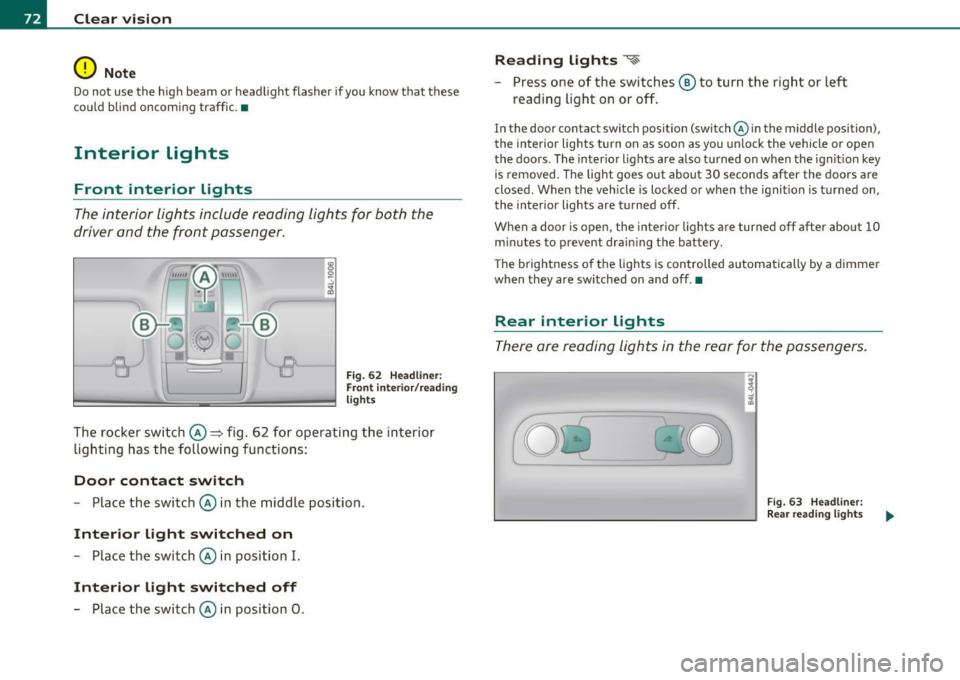
The interior lights include reading lights for both the
driver and the f ront passenger .
Fig . 62 Headlin er:
Fr ont inte ri or/ rea ding
lights
The rocker switch©=> fig . 62 for operating the interior
lighti ng has the followi ng functions :
Door contact switch
-Place the switc h© in the middle position.
Interior light switched on
-Place the switch © in position I.
Interior light switched off
- Place the switch © in position 0 .
Reading lights ~
- Press one of the switches ® to turn the right or left
reading light on or off.
In the door contact sw itch position (switch @in the middle position),
the interior lights turn on as soon as you un lock the vehicle or open
the doors . The inter io r lights are also t urned on when the ign it ion key
is removed . The light goes out about 30 seconds after the doors are
closed. W hen the vehicle is locked or when the ignit ion is t urned on,
the interior lights are turned off.
When a door is ope n, the interior lights a re turned o ff afte r about 10
m inutes to prevent dra in ing the battery.
T he brightness o f the lights is controlled automatica lly by a dimmer
when they are sw itched on and off. •
Rear interior Lights
The re are reading lights in the rear for the passengers.
Fi g. 63 Headli ner:
Rear re a din g ligh ts
Page 75 of 392
r ,:le,
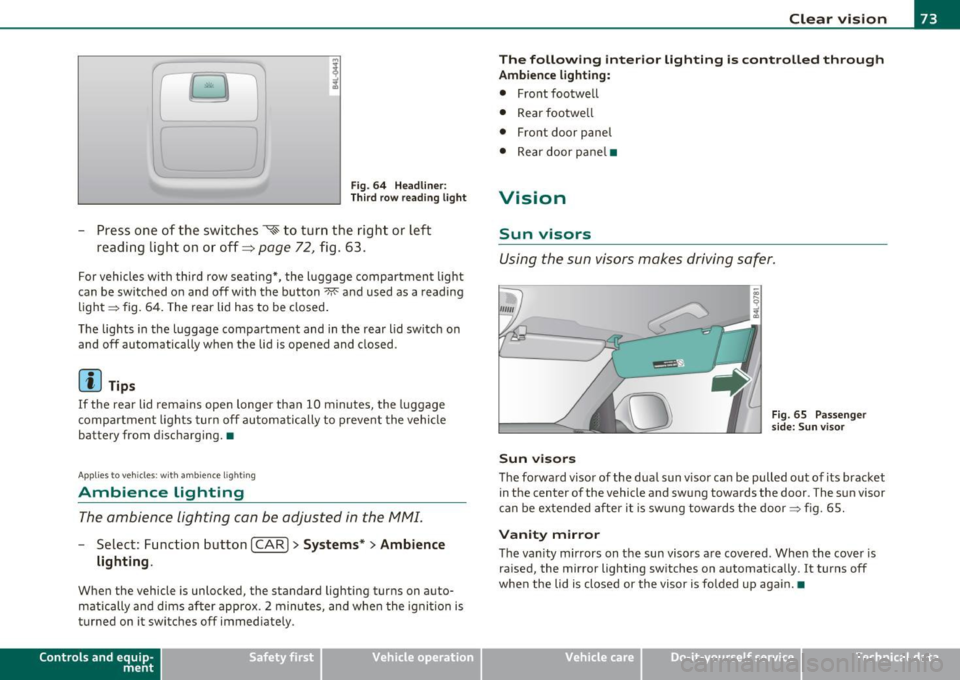
Fig. 64 Headliner :
Third row reading light
-Press one of the switches ~ to turn the right or left
reading light on or off~
page 72, fig . 63.
For vehicles with third row seating*, the l uggage compartment light
can be switched on and off with the button~ and used as a reading
light => fig. 64. The rear lid has to be closed.
The lights in the luggage compartment and in the rear lid switch on
and off automatically when the lid is opened and closed.
[ i ) Tips
If the rear lid remain s open longer than 10 minutes, the luggage
compartment lights turn off automatically to prevent the vehicle
battery from discharging. •
Applies to veh icles: with ambience light ing
Ambience Lighting
The ambience lighting can be adjusted in the MMI.
-Select: Function button I CAR]> Systems *> Ambience
lighting .
When the vehicle is unlocked, the standard lighting turns on auto
matically and dims after approx. 2 minutes, and when the ignition is
turned on it switches off immediately.
Con tro ls a nd e quip
m en t Vehicle
OP-eration
Clear vision
The following interior lighting is controlled through
Ambience lighting:
• Front footwell
• Rear footwe ll
• Front door panel
• Rear door pane l•
Vision
Sun visors
Using the sun visors makes driving safer.
Sun visors
Fig. 65 Passenge r
side: Sun v isor
The forward visor of the dua l sun v isor can be pulled out of its bracket
in the center of the vehicle and swung towards the door. The sun visor
can be extended after it is swung towards the door=> fig. 65.
Vanity mirror
The vanity mirrors on the sun visors are covered. When the cover is
ra ised, the mirror lighting switches on automatically . It turns off
when the lid is closed or the visor is fo lded up aga in.•
Vehicle care Do-it-yourselt service iTechnical data
Page 91 of 392
Seat memory
Applies to veh icles: with seat memory
Driver's seat memory
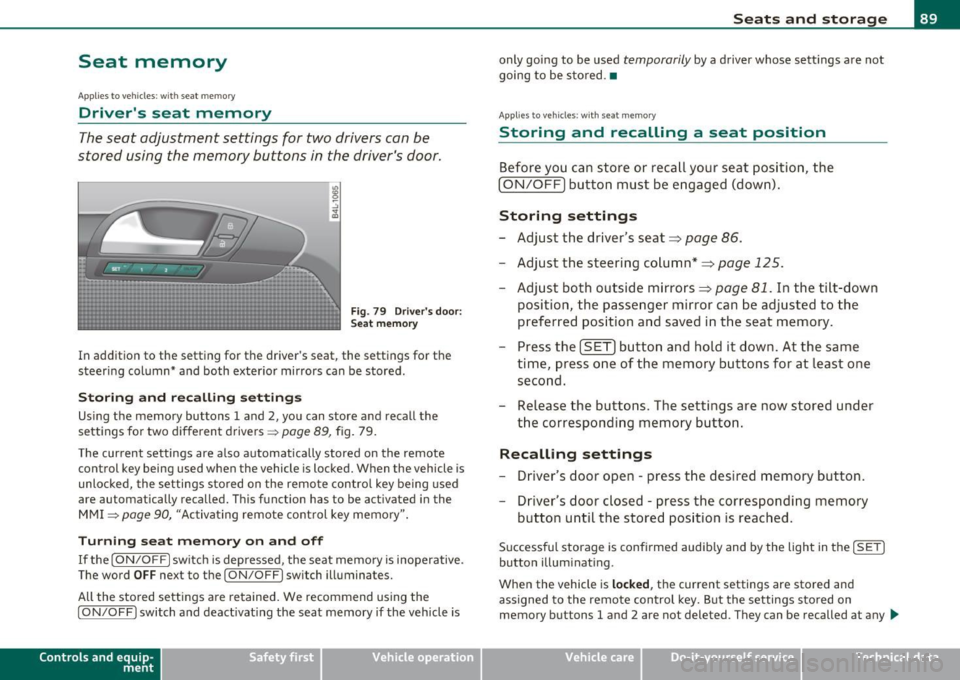
The seat adjustment settings for two drivers can be
stored using the memory buttons in the driver's door.
Fig . 79 Driver's door:
Seat memory
In addition to the setting for the driver's seat, the settings for the
steering column* and both exterior mirrors can be stored.
Storing and re calli ng setting s
Using the memory buttons 1 and 2, you can store and recall the
settings for two different drivers =>
page 89 , fig. 79.
T he current settings are also automatically stored on the remote
control key being used when the vehicle is locked. When the vehicle is
unlocked, the settings stored on the remote contro l key being used
a re automatically recalled. This function has to be activated in the
MMI
=> page 90, "Activat ing remote control key memory ".
T urning se at m em ory on and off
If the [ ON/OFF] switch is depressed , the seat memory is inoperative .
The word
OFF next to the [ ON/OFF] switch illuminates.
All the stored settings are retained. We recommend using the
[ ON/OFF ] switch and deact ivat ing the seat memory if the vehicle is
Con tro ls a nd e quip
m en t Vehicle
OP-eration
Seats and storage
only going to be used temporarily by a driver whose settings are not
going to be stored .•
App lies to vehi cles : w it h seat memo ry
Storing and recalling a seat position
Before you can store or recall your seat position, the
(ON/OFF) button must be engaged (down) .
Storing settings
-Adjust the driver 's seat => page 86.
- Adjust the steering column*=> page 125.
Adjust both outside mirrors=> page 81. In the tilt -down
position, the passenger mirror can be adjusted to the
preferred position and saved in the seat memory.
- Press the
(SET) button and hold it down. At the same
time, press one of the memory buttons for at least one second.
- Release the bu ttons. The settings are now stored under
the corresponding memory button.
Rec alling settings
- Driver's door open -press the desired memory button.
- Driver's door closed -press the corresponding memory
button until the stored position is reached .
Successful storage is confirmed audib ly and by the light in the [ SET]
button illuminating.
When the vehicle is
loc ked , the current settings are stored and
assigned to the remote control key. But the settings stored on
memory buttons 1 and 2 are not deleted. They can be recalled at any
~
Vehicle care Do-it-yourselt service iTechnical data
Page 109 of 392
_______________________________________________ S_ e_a _t_ s_ a_n_ d_ s_ t_o _r_a _, g::;.,_ e __ ffl'II
[I) Tips
When the engi ne is off and accessories are st ill plugged in and a re o n,
the vehicle battery can sti ll be drained .•
Storage
General overview
There are numerou s places to store items in your vehi cle .
Glove com pa rt me nt
Cooling box in glove compartment
Sto ra g e com partmen t in roof
Coat hooks
Storage in the door panels
Storage net in footwell
Storage net in the front seatbacks
Storage net in luggage compartment
=> page 107
=> page 109
=> page 109
=> page 109
=> page 110
=> page 11 0
Sto rage com partment bene ath car go floo r => page 99
& WARNING
• Always remove objects from the inst rument panel. Any items
not stored could slide around inside the vehicle while driving or
when accelerating or when applying the brakes or when driv ing
around a corner .
• When you are dri ving make sure that anything you may have
pla ced in the center console or other storage locations cannot fall
out into the footwells. In case of sudden braking you would not be
able to brake or accelerate.
Controls and equip
ment Safety first
& WARNING (
co ntinued )
• Any articles of clothing that you have hung up must not inter
fere with the driver's view. The coat hooks are designed only for lightweight clothing. Never hang any clothing with hard, pointed
or heavy objects in the pockets on the coat hooks . Dur ing sudden
braking or in an accident - especially if the airbag is deployed -
these objects could injure any passengers in side the vehicle. •
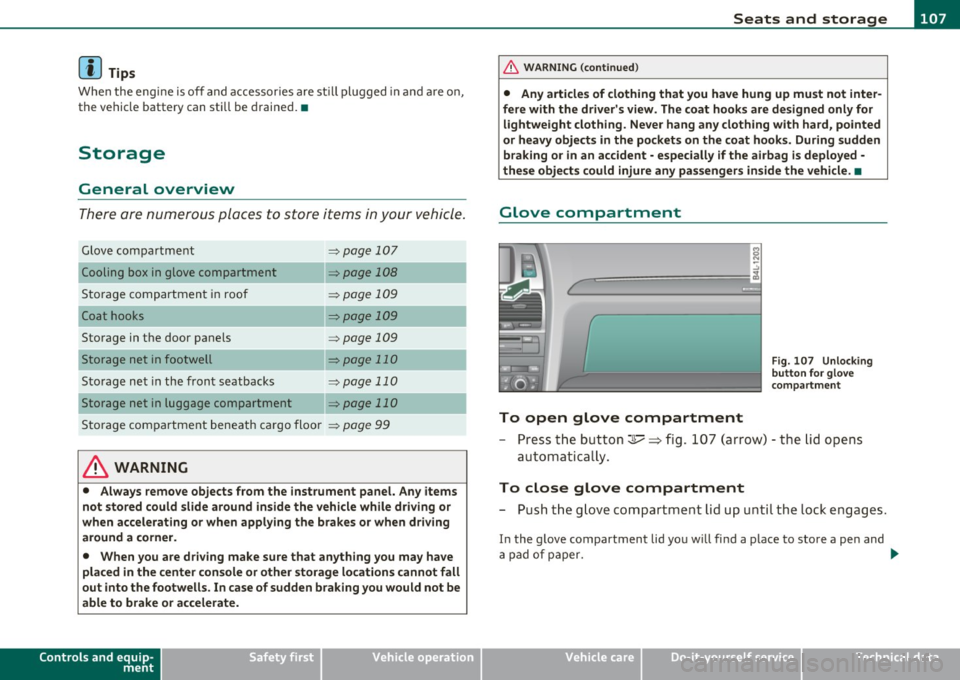
Glove compartment
To open glove compartment
Fig. 107 Unlock in g
button for g love
c ompartment
- Press th e button ::!I----~ fi g. 107 (arrow) - t he lid opens
au tomatica lly .
To close glove compartment
- Push t he g love compartme nt li d up u nti l the lock e ngag es.
In the g love compartment lid yo u w ill find a place to store a pen and
a pad of paper. _.,
Vehicle care Technical data
Page 132 of 392

IIIJL--_O=-:.. n.:.....: t;,:.h .:...:e~ r...::o =-- a=-.:. d;__ ________________________________________________ _
The glow plug indicator light w ill only ill uminate for approximately 1
se cond when the engine is w arm o r the ou tside temperature is hig her
than 46
°F (8 °() . That means you can sta rt the eng ine immediately .
& WARNING
Never allow the engine to run in confined spaces · danger of
asphyxiation.
0 Note
• Avoid high eng ine rpm, full th rottle and heavy engine loads until
the engine has reached operat ing temperature - ot herw ise you risk
eng ine damage.
• The engine cannot be started by push ing or tow ing the veh icle .
dr iving right away . In this way you avoid unnecessary emissio ns .
[ i J Tips
If you open the driver 's door when the ignition is switched on, a
buz zer sounds and the message
Ignition i s on appea rs in the instru
ment cluste r display . Please switch the ignition off .•
A ppli es to veh icles: w ith Conve nienc e key
Switching engine off with the !STO P] button
- Bring your vehic le to a comp lete stop.
Fig . 1 27 Co nveni ence
key : ENGI NE STOP
bu tt o n
- Move t he selector lever to the P or N pos ition .
- Presst he(STOP]butt on =:> fig .12 7 .
Pressi ng the !STOP I bu tton on ce sw itches off the engine and the igni
tion. If yo u press the
I STOP ) button aga in for more than 1 second,
t he steeri ng is locked, provided th at the sele cto r lever is in the P posi
tion =>& .
Emergency OFF function
If necessary, the eng ine can be switched off with the se lector leve r in
t he R, Do r S posi tions. To do so, step o n the brake pedal and press
and hold the !STOP] button (veh icle speed must be less than 6 mph
/ 10 km/h.
& WARNING
• Never turn off the engin e until the vehicle has come to a
complete stop.
• The brake booster and servotronic only work when the engine
is runn ing. With the ignition turned off , you h ave to apply more
ai,,,
Page 133 of 392

On the road -
----------------
& WARNING (co ntinued )
force when steering or braking. Since you cannot stee r and stop
normally, thi s can le ad to accident s and serious injuries .
• For safety rea sons , you should always park your vehicle with
the selector lever in P . Otherwise, the vehicle could inad vertently
roll away.
• After the engine has been switched off, the radiator fan can
continue to run fo r up to 10 minutes · even with the ignition
switched off . It can also switch on again after some time if the
coolant temperature r ises as the result of a heat buildup or if the
engine i s hot and the engine compartment is additionally heated
by the sun 's rays .
0 Note
If the engine has bee n under heavy load for an exte nded period, hea t
builds up in the engine comp art me nt aft e r t he eng ine is swit ched off
- there is a r isk of damaging the eng ine . Allow the engine to run at id le
for about 2 m inutes befo re switching it off. •
Appli es to ve hicles : w ith Con venience key
Driver messages in the instrument cluster
display
If a f unc tio n is no t pr ese nt, a driver mess age ap pea rs .
No key identified
This message appears w hen the ISTART I butt on is presse d if there is
no maste r key ins ide the vehicle o r if the system does not recog nize
it . F or examp le, the master key can not be recognized if it is covere d
by an ob ject (e .g . a luminum brief case) which
scr eens the ra dio
signal. Electron ic devices such
as cell p hones can a lso interfere w it h
the rad io s ignal.
Controls and equip
ment Safety first Press brake pedal to start engine
Thi
s message appea rs i f yo u press the I ST ART I button to start the
eng ine a nd do no t dep ress t he b rake pedal. The engine can o nly be
sta rted if t he b rake pedal is dep ressed.
Engage Nor P to start engine
Thi s message appea rs w hen the engine is started i f the selec to r lever
for the automatic transmission is not in the P o r N pos it ion . T he
engine can only be starte d wit h the selector i n these pos itio ns.
Key not in veh icle
Thi s mess age appea rs along w it h t he sym bol if th e mas te r k ey is
removed from the vehicle with t he eng ine runn ing. It is intended to
remind yo u (e .g . when cha nging drive rs) not to cont inue the journey
without the maste r key .
If the master key is no longer in the vehicle, yo u cannot switch off the
ignition after stop ping the engi ne and you also ca n no t sta rt th e
eng ine again . Moreover, you cannot lock the veh icle from the outs ide
with the key.
Shift to P otherwise vehicle can roll away. Doors do not lock if you
are not in P.
Th is message appears for safety reasons along with a warning buzze r
if the se lec tor lever f or the au toma tic tran smis sio n is no t in t he P
position when the ignition is switched off with t he
!STOP] butto n and
t he d river's door is opened. Move the sele ctor lever to the P posit io n,
otherwise the vehicle is not secured aga ins t rolling away . You also
cannot loc k the vehi cle using the locking button on the doo r handle
or us ing t he remote key .
To engage steering lock, press and hold STOP button
Th is message appea rs fo r safety reasons if the eng ine and the ign ition
h ave been swi tched o ff by pres sing t he
IS T OP I butt on once, a nd th en
t he d river's door is ope ned. In t his instance, the s teer ing is no t
locke d. The steer in g is locke d:
• If you press the
I ST O P] but ton again for mo re t han 1 second. .,,
Vehicle care Technical data