tow AUDI Q7 2011 Owner´s Manual
[x] Cancel search | Manufacturer: AUDI, Model Year: 2011, Model line: Q7, Model: AUDI Q7 2011Pages: 392, PDF Size: 93.29 MB
Page 164 of 392

1111....__A_ u_ d_ i_s_ i_d _e_ a_ s_ s_ is_t _______________________________________________ _
when usin g a retrofitted tow ing hitc h that was not installed
acc ording to factory speci ficati ons. •
Applies to vehicles: w ith sid e assis t
Safety tips
T he s ide assist detect ion may be limited w hen driving aro und narrow
st reet corners, on hilly st ree ts, and un der poo r wea the r condit ions.
It is possible that the radar sensors may also detect o ther objects,
such as high or staggered g ua rdrails .
S ide assi st does not me asure actual lane wid th. The sy stem assume s
a fixed lane w idt h. Detection in the left and right lanes is based on
t his assumed lane wid th. W hen drivi ng o n nar row ro ads o r whe n
dr iving to the left o r right of the center of a travel lane, it is possib le
that vehicles will be detected that are
not i n the lane next to the lane
you a re us ing.
& WARNING
• Improper reliance on the side assist system can cause collisions
and serious personal injury:
-Never rely only on side assist when changing lanes.
- Always che ck rear view mirrors to make sure that it is safe to
change lanes.
• Side as sist cannot detect all vehicles under all conditions
danger of accident!
• Side assi st cannot detect vehicle s in time to alert you when
they approach from behind at very high speed, or fall drop back
very quickly.
• The radar sensor's
vision can be reduced or entirely blocked by
rain , snow , and heavy spray. This can result in side assi st not
adequately detecting vehicles or , in some cases, not detecting
them at all. Alway s keep an eye on the direction you are traveling
and the relevant area around the vehicle .
& WARNING (co ntinued )
• Please note that side assist indicates there are approaching
vehicles, or vehicles in your blind spot, only after your vehicle has reached a driving speed of at least 19 mph (30 km/h).
• Side assist signal does not work around tight corners (turning
radius less than 328 feet , or 100 m).
• Side assist is no replacement for the driver's full attention. The
driver alone i s responsible for lane changes and similar driving
maneuvers . Always keep an eye on the direction you are traveling
and the relevant area around the vehicle.
0 Note
T o ensure that s ide ass ist is not a dversely affected, yo u should not
bloc k the ar ea on the rear bumper w he re the radar sensors are
locate d w it h foreign objects (such as w it h sticke rs or b icycle racks).
[ i ] Tips
If the positions o f the radar sensors have been c hanged as a result of
a r ear end -colli sion, fo r instan ce, h ave side assis t che cked b y an
author ized Audi dea ler for safety reasons. •
Page 171 of 392
______________________________________________ A_ u_ t_ o _ m_ a_ t_ ic_ t_r_a _ n_ s_m_ i_ s _s_ i_ o _ n __ _
-Now press the inter lock an d mov e the sel ector lever to the
N pos ition.
Th e se lecto r leve r ca n only be moved from the P position if the ign i
tion key is in the lock and the ign it ion is turned on. If the vehicle has
t o be pushed or towed if the power supp ly fai ls (e .g. battery is
discharged), the selector lever must be moved to the
N position using
t he emergency lock ing devi ce. •
Controls and equip
ment Safety first
Vehicle care Technical data
Page 172 of 392

lffl!I.___P_ a_r_k _ i_n ...::g::- s_, y...._ s_t _e _m ________________________________________________ _
Parking system
Applies to vehicles: w it h rear park ass ist/parking system advanced
General information
T here are two different park assist systems ava ilab le depending on
your veh icle's equipment leve l.
The
r ear park ass ist is an acoust ic park assist system that will give you
a sou nd warn ing to let you know the re is something
behind t h e
veh icle=>
page 170.
T he parking system advanced audibly and visually te lls you there is
something
in front of a nd behind the vehicle. A rearv iew camera also
shows you what is behind the vehicle. This image helps you when
para lle l par king or reverse parking=>
page 171.
[I) Tips
The senso rs must be ke pt cl ean and free of snow and ice fo r the park
assist to operate.•
Rear park assist
Applies to vehicles: with rear park assist
Description
The rear park assist is an audible system.
Sensors are located in the rear bumpers. If these detect an obstacle,
audib le signa ls warn you . The ra nge at wh ic h the sensors begin to
measure is approximate ly:
rear side
cen
ter
2 ft (0 .60 m)
5.2 ft (1.60 m)
The close r you get to the obstacle, t he shorte r the interval between
the audible s ignals. A continuous tone sounds when the obstacle is
less than approximate ly 1 foot (0.30 meters) away. Do not continue
dr iving farther .
If the dis tance to an obstacle remains constant, the volume of the
distance warning gradually drops after about four seconds (this does
no t app ly in the co ntin uous tone range).
Th e pa rk assist is act ivated automat ically when reve rse gear is
engaged. A short confirmation tone sounds.
& WARNING
• The pa rking system cannot repla ce the dri ve r's attention . The
driver alone i s re sponsible for parking and similar driv ing man eu
v ers.
• Sen sor s have blind spots in which objects cannot be detected .
Pay special attention to small children and animal s becau se the
s ensors cannot alwa ys detect them .
• Always keep your eyes on the vehicle' s surrounding s, using the
rear view mirror as w ell.
0 Note
Low obstacles a lready s ignaled by a warning can disappea r from the
system's detection range as they are approached and will not
cont inue to be s ignaled . Objects such as bar rier chai ns, trai ler draw
bars, thin pa inted vertical po les or fences may not be detected by the
system , posing risk of damage .
[I) Tips
• Please follow the ins truc tion s fo r towing a trailer=> page 177.
• You can change the volume and pitch of the signals => page 176. •
Page 174 of 392

IIIJL-___;P:....:: a:.:.r..:.k .:.: i.:..n .:.:g:!....: s:.: y~ s..:t ..:e ..:.m .:..:... _______________________________________________ _
The closer you get to the obstacle, the shorter the interval between
t he audible s ignals. A contin uous tone sounds whe n the obstacle is
less than approximately 1 foot (0 .30 meters) away . Do not co ntin ue
driving farther.
If the distance to an obstacle remains constant, the volume of the
distance warning gradually drops after about four seconds (this does
no t a pply in the co nti nuous to ne range).
Rear view camer a coverage area
The MMI display shows the area covered by the rear v iew camera
=.> page 171, fig . 171 (D . Objects that are not in the area covered@
are not shown on the M MI display.
We recommend that you practice parking with the rear v iew camera
in a traff ic -free location o r parki ng lo t to become fam iliar wi th t he
system, the orientation lines, and the ir funct ion . When do ing th is,
there should be good lig ht and weather cond itions.
In the MM I disp lay, objects o r vehicles appea r closer or fu rther away
if:
• you are dr iv ing in r everse gea r from a level surface onto an incline,
or a downwa rd slope,
• you a re driving i n reve rse gear toward p rot ruding objec ts,
• the vehicle is carry ing too much load in the rear.
T he accur acy of the or ien tat io n lines and blue su rf a ces dimin ishes if:
• the Adaptive Air Suspens ion* is faulty or the dynamic, offroad or
lift mode is on,
• the rear view camera does not prov ide a reliable image, for
example, in poor visib ility conditions or if the lens is dirty,
• the image on the screen is not visible due to sun g lare and ref lec
ti on .
Caring for the rear view camera lens
The rear view came ra is lo cated above the rea r license plate bracke t.
For the parking system to ope rate, the lens=>
page 171, fig. 172
must be kept clean: •
Dampen the lens with a househo ld alcoho l-based glass cleaner,
and then wipe the lens clean with a dry cloth =>
CD.
• Remove snow with a hand brush and ice preferably with a de-ic ing
spray =>
CD.
& WARNING
• The parking sy stem cannot replace the dri ver's attention . The
d river alone i s respo nsible for p arking and sim ila r dri ving maneu
ver s.
• Sensor s hav e blind spots in which objects cannot be detected.
Pa y s peci al att ention to small children and animal s beca u se the
sen so rs cannot al ways detect them.
• Alway s keep your e yes on the v ehicle's surr ound ing s, u sing the
r ear view mirror as well.
• Do not all ow your self to be distract ed from traffic by the r ear
v iew camera pictu res .
• If the position and the installation angle of th e camera has
changed , for e xample, after a rear end colli sion, do not continu e
to use th e system for safety r ea son s. Hav e it check ed by a qualified
deale rship.
0 Note
• Low obstacles a lready signaled by a warning can disappear from
the system's detection range as they are approached and will not
continue to be signaled . Objects such as barrier chains, trai ler draw
bars, th in pa inted vertical po les or fences may not be detec ted by the
system, posing risk of damage.
• Never use warm or hot water to remove snow or ice from the rear
view camera lens -this co uld cause the lens to crack!
• When cleaning the lens , never use products that are abrasive .•
Page 176 of 392

llffl..__P_ a_r _k _i_n -=g ::...._ s..:y ;... s_ t_ e_ m ________________________________________________ _
& WARNING (continued)
• Use the rear view camera only with the rear lid completely
closed. Make sure any objects you may have mounted on the rear
lid do not block the rear view camera.
[ i ) Tips
• The sensors must be kept clean and free of snow and ice for the
park assist to operate.
• The visual display is shown in the illustration of the rear view
camera . This display shows where the sensors have detected an
obstacle.
• You can change the volume and pitch of the signals as well as the
display =>
page 176.
• Please follow the instructions for towing a trailer=> page 177 .
• What appears in the display is time-delayed. •
Applies to veh icles: wit h pa rking sy ste m adv anc ed
Reverse Parking
Parking mode 1 can be used when parking in a garage or
into a parking space.
Fig.175 MMidisplay:
aiming at a parking
spot Fig. 176
MMI display:
aligning the vehicle
-Switch the MMI on and select reverse gear.
- Turn the steering wheel until the orange orientation lines
(D appear in the parking spot=> fig. 175. Use the mark
ings @to help you estimate the distance from an
obstacle. Each marking represents 3
ft (1 meter) . The blue
area represents an extension of the vehicle's outline by
approximately 16 ft (5 meters) to the rear.
- While driving in reverse gear, adjust the steering wheel
angle to fit the parking space with the aid of the orange
orientation lines=>
0. ® marks the rear bumper. Stop
the vehicle when the red orientation line© borders an
object=> &.
& WARNING
• The rear view camera does not show the entire area behind the
vehicle =>
page 171, fig. 171. Watch out especially for small chil·
dren and animals . The rear view camera cannot always detect
them, posing risk of an accident!
• Please note that objects not touching the ground can appear to
be further away than they really are (for example, the bumper of
a parked vehicle, a trailer hitch, or the rear of a truck). In this case, .,
Page 179 of 392

_______________________________________________ P_ a _ r_k _in _ g,__ s.::;.y _s _t _e _ m ___ !l'I
[I) Tips
• T he warn ing tones can also be adjusted d irectly by the v isua l
display* or the picture from the rear view camera* . Simply press t he
S ettings * control butto n.
• Changed settings are activated when park ing system is switched
on again.
• T he settings are automatically stored and assigned to the remote
control key. •
Applies to veh icles: w ith rear park assist/park ing system advanced and t ra iler h itch
Trailer hitch
For vehicles with a factory installed trailer hitch, or a trailer hitch
ins talled a cco rding to factory specifica tions, the p arking sys tem rear
sensors do not come on whenever you shift into reverse gear or when
you p ress the
P,.,1~ swit ch*. If yo u install a hitch yourse lf, this f unction
may not work. In genera l the follow limitations may come up:
Rear park assist*
There is no warning for distances to the rear.
Parking system advanced *
There is no warning for d istances to the rear. The front sensors
remain act ivated. The v isua l display sw itches to the trailer tow ing
mode. The p icture from the rear v iew camera will not show the orien
tat ion li nes nor the bl ue surfaces. •
Applies to veh icles: with rear park ass ist/park ing sys tem advanced
Error messages
There is an erro r in the system if the LED on the Pwi switc h* is blink ing
and you he ar a continuous alarm for a few se con ds afte r swi tching on
Controls and equip
ment Safety first
the parking system or when the parking system
is a lready activated.
Have your au thor ize d Aud i deale r co rrec t th e error.
[I) Tips
If the er ror is not corrected befo re yo u switch off the ignition, when
you sw itch on the parking system again, the LED in the
P'#A sw itch * will
blink. •
Vehicle care Technical data
Page 180 of 392
lffllL__.!.A~d~a!!p~t~iv~e~A~i r'......=S:.!u:!:s~p:.::e:.!n..::s==.:_:io~n:..:.... ________________________________________ _
Adaptive Air Suspension
Air suspension and damping
Applies to veh icles : w ith Adap tive Air Suspens ion
Description
Air suspension and damping can be adjus ted separately.
Adaptive Air Suspens ion is an e lectron ically controlled springing and
damping sys tem. This chass is sys tem makes it eas ie r on the d river by
adapting to the particular si tuation through imperceptible control
processes.
T he
Adaptive Air Su spen sion component regu lates ground clea rance
depending on vehicle speed and driver input . It funct ions indepen
dently from the load cond it io n. Ac ce le rating to a speed above a
predetermined limit will make the vehicle lower itse lf. On the other
hand, dr iv ing more slowly res ults in the vehicle r aising again at
specific speeds.
T he
damping component provides individua l control of the damping
forces . For example , w ith damping characte rist ics set to p rovide
greater comfort, damping is set somewhat harder for a brief period
only as req uir ed, for example, whe n going a ro und a curve or when
brak ing.
Sett ings
Adaptive Air Suspension provides the driver with the opportun ity to
set the chass is characte rist ics also to their individual p refe rence.
With the driving modes
Comfort, Automatic and Dynamic the dr iver
has three chass is sett ings available, ranging from comfort to spo rty.
The
Offroad mode ca n be selected for dr iv ing on poor quality
s tr etc hes of road. In addition,
Li~ provides a fif th mode, w hich can be
selected when exceptiona lly high g round clearance is needed
==> page 179, "C hass is controls ".
T he modes are set in MMI
==> page 180 .
& WARNING
The height of th e parked vehicle can change du e to temperature
fluctuations or changes in load.
0 Note
• Whenever you park yo ur vehicle, always make sure there is
ade qua te clearance above and below t he ve hicle. The height of the
parked vehicle can change as the result of temperature fluctuations,
c hanges in loa d condition and changes in the dr iv ing mode (ground
cleara nce).
• If the veh icle is be ing transported (e .g . by tow truck, tra in , sh ip,
etc.), mount the tie-down cha ins/cables over the running su rface
(circumference) of the tires. Never se cure the vehi cle by the ax le, the
suspension struts or the front or rear tow line eye. For technical
reaso ns, the p ressure in the suspension st ru ts may change dur ing the
t ransport, whic h could result in the vehicle no longer being secured
pro perly.
• If you are goi ng to tow a trailer w ith a tra iler h itch that was
not
ins talled accor ding to f actory s pecifi cations, you mus t activa te t he
t rai ler operation mode manually:::::,
page 182.
[{] Tips
• Before you ca n raise your vehicle using the vehicle jack (for
example, when c hangi ng a flat tire) or a vehicle lift, you must activate
t he jac kin g mode :::::,
page 182.
• On some mode ls, the vehicle can reach its maximum speed on ly in
t he
Automatic and Dynamic modes .•
Page 184 of 392

1111....__A_ d_ a_,_ p_t _i_ v _e _ A_i_ r_ S_ u_ s ... p,_ e_n_ s_ io_ n __________________________________________ _
Raising and l owering
If a rrow (Dis solid red=> page 181, fig. 180 or white => page 181,
fig. 181, the veh icle is raised .
If arrow
0 is solid red or white, the vehicle is lowered .
T he respective arrow stays on until the level change is complete . The
time required for a level change can vary, depending on the current
dr iving cond it ions .
Displ aying the vehicle le vel
The current vehicle leve l is show n wit h segments fi lled ou t in the
segment display@. If only the bottom segment is filled out, the
vehicle is at highway leve l. If all segments a re filled o ut, the vehicle is
at high level 2 and has the greatest amount of ground clearance
possible.
W hile the vehicle is being ra ised or lowe red, t he target leve l is ind i
cated by an arrow © next to the correspond ing segment. The arrow
disappe ars aga in whe n the vehicle is a t the target level. •
Applies to veh icles: w ith Ad ap tiv e A ir Suspens ion
Jacking mode when changing a flat tire
This mod e must be activated in the MMI bef ore raising
the vehicle with a jack or on a vehicle
li~ .
-Select: Fu nction button [CAR)> function butto n [SETUP ]
> Jacking mode .
The veh icle jack mode must be activated before c hanging a whee l so
that the automatic contro l processes for t he air s uspensio n do not
make lifting w ith the vehicle jack more difficult.
The check lamp in the instr ument cluster display illuminates in
vehicle jac k mode.
W Tips
Th e veh icle ja ck mode is switc hed off automat ica lly at speeds above 9
mph (15 km/h). •
Appli es to veh icles : with tow ing h itc h and Adaptive Air Sus pen sion
Towing a trailer
Automatic lowering is not desirable when towing a
trailer.
- Selec t: Fu nct ion button [CARI > fun ction but ton [S ETUP I
> Towing mode .
As long as towing mode is activated, a ve hicl e w ith a t railer appears
in the
adaptive air suspension main menu.
Level Adjustment when towing a trailer
• Before h itching up the trailer and befo re adjust ing the tongue
we igh t at the trailer, the automatic or com fort mode mu st be
selected so that the vehicle can be at normal leve l=>
page 180, "MMI
se ttings" .
• If dr iv ing in dynamic mode is desired, this mode
must be selected
befo re hitc hing up the tra iler and before adjus ting the tongue
we ight. However, note that yo ur vehicle is lowered and ground clear
ance is reduced.
• If you have to drive under diff icu lt road conditions, you can select
offroad or li ft mode, aft er hitching up the trai le r or after adjust ing
the tongue weight .
• If the vehicle is at
normal level, an d you se lec t offro ad mode wh ile
traveling at speeds higher than 22 mph (35 km/h), the vehicle will
no t b e raised. O ffroad mode will a ppear as t he active mode in the
MMI D isplay.
• If the veh icle is in o ffro ad mode at
high level 1, it automatic a lly
lowers to
normal level when the vehicle is traveling at speeds
exceeding approximate ly 31 mph ( SO km/h). The vehicle is automat -...
Page 185 of 392

____________________________________________ A_ d_a_ p ,_ t_iv _ e_ A _ i_ r _ S_ u_s_, p __ e_n _ s_ i _o_ n __ _
ically raised to high level 1 again when the traveling speed falls below
approximately 25 mph (40 km/h) .
Restrictions when operating with a trailer
When operating with a trailer, the lift mode can only be selected up
to about 12 mph (20 km/h). Lift mode is automatically canceled
agai n when a speed of about 25 mph (40 km/h) is exceeded.
If the vehicle is in automatic , comfort, offroad or lift mode before the
trailer towing mode is activated, the dynamic mode cannot be acti
vated .
If the vehicle is in dynam ic mode before towing operation is acti
vated, it can be driven in this mode. If the suspension is switched
from th is mode to another mode, dynamic mode cannot be re
selected.
[I) Tips
• For vehicles with a factory installed towing hitch or a trai ler hitch
that was installed later according to factory specifications, the
system recognizes "Trailer towing mode" and activates this specia l
mode automat ically , as soon as the electr ical connection on the
trailer socket is connected. The mode ceases automatically when the
electrical connection to the trailer socket is disconnected.
• If the trai ler towing mode has been activated, the vehicle will not
drop to the low o r highway level. •
Controls and equip
ment Safety first
A
pp lies to vehicles : w ith Adapt ive Air Sus pens ion
Cargo mode
The rear of the vehicle can be lowered to make it easier to
load .
Fig. 182 Luggage
compartment detail:
Cargo mode switch
Activating cargo mode in the MMI
-Select: Function button [CARI> function button [SETUP)
> Lower for loading.
Using switch for activating cargo mode
- Close all vehicle doors.
- Open the trunk lid.
- Press the lower part of the switch ®~ fig. 182. The rear
of the vehicle is lowered.
- Press the upper part of the switch
(D. The rear of the
veh icle is raised again.
In cargo mode, the rear axle is lowered by 2.2 inches (55 mm),
compa red to the normal level.
While the vehicle is in cargo mode, the segments do not appear as
filled in the segment d isplay. .,,
Vehicle care Technical data
Page 194 of 392
• ....__D_ r_iv _i_ n_, g=-- S_ a _ f_e _,Ly _ ______________________________________________ _
Proper occupant seating positions
Proper seating position for the driver
The proper driver seating position is important for safe,
relaxed driving.
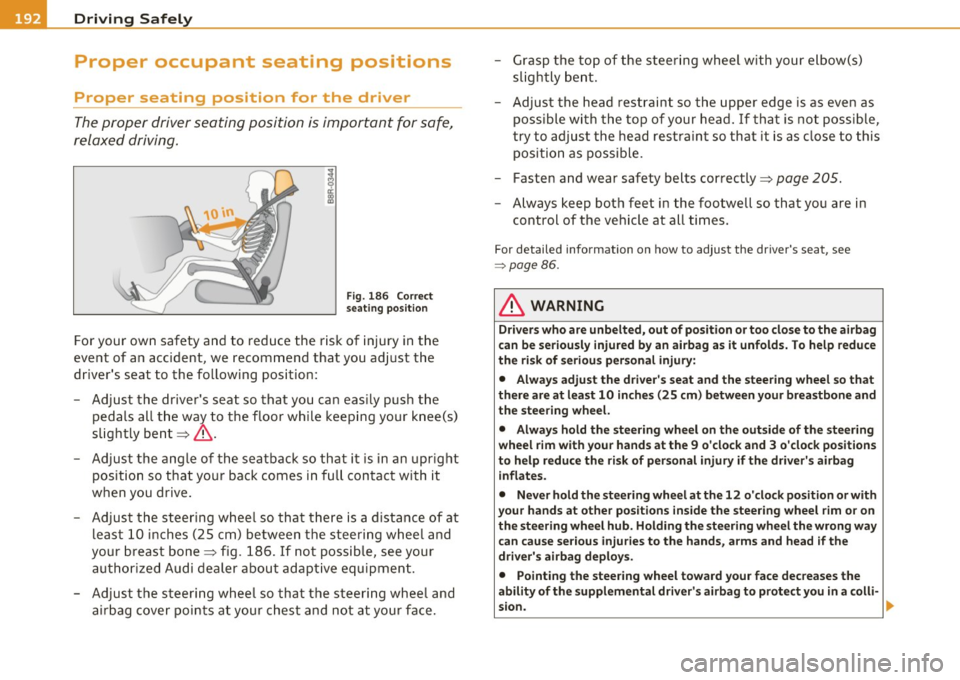
Fig. 186 Correct
seating position
For your own safety and to reduce the risk of injury in the
event of an accident, we recommend that you adjust the
driver's seat to the following position:
- Adjust the driver's seat so that you can easily push the
pedals all the way to the floor while keeping your knee(s)
slightly bent~&.
- Adjust the angle of the seatback so that it is in an upright
position so that your back comes in full contact with it
when you drive.
- Adjust the steering wheel so that there is a distance of at least 10 inches (25 cm) between the steering wheel and
your breast bone~ fig. 186. If not possible, see your
authorized Audi dealer about adaptive equipment.
- Adjust the steering wheel so that the steering wheel and airbag cover points at your chest and not at your face. -
Grasp the top of the steering wheel with your elbow(s)
slightly bent.
- Adjust the head restraint so the upper edge is as even as
possible with the top of your head. If that is not possible,
try to adjust the head restraint so that it is as close to this
position as possible.
- Fasten and wear safety belts correctly~
page 205.
-Always keep both feet in the footwell so that you are in
control of the vehicle at all times.
For detailed information on how to adjust the driver's seat, see
=> page 86.
& WARNING
Drivers who are unbelted, out of position or too close to the airbag
can be seriously injured by an airbag as it unfolds. To help reduce
the risk of serious personal injury:
• Always adjust the driver's seat and the steering wheel so that
there are at least 10 inches (25 cm) between your breastbone and
the steering wheel.
• Always hold the steering wheel on the outside of the steering
wheel rim with your hands at the 9 o'clock and 3 o'clock positions
to help reduce the risk of personal injury if the driver's airbag
inflates.
• Never hold the steering wheel at the 12 o'clock position or with
your hands at other positions inside the steering wheel rim or on
the steering wheel hub. Holding the steering wheel the wrong way
can cause serious injuries to the hands , arms and head if the
driver's airbag deploys.
• Pointing the steering wheel toward your face decreases the
ability of the supplemental driver's airbag to protect you in a colli-
sion.
~