warning AUDI Q7 2011 Owner´s Manual
[x] Cancel search | Manufacturer: AUDI, Model Year: 2011, Model line: Q7, Model: AUDI Q7 2011Pages: 392, PDF Size: 93.29 MB
Page 35 of 392

For example, if the transmission selector lever is not in the P position
when the engine is turned off, the following message appears:
Shift to P otherwise vehicle can roll away. Doors do not lock if
you are not in P.
The ignition key can only be removed with the selector in this posi
tion . This and other messages are brought up if a function cannot be
carried out.
Driver messages and red symbols
If a red symbol appears in the display, a driver message can be shown
by pressing the (CHECK] button.
For example, the symbol for a problem with engine oil pressure~
appears in the display .
If you then press the I CH ECK] button, the
following driver message appears in the display:
Switch off engine ! Oil pressure too low
The driver message in the display goes out after about 5 seconds . The
driver message can be displayed again by briefly pressing the
[CHECK] button .
Driver messages and yellow symbols
If a yellow symbol appears in the display, a driver message is also
displayed automatically.
For example, the symbol ., appears in the display, indicating low
windshield washer fluid level. The following message also appears:
Please refill washer fluid
The driver message disappears after a few seconds. The driver message can be displayed again by briefly pressing the [ CHECK]
button. •
Controls and equip
ment Safety first
Driver information display
Red symbols
A red symbol means DANCER.
-Pull off the road.
- Stop the vehicle.
- Turn off the engine .
Fig. 24 Display:
engine coolant level
warning (priority 1)
Check the malfunctioning system. Contact your autho
rized Audi dealer or a qualified workshop for assistance.
Red symbols indicate a priority 1 malfunction -Danger!
With a priority 1 malfunction, a large symbol appears in the center
area of the display~ fig . 24 . When the symbol appears,
three
warning tones sound in succession. The symbol continues to blink
until the malfunction has been repaired.
If there are
more than one priority 1 malfunctions, the symbols
appear one after the other for about 2 seconds .
An additional driver message can also be displayed by briefly pressing
the
I CHECK ] button.
The red symbols mean:
Vehicle care Technical data
Page 36 of 392

Driver information d isplay
0 Alternator ma lfunction =>page 34
BRAKE
USA model s: =>page 34
Brake system malfunction
Can ad a m odel s: ::>page 34
Brake system malfunction
- --
-~-
Engine coolant level too => page 35
low/engine coolant temperature
-too high
~ Engine o il pressure too low ::> page36
Ad Blue /7 =>page296
Ad Blue c,,,.c AdBlue malfunction * =>page296
•
~ ....
Faulty steering =>page 36
© Faulty ignition switch =>page37
~
[ i J Tips
• If the warning/indicator light BRAKE (USA models)/ «D> (Canada
mode ls) in the instrument cluster flashes, the re is a brake system
malfunction. By press ing the [ CHECK] button, you can bring up a
dr iver message which explains the ma lfunct ion in more deta il. Please
note =>
page 34 .
• Speed wa rnings threshold 1 9 (USA mode ls)/ 0 (Canada models)
and threshold 2
8 , (USA mode ls)/ 8, (Canada models) are also shown
as red symbols . T he warning is a lways shown as a sma ll symbol in the
upper area of the display=>
page 31. •
Alternator malfunction 0
If the D symbol in the instrument panel display flashes, then there
is a malfunction in the a lternato r or the veh icle electronics. A warning
to the driver will appear, too. The driver warning goes out after about
5 seconds, but it can be b ro ught up at any time by pressing the
I CHECK] button again .
Usua lly, you can still drive to the next dealership. Turn off a ll but the
most necessary electr ica l consumers, since these drain the veh icle's
battery.
0 Note
If the _ f_ warning symbol (coolant system malfunction) also lights up
on the instrument panel dur ing the trip=>
page 35, then you have to
stop immediately and turn off the engine. The coolant pump is not
working anymore -danger of damage to the engine! •
Brake system malfunction
A malfunction in the brake system must be repaired as
soon as possible.
If the warning /indicator light BRAKE (USA models)/ (CD)
(Canada models) in the instrument cluster flashes, there is a
brake system malfunction. By pressing the
[CHECK] button,
you can bring up a driver message which explains the malfunction in more detail.
Stop v ehicle and check brake fluid level
- Pull off the road.
- Stop the vehicle.
- Turn off the engine .
- Check the brake fluid level:::::,
page 311.
Page 37 of 392
- Contact your nearest authorized Audi dealer or qualified
workshop if necessary.
Warning ! Fault in brake system. Contact
workshop
- Drive carefully to the nearest authorized Audi dealer or
qualified workshop and have the malfunction corrected
=>& .
If the ABS system malfunctions, the ABS warning/indicator light illu
minates together with the brake system malfunction warning/indi
cator light:::::, &.
& WARNING
• Always observe the warnings in:::::, page 290, "Engine compart
ment", before opening the hood and checking the brake fluid.
• Driving with low brake fluid is a safety hazard. Stop the car and
get professional assistance.
• USA models: If the BRAKE warning light and the S warning
light come on together, the rear wheels could lock up first under
hard braking. Rear wheel lock-up can cause loss of vehicle control
and an accident. Have your vehicle repaired immediately by your
authorized Audi dealer or a qualified workshop. Drive slowly and
avoid sudden, hard brake applications.
• Canada models: If the brake warning light((]:» and the ABS
warning light come on together, the rear wheels could lock up
first under hard braking. Rear wheel lock-up can cause loss of
vehicle control and an accident. Have your vehicle repaired imme
diately by your authorized Audi dealer or a qualified workshop.
Drive slowly and avoid sudden, hard brake applications. •
Controls and equip
ment Safety first
Driver information display
Engine cooling system malfunction _
t_
A malfunction in the engine cooling system must be
repaired as soon as possible.
When the -L symbol in the display blinks, then either the
engine coolant
temperature is too high, or the coolant level
is too low. An additional driver message can also be displayed
by pressing the [CHECK] button:
Switch off engine and check coolant level
- Pull off the road .
- Stop the vehicle.
- Turn off the engine.
- Check coolant level :::>
page 309.
-Add coolant if necessary=> page 310.
-Continue driving only after the engine coolant
warning/indicator light goes out.
- Contact your authorized Audi dealer for assistance if
necessary.
If the engine coolant level is correct, then the radiator fan may be the
cause of the malfunction.
If the O warning symbol (alternator malfunction) also lights up on
the instrument panel:::::,
page 34, then the fan belt may be damaged .
& WARNING
• If your vehicle should break down for mechanical or other
reasons, park at a safe distance from moving traffic, turn off the
engine and turn on the hazard warning lights:::::,
page 70, "Emer-
gency flasher
A". ..,.
Vehicle care Technical data
Page 38 of 392

Driver information display
& WARNING (continued)
• Never open the hood if you see or hear steam or coolant
escaping from the engine compartment -you risk being scalded.
Wait until you can no longer see or hear steam or coolant
escaping.
• The engine compartment of any vehicle is a dangerous area.
Before you perform any work in the engine compartment, turn of
the engine and allow it to cool. Follow the warning stickers
=> page 290, "Engine compartment".
0 Note
Do not continue driving if the_¥_ symbol illuminates. There is a
malfunction in the engine cooling system -you could damage your
engine. •
Engine oil pressure malfunction 't:::f:
The red engine oil pressure warning symbol requires
immediate service or repair. Driving with a low-oil-pres
sure indication is likely to inflict severe damage to the
engine.
If the ~ symbol appears in the display and blinks, the oil
pressure is too low. An additional driver message can also be
displayed by pressing the
[CHECK] button :
Switch off engine! Oil pressure too low
Immediate actions
- Pull off the road.
- Stop the vehicle.
- Turn off the engine .
-Check the engine oil level with the dipstick => page 305.
Dipstick readings checks too low
- Top off oil to the proper level=> page 306 .
Make sure that the oil pressure warning symbol~
appears no longer in the display before you start driving
again.
Dipstick reading checks OK
- If the oil pressure warning symbol ~ starts flashing
again even though the engine oil level checks OK on the
dipstick,
do not continue driving and do not let the
engine run in idle.
Instead, contact your authorized Audi
dealer for assistance.
[I) Tips
• The engine oil pressure symbol~ is not an indicator for a low
engine oil level. Do not rely on it. Instead, check the oil level in your
engine at regular intervals, preferably each time you refuel, and
always before going on a long trip.
• The yellow oil level warning indication
~ requires oil refill or
workshop service without delay. Do not wait until the red oil pres
sure warning ~ starts to flash before you respond to the low oil
level warning
..'!' . By then, your engine may already have suffered
serious damage. •
Steering malfunction i
If there is a malfunction in the electronic steering column
lock, the steering cannot be unlocked.
If the i symbol in the display blinks, there is a malfunction
in the electronic steering column lock. An additional driver
~
Page 39 of 392

message can also be dis played by press ing the [ CHECK)
butto n:
Do not drive vehicle: steering defective
- Contact your nearest author ized Audi dealer or q uali fied
wor kshop.
- Do
not tow your veh icle.
& WARNING
Your veh icle must not be towed in the event of a malfunction in
the electronic steering column lock because it cannot be steered
due to the locked steering.
If it is towed with the stee ring locked ,
there i s the risk of an ac cident. •
Ignition lock malfunction ~
A malfunction in the ignition lock must be repaired imme
d iately .
If the .Pe symbo l in t he display b links, the re is a malfunc tion
in the electronic ignition lock . A n add itional driver message
can a lso be disp laye d by pressing the [
CHE CK) button:
Ignition lock defective. Contact workshop !
- Do not tu rn th e engine off .
- Drive immed iately to an authorized Aud i dea ler to have
the malfu nct io n correc ted .
If there is a malfunction in the e lectron ic ignition loc k, the ignit ion
c anno t be t urned off. D rive immediate ly to an au th o rized Audi dea le r
to have the cause of the malfunction corrected.
Controls and equip
ment Safety first Driver information display
On veh icles with Convenience key*, the eng ine should not be switched
o ff using the
!STO P] button be ca u se the eng ine c annot be st arted
again after the ignitio n is switched off .•
Yellow symbols
Ay ello w symbo l means WARNING.
Fig . 2 5 Displ ay: lo w
fuel leve l w arning
( pr io ri ty 2 )
Yellow symbols ind icate a p rior ity 2 malfunct ion - Warn ing!
When a yellow warning symbo l appears,
one warning tone sounds. A
dr ive r message appe ars as we ll to exp la in the ma lf u nction in more
detail. The driver warn ing goes out after about 5 seconds, but it can
be brought up again a t any time by pressi ng the
I CHECK ] button.
Check the d isp layed fu nction as soon as possible . If
more than one
pr iority 2 malfunction is detected, all symbo ls will appear one after
the othe r for about 2 seconds.
Yellow symbols mean:
Convenience key*
K ey no t in vehicle
USA models:
Defective b ra ke light
Canada models: Defective b rake light
Vehicle care
~ page 131
~page24
~page2 4
Technical data
Page 41 of 392
Windshield washer fluid Level too Low :5
Please refill washer fluid
If the symbol illumi nates, add winds hield washe r fluid to the washer
system and also to the headlight washer system=>
page 316. •
Fuel supply too Low ""~
A Plea se refuel
When t his symbo l illuminates for t he first time, the fuel reserve in
your vehicle is still between 2 .6 and 3 .2 gallons (10- 12 li te rs) . Refuel
as soon as possible =>
page 293.
If the symbol lights up, even whe n there is ample fue l in the t ank, and
the text Tank system malfunction! Contact workshop appears in the
displ ay, the re is a fa ult in the system. Con tact a qualified workshop to
have the fault rectified .•
Battery voltage U
If the battery's state of charge is not in the optima l range, the -,
s ymbo l is show n in the display and the d river mess age Low battery
charge: battery will be charged while driving appears.
Wh ile this driver notification is displayed, you have to be prepared for
limited sta rting capabili ty .
Driver message appears and goes out again
If th is driver message appears a fter the ignit ion is t urned on or while
driving and it goes o ut again after a while, the battery has been
adequate ly recharged.
Driver message appears and does not go out again
If th is dr iver no tification appears after the ign ition is turned o n or
whi le driving and does not go ou t agai n, the battery 's s ta te of charge
Controls and equip
ment Safety first
Driver information display
is not in the opt
imal range . Starting capability is restricted. Have the
ba ttery che cked by an au thor ized A udi dealer as soon as possible. •
Worn brake pads ~
-Brake pad s !
If the warning light illum inates, immediately contact your a uthorized
Audi dealer or qualified wo rkshop to have all brake pads inspected.
On USA mode ls the warn ing light
t comes o n together w it h the
warning light
BRAKE . Both sets of brake pads on an axle must a lways
be re place d at the same time.
& WARNING
Driving with bad brakes can cause a collision and serious personal
injury.
• If the warning light', and the warning light
8RAKE1l with the
me ssage Brake pads! comes on in the in strument cluster display ,
immediately contact your authorized Audi dealer or qualified
workshop to have all brake pads checked or replaced if necessary. •
Headlight range control 1©
"'Headl ight range control defective !
If the symbo l illuminates, the dynamic headlight range contro l is no
longer wo rking prope rly. Have the syste m checked and repaired at
your authorized Aud i dea ler. •
ll BRAKE : USA mode ls on ly
Vehicle care Technical data
Page 42 of 392

Driver information display
Engine oil level'\!::>-;.
:... Ple ase check oil le vel
W hen the symbo l illuminates, check the eng ine oi l level as soo n as
possible=>
page 305 . Top off the oil at your earliest oppo rtunity
=> page 306. •
Engine oil sensor defective ...
Oil level ! Sensor defective
If t he symbo l ill uminates, contact your author ized A udi dealer and
have the oi l senso r inspected. Until you have this done, check the oil
level e ach t ime you ref ue l just to be o n the s afe sid e=>
page 305. •
Applies to veh icles: with eng ine speed lim itat ion
Engine speed limitation ,')
Do not exceed ma x. engine speed of XXXX rpm
Th e symb ol illumin ates whe n there is an engine cont rol malfun c
tion. The ind icator light in the instr ument cluster also illum inates.
Th e eng ine speed is limited to the spee d disp laye d i n the driver info r
matio n system. Keep in m ind that the e ngine speed will not exceed
the va lue d isp laye d in the d river information system, for example
w hen downshifti ng .
Please go to an authorized Audi dealer or other qualified workshop to
have the malfunc tion repa ired. •
Applies to veh icles: with diesel engine and diesel particulate filt e r
Diesel particulate filter clogged
Particulate filter See owner 's manual
When the symbol illum inates, you can a lter your d riving style to
a ssist the fil ter sel f-cl eanin g process. Drive for a pproxim ate ly 15
m inu tes with the selector lever in the S pos it ion at a min imum speed
of 37 mph (60 km/h) and an engine speed of approximately 2,000
RPM. The temperature inc rease that will result from t his can burn off
the soot in the filte r. The sym bol will switc h off when the cleaning is
su ccessf ul. After a s uccessfu l cleaning, t he re is no need to b ring t he
car to an author ized dealer or qualified workshop because this is part
of nor mal ve hicle operat io n.
If t he symbo l does not switch off, see your authorized dealer or
o ther qualif ied workshop to have the p roblem co rrected.
For mo re information o n the diesel pa rt iculate filter, r efer to
=> page 267.
& WARNING
Always adapt your speed to the cur rent weather , road and traffic
conditions . You should never disobey traffic laws in order to
follow driving recommendations. •
Applies to vehicles: w ith Adapt ive light
Adaptive Light defective ·o
..., adaptive light defect ive
When this symbol.,. - illuminates, it means that Adaptive Li ght is
defective. Go to an authori zed dealersh ip to have the head ligh ts or
the contro l unit for the Adaptive Light repa ired .•
Page 44 of 392
Opening and closing
Opening and closing
Keys
Key set
C !
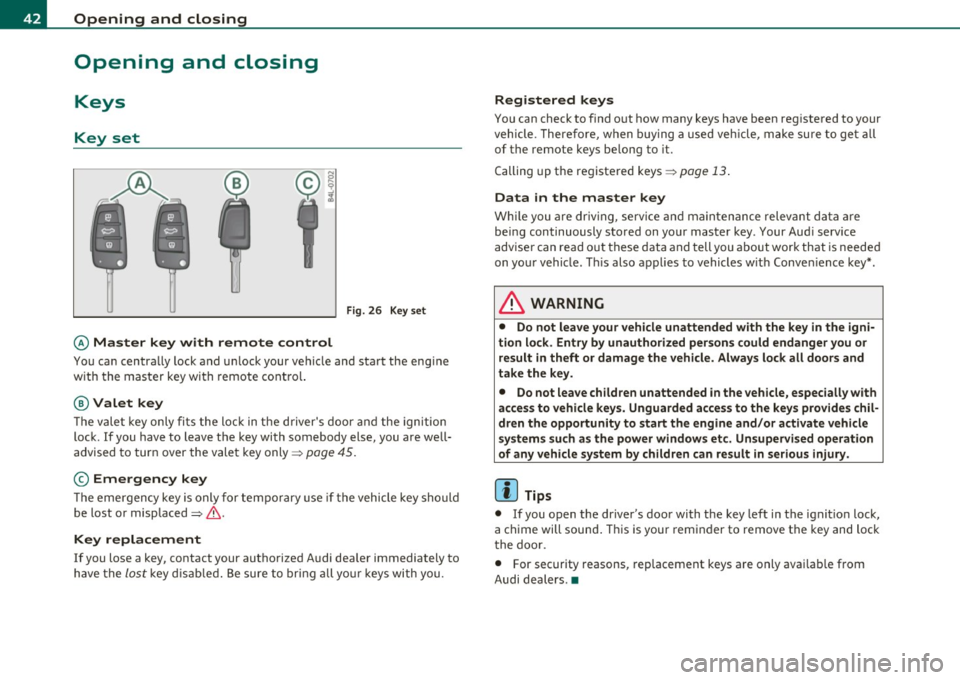
Fig. 26 Key set
© Master key with remote control
You can centra lly lock and u nlock your vehicle and sta rt the eng ine
w ith the mas ter key w ith remote cont ro l.
@ Valet key
The vale t k ey o nly fi ts the l ock in the d river' s door and t he ignition
lock . If you have to leave t he key with somebody else, you are well
advise d to tur n over the vale t key only =>
page 45.
© Emergency key
T he e mergen cy key is only for te mpora ry use if t he vehicle key sho uld
be lost or misplaced=> &.
Key replacement
If you lose a key, contact your autho rize d Audi dea ler immediately to
h ave the
lo st key d is abl ed. Be sure to bring a ll your keys wi th you.
Registered keys
You can check to find o ut how many keys have b een reg iste red to your
veh icle . T here fore, w hen buying a used ve hicle, make su re to get all
of the remote keys be long to it .
C alling up the re giste red keys =>
pag e 13 .
Data in the master key
W hile you a re driv in g, se rv ic e and maintenance relev ant da ta ar e
b ein g continuously s to red on yo ur mas ter key . Your Aud i serv ice
a dvise r ca n re ad out th ese d ata and tell you a bout work th at is neede d
on yo ur vehicle. T his also a pplies to vehicles w it h Conv enience key *.
& WARNING
• Do not leave your vehicle unattended with the key in the igni
tion lo ck. Entry by unauthorized persons could endanger you or
result in theft or damage the vehicle. Always lock alt doors and
take the key.
• Do not leave children unattended in the vehicle, especially with
access to vehicle key s. Unguarded access to the keys provides chil
dren the opportunity to start the engine and/or activate vehicle
systems such as the power windows etc. Unsupervised operation
of any vehicle system by children can result in serious injury .
(I] Tips
• If you o pen the dr iver 's doo r wi th the key left in the ig niti on loc k,
a c hime will sound . T hi s is your remin der to remove t he key and loc k
t he doo r.
• For security reasons, rep lacement keys a re o nly ava ilab le from
Audi dealers .•
Page 47 of 392

- Place the cov er w ith t he new battery on t he k ey bas e and
press bot h parts together .
For the sake of the environment
Dispose of dead batter ies proper ly so as not to po llute the envi ron
ment.
(I) Tips
Th e replaceme nt ba ttery mus t be the same spec ifica tion as the
orig inal. •
Electronic immobilizer
The immo bili zer helps t o prevent unauth ori zed use of
your v ehicl e.
A compu ter chip ins ide you r key au toma tically deac tiva tes the elec
tr on ic immob ilizer whe n you inse rt the key in the ignition lock, o r on
vehicles with Convenience key *, when the key is inside the ve hicle.
W hen you remove the key from the ignition lock, or on vehicles with
Conven ience key, when you remove the key from the vehicle, the elec
tr on ic immo biliz er is a utomat ic al ly activa ted once aga in.
& WARNING
Always take the key with you when you leave the vehicle . The key
can di sarm the elect ronic engine immobilizer and permit an unau
thor ized per son to start the engine and enable operation of the
vehicle systems such a s power w indow or Panoramic sliding
s unroof* leading to serious personal injur y.
Controls and equip
ment Safety first
Opening and closing
(I) Tips
• Th
e vehicle ca nnot be started if an unauthori zed key is u sed. The
vehicle may not start if anothe r rad io device such as a key for another
vehicle o r a tra nsponder is loca ted o n the key r ing.
• For Declaration of Compliance to United States FCC an d Industry
Canada regulations=:>
page 371. •
Valet key function
The valet key function prevents unauthorized persons
from opening the glove compartment.
Fig . 30 Ce nter
con sole: button for
v alet ke y fu nctio n
Activating and deactivating the function
- Ins ert th e master key into the ig nition lock a nd swi tch on
t he ign it ion .
- P ress the
[V AL ET] butto n~ fig . 30 to activate/ deacti
vate the fu nct ion as desire d. The ind icator light in the
bu tto n illumina tes whe n the f unct ion is ac tiv e.
- Remove t he m aster key f rom t he ign it ion lock.
- Hand ove r onl y the
valet key~ page 42, fig. 26 to t he
person w ho will ta ke charge of the veh icle.
Vehicle care Technical data
Page 49 of 392
You can unlock the vehicle from the inside by :
• removing the key from the ignition switch (the vehicle will auto
matically unlock itself) or
• pressing the unlock part of the power lock switch@ or
• pulling the door handle (twice to open the rear doors).
& WARNING
• When you lock your vehicle from outside , nobody -especially
children -should remain inside the vehicle. Remember, when you
lock the vehicle from the outside the windows cannot be opened
from the inside.
• When you leave the vehicle, always remove the ignition key
and take it with you. This will prevent passengers (children, for
example) from accidentally being locked in the vehicle should
they accidentally press the power locking switch in the front
doors.
• Do not leave children inside the vehicle unsupervised . In an
emergency it would be impossible to open the doors from the
out side without the key.
(I) Tips
• In the event of a crash w ith airbag deployment all locked doors
will be automatically unlocked to give access to the vehicle occupants
from the outside.
• If the power locking system should malfunction, you can lock each
door ind ividually us ing the veh icle key =>
page SO.
• If the power locking system should fail, you can still open the fuel
t ank flap in an emergency=>
page 296.
• You are well advised not to keep valuables inside an unattended
vehicle, visible or not. Even a proper ly locked veh icle cannot provide
the security of a safe. •
Contro ls a nd e quip
m en t Vehicle
OP-eration
Opening and closing
Unlocking and Locking the vehicle with the
remote control
How the remote control works.
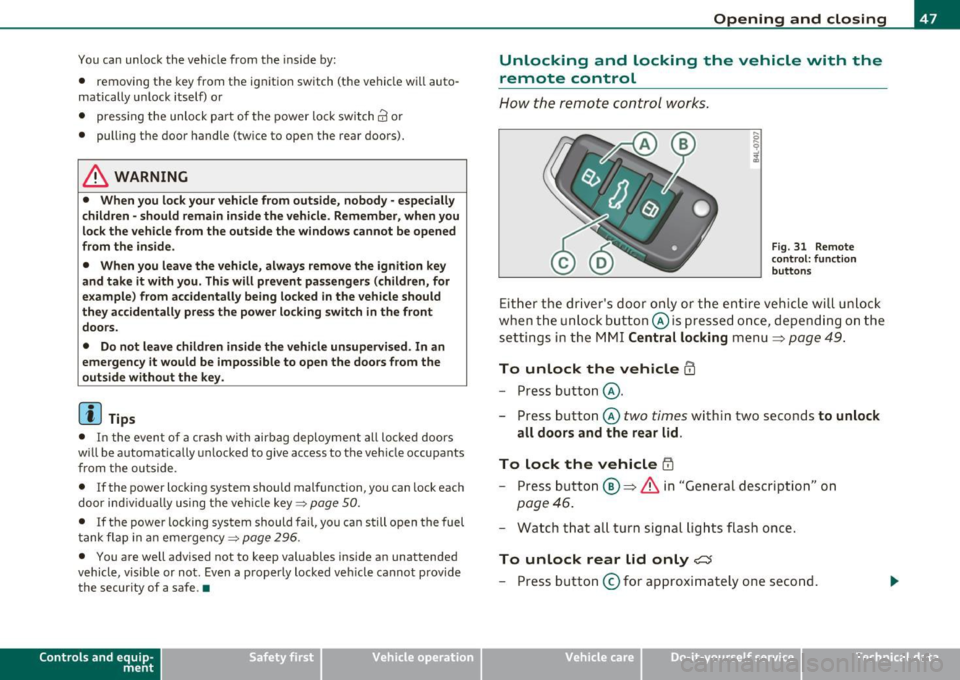
Fig. 31 Remote
con trol: function
buttons
Either the driver's door only or the entire vehicle will unlock
when the unlock button @is pressed once, depending on the
settings in the MMI Central locking menu
=> page 49.
To unlock the vehicle CD
- Press button @.
- Press button @
two times within two seconds to unlock
all doors and the rear lid.
To lock the vehicle i'.D
- Press button ®=> & in "General description" on
page 46.
- Watch that all turn signal lights flash once.
To unlock rear lid only <::::::5
-Press button @for approximately one second.
Vehicle care Do-it-yourselt service Technical data