air conditioning AUDI Q7 2011 Owner´s Manual
[x] Cancel search | Manufacturer: AUDI, Model Year: 2011, Model line: Q7, Model: AUDI Q7 2011Pages: 392, PDF Size: 93.29 MB
Page 61 of 392
Opening the windows
-Push the s witch to the first stop and hold it t here u ntil t he
win dow has lowered to the desired posi tio n.
- Push t he switch briefly to the
second stop : the window
w ill automa tically o pen all t he way .
Closing the windows
-Pull t he swi tch up to the first stop and h old it th ere until
the wi ndow has risen to th e desired pos it ion .
- P ull the swit ch quickly to the
second position: the window
wi ll auto matically c lose all th e way ~
& in "Co ntrols" .
Activating/deactivating the rear windows
- P ress the left (!) switch ~ page 58, fig. 45 to deactivate
on ly the window regulator in the left door. The indicator
light in t he switch illu minates .
-Press t he r ig ht 00 switch~ page 58, fig . 45 to deactivate
only t he window reg ulator in the right door. The ind icator
li ght in the switch illuminates.
- Press the
00 sw itch again to reac tivate t he win dow reg u-
lator. The indicator lig ht in the switch goes ou t.
If you press both(!) switches ® in succession, the fo llowing func
t ions are switc hed off in the rea r of the ve hicle:
• The window reg ulator sw itches in the rear doors.
• The buttons fo r th e Pano ram ic s liding su nroof *.
• On vehicles with rear climate cont rol *, ope ration from the rear is
blocked . Dashes" ---" are shown in the displays fo r the rear climate
controls, a nd the rear air -conditioning can only be operate d from the
cl ima te contro ls in th e cabin:::::,
page 118 .
Controls and equip
ment Safety first
Opening and closing
•
If only the left (!)switc h was pressed, t he window regulator in the
left rear door an d t he buttons in the re ar for the Panoramic sli ding
sunroof* are deactivated. In addition, the door is locked.
• If
only the right(!) switch wa s presse d, the win dow regu lator in
the
right rear door and the buttons in the rear for the Pa noramic
sliding s unroof * are dea ctiva ted. In addi tion, the door is locked .
T hi s fea ture has been provided for the safety of sma ll chi ldren r iding
in the rear of the vehicle .
[ i ] Tips
• T he windows can st ill be opened and closed for about ten minutes
after the ign ition has been tu rned off. The power w indows are no t
shut off unt il one of the front doors is opened.
• In order to ac tivate the child safe ty lock on the left and the rig ht
side, you have to p ress the two safety switches in succession. Make
c ertain that t he check light comes on the co rrespond ing safe ty sw itch
when the child safety lock is activated. •
Switch in the front passenger's door and on
the rear doors
Fig. 46 Swit ch loc a
t ion fr ont pa ssenge rs
door
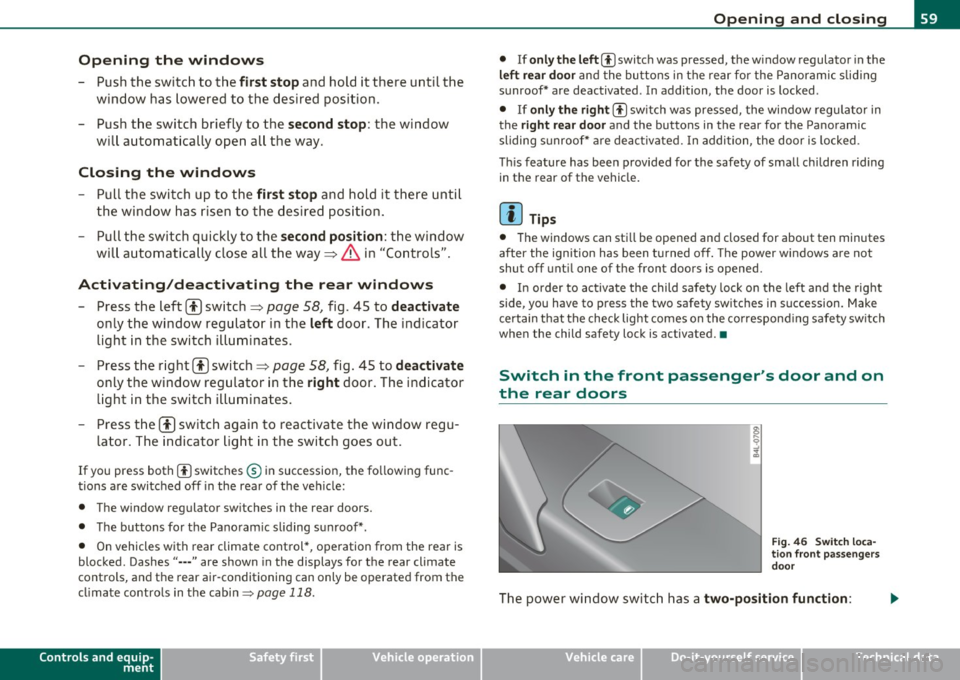
Th e pow er window switc h has a two-position function:
Vehicle care Technical data
Page 110 of 392
ffl..__S_e _ a_t _s _ a_n_ d_ s_t _o _r _a _,g:.- e ______________________________________________ _
& WARNING
To reduce the risk of personal injury in an accident or sudden stop,
always keep the glove compartment closed while driving.
(I] Tips
Should you not be able to open the glove compartment as described,
make sure the valet key function is not activated~
page 45. •
Cooling box in glove compartment
The cooling box works only when the air-conditioning is in
cooling mode.
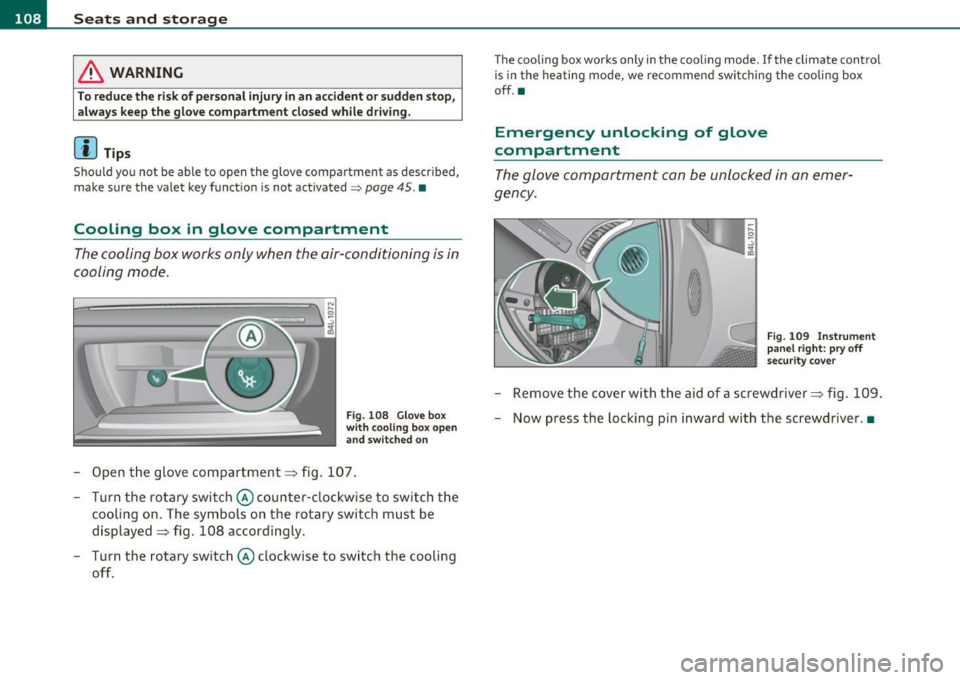
Fig. 108 Glove box
with cooling box open
and switched on
- Open the glove compartment=> fig. 107.
- Turn the rotary switch © counter-clockwise to switch the
cooling on. The symbols on the rotary switch must be
displayed=> fig. 108 accordingly.
- Turn the rotary switch © clockwise to switch the cooling
off.
The cooling box works only in the cooling mode. If the climate control
is in the heating mode, we recommend switching the cooling box
off.•
Emergency unlocking of glove
compartment
The glove compartment can be unlocked in an emer
gency.
Fig. 109 Instrument
panel right: pry off
security cover
- Remove the cover with the aid of a screwdriver => fig. 109.
- Now press the locking pin inward with the screwdriver .•
Page 114 of 392
-Warm and cold .,.,..__ ______________ _
Energy management
To prevent the battery from being discharge d and to res tore the
balance o f energy, compone nts wh ich require large amo unts o f
energy a re tempora rily cut back or sw itched off=>
page 263. Heating
systems in part icular requ ire a grea t dea l of energy . If you notice, for
example, that the seat* or rear w indow heating is not heating, they
have been t empo rar ily c ut b ack o r switched off by
energy manage
ment .
These systems are available aga in as soon as the energy
b ala nce has been resto red.
& WARNING
Reduced visibility is dangerous and can cause accidents.
• For safe driving it is very important that all windows be free of
ice, snow and condensation.
• Completely familiarize yourself with the proper use and func
tion of the heating and ventilation system and especially how to
defog and defrost the windows.
• Never use the windshield wiper /washe r system
in freezing
weather until you have warmed the windshield first , using the
heating and ventilation system . The washer solut ion may freeze
on the windshield and reduce vi sibility.
0 Note
• If you suspe ct that the clima te co ntro l system has been damaged,
switch the system off to avoid furt her damages, and have it inspected
by a qua lified deale rs h ip.
• Repa irs to the A udi a ir conditioner require special technica l know l
edge and special tools . Contac t an au thor ized A udi d ealer for assis
tance .
[I] Tips
• Keep the air inta ke s lot s (in front of the w in d shield) free from ice,
snow and debris in or der to maintain the proper function of the
cl ima te control sys tem .
• Air ins ide the veh icle escapes through air vents located in the si de
t rim panels be neat h the rea r side wi ndows . M ake sure that the outlet
slots are not covered by clothing, etc.
• Climate control works most effective ly i f the windows and the
Panoram ic sliding sunroof * are closed. However, if the interio r of a
pa rked vehi cle is ex tremely hot from the sun 's rays, br iefly ope ning
the windows can speed up the coo ling process .•
Controls
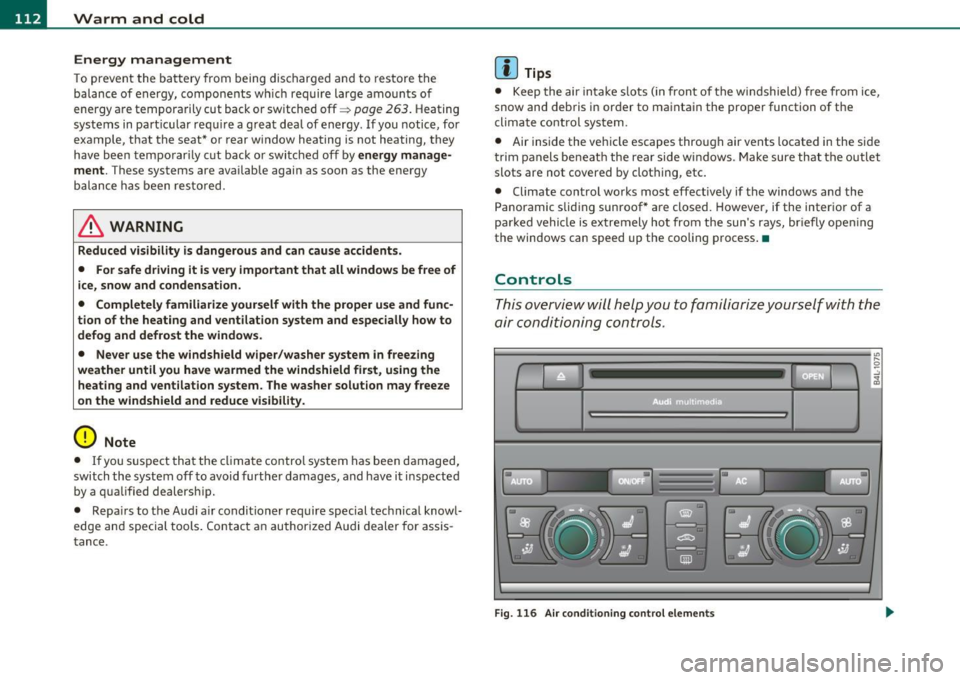
Thi s overvi ew will h elp y ou to fa miliari ze yours elf with the
air conditioning controls .
a • •
Fig. 116 Air co nd iti oning contr ol element s
Page 115 of 392
Warm and cold -
----------------
The left display indicates the temperature selected for the driver's
side, the r ight d isplay ind icates the temperature se lected for the
passenger's side.
T he settings you make are shown in the MMI display for a few seconds
when MMI is tu rned on.
Each function is turned on or off by briefly pressing the corresponding
button. The indicator l ight in the b utton ill uminates when the func
tion is act ive.
Button (s)
Function Page
ION/OFFI Climate control on/off => page 113
Air conditioner on/off =:;,page 114
Automatic mode => page 114
Temperature selection => page 114
Seat heating* => page 121
Seat ventilation* -::::;, page 121
Fan => page 114
Air distribution => page 115
Defrost => page 115
Manual recirculation -::::;, page 115
Heated rear window ::::> page 115
a) The regulator is also used to set the fan speed, air dis tr ibution, seat heating
and seat ventilation.
Synch ro nizing clim ate co ntr ol
By pressing and holding the regulator on the driver's side, the
temperature setting on the driver's side can be sw itched to the
passenge r's s ide, and vice ve rsa. T he new temperature is shown in the
display.
Controls and equip
ment Safety first
S
ynchr onizing four-z one a utom ati c c omfor t air
c ondi tioning *
By press ing and ho ld ing the regulator on the dr iver's side, the
temperature sett ing on the driver 's side can be switched to the
passenger 's side and to the outer rear seats . The new temperature is
shown in the display.
By simu ltaneously pressing and ho lding the regu lators o n the driver 's
side and front passenger's side, the temperature setting on the
driver's side can be switched to the front passenger's side . The new
temperature is shown in the display .
[I] Tips
The grille on the controls must remain unobstructed and must not be
taped over. Measuring sensors are located behind it.•
Turning on and off [ ON/OFF]
Turning the air conditioning on
-Press the [ ON/OFF] button , or
- Press the [AUTO] button.
Turning the air conditioning off
-Press the [ ON/OFF] button to switch the air conditioning
off and to block the air supply from the outside.
The air conditioner turns back on when you press the te mper ature
reg ulato r
or one of the buttons.
[I] Tips
With the ignition turned off, you can activate the residua l heat func
tion by pressing the
I ON/OFF) button. The residual heat from the
coo lant can be used to heat the vehicle interior.•
Vehicle care Technical data
Page 120 of 392
llffl..__w __ a _r _m __ a_n _ d_ c_ o_ ld ________________________________________________ _
Rear Air Conditioning
Applies to veh icles: with fou r-zone automat ic co mfort air condit ioning
Rear air conditioning -controls
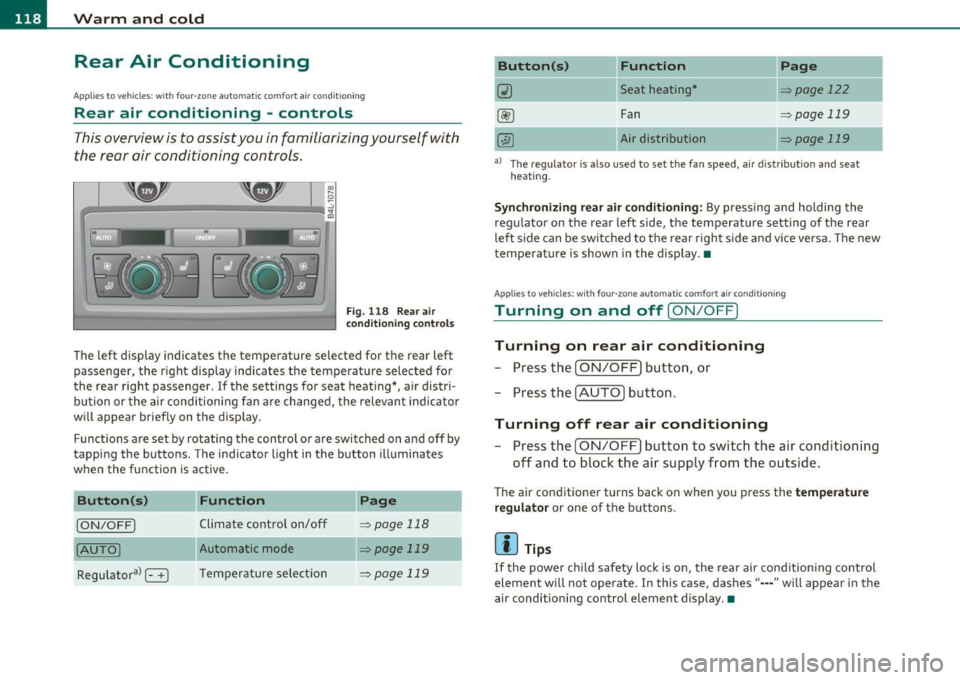
This overview is to assist you in familiarizing yourself with
the rear air conditioning controls.
F ig. 1 18 Rear air
con diti on in g con trol s
The left display indicates the temperature selected for the rear left
passenger, the right display indicates the tempe rature selected fo r
the rear right passenger. If the settings for seat heat ing *, air distr i
bu tion or the a ir conditioni ng fan are changed, the relev ant indicator
w ill appear briefly on the disp lay.
Func tions are set by rotating the contro l o r are swi tched o n and
off by
tapping the butto ns. The indicator light in the button illuminates
when the function is active .
Button(s)
Function Page
[ON/OFF) Climate control on/off => page 118
(AU TO ) Automa tic mode => page 119
Regulatora> G T emper ature se lec tion => page 119
Button(s) Function
~ Seat heating*
-
Fan
Air dis tribution
Page
::!> page 122
-
=> page 119
::!> page 119
al T he regulator is also used to set the fan speed, a ir d istr ibut ion and seat
heating.
-
Synchronizing r ear air conditioning: By pressing and holding the
regu lator on the rear left side, the temperature setting of the rear
left side can be switched to the rear right s ide a nd v ice versa. The new
temperature is shown in the display. •
Appli es to vehicles : with four -zone auto matic co mfort air condition ing
Turning on and off [ ON/OFF ]
Turning on rear air conditioning
-Press th e I ON/OFF) butt on, o r
- Press the !A UTO] button .
Turning off rear air conditioning
- Press the [ O N/OFF] but ton to sw itch the air condition ing
off and to bloc k th e air supply from the outs ide .
The air conditioner turns back on when yo u press the temperature
regu lator
or one of t he buttons .
[ i ] Tips
If the power child safety loc k is o n, the rear ai r cond ition ing contro l
element wi ll not operate. In this case, dashes" ••• " will appear in the
a ir conditioning con trol element display. •
Page 123 of 392
![AUDI Q7 2011 Owner´s Manual Warm and cold -
----------------
App lies to veh icles : with di esel e ngine
Supplementary heater
- Select: Function button !CAR]> Control button AC>
Suppl. h eat er.
Vehicles with](/img/6/40276/w960_40276-122.png "AUDI Q7 2011 Owner´s Manual Warm and cold -
----------------
App lies to veh icles : with di esel e ngine
Supplementary heater
- Select: Function button !CAR]> Control button AC>
Suppl. h eat er.
Vehicles with")
Warm and cold -
----------------
App lies to veh icles : with di esel e ngine
Supplementary heater
- Select: Function button !CAR]> Control button AC>
Suppl. h eat er.
Vehicles with diesel engines are equipped with a supplementary
heater to warm the inte rior of the veh icle more qu ickly. The supple
mentary heater switches itself on and off automatically when the
outs ide temperature is below SO
°F (10 °() and the engine is running,
depending on the coolant temperature, interior temperature and the
selected temperature .•
Applies to veh icles: with four -zone automat ic co mfort air co nditioning
Rear operation
The air conditioning in the rear of the vehicle can be
controlled from the cockpit.
-Select: Function button I CAR]> Control button AC > Re ar
operat ion.
T he d river or front passenger can contro l the a ir co ndit ion ing in the
rear of the vehicle using
his/her own contro ls. •
Heated Seats
Applies to vehicles: with ele ctrica lly heated front seats
Heated front seats ~
The seat cushion and the seatback of the front seats can
be heated electrically.
- Press the~ button.
- Rotate the regulator to the desired setting .
Controls and equip
ment Safety first
In
position O the heating for the seats is turned off. The range of
adjustment is between 1 and 6.
The heater for the front seats can be turned on when the weight of
the particular seat's occupant is detected. However, the front seats
can be pre-heated for about 10 minutes using the activated seat
heater. After this time has e lapsed, the seat heater automatically
t u rns off if it does not detect an occupant's weight for the particular
seat.
0 Note
To avoid damage to the heating elements in the seats, do not kneel
on the seats or p lace heavy loads on a small area of the seat.
[I] Tips
Please no te that the weight of objects placed on the seat wi ll also be
detected. This weight may be enough to cause the seat heater to turn
on. •
Applies to vehicles: w it h front seat ventilat ion
Front seat ventilation [~]
The seat cushion and the seatback on the front seats can
be ventilated.
- Press the Iv] button .
- Rotate the regulator to the desired setting.
When the regulator is in the O position, the seat ventilat ion is
switched off . The range of adjustment is between 1 and 6. •
Vehicle care Technical data
Page 124 of 392
-Warm and cold .Ml..__ ______________ _
Applie s to vehicles : wi th heated rear seats
Heated rear seats [JI
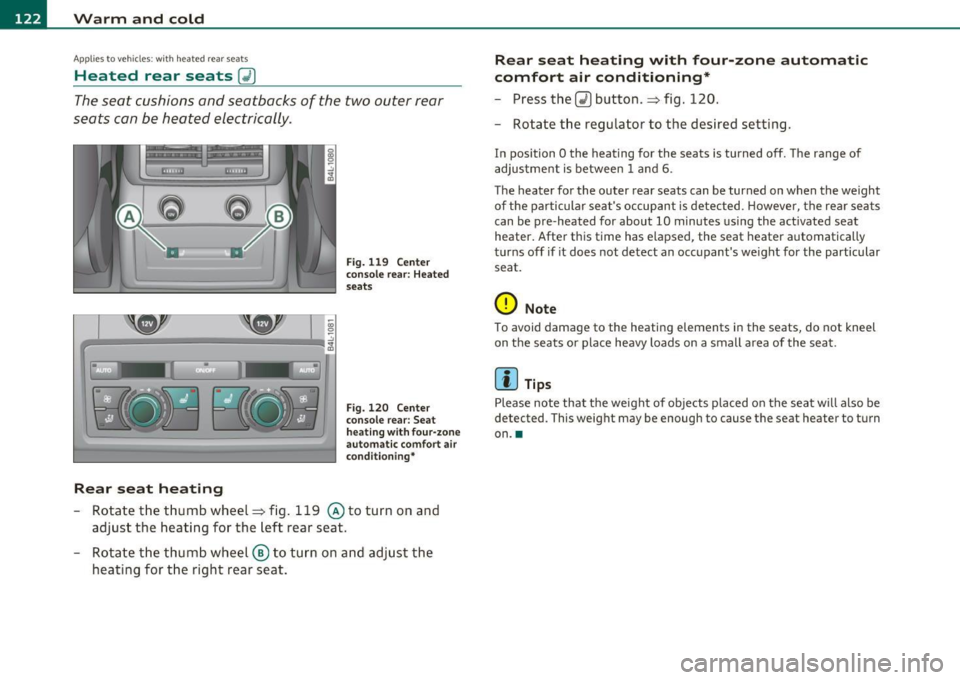
The seat cushions and seatbacks of the two outer rear
seats can be heated electrically.
Rear seat heating
Fig. 119 Center
conso le rear: Heated
seats
Fig. 120 Center
console rear: Seat
h eat ing with four-zone
automa tic comfort air
condi tioning*
-Rotate the thumb wheel~ fig. 119 @to turn on and
adjust the heating for the left rear seat.
- Rotate the thumb wheel ® to turn on and adjust the
heating for the right rear seat.
Rear seat heating with four -zone automatic
comfort air conditioning*
- Press the Q) button .~ fig. 120.
- Rotate the regulator to the desired setting.
In position O the heating for the seats is turned off. The range of
adjustment is between
1 and 6.
The heater for the outer rear seats can be turned on when the weight
of the particular seat's occupant is detected. However, the rear seats
can be pre-heated for about
10 minutes using the act ivated seat
heater. After this time has elapsed, the seat heater automatically
turns off if it does not detect an occupant's weight for the particular
seat.
0 Note
To avoid damage to the heating elements in the seats, do not kneel
on the seats or place heavy loads on a small a rea of the seat.
[I] Tips
Please note that the weight of objects placed on the seat will also be
detected . This weight may be enough to cause the seat hea ter to turn
on .•
Page 355 of 392
Fuses and bulbs -_______________ __.fWI
No. Consumer
3 CD player, DVD drive
4 MMI
Display
5 Automatic transmission
7 Panoramic sliding sunroof segment
l
8 Panoramic sliding sunroof segment 2
9 Panoramic sliding sunroof sunblind
CD player, DVD drive
11 W
indow regulators (right side of vehicle)
12 Rear air-conditioning controls
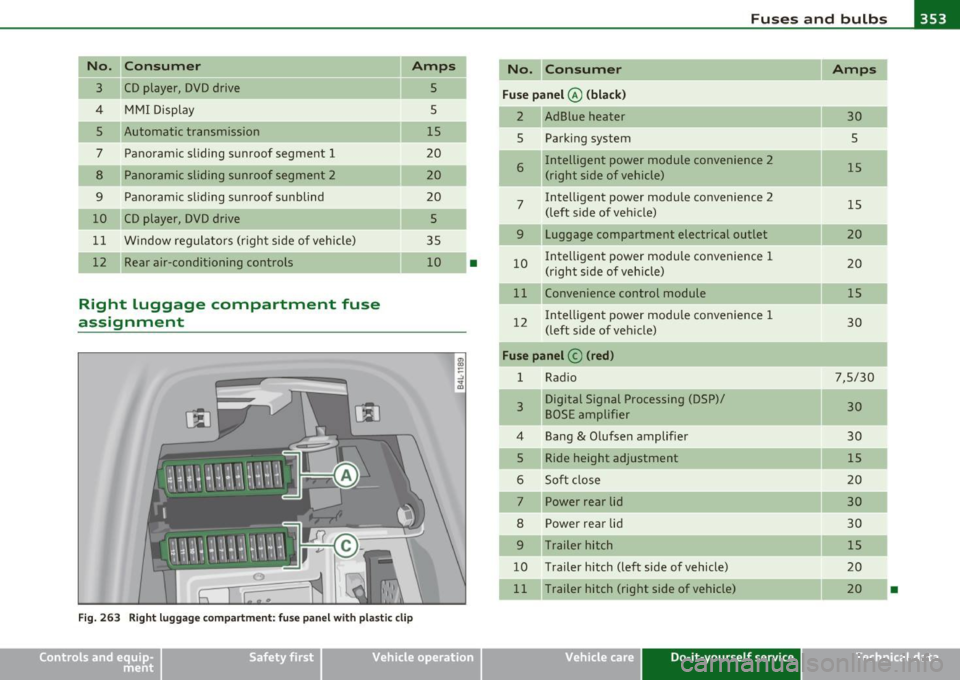
Right luggage compartment fuse
assignment
Amps
5
5
15
20
20
20 5
35 10
Fig. 263 Right luggage compartment: fuse panel with plastic clip
•
"' Q)
-
Vehicle OP-eration
No. Consumer Amps
Fuse panel @ (black)
2 AdBlue heater
30
5 Parking system
5
-
6 Intelligent power module convenience
2
15
(right side of vehicle)
7 Intelligent power module convenience 2
15
(left side of veh icle)
9 Luggage compartment electrical outlet 20
10 I
ntell igent power modu le convenience 1
20
(right side of vehicle)
11 Convenience control module
15
12 I
ntell igent power module convenience 1
30
(left side of veh icle)
Fuse panel © (red)
1 Rad io 7,5/30
3 Digital Signal Processing (DSP)/
30
BOSE amplifier
4 Bang & Olufsen amplifier 30
5 Ride height adjustment
15
6 Soft close 20
7 Power rear lid
30
8 Power rear lid 30
9 Trailer hitch 15
10 Trailer hitch (left side of vehicle)
20
1 1 Trailer hitch (right side of vehicle)
20
•
Vehicle care Do-it-yourself service iTechnical data
Page 376 of 392
___ A_ l_. p_ h _ a_b_ e_ t_ic _a_ l_ in_ d_e _ x ____________________________________________ _
A
Accessories . .. .. ..... .... ... ..... .. 3 70
Adap tive Ai r Suspension ....... ...... 178
Cargo mode in the MM I ........ ... 183
Controls . . . . . . . . . . . . . . . . . . . . . . . . 179
Description .. .. .. .. .. .. .. .... ... 1 78
H igh leve l ... .. .. .. .. .. .... ..... 179
H ighway level .. ...... ..... .. .. .. 17 9
Inst rume nt cl uste r d is p lay ....... .. 181
Jacking mode when changin g a fl at tir e ...
182 Spe
cial d riving si tua tions ... .. .. ... 149
Status messages ...... .... .. .. .. . 147
Switching on and of f ....... .. .. .. . 139
System limi ts . ... .. .. .... .. .. .. . 149
T emporarily tu rning off ... .. .... .. 1 41
warning/indicator lights . .. .. ... .. . 145
Adaptive Light ..... ... ... ... .. .. .. .. 70
defect ive ...... ...... .... .. .. .... 40
AdBlue . .. .. ...... ....... .... .. .. . 296
Filling .. .. ... .... .... ..... .... .. 298
Messages in the instrument cluster display
297
Low level .. .. .. .. .. .. ..... ..... . 179 Add ing
No rma l level ............ .. .... . .
Segmen t disp lay .. .. .. .. .... .... .
Sett ing t he driving modes ....... . . 179
1
80
1 80
Tr ailer towi ng mo de ....... ... .. .. 1 82
Us ing switch fo r ca rgo mode .... .. . 1 83
Wa rning/ind icator lights ... .. ... ... 18
Adaptive Cr uise Co ntro l .. ..... ... .. .. 1 36
Cha ng ing speed . .. .... .. ......... 140
Dr ive r information ....... ...... . .
Drive r inte rvention prompt .. .... . . 1
44
14 8 E
ngine coolant ........... ...... . 310
E ngine oil ...... ...... .... .. .. ... 306
W indshield washer fl uid ... .. .. .. .. 316
Additiona l accessories ... ... . ... .. .. . 3 70
Additives Engine oil ....... ..... .. .. .. .. .. . 306
Adjusting Inst rument cl uste r illum ination .. .. . 13
Steeri ng col umn elect rically .. ... .. . 125
Steering col umn manually . ... .. .. . 124
Dr iv ing in tra ffic . ... ... ... .... .. .
Dr iv ing p rogram . ... .. .. ... .... . . 1
38
1 49 Adjusting front seats
............. .. .. 85
Error messages ..... .. .. .. .. .. ... 147
Open road ..... .. .. .. .. ... .... .. 138
Override ............ .... .... .. .. 138 Ai
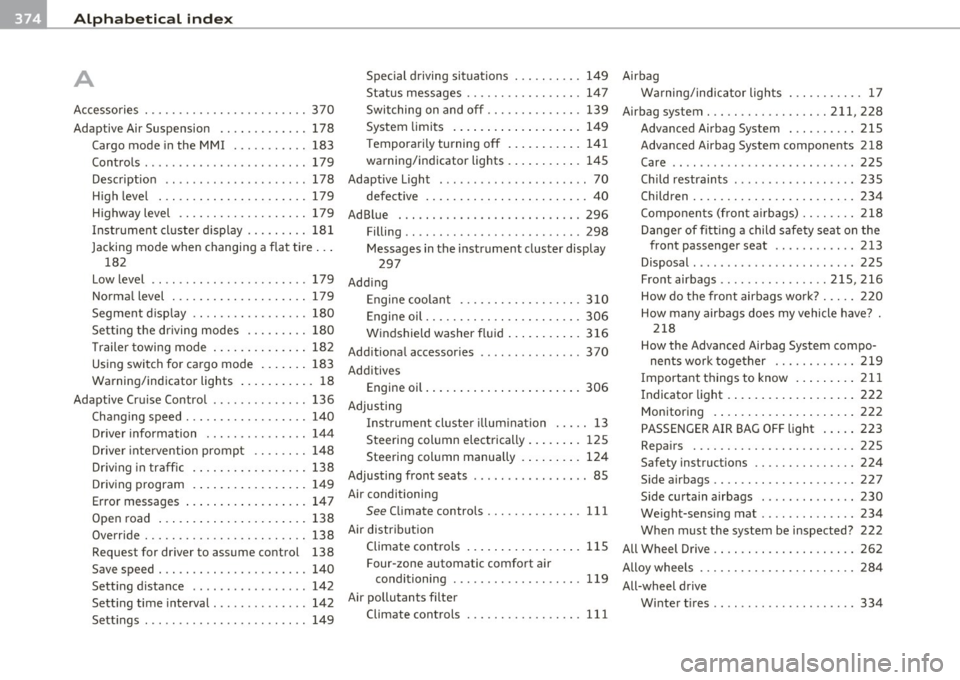
r conditioning
See C limate contro ls ....... .. .. .. . 111
Air d istr ib ution
Request for driver to assume control Climate controls
...... ..... .... .. 115 Airbag
Warning/ind icator lights . .......... 1 7
Airbag system . .. ...... ....... .. 211, 228
Advanced Airbag System . .. ...... . 215
Adva nced Airbag System components 218
Care .. .. .............. ......... 225
Child restraints .... ....... ... .. .. 235
Chi ld ren ........ .. .. .. .. .. .... .. 23 4
Compo nents (fron t airbags) .. .. .. .. 218
D ange r of fitting a child safe ty se at on the
front passenge r seat ....... .... . 213
Disposal . ................ ... .. .. 225
Fro nt airbags .. .. ... .. . .. ... . 2 15,216
How do the fro nt airbags wo rk? ... .. 2 20
How many airb ags does my vehicle have? .
218
How the Advanced Airbag System compo- nent s work toge ther ............ 219
Importa nt things to know ... .. .. .. 21 1
Indicator light . ... .. ...... ... . ... 222
M onitoring . ... .. .. ...... ... . ... 222
PASSENGER AIR BAG OFF light .. ... 223
Repa irs ............ .. .. .. .... .. 225
Safety instruct ions .. ............. 224
Side airbags .. .. .. .. ............. 227
Side curtain airbags ............. .
We ight-sens ing mat ....... ... .. . .
W hen m ust the system be inspected?
All Wheel Drive .. .. . ... ......... .. . . 230
23
4
222
262
Save speed . .. .. .. .. .. .. ........ .
Sett ing d istance ...... .. ........ . 138
140
142
1
42
1 49 Four-zone automatic comfort air
conditioning ............... ... . Alloy wheels . . . . . . . . . . .
. . . . . . . . . . . . 28 4
1 19
All-wheel drive
Sett ing t ime interval ... ....... ... .
Sett ings .... ............. .... .. . Ai
r pollutants filter
Climate controls ................ . W
inte r tir es .. .. ... ... ... ... .... . 334
111
Page 377 of 392

Alphabetical index -________________ fWI
Alternator Auto-Check Control ..... .. .. .... ...... 32 State of charge ......... ..... .... 263
Malfunction ............. ........ . 34 Automatic belt retractor ............. 205 Voltage
......................... . 39
Ambience lighting Lighting profiles ................. . 73
Anti -freeze
See Engine coolant system ......... 308
Anti-glare inside day-night mirror . . . 79, 80
Anti -lock brake system
How the ABS system works ......... 260
Warning/indicator lights ... .. .... .. 19
Anti-S lip Regulation System (ASR)
How the system works ... .... .. .. . 258
Anti-theft systems
Anti-theft alarm system ........ .. .. 57
Electronic immobilizer ............. 45
Approach/departure angle ............ 270
Ashtray . ............. .. .. .. .. .... . 105
ASR How the Anti-Slip Regulation System works . ..... ... ... .. .. ......... 258
Asterisk What does it mean when something is
marked with an asterisk? ........... 6
Audi braking guard .................. 151
Error messages ............... ... 153
Settings ................ ..... ... 153
Status messages ................. 153
Switching on and off .............. 153
Audi Service Repair Manuals and Literature
368
AU TO mode
AC climate contro ls ...... .... .. .. . 114
Auto Safety Hotline .... .... ......... 199
Controls and equip
ment Safety first
Automatic car wash
See Washing
.................... 279
Automatic mode Four-zone automatic comfort air
conditioning ........... ...... .. 119
Automatic Sh ift Lock (ASL) ............ 165
Automatic transmission ... .. ......... 163
Automatic Shift Lock (ASL) ......... 165
Driving ......................... 163
Dynamic shift program ... .. .. ..... 166
Emergency release for selector lever . 168
Fail-safe mode ................ ... 168
Ignition key safety lock ............ 127
K ick-down .. ... .... .. .. .. ... .... 166
Manual shift program .. .. .. .. .. ... 167
Selector lever ............ ...... .. 164
Shift buttons . .. ................. 168
Steering wheel with tiptronic ® .... .. 168
Average speed ......... .. .. .......... 26
Avoid damaging the vehicle ........... 267
B
Bass box ... .. .. .... ............... 341
Battery . .. .... .. ... ....... ......... 312
Batte ry location ..... .. .. .... ..... 313
Charging ................ .. ... ... 315
Important warnings when working on the battery . .................... ... 313
Jump start ing ... ....... ....... ... 355
Low .... ........ ............. ... 263
Replacing the battery .... .. .. .. ... 316 Winter operation
................. 312
Working on the battery .. .......... 313
Before driving .. ................... . 191
Blended gasoline . .. .. ...... ....... . 291
Body cavity seal ing .................. 284
Booster seats .................... .. 241
Brake assistant . .. .................. 261
Brake booster ...................... 260
Brake fluid
Changing the b rake fluid .......... . 312
Checking the brake fluid level ....... 311
Reservoir ..... ................ .. 311
What is the correct brake fluid level? . 311
What should I do if the brake fluid warning
light comes on? . .. .... .......... 311
Brake light
Defective ... .. ................... 24
Brake system ..... .......... ...... .. 311
Anti-lock brake system ... .......... 19
Brake fluid .. .. ................ .. 311
Brake fluid spec ificat ions for refill and
replacement . .. .. ...... ....... . 312
Brake pads . ... ................ .. 265
General information ............ .. 259
How does moisture or road salt affect the brakes? . .... .. .. ..... ..... ... . 259
Ma lfunction .............. ...... .. 34
Parking brake .................... 132
Wa rning/indicator lights ... .... .. .. 20
Worn brake pads symbol ........... 39
Vehicle operation Vehicle care Do-it-yourself service Technical data