brakes AUDI Q7 2011 Owner´s Manual
[x] Cancel search | Manufacturer: AUDI, Model Year: 2011, Model line: Q7, Model: AUDI Q7 2011Pages: 392, PDF Size: 93.29 MB
Page 18 of 392
![AUDI Q7 2011 Owner´s Manual Instruments and warning /indicator lights
(I] Tip s
Many fun ct ions a re mon itored by the Auto-Check system=> page 32.
Malfunctions or faults will be identified either with a red](/img/6/40276/w960_40276-17.png "AUDI Q7 2011 Owner´s Manual Instruments and warning /indicator lights
(I] Tip s
Many fun ct ions a re mon itored by the Auto-Check system=> page 32.
Malfunctions or faults will be identified either with a red")
Instruments and warning /indicator lights
(I] Tip s
Many fun ct ions a re mon itored by the Auto-Check system=> page 32.
Malfunctions or faults will be identified either with a red symbol
(pr iority
1-Dange r!) or w ith a ye llow symbo l (prio rity 2 -Warn ing). •
Applies to veh icles: w it h gasoline eng ine
Electronic power control ~
This warning/indicator light monitors the electronic
power control.
T he warning/indicator light (E lectronic Power Control) illumi -
nates when you turn o n the ignition as a function chec k.
[ i ] Tips
If this warning/indicato r light ill uminates while you are driving, then
there is a malfunct ion in the engine e lectron ics . Have the malfunct ion
co rrected as soon as possib le by yo ur autho rized Audi dealer or qua l
ified workshop .•
A pp lies to ve hicles : w ith d iese l en gi ne
Glow plug system
The control light illuminates when the glow plug system
is active.
If the indicato r ligh t illum inates, the g low p lug system is active .
You should start the eng ine immed iate ly after the ind icator light
switches off. The ind icator ligh t only illumina tes for approximately 1
second if the engine is warm or if the outside temperature is above 46
2F (8 2C).
(I] Tips
• If the glow plug indicator light illuminates while driving, there is
an engine control malfunction. The engine should be checked imme
diately .
• If the indicator light does not ill uminate at all when switching the
ign ition on, the re may be a ma lfunction in the glow plug system. The
engine should be checked .•
Electronic stabilization program (ESP) ~ / t:.
This warning/indicator light monitors the electronic
stabilization program .
If the indicator lamp blinks w hile driving, the ESP or ASR (Anti-Slip
Regulation) is actively regulat ing .
If the ~ indicator lamp illuminates, the system has switched the ESP
off. In this case , you ca n swi tch t he ignition off and then on to swi tch
the ESP on again. The system is functioning completely when the
ind icator lamp sw itches off.
If the ind icator lamp illuminates, the ESP was switc hed off w ith the
I~ OFF! button .
ESP/ ABS fault ! See own er' s manual
If the • indicator lamp and the ~ ABS indicator lamp illuminate and
the d river message appea rs, the ABS or e lectronic differentia l lock is
ma lfunction ing . This also interrupts the ESP . The brakes still funct ion
w ith their normal power, but ABS is not act ive .
Dr ive to your author ized A udi deale r immediately to have the
malfunction corrected.
For mo re information about the ESP =>
page 256 . •
Page 22 of 392
Instruments and warning/indicator lights
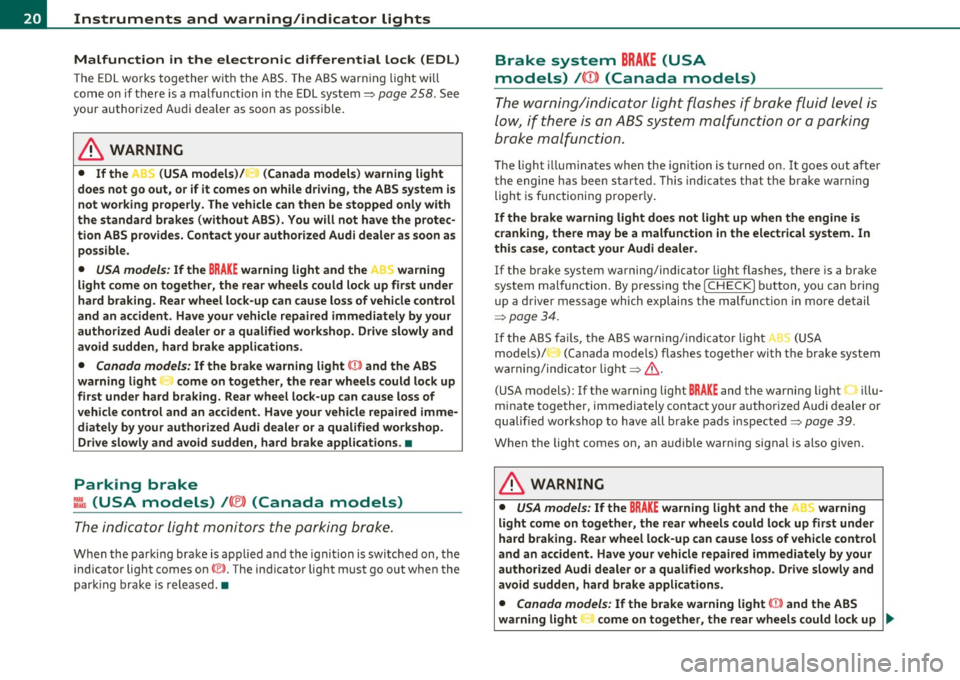
Malfunction in the electronic differential lock (EDL)
The ED L works toge ther w ith the ABS. The ABS warn ing lig ht w ill
come on if there is a mal func tion in the EDL system=>
page 258 . See
your authorized A udi dea le r as soon as poss ible .
& WARNING
• If the .. (USA models )/ ...,. (Canada models ) wa rning light
does not go out , or if it comes on while driving, the ABS system is
not working properly. The vehicle can then be stopped only with
the standard brakes (without ABS ). You will not have the p rotec
tion ABS provides. Contact your authorized Audi dealer a s soon as
pos sible.
• USA models : If the BRAKE warning light and the M, warning
light come on together, the rear wheels could lock up fir st under
hard braking. Rea r wheel lock-up can cause loss of vehicle cont rol
and an accident . Have your vehicle repaired immediately by your
autho rized Audi dealer or a qualified work shop. Dri ve slowly and
avoid sudden, hard brake applications.
• Canada models: If the brake warning light 0 and the ABS
warning light come on together, the rear wheels could lock up
first under hard braking. Rear wheel lock -up can cause loss of
vehicle control and an accident . Have your vehicle repaired imme
diately by you r authorized Audi dealer or a qualified wo rkshop.
Drive slowly and avoid sudden , hard brake applications .•
Parking brake
~[ (USA models)/ (®) (Canada models)
The indicator light monitors the p arking br ake.
W hen the parking br ake is app lied a nd the ignition is switched on, the
indicator light comes on©. The ind icator light must go out when the
par king b rake is released. •
Brake system BRAKE (USA
models)
/ ((D) (Canada models)
The warning/i ndica tor light flashes if b ra ke fluid le vel is
low, if there is an ABS system malfunction or a parking
brake malfunction.
Th e ligh t ill umin ates whe n the igni tio n is tur ned on. It goes out afte r
the engine has been started . This indicates that t he brake war ning
ligh t is functioni ng p roper ly .
If the brake warning light does not light up when the engine is
cranking , there may be a malfun ct ion in the electrical system. In
thi s ca se, contact your Audi dealer.
If the brake system warning/indicator light flashes , there is a brake
system mal function. By press ing the
I C H ECK ] b utton, yo u can bring
up a driver message which exp lains the malfunction in more detail
:::> page 34.
If th e ABS fa ils, t he ABS war ning/ indi cato r light O (USA
mode ls)/ (Canada mode ls) flashes together with t he b rake system
wa rni ng/ind icator light=> & .
(USA models): If the warning light
BRA KE and the warning light illu
minate together, immedia tely contac t your author ized Audi dealer or
qualified workshop to have all brake pads inspected=>
page 39.
When the light comes on, an a udible warn ing signal is also given.
& WARNING
• USA models : If the BRAKE warning light and the I .. S warning
light come on together, the rear wheels could lock up first under
hard braking . Rear wheel lock-up can cause lo ss of vehicle control
and an accident . Have your vehicle repa ired immediately by your
authorized Audi dealer or a qualified workshop. Drive slowly and
avoid sudd en, hard brake application s.
• Canada model s: If the b rake warning light CCI» and the ABS
warning light come on together, the rear wheels could lock up
~
Page 23 of 392
& WARNING (continued)
first under hard braking. Rear wheel lock-up can cause loss of
vehicle control and an accident. Have your vehicle repaired imme diately by your authorized Audi dealer or a qualified workshop.
Drive slowly and avoid sudden, hard brake applications.
• If the brake warning/indicator light does not go out after a few
seconds and the parking brake released, or lights up while you are
driving, the fluid level in the brake fluid reservoir is too low. If you
believe that it is safe to do so, proceed immediately at low speed
to the nearest authorized Audi dealer or qualified repair facility
and have the brake system inspected .
• Always keep in mind that after several brake applications, you
will need greater pressure on the brake pedal to stop your vehicle .
Do not rely on strained brakes to respond with maximum stopping
power in critical situations. You must allow for increased braking
distances. The extra distance used up by fading brakes could lead
to an accident. •
Controls and equip ·
ment Safety first
Instruments and warning/indicator lights
Vehicle care
Technical data
Page 41 of 392
Windshield washer fluid Level too Low :5
Please refill washer fluid
If the symbol illumi nates, add winds hield washe r fluid to the washer
system and also to the headlight washer system=>
page 316. •
Fuel supply too Low ""~
A Plea se refuel
When t his symbo l illuminates for t he first time, the fuel reserve in
your vehicle is still between 2 .6 and 3 .2 gallons (10- 12 li te rs) . Refuel
as soon as possible =>
page 293.
If the symbol lights up, even whe n there is ample fue l in the t ank, and
the text Tank system malfunction! Contact workshop appears in the
displ ay, the re is a fa ult in the system. Con tact a qualified workshop to
have the fault rectified .•
Battery voltage U
If the battery's state of charge is not in the optima l range, the -,
s ymbo l is show n in the display and the d river mess age Low battery
charge: battery will be charged while driving appears.
Wh ile this driver notification is displayed, you have to be prepared for
limited sta rting capabili ty .
Driver message appears and goes out again
If th is driver message appears a fter the ignit ion is t urned on or while
driving and it goes o ut again after a while, the battery has been
adequate ly recharged.
Driver message appears and does not go out again
If th is dr iver no tification appears after the ign ition is turned o n or
whi le driving and does not go ou t agai n, the battery 's s ta te of charge
Controls and equip
ment Safety first
Driver information display
is not in the opt
imal range . Starting capability is restricted. Have the
ba ttery che cked by an au thor ized A udi dealer as soon as possible. •
Worn brake pads ~
-Brake pad s !
If the warning light illum inates, immediately contact your a uthorized
Audi dealer or qualified wo rkshop to have all brake pads inspected.
On USA mode ls the warn ing light
t comes o n together w it h the
warning light
BRAKE . Both sets of brake pads on an axle must a lways
be re place d at the same time.
& WARNING
Driving with bad brakes can cause a collision and serious personal
injury.
• If the warning light', and the warning light
8RAKE1l with the
me ssage Brake pads! comes on in the in strument cluster display ,
immediately contact your authorized Audi dealer or qualified
workshop to have all brake pads checked or replaced if necessary. •
Headlight range control 1©
"'Headl ight range control defective !
If the symbo l illuminates, the dynamic headlight range contro l is no
longer wo rking prope rly. Have the syste m checked and repaired at
your authorized Aud i dea ler. •
ll BRAKE : USA mode ls on ly
Vehicle care Technical data
Page 109 of 392
_______________________________________________ S_ e_a _t_ s_ a_n_ d_ s_ t_o _r_a _, g::;.,_ e __ ffl'II
[I) Tips
When the engi ne is off and accessories are st ill plugged in and a re o n,
the vehicle battery can sti ll be drained .•
Storage
General overview
There are numerou s places to store items in your vehi cle .
Glove com pa rt me nt
Cooling box in glove compartment
Sto ra g e com partmen t in roof
Coat hooks
Storage in the door panels
Storage net in footwell
Storage net in the front seatbacks
Storage net in luggage compartment
=> page 107
=> page 109
=> page 109
=> page 109
=> page 110
=> page 11 0
Sto rage com partment bene ath car go floo r => page 99
& WARNING
• Always remove objects from the inst rument panel. Any items
not stored could slide around inside the vehicle while driving or
when accelerating or when applying the brakes or when driv ing
around a corner .
• When you are dri ving make sure that anything you may have
pla ced in the center console or other storage locations cannot fall
out into the footwells. In case of sudden braking you would not be
able to brake or accelerate.
Controls and equip
ment Safety first
& WARNING (
co ntinued )
• Any articles of clothing that you have hung up must not inter
fere with the driver's view. The coat hooks are designed only for lightweight clothing. Never hang any clothing with hard, pointed
or heavy objects in the pockets on the coat hooks . Dur ing sudden
braking or in an accident - especially if the airbag is deployed -
these objects could injure any passengers in side the vehicle. •
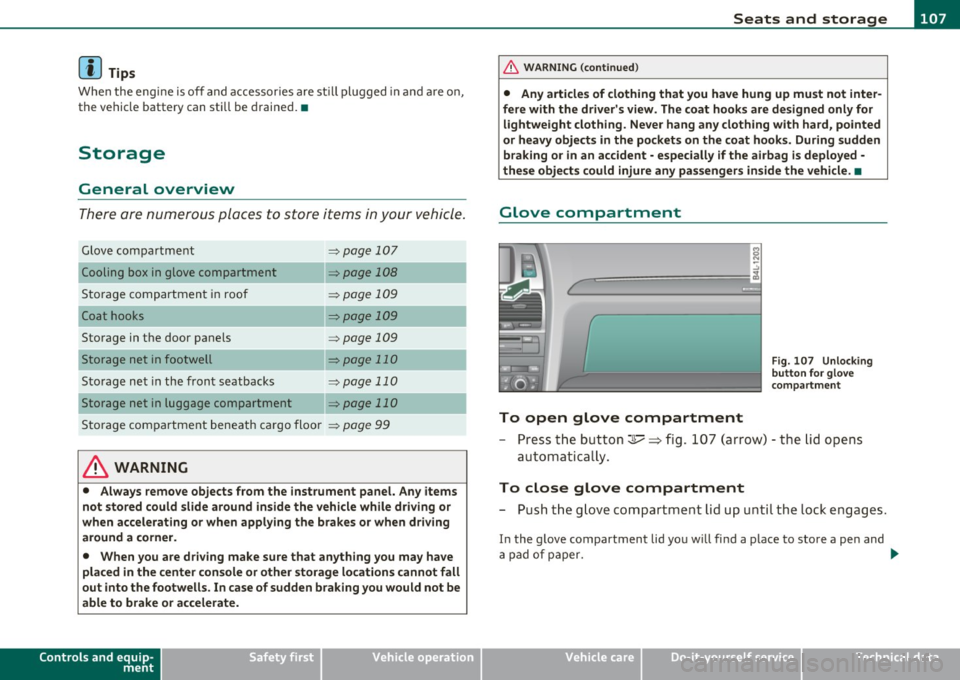
Glove compartment
To open glove compartment
Fig. 107 Unlock in g
button for g love
c ompartment
- Press th e button ::!I----~ fi g. 107 (arrow) - t he lid opens
au tomatica lly .
To close glove compartment
- Push t he g love compartme nt li d up u nti l the lock e ngag es.
In the g love compartment lid yo u w ill find a place to store a pen and
a pad of paper. _.,
Vehicle care Technical data
Page 134 of 392
Ill On the road ..___ ______________ _
• If you close the driver's door and lock your vehicle from the
outs ide. •
Parking brake
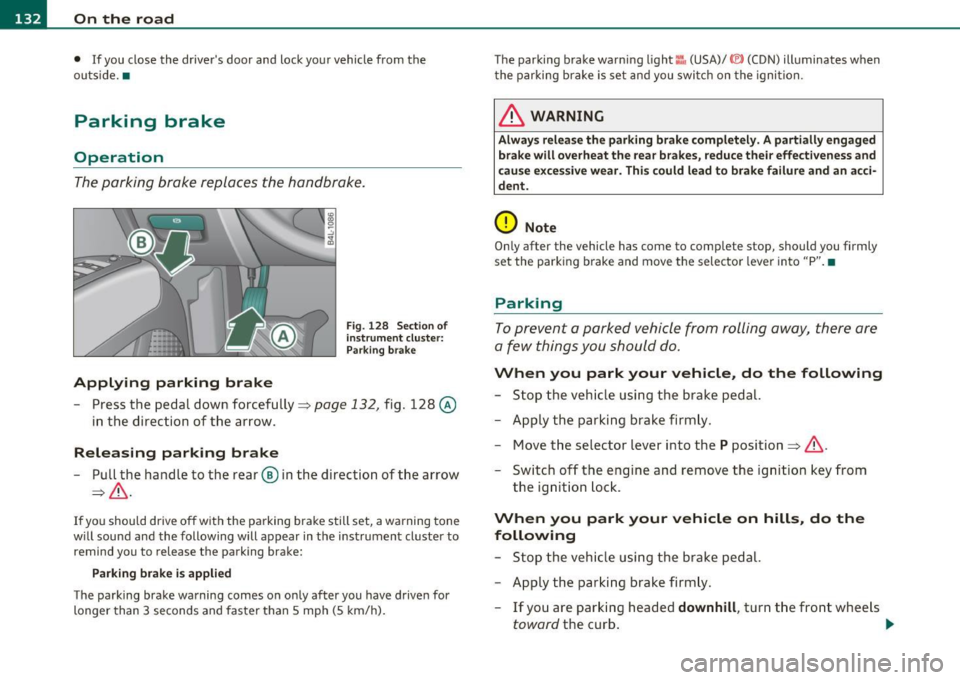
Op eration
The parking brake replaces the handbrake.
Applying parking brake
Fig. 128 Sect ion of
instrument cluster: Par king brake
- Press the pedal down forcefully~ page 132, fig. 128 @
in the d irection of the arrow.
Releasing parking brake
-Pull the handle to the rear ® in the direction of the arrow
~& -
If you should drive off with the parking brake still set, a warning tone
w ill sou nd and the following will appear in the instrument cluster to
remind you to release the parking brake:
Parking brake i s applied
The parking brake warning comes on only after you have driven for
longer than 3 seconds and faster than 5 mph (5 km/h). The parking brake warn
ing light ::, (USA)/ © (CON) illuminates when
the parking brake is set and you switch on the ignition.
& WARNING
Always release the parking brake completely. A partially engaged
brake will overheat the rear brakes, reduce their effectiveness and
c ause excessive wear. This could lead to brake failure and an acci
dent.
0 Note
Only after the vehicle has come to complete stop, should you firmly
set the parking brake and move the selector leve r into "P". •
Parking
To prevent a parked vehicle from rolling away, there are
a few things you should do.
When you park your vehicle, do the following
-Stop the vehicle using the brake pedal.
- Apply the parking brake firmly.
- Move the selector lever into the
P position =;,& .
- Switch off the engine and remove the ignition key from
the ignition lock .
When you park your vehicle on hills, do the
following
- Stop the vehicle using the brake pedal.
- Apply the parking brake firmly.
- If you are parking headed
downhill , turn the front wheels
toward the curb . .,_
Page 136 of 392

1111..__0_ n_ t_h _e_ r_o _ a_ d _________________________________________________ _
Cruise control
Switching the system on
The cruise control sys te m mak es it possibl e to d rive at a
cons tant sp eed sta rting at 20 mp h (30 km /h).
Fig . 129 Control lever
w it h set button
Fig . 130 Di spl ay:
Selected spee d
-Pull t he leve r to pos ition (D => fig . 12 9 to s witch the
system on.
- Driv e at the speed you wish to s et.
- Press bu tton @to se t th at sp eed .
The disp lay=> fig. 130 will show the se t speed . The d isplay may va ry
depending on the type of display in your vehicle. The indicator light
CRUISE (US mode l)/ 0 (Ca nadian mod el) will a lso ligh t up in t he
i n strum ent cluste r.
& WARNING
• Always pay attention to traffic even when the cruise control is
switched on. You are always responsible for your speed and the
di stan ce between your vehicle and other vehicle s.
• For safety reasons , the cruise control should not be used in the
city, in stop-and -go traffic, on twisting roads and when road
conditions are poor (such as ice , fog, gravel , heavy rain and hydro
planing) -risk of accident.
• Turn off the cruise control temporarily when entering turn
lanes , highway exit lane s or in construction zone s.
• Please note that inadvertently " re sting" you r foot on the accel
erator pedal causes the cruise control not to brake. This is because
the cruise control is overridden by the driver's acceleration .
• Never use the cruise control when driving off-road or on
unpaved roads . The Cruise control is intended for use only when
the vehicle is being operated on paved roads, and is not suitable
for use off-road or on unpaved roads.
[ i ] Tips
The cruise control cannot ma inta in a constant speed when d riving
dow nhill. The ve hicl e will accele rate unde r its own we igh t. D ownshift
to a Lower gear or use the brakes to slow down .•
Changing speed
- Press lever in the 0 or O d ire ct ion=> fig. 1 29 to i ncrease
or decre as e your s peed.
- Release the lever to save that s peed.
Page 139 of 392

Adaptive Cruise Control I'll __________________________ ...:....:..;:_....;_,,!,_ ______ _
& WARNING (continued)
the veh icle s afely when you follow another vehicle too closely.
Alway s rem ember that the Adaptive Cruise Control has a braking
powe r that is only about 30 % of the vehicle's maximum braking
ability. The automatic braking function cannot bring th e ve hicle to
a sudden or emergency stop . Always be prepared to brake and take
evasive action to avoid collisions and other accident situations .
• Never allow the closing speed between you and other vehicles
to be so high that the Adaptive Cruise Control may not be able to
slow your vehicle safely. If closing speed is too h igh, you must
apply the brake s your self to reduce the ri sk of a rear-end cra sh .
• Never rest your foot on the accelerator pedal , especially when
the Adaptive Crui se Control is being used. Pressure on the acceler
ator will overr ide the ACC braking function and prevent the brakes
from being applied when ACC detects a situation when the brake s
must be applied .
• Never u se Adaptive Cruise Control when you cannot drive safely
at a steady speed, including on city streets , on winding roads or
when road conditions are poor (for example , on ice, gravel, in fog ,
heavy rain or on wet roads that increase the risk of hydroplaning ).
• The radar sensor's
vi sion can be redu ced by rain, snow and
heavy road spray. These and similar conditions can prevent vehi
cle s up ahead from being accurately detected and in some cases
they may not be detected at all. Do not use ACC when the radar
sensors cannot accurately detect vehicles mo ving ahead of you in
traffic .
• Always turn off Adaptive Crui se Control when entering turn
lanes, exit lanes and con struction zones or in similar situat ions
because the vehicle will automatically accelerate to the stored
speed when the road ahead i s clear .
• To prevent unintended operation , always switch ACC off when
it is not being used .
Controls and equip
ment Safety first
(I] Tips
•
For safety reaso ns, t he stored speed is deleted when the igni tion
is turned off .
• T he Elect ronic Stabilization Program (ESP) and the Ant i- Slip Regu
lat ion (ASR) cannot be deactivated when the Adaptive Cruise Contro l
is sw itched on . If the ES P and t he Anti -S li p Reg ula tio n (ASR) has been
deactivated and you then switch on the Adaptive Cruise Control, the
E S P fu nction will also be a ctivated au toma tically.
• Damage cause d by accidents and some minor coll is ions can affect
t he radar se nsor se ttings and cause the syste m to malfunction o r
switch off completely .
• Th e radar sensor cover is heated. In win ter conditions, you should
st ill chec k befo re dr iv ing to make sure it is free of ice and snow. If
ne cessa ry, clean the area nea r the rada r sensor carefully ::}
page 136,
fig . 131.
• T o ensure tha t the radar sensor is not block ed, fore ign objects
(e.g. stickers, la rger license plate mo unts, add·on parts) must not
cove r th e ar ea nea r the radar senso r::} page 136, fig. 131. The area
near the ra dar senso r must not be painted, e ither.
• For Declaration o f Compliance to United Sta tes FCC and Indus try
Cana da regulat ions ::}
page 371. •
Vehicle care Technical data
Page 140 of 392

lffll.___A_ d_ a_,_ p_t _i_ v _e _ C_r_ u_ i_ s_ e_ C_ o_ n_ t_ r_ o_ l __________________________________________ _
Applie s to veh icles : wi th Adap tiv e Crui se Con tro l
How does Adaptive Cruise Control work?
Vehicles traveling ahead ore detected with the aid of a
radar sensor.
Fig. 132 Basic prin
ciple diagram: Radar
sensor measurement
range
Adaptive Cruise Control uses a radar sensor in the front of the vehicle
=>
page 138, fig. 132 . The system has limitations=> page 149.
Things that are not moving in your lane and in your direction of travel
w ill not be detected. The sensor measures the distance to reflective
surfaces that must have a certain size. The system responds only
after the distance measurement has been made . If a measurement is
not possible, the system cannot respond and will not react to a
vehicle or someth ing else up ahead.
Open road
When the road is clear, the Adaptive Cru ise Control works like cruise
control. It maintains a constant target speed specified by the driver .
Driving in traffic
If a slower veh icle driv ing ahead is detected, the Adaptive Cruise
Control decelerates (within the limits of the system)=>
page 148,
"Driver intervention prompt" and => page 149, "System limitations"
to its speed and after adjusting, tries to ma inta in the set distance
from the vehicle ahead. The vehicle may temporarily drive slower
than the set speed whi le adjusting=>
& in "Descr iption" on
page 136.
If the vehicle in front accelerates, Adaptive Cruise Control also accel
erates up to the speed that you have set.
If the vehicle ahead slows to a stop, ACC w ill slow your vehicle down
and to a complete stop if this is possible within the system's limits
and capabilities . ACC will not make an emergency stop. The text
message
ACC off: manual control! appears in the instrument cluster
display. Once the vehicle stops, you must depress the brake pedal to
prevent the veh icle from moving forward or "creeping". Depressing
the brake pedal turns off ACC. When the vehicle ahead accelerates
you can reactivate ACC =>
page 141, as soon as your vehicle has
reached a speed of 1 mph (2 km/h) .
Situations requiring driver intervention
In some situations you will have to use the footbrake to slow the
vehicle down in order to keep a safe distance from vehicle in front of
you or to avoid a rear-end collision. In this situation, a symbol
appears and a warning tone sounds=>
page 148.
Passing another vehicle
If you move into the passing lane and no vehicle is detected ahead,
the Adaptive Cruise Control accelerates to the speed you have set and
maintains it.
Overriding ACC
You can increase your speed at any time by stepping on the acceler
ator pedal. After you release the accelerator pedal, the system
adjusts back down to the speed you previously set.
Reduc ing stopping distance
If the radar sensor detects that the distance to the vehicle ahead is
less than defined minimum distance, the brakes are automatically
prepared for emergency braking by the driver. The brake pads are
moved very close to the brake discs withou t actually bra king the
vehicle. This brake assistant feature reacts more quickly to the driver's braking, and also works when Adaptive Cruise Control is off.
The stopping d istance is reduced as a result of this advance brake .,_
Page 141 of 392

__________________________________________ A_ d_ a_,_ p_t _iv _ e_C_ r_u _i _ s _e _C_ o_n_ t_ r_ o_ l __ _
preparation. Th is function does not p erfo rm any e mergency braki ng
man eu ver s by its elf; th e dr iver m ust alway s app ly the b ra kes .
& WARNING
If ACC initiates a braking maneuver, the brake pedal will be
retracted . Interference with the brake pedal can prevent ACC from
slowing the vehicle down and cause a crash and serious personal
injury .
• Never put anything in the driver's footwell or let anything fall
into it. An object in the driver 's footwell can interfere with the
pedals and prevent the accelerator from being used to override
ACC or prevent ACC from being switched off when the brake pedal
is depressed and also prevent the vehicle from being slowed down
or stopped.
• Only use floor mats that keep the area around the pedals free
and that can be securely fastened to the footwell.
• Never drive with your foot underneath the brake pedal.
• Always read and heed the information and WARNINGS~
& in
" Description " on
page 136.
& WARNING
• Never rely on the distance control feature of ACC alone to
prevent rear-end collisions. Always be prepared to brake and take
evasive action to avoid collisions and other accident situations.
• Never allow the closing speed between you and other vehicles
to be so high that the Adaptive Cruise Control may not be able to slow your vehicle safely. If closing speed is too high , you must
apply the brakes yourself to reduce the risk of a rear-end crash.
[I] Tips
Please note tha t the amount of accelerat ion the Adaptive Cr uise
Control uses depends on t he D istance sett ing se lected. DIS TA NCE 1
give s yo u acc eler ation th at is dy namic and sport y. DI STANC E 4, on th e
Controls and equip
ment Safety first
o
ther hand , gives more moderate acce lera tion . For more info rmation
a b out t he tim e inte rvals ~
page 142 , "Ho w is the di stanc e (tim e
interval) se t?".
• P lease no te th at if the A dapt ive Cruis e Con trol has b egun braking
t he vehicle a nd the dr ive r ch oos es to brake the vehicle addit io nally,
th e bra kes m ay feel "h ard". Thi s is s imply due to th e p res sur e buil d
up of th e initia l braking.
• Adaptive Cr uise C ontr ol is sw itche d off aft e r p ressing the foot
bra ke. T he speed saved up this poin t can be resumed . To resume the
s aved s peed, rele ase the b rake ped al and pull th e control lever
t oward you~
page 141, "Turning Adaptive Cr uise Contro l off
tempora rily" .•
A pp lies to ve hicle s: with Ad apti ve Cru ise Con tro l
Switching the system on and off
Switching the system on
- P ull th e lever t o posit ion © => fig . 133 .
Switching the system off
Fig . 133 Control
lever: Switch ing on
an d off
- P ress t he lever to posit io n @ (latc hed). •
Vehicle care Technical data