key battery AUDI Q7 2011 Owner´s Manual
[x] Cancel search | Manufacturer: AUDI, Model Year: 2011, Model line: Q7, Model: AUDI Q7 2011Pages: 392, PDF Size: 93.29 MB
Page 40 of 392
Driver information display
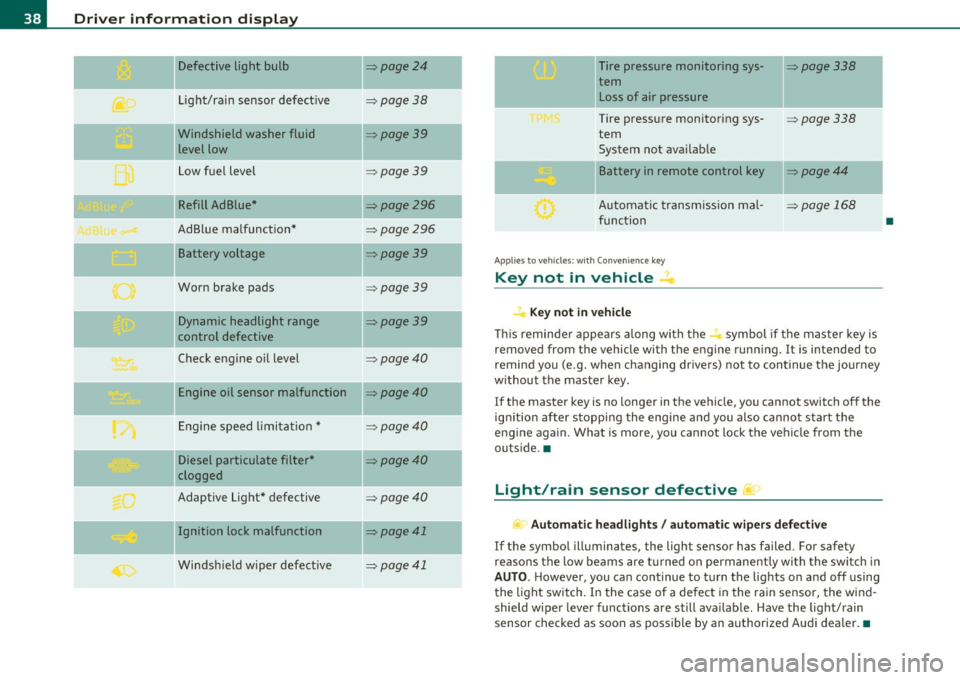
Defective light bulb ::::>page24
._ -
Light/rain sensor defective :::>page 38
-Windshield washer fluid =>page39
level low
Low fuel level
::::>page39
Refill Ad Blue* ::::>page296
AdBlue malfunction* =>page 296
-Battery voltage ::::>page39
Worn brake pads ::::>page39
Dynamic headlight range ::::>page39
control defective
-
Check engine oil level ::::>page40
Engine oil sensor malfunction =>page40
Engine speed limitation* ::::>page40
Diesel particulate filter* ::::>page40
clogged
Adaptive Light* defective
=>page40
Ignition lock malfunction ::::>page41
--
Windshield wiper defective => page 41
-
-
-
-
-
-
Tire pressure monitoring sys-::::>page338
tern Loss of air pressure
Tire pressure monitoring sys-=> page338
tern
System not available
- -
11
sattery in remote control key ::::>page44
Automatic transmission mal-=> page 168
function
Applies to veh icles: with Conven ience key
Key not in vehicle ..Z..
Key not in vehicle
This reminder appears along with the -i. symbol if the master key is
removed from the vehicle with the engine running. It is intended to
remind you (e.g. when changing drivers) not to continue the journey
without the master key.
If the master key is no longer in the vehicle, you cannot switch off the
ignition after stopping the engine and you also cannot start the
engine again. What is more, you cannot lock the vehicle from the
outside. •
Light/rain sensor defective ~'j.
Automatic headlights/ automatic wipers defective
If the symbol illuminates, the light sensor has failed. For safety
reasons the low beams are turned on permanently with the switch in
AUTO. However, you can continue to turn the lights on and off using
the light switch. In the case of a defect in the rain sensor, the wind
shield wiper lever functions are still available. Have the light/rain
sensor checked as soon as possible by an authorized Audi dealer. •
•
Page 46 of 392

Opening and closing
Check Light in the master key
The check light in the master key provides information
about different conditions.
Check light functions in the master key:
Vehicle within range of the key
Fig. 28 Check light in
the master key
If the vehicle is within range of the key, the check light comes on
briefly once when a button is pressed.
Vehicle outside the range of the key
If the vehicle is outside the range of the key, the check light comes on
briefly once and then shows the status of the vehicle door locks:
• If the light is flashing quickly, the vehicle is not locked.
• If the light is flashing slowly, the vehicle is locked.
State of master key battery
If the check light does not come on, the battery is dead and has to be
replaced. In addition, when the battery is dead the symbol appears
in the instrument cluster display as well as the message:
Please change key battery
Battery replacement=:> page 44.
[I] Tips
Please note that the current state of the vehicle door locks can only
be recalled with the master key that was last used to lock the vehicle.
It is possible that a different state is shown for the door locks on the
other master key which is not the same as that of the vehicle. •
Master key battery replacement
Each master key contains a battery housed under the
cover.
Fig. 29 Master key:
opening the cover
We recommend having the battery changed by an authorized
Audi dealer. However, if you wish to replace the dead battery
yourself, proceed as follows:
- Pry apart the base~ fig. 29
© and the cover @ carefully
with a coin.
- Remove the cover (arrow).
- Remove the dead battery from the cover.
- Install the new battery. Please make certain that the"+"
sign on the battery faces down. Correct polarity is shown
on the cover. _..
Page 47 of 392

- Place the cov er w ith t he new battery on t he k ey bas e and
press bot h parts together .
For the sake of the environment
Dispose of dead batter ies proper ly so as not to po llute the envi ron
ment.
(I) Tips
Th e replaceme nt ba ttery mus t be the same spec ifica tion as the
orig inal. •
Electronic immobilizer
The immo bili zer helps t o prevent unauth ori zed use of
your v ehicl e.
A compu ter chip ins ide you r key au toma tically deac tiva tes the elec
tr on ic immob ilizer whe n you inse rt the key in the ignition lock, o r on
vehicles with Convenience key *, when the key is inside the ve hicle.
W hen you remove the key from the ignition lock, or on vehicles with
Conven ience key, when you remove the key from the vehicle, the elec
tr on ic immo biliz er is a utomat ic al ly activa ted once aga in.
& WARNING
Always take the key with you when you leave the vehicle . The key
can di sarm the elect ronic engine immobilizer and permit an unau
thor ized per son to start the engine and enable operation of the
vehicle systems such a s power w indow or Panoramic sliding
s unroof* leading to serious personal injur y.
Controls and equip
ment Safety first
Opening and closing
(I) Tips
• Th
e vehicle ca nnot be started if an unauthori zed key is u sed. The
vehicle may not start if anothe r rad io device such as a key for another
vehicle o r a tra nsponder is loca ted o n the key r ing.
• For Declaration of Compliance to United States FCC an d Industry
Canada regulations=:>
page 371. •
Valet key function
The valet key function prevents unauthorized persons
from opening the glove compartment.
Fig . 30 Ce nter
con sole: button for
v alet ke y fu nctio n
Activating and deactivating the function
- Ins ert th e master key into the ig nition lock a nd swi tch on
t he ign it ion .
- P ress the
[V AL ET] butto n~ fig . 30 to activate/ deacti
vate the fu nct ion as desire d. The ind icator light in the
bu tto n illumina tes whe n the f unct ion is ac tiv e.
- Remove t he m aster key f rom t he ign it ion lock.
- Hand ove r onl y the
valet key~ page 42, fig. 26 to t he
person w ho will ta ke charge of the veh icle.
Vehicle care Technical data
Page 58 of 392

Opening and closing
Applie s to veh icl es : wi th Conv enie nce key
Unlocking the vehicle
The doors and the rear lid can be unlocked without oper
ating the master key.
Fig. 43 Convenience
key: unlocking vehicle
door
- Take hold of the door handle . The door is unlocked auto-
matically.
- Pull the handle to open the door.
A door is unlocked as soon as you approach the door handle and the
system recognizes an authorized master key . The vehicle can be
unlocked at any door. The authorized master key only has to be within
a range of about 5 feet (1.5 meters) from the respective door.
When a door is unlocked, the driver's door is always unlocked as well.
It depends on the settings in the central locking menu in the MMI
whether the entire vehicle is unlocked or only certain doors
~ page 49.
[I] Tips
If your vehicle has been standing for an extended period, please note
the following : •
The proximity sensors are deactivated after a few days to save
power . You then have to pull on the door handle once to unlock the
vehicle and a second t ime to open the vehicle.
• To prevent the battery from being discharged and to preserve your
vehicle 's ability to start for as long as possible, the energy manage
ment system gradually switches off unnecessary convenience func
tions . It is possible that you will not be able to unlock your veh icle
using these convenience functions. •
Appli es to vehicles : wit h Con venie nce key
Locking the vehicle
The vehicle can be locked without operating the master
key.
Fig . 44 Convenience
k ey: Locking the
vehicle
- Move the selector lever to the P position .
- Press the locking button in the door handle to lock the
vehicle =>& .
The vehicle can be locked at any door . The authorized master key only
has to be within a range of about 5 feet (1.5 meters) from the parti c
ular door.
T he selector lever must be in the P position, otherwise the vehicle
cannot be locked.
Page 74 of 392
Clear vision
0 Note
Do no t use the hig h beam or hea dlight fl asher if you know that these
cou ld blind oncoming traffic.•
Interior lights
Front interior Lights
The interior lights include reading lights for both the
driver and the f ront passenger .
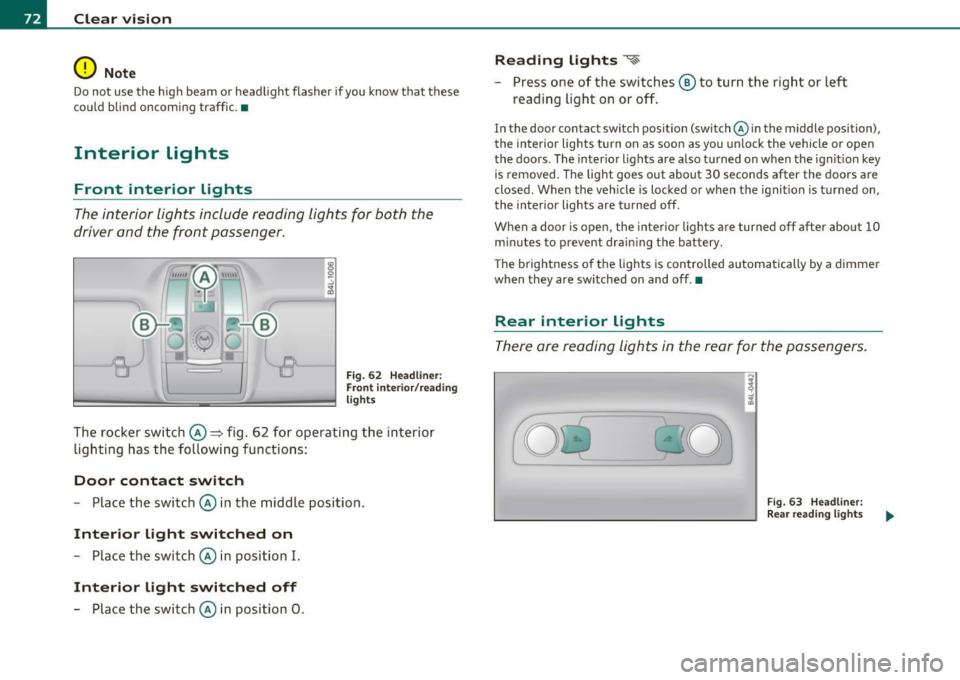
Fig . 62 Headlin er:
Fr ont inte ri or/ rea ding
lights
The rocker switch©=> fig . 62 for operating the interior
lighti ng has the followi ng functions :
Door contact switch
-Place the switc h© in the middle position.
Interior light switched on
-Place the switch © in position I.
Interior light switched off
- Place the switch © in position 0 .
Reading lights ~
- Press one of the switches ® to turn the right or left
reading light on or off.
In the door contact sw itch position (switch @in the middle position),
the interior lights turn on as soon as you un lock the vehicle or open
the doors . The inter io r lights are also t urned on when the ign it ion key
is removed . The light goes out about 30 seconds after the doors are
closed. W hen the vehicle is locked or when the ignit ion is t urned on,
the interior lights are turned off.
When a door is ope n, the interior lights a re turned o ff afte r about 10
m inutes to prevent dra in ing the battery.
T he brightness o f the lights is controlled automatica lly by a dimmer
when they are sw itched on and off. •
Rear interior Lights
The re are reading lights in the rear for the passengers.
Fi g. 63 Headli ner:
Rear re a din g ligh ts
Page 171 of 392
______________________________________________ A_ u_ t_ o _ m_ a_ t_ ic_ t_r_a _ n_ s_m_ i_ s _s_ i_ o _ n __ _
-Now press the inter lock an d mov e the sel ector lever to the
N pos ition.
Th e se lecto r leve r ca n only be moved from the P position if the ign i
tion key is in the lock and the ign it ion is turned on. If the vehicle has
t o be pushed or towed if the power supp ly fai ls (e .g. battery is
discharged), the selector lever must be moved to the
N position using
t he emergency lock ing devi ce. •
Controls and equip
ment Safety first
Vehicle care Technical data
Page 266 of 392
Intelligent technology
'-------------------------------------------------
Take into consideration that when you unlock your vehicle, some
convenience functions, such as the remote key or power seat adjust
me nt, may not be available. The convenience functions will be avail
able again when you turn on the ignition and start the engine.
With the engine turned off
If you listen to the radio, for example, with the engine turned off or
use other MMI functions, the battery is being discharged.
If start ing capability is jeopardized due to energy consumption, the
following warning appears in the MMI display:
Please start engine, otherwise system will switch off in
3 minutes .
The warning indicates that the system will be turned off automati
cally after 3 minutes. If you wish to continue using the functions, you
have to start the engine.
With the engine running
Although electrical energy is generated when the vehicle is being
driven, the battery can become discharged. This happens mostly
when little energy is being generated and a great deal consumed and
the battery's state of charge is not optimal.
To bring the energy balance back into equilibr ium, consumers which
require especially large amounts of energy are temporarily cut back
or switched off. Heat ing systems in particular require a great deal of
energy. If you notice, for example, that the heated seats* or the
heated rear window are not heating, they have been temporarily cut
back or switched off. These systems will be available again as soon as
the energy balance has been restored .
You will also notice that engine idle speed has been increased
slightly. This is norma l and not a cause for concern. By increasing
engine idle speed the additional energy required is generated and the
battery is charged.
Driver notification in the instrument
cluster display
If battery power drops into the range where it can limit the ability of
the engine to start, this is shown in the instrument cluster display
with the following driver message:
i...-3 Low battery charge: battery will be charged while driving
This notification reminds you that the starting capability of the
engine may be limited. As soon as you start driving again, the battery
w ill be recharged and the notification will go out.
Driver notification appears and goes out again
If th is driver notification appears after the ignition is turned on or
whi le driving and it goes out again after a while, the battery has been
adequately recharged.
Driver notification appears and does not go out
again
If this driver notification appears after the ignition is turned on o r
wh ile driving and does not go out again, the battery's state of charge
is not in the optimal range. Starting ability is restricted. Have the
battery checked as soon as possible by an authorized Audi dealer or
qualified workshop. •
Page 303 of 392

____________________________________________ ....:C _h_ e..:......::. c....:k :..:..in :....:..::: g!....::. a:..:..n.:... d:.:......: f....: i.:..ll :.:.i.:...n ::.:gi!-- __
Closing the engine hood
- Pull the hood down until the pressure from the struts is
reduced.
- Let the hood
drop down and latch in place. Do not try to
push it shut;
it may fail to engage=:> &.
& WARNING
A hood that is not completely latched could fly up and block your
view while driving.
• When you close the engine hood, check it to make sure the
safety catch has properly engaged. The hood should be flush with
the surrounding vehicle body parts.
• If you notice while driving that the hood is not secured prop
erly, stop at once and close it. •
Working in the engine compartment
Be especially careful whenever you work in the engine
compartment.
Whenever you must perform any work in the engine compartment,
for example checking and filling different fluids, there is a risk of injury, burns and accidents. To prevent personal injury always
observe the following WARNINGS. The engine compartment of any
vehicle is a hazardous area=>& .
& WARNING
To help avoid injury, before you check anything under the hood:
• Turn off the engine.
• Remove the ignition key.
• Apply the parking brake.
Safety first
& WARNING (continued)
• Move selector lever to "P" (Park).
• Always let the engine cool down. Hot components will burn
skin on contact.
• To reduce the risk of being burned, never open the hood if you
see or hear steam or coolant escaping from the engine compart
ment. Wait until no steam or coolant can be seen or heard before
carefully opening the hood.
• Keep children away from the engine compartment.
• Never spill fluids on hot engine components. They can cause a
fire. • Never touch the radiator fan. The auxiliary electric fan is
temperature controlled and can switch on suddenly.
• Never open the coolant reservoir cap when the engine is still
warm. The coolant system is pressurized and hot coolant could
spray out.
• Protect your face, hands and arm from steam or hot engine
coolant by placing a thick rag over the cap when you open the
coolant reservoir.
• If work on the fuel system or the electrical system is necessary:
- Always disconnect the battery.
- Never smoke or work near heaters or open flames. Fluids in
the engine compartment could start a fire.
- Keep an approved fire extinguisher immediately available.
• To avoid electrical shock and personal injury while the engine is
running or being started, never touch:
-Ignition cables
- Other components of the high voltage electronic ignition
system.
• If you must perform a check or repair with the engine running:
- First, fully apply the parking brake, move selector lever to
"P" (Park). .,
Vehicle care Technical data
Page 315 of 392

___________________________________________ C..:...._ h:....:e :....:c:..:. k.::..: i..:.. n .:..:g:!:....:: a....:. n..:.. d~ f:....:. i.:..ll :.:.i:....:n :.:g !....- __
Disconnecting the battery terminals
Some vehicle f unct ions (powe r window regula to rs, fo r ex am ple) are
lost if the batt ery t ermina ls are disconnec ted . These func tions hav e
to be re lea rne d after the battery term ina ls a re co nnecte d aga in . To
prev en t th is, t he battery should only b e disconn ecte d from th e
vehicle e lectr ica l system when absol ute ly necessary for repairs .
Vehicles not driven for long periods
If you do not drive your veh icle over a period of seve ra l days o r wee ks,
el ect rical compo nents are g radually cu t back or swi tched off . This
re duces ene rgy consumption an d maintains start in g ca pability ove r a
lo nger pe riod=>
pag e 263.
Take into consideration t hat when you unlock your vehicle, some
c onvenie nce func tions, such a s the m aster key remote function or
power seat ad justment , may not be ava ilab le. T he conven ience func
t ions wi ll be available again when you turn on the ignition and st art
t he engin e.
Winter operation
Dur ing the w inter months, batte ry capac ity tends to decrease as
t empe ra tures drop . This is beca use mo re powe r is also co nsu med
w hile starting, and the headlights, rear w indow defogger, etc ., are
used more often .
Avoid unnecessa ry power consu mptio n, part icularl y in city tra ffic o r
w hen trave ling on ly short distances . Let your author ized A udi deale r
ch eck t he capa city of the vehicle ba ttery before w inter sets in
=>
page 315. A well charged battery will not only prevent start ing
pro blems when the we ather is co ld, but wi ll a lso la st l onge r.
[ i J Tips
If you r ve hicl e is left s tandi ng for seve ral weeks at extremely low
tempe ratures, t he ve hicle battery should be removed and stored
w here it will no t free ze . T his will preven t it fr om being dam age d and
having to be replaced .•
Safety first
Working on the battery
B e es pec ially ca reful when workin g on o r nea r the
batt ery.
The battery is located un de r th e d rive r's se at . B efo re yo u
ch eck a nyth ing under the driv er's sea t,
read and heed all
WARNINGS =>& .
Always heed the safety warnings , when wo rking on the vehicle
battery or the ve hicle elect rical system to p reve nt injury .
The following WARNINGS are very important when
working on the battery:
Always heed the following WARNING SYMBOLS and safety pre
cautions when working on the battery.
@
Always wear eye protection.
Battery acid contains sulfuric acid. Always wear
gloves and eye protection.
No
- sparks
- flames
• smoking .
When a battery is charged, it produces hydrogen
gas which is explosive and could cause personal injury.
Always keep the battery well out of reach of chil
dren.
& WARNING
Whenever working on the battery or on the electrical system ,
there i s the risk of injury, accident and even fire. Read and heed
the following WARNINGS: .,_
Vehicle care Technical data
Page 377 of 392

Alphabetical index -________________ fWI
Alternator Auto-Check Control ..... .. .. .... ...... 32 State of charge ......... ..... .... 263
Malfunction ............. ........ . 34 Automatic belt retractor ............. 205 Voltage
......................... . 39
Ambience lighting Lighting profiles ................. . 73
Anti -freeze
See Engine coolant system ......... 308
Anti-glare inside day-night mirror . . . 79, 80
Anti -lock brake system
How the ABS system works ......... 260
Warning/indicator lights ... .. .... .. 19
Anti-S lip Regulation System (ASR)
How the system works ... .... .. .. . 258
Anti-theft systems
Anti-theft alarm system ........ .. .. 57
Electronic immobilizer ............. 45
Approach/departure angle ............ 270
Ashtray . ............. .. .. .. .. .... . 105
ASR How the Anti-Slip Regulation System works . ..... ... ... .. .. ......... 258
Asterisk What does it mean when something is
marked with an asterisk? ........... 6
Audi braking guard .................. 151
Error messages ............... ... 153
Settings ................ ..... ... 153
Status messages ................. 153
Switching on and off .............. 153
Audi Service Repair Manuals and Literature
368
AU TO mode
AC climate contro ls ...... .... .. .. . 114
Auto Safety Hotline .... .... ......... 199
Controls and equip
ment Safety first
Automatic car wash
See Washing
.................... 279
Automatic mode Four-zone automatic comfort air
conditioning ........... ...... .. 119
Automatic Sh ift Lock (ASL) ............ 165
Automatic transmission ... .. ......... 163
Automatic Shift Lock (ASL) ......... 165
Driving ......................... 163
Dynamic shift program ... .. .. ..... 166
Emergency release for selector lever . 168
Fail-safe mode ................ ... 168
Ignition key safety lock ............ 127
K ick-down .. ... .... .. .. .. ... .... 166
Manual shift program .. .. .. .. .. ... 167
Selector lever ............ ...... .. 164
Shift buttons . .. ................. 168
Steering wheel with tiptronic ® .... .. 168
Average speed ......... .. .. .......... 26
Avoid damaging the vehicle ........... 267
B
Bass box ... .. .. .... ............... 341
Battery . .. .... .. ... ....... ......... 312
Batte ry location ..... .. .. .... ..... 313
Charging ................ .. ... ... 315
Important warnings when working on the battery . .................... ... 313
Jump start ing ... ....... ....... ... 355
Low .... ........ ............. ... 263
Replacing the battery .... .. .. .. ... 316 Winter operation
................. 312
Working on the battery .. .......... 313
Before driving .. ................... . 191
Blended gasoline . .. .. ...... ....... . 291
Body cavity seal ing .................. 284
Booster seats .................... .. 241
Brake assistant . .. .................. 261
Brake booster ...................... 260
Brake fluid
Changing the b rake fluid .......... . 312
Checking the brake fluid level ....... 311
Reservoir ..... ................ .. 311
What is the correct brake fluid level? . 311
What should I do if the brake fluid warning
light comes on? . .. .... .......... 311
Brake light
Defective ... .. ................... 24
Brake system ..... .......... ...... .. 311
Anti-lock brake system ... .......... 19
Brake fluid .. .. ................ .. 311
Brake fluid spec ificat ions for refill and
replacement . .. .. ...... ....... . 312
Brake pads . ... ................ .. 265
General information ............ .. 259
How does moisture or road salt affect the brakes? . .... .. .. ..... ..... ... . 259
Ma lfunction .............. ...... .. 34
Parking brake .................... 132
Wa rning/indicator lights ... .... .. .. 20
Worn brake pads symbol ........... 39
Vehicle operation Vehicle care Do-it-yourself service Technical data