manual transmission AUDI Q7 2011 Owner´s Manual
[x] Cancel search | Manufacturer: AUDI, Model Year: 2011, Model line: Q7, Model: AUDI Q7 2011Pages: 392, PDF Size: 93.29 MB
Page 4 of 392
Table of contents
Table of contents
Vehicle literature ..... .
About this Owner's Manual .......... ....... .. .
Controls and
equipment .............. .
Instruments and controls ... .
General illustration ........... .
Instruments and
warning/indicator Lights ..... .
Instruments ... ... .......... .
Warning/indicator ligh ts ..... . .
Driver information display ... .
Introduction ...... ......... . .
T rip comput er . .... .......... .
E fficiency program ........... .
On-Board D iagnostic system
(OBD) .. .... ..... ............ .
Elec tronic speed limiter ....... .
Speed warning system ........ .
Auto Check Control ........... .
Opening and closing ......... .
Keys ....... ..... ............ .
Powe r locking sys tem ....... . .
Rear lid .... ................. .
Child safe ty lock ............. .
Conve nience key . ............ .
Anti -theft alarm system .. .... .
P o w er wind ow s ......... ..... .
Panoram ic sliding sunroof . .... .
5
6
8
9
9
10
10
14
22
22
26
28
30
30
31
32
42
42
46
51
54
55
57
58
61
Clear vision . .... ... .......... .
Lights ... ................... .
Int erior ligh ts ......... ...... .
V ision .. ..... ............... .
W iper and washer sys tem .... .
Mirrors ... ..... ... .......... .
D igital compass ............. .
Seats and storage ........... .
General recommendations .... .
Pow er fron t seat adju stm ent .. .
Adjusting fron t passenger's sea t
manually ........ .... ....... .
S eat m emory . ............... .
Rear seats ........ .......... .
Head res train ts .............. .
Armrest ...... .............. .
L ong cente r con so le ... .. ..... .
L uggage compar tment ....... .
Roof rack ................... .
Cupholder .................. .
Rear ash tray ......... ....... .
Outl et ..... ................. .
Storage ..... ............... .
Warm and cold .... ....... ... .
Climate con tro l .............. .
Rear Air Condition ing ...... ... .
Basic settings ............... .
Hea ted Sea ts ... ... ...... .... .
On the road ... .... .......... .
Steering .. ...... ..... ....... .
Ignition lock and igni tion switch
S tar ting and s topp ing the engin e
Start ing and stopping the engine
with Conv eni ence key ... ...... .
Parking brake ............... . 67
67
72
73
74
79
83
85
85
86
88
89
90
92
94
95
96
102
104
105
106
107
111
111
118
120
121
124
124
126
127
129
132 S
tar ting on hill s ............... 133
Cruise control ........... ..... . 134
Adaptive Cruise Control ....... 136
Sp eed and di stan ce con trol
system ....... ...... ...... .... 136
Driv er information . . . . . . . . . . . . . 144
Sys tem limi tations ............ 149
A udi braking guard ............ lSl
Audi side assist ............... 1S4
L ane Change Assistant ......... 154
Notes ..... ................... 161
Automatic transmission
tiptronic ® 163
163
Parking system .............
.. 170
General informa tion . . . . . . . . . . . 170
Rear park assist . . . . . . . . . . . . . . . 17 0
Parking system advanced .... ... 171
Adjusting th e di splay and warning
tones ................ ..... .. . 176
T rail er hi tch . . . . . . . . . . . . . . . . . . 177
E rror messages . . . . . . . . . . . . . . . 1 77
Adaptive Air Suspension 178
Air su sp en sio n and dam ping . . . . 178
Homelink ® ............. .... .. 185
Univ ersal remote control 18S
Safety first . . . . . . . . . . . . . . . 190
Driving Safely ................. 190
G eneral not es . . . . . . . . . . . . . . . . . 190
Proper occupant seating
p os itions . . . . . . . . . . . . . . . . . . . . . 192
Pedal area ................. ... 196
Page 165 of 392

____________________________________________ A_ u_ t_ o_ m_ a_ t_ i_ c _ t_ra _ n_s_ m __ is_s_ i_ o _ n _ __.lJII
Automatic transmission
• • ®
t1ptron1c
General information
Your vehicle is equipped with an e lectron ically contro lled automatic
transmission. Upshifting and downshifting takes place
automati
cally.
The transmiss ion is also equipped with tiptronic ®. It allows the driver
to shift gears
manually if desired => page 167. •
Driving the automatic transmission
Starting the engine
-The selector lever must be in Nor P.
Starting off
- Press a nd hold the brake pedal.
Fig. 162 Shift gate on
th e ce nte r co nso le :
selec tor lever w it h
r ele ase bu tton
-Press and hold the release button in the selector lever
handle and move the selector lever from
P or N to D and
release the button => & .
Con tro ls a nd e quip
m en t Vehicle
OP-eration
- Wait briefly until the transmission has shifted (you will
feel a slight movement).
- Remove your foot from the brake pedal and accelerate .
Rocking back and forth to become unstuck
-Shift only between D and R when the vehicle is at a full
stop and the engine is running at idle speed .
Stopping
-Press and ho ld the brake pedal until the vehicle has come
to a complete stop .
- Keep the b rak e pedal depr essed so that the vehicle ca nnot
roll forward or backward while it is idling => & .
- Once stopped,
do not depress the accelerator pedal to rev
up the engine=> &.
Parking
-Press and hold the brake pedal until the vehicle has come
to a complete stop.
- Set the park ing brake firmly=>
page 132, "Park ing".
- Press and hold the release button in the selector lever
hand le, move the se lector l ever int o
P and the n let go of
the release button => & .
The selecto r lever must be in Nor P. If one of the dr iv ing positions is
engaged a safety switch will prevent the engine from being started.
See also =>
page 127. _,.
Vehicle care Do-it-yourselt service iTechnical data
Page 167 of 392

______________________________________________ A_ u_ t.:.. o_;__ m_ a_ t_;__ ic.......; t_r_a _ n_:.. s_m _:_: i.:: s ..:s:....: i..:o :....: n_;____,J-
When the ignition is on, the backup lights illuminate when the
selector lever is moved into
R.
N -Neutral
The transmission is in neutral in th is posi tion . Sh ift to this posit ion
for standing with the brakes applied~
page 165.
When the vehicle is stationary or at speeds below 3 mph (5 km/h),
you must always apply the footbrake before and wh ile moving the
lever out of
N .
D -Normal position for driving forward
Position D is for normal city and highway driving. It ranges from zero
to top speed and all gears shift automatically, depending on engine
load, driving speed and automatically selected shift programs.
When the vehicle is stat ionary or at speeds below 3 mph (5 km/h),
you must always app ly the foot brake before and while moving the
lever to
D out of N.
In certain circumstances it may be advantageous to temporarily
switch to the manual shift program to manua lly select gear rat ios to
match specific driving conditions~
page 167.
S -Sport position
Select this position for sportier performance. In this position, the
transmission will not upshift as soon, allowing the vehicle to use the
increased power available at higher engine speeds to ach ieve livelier
acceleration.
When the vehicle is stat ionary or at speeds below 3 mph (5 km/h),
you must always apply the foot brake before and while moving the
lever to
S out of N.
& WARNING
Read and follow all WARNINGS ~ & in "Driving the automatic
transmission " on page
163 .
Contro ls a nd e quip
m en t Vehicle
OP-eration
0 Note
Coasting downh ill with the transmission in N and the engine not
running will result in damage to the automatic transmission and
poss ibly the catalytic converter .•
Automatic Shift Lock (ASL)
The Automatic Shift Lock safeguards you against acci
dentally shifting into a forward or the reverse gear and
causing the vehicle to move unintentionally .
Fig. 164 Shift gate:
selector lever lock posi
tions and interlock
button highlighted
The selector lever lock is released as follows:
- Turn the ignition on.
- Step on the brake pedal.
At the same time press and hold
the interlock button on the side of the gear selector knob
=> fig . 164 with your thumb un til you have moved the
selector lever to the desired position.
Automatic selector lever lock
The selector lever is locked in the P and N positions when the ignition
is turned on. To move the lever from these positions the driver must
depress the brake pedal. As a reminder to the driver, the following
~
Vehicle care Do-it-yourselt service iTechnical data
Page 169 of 392

______________________________________________ A_ u_ t_ o_ m_ a_ t_ ic_ t_r _a _n_ s_m _ i_s _s_ i_o _n _ ___.fflll
of the braking effect of the engine without the need to shift down
manually .•
Manual shift program
Using the manual shift program you con manually select
gears.
Fig. 165 Center
console: shifting the
tiptroni c® manually
Fig. 166 Display:
manual shift program,
selec ted gear
Switching to manual shift program
-Push the selector lever to the right from D. As soon as the
transmission has switched over , the selected gear appears
in the display => fig. 166.
Con tro ls a nd e quip
m en t Vehicle
OP-eration
To upshift
-Push the selector lever forward to the plus position 0
=> fig. 165.
To downshift
- Push the lever to the minus position Q.
When accelerating, the transmission will a utomatica lly shift into the
next gear before the engine reaches its maximum RPM .
I f you apply a light throttle when accelerating, tiptronic ® will auto
matically shift from 1st to 2nd gea r to save fuel. If you apply a heavy
throttle, the transmission will stay in 1st gear until near maximum
RPM is reached, or until the driver sh ifts into 2nd gear.
I f you take your foot off the accelerator pedal when driv ing down a
st eep incline, tiptronic ® will downshift from the selected gear into
the next lower gear until it reaches 1st gear, based on road speed and
e ngine RPM . Automatic downsh ifting is interrupted as soon as you
apply the throttle again.
[ i ] Tips
• When you shift into the next lower gear, the transmission will
downshift on ly when there is no possibility of over-rewing the
engine.
• When the kick -down comes on, the transmission will shift down to
a lower gear, depending on vehicle and engine speeds.
• tiptronic ® is inoperative when the transmission is in the fail-safe
mode. •
Vehicle care Do-it-yourselt service iTechnical data
Page 170 of 392
ffl..__A_ u_ t_ o_ m_ a_ t _ ic_ t_r_a _ n_ s_m _ i_ s _s_ i_ o _ n _____________________________________________ _
Applie s to veh icles : wi th tip tron ic -s te eri ng whe el
Steering wheel with tiptronic ®
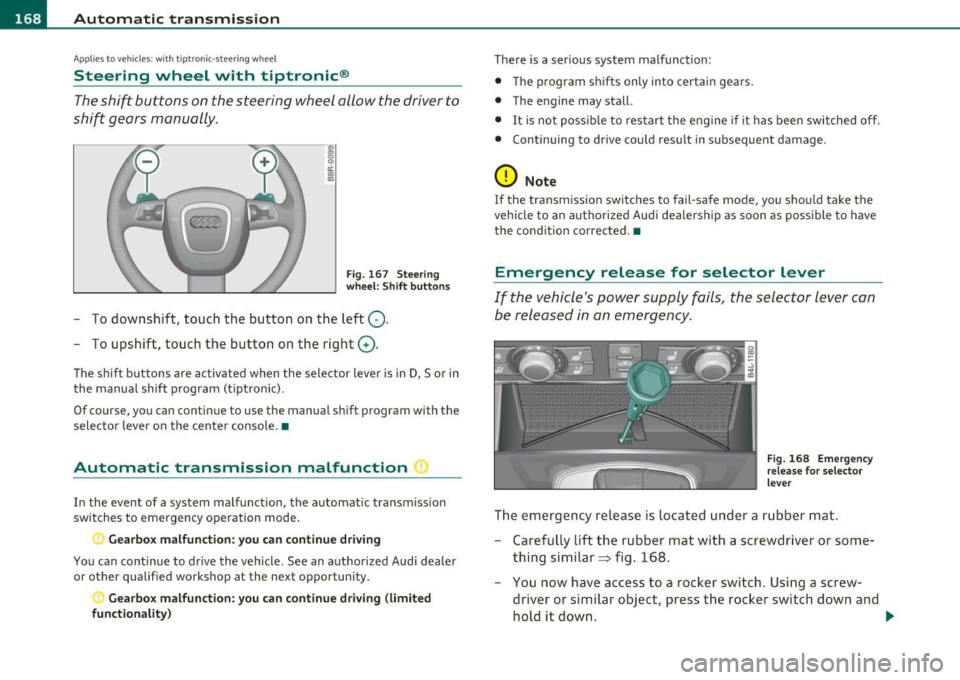
The shift buttons on the steering wheel allow the driver to
shift gears manually.
Fig. 167 Steering
wheel: Shift buttons
- To downshift, touch the button on the left Q.
- To upshift, touch the button on the right G).
The shift buttons a re activated when the selector lever is in D, Sor in
the manual shift program (t iptronic).
Of course, you can continue to use the manual shift program with the
selector lever on the center console. •
Automatic transmission malfunction I
In the event of a system malfunction, the automat ic transmission
switches to emergency operation mode .
., Gearbox malfunction: you can continue driving
You can continue to drive the vehicle. See an authorized Audi dealer
or other qualified workshop at the next opportunity .
Gearbox malfunction: you can continue driving (limited
functionality )
There is a serious system malfunction:
• The program shifts only into certain gears.
• The engine may stall.
• It is not poss ible to restart the engine if it has been switched off.
• Continuing to drive could result in subsequent damage .
0 Note
If the transmission switches to fail-safe mode, you should take the
vehicle to an authorized Audi dealership as soon as poss ible to have
the condition corrected. •
Emergency release for selector lever
If the vehicle's power supply fails, the selector lever can
be released in an emergency.
Fig. 168 Emergency
release for selector
lever
The emergency release is located under a rubber mat.
- Carefully lift the rubber mat with a screwdriver or some
thing similar=> fig. 168.
- You now have access to a rocker switch . Using a screw
dr iver or similar object, press the rocker switch down and
hold it down. ._
Page 364 of 392

., __ G_ e_n_ e_r _a _ l_ in_ f_o _r_ m_ a_ t_io _ n _______________________________________________ _
General information
Explanation of technical data
Some of the technical data listed in this manual requires
further explanation.
The technical data for your vehicle is listed in the charts starting on
~ page 365. This sect ion prov ides genera l information, notes and
restrictions which app ly to this data .•
Veh icle identification
The key data is given on the vehicle identification number
(VIN) plate and the vehicle data sticker.
F ig. 273 V ehicle I den
t ifi ca tion Nu mbe r
(V IN ) plate: locat io n
o n d river's s id e d ash
p an el Fi
g. 27 4 Th e vehi cle
i d enti ficati on l abel -
in side the l ugga ge
co mpa rtme nt
The Vehicle Id ent ifi cat ion Number (VlN )
is located on the driver's s ide so that it is visible from the outside
through the windshield ~ fig . 273 . You can also d isp lay the Vehicle
Identification Number of your vehicle in the MMI. Se lect funct ion
button [CAR]>
S yst em s* > Vehicle ID number (VIN ).
The vehicle identifica tion lab el
is located in the luggage compartment under the cargo floor cover.
The label~ fig . 274 shows the following vehicle data:
© Production control No.
@ Vehicle identification No.
® Type code n umber
@ Type designat io n/eng ine output in Kilow atts
© Engine and transmission code letter
© Paint No./Interior
(j) Optional equipment No.'s
Vehicle data 2 to 7 are also found in your Warranty
& Maintenance
booklet . .,,
Page 377 of 392

Alphabetical index -________________ fWI
Alternator Auto-Check Control ..... .. .. .... ...... 32 State of charge ......... ..... .... 263
Malfunction ............. ........ . 34 Automatic belt retractor ............. 205 Voltage
......................... . 39
Ambience lighting Lighting profiles ................. . 73
Anti -freeze
See Engine coolant system ......... 308
Anti-glare inside day-night mirror . . . 79, 80
Anti -lock brake system
How the ABS system works ......... 260
Warning/indicator lights ... .. .... .. 19
Anti-S lip Regulation System (ASR)
How the system works ... .... .. .. . 258
Anti-theft systems
Anti-theft alarm system ........ .. .. 57
Electronic immobilizer ............. 45
Approach/departure angle ............ 270
Ashtray . ............. .. .. .. .. .... . 105
ASR How the Anti-Slip Regulation System works . ..... ... ... .. .. ......... 258
Asterisk What does it mean when something is
marked with an asterisk? ........... 6
Audi braking guard .................. 151
Error messages ............... ... 153
Settings ................ ..... ... 153
Status messages ................. 153
Switching on and off .............. 153
Audi Service Repair Manuals and Literature
368
AU TO mode
AC climate contro ls ...... .... .. .. . 114
Auto Safety Hotline .... .... ......... 199
Controls and equip
ment Safety first
Automatic car wash
See Washing
.................... 279
Automatic mode Four-zone automatic comfort air
conditioning ........... ...... .. 119
Automatic Sh ift Lock (ASL) ............ 165
Automatic transmission ... .. ......... 163
Automatic Shift Lock (ASL) ......... 165
Driving ......................... 163
Dynamic shift program ... .. .. ..... 166
Emergency release for selector lever . 168
Fail-safe mode ................ ... 168
Ignition key safety lock ............ 127
K ick-down .. ... .... .. .. .. ... .... 166
Manual shift program .. .. .. .. .. ... 167
Selector lever ............ ...... .. 164
Shift buttons . .. ................. 168
Steering wheel with tiptronic ® .... .. 168
Average speed ......... .. .. .......... 26
Avoid damaging the vehicle ........... 267
B
Bass box ... .. .. .... ............... 341
Battery . .. .... .. ... ....... ......... 312
Batte ry location ..... .. .. .... ..... 313
Charging ................ .. ... ... 315
Important warnings when working on the battery . .................... ... 313
Jump start ing ... ....... ....... ... 355
Low .... ........ ............. ... 263
Replacing the battery .... .. .. .. ... 316 Winter operation
................. 312
Working on the battery .. .......... 313
Before driving .. ................... . 191
Blended gasoline . .. .. ...... ....... . 291
Body cavity seal ing .................. 284
Booster seats .................... .. 241
Brake assistant . .. .................. 261
Brake booster ...................... 260
Brake fluid
Changing the b rake fluid .......... . 312
Checking the brake fluid level ....... 311
Reservoir ..... ................ .. 311
What is the correct brake fluid level? . 311
What should I do if the brake fluid warning
light comes on? . .. .... .......... 311
Brake light
Defective ... .. ................... 24
Brake system ..... .......... ...... .. 311
Anti-lock brake system ... .......... 19
Brake fluid .. .. ................ .. 311
Brake fluid spec ificat ions for refill and
replacement . .. .. ...... ....... . 312
Brake pads . ... ................ .. 265
General information ............ .. 259
How does moisture or road salt affect the brakes? . .... .. .. ..... ..... ... . 259
Ma lfunction .............. ...... .. 34
Parking brake .................... 132
Wa rning/indicator lights ... .... .. .. 20
Worn brake pads symbol ........... 39
Vehicle operation Vehicle care Do-it-yourself service Technical data
Page 384 of 392
___ A_ l_. p_ h _ a_b_ e_ t_ic _a_ l_ in_ d_e _ x ____________________________________________ _
Malfunction Indicator Lamp (MIL) ... 17 , 30
Master key ............ ...... .. .. .. . 43
Battery rep lacement ............... 44
Check light ..... .. .... .. .......... 44
Mileage Average ................ ...... .. . 26
Instantaneous ........... .. .... .. . 26
Mirrors Act ivating the d igital compass ... .... 83
Adjusting the ant i-glare ... .. .. .. 79, 80
Automatic d imming for the outside
mir rors .. .. .................... 82
Automatically dimming inside mirror . 80
Inside day-nigh t mi rror .. .......... 79
Interior mirror ... ........ .. .. .. 79, 80
Outside mirrors ..... .............. 81
Recalling position of outside m irrors . . 89
Storing position of outside mirrors ... 89
Monitoring the Advanced Airbag System 222
N
Natural leather ............. ...... .. 287
New tires and wheels ................ 330
NH TSA
Contact ing . .. ..... ... ........... 199
Number of seats ........ .... .. .... .. 201
0
Occupant seating positions
192
Octane rating . .. .. .. .. .. .. .... ..... 291
Odometer .. .. .. ..... ....... .. .. . .. . 12 Offroad mode
.. .. .. ..... ..... .... .. 256
Oi l
See Engine oil ....... ... .. .. .... . 303
On-Board Diagnostic System (OBD) Data Link Connector (DLC) ........ .. 30
Electronic speed limiter .......... .. 30
Malfunction Indicator Lamp (MIL) .. .. 30
Open door or rear lid warn ing .. ... ..... 24
open sky system
See Panoramic sliding sunroof ..... .. 61
Operate your veh icle economically and mini-
mize pollution . .... .. .......... 267
Optional equipment
Marked with an asterisk ............. 6
Other equipment (eff ici ency program) ... 29
Outlets ... ............. .... .. .. .. . 106
Outside air pollution
How to prevent from entering the vehicle .
115
Outside mirrors ..................... 81
Outside temperature display ... .. .. .. .. 23
Owner's manual How the Owner's Manual is organized . . 6
p
Paint
Touch-up . .......... ... ..... ... . 282
Paint No ......... ........... ...... . 362
Panoramic s lid ing sunroof ........... .. 61
Closing ........ .. .... .... .. .. .. .. 62
clos ing ........ .. .... .. .. .. ...... 61
Conven ience clos ing ....... ...... .. 63 Emergency operation
... .. .. . 64 , 65, 66
sliding open ................... ... 61
Sunshade .................. .... .. 63
tilt ing . .. .. .... ....... ... .. .. . .. . 61
Parking .. .. ....................... 132
Automatic transmission ........... 163 Caution when parking near a parking barri- er or curb . ................... . 132
Low bumper cover, spoilers and suspension ... .... ..... ....... . 132
Park ing brake . .. .. .... ............. 132
Parking ........ .. .. .. .. .. .... .. 132
Warning/indicator lights . .......... 20
Parking on a decl ine (downhill) .. .... .. 132
Parking on an incline (uphill) .. ... .. .. . 132
Parking system advanced ........... . 171
Adjusting the display ........... .. 176
Adjusting the warning tones ....... 176 Rear view camera - parking mode 1 .. 174
Rear view camera -parking mode 2 .. 175
Safety precautions ............... 171
Switching on and off ... .. .. ... .. .. 173
Tr ailer hitch .. .... .. ........... .. 177
Particle filter
See Diesel particulate filter ......... 40
Parts replacement ...... .... .... .. .. 3 70
PASSENGER AIR BAG OFF light ........ 223
Passenger's seat .................. 86, 88
Passive safety system ... .. ........ .. 190
Pedals ................ .. .... .... .. 196
Perimeter lighting ................. .. 70
Physical principles of a frontal collision . 202
Polishing ... .. .. .. ................ . 281
Page 386 of 392
___ A_ l_. p_ h _ a_b_ e_ t_ic _a_ l_ in_ d_e _ x ____________________________________________ _
Retractor ... .. .. .... .. .. .. ... ... . .. 205
Rims Cast a lloy . ... ... ... ... ... .... ... 284
Roof rack . .. .. .................. ... 102
Loading ..... ................. .. 103
Mounting locat ions . .. .. .. .. .. .. .. 103
Roof we ight ....... ... ............. 103
Rule of behavior offroad 270
s
Safe driving habits ... .. .. .. .. .. .. ... 190
Safety belt he ight ad justment .. .. .. .. . 208
Safety belt position .. .. .... ......... 206
Safety belt he ight adjustment ...... 208
Safety belts worn by pregnant women ...
2 07
Safety belt p retensioner ............. 209
Service and disposal ........ .... .. 210
Safety belt warn ing light .... .. .. .. 18, 201
Safety bel ts ... ................... .. 20S
cleaning ...................... .. 28 9
Dange r to passengers who do no t wear a
safety belt ............ ... ... ... 203
Fasten ing ... ...... .............. 205
Improperly worn .. .... .. ......... 209
N ot wo rn .... ................. .. 203
Safety bel t position ....... .. .. .. .. 206
Sa fety ins truc tions . .... ... .... . .. 204
Sec uring child sa fety seats ...... .. . 243
Special considerations fo r pregnant Why YOU MUST wear them .
.. .. .. . 201
Worn properly ............... ... . 204
Safety compliance sticker . ... .... ... . 362
Safety equipment ................... 190
Safety features for occupant restraint and protection . . . . . . . . . . . . . . . . . . . . . 19 0
Safety guidelines Seat adjustment ................ .. 85
Safety instructions Engine compartme nrt ...... .. .. .. . 301
for side curtain airbags ........... . 232
for using child safety seats .. .. .... . 236
for using safety be lt s ... .. ... .. .. . 204
Monitor ing the Advanced Airbag System
224
Safety lock
Igni tion key, au tomatic transmission 1 27
Seat ad justment
Adjusting the seat height manually ... 88
Adjusting the seatback ma nua lly . .. .. 88
Dr iver's seat .......... .... ....... 85
Dr ive r's seat memory ............ .. 89
Front passenger's seat .. .. .. ... .... 86
Front sea ts . . . . . . . . . . . . . . . . . . . . . . 85
Head res trai nts ......... .. .. .. 92, 19 4
M anu al con trols . ................. 88
Moving the seat forward o r bac kward
manua lly ....... ..... ........ ... 88
Powe r .. .. .. .. .. ... .... .. .. ... ... 86
Seat be lts
See Safety be lts ................ . 201
women .. ..... ........ ...... .. 207 Seat memory ...... .... ... . ... .... . . 8 9
Unfasten ing ·· ············ ···· ··· 208 Seat vent ilat ion .. ..... .... . ... .. .. . 121
Wa rning/ind icator light .. ......... 201 Seat
ing capac ity . ... ... .. . .. .. .. .. .. 201
Seat ing pos it ion
Driver ... .. .. .. ... ... ... .. .. . ... 192
Front passenger ... ... ... .. .. . ... 193
How to adjust the front seats ...... 193
Incorrect seat position ... ......... 195
Occupants . .. .. .... ............. 192
Rear passengers
Seats Numbe r of seats 194
201
Selective un lo ck feat ure .. .. ..... .. ... 49
Selector lever . .. .... .. ........... .. 164
Service and disposal Safety belt pretensioner . .... ... ... 2 10
Serv ice in terva l disp lay . ........... .. . 25
Service posit ion
Windshield wipers .. .... .......... 77
Servo tro n ic
Powe r stee ring . ..... .. .. .. .... .. 2 61
Shift buttons ..................... . 168
Side airbags Description ........ ............. 227
How they work ............ .... .. 228
Side ass ist
Act ivat ing and deact ivat ing . .. .. ... 154
Description . ... .. .. ..... ..... .. . 154
Informational and a lert stage signals 156
Messages in instrument cluster disp lay ..
16 1
MM I setti ngs ........ .. .... .... .. 160
Ope ra tion ..... .. .. ... .... .. . ... 156
Safety tips ..... .. .. .. .. ... .. . ... 162
Sensor detect ion area . ... ... ... ... 1 56