clock AUDI Q7 2011 Owner´s Manual
[x] Cancel search | Manufacturer: AUDI, Model Year: 2011, Model line: Q7, Model: AUDI Q7 2011Pages: 392, PDF Size: 93.29 MB
Page 13 of 392
If the needle is well in the upper area of the gauge, the coolant
tempe rat ure is too high.
Stop the vehicle , switch the engine off and
allow the engine to cool.
If the warning light comes on again after
driving a short distance, contact an authorized dealer.
& WARNING
• Alway s observe th e warning in=> page 290 , "Engine comp art
ment ", before opening the hood and checking the engine coolant
level.
• Never open the engine hood if you see or hear steam, or if you
s ee engin e coolant dripping from the engine compartment. You
could burn yourself. Let the engine cool off first so that you cannot
hear or see any steam or engine coolant .
0 Note
• Mounting additiona l lights or accessories in fron t of the a ir inlets
reduces the cooling effect of the radiator . At high outside tempera
t ur es o r high engine load, the engine could overheat.
• The front spo iler has bee n des igned to prope rly d istribute the
coo ling air when the vehicle is moving.
If the spoiler is damaged, this
cou ld reduce the coo ling effect and the eng ine could then overheat .
Ask your author ized A udi dealer for assistance .•
Tachometer (engine rev counter)
The tachometer indicat es th e engine RPM (revolutions
per minutes).
Th e ta chomete r@ ::::> page 1 0, fig. 2 is the left of the tw o large clock
type displays.
Th e engine tu rns at a speed
1,000 times the si ng le dig it in the
display, e.g. if the need le is po int ing at the "2 " the engi ne is t urning
at 2,000 RP M.
Controls and equip
ment Safety first
Instruments and warning
/indicator lights
If e ngine RPM drops below 1,500, you s hould dow nsh ift to t he next
lower ge ar. T he re d area at t he e nd of the s cale i ndic ates m aximum
permissible e ngine RPM after the break-in per iod . Before reaching
this area, move the selector lever to posit ion "D (Drive)" or ease yo ur
foot off the accelerator pedal.
0 Note
T he tachome ter needle s houl d not move into the red range. If it does,
then only fo r a very short period of time . You could damage your
e n g in e by driv ing at h igh RPM .
c£> For the sake of the environment
Upshifting early saves fuel a nd reduces e ngine noise. •
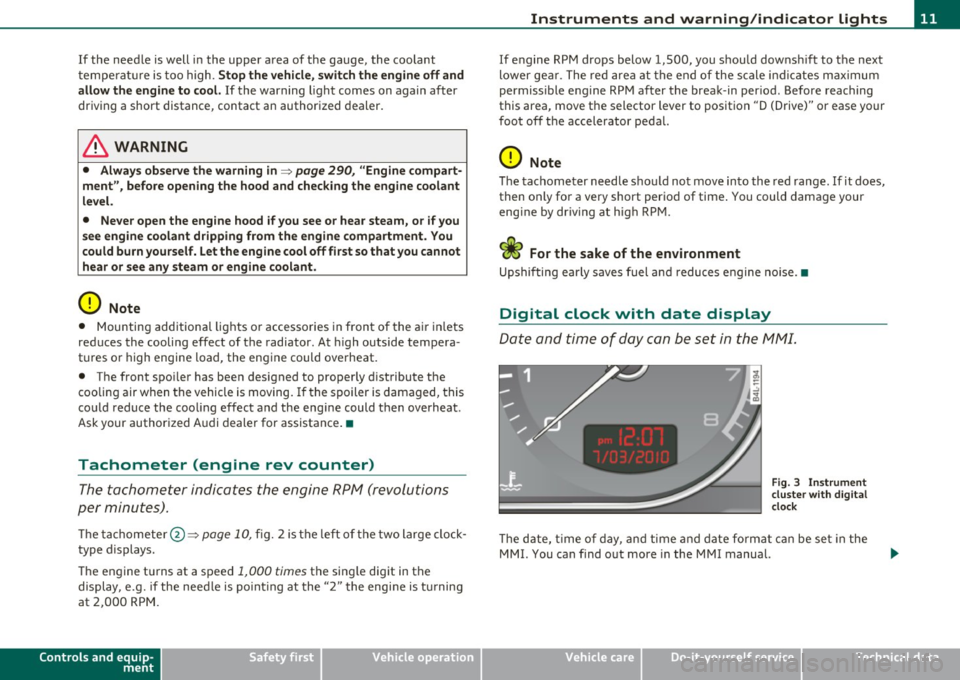
Digital clock with date display
Date and time of day can be set in the MM I.
Fig. 3 Instrumen t
cluster with digital
clock
Th e d ate, t ime o f day, and time and date fo rmat c an be se t in the
MMI. You can find o ut more in the MMI manual.
Vehicle care Technical data
Page 14 of 392
Instruments and warning /indicator lights
(I) Tips
• T he dig ita l clock and the odomete r are t urned on for about 30
seconds when the driver's door is opened .
• When the ign ition is turned off, the odometer read ing and the
digital clock with date disp lay can be switc hed on for about
30 se conds by press ing the
[CH ECK! button~ page 13, fig. 5. •
Speedometer with odometer
The speedometer shows you the vehicle speed, and the
odometer shows you how many miles (kilometers) you
have driven .
"' ---------1 ~ .!, ;g
Fig. 4 Instrume nt
clu st e r O dom eter a nd
r e se t bu tton
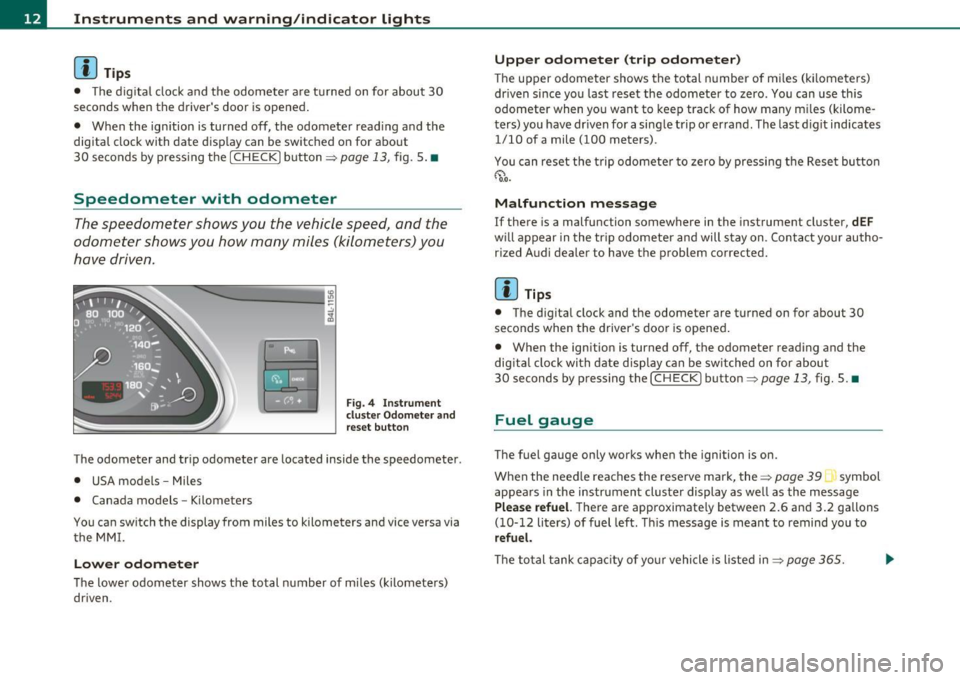
The odometer and tr ip odometer are located inside the speedometer .
• USA models -Miles
• Canada models -Kilometers
You can sw itch the display from miles to kilometers and vice versa via
t he MM I.
Lower odometer
The lowe r odometer shows the total n umber of m iles ( kilomete rs)
dr iven .
Upper odometer (trip odometer)
The upper odometer shows the total n umber of m iles (k ilometers)
dr iven since you last reset the odometer to zero . You can use th is
odometer when you want to keep track of how many m iles (kilome
ters) you have dr iven for a sing le trip or errand. The last d igit indicates
1/10 of a mile (100 meters) .
You can reset t he t rip odometer to zero by pressi ng t he Rese t bu tto n
~ o.o.
Malfunction message
If there is a malfunction somewhere in the instrument cluster, dEF
w ill appear in the tr ip odomete r and will s tay on . Con tact yo ur autho
r ized Audi dealer to have the problem corrected.
[ i ] Tips
• The d igita l clock and the odometer are turned on for about 30
seconds when the driver 's door is opened .
• When the ignition is turned off, the odometer reading and the
dig it a l cl ock with date d isp lay can be sw itched on for abou t
30 seconds by pressing the [
CHECK! button=> page 13, fig. 5. •
Fuel gauge
The fuel gauge only works when the ignition is on.
When the need le reaches the rese rve mark, the~
page 39 symbol
appea rs in the instrument cluste r display as we ll as the message
Plea se refuel. T here are approximate ly between 2.6 and 3.2 gallons
( 1 0-12 li ters) of fuel left . T hi s message is meant to remind you to
refuel.
Th e to tal tank capa city of yo ur vehicle is liste d in ~ page 365.
Page 15 of 392
0 Note
Never run the tan k comp letely d ry . An irregular s upply of f ue l can
cause engine misfiring and fue l cou ld enter the ex ha ust system . T he
c ata lytic co nve rter co ul d the n overhea t and be damaged .•
[ C HECK ) button
You can per form differen t functions wi th this button.
Fig . 5 CHE CK button
i n the in strume nt
clu ste r
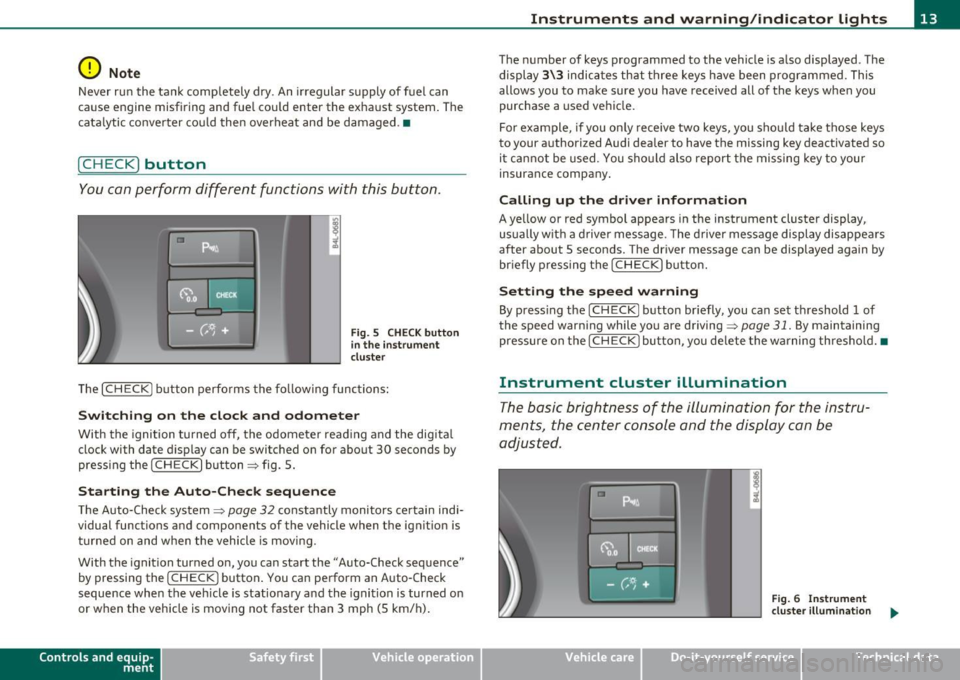
Th e [ C H ECK] bu tton perfo rms the fo llowing func tions :
Switching on the clock and odometer
With the ignition tu rned off, the odome ter read ing and the dig ita l
clock with date d isplay can be switched on for abo ut 30 seconds by
pressin g the [
CHECK ] button ~ fig . 5.
Starting the Auto-Check sequence
The Auto-Check system~ page 32 constantly monitors ce rtain indi
vidual functions and components of the vehicle when the ignit ion is
tur ned on and w hen the vehicle is movi ng.
With the ignition turned on, yo u can sta rt the "A uto-Check sequence"
by pressing the
!CHECK ] button. You can perform an Auto -Check
sequence whe n the veh icle is st ationa ry a nd the ignition is turned on
or when the vehicle is moving not faster than 3 mph (5 km/h) .
Control s and equ ip
m ent Vehicle OP-eration
Instruments and warning /indicator lights
The nu mber of keys programmed to the vehicle is a lso displayed . The
di splay
3\3 indic ates th at three keys have been programmed . T his
allows you to make sure you have received all of the keys w hen you
purc hase a used ve hicle.
For example, if you o nly receive two keys, yo u sho uld ta ke tho se keys
to your a uthorized Audi dealer to have the missing key deactivated so
i t ca nn ot be used. You sh ould also re port the mis sing key to you r
insurance compa ny.
Calling up the driver information
A ye llow or red symbol appears in the instrument cluster display,
us ua lly w it h a dr ive r mes sage . T he driver message display di sappe ars
after about 5 seco nds. The driver message can be displayed again by
br iefly p ressing t he
[CHECK ] but to n.
Setting the speed warning
By press ing t he I CH ECK] button br iefly, you can set t hreshold 1 of
the speed warning while yo u are driving ~
page 31. By maintaining
pressure on the
I CHECK ] button, you de lete the warning th reshol d.•
Instrument cluster illumination
The basic brig htness of the illumination for the inst ru
ments, the center console and the display can be
a dju sted.
Fig. 6 Instrument
clu ste r illum inat ion .,,_
Vehicle care Do-it-yourselt service iTechnical data
Page 110 of 392
ffl..__S_e _ a_t _s _ a_n_ d_ s_t _o _r _a _,g:.- e ______________________________________________ _
& WARNING
To reduce the risk of personal injury in an accident or sudden stop,
always keep the glove compartment closed while driving.
(I] Tips
Should you not be able to open the glove compartment as described,
make sure the valet key function is not activated~
page 45. •
Cooling box in glove compartment
The cooling box works only when the air-conditioning is in
cooling mode.
Fig. 108 Glove box
with cooling box open
and switched on
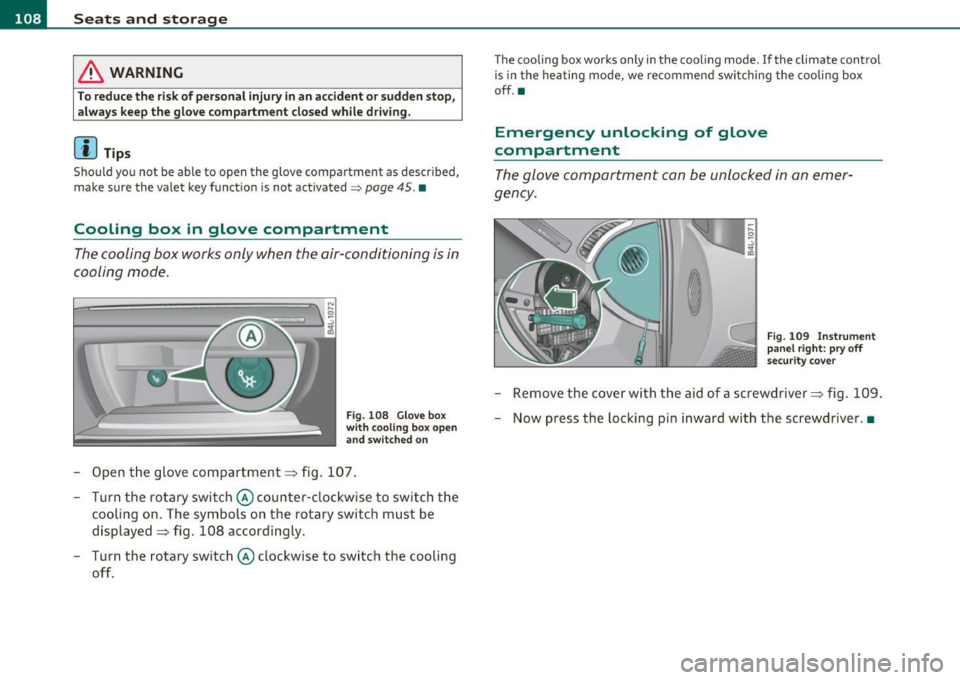
- Open the glove compartment=> fig. 107.
- Turn the rotary switch © counter-clockwise to switch the
cooling on. The symbols on the rotary switch must be
displayed=> fig. 108 accordingly.
- Turn the rotary switch © clockwise to switch the cooling
off.
The cooling box works only in the cooling mode. If the climate control
is in the heating mode, we recommend switching the cooling box
off.•
Emergency unlocking of glove
compartment
The glove compartment can be unlocked in an emer
gency.
Fig. 109 Instrument
panel right: pry off
security cover
- Remove the cover with the aid of a screwdriver => fig. 109.
- Now press the locking pin inward with the screwdriver .•
Page 126 of 392
1111..__0_ n_ t_h _e_ r_o _ a_ d _________________________________________________ _
On the road
Steering
Applies to vehicles: w ith man uall y ad justable steering whee l
Manually adjustable steering wheel
The heig ht and r ea ch of t he steering wheel c an be
adjusted.
Firs t, adjust t he driv er's s eat corre ctly.
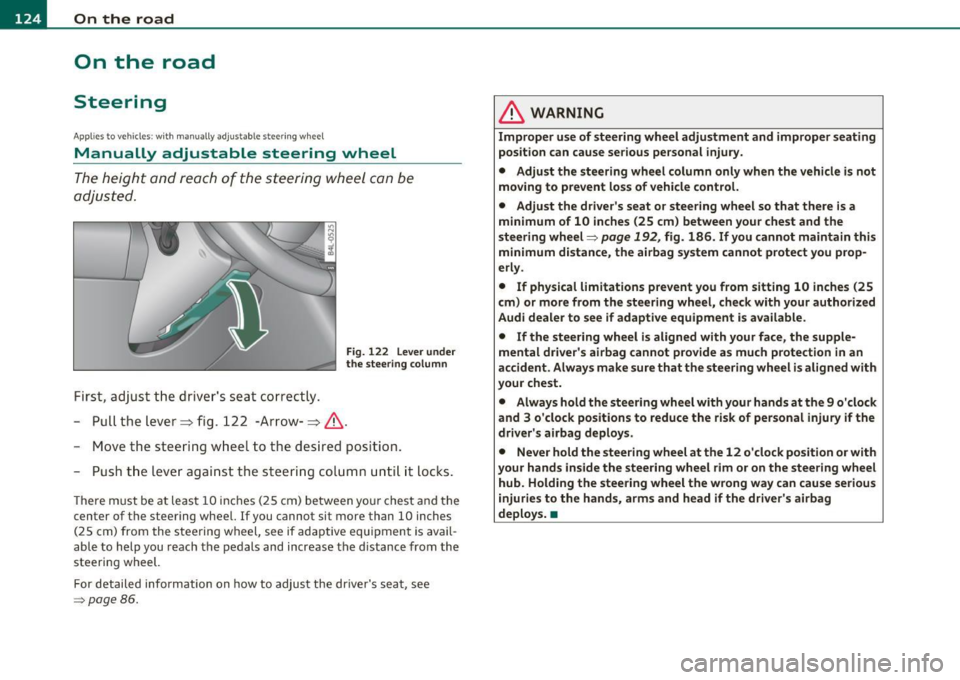
Fig. 122 Le ver un der
the stee ring colu mn
-Pull t he le ve r~ fig . 122 -Arrow-~ & -
- Move the stee ring w hee l to t he des ired pos ition.
- Push t he leve r agai nst t he steeri ng col umn until i t loc ks.
T he re m ust be at le ast 1 0 inc hes (25 cm) be tween you r che st and the
center of the steering whee l. If you cannot sit more than 10 inches
( 2 5 cm) from the s teering wheel, see if ada ptive equipmen t is avai l
able to help you reach the pedals and increase the d istance from the
steeri ng wheel.
For detailed info rmation on how to adju st the dr ive r's seat, see
=> page 86 .
& WARNING
Improper use of steering wheel adjustment and improper seating
position can cause serious personal injury.
• Adjust the steering wheel column only when the vehicle is not
moving to prevent loss of vehicle control.
• Adjust the driver's seat or steering wheel so that there is a
minimum of 10 inches (25 cm ) between your chest and the
s teering wheel=>
page 192, fig. 186. If you cannot maintain this
minimum distance , the airbag system cannot protect you prop
erly .
• If physical limitations prevent you from sitting 10 inches (25
cm ) or more from the steering wheel, check with your authorized
Audi dealer to see if adaptive equipment is available.
• If the steering wheel is aligned with your face , the supple
mental driver's airbag cannot provide as much protection in an
accident. Always make sure that the steering wheel i s al igned with
your chest.
• Always hold the ste ering wheel with your hands at the 9 o'clock
and 3 o'clock positions to reduce the risk of personal injury if the
driver' s airbag deploys .
• Never hold the steering wheel at the 12 o 'clock position or with
your hands inside the steering wheel rim or on the steering whe el
hub. Holding the steering wheel the wrong way can cause serious
injuries to the hands, arms and head if the driver's airbag
deploys .•
Page 127 of 392

On the road Ill _______________ __.
Applies to veh icles : w ith electrically adju stab le steer ing wheel
Electrically adjustable steering wheel
The height and reach of the stee ring wheel ca n be ele ctri
c ally adj usted to sui t th e d river.
Firs t, a djust t he dr iver's se at correct ly.
Height adjustment
Fig . 123 Sw itch for
s teering whee l ad ju st
ment
- Push t he s witch © up or down=> fig. 12 3. The st ee ring
w he el heig ht chang es f or as long as you press t he swi tch .
Reach adjustment
- Push t he switc h© forward or backward=> fig . 123 . T he
ste ering w hee l reac h changes for as long as you press the
swi tch .
The re m ust be at least 10 inches (25 cm) between you r chest and the
cen ter of the steering whee l. If you cannot sit more than 10 inches
(25 cm) from the steer ing wheel, see if adapt ive equ ipment is ava il
able to h elp you reach the pedals and increase the distance from the
steeri ng wheel.
For detailed information on how to adjust the dr iver 's seat , see
~ page 86.
Con tro ls a nd e quip
m en t Vehicle
OP-eration
The steering wheel ca n be adjusted even when the ign ition is turned
O ff. For veh icles with sea t memory, the individu al pos it io ns for the
steer ing wheel can be sto red along with t he seat pos it ion.
& WARNING
Improper use of steering wheel adjustment and imprope r seating
position can cau se seriou s per sonal injury.
• Adjust the steering wheel column only when the vehicle i s not
moving to prevent loss of vehicle control.
• Adjust the driver 's seat or steering wheel so that there is a
minimum of 10 in ches (25 cm) between your chest and the
steering wheel~
page 192, fig. 186. If you cannot maintain this
minimum distance , the airbag system cannot prote ct you prop
erly.
• If phy sical limitations prevent you from sitting 10 inches (25
cm ) or more from the steering wheel, check with you r authorized
Audi dealer to see if adaptive equipment is available .
• If the steering wheel is aligned with your face , the supple·
mental driver 's airbag cannot provide as much protection in an
accident. Always make sure that the steering wheel is aligned with
your che st.
• Always hold the steering wheel with your hands at the 9 o'clock
and 3 o'clock po sition s to reduce the risk of personal injury if the
drive r's airbag deploys.
• Never hold the steering wheel at the 12 o'clock po sition or with
your hands inside the steering wheel rim or on the steering wheel
hub. Holding the steering wheel the wrong way can cause serious
injuries to the hands, arms and head if the driver's airbag
deploy s.•
Vehicle care Do-it-yourselt service iTechnical data
Page 194 of 392
• ....__D_ r_iv _i_ n_, g=-- S_ a _ f_e _,Ly _ ______________________________________________ _
Proper occupant seating positions
Proper seating position for the driver
The proper driver seating position is important for safe,
relaxed driving.
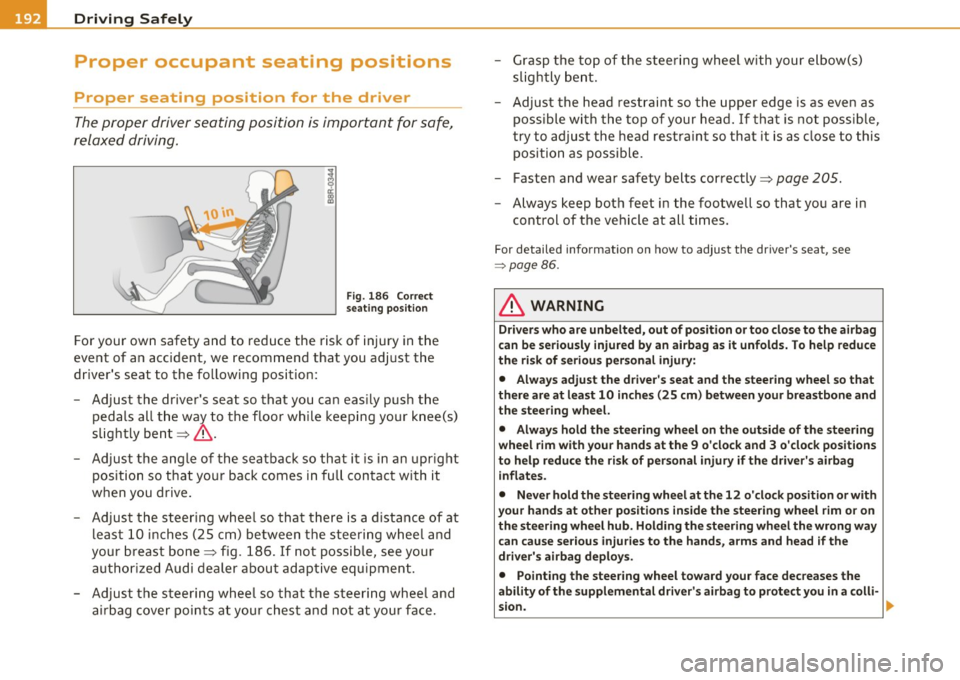
Fig. 186 Correct
seating position
For your own safety and to reduce the risk of injury in the
event of an accident, we recommend that you adjust the
driver's seat to the following position:
- Adjust the driver's seat so that you can easily push the
pedals all the way to the floor while keeping your knee(s)
slightly bent~&.
- Adjust the angle of the seatback so that it is in an upright
position so that your back comes in full contact with it
when you drive.
- Adjust the steering wheel so that there is a distance of at least 10 inches (25 cm) between the steering wheel and
your breast bone~ fig. 186. If not possible, see your
authorized Audi dealer about adaptive equipment.
- Adjust the steering wheel so that the steering wheel and airbag cover points at your chest and not at your face. -
Grasp the top of the steering wheel with your elbow(s)
slightly bent.
- Adjust the head restraint so the upper edge is as even as
possible with the top of your head. If that is not possible,
try to adjust the head restraint so that it is as close to this
position as possible.
- Fasten and wear safety belts correctly~
page 205.
-Always keep both feet in the footwell so that you are in
control of the vehicle at all times.
For detailed information on how to adjust the driver's seat, see
=> page 86.
& WARNING
Drivers who are unbelted, out of position or too close to the airbag
can be seriously injured by an airbag as it unfolds. To help reduce
the risk of serious personal injury:
• Always adjust the driver's seat and the steering wheel so that
there are at least 10 inches (25 cm) between your breastbone and
the steering wheel.
• Always hold the steering wheel on the outside of the steering
wheel rim with your hands at the 9 o'clock and 3 o'clock positions
to help reduce the risk of personal injury if the driver's airbag
inflates.
• Never hold the steering wheel at the 12 o'clock position or with
your hands at other positions inside the steering wheel rim or on
the steering wheel hub. Holding the steering wheel the wrong way
can cause serious injuries to the hands , arms and head if the
driver's airbag deploys.
• Pointing the steering wheel toward your face decreases the
ability of the supplemental driver's airbag to protect you in a colli-
sion.
~
Page 296 of 392
Fuel supply and filling your fuel tank
Your vehicle fuel tank has an on-board refuelling vapor recovery
system . This feature helps to prevent fuel vapors from escaping from
the tank and polluting the environment while you refuel your vehicle.
In order to fill the tank properly while protecting the environment,
please follow this refueling procedure carefully.
& WARNING
Under normal operating conditions, never carry additional fuel
containers in your car. Gas canisters and other containers used to
transport fuel can be dangerous. Such containers, full or empty, may leak and could cause a fire in a collision. If you must transport
fuel to use for your lawn mower, snow blower, etc., be very careful and always observe local and state laws regarding the use, trans
portation and storage of such fuel containers. Make certain the
container meets industry standards (ANSI/ASTM F852 -86).
0 Note
Never drive your vehicle until the fuel tank is completely empty. The
ir regular supply of fuel can cause misfiring. Gasoline could enter the
exhaust system and damage the catalytic converter. •
Refuelling
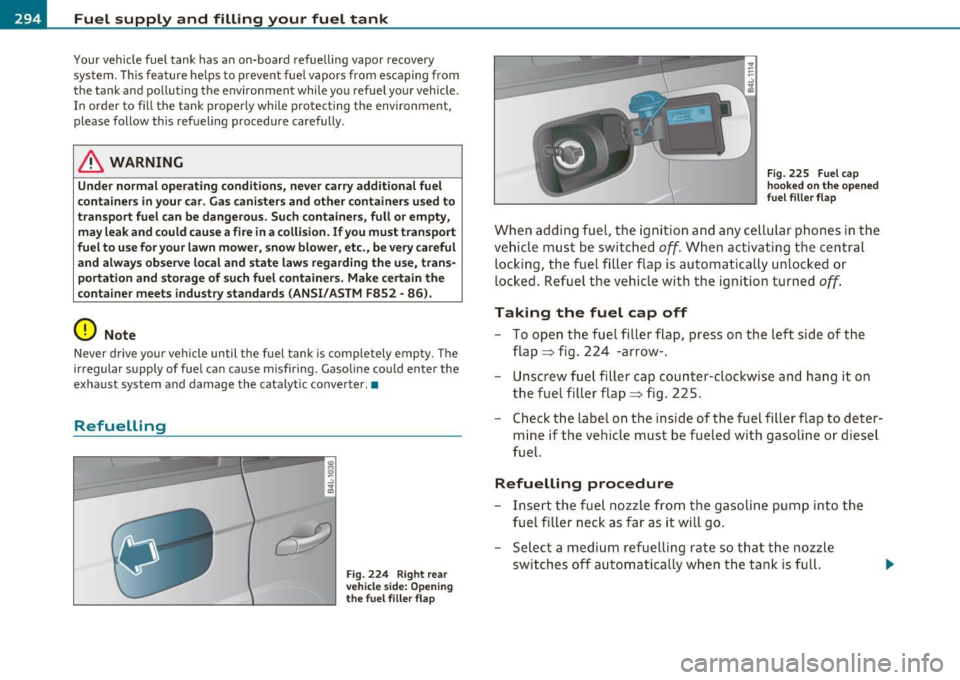
Fig. 224 Right rear
vehicle side: Opening
the fuel filler flap Fig
. 225 Fuel cap
hooked on the opened
fuel filler flap
When adding fuel, the ignition and any cellular phones in the
vehicle must be switched
off. When activating the central
locking, the fuel filler flap is automatically unlocked or
locked. Refuel the vehicle with the ignition turned
off.
Taking the fuel cap off
- To open the fuel filler flap, press on the left side of the
flap ~ fig. 224 -arrow-.
- Unscrew fuel filler cap counter-clockwise and hang it on
the fuel filler flap~ fig. 225.
- Check the label on the inside of the fuel filler flap to deter
mine if the vehicle must be fueled with gasoline or diesel
fuel.
Refuelling procedure
- Insert the fuel nozzle from the gasoline pump into the
fuel filler neck as far as it will go.
- Select a medium refuelling rate so that the nozzle
switches off automatically when the tank is full.
Page 300 of 392

Fuel supply and filling your fuel tank
This message appears when the AdBlue tank is empty. You will also
he ar three warning signals in a row. Please add AdBl ue. Otherwise yo u
w ill not be able to start the engine again once you stop it.
When the minimum Ad Blue level has been reached, you must add at least 1 gallon (3.8 liters) . This is equal to two bott les from the refill
container available from authorized dealers~
page 298. This is the
m ini mum amo unt required to ensure the system detects the refill ing
and to start the engine.
Filling incorr ectly
If the Ad Blue tank was filled w ith a different fluid than Ad Blue and
the sys tem detects that it is incor rect, you will be not ified as follows:
ff 1
, 'W"l , AdBlue! No re start in 600 miles
( 1000 km )! See owner 's manual
Th is message appears when it is only possible to drive the distance
indicated in the
driver information system. You will also hear a
wa rning signa l. Drive to the nearest qualified wo rkshop to have the
ma lfunction repaired. Otherw ise the engine w ill not start again if you
stop it once the distan ce indicated has bee n driven .
Ad Blue ~ 0 mi (0 km ) Ad Blu e: syste m fault . No res tart! See
owner 's manual
Th is message appears if the system detects it was filled inco rrectly.
You will also hear three warning signals in a row.
Drive immediately
to the nearest qua lified workshop to have the malfunction repaired .
O therwise you w ill not be able to star t the engine again once you stop
it .•
A ppli es to veh icles : wi th diesel e ngine
Filling AdBlue
A special refill bottle must be used to fill the Ad Blue.
Fi g. 2 29 Rig ht r ea r
veh icle side : re moving
t h e A dBlu e ca p
Fig . 230 A d Blue filler
t ub e: in sert ing t he
re fill bottl e
The filler flap automatically unlocks or locks w hen the central
locking system is operated. The Ad Blue filler tube is located
at the right near the diesel filler tube.
Opening the filler tube and adding AdBlue
- Press the left side of the fuel filler flap to open it
=> page 294, fig. 224 -arrow- .
- Turn the cap counte rclockwise with the lug wrench from
the vehic le tool ki t to remove it~ fig. 229.
~
Page 301 of 392

- Remove the cap from the refill bott le.
- Position t he refill bott le on the filler tube a nd turn the
bottle clockwise u ntil it stops turning~
page 298,
fig. 230 © -
- Press lightly against the bottom of the bottle@to em pty
it. Contin ue pressing the bottom o f the bott le until it is
empty or until fluid stops flowing into the tank.
- Turn the bottle to the left without pressing on the
bottom .
Closing the filler tube
- Turn t he cap clockw ise on t he fi ller t ube with t he lug
wrench un til you hear it t ighte n comp letely.
- Then press on the le ft side of the filler fla p un til yo u hear
i t lock.
& WARNING
• Ad B lu e can irritat e the skin, eye s and respiratory sy stem. If
the re is contact with the fluid , flush immed iately with plenty of
water. Con sult a phy sician if ne ce ss ary .
• Do not allow Ad Blue to come into contact with clothing. If
there is contact with the fluid , flush immediate ly with plenty of
water.
0 Note
• Only use Ad Blue that conforms to the standard ISO 22241-1. Do
no t m ix any addit ives wi th the Ad Blue and do not dil ute it with water.
• Ad Blue is not a diesel add it ive. Do not add it to the diese l tank. If
Ad Blue is mixed w it h diesel f ue l, it can lead to damage to the engine
and the Ad Blue tank system. The L imited New Vehicle Warranty does
no t cover su ch damage.
Safety first
Fuel supply and filling your fuel tank
• Ad Blue attacks surfaces such as pai nted vehicle components,
plast ic and carpet. Remove the fluid as q uickly as poss ible wi th a
damp cloth and plenty of cold wate r. If the Ad Blue has already crys
tallized, use wa rm water and a sponge. Ad Bl ue residue that is not
removed will crystallize and can damage the affected s urface.
• Do not store the refi ll bott le in the veh icle. If it leaks, the esc aping
Ad Blue could damage the vehicle interior .
(I) Tips
• The fuel fil ler flap of your vehicle is not locked whe n you lock the
vehicle from the inside.
• The refill bottle ho lds approximate ly 0.5 gallon (1.9 liters) .
Always add two bottles of Ad Blue (1 gallon/3.8 liters) as soon as a
message appears in the instrument cluster display~
page 297. The
ignition must be switched off when filling the Ad B lue.
• The vehicle must be driven after the Ad Blue has been fi lled. The
system may take up to two minutes to detect when Ad B lue is added .
Whe n there is no more Ad Blue in the ta nk and
O mi (0 km) appears in
the instrument cluster display, switch the ignition on for approxi
mately 15 seco nds and then sta rt the eng ine.
• You can obtain refill bottles from any a uthorized Audi dealer or
other qualified workshop.
• F ollow t he Ad Blue manufacturer 's inst ru ct io ns for usage and
storage .•
Vehicle care Technical data