brakes AUDI Q7 2012 Owner´s Manual
[x] Cancel search | Manufacturer: AUDI, Model Year: 2012, Model line: Q7, Model: AUDI Q7 2012Pages: 342, PDF Size: 86.42 MB
Page 122 of 342
120 Adapti ve crui se control
_&. WARNING
-
Following other vehicles too closely in
creases the risk of a crash and serious per
sonal injury .
- Following other vehicles too closely, par
ticu larly at higher speeds increases the
risk of coll is ions and serious personal in
jury.
- Setting short distances to the traffic
ahead reduces the time and distance
available to bring your vehicle to a safe
stop and makes it even more necessary
to pay close attention to traffic .
- Always select a speed and distance to
traffic ahead that is safe and appropriate
under the prevailing traff ic, road, weath
er and lighting conditions.
- Never rely on the distance control fea
ture of ACC a lone to prevent rear-end col
lis ions. Always be prepared to b rake and
take evasive act io n to avoid co llisions
and other ac cident situations.
- Never allow the clos ing speed between
yo u a nd other vehicles to be so h igh that
the adaptive cruise control may not be
able to slow your vehicle safe ly . If clos
ing speed is too high, yo u m ust app ly the
brakes yourself to reduce the risk of a
rear-end crash.
- Always select a greater following dis
tance to the veh icle ahead on wet roads
than on dry roads.
- Always read and heed the information
and WARNINGS
¢ &. in Description on
page 113.
(D Tips
The distance setting is reset to the factory
default
DIS TANCE 3 the next time the ig
nition is turned on.
Driver information
Displays in the instrument cluster
Applies to veh icles: w ith adaptive cruise contro l
Depending on the driving situation, driver in
formation is displayed in the instrument clus
ter .
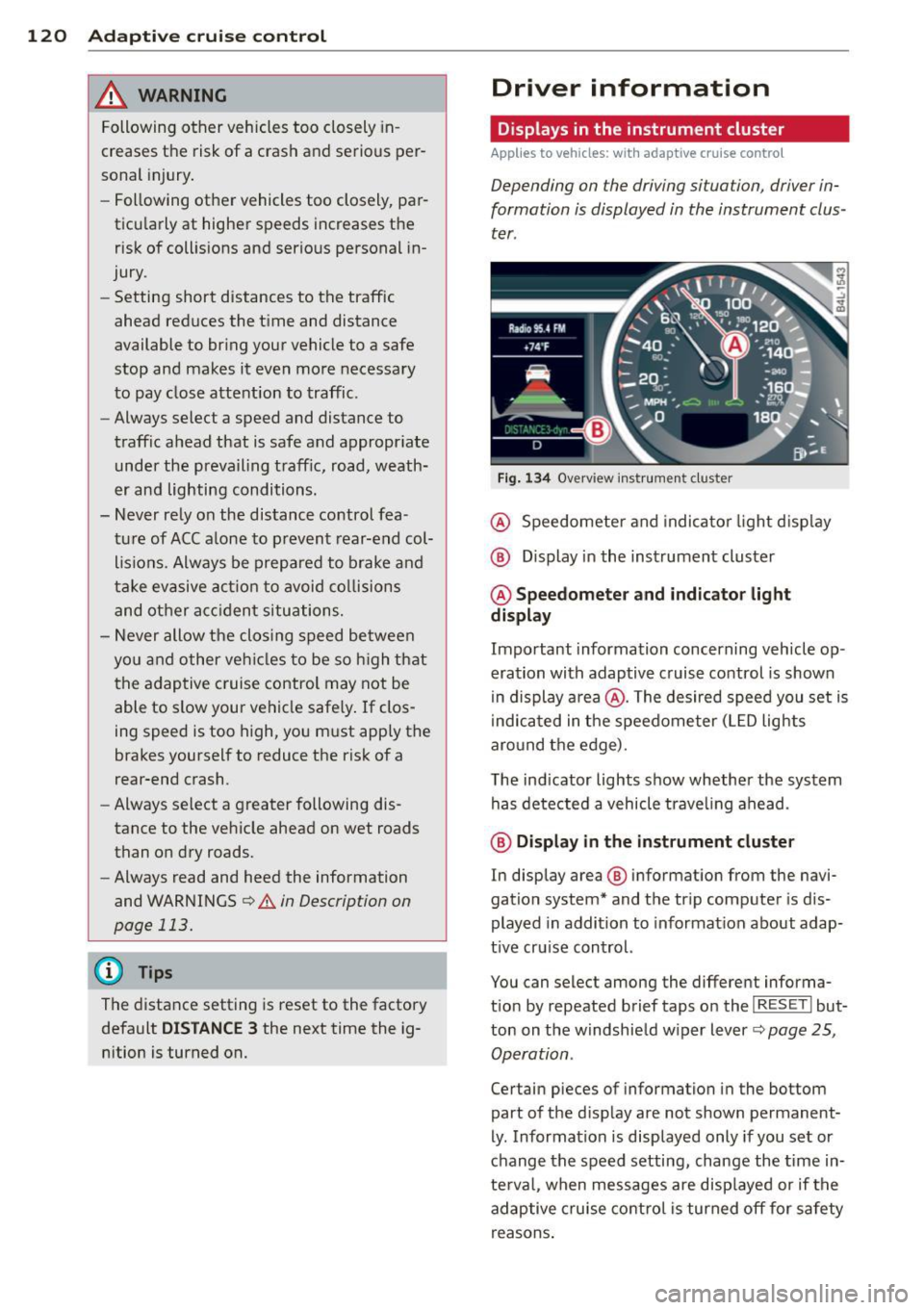
Fig . 1 34 Overview ins tr u me nt cluster
@ Speedometer and indica to r li ght d isp lay
@ Display in the instrument cluster
@ Speedometer and indi cato r light
display
Important information concerning vehicle op
eration with adaptive cruise control is shown
in display a rea @. The desired speed you set is
i ndica ted in the speedometer (L ED lights
aro und the edge).
T he ind icator lights show whether the system
has detected a vehicle trave ling ahead .
@ Display in the in strument cluster
In display area @ information from the navi
gation system* and the tr ip computer is dis
played in addition to informat ion about adap
t ive cru ise control.
You can select among the different informa
t io n by repeated brief taps on the
I RESET I but
ton on the w indshie ld w iper lever
c::> page 25,
Operation .
Certain pieces of information in the bottom
part of the d isplay are not shown permanent
ly . Information is displayed only if you set or
change the speed setting, change the time in
te rva l, when messages are disp layed or if the
adaptive cruise contro l is turned off for safety
reasons .
Page 123 of 342

Display in the speedometer
Applies to vehicles: with adaptive cruise control
Fig. 135 D isplay in t he s pee domete r
Des ired spe ed
The desired speed set by the driv er is dis
p layed by a red L ED.
If the desi red speed was set between two
lines on the speedometer using the
I SE TI but
ton, the two closest light emitting diodes will
come on <=>
fig. 135.
The system a llows only speeds to be set be
tween 20 to 95 mph (30 to 150 km/h) to be
set. This speed range is faint ly illuminated in
the speedometer (L ED lights).
Ind icator light s (symbol s)
-- Open road:
T he ind icator light _
shows that ACC is active and that no moving
veh icle has been detected with in range of
the radar sensor up ahead in your lane of
your lane of travel. Your speed is adjusted according to the speed of the vehicle up
front . ACC acce lerates and brakes automati
ca lly within the system's capab ilities .
-- Driver int ervention prompt : The
red flashing warning light- means
Request for dri ver to assum e co ntr ol. You
as the dr iver must s low the vehicle with the
f oot brake. The symbol - tells you
t h at the adaptive cruise control is not able
to slow the vehicle down enough to keep a
e nough distance to the vehicle in front of
you. A warning tone will also sound when
Ad apti ve crui se control 121
the symbol appears. For more information
about the driver intervention prompt
r::!) page 124.
_& WARNING
Improper use of the adaptive cruise con
trol features and inattent ion can lead to a
crash and serious personal injury.
- Never allow the closing speed between
you and othe r vehicles to be so high that
the adaptive cruise control may not be ab le to slow your vehicle safely . If clos
ing speed is too high, you must apply the
brakes yo urself to reduce the risk of a
rear-end crash.
- Always select a greater following d is
tance to the vehicle up ahead on wet
roads than on dry roads.
- Always read and heed the info rmation
and WARNINGS <=>
& in Description on
page 113 .
(D Tips
-If you use the accelerator to go faste r
t han t he speed of the vehicle ahead of
you , the dr iver intervention prompt will
not be accompan ied by a warn ing tone.
- If the speed you previously set is exceed
ed, the indicator light in the speedome
ter will switch off.
Display in the instrument cluster
Appl ies to vehicles: wit h adaptive cruise control
F ig. 136 D isp lay in the in strument clust er
-
Scroll through the available information dis
plays by br iefly tapp ing the
I RES ET! button at
the end of the windshield wipe r lever . You can ..,.
Page 125 of 342

the 20 to 95 mph (30 to 150 km/h) speed
range .
ACC not available
The text message ACC not available appears,
for example, if the temperature of the brakes
i s excessive. Adaptive cruise control is tempo
rarily not available. A warning tone sounds as
a reminder .
ACC not available!
The text message ACC not available! appears
in the event of a malf uncti on. Adaptive cruise
control is tu rned off . A warning tone sounds
as a reminder. Have the system inspected by a
qua lified dealership.
ACC sensor blocked !
The text message ACC sensor blocked ! ap
pears when the ACC System can no longer ac
curately detect vehicles moving up ahead in
your lane of travel. Adaptive cr uise control is
turned off. A warning tone also sounds as a re minder.
To decide whether it is necessary to switch off
the ACC (ACC sensor blocked
!) or if it is only a
temporary condition (ACC Functionally limit
ed), the system will a lso takes into cons idera
tion the outside temperature and/or the wind
shield wiper operation .
The ACC sensor is dirty or blocked (e.g. leaves,
snow).
The ACC sensor is loca ted behind the area to
the right of the front license plate . If the ACC
sensor is dirty or blocked, clean the area to re
store system operat ion.
Stability program
The text message Stability program appea rs
if the Electronic Stability Control (ESC) has in
tervened . In th is case the adaptive cr uise con
trol is automatically turned off. Th is is accom
panied by a warn ing tone.
Speed
The set speed in mph (Canada km/h) always
appears when saving or changing the speed in
Adaptive cruise control 123
adaptive cruise control c:::> page 116, How is
the speed stored?
and c:::> page 117, Changing
stored speed.
ACC functionality limited
T he message ACC functionality limited ap
pears when the ACC System does not detect
any moving vehicles up ahead in your lane of
trave l for a longer period of time . During t his
time, the distance to moving vehicles in your
lane of travel up ahead is not being main
ta ined . The ACC system is not switched off,
and increased attention to the traffic situation
is absolutely necessary. The following may be
reasons why the message
ACC functionality
limited
appears:
- The ACC sensor is d irty. The ACC system is
not reacting, or is not reacting co rrectly, to
moving vehicles up ahead in your lane of
travel.
- There may be very light traffic on and there
is noth ing that marks the side of the road
(for examp le, guard ra ils, traffic signs,
t rees). As soon as a moving vehicle up ahead
is detected again, ACC becomes active again
and the message disappears.
T he ACC senso r is located behind the area to
the right of the front license p late.
If the ACC
sensor is dirty or blocked, clean the area to re
store system operation.
Parking brake!
The text message Parking brake! appears,
whe n the parking brake is applied. ACC is
turned off. A warning tone sounds as a re
minder.
Stationary object ahead
T he text message Stationary object ahead ap
pears, whe n you want to activate the system
and there is a stationary vehicle or an object
immediately in front of you .
Gradient too steep
The text message Gradient too steep appears
when the maximum gradient for prope r ACC
operation has been exceeded. Adaptive cruise .,.
Page 127 of 342

System limitations
General information
Applies to vehicles: with adaptive cruise control
The radar sensor has limits that the driver
must know to be able to use ACC properly.
The adaptive cruise control works within lim
its that are also related to radar sensor range
and s ight distance . In some situations ACC
may react unusually or late from the driver's
point of v iew. Therefore, a lways be attent ive
to what is happening around you and always be ready to intervene, if necessary:
- when driving around curves ¢page 125
- when vehicles up front are not in line with
you r vehicle ¢ page 125
- when other vehicles are changing lanes
¢ page 126
- when other vehicles are difficult to detect
¢ page 126
- when vehicles up ahead are not moving or
obstacles are in your travel lane ¢page 126
A WARNING
The radar sensor's function and ra nge can
be reduced by rain , snow and heavy spray.
Moving veh icles up ahead may not be
prompt ly detected or may not be detected
at all.
- Always pay ca reful attention to the traf
fic s ituation and be ready to intervene
and be rea dy to take comp lete cont rol
whenever necessary.
When driving around curves
Applies to vehicles: with adaptive cruise co ntrol
Fig. 1 39 Vehicle enter ing a cu rve
Ad apti ve crui se control 125
Fig. 140 Vehicle leaving a curve
Entering a curve
When enter ing a curve, the adaptive cruise
control may react to a vehicle in the next lane
and apply the brakes in your vehicle
¢ fig. 139. The braking action ca n be over rid
den by depressing the ac ce lera tor pedal.
Leaving a curv e
At the end of very long curves, ACC's predic
tive lane reading can cause ACC to react to an
other vehicle in the next lane and apply the
brakes on your vehicle~ fig . 140. The braking
action can be overr idden by depressing the ac
ce le rator pedal.
Vehicles offset to one side
App lies to vehicles: with adaptive cruise control
Fig. 141 Vehicle traveling ah ead outside the detect ion
r ange of the radar sensor
Vehicles moving up ahead but offset in the
lane ca nnot be detected by ACC until they are
in sensor range.
Page 129 of 342

The Audi braking guard is active from a speed
of approx. 20 mph (30 km/h) and works with
in the system limits
¢ page 125 even when
the adaptive cruise contro l is deact ivated.
A radar senso r is bui lt into the front of the ve
hicle
¢ page 114, fig. 127. The system is in
tended to measure the distance to reflect ive
surfaces. If a measurement is not possible,
the system does not respond .
When the measurement has been taken, the
system can recognize a poss ibly hazardous sit
uation, for example, when a vehicle up ahead
in your lane of travel suddenly brakes or when
your ow n ve hicle is moving at high speed to
wards a much s lowe r vehicle up ahead . As
soon as the system senses that a possible co l
l ision with the vehicle up ahead can only be
avoided by immediate full brake appl ication or
by an avoidance maneuver, a warning appears .
The system has a defau lt response time to be
ab le to sig na l befo re a col lision occu rs. This
system response time is a utomat ica lly re
d uced if you acce lerate actively, for example
to join a highway. Braking, transverse acce ler
ation and the steering ang le can lead to a re
duced system response time. The warning is
deactivated if you begin to overtake with full
acceleration.
The system can make yo u aware of two differ
ent hazardo us situations:
Distance
The distance warn ing is g iven if the sys tem
calc ulates that the re is not enough d istance
to the vehicle up ahead a period of more than 5 seconds. If the distance is less than 30 feet
(9 meters) at SO mph (80 km/h), for example,
an optical d isplay comes on in the instrument
cluster
c> fig . 146.
If the vehicle ahead brakes sharply, A udi brak
ing guard cannot help you to avoid a co llision,
even in the case of an immediate response.
Take immediate act ion to avoid the collision
and increase the distance to the vehicle up
ahead .
Adapti ve crui se control 127
Speed
If there is a much slowe r vehicle mov ing up
ahead in your lane, or if the vehicle ahead brakes sharply, the Audi brak ing guard calcu
lates the point from which a collision can only
be avoided by f ull braking or by an avo idance
maneuver . If a warning does sound, a possible
collision with the veh icle in front can only be
avo ided through an evas ive maneuver or by
braking.
The warning is given in two stages:
- Pre-warnin g: A visua l display appears in the
instrument cluster and a warning tone
sounds.
- Acute w arning : If you do not respond to the
pre-warning, the second stage warning is
given. A quick brake application helps to di
rect your attention to the road and traffic
situat ion.
Under heavy braking, the brake assistant
i=> page 114 also helps you benefit from maxi
mum brak ing eff ic iency.
_& WARNING
Inattention can cause collisions, other ac
cidents and ser ious personal inju ries.
- Always pay close attent ion to the traffic,
even when the Audi braking guard is
sw itched on. The Audi braking guard pro
vides a wa rning but does not brake the
car for you. You must app ly the brakes
yourse lf!
- Always keep the safe and lega l distance
between yo ur vehicle and vehicles up
ahead.
- Aud i brak ing g uard wor ks within lim its
and will no t respond outside the system
limits, fo r example when approach ing a
stopped vehicle or stationary obstacle (end of a traffic jam or vehicle that has
broken down in traffic).
- Always remember that the radar sensor
for the Audi braking guard works within
defined detect ion and range limits that
may prevent the proper detection of oth
er vehicles .
Page 140 of 342
138 Automatic transmi ssion
co uld "creep" forward or backward.
When stopped, keep the brake pedal
fully depressed and use the parking brake if necessary to keep the vehicle
from ro lling .
- If the selector lever is unintentionally
moved into N wh ile you are driving, take
yo ur foot off the accele rato r pedal and
wa it for the engine to return to idle
speed befo re selecting a d rivi ng position .
- Never shift into "R" or "P" when the vehi
cle is in mot ion.
- Never get out of the dr iver 's seat when
the engine is runn ing .
- If you must get out of the vehicle, move
the se lector lever securely into the P po
sit io n and apply the par king brake f irm ly.
- If the eng ine must remain ru nning, never
hav e any driv ing pos ition engaged when
c hec king under the hood . M ake sure t he
sele ctor lever has securely eng aged and
is locke d in "P" with the par king brake
firmly set ¢
page 248, Engine compart
ment .
Otherw ise, any increase in eng ine
speed may set the vehicle in m otion,
even w ith the par kin g brake applied.
Selector lever positions
This section describes the selector lever posi
tions and driving ranges.
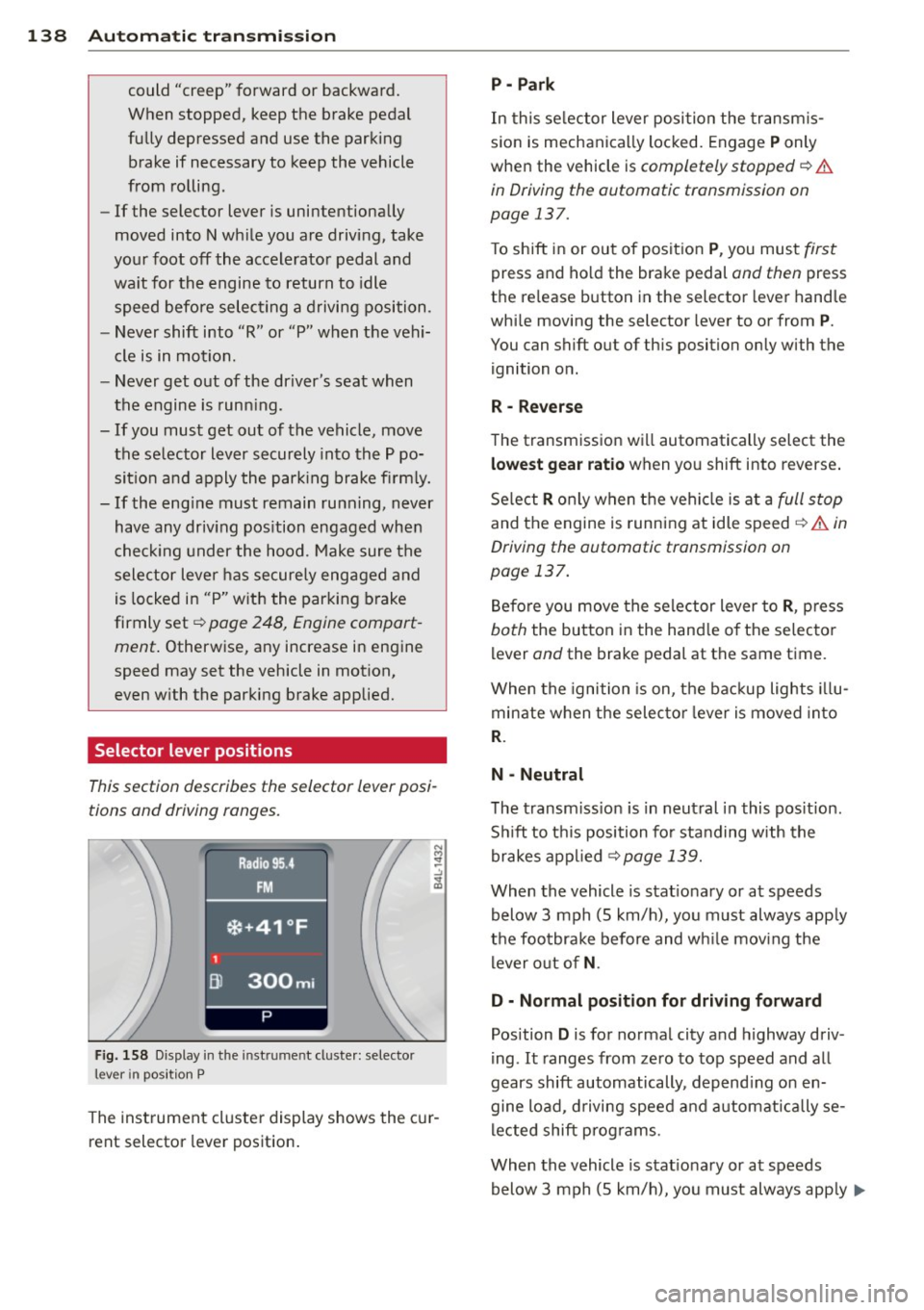
F ig. 158 Display in t he in st rum en t cluste r: selecto r
lev er in po sit ion P
The inst rumen t cluste r display shows the c ur
rent selector lever position .
P - Park
In this selector lever posi tion the transm is
s ion is mechanica lly locked. Engage
P only
whe n the vehicle is
completely stopped¢&.
in Driving the automatic transmission on
page 137.
T o shift in or out of posit ion P , you mus t first
press and ho ld the brake pedal and then press
the re lease button in the selector leve r hand le
whi le moving the selector lever to or from
P .
You can shift out of th is position only with the
ignition o n.
R • Reverse
The transm iss ion w ill automatically select the
lowest gear ratio when you shift into reverse .
Se lect
R o nly when t he vehi cle is at a full stop
and the engine is running at idle speed¢&. in
Driving the automatic transmission on
page 137.
B efore you move the se lector lever to R , press
both the button in the hand le o f the se lecto r
lever and the brake pedal at the same t ime.
W hen the ignition is on, the bac kup light s illu
minate w hen t he selec to r l ever is
moved in to
R .
N -Neutral
The transm iss io n is in neut ral in this pos it ion .
S hi ft to t his position fo r standing with the
brakes app lied
¢ page 139.
When the vehicle is stat iona ry or at speeds
below 3 mph (5 km/h) , you must always app ly
t h e foo tbrake before and wh ile mov ing the
l ever o ut o f
N.
D - Normal position for driving forward
Position D is for no rma l city and highway driv
ing . It ranges from zero to top speed and all
gears shift automatically , depend ing on en
gine load, d riving speed and a utomat ically se
l ected shift p rog rams.
When the vehicle is stat iona ry or at speeds
below 3 mph (5 km/h), you must always app ly
IJ,,
Page 222 of 342
220 Intellig ent technol ogy
The vehicle is then stabilized by the forces act
ing on the whee l during braking. If the vehicle
is
oversteering (rear tends to sk id out of the
turn), the brakes are ma inly applied on the
wheel that is on the outside of the curve. In
the case of a vehicle that is
understeering
(tendency to slide out of the curve), the
brakes are applied as needed on the whee l
that is on the ins ide of the curve or addit ional
l y on the o ther wheels. An acoustic s ignal indi
cates when ESC b rake app lication cuts in
¢ A .
The system operates across the entire speed
range in combination with the ABS system
¢ page 223. If the Anti-Lock Brake System
(ABS) malfunctions, the ESC wi ll be out of ac
tion as well .
Activating
When you turn on the engine, ESC w ill auto
mat ica lly be act ivated and will perform a se lf
test. As soon as the test is comp leted, the sys
tem is in normal operating mode.
Offroad mod e
ESC should normally be ope rated in normal
mode because this ensures maximum vehicle
stability. If necessary, you can act ivate the
ESC offroad mode by pressing the but to n
¢ fig . 218 to obtain maximum traction and
braking ability when driving
off paved roads at
l ow speeds. In ESC offroad mode, the indica
tor light
fi illuminates and the message Off
road control Warning! Red uced t ract ion
ap
pears briefly in the display .
The ESC offroad mode can be usefu l in the fo l
low ing except iona l situations when slip or a
h ighly effective differentia l locking function is
desirable . Examples:
- when driving with tire chains,
- when driving in deep snow or on loose
ground,
- when driving on uneven surfaces with the
wheels severe ly unloaded (articulation), and
- when rocking the vehicle loose after it has
become stuck.
When the unusua l situat ion is past, you
should shift back to the normal ESC operating mode by pushing the button again
. The mes
sage
S tabilit y prog ram on then appears brief
l y in the display.
H ill descent control
T he hill descent con trol is swi tched on in ESC
offroad mode . When slowly descending steep
gradients on loose gro und or when the axles
are articulated, hill descent control provides
ass istance by automatically applying the
brakes to keep vehicle speed constant. The ve
hicle is also rendered easier to steer by selec
t ive d istr ibut ion of braking force . H ill descent
control intervenes when:
- the acce lerator pedal is not pressed,
- the vehicle is travelling less than 12 mph
(20 km/h),
- a steep gradient is detected,
- wheel behavior indicates loose ground or
conditions with poor adhesion (e.g . a lso axle
articu lation).
Hill descent con tro l operates both d riving for
ward and in reverse. Active hill descent con
trol is deactivated by pressing the accelerator
pedal unti l the conditions for activation al
ready listed are met again.
A WARNING
- The Electronic Stability Control is never
theless subject to the laws of phys ics. It
is part icu larly important to pay attention
to this fact on wet and slippery roads. It is therefore impo rtant that you a lways
a dapt your d riving to the condit ion of the
road and traffic cond itions. Do not allow
the increased safety provided by the Electron ic Stability Control system to lull
you into accepting additional safety
risks.
- Please be aware that in ESC offroad
mode, particularly on a smooth and s lip
pery road, the wheels may have an in
creased tendency to spin and the vehicle
may break away - danger of skidding!
- Stability is limited in the ESC offroad
mode.
Page 223 of 342
Electronic differential lock (EDL)
The electronic differential lock monitors the
rotational speed of the drive wheels.
G ener al note s
The electronic differentia l lock (EDL) helps the
car to start mov ing, accelerate and climb a
gradient on surfaces providing poor or almost
no gr ip . W ithout EDL, this would be difficult,
if not impossible .
How the s yst em work s
The EDL operates automatically . It monitors
the rotat ional speed of wheels w ith the help
of the ABS sensors <=>
page 223. If a noticea
ble
slip i s detected at the wheels (e.g . on slip
pery ground
on one side), the spinning wheels
are braked and power is transferred to the
other wheels. This is done up to a speed of
about 60 mph (100 km/h). Noises from the b rake system signal that wheel spin is being
contro lled .
Driving off
When driv ing off , a lways be sure to keep road
conditions in mind as you accelerate . If one
drive whee l spins because it is on a surface
with less grip, apply
plenty of throttle until
the car starts to move.
Overheating of brakes
To prevent the disc brake of the b raked wheel
from ove rheating if subjected to excessive
l oads on this whee l, the EDL cuts out tempo
ra rily. The vehicle remains operational and be
h aves in the same way as a vehicle without
EDL.
As soon as the brake has cooled down, EDL
switches on again automatically .
A WARNING
-When accelerating on slippery surfaces,
such as on ice or snow, always be careful
when depressing the acce lerator pedal.
Even with the EDL working, the drive
wheels can spin and reduce your ability
to control your car . R isk of crash!
Int ellig ent technolog y 221
-The increased safety afforded by EDL
does not mean that you can take safety
risks. Always adapt your driving style to
the road condit ions and traffic situation .
(!) Tips
If a fault occurs in the ABS, the EDL is also
not functioning. This is ind icated by the
ABS warning light <=>
page 18.
' Anti-Slip Regulation System (ASR)
The Anti-Slip Regulation System prevents the
driven wheels from spinning when the car is
accelerating.
G eneral not es
The Anti-Slip Regulation System (ASR) is inte
grated in the Electronic Stability Control
(ESC). When the vehicle starts up and acceler
ates, the wheels are prevented from spinning
by adjust ing the eng ine power to match the
amount of grip available from the road sur
face .
How the system works
ASR performs automatica lly, i.e. without the
driver 's intervention. With the aid of the ABS
sensors <=>
page 223, ASR monitors the speed
of the dr iven wheels. If the wheels start to
spin, engine torque is reduced automatically
unt il the t ires find enough grip to lock onto
the road surface. The system is active across
the enti re speed range.
The ASR works in conjunction with the ABS. If
a malfunction should occur in the ABS, the
ASR wi ll also be ou t of act ion.
A WARNING
The increased safety affo rded by ASR does
not mean that you can take sa fety risks.
A lways adapt your driving sty le to the road
conditions and traffic situation. ...,
•
•
Page 224 of 342
222 Intelligent technology
To ensure that the ASR works properly, all
four wheels must be fitted with identical
tires. Any differences in rolling rad ius of
the t ires can cause the system to reduce
engine power when this is not desired. See
also¢
page 285, New tires and replacing
tires and wheels.
Braking
General information
What affects braking efficiency?
Operating conditions and driving habits
The brakes on today's automob iles are st ill
subject to wea r, depending la rgely on operat
ing cond itions and dr iv ing habits
Q ,& . On ve
hicles that are eithe r driven mostly in stop
and -go city traffic or are driven hard, the
brake pads should be checked by your author
ized Audi dealer more often than specified in
the
Warranty & Maintenance booklet . Failure
to have your brake pads inspected can result
in reduced brake performance .
On steep slopes, you shou ld use the braking
effect of the engine. This way, you prevent un
necessary wear on the brake system. If you
must use your brakes, do not hold the brakes
down continuously . Pump the brakes at inter
va ls.
Noises may occur when braking depending on
the speed, braking force and outside condi
tions such as temperature and humidity.
Moisture or road salt
Under certain conditions, for examp le, when
driving through water or very heavy rain, or
even after washing your vehicle, the braking
effect can be reduced due to moisture (or in
freezing conditions ice) on the brake pads. A
few careful brake applications should dry off
the brake pads o r remove any ice coatings.
When you are driving at higher speeds with
the w indshield wipers on, the brake pads will
brief ly touch the brake discs in regular inter- vals so as
to improve reaction time when brak
ing on wet surfaces . You, the driver, will not
notice anything.
T he effect iveness of the brakes can be reduced
when the vehicle is driven on a sa lt-covered
road and the brakes are not used . Here too,
you should clean off accumulated sa lt coating
from brake discs and pads w ith a few careful
applications of the brake¢,&.
Corrosion
There may be a tendency for dirt to build up
on the brake pads and corrosion to form on
the discs if the car is not driven regu larly or
only for short trips w ith litt le use of the
brakes.
If the brakes are not used frequently, or if cor
rosion has formed on the discs, it is advisable
to clean off the pads and discs by braking
firmly a few times from a moderately high
speed
c> ,& .
Faults in the brake system
If you shou ld notice a sudden increase in
brake pedal trave l, then one of the two brake
c ir cuits may have fa iled
c> ,& .
Low brake fluid level
Malfunctions can occur in the brake system if
the brake fluid level is too low. The brake fluid
l evel is monitored electronically .
Brake lining wear status
Brake lining wear may be checked by visual in
spect ion of the condition of the brake pads
through the openings in the wheel. If neces
sary, the wheel may be removed for this in
spect ion
c> page 298, Changing a wheel.
A WARNING
-- You shou ld perform braking maneuvers
for the purpose of cleaning the brake
system only if road conditions permit.
Other road users must not be put at risk -
you may cause an accident!
Page 225 of 342
-Before descending a steep grade, reduce
speed and shift transmiss ion into a lower
gear or lower driving range. Do not ride
the brakes or hold the pedal down too
long or too often. This could cause the
brakes to get hot and dimin ish braking
efficiency.
- Do not "r ide the brakes" by resting your
foot on the pedal when you do not intend
to bra ke. Th is may cause the brakes to
overheat, prema ture wear and increased
stopping distance .
- Under certain climat ic and operating
condit ions such as passing through wa
ter, driving in heavy rain or after washing
the vehicle, the effectiveness of the
brakes can be reduced . In winter, ice can
accumulate on the brake pads, linings,
discs and drums. Carefully apply brakes
for a test . Brakes will dry and ice coat
ings will be cleaned off after a few care
ful brake applications.
- Driv ing for an extended period of time on
salt-covered roads w ithout us ing your
brakes can also affect braking efficiency .
Clean off accumulated salt coating from
brake discs and pads w ith a few caref ul
brake applicat ions.
- If you damage the front spoiler, or if you
install a different spoiler, be sure the air
flow to the front brakes is not obstruct
ed. Otherwise the brake system co uld
overheat reducing the effectiveness of
the entire brake system.
- Failure of one brake circuit will impair
the braking capability resulting in an in
creased stopp ing distance. Avoid driv ing
the vehicle and have it towed to the near
est author ized Audi dealer or qualified
workshop .
Brake booster
The brake booster adds extra braking power.
The brake booster works with vacuum pres
sure which is created only when the engine is
running¢ &,.
Int ellig ent technolog y 223
A WARNING
-Never let the veh icle roll to a stop with
the engine shut off .
- If the brake booster is not working, for
example when towing your vehicle, or because the brake booster has somehow
been damaged, the brake pedal must be
pressed considerably harder to make up
for the la ck of booster assistance .
Functioning of Anti-Lock Brake System
(ABS)
ABS prevents the wheels from locking up un
der braking.
T he ABS contributes effect ively to vehicle con
trol s ince it preve nts the whee ls from
locking
when the brakes are applied. This means that
the vehicle remains steerable and is less likely
to skid .
With ABS y ou do not nee d to pump the
bra ke. Just h old t he br ake ped al d own .
However, do not expect the ABS to shorten
braking distance under
all circumstances.
When dr iving on g ravel or on new ly fallen
snow o n top of icy s urfaces, braking dis tance
may be even longer, therefore, under these
circumstances, it is especia lly important that
you drive s low ly and wit h great care.
How the ABS s ystem works
An a utomat ic check is made when a speed of
about 12 mph (20 km/h) is reached . When
th is happens, a pumping noise can be heard.
If an ind iv idual whee l begi ns to rotate too
s low ly in relation to vehicle speed and tends
to lock, the ABS automatically reduces brake
pressure to prevent tha t whee l from locking .
T his automatic adjustment p rocess will cause
a
sli ght vibrati on of the brake pedal and some
no ises to a le rt you that ve hicle speed m ust be
adapted to existing road and traffic condi
tions. •
•